Normal view

Today — 11 February 2026Main stream

5 HyperOS 3 features that make it better than stock Android

10 February 2026 at 15:49
HyperOS 3 features
HyperOS 3 features

HyperOS 3 is one of the biggest upgrades to Xiaomi devices to date, bringing loads of new features and improvements across the system. It’s based on Android 16, but on top of that, Xiaomi has introduced several exciting and useful features in HyperOS 3 that make the stock Android feel like a less feature-rich update.

Here are the five HyperOS 3 features that make it better than stock Android.

1. HyperIsland with multitasking capabilities

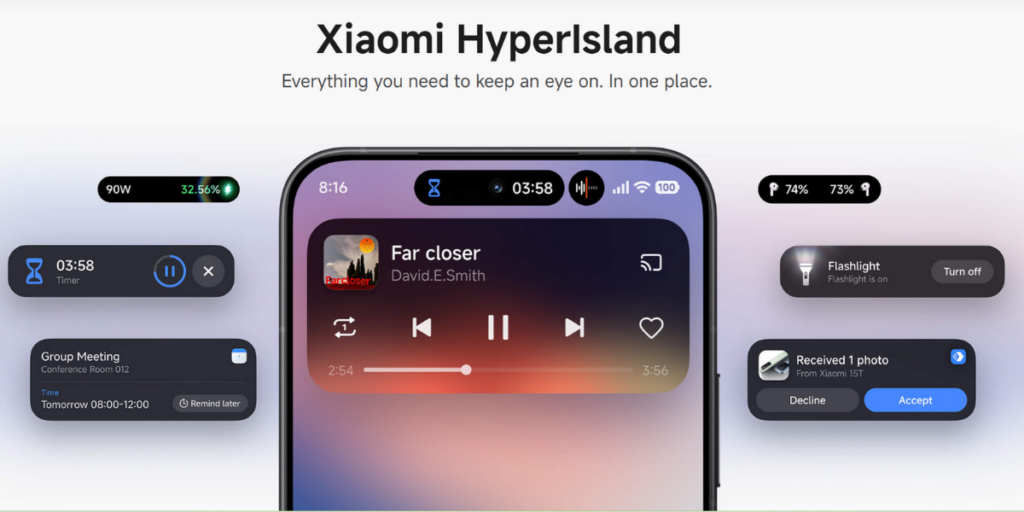
Android 16 adds Live Updates to show ongoing tasks (delivery, ride, etc.) in the notification area and on the lock screen, but HyperOS 3 goes much further with HyperIsland. Xiaomi’s implementation features a dedicated pill-style hub at the top of the screen with the ability to show multiple live activities at once (up to three), letting users monitor several concurrent tasks simultaneously and interact with each individually.

HyperIsland offers rich inline controls (play/pause, call actions, accept/decline, navigation shortcuts, etc.) and supports gestures like tapping to expand and swiping to switch islands. What’s more interesting is that users can swipe down an island to open the related app into a floating window for instant multitasking. The Live Updates in Android 16 have fewer controls and don’t offer floating-window behavior for islands.

Xiaomi’s HyperIsland also offers better integration with system features and extends support to a wide range of third-party apps like WhatsApp, YouTube, and Spotify. At the same time, Android 16’s Live Updates work best with Google’s own apps and depend heavily on app developers to make the required changes.

2. Cinematic lock screen and AI dynamic wallpapers (with deeper editing)

HyperOS 3 lock screen
Lock screen in HyperOS 3

HyperOS 3.0 focuses on offering a redefining lock-screen experience with new AI-assisted features and deeper customization, while stock Android 16 focuses more on core OS usability than on lock-screen creativity.

The new AI Cinematic Lock Screen feature in HyperOS 3 creates a story-like, cinematic effect each time you unlock, and the AI Dynamic Wallpapers feature transforms your photos into stunning cinematic visuals. HyperOS 3 also features smoother lock-screen transitions, like AOD to lock screen to home screen, making the lock screen feel more premium and lively.

HyperOS 3 - AI Dynamic Wallpapers
HyperOS 3 - AI Cinematic Lock Screen

In short, Android 16’s lock screen is clean and functional but less focused on creativity and personalization, but HyperOS 3 explicitly promotes personalized editing. 

3. Much stronger cross-ecosystem features, including Apple integration

HyperOS 3 improved interconnectivity

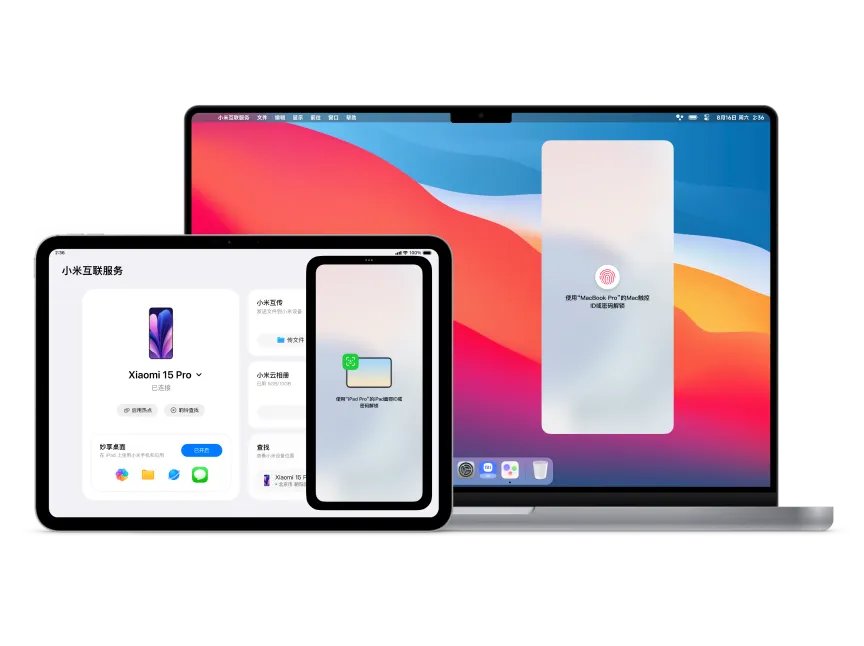
HyperOS 3.0 excels at cross-device connectivity, especially with Apple devices, while stock Android 16 mostly focuses on bridging gaps among Android devices.

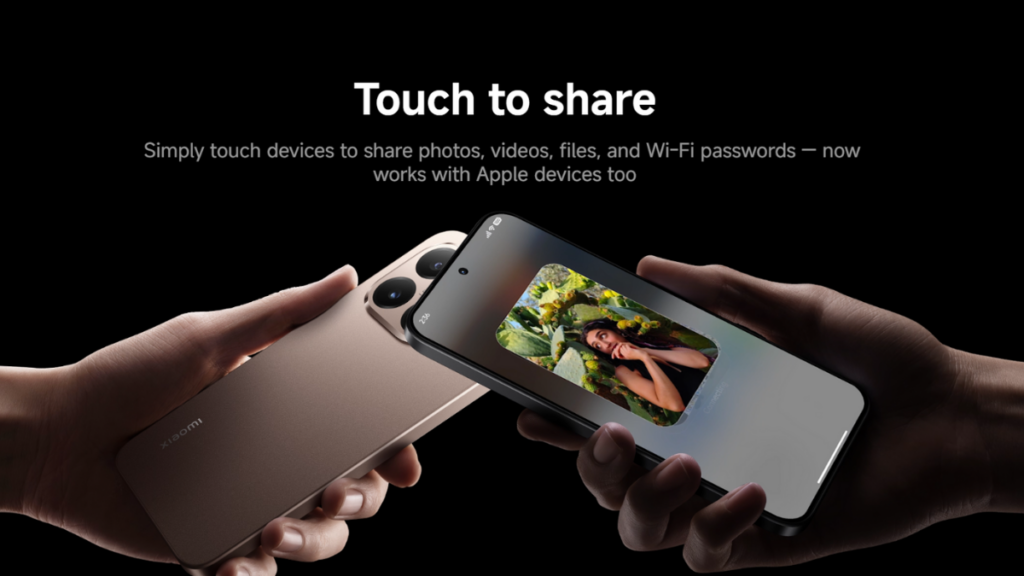
HyperOS 3 - Touch to Share

The “Touch to share” feature on HyperOS 3.0 now works with Apple devices too. So, you can now share photos, videos, files, and Wi-Fi passwords with Apple devices simply by touching both devices. Users can also run Xiaomi phone apps on iPad using the Home Screen+ feature with full support for iPad multitasking. Plus, they can unlock their Xiaomi devices using Touch ID or Face ID.

Apple devices can connect to a Xiaomi hotspot with just one tap. Additionally, users can instantly locate their Xiaomi phones from Apple devices, further strengthening Xiaomi’s cross-ecosystem capabilities.

4. HyperAI for smarter writing, transcription, and translation

HyperOS 3.0 provides a suite of AI features as a part of HyperAI, while stock Android 16 relies on Google apps (Gemini, Translate, Photos, etc.) to deliver the most visible AI features.

HyperOS 3 - AI Writing
HyperOS 3 - AI Speech Recognition

The AI Writing feature in HyperOS 3.0 can rewrite text in multiple styles, generate captions for images, and features a “DeepThink mode” for longer content in Notes. The AI Speech Recognition helps reduce background noise, convert speech to text while recording, and generate an instant summary when the recording ends.

HyperOS 3 - AI Search

HyperAI also offers AI Search to search the web for instant answers, generate AI summaries of search results, and find on-device content quickly, while the AI Translate feature does live interpretation for calls/meetings, bilingual subtitles by transcribing and translating audio, and an offline mode for face-to-face conversation translation.

5. Stronger privacy and security layer

The stock Android 16 features Android Protection, which layers multiple protections, such as Theft Detection Lock, offline device lock, USB protection, and anti-scam safeguards. Many of them are also available on Xiaomi devices running HyperOS 3, but the software also includes several security features developed by Xiaomi that are not present in stock Android 16.

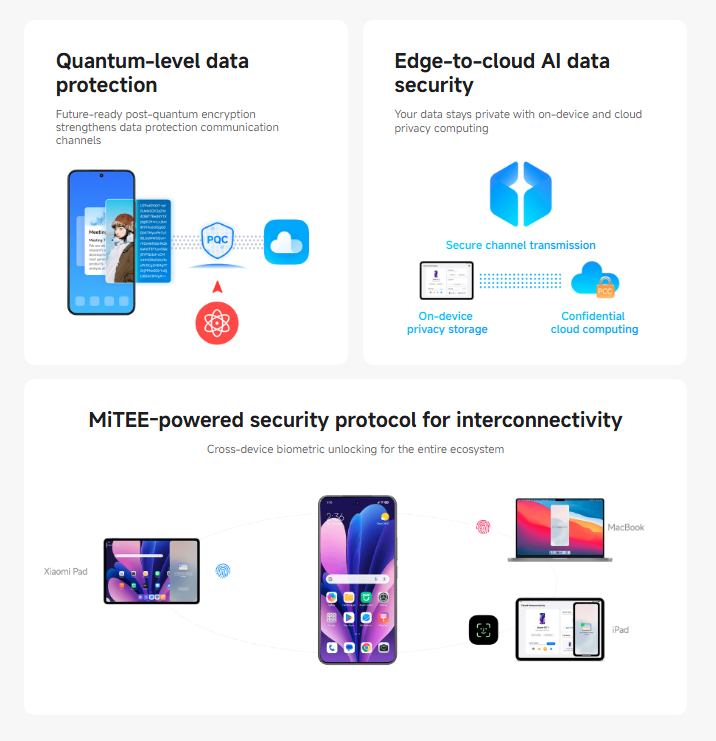
HyperOS 3 security features

HyperOS 3 offers Quantum-level data protection for protection against future quantum attacks on communications. It also features Edge-to-cloud AI data security, ensuring data stays private with on-device and cloud privacy computing, and MiTEE‑powered security protocols for interconnectivity.

So, HyperOS 3.0, based on Android 16, is a pretty significant upgrade for Xiaomi devices, bringing plenty of additional features and improvements over stock Android 16.

Also read:
1. Xiaomi HyperOS 3.1 update: New features, smarter UI, & more
2. HyperOS 3.1 vs HyperOS 3: Every features, changes, & full eligible device list

To ensure you don’t miss out on the important updates from Xiaomi, remember to visit the Xiaomi section on this website regularly. Alternatively, you can join us on Telegram to get instant notifications about the latest HyperOS updates, along with the biggest tech headlines.

The post 5 HyperOS 3 features that make it better than stock Android appeared first on Gizmochina.
Yesterday — 10 February 2026Main stream

These Samsung devices won’t receive One UI 8.5 update

9 February 2026 at 11:57
Samsung One UI 8.5 update not eligible devices

Samsung is expected to release One UI 8.5 with the upcoming Galaxy S26 series later this month. It has been available to Galaxy S25 owners as a beta release for quite some time, and the stable release is now around the corner. There are dozens of Galaxy devices in line to receive the One UI 8.5 update, but many devices will miss out on this exciting upgrade that’s packed with many useful features and plenty of upgrades.

We’ve carefully curated a list of Samsung devices that are not eligible for the One UI 8.5 update. To keep the list short and relevant, we’ve only included Galaxy devices that received the Android 15 (One UI 7) update.

List of Galaxy devices that won’t receive the One UI 8.5 update

Galaxy S series

  • Galaxy S21
  • Galaxy S21+
  • Galaxy S21 Ultra
  • Older Galaxy S models

Galaxy Z series

  • Galaxy Z Fold 3
  • Galaxy Z Flip 3
  • Older Galaxy Z models

Galaxy A series

  • Galaxy A23
  • Galaxy A14
  • Galaxy A05
  • Galaxy A05s
  • Older Galaxy A models

Galaxy M series

  • Galaxy M14
  • Galaxy M05
  • Older Galaxy M models

Galaxy F series

  • Galaxy F14
  • Galaxy F05
  • Older Galaxy F models

Galaxy Tab series

  • Galaxy Tab Active 4 Pro
  • Older Galaxy Tab models

Galaxy XCover series

  • Galaxy XCover 6 Pro
  • Older Galaxy XCover models

If your Samsung device is on the list above, it is unlikely to receive the One UI 8.5 update. In that case, you may want to upgrade to a newer model to ensure your device has the latest features and upgrades. Check out the list of Samsung devices that are eligible for seven Android OS updates, six Android OS updates, or four Android OS updates to find an upgrade that will stay relevant for years to come.

Related: When will your Samsung Galaxy receive One UI 8.5 update

Is One UI 8.5 a big upgrade for Samsung devices?

Samsung has already released the One UI 8.5 beta for the Galaxy S25 series, which shows it’s a useful upgrade rather than just an incremental one with minor changes. While both are based on Android 16, the One UI 8.5 uses a newer QPR2 development build, allowing Samsung to include deeper system-level features.

The Quick Settings panel in One UI 8.5 is deeply customizable, allowing users to adjust the layout of every toggle and slider. The app icons (at least Samsung’s apps) have been updated to feature a subtle 3D effect. Some first-party apps also show a similar effect. The lock screen is now smarter and more personalized. It automatically adjusts the clock and date so they don’t cover the main subject of your wallpaper. Plus, the lock screen can show water visuals and features new fonts.

One UI 8.5 adds a partial-screen recording mode that captures a specific area of your phone rather than the entire screen. The Settings app features a few new options, including a failed authentication lock that automatically locks the device when it detects suspicious behavior, and an intelligent blocking feature that blocks apps that send too many ad notifications.

The new software also improves the Photo Assist feature to allow interrupted image generation without needing to save each iteration. There are a host of other improvements to One UI 8.5, making it a well-rounded package rather than just an incremental upgrade. So, One UI 8.5 is indeed a big upgrade, which will start rolling out to older Galaxy devices a few weeks after its initial release on the Galaxy S26 series later this month.

We’ll continue to update you with the latest developments around One UI 8.5 in the Samsung section on this website. Remember to visit that regularly. Also, join our Telegram channel to get instant notifications about the breaking news and software rollouts.

The post These Samsung devices won’t receive One UI 8.5 update appeared first on Gizmochina.

Before yesterdayMain stream

These Motorola phones are receiving the Android 16 update

7 February 2026 at 11:57
Motorola Android 16 update rollout list

While Motorola isn’t the fastest brand when it comes to software rollouts, it’s improved a lot with the Android 16 rollout. In fact, it was one of the very first brands to push the Android 16 update, which has now expanded to over a dozen smartphones. We’ve curated a list of those devices and a separate list of Motorola devices currently part of the beta program.

These Motorola devices have received the stable Android 16 update

Motorola Edge series

  • Motorola Edge 60 Pro
  • Motorola Edge 60 Fusion
  • Motorola Edge 60 Stylus
  • Motorola Edge 50 Pro
  • Motorola Edge 50 Ultra
  • Motorola Edge Fusion
  • Motorola Edge 2025

Motorola Razr series

  • Motorola Razr 60
  • Motorola Razr 60 Ultra
  • Motorola Razr 50
  • Motorola Razr 50 Ultra

Motorola Moto G series

  • Moto G86 5G
  • Moto G86 Power 5G
  • Moto G75 5G
  • Moto G67 Power 5G
  • Moto G Stylus (2025)
  • Moto G Power (2025)
  • Moto G (2025)

The stable Android 16 update has been spotted rolling out to all devices on the list above. However, remember that it usually rolls out in batches, so not all users receive the update at the same time. It gradually expands to cover all regions, so it may take some time for the update to appear on your device, even if it’s on the list.

Additionally, Motorola has been testing Android 16 on a bunch of its devices, as mentioned in the list below.

These Motorola devices are currently under the Android 16 beta testing

  • Motorola ThinkPhone
  • Motorola ThinkPhone 25
  • Motorola Edge 60
  • Motorola Edge 60 Neo
  • Motorola Edge 50
  • Motorola Edge 50 Neo
  • Motorola Edge 40 Pro
  • Motorola Edge (2024)
  • Motorola Edge+ (2023)
  • Motorola Razr 40 / Razr (2023)
  • Motorola Razr 40 Ultra / Razr+ (2023)
  • Moto Pad 60 Pro
  • Moto G96 5G
  • Moto G85 5G
  • Moto G67 5G
  • Moto G56 5G
  • Moto G55 5G
  • Moto G35 5G

The beta program allows a limited set of users get a taste of the software ahead of the public rollout. You must follow these steps to join the beta program.

Unfortunately, Motorola doesn’t publish a rollout timeline, so it isn’t clear when the update will arrive on a device. However, the beta program typically lasts a few weeks before Motorola begins to push the stable build via an OTA update. To manually check for the latest update on your smartphone, navigate to Settings > System > Check for updates.

To ensure you do not miss out on the latest information, remember to visit the Motorola section once in a while. Alternatively, you can join our Telegram channel to get instant notifications related to software updates, product launches, and all major tech events.

The post These Motorola phones are receiving the Android 16 update appeared first on Gizmochina.

HyperOS 3.1 testing begins for 10 more Xiaomi devices

6 February 2026 at 10:39
HyperOS 3.1 beta testing

Xiaomi is wrapping up the HyperOS 3.0 rollout and has already started focusing more on HyperOS 3.1. The upcoming HyperOS 3.1 software, based on Android 16, has already been released for a dozen devices, and now it appears the next phase of beta rollout has already begun.

Folks at HyperOS Insider have spotted HyperOS 3.1 beta builds for 10 new smartphones. The beta update has been spotted in multiple regions. So, if you’re planning to get an early taste of HyperOS 3.1, you may have a chance if your device is on the list and you’re in a supported region.

So, here’s a fresh list of devices that have been spotted with the HyperOS 3.1 beta build:

  • Redmi K70
    • China: OS3.0.300.1.WNKCNXM
  • POCO F6 Pro
    • EEA (Europe): OS3.0.300.1.WNKEUXM
    • Russia: OS3.0.300.1.WNKRUXM
    • Taiwan: OS3.0.300.1.WNKTWXM
    • Global: OS3.0.300.1.WNKMIXM
  • Redmi K70 Pro
    • China: OS3.0.300.1.WNMCNXM
  • Redmi Turbo 4 Pro
    • China: OS3.0.300.1.WOLCNXM
  • Redmi Turbo 4
    • China: OS3.0.300.1.WOJCNXM
  • POCO F7
    • India: OS3.0.300.1.WOLINXM
    • Global: OS3.0.300.1.WOLMIXM
    • Taiwan: OS3.0.300.1.WOLTWXM
    • Indonesia: OS3.0.300.1.WOLIDXM
    • Russia: OS3.0.300.1.WOLRUXM
    • EEA (Europe): OS3.0.300.1.WOLEUXM
  • POCO X7 Pro
    • Global: OS3.0.300.1.WOJMIXM
    • India: OS3.0.300.1.WOJINXM
    • Indonesia: OS3.0.300.1.WOJIDXM
    • Russia: OS3.0.300.1.WOJRUXM
    • Taiwan: OS3.0.300.1.WOJTWXM
    • Turkey: OS3.0.300.1.WOJTRXM
    • EEA/Europe: OS3.0.300.1.WOJEUXM
  • Xiaomi 15T
    • EEA (Europe): OS3.0.300.1.WOEEUXM
    • Global: OS3.0.300.2.WOEMIXM
    • Indonesia: OS3.0.300.2.WOEIDXM
    • Turkey: OS3.0.300.2.WOETRXM
    • Taiwan: OS3.0.300.2.WOETWXM
    • Russia: OS3.0.300.2.WOERUXM
  • Xiaomi 14T Pro
    • Global: OS3.0.300.1.WNNMIXM
  • Redmi Note 15 5G
    • China: OS3.0.300.2.WPQCNXM
    • EEA (Europe): OS3.0.300.1.WPQEUXM
  • Redmi Pad 2 Pro 5G
    • EEA (Europe): OS3.0.300.1.WPXEUXM
    • India: OS3.0.300.1.WPXINXM
  • Redmi Pad 2 Pro / POCO Pad M1
    • Global: OS3.0.300.1.WPWMIXM
    • India: OS3.0.300.1.WPWINXM
    • Turkey: OS3.0.300.1.WPWTRXM
    • Taiwan: OS3.0.300.1.WPWTWXM
    • Indonesia: OS3.0.300.1.WPWIDXM
    • Russia: OS3.0.300.1.WPWRUXM

You must sign up for the HyperOS beta program to get early access to beta builds before the public release. We’ve a detailed step-by-step guide on how to become a HyperOS tester on this page.

Keep in mind that the rollout happens in stages and hence may take a while to reach all the users, even if you’ve been accepted for the beta testing program. To manually check for the latest update on your device, go to Settings > About phone and then tap the HyperOS logo at the top.

As for the changes, HyperOS 3.1 brings an upgraded Super Island that is more interactive and informative, and integrates with more third-party apps. The Gallery and Weather apps feature new animations, and the lock screen is now more customizable than before.

Xiaomi has also improved cross-platform integration with Apple’s ecosystem, now showing a pop-up to pair Apple’s TWS earbuds and providing access to spatial audio. Furthermore, there are improvements to accessibility features, quick gestures, and system performance. Check this page for all the upgrades to HyperOS 3.1 in detail.

To ensure you don’t miss out on the important stuff, remember to visit the Xiaomi section on this website regularly. Alternatively, you can join us on Telegram to get instant notifications about the latest HyperOS updates, along with the biggest tech headlines.

The post HyperOS 3.1 testing begins for 10 more Xiaomi devices appeared first on Gizmochina.

Xiaomi releases February 2026 security update for several HyperOS devices

6 February 2026 at 09:41
Xiaomi February 2026 security update

Xiaomi has begun updating its devices to the February 2026 security patch via the latest software update. The update is rolling out to multiple devices, and it’s not only the flagship devices getting the initial treat. Several mid-range smartphones are also on the list, running the older HyperOS 2 build based on Android 14.

We’ve prepared a list of Xiaomi, Redmi, and POCO smartphones receiving the February 2026 security patch update, along with their firmware versions, as shared by Xiaomi Time. Review the list to see if the update has started rolling out for your Xiaomi device.

First, let’s look at the HyperOS 3 devices that are receiving the February 2026 security patch.

  • Xiaomi 15
    • Global: OS3.0.6.0.WOCMIXM
  • POCO X7 / Redmi Note 14 Pro
    • Global: OS3.0.9.0.WOOMIXM
    • EEA (Europe): OS3.0.3.0.WOOEUXM
  • POCO X7 Pro
    • Turkey: OS3.0.5.0.WOJTRXM
    • Global: OS3.0.9.0.WOJMIXM
    • EEA (Europe): OS3.0.5.0.WOJEUXM
    • Also released in India, Indonesia, Russia, and Taiwan
  • POCO M6 / Redmi 13 / Redmi 13X
    • Global: OS3.0.6.0.WNTMIXM
    • EEA (Europe): OS3.0.3.0.WNTEUXM

Now, let’s move to the list of Xiaomi HyperOS 2 devices receiving the February 2026 security patch.

  • Redmi Note 12 Pro / Note 12 Pro+ / Note 12 Explorer
    • India: OS2.0.10.0.UMOINXM
    • Indonesia: OS2.0.12.0.UMOIDXM
  • POCO X5 Pro 5G / Redmi Note 12 Pro Speed
    • Indonesia: OS2.0.13.0.UMSIDXM

The list will grow as Xiaomi pushes the February 2026 security update to more devices in the coming days and weeks. To manually check for the latest update on your Xiaomi device, navigate to Settings > My Device > Xiaomi HyperOS. Note that the update usually rolls out in batches, so it may take some time to reach all the users.

Also read:
1. No HyperOS 3.1 update for these Xiaomi devices: Here’s the complete list
2. Xiaomi HyperOS 3.1 update: New features, smarter UI, & more details

As for the February 2026 security patch, it’s a standard security maintenance release focused on improving system stability and bug fixes. According to the latest Android Security Bulletin, there are no critical or high-severity vulnerabilities patched with this month’s release.

To stay updated with the latest news about HyperOS, visit the Xiaomi section regularly. Or, you can join us on Telegram to get instant notifications about the latest HyperOS updates, along with the biggest tech headlines.

The post Xiaomi releases February 2026 security update for several HyperOS devices appeared first on Gizmochina.

❌
❌