Normal view

Today — 15 February 2026Main stream

Snapdragon 7 Gen 4 vs 7 Gen 3: Performance comparison, benchmarks, and more

14 February 2026 at 17:52
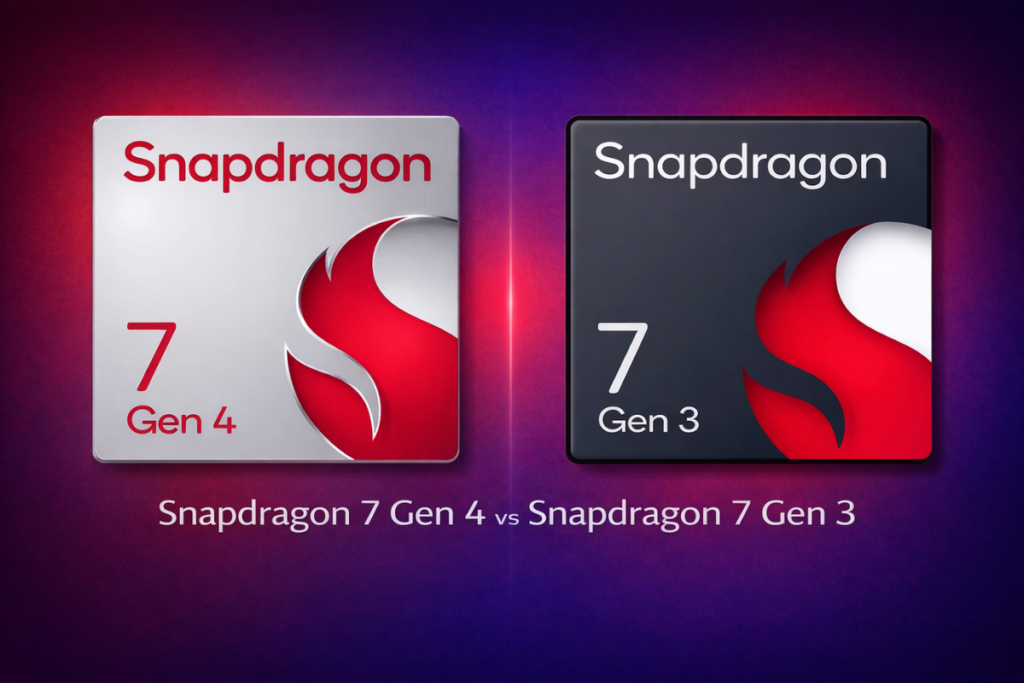
Snapdragon 7 Gen 4 vs 7 Gen 3

Snapdragon 7 Gen 3 has been a popular choice among mid-range phones for offering excellent performance, power efficiency, and a reliable gaming experience. Its successor, the Snapdragon 7 Gen 4, takes everything a step ahead with notable advancements to CPU, GPU, and connectivity.

The Snapdragon 7 Gen 4 will offer better performance, but the real question is: how big an upgrade is it? Is it just a new name with minor changes, or are there some serious upgrades? Let’s look at the benchmark scores and key differences to find out.

Here’s the spec sheet to begin with:

Snapdragon 7 Gen 4Snapdragon 7 Gen 3
AnnouncedMay 2025November 2023
Process node4nm (TSMC)4nm (TSMC)
CPU1 x 2.8GHz — Cortex-A720
4 x 2.4GHz — Cortex-A720
3 x 1.84GHz — Cortex-A520
1 x 2.63GHz — Cortex-A715
3 x 2.4GHz — Cortex-A715
4 x 1.8GHz — Cortex-A510
GPUAdreno 722
Snapdragon Elite Gaming features
Adreno 720
Snapdragon Elite Gaming features
NPUQualcomm Hexagon NPUQualcomm Hexagon NPU
MemoryLPDDR5x, up to 4.2GHzLPDDR5, up to 3.2GHz
StorageUFS 4.0UFS 3.1
CameraQualcomm Spectra ISP (Triple AI-ISPs, 12-bit)
up to 200MP single camera
up to 64MP single camera with zero shutter lag
up to 32+21MP dual cameras with zero shutter lag
up to 21MP triple cameras with zero shutter lag
up to 4K/60fps video recording
Qualcomm Spectra ISP (Triple CV-ISPs, 12-bit)
up to 200MP single camera
up to 64MP single camera with zero shutter lag
up to 32+21MP dual cameras with zero shutter lag
up to 21MP triple cameras with zero shutter lag
up to 4K video recording
ConnectivitySnapdragon 5G modem (sub‑6GHz)
download speed: 4.2Gbps (peak speed)
Wi-Fi 7 (peak speed: 5.8Gbps)
Bluetooth 6.0
Snapdragon X63 5G modem (sub‑6GHz)
download speed: 5Gbps (peak speed)
Wi-Fi 6E (peak speed: 2.9Gbps)
Bluetooth 5.4

Snapdragon 7 Gen 4 vs 7 Gen 3: Benchmark scores

[Note: For the benchmark results, the tests were performed on the Vivo T4 Pro (powered by Snapdragon 7 Gen 4) and OnePlus Nord CE 4 5G (powered by Snapdragon 7 Gen 3).]

Geekbench score

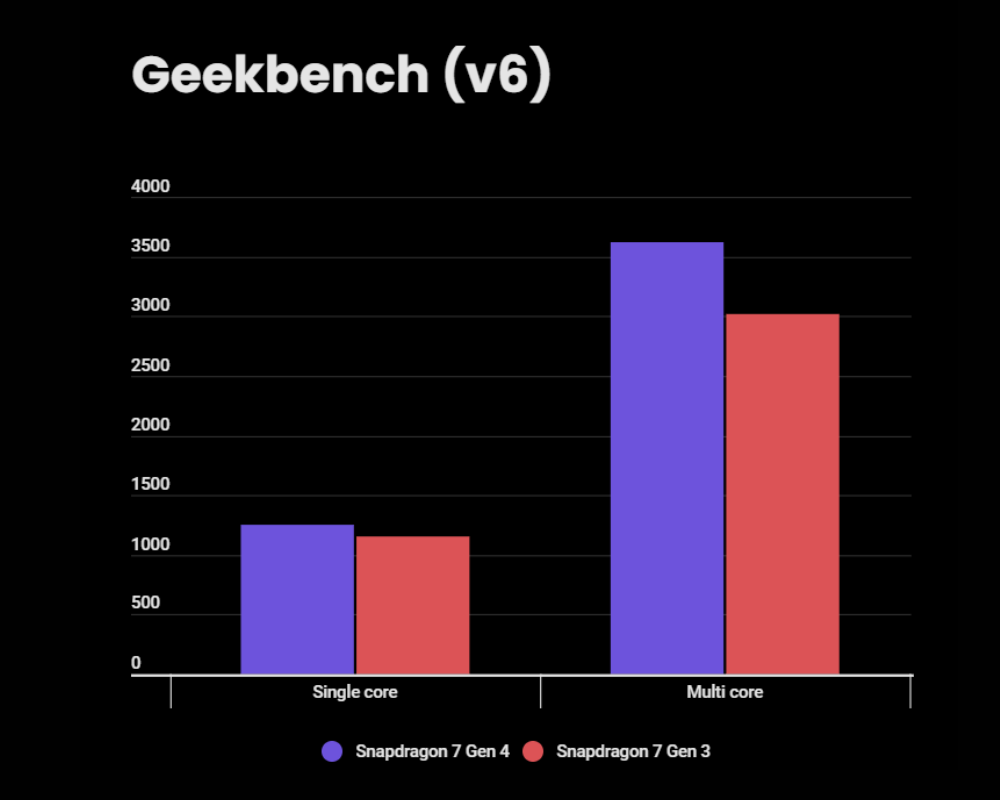
Snapdragon 7 Gen 4 vs 7 Gen 3 - Geekbench score

The Vivo T4 Pro, powered by the Snapdragon 7 Gen 4, has achieved 1,252 points in the single-core performance, which is about 8% higher than the 7 Gen 3. The gap widens in the multi-core performance, where the 7 Gen 4 leads with 20% higher score (3620 vs 3018).

Snapdragon 7 Gen 4Snapdragon 7 Gen 3
Single core1,2521,154
Multi core3,6203,018
Geekbench v6

Geekbench results suggest devices powered by Snapdragon 7 Gen 4 will perform better than those powered by 7 Gen 3, especially in tasks that require multiple cores to work together.

AnTuTu score

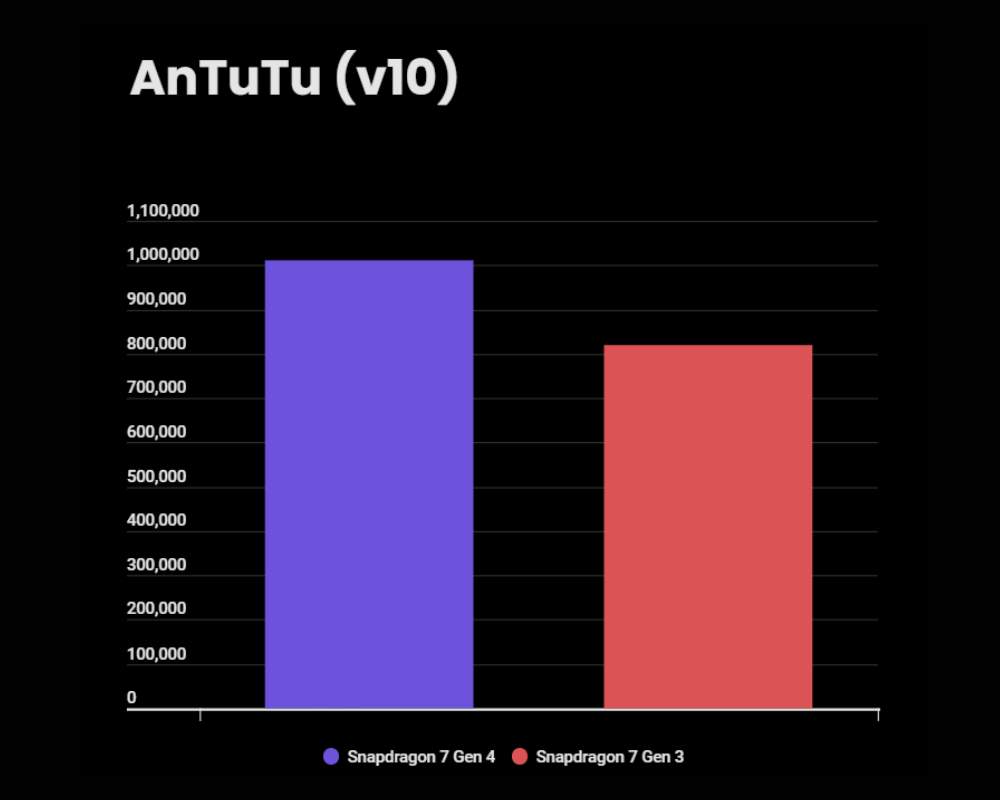
Snapdragon 7 Gen 4 vs 7 Gen 3 - AnTuTu score

In the AnTuTu benchmark, the Snapdragon 7 Gen 4 scores over 1 million, while the 7 Gen 3 scores 819K. That’s a 23% higher score for the newer chip, which also reflects in every single test on the platform.

The Snapdragon 7 Gen 4 delivers 14% higher CPU and 26% higher GPU scores than the Snapdragon 7 Gen 3. The memory and UX scores also favor the newer chip.

Snapdragon 7 Gen 4Snapdragon 7 Gen 3
AnTuTu score1,010,864819,655
CPU309,273269,334
GPU323,797256,584
Memory182,776129,961
UX195,019163,776
AnTuTu v10

Benchmark scores suggest a notable performance boost for the Snapdragon 7 Gen 4, but they don’t reveal improvements to the camera, connectivity, or other key areas. So, let’s discuss them in the following section.

Snapdragon 7 Gen 4 vs 7 Gen 3: What are the upgrades?

CPU, GPU, and NPU

The Snapdragon 7 Gen 4 features an upgraded (1+4+3) core configuration, which replaces an efficiency core with a performance core. On top of this, the CPU uses a newer instruction set and newer cores, which offer better performance and power efficiency than the Snapdragon 7 Gen 3.

Additionally, the prime core in the Snapdragon 7 Gen 4 runs at a higher frequency, further improving the chip’s performance. Qualcomm claims a 27% performance uplift in CPU over the 7 Gen 3.

For graphics rendering, the Snapdragon 7 Gen 4 relies on the Adreno 722 GPU, which brings higher capabilities than the 7 Gen 3’s Adreno 720 GPU. The newer chip also benefits from some additional gaming optimizations, such as Qualcomm Adaptive Performance Engine 4.0 and Snapdragon Adaptive Game Configuration. Qualcomm says the newer GPU does 30% faster rendering.

The Snapdragon 7 Gen 4 also features an upgraded Hexagon NPU, which delivers 65% better AI performance. It’s also the first in the lineup to support Stable Diffusion 1.5, enabling real-time image generation in seconds. 

Camera and imaging

The camera specs are largely unchanged, but there are a few upgrades worth paying attention to. The Snapdragon 7 Gen 4 is an AI ISP that enables AI-powered autofocus, auto white balance, and auto exposure.

The Snapdragon 7 Gen 4 is the first in the series to feature hardware-enabled electronic image stabilization (EIS) and adds real-time Video Super Resolution. Additionally, it significantly improves multi-frame noise reduction, resulting in clearer, crisper capture.

Connectivity

The Snapdragon 7 Gen 4 features more robust connectivity, thanks to an upgraded 5G modem that implements the latest 3GPP Release 17 standard. Unfortunately, though, the 7 Gen 4 features a lower peak download speed over 5G. On the plus side, it features twice the download speed over Wi-Fi as the 7 Gen 3.

The Snapdragon 7 Gen 4 also benefits from Wi-Fi 7 and Bluetooth 6.0 implementation. It’s the first chip in the series to feature Qualcomm Expanded Personal Area Network (XPAN) technology, which keeps earbuds connected over Wi-Fi ultra-clear, untethered audio.

Snapdragon 7 Gen 4 vs 7 Gen 3: Which is a better choice?

The Snapdragon 7 Gen 4 is a real upgrade rather than a new name slapped to minor improvements. It has a performance-focused CPU and a newer GPU with faster rendering and additional gaming-centric features. The upgraded NPU is faster and more capable.

The newer Snapdragon chip also features an AI-ISP with advanced camera capabilities like hardware-enabled electronic image stabilization (EIS) and real-time Video Super Resolution. It also offers more modern, robust connectivity features, such as Wi-Fi 7, Bluetooth 6.0, and Qualcomm’s XPAN technology.

The Snapdragon 7 Gen 4 is clearly the better choice here. But it will come with a higher price tag than 7 Gen 3-powered devices. In short, the Snapdragon 7 Gen 3 gives you an excellent value for money, whereas the newer 7 Gen 4 pushes for higher performance and modern features for a slightly higher price.

The post Snapdragon 7 Gen 4 vs 7 Gen 3: Performance comparison, benchmarks, and more appeared first on Gizmochina.
Android 17 Beta 1 is here: How to install, eligible devices, and new features

14 February 2026 at 11:22
Android 17 Beta 1
Android 17 Beta 1

Just three days ago, Google confirmed that Android 17 Beta 1 is coming, and now it’s here. We weren’t expecting the first beta to be released so quickly, but it’s here with improvements to privacy, security, and performance. There are some significant changes as well, which we’ll discuss in the article, along with the eligible devices list and installation steps.

Which devices are eligible for Android 17 beta?

Google Pixels are the first in line to receive the latest beta update, and this year is no different. For now, Android 17 Beta 1 is available for Google Pixels, and it will soon be available on devices from other brands.

So, here’s a list of Google Pixel devices eligible for Android 17 beta:

  • Pixel 6
  • Pixel 6 Pro
  • Pixel 6a
  • Pixel 7
  • Pixel 7 Pro
  • Pixel 7a
  • Pixel Tablet
  • Pixel Fold
  • Pixel 8
  • Pixel 8 Pro
  • Pixel 8a
  • Pixel 9
  • Pixel 9 Pro
  • Pixel 9 Pro XL
  • Pixel 9 Pro Fold
  • Pixel 9a
  • Pixel 10
  • Pixel 10 Pro
  • Pixel 10 Pro XL
  • Pixel 10 Pro Fold

In short, if you have a Pixel 6 or older, you can install the Android 17 Beta 1 build and get a taste of the latest features and all the upgrades without waiting months for the stable rollout.

How to install Android 17 Beta 1 on Google Pixels?

If your Google Pixel is running Android 16 QPR3 Beta 2.1 and you haven’t exited the beta program, you should automatically receive the Android 17 Beta 1 update. The update should be available at Settings > System > Software Updates > System Updates. Other users should follow the process as mentioned below.

If you’re not already part of the beta program, visit google.com/android/beta and “Opt in” on your selected device. Make sure you’re logged into the website with the same Google account. After opting in, you should be able to install the latest beta update on your Google Pixel from the Software Updates section in the Settings app.

Before installing any beta update, it’s advised to back up important data to another device or a cloud storage for added safety.

Android 17 Beta 1: What’s new and what’s improved?

The first beta of Android 17 is mostly developer-focused and marks the transition from the traditional “Developer Preview” model to a continuous “Android Canary” program. The Canary channel offers faster access to features and APIs, quicker stability, and eliminates the need for manual flashing.

As for the changes, the first beta enforces stricter requirements for app behaviour on large-screen devices (smallest width ≥ 600dp), preventing apps from opting out of resizability and orientation changes. These changes do not affect smaller devices (sw < 600dp).

Furthermore, apps running on larger screens, such as tablets, foldables, or desktop windowing environments, must now support landscape and portrait layouts and adapt to resizable windows.

Android 17 introduces several low-level changes to improve app efficiency and system health, including a Lock-free MessageQueue to reduce missed frames, Generational Garbage Collection to reduce the CPU cost and duration of full-heap collections, and Strict “Static Final” Fields to allow the runtime to apply more aggressive performance optimizations.

The update also includes important camera upgrades, including Dynamic Camera Sessions to enable seamless transitions between modes, Constant Quality Recording for extended control, and Versatile Video Coding (VVC) on devices with supported hardware.

Additionally, the latest beta build includes an improved audio framework, enhanced VoIP call history (supporting avatars and privacy controls), and Wi-Fi Ranging updates (Proximity Detection and 11az secure ranging). The CompanionDeviceManager now features two new profiles, Medical Devices and Fitness Trackers, for streamlined permission handling and device identification.

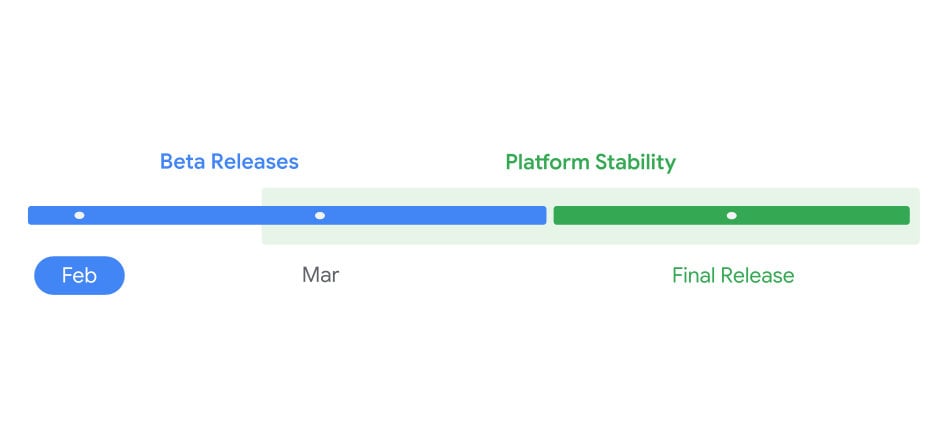
According to the official timeline, the “Platform Stability” phase begins next month. At this point, SDK/NDK APIs and app-facing behaviors will be finalized. The stable release could arrive sometime in Q3 2026.

We’ll continue to update you with fresh developmenets in our Android 17 section. You can visit it regularly for the latest updates. Or, join our Telegram channel to get instant notifications about the latest happenings in tech.

The post Android 17 Beta 1 is here: How to install, eligible devices, and new features appeared first on Gizmochina.

Yesterday — 14 February 2026Main stream

Samsung begins One UI 9 testing for these Galaxy devices

13 February 2026 at 14:53
Samsung One UI 9 testing - device list

While the One UI 8.5 release is yet to happen, Samsung is already laying the groundwork for its next major release, One UI 9. A few Galaxy devices have been spotted on Samsung’s test servers with new build versions pointing to One UI 9.

The Galaxy Z Fold 8 and Galaxy Z Flip 8 were the first phones to show up on the server with One UI 9 test builds (1, 2). Both foldables will launch around July 2026 with One UI 9 right from the box.

Perhaps the most intriguing is the appearance of a mysterious third device with the modem number SM-F971U running the build version F971USQU0AZB1. This could mean Samsung might also launch a third foldable phone alongside the Fold 8 and Flip 8 in the second half. We don’t know what it would be called, but rumors say this could be the Galaxy Wide Fold.

Alongside these three upcoming foldable phones, the One UI 9 test build has also been spotted for the Galaxy Z Fold 7. This is kind of surprising, as the Galaxy Z Fold 7 hasn’t even received the One UI 8.5 update.

So, here’s a list of Samsung devices that are currently under One UI 9 testing:

  • Galaxy Z Fold 8
  • Galaxy Z Flip 8
  • Galaxy Wide Fold (name unconfirmed)
  • Galaxy Z Fold 7

The list is currently small, as Samsung began testing One UI 9 just recently. It will grow in the coming days, especially after the One UI 8.5 release, when more of the company’s focus will shift towards One UI 9.

It’s important to highlight that One UI 9 testing is happening internally, so you can’t download and test the firmware on your Galaxy device. The presence of such test builds on the server indicates that the company is testing the firmware behind closed doors to ensure a stable, smooth rollout in the future.

While Samsung has begun development of One UI 9 for its Galaxy devices, its primary focus will be the Galaxy S26 series, which is launching later this month with One UI 8.5. In late April, we might see One UI 8.5 rolling out to older Galaxy devices. You can check the list of eligible devices here.

We’ll continue to update you with the latest One UI news in our Samsung section. Visit it regularly to stay up to date. Or, join our Telegram channel to get instant notifications about the latest happenings in tech.

The post Samsung begins One UI 9 testing for these Galaxy devices appeared first on Gizmochina.

Xiaomi HyperOS February 2026 security update tracker: Check if your device is getting it

13 February 2026 at 10:20
Xiaomi February 2026 security update

Xiaomi has begun rolling out the February 2026 security patch to its devices. While the update doesn’t include new features or improvements, it’s still important because it ensures the devices have fixes for the latest security vulnerabilities. Fortunately, Xiaomi isn’t prioritizing newer devices, as the February update has already started rolling out to HyperOS 2 (Android 14) devices, alongside many HyperOS 3 devices.

The latest security patch doesn’t include any critical “zero-day” vulnerabilities or high-level severity, according to the official Android Security Bulletin. This appears to be a standard maintenance release focused on bug fixes and improvements to system stability.

List of Xiaomi devices receiving the February 2026 security update

HyperOS 3 (Android 16) devices getting the February update:

  • Xiaomi 15
    • Global: OS3.0.6.0.WOCMIXM
    • Taiwan: OS3.0.3.0.WOCTWXM
  • Xiaomi 15T
    • Global: OS3.0.9.0.WOEMIXM
    • EEA/Europe: OS3.0.10.0.WOEEUXM
  • Xiaomi 15T Pro
    • Global: OS3.0.11.0.WOSMIXM
    • EEA/Europe: OS3.0.13.0.WOSEUXM
  • Xiaomi 14T
    • Indonesia: OS3.0.2.0.WNEIDXM
  • POCO F6 Pro/Redmi K70
    • Global: OS3.0.7.0.WNKMIXM
  • POCO X7/Redmi Note 14 Pro
    • Global: OS3.0.9.0.WOOMIXM
    • EEA/Europe: OS3.0.3.0.WOOEUXM
  • POCO X7 Pro
    • Turkey: OS3.0.5.0.WOJTRXM
    • Global: OS3.0.9.0.WOJMIXM
    • EEA (Europe): OS3.0.5.0.WOJEUXM
    • India, Indonesia, Russia, Taiwan
  • POCO M6/Redmi 13/Redmi 13X
    • Global: OS3.0.6.0.WNTMIXM
    • EEA/Europe: OS3.0.3.0.WNTEUXM

HyperOS 2 (Android 15) devices getting the February update:

  • Xiaomi 12T
    • Global: OS2.0.212.0.VLQMIXM
    • Russia: OS2.0.207.0.VLQRUXM
    • Taiwan: OS2.0.207.0.VLQTWXM
  • Redmi Note 15 Pro 4G
    • EEA/Europe: OS2.0.207.0.VPFEUXM
  • Redmi Note 15 Pro 5G
    • India: OS2.0.203.0.VPPINXM
    • Turkey: OS2.0.202.0.VPPTRXM
  • Redmi Note 12S
    • Turkey: OS2.0.208.0.VHZTRXM
    • Russia: OS2.0.209.0.VHZRUXM
    • Taiwan: OS2.0.209.0.VHZTWXM
  • Redmi Note 12 4G
    • Global: OS2.0.205.0.VMTMIXM
  • Redmi Pad 2 4G
    • India: OS2.0.209.0.VOWINXM
  • Redmi Pad 2 Pro 5G
    • Russia: OS2.0.203.0.VPXRUXM
  • Redmi 13C 5G, Redmi 13R
    • Taiwan: OS2.0.203.0.VGQTWXM
    • EEA: OS2.0.209.0.VGQEUXM
  • POCO Pad, Redmi Pad Pro
    • EEA: OS2.0.208.0.VNSEUXM
    • Russia: OS2.0.207.0.VNSRUXM
  • Redmi Pad Pro 5G
    • India: OS2.0.207.0.VFSINXM
    • EEA: OS2.0.208.0.VFSEUXM

HyperOS 2 (Android 14) devices getting the February update

  • Redmi Note 12 series (Explorer, Pro, Pro+)
    • Turkey: OS2.0.8.0.UMOTRXM
    • India: OS2.0.10.0.UMOINXM
    • Indonesia: OS2.0.12.0.UMOIDXM
    • Taiwan: OS2.0.8.0.UMOTWXM
  • POCO X5 Pro 5G/Redmi Note 12 Pro Speed
    • Indonesia: OS2.0.13.0.UMSIDXM

The above list has been shared by Xiaomi Time, which also includes some Xiaomi devices running Android 14. It’s good to see the brand expanding the update to older devices alongside newer models. We’ll update the list regularly as Xiaomi expands the update to more devices.

Also read: Xiaomi HyperOS 3.1 update: New features, eligible devices, and more

If your Xiaomi device is on the list and you live in a region where the update is already rolling out, you can upgrade to the latest security patch by navigating to Settings > My Device and tapping the HyperOS logo at the top.

Be sure to visit the Xiaomi section regularly for the latest updates. Or, you can join us on Telegram to get instant notifications about the latest HyperOS updates, along with the biggest tech headlines.

The post Xiaomi HyperOS February 2026 security update tracker: Check if your device is getting it appeared first on Gizmochina.

❌
❌