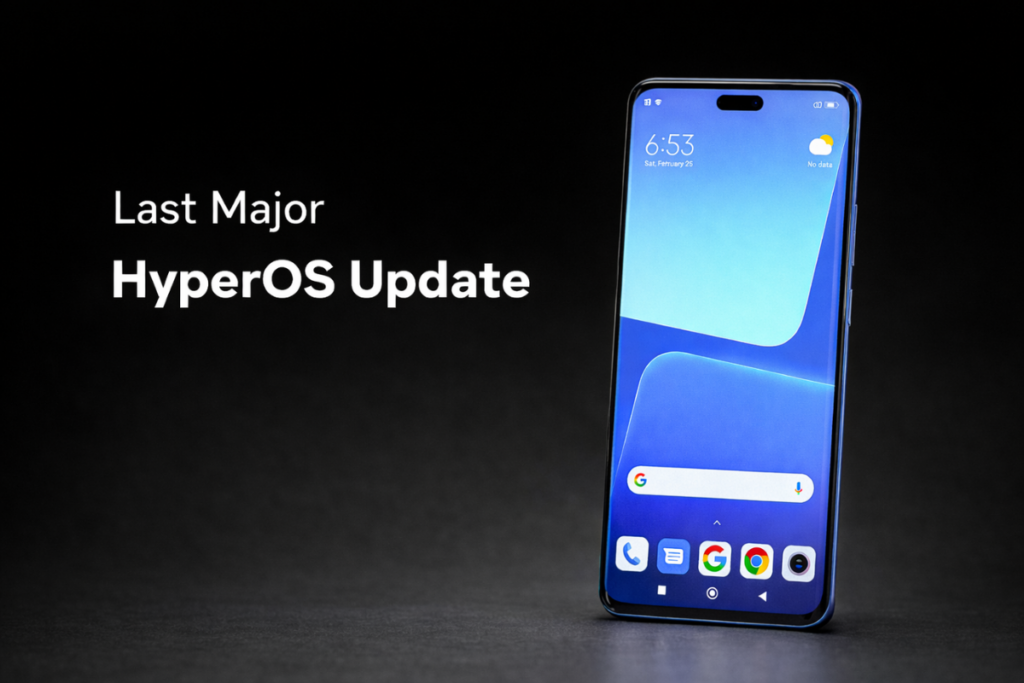
Xiaomi has finally begun rolling out the much-awaited HyperOS 3 update to Xiaomi 13 Lite users. This one is based on Android 15 and packs some exciting new features, along with plenty of upgrades throughout the system. Unfortunately, this is the last major HyperOS upgrade for the Xiaomi 13 Lite users.
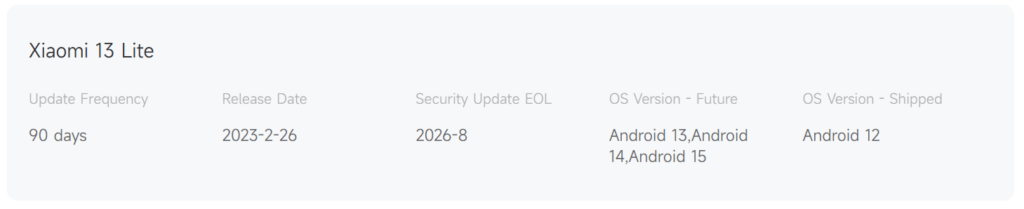
The smartphone was launched in early 2023 with Android 12 out of the box. It received three Android OS updates since then, now running Android 15, and isn’t eligible for more OS upgrades. That means it will spend the rest of its life running Android 15. According to the official website, the Xiaomi 13 Lite will reach end of life in August 2026.
Coming to the HyperOS 3 update, it’s rolling out to Xiaomi 13 Lite users in multiple regions with the following firmware versions:
Xiaomi 13 Lite (Global): OS3.0.1.0.VLLMIXM
Xiaomi 13 Lite (EEA): OS3.0.2.0.VLLEUXM
Xiaomi 13 Lite (Turkey): OS3.0.1.0.VLLTRXM
Xiaomi 13 Lite (Taiwan): OS3.0.1.0.VLLTWXM
Xiaomi 13 Lite (Russia): OS3.0.1.0.VLLRUXM
If you have a Xiaomi 13 Lite, you should be able to upgrade to HyperOS 3 by navigating to Settings > My device and tapping the HyperOS logo at the top. If the update doesn’t appear, check again in a few days, as the rollout happens in batches and can take a few days to reach all the users.
While not as rich as the Android 16-based software, HyperOS 3 with Android 15 still delivers a wide array of useful upgrades throughout the system, along with many visual enhancements and new features. Fortunately, it includes the new Hyper Island, which provides easier access to information with multitasking capabilities.
The update also includes new icons, new battery and signal indicators, enhanced animations, and system-wide blur effects. HyperOS 3 further improves integration with Apple devices by supporting iPhone call/SMS forwarding and screen sharing with a MacBook.
HyperOS 3 also integrates new AI features, including AI writing in notes, AI voice translation and noise reduction for recordings, AI Dynamic Wallpapers, and AI Search and AI photo search in Gallery. The latest update also includes numerous under-the-hood changes to deliver up to 30% better performance.
HyperOS 3 is the final major upgrade for the Xiaomi 13 Lite, and it will soon run out of security patches as well. The official website says software support will end in August 2026. By that time, the Xiaomi 13 Lite may receive one or two security updates, but it won’t receive HyperOS 3.1 or HyperOS 4.0.
Even after reaching the end of life (EOL), the Xiaomi 13 Lite will continue to work fine, but it won’t have the fixes for the recently discovered security vulnerabilities, which puts your device at risk, especially if it contains critical data.
It’s best to upgrade to a newer model, which will not only receive the latest security patches but also the latest features and upgrades from HyperOS updates. If you’re wondering about the best upgrade options, this page lists all Xiaomi devices that promise 6 years of software updates.
Be sure to visit the Xiaomi section once in a while for fresh information. Alternatively, you can join our Telegram channel to get instant alerts about the latest HyperOS releases and breaking tech news.
ColorOS 16 rollout is in its final phase, with only a few devices left to receive the update. The list has now become even shorter as Oppo has released the update to three more mid-range smartphones: Oppo K13x, Oppo K12x, and Oppo Reno12 F.
As per the official announcement on the community page (1,2,3), the ColorOS 16 update for the Oppo K13x and Oppo K12x is rolling out in India, while the Oppo Reno12 F is receiving the update in Indonesia. The update will expand to other regions in the coming days and weeks.
Your Oppo phone must be running the required firmware version to be eligible for the ColorOS 16 update:
Oppo K13x: CPH2753_16.0.3.500(EX01)
Oppo K12x: CPH2667_16.0.3.500(EX01)
Oppo Reno12 F: CPH2687_16.0.3.501(EX01)
If your Oppo smartphone is on the list and you belong to a supported region, the update may be ready for installation. Go to Settings > System & update > Software update to check for available updates.
If you don’t see the update, apply for the Release Candidate to get it sooner. For this, go to Settings > System & update > Software update > Tap the top of the page > Tap the icon on the top right > Beta program > Release candidate > Apply Now. Then check for an update and hit the Download now button.
Keep in mind that ColorOS 16 is a major upgrade with a download size of a few gigabytes. So, you must make sufficient room on your device and charge it to at least 50% for a smooth upgrade to ColorOS 16. Don’t forget to back up important data just to stay on the safe side.
With three more Oppo devices now receiving the ColorOS 16 update, only a few devices are in the queue, including the Oppo Reno12 FS, Oppo Reno11 FS, and Oppo F31 5G. Oppo promises to release the update for those devices this month itself.
We’ll keep you updated with the latest news in our Oppo section, so make sure to check it regularly for new updates. You can also join our Telegram channel to get instant notifications.
Samsung’s Exynos chipsets have historically been less powerful than Qualcomm’s Snapdragon chipsets. The latter has always dominated key aspects, including CPU, GPU, and connectivity. However, the newly-released Exynos 2600 narrows the gap significantly. In fact, it outperforms the Snapdragon 8 Elite Gen 5 on several benchmarks.
In this detailed comparison, we’ll make sense of the benchmark scores and dive into the key differences to understand how the Exynos 2600 and Snapdragon 8 Elite Gen 5 stack up against each other.
Let’s begin with a quick look at the spec sheet:
Exynos 2600
Snapdragon 8 Elite Gen 5
Announced
December 2025
September 2025
Process node
2nm (TSMC)
3nm (TSMC)
CPU cores
10-core
8-core
CPU cores
1 x 3.8GHz — C1-Ultra 3 x 3.25GHz — C1-Pro 6 x 2.75GHz — C1-Pro
2 x 4.61GHz — Oryon (3rd gen) 6 x 3.63GHz — Oryon (3rd gen)
GPU
Exynos Xclipse 960 GPU Ray tracing support Exynos Neural Super Sampling
Adreno 840 Ray tracing support Snapdragon Elite Gaming features
NPU
AI engine with 32K MAC NPU
Qualcomm Hexagon NPU Agentic AI support
Memory
LPDDR5X
LPDDR5X, up to 5.3 GHz
Storage
UFS 4.1
UFS 4.1
Camera
up to 320MP single camera up to 108MP single camera (30fps) up to 64MP+32MP dual cameras (30fps) up to 8K video recording real-time semantic segmentation
Qualcomm Spectra Triple ISP (20-bit) up to 320MP single camera up to 108MP single camera (MFNR, ZSL, 30fps) up to 48MP triple camera (MFNR, ZSL, 30fps) up to 8K video recording real-time semantic segmentation (limitless) Advanced Professional Video (APV) codec
Exynos 2600 vs Snapdragon 8 Elite Gen 5: Benchmark scores
Since the Galaxy S26 trio has yet to reach Gizmochina’s house, we used NL Tech’s benchmark data. The Galaxy S26+ (Exynos 2600) and Galaxy S26 Ultra (Snapdragon 8 Elite Gen 5) were used in the testing.
Geekbench score (v6)
Exynos 2600
Snapdragon 8 Elite Gen 5
Single core
3,126
3,690
Multi core
10,684
11,148
On Geekbench, the Exynos 2600 posts lower scores than the Snapdragon 8 Elite Gen 5. In the single-core test, the Snapdragon gets about 18% higher score, while the difference in multi-core scores is just 4%.
AnTuTu score (v11)
Exynos 2600
Snapdragon 8 Elite Gen 5
AnTuTu score
2,663,898
3,396,880
CPU
788,803
1,014,266
GPU
1,091,141
1,388,476
Memory
359,328
346,871
UX
424,626
647,267
The Snapdragon 8 Elite Gen 5 shines on AnTuTu too, posting a total score close to 3.4 million (vs. 2.66 million on Exynos 2600). That 27% uplift in total score for the Snapdragon chip is also reflected in the CPU and GPU scores.
The Snapdragon 8 Elite Gen 5 also achieves a significantly higher score in the memory test, while the Exynos 2600 scores 3% higher in the user experience test.
3DMark score
Wild Life Extreme Stress Test
Exynos 2600
Snapdragon 8 Elite Gen 5
Best loop score
7,077
7,084
Lowest loop score
2,988
3,067
Stability
42.2%
43.3%
Benchmark results from the 3DMark Wild Life Extreme Stress Test show that the Dimensity 2600 performs on par with the Snapdragon 8 Elite Gen 5. There isn’t a big gap in stability either.
Solar Bay Extreme Stress Test
Exynos 2600
Snapdragon 8 Elite Gen 5
Best loop score
2,037
1,247
Lowest loop score
878
709
Stability
43.1%
56.9%
The Exynos 2600 surprisingly outperforms the Snapdragon 8 Elite Gen 5 in the Solar Bay Extreme Stress Test, which means that the latest phones have excellent ray tracing performance.
Now that we’re aware of the benchmark data, let’s dig further into the key differences to get a clearer picture.
Exynos 2600 vs Snapdragon 8 Elite Gen 5: Key differences
The Exynos 2600 was announced just three months after the Snapdragon 8 Elite Gen 5, as the world’s first smartphone chipset to use a 2nm process. In February 2026, it debuted with the Galaxy S26 series.
CPU, GPU, and NPU
The Exynos 2600 features a 10-core CPU, which includes one C1-Ultra prime core, three C1-Pro high-performance cores, and six C1-Pro high-efficiency cores. The Snapdragon 8 Elite uses a custom-designed Oryon CPU, featuring two Oryon prime cores (third-gen) and six Oryon performance cores (third-gen).
The Snapdragon 8 Elite benefits from a higher peak CPU speed, which is one of the reasons it scored higher in the single-core test on Geekbench. For graphics-intensive tasks, the Exynos 2600 relies on the Xclipse 960 GPU, while the Snapdragon chip uses the Adreno 840 GPU.
Both chipsets have highly capable GPUs with strong ray tracing capabilities. However, the Exynos 2600 may have an edge, as seen in 3DMark tests.
The Exynos 2600 and Snapdragon 8 Elite Gen 5 feature advanced NPUs optimized for on-device generative AI. They also use AI to optimize connectivity, camera, and many other aspects.
Camera
The Exynos 2600 introduces an AI-powered Visual Perception System (VPS), which replaces the traditional ISP with a dedicated AI subsystem for real-time scene analysis, object recognition, and noise reduction. This enables ultra-high-res processing at 60fps with over 50% better power efficiency than the Exynos 2400.
The Exynos chip features Deep Learning Video Noise Reduction (DVNR) for noise reduction in low-light conditions and supports hybrid OIS + AI-EIS for better stabilization.
On the other hand, the Snapdragon 8 Elite offers 20-bit triple AI-ISPs, delivering 4x dynamic range, real-time semantic segmentation with up to 250 layers, and direct NPU access to raw sensor data for on-device AI processing. Additionally, the chip offers a range of features to further improve the camera output, including object eraser, skin/sky tone enhancements, Night Vision 3.0, video object eraser, and Snapdragon Audio Sense.
Connectivity
The Exynos 2600 features a redesigned connectivity setup with an external modem (Exynos Modem 5410), offloading cellular, Wi-Fi, and Bluetooth from the main 2nm die to improve the thermal efficiency and space for CPU/GPU.
The Exynos chip supports a higher peak download speed of 14.79Gbps (vs. 12.5Gbps) and a higher peak upload speed of 4.9Gbps (vs. 3.7Gbps) on a cellular connection compared to the Snapdragon 8 Elite Gen 5.
The Snapdragon chip features an integrated Snapdragon X85 5G modem with FastConnect 7900 for robust connectivity. Wi-Fi 7 supports a peak speed of 5.8Gbps. Furthermore, the chip includes AI-powered optimizations for traffic prioritization, seamless Wi-Fi/cellular switching, and enhanced satellite support.
Exynos 2600 vs Snapdragon 8 Elite Gen 5: Which is a better choice?
Since we haven’t yet tested an Exynos 2600-powered Samsung phone, it’s difficult to say whether it’s the same story this year or if the Exynos 2600 completely outperforms the Snapdragon 8 Elite Gen 5. However, based on the benchmark data and spec sheet, the Exynos 2500 appears to be significantly better than its predecessor, particularly in gaming performance.
The Exynos chip also introduces major camera upgrades, including Deep Learning Video Noise Reduction. It now features a redesigned connectivity system with an external modem, which claims to improve thermal efficiency.
That said, the Snapdragon 8 Elite Gen 5 still delivers strong CPU performance and features a mature ISP with excellent imaging capabilities. Its robust connectivity system with better carrier support also makes a notable difference.
The OriginOS 6 update is rolling out to the last phase of eligible devices. Part of this phase, the iQOO Z9 and iQOO Z9x have recently started receiving the Android 16 update, which brings a host of new features and upgrades across the system.
The Android 16-based update for the iQOO Z9 is tagged with the firmware version PD2346F_EX_A_16.2.10.4.W30, while the iQOO Z9x is getting it as PD2353F_EX_A_16.2.11.0.W30, as spotted by Ytechb. The initial rollout may be limited to select regions. So, if you don’t see the update on your device, check again in a few days once the rollout expands. You can manually check for updates via the System updates section in the Settings app.
If the update doesn’t appear on your iQOO smartphone, you can get it sooner by requesting it through the trial program. For this, navigate to Settings > About Phone > System updates > version Trial > Trial version > download and install.
The OriginOS 6 update is a hefty one, weighing in at around 4GB. Therefore, you must ensure that your device has sufficient storage and that it’s charged to at least 40% for a smooth upgrade to OriginOS 6. You can also back up important data for added safety.
Once you have the software installed on your phone, there’s a lot to explore, including an all-new Origin Island that offers real-time updates and improved multitasking. The Control Center now features an enhanced notification center, improved lighting effects, and new system fonts. The lock screen features new clock styles, new widgets, and better layout controls. OriginOS 6 also introduces improvements to privacy, security, and battery efficiency. You can read the complete changelog on this page.
Be sure to regularly visit the iQOO section on Gizmochina to get the latest updates. Or, if you prefer your news instant and on-the-go, hop into our Telegram channel for rapid-fire software updates and all the biggest tech headlines.

 Login
Login