Normal view

Yesterday — 26 March 2026Main stream

Samsung releases One UI 8.5 Beta 8 for Galaxy S25 series

26 March 2026 at 14:01
Samsung One UI 8.5 beta

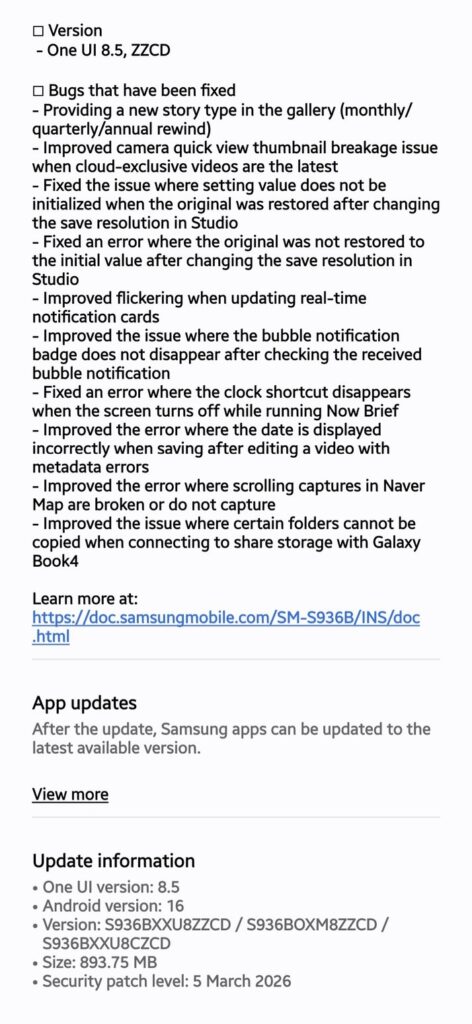
While we expected this to be a stable release for the Galaxy S25 series, Samsung has thrown another One UI 8.5 beta update, bringing the total beta count to eight. The latest build includes a host of bug fixes, but thankfully, those are not critical, meaning Samsung may be doing the final bug cleanup before the stable release.

The eighth One UI 8.5 beta for the Galaxy S25, S25+, and S25 Ultra comes with the build version ZZCD and has a download size of nearly 1GB. The update, spotted by Tarun Vats, was initially rolled out in Germany, but then quickly expanded to India, Poland, South Korea, and the UK within a few hours of its initial release. Only the US is yet to receive the update, which shouldn’t take long.

Galaxy S25 One UI 8.5 beta 8 update

As for the changes, Beta 8 adds a new story type in the Gallery app that automatically generates monthly, quarterly, or yearly reviews. The rest of the update focuses on squashing bugs related to the camera, Studio, lock screen, notifications, and Galaxy Book 4 connectivity. Check the complete changelog below for more details.

Galaxy S25 One UI 8.5 Beta 8 changelog

– Added a new story type within the Gallery (monthly/quarterly/yearly review)
– Improved the issue of corrupted camera quick view previews when cloud-exclusive videos were the latest
– Fixed an issue where originals were not restored after changing the storage resolution in Studio
– Improved the flickering when updating real-time notification cards
– Improved the bubble notification badge not disappearing after checking received bubble notification
– Fixed an issue where the clock shortcut disappeared when the screen was turned off while Now Brief was running
– Improved an issue where the date was displayed incorrectly after editing a video with metadata errors
– Improved an issue where shots were corrupted or not captured when scrolling in Naver Map
– Improved the issue where certain folders could not be copied when connected to shared storage with Galaxy Book 4.

If you have a Galaxy S25, S25, or S25 Ultra running One UI 8.5 beta, you should be able to install the latest beta by navigating to Settings > Software updates > Download and install.

This could very well be the last One UI 8.5 beta for the Galaxy S25 series, as Samsung is reportedly gearing up for the stable rollout. A stable build for the same device was also recently spotted on Samsung’s servers, further hinting at a closer stable rollout. We’ll let you know when that happens. Stay tuned.

We’ll keep posting the latest One UI developments in our Samsung section. You can visit the section regularly for the latest updates, or join our Telegram channel to get instant notifications about the latest software updates and breaking tech news.

The post Samsung releases One UI 8.5 Beta 8 for Galaxy S25 series appeared first on Gizmochina.
Android 17 beta is available for these devices: Complete list

26 March 2026 at 12:08
Android 17 beta update devices list

Google Pixels were the first phones to get Android 17 beta, but now, a few weeks later, the beta is available for many third-party phones from different brands, including Motorola, OnePlus, and Oppo. For easier tracking of beta-supported devices, we’ve created a list here that has all the devices getting Android 17 beta.

List of devices getting Android 17 beta

Google

  • Pixel 10
  • Pixel 10 Pro
  • Pixel 10 Pro XL
  • Pixel 10 Pro Fold
  • Pixel 10a
  • Pixel 9
  • Pixel 9 Pro
  • Pixel 9 Pro XL
  • Pixel 9 Pro Fold
  • Pixel 9a
  • Pixel 8
  • Pixel 8 Pro
  • Pixel 8a
  • Pixel Tablet
  • Pixel Fold
  • Pixel 7
  • Pixel 7 Pro
  • Pixel 7a
  • Pixel 6
  • Pixel 6 Pro
  • Pixel 6a

Motorola

  • Motorola Edge 70
  • Motorola Edge 70 Fusion
  • Motorola Edge 70 Fusion+
  • Motorola Edge 60
  • Motorola Edge 60 Fusion
  • Motorola Edge 2025
  • Motorola Moto G86
  • Motorola Moto G86 Power
  • Motorola Moto G57
  • Motorola Moto G57 Power

OnePlus

  • OnePlus 15

Oppo

  • Oppo Find X9 Pro

Realme

  • Realme GT 8 Pro

If your device is on the list, you can sign up for the beta program to receive the Android 17 beta update and access upcoming features and changes months before the stable release.

The list should continue to grow as the brands open the beta program to more devices over the coming weeks and months. We’ll update the list periodically to keep it fresh.

Keep in mind that beta builds are only rolled out to a few devices, which typically include the latest flagship phones. So, if your device is not on the list above, it may still receive the stable Android 17 update, depending on its eligibility.

Also read: Android 17: Every new feature discovered so far

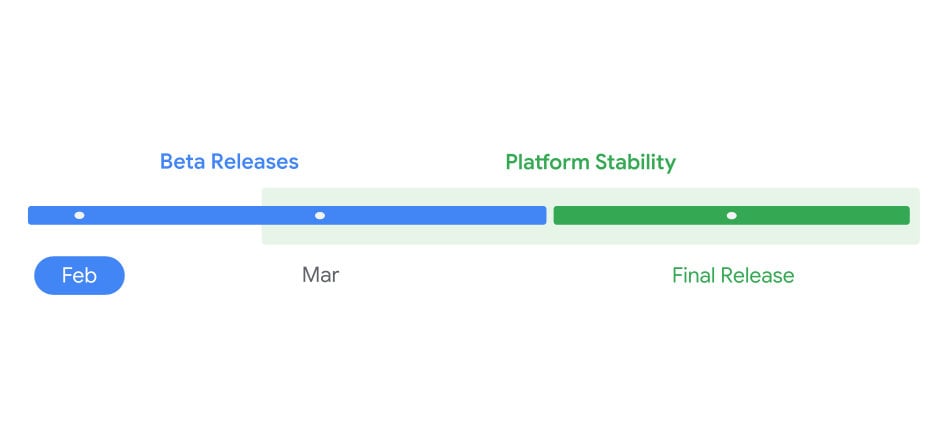
So far, Google has released two Android 17 betas. The first beta was released on February 13, and the second beta arrived on February 26. And now, it appears the third beta could drop anytime soon. Google will continue to release beta builds to further refine the software until it reaches a stable state for a wider rollout.

According to the official timeline, Google may release the stable Android 17 in June 2026, while other brands would require additional time to fine-tune their skin based on the latest Android OS and add new features. Those third-party brands would likely begin rolling out a stable Android 17 update in Q3 2026.

We’ll keep posting fresh updates in the Android 17 section on Gizmochina. Remember to visit it regularly to stay up-to-date with the latest developments. Alternative, you can join our Telegram channel to get instant notifications about software updates, along with the biggest tech headlines.

The post Android 17 beta is available for these devices: Complete list appeared first on Gizmochina.

Nothing OS 4.1 update: Eligible devices, release timeline, and new features

25 March 2026 at 16:06
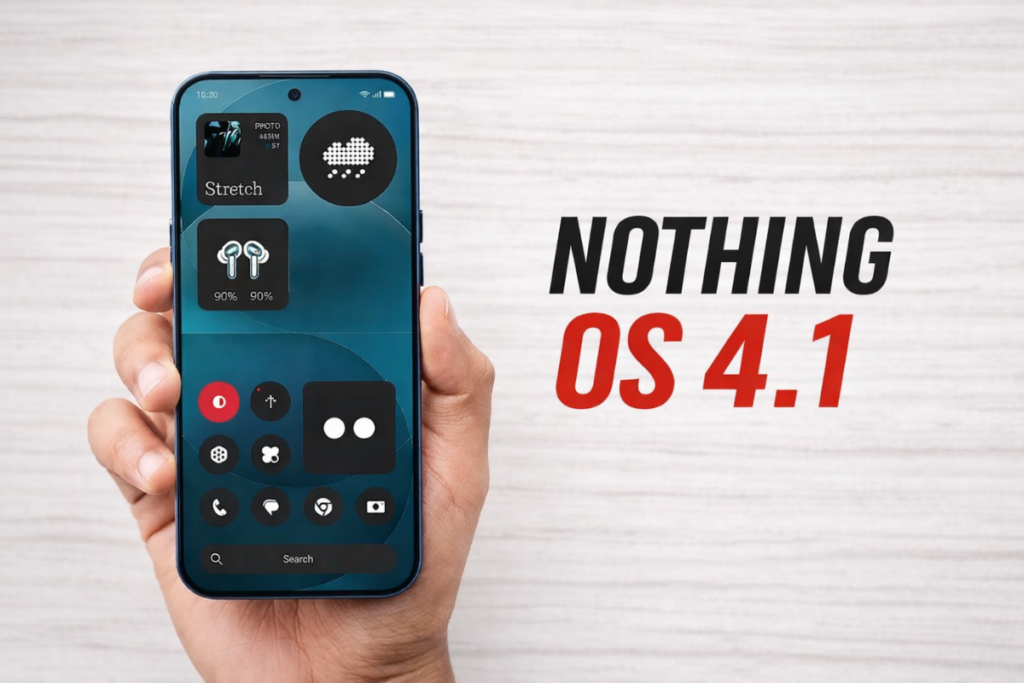
Nothing OS 4.1
Nothing OS 4.1

While Nothing OS 3.1 remained exclusive to the Phone (3a) series, Nothing OS 4.1 is officially confirmed to reach older smartphones. It’s an incremental upgrade built on Android 16, but it does include some significant upgrades focusing on AI, wellness, and real-time information.

If you’re rocking a Nothing phone, you may be waiting for the Nothing OS 4.1 update. So, here’s everything you need to know about it, including the list of eligible devices, release timeline, and major changes.

Nothing OS 4.1 update: List of eligible devices

The Nothing Phone (4a) and Phone (4a) Pro come with Nothing OS 4.1 skin out of the box. For other devices, the company hasn’t yet confirmed eligibility for the update. However, it’s safe to say all Nothing phones running Android 16 will be upgraded to Nothing OS 4.1, since the latest software is an iterative upgrade built on the same Android OS. 

  • Nothing Phone (3)
  • Nothing Phone (3a)
  • Nothing Phone (3a) Lite
  • Nothing Phone (3a) Pro
  • Nothing Phone (2)
  • Nothing Phone (2a)
  • Nothing Phone (2a) Plus
  • CMF Phone 2 Pro
  • CMF Phone 1

We’ll update the list when Nothing publishes an official list.

Nothing OS 4.1 rollout schedule

Nothing hasn’t published a rollout schedule for Nothing OS 4.1 yet, and we’re not expecting that either. The company will likely start sending the update directly to eligible devices.

The initial phase would likely cover the Nothing Phone (3) and Nothing Phone (3a) series, which could begin later this month or early April. Remaining devices should receive the update by May 2026.

Related: Nothing phones eligible for Android 17 (Nothing OS 5.0) update

Nothing OS 4.1: New features and major upgrades

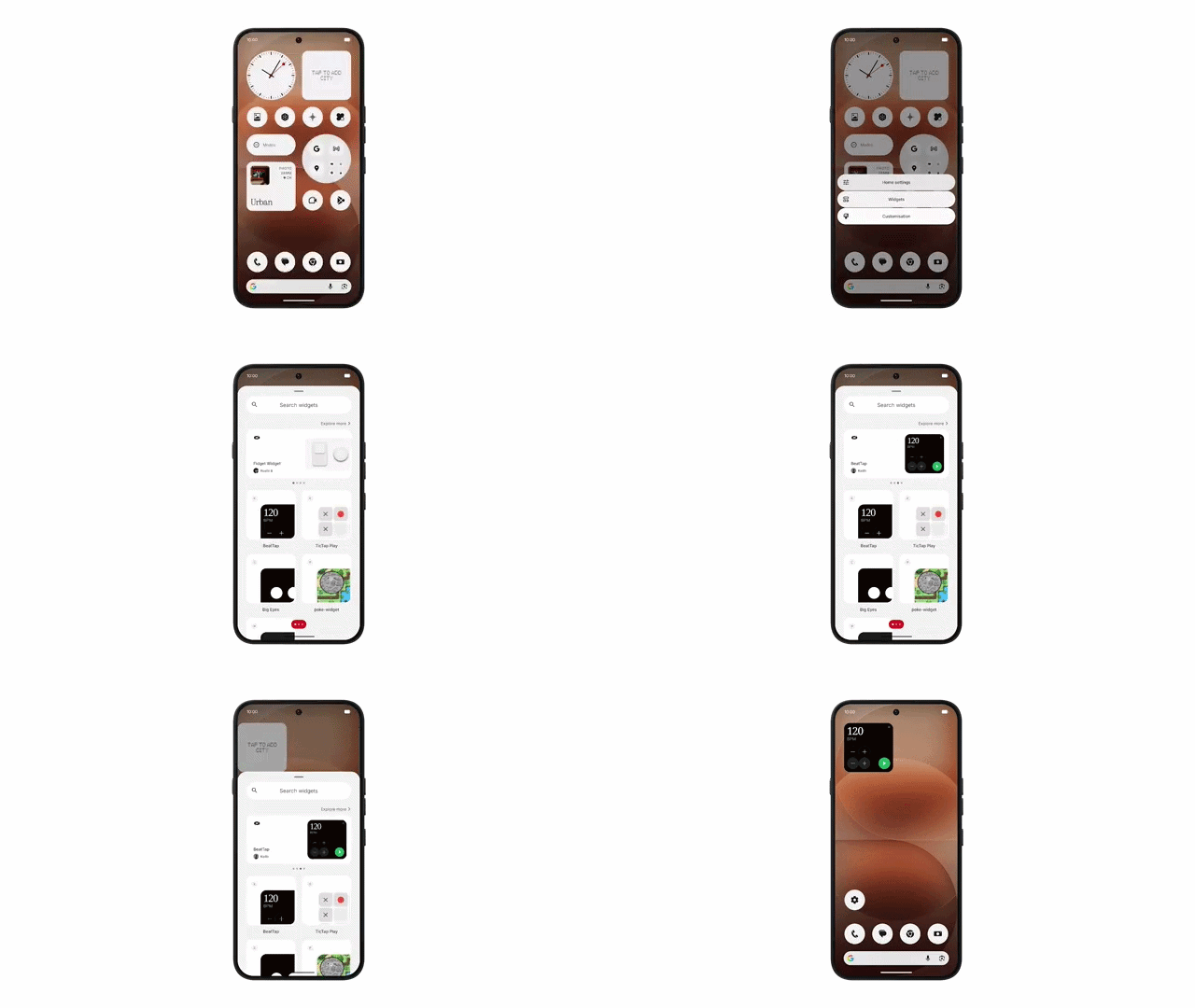
1. New widgets

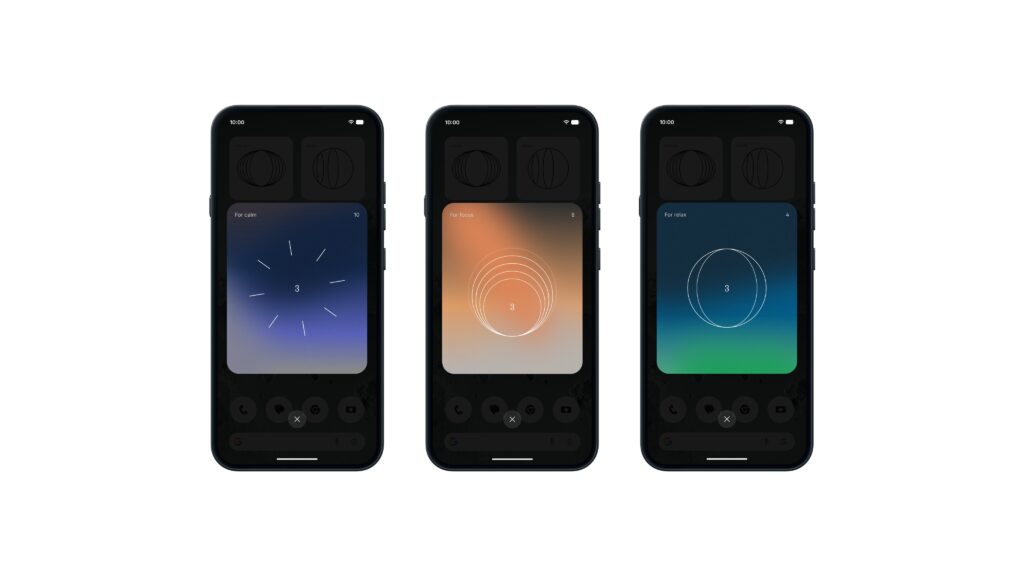
Nothing OS 4.1 adds three new widgets, officially termed Breathing Break widgets. They offer simple breathing exercises, designed to help you reset during the day.

Breathing Break Widgets - Nothing OS 4.1

The new widgets are available in the widget library and can be easily added to the home screen. When you tap a widget, it starts a timer and asks you to perform inhaling and exhaling exercises.

Essential App Drawer - Nothing OS 4.1

Another meaningful change is that the Essential Apps section in the widget drawer now highlights recommended apps, which you can add to your home screen instantly.

2. Lock screen becomes more customizable

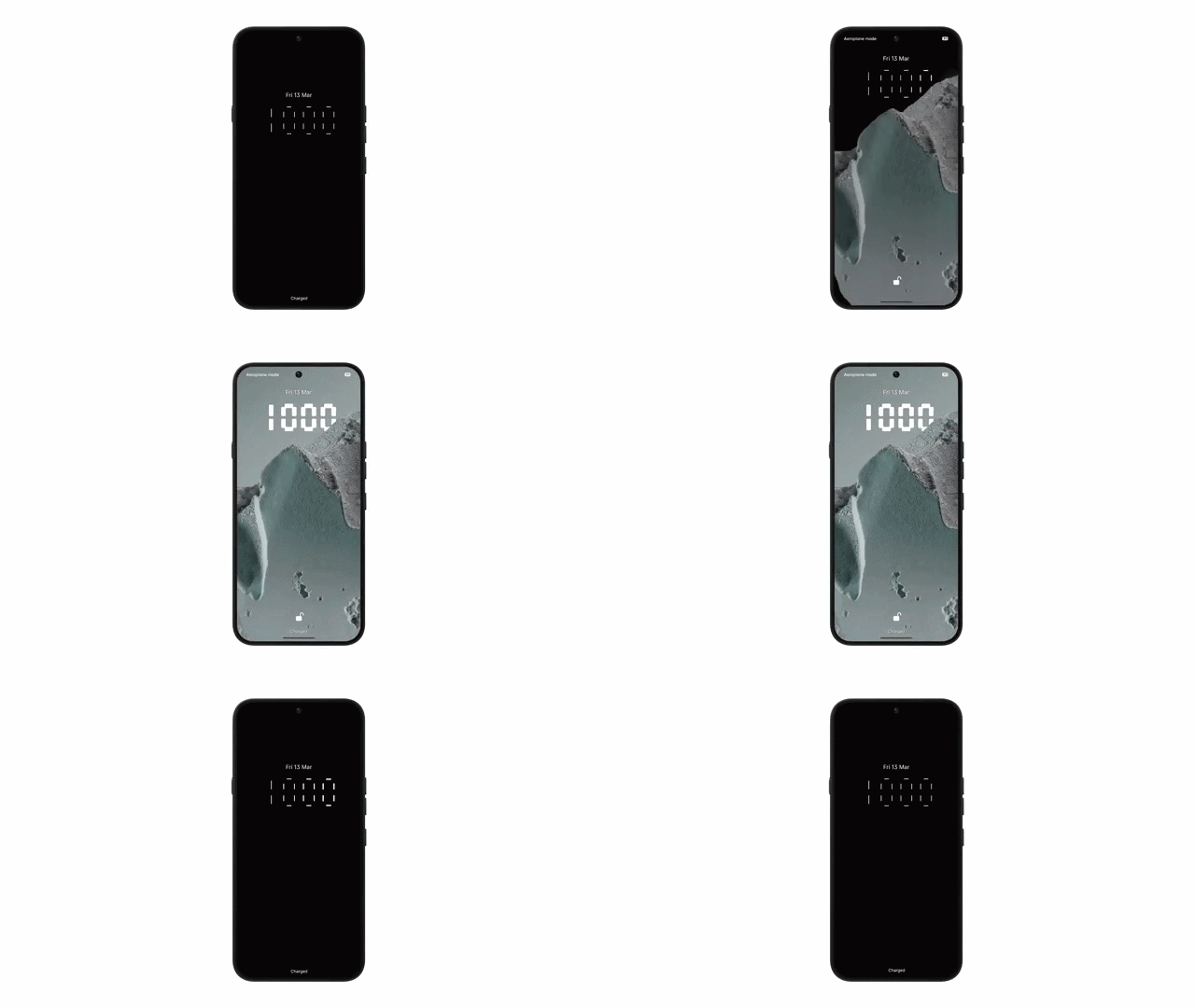
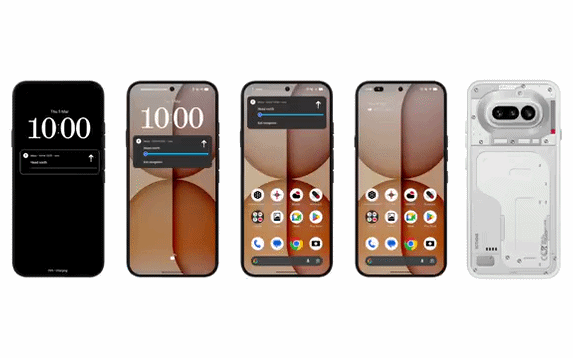
Nothing OS 4.1 introduces a new clock face from Phone (3a) Community Edition. It features an exclusive typeface style and a unique waking-up animation.

Lock screen - Nothing OS 4.1

The update also adds Depth Effect, which layers the lock screen clock behind the main subject of your wallpaper, creating a 3D depth effect. Furthermore, you can adjust the clock size and alignment to create a more personalised layout.

3. AI Eraser

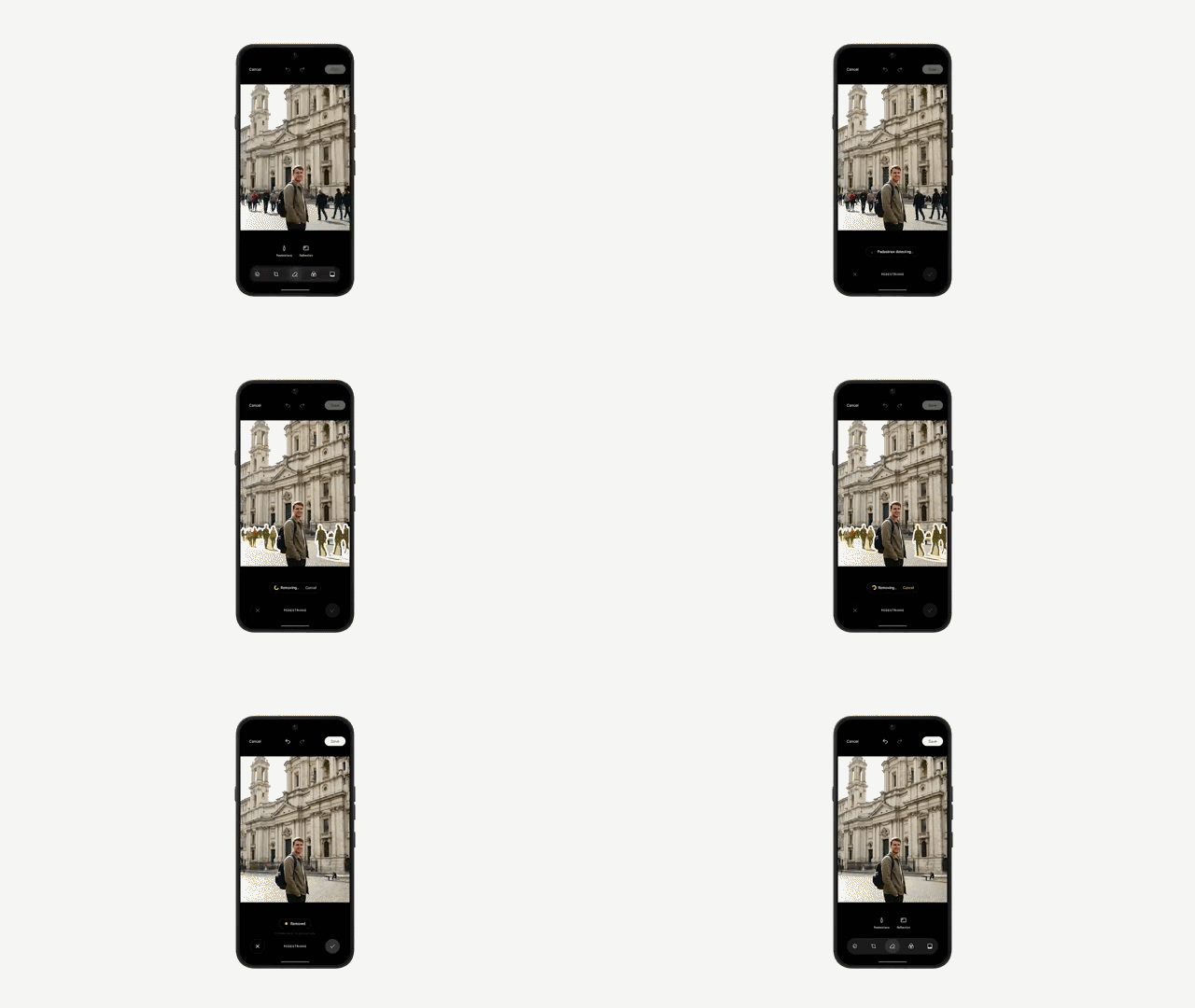
Nothing finally adds the “AI Eraser” feature in the native Gallery app. The feature intelligently detects bystanders and reflections, and also lets you manually select areas to remove.

AI Eraser - Nothing OS 4.1

Nothing says users’ data stays private with no cloud processing, though this feature removes the Ultra XDR effect. That also means you don’t need an active internet connection to use AI Eraser.

4. Live Updates with Glyph Bar

Live Updates in Nothing OS 4.1 keep real-time updates visible across the Always-On Display, Status Bar, Lock Screen, and Notifications. This is a small but useful change that further reduces the time to check the progress of an ongoing activity. The Live Updates feature now also works with Glyph Bar.

Live updates with Glyph Bar - Nothing OS 4.1

5. Camera and other changes

Nothing OS 4.1 adds a new Cricket preset for RCB fans, which shows a Nothing x RCB watermark. The brand is also the title sponsor of the IPL team.

The update also adds support for Playground Sync, allowing users to import photo presets from Nothing Playground in just a few taps. There’s also a new power-saving recording feature, which automatically lowers the screen brightness during video recording to save battery.

We’ll keep an eye on the latest developments around Nothing OS 4.1 and post them in the Nothing section. You can visit the page regularly to get the latest updates. Or, join our Telegram channel to get notified whenever we post such stories.

The post Nothing OS 4.1 update: Eligible devices, release timeline, and new features appeared first on Gizmochina.
Before yesterdayMain stream

Goodbye MIUI: Xiaomi officially pulls the plug on updates forever

25 March 2026 at 10:25
Xiaomi MIUI Discontinuation

Xiaomi has officially pulled the plug on MIUI, which was the company’s starting point and later became one of the most popular Android skins in the world, with more than 500 million monthly active users at its peak. Following the HyperOS release, Xiaomi upgraded millions of its devices to the new OS, while many were added to the end-of-life (EOL) list.

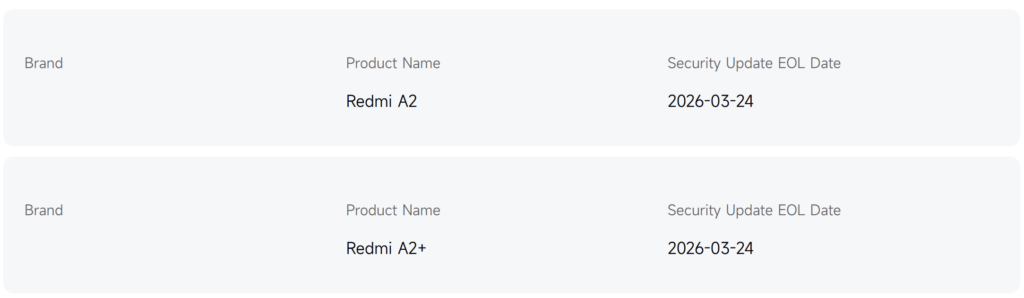
However, two devices continued to receive MIUI updates even in 2026. We’re talking about the Redmi A2 and Redmi A2+. Both devices received Android 13 as their major OS upgrade, but continued to receive security patches and minor updates. The last update for them arrived in December with the firmware version V14.0.44.0.TGOMIXM, although the official website mentions EOL on March 24, 2026.

Redmi A2 EOL date

That day has arrived for the last MIUI-running devices, and they’re now officially retiring from all kinds of software updates. That also leads to a complete discontinuation of the MIUI legacy, which initially began as a custom ROM project for third‑party Android phones.

How MIUI became one of Android’s most popular skins

MIUI 15

MIUI was actually Xiaomi’s first product, released before the company launched any hardware. It was introduced in August 2010 and was based on Android 2.2 Froyo. Early MIUI builds were distributed as a custom ROM for third-party Android phones.

MIUI quickly attracted an enthusiastic community because it offered weekly beta updates, aggressive feature additions, and ports to non-Xiaomi devices. This community-first origin story helped MIUI gain a reputation as a “tinker-friendly” skin, with robust rooting and modding support compared to other OEM UIs of the time.

MIUI focused on user-visible customization rather than stock Android minimalism. Soon, MIUI started bundling its own apps for core functions such as phone, messaging, notes, music, and gallery. Xiaomi also brought in a powerful theme engine that could change icons, fonts, sounds, lock screens, and system UI elements, well before most of its competitors.

Some of the notable features that later became part of MIUI’s identity include Second Space, Dual Apps, App Lock, hidden apps, and built-in call recording. Doubling down on MIUI’s popularity, Xiaomi entered the hardware market by launching Mi-branded phones in China, and later expanded to India and other global markets.

MIUI crossed 100 million global monthly active users in 2015, 200 million in 2018, 300 million in 2019, 400 million in early 2021, and surpassed 500 million monthly active users worldwide by November 2021. At its peak, roughly 15% of the world’s population was using a Xiaomi/Redmi/Poco phone running MIUI.

Why did Xiaomi shut down MIUI?

HyperOS vs MIUI

In October 2023, Xiaomi officially announced that a new operating system, Xiaomi HyperOS, would replace MIUI. Just a few days later, Xiaomi launched the Xiaomi 14 as the company’s first phone preloaded with HyperOS. But why did Xiaomi feel the need to ditch MIUI and move to HyperOS?

Well, the decision was made for good reasons. Despite MIUI’s success, Xiaomi was finding it challenging to connect hundreds of millions of devices across 200 product categories, from smart speakers to air conditioners, and eventually cars. Back then, Xiaomi had a mix of firmware stacks, making unified development and cross-device experience difficult to implement.

The decision to switch to HyperOS wasn’t made out of the blue. The company began exploratory development in 2014 and R&D in 2017, with the aim of supporting all ecological devices and applications through an integrated system framework.

HyperOS takes MIUI experience to the next level

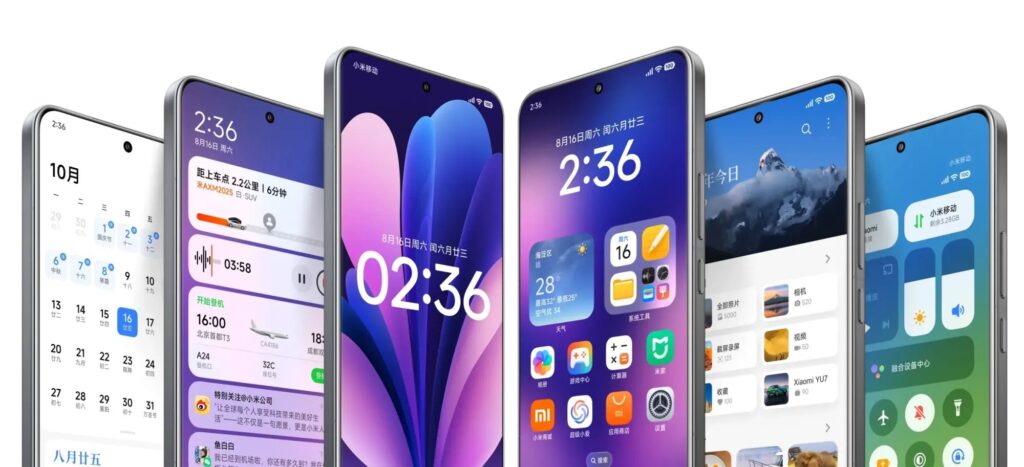
Xiaomi HyperOS is described as a human-centric operating system built on an integration of a deeply evolved Android base and Xiaomi’s in-house Vela IoT system, running atop a Linux kernel. It takes less space than MIUI and delivers better performance and a more consistent experience.

HyperOS is the pillar of Xiaomi’s “Human x Car x Home” strategy, designed to connect personal devices, smart home products, and EVs into a coordinated platform, enabling them to share context and services. One of the key elements of this new OS is “HyperConnect,” which enables real-time networking and device discovery. So, a phone can, for example, act as a key for a car, mirror its camera to a TV, or manage smart home devices without relying on a traditional setup that requires Android-plus-vendor apps.

While Xiaomi HyperOS focuses primarily on a unified OS with deeper integration among Xiaomi devices, it also offers better resource utilization, tighter security, and a consistent experience while preserving much of MIUI’s interface language.

To ensure you do not miss out on the latest HyperOS news, visit the Xiaomi section on this website regularly. Alternatively, you can join us on Telegram to get instant notifications about the latest HyperOS updates, along with the biggest tech headlines.

The post Goodbye MIUI: Xiaomi officially pulls the plug on updates forever appeared first on Gizmochina.
❌
❌