Reading view

Developer successfully ports Linux to 1994 Sega 32X — Genesis and MegaDrive expansion runs open-source OS on paltry 23MHz processors and 256KB of RAM

The adventurous developer who recently released Linux for the Atari Jaguar (1993) has brewed up a version of the open-source OS for the Sega 32X (1994). If you can’t remember the 32X, it was Sega’s mid-gen answer to early fifth-generation challengers like the Jaguar, 3DO, and Amiga CD32. Sega’s solution added some potent processing power to a mushroom-like slot in an expansion to its popular Mega Drive/Genesis. Now cakehonolulu has got it running Linux, despite facing several major hurdles.

Compared to its Genesis host, the Sega 32X was incredibly muscular. The Genesis had relied on the capable but long-in-the-tooth Motorola 68000 (7 MHz) for years, but the 32X add-on boosted that with a pair of Hitachi SuperH SH2s (SH7604) CPUs (23 MHz). It also ramped up system RAM from the base 64KB by adding 256KB of its own. Sega’s expansion offered more than just speed; the console’s color palette was ramped up from 64 to 32,000 simultaneous colors on screen, and it was powerful enough to introduce hitherto unachievable 3D graphics elements to mainstream console gaming.

As with cakehonolulu’s tale of Linux wrangling on the old Jag, the above-linked blog talks through a long list of hurdles that needed to be leapt to get the Linux kernel booted and running BusyBox. This time around, particularly steely roadblocks included: the even more constrained RAM situation, the lack of hardware synchronization primitives, the desire to get SMP working across the pair of SH2 CPUs, no direct UART access from the 32X, and scheduler bugs, among other things.

On the positive side, smoothing the development process along were access to Chilly Willy’s 32X devkit, the linuxmd project, the Krikzz FPGA-based flash cart with ROM – RAM mapping tools, and existing SH2 documentation and sample projects. Please check through the linked blog for far more technical details from cakehonolulu.
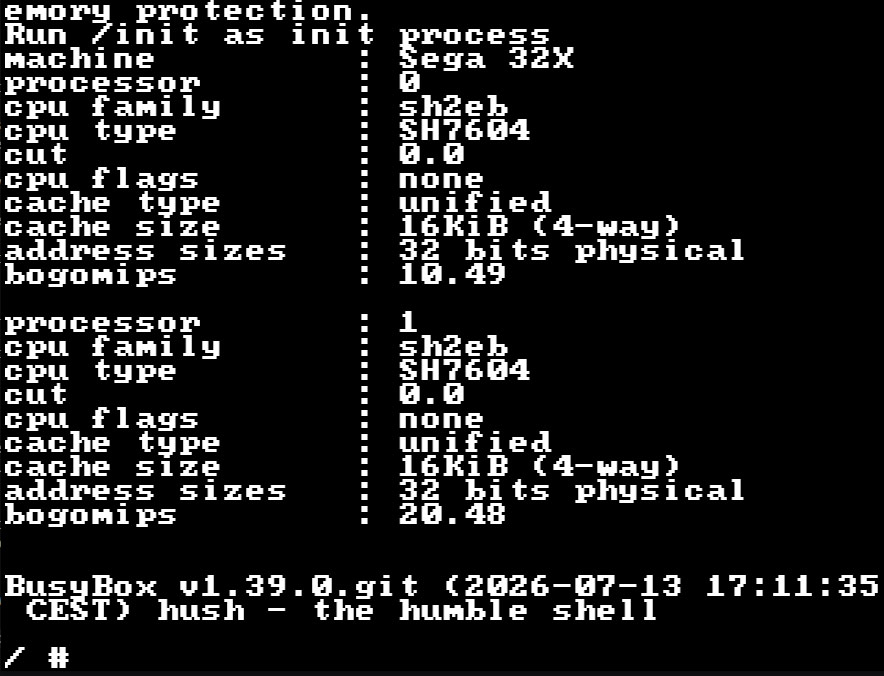
Linux now available for the Sega 32X

Linux booted with BusyBox prompt on the Sega 32X (Image credit: cakehonolulu)

As you can see, cakehonolulu was successful again. So, what’s the next stop for this adventurous dev – the Sega Saturn? Whatever the project may be, it was interesting to read that works like this are basically forming a portfolio for the Spanish dev, which they hope will help them with job hunting.
Sega Dreamcast driver fixes appear in Linux 7.2-rc3 — fabled console remains in favor while iconic computing architectures like i486 fall by the wayside

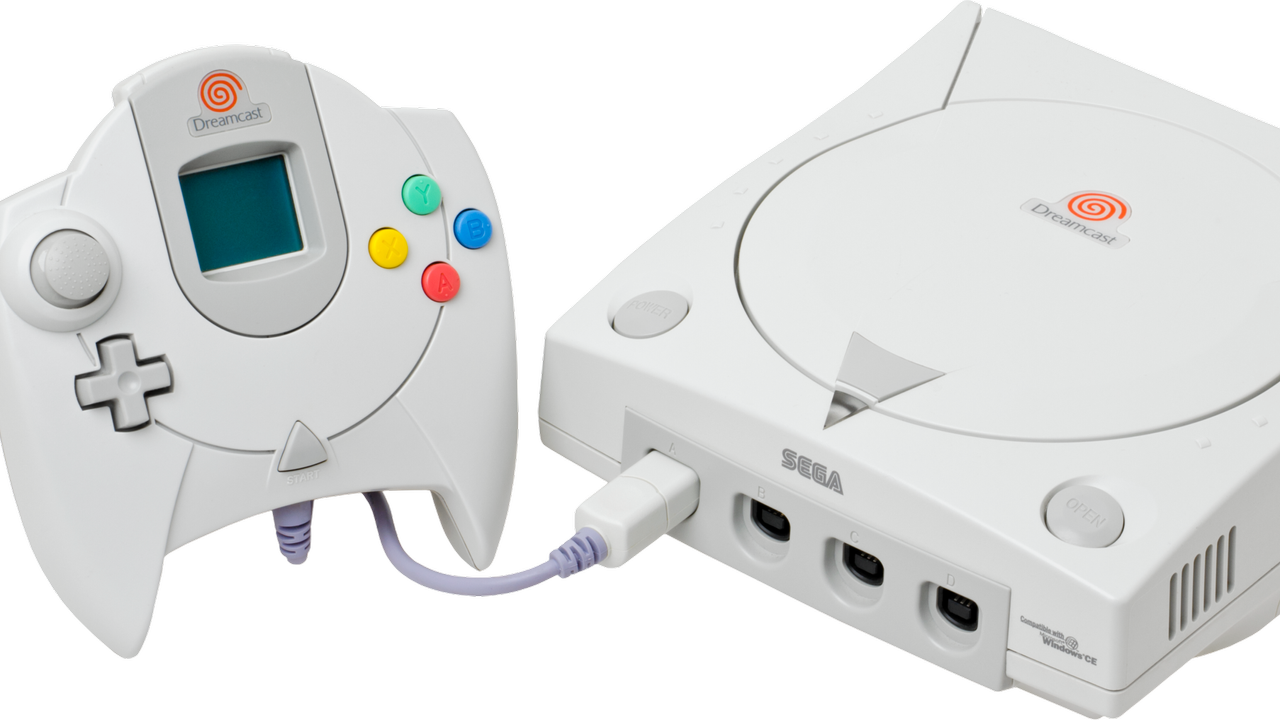
A set of updates for Sega Dreamcast hardware has been merged into the Linux 7.2-rc3 kernel this weekend. Dmitry Torokhov submitted updates addressing the legendary console’s input subsystem and Linus Torvalds merged them on Saturday. The updates even surprised Linux-focused site Phoronix, That’s probably due to context: the Dreamcast continues to enjoy support while admittedly older but real computing hardware like the i486, PowerPC 40x chips, DEC Alpha, and Itanium / IA‑64, have all been sidelined in recent times.

In brief, the updates should mean new versions of Linux will come with more stable mouse, keyboard, and joystick drivers for Dreamcast stalwarts. If you are one of the Dreamcast faithful, still satisfying your computing (and gaming) needs on the final original consumer gaming hardware from Sega, this is good news.

Reading the pull request we can see some details about the new drivers for the Dreamcast’s Maple‑bus peripherals (mouse, keyboard, controller). Specifically, there’s a “fix for a crash in Sega Dreamcast (Maple) mouse driver when opening the device, caused by missing driver data,” as well as “Fixes for Maple drivers (keyboard, mouse, joystick) to properly order setting driver data and device registration to avoid races.” In this context races refers to things happening in the wrong order to result in crashes: it’s a timing bug that’s now been quashed.

Dreamcast hangers-on will now be able to craft specialized Linux builds on CD-R for their machines. The maplemouse driver has had the now-fixed crash-inducing bug since 2017.

Phoronix also comments that Linux kernel fixes for the GD-ROM driver used by the Dreamcast and a proposal for the VMUFAT file-system driver were also seen this year.

The Sega Dreamcast launched at the end of 1998 (in Japan, and the following year in the U.S.). So, in some ways it isn’t that surprising that it is still getting Linux kernel updates when the Intel i486 (1989) has been retired from mainline support. But one might have expected stronger demand for supported Linux distributions among i486 desktop and laptop users.

Windows 95 didn’t detect installers, it ‘guessed’ based on the file name, says veteran dev — it simply checked for words like setup, install, inst, or localized equivalents

Windows 95 worked out whether a setup program had run by reading the executable's name and checking it against a short list of hard-coded words, according to Microsoft engineer and semi-official Windows historian Raymond Chen, sharing the details via his Old New Thing blog. A filename containing "setup," "install," or "inst" flagged the program as an installer, which triggered the operating system's routine for repairing system files that installers had damaged. Three non-English entries appeared on the same list, which Chen identified as his own guesses at Italian, Turkish, and Hungarian.

The full match list ran to six terms: setup, install, inst, imposta, ayarla, and felrak. Chen wrote that "install" was redundant, because any name containing it already contains "inst," and speculated that the shorter entry was added later to catch installers named along the lines of "blahinst" without anyone deleting the original. A program whose own name produced no match got a second test, with Windows 95 checking whether the word "Setup" appeared anywhere in the path to the executable. A separate live check ran after any multimedia driver was installed through an INF file, added because those drivers frequently overwrote system DLLs.

This heuristic gated a recovery mechanism Chen described in March. Installers of the period overwrote system files without checking versions, disregarding Microsoft's rule that a file should only ever be replaced by a newer one. An installer carrying Windows 3.1 copies of shared DLLs, for example, would bury the newer Windows 95 versions underneath them, and every program that relied on the current files would break.

Windows 95 kept backup copies of commonly clobbered files in a hidden C:\Windows\SYSBCKUP directory. It would then let each installer finish, check its work, and restore the correct versions where the installer had downgraded them. This safety net depended entirely on correctly guessing that an installer had run, so a setup routine with an unusual name slipped past it, while an ordinary program named something like instant.exe tripped it for nothing.

The file check was often deferred until the next boot rather than run immediately, with Chen explaining that some installers, unable to replace a file already in use, would drop back to MS-DOS, run a batch file to swap the file, and restart Windows, so the cleanup pass had to wait for the reboot to catch anything the batch file had altered.

Windows 2000 debuted a new approach

Microsoft dropped this approach in Windows 2000, which introduced Windows File Protection. That system registers for file-change notifications through Winlogon restores protected files from a cache at %WinDir%\System32\dllcache, with no filename guessing and no waiting for a setup program to complete.

Then, Windows ME shipped a comparable System File Protection, and Vista onward moved to Windows Resource Protection, which guards files using access-control lists instead. The sfc /scannow command that Windows 11 users still run to repair system files descends directly from that work, having replaced a 1995 mechanism that decided when to act by scanning filenames for the word "setup."

Save 84% on a two-year ExpressVPN subscription, offering four additional months for free — upgrade your privacy for under $70 with no-logs access to servers in 105 countries worldwide

If you're browsing the web, a VPN is one of the fastest ways to upgrade your privacy. Luckily, the cost of a two-year subscription to one of the biggest VPN providers, ExpressVPN, is now down to only $69.72 right now. You'll be saving $378 in total if you buy a sub this way, compared to a rolling monthly sub, and you'll get an extra four months added onto your plan for free, too.

Check out this deal at ExpressVPN

VPN pricing is a little unorthodox, and we see deals like these appear all the time, so it's important to point out where the value really lies here. I spent a long time paying month by month for a VPN subscription, not realizing how much money I was actually spending by choosing a rolling, 30-day sub over locking in for a longer period. The $69.72 cost means that you're paying the equivalent of just $2.49 a month for the 28 months of access you're gaining here, compared to $15.99 a month for the 30-day access.

This deal for ExpressVPN's Basic plan unlocks a solution that'll protect 10 devices simultaneously with the same account. You can use it to keep your identity safe while you browsing, but if you're still unsure, new customers can take advantage of ExpressVPN's 30-day money-back guarantee. If you're unhappy, you can ask for a full refund within those first 30 days, giving you enough time to fully test the service to see if it matches up to your expectations.

This massive discount on a 2-year ExpressVPN subscription drops the price by 84%, with an extra four months of subscription thrown in for free. It comes with a 30-day money-back guarantee for new customers.View Deal

ExpressVPN is a no-logs provider, meaning it can't give up your data while you're using it, as it doesn't track or store any data about its users' connections. This is regularly audited, with the last audit in 2025 by KMPG confirming "reasonable assurance" of its systems and policies. This is real peace of mind for users: you're free to use the web how you want.

It also gives you a shield of privacy that your regular ISP just can't. A VPN sub like this means you can shop online or browse the web without trackers monitoring where you're from via your IP address. Your location stays hidden, obfuscated through the 105 different countries that ExpressVPN hosts servers, with 24 different server locations in the U.S. alone.

Don't underestimate how important that privacy is in the modern world. Every page you're visiting leaves a trace, whether it's a ping in a server log or a tracker on-page, giving the site owner data to build a profile on who you are, but using a VPN can stop this data from being useful. Likewise, a VPN connection can help you to connect as if you're from a certain location, which is particularly useful if you're traveling abroad and want to be able to access your home streaming services. It's also a good idea to use a VPN as a way to protect yourself if you're accessing the internet from a public WiFi network, where malicious actors could otherwise be snooping on your connection.

Using ExpressVPN, the encryption between your device and its servers is encrypted using industry-standard AES-256 encryption, as well as post-quantum encryption techniques for the initial handshake process. This can stop your data from being intercepted while you're accessing the web. If you lose your connection, features like ExpressVPN's kill switch will stop the data from leaking out, blocking any access until you reconnect. The Basic plan also includes a private email relay service to give you 10 anonymous email aliases to use for registering online, along with basic ad and malicious site protection for your browser.

This $69.72 price tag for the ExpressVPN Basic plan is a good deal for a 28-month privacy upgrade. Yes, VPN pricing can seem confusing, but by locking in for that period, you're getting online privacy protection for the equivalent of just $2.49 a month. You can always give it a go and, if you don't like it, request a refund using ExpressVPN's 30-day money-back guarantee.

If you're looking for more savings, check out our Best PC Hardware deals for a range of products, or dive deeper into our specialized SSD and Storage Deals, Hard Drive Deals, Gaming Monitor Deals, Graphics Card Deals, Gaming Chair, Best Wi-Fi Routers, Best Motherboard, or CPU Deals pages.

You can also join the Tom's Hardware deals Discord for up-to-the-minute hardware deals.

❌