
 Login
Login
Lenovo to Power Esports World Cup 2026 as a Founding Partner
Lenovo announced today that it will be the official power behind the 2026 edition of the Esports World Cup (EWC) in Paris, France. Recognized as the largest esports event globally, the Esports Foundation (EF) has partnered with Lenovo to provide Lenovo Legion gaming desktop PCs, gaming monitors, and everything else players need. All esports athletes will be using their Legion Tower 7i and Tower 5i desktop PCs. This event will take place from July 6 to August 23, featuring around 200 teams and approximately 2,000 esports players competing for the top spot across 24 games and 25 tournaments, with a record-breaking prize pool of over $75 million. New this year, athletes will also be using Legion monitors, not just competing on Legion desktops.
This isn't Lenovo's first involvement with the EWC. In 2025, the company's debut at the event saw over 2,000 Legion machines in use on the tournament floor, in broadcast booths, at creator activations, and throughout the festival grounds. The Legion logo was prominently displayed across all 24 games that year, with the broadcast reaching an estimated 750 million viewers worldwide. Beyond the competition hardware, this partnership has inspired Lenovo to innovate. At CES 2026 earlier this year, the company unveiled the Legion Pro Rollable Concept—a gaming laptop featuring a 16-inch rollable PureSight OLED screen that can expand to 21.5 inches or even a full 24 inches, depending on how much space esports athletes need for training on the go. EWC attendees in Paris will have the opportunity to try it out themselves at the Legion booth.
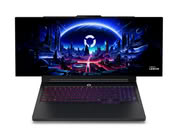
This isn't Lenovo's first involvement with the EWC. In 2025, the company's debut at the event saw over 2,000 Legion machines in use on the tournament floor, in broadcast booths, at creator activations, and throughout the festival grounds. The Legion logo was prominently displayed across all 24 games that year, with the broadcast reaching an estimated 750 million viewers worldwide. Beyond the competition hardware, this partnership has inspired Lenovo to innovate. At CES 2026 earlier this year, the company unveiled the Legion Pro Rollable Concept—a gaming laptop featuring a 16-inch rollable PureSight OLED screen that can expand to 21.5 inches or even a full 24 inches, depending on how much space esports athletes need for training on the go. EWC attendees in Paris will have the opportunity to try it out themselves at the Legion booth.


