
 Login
Login
One UI 8.5 Group Sharing has link invites, family album and more
Samsung pushed a new update to the Group Sharing app following the rollout of the latest One UI 8.5 Beta update. The latest version introduces three major changes that actually impact how you utilize this Galaxy application.
One UI 8.5 makes sharing with family and close circles faster, cleaner, and far less annoying than before. Here is what is new, and why it fits neatly into the broader Samsung Account and SmartThings experience.
Added invite function via link
Until now, adding someone to a Group Sharing setup felt a bit too manual. You needed the right account, the right device, and a bit of patience.
One UI 8.5 fixes that with link-based invites. You can now generate an invite link and share it like any normal URL.
Add a family share album
Samsung is also expanding Group Sharing into photos, and this one feels overdue. One UI 8.5 adds proper family shared albums that sync across members.
These albums live inside Samsung Gallery and tie directly to your Samsung Account. Photos added by one person show up for everyone in the group.
Child account support
The third piece of the update focuses on child account integration. Samsung is tightening how child Samsung Accounts work inside Group Sharing.
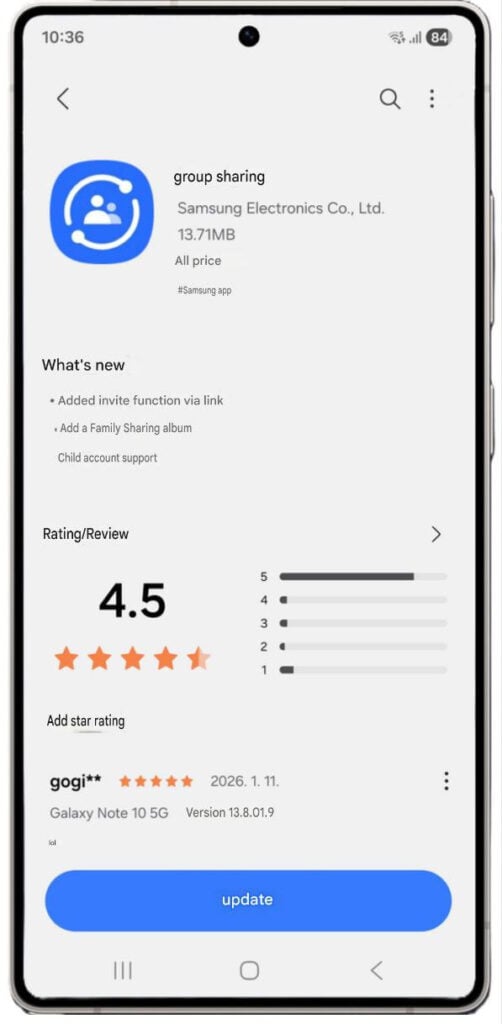
Source – Android-X (Samsung Members Korea)
That said, One UI 8.5 is not just a flashy redesign. It is a quality-of-life release. For Galaxy users who actually share devices, homes, and memories, that makes all the difference.
You may like:
The post One UI 8.5 Group Sharing has link invites, family album and more appeared first on Sammy Fans.
