
 Login
Login
Samsung loads Camera Assistant with powerful new controls – Check all features
Samsung has pushed a new update for Camera Assistant with version 4.5.00.19. This update adds a bunch of new camera features and improvements. It shows that Samsung wants to give users better control and better photo and video quality.
According to the changelog of the update, this update brings simple but powerful tools to enhance Galaxy Photography. Let’s explore the changes.
New Features of Camera Assistant
The fresh update brings Touch AF/AE in Pro Video mode. This lets users tap on the screen to change focus and brightness while recording a video. Focus peaking is now available in Pro modes too. This helps users easily see what is sharp and in focus. There are also new settings like speed and sensitivity to control how fast and how smoothly the camera focuses.
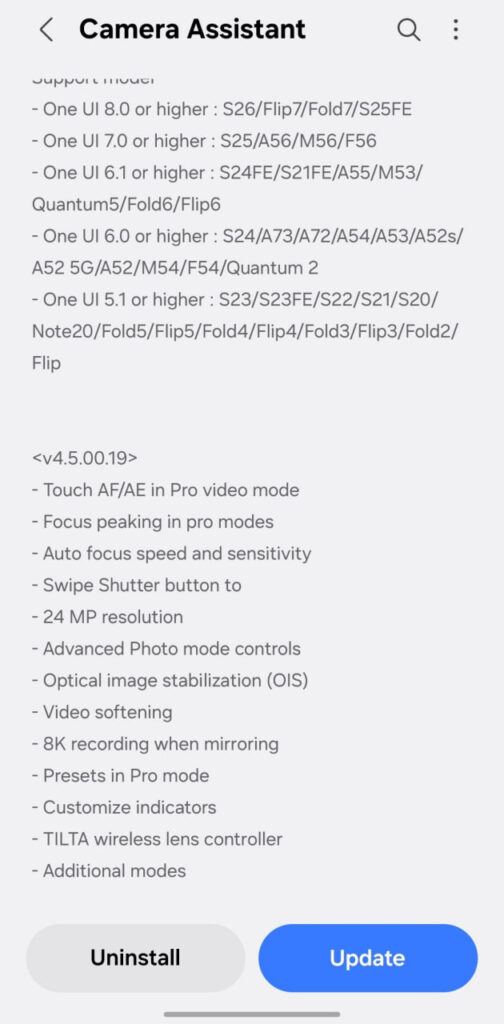
Image via TarunVats
Also, the update adds a 24MP photo option. This gives clear and detailed pictures without making file sizes too large. There are also more controls in Photo Mode for users who like to adjust settings manually. Optical Image Stabilization (OIS) has been improved to reduce shaking in photos and videos. A new swipe gesture on the shutter button makes taking pictures faster and easier.
For video recording, Samsung has added a video softening option. This can make faces look smoother. The app also supports 8K recording when mirroring. Users can now save their favorite settings as presets in Pro Mode. On-screen indicators can also be customized to make the camera screen look cleaner.
There is also support for TILTA wireless lens controllers, which may help professional users. Aside from this, Samsung has also added more modes and improvements to make camera controls and taking photos easier.
Samsung is going to launch the Galaxy S26 series this week. It seems like the company is making the camera ready for this series with new features. Stay tuned.

The post Samsung loads Camera Assistant with powerful new controls – Check all features appeared first on Sammy Fans.
