Nothing has been impressive with software rollouts so far. It was one of the first brands to conclude the Android 16 rollout, and now the company may already be working on the next major upgrade, based on Android 17. While most of the details are under wraps, we already know which Nothing phones are eligible for the Android 17 update.
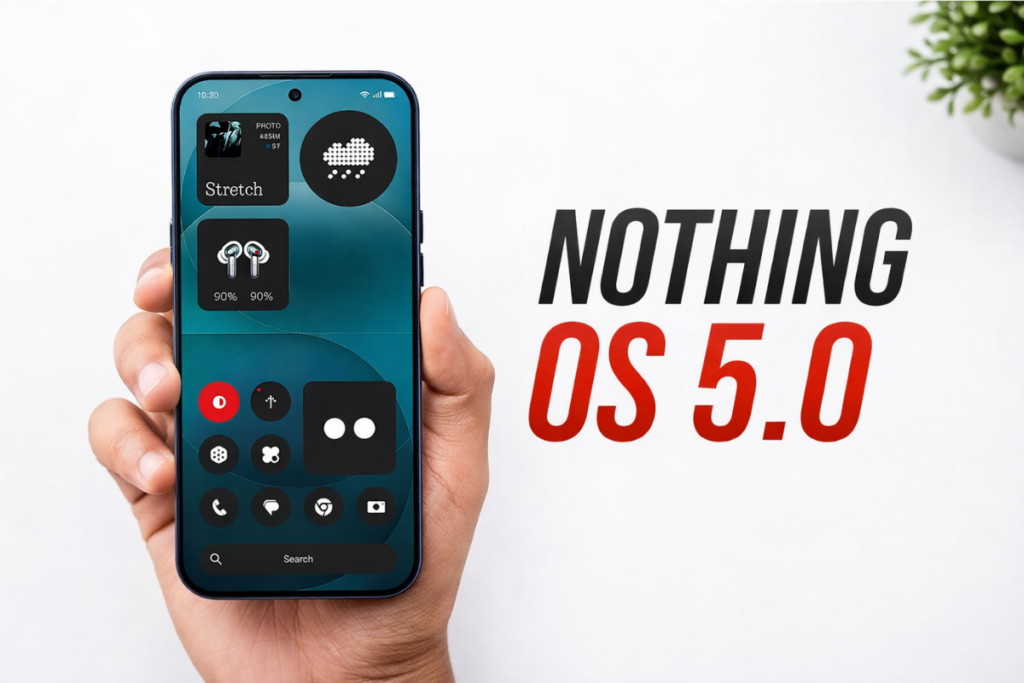
The Android 17 update for Nothing phones will likely come with the Nothing OS 5.0 skin at the top, based on the company’s past naming scheme. Android 15 arrived with Nothing OS 3.0, and then Android 16 arrived last year with Nothing OS 4.0, so the next version, based on Android 17, is likely to come with Nothing OS 5.0.
Review the list of eligible devices for the Android 17 upgrade to see if yours is included.
Nothing Android 17 update: Eligible devices list
Nothing Phone (4a)
Nothing Phone (4a) Pro
Nothing Phone (3)
Nothing Phone (3a)
Nothing Phone (3a) Lite
Nothing Phone (3a) Pro
Nothing Phone (2a)
Nothing Phone (2a) Plus
Nothing CMF Phone 2 Pro
While this is still an unofficial list, it wouldn’t differ from the official one when announced. That’s because it’s based on the official software update policy. If your Nothing phone is on the list, it’s guaranteed to receive the Android 17 update when the rollout begins.
Only three phones are missing from the list: the original Nothing Phone (1), Nothing Phone (2), and the budget-friendly CMF Phone 1. They have already received the promised number of Android OS updates, and therefore have run out of OS updates.
If you’re still using an outdated Nothing phone, now might be the right time to upgrade to a newer model with longer software support. The Nothing Phone (4a) and Phone (4a) Pro have just been released, promising OS updates until Android 19. Or, you can get the flagship Phone (3) for an extra major upgrade.
While Nothing hasn’t revealed anything about Android 17 yet, Google has already released a few public betas, offering a sneak peek at the upcoming features and changes. You can check them out on this page. The stable version is expected to go live for Google Pixels in June, while other brands, including Nothing, will take additional time to fine-tune the software and add more features. For Nothing phones, we can expect the Android 17 rollout to kick off in Q4 2026.
We’ll keep an eye on the latest developments around Android 17 and post them in the Nothing section. You can visit the page regularly to get the latest updates. Or, join our Telegram channel to get notified whenever we post such stories.
Xiaomi is already rolling out the stable version of HyperOS 3.1 in China, and now the focus is shifting to the global market as the company has just begun rolling out the HyperOS 3.1 global beta for the initial batch of devices.
The initial Mi Pilot rollout of HyperOS 3.1 is currently restricted to the latest flagship smartphones, as reported by Xiaomi Time. Here’s the list of those devices and the firmware versions:
Xiaomi 17 Ultra (EEA): OS3.0.301.3.WPAEUXM
Xiaomi 17 (Global): OS3.0.300.7.WPCMIXM
The list is too short for now, as the global beta rollout has just gone live. However, it will keep getting bigger as Xiaomi pushes the beta to more devices over the coming days and weeks.
If your device is on the list and you belong to a beta-supported region, sign up to become a beta tester to get early access to the latest features and upgrades. We’ve included all the steps towards the end of the article.
Unlike HyperOS 3.0, there’s no Android 15 version of HyperOS 3.1. That means it’ll only reach Xiaomi, Redmi, and POCO devices that are already running Android 16. You can check the complete list of eligible devices and new features here.
How to sign up to become a HyperOS Mi Pilot tester?
Keep in mind that beta builds are prone to having bugs and unfinished features. Hence, it’s best to back up your important data before installing a beta build. The best route is to install them on a secondary device.
Step 1: Download the Mi Community app and create an account.
Step 2: Make sure the region is set to “Global”. To change the current region, tap ME in the bottom-right corner and go to Set up > Change region.
Step 3: Select the beta program available for your device and click the Apply button.
Step 4: Tap the Answer button and submit your responses. Aim for at least 60 points for greater chances of being selected for the beta program.
Step 5: Click Apply and then Apply again to submit your application.
Step 6: Wait for the approval (it may take up to seven days). Go to the Mi Community app > ME > Beta testing to check the status.
Step 7: Once your application is approved, go to Settings > About phone and tap the HyperOS version to check for updates.
To ensure you don’t miss out on the latest HyperOS stories, remember to visit the Xiaomi section on this website regularly. Alternatively, you can join us on Telegram to get instant notifications about the latest HyperOS updates, along with the biggest tech headlines.
Google has made several major changes to the Android development cycle in recent years, and as a result, newer versions now arrive a lot earlier than before. The upcoming Android 17 has already entered the development phase. In fact, Google has already released two public betas, giving us a sneak peek at the upcoming features and changes.
What’s the dessert name for Android 17?
The tech giant doesn’t name Android versions after desserts anymore. It abandoned that tradition with Android 10, sticking to only the version number for future releases.
However, the internal team still uses a dessert codename. Android 16 has a dessert name, “Baklava”, and for the upcoming Android 17, Google has chosen “Cinnamon Bun” as the dessert codename.
A cinnamon bun is a sweet, spiral-shaped pastry made with rolled dough and a mixture of butter, sugar, and ground cinnamon. It’s quite popular in northern Europe and North America.
Android 17: Upcoming features and changes
Bubbles
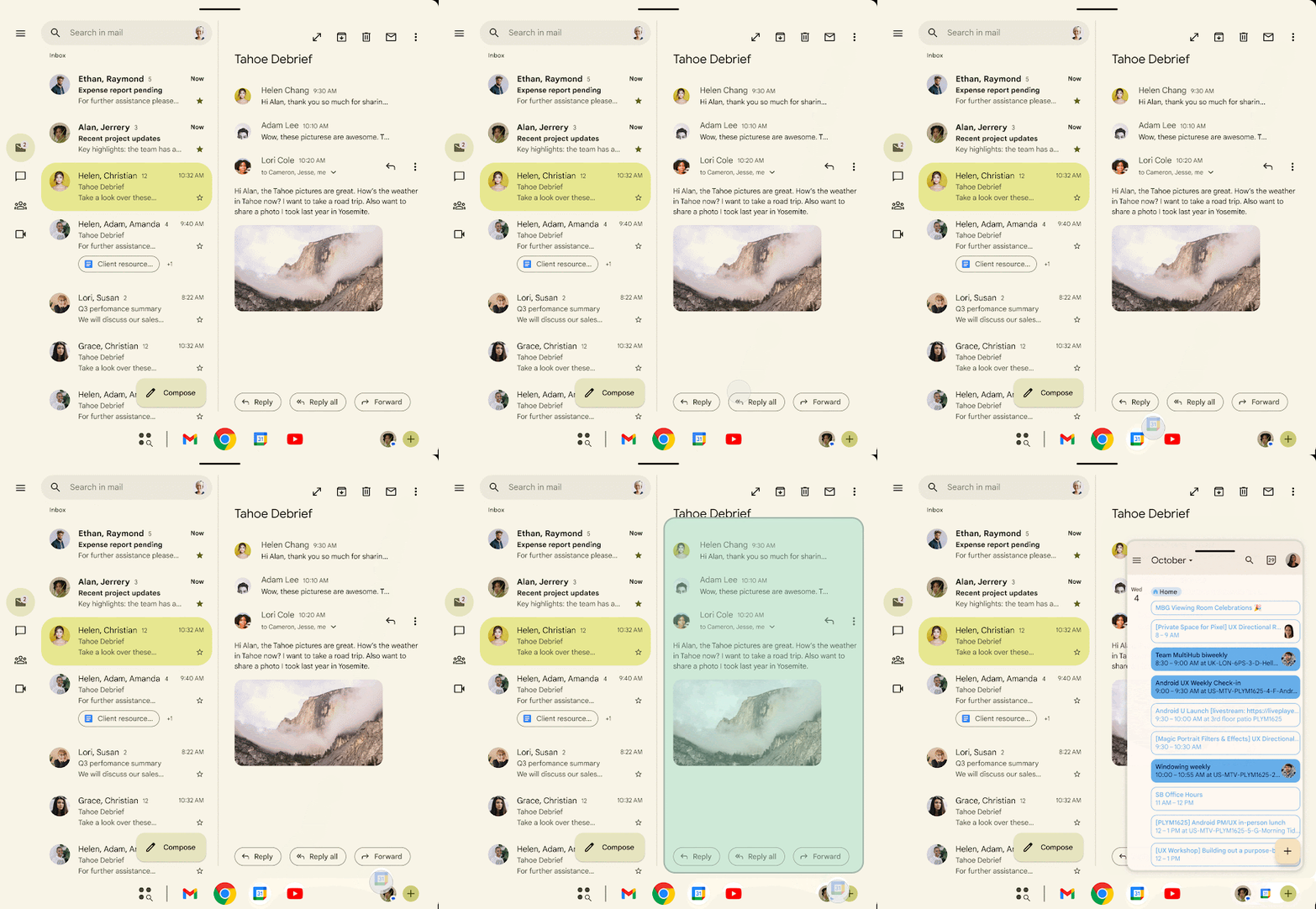
The bubble feature has been around here for quite a few years now, but that’s limited to conversation notifications. Google is now working on implementing it for all apps. The new Bubbles feature was spotted in Android 17 Beta 2, allowing users to run multiple floating apps without ever having to leave the full-screen app.
Bubbles in Android 17
Once activated, users can enable a floating bubble for an app by tapping and holding the icon and then choosing “Bubble” from the context menu. On large-screen devices, a dedicated bubble bar appears in the taskbar, which makes it easy to organize bubbles and switch between them.
Limited Connects access
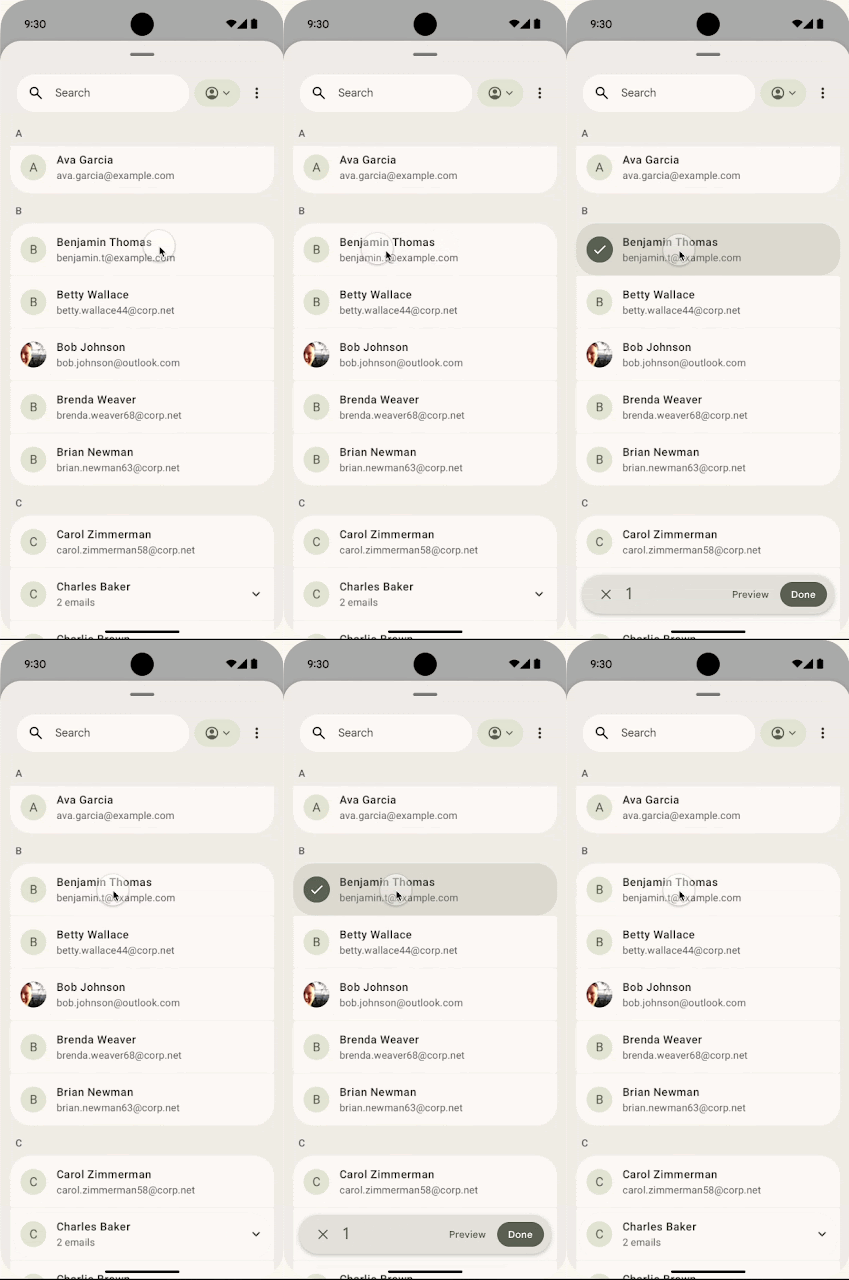
Android 17 introduces a new system-level Contacts Picker application, which will allow users to select one or more contacts to share with an app at a time. What makes it more privacy-focused is that apps won’t be able to track any changes you make to a contact’s information.
Contacts Picker in Android 17
Google says Contact Picker grants temporary, session-based read access to the specific data fields selected by the user. That means the app will be required to ask for permissions again after the session timeout. The new feature also allows selections from the device’s personal or work profiles.
Seamless task continuity
Android 17 could bring the awaited “Task Continuity” feature, which will allow users to sync notifications, share files, and continue apps across their linked Android devices. Essentially, you will be able to transfer an app’s current state from one Android device to another.
As explained by Android Authority, this feature will show a suggestion on the taskbar representing the running app from another device. When you click this suggestion, the system initiates the handoff and passes the remote app’s state.
Google officially announced the new Handoff API in Android 17 Beta 2, which allows developers to specify the application state to resume on another Android device. Once enabled, the Android system displays a handoff suggestion in the launcher of the user’s nearby devices. This feature is designed to offer seamless task continuity across linked Android devices.
Redesigned privacy indicators
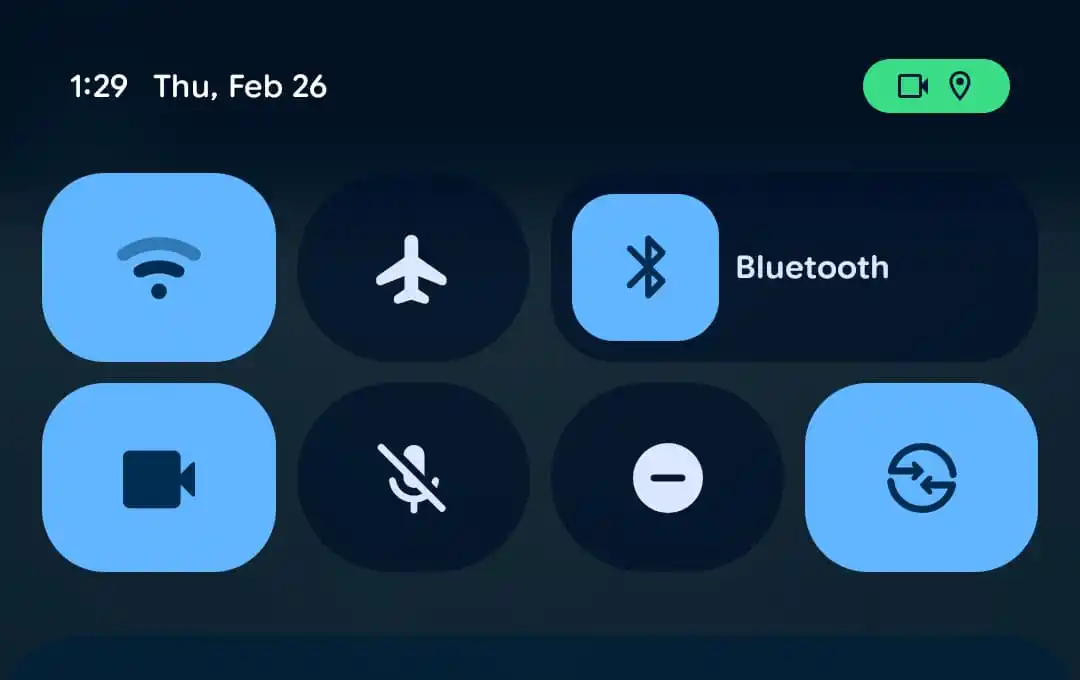
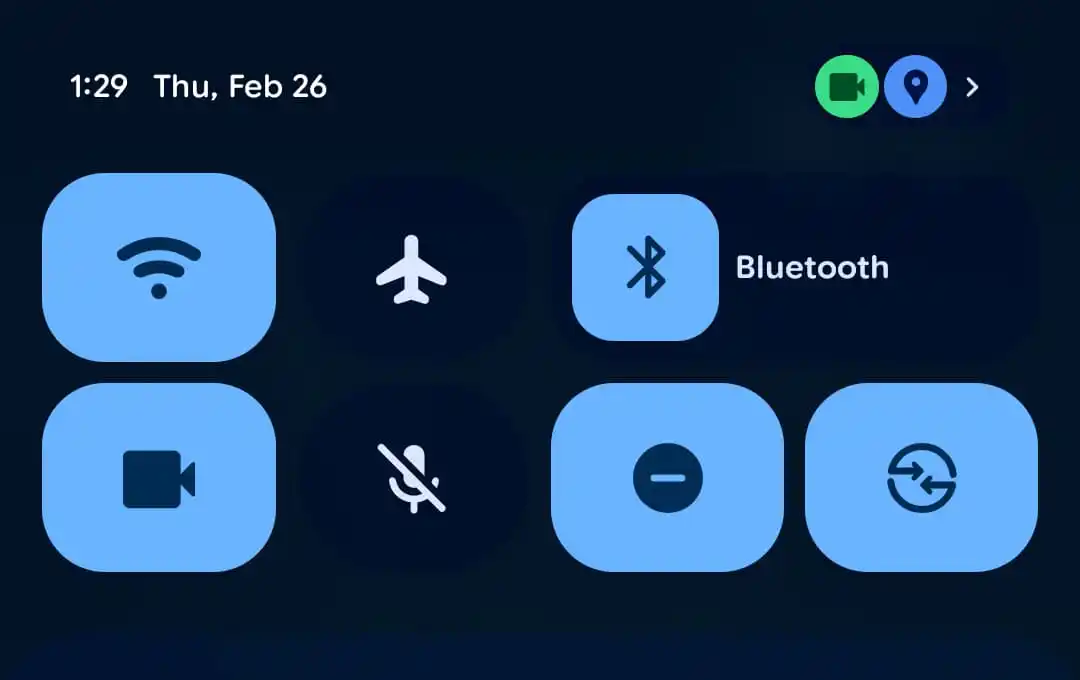
Android 17 Beta 2 introduced changes to privacy indicators, now featuring separate circles and multiple colors. Earlier, the privacy indicators were shown in a pill-shaped green enclosure. The icons now appear in separate circles, and the location icon has a blue circle instead of green.
Privacy indicators (old vs new)
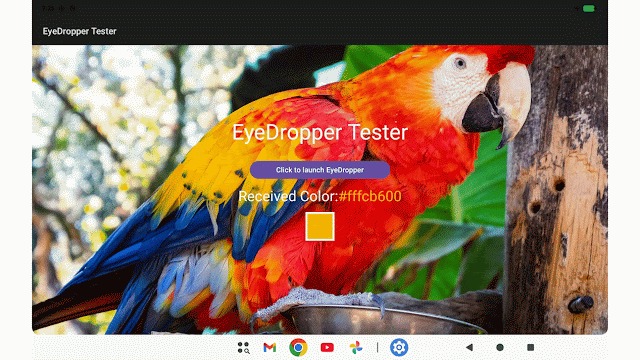
System EyeDropper
Google has added an “EyeDropper” app in Android 17 Beta 2 to allow other apps to ask Android to pick the exact color of any pixel shown on the screen without requiring sensitive screen-capture permissions. This means developers will no longer need to build their own eyedropper tool or import third-party libraries, resulting in time saving and a slight reduction in the app’s file size.
With Android 17 Beta 2, Google has further strengthened OTP message protection by delaying access to OTP messages for three hours for apps that are not intended to be recipients. This narrows down OTP access to select apps, but it excludes the default SMS app, assistant apps, and companion apps for connected devices.
The latest change applies to WebOTP messages, SMS retriever format messages, and standard OTP SMS messages.
Better app adaptability
Google began phasing out apps’ ability to restrict screen orientation and resizability on large-screen devices with Android 16. However, it still allowed app developers to opt out of this change. But Android 17 makes it mandatory, and developers will no longer be able to opt out.
This change will make apps running on Android 17 fill the space and respect the device posture on large-screen devices. The users will still have the ability to opt in/out of using an app’s default behavior via the aspect ratio settings.
Versatile Video Coding (VVC) support
Google introduced the Versatile Video Encoding (VVC) standard (also known as H.266) in Android 17 Beta 1. This video compression standard can deliver video quality similar to or better than the original at reduced file sizes, provided that the Android device has the hardware decode support and capable drivers.
Loudness Management
Google is introducing the CTA-2075 loudness management API with Android 17 Beta 1. This allows apps to dynamically adjust audio playback loudness based on metadata from supported AAC content and device characteristics, resulting in a more consistent listening experience across applications and hardware.
And a lot more
The features and changes we’ve discussed so far have been spotted in the first two betas of Android 17. However, for non-Google brands like Xiaomi, OnePlus, Oppo, Vivo, and Samsung, the list would be much longer, as the Android 17 build for them will also include features from Android 16 QPR releases.
The first major release of a new Android OS happens around June. That build is shipped to most of the Android devices, which might also include some additional features and upgrades from their OEMs. Google Pixels, on the other hand, also receive QPR releases with new features and upgrades every three months (quarter).
Google released three Android 16 QPR releases: QPR1, QPR2, and QPR3. All three builds brought new features and meaningful upgrades, including Material 3 Expressive, auto-themed icons, Desktop Mode, Secure Lock Device, and Low Light mode. Google Pixels have received these QPR builds. For other brands, these new features and upgrades will be added as part of Android 17. So, there’ll be plenty of new features and upgrades for non-Google Pixel devices.
When will Google release Android 17?
Google is largely following the same timeline for Android 17 as last year’s Android 16, with a major SDK release in Q2 and a minor SDK release promised for Q4.
As of writing this post, Google has released two Android 17 betas: Beta 1 arrived on February 13, and Beta 2 arrived on February 26.
Android 17 Beta 1: February 13, 2026
Android 17 Beta 2: February 26, 2026
There will be a couple more beta releases before Google pushes the stable build. The stable build of Android 16 was released on June 10, 2025. Google is unlikely to change the timeline this year, and therefore, we’re expecting the stable Android 17 to land in June 2026.
We’ll keep posting new stories on Android 17 in the Google section. Remember to visit it at least once every few days to stay up-to-date with the latest developments. Alternative, you can join our Telegram channel to get instant notifications about the latest tech news and software updates.

 Login
Login