
 Login
Login
Samsung Gallery gets Gemini integration, offering AI-powered media search
Google Gemini AI added Samsung Gallery as one of the compatible “Connected apps.” The new option has joined the growing list of Samsung apps inside Gemini. This upgrade aims to offer AI-powered media search on Samsung phones.
Samsung Gallery has silently become a Gemini-supported app. It’s disabled by default, meaning it requires manual intervention. Enabling the toggle launches the connection setup, bringing Gemini access to discover media.
Google’s Gemini continues to evolve for Samsung devices. Gemini has a separate section of Samsung apps, with the Gallery following other apps, including Samsung Calendar, Samsung Notes, and Samsung Reminder.
You can enable Samsung Gallery in Gemini by navigating to Profile > Connected apps > Samsung Gallery. If you don’t see “Connected apps,” head to the “Personal intelligence,” followed by Connected apps > Samsung Gallery.
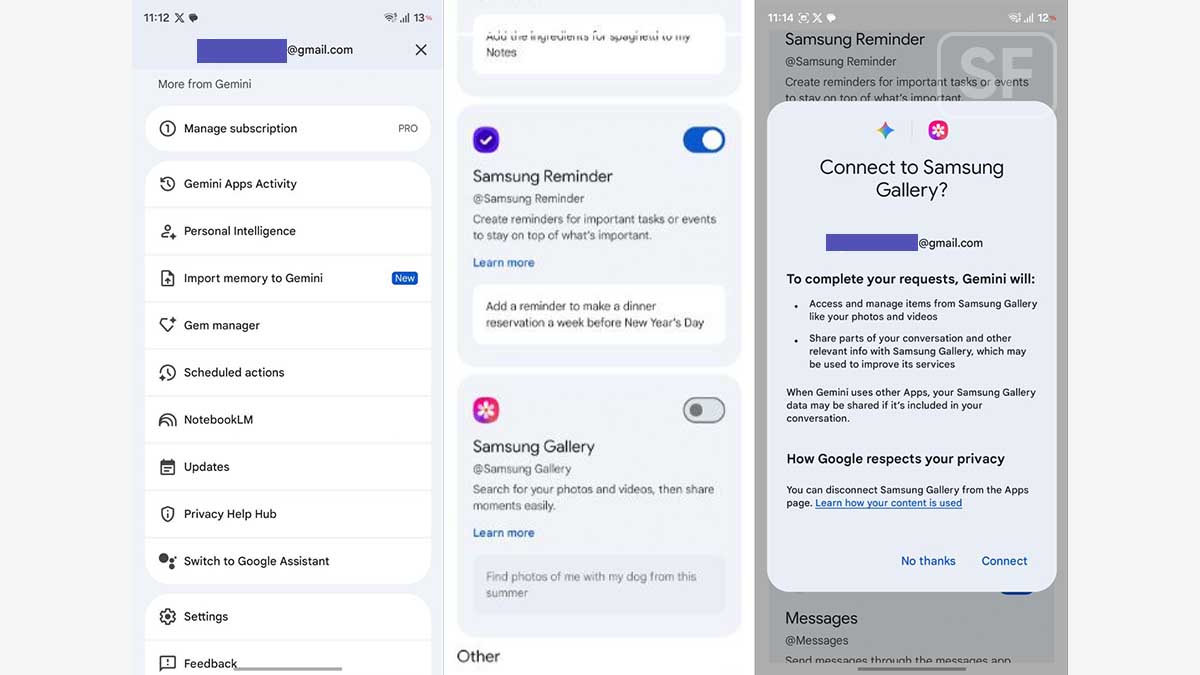
Once enabled, you can order Gemini to discover media in Samsung Gallery. It works with both photos and videos, based on your Gemini instructions. Well, it depends on your decision whether to assign Gemini Gallery access or not.
During the connection setup, Gemini requires your permission for two main aspects:
- Access and manage items from Samsung Gallery, like your photos and videos.
- Share parts of your conversation and other relevant information with Samsung Gallery, which may be used to improve its services.
That said, Gemini will have complete access to your photos and videos. The feature being offered is literally interesting, but the letdown isn’t small either. I like this one, but I am not gonna enable the Gemini-Gallery connection.
Samsung Gallery app already supports natural language search. It’s deeply integrated with the software and application and runs on-device. What Gemini will do is already on the Samsung Gallery, so decide carefully.
The post Samsung Gallery gets Gemini integration, offering AI-powered media search appeared first on Sammy Fans.
