❌

Reading view

TeraBox AI review

TeraBox built its name on 1TB of free cloud storage, which is still the headline pitch. What's changed is everything sitting next to the storage. An AI Presentation Maker, an essay writer, a scanner, a transcriber, and a research tool called Deep Research are now baked into the same free account I've used for years.

Until recently, TeraBox functioned more like a toolkit than a dedicated AI assistant. Many of the tools only did one job, like generate a deck, paraphrase a paragraph, or scan a document β€” then handed back results rather than a conversation.

But now, Terabox has added a dedicated research assistant that can access the web and parse through complex queries for information. It can also generate graphics and create properly-formatted documents to help with your research tasks. It's neat, but the most capable versions of these tools sit behind a Premium+ subscription priced under $4 a month.

I've covered hosting, storage, and AI software for TechRadar Pro since 2012, including our 2026 buying guide for vibe coders. If you'd like to see a wider selection of dedicated AI tools to pick from, check out our list of 70+ other AI tools across different categories. For this Terabox AI review, I had access to a 7-day trial of Premium+, which let me try all of the platform's features in depth over the review period.

What is TeraBox AI?

TeraBox AI is the set of generative tools Flextech Inc. has added to TeraBox, the free storage app it took over from Baidu in 2020. Rather than one assistant, it's a handful of single-purpose tools, an essay writer, presentation maker, paraphraser, transcriber, scanner, and research assistant, living inside the app I use for backups.

I'd call it a productivity add-on rather than an AI platform in its own right. You pick a tool, type or upload your input, and get a finished result. That suits someone wanting a quick deck or a tidier paragraph, but the platform left something to be desired when it came to more complex tasks requiring advanced reasoning.

TeraBox AI: At a glance

Attribute

Notes

Underlying model(s)

Not publicly disclosed. TeraBox doesn't name the large language models powering its tools.

Best for

Quick presentation drafts, document scanning and OCR, meeting transcription, light essay and paraphrasing help, existing TeraBox users.

Distinguishing functions

AI Presentation Maker with Agent Mode, Deep Research reports, AI Scan, AI Transcribe, bundled 1TB free storage.

UI features

Web app at terabox.com/ai, plus desktop and iOS/Android clients, each with a simple prompt box per tool.

Subscription costs

Free (basic AI, ad-supported, 1TB storage), Premium around $3.49/month (2TB storage, no AI), Premium+ around $3.89/month or $39.99/year (full AI suite, 2TB storage).

API pricing

No dedicated AI API. A separate OAuth-based Open Platform API covers file storage access only.

Buy it if…

  • You already use TeraBox for storage. The AI suite rides on cloud space you may already pay for, so the extra cost is small.
  • You need quick scans and transcripts. AI Scan and AI Transcribe handle everyday OCR and meeting notes well for casual use.
  • You want a fast presentation starter. One prompt turns into a usable slide deck in seconds, ready for further editing.

Don't buy it if…

  • You need a serious writing or design tool. Dedicated tools go deeper than TeraBox's essay writer and paraphraser for professional output.
  • Data jurisdiction matters to you. TeraBox's storage business began inside Baidu before Flextech took over in 2020, which still gives some professionals pause.
  • You can't stand ads. The free tier's AI tools sit behind the same ad-supported experience as TeraBox's storage.

My time with TeraBox AI

I tested TeraBox AI through the web app and Android client, running presentations, transcriptions, and scans over several days. The Presentation Maker stood out. A one-line prompt about small business marketing trends produced a ten-slide deck, icons and chart included, in under a minute.

AI Scan and AI Transcribe felt the most useful day to day, turning a printed invoice into clean, editable text in seconds. Transcribing a short interview gave me a readable summary alongside the full transcript. The essay writer and paraphraser, by contrast, were serviceable but generic.

However, my experiences with the dedicated AI chat and Research Assistant were somewhat mixed. A simple query asking for Elon Musk's updated net worth returned accurate input, but a more complex task involving generating a graphic of his net worth over the years seemed to fail entirely.

TeraBox was able to offer the information as a table instead on further attempts, which led me to believe that the failure was a result of being unable to pull up the necessary integrations for data visualization rather than an error in the research itself. That does redeem it in my eyes given the price point, just don't go in expecting the same level of functionality as a dedicated AI platform like ChatGPT.

On value, Premium+ is an easy call. It costs under $4 a month and bundles 2TB of storage with the full AI suite. The caveat is that nothing here matches a tool built solely around AI writing or design.

TeraBox AI: Features

TeraBox AI isn't the best do-everything assistant, which also shows in how the features are organized. Presentation, writing, scanning, and research tools each live in their own corner of the AI tab, which keeps things simple but means there's no unified chat for mixing tasks together.

The Presentation Maker impressed me most, with Agent Mode generating decks up to 40 slides from a prompt or uploaded document, complete with citations when it pulls from web sources. A separate Beautify option restyles slides you've already made. For students or small business owners needing a deck fast, this alone might justify upgrading.

AI Scan and AI Transcribe are the most practically useful tools for office work, handling OCR, ID document capture, and on-the-fly translation on one side, and audio-to-text conversion with an AI summary on the other. Both worked reliably in my testing, needing only minor cleanup afterward.

Deep Research, the suite's research tool, builds a structured outline you can edit before it writes a full report. The output reads more like a market briefing than original analysis, so treat it as a starting point rather than a finished document.

The essay writer and Smart Paraphraser are the weakest links. Output reads competently but generically, and TeraBox doesn't disclose which model is doing the writing. Given the price for Premium+, the overall feature set still feels reasonably generous for a bundle riding on storage you might already want.

TeraBox AI: User experience

I got started in under a minute. I logged into my existing account, tapped the AI tab, and was generating a presentation within seconds, with no separate sign-up or onboarding flow to slow things down. Each tool opens to a simple prompt box, so the learning curve is close to zero.

But the experience feels bolted onto a storage app rather than designed around AI from the ground up. Switching tools means backing out to the main AI menu each time, and the free tier's ads occasionally interrupt what otherwise feels quick and uncluttered.

TeraBox AI: Customer support

Support looks decent on paper. Users across review platforms rate TeraBox's customer service 4.0+ out of 5 and Flextech representatives respond to public reviews directly, including the ones flagging slow replies.

I didn't need to contact support during testing, since the AI tools worked as expected. The bigger caveat is documentation, since TeraBox's help content for the AI suite leans on blog posts and FAQs rather than a structured knowledge base.
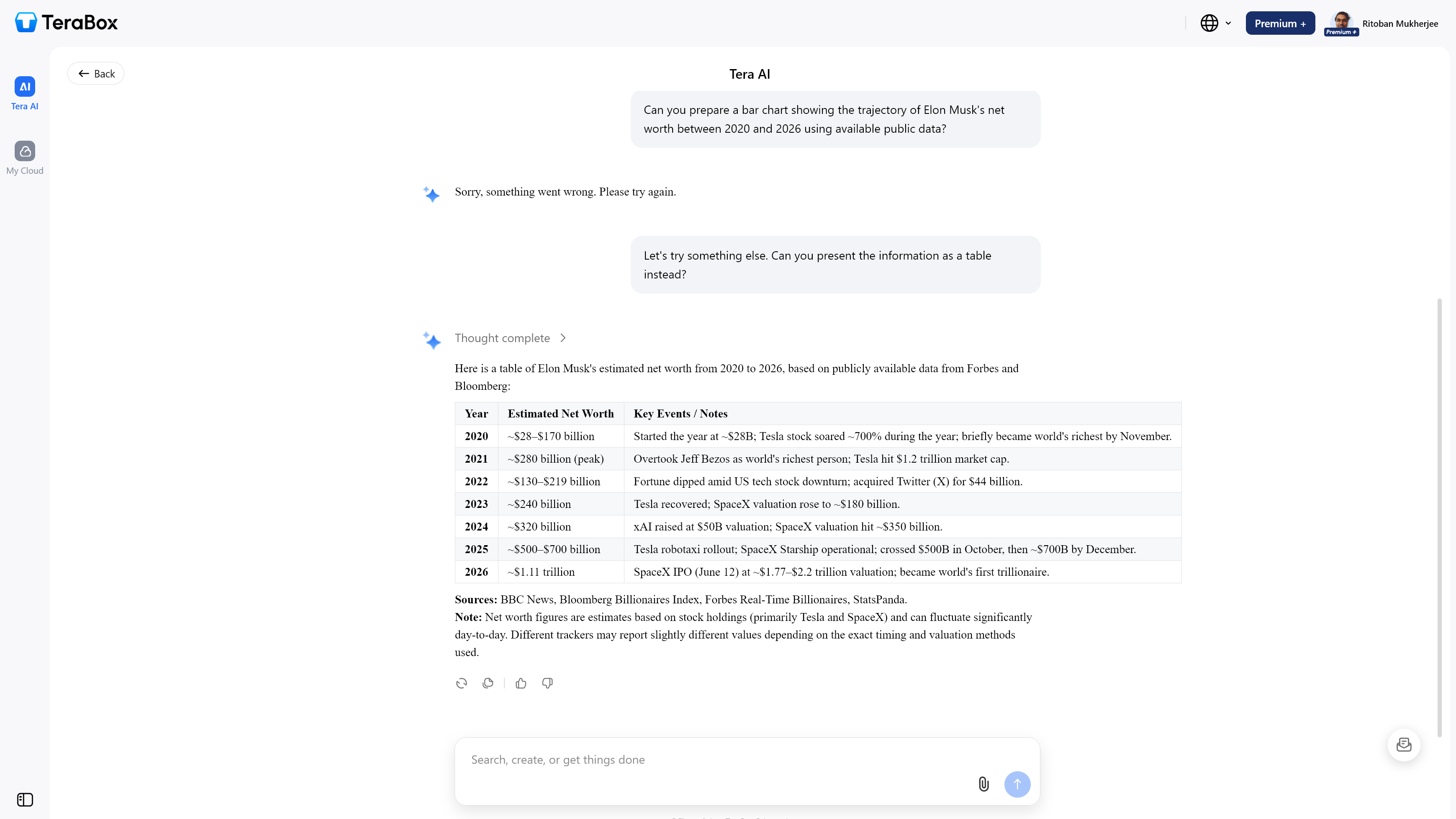
TeraBox AI chat session

(Image credit: TeraBox)

TeraBox AI: Pricing

  • Free tier includes limited AI access, plus 1TB of ad-supported storage.
  • Premium adds 2TB of storage and removes ads, but doesn't unlock the AI suite.
  • Premium+ is the only tier with full AI access, priced from around $3.89 a month or $39.99 a year.

TeraBox's free plan gives a limited taste of the AI tools, including a small number of free presentation generations, on top of the full 1TB allowance. That's enough to test whether the tools suit your workflow before paying anything.

Premium+ is where the AI suite lives, bundling the essay writer, presentation maker, transcriber, scanner, paraphraser, and search tools alongside 2TB of storage for under $4 a month. TeraBox's official pricing page renders dynamically and didn't return visible data when I checked the source directly, so these figures come from cross-referenced third-party listings instead. There's no separate API pricing, since TeraBox doesn't offer developer access to the AI tools.

TeraBox AI: alternatives you should consider

  • pCloud: A privacy-focused cloud storage service with optional zero-knowledge encryption, starting around $49.99 a year for 500GB, without TeraBox's bundled AI tools.
  • Google Drive with Google AI Pro: Google's storage plans now fold Gemini directly into Drive, Gmail, and Docs, bundling 5TB of storage with AI access for $19.99 a month.
  • Canva: A more polished option built for AI-assisted presentations and design, with Magic Studio included in Canva Pro for around $15 a month.

How I tested TeraBox AI

  • Used the Presentation Maker, AI Scan, AI Transcribe, Deep Research, and Smart Paraphraser across free and Premium+ access.
  • Tested the AI suite through TeraBox's web app and Android app over several days of regular use.
  • Cross-checked pricing and ratings against TeraBox's official site, G2, and Capterra, noting where the vendor's pricing page wouldn't render visibly.

I focused testing on the tools most useful for a typical small business or student workflow, presentations, scanning, and transcription, rather than edge cases. Beyond the data obtained from their official website and documentation, I cross-referenced features across multiple third-party sources. as well as verified them during my own testing, to confirm consistency before including them here.


Brave Leo AI review

Brave Leo arrived in November 2023 as a sidebar AI assistant for the Brave browser, and it has grown into one of the more unusual offerings in the AI chat market. Unlike most platforms that treat privacy as an afterthought, Leo bakes it into the architecture: no IP logging, no conversation storage, and no requirement to create an account. In late 2025, Brave went further by introducing Trusted Execution Environments (TEEs) powered by NEAR.AI and Intel TDX technology, giving users cryptographically verifiable assurance that requests are processed exactly as described.

Two features set Leo apart from the field. The Bring Your Own Model (BYOM) option lets you connect Leo to locally-running models via Ollama or your own API endpoints, which is rare among browser-native AI tools. The Skills feature, launched in December 2025, lets you assign keyboard shortcuts to frequently used prompts to cut down on repetitive setup.

Agentic browsing, which lets Leo autonomously navigate and complete tasks on your behalf, entered early testing across all Brave release channels in May 2026.

I've been covering AI platforms and B2B software at TechRadar Pro since 2018, including our 2026 vibe coding buying guide and the Microsoft Build conference this year in San Francisco. Here's how Leo holds up.

What is Brave Leo AI?

Brave Leo is an AI chat assistant built directly into the Brave browser, accessible from a sidebar panel, a full-page view, or the address bar. It's available on Windows, macOS, and Linux on desktop, and on Android and iOS on mobile. No separate installation, app, or account is needed to get started with the free tier.

Leo's defining quality is page awareness. It reads the content of the active tab, whether that's a webpage, PDF, Google Doc, Google Sheet, or YouTube video, and uses that content as context for your questions. You don't need to copy-paste anything or upload files to an external server.

Moreover, Brave Search pulls in real-time information from across the web when your question calls for it.

The platform targets privacy-conscious individuals, students, and professionals who want AI assistance without feeding personal data to third parties. It's also a practical option for people already running Brave who'd rather not switch tabs to reach a separate AI app.

Brave Leo AI: At a glance

Attribute

Notes

Underlying model(s)

Qwen, Meta Llama, Google Gemma (free); Claude Haiku, Claude Sonnet, DeepSeek V3.1 (premium); all hosted on Brave's own secure infrastructure

Best for

Privacy-conscious users, web research, document summarization, coding assistance

Distinguishing functions

Privacy proxy, BYOM, Skills shortcuts, Automatic mode, agentic browsing (early access)

UI features

Sidebar panel and full-page mode; address bar integration; in-chat model selector

Subscription costs

Free (open models, rate-limited); Leo Premium at $14.99/month or $149.99/year

API pricing

Not available; Leo is a browser-only product with no public API

Buy it if…

  • You prioritize AI privacy above all else. Leo doesn't log your conversations, store your IP address, or use your chats for model training. For users handling sensitive research or confidential work, that's a real distinction from most AI chatbots.
  • You're already a Brave browser user. Leo is built directly into Brave with no extra installation required. It picks up page context automatically, making web research faster with very little setup.
  • You want model flexibility. The ability to switch between Llama, Claude, Qwen, and others, or connect your own model via BYOM, gives you more control than most browser-native AI tools offer.

Don't buy it if…

  • You need AI across multiple browsers or tools. Leo only works inside Brave. If you regularly use Chrome, Firefox, or other apps, you won't have Leo available in those environments.
  • You rely on intensive daily free usage. The free tier hits its ceiling quickly during heavy use. A Premium subscription is more or less necessary for anyone using Leo throughout the working day.
  • You need enterprise features or team access. Leo is a personal assistant with no team accounts, admin controls, or organization-level management. Businesses looking to deploy it across multiple users will need individual subscriptions for each.

My time with Brave Leo AI

My first impression of Leo was how little friction there was to getting started. No account confirmation, no model selection screen, no onboarding pop-ups. Within seconds of opening the sidebar, I was summarizing a lengthy policy document open in another tab.

The sidebar stays out of the way until you need it, which I found more practical than switching to a dedicated AI app.

Automatic mode worked well in practice. Leo picked Claude Sonnet for a nuanced writing task and shifted to a faster model for a quick factual question, all without me having to intervene. I did run into rate-limit warnings during a longer research session on the free tier.

Those limits don't reset frequently enough for sustained daily use, and that was what ultimately pushed me to test the Premium plan.

The Skills feature was a useful addition for repetitive tasks. I set up a shortcut for a summarization prompt I return to frequently. After a few days, it saved real time.

New users may not find it easily, though, since it's tucked away and not highlighted in Leo's default interface.

Brave Leo AI: Features

Leo's feature set has expanded considerably since its 2023 launch. The platform covers summarization, translation, code generation, content writing, question answering, and document analysis across webpages, PDFs, Google Docs, Google Sheets, and YouTube videos. Image understanding was added more recently, and agentic browsing, which lets Leo autonomously complete multi-step tasks in an isolated browser profile, entered early access across all release channels in May 2026.

Page awareness is one of Leo's strongest practical assets. It reads whatever you're currently viewing and uses it as live context for your prompts. This works without uploading anything to a third-party server, which keeps the privacy model consistent across all use cases.

BYOM is a genuine differentiator. You can connect Leo to locally-running models via Ollama, to OpenAI-compatible endpoints, or to other third-party APIs. For developers or power users who want a specific model or prefer to keep everything on-device, this adds a level of control that most browser AI tools don't offer.

The Skills feature lets you save and trigger custom prompts with keyboard shortcuts. It's useful for repetitive workflows, though the current library of built-in skills is still relatively narrow. More customization here would strengthen the feature, and it's an area I'd like to see Brave expand.

Multi-tab context and Tab Focus Mode let Leo work across several open tabs rather than just the active one, which helps when cross-referencing multiple sources. The Brave Talk integration is a useful bonus for anyone using Brave's video conferencing tool: Leo can transcribe meetings in real time and produce summaries and action items without sharing data externally.

The one area where Leo falls behind dedicated AI platforms is memory. Leo doesn't retain context between separate sessions, so every conversation starts from scratch. Users who want a long-running assistant that remembers preferences or project history will find this limiting.

Brave Leo AI: User experience

The interface is clean and minimal. The sidebar slides open without disturbing your active page, and the full-page view at brave://leo-ai works well for longer sessions. Switching models takes a couple of clicks from the dropdown at the top of the chat.

Automatic mode removes the decision entirely if you'd rather not think about it.

The address bar integration is a small but practical touch: typing a question and selecting "Ask Leo" opens the response in full-page view without interrupting your browsing. Mobile support on Android and iOS covers the same core features as desktop, with voice input available on iOS. The experience is consistent across platforms, which isn't always the case with browser-based AI tools.

Brave Leo AI: Customer support

Brave handles Leo support through its Help Center at support.brave.app. The documentation is well-organized and covers most common scenarios, from initial access to advanced configuration options like BYOM and model settings. Articles are generally current, which is more than can be said for some AI products that update fast but leave documentation behind.

There's no live chat or dedicated support line for Leo. Community forums and the Help Center are the primary routes for getting help. For a free or modestly priced tool, this is standard, but business users with time-sensitive issues may find the self-serve model inadequate.

Brave Leo AI in action

(Image credit: Brave Browser)

Brave Leo AI: Pricing

  • Free tier: Access to open-source models (Llama, Qwen, Gemma), rate-limited usage, no account required
  • Leo Premium: $14.99/month or $149.99/year, with a 7-day free trial. Includes Claude Haiku, Claude Sonnet, DeepSeek V3.1, and other advanced models; higher rate limits; early access to new features

The free tier works for light, occasional use. You get solid open-source models and full privacy protections without signing up for anything. Rate limits are the catch: they kick in faster than you'd expect during sustained sessions, and there's no way to pay for a small top-up without committing to Premium.

At $14.99/month, Leo Premium is cheaper than ChatGPT Plus ($20/month) and sits comfortably within range for an individual AI subscription. The annual plan at $149.99 brings that down to about $12.50/month, which is reasonable given the model access on offer. There's no team or enterprise pricing.

Leo also has no public API, so external workflow integration isn't an option.

Brave Leo AI: alternatives you should consider

  • ChatGPT Atlas: A Chromium-based web browser from OpenAI with built-in access to the most widely used AI assistant. However, it's only available to macOS users for now and has now Windows version.
  • Microsoft Copilot: Built into Microsoft Edge and deeply integrated with the Microsoft 365 suite. The stronger pick for users already working in the Windows and Office ecosystem.
  • Perplexity AI: A research-focused AI that delivers sourced, real-time answers from the web. Worth considering if web research and fact-finding are your primary use cases rather than general-purpose chat.

How I tested Brave Leo AI

  • Used Leo's free tier for web research, PDF summarization, and content drafting over multiple sessions to assess response quality and the real-world impact of rate limits.
  • Tested Premium-tier models including Claude Sonnet on complex writing and analysis tasks, comparing output quality against the default open-source models.
  • Configured BYOM with Ollama, created custom Skills shortcuts, and put the multi-tab context feature through a multi-source research task.

Testing covered Brave Leo on desktop (Windows and macOS) and on Android, using both the sidebar and full-page chat modes. I evaluated response accuracy across summarization, factual questions, code generation, and writing tasks, and cross-referenced Brave's privacy claims against official documentation and third-party reporting from sources including The Register.

HuggingChat AI review

HuggingChat is Hugging Face's free, open-source chat interface . It might be the most underrated AI tool available right now. You get access to over 120 open-weight models including Llama, Mistral, Qwen, DeepSeek, and Falcon, all without spending a cent. The newest addition is Omni, a routing layer that automatically picks the most suitable model for your request.

What makes HuggingChat worth paying attention to is the sheer scope of model access it bundles into a single free product. I've been reviewing B2B software at TechRadar Pro for the past 10 years and our team covers the AI space closely. Take a look at our 2026 best AI tools roundup and read our in-depth explainers on open-source platforms like OpenClaw and Moltbook.

What is HuggingChat?

HuggingChat is the conversational AI interface built by Hugging Face, the company behind the world's largest open-source AI model repository. Instead of locking you into a single proprietary model, it lets you chat with any of 120+ community-hosted, open-weight models directly from your browser.

It's aimed squarely at developers, ML researchers, and technically curious users who want to compare model outputs, test different architectures, or simply avoid handing their data to a closed-source provider. For anyone evaluating an open-weight model before self-hosting it internally, this is an obvious starting point.

The platform also works for general use cases: writing, coding help, document analysis, and Q&A. But it's at its best when the person on the other end knows what they're asking of each model.

HuggingChat: At a glance

Attribute

Notes

Underlying model(s)

User-selectable from 120+ open-weight models including Meta Llama, Mistral, Qwen, DeepSeek, Falcon, and Cohere Command R+

Best for

Developers testing open models, researchers, ML engineers, privacy-conscious users

Distinguishing functions

Multi-model switching, Omni routing, web search, custom Assistants, document upload

UI features

Clean single-column chat interface with persistent model selector and sidebar conversation history

Subscription costs

Free (unlimited), Hugging Face Pro at $9/month

API pricing

Via Hugging Face Inference API; pricing varies by model and hardware; starts from $0.03/hour for CPU instances

Buy it if…

  • You want to compare open-weight models side by side. HuggingChat is the fastest way to test how Llama, Mistral, and Qwen handle the same prompt without switching tools.
  • You need a free AI chat tool with no usage caps. Unlike many free tiers, HuggingChat doesn't cut you off after a certain number of messages per day.
  • Avoiding vendor lock-in matters to your organization. Every model on the platform is open-weight, meaning you can evaluate it here and self-host the exact same model later.

Don't buy it if…

  • You want a polished, feature-complete interface. There's no canvas mode, no voice input, and no image generation. That puts it behind ChatGPT and Claude for everyday productivity use.
  • Consistent response speed is critical. Inference speed varies depending on server load, and the free tier runs on shared infrastructure. Peak hours can slow things down noticeably.
  • You need mobile-first access. HuggingChat is browser-only with no dedicated iOS or Android app, which limits how well it works on the go.

My time with HuggingChat

My first impression was that HuggingChat is more of a research tool than a daily driver. The interface is minimal: a chat window, a model selector, and a sidebar. That's about it. Once I got past the expectation of feature parity with ChatGPT, I found myself appreciating how little gets in the way of just talking to a model.

The Omni routing feature is a genuine improvement. Rather than guessing which model handles a given task best, In my testing, Omni made sensible choices more often than not. For users who don't want to manage model selection manually, it reduces friction considerably.

Where I ran into friction was speed. During busier periods, response latency was noticeably longer than on paid commercial platforms. For quick back-and-forth conversations, that's tolerable. For longer document analysis tasks, it started to feel slow.

HuggingChat: Features

The model catalog is HuggingChat's biggest selling point, and it's hard to overstate how much value that represents for free. At the time of writing, you can chat with 120+ models including Llama 3.1 405B, Mistral Large 2, Qwen 2.5 72B, DeepSeek V3, Command R+ from Cohere, and several Falcon variants. The list updates regularly as new community models are released.

Web search integration is available and works well enough for pulling in current information, which helps avoid stale knowledge cutoff responses. It's not as tightly integrated as Perplexity's approach, but it does the job without requiring a separate tool.

Custom Assistants let you set system prompts, attach knowledge bases via retrieval-augmented generation, and share a pre-configured assistant via a direct link. This is particularly useful for teams who want a repeatable AI workflow without paying for an enterprise platform. Document upload is also supported, which lets you drop in a PDF or text file and ask questions against it.

HuggingChat's limitations are harder to ignore if you're coming from a commercial product. There's no image generation, no voice mode, no plugin system, and no equivalent of ChatGPT's canvas or Claude's Projects feature. For general productivity use, those gaps matter.

HuggingChat: User experience

The interface is clean and gets out of the way quickly. A new conversation starts within seconds. The model selector is easy to find, and conversation history is accessible from the sidebar once you're logged into a Hugging Face account. There's no learning curve beyond understanding what each model is good at. That knowledge gap is real for non-technical users.

Hugging Face has been transparent in interviews about positioning HuggingChat as the open-source community's answer to proprietary chat products. That framing shows in the design decisions: the priority is access and transparency over UX polish. For the target audience of developers and researchers, that's a reasonable trade.

HuggingChat: Customer support

Support for HuggingChat itself is primarily community-driven, via the Hugging Face Discord and forums. There's no in-product live chat or dedicated help desk for the free tier, which means troubleshooting usually involves hunting through documentation or community threads.

Hugging Face Pro subscribers gain access to prioritized support channels, and Enterprise customers get dedicated support. For individual users on the free plan, the documentation is thorough but the response loop can be slow if you hit an edge case.

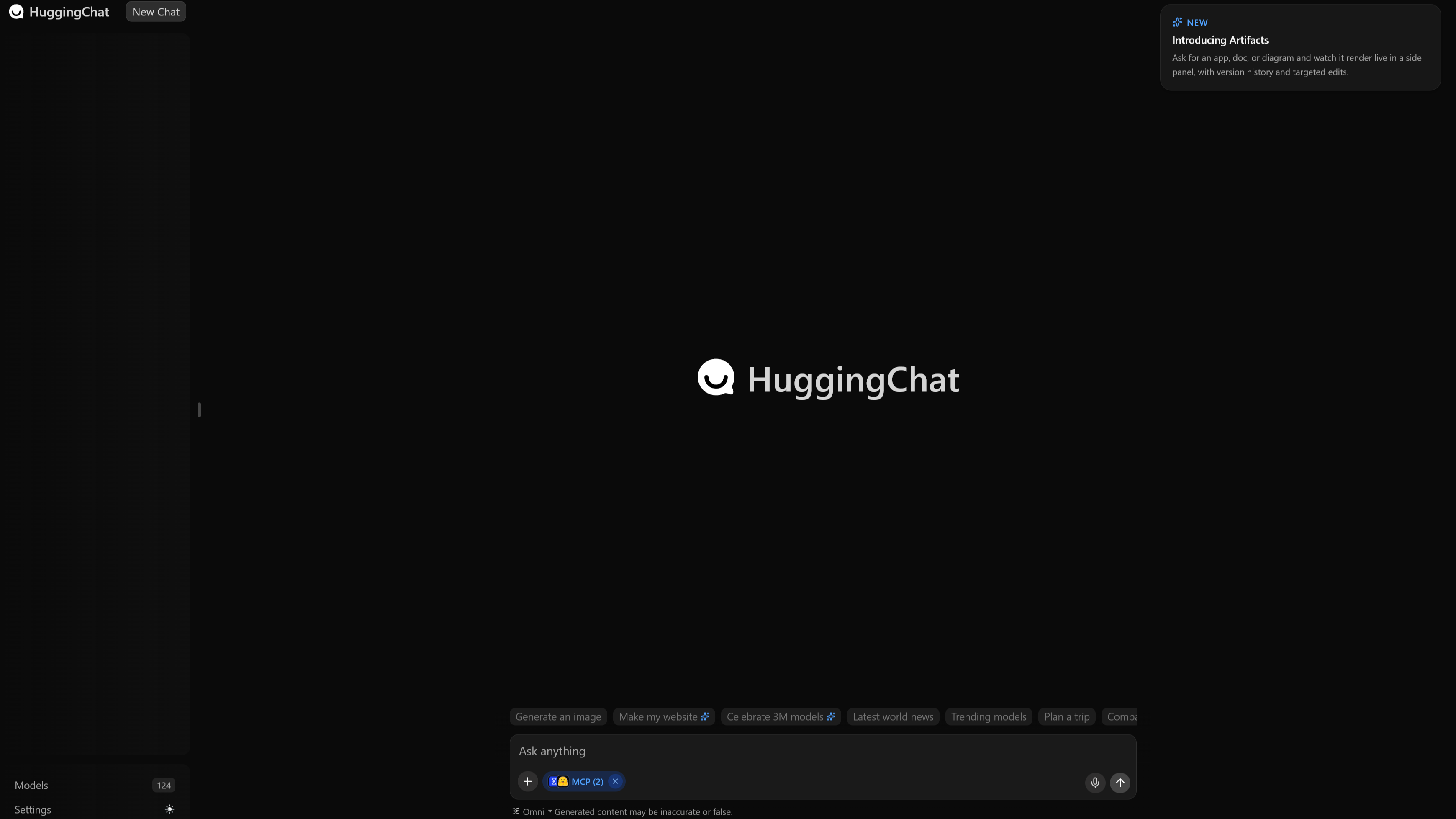
HuggingChat interface

(Image credit: HuggingFace.co)

HuggingChat: Pricing

  • Free: Full access to all 120+ models, web search, document upload, and custom Assistants with no daily message limits
  • Hugging Face Pro ($9/month): 20x inference credits, 10x private storage, ZeroGPU priority access, Spaces Dev Mode, and early access to new features
  • Team ($20/month per user) and Enterprise ($50/month per user): Adds SSO, audit logs, storage regions, SCIM provisioning, and dedicated support

The free tier is impressively generous and covers most use cases without restriction. Upgrading to Pro makes sense if you're a developer who also uses Hugging Face's broader platform for model hosting, inference, or dataset work. The credits and storage benefits extend well beyond HuggingChat itself.

There's no standalone HuggingChat subscription. The Pro plan is a Hugging Face platform upgrade, which means you're paying for the full platform rather than just the chat product. That's either good value or unnecessary overhead, depending on how embedded you are in the HF ecosystem.

HuggingChat: alternatives you should consider

  • ChatGPT (OpenAI): The most polished AI chat product on the market, with voice mode, image generation, and a canvas editor. Better for general productivity but fully proprietary and locked behind a subscription for advanced features.
  • Claude (Anthropic): Strong at long document analysis and nuanced writing. More consistent response quality than most open-weight models, though it's closed-source and doesn't offer model selection flexibility.
  • Perplexity AI: A strong alternative if web search and real-time information retrieval are your main use cases. Less flexible on the model side but more tightly integrated with live web data.

How I tested HuggingChat

  • Ran identical prompts across Llama 3.1, Mistral Large 2, and Qwen 2.5 to evaluate output consistency and quality differences.
  • Tested web search integration, document upload, Omni routing, and custom Assistant creation over multiple sessions.
  • Ran tests across different times of day to assess latency variability on the free tier.

Testing covered both technical tasks (code generation, document Q&A) and general use cases (writing, research, open-ended reasoning) to give a representative picture of day-to-day performance.

❌