Normal view

Yesterday — 4 May 2026Main stream

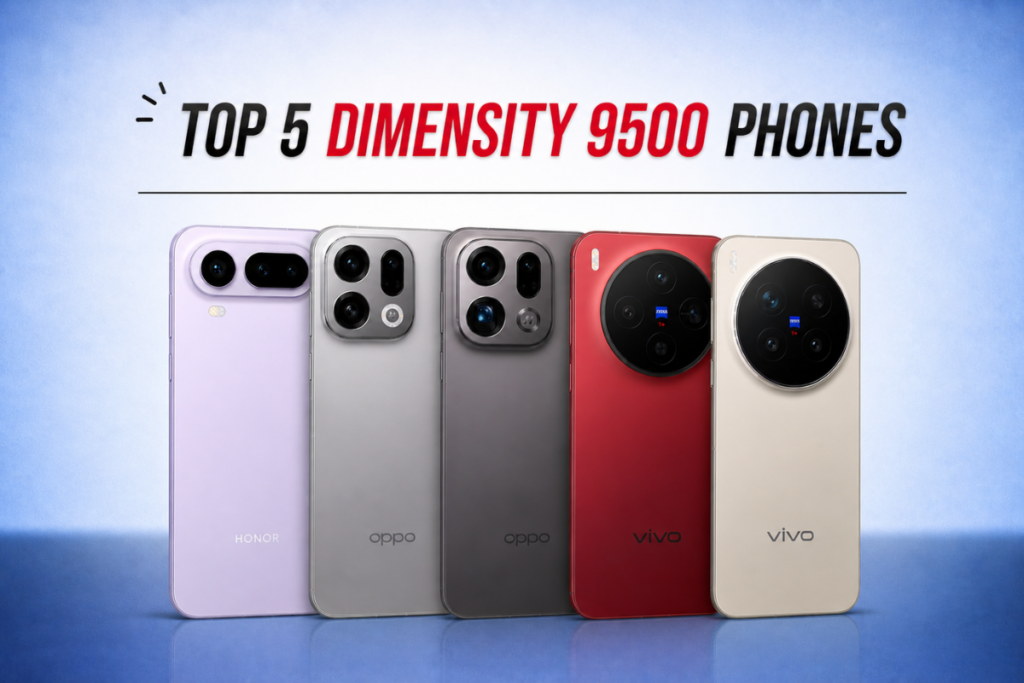
Top 5 Dimensity 9500 phones in 2026

4 May 2026 at 15:57
Dimensity 9500 phones

The Dimensity 9500 is MediaTek’s most powerful smartphone chipset right now, with performance and efficiency going toe-to-toe with Qualcomm’s Snapdragon 8 Elite Gen 5 SoC, but at a lower price point.

If you’re in for a high-end upgrade with strong hardware and long-term software support, these are the top five Dimensity 9500-powered smartphones to watch in 2026.

5 Best Dimensity 9500 smartphones in 2026
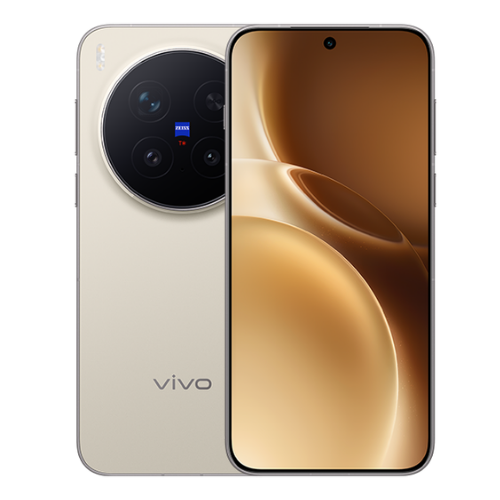
1. Vivo X300 Pro

The Vivo X300 Pro offers excellent rear cameras. The triple camera setup includes a 50MP primary shooter, a 200MP periscope telephoto lens, and a 50MP ultrawide camera. The 50MP selfie camera takes great shots with excellent details.

The smartphone features a 6.78-inch LTPO AMOLED screen with a 120Hz refresh rate and 4500 nits of peak brightness. It supports HDR10+ and Dolby Vision. The device ships with Android 16 out of the box and promises up to five generations of OS upgrades, all the way up to Android 21.

The X300 Pro houses a 6,540mAh battery, but the EU markets get a slightly lower capacity at 5,440mAh. The charging capabilities remain the same across all markets: 90W wired fast charging and 40W wireless charging support. The Vivo phone also offers strong connectivity, featuring Wi-Fi 7, Bluetooth 5.4, NFC, and USB Type-C 3.2.

Vivo X300 Pro specs:

  • Display: 6.78-inch LTPO AMOLED, 1260 x 2800 pixels, 120Hz refresh rate, HDR10+, HDR Vivid, Dolby Vision, 4500 nits (peak)
  • Processor: MediaTek Dimensity 9500 (3 nm)
  • Software: Android 16, up to five major Android upgrades
  • Rear camera: 50MP (wide) + 200MP (periscope telephoto, 3.7x optical zoom) + 50MP (119˚ ultrawide)
  • Selfie camera: 50MP
  • Battery: 6510mAh (global), 5440mAh (EU markets)
  • Charging: 90W (wired), 40W (wireless)
  • Connectivity: Wi-Fi 7, Bluetooth 5.4, NFC, USB Type-C 3.2
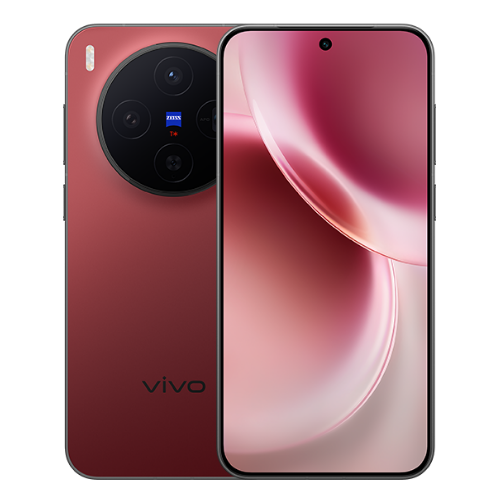
2. Vivo X300

The Vivo X300 (review) is a compact flagship phone, featuring a 6.31-inch LTPO AMOLED screen. It supports a 120Hz refresh rate, HDR10+, HDR Vivid, and a peak brightness of 4500 nits.

The smartphone features a different camera setup than its Pro model. The triple camera setup includes a 200MP primary camera, a 50MP periscope telephoto lens, and a 50MP ultrawide camera. The selfie camera is still a 50MP snapper. The X300 also boots Android 16 out of the box and promises OS upgrades up to Android 21.

The Vivo X300 packs a 6,040mAh battery, with EU markets getting a slightly lower capacity of 5,360mAh. The charging speeds, though, match the Pro model, so you still get 90W wired charging and 40W wireless charging.

Vivo X300 Pro specs:

  • Display: 6.31-inch LTPO AMOLED, 1216 x 2640 pixels, 120Hz refresh rate, HDR10+, HDR Vivid, 4500 nits (peak)
  • Processor: MediaTek Dimensity 9500 (3 nm)
  • Software: Android 16, up to five major Android upgrades
  • Rear camera: 200MP (wide) + 50MP (periscope telephoto, 3x optical zoom) + 50MP (119˚ ultrawide)
  • Selfie camera: 50MP
  • Battery: 6040mAh (global), 5360mAh (EU markets)
  • Charging: 90W (wired), 40W (wireless)
  • Connectivity: Wi-Fi 7, Bluetooth 5.4, NFC, USB Type-C 3.2
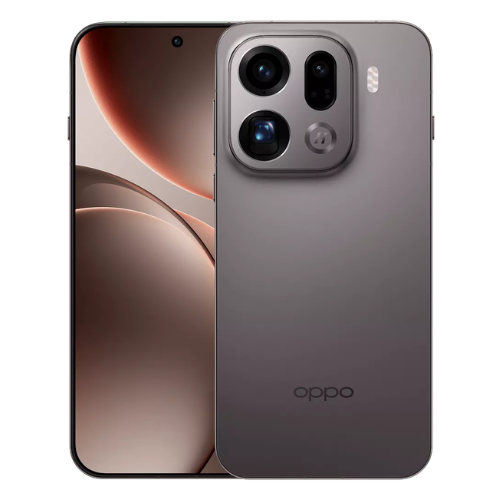
3. Oppo Find X9 Pro

The Find X9 Pro (review) has a 6.78-inch LTPO AMOLED panel with a 120Hz refresh rate, HDR10+, HDR Vivid, and a peak brightness of 3600 nits. The display specs closely resemble the Vivo X300 Pro, and so do the camera specs, which include a 50MP primary camera, a 200MP periscope telephoto lens, and a 50MP ultrawide camera. The selfie camera is also a 50MP snapper.

The Oppo Find X9 Pro boots Android 16 and promises five major Android OS upgrades, up to Android 21. On the battery side, it houses a 7,500mAh battery with support for 80W wired charging and 50W wireless charging. Connectivity specs include Wi-Fi 7, Bluetooth 6.0, NFC, and USB Type-C 3.2.

Oppo Find X9 Pro specs:

  • Display: 6.78-inch LTPO AMOLED, 1272 x 2772 pixels, 120Hz refresh rate, HDR10+, HDR Vivid, Dolby Vision, 3600 nits (peak)
  • Processor: MediaTek Dimensity 9500 (3 nm)
  • Software: Android 16, up to five major Android upgrades
  • Rear camera: 50MP (wide) + 200MP (periscope telephoto, 3x optical zoom) + 50MP (120˚ ultrawide)
  • Selfie camera: 50MP
  • Battery: 7500mAh
  • Charging: 80W (wired), 50W (wireless)
  • Connectivity: Wi-Fi 7, Bluetooth 6.0, NFC, USB Type-C 3.2
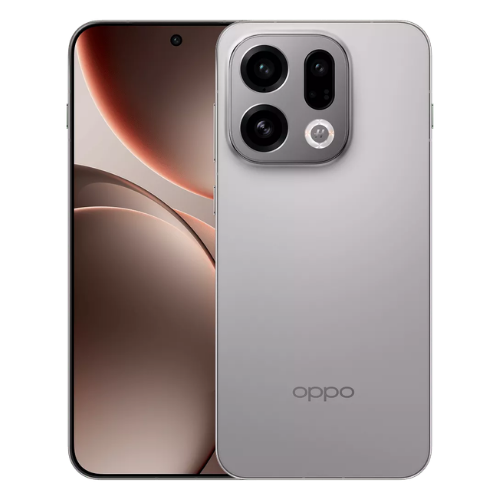
4. Oppo Find X9

The standard Find X9 (review) is a compact flagship phone featuring a 6.59-inch AMOLED screen with a 120Hz refresh rate, HDR10+, and 3600 nits of peak brightness. It boots Android 16 and promises OS upgrades up to Android 21.

The smartphone features three rear cameras, all with 50MP resolution. It includes a primary camera, a periscope telephoto lens with 3x optical zoom, and a 50MP ultrawide camera. The selfie camera has a lower resolution of 32MP.

Inside the device is a 7,025mAh battery with support for 80W wired and 50W wireless charging. On the connectivity side, the device supports Wi-Fi 7, Bluetooth 6.0, and NFC.

Oppo Find X9 specs:

  • Display: 6.59-inch AMOLED, 1256 x 2760 pixels, 120Hz refresh rate, HDR10+, HDR Vivid, 3600 nits (peak)
  • Processor: MediaTek Dimensity 9500 (3 nm)
  • Software: Android 16, up to five major Android upgrades
  • Rear camera: 50MP (wide) + 50MP (periscope telephoto, 3x optical zoom) + 50MP (120˚ ultrawide)
  • Selfie camera: 32MP
  • Battery: 7025mAh
  • Charging: 80W (wired), 50W (wireless)
  • Connectivity: Wi-Fi 7, Bluetooth 6.0, NFC, USB Type-C
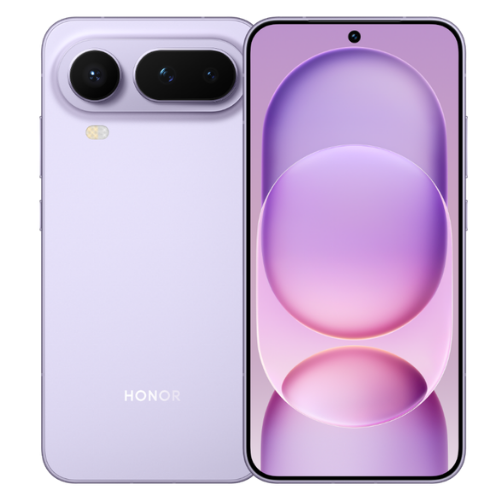
5. Honor Magic 8 Pro Air

The Honor Magic 8 Pro Air (review) is currently exclusive to China. However, a global release is expected to follow soon, though an official confirmation is still awaited. The phone ships with a 6.31-inch LTPO OLED panel, featuring a 120Hz refresh rate, Dolby Vision, and 6000 nits of peak brightness.

The smartphone boots Android 16 OS with the MagicOS 10 skin on top of it. It features a triple camera setup on the back, comprising a 50MP primary shooter, a 64MP periscope telephoto lens, and a 50MP ultrawide camera. The front side has a 50MP selfie snapper.

The Magic 8 Pro Air houses a 5,500mAh battery with 80W wired and 50W wireless charging support. And its connectivity specs include Wi-Fi 7, Bluetooth 6.0, NFC, and USB Type-C 2.0.

Honor Magic 8 Pro Air specs:

  • Display: 6.31-inch LTPO OLED, 1216 x 2640 pixels, 120Hz refresh rate, HDR Vivid, 6000 nits (peak)
  • Processor: MediaTek Dimensity 9500 (3 nm)
  • Software: Android 16, MagicOS 10
  • Rear camera: 50MP (wide) + 64MP (periscope telephoto, 3.2x optical zoom) + 50MP (112˚ ultrawide)
  • Selfie camera: 50MP
  • Battery: 5500mAh
  • Charging: 80W (wired), 50W (wireless)
  • Connectivity: Wi-Fi 7, Bluetooth 6.0, NFC, USB Type-C 2.0

The post Top 5 Dimensity 9500 phones in 2026 appeared first on Gizmochina.
Samsung’s April 2026 security update is out for these devices

4 May 2026 at 11:38
April 2026 security update for Samsung phones

Samsung’s security update rollout, which had lagged in the last couple of months, is finally getting back on track. The April 2026 security patch started rolling out to the Galaxy S26 series on the very first day of April, and it has gradually expanded to over a dozen Galaxy devices since.

Here’s a list of Galaxy devices that have started receiving the April 2026 security update:

Galaxy S series

  • Galaxy S26, S26+, S26 Ultra
  • Galaxy S25, S25+, S25 Ultra, S25 Edge, S25 FE
  • Galaxy S24, S24+, S24 Ultra, S24 FE
  • Galaxy S23, S23+, S23 Ultra, S23 FE

Galaxy Z series

  • Galaxy Z TriFold
  • Galaxy Z Fold 7, Z Flip 7, Z Flip 7 FE
  • Galaxy Z Fold Special Edition
  • Galaxy Z Fold 6, Z Flip 6
  • Galaxy Z Fold 5, Z Flip 5
  • Galaxy Z Fold 4, Z Flip 4

Galaxy A series

  • Galaxy A57, A56, A55, A54, A53
  • Galaxy A37, A36, A35, A34
  • Galaxy A26, A25
  • Galaxy A16, A15
  • Galaxy A07, A07 4G

Galaxy M series

  • Galaxy M54
  • Galaxy M16

Galaxy Tab series

  • Galaxy Tab S10+, Tab S10 Ultra
  • Galaxy Tab A11+

Galaxy XCover series

  • Galaxy XCover 7, XCover 7 Pro
  • Galaxy XCover 6 Pro

Samsung releases software updates in batches, so even if your device is on the list, it may take a few days before the update shows up. You can manually check for updates by navigating to Settings > Software updates > Download and install.

The April 2026 security patch, like any other, fixes vulnerabilities found in the previous software version. It doesn’t include new features or visual upgrades, but it strengthens security to keep the device safe from critical security flaws.

The April security patch, in particular, addresses 47 vulnerabilities in total. Of these, 33 come from Google as part of the Android Security Bulletin for April 2026, 10 from Samsung Mobile, and the remaining 4 from Samsung Semiconductor. Some of those Samsung-specific patches are related to Device Care and DeX.

There are still many more Galaxy devices in line to receive the latest security update. The rollout should gradually cover them over the coming days and weeks. We’ll update the list periodically to ensure it remains fresh. You can revisit the page later for the latest information.

While the security update rollout is back on track after being delayed in February and March, Samsung is still struggling with One UI 8.5. The company hasn’t begun rolling out the update despite a really long beta program. Hopefully, the wait will be over soon. You can check the One UI 8.5 eligible devices list here.

We’ll update you with the latest developments in our Samsung section. You can visit the page from time to time to stay updated. Or, join our Telegram channel to get instant updates.

The post Samsung’s April 2026 security update is out for these devices appeared first on Gizmochina.

Before yesterdayMain stream

5 One UI 8.5 features I can’t wait to use

2 May 2026 at 16:52
One UI 8.5 features
One UI 8.5 features

One UI 8.5 rollout is about to begin, and dozens of Galaxy models are lined up to receive this feature-rich upgrade that doesn’t look like an incremental upgrade at all. It brings numerous visual upgrades, new features, and expanded customization options that really level up the software experience.

Among the long list of changes coming to One UI 8.5, there are five features I am most excited about. I really wish Samsung would bring them to the majority of eligible devices.

1. Modern Liquid Glass interface with smoother animations

One UI 8.5 - Phone app
Liquid Glass interface in One UI 8.5

One UI 8.5 introduces Liquid Glass design for the first time on Galaxy devices. We know where the inspiration comes from (hello, Apple). The updated design language emphasizes transparency, floating surfaces, rounded controls, and soft depth effects across core apps and the system UI, making One UI feel more premium and modern.

Part of this new design language includes floating navigation bars with semi-transparent panels and more pronounced blur and shadow layering to create a “glass” feel. You’ll see it in the Settings app and first-party apps like Dialer, Gallery, and Calculator, replacing the traditional flat, rectangular navigation bar. The back button and other controls appear as separated floating elements, allowing more room for content.

The new Liquid Glass design is most prominent in Samsung’s own apps, but other areas, including notifications, widgets, and the control center, also receive a subtle glass-style treatment.

2. Fully customizable Quick Panel

One UI 8.5 Quick Settings Panel screenshot-1
One UI 8.5 Quick Settings Panel screenshot-2
Quick Panel customization in One UI 8.5

The Quick Panel in One UI 8.5 is receiving its biggest customization update yet. You can now move tiles and widgets wherever you want, resize them, or change their orientation to create a layout that is perfect for you. You can even remove every toggle to get an almost empty panel.

Brightness and volume sliders are also part of the latest changes, with the ability to switch between horizontal and portrait-style layouts. You can customize the panel however you like instead of using Samsung’s default layout. The panel can become messy if you over-customize, but Samsung’s got you covered. You can easily reset to the default layout.

3. Calling gets a major AI upgrade

Call Assist in One UI 8.5
Auto answer with AI feature in One UI 8.5
Image credit: Sammobile

One UI 8.5 brings major upgrades to calling, now allowing the phone to automatically answer unknown or suspected spam calls. The AI assistant asks the caller’s purpose, shows you a live transcript, and lets you decide whether to pick up or mark as spam. This is a big step up from the manual Bixby Text Call, helping you avoid interruptions from robocalls or telemarketers.

You can also enable the auto answer with AI feature to let the device automatically answer calls after a specific delay (5-30 seconds) and provide a live text transcript. This is particularly useful when you are busy or have Do Not Disturb enabled, allowing you to see the caller’s query via a live transcript before even picking up the call.

One UI 8.5 also introduces a direct voicemail feature that lets callers leave a voice message directly on your device rather than a carrier server. You can see the live transcript of the voicemail as it is being recorded in real-time.

Even during a normal call, you can see real-time call options, making it easier to follow in loud environments. Another small but useful upgrade is that the Now Bar shows a dedicated counter for missed calls, making it easier to track without unlocking the device.

4. A new Creative Studio app for AI creativity

Creative Studio in One UI 8.5

Samsung has added a new Creative Studio app in One UI 8.5, which is basically a central hub for generative AI creativity. The app lets users create wallpapers, stickers, greeting cards, invitations, and profile cards with simple sketches, existing photos, or text prompts.

Creative Studio app - One UI 8.5
Image generation in Creative Studio app - One UI 8.5
Image credit: Sammyfans

The app supports multiple aspect ratios (such as 16:9 and 4:3) and various art styles, including Childhood Sketch, Marker Drawing, and Oil Painting.

5. Sharing files got a lot easier (even with Apple devices)

Samsung has made significant upgrades to file sharing to bridge the gap between its ecosystem and other platforms, particularly Apple devices. A major addition is a new “Share with Apple devices” option in the Quick Settings menu, enabling seamless, high-speed transfers to iPhones, iPads, and Macs that use AirDrop.

One UI 8.5 also makes it easier to access the storage of one Galaxy device directly from another through the My Files app. For example, you can browse photos, music, and documents stored on your Galaxy Tab directly on your Galaxy phone, provided both devices are signed into the same Samsung account.

We’ll keep sharing with you the latest One UI updates in the Samsung section on this website. You can visit that page regularly to get fresh details. Or, if you prefer news on the go, make sure to follow our Telegram channel.

The post 5 One UI 8.5 features I can’t wait to use appeared first on Gizmochina.

TSMC ramps up 2nm production capacity with five fabs, targeting a major leap over 3nm capacity

2 May 2026 at 10:58
TSMC 2nm production capacity increase

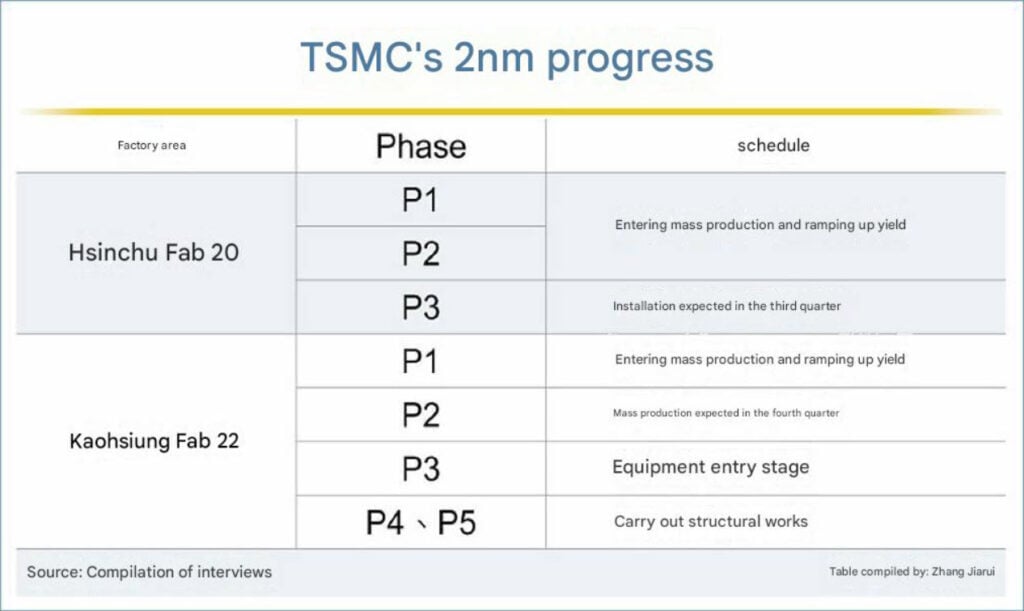
Chip giant TSMC is aggressively expanding its advanced 2nm production capacity to meet the unprecedented demand for artificial intelligence (AI) chips and high-performance computing (HPC). The company has set up five state-of-the-art fabrication plants, all entering the ramp-up phase this year, gearing towards the most aggressive expansion in the company’s history.

At TSMC’s 2026 Technology Symposium held in Silicon Valley recently, Hou Yung-ching, Senior Vice President, Deputy Co-COO, and Chief Information Security Officer, revealed that the company is pushing forward with its expansion plan at “twice the speed.” He added that the 2nm process has officially entered mass production and its yield learning curve is superior to that of the 3nm generation, even though the newer node uses a more complex nanosheet architecture, demonstrating TSMC’s leadership in advanced processes.

Even with higher production capacity, there will still be a shortage of high-performance chips due to explosive demand. To counter that, major players including NVIDIA, Apple, Qualcomm, and AMD have reportedly secured large allocations of N2 capacity. Apple alone is reported to have secured more than half of the initial N2 capacity from TSMC.

Also read:
1. TSMC pushes toward sub-1nm chips after 1.4nm breakthrough
2. TSMC hits 5GHz speeds on smartphone processors, leaving Huawei generations behind

Hou Yung-ching pointed out that multiple fabs simultaneously introducing new processes in the same year has never happened before. With the five 2nm fabs in operation, TSMC is expected to increase output capacity by up to 45% compared to the same period for 3nm fabs, a significant increase in capacity utilization. TSMC also plans to upgrade or install nine new factories along with capacity expansion projects each year to significantly ramp up its production capacity, effectively doubling the company’s historical expansion rate. The production is also being expanded at existing fabrication plants in Arizona, USA; Kumamoto, Japan; and Dresden, Germany.

Supported by strong demand, TSMC’s wafer shipments for AI accelerators are increasing by 11x, and demand for large-size chips featuring advanced packaging technologies is going up by 6x. And with continuous upgrades to 3D packaging technologies, TSMC has shortened the mass production time for SoIC chips by up to 75%, resulting in faster chip production. The overall advanced packaging capacity is estimated to grow by 80% in 2027.

TSMC is witnessing explosive demand for its high-performance node, pushing the company to expand its production capacity at a pace never seen before while simultaneously advancing large-scale future expansion plans. The company will continue to strengthen its leading advantage and domination in the semiconductor industry.

For the latest stories, visit the news section on Gizmochina regularly. Also, follow our Telegram channel to get the latest news as soon as we post them.

sources: 1, 2

The post TSMC ramps up 2nm production capacity with five fabs, targeting a major leap over 3nm capacity appeared first on Gizmochina.

Xiaomi releases Android 17 beta for these devices: Eligible devices and installation steps

1 May 2026 at 11:55
Xiaomi Android 17 beta

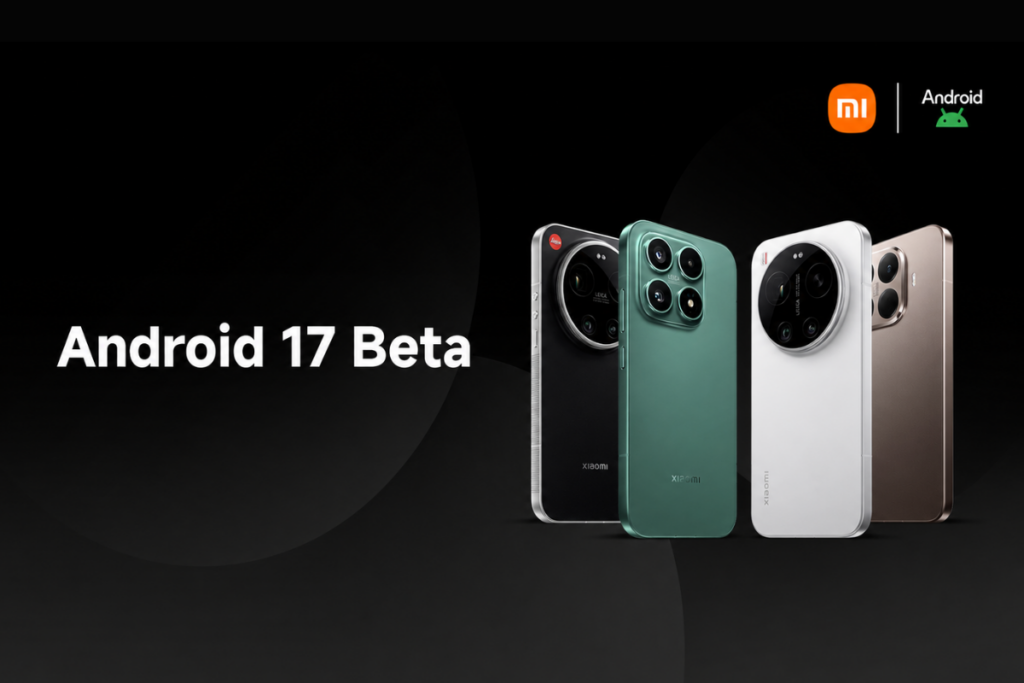
Xiaomi’s Android 17 Developer Preview program has just gone live, and it brings an unexpected upgrade to HyperOS 3.3. The company has restricted the beta program’s access to a limited number of high-end smartphones initially, with broader device support coming in the near future.

The Developer Preview program is currently available for four Xiaomi devices: Xiaomi 17, Xiaomi 17 Ultra, Xiaomi 15T Pro, and Leica Leitzphone powered by Xiaomi. If you’re rocking any of these devices, you can sign up for the testing program and get access to the upcoming features and upgrade well ahead of the public release. This release, however, signals a major shift in Xiaomi’s naming strategy for its HyperOS skin.

As spotted by Ximi Time, the Android 17 beta build for Xiaomi devices comes with HyperOS 3.3, skipping HyperOS 3.2 for some reason. This suggests Xiaomi won’t make the jump to HyperOS 4 but will pair HyperOS 3.3 with Android 17.

How to get Android 17 beta on your Xiaomi device

Remember that beta builds are prone to having bugs or unfinished features. Some apps may face compatibility issues. Therefore, it’s best to avoid such builds altogether or install them on a secondary device.

Before installing a beta build, it’s highly recommended to back up important data to cloud storage or copy it to a different device to be on the safe side.

Step 1: Ensure your phone is running the required firmware version.

  • Xiaomi 17: OS3.0.301.0.WPCMIXM
  • Xiaomi 17 Ultra: OS3.0.9.0.WPAMIXM
  • Leica Leitzphone powered by Xiaomi: OS3.0.9.0.WPAMIXM
  • Xiaomi 15T Pro: OS3.0.11.0.WOSMIXM

Step 2: Download the correct Android 17 beta build for your Xiaomi phone.

Step 3: Copy the downloaded ROM upgrade ZIP file to the internal storage (if it isn’t there already)

Step 4: Go to Settings > About phone > tap the Xiaomi HyperOS logo at the top of the page.

Step 5: Tap Xiaomi HyperOS at the top for 10 times > click the three-dots icon in the top-right corner > select Choose update package.

Step 6: Select the ROM upgrade file you downloaded in step 2 and install it.

This is a major upgrade, and so the installation time could be longer. It’s best to charge your device at least 40% before the installation. Also, ensure the device has at least 10GB of free space for a smoother installation and better performance.

If you face major issues or want to revert to a previous stable build for any reason, you can download the required firmware using the links given below and flash it on your phone the same way. However, this could result in data loss. So, back up your important data beforehand.

Fallback firmware files:

We’ll keep tracking the latest developments on Android 17 and post them in the Xiaomi section on this website. Remember to visit the page at least once in a while to get fresh details. Or, you can follow our Telegram channel to get instant updates.

The post Xiaomi releases Android 17 beta for these devices: Eligible devices and installation steps appeared first on Gizmochina.

❌
❌