
 Login
Login
Gemini Tools redesign arrives on Android and iOS
Google is updating the Gemini app on Android, iOS, and the web. These changes make the app easier to use and give it a cleaner look. The update mainly focuses on the Tools menu and the “My stuff” section.
The new Tools menu first appeared on the Gemini website earlier this week. Now, it is gradually rolling out to Android and iOS users. On Android, the Tools menu opens from the bottom of the screen and now has a clear name at the top. This helps users understand what the menu is for.
At the bottom of the menu, there is a new section – Experimental features. It has a “Labs” label and shows features that Google is still testing.
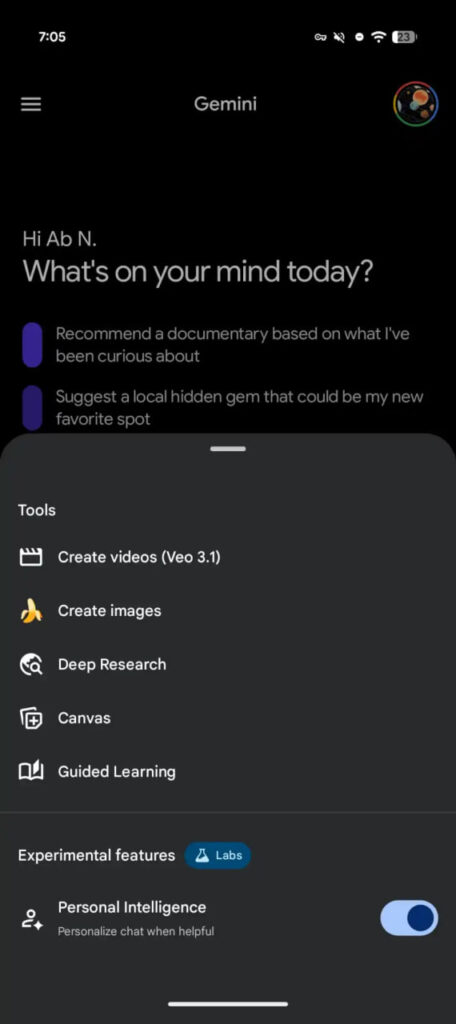
Image via 9to5Google
There is also a new option, Personal Intelligence, for Google AI subscribers in the US. Users can turn this on or off for the current chat only. This lets people choose whether Gemini can use personal information during that conversation.
On iOS, the Tools menu has changed in how it looks and opens. Instead of using the system pop-up menu, it now appears as a bottom sheet, similar to the model picker in the app. The ‘plus’ button used for adding attachments has not changed.
There are also updates to “My stuff.” On Android and the web, the preview showing the three latest items has been removed. This makes the side panel look cleaner and simpler. On the Gemini website, the “My stuff” section now has a fun smiley star icon. Stay tuned for more information.

The post Gemini Tools redesign arrives on Android and iOS appeared first on Sammy Fans.
