Reading view

Top 5 ways to use Gemini 3.1 Pro for free
How to use Gemini 3.1 Pro for free

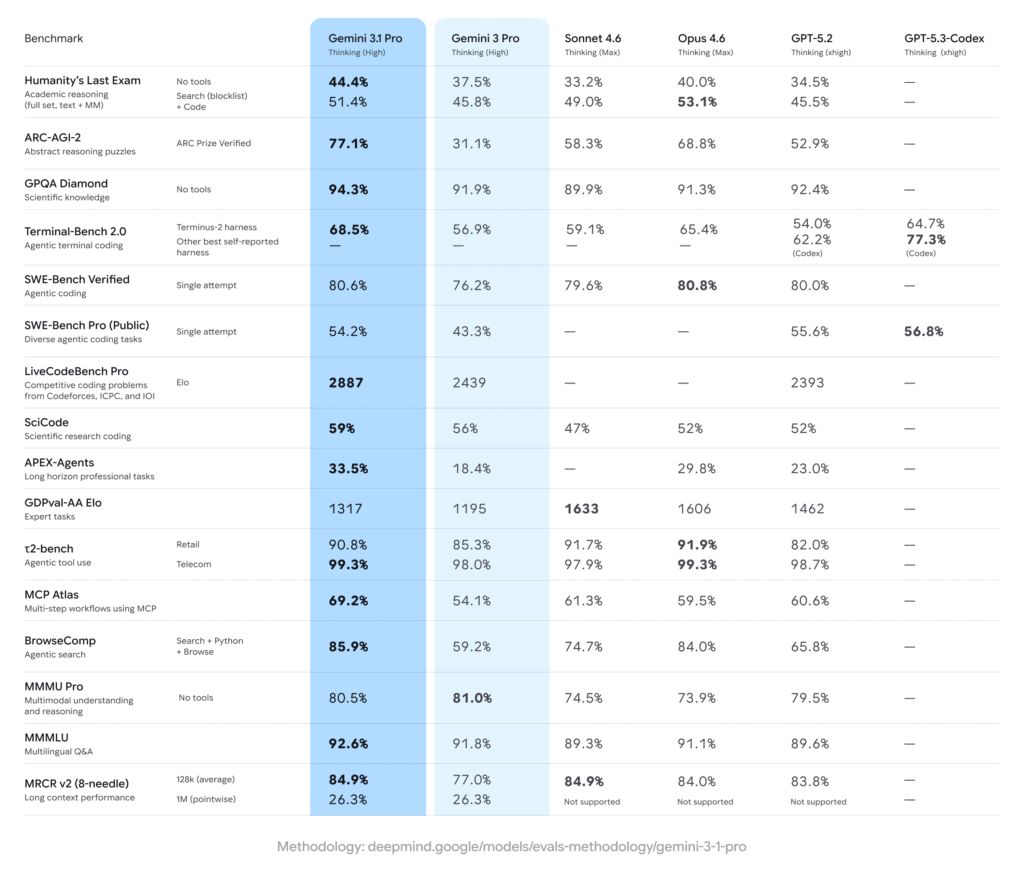
Gemini 3.1 Pro is the company’s most capable LLM with stronger core reasoning and better performance on complex, multi-step work. It outperforms the best from Anthropic and OpenAI across many benchmarks. Here, I’ll show you the top 5 ways to access Gemini 3.1 Pro for free with all the steps.

Gemini 3.1 Pro AI benchmark performance
Image credit: Google

How to use Gemini 3.1 Pro for free (5 methods)

Google Gemini

1. Google Gemini

This is the easiest and quickest way to test the capabilities of Gemini 3.1 Pro. Simply go to gemini.google.com, choose the “Pro” option, and get things done.

Step 1: Open gemini.google.com on your device.

Step 2: Log in to your Google account (if not logged in).

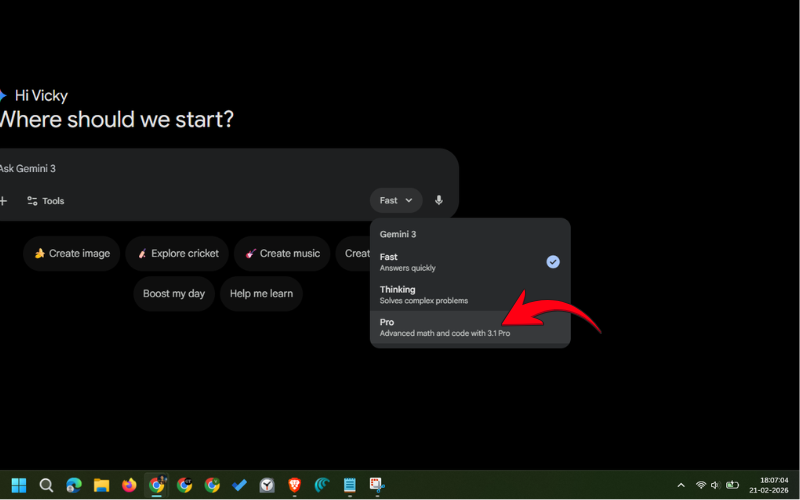
Step 3: Tap the mode selector and choose “Pro”.

Choosing Pro mode on Gemini

Step 4: Type your prompt and hit Enter.

If you’re using a smartphone, it’s best to download the Google Gemini app from Google Play Store (Android) or App Store (iPhone). The steps remain the same.

Please note that the free version of Google Gemini allows only a few messages per day for Gemini 3.1 Pro. That’s best for the testing purpose. However, you can upgrade to the Pro or Ultra plan to increase your limits. Luckily, there are ways to get Google Gemini Pro for free for a year. Comment below if you want a detailed post on that.

Google Vertex AI

2. Google’s Vertex AI platform

Google is offering $300 in free credits to use Google Cloud services, including the Vertex AI platform, which allows us access to Gemini 3.1 Pro, Google Veo, and many other AI tools. Note that free credits are available for 90 days. After which, they expire.

Here’s how to sign up for Google Cloud:

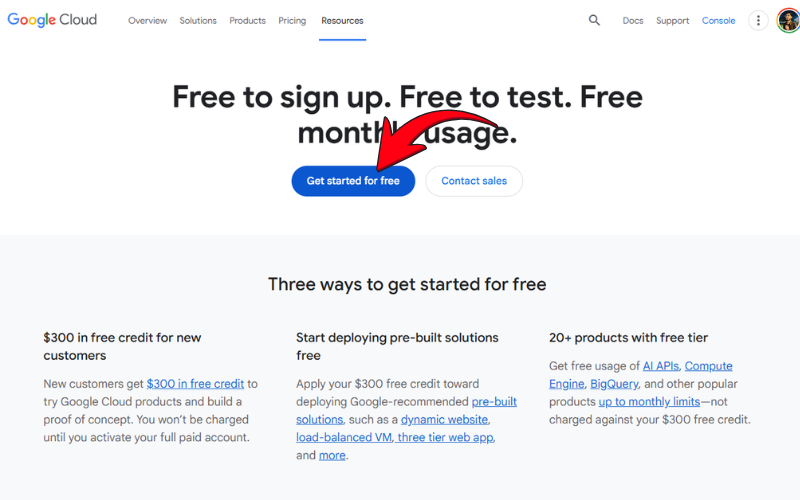
Step 1: Open the Google Cloud trial offer page and tap “Get started for free”.

signing up on Google Cloud platform

Step 2: Choose your Google account and your country.

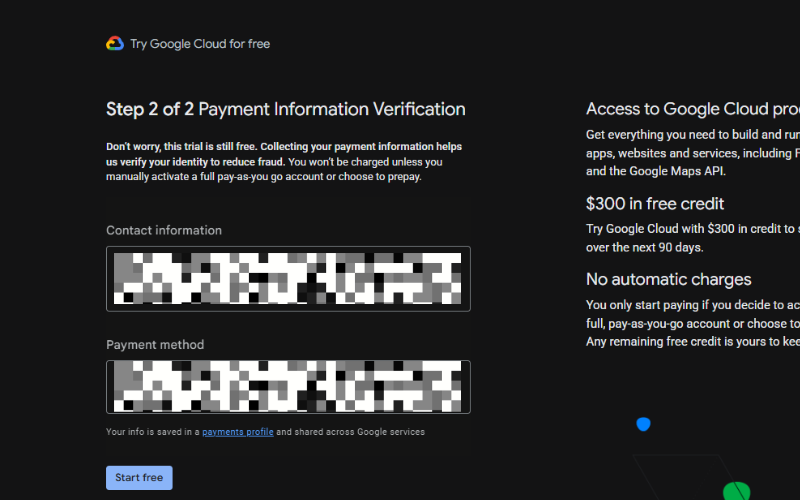
Step 3: Fill in your contact information, then verify a payment method.

[Note: You won’t be charged automatically even after the free trial ends unless you do a manual activation. You can verify the same in the screenshot below.]

Verifying payment details on Google Cloud platform

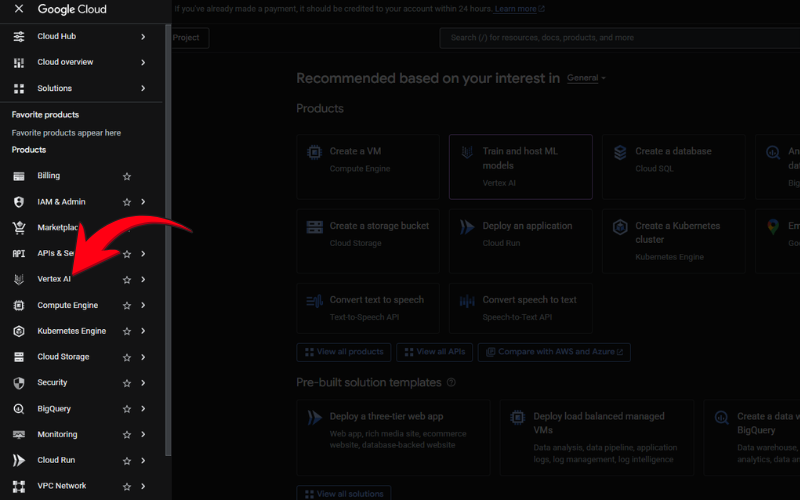
Step 4: In your Google Cloud dashboard, tap the menu button and choose “Vertex AI”.

Vertex AI on Google Cloud

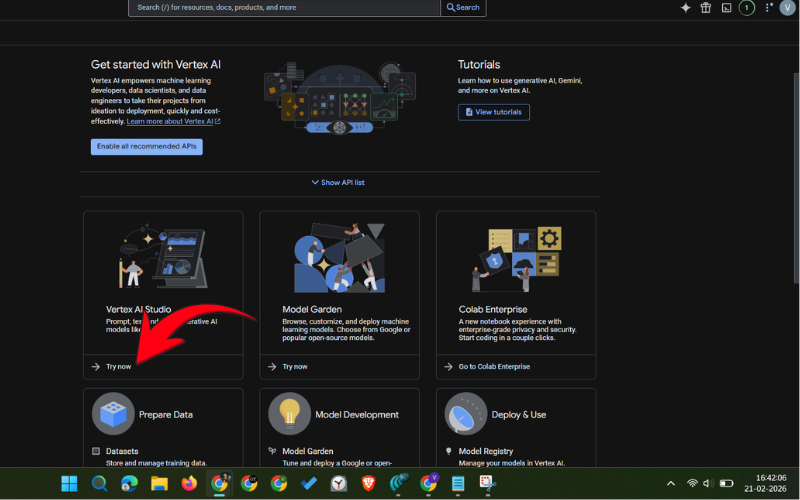
Step 5: Click “Try now” below Vertex AI Studio.

Accessing Vertex AI Studio API on Google Cloud

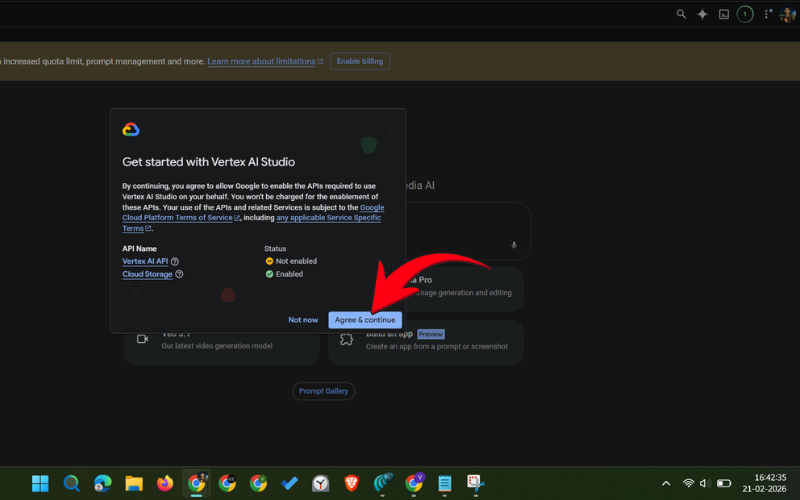
Step 6: Click “Agree & continue” to enable the required APIs for using Vertex AI Studio.

Enabling Vertex AI Studio API on Google Cloud

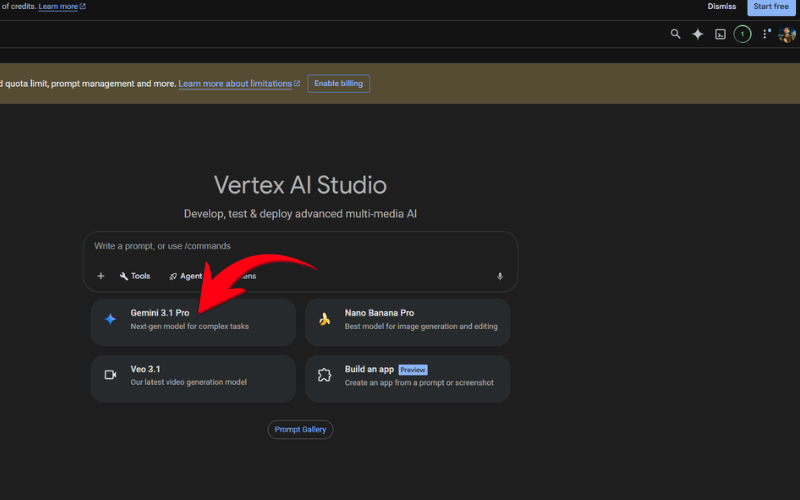
Step 7: Choose “Gemini 3.1 Pro” and start using it.

Gemini 3.1 Pro selector on Vertex AI Studio

The $300 free credit gives you very high usage limits to Google’s top AI models for 90 days. You can even create videos, build tools using coding, and do a lot more stuff without paying a penny.

Try That LLM

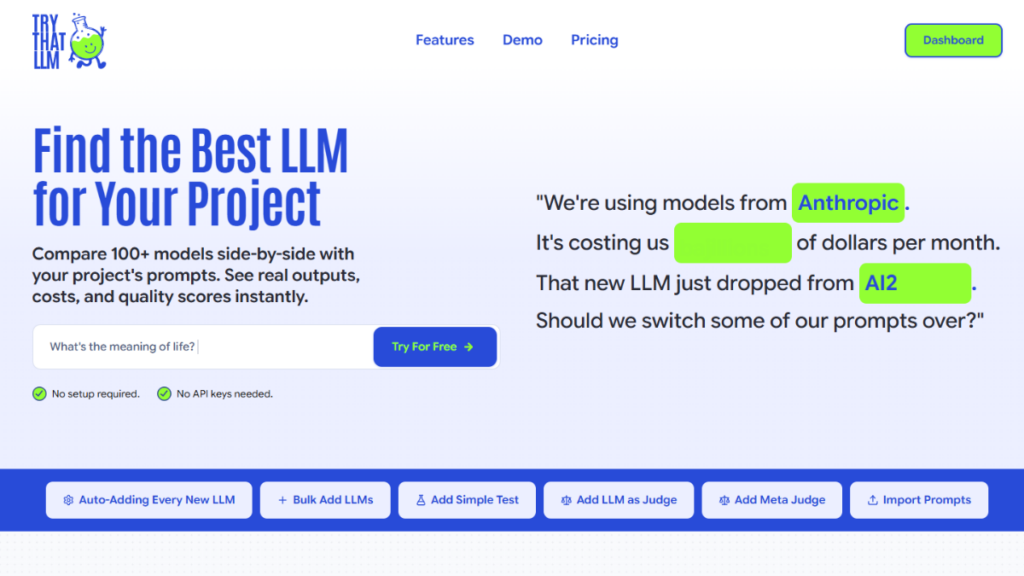
3. Try That LLM

This is an easy and free tool for comparing responses from various LLMs. The platform offers dozens of LLMs to test your prompt, including Gemini 3.1 Pro, Claude Opus 4.6, and ChatGPT 5.2.

This is super easy to use. Just sign up on the website (it takes less than a minute), choose your model, and start using it. The best part is you don’t need to fill in payment details.

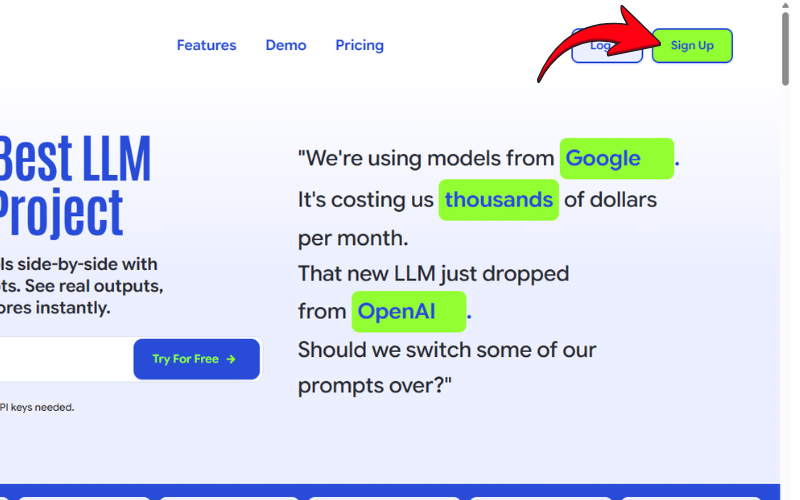
Step 1: Go to trythatllm.com and click the “Sign up” button.

signing up on Try That LLM

Step 2: Fill in basic details to create your account.

Step 3: Verify your email.

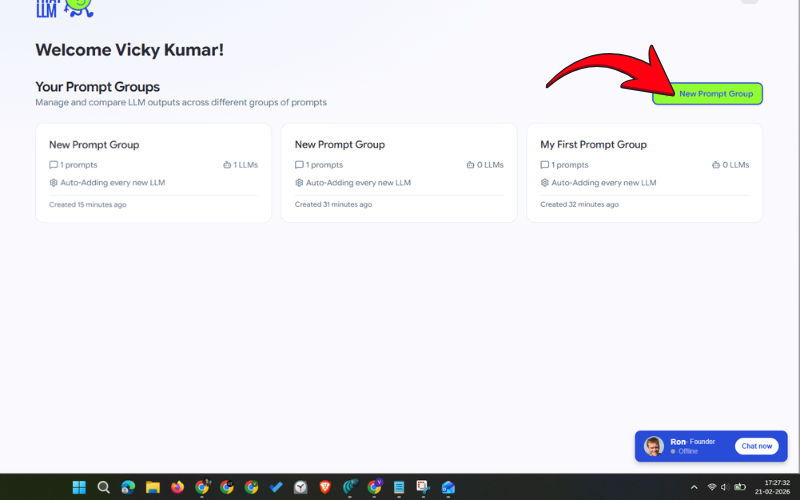
Step 4: Tap “New Prompt Group”.

setting up prompt group on Try That LLM

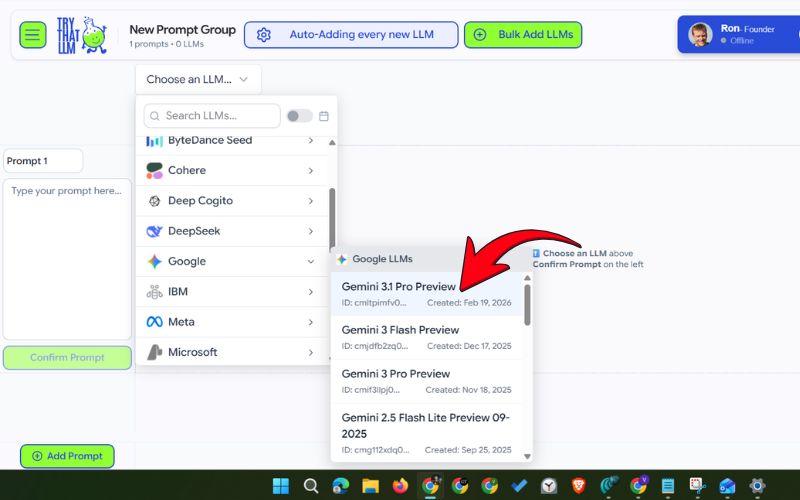
Step 5: Click “Choose an LLM” and select Google > Gemini 3.1 Preview.

choosing LLM on Try That LLM

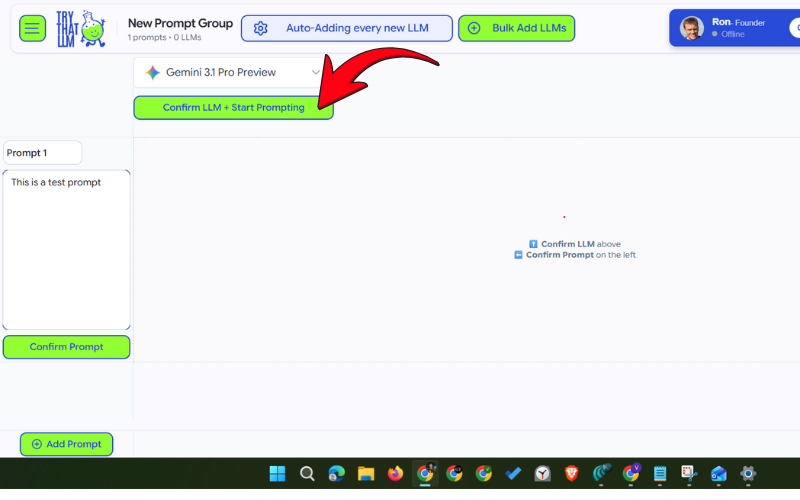
Step 6: Click “Confirm LLM + Start Prompting”.

confirming LLM on Try That LLM

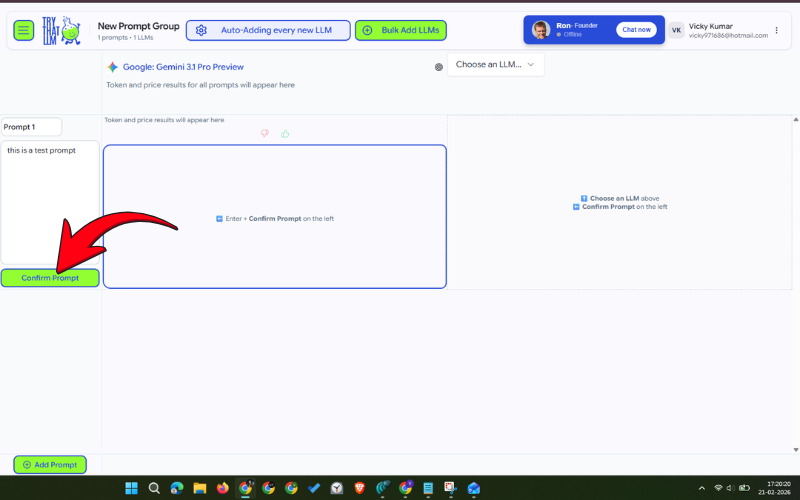
Step 7: Enter your message in the prompt section and click “Confirm Prompt”.

confirming prompt on Try That LLM

You get 1000 free credits when you create an account. Note that these are one-time credits and are not added every month.

Arena AI

4. Arena AI

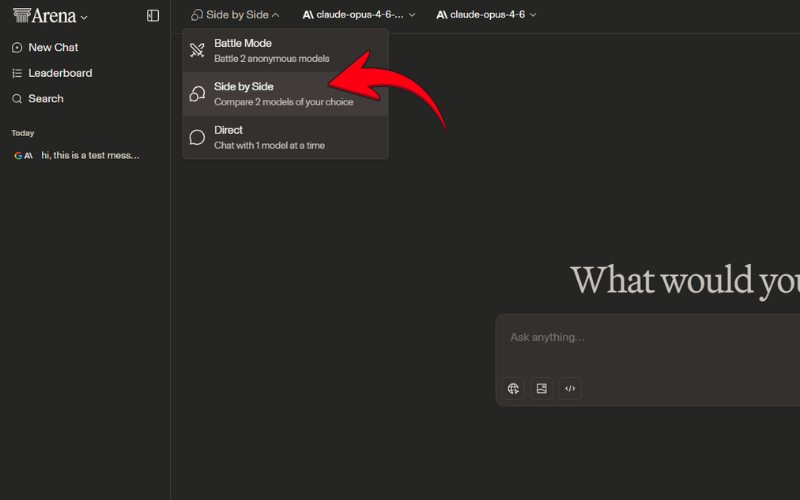
Arena AI also lets you compare different LLMs for free. The best part is that you don’t need to sign up on the platform to use Gemini 3.1 Pro or any other LLM. Just open the website, choose your AI model, and start messaging.

Step 1: Go to Arena.ai and make sure side-by-side mode is selected.

choosing side by side mode on Arena AI

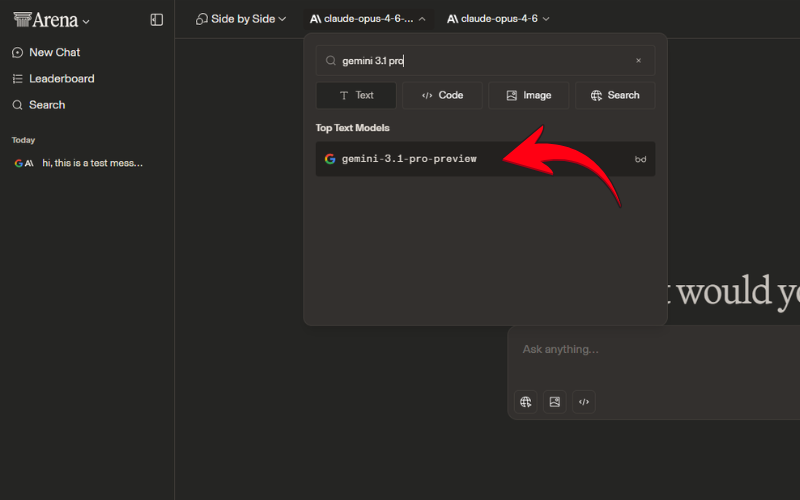
Step 2: Tap on the first LLM field.

Step 3: Search for “Gemini 3.1 Pro” and choose the right LLM from.

choosing LLM on Arena AI

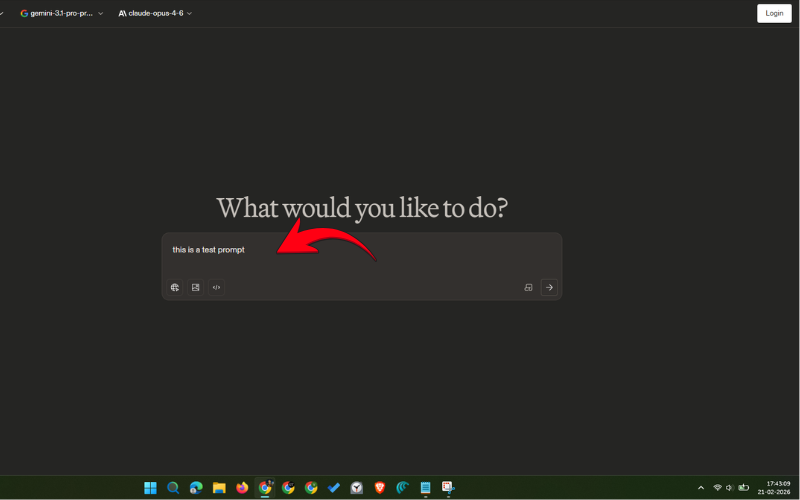
Step 4: Write your message/prompt in the Ask anything section and enter.

using the LLM on Arena AI

Arena AI is completely free to test LLMs, but it doesn’t offer unlimited responses. The platform provides pretty generous limits, which should be more than enough for small use cases.

ChatPlayGround AI

5. ChatPlayGround AI

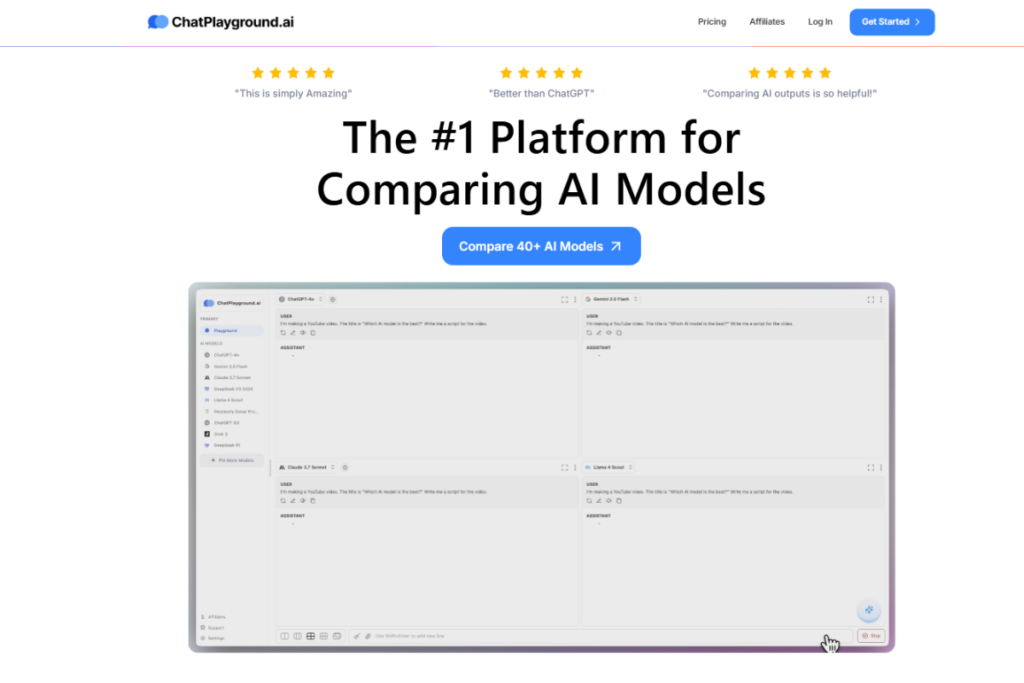
ChatPlayGround AI also offers access to dozens of LLM models, including Gemini 3.1 Pro, Claude Opus 4.6, and ChatGPT 5.2. Unlike Try That LLM and Arena AI, this AI tool lets you use images and PDFs with your message. But what’s the catch here? It doesn’t have a free plan; instead, it offers a 3-day free trial, and for that, you’ll need to link your bank cards.

So, if you only need access to Gemini 3.1 Pro and other LLMs with better capabilities, you can go for the free trial, but make sure to cancel the plan before three days to avoid any charges. Simply go to chatplayground.ai, tap “Sign Up”, and fill in the required details to get started.

Be sure to visit the AI section on Gizmochina regularly for the latest updates.

The post Top 5 ways to use Gemini 3.1 Pro for free appeared first on Gizmochina.
Samsung’s One UI 8.5 beta program is still not over

Samsung One UI 8.5 beta program

Samsung has already released five One UI 8.5 beta builds for the Galaxy S25 trio, and it appears the brand is still not done with the beta testing. Just recently, a new beta build was spotted on the test server, which could be the sixth for the S25 series. Now, if you’re wondering whether a new beta will cause a delay to the stable release or when the stable update will arrive, then stick to the post as we dig deeper to find those answers.

The One UI 8.5 beta program went live in early December for the Galaxy S25 series. At regular intervals, Samsung continued to push more beta builds to fix bugs and enhance the software experience. The Beta 3, in particular, brought some hope of a quicker, stable release, as the build reportedly had a near-stable smoothness with no obvious bugs. However, Samsung wasn’t convinced.

The fourth beta landed in early February, and then the fifth one arrived this week. While these builds primarily aimed to improve software smoothness and squash previously discovered bugs, they also introduced a couple of new features. Beta 4 added Direct Voicemail, and Beta 5 debuted AI-powered Bixby

Samsung might release another One UI 8.5 beta soon, as a new build has just been spotted on the server (via Alfaturk) with firmware version ZZB7. This could go live next month as the sixth beta update for the Galaxy S25 series. We don’t know how many more are on the way. Last year, Samsung released seven One UI 8.0 beta builds before pushing the stable update. So, there could be one or two more beta builds for One UI 8.5 in the queue before we actually start receiving the stable update.

Samsung hasn’t announced when it will start rolling out the stable One UI 8.5 update. However, if past rollouts are anything to go by, we can expect the rollout to begin in late March 2026, starting with the Galaxy S25 series.

Related:
1. One UI 8.5: Eligible devices and new features
2. One UI 8.5 will be the last feature update for these Galaxy devices

It’s been surprising to see that Samsung didn’t expand the One UI 8.5 beta program beyond the Galaxy S25 series. The brand has not confirmed if more devices will get the beta update. This could mean a direct stable release for other Galaxy models. That shouldn’t be concerning if Samsung quickly rolls out the One UI 8.5 update to its eligible devices. That seems more likely as the brand is reportedly gearing up to release the next-gen foldable devices with One UI 9.0 (Android 16) around July or August. Samsung would be looking to wrap up the One UI 8.5 rollout before that.

We’ll continue to update you with the latest developments around One UI 8.5 in the Samsung section on this website. Remember to visit that regularly. Also, join our Telegram channel to get instant notifications about the breaking news and software rollouts.

The post Samsung’s One UI 8.5 beta program is still not over appeared first on Gizmochina.
Motorola’s premium phones finally receive Android 16 update in the US

Motorola razr 2025 Android 16 update

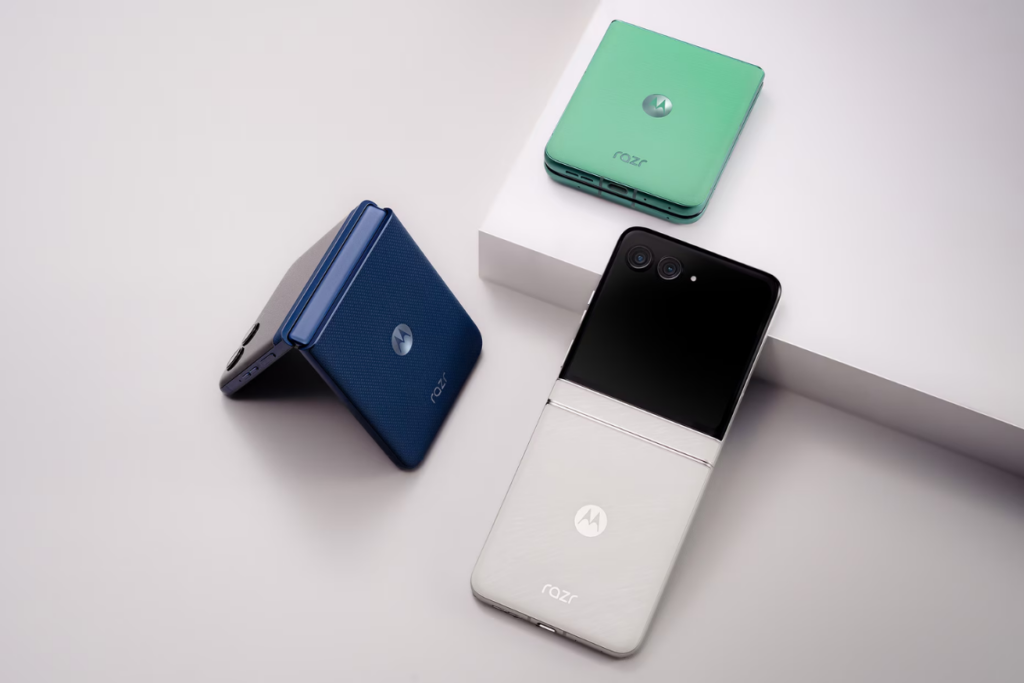
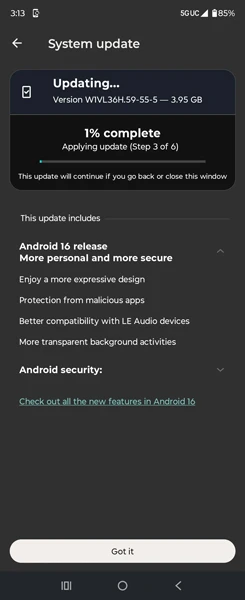
The Android 16 update is finally rolling out to Motorola’s most premium smartphones, Razr 2025 and Razr Ultra 2025, in the US, just as Google has released the first Android 17 beta. Both Razr phones entered Android 16 beta testing about half a year ago, and now, after a long wait, the stable update is finally here.

The Android 16 update for 2025’s Razr smartphones is currently available on T-Mobile and Verizon carriers in the US, as spotted by Ytechb. For the Razr 2025, the update arrives with the firmware version W1UC36H.96-35-1, whereas the Razr Ultra 2025 users can identify the update by the firmware version W1VL36H.59-55-5.

Motorola Razr Ultra 2025 Android 16 update

This is the first major OS update for the Razr 2025 and Razr Ultra 2025, which has a massive download size of about 4GB. It’s best to download such large packages over Wi-Fi and make sure the battery is at least 40% charged for a smooth upgrade to Android 16.

While it’s a major OS upgrade, don’t expect major visual changes or groundbreaking features. That said, there are still some useful upgrades and new features that further improve the software experience. It introduces a new notification cooldown feature that prevents you from getting annoyed when an app sends too many notifications from the same app within a short time. It does so by reducing the volume of incoming notifications for that particular app.

Android 16 lets you create custom models based on your needs, in addition to the existing modes, including Do Not Disturb, Bedtime, and Driving. You can also connect to a hotspot of a different device without entering the password, provided that both devices are logged in to the same Google account. The update also brings improvements to hearing aids, protection from malicious apps, and performance upgrades.

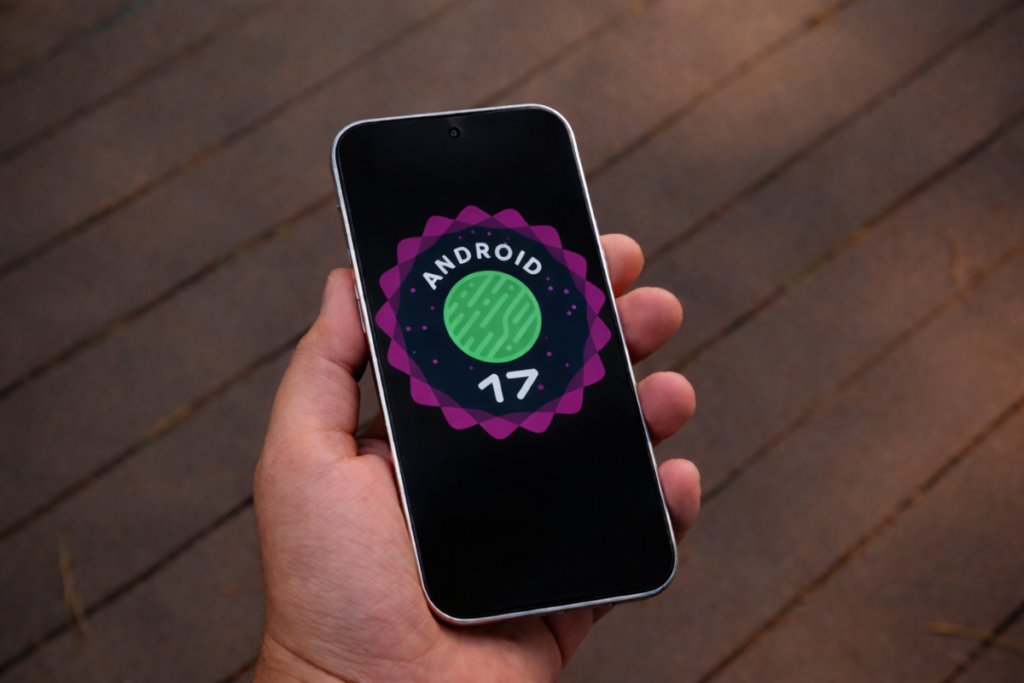
While Motorola is busy rolling out the Android 16 update, Google has already started developing Android 17. In fact, the first beta has been out for a few days now, with more to arrive in the coming weeks and months. The stable build could arrive around June or July 2026. We’ve a dedicated Android 17 section where we regularly post the latest developments on the same. You can follow that along to stay up-to-date.

To ensure you don’t miss out on the latest updates from Motorola, remember to visit the Motorola section once in a while. Or, you can join our Telegram channel to get instant notifications as soon as we publish new stories.

The post Motorola’s premium phones finally receive Android 16 update in the US appeared first on Gizmochina.

These Android 17 best features have been on Apple devices for years

Android 17 best features

Android 17’s development is progressing faster than we thought, as the first beta is already here, with no developer preview builds. But if you went through the changelog (here), you’d be disappointed to see no significant upgrades. However, the good news is that there are many under-development Android 17 features that will land at some point this year. Those include two useful features that Apple users have been using for years.

1. A native app-lock, finally

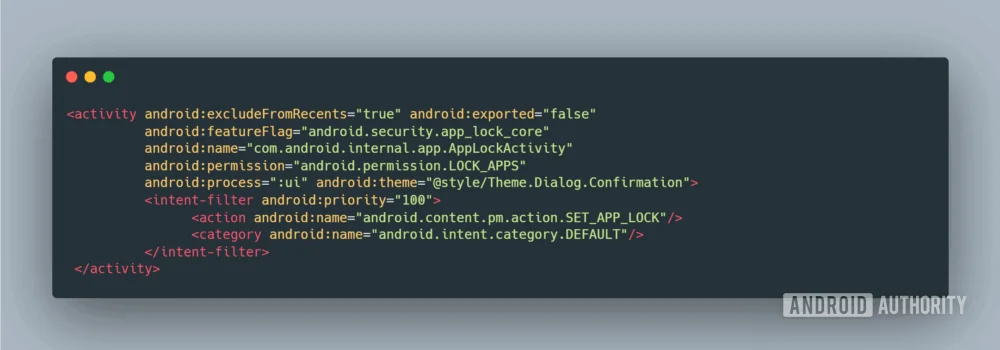
Google may finally bring a native app-lock feature to Android 17. While this isn’t officially confirmed yet, instances of it were discovered within the Android framework package. 

So far, Google Pixel users are forced to rely on third-party app lockers, which are fundamentally concerning. While Pixel phones do have a Private Space for securing apps, they don’t work the way app lock does. It offers a separate space to run apps in a separate user profile, which can be good for apps you rarely open, but a headache for apps you open daily.

Apple felt the need for it a long time ago and introduced native app lock support with iOS 18 in 2024. Major Android brands, including Samsung, Xiaomi, Oppo, Vivo, and OnePlus, have also integrated it into their custom skins. Still, a native integration into Android OS is always the best route, especially for Pixel owners. 

2. Universal clipboard enabling seamless copy-paste

Android has a built-in clipboard feature that stores clipboard content, so you can easily paste it into your favorite apps, but the clipboard contents are not synced across your Android devices. This means you can’t paste the copied content from your phone onto another Android phone, PC, or tablet. That could change soon with the Universal Clipboard feature in Android 17.

This upcoming feature was spotted in an Android beta and Canary releases in November, and is expected to arrive as part of Android 17. This will work similarly to the Universal Clipboard on Apple devices, introduced back in September 2016, which allows users to copy text or media on one device and paste it instantly onto another.

A native app locker and a universal clipboard are two of the most useful features we are looking forward to in Android 17. One feature adds an extra layer of security to your apps, and the other strengthens the Android ecosystem.

Google appears to be following last year’s release pattern. Therefore, the first Android 17 release was always going to be developer-focused, laying the groundwork for significant upgrades and new features in Android 17 QPR1, which would be released around August or September 2026, along with the Pixel 11.

We’ll continue to publish the latest stories around the same topic in our Android 17 section. You can also join our Telegram channel to get instant notifications about the latest happenings in tech.

The post These Android 17 best features have been on Apple devices for years appeared first on Gizmochina.

Here’s when your Xiaomi device will stop getting HyperOS updates

Xiaomi HyperOS update life

Xiaomi has one of the best software update policies among Android brands, but even that has to come to an end sometime. Thus, it becomes important to keep the update policy of your device in check to ensure it continues to receive the latest updates.

To make things easier, we dug through Xiaomi’s official website to prepare a list for you that shows when your Xiaomi, Redmi, or POCO device will stop receiving software updates.

List of Xiaomi, Redmi, and POCO devices with their EOL dates

The End-of-Life (EOL) date is when your device stops receiving all software updates, including major HyperOS updates and security releases.

Xiaomi devices

DeviceEOL Date (YYYY-MM-DD)
Xiaomi 15, 15 Ultra2031-03-01
Xiaomi 15T, 15T Pro2031-09-24
Xiaomi 142029-02-25
Xiaomi 14 Ultra2029-03-15
Xiaomi 14T, 14T Pro2029-09-26
Xiaomi 13, 13 Pro2028-03-08
Xiaomi 13 Ultra2028-06-12
Xiaomi 13 Lite2027-03-02
Xiaomi 13T, 13T Pro2028-10-04
Xiaomi 12, 12 Pro2026-03-17
Xiaomi 12 Lite2026-07-01
Xiaomi 12T, 12T Pro2026-10-13
Xiaomi Pad 7, Pad 7 Pro2028-03-01
Xiaomi Pad 62026-07-10
Xiaomi MIX Flip2029-07-18

Redmi devices

DeviceEOL Date (YYYY-MM-DD)
Redmi Note 15, Note 15 5G2032-01-15
Redmi Note 15 Pro, Note 15 Pro 5G, Note 15 Pro+ 5G2032-01-15
Redmi Note 142031-03-01
Redmi Note 14 5G2029-01-09
Redmi Note 14 Pro2029-01-15
Redmi Note 14 Pro 5G2029-01-30
Redmi Note 14 Pro+ 5G2029-01-01
Redmi Note 13, Note 13 5G2028-01-15
Redmi Note 13 Pro, Note 13 Pro 5G, Note 13 Pro+ 5G2028-01-15
Redmi Note 122027-03-23
Redmi Note 12 5G2026-03-23
Redmi Note 12 Pro2026-04-20
Redmi Note 12 Pro 5G, Note 12 Pro+ 5G2027-03-23
Redmi Note 12S2027-05-10
Redmi 152029-09-22
Redmi 15 5G2029-08-01
Redmi 15C2031-08-28
Redmi 15C 5G2031-09-30
Redmi 14C2028-09-26
Redmi 13C2026-11-10
Redmi 122027-06-16
Redmi 12 5G2027-09-01
Redmi 12C2026-03-10
Redmi A52029-04-30
Redmi A32027-02-21
Redmi A2, A2+2026-03-24
Redmi Pad 2, Pad 2 4G2032-06-15
Redmi Pad 2 Pro, Pad 2 Pro 5G2029-09-22
Redmi Pad Pro 5G2027-06-11
Redmi Pad SE 8.7, Pad SE 8.7 4G2026-08-15

POCO devices

DeviceEOL Date (YYYY-MM-DD)
POCO F8 Pro, F8 Ultra2031-11-26
POCO F72031-06-24
POCO F7 Pro, F7 Ultra2031-03-27
POCO F62028-05-23
POCO F6 Pro2028-05-22
POCO F5, F5 Pro2026-05-09
POCO X72029-01-30
POCO X7 Pro2029-01-07
POCO X6 5G, X6 Pro2028-01-11
POCO X5 5G2027-02-06
POCO X5 Pro 5G2026-02-06
POCO M8 5G, M8 Pro 5G2032-01-08
POCO M72031-08-19
POCO M7 Pro 5G2029-01-09
POCO M62028-06-05
POCO M6 Pro2028-01-11
POCO C852031-08-28
POCO C752028-09-26
POCO C652026-11-06
POCO Pad M12029-09-22

If your Xiaomi device is approaching its EOL date or has already reached it, you should really upgrade to a newer model. While an outdated device will still work just fine, it won’t be as secure as newer devices running the latest HyperOS software and security patch. Check out the list of Xiaomi devices that promise six years of software support to find a reliable upgrade that stays relevant for much longer.

Also read:
1. How to turn off ads in Xiaomi’s HyperOS system apps
2. Xiaomi devices eligible for Android 17 update
3. HyperOS 3.1: Here’s everything you need to know

To ensure you don’t miss out on the important updates from Xiaomi, remember to visit the Xiaomi section on this website regularly. Alternatively, you can join us on Telegram to get instant notifications about the latest HyperOS updates, along with the biggest tech headlines.

The post Here’s when your Xiaomi device will stop getting HyperOS updates appeared first on Gizmochina.

❌