Tecno has historically faced criticism for its slow software updates, and that trend hasn’t quite shifted yet. The company has recently announced its Android 16 rollout schedule, but most of its competitors are already offering Android 17 betas. Despite the wait, we finally have official details on which devices are eligible and when they can expect the new HiOS 16 update.
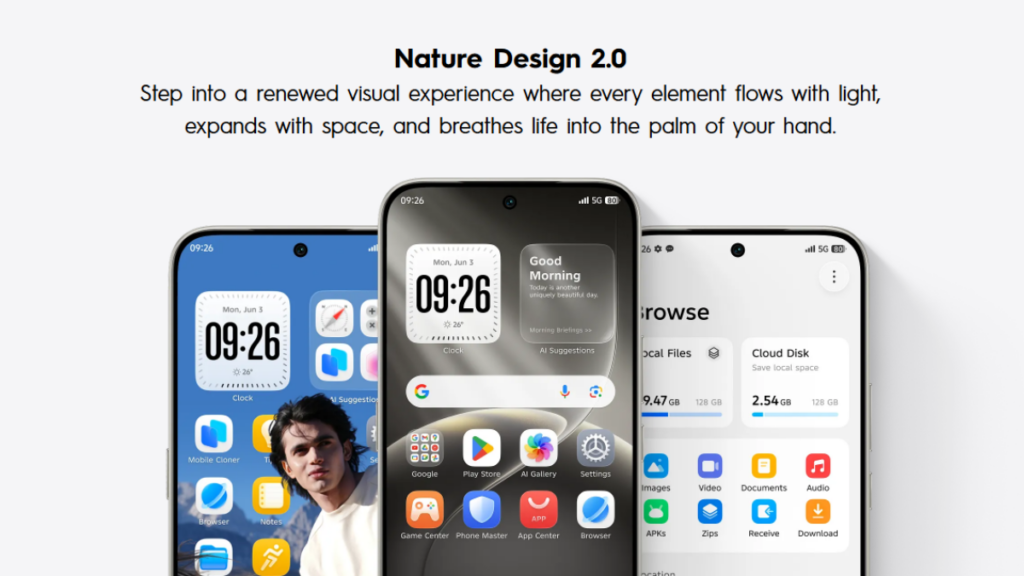
The Android 16 update for Tecno devices comes with the HiOS 16 skin on top, offering additional features and upgrades beyond what’s already included in Android 16. The update will be rolled out to the Camon 40 series, Camon 30 series, and several devices in the POVA and Phantom lineup as per the timeline below.
Tecno Android 16 (HiOS 16) rollout timeline
Q2 2026 (April – June)
Tecno Camon 40
Tecno Camon 40 Pro
Tecno Camon 40 Pro 5G
Tecno Camon 40 Premier 5G
Q3 2026 (July – September)
Tecno Camon 30
Tecno Camon 30 5G
Tecno Camon 30 Pro 5G
Tecno Camon 30 Premier 5G
Tecno Camon 30S
Tecno Camon 30S Pro
Tecno POVA Slim 5G
Tecno POVA 7 NEO
Tecno POVA 7
Tecno POVA 7 5G
Tecno POVA 7 Ultra 5G
Tecno POVA Curve 5G
Tecno POVA 7 5G Pro
Q4 2026 (October – December)
Tecno Phantom V Fold2 5G
Tecno Phantom V Flip2 5G
The company states that the availability of the update will depend on region, model type, and carrier certification. Because of this staged rollout, the same device in one region may receive the update earlier than some regions. You can manually check for available updates in the System update section inside the Settings app.
Tecno Android 16 (HiOS 16) update: New features and major upgrades
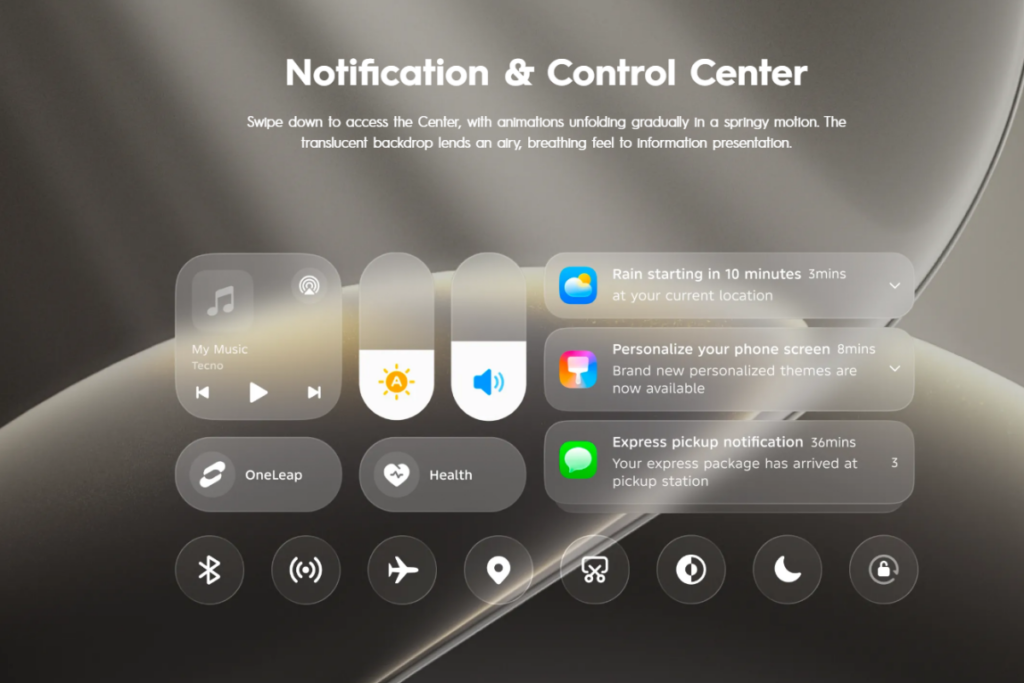
HiOS 16 focuses on smoother performance, visual changes, and much deeper AI integration through Ella and AIGC tools. It introduces a refreshed design language, “Superfluidity,” aimed at smoother animations, cleaner transitions, and a more cohesive visual experience. The UI has effects similar to Liquid Glass.
The Minus One screen is now more structured, allowing you to quickly access tools such as real-time translation and other smart services. You can access key actions and information without even opening individual apps.
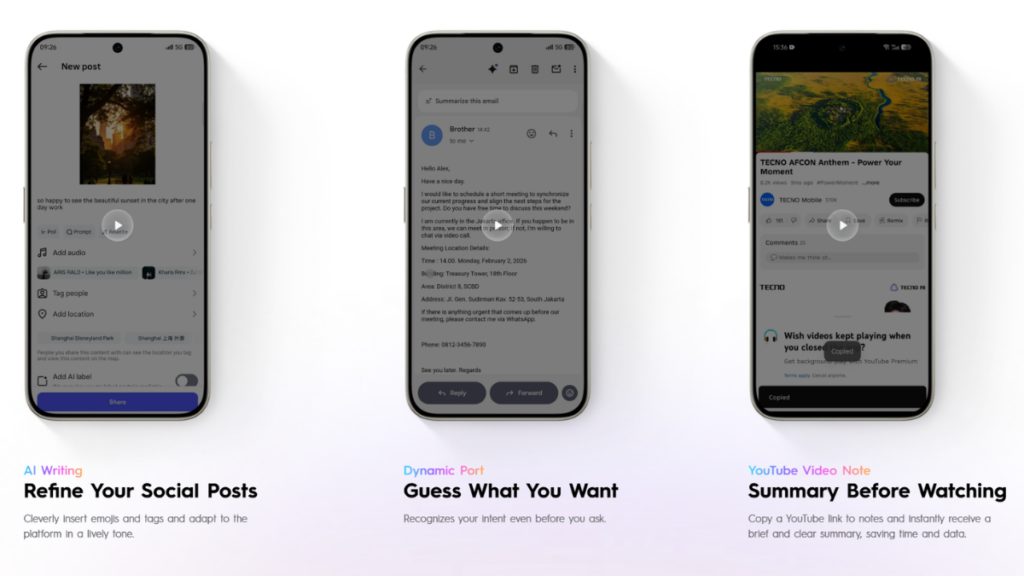
AI has been a major focus in HiOS 16, now featuring a more powerful built-in “Ella” assistant with deeper system integration and better context understanding. It can help you manage daily routines, offer proactive suggestions, summarize YouTube videos, and integrate with WhatsApp to read and reply to messages.
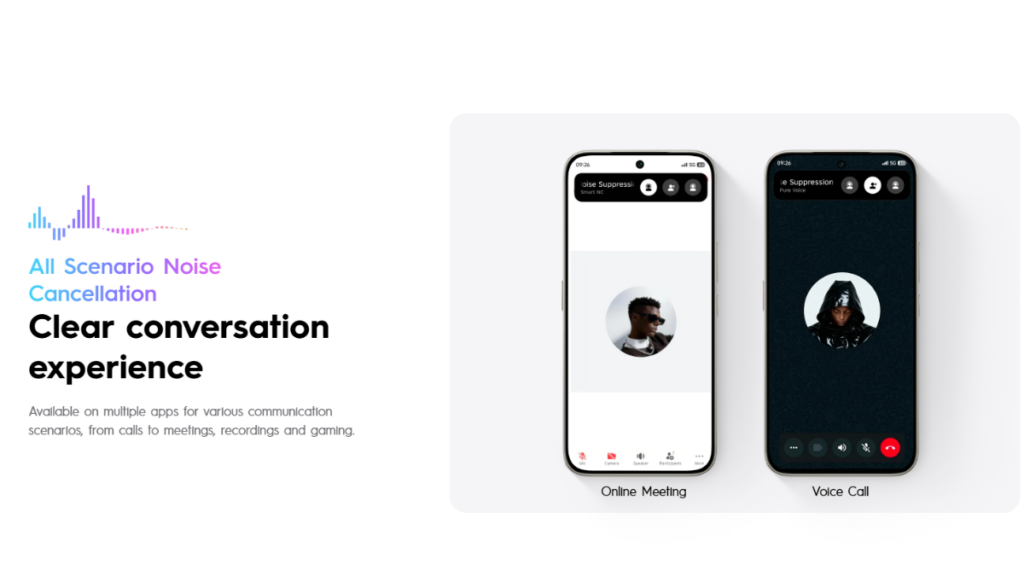
The latest software offers AI-driven photo editing upgrades in the Gallery app, an intelligent calling assistant for real-time subtitles, call summaries, and noise cancellation.
HiOS 16 lets you transfer files with iPhones with just a single tap without requiring an internet connection. The software also introduces OneLeap for managing multiple devices. Furthermore, it brings App Flash Launch 2.0, Sensory Scheduling 3.0, and MemCompress to enhance the overall performance. There are also some gaming-related upgrades, such as Gaming Bypass Charging and a more precise touch control.
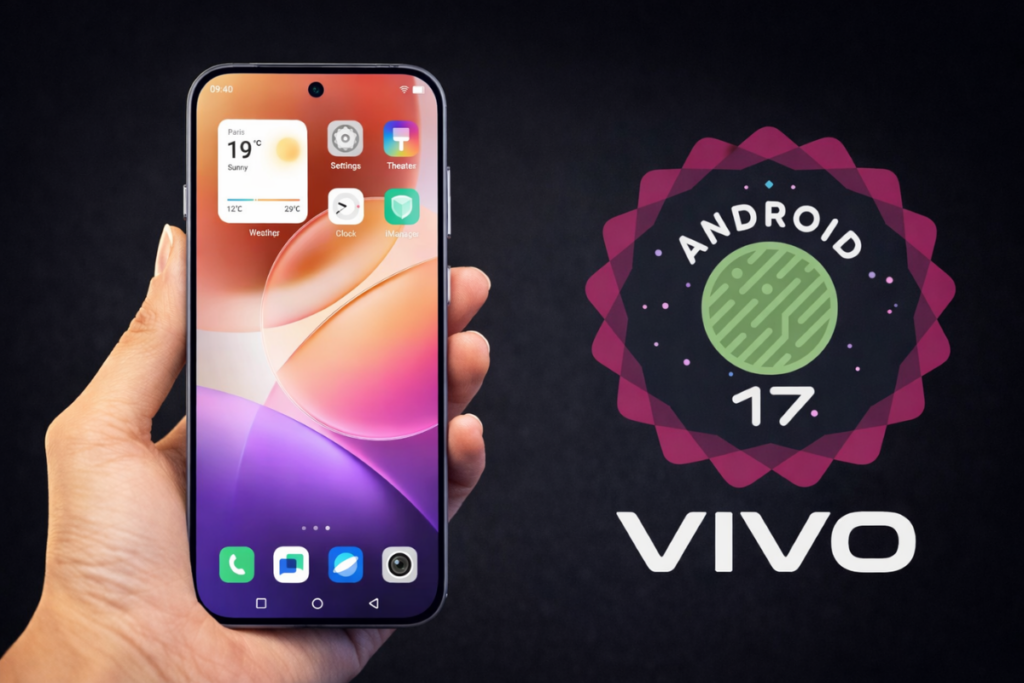
Vivo finally joins its Chinese rivals, Oppo, OnePlus, and Realme, to offer its users early access to Android 17 via the Developer Preview program. This preview program build is based on Android 17 Beta 2 and is currently limited to the newest flagships, Vivo X300 Pro and iQOO 15.
The company has already begun accepting applications for its Android 17 Developer Preview program, although it’s currently live in mainland China. We can expect its expansion to other regions in the coming days and weeks. We’ll keep you posted in the Vivo section.
If you have an eligible device and live in a supported region, you can sign up for Android 17 Developer Preview and get early access to the latest features and upgrades. Keep in mind that these early builds are intended for developers and advanced users. Below is a list of issues in the current beta build shared by Vivo.
Known issues:
Vivo X300 Pro 1. Fingerprint cannot be used 2. Screenshot function is unavailable. 3. Some built-in and third-party applications may crash. 4. Some system settings (system style, easy mode, privacy system, etc.) cause crashes.
iQOO 15 1. Fingerprint cannot be used 2. Screenshot function is unavailable. 3. There is a chance that the small window cannot be opened. 4. Facial recognition is temporarily unavailable. 5. The Home button may occasionally malfunction; it is recommended to use the navigation keys.
Before you upgrade to Android 17 beta, note that you can’t go back to the preview stable build without doing a full factory reset. Make sure to back up important data. Also, ensure that your phone has at least 5GB of free storage and is charged to at least 40% before installing the beta build.
How to install Android 17 beta on Vivo and iQOO phones?
Back up your important data by navigating to Settings > Additional settings > Back Up and Reset > Backup & Restore and choosing what to back up. Once done, download the required firmware file from the official website.
Now, follow these steps:
Connect your Vivo phone to a computer via a USB cable.
Switch the phone’s USB settings to file transfer mode.
Copy the downloaded software firmware to the phone’s internal storage. (if it isn’t already there)
On your phone, go to Settings > System Management and Upgrade > System Upgrade > Upgrade Settings > Local Upgrade
Choose the downloaded firmware file and start the upgrade.
Once the upgrade is complete, tap Restart.
If you encounter any problems with the beta build, submit your feedback through the Feedback application. This will help the brand in addressing those bugs. You can also downgrade to the stable Android 16 build. Check the Vivo developer site for the required package and steps.
Remember to visit the Vivo section on Gizmochina regularly for the latest information. Or, you can join our Telegram channel to get instant notifications about the latest software updates and breaking tech news.
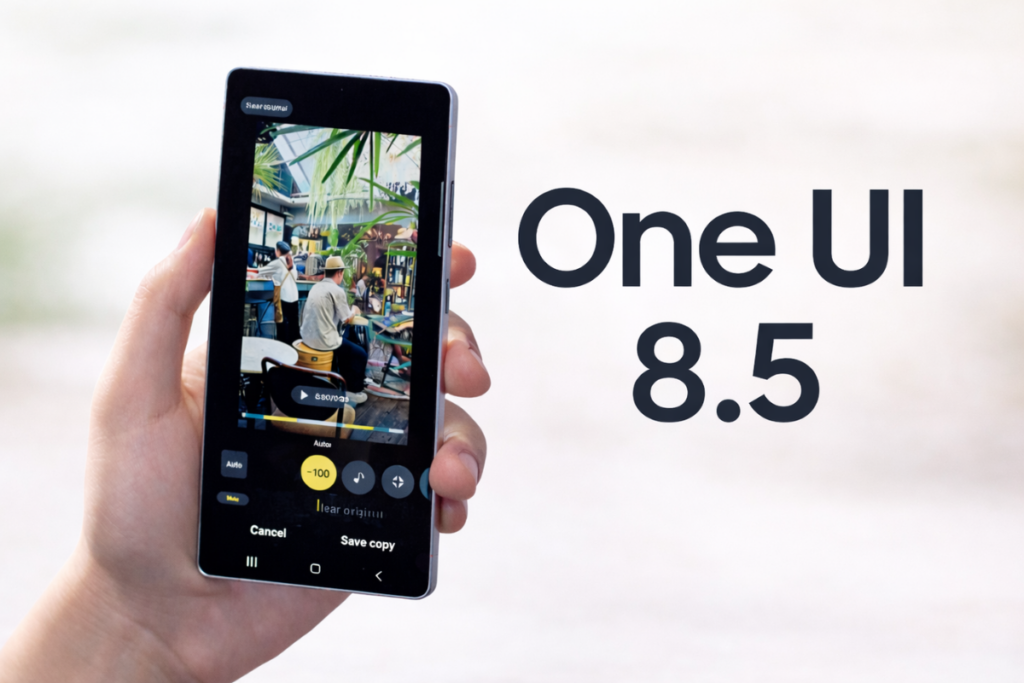
One UI 8.5 debuted with the Galaxy S26 series in February and was expected to begin rolling out to older Galaxy devices in March, but users received a series of beta updates instead. It appears we’re still nowhere near the stable rollout, as the company has reportedly planned a few more beta releases this month.
According to the leaked One UI 8.5 beta timeline shared by a user on X, the Galaxy S25 series will receive at least two more beta updates in April. The Galaxy S24 and Galaxy S23 phones may also receive two beta updates this month, while the Galaxy Z Fold 6 and Galaxy Z Flip 6 may receive one.
Here’s the leaked beta timeline:
Galaxy S25 series
Beta 9: This week
Beta 10: Third week of April
Stable: Not determined
Galaxy S24 series
Beta 2: April 9, 2026
Beta 3: April 20, 2026
Galaxy Z Fold 6, Flip 6
Beta 2: April 9, 2026
Galaxy S23 series
Beta 1: April 9, 2026
Beta 2: April 23, 2026
If this leaked beta timeline turns out to be accurate, the stable rollout won’t begin this month. This may certainly disappoint Galaxy S25 owners and would also result in a delayed rollout for other Galaxy devices.
It’s surprising to see Samsung is still stretching the beta phase, given that recent beta builds had no critical bugs. The One UI 8.5 build for the Galaxy S25 appears stable enough for a wider rollout. That could mean Samsung is intentionally delaying the stable rollout.
We’ll update you on this when we have more details to share. You can visit the One UI 8.5 section on Gizmochina in a few days to check for fresh details. Or, if you prefer instant updates, don’t forget to join our Telegram channel.
The Snapdragon 8 Gen 5 is the first non-Elite chipset to feature the powerful Oryon cores. The chipset offers solid gaming performance, a flagship-grade ISP, and reliable connectivity, making it a powerful choice among premium mid-range phones.
On the other hand, the Dimensity 9300 is two years older than the Snapdragon 8 Gen 5. Still, it offers smooth performance and excellent efficiency to be considered a reliable choice, and more importantly, at a lower price.
So, the real question is: does it make sense to go with the Snapdragon 8 Gen 5, or is the Dimensity 9300 a solid choice at a relatively lower price? Let’s find out in this detailed comparison.
Quick verdict:
Choose Snapdragon 8 Gen 5 if you want higher CPU performance, sustained gaming performance, flagship ISP, and modern connectivity features. Choose Dimensity 9300 if you want reliable performance and excellent efficiency at a lower price point.
Snapdragon 8 Gen 5 vs Dimensity 9300: Spec sheet
Snapdragon 8 Gen 5
Dimensity 9300
Announced
November 2025
November 2023
Process node
3 nm (TSMC)
4 nm (TSMC)
CPU
2 × 3.8 GHz (Oryon Gen 3 – Prime) 6 × 3.32 GHz (Oryon Gen 3 – Performance)
Adreno 829 ray tracing support Snapdragon Elite Gaming features
Arm Immortalis-G720 MP12 console-level global illumination effects ray tracing support MediaTek HyperEngine Adaptive Gaming Technology
NPU
Qualcomm Hexagon NPU Agentic AI support
MediaTek NPU 790 up to 33 billion parameters on-device LoRA Fusion support
Memory
LPDDR5x, up to 4.8 GHz
LPDDR5T, up to 4.8 GHz
Storage
UFS 4.1
UFS 4 + MCQ
Camera
Qualcomm Spectra triple AI ISP (20-bit) up to 320MP single camera up to 108MP single camera with zero shutter lag, 30fps up to 48MP triple cameras with zero shutter lag, 30fps up to 4K/120fps video recording real-time semantic segmentation (limitless)
MediaTek Imagiq 990 ISP (18-bit) up to 320MP single camera up to 8K video recording AI Semantic Analysis Video Engine
Connectivity
Snapdragon X80 5G modem download speed: up to 10 Gbps upload speed: up to 3.5 Gbps Wi-Fi 7 (peak speed: 5.8 Gbps) Bluetooth 6.0
MediaTek 5G modem download speed: up to 7 Gbps Wi-Fi 7 (peak speed: 6.5 Gbps) Bluetooth 5.4
Snapdragon 8 Gen 5 vs Dimensity 9300: Benchmark numbers
Note: To obtain the benchmark results, the tests were performed using these devices: – OnePlus 15R (Snapdragon 8 Gen 5) – Vivo X100 Pro (Dimensity 9300)
Geekbench score (v6)
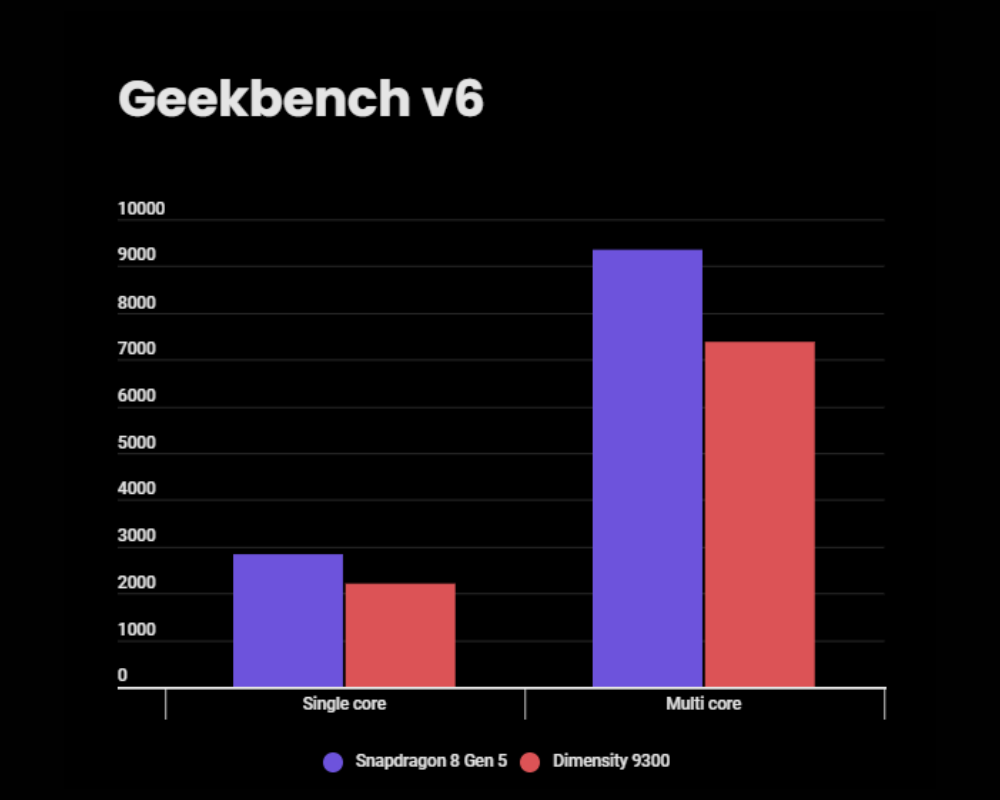
The Snapdragon 8 Gen 5 outperforms the Dimensity 9300 in both single-core and multi-core tests. In both tests, the Snapdragon chip achieves about 27% higher score, suggesting a snappier performance, particularly in tasks that require greater CPU resources.
Snapdragon 8 Gen 5
Dimensity 9300
Single core
2,837
2,208
Multi core
9,352
7,380
AnTuTu score (v11)
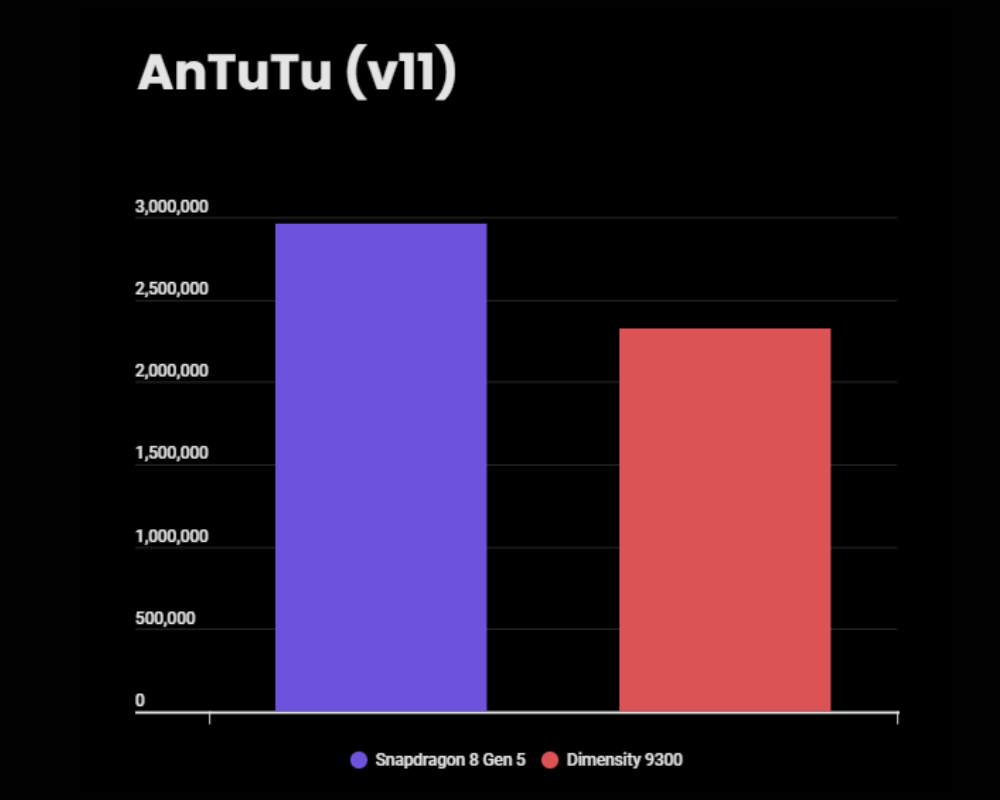
On the AnTuTu benchmark, the Snapdragon 8 Gen 5 scores 2.96 million, while the Dimensity 9300 sits below it with 2.32 million total score. That’s a solid 27% uplift for the Snapdragon chip.
Snapdragon 8 Gen 5
Dimensity 9300
AnTuTu score
2,961,236
2,324,872
CPU
914,878
692,230
GPU
974,402
816,259
Memory
382,729
338,122
UX
689,228
478,261
The breakdown of the AnTuTu score paints a better picture, and unsurprisingly, the Snapdragon 8 Gen 5 dominates all aspects. The CPU gets 32% higher score, the GPU gets 19% higher score, memory performance is up by 13%, and the UX score is up by 44%.
3DMark score
Wild Life Extreme Stress Test
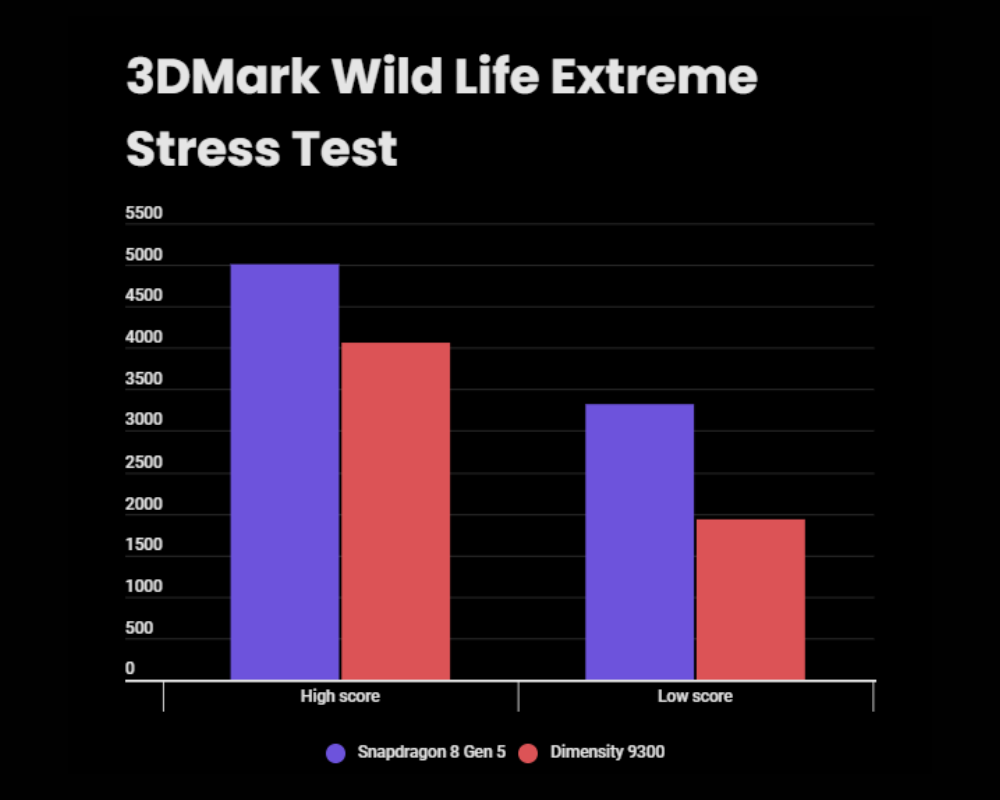
This is a widely popular gaming benchmark, where the Snapdragon 8 Gen 5 outperforms the Dimensity 9300 by a wide margin. It achieves a 23% higher best loop score and a whopping 71% increase in the lowest loop score. So, not just the performance, the Snapdragon chip also maintains higher stability.
Snapdragon 8 Gen 5
Dimensity 9300
Best loop score
5,009
4,062
Lowest loop score
3,321
1,933
Stability
66.30%
47.59%
While benchmarks offer great insights into performance and stability, they don’t focus on other key aspects, including connectivity, camera, and features. To give you a clearer picture, we’ve included them in the following section.
Snapdragon 8 Gen 5 vs Dimensity 9300: Key differences
Process node
The Snapdragon 8 Gen 5 uses TSMC’s newer 3nm node, which offers better performance and power efficiency than the 4nm node used in the Dimensity 9300.
Performance
CPU
Both chipsets feature octa-core CPUs, although their core configurations differ. The Snapdragon 8 Gen 5 uses a (2 + 6) layout, featuring two Oryon prime cores at 3.8 GHz and six Oryon performance cores at 3.32 GHz. The Dimensity 9300 features a (1 + 3 + 4) layout, which includes one Cortex-X4 prime core at 3.25 GHz, three Cortex-X4 performance cores at 2.85 GHz, and four Cortex-A720 efficiency cores at 2.0 GHz.
The Snapdragon 8 Gen 5 prioritizes performance by offering a higher peak clock speed of 3.8 GHz. In fact, all the CPU cores in the Snapdragon chip run at higher clock speeds than those in the Dimensity 9300. This is one of the primary reasons the Snapdragon chip easily outperforms the Dimensity 9300 in benchmarks.
GPU
As for the gaming and graphics rendering, the Snapdragon 8 Gen 5 uses a powerful Adreno 829 GPU featuring Qualcomm’s “sliced” architecture. The GPU offers excellent ray tracing performance, support for Unreal Engine 5, and AI-assisted upscaling. It also bundles a full suite of Snapdragon Elite Gaming features to deliver a smooth gaming performance with consistently high frame rates, low latency, and improved power utilization.
The Dimensity 9300 features a 12-core Arm Immortalis-G720 GPU, promising console-level global illumination effects. The GPU is equipped with a 2nd-gen hardware ray tracing, which is claimed to offer “fast, full raytracing experiences at a smooth 60 fps.” The chip also features MediaTek HyperEngine Adaptive Gaming Technology to deliver flagship performance without slowdowns for up to an hour in top titles, along with better cooling and improved power efficiency.
NPU
The Snapdragon 8 Gen 5 features a very capable Hexagon NPU, which integrates with an Oryon CPU and Adreno GPU to enable on-device agentic assistants, multimodal AI, and heavier gen-AI workloads in high-end devices. It is essentially a slightly binned-down version of the 8 Elite Gen 5 AI platform, with nearly all of the same features but lower peak clocks.
The Dimensity 9300’s AI stack is built around the MediaTek NPU 790, which delivers substantial efficiency and speed gains over the previous generation. It can run LLMs with up to 33 billion parameters and real-time generative AI. The AI stack enables the SoC to run multi-modal, multi-LLMs setups at usable latencies, entirely on-device.
Camera
The Snapdragon 8 Gen 5 features a 20-bit Spectra AI ISP with up to 320MP single camera and up to 4K/120fps video recording, although OEMs can enable up to 8K recording. The chip also supports limitless real-time semantic segmentation for precise optimizations. Plus, it offers a range of camera features (including AI-assisted features) to deliver greater quality with less noise.
On the other hand, the Dimensity 9300 is equipped with an 18-bit Imagiq 990 ISP, supporting up to 320MP single-camera and up to 8K video recording. The chip features an AI Semantic Analysis Video Engine with 16 categories of scene segmentation adjustments for enhanced cinematic video capture. It also features zero-latency video preview and 100% pixel-level autofocus + dual-lossless zoom.
Connectivity
While both chips offer robust connectivity, there are several important differences to consider. On a 5G connection, the Snapdragon 8 Gen 5’s download speed can reach up to 10 Gbps, while the Dimensity 9300 peaks at 7 Gbps. The Dimensity chip bounces back with a higher peak Wi-Fi 7 speed, reaching 6.5 Gbps (vs. 5.8 Gbps on the Snapdragon 8 Gen 5). Another advantage of the Snapdragon 8 Gen 5 is its support for Bluetooth 6.0, while the Dimensity 9300 supports the older Bluetooth 5.3 standard.
Snapdragon 8 Gen 5 vs Dimensity 9300: Which is better?
The Snapdragon 8 Gen 5 is clearly a much better choice over the Dimensity 9300. It offers solid CPU performance, a more consistent gaming performance, and a modern connectivity stack. Plus, it features the advanced Spectra ISP from the Snapdragon 8 Elite Gen 5, integrating the latest camera features and advanced camera optimizations.
That said, the Dimensity 9300 is still a solid mid-range chipset in 2026. It can smoothly run your day-to-day apps while offering excellent efficiency. Gaming performance is also good, but for heavier games and longer sessions, you may want to prefer a more capable chipset like the Snapdragon 8 Gen 5. Perhaps the only advantage it offers over the Snapdragon 8 Gen 5 is its lower price. So, if you’re getting a hefty discount on a Dimensity 9300 phone that makes it much cheaper than a Snapdragon 8 Gen 5 phone, that may be a solid deal. Otherwise, the Snapdragon 8 Gen 5 is a no-brainer choice here.

 Login
Login