Reading view

Stephen Tsai: Mountain West one-upping new Pac-12 in PR battle

It was supposed to be an all-in showdown on the Ninth Island.

No, not the McGregor-Holloway fight, although that one at least had a moment of action before being decided to the satisfaction of no one.

But the battle of public relations between the Mountain West and the Pac-12 never materialized.

No mas? No show. The Pac-12 did not even put in an ante.

Here’s the back story:

Two years ago, 10 of the 12 Pac-12 schools departed for other conferences. Oregon State and Washington State were left behind with each other, whatever TV revenues were abandoned, and the conference’s name. OSU and WSU had two options: 1) beg to follow Oregon and Washington into the Big Ten, or 2) merge with the Mountain West. They chose “none of the above.”

Instead, OSU and WSU negotiated to play football games against Mountain West teams during the 2024 season. Then in September of that year, whether it was through poaching or persuasive marketing, five Mountain West schools — Boise State, Colorado State, Fresno State, San Diego State and Utah State — agreed to join the Pac-12 beginning with the 2026-27 academic year. It took cross-my-heart loyalty pledges and retention payouts to keep UNLV and Air Force from joining the secession. Along the way, basketball powerhouse Gonzaga joined the Pac-12. The Mountain West countered with additions such as UTEP and Grand Canyon, and Hawaii becoming an all-sports member.

Both conferences went to court to argue over poaching penalties and exit fees worth millions of dollars.

This summer, both were supposed to boast about their members, television partners, sponsors and overall well-being.

This week, the Mountain West is hosting media days in Las Vegas. Each of the 10 football programs was asked to bring four players, the head coach, a top administrator, a media relations director, two digital creators and a mascot. (UH does not have an official mascot.) Television and broadcast partners will attend. Commissioner Gloria Nevarez will promote the league’s strengths and five-time-zone footprint in her annual state-of-the-MW address. The two-day event will be held at the Palms, once a celebrity hot spot in the early 2000s. In recent years, the Mountain West’s media days were held at the 21-and-older Circa Resort &Casino in downtown Las Vegas.

The Pac-12 also was expected to launch its football season with media days in Las Vegas. After all, the Pac-12 has embraced Las Vegas as a favorite venue. For the next two years, the Pac-12’s basketball tournaments will be held at the MGM Grand Garden Arena in Las Vegas.

But Pac-12 officials have been secretive in recent weeks. They have declined to reveal financial details of their new television contracts. And deputy commissioner Rick Hart recently told reporters the Pac-12 decided against holding a media day. The Pac-12 is the only FBS conference without a traditional media day or official preseason kickoff event this summer.

“We could have,” Hart told Front Office Sports. “We talked about it. Those are expensive. … Traditionally, you spend a lot of money, you bring everybody together for two or three days, you disrupt camp or whatever’s going on. Maybe you get the media there, maybe you don’t. Maybe you get 72 hours of publicity alongside all the other leagues that are doing media days. It’s pretty noisy. There’s a lot of static. And then everybody moves on.”

But media event would not conflict with training camp, which can’t open more than a month from the opener. UH, for example, plays Stanford on Aug. 29, college football’s Week Zero. The Warriors’ first practice of training camp is July 29.

The preseason hype probably offsets the cost of a media event. The Mountain West pays for meals and lodging for each team’s representatives. The schools pays for their travel expenses.

To the cynics, there are these conspiracy theories of the Pac-12’s non-plans.

1. If the Pac-12 announces lucrative sponsorships, TV deals and payouts to members, it could enhance the Mountain West’s claim the poaching/secession caused damage.

2. The Mountain West would receive better coverage if the Pac-12 held a media event at the same time in Las Vegas. UNLV and Nevada are Mountain West members; the Pac-12 does not have a member in the Silver State.

Maybe the Pac-12 has an entertaining and superior product. But the proof won’t be in the promotions.

NymVPN has released a huge iOS update adding Mixnet Tuning, Server Families, and app icon disguises — but some questions remain around the scale of some improvements

Nym Technologies has released a major update to the NymVPN iOS app, adding several new connectivity and convenience features.

At the core of the update are new features designed to give users control over the balance between privacy and performance.

NymVPN is one of the more technical VPNs on the market. Central to its operation is the titular Nym mix network, or mixnet, which hides user metadata by routing traffic through a mixture of servers, scrambling IP addresses on both sides of the connection.

At the same time, a blend of other users’ traffic and decoy traffic is sent through the same mixnet, making it effectively impossible to trace any actions back to you.

NymVPN has seen several notable improvements of late, adding post-quantum encryption as standard in June this year, split tunneling for Windows users in April, and an ad-blocker earlier in 2026.

It now resembles a typical VPN a little more closely, though the new features and fixes included in the 2026.11.0 iOS update are a bit more complex than your typical VPN update. Read on for a breakdown of the new features (based on the information NymVPN has given us, anyway).

Key features

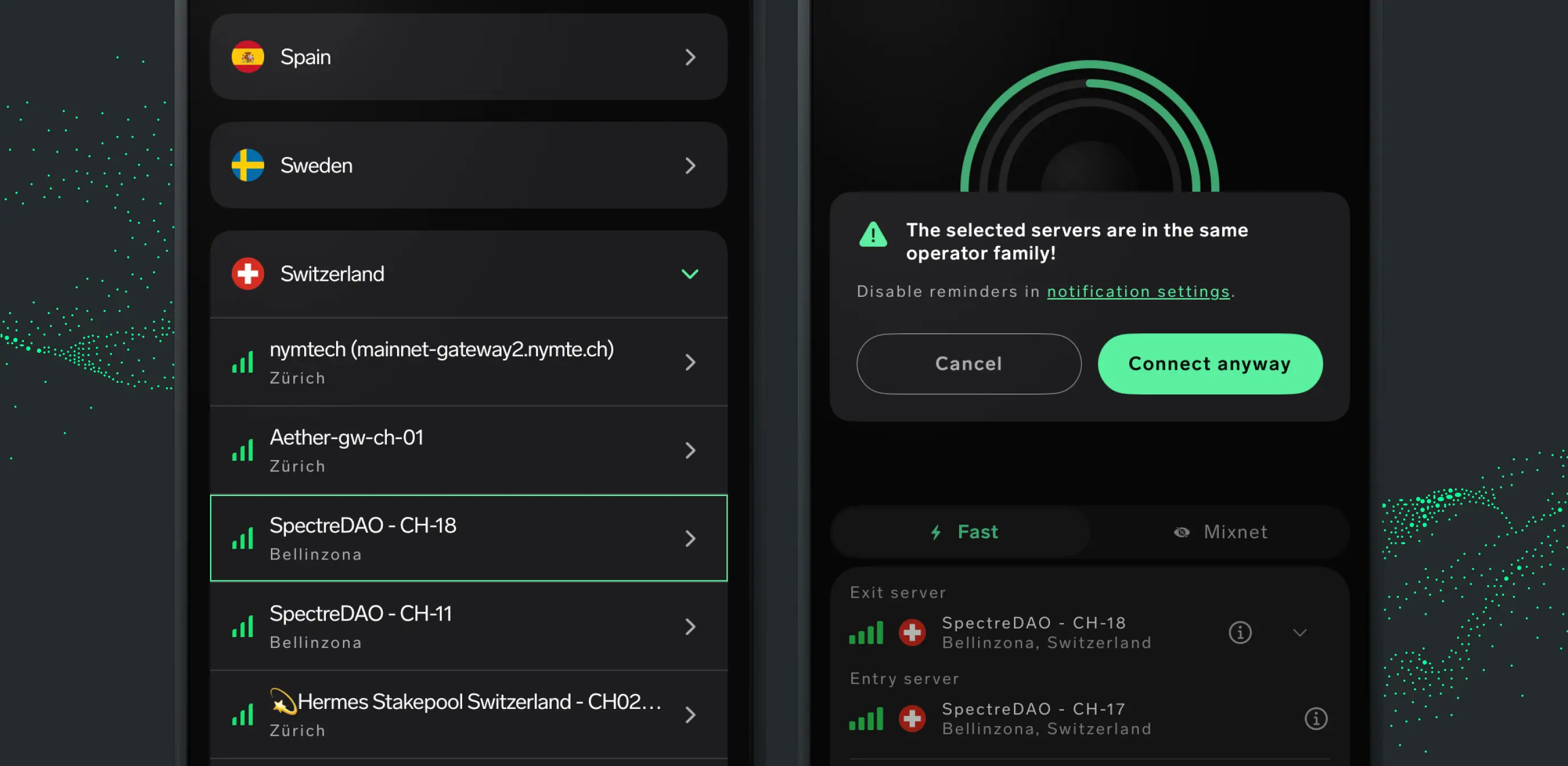
A composite image of the NymVPN Server Families page

(Image credit: Nym Technologies)

The update introduces Server Families, a new alert system that lets users know when their chosen mixnet servers may belong to the same operator or subnet. This allows users to maintain decentralization by choosing servers from different operators for each node in the mixnet.

All Nym servers are community-run and decentralized using blockchain technology, but using different operators for each node maximises the possible obfuscation of network traffic.

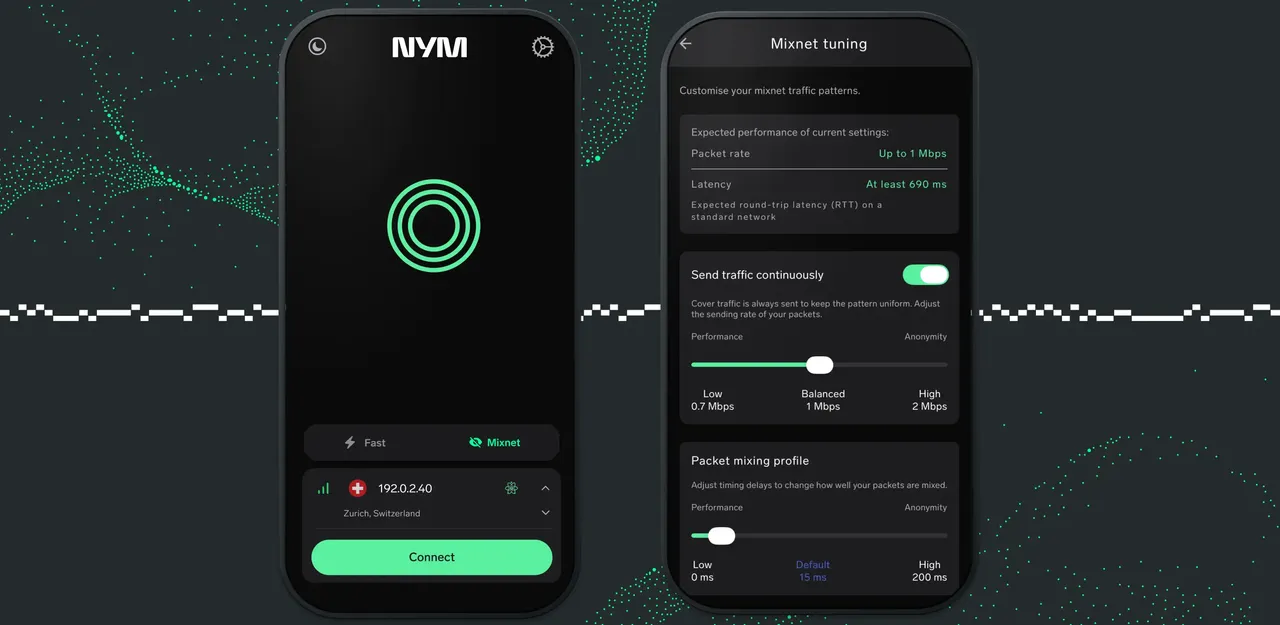
Additionally, the update adds a new Mixnet Tuning feature in beta, allowing users to adjust the balance between anonymity and privacy.

Mixnets operate through a number of ‘hops’, referring to individual nodes between the origin and destination of network traffic. Nym uses a five-hop mixnet as standard, with an entry, exit, and three connection points in between.

This creates latency – according to Nym, its mixnet adds 15ms of delay per hop by default, totalling 75ms across five hops.

This is an intentional measure designed to hide the timing of your network traffic, as well as its origin and destination, but could be annoying for streaming video or playing online games, where latency should be as low as possible to maximise performance.

Mixnet Tuning adds two settings that allow users to adjust the NymVPN’s default instructions while maintaining connection. These are the ‘Send traffic continuously’ setting, which offers a range of 0.7Mbps to 2Mbps for decoy traffic, and ‘Packet mixing profile’, which changes how long each mix node holds onto your traffic, from 0ms to 200ms.

Keeping it convenient

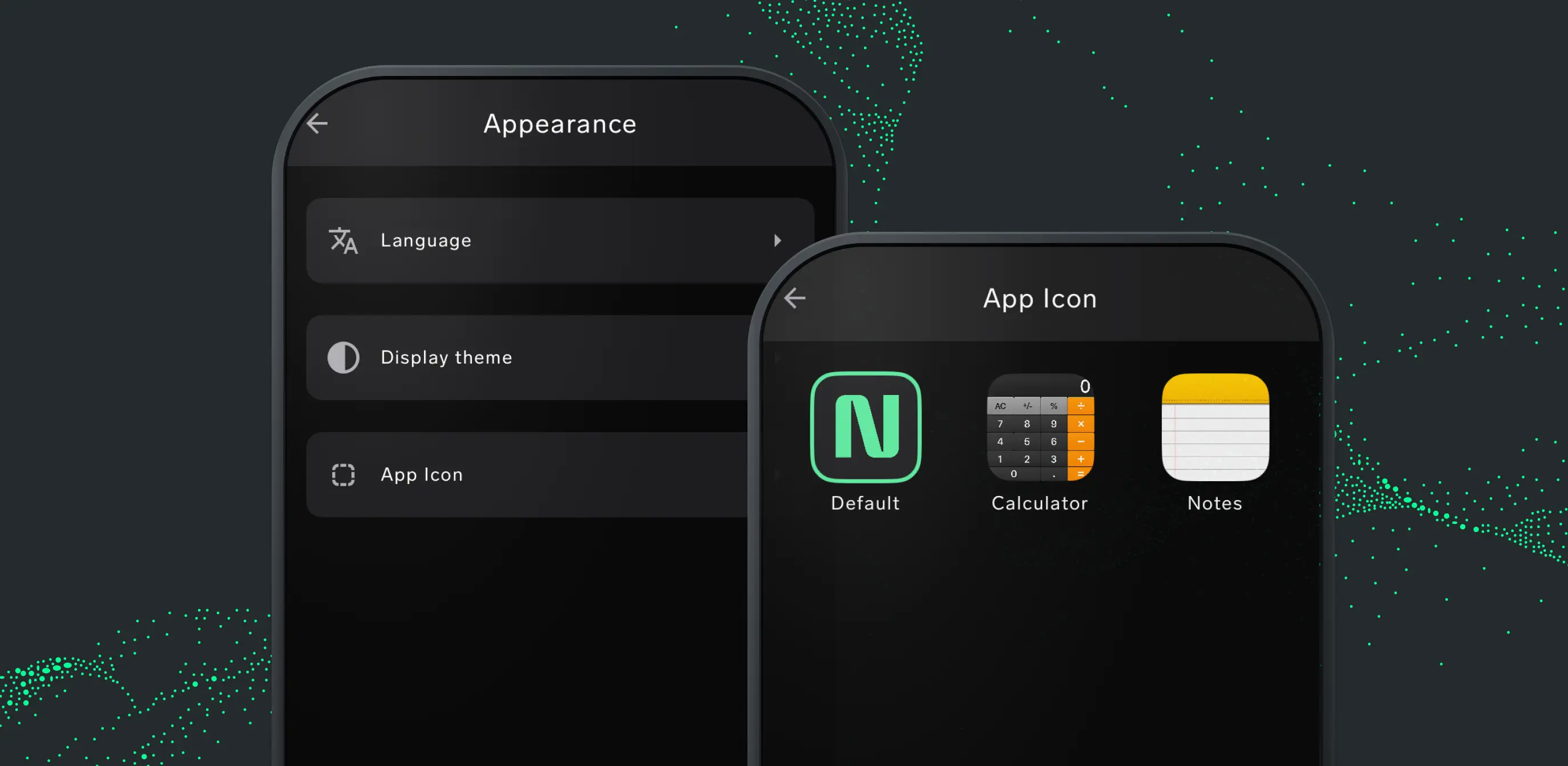
A composite image of the NymVPN app icon disguise menu

(Image credit: Nym Technologies)

NymVPN’s latest iOS update also brings some quality-of-life improvements to the app, and while it’s still a fair way from our list of the best VPNs, it’s good to see that the app will now be easier to use on the best iPhones and best iPads.

These improvements include the ability to change the app icon to a calculator or notepad to avoid prying eyes, a bug fix for an issue that displayed subscription data incorrectly after a fresh install, and stronger ad blocking.

Nym’s blog says that the app’s daily data allowance has been increased, but at the time of writing the company hasn’t confirmed the total allowance or by how much it’s been increased.

Similarly, Nym has not expanded on its claim that the update makes it NymVPN easier to use in areas and territories that restrict VPN use.

TechRadar has reached out to NymVPN for more information on these areas, and we'll update this article once we know more.

IPVanish just made OpenVPN almost three times faster on Windows — but there's a catch

  • IPVanish added OpenVPN Data Channel Offload (DCO) to its Windows app
  • Internal testing recorded download increases of up to 196%
  • The feature cannot be used at the same time as OpenVPN Scramble

IPVanish has released a new Windows client built around High-Speed Mode, the provider's implementation of OpenVPN Data Channel Offload (DCO). The company claims the feature lifts OpenVPN download speeds by up to 196%.

OpenVPN remains one of the most widely supported protocols in the industry, prized for its maturity and its ability to work almost anywhere. Its weakness has always been pace, which is why so many of the best VPN services now steer users towards WireGuard by default.

OpenVPN DCO addresses this problem. It moves the heavy lifting of encryption out of the app and into the deepest core of the operating system, cutting latency and easing CPU load without changing the protocol's security.

IPVanish has also swapped its Windows OpenVPN cipher from AES-256-CBC to AES-256-GCM, a change it says trims 32% off the time needed to connect to a server.

OpenVPN DCO remains an exclusive for Windows users. As the provider confirms to TechRadar, "OpenVPN DCO isn't possible on macOS, iOS, or Android. Those operating systems have locked-down kernels."

What IPvanish's High-Speed Mode actually changes, and how to use it

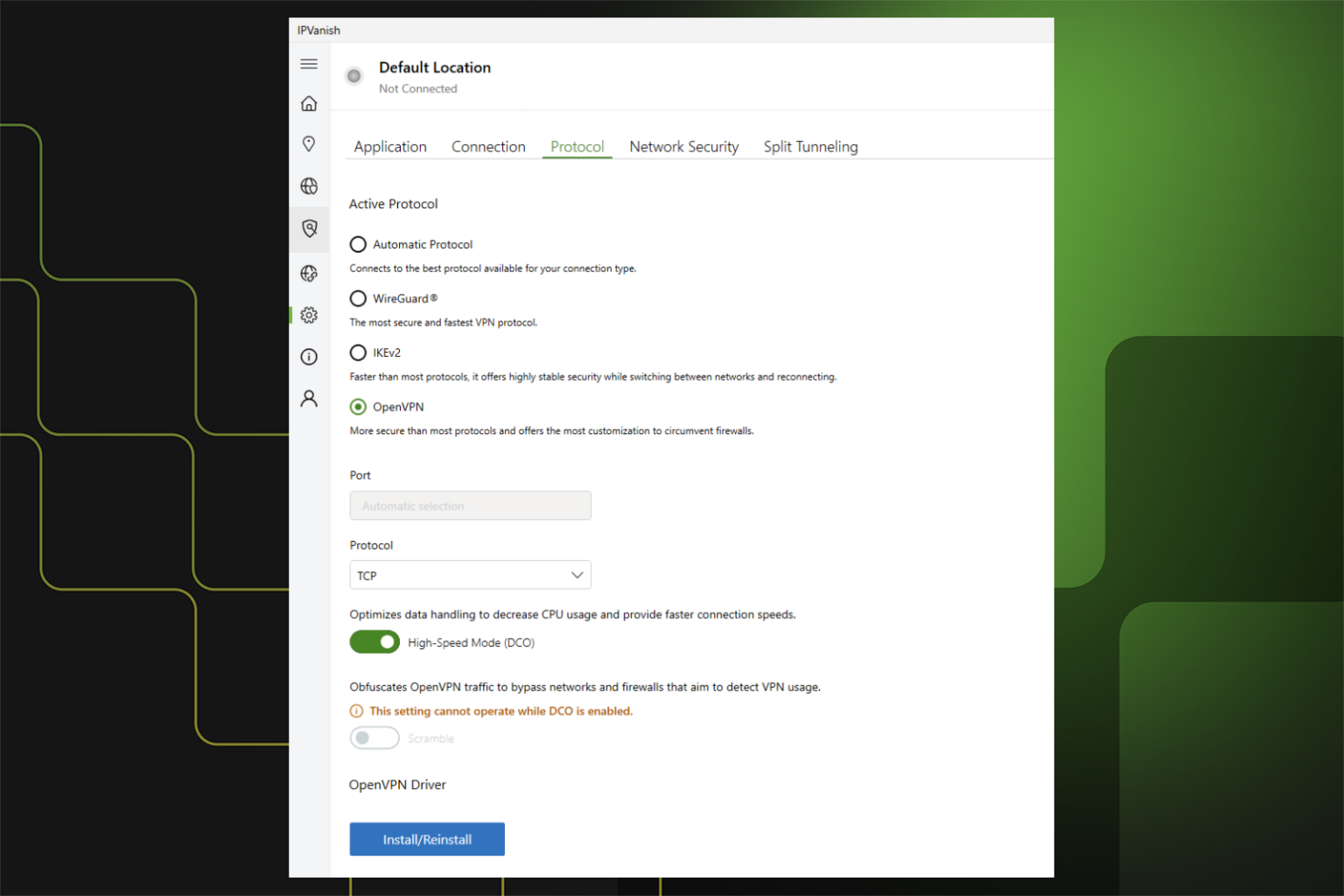
IPVanish's High-Speed Mode settings on Windows

(Image credit: IPVanish)

Standard OpenVPN shuttles data back and forth between the VPN app and the operating system. Every one of those handovers costs time. DCO keeps the data channel closer to the Windows networking layer instead, so encrypted traffic moves through the system with fewer stops.

IPVanish tested servers in New York, London, Berlin, and Tokyo, three times a day across three consecutive days. Averaged out, downloads improved by 131% on TCP and 196% on UDP, while uploads rose 34% and 101% respectively.

"IPVanish is already known for offering fast VPN speeds, and today we're raising the bar for Windows OpenVPN," said Subbu Sthanu, General Manager, Consumer Cybersecurity at IPVanish, adding that streamers, gamers, and remote workers should all feel the difference.

You can turn the feature on by updating your Windows app and going to the OpenVPN protocol in the Settings tab.

One catch is that High-Speed Mode is not compatible with OpenVPN Scramble — IPVanish's obfuscation feature that disguises your VPN traffic to slip past networks that block it. Turn one on, and you lose the other. For anyone connecting from a school, an office, or a country that filters VPNs, Scramble is probably the more important feature.

Which other VPNs offer OpenVPN DCO

ExpressVPN was among the first providers to unveil OpenVPN DCO in March 2025, claiming a 2,000% jump in UDP performance. Windscribe also added DCO on Windows at the same time, recently extending it to Linux, too.

Norton VPN followed in September 2025, citing doubled speeds and 15% lower latency.

Surfshark, NordVPN, and PrivadoVPN all ship a DCO adapter in their Windows clients, too. It's still a short list, with most providers betting on WireGuard instead.

No, NordVPN does not drain your phone battery

  • West Coast Labs found that the VPN battery drain is just a myth
  • Leaving NordVPN on for 24 hours drains just up to 1.8% of battery
  • NordVPN's NordLynx uses up to 31% less battery than OpenVPN

One of the biggest reasons people turn off their cybersecurity apps is the fear of a dead smartphone. For years, the conventional wisdom has been that running a virtual private network (VPN) in the background will relentlessly chew through your daily charge.

However, new independent research commissioned by NordVPN reveals that this long-held belief is actually a massive misunderstanding. If you've been avoiding firing up the best VPN to save a few precious battery percentage points, your phone has probably been lying to you.

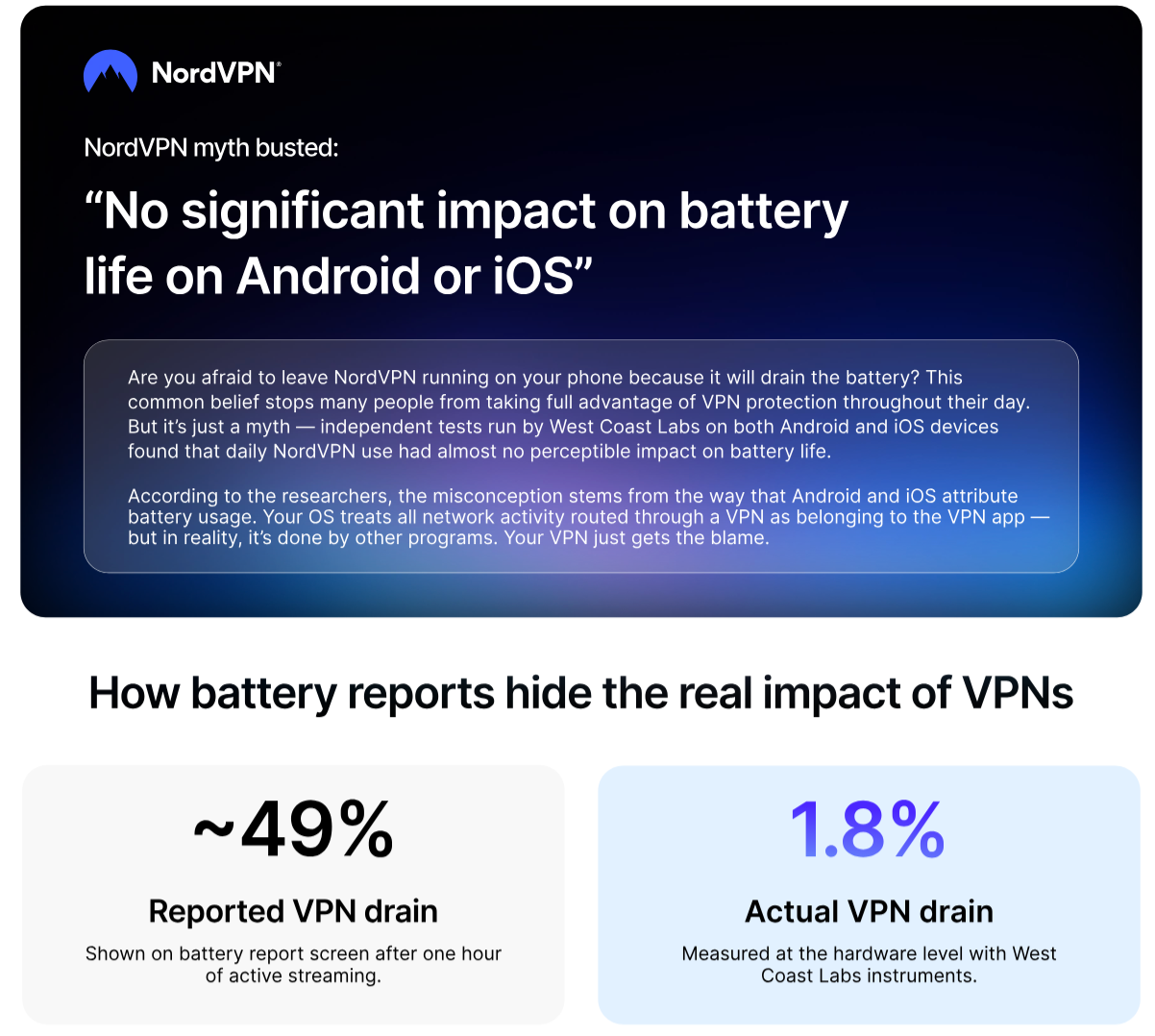
West Coast Labs carried out an evaluation across flagship Apple, Samsung, and Google devices. Testing showed that running NordVPN continuously for a full 24 hours added a mere 1.4% to daily battery use on Android and just 1.8% on iOS.

To put that into perspective, leaving the VPN active all day on a premium Android device means you would only need to charge it roughly half a day earlier over the course of an entire month.

Why your phone's battery screen is lying to you

NordVPN graphic on West Coast Labs' VPN phone better drain results (July 2026)

(Image credit: NordVPN)

"Battery drain is one of the biggest reasons people avoid using a VPN," says Marijus Briedis, chief technology officer (CTO) at NordVPN. "We wanted to know if that myth holds up, and it turns out it largely doesn’t. Your phone makes VPN battery use look a lot scarier than it actually is."

The confusion stems from how Android and iOS calculate power consumption. When a VPN is active, your device routes all its internet traffic through that encrypted tunnel. Because of this, your smartphone's operating system labels all that transferred data as belonging to the VPN app.

If you stream a video or browse the web, your battery usage screen blames the VPN for the power drop. During an hour of streaming, West Coast Labs found that phones attributed an average of 49% of the session's battery drop to NordVPN.

However, when researchers used hardware instruments to measure the actual electrical current draw, the real VPN overhead was just 1.6% to 2.1%. Essentially, your phone's battery screen is simply counting data volume, not actual power loss. When idle, the background overhead is less than 0.5% of battery capacity per hour.

The commuter test and modern protocols

Another scenario notorious for eating up battery life is the daily commute. Phones rapidly switching between Wi-Fi and mobile data networks can force apps to constantly reconnect, draining juice in the process.

West Coast Labs simulated a two-hour commute with automated network switches every nine minutes. Even under this stress, NordVPN's transition overhead stayed at just 5.1% on Android and 6.8% on iOS. The app also successfully reconnected after more than 99 out of every 100 network switches.

So, where did the battery-draining myth come from? The report points the finger at older technology, specifically OpenVPN. Built in 2001, OpenVPN was designed long before mobile battery efficiency was a priority.

In contrast, NordVPN’s proprietary NordLynx protocol — which is built on the much lighter WireGuard standard — uses modern cryptography requiring significantly less processing power. Benchmarking tests showed NordLynx uses 31% less battery per unit of data than OpenVPN on Android, and 24% less on iOS.

“People deserve to make informed choices about their online security. If battery drain was the reason someone wasn’t using a VPN, we hope this report puts that concern to rest for good," says Briedis.

NordVPN is now part of Mastercard’s lifestyle perks — find out if you are eligible

  • Some Mastercard’s users can install NordVPN for free
  • The VPN now offers its services as part of the credit card’s perks
  • This move indicates that digital awareness is growing among consumers

Do you have a Mastercard? If so, you'll be happy to know that you may be eligible to use NordVPN's services for free.

These days, we know that using a VPN has become crucial for protecting one's digital identity. But when a major payment service provider enables its cardholder to access one of the best VPNs for free as part of the benefits included in their package, you realize that digital security has truly become an integral part of everyday life.

Indeed, Mastercard cardholders can now redeem a NordVPN subscription in exactly the same way they currently access airport lounges, fast-track services, and other lifestyle perks included in Mastercard's list of exclusive benefits.

How to get your VPN

NordVPN on a mobile phone

(Image credit: Pixabay)

Depending on your bank or Mastercard issuer and the country where you live, your Mastercard payment plan may now include NordVPN Basic and NordVPN Standard.

The basic version is already packed with features and serves as a golden ticket to digital security, thanks to its excellent unblocking capabilities, servers in 126 countries, 10 simultaneous connections, and the ability to block ads and malicious domains.

The luckiest users will be able to take advantage of NordVPN Standard, which exceeds all expectations, especially thanks to its next-gen antivirus digital suite.

The service helps protect your device from ads, trackers, malware, and malicious websites or downloads, and was previously ranked by the cybersecurity specialist AV-TEST and West Coast Labs (WCL) as the best tool for blocking malicious websites and anti-malware evaluation. We also tested it and can confidently confirm that it outperformed most other VPNs.

Mastercard cardholders can redeem their NordVPN subscription by checking their eligibility at https://nordvpn.com/partners/mastercard.

Customers are advised to contact their bank or card issuer to ensure that NordVPN’s digital benefits are included in their plan. Once they activate their NordVPN subscription, the service will ask them to set up their Nord account and download the NordVPN app.

A huge lifestyle plus

The partnership between NordVPN and Mastercard reflects a growing focus on privacy protection within financial services, particularly in industries where digital security is critical because sensitive data is constantly being shared.

In fact, virtual private networks (VPNs) allow cardholders to boost privacy by encrypting their browsing data and masking IP addresses. This provides solid protection against the risks associated with transactions made on public Wi-Fi networks, offering a defense against hackers who might intercept sensitive data.

The fact that a VPN is included among the lifestyle benefits offered by a payment giant shows that customers are paying closer attention to the digital world and view VPNs as an essential tool in their lives — just like vacations or entertainment.

"Digital security is becoming an essential part of everyday life, especially as people increasingly manage their finances, shop, and access important services online," stressed Kestas Saulis, Head of Payments at NordVPN.

Indeed, we might expect an ever-growing demand for digital security among payment services customers as they become increasingly aware of the real risks they face every time they conduct online transactions and share personal data.

Proton VPN brings official one-click installs to the Linux Snap Store — but some features are still missing

  • Proton VPN is now officially published by Proton AG on the Snap Store
  • The release offers one-click install for Ubuntu and other compatible distros
  • Some features are missing from this initial build due to sandboxing limits

Linux users looking for a top-tier security boost just got a major convenience upgrade. The team behind Proton VPN has announced that its app is now officially available to download directly from the Linux Snap Store.

While the Swiss-based provider always supported Linux VPN distributions, previous accessibility for Snap users was limited to a "community-maintained fork." This release marks the very first time the official build has been published directly by Proton AG.

The move makes downloading one of the best VPN services on the market significantly easier for the open-source community. According to Proton's announcement, users can now perform a straightforward "one-click install on Ubuntu and any distro that supports snaps," saving them the usual hassle of manual command-line configurations or repository hunting.

Proton's Snap Store build arrives complete with a "verified publisher badge," ensuring users aren't accidentally downloading a compromised or outdated client. Yet, it still lacks some key features due to sandboxing limits.

What’s missing from the first release?

While the Snap Store debut provides the broader community with an "official, trustworthy way to install Proton VPN," the developers were highly transparent about a few technical trade-offs in this initial version.

Most notably, there is "no split tunneling" available just yet.

This highly requested feature, which lets you choose which specific apps bypass the encrypted tunnel to maintain high network speeds, was introduced to Proton’s standard Linux app last year. However, it is absent in the Snap version. "Like our Flatpak, this is due to sandboxing limitations," the team explained, adding that it is "something we hope to resolve in the future."

Proton VPN is now officially on the Snap Store from r/ProtonVPN

The provider's anti-censorship tool, the Stealth protocol, also missed the cut. "Stealth protocol isn't included yet. It's not part of this first Snap release," the company confirmed.

Hardware compatibility also comes with a slight catch. The new package offers "no ARM support at this time." While Proton noted that they "expect ARM device volume to be low for now," they are "keeping an eye on it."

Software-wise, the developers warned that "older distros may have issues," cautioning that if users are on an operating system "older than Ubuntu 24, you might run into connection problems."

A big year for Proton’s Linux community

Despite these early missing features, the Snap Store launch is just the latest in a rapid string of upgrades demonstrating Proton’s dedication to its Linux user base. Unlike many competitors that treat open-source platforms as a secondary concern, Proton has spent recent months closing the feature gap between its Linux, Windows, and Mac applications.

At the beginning of the year, the company revealed a major Linux makeover.

This included upgrading the graphical app to the modern GTK4 framework to pave the way for a complete interface redesign. Meanwhile, command-line interface (CLI) power users received vastly improved server selection tools, alongside support for advanced features like custom DNS settings and the NetShield Ad-blocker.

With the brand-new official Snap release now live at snapcraft.io/proton-vpn, Linux fans finally have the reliable, hassle-free installation method they've been waiting for.

Make sure the whole family can stream Spain vs Belgium securely from anywhere with this VPN — it's cheaper than NordVPN, Proton, and more

If you've survived the first 24-hour gap in this year's World Cup schedule, then it's time to ensure your viewing of the quarter-finals is the best it can be.

The World Cup's mass appeal puts a huge strain on streaming providers. And if you're travelling, you could easily miss out on commentary in your native language or be stuck behind paywalls if you're in the US.

This is where the best streaming VPNs come in handy. They offer high-performance encryption protocols, servers with huge capacity, and all the tech you need to securely watch your regular World Cup coverage from wherever you are.

Right now, the cheapest VPN for this is Norton VPN. It ranks second in our best streaming VPNs rankings, but is a dollar a month cheaper than our top pick — NordVPN.

Norton VPN has servers across 91 countries, speeds of over 1000 Mbps on WireGuard, and hardly struggled with any streaming services we tested.

It's also even cheaper when you pick up a 12-month plan. These now start from only $39.99.

▶︎ World Cup Deal – plans from only $39.99 (was $53.88) for 12 months of protection

Watch France vs Morocco in the World Cup quarterfinals uninterrupted. Norton VPN delivers fast, secure connections with servers worldwide, so you can stream from anywhere.

You can now get Norton VPN Plus for the same price as the standard plan. That means you get AI-powered scam detection and a password manager effectively for free.

Additional features include:

🛡️ Cover up to 5 devices
🔓 Unlock World Cup streams
⚡ 1010 Mbps download speeds

Norton VPN also offers a 60-day money-back guarantee — double the industry standard. View Deal

By comparison, a year of NordVPN is $65.88, over $25 more.

So, if you're just after World Cup protection, why spend the extra? You even get AI-powered scam protection, real-time ransomware and malware protection, password management, dark web alerts, and 10GB cloud storage thrown in if you choose a Plus plan (still $15 cheaper than NordVPN).

For the absolute cheapest experience possible, only PIA, CyberGhost, and PrivadoVPN come with our seal of recommendation. These are all under $1.60/month but are far less reliable with streaming services, especially if you're planning to watch live events like the World Cup or Wimbledon.

NordVPN expands scam text protection to all Android users worldwide

  • NordVPN has launched Message Protection for Android users worldwide, adding SMS screening to its Call and Message Protection suite.
  • The tool checks incoming texts from unknown senders and pushes a notification when a message looks malicious or suspicious.
  • Flagged texts open in a safe view that stops links being tapped by accident, and NordVPN says it never stores message content.

NordVPN is rolling out a Message Protection feature to Android users worldwide, giving people a way to catch fraudulent texts before they become a threat. The tool automatically screens incoming SMS messages and flags anything that looks like a scam.

The feature, which was already made available to iPhone users at the beginning of June, joins existing Call Protection on a single screen, so there is now one place to manage defenses against both suspicious calls and malicious texts.

NordVPN has long been a front-runner for the title of best VPN, but this update is another step in its shift toward an all-in-one privacy and security app, rather than a service that simply encrypts your traffic.

Why text scams keep climbing

According to GASA's Global State of Scams 2025 report, text and SMS rank as the second most common channel used by fraudsters. The same research, which surveyed 46,000 adults across 42 markets, found that 57% had been scammed in the past year, with global losses reaching an estimated $442 billion.

Citing the US Federal Trade Commission, NordVPN says text scam losses hit $639 million in 2025, a 36% jump compared to the previous year. Fake package deliveries, bogus bank alerts, and unpaid toll notices remain some of the most common lures.

"Text messages have always been one of the easiest ways for scammers to reach people at scale," says Domininkas Virbickas, product director at NordVPN. "Message protection is about breaking that chain before it starts."

How Message Protection works

NordVPN Scam Text Protection

(Image credit: NordVPN)

The feature screens every incoming SMS from an unknown sender, checking it against phone reputation data, URL analysis, and content categorization. When a message is judged malicious or suspicious, users get an instant push notification naming the threat type and the recommended action.

If you want to view a flagged message, you can do so in a safe viewer that prevents links from opening, and you can track how many messages and calls get flagged in the unified dashboard.

The feature runs quietly in the background, even when the VPN is switched off, and NordVPN says it doesn't store the content of any of the calls or texts.

How to switch it on

On a fresh install, you can enable Message Protection during the onboarding steps. Existing users can go from the Home screen to Call and Message Protection under the Product hub, then follow the permission setup.

NordVPN has also launched Prompt Guard, a separate Chrome and Edge extension that warns you before you paste sensitive data, such as passwords or card numbers, into AI tools.

214 distinct server locations, 113 countries — Inside ExpressVPN's biggest network yet, but there's a catch

  • ExpressVPN has grown to 214 'distinct, app-selectable server locations'
  • The 214-location count across 113 countries does not mean 214 cities
  • ExpressVPN now covers around 196 cities, up from 189

ExpressVPN has rolled out the biggest network in its history, expanding to 214 distinct, app-selectable server locations across 113 countries.

It's a significant step up for a provider TechRadar last clocked at 189 locations, and it arrives as the fight to top our best VPN list increasingly turns on where you can connect, not how many servers hide behind the app.

The fresh additions reach places the network had not touched before, including Nuuk in Greenland, Lagos in Nigeria, Doha in Qatar, Valencia in Spain, and Manchester in the UK. The move builds on ExpressVPN's rollout to all 50 US states earlier this year, bringing that same local-first approach to the wider world map.

It's worth noting, however, that what the provider refers to as a "server location" is a connection option in the app, rather than a guaranteed unique city. For example, ExpressVPN's UK entries bundle multiple London-area spots that each count separately toward the total.

If you strip those duplicates out, the real coverage is narrower. By TechRadar's own tracking, ExpressVPN now reaches roughly 196 cities, up from 189. It's a definite upgrade, but it still trails NordVPN, which covers around 224 cities and leads on country count, too.

A bigger, more local network

ExpressVPN server list in app

(Image credit: EpressVPN)

ExpressVPN is pitching this as a local-first expansion rather than a raw server-count boast. The new connection points span Europe, Africa, the Middle East, and North America, while established markets have been deepened rather than simply widened.

The UK line-up now runs from Docklands and Tottenham to Manchester and the Midlands, Australia stretches from Adelaide to Woolloomooloo, and Japan covers Osaka, Shibuya, Tokyo, and Yokohama.

More nearby options can cut latency, give you a backup when a route is busy, and let you match a specific city, state, or region to whatever you are doing, from streaming and gaming to banking or working while travelling.

Every new location runs on ExpressVPN's RAM-only TrustedServer tech, which wipes data on each reboot, alongside its no-logs policy and its record of independent audits.

How to switch to the new locations

Getting to the new spots is simple. Update to the latest version of the ExpressVPN app, open the location picker, and browse the expanded country and city list.

If you would rather not choose, Smart Location will pick the fastest option for you automatically, based on speed, latency, and distance.

You can preview the full network on ExpressVPN's server locations page before you connect. And if precise city-level control is what you are after, it is worth checking if the list covers the exact places you need, rather than trusting the headline figure alone.

Freedom Holding, Nokia launch Innovation Center to develop fintech and consumer services

Freedom Telecom International has opened a Silicon Valley Innovation Center with Nokia near Nokia’s Sunnyvale campus, creating a collaborative space focused on next-gen digital infrastructure, AI, cloud technologies for telecom-fintech convergence, and state-of-the-art consumer applications.

Complementary to Nokia’s recently launched AI Networking Innovation Lab, the center will serve as a testing ground for joint initiatives across Freedom Holding Corp. (FRHC), Freedom Telecom International, Freedom Lifestyle Group, and Nokia, where teams can experiment, build, test, evaluate, and demonstrate digital solutions designed for direct application across FRHC’s operational footprint.

The collaboration combines Nokia’s expertise in networks, cloud, edge computing, and AI-ready infrastructure with Freedom Holding Corp.’s expanding ecosystem in finance, banking, insurance, telecom, payments, e-commerce, and lifestyle services. The parties are determined to discover and develop the most promising next-generation digital infrastructure solutions. Early focus will be on AI data center blueprints, cloud infrastructure and advanced networking, 5G and edge use cases, and enabling AI-powered consumer services.

By being located in the heart of Silicon Valley, the center will bring together:

  • Nokia’s infrastructure, engineering expertise, global innovation network, and technology testbeds;
  • Freedom’s ecosystem, market access, investment capabilities, and experience scaling digital financial and lifestyle services;
  • Silicon Valley’s unique energy: the closeness of all technology partners, world-class entrepreneurs and world-class tech talent.

During the opening ceremony, Timur Turlov, CEO of Freedom Holding Corp., said, “Financial services represent a tremendous global opportunity due to their inefficiencies. Too much time, effort, and human capital are spent on processes that can already be automated. We have proven that it is possible to approve a mortgage within hours, and this encourages us to completely rethink the role of traditional structures. AI opens our horizon and allows us to tackle complex processes which can be redesigned and assisted through its capabilities. I trust our partner, Nokia, that together we can move our ideas to real, scalable solutions for the benefit of our ecosystem.”

Mikko Lavanti from Nokia commented, “This partnership is about delivering tangible value together. At Nokia, we bring deep expertise in designing and deploying high-performance AI infrastructure at scale, backed by a strong track record of innovation. We are proud to support Freedom in launching state-of-the-art consumer applications across its markets, helping to accelerate its AI ambitions with resilient and future-ready infrastructure.”

The post Freedom Holding, Nokia launch Innovation Center to develop fintech and consumer services appeared first on My Startup World - Everything About the World of Startups!.

❌