
 Login
Login

Six more Realme phones are getting Realme UI 7.0 beta update

The seventh round of the Realme UI 7.0 Early Access program has gone live, bringing the latest features and upgrades to six more Realme smartphones ahead of the stable rollout. The latest beta round includes devices like the Realme 13 5G, Realme 12x 5G, Narzo 70x 5G, Narzo N65 5G, Realme C65 5G, and Realme C63 5G.
The sixth wave of Realme UI 7.0 beta access is currently live in India, with no official confirmation regarding its expansion to other regions. If you have one of these eligible Realme devices and live in India, you can sign up for the beta program to access the latest features and upgrades without waiting.
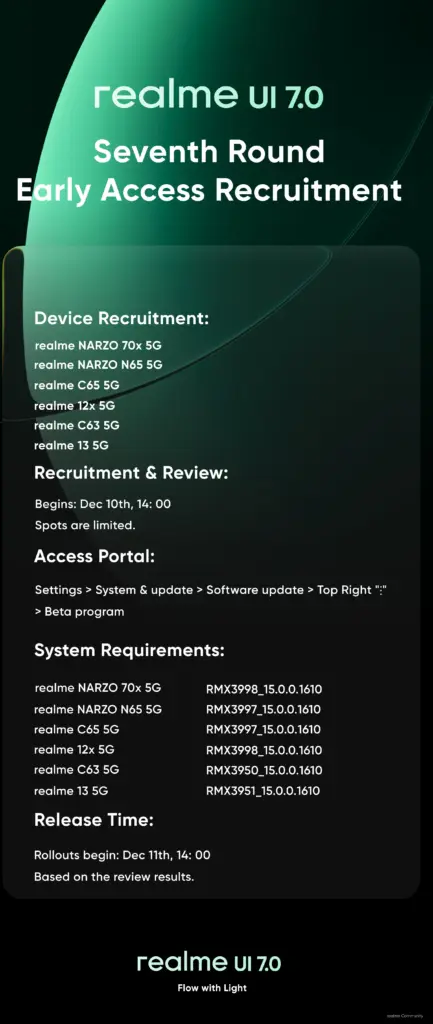
How to get the Realme UI 7.0 beta update?
The Realme UI 7.0 Early Access program is already live for all six Realme phones. You can participate in the program right now, but note that Realme is only accepting a maximum of 200 applications for each of these models. Therefore, you must hurry to secure a slot, as they are offered on a first-come, first-served basis.
Step 1: Ensure that your device has the required firmware version
To be eligible for the beta access, your Realme device must be running on the required firmware version:
- Realme 13 5G: RMX3951_15.0.0.1610
- Realme 12x 5G: RMX3998_15.0.0.1610
- Realme Narzo 70x 5G: RMX3998_15.0.0.1610
- Realme Narzo N65 5G: RMX3997_15.0.0.1610
- Realme C65 5G: RMX3997_15.0.0.1610
- Realme C63 5G: RMX3950_15.0.0.1610
You can verify the software version by navigating to Settings > System & Updates > Software Update. Now that we have completed this step, let’s proceed to the beta registration part.
Step 2: Sign up for the Realme UI 7.0 Early Access program
You must enable the developer settings first. If you haven’t already, go to Settings > About device > Version > Version Number and tap the version number seven times in quick succession. This should enable developer settings.
Now, you’re ready to sign up for the beta program. Follow these steps in the same order:
- Open the Settings app on your Realme phone.
- Go to System & update and tap Software update.
- Tap the three dots icon in the top-right corner and choose Beta program.
- Tap the Early Access option and click Apply now on the next screen.
- Accept terms and conditions and tap Submit.
After submitting the application, you will soon receive the Realme UI 7.0 beta update via OTA. To manually check for updates, go to Settings > System & update > Software update.
The beta rollout has already begun for these Realme devices included in the 7th wave of beta access, so the wait should not be long. Since this is a major upgrade with a hefty download size, the brand recommends keeping at least 15GB of free storage and a battery level above 60% for a smoother installation.
Also read: Here’s the Realme UI 7.0 Open Beta rollout timeline for India
Be sure to check the Android 16 section on Gizmochina regularly for fresh updates. Or, if you prefer your news instant and on-the-go, hop into our Telegram channel for rapid-fire software updates and all the biggest tech headlines.
(source: Realme Community)
The post Six more Realme phones are getting Realme UI 7.0 beta update appeared first on Gizmochina.
