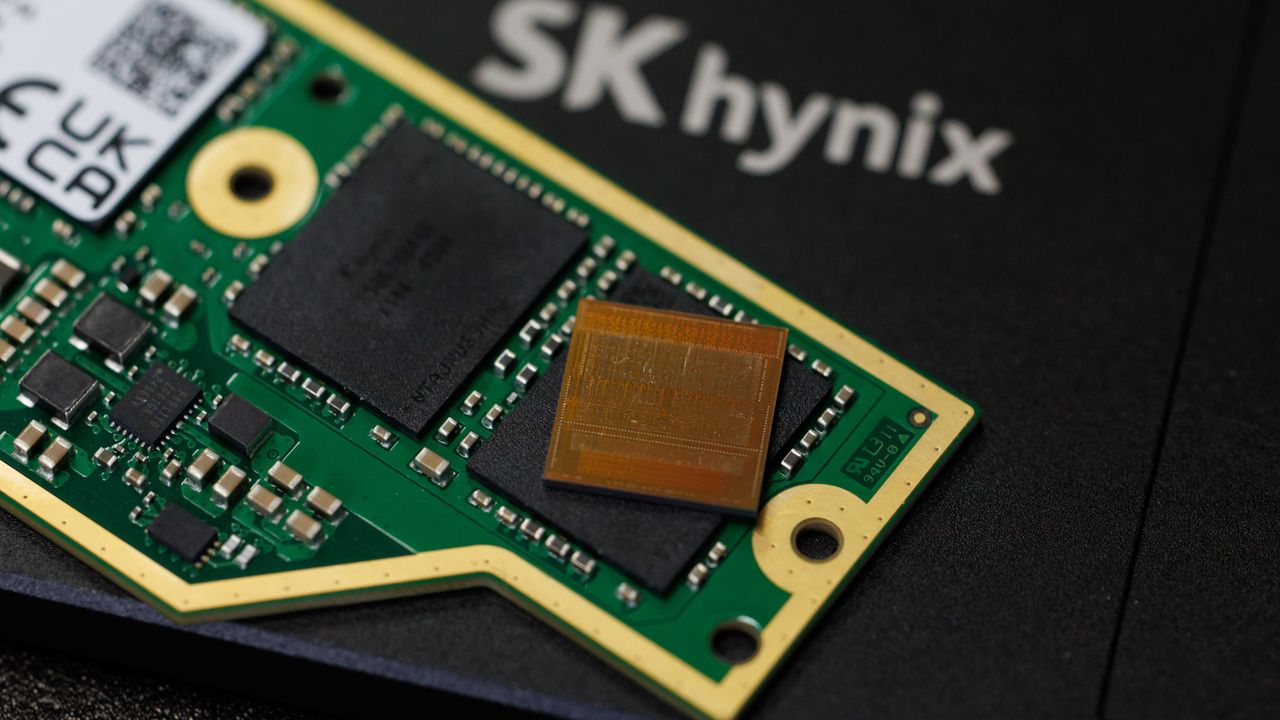
Homegrown DDR5 memory from China, manufactured by ChangXing Memory Technologies, has been making the rounds lately as more and more vendors start legitimizing it. However, new testing from overclocker Safedisk, shared by Uniko's Hardware, purportedly shows that it actually carries inferior performance compared to similar options from SK Hynix, alongside significant variance in the silicon between different batches.
kingbank 2x24 6000c36 1.25 kit (cxmt 3gb dies) on asus c10amanual oc to 8600c44 mt 100%key characteristics of cxmt dies- dont scale with voltage- cant tighten timings- silicon variance appears to be massive between batches- not as strong as hynix when it comes to manual… pic.twitter.com/WNPRiHj233July 15, 2026
CXMT began producing DDR5 in late 2025 despite lacking any cutting-edge EUV lithography tools. Fast forward to today, and reports of the company matching Micron's memory capacity by this year are now floating around. If true, China would become the second-largest memory maker in the world. At such scale, it's no wonder that many companies in China have already started sourcing CXMT-made RAM to fill the gap in the consumer market.
Throughout 2026, we've seen motherboard manufacturers verify CXMT's DDR5 with official BIOS optimizations that allow it to run beyond 8,000 MT/s at this point. OEMs such as Dell and HP are using CXMT RAM in their region-bound systems, and even proper PC hardware companies like Corsair are using CXMT modules. Lexar, Kingbank, Netac, Asgard, Gloaway and more are also producing retail DDR5 kits with CXMT chips.
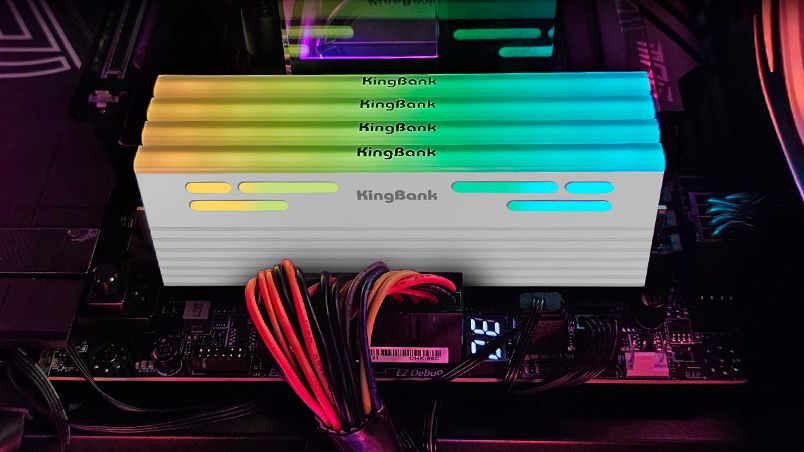
As such, the testing features a Kingbank 48GB (2x24) DDR5-6000 kit running at CL36 and found several weaknesses despite successfully achieving an 8,600 MT/s overclock at CL44. The first revelation is that CXMT modules don't scale with voltage, meaning you can't just increase voltage in hopes of achieving higher clocks. CXMT's DDR5 apparently doesn't respond well to tuning sub-timings either, forcing you to remain stuck with baseline CAS latency (or higher, like in this case).
Different batches of CXMT-equipped memory perform differently, too, so silicon lottery plays a much bigger role than it would with other vendors. Speaking of which, SK Hynix-made DDR5 modules allegedly performed better at identical clock speeds, while CXMT's modules were less susceptible to overclocking in general. We didn't get any comparative benchmarks for any metric, so take these claims with a grain of salt.
Overall, if Asus' testing is to be believed, it serves as counterprogramming against the popular narrative forming around China as the savior of consumer interests. CXMT's strength lies in the fact that it doesn't have to cater to opulent AI clients as much as the Big Three, which reduces opportunity cost, allowing CXMT to produce more DDR5 memory. That doesn't mean it would be cheaper, though, or at least no evidence has suggested that so far.
CXMT has remained limited to the Chinese region for now, and breaking through to the Western market would mean impressing a lot of skeptics. Not only would pricing play a big factor, but the reliability of a new DRAM manufacturer would raise serious concerns. Stories like these certainly don't help, but with CXMT's IPO on the way, it's only a matter of time before it becomes a serious mainstream contender.
ASRock is well known among PC enthusiasts for its graphics cards, motherboards, power supplies, and gaming monitors. Now, it has entered the market for liquid cooling solutions.
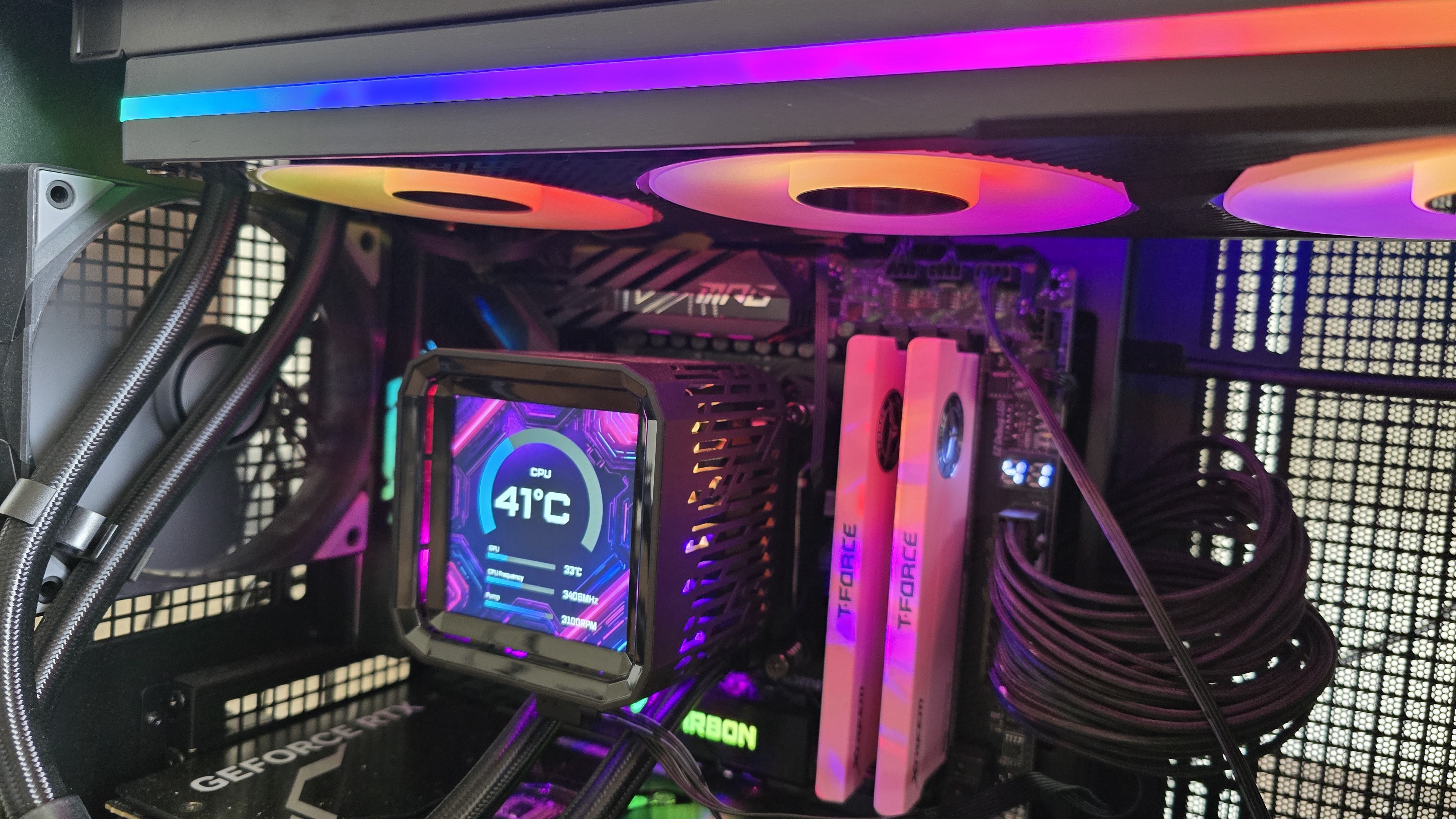
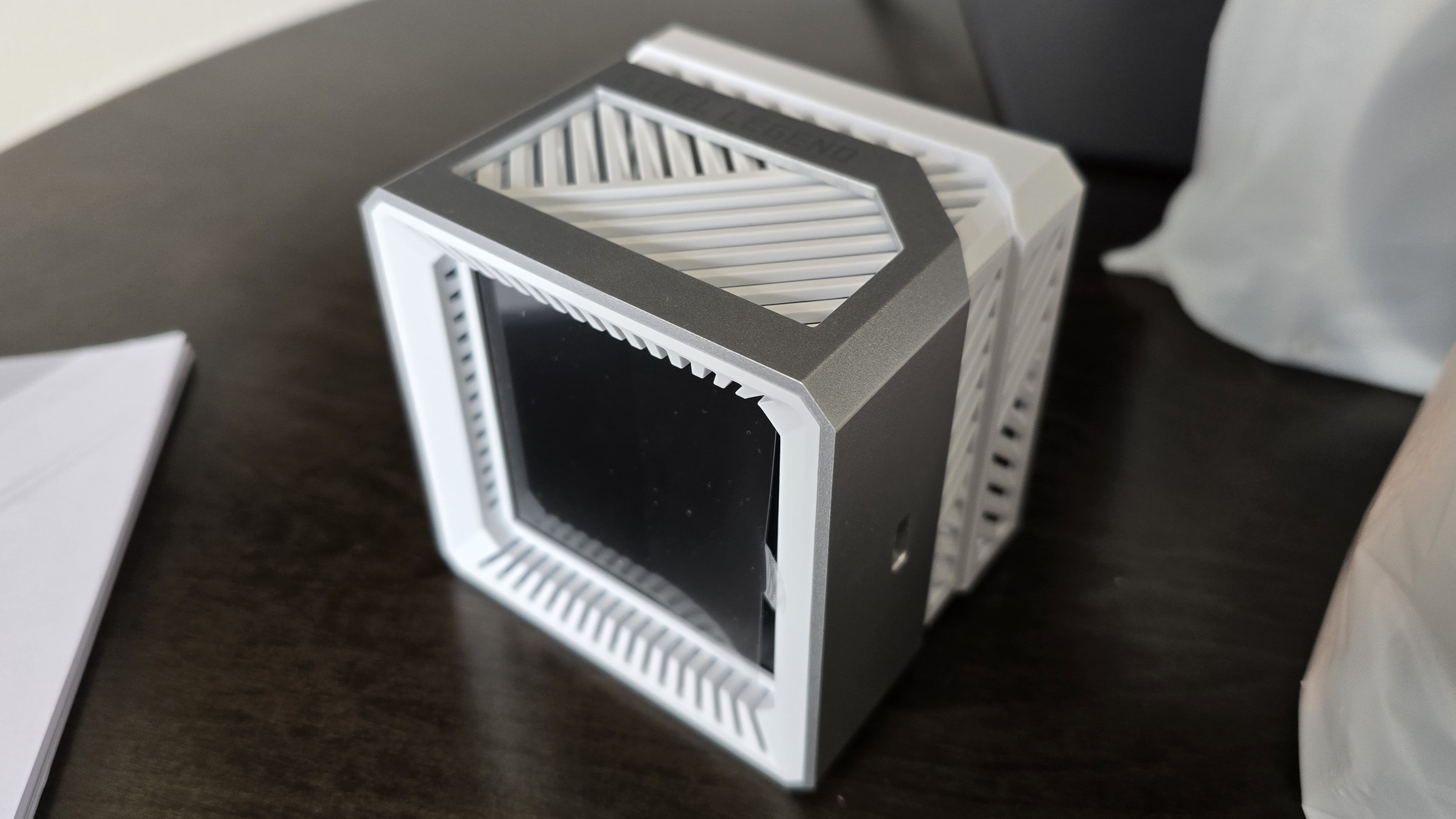
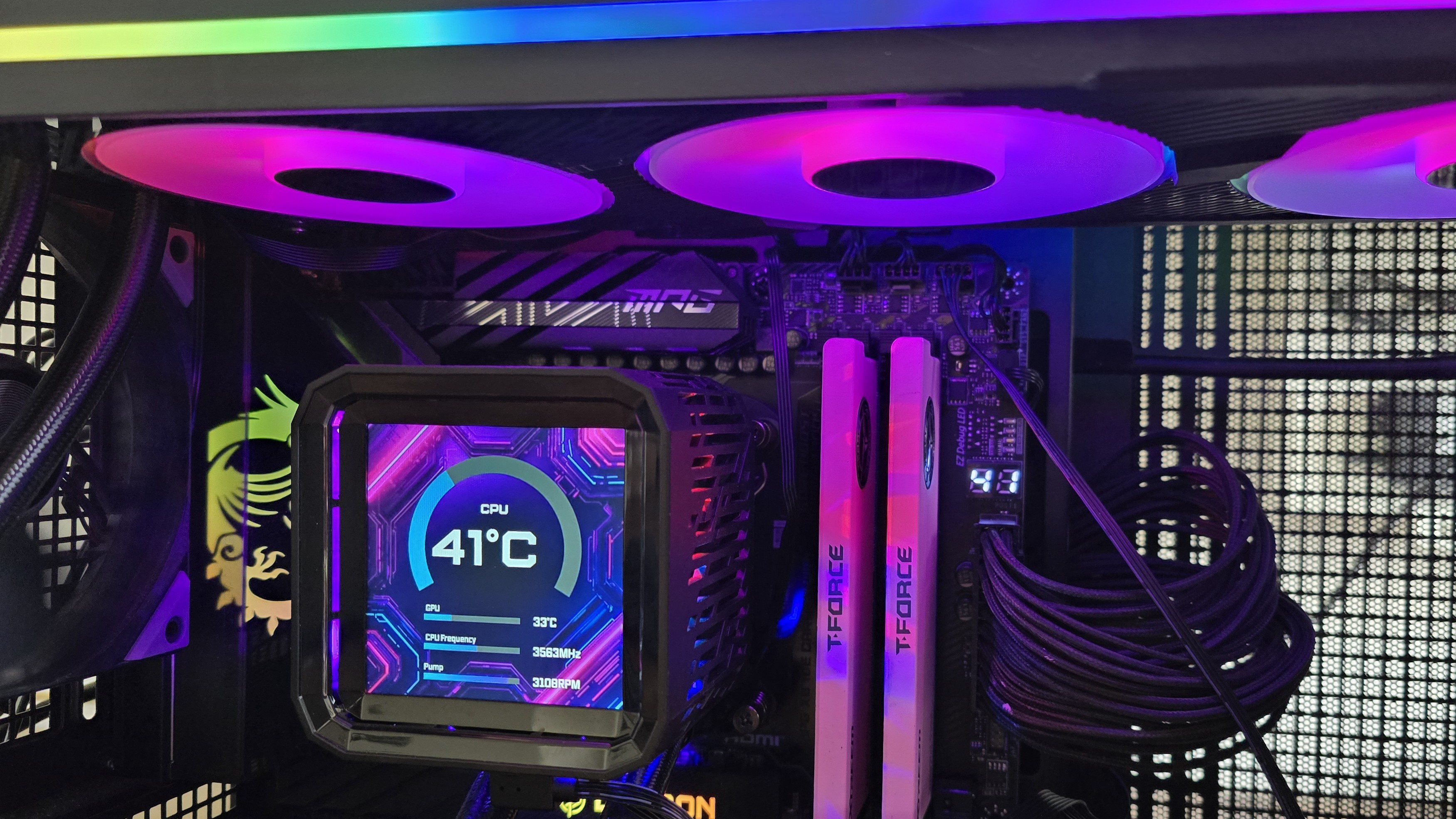
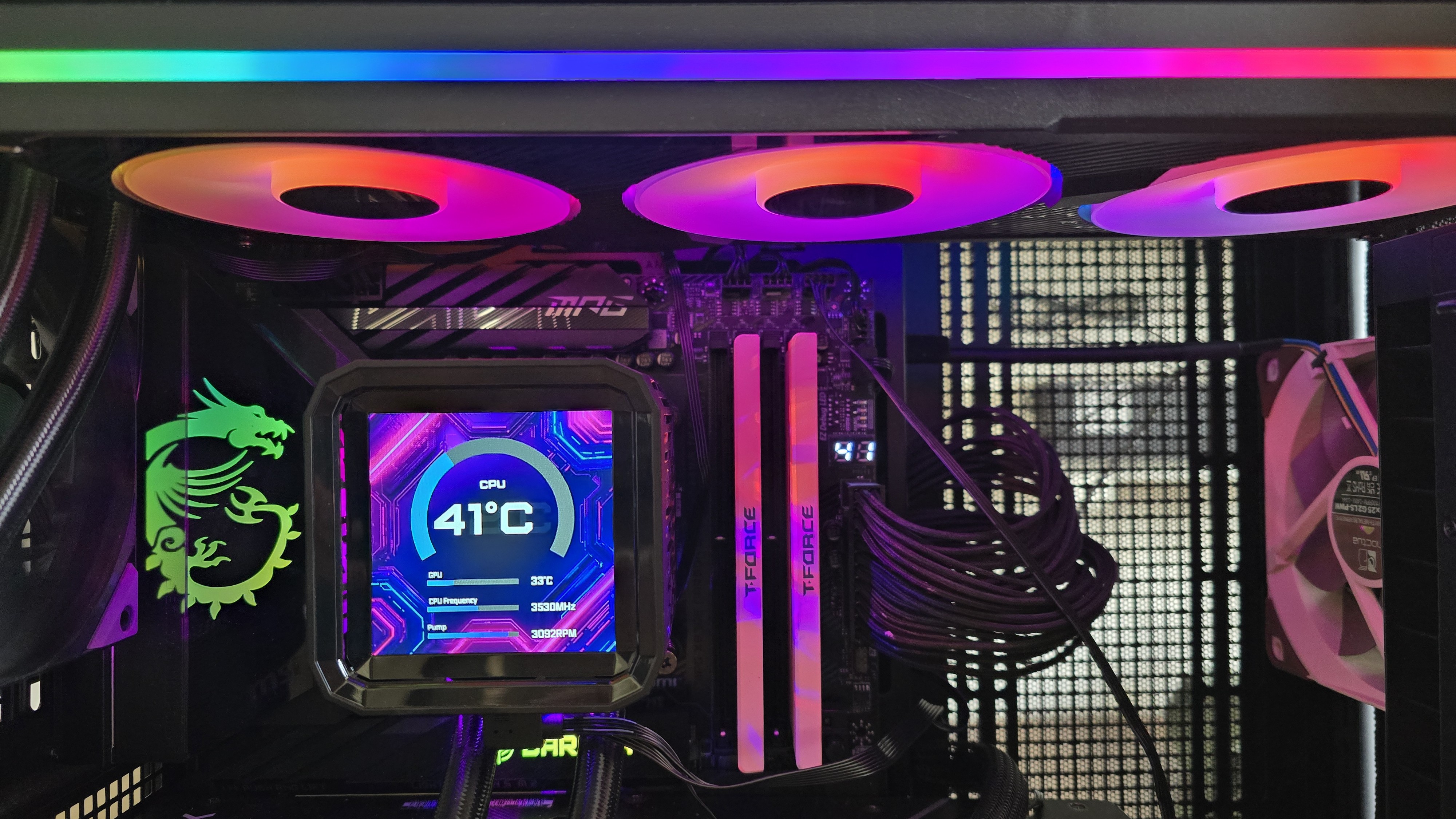
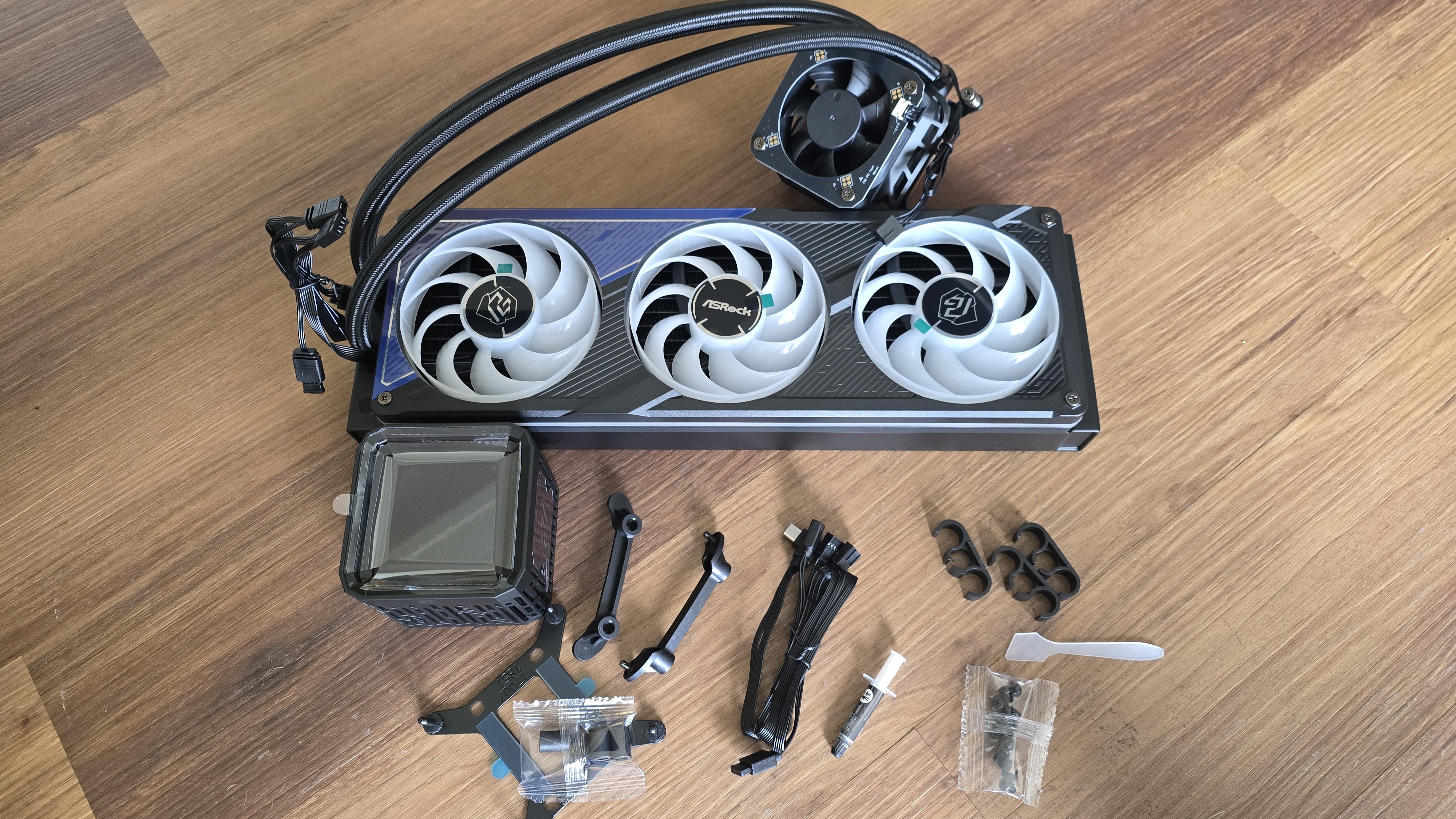
We’re looking at two of the company’s first AIOs here, the Phantom Gaming 360 LCD and Steel Legend 360 LCD. Both of these liquid coolers feature 3.4-inch 480 x 480 displays for showing off animations and monitoring performance metrics. Aside from aesthetics, the main differences between the two are the included fans and radiator size. The Steel Legend 360 incorporates a standard 27 mm thick radiator, whereas the Phantom Gaming 360 uses a thicker-than-normal 32 mm radiator.
(Image credit: Tom's Hardware)
Let's take a look at the specifications and features of the coolers, then we’ll go over thermal and noise benchmarks and decide whether ASRock’s Phantom Gaming and Steel Legend AIOs deserve to make our list of the best CPU coolers.
Cooler specifications
Cooler
ASRock Phantom Gaming 360
LCD/Steel Legend 360 LCD
Colors
Black
White
MSRP
$189.99
$159.99
Lighting
CPU block, radiator, and fans
CPU block
Warranty
6 years
2 years
Socket Compatibility
AMD AM5/AM4
Intel 1700/1851
Radiator dimensions
397mm (L) x 120mm (W) x 32mm (H)
397mm (L) x 120mm (W) x 27mm (H)
Maximum TDP (Our Testing)
>260W with AMD’s Ryzen 9 9950X3D
>260W with AMD’s Ryzen 9 9950X3D
Features of ASRock Phantom Gaming & Steel Legend 360 LCD
▶️ 60hz 3.4-inch LCD display
(Image credit: Tom's Hardware)
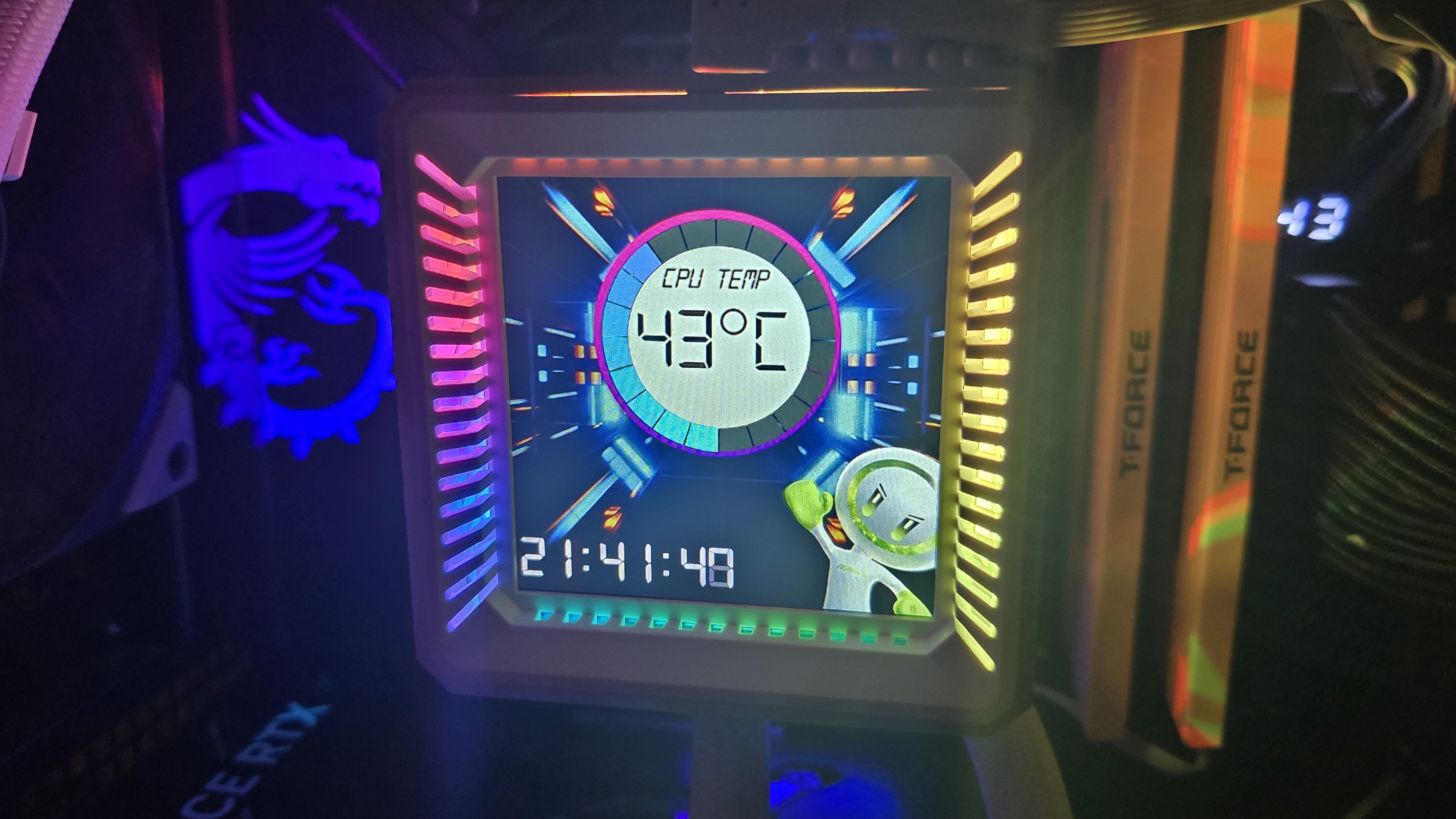
Both the Phantom Gaming 360 LCD and the Steel Legend 360 LCD include a 3.4-inch square IPS screen with a 480 x 480 resolution and 60 Hz refresh rate, with brightness rated at 250 nits.
(Image credit: Tom's Hardware)
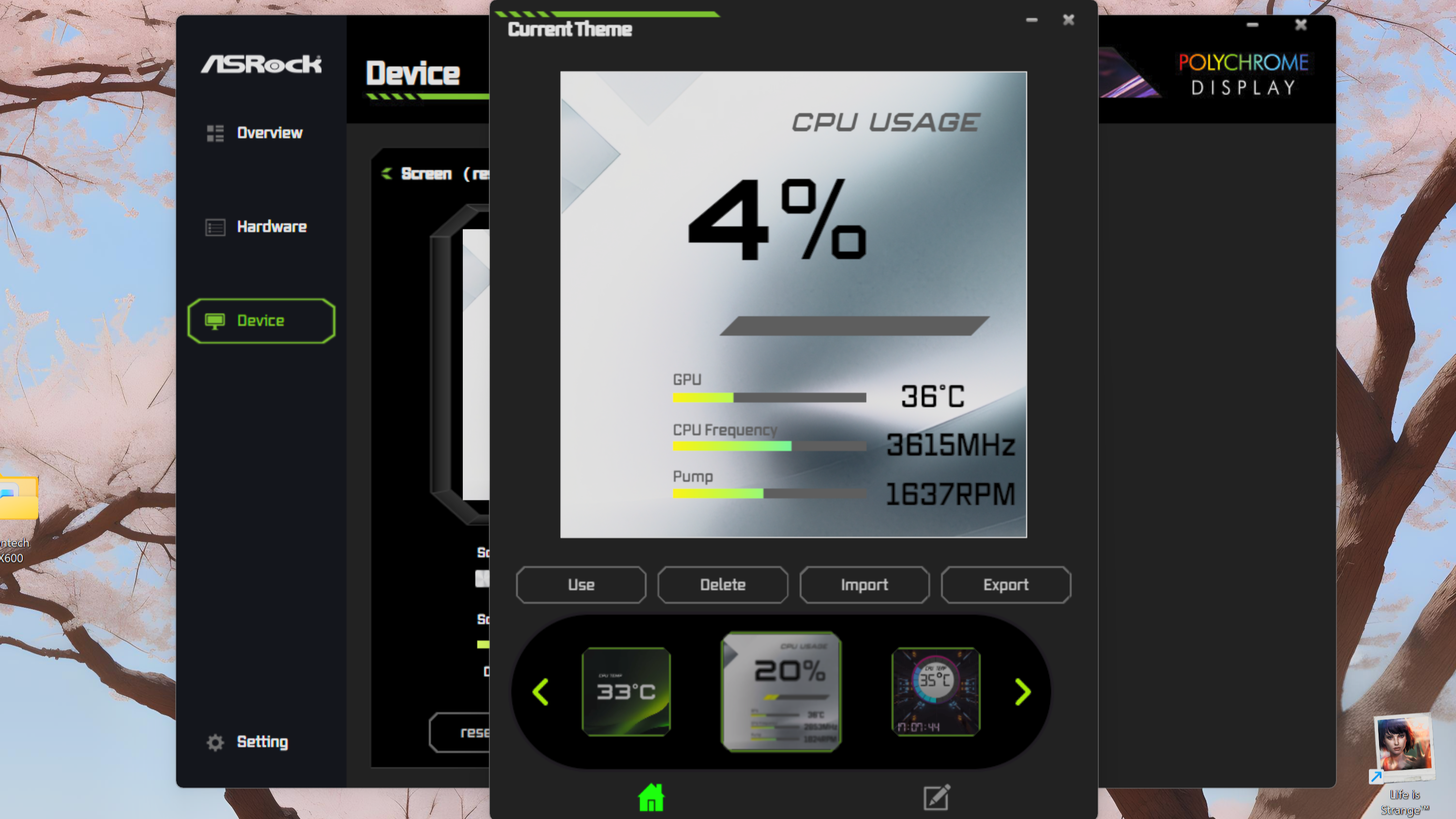
To control and customize the screen, you’ll need to download ASRock’s Polychrome Display software. You have the option of selecting six preset themes, or you can build your own theme, and/or customize the individual elements shown on the display.
(Image credit: Tom's Hardware)
While I certainly wish there were more presets available, my biggest complaint using this software is the extreme file compatibility limits. If you’d like to upload a custom background, the image or video file needs to be less than 20 megabytes and 1080p or lower in resolution.
(Image credit: Tom's Hardware)
▶️ RAM Clearance
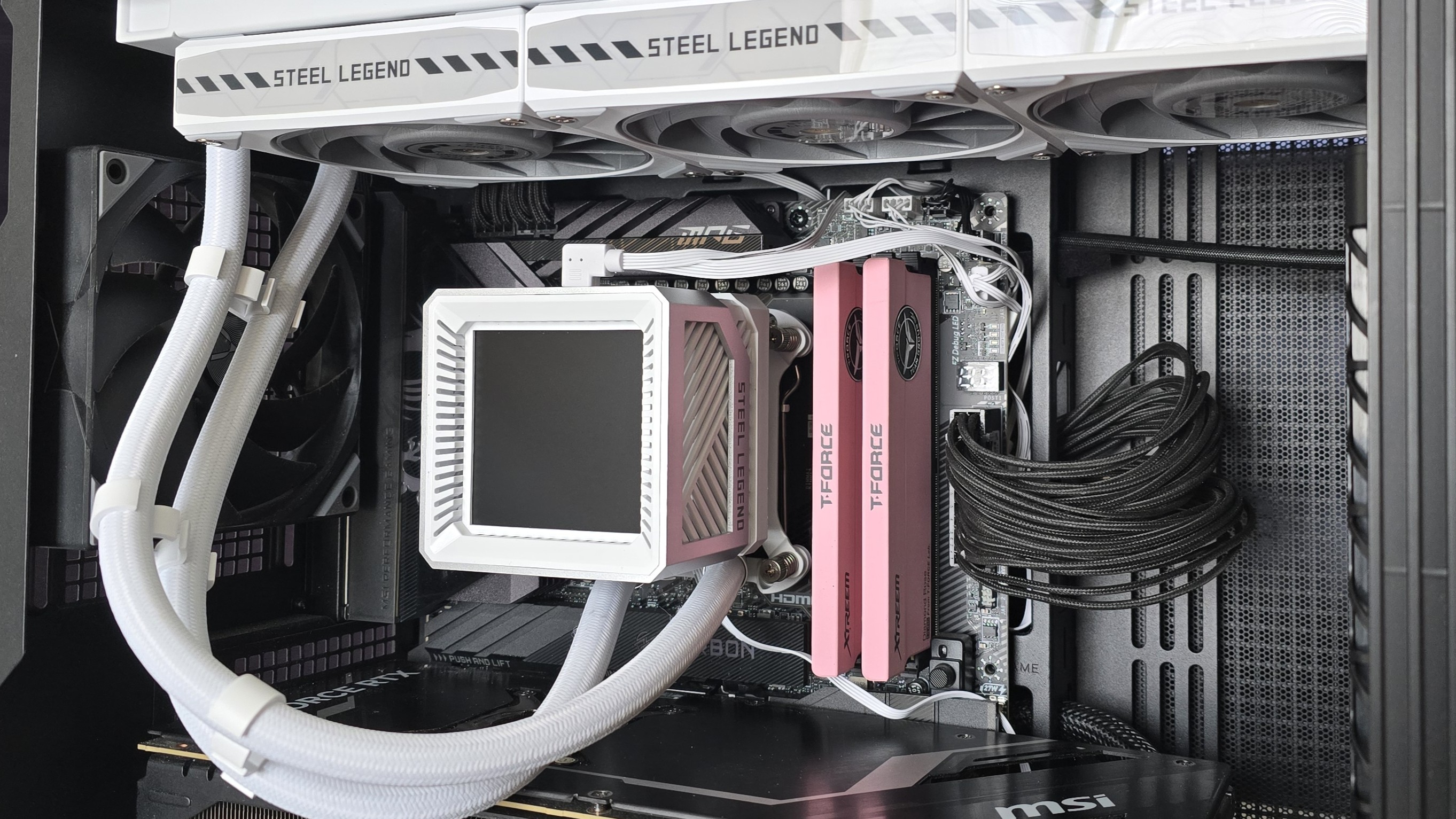
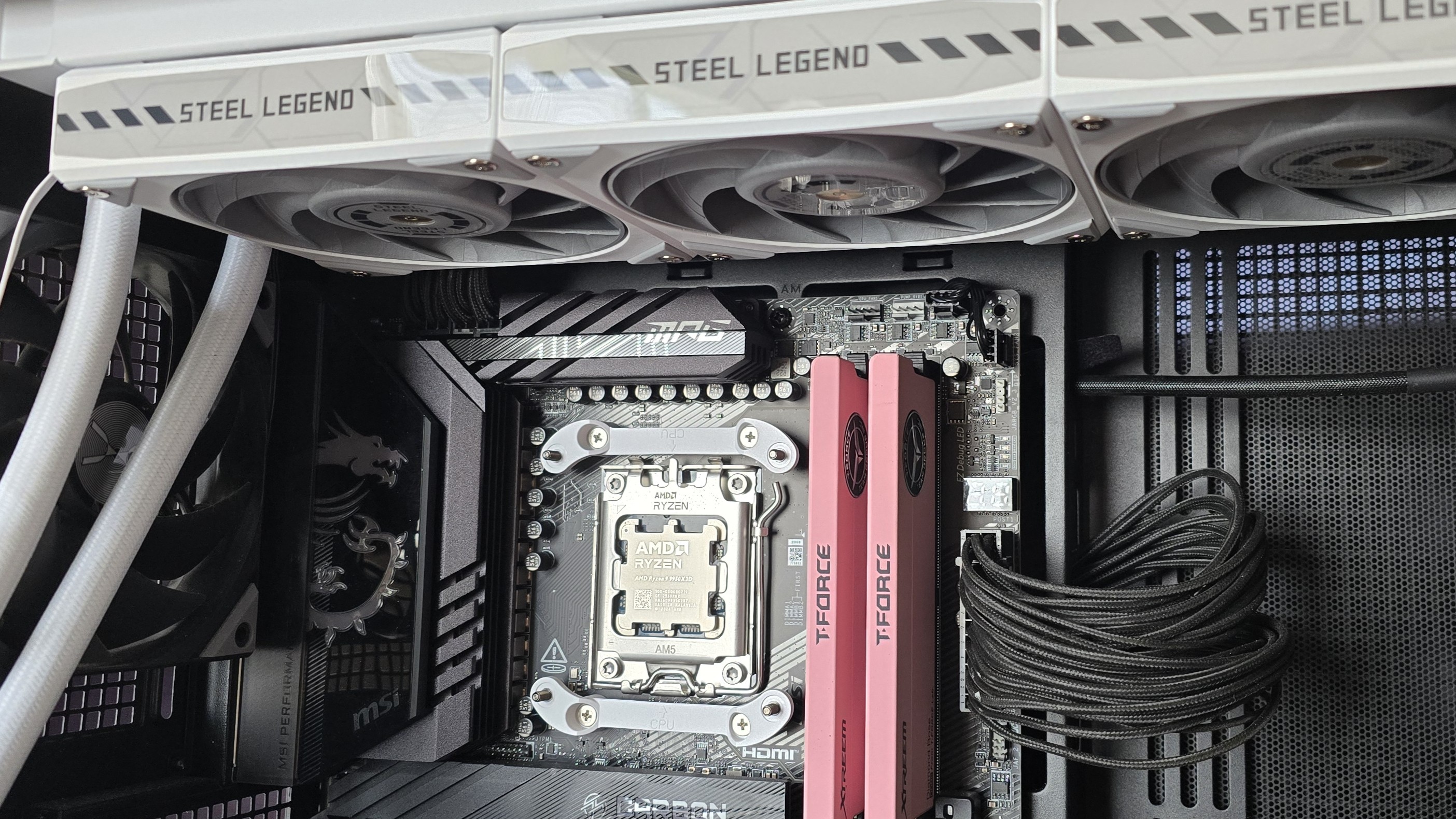
As with most liquid coolers, the design of both the Steel Legend and Phantom Gaming 360 has the CPU block set so it doesn’t overhang or interfere with the DIMM slots – ensuring that all sizes of RAM, no matter how tall, are compatible.
(Image credit: Tom's Hardware)
▶️ VRM fan
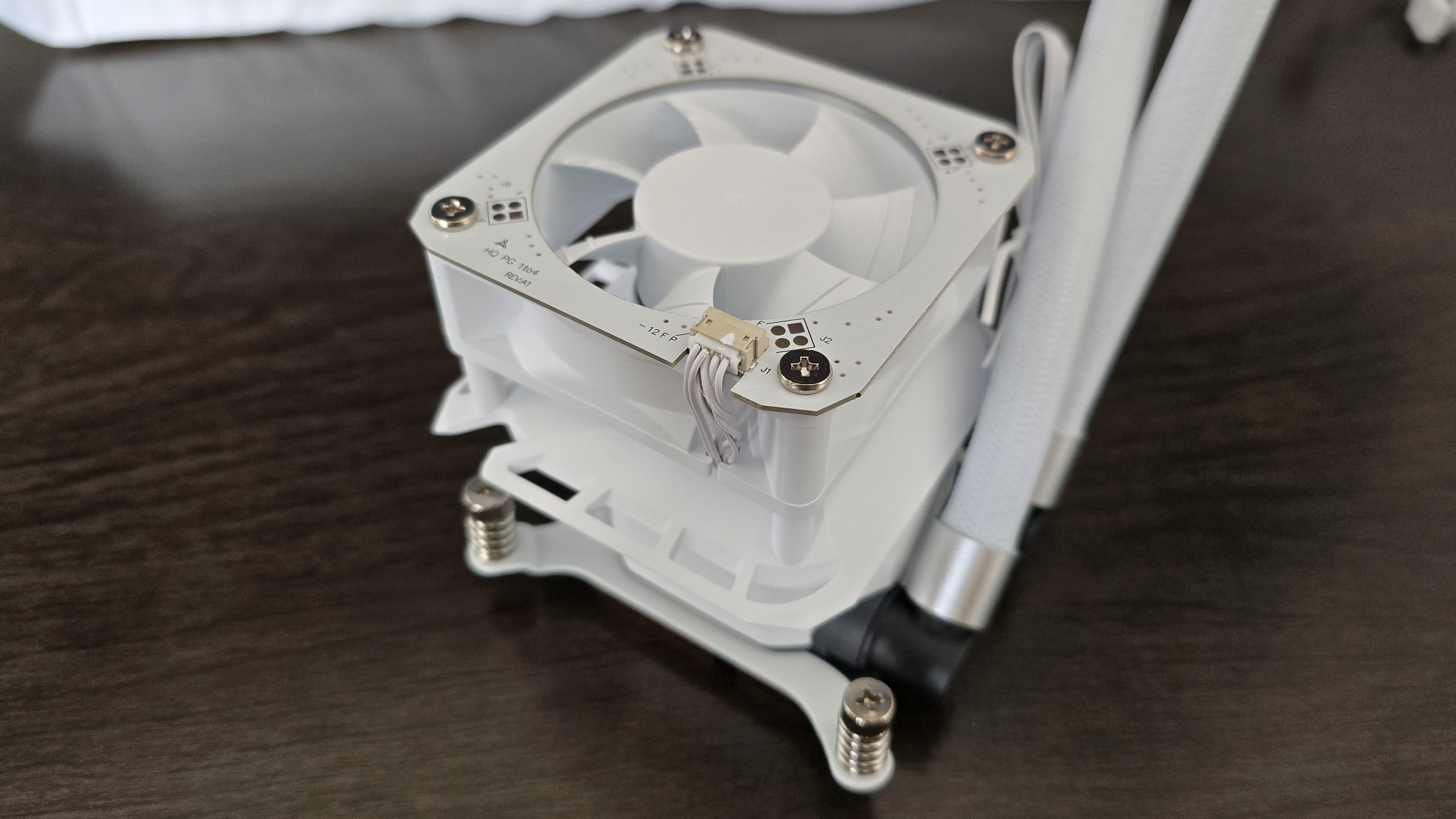
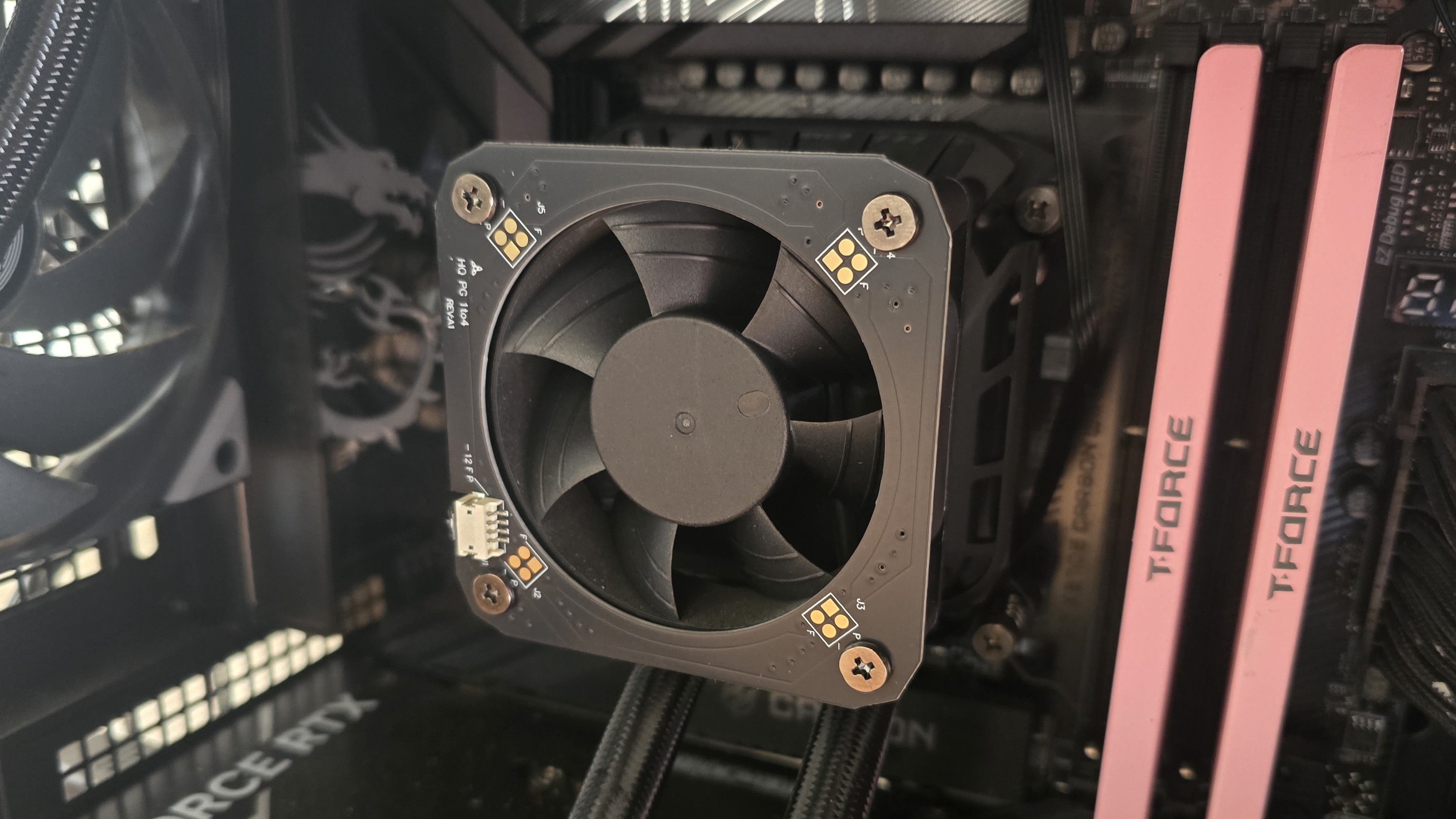
Included on top of the CPU block is a 70 mm, 3,000 RPM fan designed to help keep your RAM and motherboard’s VRM modules cool. As you’ll see in our Karhu benchmarks, it does an excellent job of cooling these parts of your computer.
(Image credit: Tom's Hardware)
▶️ Thick CPU cold plate
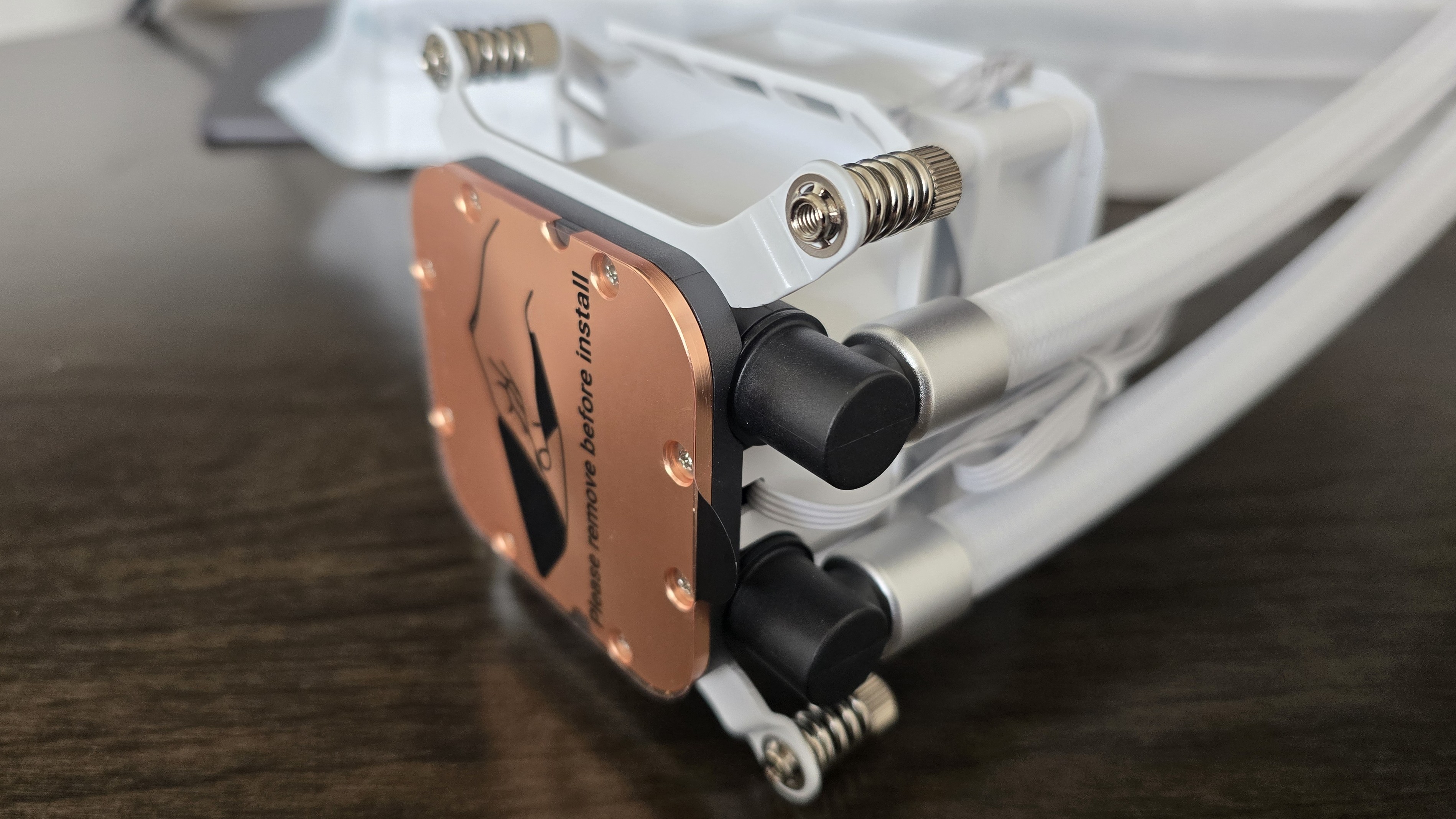
The copper contact plate is unusually thick, like you’d more typically see in an AIO supporting AMD Threadripper or Intel Xeon server CPUs.
(Image credit: Tom's Hardware)
Differences between the ASRock Phantom Gaming 360 LCD and Steel Legend 360 LCD
▶️ Color schemes and aesthetic
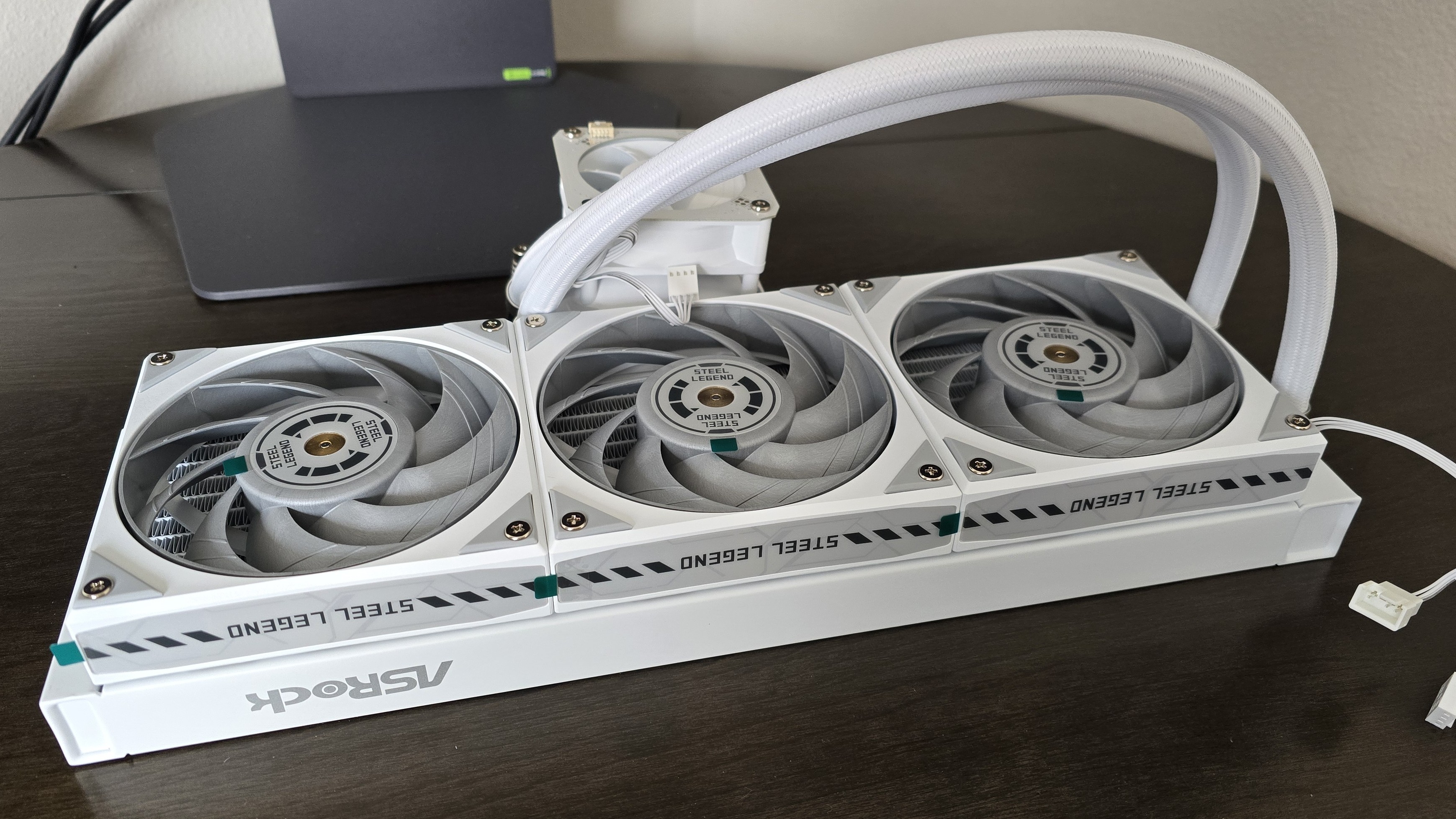
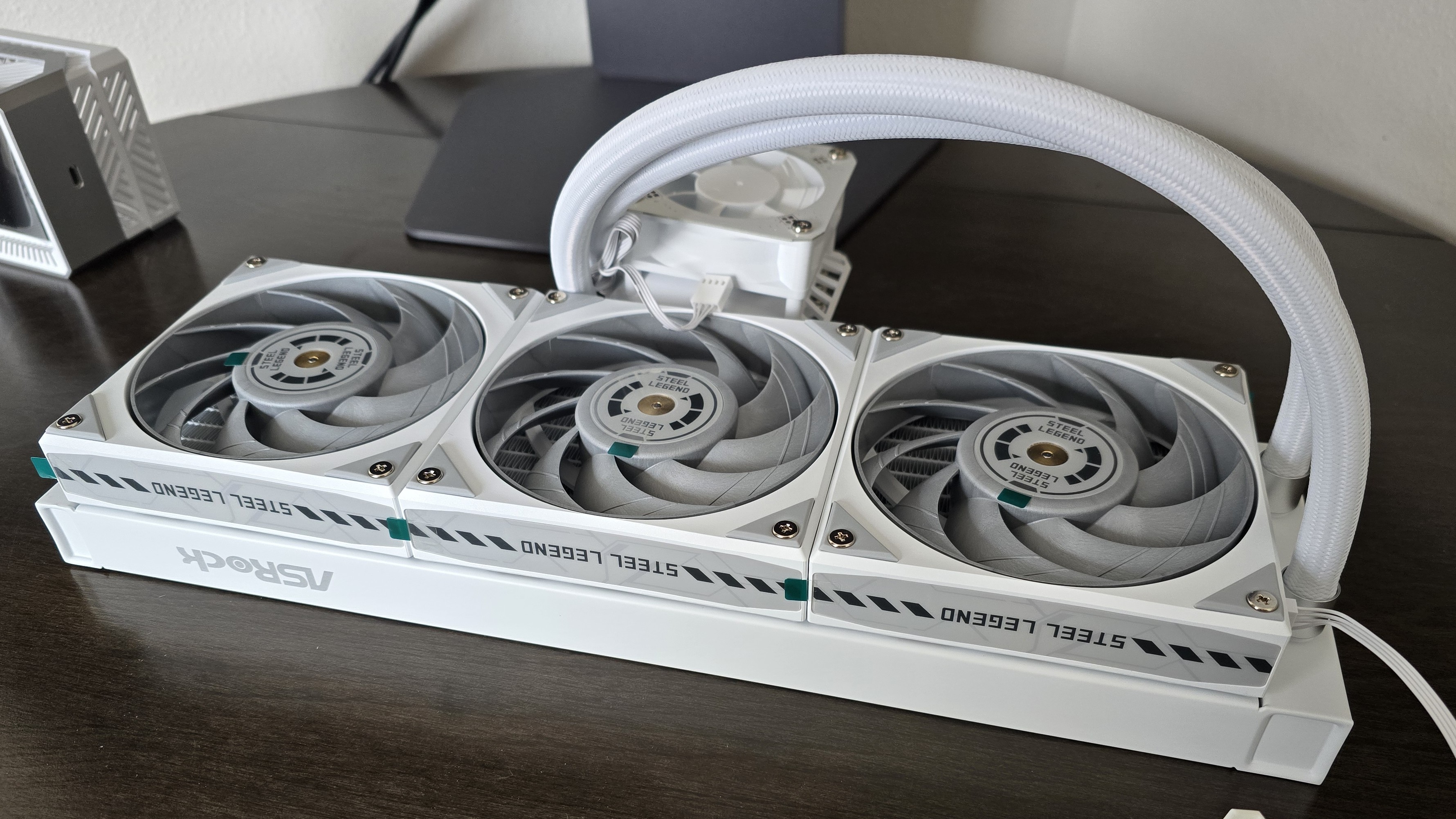
While they are similar in many ways, each of these AIOs has a different aesthetic, similar to what you’d see in the company’s motherboard lines. The Steel Legend might appeal to those who prefer simpler designs, with a white body and gray fan blades.
(Image credit: Tom's Hardware)
If you want flashy lighting, the Phantom Gaming 360 might be your thing. In addition to ARGB lighting on the fan blades, it also includes a lighting strip across the side of the radiator.
(Image credit: Tom's Hardware)
▶️ Radiator sizes: 32 mm and 27 mm
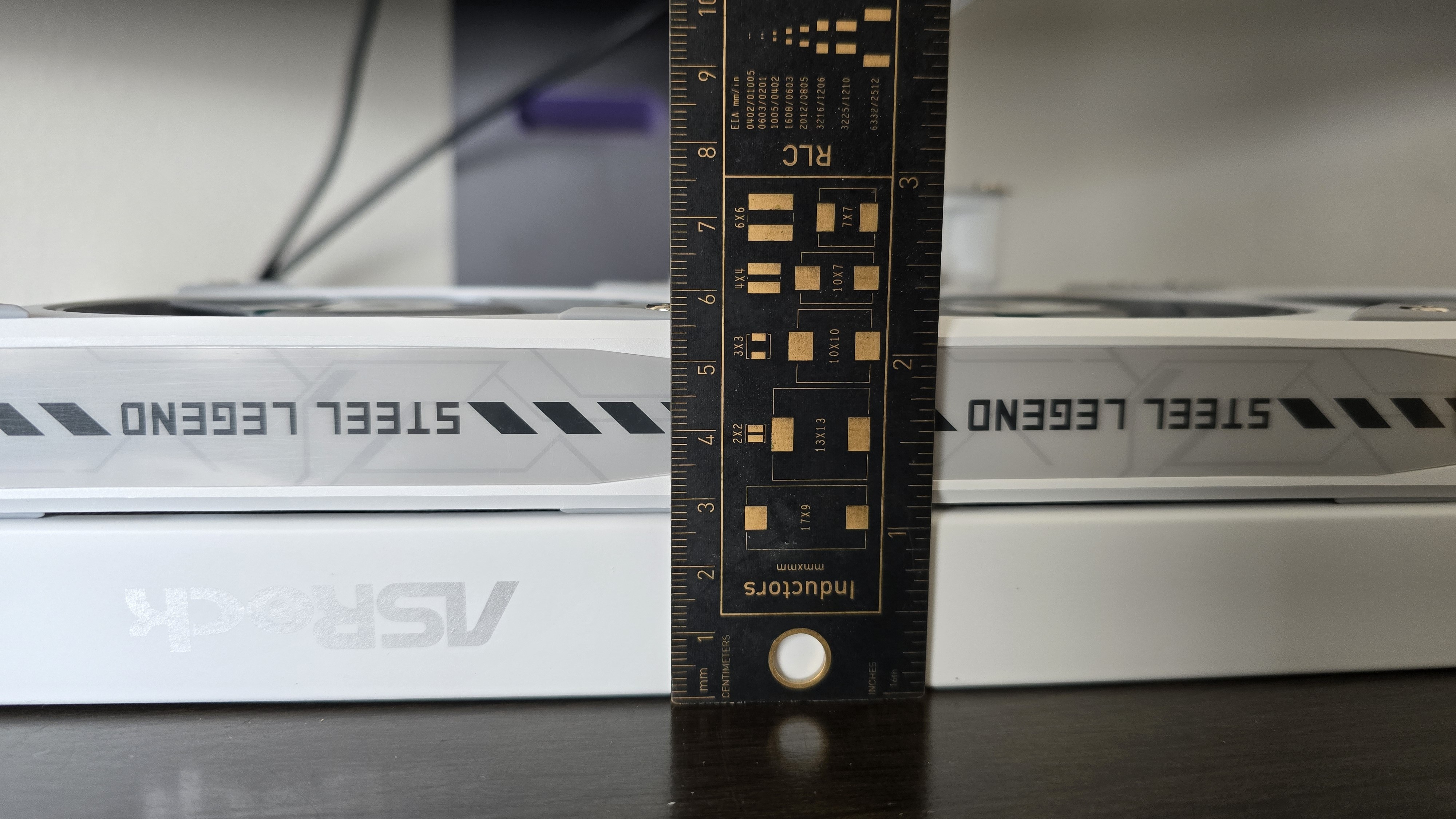
There are two primary technical differences between the Phantom Gaming 360 LCD and the Steel Legend 360 LCD; one of those is the radiator size. The Steel Legend 360 LCD has a standard 27 mm radiator, whereas the Phantom Gaming 360 features a thicker 32 mm radiator.
(Image credit: Tom's Hardware)
▶️ 120 mm fans
There’s more to a liquid cooler than just the radiator and liquid pump. The included fans directly impact noise levels and cooling performance. This constitutes the second primary technical difference between the AIOs we’re reviewing today.
Both units include fans that are 28 mm thick and pre-installed for user convenience. The Steel Legend 360 features three individual 120 mm fans, with a white shell and gray blades.
(Image credit: Tom's Hardware)
The Phantom Gaming includes a fancier fan block instead of individual fans, and features ARGB lighting on the fan blades and a strip across the radiator. These fans aren’t as powerful – or as noisy – as the fans included with the Steel Legend, but this is balanced by the thicker 32 mm radiator included on the Phantom Gaming 360 LCD.
(Image credit: Tom's Hardware)
Steel Legend
Phantom Gaming
Fan Speed
0 - 2500 ± 10% RPM
0 - 2400 ± 10% RPM
Airflow
76.7 CFM
61.28 CFM
Air Pressure
4.16 mmH20
3.11mmH20
Packaging
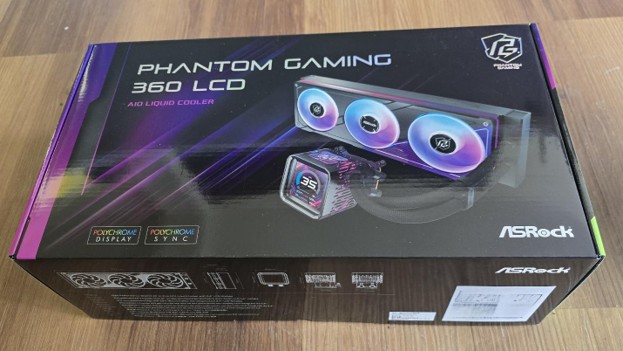
The outer packaging is a bit flashy – at least, in comparison to your normal AIO box. It features a rendering of the cooler against a black background with streaks of purple hues.
(Image credit: Tom's Hardware)
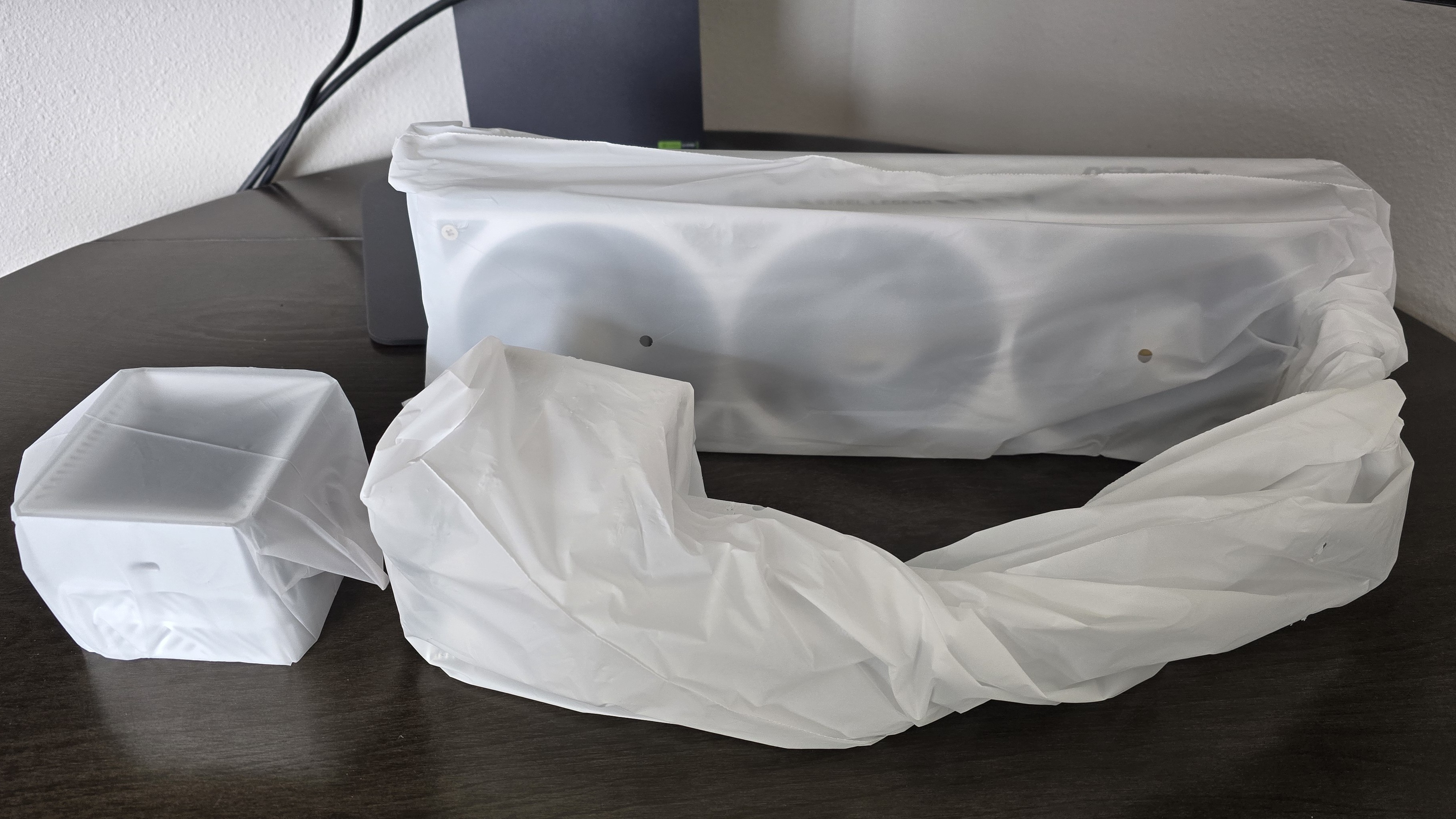
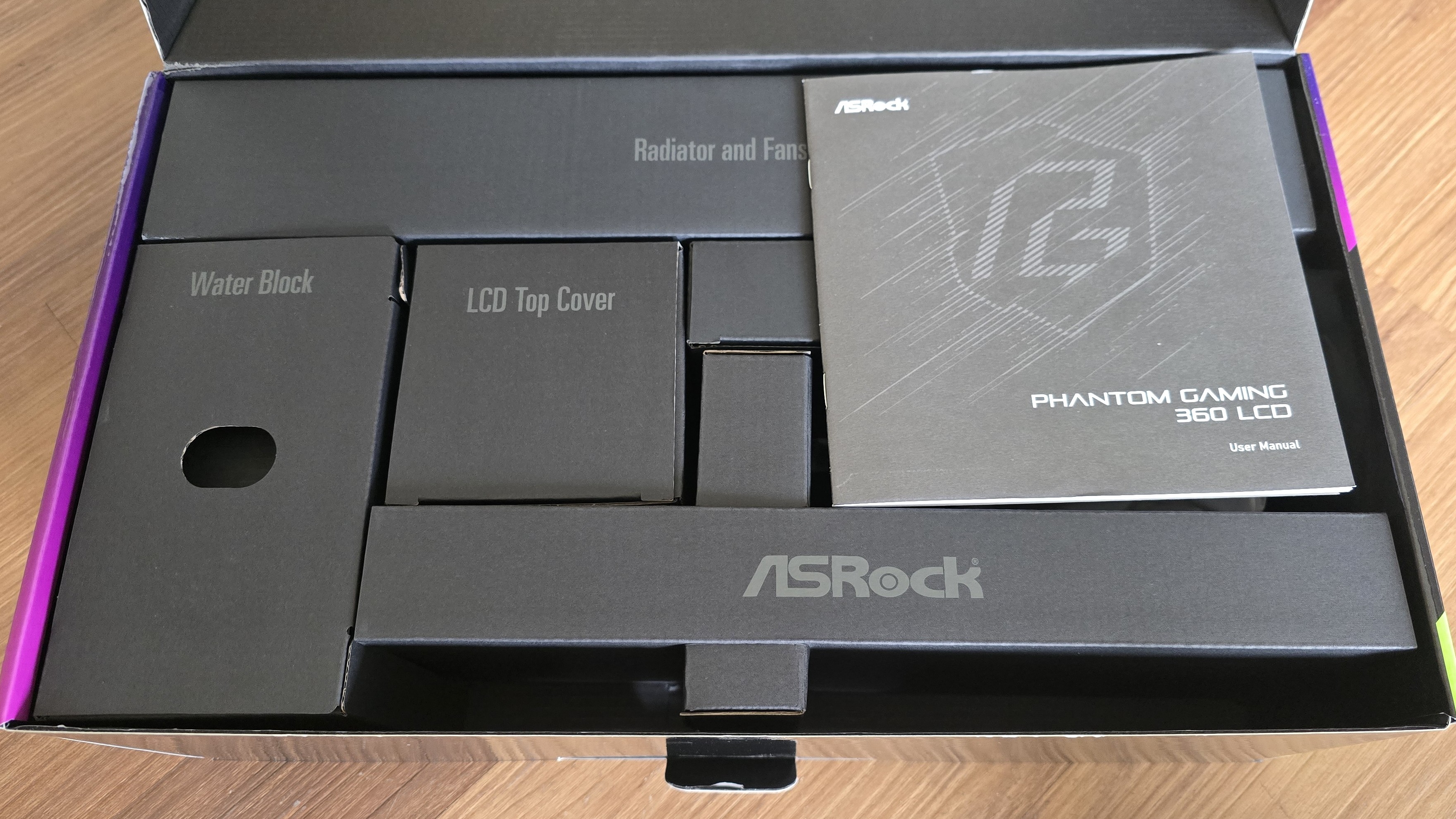
The inner packaging is just as fresh as the outside, with each component of the cooling system well protected from the chaos that shipping can bring by using a combination of soft covers and individual cardboard walls for each component.
Tom's HardwareTom's Hardware
Included with the package are:
Mounting hardware for AMD and Intel platforms
Tubing clips
A small tube of thermal paste
360 mm radiator and 120 mm fans
3.4-inch LCD display
(Image credit: Tom's Hardware)
AM5 Installation
This section assumes you’ve already mounted the 360 mm radiator. Installation of AIOs is typically much easier when you have already secured the radiator to your computer case.
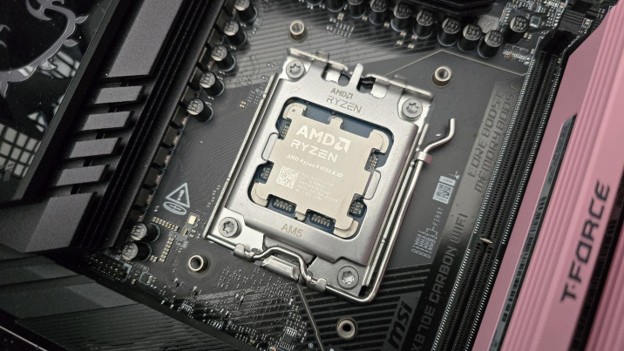
To begin putting things together, you’ll first need to remove the default AM4/5 retention from the motherboard.
(Image credit: Tom's Hardware)
The next step is to place the mounting bars on top of the studs, securing them with the included screws. The middle of the mounting bars includes a helpful image indicating the direction the bars should be installed, with an arrow pointing towards where the CPU should be.
(Image credit: Tom's Hardware)
Now you’ll want to apply the included thermal paste. If you’re not sure how to do that, we have a handy thermal paste application guide that covers the different methods you can use.
Afterwards, place the pump block against the CPU and mounting bars, and use a screwdriver to secure it. You should have the liquid tubing in the south position for best thermal performance.
(Image credit: Tom's Hardware)
The next step is to slide the LCD display on top of the VRM fan. To complete the AIO’s installation, you’ll want to connect the USB, PWM, and ARGB headers as appropriate – then you can power on your system.
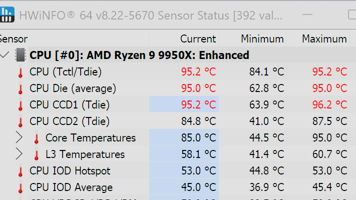
We’ve tested coolers with both the Ryzen 9950X3D and its non-V-Cache sibling, the 9950X. There are some differences in how the 9950X and 9950X3D CPUs are impacted by thermal events. While the heat output of the CCDs of AMD’s 9950X3D is relatively balanced, the 9950X I used has one CCD that runs much hotter than the other, with a difference of over 10 degrees Celsius in some scenarios, shown below.
(Image credit: Tom's Hardware)
We’ve since returned to using a 9950X3D for cooler testing, as it has a more balanced heat profile, and is almost certainly a more widely adopted CPU. The benchmark results shared in these reviews may differ from others because I emphasize results that are comparable to real-world use. This means I generally test CPU coolers inside of a closed desktop case, which increases cooling difficulty compared to other testing methods.
Many reviewers test coolers on open test benches, which have a combination of lesser airflow needs and lowered ambient temperatures. This results in making weak coolers appear stronger than they really are. Some also use generic thermal plates to test cooling solutions. I reject both of these methods because they don’t accurately reflect real-world cooler conditions.
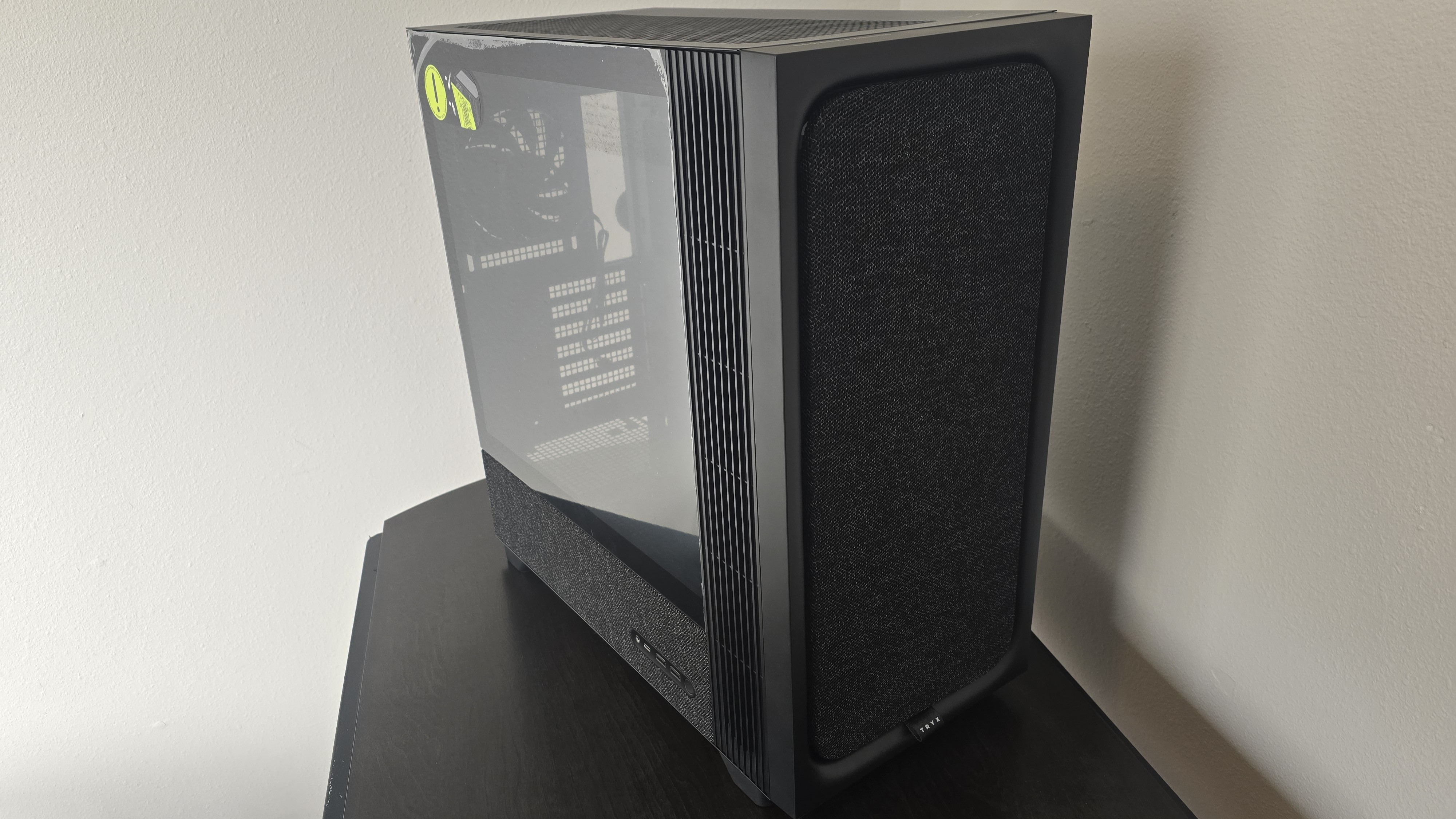
Our latest testing setup uses the Flova F50 computer case from Tryx.
(Image credit: Tom's Hardware)
This case features a unique “crossflow” fan that pulls air from the side, which the company claims is more effective than traditional intake fans. For air cooling tests, we’ve added a single Noctua NF-A12 G2 intake fan.
We’re going to start this review’s benchmark section by focusing on a traditional maximum performance test, with the CPU cooler’s fans allowed to reach their fastest speeds for the best cooling possible.
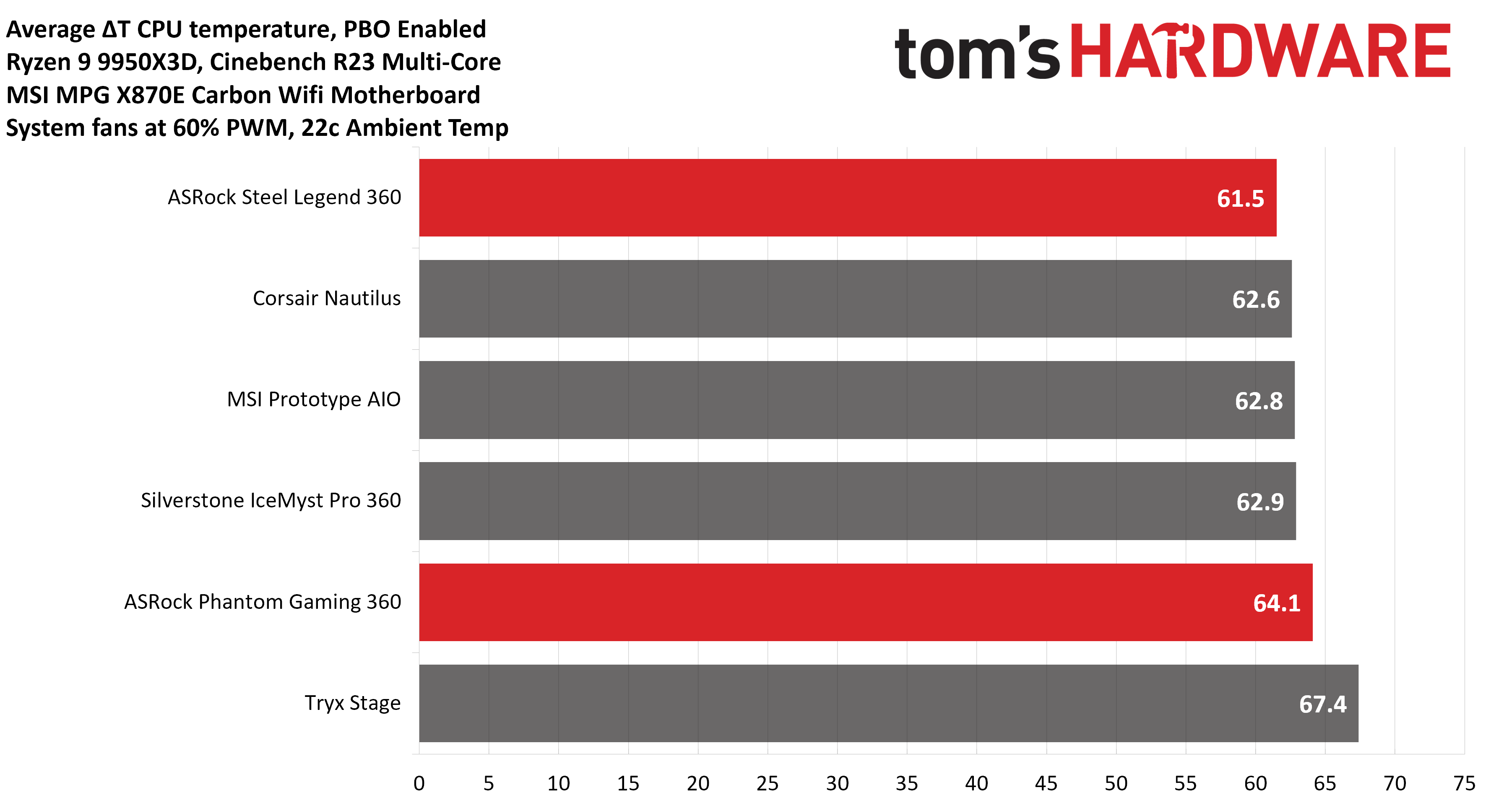
Turning on PBO allows AMD’s Ryzen 9 9950X3D to stretch its legs to an extent, and all air coolers I have tested with PBO enabled using MSI’s X870E Carbon Wifi motherboard reach the maximum CPU temperature of 95 degrees C (203 F) and thermally throttle to some extent.
(Image credit: Tom's Hardware)
The thermals of both ASRock AIOs are excellent, able to keep AMD’s Ryzen 9 9950X3D under its peak temperature (TJ Max) in Cinebench R23 with PBO enabled – allowing for the best possible benchmark performance. Of particular note is the performance of ASRock’s Steel Legend 360; it maintained an average of 61.5C over ambient (83.5C), the best result we’ve seen on this test bench.
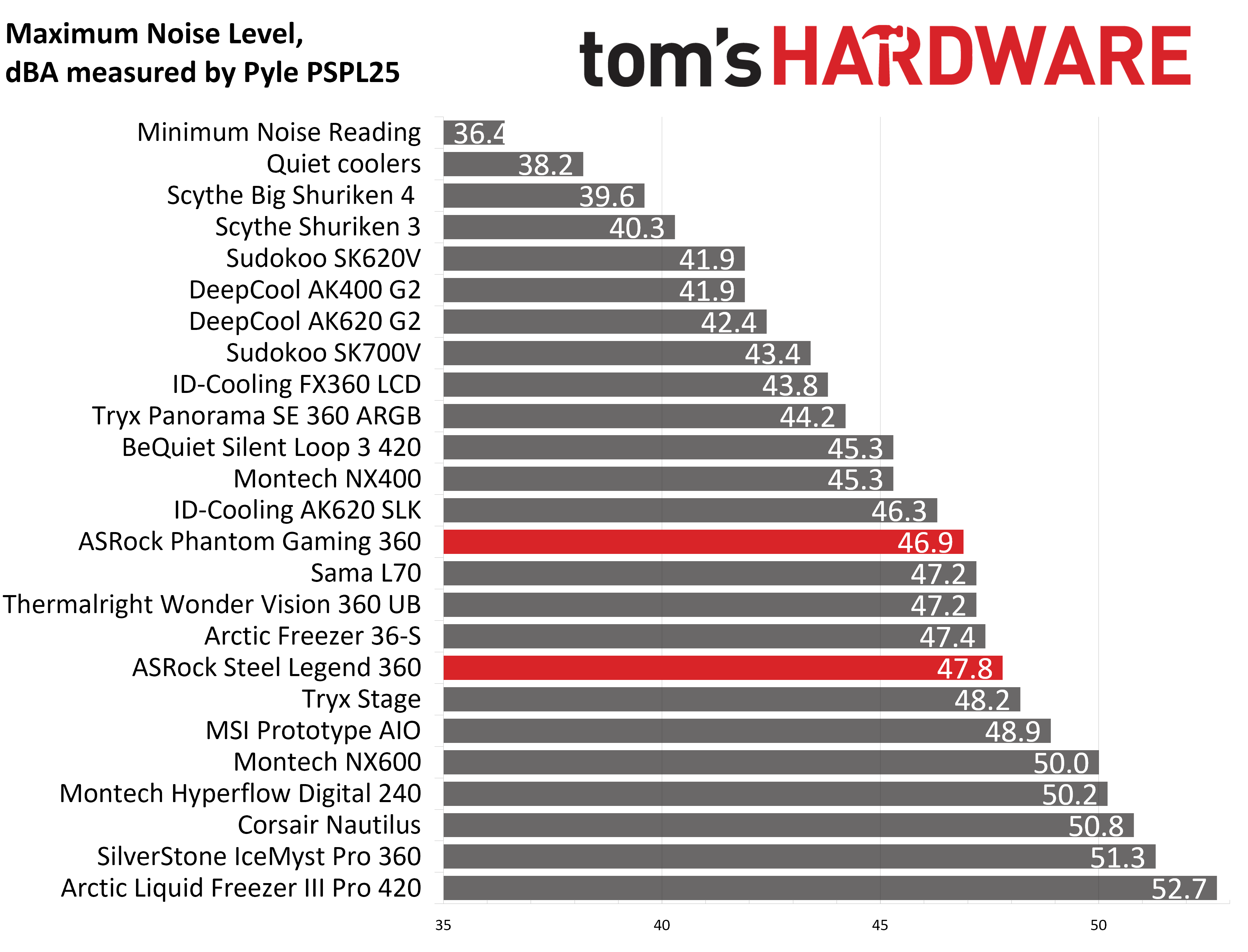
Some coolers perform well in maximum strength tests, but require running loudly to maintain said performance. The ASRock AIOs we tested reach 46.9 and 47.8 dBA, which is about average for most liquid coolers on the market.
(Image credit: Tom's Hardware)
200W thermal benchmarks
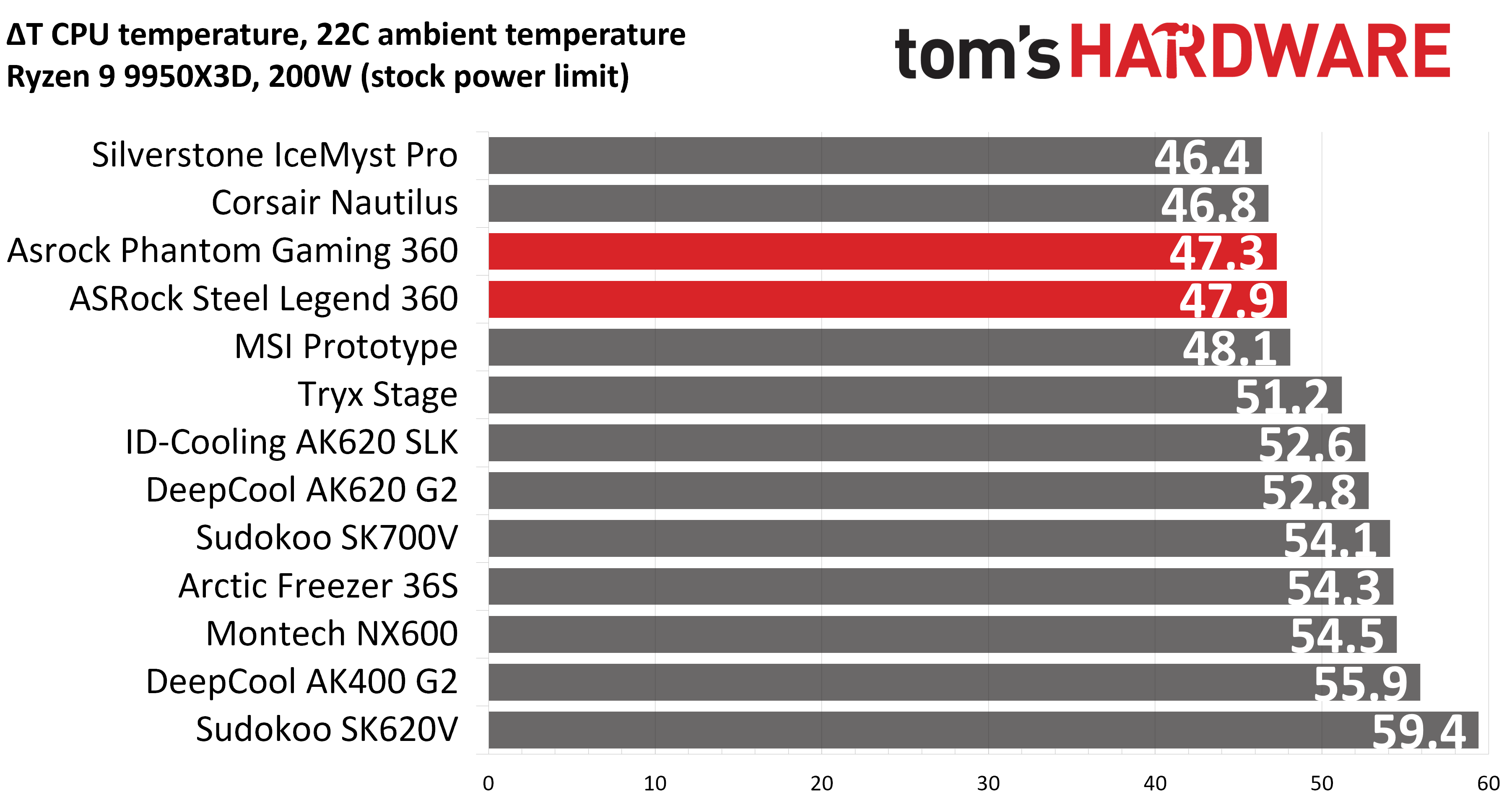
For the next thermal test, I leave the motherboard settings at their defaults, which results in a power limit of 200W when running Cinebench R23.
(Image credit: Tom's Hardware)
When a standard power limit is imposed, the thermal differences between the two ASRock coolers close, with both coolers performing about the same. I measured 47.3 and 47.9 degrees over ambient, giving them the third- and fourth-best performing results from this test bench.
150W + GPU thermal results, noise levels
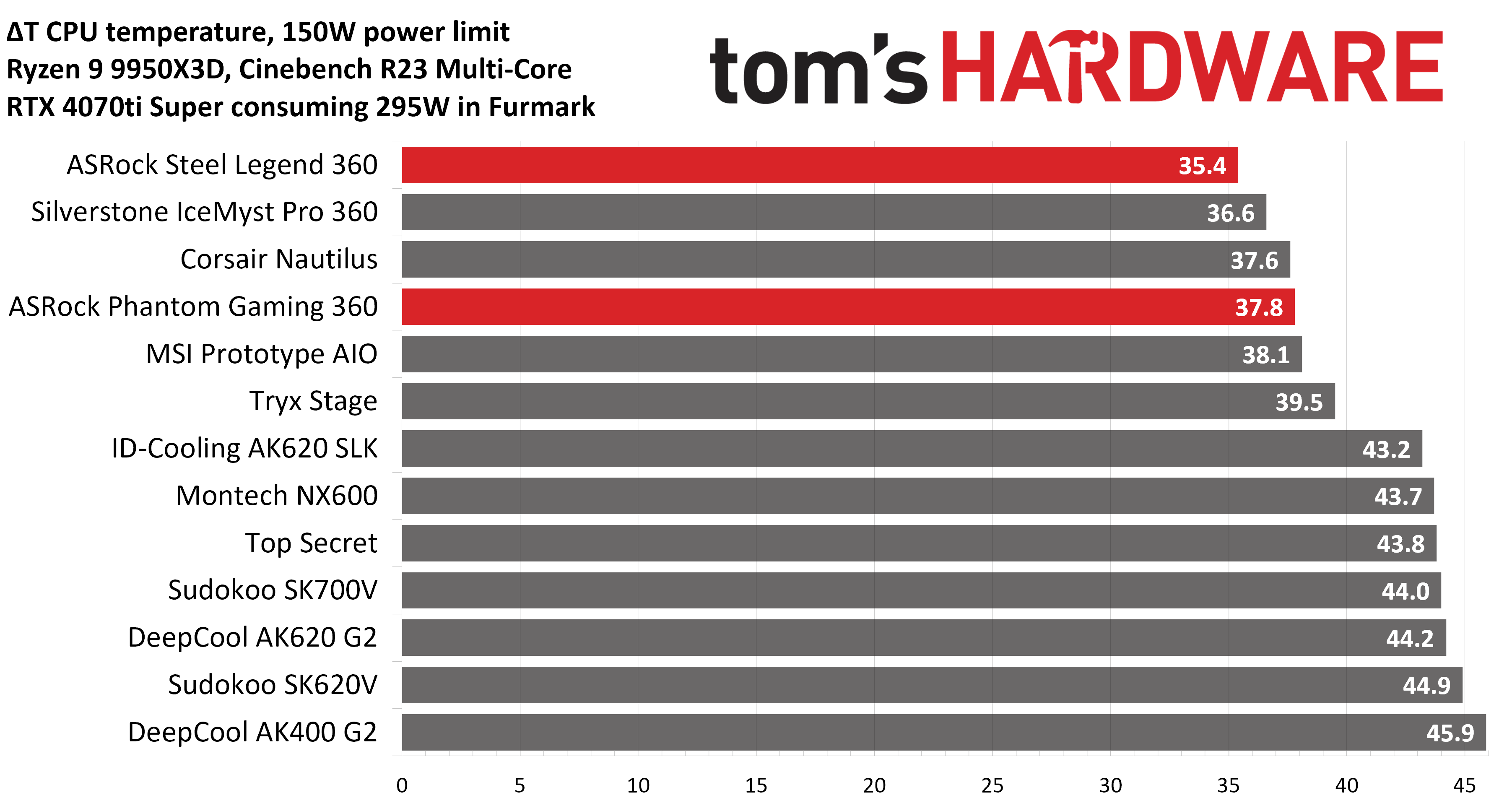
Our next test runs Cinebench on the CPU with a 150W power limit, while also running Furmark on MSI’s RTX 4070 Ti Super Ventus 3x OC. This causes the GPU to consume ~295W of power. This test is designed to emulate the thermals of games, which primarily stress the CPU and GPU.
(Image credit: Tom's Hardware)
ASRock’s Steel Legend stood out in this test, outperforming all other competitors, with an average temperature of 57.4 C (35.4 C above ambient). The Phantom Gaming AIO also performed well, taking the fourth-place spot.
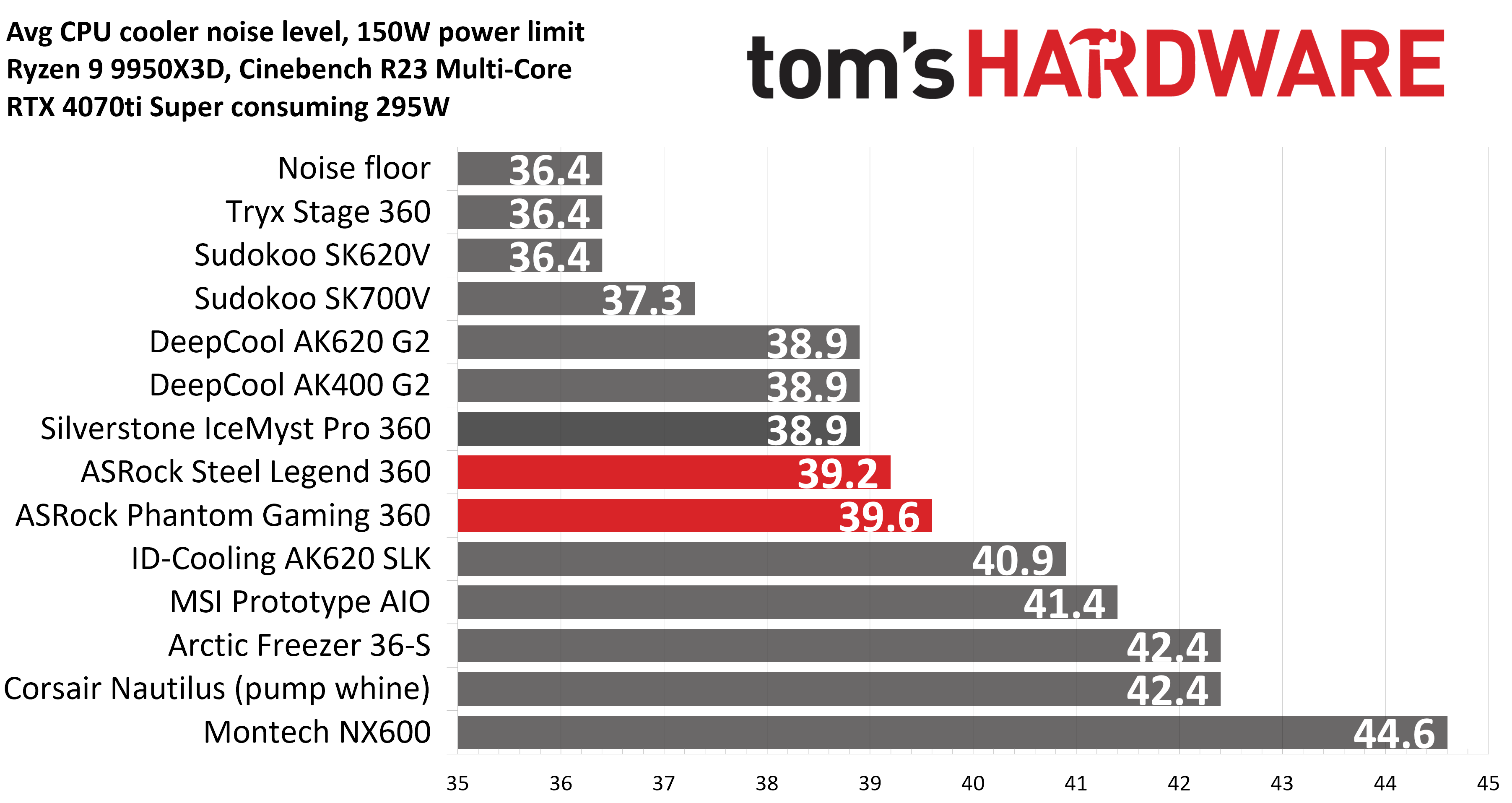
But thermals are only part of the story. Noise levels, especially when you’re gaming, are far more important here. When tied to my motherboard’s default fan curve, ASRock’s Steel Legend 360 had a noise level measured at 39.2 dBA. The Phantom Gaming 360 LCD was just a hair louder, measuring 39.6 dBA.
(Image credit: Tom's Hardware)
Noise-normalized testing
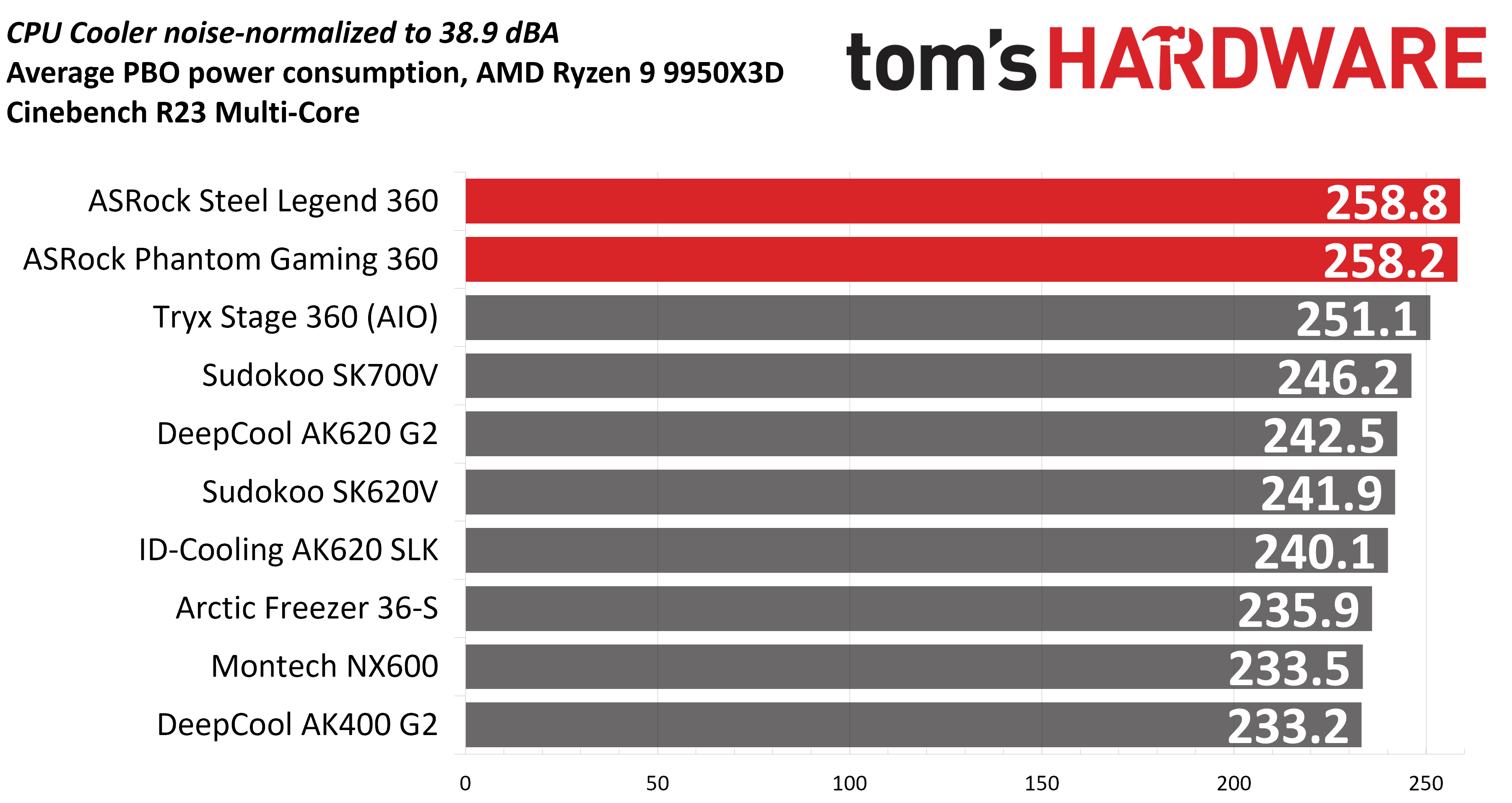
Most testing is performed with the cooler tied to the default fan curve of our MSI X870E Carbon motherboard, but some prefer to see tests when the noise levels of coolers are equalized. This is especially important to those of you who prefer silent computers. This next test has the CPU cooler noise-normalized to 38.9 dBA, with PBO enabled for the Ryzen 9 9950X3D CPU.
(Image credit: Tom's Hardware)
With recordings of 258.8 and 258.2W average CPU power consumption, ASRock’s AIOs perform essentially on par with each other while noise-normalized.
Karhu DDR5 RAM thermals testing
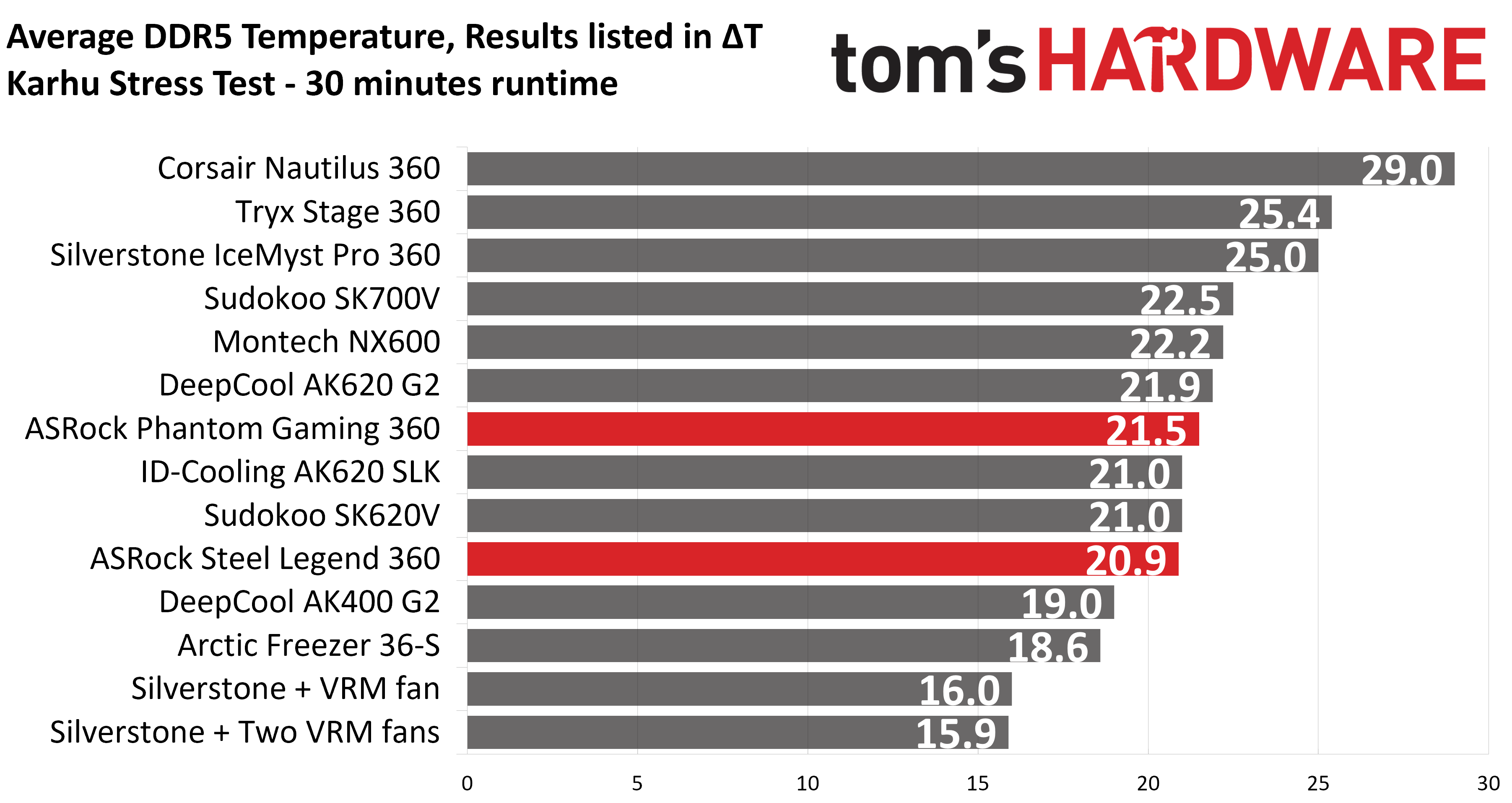
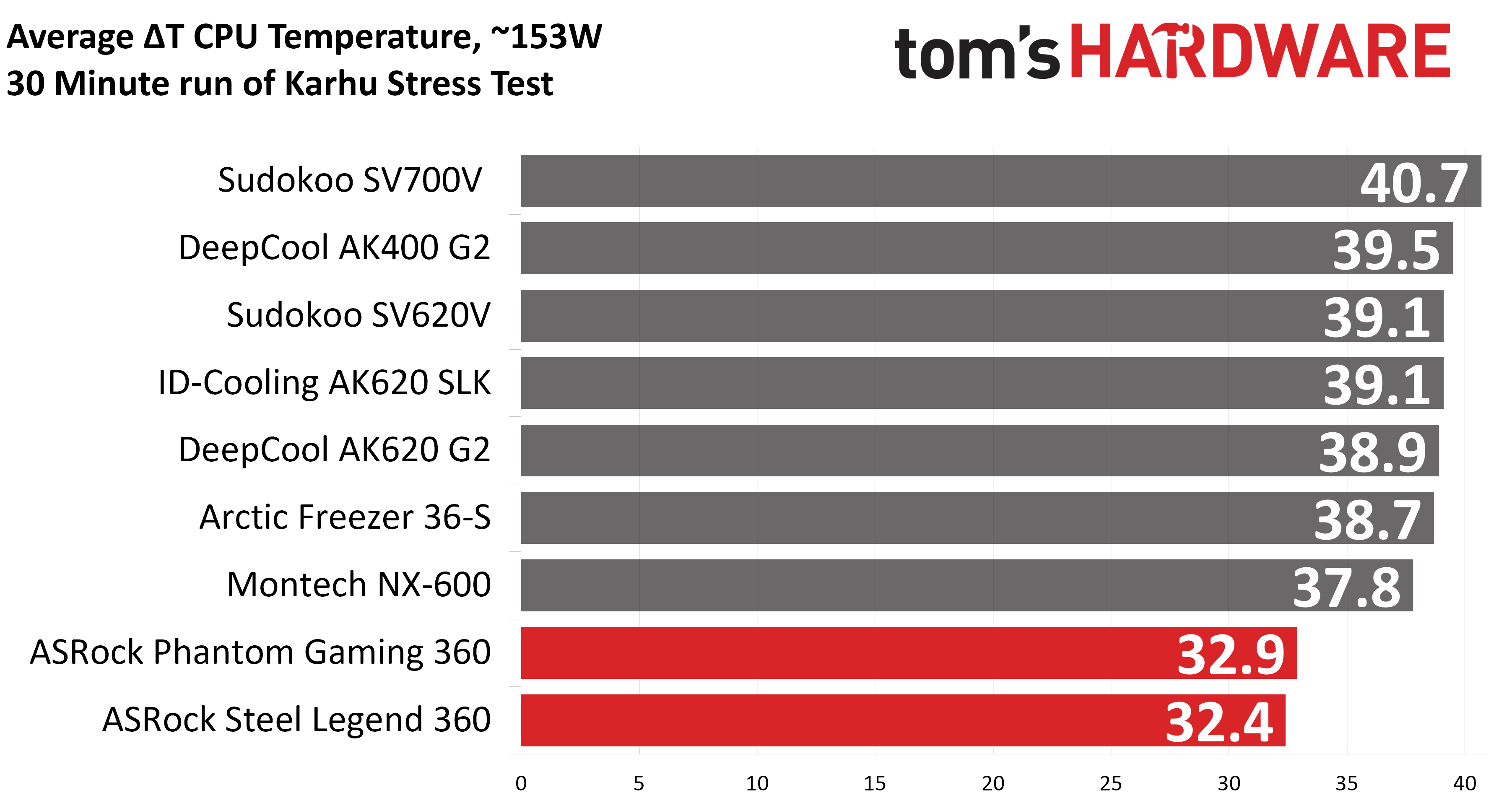
Your CPU cooler does not operate in isolation. It has an impact on not just your CPU’s temperatures, but also the other components in your build, like your RAM and GPU. To that end, I’ve run the Karhu RAM stress test. This places a load of ~153W on the CPU and ensures system RAM (DDR5 in my case) is fully stable. In this type of scenario, most AIOs tend to produce worse results than air coolers.
(Image credit: Tom's Hardware)
DDR5 temperatures were excellent in this test, with averages of 20.9 C (Steel Legend) and 21.5 C (Phantom Gaming) recorded. Of the AIOs I’ve tested on this configuration, only Silverstone’s IceMyst Pro with its unique stackable fans performs better.
We’ve also included a chart showing the CPU temperatures in this test, and thermal performance was strong – outperforming air coolers by ~5 degrees C. But I haven’t recorded this data for other AIOs yet.
(Image credit: Tom's Hardware)
Conclusion
(Image credit: Tom's Hardware)
ASRock’s Steel Legend 360 LCD and Phantom Gaming 360 LCD are both strong coolers, well suited to heat-intensive CPUs like AMD’s Ryzen 9950X3D or Intel’s Core i9-14900K.
Of the two ASRock AIOs, I would recommend the Steel Legend 360 LCD for users who want the best thermal performance possible (and a lower price tag). It might lack the thicker 32 mm radiator included with the Phantom Gaming 360 LCD, but its included fans are stronger, and as a result provide lower CPU temperatures and quieter noise levels in common scenarios. Still, at around $160, the Steel Legend is far from the most affordable AIO with a display, and it’s only available in white.
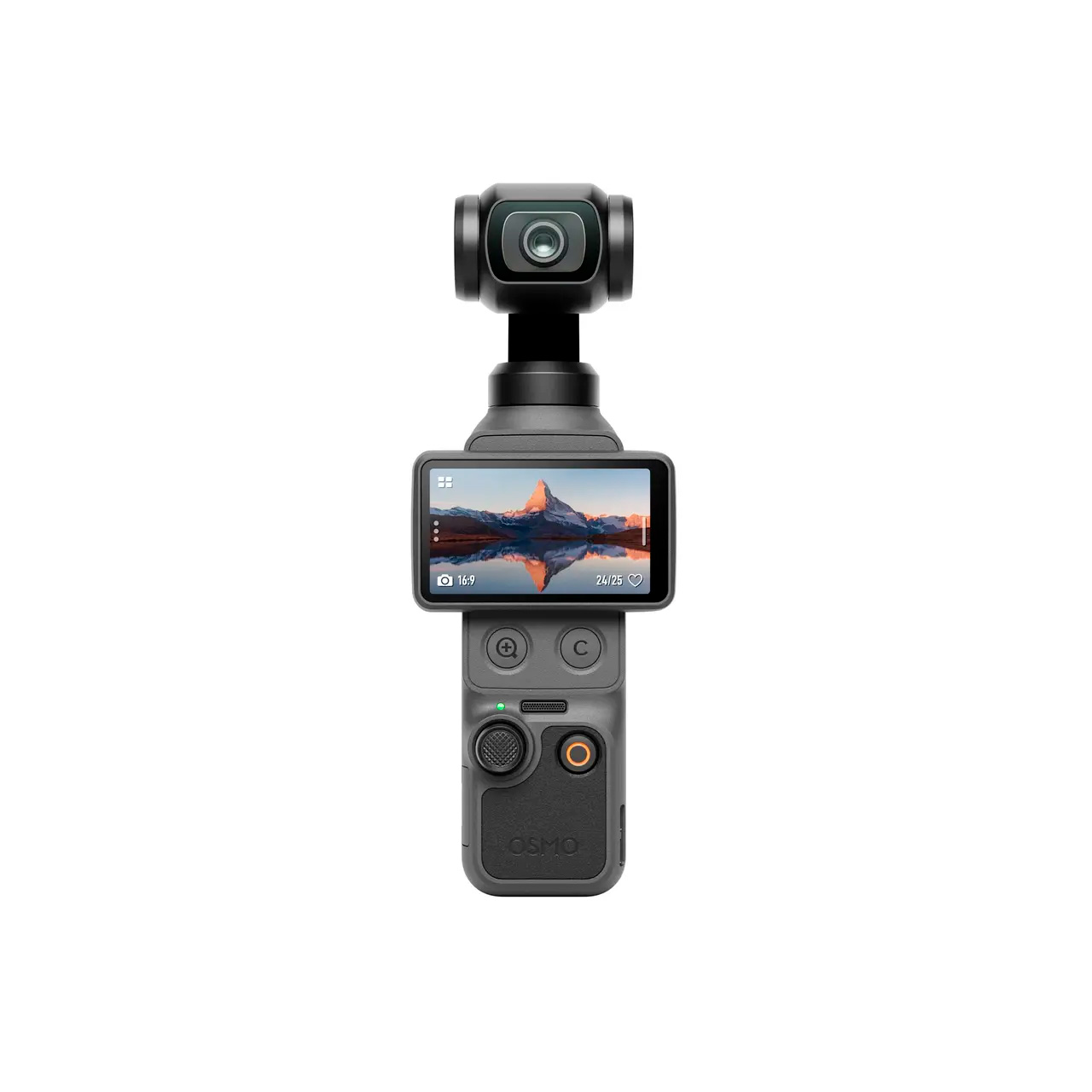
If you are an aspiring vlogger or simply just enjoy capturing your adventures, DJI’s Osmo Pocket series are among the most popular options on the market right now. And for a limited time, you can elevate your vlogs with some of the best Osmo Pocket handheld cameras that are available at special prices on AliExpress.
AliExpress already sells DJI’s Osmo 360, Pocket 3, Pocket 4, Pocket 4P, and their respective Creator Combos at very competitive prices compared to other U.S. retailers. However, the retailer's July A+ event brings even more attractive deals on the Osmo Pocket series. You can now save up to an additional 14% on top of the already low prices. The discounts range from $2 up to $70.
We have a few coupon codes that will help slash AliExpress's prices even further. They are exclusive for U.S. consumers and are case-sensitive. Therefore, you need to copy and paste them exactly as provided. Each account can only use a coupon once, so plan your shopping cart accordingly.
As usual, AliExpress utilizes a tiered format, so apply the highest coupon that matches your purchase amount to get the best deal. That does not mean you have to buy the more expensive model, as there are some nice discounts on the more affordable options, as well.
VSFUTURE2 — $18 –> $2
VSFUTURE5 — $39 –> $5
VSFUTURE10 — $69 –> $10
VSFUTURE20 — $139 –> $20
VSFUTURE23 — $169 –> $23
VSFUTURE35 — $249 –> $35
VSFUTURE55 — $379 –> $55
VSFUTURE70 — $499 –> $70
The Osmo 360 is a high-end 360-degree action camera with impressive specifications. It records in native 8K, up to 50 FPS, and takes stills up to 120 megapixels, with 360-degree support. Use the VSFUTURE35 coupon code at checkout.View Deal
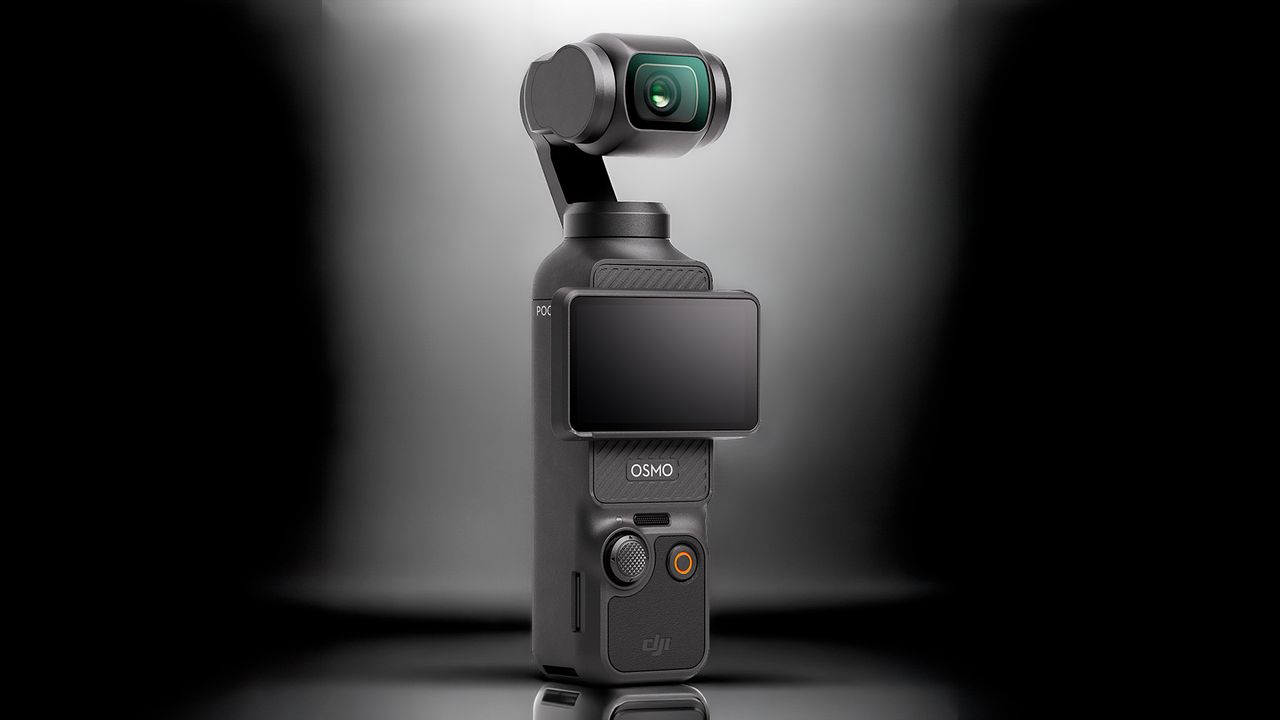
The Osmo Pocket 3 is a pocket-sized camera that is designed for vlogging. It shoots 4K videos up to 60 FPS or, alternatively, 4K slow-motion videos up to 120 FPS. Use coupon code VSFUTURE55 at checkout.View Deal
The Osmo Pocket 4 brings significant upgrades over the previous version, such as upping the slow-motion capability to 4K at 240 FPS, a brighter screen, and longer battery life. Use the VSFUTURE70 coupon code at checkout.View Deal
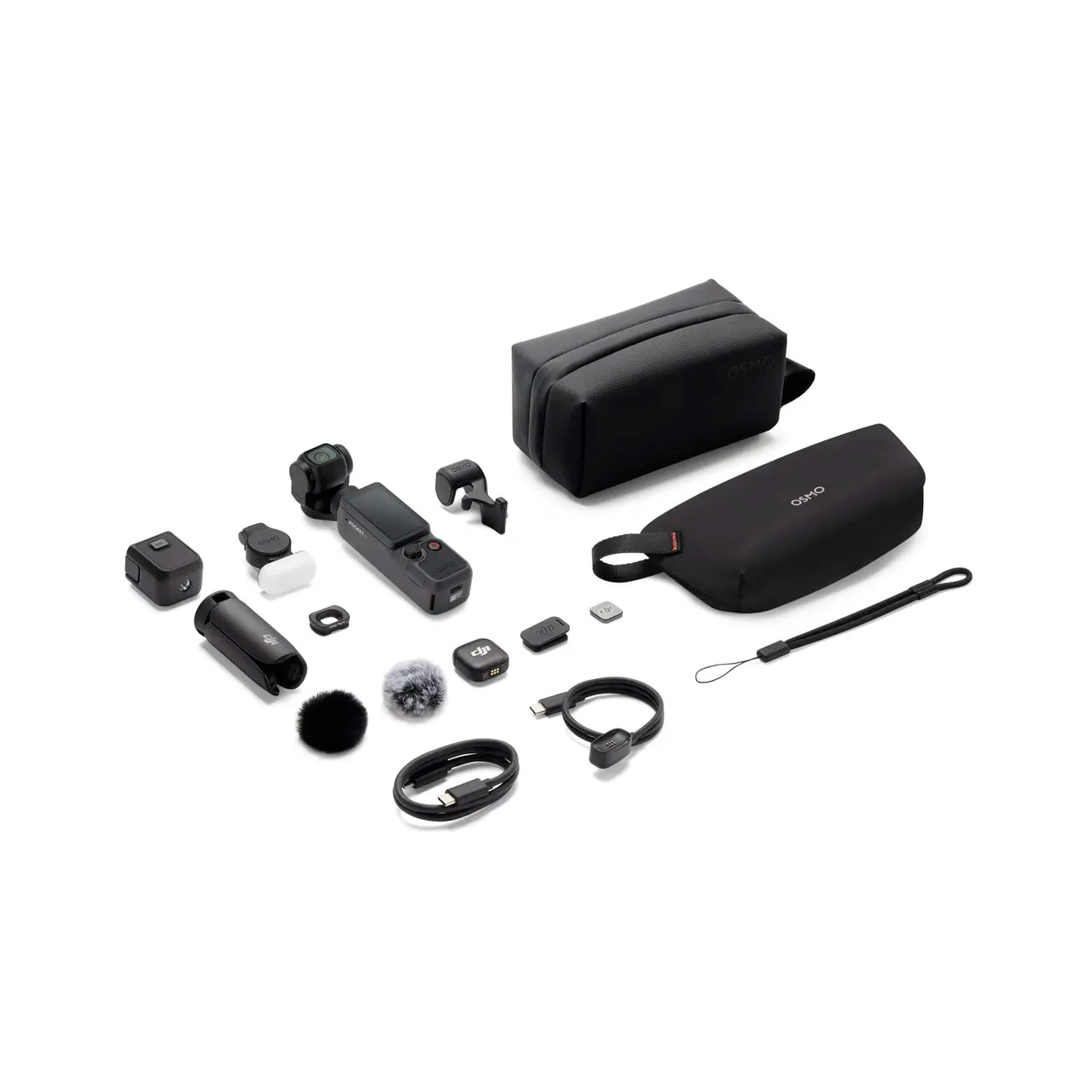
The Creator Combo comes with some useful accessories, including a DJI Mic 4 wireless transmitter, an Osmo mini tripod, a dedicated carrying bag, and other goodies. Use the VSFUTURE70 coupon code at checkout.View Deal
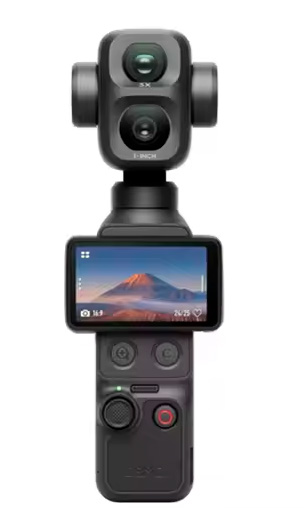
The Osmo Pocket 4P is the ultimate compact camera from DJI, which brings substantial upgrades for vlogging enthusiasts. It flaunts a dual-lens setup, 4K slow motion up to 240 FPS, a 37-megapixel snapper, and up to 210 minutes of shooting. Use the VSFUTURE70 coupon code at checkout.View Deal
The Creator Combo arrives with a plethora of audio and stabilizing accessories, like a handle extension, DJI wrist strap, DJI Mic 3 wireless transmitter, among others. Use the VSFUTURE70 coupon code at checkout.View Deal
The July A+ event started on July 13 and will last through July 19, so there is still ample time to look over the Osmo Pocket series products that are on sale. If you have been eyeing something, now is your opportunity to secure one at a bargain price. At these unbeatable prices, the Osmo Pocket series will likely sell out quickly, so don't wait too long.
Every order ships directly from AliExpress local U.S. warehouses, so shipping is free and comes with full buyer protection. There are no hidden fees, such as cross-border duties, either. Once your order is locked in, AliExpress will ship it in 2-5 business days. Take advantage of this limited-time event to get the best deals on DJI Osmo Pocket products before they sell out.
Nowadays, storage devices for consumer and data center applications differ rather dramatically, as do approaches to product design as well as go-to-market strategies. Therefore, to get a more or less comprehensive overview of the storage market in general, you must observe both ends of the spectrum. To complement our interview with Nelson Duann at Computex, we also sat down with his colleague Alex Chou, who is in charge of Silicon Motion’s enterprise storage business.
Alex Chou is an interesting person to talk to. Before joining Silicon Motion, he spent some 18 years at Broadcom, where he led the wireless connectivity business, also initiating the Enterprise Switch, PoE, and 10-G Base-T PHY business with a product marketing focus. Before that, he worked at UMC Capital, ARK Logic, and Western Digital, where he developed graphics accelerators. He deeply understands the industry and uses his knowledge to expand SMI's business into the data center segment. As he is the first general manager of Silicon Motion's enterprise business unit, it is safe to say that all the success that the company has faced in the new segment so far can be attributed to Alex Chou.
Anton Shilov: Can you introduce yourself to our readers, please?
Alex Chou: My name is Alex Chou. As you know, Silicon Motion has two business units: the client business and the enterprise business. I am responsible for the enterprise business unit. My responsibilities include defining new products, leading development teams, bringing products to market, and working with OEMs, cloud service providers, and other customers to promote our technology and differentiation.
Getting into enterprise SSD business
Historically, Silicon Motion was focused on NAND controllers for client applications as well as embedded graphics processors and USB display controllers. Following the restructuring in the early 2020s, SMI formed a separate business unit to offer enterprise-grade SSD controllers, though it took the company some time to land its first tangible orders. By now, the company has yet to grab a 10% market share, yet it has clients among cloud service providers (CSPs), hyperscalers, and OEMs, significant achievements given Silicon Motion is a relatively new market entrant.
Anton Shilov: It has been a challenging year for much of the industry, particularly for memory-related segments. Yet Silicon Motion reported first-quarter revenue of $342.1 million, up 23% sequentially and 105% year-over-year, while SSD controller sales increased by roughly 40% to 45%. Can you explain what drove those results, particularly on the enterprise side?
Alex Chou: It depends on how you define a difficult year. If you look at the results, I would argue that this has actually been one of the best years the storage industry has seen.
Silicon Motion is fundamentally a controller company. We build controllers that work with NAND from all major memory suppliers. On the enterprise side, we are still relatively new compared to some established competitors, but we have secured a number of new projects and have started delivering products to customers.
We have invested heavily in PCIe Gen5, Gen6, and Gen7 enterprise SSD controllers. Today, our Gen5 products are beginning to ramp into volume production with multiple OEM customers. That ramp is contributing to our growth.
Anton Shilov: Do you have an estimate of your market share in the enterprise SSD controller market?
Alex Chou: That depends on how you define the market. Some people measure market share by unit shipments, while others look at exabytes shipped because SSD capacities continue to increase.
We have only recently begun shipping enterprise products in volume. If you listened to our CEO's comments during the earnings call, we expect enterprise shipments to increase significantly in the second half of the year. We are still in the early stages of our ramp, but we are making good progress with several key customers.
If you look beyond the initial ramp and think about the full-year run rate, I believe we can build from there and target a much stronger position next year. Longer term, our goal is to exceed 10% market share in the $4B enterprise SSD controller market, but this year is really about getting through qualification, customer testing, and the early production ramp in 2 half of this year.
Our goal is to continue expanding our share. We are only beginning the ramp [of our data center-grade SSD controllers] today, but we expect our share to increase meaningfully as deployments grow.
Anton Shilov: Who are your primary customers? SSD manufacturers, OEMs, or hyperscalers?
Alex Chou: We primarily work with OEMs. We sell controllers and firmware solutions to SSD manufacturers and OEMs. Some customers use our complete controller-and-firmware solution, while others develop their own firmware.
At the same time, we work directly with hyperscalers and cloud service providers to explain the advantages of our products and ensure they understand our technology roadmap.
Enterprise SSDs are used in several different segments. Traditional compute servers represent one market. High-density storage systems used for AI and large-scale data storage are another. We also see growing interest in storage systems located near GPUs, where latency becomes particularly important.
One area where we differentiate ourselves is quality of service. We have developed a patented traffic-shaping engine that helps maintain latency consistency under heavy workloads and multi-tenant environments. That capability is particularly attractive to hyperscalers and cloud service providers.
Anton Shilov: Do you see the enterprise SSD market splitting into different categories depending on workload?
Alex Chou: Yes. We see at least three major categories emerging.
The first is traditional compute-attached enterprise SSDs, which are used in conventional servers and storage systems. The second is very high-density storage for AI and hyperscale environments, where capacity, throughput, and cost efficiency are critical. The third is storage located closer to GPUs, where the requirements are very different because latency and quality of service become much more important.
That third category is particularly interesting. In AI systems, the storage subsystem is no longer just feeding CPUs. It increasingly has to support GPUs directly, especially for workloads involving very large datasets or KV-cache offload. In those environments, low latency and predictable performance matter much more than they did in traditional storage deployments.
Storage Next, PCIe 6 and PCIe 7 SSD controllers
Anton Shilov: Is that where Nvidia's Storage Next vision comes in?
Alex Chou: Yes. Storage Next is one of the major industry developments we are watching very closely.
The idea is that storage will move closer to the GPU and become part of a much more tightly integrated data path. In some cases, the goal is not just to maximize bandwidth, but to ensure that latency remains low and deterministic enough for AI workloads that continuously move data between accelerators, system memory, and storage.
This is one of the reasons we have invested heavily in QoS and latency control. Through our traffic-shaping technology, we can manage access patterns and reduce latency spikes when multiple tenants or applications share the same SSD. In a cloud environment or an AI storage environment, that becomes very important.
(Image credit: Silicon Motion)
Anton Shilov: So, the challenge is no longer just raw throughput, but how predictably the SSD behaves under load?
Alex Chou: Exactly. Bandwidth still matters, but in many enterprise and AI environments, consistency matters just as much.
When multiple applications, multiple VMs, or multiple users share the same storage device, you need to control latency and quality of service carefully. If performance becomes unpredictable, it can affect the entire system.
That is why we have focused on a traffic-shaping mechanism that can prioritize and isolate workloads more effectively. We believe that kind of latency management will become a key differentiator for enterprise SSD controllers going forward.
Anton Shilov: How does that affect your roadmap for future controllers?
Alex Chou: It affects it quite a bit. Our upcoming controllers are not designed only for higher sequential bandwidth. They are also being designed for newer enterprise requirements such as OCP 2.7 compliance, stronger security, better QoS, and support for more advanced deployment models.
Anton Shilov: Are you already sampling your PCIe 6.x controllers?
Alex Chou: On the Gen6 side, our controller design is essentially complete; we have an FPGA [emulating algorithms], and we expect tape-out very soon. If everything goes according to plan, we expect first silicon back in the second half of 2026.
That controller not only supports a faster host interface, but also supports new features and requirements we see from AI infrastructure and hyperscale customers.
Anton Shilov: So, the PCIe Gen6 SSD platform is not just a speed upgrade for Silicon Motion?
Alex Chou: Correct. PCIe Gen6 obviously provides more bandwidth, but for us the more important part is that the surrounding system requirements are changing as well. Security, QoS, cloud deployment models, and AI storage architectures are all evolving at the same time, so the controller has to evolve with them.
Anton Shilov: Let us talk about the roadmap in more detail. You said the PCIe Gen6 enterprise controller is close to tape-out. What comes after that?
Alex Chou: PCIe Gen6 is the next major step for us, and the design is essentially complete. We expect to tape out very soon and, assuming [everything works correctly], receive first silicon in the second half of 2026.
But internally, we are already working beyond PCIe Gen6. PCIe Gen7 development has already started. In fact, the overall architecture for our Gen7 enterprise controller platform has already been defined. That means we are not just planning the interface speed increase; we are also defining the surrounding architecture, feature set, and deployment model that will be needed in the next generation of enterprise and AI systems.
Anton Shilov: So, SMI's PCIe Gen7 controller is no longer just a concept?
Alex Chou: Correct. PCIe Gen7 is already in active development. The current plan is to have internal samples in 2H, 2027 and to move toward production in that same general timeframe.
As controller development becomes more complex, you cannot wait until the market is ready before starting work. By the time a new interface reaches the market, the controller has to be nearly finished already. So, we are always working at least one generation ahead, and in practice often two.
Anton Shilov: As NAND becomes denser and more complex, error correction also becomes a bigger issue?
Alex Chou: That is a major part of controller development now. As NAND moves to higher layer counts and denser cell structures, the controller has to do more work to maintain reliability, endurance, and data integrity.
One of the areas we are working on is stronger LDPC. On the enterprise side, LDPC with a 16KB collaborative codeword is already used with SM8466, SMI’s first Enterprise PCIe Gen6 controller, and it is part of the roadmap because future NAND will require more robust error correction. That is one of the reasons enterprise controller architecture keeps becoming more complex generation after generation. You are no longer designing only for interface speed. You are also designing for signal integrity, power, security, QoS, error correction, and support for future NAND generations that may behave very differently from today's devices.
Anton Shilov: Will LDPC with 16KB collaborative codeword be enough for next generations of 3D NAND with hundreds of active layers?
Alex Chou: A 16KB LDPC engine already consumes a significant amount of silicon area and is quite sophisticated. For PCIe Gen7 controllers, our goal is to optimize and improve that engine from multiple angles rather than simply keep expanding it. We still need our architects to make the final call on exactly which improvements we will implement, but at this point we are more likely to refine and enhance the current design than to move beyond 16KB LDPC.
SSD controller development strategy
Anton Shilov: Speaking more generally, SSD controllers are increasingly becoming full platforms rather than just controllers, because integration matters so much. Do you expect close collaboration between controller vendors, NAND makers, and SSD manufacturers to become even more important as the industry moves to next-generation storage devices?
Alex Chou: I may not fully understand your question, but let me explain how we approach it.
At Silicon Motion, we design the controller architecture and build the firmware stack with a rich feature set. For example, we have developed our own [PerformaShape] traffic-shaping engine to improve QoS. That is the foundation of the platform.
From there, we have to look at how NAND evolves from one generation to the next. As we move from PCIe Gen5 to Gen6 to Gen7, controller performance has to scale accordingly. If you want to saturate the PCIe interface and deliver, say, 7 million IOPS today and much higher performance in future generations, you have to understand exactly where NAND is going.
That is why my team meets regularly with Samsung, SK hynix, SanDisk, Kioxia, and all other NAND vendors to review their roadmaps. Silicon Motion is part of that ecosystem, and because of those relationships, we usually get early visibility into future NAND generations and often receive early samples so we can bring up our controllers and make sure they take advantage of new NAND as quickly as possible.
That matters even more in the current supply environment. Because we work with all NAND suppliers, hyperscalers and cloud service providers can come to us and ask for a solution that is not tied to a single memory vendor. A company like Samsung naturally builds around its own NAND, but we have the advantage of being able to support multiple suppliers. That gives customers much more flexibility when supply is tight.
So yes, we have a core controller architecture and a common firmware base, but one of our strengths is that we work very closely with NAND vendors on future generations and make sure our platform can take advantage of faster interfaces, higher die counts, and new NAND capabilities as they arrive.
XL-Flash and storage-class memory
Anton Shilov: What about storage-class memory? Are there any developments there? As far as I can tell, adoption of Kioxia’s XL-Flash has been limited.
Alex Chou: That’s a very good question. I am actually going to visit Kioxia, so I should have a better sense of their plans after that. At the moment, Kioxia is essentially the only company still pushing XL-Flash, so they are trying to build something around it.
The challenge is that it is not just about the technology itself. You need a broader ecosystem to support it, and that is what makes the situation more complicated. We are watching it closely and trying to understand whether it is something we really need to support, but at this point I do not have a definitive answer. We are still evaluating it.
Anton Shilov: Have you heard anything similar from other suppliers? Quite a few memory makers used to talk about storage-class memory or similar technologies in their roadmaps.
Alex Chou: Based on what we know, not really. If you look back at last year’s Flash Memory Summit, several NAND makers were talking about higher-performance flash and storage-class-memory-like concepts. That created a lot of buzz at the time, and we looked into it, just as we have looked into XL-Flash, to understand whether there was a real ecosystem forming around it.
But there is much less discussion around those ideas now. One reason is simple: memory vendors do not really need those products at the moment because they can sell conventional NAND at very high prices and still generate strong returns.
Anton Shilov: In other words, they can just sell QLC 3D NAND and be perfectly happy.
Alex Chou: Exactly.
Anton Shilov: On the other hand, Nvidia wants storage devices capable of 100 million IOPS.
Alex Chou: Yes, that is where Storage Next comes in.
Anton Shilov: Has anyone actually come close to 100 million IOPS yet?
Alex Chou: I would say Storage Next gains many attentions. XL-Flash could be one possible approach to address that kind of requirement. But these are other options aiming to address high-performance and low latency needs.
What matters more is that Storage Next has a much stronger ecosystem behind it because Nvidia is actively driving it. There are regular meetings around it, and our architect has been involved from the very beginning. We have been tracking it closely and trying to make sure our future controller architecture can support it if and when the market materializes.
At the same time, Nvidia itself appears to recognize that 100 million or 200 million IOPS may not be realistic in the near term. The target seems to be moving closer to something like 50 million IOPS, which is more achievable. So yes, we are watching it very closely, and we are building in the flexibility to support it if needed.
In storage, having a technically interesting idea is not enough. The industry has to agree on how to use it, how to deploy it, and how to integrate it into systems. Storage Next currently has more momentum because the ecosystem behind it is much stronger.
Anton Shilov: So, you see Storage Next as more commercially relevant than storage-class memory, at least for now?
Alex Chou: Yes. At least today, Storage Next looks more immediate and more actionable.
We are already participating in those discussions and thinking about what future controller requirements will look like in that environment. That includes not only bandwidth, but also latency behavior, QoS, and the role storage plays in systems where GPUs are increasingly central to the data path.
That does not mean other technologies disappear. It just means that if you ask where the market is actively moving right now, the answer is much more on the Storage Next side than on the storage-class-memory side.
Anton Shilov: So, in practice, you make sure your controller works with all relevant NAND types, while the memory vendor mainly has to make sure the media itself complies with the interface requirements?
Alex Chou: When we design a controller, we already cooperate closely with NAND suppliers. Our architects look at all of the major vendors to understand whether there are any special requirements we need to account for. Then we handle another layer of optimization in firmware to make sure we can support all of those devices properly.
If you look deeper into enterprise NAND, most products also use interface chips internally to connect large numbers of dies. Those interface chips can differ from vendor to vendor, so we need to understand their configurations as well, including die counts, planes, and other architectural details. The goal is to make sure the controller and firmware together can support all of those different combinations.
So far, our architecture has been able to support NAND from SanDisk, Kioxia, SK hynix, and the other major vendors. Even if the interface chips differ, we try to keep the overall hardware design as flexible as possible.
There are really three elements involved: the controller itself, the hardware board, and the firmware. Ideally, you do not want a completely different board design for every NAND supplier. Fortunately, the industry has standardized a lot of the pinouts and module interfaces, which makes it possible to use a common hardware design and swap in NAND from different suppliers with the right firmware support.
We spend a lot of time making sure we can support all of those different combinations.
Anton Shilov: So you are effectively building controllers with a fairly clear view of what future NAND generations will look like.
Alex Chou: Exactly. We want to make sure that when the next generation of NAND arrives, we are ready to support it as broadly as possible.
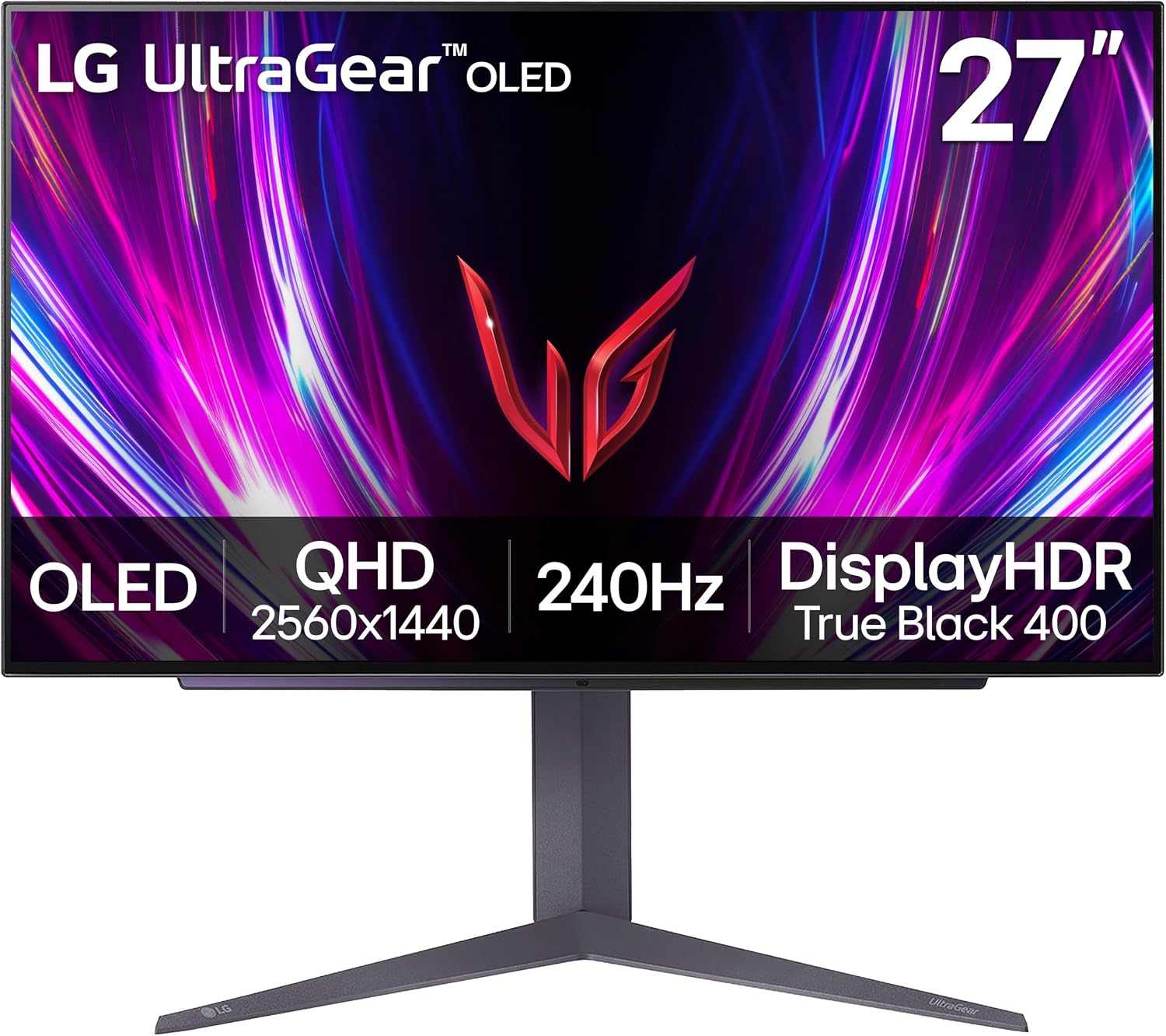
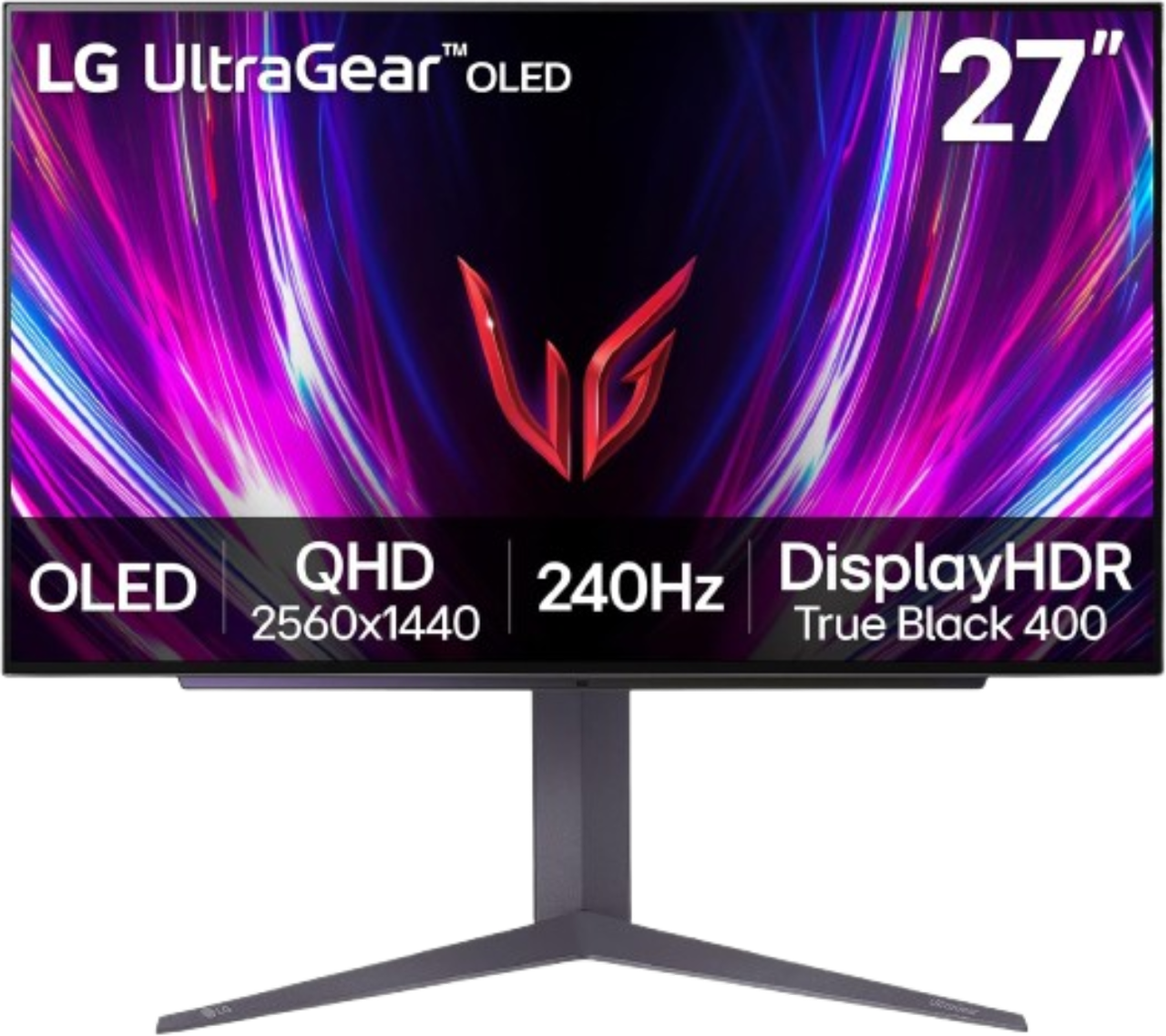
If you’re in the market to upgrade your gaming monitor, LG’s 27GS93QE, a 27-inch gaming monitor, is on sale now for only $499.99, a whopping $400 off the $899.99 MSRP. For the money, you get an awesome OLED panel with colors that pop off the screen and true blacks, delivering better image quality than VA or IPS panels, QHD (2560x1440) resolution, and a fast 240 Hz refresh rate that supports variable refresh rate technologies to ensure you won’t see any screen tearing. In all, it’s a significant upgrade over any 1080p VA/IPS panel or many 1440p monitors, and at 44% off the retail price (matching its all-time low), it’s a deal you should jump on sooner rather than later.
Snag a great deal on this 27-inch, 240 Hz LG UltraGear 27GS93QE monitor. The fast refresh rate and awesome colors on the OLED make upgrading worth it for your eyes while the price is easy on your wallet.View Deal
The 27GS93QE’s OLED panel supports a wide color gamut covering 98.5% DCI-P3 (~139% sRGB and 95-98^+% Adobe RGB), so not only is the panel fast, but it also covers quite a bit of colors. It’s also VESA DisplayHDR True Black 400 and sports a 1.5M:1 contrast ratio. So not only would this be good for gaming, but it also works well for photo editing, digital cinema production, and more. The 240 Hz (0.03ms GtG response time) minimizes ghosting and supports AMD FreeSync Premium Pro and Nvidia G-SYNC, so whether you have an AMD or Nvidia graphics card, you’ll get the best possible experience, as the monitor’s refresh rate will match the frame output of the graphics card. It also uses an anti-glare, low-reflection coating to minimize ambient light reflections.
As far as connectivity goes, the 27-inch UltraGear offers two HDMI (v2.1) and a single DisplayPort (v2.3) for video, and a single 3.5mm headphone jack. You will not find USB ports, however. The panel comes with a stand that lets you adjust the tilt (-5-15 degrees), height (110mm), and pivot (-10-10 degrees) to set it just as you want it. It’s also 100 × 100 mm VESA-mount-capable if you want to hang it on the wall. LG stands behind this panel with a 2-year warranty.
At $499.99, the LG 27GS93QE matches its all-time low price and is one of the best deals going on a 27-inch OLED gaming monitor. At 44% off MSRP, it’s hard to find another 1440p OLED from a trusted brand with these specs. If you've been waiting to upgrade your gaming or work setup, don't wait too long and grab this deal before the sale ends.
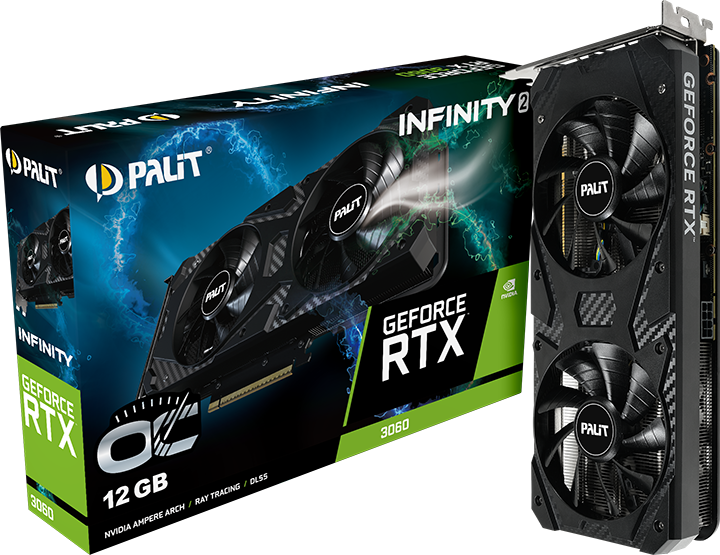
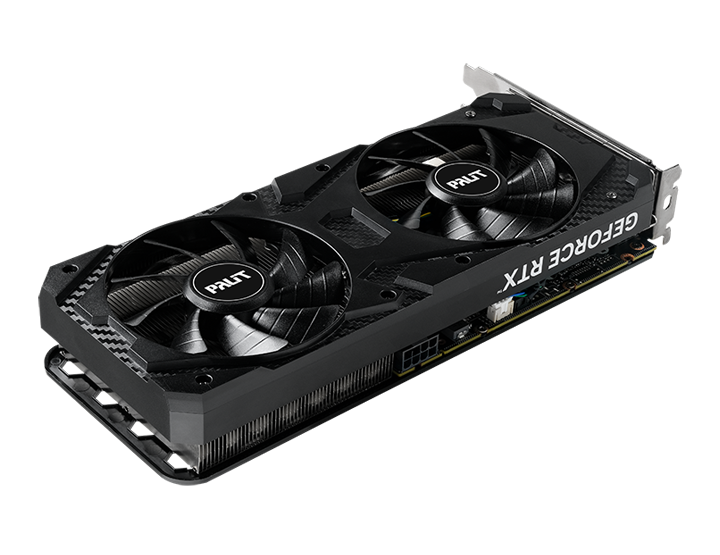
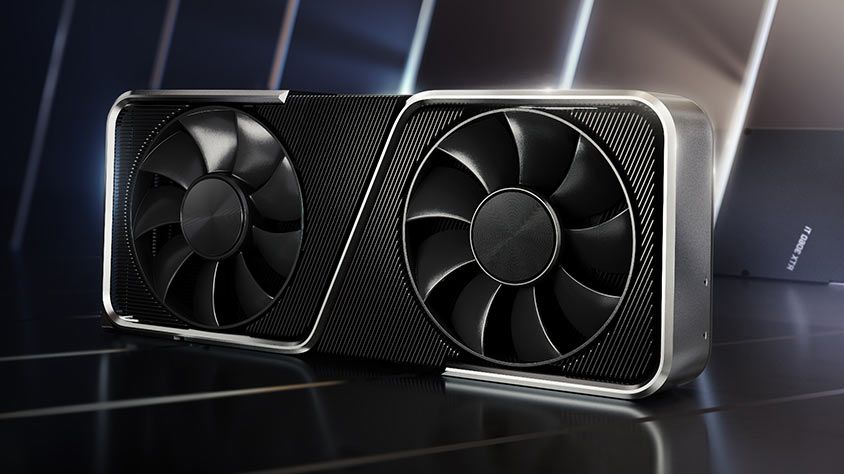
Nvidia has just relaunched its five-year-old graphics card, the GeForce RTX 3060, in order to combat the component scarcity driven by AI. This resurrection has seen a staggered release, with companies like Gigabyte and Manli silently listing their renewed variants in different parts of the world. Today, Palit joined the list with an official announcement for its RTX 3060 Infinity 2 OC, the first official indication of Ampere's return.
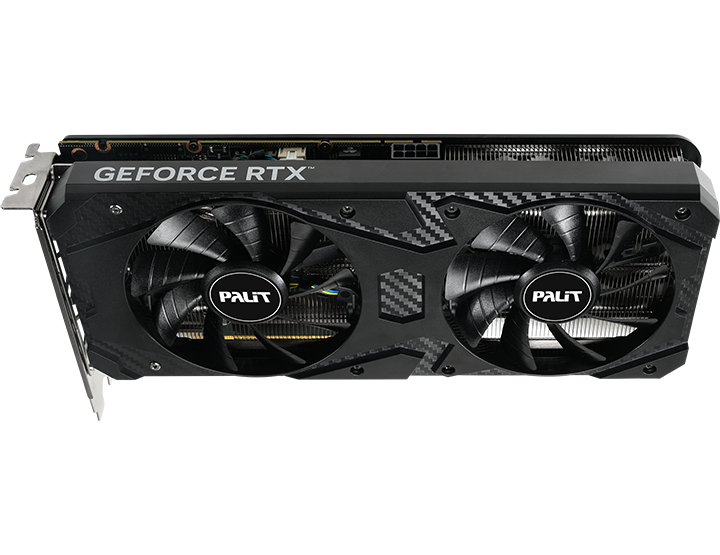
If we take a look at the specs, the card is identical to the original RTX 3060 we saw in 2021 — it has 3,584 CUDA cores paired with 12GB of GDDR6 VRAM saturated across a 192-bit-wide bus. Since this is an overclocked variant, it can boost up to 1,792 MHz, which is less than 1% higher than the base 1,777 MHz boost that Nvidia already mandates. Palit will also release a non-OC variant of the Infinity 2 RTX 3060.
The card features a relatively simple design characterized by the typical black aesthetic we see on budget GPUs. There's no zero-RPM tech here, but Palit claims 0dB noise levels and says there's a "protective backplate" on the card that prevents PCB flex. When you're buying a GPU like this, its looks are probably the least of your concern; the main selling point is, of course, that 12GB memory pool.
PalitPalitPalit
Late last year, the PC hardware industry entered one of its most turbulent eras, characterized by production inadequacies created by the AI boom. Artificial intelligence demands a lot of memory and storage, and thus, commodity silicon has skyrocketed in price overnight with no signs of slowing down. After evading the crisis initially, GPUs eventually got wrapped up in the price hikes as well.
Nvidia's latest Blackwell family uses cutting-edge GDDR7 memory, which is even more expensive, and since vendors are busy producing HBM for fatter margins instead, the "solution" to this dilemma had to be creative. The idea for reviving older generation cards was actually floated by our very own Paul Alcornat a Q&A at CES 2026, where Nvidia CEO Jensen Huang replied, saying he'd "go back and take a look at this."
Palit hasn't provided a price for the Infinity 2 OC yet, and we didn't see it listed on retailers yet, but we can infer it'll cost around $329 given similar variants have also been popping up for that price. To be clear, the RTX 3060 is a great value GPU that we praised even back when it launched. But in the face of the RTX 50-series, it's not exactly something you should consider first, especially when buying new.
You can get an RTX 5060 Ti for just $369 right now on Newegg, which is a significantly faster card with support for DLSS 4.5 and multi-frame gen, not to mention the better efficiency. It only has 8GB of VRAM, unfortunately, which hurts performance at high resolutions and if you like to play with ray tracing enabled. Still, unless you're going up to 4K, the 5060 Ti (and the regular 5060) will perform much better than a 3060 no matter what, as you can see in our GPU benchmark hierarchy.
Ultimately, rebooting the RTX 3060 makes sense from a manufacturer's point of view given the better yields of Samsung's older 8nm process compared to TSMC's more expensive N5 node used by Ada and Blackwell. But as a consumer, you should definitely stick with the RTX 50-series or try to find a used RTX 40-series GPU instead.
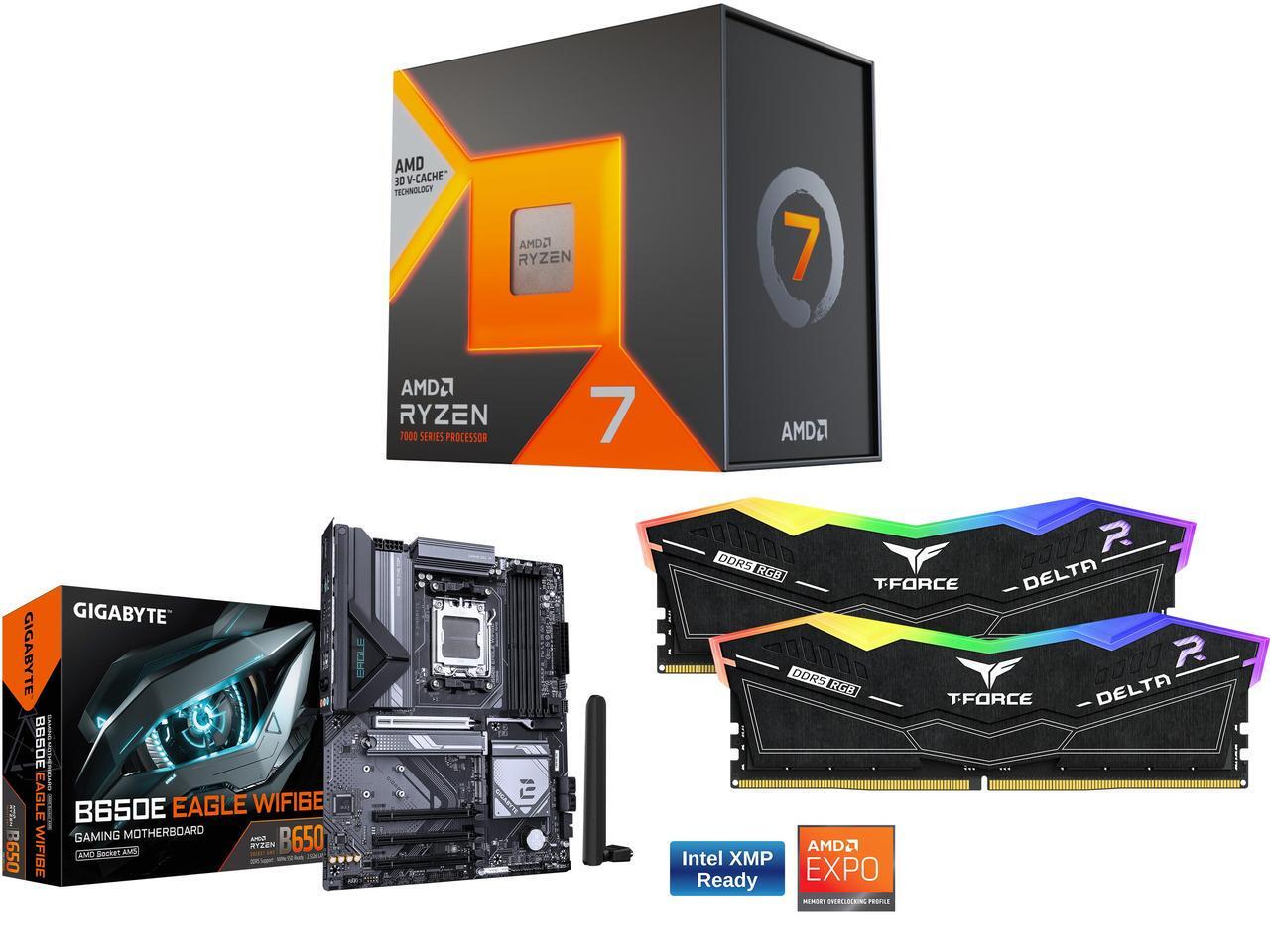
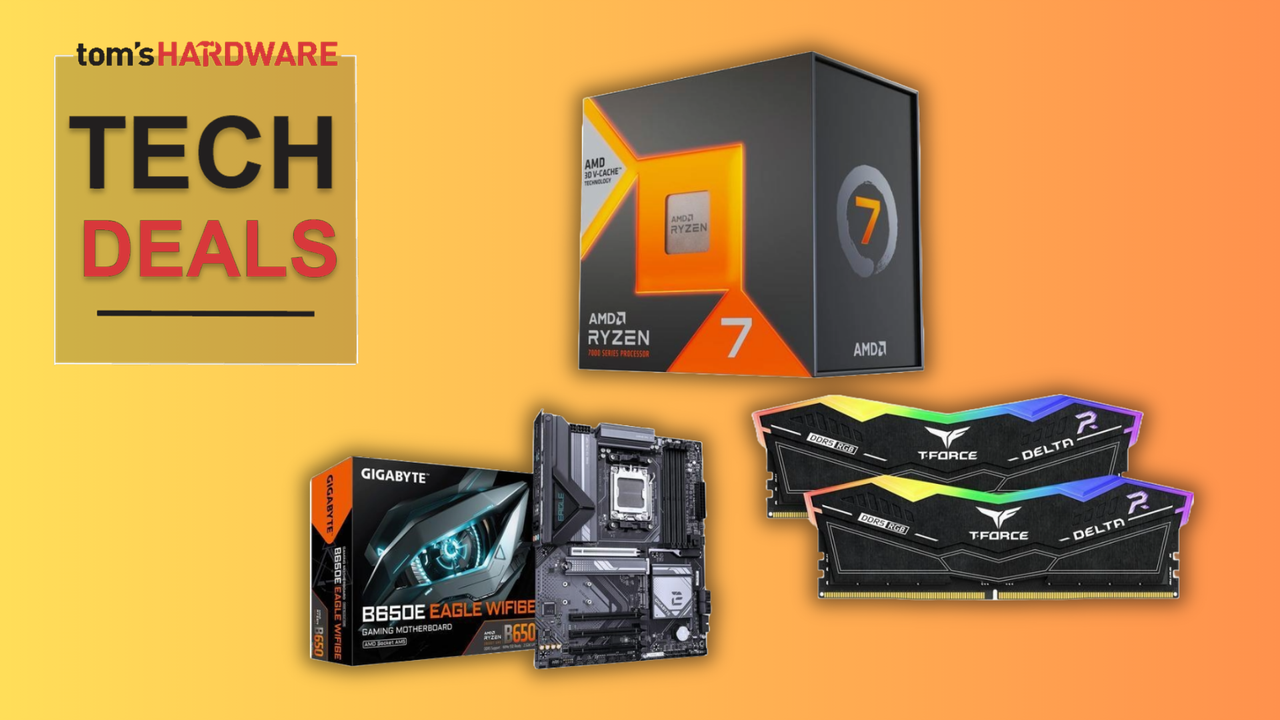
Overall, this combined deal on PC parts means that you're paying the equivalent of just $61.99 for the RAM, and that's before we even consider the free $69.99 MSI MAG cooler that this deal includes. Yes, it isn't 32GB, but the lowest available (standalone) 16GB DDR5 RAM kit with comparable specs would cost you $202.97. You won't find RAM cheaper than this, but while the memory is a serious reason to buy this bundle, the other components can't be ignored, too.
This Newegg combo for an AMD AM5 gaming PC build features the AMD Ryzen 7 7800X3D, Gigabyte B650E motherboard, and 32GB of TeamGroup DDR5 RAM. You also get a free MSI MAG AIO cooler, worth $69.99, for a limited-time only.View Deal
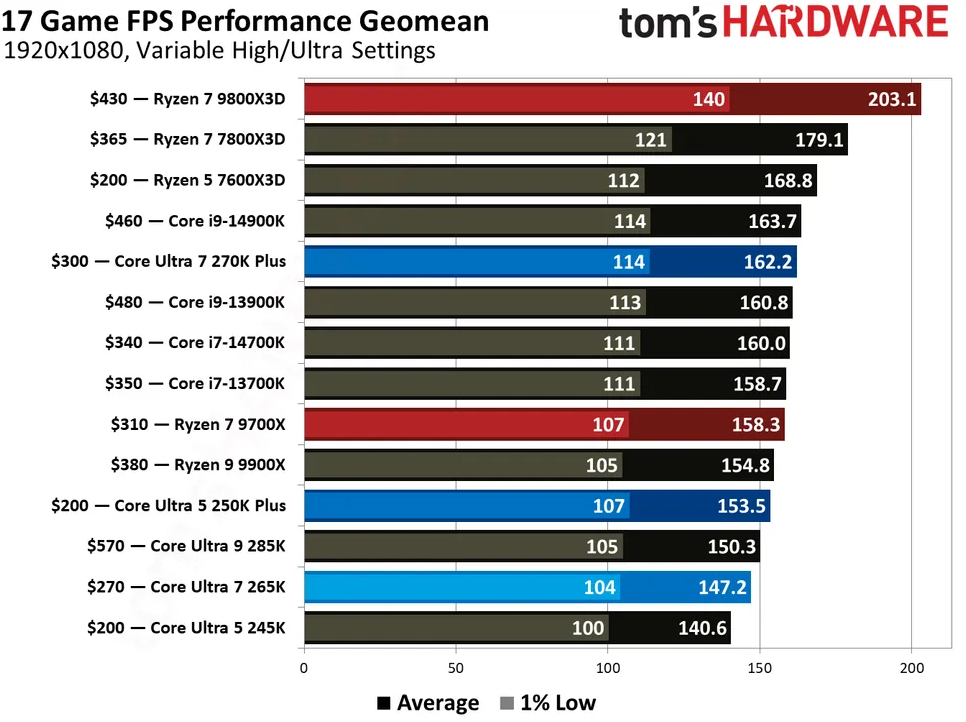
Our AMD Ryzen 7 7800X3D review makes clear how transformative this processor was when it launched: it's a powerhouse. While it isn't the fastest gaming CPU you can buy these days, our CPU benchmarks below show that it continues to rank highly for gaming and continues to be a popular option for gamers looking to build on a budget.
FutureFutureFuture
The 7800X3D ships with eight cores, all of which have access to the full 96 MB L3 cache capacity that helps give these chips their ultimate performance, along with a 4.2 GHz clock speed, which can boost up to 5 GHz. The L3 cache is the most important element, however, as the improved memory here reduces latency significantly. This means that the CPU doesn't have to fall back on using the slower system RAM as often while you're playing games, giving you higher and more stable frame rates while you play. You're also getting a free MSI MAG Coreliquid 240mm cooler, worth $69.99, to help keep your new CPU cool.
Alongside this powerhouse processor is a Gigabyte B650E Eagle motherboard. This is a budget-friendly mainstream board with plenty of I/O, including 2.5Gb Ethernet and several USB Type-A and Type-C ports. It has WiFi 6E and Bluetooth 5.3 connectivity, and has four M.2 slots for SSDs, including two with Gen 5 speeds.
The RAM, meanwhile, is from TeamGroup. This T-Force Delta RGB DDR5 kit comes with two 8GB modules, delivering 16GB memory in total, with speeds of 6,000 MT/s, and CAS latency and memory timings of 38-38-38-78. It has customizable RGB lighting, too, and supports both Intel XMP and AMD EXPO overclocking profiles, which are both supported by the motherboard, too.
16GB of DDR5 RAM for $61.99 (or free, if you count the value of the cooler) is a deal worth considering, especially when it's coupled with one of AMD's best and most popular CPUs from recent years. The $636.96 sale price for this 7800X3D bundle at Newegg hides some significant value, with $188.99 in savings overall up for grabs.
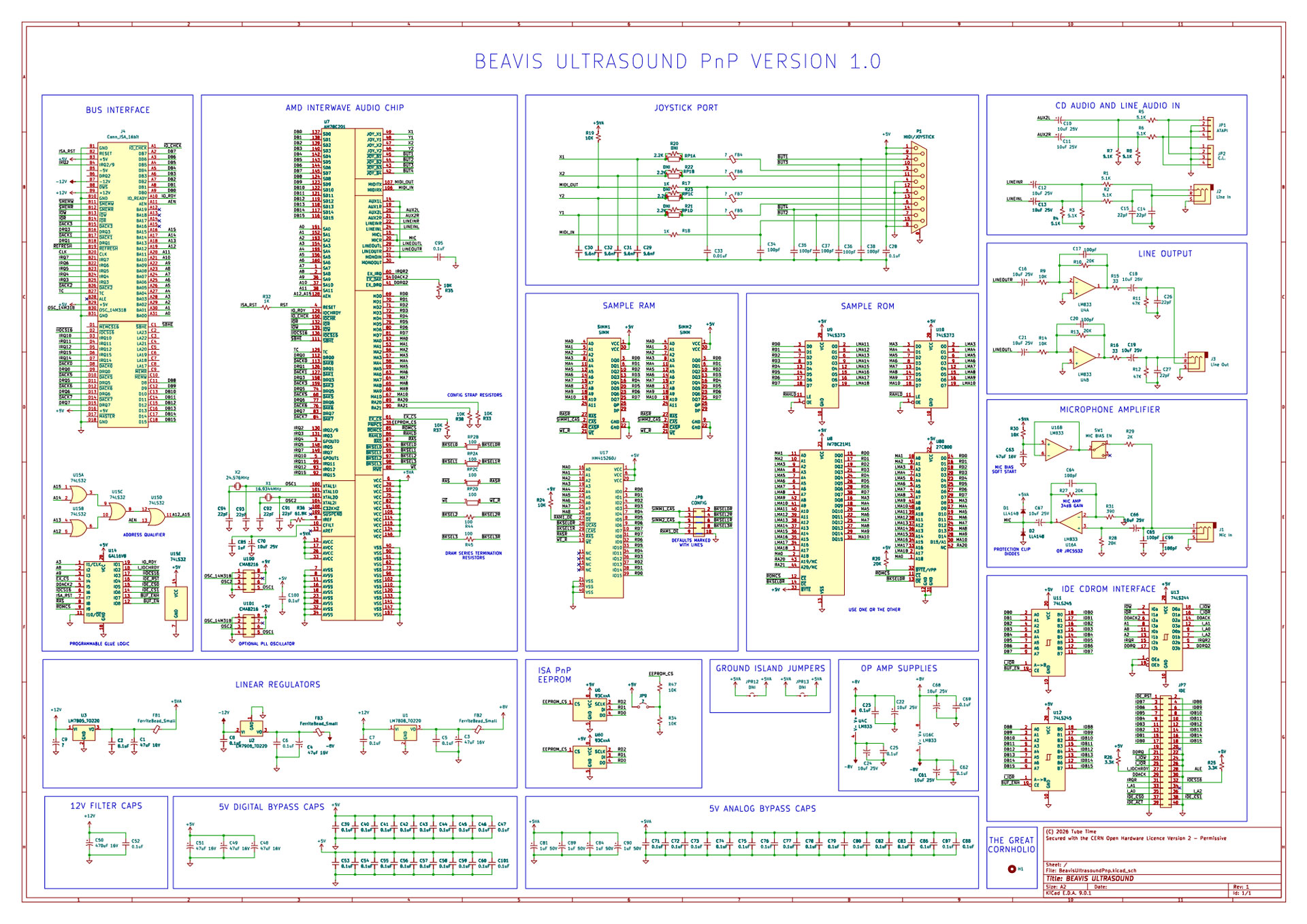
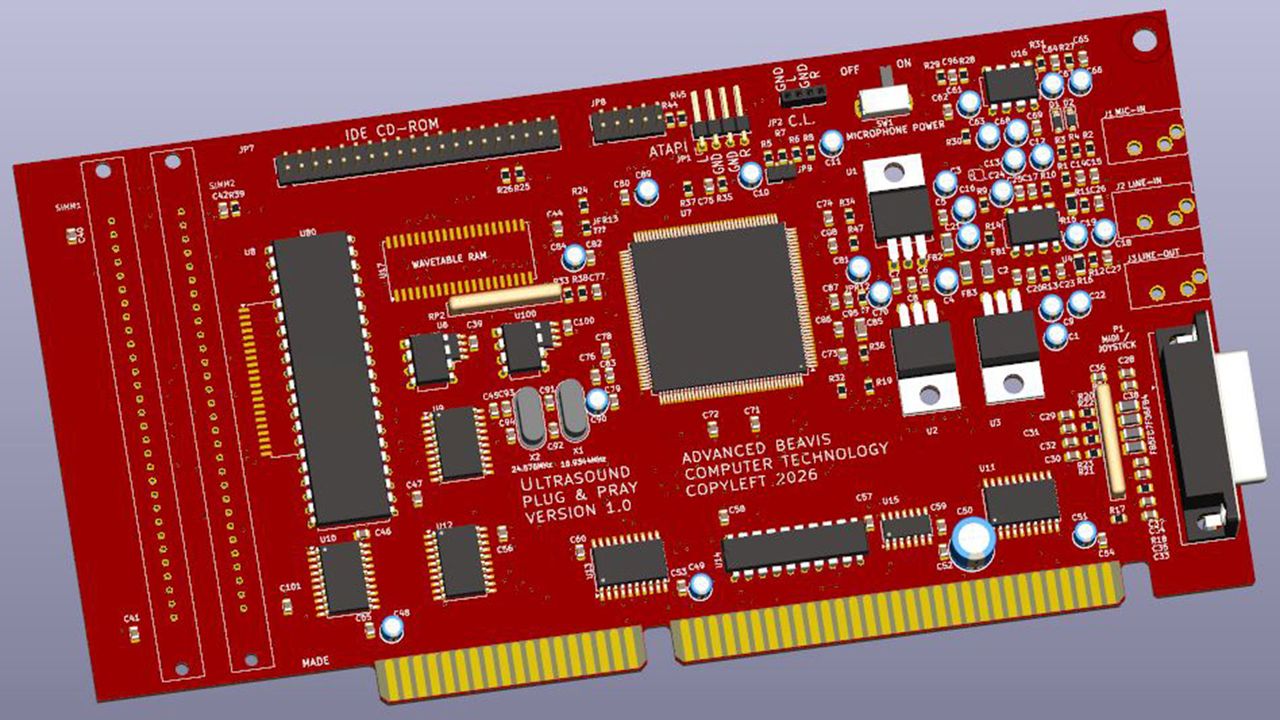
There’s a new remake of the legendary Gravis Ultrasound ISA soundcard on the block with the arrival of the open-source Beavis Ultrasound project. Developer schlae shared details of this amusingly named mid-90s-cultural phenomenon portmanteau, Beavis Ultrasound PnP ISA Sound Card Replica, on GitHub on Monday. The repository includes complete KiCad schematics, PCB layout, sample ROM, reverse‑engineered GAL logic (for an operational IDE CD-ROM interface), assembly notes, and more. You’ll still need to source an old AMD AM78C201 InterWave chip to complete this DIY project, though.
The appeal of the new Beavis Ultrasound is nicely summed up by schlae, as they explain that “unlike other clones, this design includes the entire schematic as well as the reverse-engineered source code of the GAL.” This GAL provides transparent and reproducible logic and is key to this project being able to handle IDE connectivity, like original Gravis Ultrasound (GUS) PnP cards. And, yes, this is not a GUS Classic or MAX clone, but caters to enthusiasts wanting a clone of the more complex and advanced GUS PnP.
A particular strength of the Beavis Ultrasound is its authenticity. It could be described as a faithful hardware‑level reproduction rather than a functional approximation. No microcontrollers take the place of real hardware here; there’s no emulation software, and features like the aforementioned GAL logic and IDE interface aren’t swerved by the developer.
However, this authenticity could also be an Achilles heel, as you’ll need to source an old AMD AM78C201 InterWave chip to complete a Beavis Ultrasound build and enjoy once again its marvelous sound. Actually, there’s another point to note before following schlae’s plans. There are no tried and tested footsteps to follow at the time of writing, as the dev admits they “have not actually fabricated the board and tested it for functionality,” so interested parties are instructed to “build this board at your own risk.”
If you aren't an open-source or hardware-only purist
In recent weeks, we also reported on the return of the Orpheus II ISA soundcard due to “popular demand.” This device includes some GUS functionality but is a commercial, non-open-source proprietary product. Probably the most popular DIY-able solution around would be the PicoGUS, built around a Raspberry Pi Pico (RP2040) microcontroller, which handles all its GUS‑compatible audio playback in software – eschewing the need for rare vintage components like the AMD Interwave.
ChangXin Memory Technologies (CXMT), China's largest DRAM maker, is on track to match Micron's production capacity in 2026, if Citrini Research's forecasting models are correct. If this happens, China will become the world's second-largest DRAM production base in the coming years.
The bottom-up model estimates that CXMT will finish 2026 with approximately 350,000 wafer starts per month (WSPM) of DRAM capacity, which is just 25,000 WPM less than Micron. According to the analysis, the federal government is pushing CXMT to share its DRAM technology with JHICC, Swaysure, and YMTC's subsidiary XMC to ease domestic shortages. All three companies have either built DRAM capacity already, or will do so in the short-term future, the report claims.
Swaysure has completed construction of a 140,000-WSPM fab in Shenzhen, while JHICC's Jinjiang complex contains enough cleanroom space for 120,000 WSPM, and the initial 60,000-WSPM phase is expected to receive equipment by the end of 2026. YMTC is also projected to operate about 50,000 WSPM of DRAM production at Wuhan Fab 3. If all these facilities initiate operations in the coming years, then China will have a total DRAM capacity of 600,000 WSPM (not counting Samsung's and SK hynix's fabs in China), which is dramatically lower compared to South Korea, but ahead of Japan, Taiwan, and the U.S. combined.
But China is not going to stop developing its DRAM industry, and by 2030, its total capacity will increase to around 1.41 million WSPM, according to Citrini. CXMT alone is projected to build new production capacities in Beijing, Hefei, and Shanghai, to expand its production capability to 950,000 WSPM in 2030, assuming everything goes as planned.
The supply model assumes that about 400,000 WSPM of CXMT output will remain on D1a, another 400,000 WSPM will migrate to D1b, and roughly 150,000 WPM will produce D1c devices.
Forecasted DRAM manufacturing capacities (in thousands WSPM)
2026E
2027E - 2029E
2030E
CXMT
350
?
950
JHICC
-
60
120
Micron
375
?
?
Samsung
720
?
1,140 - 1,450
SK hynix
590
?
1,180
Swaysure
-
?
140
YMTC/XMC
50
50
200
Enough fab tools?
Citrini admits that producing China's outlook is considerably more difficult than predicting the development of established DRAM makers. On the one hand, there is rapidly expanding fabrication infrastructure in China, abundant state-backed financing, and government-directed technology transfers. On the other hand, among the key near-term limitations remains lithography equipment availability, particularly if the proposed MATCH Act restricts sales of advanced immersion DUV tools to select Chinese companies.
However, the author expects SMEE's domestic immersion DUV scanners to enter volume production around late 2026 or early 2027 following beta testing, as well as SiCarrier/Yuliangsheng introduce its own production-ready DUV platform in 2028. Perhaps a bit optimistically, the analysts predict that availability of lithography tools is not expected to constrain Chinese production beyond 2028, at least for mature logic and DRAM nodes. Yet, for obvious reasons, if the MATCH Act works as planned and disrupts supply of advanced immersion DUV tools to DRAM makers, production capacity expansions will not occur in the next couple of years, the report suggests.
Still, both SMEE and SiCarrier will need time to ramp up production of their lithography systems, whereas DRAM makers must learn how to use them efficiently, so we would not be as optimistic as the authors and would not expect Chinese tools to produce meaningful DRAM volumes before the early 2030s. Still, the key takeaway here is that China is on track to become a major DRAM maker rather sooner than later.
Unprecedented demand
Citrini Research projects total DRAM demand to reach 157.5 exabytes (EB) per year by 2030, including 75 EB of commodity DRAM for agentic AI CPUs, 25 EB of commodity DRAM for conventional cloud servers, 20 EB of commodity DRAM for client devices, and 37.5 EB of HBM4E as well as HBM5 for AI accelerators (15 EB and 22.5 EB, respectively).
Meanwhile, Citrini expects the whole industry to only produce around 37.5 EB of HBM4E/HBM4 memory (mostly by Micron, Samsung, and SK hynix) as well as 91.3 EB of commodity DRAM (including output in China) in 2030, leaving a deficit of 28.7 EB, or roughly 25%.
That said, the rapid expansion of DRAM production in China could be the industry's best hope to maintain relatively low prices of memory, something that will be particularly beneficial for the market of consumer devices that are sensitive to memory prices, analysts from Citrini believe. Yet, the author argues that most of this new capacity would satisfy China's own demand rather than eliminate the global shortage. Furthermore, even if companies like CXMT can expand their fabs faster, that additional capacity will mostly be consumed by domestic needs, according to Citrini.
It should be noted that to make more memory, DRAM makers need more fab tools, primarily 193nm immersion scanners. Yet, companies like ASML, Canon, and Nikon cannot increase output of immersion DUV systems quickly as these are extremely complex machines containing tens of thousands of parts. While Chinese memory companies certainly pin their hopes on local producers like SMEE and SiCarrier, neither has delivered a single commercial immersion system, and after they do, it will take them years to ramp up production of such tools.
Samsung is back with another solid-state drive, and this time it's something a little bit different. The 990 is a QLC-based 990 EVO Plus, positioned as a budget drive that can still push a lot of bandwidth. It’s a little late to the game and not quite what was rumored for the 990 QVO, but it does bring some new technology to the table. We’re always interested in seeing what Samsung puts out, and this time is no different. It should not be confused as being part of Samsung’s Pro line or, for that matter, the EVO line, so keep that in mind.
The drive has its ups and downs, but in this challenging market, and for a budget drive, that’s to be expected. Samsung is still well-regarded for its name and reliable hardware, even as there has been a massive push towards enterprise, away from the consumer side. Samsung has, in fact, given some ground in the SSD space for many years, even as it produces some of the most common OEM drives. So while this is not a Crucial situation, it’s best to jump into this review with the right expectations about what this drive is and isn’t. It’s a budget drive with full Gen 4 throughput that hits the most common capacities with sufficient performance and power efficiency. It’s not meant to be a throne-taker.
It’s also thankfully not another 990 EVO situation – that drive felt somewhat underwhelming by the time it arrived, even when pitted against budget drives – but the 990 is also not a QLC rallying call. It’s a competent drive that mostly hits the right notes, as intended. Given how scarce Samsung QLC drives have been, and how much demand its QLC flash surely has elsewhere, it can feel like Samsung is throwing consumers a bone, though it would be crass to put it that way. We instead think this is smart positioning by the company as it knows the future is with QLC and the technologies used in this flash (even if first shown two years ago at ISSCC) point firmly at an ambitious future. The 990 just lets you own a piece of that.
Samsung 990 Specifications
Product
1TB
2TB
Pricing
$269.99
$529.99
Form Factor
M.2 2280 (Single-sided)
M.2 2280 (Single-sided)
Interface / Protocol
PCIe 4.0 x4 / NVMe 2.0
PCIe 4.0 x4 / NVMe 2.0
Controller
Samsung PiccoloQ
Samsung PiccoloQ
DRAM
N/A (HMB)
N/A (HMB)
Flash Memory
Samsung V9 QLC
Samsung V9 QLC
Sequential Read
7,150 MB/s
7,250 MB/s
Sequential Write
6,450 MB/s
6,450 MB/s
Random Read
700K IOPS
850K IOPS
Random Write
1,100K IOPS
1,200K IOPS
Power (R/W)
4.0W / 3.7W
4.3W / 3.8W
Endurance
400 TBW
800 TBW
Security
TCG Opal V2.0
TCG Opal V2.0
Part Number
MZ-V9V1T0
MZ-V9V2T0
Warranty
3-Year
3-Year
The Samsung 990 is only available at 1TB and 2TB capacities, with MSRPs of $269.99 and $529.99, respectively. These prices are very high, as you can get competing drives like the Crucial P310 for substantially less, and in fact even the TLC-based WD Black SN7100 costs less. But Samsung has historically launched with MSRPs well above actual market price. You should be able to get the drive at significantly lower prices after launch, but the “Samsung tax” may still apply. We’ll get into what that means throughout the review.
This limited capacity range is unfortunate, but enables Samsung to pack the flash into just one package, which reduces PCB space so that any OEM variant can be used in multiple M.2 form factors and will always be single-sided. Less than 1TB is also not enough for these denser dies if you want good performance. That leaves 1TB and 2TB as the target capacities, which also makes sense in a market where 4TB+ is getting exceptionally expensive. We’ll eventually see 2Tb dies to make single-package 4TB a reality, but that’s further along in Samsung’s roadmap.
The drive can reach 7,250 / 6,450 MB/s for sequential reads and writes and up to 850K / 1,200K random read and write IOPS. Peak performance is attained at 2TB, where you have the optimal amount of interleaving or parallelization: Sixteen 1Tb dies means four dies for each of four flash channels, the typical ceiling. However, as these are four-plane dies, you still get 32-way interleaving at 1TB with eight dies, which is enough to get good performance with just two dies per channel. Less than that is much less ideal, and more than that introduces additional overhead, especially for budget controllers. The math changes with six-plane and 2TB dies, but for this flash, 1TB is the reasonable minimum, with 2TB offering the best performance.
The drive is rated for approximately 4W of power draw across the two capacities, when looking at both reads and writes. Check our power results below to see how accurate that is. The drive is rated for 400TB of writes per TB capacity, which is high for QLC flash – we would typically see maybe 300TB, which is one-half of the TLC standard – but also indicates a very high drive writes per day (DWPD) rating. This is due to the warranty only covering three years rather than the normal five, so the amount of writes per year is significantly higher. This is atypical, so requires further explanation.
For those who live for TBW and write endurance, this illustrates why TBW often looks better on paper. Spreading 400TB over three years works out to roughly double the daily write allowance of a typical 300TBW / five-year QLC drive. Most people will never approach either number, and they will live with the shorter coverage window. However, if you intend to hammer the drive with writes to the point of exceeding TBW within the three-year warranty period, then this could be good. Although you really shouldn't use a budget DRAM-less QLC-based drive for that type of workload. However, that option exists and is rarely the case with a QLC-based drive. As a final note, the drive does support TCG Opal 2.0 for encryption.
Samsung 990 Software and Accessories
Samsung’s Magician software is the gold standard for consumer SSDs. This is an SSD toolbox with all the features you need. It displays system and drive health information, including SMART, and checks whether your drive is legitimate. You can also benchmark your drive and use any optional features, such as encryption. The software is also essential for keeping the drive’s firmware up to date, although you can also download that from the first link.
Samsung 990: A Closer Look
Tom's HardwareTom's Hardware
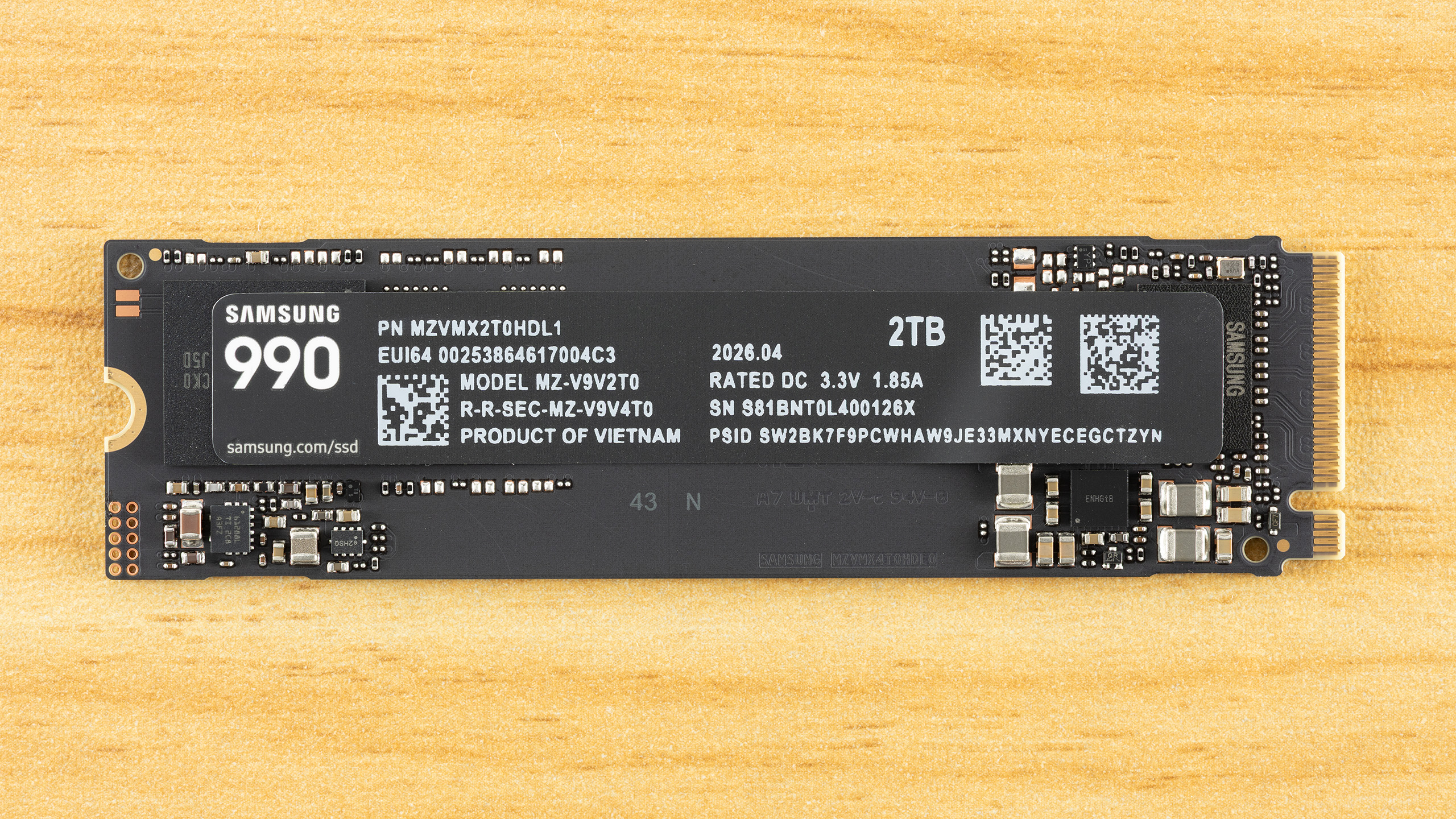
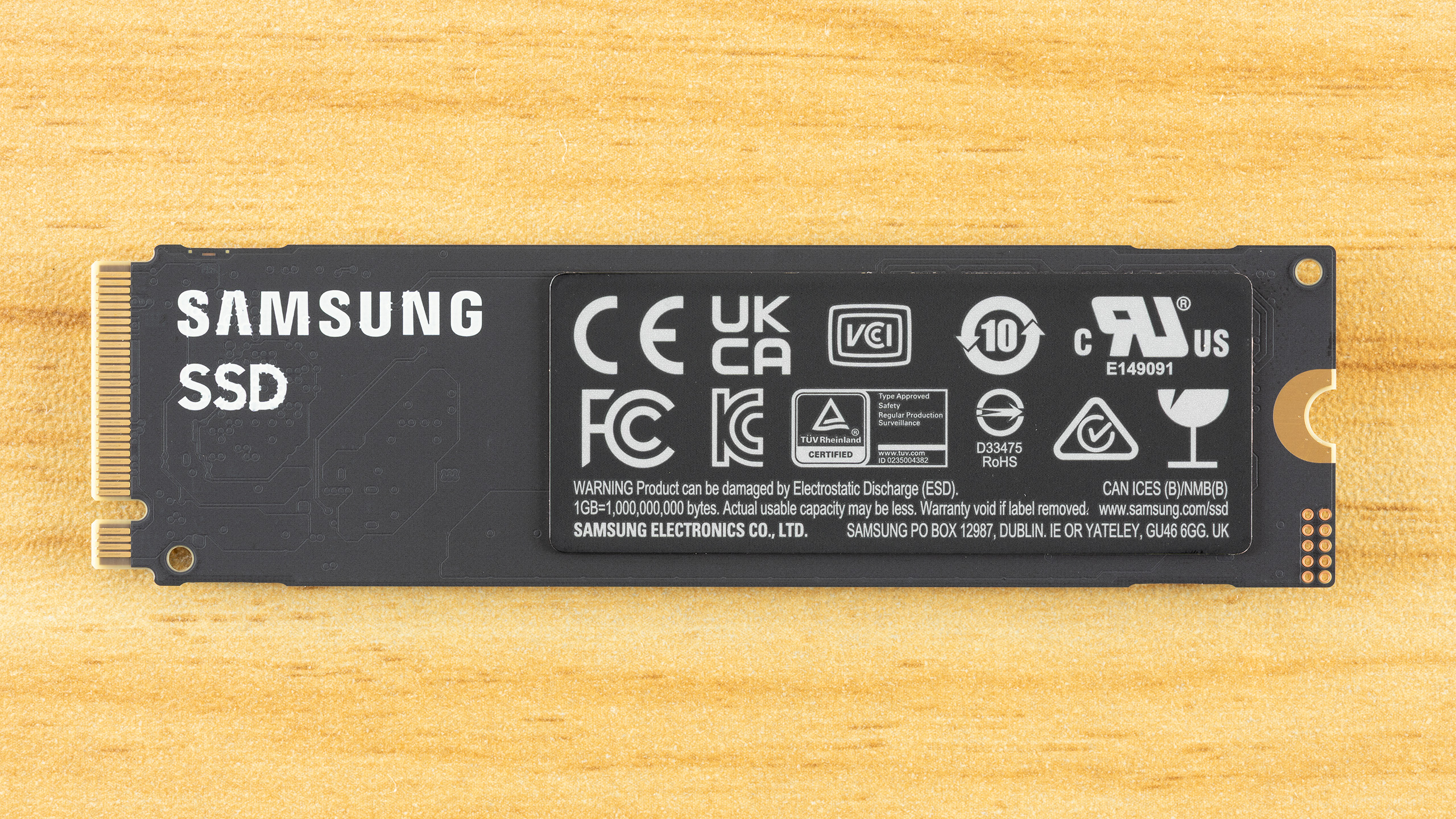
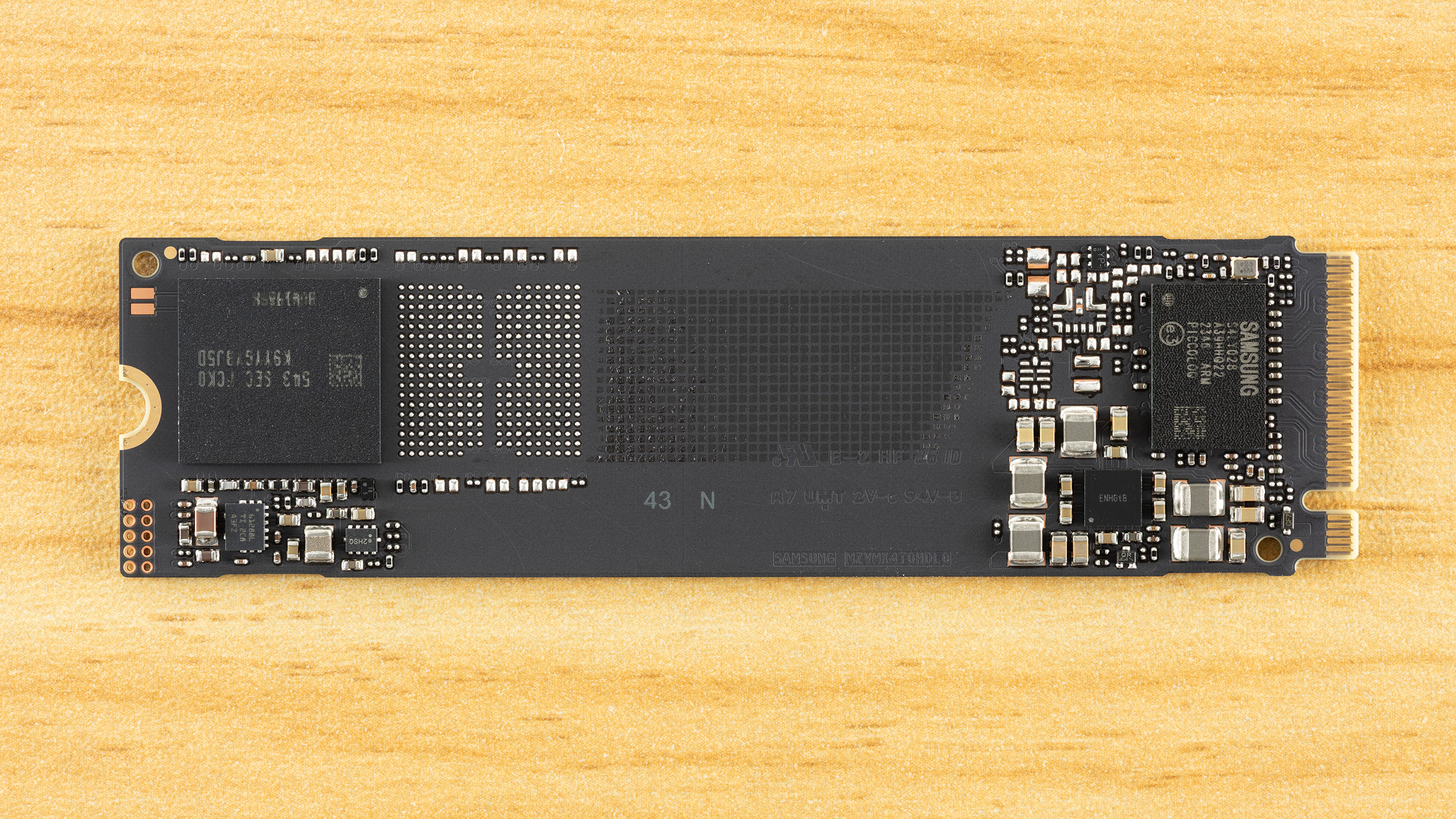
The 990 has an SSD controller, a single NAND flash package, and power management circuitry. There is no DRAM package present. This is a single-sided drive, which is ideal for compatibility and cooling. There is a lot of free space on the PCB, and by putting distance between the controller and flash, there is separation to mitigate component heat generation. This would also help if a heatspreader or heatsink were to be added. Without this space, the drive could be sold in a shorter form factor, which is particularly useful for OEM drives.
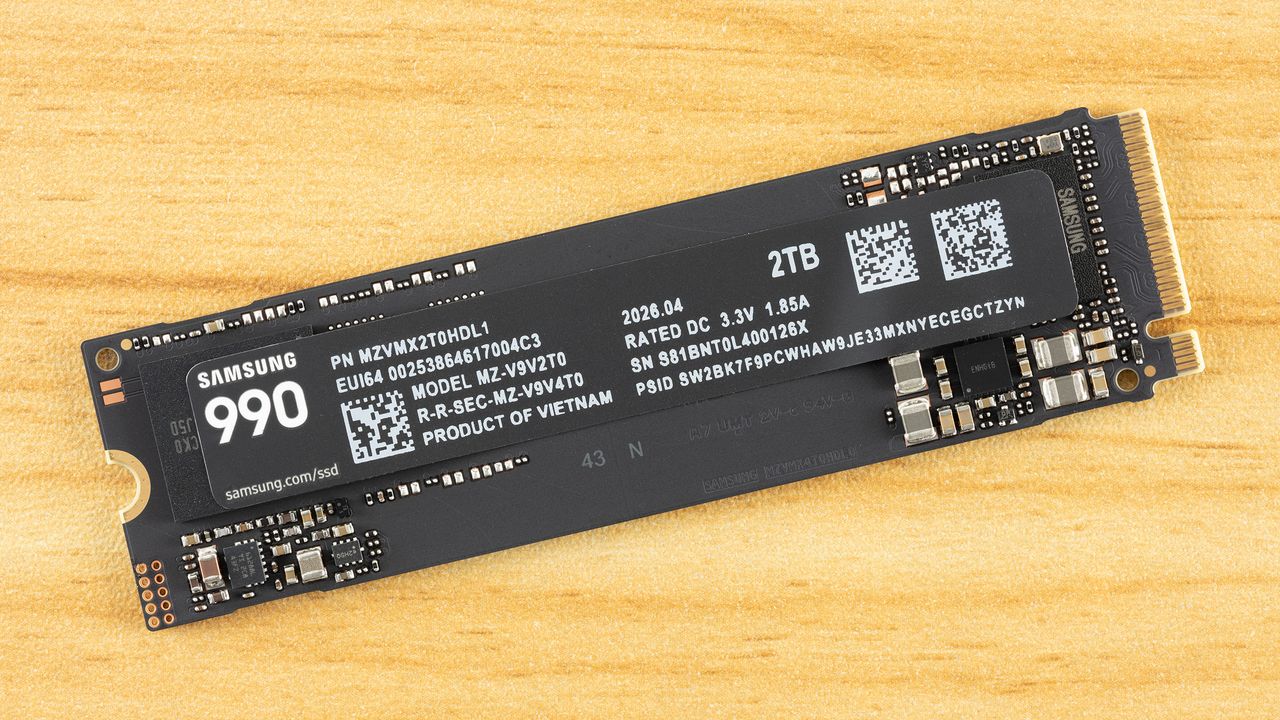
The label has information about the drive, such as the date of manufacture (DOM), model, serial, the PSID, and the power rating. We always caution that you not take certain drive information as being conclusive about the hardware. For example, you should not assume TLC or QLC flash from a drive’s TBW. Likewise, you shouldn’t rely on the labeled power rating – and this is done more often on M.2 2230 drives for portable devices – as any indication of drive power efficiency. Here we have 3.3V / 1.85A, which indicates potential power draw over 6W. Now, the power ratings given on spec sheets will often be average and not peak, and will be separated as read or write rather than mixed. In fact, this drive’s load power states can reach a peak of 5.90W via SMART, which is much above the rated average ~4W. We track both peak and average in our testing.
SamsungSamsungSamsung
We always enjoy reviewing Samsung drives with a focus on the technicals, as the manufacturer remains a leader in many ways. The 990, in particular, requires some extra description to be fully appreciated. Simply looking at the benchmark results might make the technology seem underwhelming – to be honest, this is very much a budget drive, even taken in the best light – but that doesn’t mean Samsung phoned this one in. In fact, there are signs of deliberate design here, and some of the decisions could help sell this drive. Samsung still has to get the pricing right, of course, but what else is new?
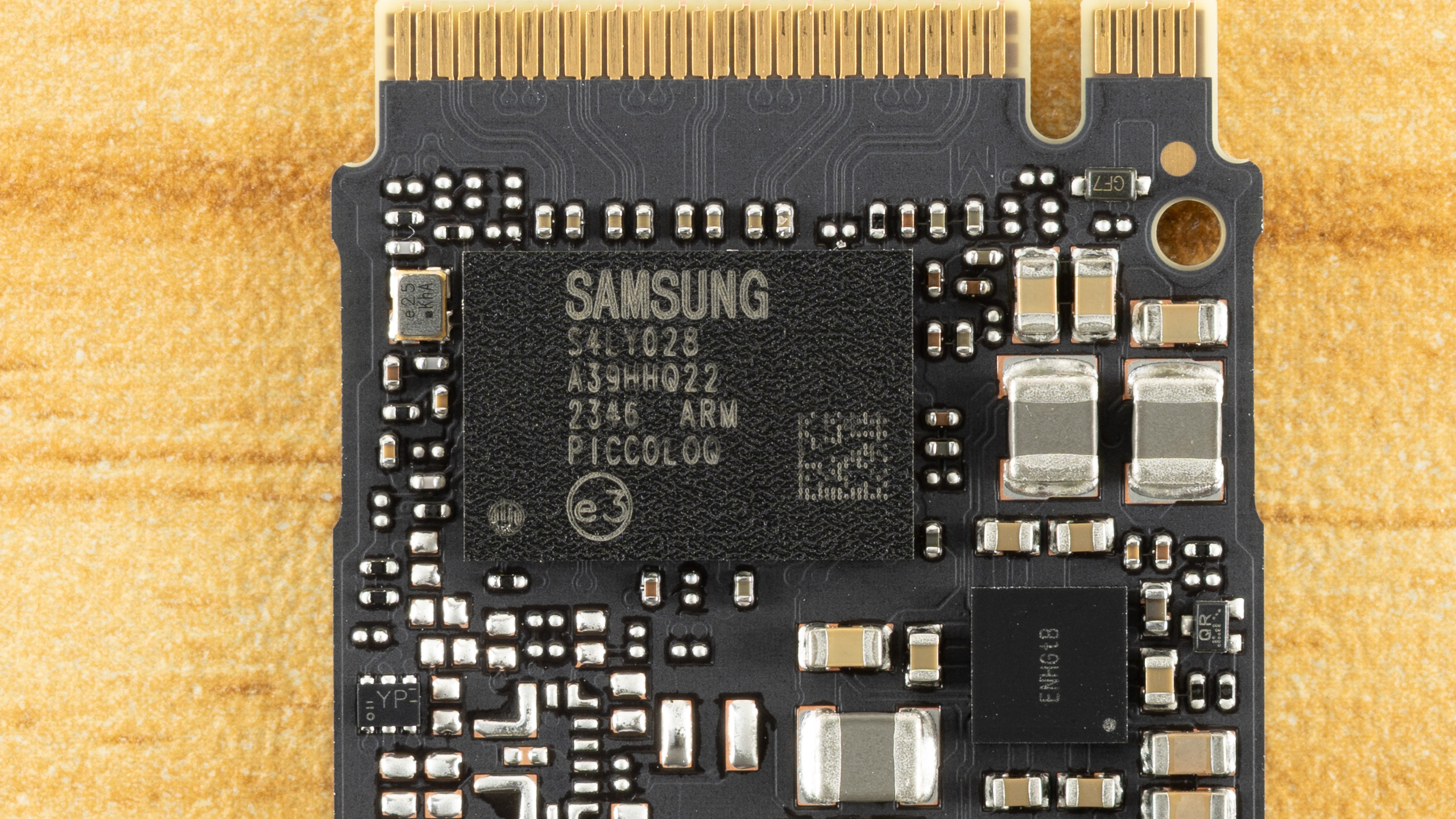
Let’s start with the controller. The 990 is using the PiccoloQ, which is the QLC flash version of the Piccolo. The Piccolo is utilized on the 990 EVO and 990 EVO Plus, two TLC-based drives. In all cases, it’s a four-channel, DRAM-less design, which limits performance and capacity. In both cases, the controller takes up to 2,400 MT/s flash – this is more than enough to saturate PCIe 4.0 – and the interior design is the same. This means it’s a Samsung 5nm part with multiple ARM Cortex-R8 cores and a single R5 core. If the Piccolo stands out in any way, it’s that it offers a PCIe 5.0 x2 option in addition to the standard 4.0 x4 interface. This option or mode has limited usefulness, though, and nothing in the 990 would change that if enabled for the PiccoloQ.
So, not much new on the controller front, but the use of this controller at the 990’s rated speeds does give us some more information. Namely, we know the 990 EVO runs more slowly because it’s using flash slower than 2,400 MT/s, 1,600 MT/s Samsung V6P TLC, to be precise. If we look at Samsung’s V7 QLC flash, it can run at that same speed. This is why the originally speculated 990 QVO with that flash was targeted at the same speeds as the 990 EVO. Things have changed since then. This drive could have been the 990 QVO, but with the EVO and EVO Plus lines going DRAM-less this generation, we suspect the QVO tier was “promoted” to the plain 990 name, and the 990 now targets the 990 EVO Plus's specs
The evidence to back this up, which also supports the loose 990 QVO rumor, is that Samsung does have a V7 QLC OEM drive: the BM9C1. This is the cousin to the PM9C1 line with OEM 990 EVO and 990 EVO Plus (PM9C1b) variants. The BM9C1 is available down to M.2 2230 and uses the same PiccoloQ as the 990 (the QLC version of the 990 EVO/EVO Plus’s Piccolo). It’s just limited to the same speeds as the 990 EVO, as it’s running at 1,600 MT/s. We have to be careful here, though, as Samsung’s V9 QLC press release indicates a 60% I/O improvement, which, with the V9 being 3,200 MT/s, suggests a 2,000 MT/s ceiling for the V7 QLC. Since there is an OEM TLC-based drive in between the 990 EVO and 990 EVO Plus (the PM9C1a) at 2,000 MT/s, the possibility for a ~6 GB/s 990 or 990 QVO with V7 QLC existed.
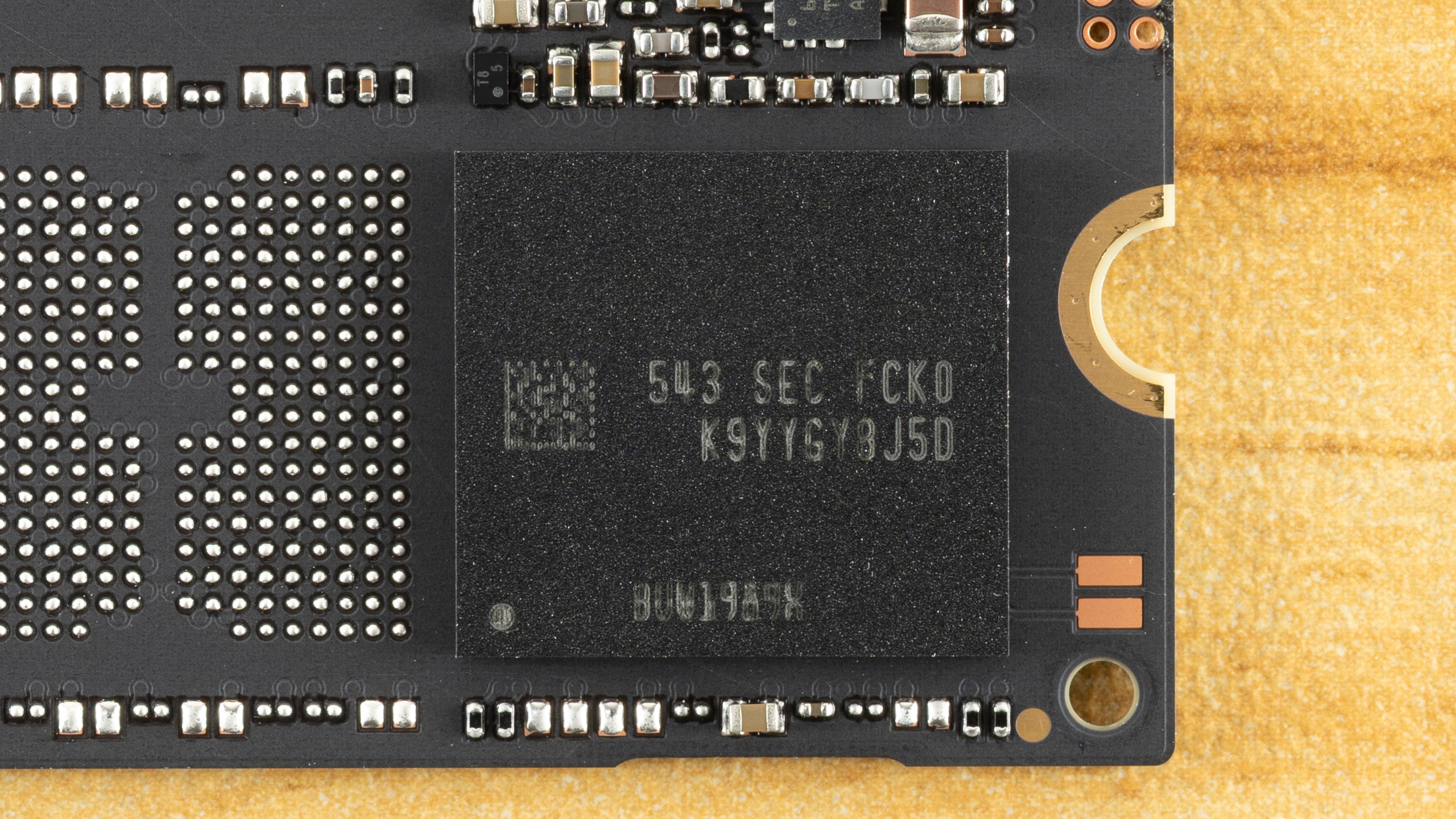
Before we dive more deeply into the flash, since we haven’t seen the new Samsung QLC in a while and there is some neat tech here, let’s decode the module. “K9” tells us it’s Samsung NAND flash memory. “YYG” indicates it’s a QLC flash package with sixteen dies (HDP) in a 2TB configuration, which confirms 1Tb dies. “Y8” means it’s 8-bit, J tells us the voltage, “5” tells us the number of chips enabled and ready/busy signals, and “D” tells us the generation. With V7 being “C” and V8 skipped, this suggests V9. The second part of the code tells us how the flash is packaged and that it’s commercial / consumer-grade. While you aren’t expected to know how to read codes on your SSD, knowing how it works can be useful, especially with Samsung drives, even if it’s just a matter of trying to figure out if you have a counterfeit product.
So let’s talk about the flash. This is a 286-Layer part, technically, but is sold as 280-Layer once accounting for source/ground and dummy lines. Dummy lines are usually at stack edges, as the physics of flash can make these lines otherwise unusable. A higher layer count – Samsung’s V7 is only 176-Layer, although technically 191 layers – generally means higher bit density. Bit density is key to scaling NAND flash, which is acting as capacious, non-volatile storage media. This can be disappointing to some because it means you don’t always see any real performance scaling as the layer count progresses.
Fitting more flash into the same space can mean less room for charge in each cell, which makes it harder to optimize for performance if you’re trying to maintain the same endurance level. That is certainly the case with this flash, as the performance only manages to match that of last-generation 176-Layer QLC flash from competitors, which is why we want to go out of our way to point out Samsung’s design decisions and why it leans innovative in ways you won’t see in, say, your game load times.
For one, when we talk about the layer count difference – reported versus actual – you also get an efficiency number that is the ratio between usable and total word lines. Samsung is a leader here, with high layer efficiency. Samsung also has held off using three decks or stacks of flash and is still at two, due to having superior channel etching – it’s able to drill down more layers with a higher aspect ratio. It’s also possible to run lines through the flash itself rather than rely largely on masked steps, which sets the stage for Samsung scaling to extremely high layer counts. One issue with high layer counts is that you start losing uniformity from layer to layer, and Samsung accounts for this with optimized word line spacing, too. So, as we’ve said in the past, it often feels like Samsung is falling behind on layer count, but in reality it has a very focused strategy and the best technology in the business, and we can see this with the 990’s flash.
For the consumer, though, the 990 is a little bit weird. This is presumably 3,200 MT/s flash that is being “wasted” with a 2,400 MT/s controller. This flash has amazing bit density, but having a single sixteen-die package at 2TB is nothing new. What about performance? Samsung has made optimizations to improve performance on this flash, but nothing amazing. This QLC is only comparable to the competition in performance terms, particularly at 2,400 MT/s. Samsung is playing catch-up, but we also think this is a case of designing for enterprise rather than consumer.
QLC flash is now highly sought after in enterprise for its density, and Samsung’s optimizations all benefit that kind of environment. In fact, from a consumer’s perspective you could look at this V9 QLC as being focused on higher bit density – but no 2Tb dies – and you would largely be correct. Samsung’s V9 QLC is 86% more dense generationally and about 94% more dense than the competition’s 176-Layer QLC flash.
We’ll take a look at one new technology in the V9 QLC flash to illustrate. One important consideration is flash power interruption leading to data loss, which, without power loss protection (PLP) means you are looking at protecting data at rest. This is on the non-volatile media or flash, not the volatile memory like DRAM. When folding from the pSLC cache to the native flash, data loss is not an issue because you don’t invalidate the original pSLC copy until the write has been verified. However, when writing to native QLC, you are writing multiple pages where the upper pages will require higher levels of sensitivity for proper reading. There are different methods of writing to QLC flash, but generally multi-bit flash has multiple write passes that go from fuzzy (coarse) to precise (fine), and lower pages write faster and may be complete first. Therefore, it’s important not to ruin existing lower-page data if you lose power while still adjusting voltage for the upper pages.
Micron has a unique way of dealing with this using a differential engine that can predict values from partial shifts, but a more common method is simply to back up or buffer the values in nonvolatile flash. QLC stores four bits per cell, so a full backup means writing four bits of pSLC per cell. pSLC is used because its writes are fast, whereas QLC's upper-page writes, in particular, are an order of magnitude slower. Samsung reduces the buffer to a single parity bit by using an odd/even algorithm, creating a sensing window that’s more like TLC (8-state) than QLC (16-state). This improves performance, endurance, and bit density. Some of that performance is still lost for higher bit density. For consumers, the direct benefit is higher TBW, but we speculate the higher density is aimed more at enterprise and future flash generation products. This is in part a response to Solidigm’s floating-gate design, a different technology than charge trap, with tighter charge placement.
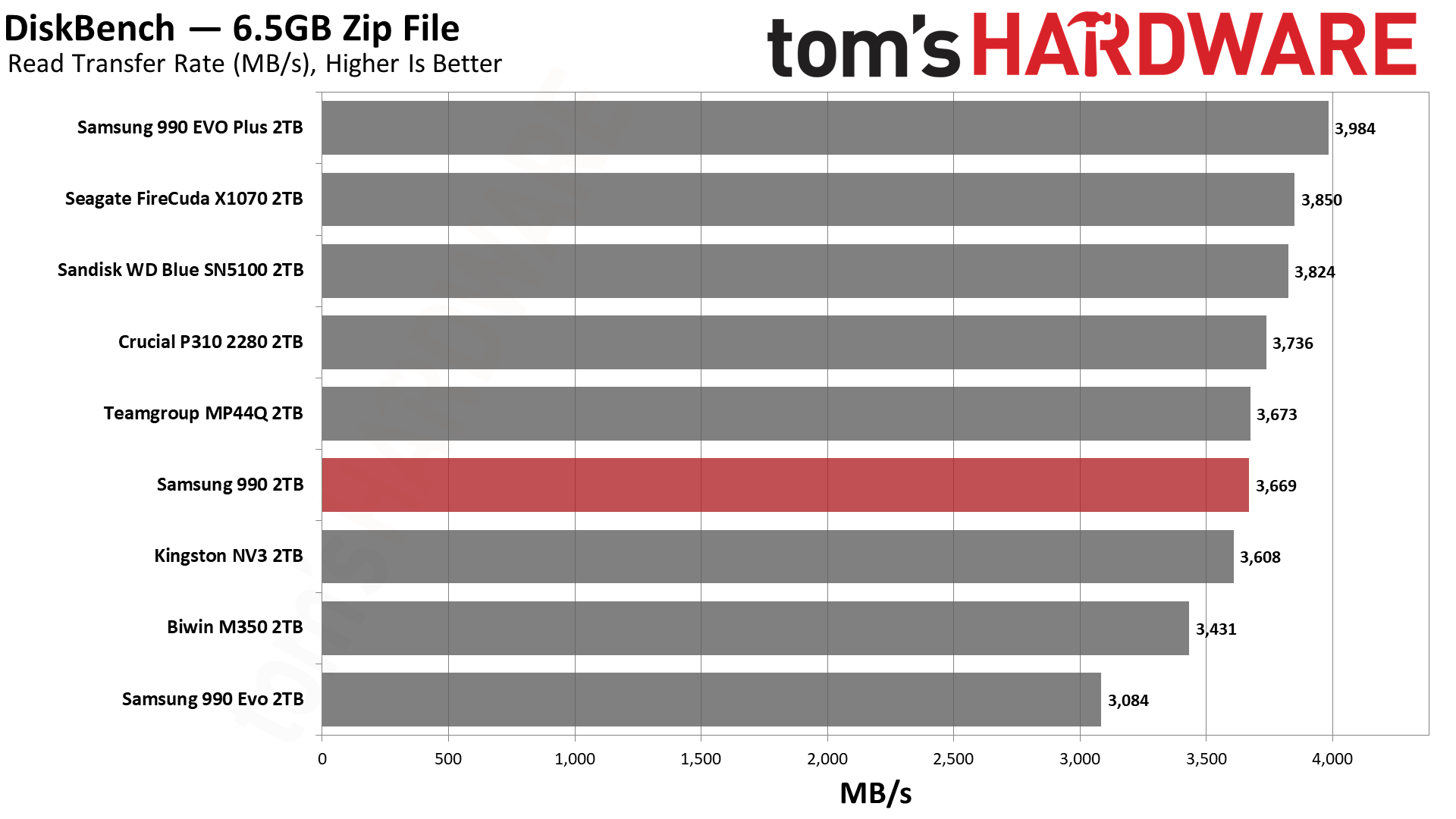
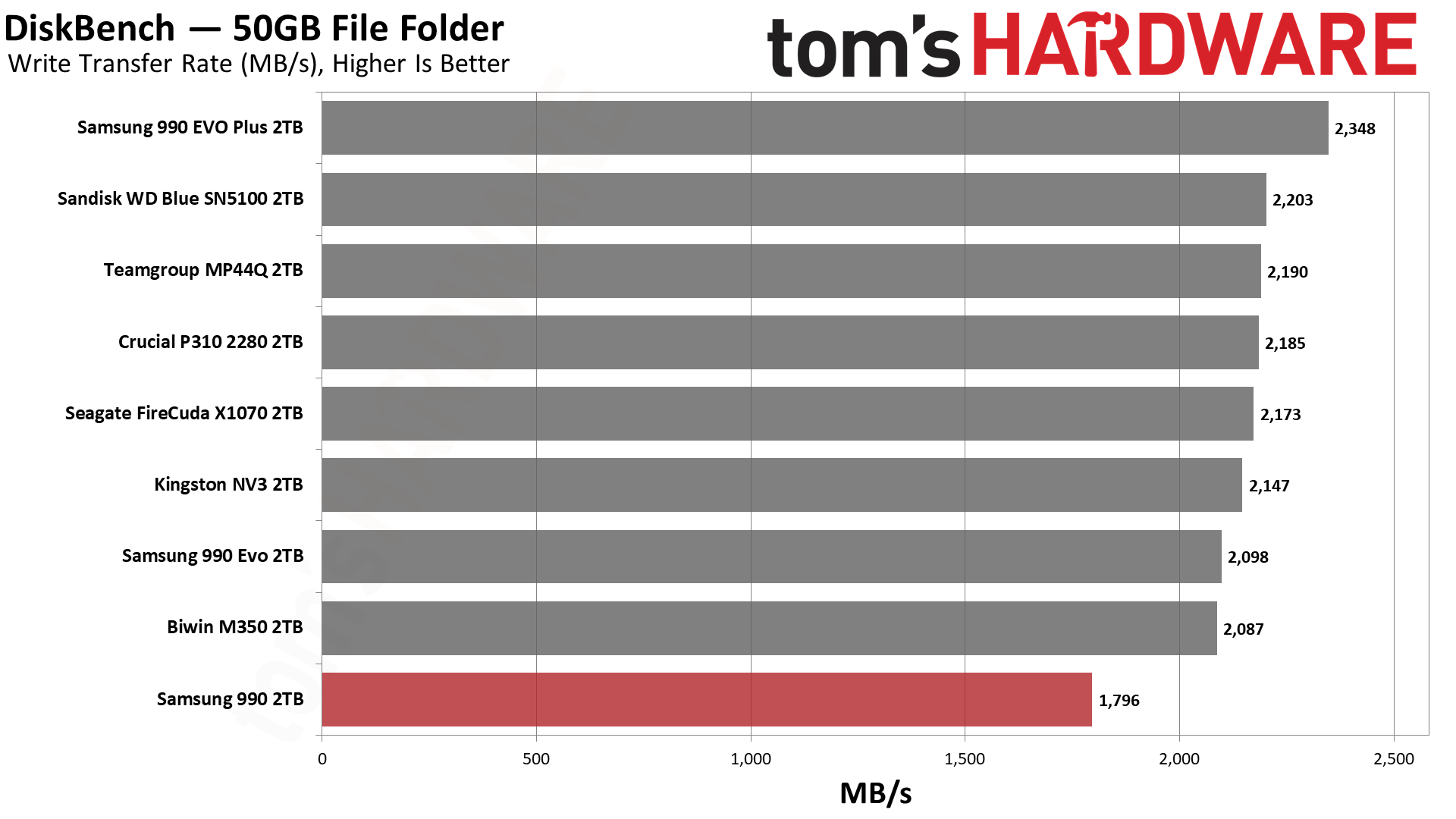
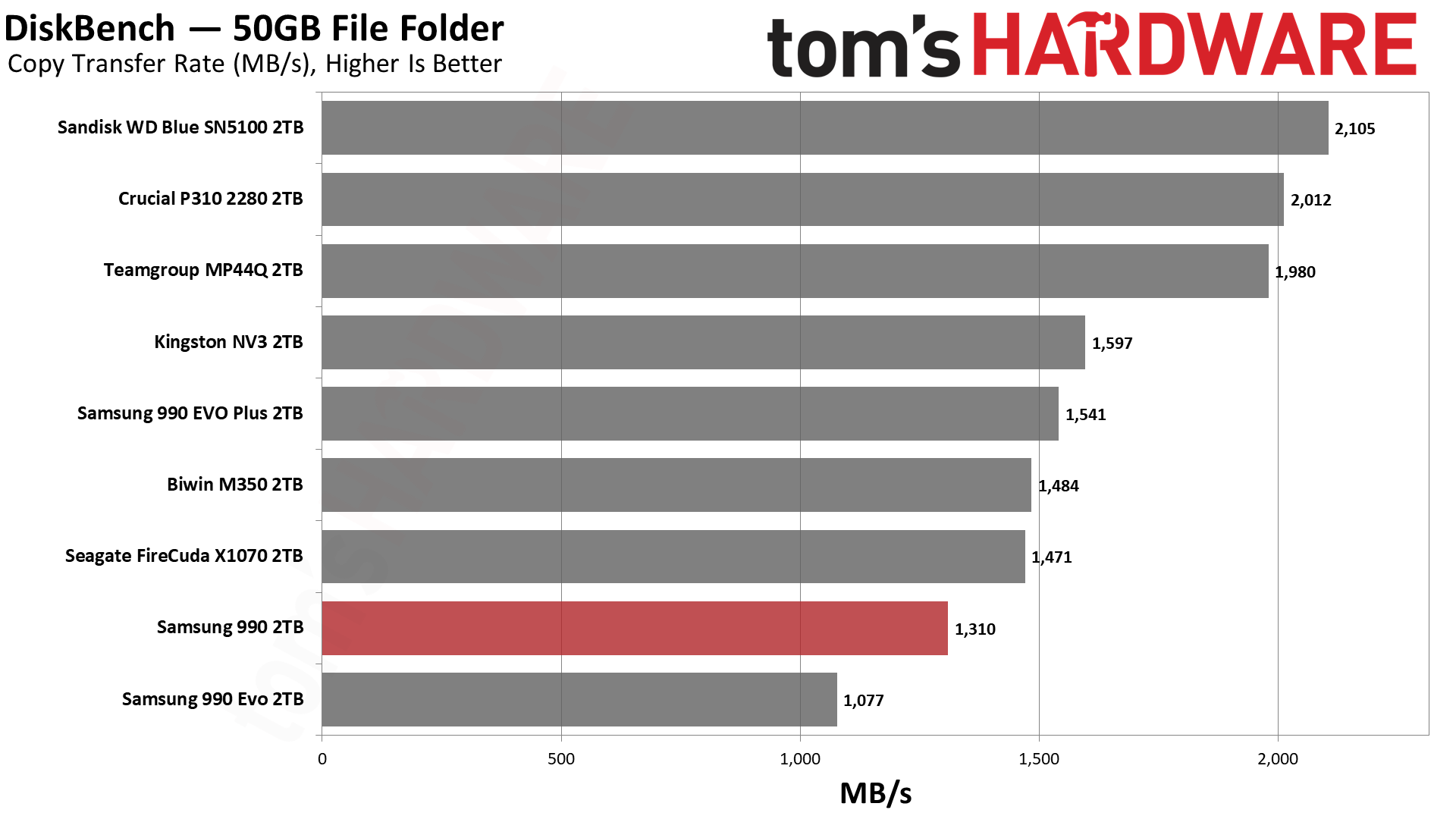
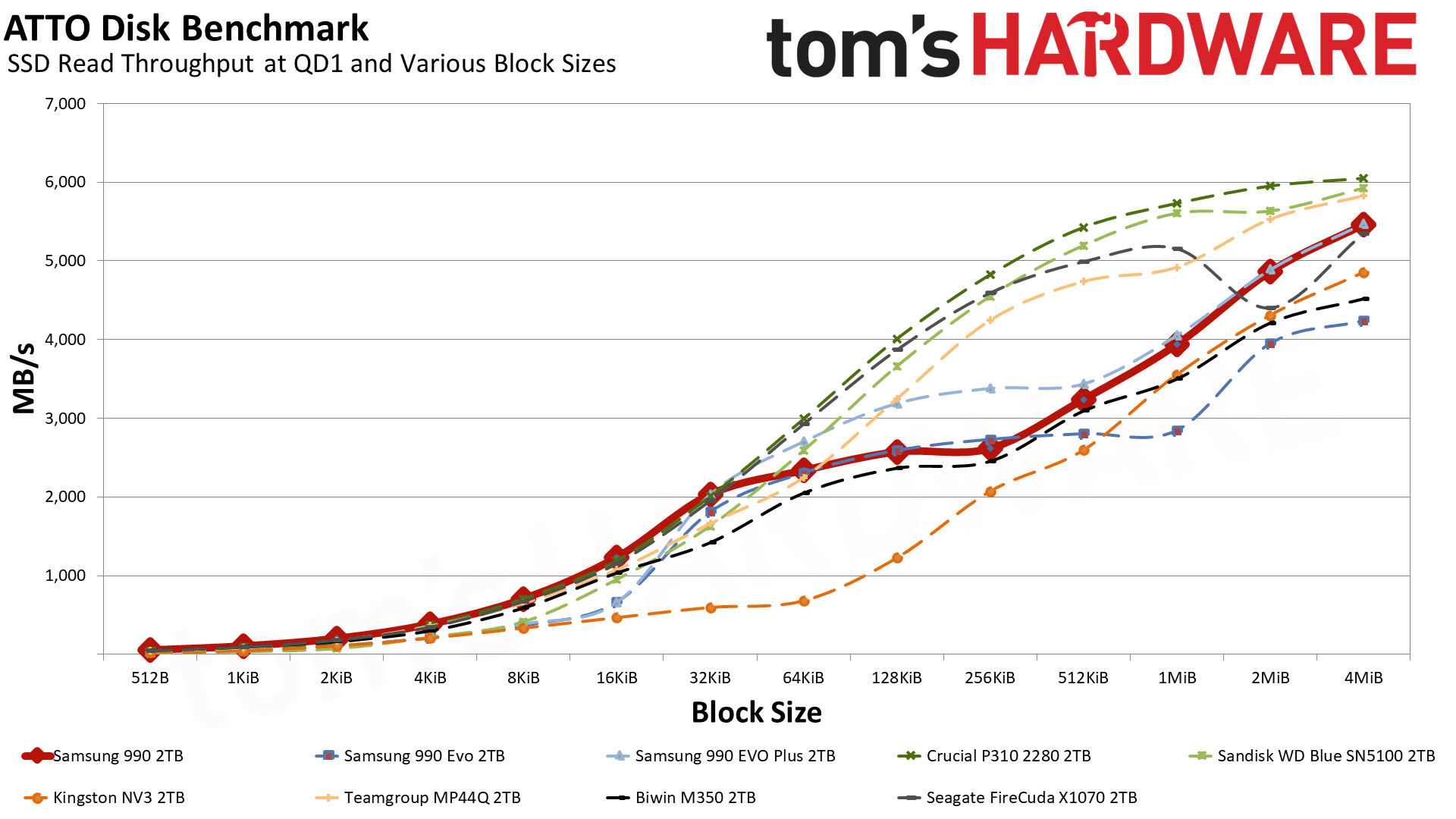
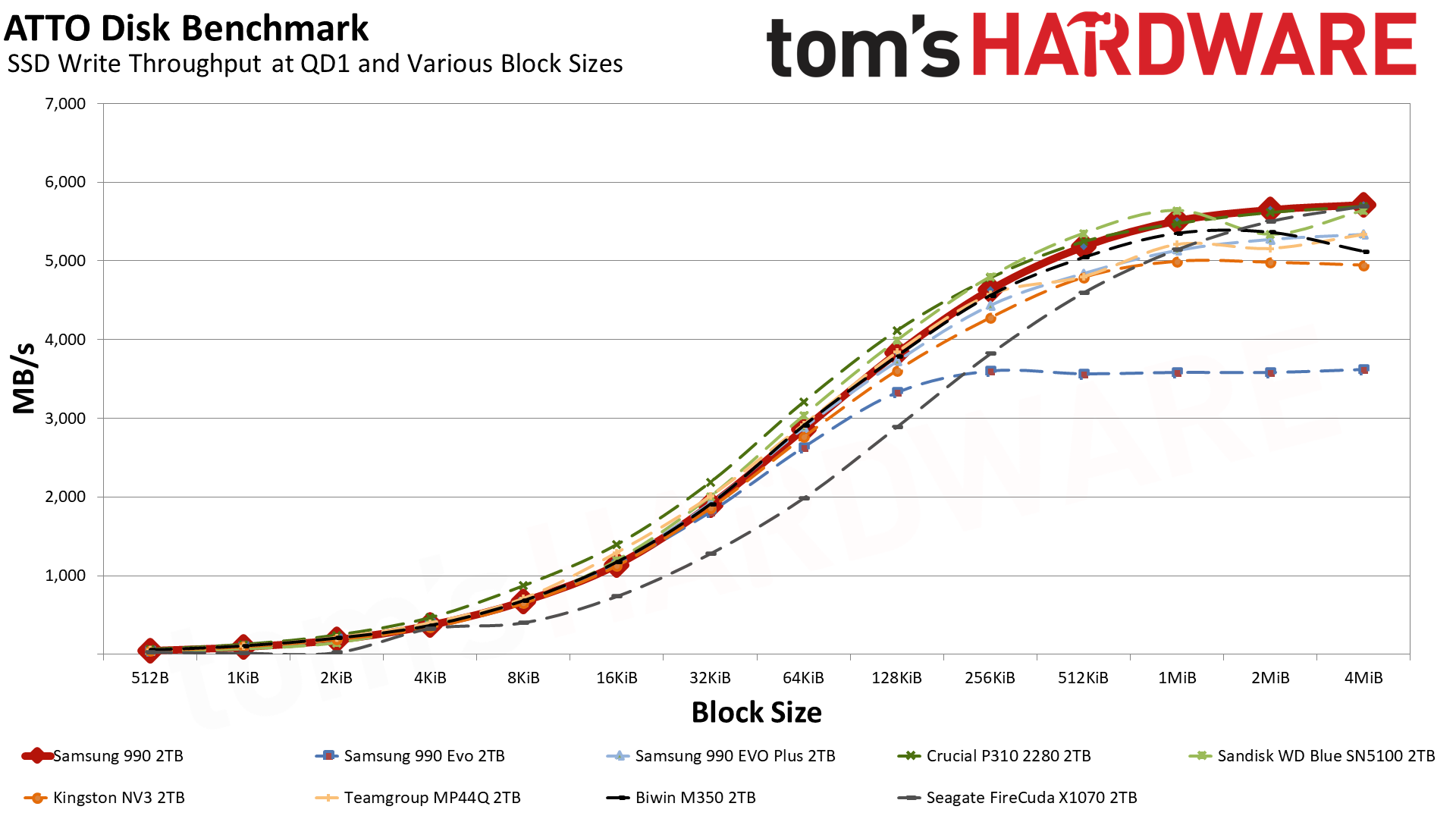
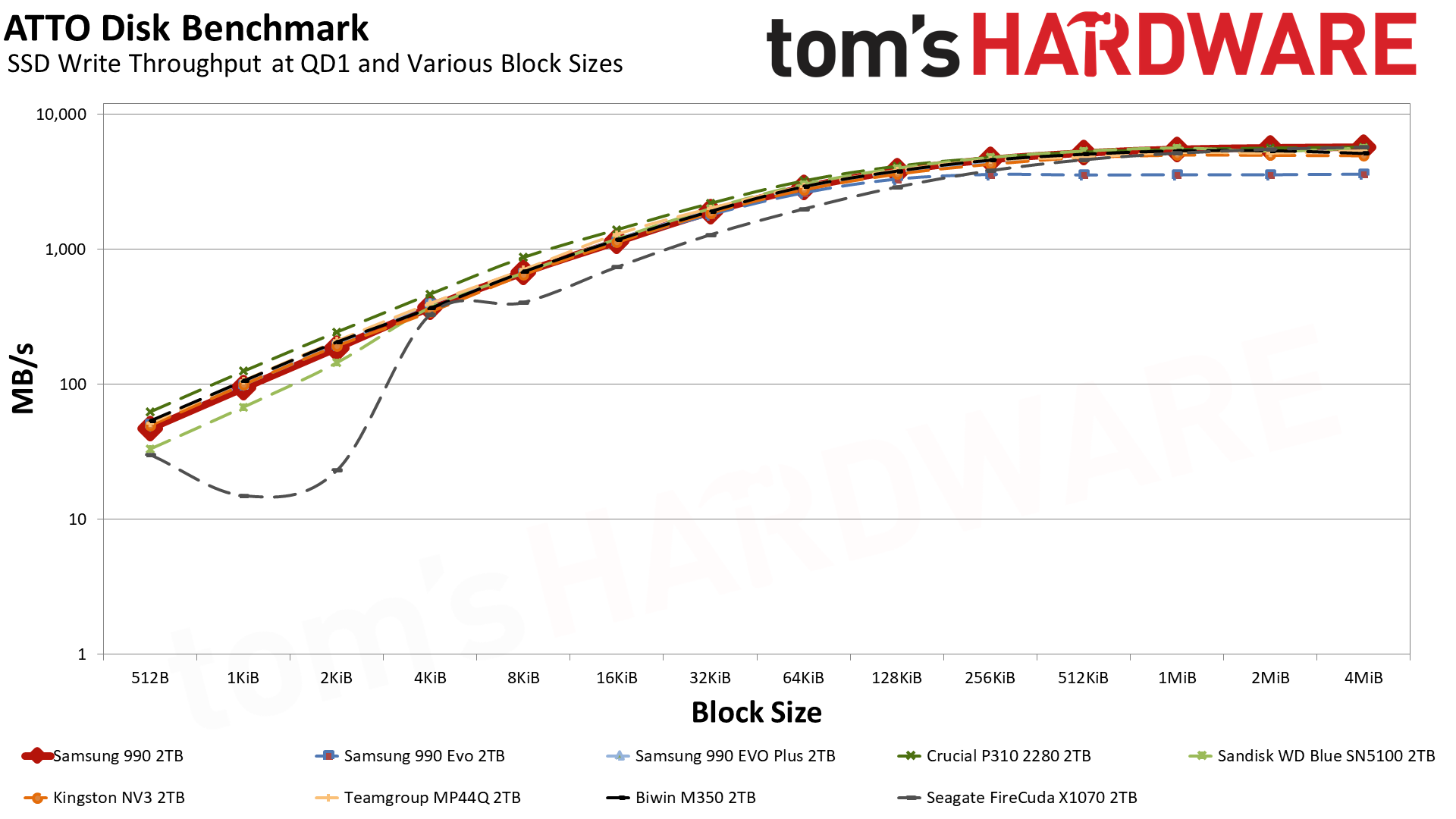
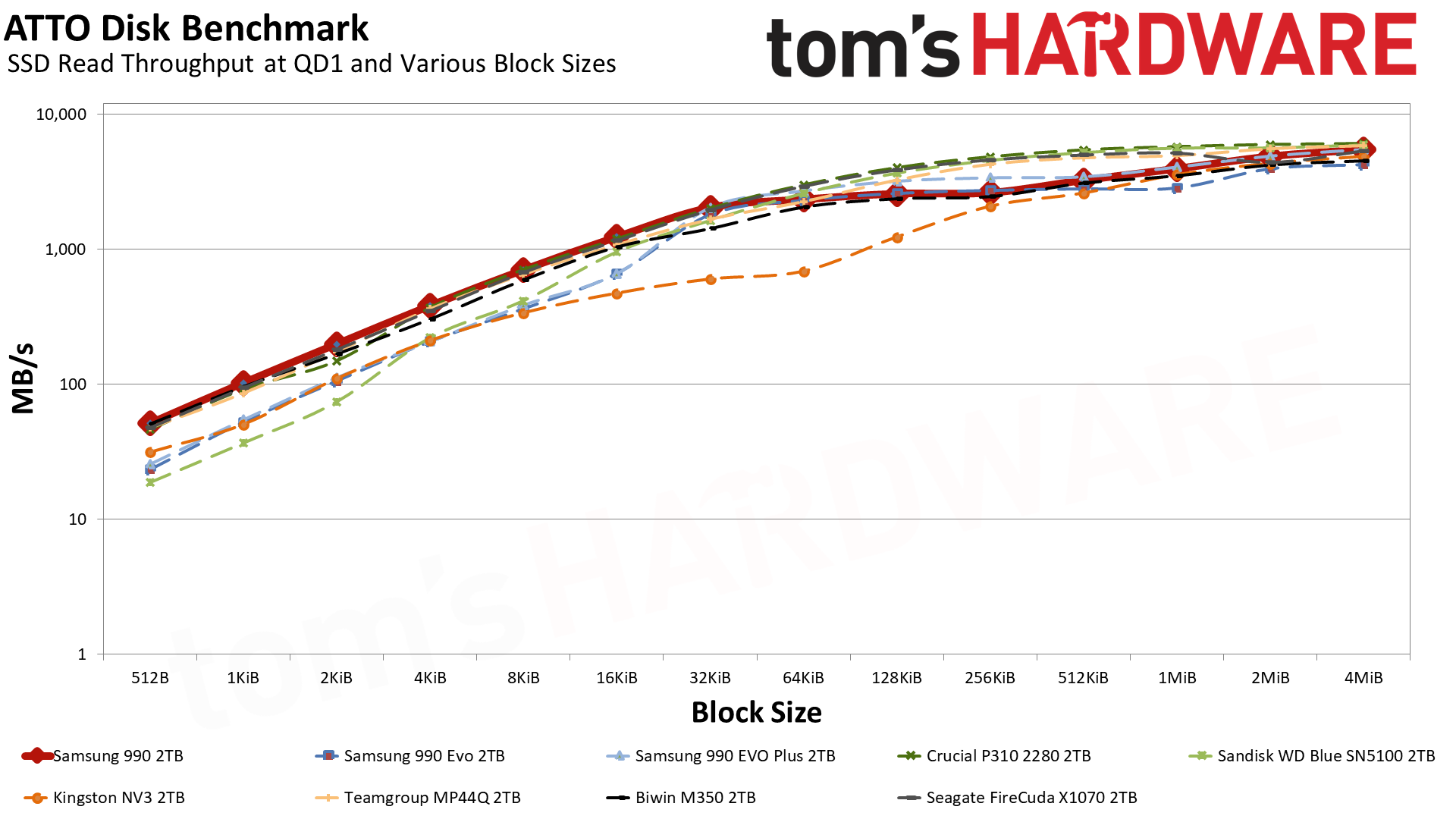
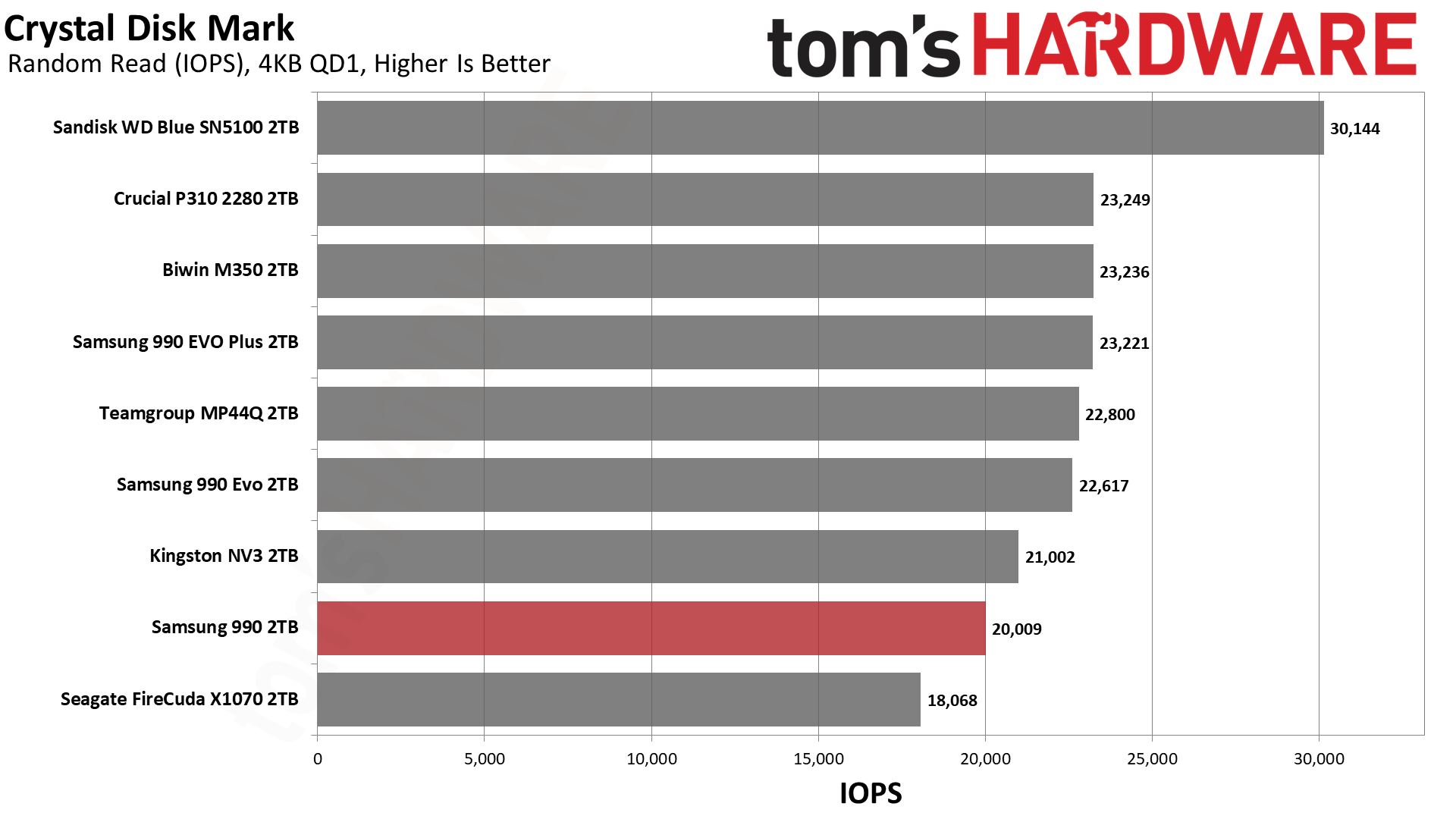
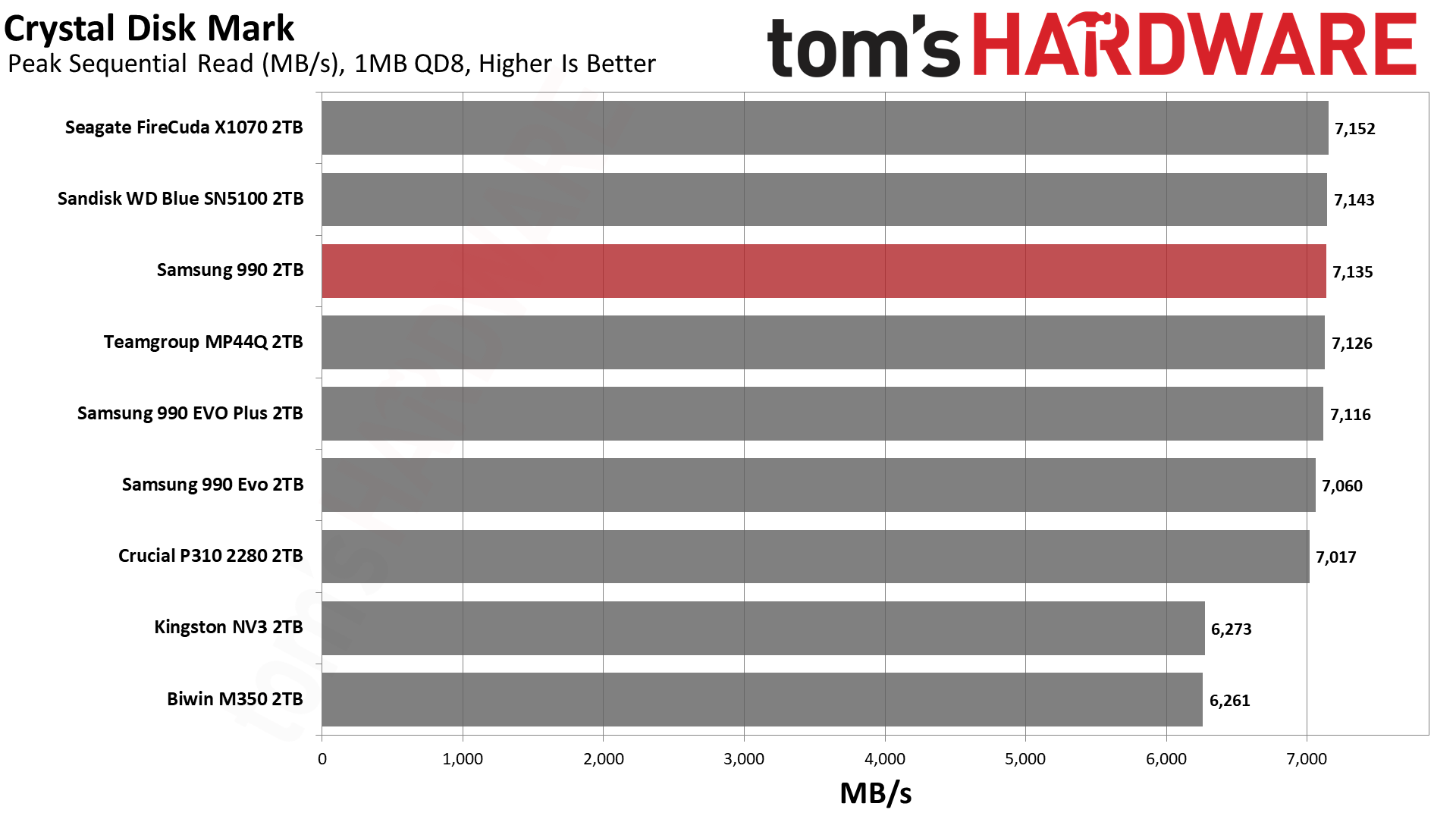
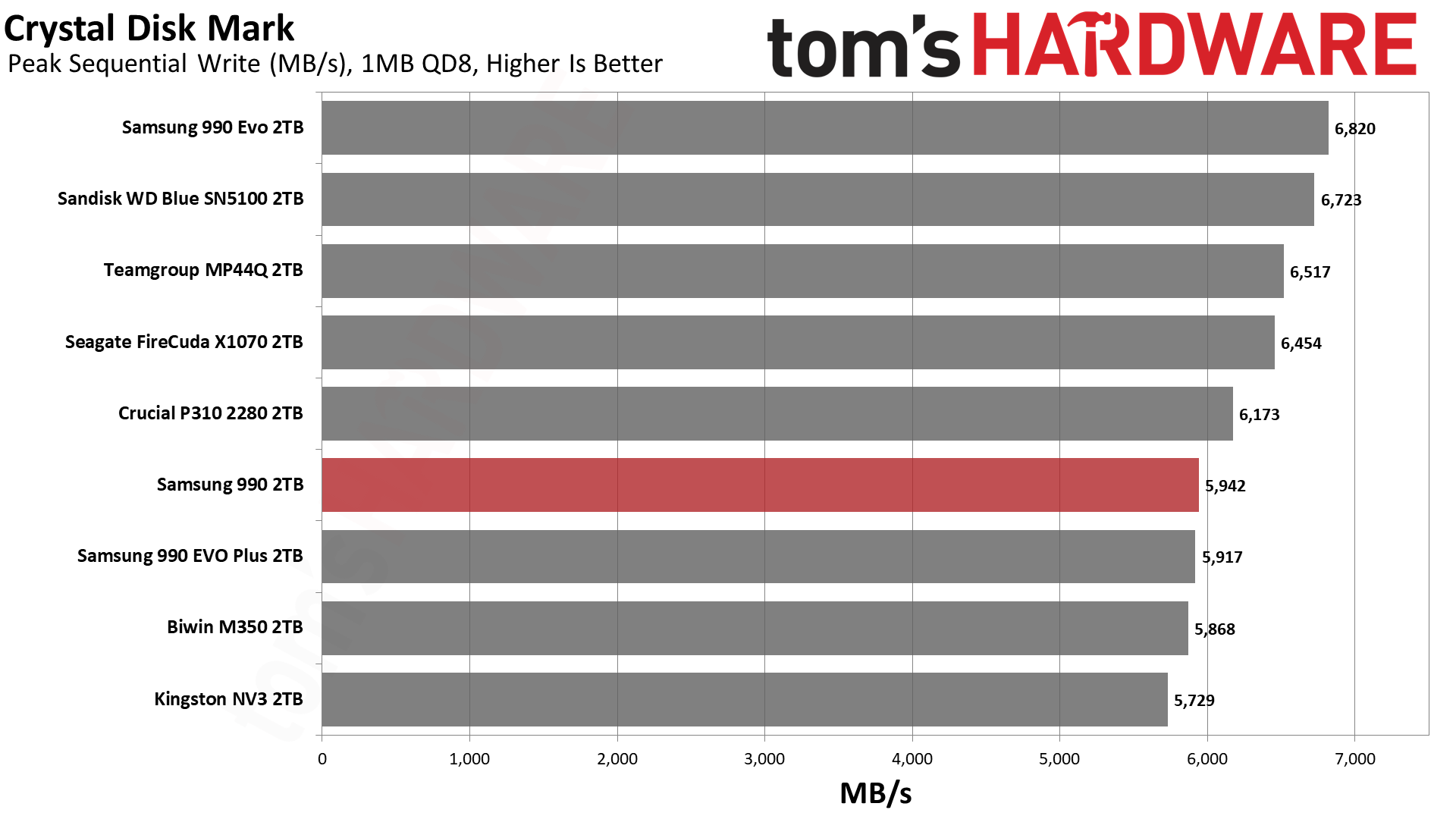
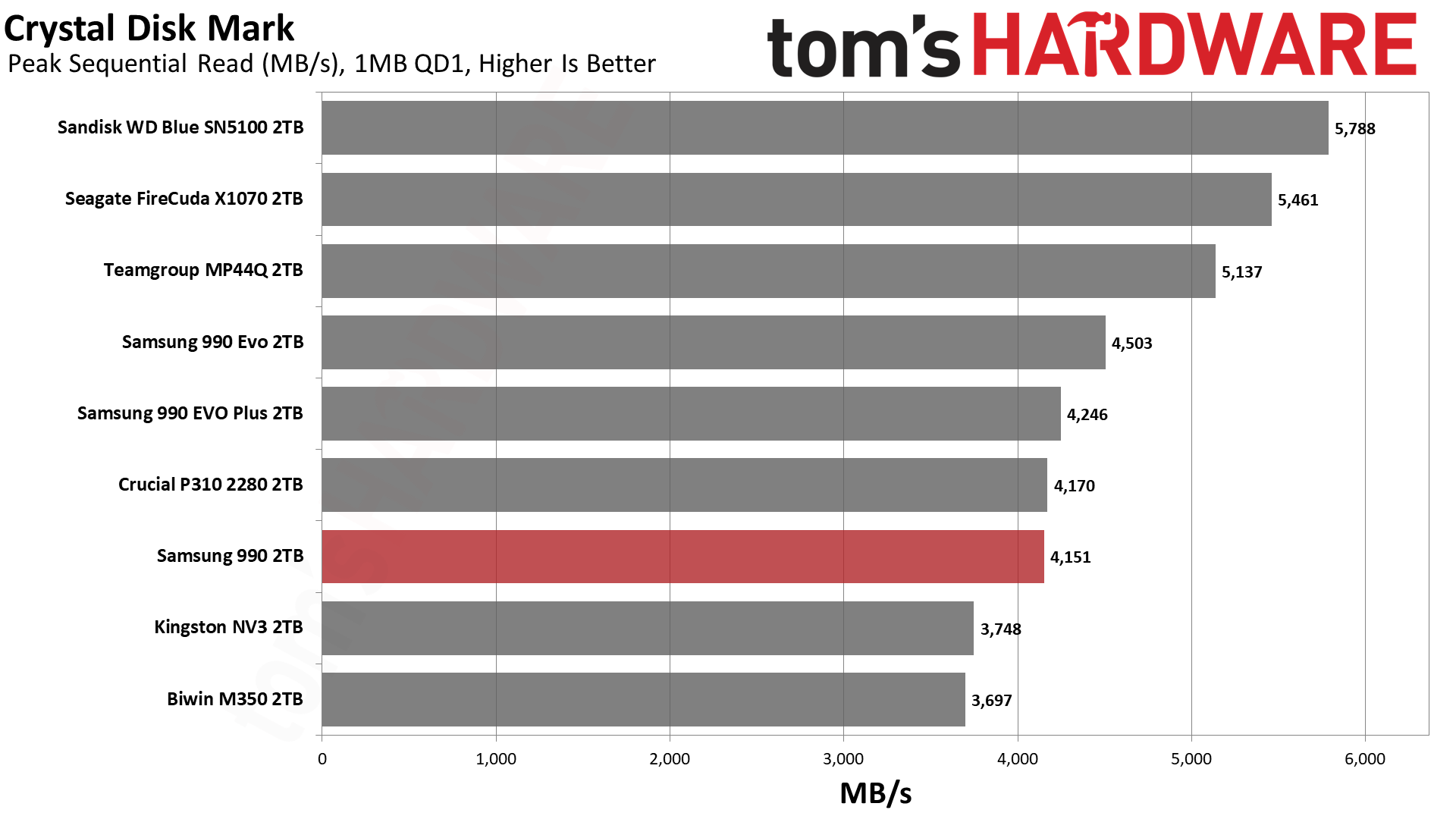
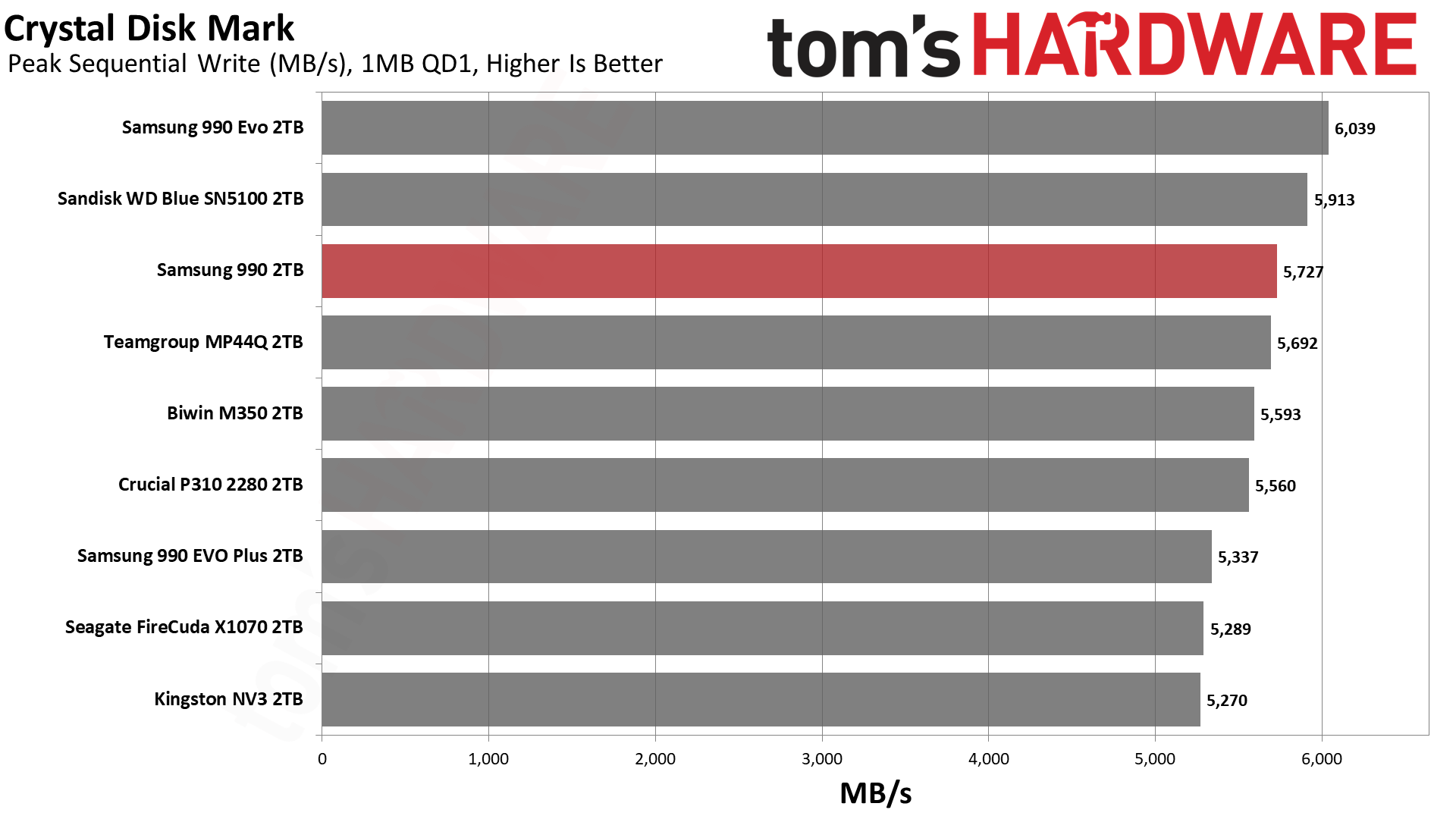
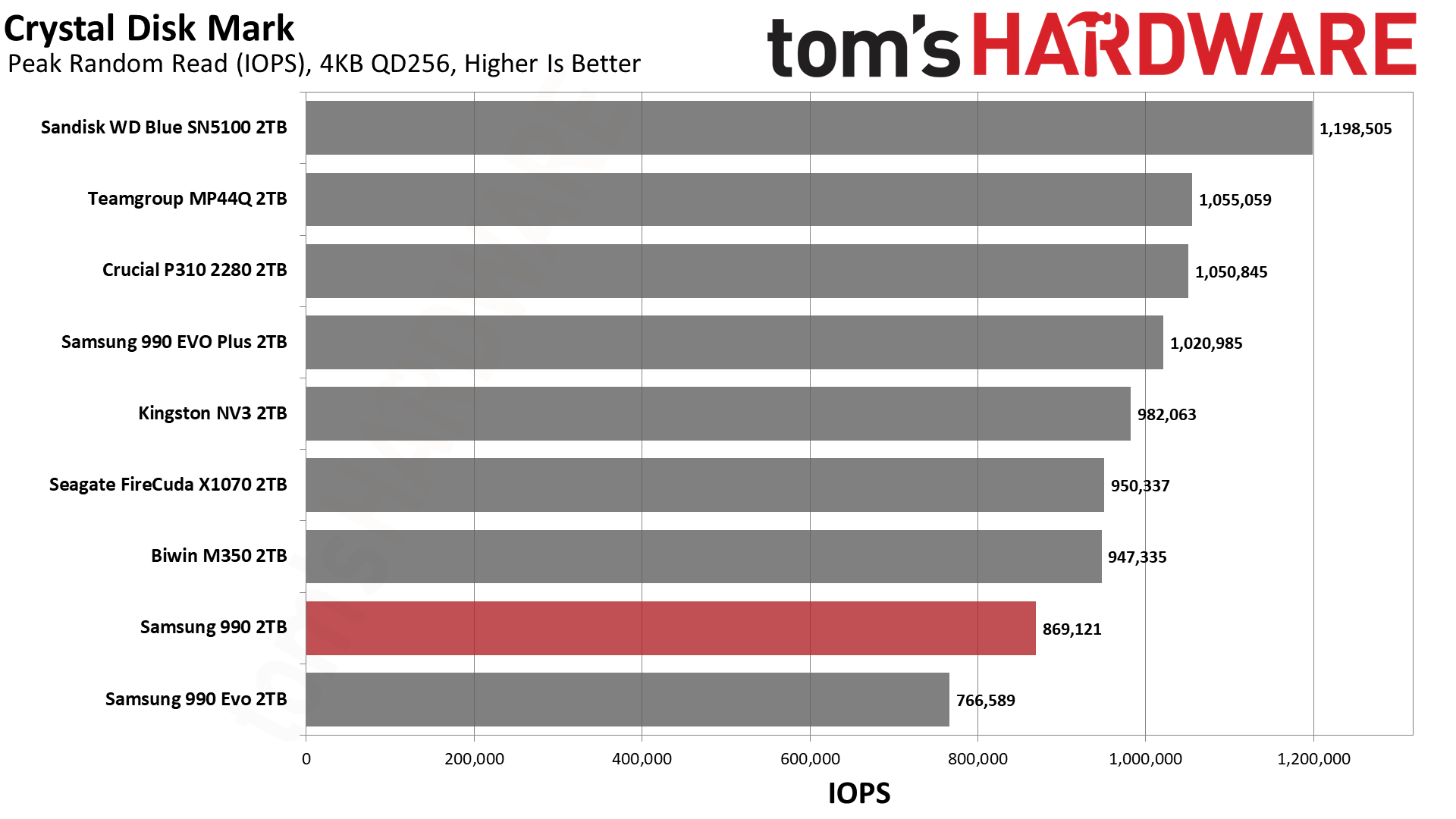
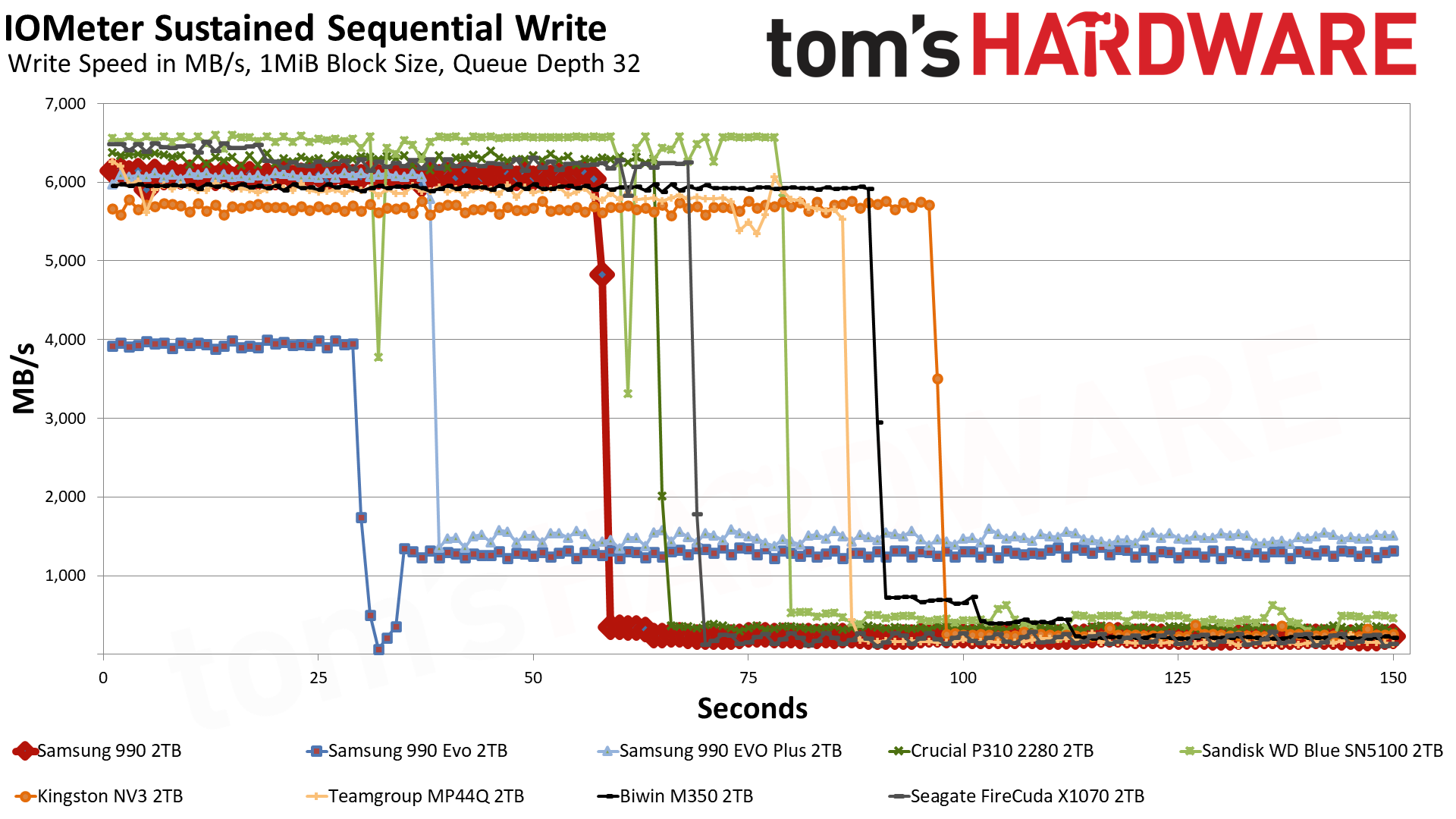
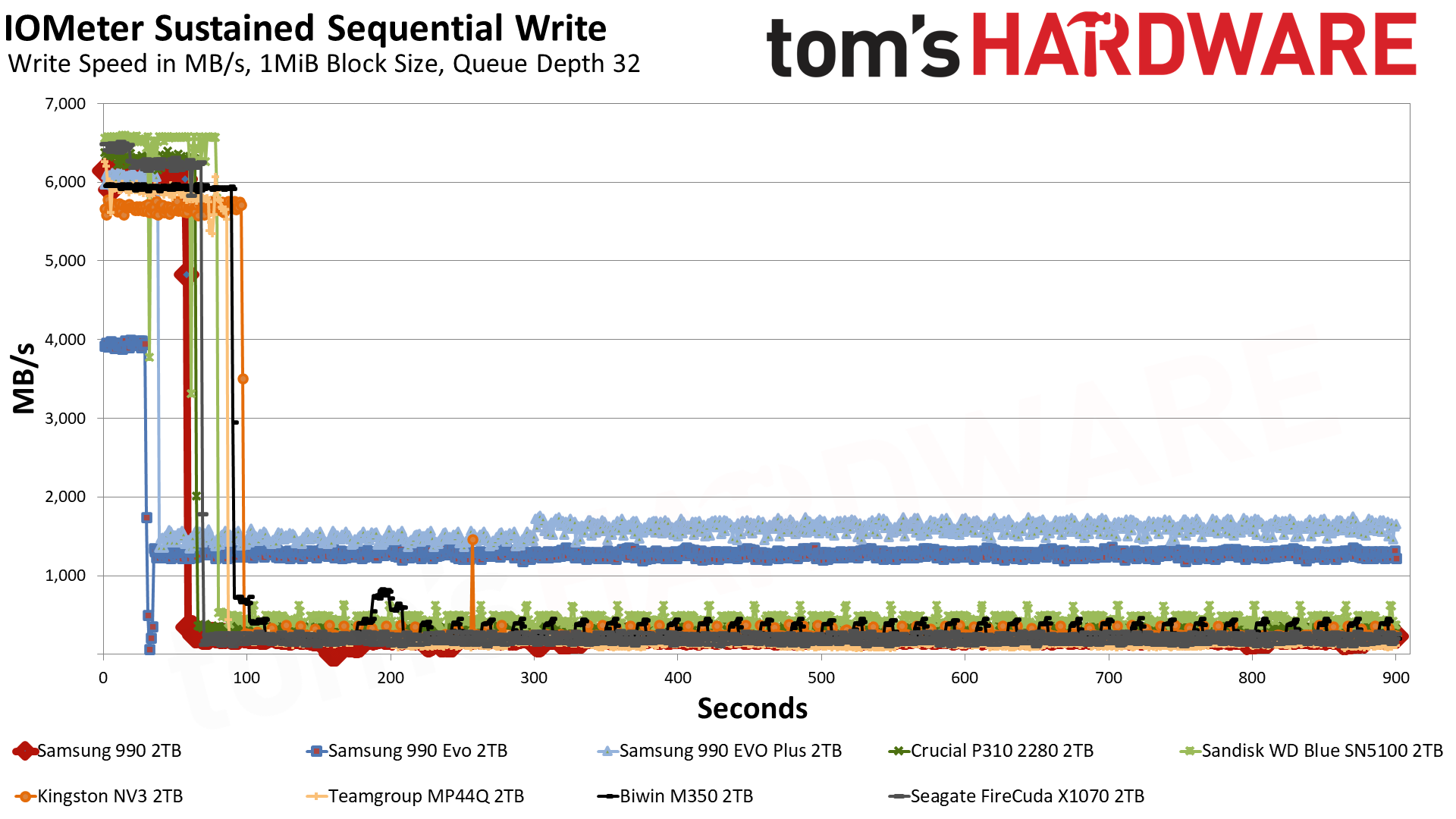
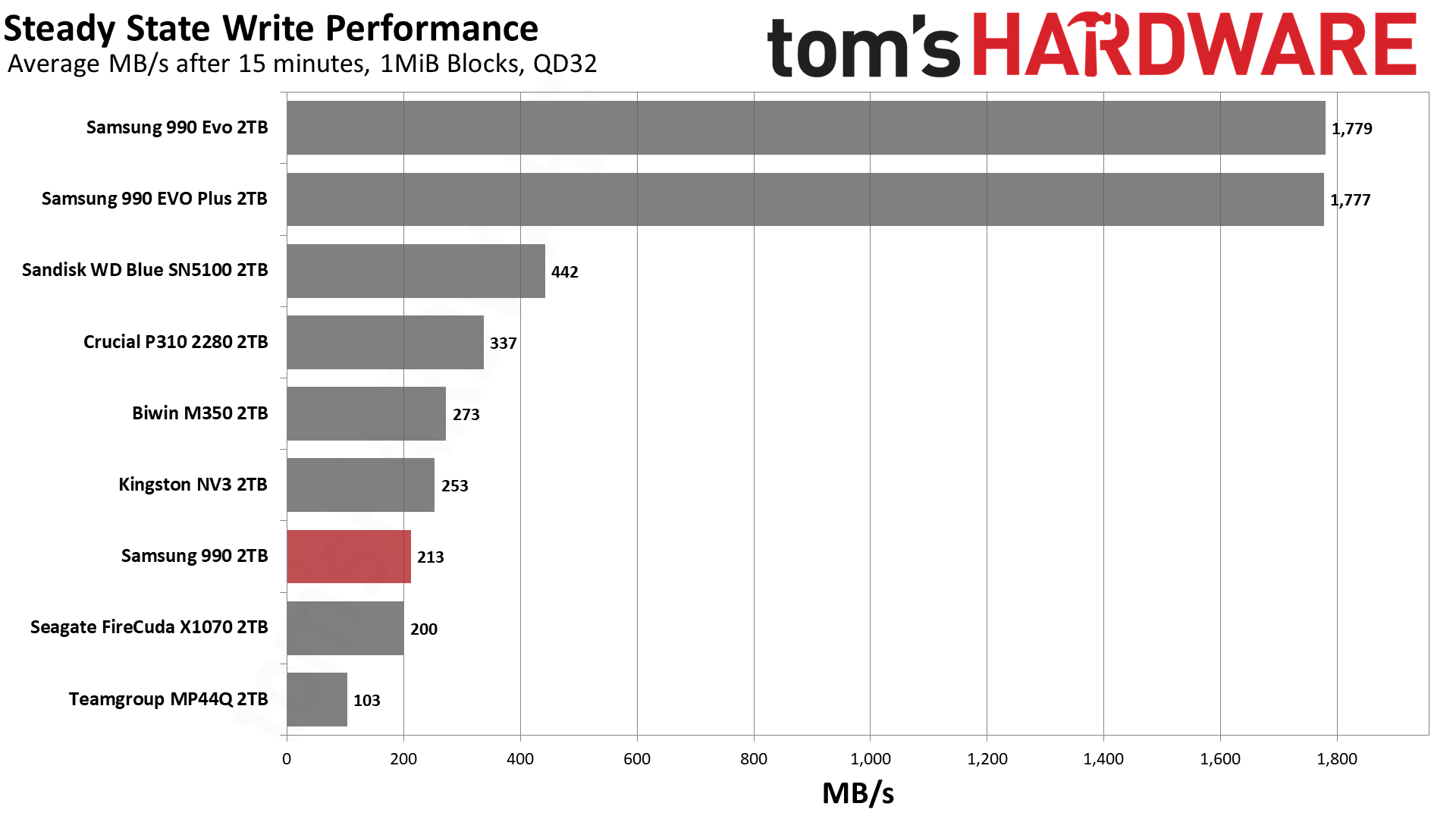
The Samsung 990 enters a crowded market with a lot of good options, at least in theory. If we’re looking at QLC-based drives, this means the Crucial P310 and Sandisk WD Blue SN5100 at the very top. Both of these drives perform incredibly well. Below that, we have the older wave of drives represented by the TeamGroup MP44Q. That drive in particular remains a budget favorite with a fast controller and good QLC flash.
We would put the rest below that, even though the hardware is not always worse. This would include the Biwin M350, the Kingston NV3, and the Seagate FireCuda X1070. These drives are using alternative controllers – SMI, SMI, and TenaFe, respectively – that are roughly comparable, and the flash is not particularly old, either. However, these drives tend to be more budget-focused with reduced performance and (ideally) reduced cost.
We’ve also thrown in Samsung’s 990 EVO and 990 EVO Plus for comparison. The 990 should be closer to the latter, but with QLC flash, it would be okay landing somewhere in between. On the whole, we would expect the drive also to be between the two main categories of drives – that is, above the budget ones, below the two fastest, and closer to the middle MP44Q and its MAP1602-equipped alternatives, but with Samsung’s name recognition. The technology is here to make this a reliable drive, which is also a factor to consider, but being this late to the game puts the 990 at a general disadvantage.
Trace Testing — 3DMark Storage Benchmark
Built for gamers, 3DMark’s Storage Benchmark focuses on real-world gaming performance. Each round in this benchmark stresses storage based on gaming activities including loading games, saving progress, installing game files, and recording gameplay video streams. Future gaming benchmarks will be DirectStorage-inclusive and an evaluation for future-proofing is included where applicable.
SamsungSamsungSamsung
We start by looking at 3DMark because, frankly, QLC-based drives make a lot of sense for gaming. Aside from large installs and updates, you’re mostly doing reads, which do not favor TLC drives as much. While it’s true that QLC flash is still slower, often-accessed data might be left in the pSLC cache – if you leave enough space free – and QLC is also optimized for random reads. Games do involve a lot of sequential reads and often at larger block sizes than you’d expect, but as long as the drive has sufficient interleaving (it’s sufficiently large) you are going to get pretty good performance.
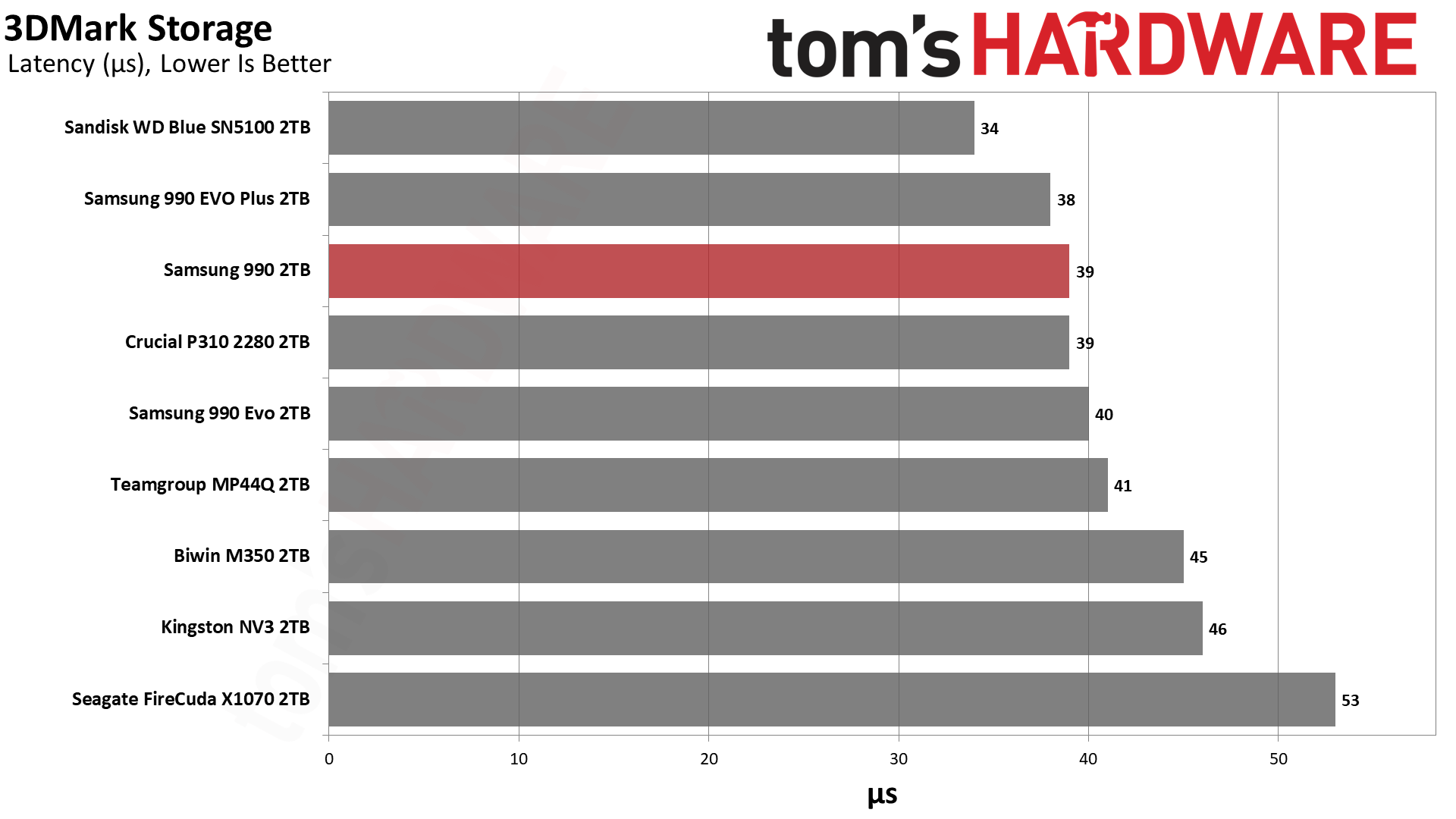
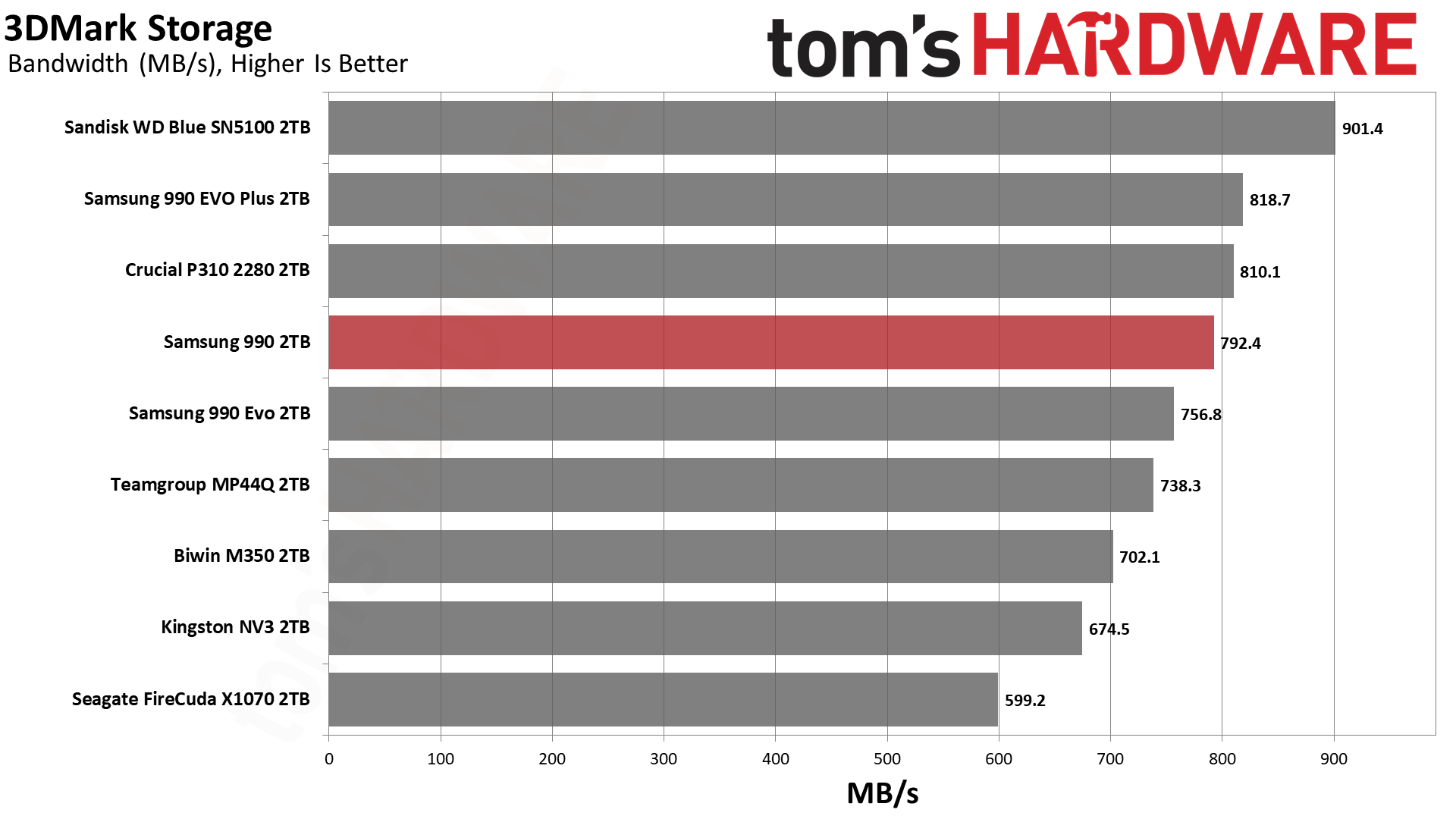
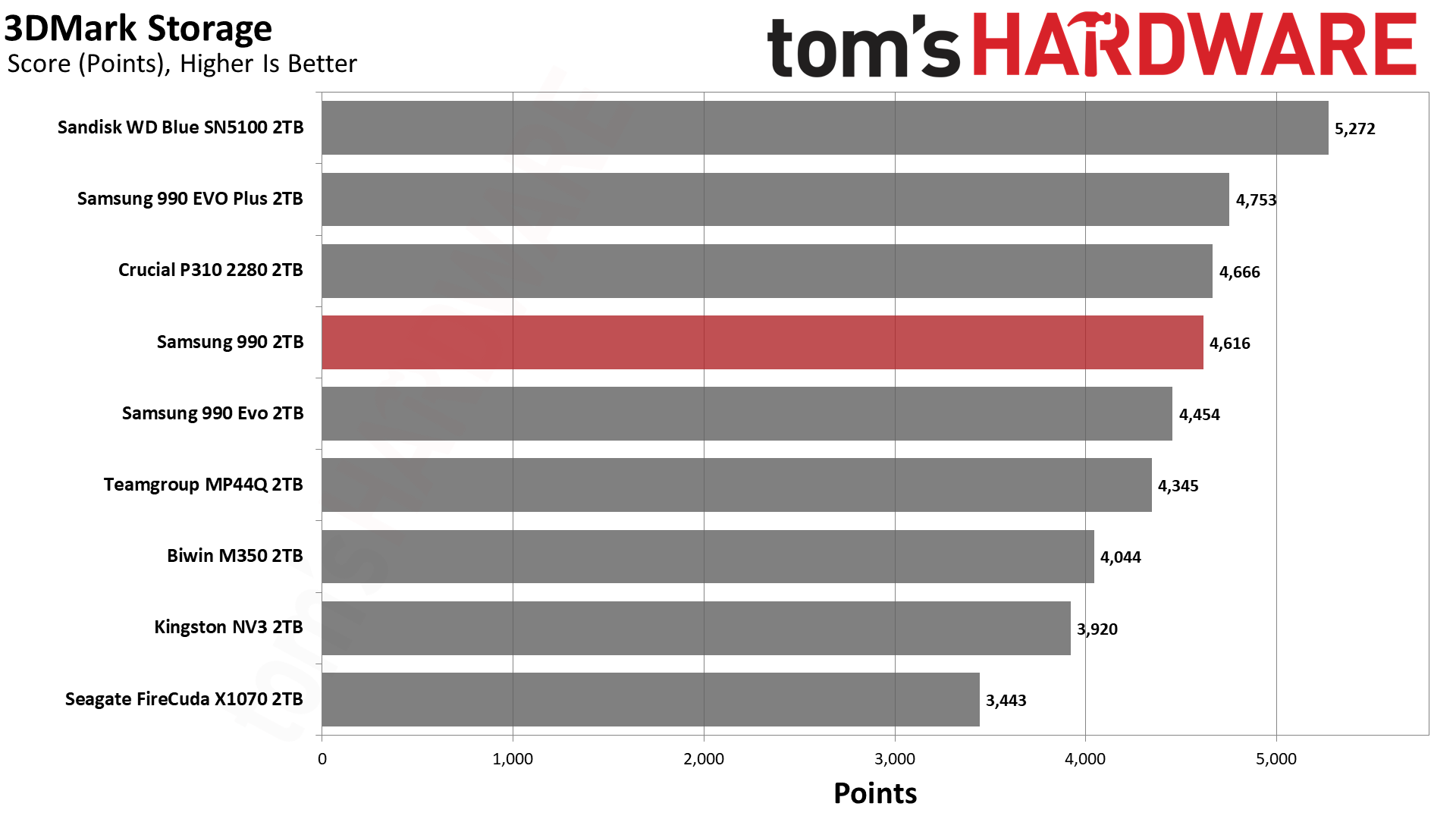
For 3DMark, which is a synthetic test, we might expect the drives to perform as they do under ideal, cached circumstances. This means the 990 should perform closely to the 990 EVO Plus and better than the 990 EVO, even though both of those latter two are TLC-based. It does. The 990 gets pretty close to the P310, which is one of the best QLC drives out there, aside from the Blue SN5100. We tend to look at ~45µs as a good cutoff point for all-around performance – gaming doesn’t need to be super responsive – which is roughly around the popular budget NV3. The 990 is significantly faster than that, which is all you could ask for here.
Trace Testing — PCMark 10 Storage Benchmark
PCMark 10 is an industry standard trace-based benchmark that uses a wide-ranging set of real-world traces from popular applications and everyday tasks to measure the performance of storage devices. The results are particularly useful when analyzing drives for their use as primary/boot storage devices and in work environments.
SamsungSamsungSamsung
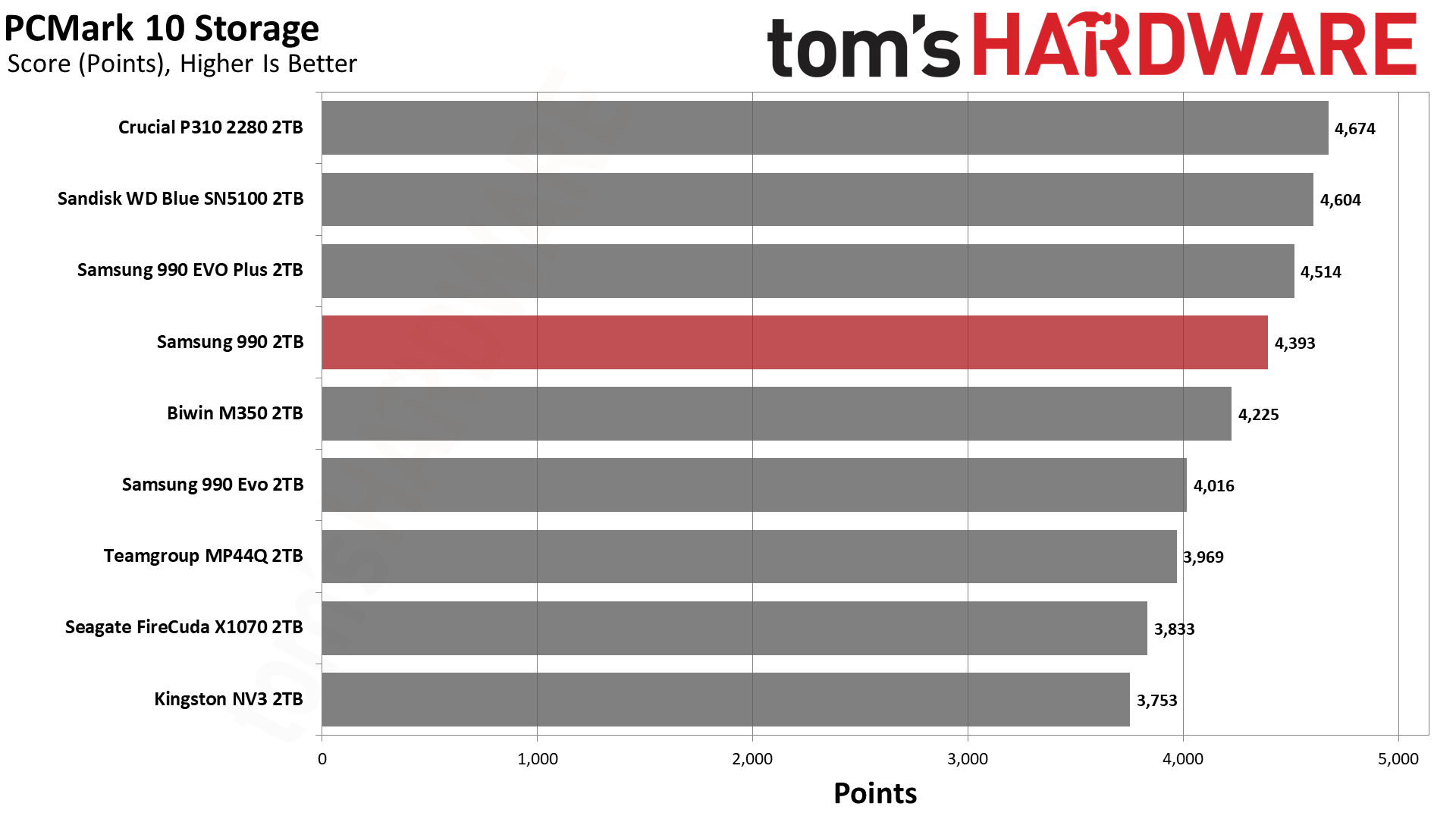
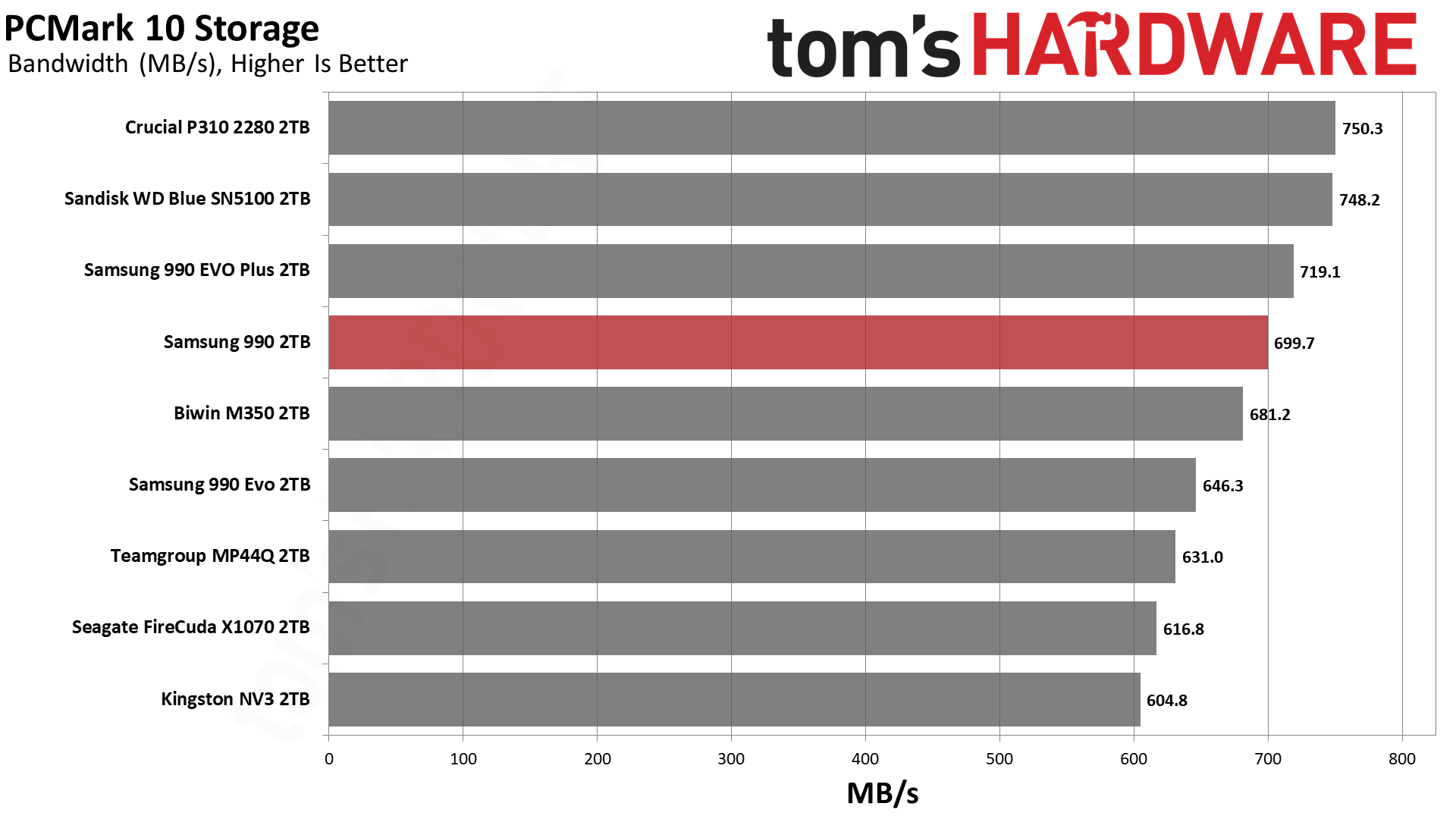
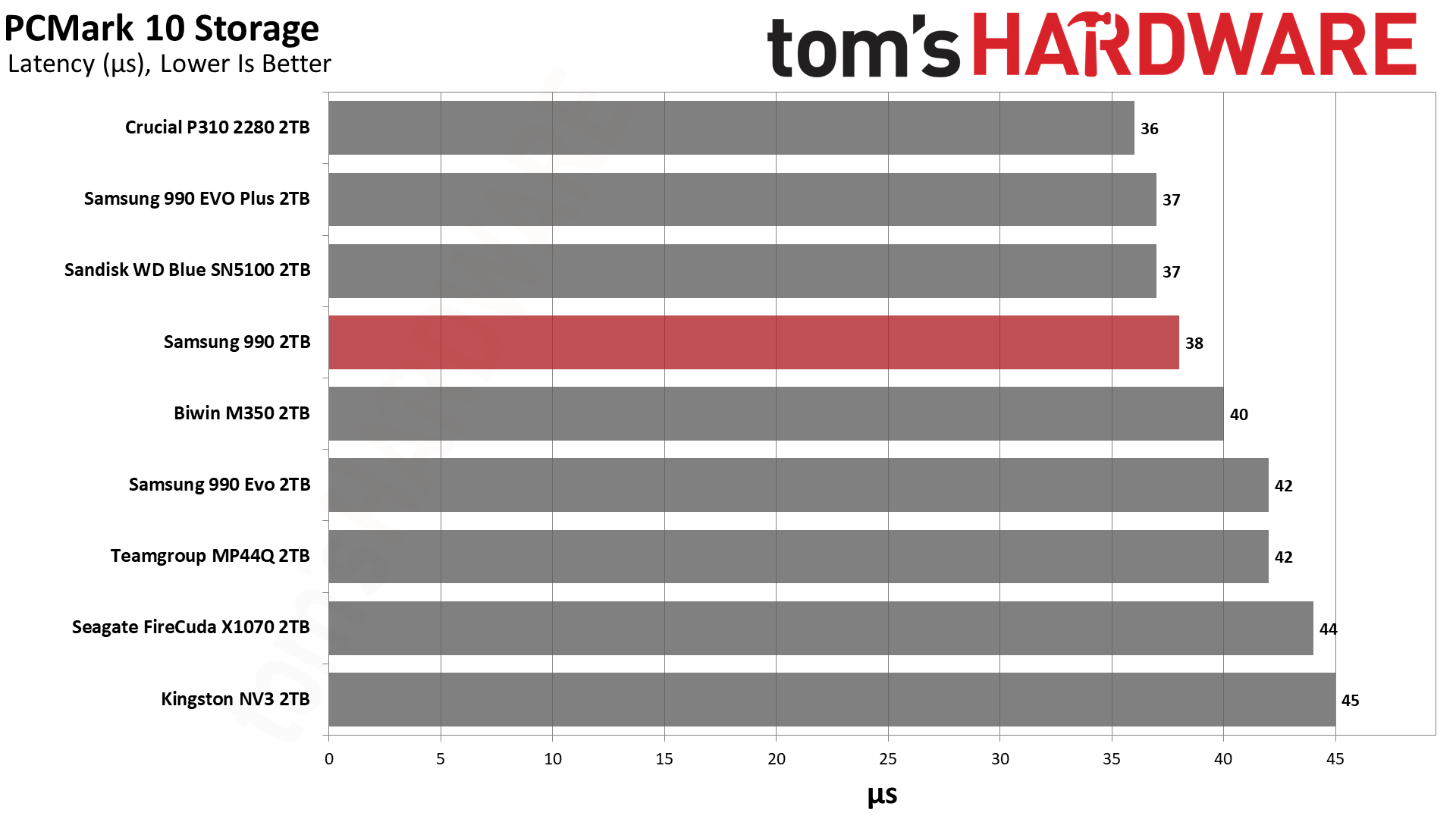
PCMark 10 performance usually, but not always, follows 3DMark. There is speculation that some drives or firmware may be optimized for benchmarks like PCMark 10, but taken within a greater suite of tests it’s still useful to get a feel for application performance. For us, that means for a primary drive – your boot or OS drive where your apps live – or for your everything drive, if you work and game on a single drive in your system. This isn’t too unusual with laptops where M.2 slots are limited.
The 990 again ends up roughly where we’d expect – above the 990 EVO, and close to the 990 EVO Plus. It’s not on the level of the P310 or Blue SN5100, but it’s clearly above the budget drives. This is a strong result with good latency. For instance, we would take the 990 over the NV3 any day, every day. On the other hand, the P310 and Blue SN5100 are frankly better drives. These two drives are better optimized and performance-oriented. The 990 is more of a gap filler that’s late to the scene.
We have to say, though, that we’re glad Samsung didn’t push out a 990 QVO that was more like the 990 EVO, even if it would have arrived earlier. Such a drive would have used older QLC flash and performed more slowly simply due to the lower interface speed.And frankly we’d rather have density-optimized flash that can run at the 990 EVO Plus level. That’s what the 990 delivers, even if it feels a little underwhelming. However, it makes perfect sense given the current market, enterprise demand, OEM demand, etc. The drive is still very fast and of a superior quality to a great many budget drives out there, and that makes it worthwhile.
Console Testing — PlayStation 5 Transfers
The PlayStation 5 is capable of taking one additional PCIe 4.0 or faster SSD for extra game storage. While any 4.0 drive will technically work, Sony recommends drives that can deliver at least 5,500 MB/s of sequential read bandwidth for optimal performance. Based on our extensive testing, PCIe 5.0 SSDs don’t bring much to the table and generally shouldn’t be used in the PS5, especially as they may require additional cooling. Check our Best PS5 SSDs article for more information.
Our testing utilizes the PS5’s internal storage test and manual read/write tests with over 192GB of data, both from and to the internal storage. Throttling is prevented where possible to see how each drive operates under ideal conditions. While game load times should not deviate much from drive to drive, our results can indicate which drives may be more responsive in long-term use.
SamsungSamsungSamsung
You know our PlayStation 5 line by now: just about any drive will do. The 990 can push more bandwidth than the 990 EVO, which arguably makes it a better pick. It’s on par with, or better than, most budget drives out there. At least, for the things you will usually be doing on the PS5. It’s clear from our one bandwidth test that the drive ran out of cache, and it has the typical slow QLC flash write state. This is not indicative of real-world performance if you do normal installs/updates with mostly reads. If you are freshly installing the drive and moving a ton of games onto it, then yes, this could be an issue, but the QLC write speeds are still significantly faster than 1GbE if you’re intending only to download a ton of games at once. Otherwise, you can check the cache size in the relevant testing section.
Transfer Rates — DiskBench
We use the DiskBench storage benchmarking tool to test file transfer performance with a custom 50GB dataset. We write 31,227 files of various types, such as pictures, PDFs, and videos to the test drive, then make a copy of that data to a new folder, and follow up with a reading test of a newly-written 6.5GB zip file. This is a real-world type workload that fits into the cache of most drives.
SamsungSamsungSamsung
We also see some write performance issues in DiskBench. This is dependent on cache size and speed, but for the most part should be limited by the interface speed. However, there are cases where copy speed will simply be slower, whether due to the controller or other optimization trade-offs. We can see that the 990 EVO, with TLC flash, is not exactly doing great here, and the 990 EVO Plus does much better. However, the 990 lags behind, and is very far behind the P310 and Blue SN5100.
So, we can put some of this slow speed on the Piccolo/PiccoloQ controller. To avoid getting too technical on this, we suspect it is partially architectural. This is reflected in power efficiency, as both the P310 and Blue SN5100 – with the Phison E27T and a proprietary Sandisk controller, respectively – are significantly more power-efficient than the 990 EVO, 990 EVO Plus, and as we’ll discover, the 990 as well. We also know that Samsung’s V9 QLC flash is not particularly inefficient.
As for the controller, there are reasons to design it differently. Reliability is one reason, especially if you sell a lot of OEM and enterprise drives that share the technology. Scaling is another, as you may use similar technology across your stack. You might want to optimize for a different sort of performance baseline; you may have unique endurance requirements, and you also might have to keep capacity in mind – enterprise drives, in particular, could make better use of this flash’s interface speed when scaling for capacity. Therefore, DiskBench results for our specific testing may not really be what Samsung is optimizing for, in which case the 990’s performance more or less hits expectations based on the 990 EVO and 990 EVO Plus. It just disappoints against drives like the NV3, which are otherwise inferior.
And to put a cap on it, yes, this is a consumer drive, but if you go back and read our 990 EVO review – and other recent Samsung SSD reviews, for that matter – you will see we underlined the idea that Samsung has been late to the party with less-than-leading performance recently. The fact is, Samsung has and has had bigger fish to fry, and its technology is sound but no longer looks amazing on the standard consumer benchmarks. That makes its products less relevant if you just want the fastest drive, although we’d argue there are secondary effects like drive reliability that still keep Samsung in the fight, certainly as an OEM option. It’s also true that consumer use has a lower bar – any halfway-decent NVMe drive is fast enough for daily driving – which means, sometimes you’re just buying the Samsung name.
Synthetic Testing — ATTO / CrystalDiskMark
ATTO and CrystalDiskMark (CDM) are free and easy-to-use storage benchmarking tools that SSD vendors commonly use to assign performance specifications to their products. Both of these tools give us insight into how each device handles different file sizes and at different queue depths for both sequential and random workloads.
ATTO gives us a clear image of how a drive performs over a range of block sizes. This can relate to different file sizes, for example, you probably have many files at or below 4KiB in size for various things but larger files, archives, and media files will usually be in units of MiB. Depending on what you’re using the drive for you may want to pay attention to how a drive performs within a certain range. For the quickest comparison, we show the results on a logarithmic scale and, there, the 990 shows significant dips for reads between 64KiB and 1MiB.
What you need to know is that flash is interleaved to improve performance, which means that larger I/O sizes will show higher throughput. A single, four-plane die, with modern 16KiB pages, can interleave up to 64KiB internally. If you have one die per each of four channels, that’s 256KiB. If you parallelize that over four dies per channel – which is the ideal amount and what we have with the 2TB 990 – then you reach 1MiB. While alignment here can impact performance, for example we sometimes look at six-plane flash these days, in general you will see a gradual throughput increase as you go. You’ll see this beyond 1MiB as data can and will be cached in volatile memory, either system-side or in a small cache on the drive. If you’re looking at higher queue depths, which we do with CrystalDiskMark, performance saturates even further as the controller is able to optimize data placement and retrieval with knowledge of what’s coming.
What this usually means is that QD8 is enough to get drives close together, while there will be more disparity at QD1. QD1 is much closer to real-world, as most operations will be at low queue depth, the vast majority at our below QD4 and the majority at QD1 or QD2.
We see that the 990 matches the P310 with QD1 reads, while some drives, like the X1070, do surprisingly well. We can assume that the controller plays at least a partial role here. The X1070 is a good example because, let’s be real, it’s not a drive a lot of reviewers liked. Yet, it has pretty good performance in this instance, indicating it could be a solid secondary storage drive. Fair enough. The 990 just doesn’t really have the response we like to see for that, but it’s fast enough to remain relevant. We got the impression in our X1070 review that its controller was chosen for cost savings and that was plenty for daily use, but we don’t think Samsung cheaped out on the PiccoloQ. Rather, Samsung is looking at the bigger picture, as it also sells drives with the Piccolo controller, including its OEM offerings.
Random latency seems much more important to a lot of people. We generally find that sub-50µs is one bar and another is sub-45µs. The 990 manages the former, which puts it above last-gen drives and some earlier Gen 4 drives, and budget drives like the X1070. It’s in the same ballpark as the NV3, too. It’s sufficiently far behind more popular budget drives, though, to draw our interest. In most cases you won’t notice it, but if you’re using this as your only drive and are sensitive to that, it’s not your best option. On the other hand, we think you have to balance that against pricing and some management of expectations. Any modern SSD is going to be very fast, and with current pricing it might be worth putting more weight on reliability, for example.
Sustained Write Performance and Cache Recovery
Official write specifications are only part of the performance picture. Most SSDs implement a write cache, which is a fast area of pseudo-SLC (single-bit) programmed flash that absorbs incoming data. Sustained write speeds can suffer tremendously once the workload spills outside of the cache and into the "native" TLC (three-bit) or QLC (four-bit) flash. Performance can suffer even more if the drive is forced to fold, the process of migrating data out of the cache in order to free up space for further incoming data.
We use Iometer to hammer the SSD with sequential writes for 15 minutes to measure both the size of the write cache and performance after the cache is saturated. We also monitor cache recovery via multiple idle rounds. This process shows the performance of the drive in various states including the steady state write performance.
Tom's HardwareTom's HardwareTom's Hardware
Samsung’s TurboWrite 2.0 caching technology utilizes a fixed, static portion of pSLC combined with a much larger dynamic portion. These two zones have unique characteristics which, when taken together, ideally keep the drive feeling fast across a variety of workloads. The static portion ensures the drive always has some cache for random writes, while the dynamic portion varies with drive usage so that you always have ample cache. While the 990 EVO had 108GB total regardless of capacity, it’s more typical for Samsung to increase both caches in absolute terms as capacity goes up. This is the case with the 990 EVO Plus, which has a 216GB cache at 2TB. But we know from our 9100 Pro review that Samsung is quite capable of going with a larger cache. The general trend for consumer SSDs has been to go that way, especially for QLC-based and DRAM-less SSDs, as it better hides weak performance states.
Therefore, it’s not too surprising that the 990’s cache is pretty large. In its fastest state, it writes at almost 6.1 GB/s for over 57 seconds, for a cache in excess of 350GB. This is larger than the 2TB 990 EVO Plus’s but smaller than the 2TB 9100 Pro’s. Our suspicion is that the 990 follows the newer, larger scheme, but we’re dealing with QLC rather than TLC flash. QLC flash to pSLC is 4 bits to 1, while TLC is 3 bits to 1, so in relative terms the 990 lines up with the 9100 Pro. That’s all fine and good. As for how fast it writes, Samsung markets the 990 as having over 50% faster write performance than the 990 EVO, which is accurate simply because we’re moving from 1,600 to 2,400 MT/s, with newer flash and firmware.
Once the cache is exhausted, the drive has to write to the native QLC flash directly or fold data over from pSLC to QLC. The latter is slower but can reduce wear in some cases – folding uses predictable, sequential writes – and reduces the likelihood of errors in transmission. Considering the technology we mentioned above and how Samsung avoids problems with power loss, it makes sense that going slower is by design. In fact, given we know the expected speed of the flash – rated at 41 MB/s per die – we can reasonably assume the firmware wants this outcome. It’s not that the flash can’t handle higher speeds, even at the risk of endurance. It’s simply that for a consumer drive of this type, the response is reasonable and measured. Going faster would require reducing the cache size potentially, which tends not to be a good trade-off for this type of drive.
One interesting thing about the V9 flash is that it can operate in a pTLC caching mode. We don’t see that here. Honestly, that’s not too surprising: Solidigm’s 5-bit PLC flash effectively was designed to run as QLC/pQLC for enterprise, so it’s possible this pTLC mode was for cases where you might need that higher level of performance or endurance. After all, this is extremely dense flash even in such a mode, which points more at enterprise use.
We’ve seen QLC flash from Kioxia also optionally have this mode – and for that matter, Solidigm’s PLC can do pTLC, too – in the past, but that mode doesn’t appear to be designed for consumer use. There may be other reasons for not using it in a consumer product, such as power optimization, as consumer workloads probably benefit more from a straight pSLC and native/QLC hybrid.
Power Consumption and Temperature
We use the Quarch HD Programmable Power Module to gain a deeper understanding of power characteristics. Idle power consumption is an important aspect to consider, especially if you're looking for a laptop upgrade as even the best ultrabooks can have mediocre stock storage in terms of capacity and performance. Desktops are often more performance-oriented with less support for power-saving features so we show the worst-case for idle.
Some SSDs can consume watts of power at idle while better-suited ones sip just milliwatts. Average workload power consumption and max consumption are two other aspects of power consumption but performance-per-watt, or efficiency, is more important. A drive might consume more power during any given workload but accomplishing a task faster allows the drive to drop into an idle state more quickly, ultimately saving energy.
For temperature recording we currently poll the drive’s primary composite sensor during testing with a ~22°C ambient. Our testing is rigorous enough to heat the drive to a realistic ceiling temperature but real-world temperatures will vary due to the environment and workload factors.
Is the 990 power-efficient? Samsung markets the drive as being 38% more efficient than the 990 EVO – or that it cuts power consumption by 38% – which, technically, works with our numbers. It’s not a huge bar to hit as the 990 EVO was not very power-efficient. Even the X1070 is significantly more efficient! The 990, unfortunately, really doesn’t do well against other drives in its class, regardless of flash. We can’t chalk this up as being fully due to the controller because the 990 EVO Plus does well enough for itself.
This is actually expected since, for example, the Blue SN5100, which is using BiCS8 QLC, is less efficient than its BiCS8 TLC sibling, the Black SN7100. QLC and TLC flash of the same generation often have significant differences. TLC flash saw six planes first while QLC tends to be optimized for density. While it’s true that pSLC performance between the two is often comparable, behind the scenes the drive still has to deal with wear-leveling, garbage collection, and other maintenance with block granularity. QLC is slower, with larger blocks and pSLC taking more bits. So all else being equal, TLC often outshines it in power efficiency.
Our impression here, as is the case elsewhere in the review, is that this flash is basically V7 QLC with twice the density. Samsung uses impressive tricks to get it there; the flash is technically a bit faster and more efficient, and it has some neat changes that mostly apply to enterprise. This means you can have the 990 doing worse than the 990 EVO Plus with its V8 TLC. This is not perplexing. QLC flash is made for bit density, and Samsung intends to scale flash for a very long time. It also skipped V8 QLC for a reason. This doesn’t endear it to people wanting to buy this drive for laptops, although we assure you that this does use some cutting-edge technology, and we do think it should be very reliable. It’s just not going to be as efficient as you might expect.
Samsung is cognizant that its drives will end up with OEM variants in laptops and in many cases, shorter form factors. The 990 EVO wasn’t a great laptop drive due to its heat generation, but it works. The 990 is significantly better, so it, too, will work as a laptop drive. We think this drive deserves a heatsink in a desktop or PS5, and probably should have heatspreading of some sort anywhere else, if at all possible.
The question is, will it overheat? In our testing, we found that it got closer than we prefer to that point. Our maximum reported controller temperature was high relative to the initial throttling temperature, but a true composite value would be lower. Even so, the controller did get warm. On the other hand, our Iometer testing is far from real-world. We push our drives hard. This is not the sort of drive for a desktop replacement or high-end laptop in our opinion, although we think with typical workloads it’s perfectly fine. After all, the results here are better than the SK hynix Gold P31, which is a laptop staple. By all means, in a Gen 3 slot this thing will fly. If you’re hammering it at Gen 4 speeds, though, yeah, it’s not the coolest drive in town.
We use an Alder Lake platform with most background applications, such as indexing, Windows updates, and anti-virus, disabled in the OS to reduce run-to-run variability. Each SSD is prefilled to 50% capacity and tested as a secondary device. Unless noted, we use active cooling for all SSDs.
Samsung 990 Bottom Line
The Samsung 990 is bound to be underwhelming for some, but none of our results should surprise. We know what this technology is and we’ve seen Samsung’s entries in recent years with the 990 EVO, the 990 EVO Plus, and the 9100 Pro. You could even put the 980 and 990 Pros into that mix. The move away from DRAM on the EVO Plus series, in particular, was a sign of the times. It’s not surprising to see the raw 990 – the 980 was TLC-based – go to QLC without the “QVO” addendum. The original speculation of the 990 QVO being a QLC 990 EVO, with the EVO itself being a surprisingly “slow” drive, was probably correct given the OEM evidence, and the 990 being a step up lets it command the 990 name by itself. To reiterate, this is exactly what we expected.
Skipping over the 990 QVO and V7 QLC flash is only sidestepping, and that’s likely because the market has changed so much over the last year or two. Bringing out a QLC-based 990 EVO equivalent just wouldn’t sell and might even make the brand look bad. It could certainly be done, and even still done, as an affordable SKU with better yields. But any 990 was going to be exactly what we got, instead. You need the faster flash to saturate PCIe 4.0 with a DRAM-less drive, and this was always going to be DRAM-less. Using a new or licensed controller with TLC flash would be weird, as it’d be going up against the existing 990 EVO Plus. Frankly, the 990 is a good 990 EVO replacement from retail and OEM perspectives, with one caveat: endurance. Samsung saves itself some headaches by reducing the warranty to three years, and as this flash is robust, it can just nudge up the TBW as a distraction.
(Image credit: Samsung)
We think that’s an important part of the message here. This flash seems designed for enterprise and has technological changes to back that up, with the main consumer benefits being the potential for increased reliability. But memory is still in high demand, and this has to be a budget part, so here comes the three-year warranty. Performance is not bad – it certainly beats earlier Gen 4 QLC-based drives and would beat the rumored 990 QVO as well. It’s just not really performance-focused. It’s also a much more efficient design, but that’s in comparison to Samsung’s own hardware. It’s merely mediocre there in the current landscape. Samsung seems to be building for the future with higher layer counts and bit density, so this lays the groundwork. A client drive seems almost like an afterthought. Users shouldn’t take that personally, but also shouldn’t underestimate this drive as it’s more than effective enough for its purpose.
In fact, in the era of Gen 3 drives returning and so many “box of chocolates” SSDs with random names and hardware, a reliable Samsung SSD is a nice option. Even with QLC flash. If you only need a budget drive to throw into a build or to upgrade an old PC, you get Gen 4 performance and a TLC-like experience for most things. We also feel this drive should be reliable and, although it runs hotter than we’d like, it’s not going to be molten like some other drives. It’s just a polished design by Samsung that fills a micro niche, and clearly it thought a response was needed. It’s not a lot different than our reaction has been to Samsung’s last few new drives, which have all been competent but largely never the strtong leader. That’s okay with us, as we can tell the manufacturer has a longer-term perspective; it just means a little less awe when you finish a build using a Samsung drive.
If you really want the best experience with a QLC-based drive, we still recommend the Crucial P310 – which is going away – or the Sandisk WD Blue SN5100. These offer incredible performance for QLC flash. Otherwise, there are some MP44Q-like drives out there that continue to be budget leaders. The 990 fits somewhere along there as a known-brand alternative. If you’re looking for Gen 5, DRAM, or TLC, then you’re also looking at a higher price tag. Frankly, QLC costs more than it should, in part due to enterprise demand. On the other hand, a modern QLC drive will provide an equivalent experience 99% of the time. The priorities are up to you. For us, the 990 is a fine primary drive for normal builds and OK for laptops, although we’d go cheaper for the PS5 and higher-end for an enthusiast machine.
Intel this week announced that it will invest €5 billion ($5.7 billion) to expand and modernize its manufacturing operations at the company's facility near Leixlip, Ireland. The project is intended to increase production capacity for Intel Xeon 6 processors and next-generation Intel Xeon products built using the Intel 3 fabrication process (3nm-class), as well as advanced research and development (R&D) activities at the site.
The upgrade of the facility will involve installation of new tools presumably at Fab 34 as well as extensive infrastructure improvements designed to increase manufacturing efficiency. One of the key elements of the project is the expansion of the campus' automated material transport network, which will connect separate manufacturing modules into a single high-speed production system. Meanwhile, the modernization will not involve cleanroom expansion. Intel expects the upgrade to enable the Leixlip site to produce larger volumes of Intel 3-based products and make better use of the existing cleanroom capacity.
Intel opened its Fab 34 near Leixlip, Ireland, in 2023 and has been making various chips — including Core Ultra 100-series using Intel 4 and Xeon 6 using Intel 3 production node — using its process technologies that rely on EUV lithography at the site. At present, Intel's Fab 34 is Europe's only high-volume semiconductor production facility that uses EUV tools.
In mid-2024, Intel announced the €10.1 billion sale of a 49% stake in Fab 34 with Apollo Global Management as it badly needed money. This April, the company announced that it would repurchase the 49% stake in Fab 34 for $14.2 billion, which opened doors to the current expansion and investment. Intel claims that it kicked off execution of the project earlier this year, though it did not disclose when the upgrades will be completed.
"By investing in our existing fabs with state-of-the-art technology and installing cutting-edge tools, we are not just increasing output of critical products like Xeon 6 and next gen Intel Xeon processors built on Intel 3, we are ensuring that Ireland remains at the forefront of the world's most advanced manufacturing ecosystems, while strengthening the region’s role in the global technology landscape," said Naga Chandrasekaran, Executive Vice President, Chief Technology and Operations Officer and General Manager of Intel Foundry.
Among other things, Intel says that the investment will strengthen Europe's semiconductor supply chain and support the European Union's technology sovereignty objectives by increasing domestic production of leading-edge CPUs. There is a catch about that claim, though. All the silicon produced in Ireland is transported back to the U.S. for testing and assembly, as well as makes the end products, such as Core Ultra or Xeon 6, 'made in America.'
Stock for the 10th Anniversary 5800X3D has fluctuated since launch, but it's back with a vengeance. The $349.99 price is certainly better than the efforts by scalpers to double the price shortly after launch, and puts it back at MSRP. However, it's the free AIO cooler that makes this a serious bargain, as it brings the effective cost of the 5800X3D to just $270.
The Ryzen 7 5800X3D 10th Anniversary Edition is functionally similar to its predecessor, delivering top-tier gaming from a DDR4 platform with its eight cores and 16 threads delivering up to 4.5 GHz. The massive 96MB L3 is the main attraction, powering excellent gaming performance for this class of chip.
For a limited-time only, the 5800X3D comes with a free MSI MAG Coreliquid 250mm AIO cooler worth $69.99.View Deal
Our 5800X3D re-review shows that AMD has made a shrewd move by re-releasing this old classic. It continues to be the fastest option for builds with AMD AM4 builds with DDR4 RAM, as our CPU benchmark data confirms. It has eight cores, 16 threads, uses AMD's Zen 3 architecture, and can boost up to 4.5 GHz, and, yes, it has that boosted L3 cache capacity of 96MB, too.
(Image credit: Tom's Hardware)
This earlier X3D chip lacks the serious performance gains seen in its newer replacements like the 7800X3D and 9800X3D, but it's mostly in the context of DDR4 vs DDR5 platforms, as far as in-game FPS scores go. Our re-review shows that simply switching to DDR5 memory can itself be a big performance boost.
But that's not the point: DDR5 RAM is massively more expensive than it used to be, and the 5800X3D's re-release is designed to give gamers with older AM4 builds, or those looking to build a budget-friendly build with cheaper DDR4 RAM, an alternative route. You're certainly getting that here, and if you want a more complete set of parts, Newegg is also offering a combo bundle with the 5800X3D, motherboard, and RAM, alongside the free MSI MAG cooler that'll give you $173 in savings overall.
This Newegg combo bundle features the re-released 5800X3D with 16GB of DDR4 RAM and an Asus TUF Gaming B550-Plus motherboard, alongside the free $69.99 MSI MAG Coreliquid cooler.View Deal
Alongside the 5800X3D, you're getting an Asus TUF Gaming B550-Plus motherboard. We reviewed this model back in 2020, and it scored well as a good all-rounder for an AM4 build, with WiFi 6 support, 2.5Gb Ethernet, and support for up to 128GB DDR4 RAM. There's plenty of Type-C and Type-A USB ports for peripherals, and it also supports two M.2 SSDs, one with Gen 4 speeds.
RAM, meanwhile, is supplied by TeamGroup. The T-Force Delta RAM kit here has two 8GB modules, for 16GB total. It's DDR4, supporting speeds of 3,200 MT/s, with customizable RGB lighting. The deal overall means you're saving $103.99 compared to buying the parts separately, but that excludes the free $69.99 MSI MAG cooler that you'd also receive with this bundle.
A stylish new product encourages the repurposing of old IDE optical drives as standalone audio players. Boutique South Korean electronic device maker das_POD has launched the CD-ROM PLAYER 01 (ships worldwide), and it has some distinct Teenage Engineering-a-like design flair. Any similarity to genuine TE products is purely accidental, we’re sure. The new self-assembly and bring-your-own optical drive enclosure costs from $190.
These guys are making a universal laser cut enclosure with a custom pcb for repurposed old cd-drives.The project is called CD-ROM PLAYER-01, by das_POD. pic.twitter.com/3w8kkyNbKlJuly 10, 2026
This das_POD product is “designed to be assembled, repaired, and owned,” says the maker. In contrast to a conventional hi-fi CD music player, the CD-ROM PLAYER 01 is supplied as a project that lets owners repurpose their old, unused, or discarded optical drives. The artsy assertion of das_POD is that “the project explores ownership, reparability, and the physical experience of music.”
As we stressed in the intro, the kit is supplied without any IDE optical drive, something required to complete the project. “Compatible IDE drives can often be found in old computers, second-hand markets, recycling centers, or forgotten boxes in storage,” points out das_POD, just in case you have never heard of eBay. “Every drive carries its own history. Every player becomes unique,” it adds, attempting to add mystique to a simple recycling/upcycling project.
We looked through the das_POD store and noticed that it sells some very reasonably priced IDE drives that can be used to facilitate a complete CD-ROM PLAYER 01 delivered in one package. Several refurb opticals are priced at just $5, for example. But you can also pick through multiple drives at $10, $15, $20… all the way up to $40. Something about the $35 DRIVE_24 from Samsung with its blue logo bar and tarnished beige faceplate (Grade: Output: A+, Sound Quality: A, Condition: C) grabbed my attention.
das_PODdas_PODdas_PODdas_PODdas_POD
There are two CD-ROM PLAYER 01 colorways to choose from right now. das_POD sells a model in an anodized semi-gloss white for $220. A model in TE-a-like powder-coated orange is priced at $190.
The maker boasts that the kit supplied needs no soldering. But we also learn on the respective product pages that an AUX cable and 12V power adapter are (also) not included. Circling back to the firm’s online store, it looks like purchasing these items will add $25 to $30 to your checkout total.
A cheaper Aliexpress + DIY alternative for makers?
As some social media commenters say, besides the case, another key component of this product appears to be a CD/DVD-ROM optical drive controller, much like one available from Aliexpress for $30. That leaves the das_POD power board PCB as the sole missing essential, preventing makers with 3D printers, laser cutters, and/or CNCs from crafting their own CD-ROM PLAYER 01-type kits.
If you're looking for a relatively affordable graphics card upgrade, the landscape has been barren of late, even during the peak of Prime Day. But Amazon is back with a deal on Asus' Prime RTX 5060 that beats even the best Prime Day lows we saw — at least if you're one of the lucky Prime subscribers it deems worthy.
If you do qualify, you can get this card for just $301.62, or just $2 above MSRP, which is as low a price as you'll find anywhere for an RTX 5060 right now.
To get this deal, you need to be a Prime member, but you also need to meet some other secret criteria. Most of the Tom's Hardware staff and several friends were eligible for the discount, but at least one of my friends didn't see it despite being a Prime member, so it's not a surefire deal. That said, if you are lucky enough to get this offer and need an affordable GPU upgrade, it's worthy of your consideration.
Nvidia's GeForce RTX 5060 is our pick for the best 1080p gaming graphics card, and you can score this Asus Prime card and its spiffy triple-fan cooler for less right now.View Deal
Despite having 8GB of VRAM, the RTX 5060 offers some of the strongest bang for the buck of any graphics card of its class, thanks to the strong baseline performance of its Blackwell architecture and support for the latest DLSS 4.5 upscaling model (as well as MFG, if your game's VRAM usage is low enough to allow for it).
The recently re-introduced RTX 3060 12GB is selling for anywhere from $329 to $359, but despite its extra 4GB of VRAM, we wouldn't give that card a second glance in 2026. By the time the extra VRAM makes a difference in performance, you're already running into the limitations of this five-year-old graphics card's shader horsepower. And even in raster games, the 3060 greatly trails the 5060 in our 2026 test suite. The smart money is definitely on the more modern Blackwell card.
The RTX 5060's most direct competition is the $299 Radeon RX 9060 XT 8GB, but you won't find any of those cards for anywhere close to the price of the median RTX 5060 right now, to say nothing of this Asus Prime card.
Versus other RTX 5060s, the Prime RTX 5060 8GB stands out thanks to its triple-fan cooler, sleek and stealthy shroud, and a full-length backplate with a large flow-through cutout for waste heat. Asus also equips this card with a dual-BIOS switch that lets you choose between the highest performance and low noise levels.
All that adds up to a great deal, so if you need an entry-level gaming upgrade in 2026 and qualify for this coupon from Amazon, you should jump on it while you can.
MSI Afterburner’s solo developer is working on a new update that provides a heatmap of the most-used voltage/frequency points a GPU is operating at within Afterburner’s voltage/frequency curve chart. The update is designed to help enthusiasts and overclockers better understand the boosting behavior of their GPU and adjust their GPU’s overclock accordingly. Unwinder, Afterburner’s developer, reported on the Guru3D forums that this update will be released with 4.6.7 beta4 for users to test. An official (non-beta) release with the heatmap has not been announced yet.
The new heatmap generates yellow dots within Afterburner’s existing V/F curve editor, making it easy to compare the GPU’s existing V/F curve against where the GPU is boosting in real workloads. For instance, Unwinder shared a screenshot of the heatmap being used with an RTX 5090, showing the GPU operating primarily at 800mv at 1200MHz, and 1000- 1055 mV at around 2.6 to 2.8GHz. The former relates to the GPU’s behavior at idle/low-load workloads and the latter at maximum load.
the next beta of msi afterburner developed by unwinder adds V/F hit map.v4.6.7 beta4 (not yet released)https://t.co/sJxErlqMLVthe current latest beta is v4.6.7 beta3 build17352 (jun 19)https://t.co/o4jRfXFMJP https://t.co/cEMaQHaDTe pic.twitter.com/7vKK0rgyhhJuly 12, 2026
Unwinder revealed that one interesting perk of the new heatmap system is its ability to identify the differences in boosting behavior between Nvidia’s RTX 40-series and older GPUs, and RTX 50-series GPUs. Improvements in Blackwell’s DVFS, or Dynamic Voltage Frequency Scaling, make the GPU behave very differently compared to RTX 40-series GPUs or older. Unwinder shared an additional screenshot of an RTX 4090 running the heatmap, showing yellow dots only around the lower and upper ranges of the V/F curve. By contrast, the heatmap of the RTX 5090 shows yellow dots across the entire V/F curve, revealing that the RTX 5090 is spending more time in the middle range of the curve than its predecessor.
MSI Afterburner’s new heatmap aims to help overclockers more accurately adjust their overclocks according to what voltage/frequency points the GPU is prioritizing in real workloads. For the uninitiated, V/F curve overclocking manipulates the GPU’s boosting algorithm by changing the shape of its V/F curve. If you're able to sustain the same clock speed at a lower voltage, that should mean a higher voltage can push a higher clock speed, which is the idea behind undervolting with a V/F curve before overclocking with an offset.
Cooler Master's HAF series of cases burst onto the scene in 2008 with the HAF 932, and it quickly became a favorite among the enthusiast crowd for its high airflow (High Air Flow) and massive 200 mm fans. From there, we've seen the HAF X (2010), the cube-shaped, dual-chamber HAF-XB (which I owned), and the spiritual successor, the MasterCase H 500 series of 2017 (there are other iterations, but these are the major releases). The HAF name was resurrected in 2022 with the HAF 500, again sporting large 200mm fans and returning to a focus on pure thermal performance. Fast-forward to today, and Cooler Master has released the HAF II 500 ($199.99), which the company calls “the next evolution of the High Air Flow series…” and is designed for “industry-leading noise-normalized cooling performance.”
The beefy mid-tower sports two huge 220mm fans up front and a large 180mm exhaust fan (all 40mm thick) in the rear to move large amounts of air quietly and keep the internals running optimally. And let me tell you, there is a lot of room inside for just about anything. Are you working with an E- ATX motherboard? No problem! 3.5-slot, 350 mm-plus video card or two? Easy. Considering two 3x140 mm radiators? You can do that, too. There's a lot of room and flexibility for all kinds of components, and we haven’t even mentioned the MasterRail system yet.
Externally, the black (the only colorway currently available) mid-tower is more of a typical cuboid shape, though wider than most mid-towers – over 10 inches due to the massive 220mm fans up front. The front panel has vertical slats running from top to bottom, with the Cooler Master brand shape (an angular, rounded-off hexagon) woven over the slats, with the same pattern used on top. Overall, it's an aggressive but good- looking chassis, and you know it means business with the huge fans visible through the front grille.
We'll cover many more details inside and outside the case, showcasing the features and any issues we may encounter during the build process. We also run the case through our thermal and noise testing to give you an idea of how it performs compared to other cases and see if it makes our best PC cases list. Below are the specifications from Cooler Master’s website.
Product Specifications
Type
Mid-Tower
Dimensions (H x L x W)
21.5 x 21.9 x 10.1-inches (548 x 557 x 262mm)
Motherboard Support
Mini-ITX/DTX, MicroATX, ATX, CEB, E-ATX
Color
Black
Storage Support
(3) 3.5-inch -or- (6) 2.5-inch
PCIe Expansion Slots
8
Fan Support
Top - 3x120/140mm or 2x160/180mm Front - 2x220mm, 3x120/140mm or 2x160/180mm Rear - 1x180mm
As far as looks go, it’s a design (or at least a shape) we’ve all seen before, except that the HAF II 500 is a bit wider than most mid-towers. The front panel looks good and showcases the huge 220mm fans behind it, along with a filter to keep dust out. It also has the “HAF” and “500” branding on tabs on each side, along with a shiny Cooler Master symbol in the middle. The panel is secured by tabs at the bottom and magnets on top. It pops off with a gentle tug from the top, exposing the removable dust filter and those massive fans.
FutureFutureFutureFutureFutureFutureFuture
The windowed side panel and non-windowed back panel attach to the case similarly, with tabs to line things up at the bottom, a ball-and-socket capture mechanism, and a thumbscrew on top for each. The top panel, also filtered, hangs on via a single thumbscrew and slides off toward the back, giving access to the flexible MasterRail system on top. Also at the top front, angled down, is the IO panel. It consists of a power button with a white LED, a small reset button on the right, three USB ports, and a single 3.5mm audio jack for audio and microphone. You get one USB 3.2 Gen 2x2 (20 Gbps) Type-C port and two USB 3.2 Gen 1 (5 Gbps) Type-A ports that flank both sides of the power button. It’s nice to see a 20 Gbps port up front, as many cases use 10 Gbps.
On the rear of the case, you can see that all airflow holes are shaped like the Cooler Master branding/symbol and appear to have less resistance, at least by air-to-grating ratio, than most others with much smaller spaces. That said, it’s probably a good idea to run slightly more intake than exhaust, or you could pull some dust in from this area (something most cases have to deal with). The power supply mounts on the bottom, in either a fan-up or fan-down configuration, and last are the eight expansion slots capable of holding two massive GPUs or four double-slot cards.
The chassis sits on four feet integrated into the metal frame that raise it roughly an inch off the floor to help with clean intake. The bottom uses a small dust filter for the PSU area only. It pulls out of the back, so depending on where your case lives, you may need to move it to get it out. But the good news is that it’s short, so you don’t need as much clearance as if it ran the full length of the case, as others do.
▶️ Internal Features
Moving inside the case, one of the first things you’ll notice is the amount of room inside, the huge fans, and the scoop to improve video card cooling. Since it’s over 10 inches wide, it feels like you’re working in a warehouse, with room for whatever components you can think of (within reason, of course). Starting at the front, we get a better look at the two Mighty40 F220 fans that bring air into the space. These dual ball-bearing fans spin from 200-1,500 RPM, and according to the specifications, each one moves over 203 CFM of air at 3.1 mmH2O static pressure, and does so at a low 36 dBA. This area supports up to 3x 120 mm fans/radiators or 2x 180 mm fans/radiators (up to 72mm thick if the air divider is removed).
FutureFutureFutureFutureFuture
Inside, a split-level layout separates the power supply and drive storage areas from the rest of the case. Towards the front is a sloped baffle covering part of the bottom fan, directing most of the air up towards the video card. The rest is dispersed within the power supply chamber, cooling any 2.5-inch (up to six) or 3.5-inch (up to three) drives in the space.
The panel where the motherboard mounts has an interior-sliding panel and a rear door, which makes building your rig and routing cables much easier. You don’t have to play games moving from one side to the other to find and plumb them; just send the cables through the large gap when both are open and connect. Easy. Once you’re done, slide the interior panel and secure it at the top with a twist of the tab (the thumbscrew at the bottom lets it slide fore and aft), so you can’t see the wires. It’s a really clean look. Also attached to that panel is the mount for the GPU support strut(s). It comes with one already mounted, but includes another in the accessories kit, to support two graphics cards.
The HAF II supports up to E-ATX motherboards and comes with the motherboard standoffs already installed (as we expect at this price point). There’s a large cutout on the motherboard baffle and plenty of room to install cooling hardware with the board already mounted. One thing I’d like to see in this case that isn’t here is rear-connect (BTF, Stealth, Project Zero) support for motherboards. You’ll have to use a ‘traditional’ motherboard. Cooler Master does stamp out plenty of holes around the edge of the motherboard real estate for cable routing.
FutureFutureFutureFutureFutureFutureFuture
The rear of the case holds the third included fan, in this case, a Mighty40 V180. This big guy spins from 25 to 1,370 RPM and delivers over 161 CFM at 4.0 mmH2O static pressure, at only 34 dB(A), according to the specifications. Below that are the eight PCIe expansion slots, which allow you to install up to two 3.5-slot video cards (72mm with two cards, up to 40mm each if installing four cards), rare for a mid-tower. You can run a single vertical GPU, but you’ll have to buy an adapter (PCI 4.0 or 5.0) separately.
Sliding off the top of the case (it moves back an inch or so, then lifts) exposes the MasterRail multi-purpose mounting system for fans or radiators. The rails and fully adjustable mounting points allow flexible placement of fans and radiators, enabling easy upgrades and fully custom setups. This space supports up to 3x 120 mm fans/radiators or 2x 180 mm fans/radiators (up to 58mm thick).
Flipping the case around to the back, we can see the second chamber at the bottom, along with space for the power supply and drive bays. The three pre-installed drive caddies support up to three 3.5-inch drives or six 2.5-inch drives, which is a lot in the age of M.2 form factor SSDs. PSU clearance is up to 210mm when the drives are installed in East-West orientation (pictured), and 150mm when you turn them North-South. As is, there’s enough room to hide your cables, but I wouldn’t call the cable space plentiful with all the caddies in place and East-West oriented.
Cooler Master includes several pre-installed Velcro strips for cable routing, and when you take the time to use them, they can really keep things clean in this normally messy area. In the middle, you can see that ‘door’ we talked about earlier to help with cable management. Again, open this up, slide the front one back, route your cables, slide the front back, and secure this rear one with two captive thumbscrews. I’d like to see captive thumbscrews on the side and top panels, too.
Along the top edge, we can see the included fan hub. The SATA-powered device supports up to six 4-pin PWM fans and six 3-pin ARGB devices. It supports up to 32W, which means you can use up to six ~5W fans.
The takeaways for me here are how much room there is for components and fiddling around, the copious amount of airflow, and how quiet it is at low speeds (and how it performs there as we’ll see in our testing below).
Our thermal tests are presented to give you more information about the product’s performance, but aren’t intended as the sole basis for judging the chassis. The style, price, features, and noise levels of a case should also be considered, and we all have different preferences. What I might like in a case, you might not, and that’s OK. Our goal with these reviews is to give everyone, regardless of their preferences, enough information to decide whether a case is right for them.
To get heat into the system, we stress the CPU with Cinebench R26 (multi-threaded test) and the video card with Furmark 2 (1080p). CPU and GPU tests run concurrently for 30 minutes, allowing the air-cooled system to reach saturation and stabilize over that period. We then let the system idle for 15 minutes, adjust the fans to 100%, and test again.
Noise-normalized (42dBA) Maximum thermal Performance
This set of tests is designed to appeal to those who love quiet PCs, with both system fans and the CPU fan noise normalized to 42 dBA. Consider this a measure of the case’s thermal efficiency when noise levels are set to run quietly. It is audible, but just (at least for my old ears).
FutureFuture
The HAF II 500 and its gigantic wind movers did a good job keeping our Intel Core Ultra 9 270K Plus running below its throttling point with ease, like the others. Temperatures peaked at 90 degrees Celsius, the best result (matched by the Montech TG3) among the five datasets we have on our new Intel-based test system. The HAF churned out the lowest video card temperature by far (5 degrees) in the group, which averaged 69 degrees Celsius, making this chassis great for high-power graphics cards for gaming, AI, rendering, or other GPU-heavy, compute-intensive workloads.
Maximum Noise Levels
We measure the noise levels with a sound meter from one meter away from the computer case, with the pre-installed fans running at their maximum RPM. If a case does not have enough included fans for airflow (intake and exhaust) as configured, we add a Cooler Master M120 ARGB, since we expect most users will add at least one more fan in situations like these.
(Image credit: Future)
With the three massive fans cranked and moving copious amounts of air, the new HAF peaked at 49 dBA, placing it in the middle of our current data sets. The Montech was the quietest at 48 dBA, a mere 1 dBA difference. Subjectively, the three Mighty40 fans' tone wasn’t unpleasant when fully cranked, and there was way more wind noise, with little audible mechanical noise. At the lower noise-normalized speed, it also didn’t emit harsh tones.
Maximum thermal performance - fans at full speed
Our noise-normalized results are designed for folks who prefer silence, but what if you don’t mind additional noise and just care about maximum performance, or maybe you have to run things at high settings to keep high-powered devices cool? This testing is for you. Obviously, when you add fans or an AIO up top, things will change a bit, but this gives you a great idea of ‘out-of-the-box’ performance, noise be damned.
FutureFuture
Maximum thermal performance – fans at full speed
Our noise-normalized results are designed for folks who prefer silence, but what if you don’t mind additional noise and just care about maximum performance, or maybe you have to run things at high settings to keep high-powered devices cool? This testing is for you. Obviously, when you add fans or an AIO up top, things will change a bit, but this gives you a great idea of ‘out-of-the-box’ performance, noise be damned.
FutureFuture
As we cranked the fans up, temperatures dropped 6 degrees Celsius from the noise-normalized testing to an average of 84 degrees for the HAF II 500. Video card temperatures only dropped two degrees Celsius to 67 degrees, but the HAF was still leading the pack. Overall, the huge fans did a great job of keeping our internals cool, especially with the graphics card.
Conclusion
Cooler Master’s new HAF II 500 ($199.99) carries on the HAF legacy, focusing on what made the series popular in the first place: moving a lot of air. The three pre-installed Mighty40 fans delivered excellent thermal performance in our testing, leading the pack on GPU temperatures and tying for the best CPU result on our new platform. The mid-tower not only supports a wide variety of hardware configurations, including up to four dual-slot graphics cards or two colossal 3.5-slot cards, but also cools them better than any of the five cases we’ve tested in this new setup so far. That may change over time, but for now, it’s the king of the hill, especially for video card cooling.
At just under $200, the HAF II 500 isn’t inexpensive, but it's built for enthusiasts who prioritize cooling performance without sacrificing acoustics. With massive fans, excellent airflow, a noise-optimized profile, flexible interior configurations, and a clean, built-for-purpose appearance, Cooler Master has delivered a worthy successor in the HAF lineup. It also made our Best PC Cases list as the best premium airflow chassis. So if you have the budget for a gaming, AI, rendering, or other high-power configuration, the HAF II 500 is a well-rounded sub-$200 chassis that keeps everything inside running optimally, and it does so without being loud.
AMD is reportedly testing FSR Multi Frame Generation for existing Radeon GPUs, with ratios of up to 8x. According to a screenshot shared on the Chiphell forums, AMD's latest Adrenalin Edition 26.6.2 driver includes support for Multi Frame Generation, as hidden experimental settings were discovered in RadeonTuner, a third-party open-source alternative to AMD Adrenalin Software. In addition to a new Multi Frame Generation Ratio setting, RadeonTuner also includes override options for FSR Ray Regeneration Denoiser and FSR Neural Radiance Caching.
This suggests that AMD is potentially testing FSR Multi Frame Generation, with options ranging from 1x to 8x. In theory, that could boost a base frame rate of 60 FPS to as high as 480 FPS, which is around 2x higher than what Nvidia currently offers on its RTX 50 series GPUs. That said, these settings are non-functional, and there is no confirmation whether AMD has plans to roll out an 8x Multi Frame Generation mode.
(Image credit: Chiphell Forums)
The discovery has also prompted a response from the developer of RadeonTuner on GitHub, where they explained that AMD occasionally adds the names of upcoming settings to its drivers months before the actual functionality is implemented. The developer also clarified that the newly listed Multi Frame Generation ratios of up to 8x are placeholders that have been added for testing purposes, meaning that it may or may not align with the final implementation that AMD ends up supporting eventually.
Interestingly, during Microsoft's recent unveiling of its upcoming Xbox platform codenamed Project Helix, the company confirmed that the console will feature FSR Diamond (previously called FSR Next). This was touted as an AI-powered rendering suite that would include machine learning-based upscaling, ray regeneration, and Multi Frame Generation. AMD's graphics chief, Jack Huynh, later described FSR Diamond as the result of a multi-year engineering collaboration with Microsoft.
While there is no indication that the hidden driver settings are directly tied to FSR Diamond, the presence of experimental options for Multi Frame Generation, Ray Regeneration, and Neural Radiance Caching suggests AMD is laying the groundwork for its next-generation FSR technologies across the Radeon ecosystem.
We're enduring a particularly hot summer in the northern hemisphere, so it is understandable if powerful, pint-sized PCs are getting relatively toasty during long gaming sessions. However, Valve has confirmed that the Steam Machine's red light bar warning is bugged and being triggered prematurely. Redditor Pure-Outcome-5977 shared a Steam Support message that appears to confirm that a BIOS fix is on the way to raise the temperature and throttling red light warning threshold for the CPU/GPU from 95/90 to 100/100 degrees Celsius.
There appears to be a little miscommunication going on between the Redditor and Steam Support. Pure-Outcome-5977’s red warning light was coming on with system monitor tools showing the CPU was at 81°C and the GPU at 71°C. So the red light bar warning trigger temperatures of 95/90°C seem to be bugged. Thus, they got an answer to a slightly different issue than the one they raised.
“After discussing with our engineers, there is a known issue with the current BIOS that results in the red LED lights displaying much earlier than they should,” admits the Steam Support person in the message screenshot. “The issue is just with when the lights are set to come on. The Steam Machine itself is within normal operating temperature for the CPU/GPU, which they confirmed from your screenshots. For your awareness, the Steam machine will start throttling performance at 100C for CPU/GPU and will shut down to protect itself if temperatures rise past that.”
Importantly, this premature red warning light is just a temporary wrinkle that will be fixed soon via a BIOS update, adds Steam / Valve. After the update, red light warnings will only be seen after hitting a threshold of “100/100C for CPU/GPU instead of 95/90 for CPU/GPU that is currently happening,” concluded the official support message.
The nearest desktop alternative to the Steam Machine’s CPU, something like the Ryzen 5 7500F, has a TDP of 65W and a max operating temperature of 95°C. However, Valve uses a custom mobile-tuned 30W CPU, which is configured to throttle at 100°C and self-protect shutdown if temperatures continue to rise, hitting 105°C.
We don’t have a set date for the arrival of the new Steam Machine BIOS, but “soon” should be good enough for most users.
The Steam Machine’s light bar has previously been in media focus, being central to stories about the device suffering from a ‘Red Line of Death’ (RLOD). Happily, the pronouncement of death in that case was also premature. RLOD Steam Machines can be reanimated Lazarus-like by following a simple and officially described CMOS reset procedure (read more via the above link).
This bundle is $45 cheaper than it was last week, but the price of each component means that you're effectively paying just $236 for the RAM here. That's $154 less than the cheapest 32GB DDR5 RAM kit you can buy right now. You're also getting a full, powerhouse kit of components here, with the RAM bundle joined up with the seriously impressive 9800X3D for a rig capable of gaming at 4K, as long as you've got a good enough GPU. There's even an $80 360mm AIO cooler thrown in for free, too.
Free Gamedias Chione E4 V2 360mm AIO
This Newegg deal comes with one of the fastest gaming processors around in the 9800X3D, along with 32GB of Corsair Vengeance DDR5 RAM, a quality motherboard in the Gigabyte X870E Aorus Pro, and a free Gamedias 360mm AIO. This is the perfect combo for an AMD AM5 rig.View Deal
The AI boom has seriously affected the market for PC components, so the value of that RAM can't be understated. That said, the AMD Ryzen 7 9800X3D is a serious component in this bundle.
Our CPU benchmark data shows just what this X3D chip can do. It was, until recently, the fastest gaming CPU you can buy, and it remains the best CPU for most gamers and our top pick. This Zen 5 CPU has eight cores, 16 threads, and comes with a boost clock speed of up to 5.2 GHz.
All eight of its cores can access the boosted 96MB L3 cache. This 3D V-Cache technology is what makes all the difference for gaming, reducing the reliance on the slower system RAM and giving gamers the chance to play games at a higher, more stable frame rate compared to non-X3D chips.
Tom's HardwareTom's HardwareTom's Hardware
Alongside the CPU, you're also getting a Gigabyte X870E Aorus Pro motherboard. This is a good all-rounder, featuring fast 2.5Gb Ethernet and WiFi 7 connectivity. You've also got four M.2 sockets, one with Gen 5 speeds, along with four SATA ports. A good set of 80A SPS VRMs are there to power the processor, and it's beginner-build friendly, with "EZ" functionality such as the easy-to-use latching for the various M.2 ports.
As for the RAM, you're getting a fast set of 32GB memory from Corsair. This Corsair Vengeance DDR5 memory kit comes with two 16GB modules, allowing you to run dual channel, with speeds of 6,000 MT/s, which is about average for this type of RAM in an AM5 build. The built-in RGB lighting has ten different configurable zones, which you can customize using Corsair's iCue app, and is a popular choice for gamers.
The best part of this deal is the RAM price, though. The effective $236 cost you're paying for this Corsair RAM makes this bundle a steal, compared to the next-best option, especially as you're getting it with a 9800X3D. You're saving $234.48 on the cost of the parts combined, too.
Don't sit on this $1,064.98 Newegg RAM deal with memory pricing that good. The market isn't kind to PC builders right now, and coupled with the 9800X3D and an enthusiast Gigabyte board, you've got a good start on a 4K-ready gaming PC here. This RAM deal has already shifted in price once, and these combo deals typically sell out quite quickly, so make sure to grab it while you can.
We all know by now that flash storage is facing unprecedented demand due to the AI boom; while not as unattainable as memory, it's still severely overpriced compared to last year. If you have an old M.2 SSD lying around that you'd like to appreciate more during these trying times, you can use an enclosure to turn it into a super-fast external drive. As such, we've found a deal on Asus' ROG Strix Aiolos, which has dropped down to just $59 on Amazon right now.
With transfer speeds up to 20 Gbps, this dual-interface M.2 enclosure can take any SSD and convert it into a high-speed portable drive in seconds, thanks to its tool-free installation. It also happens to look sleek while doing so. View Deal
The ROG Strix Aiolos is a premium, high-end M.2 SSD enclosure with transfer speeds up to 20 Gbps, enabled by a USB 3.2 Gen 2x2 interface that terminates in a USB-C port. Asus is using a Realtek RTL9220 controller, which allows it to take either a PCIe-based NVMe SSD or a SATA-based SSD and connect it to the aforementioned USB interface. It supports M.2-2242/2260/2280 sizes, but not M.2-2230.
You get a tool-less assembly with the Aiolos since it features a push-to-open mechanism for quick removals and installations. The enclosure is made from metal and has a hook on one end with a fabric loop for attaching it to backpacks and such. The body is also wrapped around in rubber to make it grippier on flat surfaces like when it's sitting on a desk. Frankly, the entire thing looks like a miniaturized ROG Astral graphics card.
Being an Asus ROG Strix product, there's an RGB strip running along the top that's controllable through software. Speaking of which, the Aiolos ships with a key for a basic version of the ROG SSD Dashboard so you can monitor your drive in real time. It can track SSD health, remaining capacity, show SMART info, and check temps. You can definitely get cheaper M.2 enclosures, but for just $59 right now, you're not getting one as fancy, or perhaps as fast, as the Aiolos.
Cooler Master occupies an unusual position in the power supply market. Founded in Taiwan in 1992 and best known for the cases and coolers that made its name, the company has spent more than two decades selling PSUs without ever being a PSU manufacturer in the strict sense. Like most brands in this space, it commissions platforms from numerous OEMs, and the quality of a given Cooler Master unit has historically tracked the quality of whoever built it. The MWE line sits at the volume end of the company's catalog: sensible, mainstream units aimed at builders who want a dependable supply without paying for a flagship badge. We take a closer look at the Cooler Master MWE Gold 750 V4 to see if it belongs among our list of the best power supplies in the market today.
The MWE Gold V4 series is the latest iteration of that formula, and it arrives with more substance than the mid-range positioning suggests. The platform was developed by Gospower in collaboration with Cooler Master, and it is currently dedicated to them - you will not find this design wearing another brand's sticker for the time being. The series is fully compliant with ATX 3.1 and PCIe 5.1, carries a native 12V-2x6 connector, and introduces Cooler Master's patent-pending GPU Shield current-monitoring feature alongside a digital control scheme for the PFC and LLC stages. The 750W model reviewed here targets the heart of the mainstream gaming market, backed by a ten-year warranty and a $119 MSRP.
Specifications and Design
Cooler Master MWE Gold V4 750W Power specifications ( Rated @ 40 °C )
RAIL
+3.3V
+5V
+12V
+5Vsb
-12V
MAX OUTPUT
20A
20A
62.5A
3A
0.3A
120W
120W
750W
15W
3.6W
TOTAL
750W
AC INPUT
100 - 240 VAC, 50 - 60 Hz
MSRP
$119
In the Box
The MWE Gold 750 V4 ships in a cardboard box with a purple-blue sleeve wrapped around plain kraft board, a render of the unit on the front, and the important badges - ATX 3.1 with 12V-2x6, PCIe 5.1 readiness, the 80 PLUS Gold logo, and the ten-year warranty shield - laid out along the bottom edge. It is a clean, honest presentation for the class, with the GPU Shield feature called out in its own corner.
(Image credit: Tom's Hardware)
Inside, the supply is sandwiched between protective packaging. The bundle is basic: the AC power cord, a set of mounting screws, a handful of zip ties, and a few reusable Velcro straps, plus a leaflet explaining Cooler Master's recommended PCIe cable installation practices. There are no cable combs, no tester, and no storage pouch, which is a defensible economy at this price point, even if competitors occasionally throw in more.
(Image credit: Tom's Hardware)
The modular cables themselves are all-black, flat ribbon types. The 12V-2x6 cable uses the two-color connector design that the ATX 3.1 spec encourages, making an incompletely seated plug easy to spot, but we would argue that dark purple was not the best choice for this application. Wire gauges are appropriate throughout, and the flat design makes routing behind a motherboard tray painless.
(Image credit: Tom's Hardware)
Cooler Master MWE Gold V4 750W
Connector type
Hardwired
Modular
ATX 24 Pin
-
1
EPS 4+4 Pin
-
1
EPS 8 Pin
-
1
PCI-E 5.0
-
1
PCI-E 8 Pin
-
4
SATA
-
6
Molex
-
3
Floppy
-
-
External Appearance
At 140 x 150 x 86 mm, the MWE Gold 750 V4 is a compact ATX unit - 140 mm of depth is as short as modern PSUs practically get, and it will drop into any case that accepts an ATX supply at all, with room to spare for cable slack. The rhombille tiling fan grille stands out, framed by four exposed screws, with a thin gold pinstripe and gold MWE branding on the side panels, providing the only decoration on an otherwise all-black chassis. The finish deserves a mildly critical word. It is smooth and appealing - not a bad paint job by any means - it simply is not as special as the rest of the unit's feature sheet might lead you to expect.
Tom's HardwareTom's Hardware
The rear face carries the AC receptacle and a receded main rocker switch surrounded by a generous perforated exhaust area. There is no switch for the semi-passive fan mode - the Zero RPM behavior is automatic and not user-selectable, which some builders will not appreciate. The front face hosts the fully modular connector bay, clearly silkscreened, with a shared 8-pin socket group for the PCIe and CPU cables, the native 12V-2x6 socket, and a small indicator LED between them. The specifications sticker lies on the top face.
(Image credit: Tom's Hardware)
That small LED is the visible face of GPU Shield, Cooler Master's patent-pending current-management feature, and the marketing centerpiece of the V4 series. The circuit monitors the current flowing through the individual pins of the 12V-2x6 connector in real time, and if it detects an abnormal draw on any of them - the classic signature of a poorly seated or damaged connector - it intervenes and flags the fault through the LED. Given how much grief melting connectors have caused over the past few years, a per-pin watchdog on a $119 unit is a genuinely useful inclusion rather than a gimmick, even if we hope most owners never see the LED do anything at all.
Tom's HardwareTom's Hardware
Internal Design
Cooling is handled by a 120 mm Hong Hua HA1225H12F-Z fan, a hydrodynamic bearing (HDB) model rated for 2400 RPM at 0.58A. Hong Hua is a familiar name inside value-oriented and mid-range PSUs, and while it lacks the cachet of a premium Japanese fan, the HDB variant is a reasonable, durable choice at this tier, and its ceiling speed gives the platform plenty of thermal headroom to call on.
(Image credit: Tom's Hardware)
As noted in the introduction, the platform is a Gospower design produced in collaboration with Cooler Master and currently exclusive to them, so there is a clear answer to the perennial 'who really makes it' question. The layout is clean and modern, with sizable heatsinks for the power output, vertical daughterboards for the minor rails, and generous helpings of grey silicone glue securing the components.
Tom's HardwareTom's Hardware
The transient filtering stage begins on a small PCB behind the AC receptacle and continues on the main board, with two Y capacitors, two X capacitors, two filtering inductors, and a MOV - a basic but complete filter without omissions. A relay handles inrush current bypass duty alongside the usual NTC thermistor. Two bridge rectifiers are mounted on their own heatsink, feeding the APFC stage, whose boost components share the long heatsink with the primary inversion stage MOSFETs. A single 590 μF capacitor from TK (Toshin Kogyo), a renowned Japanese manufacturer.
Tom's HardwareTom's Hardware
The primary inversion stage uses a half-bridge LLC resonant topology, the mature and cost-effective arrangement that dominates this class, with Cooler Master claiming the digital tuning of the PFC and LLC stages is worth roughly three points of efficiency over the previous MWE generation - a dubious claim as the unit still lands on Gold-level efficiency class. On the secondary side, the 12V rail is generated by four MOSFETs arranged in synchronous rectification on the main PCB, while the 3.3V and 5V rails are derived from DC-to-DC converters on a vertical daughterboard. Secondary filtering leans heavily on CapXon capacitors.
(Image credit: Tom's Hardware)
Cold Test Results (25°C Ambient)
Cold Test Results (25°C Ambient)
For the testing of PSUs, we are using high precision electronic loads with a maximum power draw of 2700 Watts, a Rigol DS5042M 40 MHz oscilloscope, an Extech 380803 power analyzer, two high precision UNI-T UT-325 digital thermometers, an Extech HD600 SPL meter, a self-designed hotbox and various other bits and parts.
At 25°C ambient, the MWE Gold 750 V4 delivers exactly the efficiency profile its badge promises. It averaged 90.4% at 230 VAC and 89.3% at 115 VAC across the nominal load range, peaking at 92.6% (230 VAC) near 50% load and holding 90.2% even at a sustained 750W. The curve is not exactly flat, but there is no dramatic full-load sag. The figures sit comfortably within 80Plus Gold territory. What the unit does not yet have is a Cybenetics certification: at the time of writing, there is no entry for the MPM-75F4-AFG in the Cybenetics database.
Acoustically, the cold run is very good news. The Zero RPM mode keeps the fan completely stopped up to almost 40% load (roughly up to 300W), which covers desktop work and light gaming outright. The fan spins up at about 40% load, registering a whisper-quiet 31.6 dB(A), and ramps gently from there, crossing 39 dB(A) only past 80% load and topping out at 44.2 dB(A) at a sustained 750W. Thermal performance gives no cause for concern, with the primary and secondary heatsinks reaching just 64°C and 66°C, respectively, at full load.
Hot Test Results (~45°C Ambient)
Hot Test Results (~45°C Ambient)
Inside the hotbox at roughly 45°C ambient - slightly above the unit's own 40°C rating - efficiency drops by about two percentage points, averaging 88.4% at 230 VAC and 87.4% at 115 VAC, with full-load figures of 86.5% and 85.2% respectively. That degradation is significant but entirely ordinary for the temperature delta, especially considering a unit that is now operating beyond its rated envelope.
Noise is where the heat reshapes the unit's character. The fan abandons its passive mode sooner and climbs steadily to 47.8 dB(A) at full output - a level you will definitely hear, though short of the wind-tunnel territory some compact Gold units reach under the same conditions. Internal temperatures are the figures to watch: the primary heatsink reached about 104°C and the secondary about 105°C at full load. The platform held composure, and component ratings give some reassurance, but sustained full-load operation in a 45°C environment is clearly not this unit's design brief, nor should it be for any mainstream 750W supply.
PSU Quality and Bottom Line
Power Supply Quality
Voltage regulation is relatively solid for the class. Across the 20% to 100% load span, the 12V rail moved by 0.9%, the 3.3V rail by 1.1%, and the 5V rail by 1.4%. Nothing here approaches the sub-1% figures of premium digital platforms, but every rail stays comfortably tight, and the 12V line - the only one modern systems seriously stress - is well controlled at under 1% regulation.
Ripple suppression follows the same pattern of honest adequacy. The 12V rail peaked at 54 mV under full load and 50 mV under the 12V-focused cross-load test, while the 5V and 3.3V rails topped out at 32 mV and 30 mV. Against the 120 mV and 50 mV ATX design limits, these are comfortable passes with roughly 55% headroom on the critical rail, though enthusiast-class platforms routinely halve these numbers. For the components a 750W Gold unit will realistically feed, the filtering is more than sufficient.
During our thorough assessment, we evaluate the essential protection features of every power supply unit we review, including Over Current Protection (OCP), Over Voltage Protection (OVP), Over Power Protection (OPP), and Short Circuit Protection (SCP).
All protection mechanisms were verified and triggered correctly during testing. With the unit hot, OCP tripped at 134% on the 3.3V rail, 136% on the 5V rail, and 128% (80A) on the 12V rail, with OPP shutting the unit down at roughly 130% of rated output, or about 975W. These thresholds are on the generous side for a mainstream unit but not unexpectedly so.
Main Output
Load (Watts)
151.48 W
378.52 W
564.3 W
748.7 W
Load (Percent)
20.22%
50.47%
75.24%
99.83%
Amperes
Volts
Amperes
Volts
Amperes
Volts
Amperes
Volts
3.3 V
1.8
3.37
4.5
3.36
6.75
3.34
9
3.33
5 V
1.8
5.1
4.5
5.09
6.75
5.05
9
5.02
12 V
11.25
12.11
28.14
12.1
42.2
12.03
56.27
11.97
Line
Regulation
Voltage Ripple (mV)
(20% to 100% load)
20% Load
50% Load
75% Load
100% Load
CL1 12V
CL2 3.3V + 5V
3.3V
1.3%
26
18
26
30
22
30
5V
1.5%
26
22
28
32
22
30
12V
1.2%
18
24
36
54
50
24
Bottom Line
The MWE Gold 750 V4 is a well-judged mainstream power supply that knows exactly what it is trying to be. The Gospower-built platform - developed jointly with Cooler Master and currently dedicated to them - is modern where it matters: ATX 3.1 compliance with a native 12V-2x6 connector, digital control of the PFC and LLC stages, and the GPU Shield monitoring feature as a genuinely novel extra at this price. The engineering fundamentals are in noticeably better shape than the MWE badge historically implied, and the 12V-2x6 connector protection can bring sales from worried consumers.
(Image credit: Tom's Hardware)
The measurements back the badge without embarrassing it. Efficiency lands squarely and honestly in Gold territory with a predictable curve, and its 80Plus listing is real and verifiable. Regulation and ripple are comfortably within specification on every rail, with the 12V line particularly steady, even if neither metric threatens the enthusiast tier. Acoustics at normal ambient temperatures are a quiet strength, with a true fanless window covering 300W of load and restrained ramping beyond it.
The compromises are easy to enumerate and, mostly, easy to live with. The capacitor selection is almost entirely Taiwanese, leaning on CapXon polymers - fine parts, but the ten-year warranty is doing some load-bearing work there. The unit gets audible under sustained heavy load in hot environments, where the internal temperatures also climb higher than we would like. None of these is a genuine weakness at this price point - they are simply the fingerprints a $119 budget inevitably leaves somewhere.
(Image credit: Tom's Hardware)
At an MSRP of $119 and with retail pricing typically drifting below that figure, the value calculus is straightforward. There are quieter units, better-built units, and units with prestigious component sheets - all of them costing meaningfully more. For a mainstream ATX 3.1 build around a mid-range or upper-mid-range graphics card, the MWE Gold 750 V4 delivers verified Gold efficiency, current-generation connectivity, unusual protective touches, and a decade of warranty coverage at a price that undercuts most of the units it competes with. That is an easy recommendation, delivered with only minor reservations.
When the RTX 50 series launched, reviewers quickly discovered that the hotspot temperature was being misreported in standard diagnostics tools such as HWiNFO or MSI Afterburner. Eventually, people realized that Nvidia had outright removed the option to monitor hotspot temps, but it seems like the hardware was never removed from the GPU. New testing by Brazilian repair specialist Paulo Gomes has revealed that the sensor is still present and readable with special tools.
In the video, the host shows a Gigabyte variant of the RTX 5070 Ti that was sent to him due to overheating issues. Within Windows, the monitoring tools showed no abnormal signs, as the "average" temperature was reported at 67 to 68 degrees Celsius. However, when diagnosed with a specialized tool called "MODS," the hotspot temperature reached 107 degrees Celsius almost immediately under load.
MODS stands for Modular Diagnostics Software, and it's an internal Nvidia tool used to test GPUs before they hit the shelves or during the RMA process. It's not available to the public and doesn't work on Windows because the OS keeps intercepting calls from the hardware monitoring APIs. You need a Linux distribution that boots directly into a command line, from where MODS (and MATS, for memory testing) can run as intended.
Some repair shops have been known to get access to MODS, such as in this case, which unlocks the hidden hotspot temperature sensor on Blackwell gaming GPUs. Keep in mind that Nvidia ships much more comprehensive diagnostic utilities for its server-grade and workstation GPUs that can actively monitor all aspects of the card. It's unknown why the company decided to keep some sensors locked out of gamers' reach.
Perhaps we can infer the rationale from last year, when Igor's Lab tested several RTX 50-series GPUs and found a "hotspot issue" affecting all of them. The reason was poor PCB manufacturing — not using heavy-duty materials to build the PCB layers, causing certain parts of the substrate to heat up even when the core was relatively cool. This was exacerbated by Nvidia's own guidelines, which told AIBs to compensate for ideal conditions instead of worst-case scenarios.
Anyhow, as Paulo Gomes and his team discovered, the RTX 5070 Ti's hotspot was hitting 107 degrees Celsius, and the card throttled and dropped its clock speeds right away. Nvidia mandates 107 degrees Celsius as the upper limit for RTX 50-series, so it was clear that the card was slowing down to prevent damage. To inspect what was actually wrong, they opened up the card and found poor thermal contact between the cooler and the componentry.
The TIM (thermal interface material) application was inadequate; the paste had accumulated around the perimeter of the core while the center was mostly dry. The repair personnel removed the old material and replaced it with SnowDog Husky paste, which was enough to drop the hotspot temperatures to 100 degrees Celsius. Now, it was within the safe operating range and no longer thermal throttling under load.
What would've been a simple fix on the consumer's end was turned into a repair job solely because Nvidia hid the GPU's hotspot temperature, literally misreporting the card's internal condition. Had this RTX 5070 Ti just run at 107 degrees Celsius continuously, the silicon would wear down incredibly fast, and the customer would never even know why. Not to mention some manufacturers' insistence on voiding warranty upon breaking the GPU's "seal," which is an illegal and unenforceable practice in the United States.
Combo deals are a great way to offset today's inflated memory prices while saving money on a complete platform upgrade. One such offer we spotted at Newegg bundles an AMD Ryzen 5 9600X with a Gigabyte B650M motherboard and a Corsair Vengeance RGB 16GB DDR5-6000 memory kit for $519.99. In addition to saving roughly $50, the bundle also includes a free Cooler Master Elite 240mm AIO liquid cooler valued at $79.99.
The AMD Ryzen 5 9600X is a solid budget processor featuring 6 cores and 12 threads with a boost clock speed of 5.4 GHz. Based on AMD’s latest Zen 5 architecture, the CPU comes with a rated TDP of 65W, which not only makes it efficient but also allows it to run at much lower temperatures. As for memory, the 16GB Corsair Vengeance RGB is a solid kit offering support for AMD Expo, 6000 MT/s speeds, addressable RGB lighting, and CL36 latency with timings of 36-44-44-96.
The bundle includes AMD's Zen 5-powered Ryzen 5 9600X, a Gigabyte B650M Gaming Plus Wi-Fi motherboard, 16GB of Corsair Vengeance DDR5 memory, and a complimentary 240mm liquid cooler.View Deal
The Gigabyte B650M Gaming Plus Wi-Fi is an entry-level mATX motherboard that comes with all the essential features, including a 5+2+2 digital VRM solution, support for DDR5 8000 (OC) memory, two M.2 SSD slots with support for PCIe Gen 4.0 speeds, a quick-release mechanism for the PCIe x16 slot, and onboard Wi-Fi 6E and 2.5GbE LAN.
As mentioned, the deal includes a free Cooler Master Elite Liquid 240mm AIO liquid cooler, which should easily handle the Ryzen 5 9600X. The company claims that the included 120mm PWM fans are optimized for quiet operation, while the pre-installed CryoFuze thermal paste should offer excellent thermal conductivity. The cooler also comes with a unique translucent hexagonal cap that sits atop the pump block and features customizable ARGB lighting.
Considering the overall value, this $519.99 Newegg bundle offers a great starting point if you are looking at a budget-friendly AM5 gaming build. Not only do you save $50 on the core components, but you also get a free CPU cooler, bringing the total value of the offer to roughly $130. Do keep in mind that such combo deals are usually time-limited and subject to stock availability.
AMD’s formerly China-exclusive Radeon RX 9070 GRE, which rivals the best graphics cards, went global last month at a suggested MSRP of $549. The GPU has now seen its first price drop since its launch, with the Gigabyte Gaming Radeon RX 9070 GRE available for $499 at Newegg. While the listing shows $549, customers can use a $50 promo code by submitting their email address to reveal it.
The Radeon RX 9070 GRE is built on AMD’s RDNA 4 graphics architecture, and uses the same Navi 48 GPU as the Radeon RX 9070 and RX 9070 XT. However, it uses a cut-down version of that chip with 48 compute units. It also comes with 12GB of GDDR6 running at 18 Gbps on a 192-bit bus, offering 432 GB/s of raw memory bandwidth. Despite the scaled-down specifications, the RX 9070 GRE retains a TDP of 220W, similar to the standard Radeon RX 9070. Essentially, the card sits between the RX 9060 XT 16GB and the RX 9070, and AMD claims it delivers 21% higher average performance than the RTX 5060 Ti 16GB in 1440p gaming.
FutureFutureFuture
In our testing of the XFX Swift Radeon RX 9070 GRE, we found that the card averages 120 FPS at 1080p and 86.6 FPS at 1440p across our 11-game raster-only test suite. That makes it a solid choice for high-refresh-rate gaming at two of the most popular monitor resolutions, and it offers a comfortable position over the RX 9060 XT 16GB and RTX 5060 Ti 16GB.
Unfortunately, the RX 9070 GRE is not entirely impressive at 4K resolution as it struggles to maintain an average of 60 FPS. That said, enabling FSR 4 upscaling and frame generation in supported titles can significantly improve performance. Ray tracing performance remains a weaker area for the RX 9070 GRE. Gamers who prefer enabling RT effects will likely need to enable FSR 4 to offset the performance hit, particularly at higher resolutions.
At its discounted price, the RX 9070 GRE competes directly with Nvidia's RTX 5060 Ti 16GB, which currently sells for well over $500. If you are a gamer who prioritizes raw rasterized performance, the RX 9070 GRE is worth considering, especially if you're upgrading from an older GPU such as the RX 6700 XT or RTX 3070.
SK Hynix CEO Kwak Noh-jung says that 2027 will be the "worst year" for the ongoing memory shortage in comments shared with Reuters. The remark comes on the heels of SK Hynix successfully marking the largest-ever IPO for a foreign company on the U.S. stock market, raising $26.5 billion. Although Kwak points to next year being the worst for RAM shortages, the executive expects the memory crunch to last until 2030.
"We forecast that next year will be the worst year in the industry's history from the supply perspective," Kwan told Reuters. "We still forecast that customer demand will remain higher than our supply capacity even beyond 2030. But we are doing our best to solve the problem."
In March, SK Group chairmanChey Tae-won also suggested shortages would last until 2030, and the company has previouslypointed to 2027 as a key shortage point, alongside Samsung. DRAM demand is largely driven by the HBM used in AI accelerators, which require far more sophisticated manufacturing and packaging processes compared to consumer DDR5. On top of advanced manufacturing, HBM also consumes more wafer capacity than DDR5, forcing major memory brands to reallocate supply and double down on an already sticky supply situation.
Forecasts like this are tricky. It's in SK Hynix's financial interest for memory shortages to continue, even well beyond 2030. SK Hynix has set a record for quarter-over-quarter revenue, and rival Micron has seen its stock value increase 213% this year, pushing its share price to around $990.
However, Kwan's remarks aren't just a bid to rally behind SK Hynix stock. Over the past few months,we've seen Micron andSK Hynix ink long-term supply agreements (LTAs). These agreements commit supply over multiple years to particular companies and define a price floor and ceiling during the agreement term. Although LTAs don't directly influence market prices, they secure demand, and we've seen a lot of LTAs over the past several months to bind DRAM supply.
Although memory (and NAND) prices will remain elevated for at least the next several months, we've seen some signs of the market cooling. Earlier this month, aTrendForce report showed DRAM contract prices up 15% to 18% quarter over quarter for Q3 2026. That's a large increase, but far lower than the QoQ increases we've seen previously.
We're nearing some semblance of stability in the memory market, just stability at vastly elevated prices. How long that lasts is anyone's guess. Although memory brands like SK Hynix have visibility into market trends, those can rapidly change. Just this year, we've seen a massive pivot toward AI spending going toward CPUs, pushing Intel's stock to record highs while shedding around $1 trillion in Nvidia's market cap; a year ago, that would've been almost impossible to predict.
The entire PC hardware industry is in shambles right now due to the AI boom. The cost of components has skyrocketed over the past year, making it difficult to assemble a rig today. Some parts, however, have stayed relatively unaffected, including processors. We've found a great deal on Intel's prior-gen Core Ultra 5 245K CPU — it's on sale for just $179.99 on Amazon right now, down 42% from its original MSRP of $310.
The Intel Core Ultra 7 245K is at all-time low pricing. This 14-core processor has 6 P-cores and 8 E-cores with 14 threads. The boost clocks of 5.2 GHz for the P-cores and 4.6 GHz for the E-cores enable this processor to perform well in gaming and multithreaded applications. View Deal
Tom's HardwareTom's HardwareTom's Hardware
The Intel Core Ultra 5 245K was succeeded by the excellent Core Ultra 5 250K Plus earlier this year as part of the Arrow Lake refresh. While that chip is genuinely fantastic, the 245K is no slouch either, especially at this new discounted rate. Its value proposition skyrockets if you get it for just $179, since it's a 14-core processor with 6 P-cores and 8 E-cores built on the same architecture and node as the Arrow Lake refresh lineup.
In games, it performs better than AMD's Ryzen 7 5800X3D, which was just relaunched as a special edition for $349. Even at its original $310-320 launch price, the 245K had the third-best FPS-to-dollar ratio in our testing; at $179, it's basically a no-brainer. In productivity tasks, it can even beat AMD's flagship AM5-based X3D chips, since it posted better geomean numbers than the 5800X3D, 7800X3D, and the 9800X3D in multi-threaded performance.
This CPU is compatible with DDR5 RAM — more specifically, you can install up to 256GB of DDR5-6400 via 2 memory channels. The Intel Core Ultra 5 245K is compatible with both PCIe 4.0 and PCIe 5.0 devices. The integrated graphics have doubled in capability compared to the 14th Gen Raptor Lake chips, though they're still no match for a dedicated GPU, of course.
Despite not being the flashiest offering on the Blue Team's ledger right now, the revised pricing makes it one of the best, nonetheless. At just $179 on Amazon, no other CPU will give you more performance across the board than the Core Ultra 5 245K. Just make sure to find reasonably priced DDR5 memory, as motherboards are already enjoying lower prices.

 Login
Login