Reading view

Google adds location targeting controls to Demand Gen campaigns
Microsoft Ads: How it compares to Google Ads and tips for getting started

Google Ads is rolling out new location targeting options for Demand Gen campaigns, matching the controls already available in Search.

What’s new. You can choose between Presence or interest and Presence when setting up Demand Gen campaigns.

  • The option appears directly in the campaign interface, removing the need for manual exclusions.

Why we care. Until now, Demand Gen advertisers had limited control over geotargeting. By making presence targeting native to campaign setup, Google removes a common workaround and reduces the risk of accidental geo-leakage. The result is cleaner traffic, more accurate measurement, and greater confidence in upper-funnel Demand Gen performance.

The big picture. Demand Gen is designed for upper- and mid-funnel reach across YouTube, Discover, and Gmail. Adding clearer location controls gives advertisers more confidence that impressions and clicks are coming from users actually located in their target markets.

Bottom line. With proper location targeting now built in, Demand Gen campaigns are easier to set up, easier to control, and less likely to waste budget outside intended geographies.

First seen. This update was spotted by Google Ads specialist Marcin Wsół on LinkedIn.

Apple will add more App Store search ads

Apple Ads- What you need to know

Apple plans to add more ads to App Store search results in 2026, expanding its ad inventory while keeping tight controls on how advertisers influence placement.

What’s changing. The new ads will appear inline with App Store search results, mixed among organic listings. The existing top-of-search ads will stay the same. Advertisers don’t need to do anything to appear in these new placements, Apple said, because they can’t.

What Apple is saying. In guidance shared with Apple Insider, Apple made one point clear: relevance is non-negotiable.

  • “If your app isn’t relevant to what the user is searching for, it won’t be displayed — regardless of how much you may be willing to pay,” an Apple representative said.

Apple added that apps that aren’t a strong match for a search query won’t even enter the auction, regardless of bid size. Apple Ads weighs both relevance and bids, but relevance decides who gets in the door.

Why we care. Apple is expanding its App Store search ad inventory, which could raise competition and increase how often ads appear during discovery. At the same time, Apple’s relevance-first approach means bidding alone won’t guarantee visibility. That puts more pressure on smart keyword choices and strong creative. With no control over placement, advertisers who closely match user intent are most likely to benefit from the added exposure.

What advertisers can control. Creative still matters. Advertisers can prepare multiple ad variations to better match different audiences or keyword themes. If they don’t provide custom creative, Apple will automatically generate ads using the app’s product page assets.

Billing stays the same. There will be no pricing changes, Apple confirmed. Advertisers will still pay per tap or per install, based on their current setup.

The big picture. Apple has steadily expanded its ads business. It added ads to the Today tab in 2022 and recently rebranded Apple Search Ads as Apple Ads, signaling broader ambitions while continuing to resist the traditional auction dynamics seen elsewhere.

The report. Apple to flood App Store search results with more ads in 2026

LinkedIn opens up top-of-feed Reserved Ads to all managed advertisers

LinkedIn Ads retargeting: How to reach prospects at every funnel stage

LinkedIn is making Reserved Ads generally available to all managed accounts, giving marketers the ability to lock in the first ad slot in the feed for premium visibility.

What’s new. Reserved Ads let advertisers secure top-of-feed placement at a fixed rate, providing predictable delivery, consistent reach, and greater share of voice. Early results show the format drives up to 75% higher dwell time, 88% higher view-through rates, and delivers 99% of forecasted impressions, according to LinkedIn.

How it works. Reserved Ads appear in the most visible ad slot on LinkedIn’s feed and support most Sponsored Content formats, including Video, Single Image, Carousel, Document, Thought Leader, and Event Ads. Advertisers work with their LinkedIn account representative to reserve inventory and pricing.

Why we care. LinkedIn Reserved Ads give you guaranteed top-of-feed placement, increasing visibility, attention, and engagement for campaigns. This premium positioning helps cut through the typical noise in B2B feeds, improving recall and early-funnel impact.

Additionally, the predictable delivery and fixed pricing allow marketers to plan campaigns with more certainty while building higher-quality retargeting audiences for future conversions.

The big picture. LinkedIn is positioning Reserved Ads as a bridge between brand and demand. By anchoring awareness campaigns at the top of the feed, marketers can build higher-quality retargeting pools — with LinkedIn reporting up to a 101% lift in mid-funnel engagement when audiences are warmed with Reserved Ads ahead of time.

The bottom line. By turning premium feed placement into a reservable product, LinkedIn is giving B2B marketers a more predictable way to buy attention — and convert it into downstream demand.

Google scraps unified pricing rules in Ad Manager after antitrust pressure

Google Ad Manager

Google has removed its long-standing unified pricing rules in Google Ad Manager, once again allowing publishers to set different price floors for Google demand versus other programmatic buyers.

What changed. Publishers can now set bidder-specific floor prices in Ad Manager. For example, one buyer can be required to bid at least $5 while others compete at a lower $2 floor. Google has also rebranded “unified pricing rules” as simply “pricing rules.”

The backstory. Before 2019, publishers often set higher floors for Google to counterbalance its data advantage. That flexibility disappeared when Google mandated uniform pricing across exchanges — a move later scrutinized by regulators in both the U.S. and Europe.

Why we care. Bidder-specific pricing rules change how auctions clear and how competitive different demand sources are inside Google Ad Manager. As publishers regain the ability to set higher floors for certain buyers, advertisers may see shifts in win rates, CPMs, and available inventory depending on their buying setup. Over time, this could reshape pricing dynamics and push advertisers to reassess bidding strategies and diversification across exchanges.

Regulatory pressure: The rollback follows major antitrust actions against Google’s ad tech business. In the U.S., Google was found guilty of anti-competitive behavior, prompting proposed remedies that included ending unified pricing. In Europe, the European Commission fined Google €2.95 billion ($3.45 billion) and ordered the company to end self-preferencing practices across the ad tech supply chain.

What Google says: Google said the change will make it easier for publishers and advertisers to use competing ad tech providers while minimizing disruption. The company framed the update as part of broader near-term product changes across display, video, and app ads.

Industry reaction. Jason Kint, CEO of Digital Content Next, called the move a meaningful — if limited — win for publishers, noting that unified pricing often lowered yield and that this change offers immediate, tangible relief. He also suggested the update may be designed to show regulatory compliance and head off stronger remedies, including potential divestitures.

The bottom line. After more than six years, publishers are regaining pricing control inside Google Ad Manager — a shift driven less by product strategy and more by mounting antitrust pressure on Google’s ad tech empire.

Google adds animation and image editing tools to Merchant Center’s Product Studio

Google Shopping Ads - Google Ads

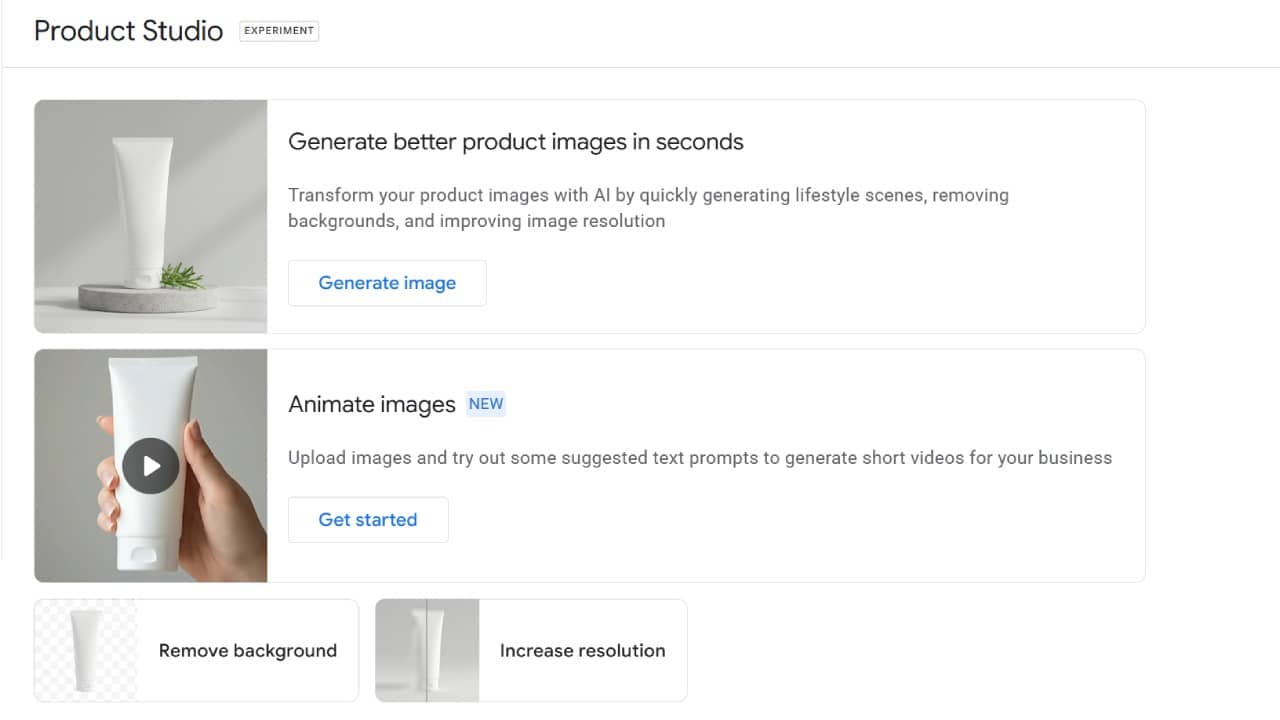
Google has expanded Product Studio inside Merchant Center, rolling out three new creative features that go beyond its original image generation tool.

What’s new. In addition to image generation, Product Studio now lets merchants animate static product images into short videos using suggested text prompts, a move aimed squarely at short-form ads and social-style creative.

Google has also added one-click background removal to help isolate products and create cleaner, more consistent Shopping visuals.

The third update increases image resolution, allowing advertisers to upscale older or lower-quality assets to meet modern visual standards.

Why we care. Product imagery plays a major role in Shopping performance, but creating and refreshing assets is often slow and resource-heavy. These updates give merchants more ways to produce high-quality visuals quickly — without leaving Merchant Center or relying on design teams.

The big picture. Google continues to embed AI-powered creative tools directly into commerce workflows. By housing animation, editing, and enhancement inside Merchant Center, Google is lowering the barrier to frequent creative testing — a key lever for Shopping and Performance Max campaigns.

What to watch. These tools could significantly speed up asset iteration for advertisers with limited creative resources, especially as Google pushes more video-forward and visually rich ad formats across Search, Shopping, and YouTube.

First seen. This update was spotted by Senior PPC Specialist – Vojtěch Audy

Google: Exact match keywords won’t block broad match in AI Max

Why phrase match is losing ground to broad match in Google Ads

Ginny Marvin, Google’s Ads Liaison, is clarifying how keyword match types interact with AI Overviews (AIO) and AI Mode ad placements — addressing ongoing confusion among advertisers testing AI Max and mixed match-type setups.

Why we care. As ads expand into AI-powered placements, advertisers need to understand which keywords are eligible to serve — and when — to avoid unintentionally blocking reach or misreading performance.

Back in May. Responding to questions from Marketing Director Yoav Eitani, Marvin confirmed that an ad can serve either above or below an AI Overview or within the AI Overview — but not both in the same auction:

  • “Your ad could trigger to show either above/below AIO or within AIO, but not both at this time.” Marvin confirmed.

While both exact and broad match keywords can be eligible to trigger ads above or below AIO, only broad match keywords (or keywordless targeting) are eligible to trigger ads within AI Overviews.

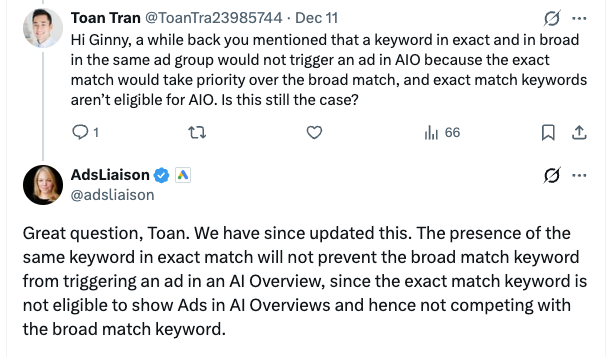
What’s changed. In a follow-up exchange with Paid Search specialist Toan Tran, Marvin clarified that Google has updated how eligibility works. Previously, the presence of an exact match keyword could prevent a broad match keyword from serving in AI Overviews. That is no longer the case.

  • “The presence of the same keyword in exact match will not prevent the broad match keyword from triggering an ad in an AI Overview, since the exact match keyword is not eligible to show Ads in AI Overviews and hence not competing with the broad match keyword.” Marvin said.

Since exact and phrase match keywords are not eligible for AI Overview placements, they do not compete with broad match keywords in that auction — meaning broad match can still trigger ads within AIO even when the same keyword exists as exact match.

The big picture. Google is reinforcing a clear separation between traditional keyword matching and AI-powered intent matching. Ads in AI Overviews rely on a deeper understanding of both the user query and the AI-generated content, which is why eligibility is limited to broader targeting signals.

The bottom line. Exact and phrase match keywords won’t show ads in AI Overviews — but they also won’t block broad match from doing so. For advertisers leaning into AI Max and AIO placements, broad match and keywordless strategies are now essential to unlocking reach in Google’s AI-driven surfaces.

❌