Reading view

Samsung adds 9 new devices to One UI 8.5 beta

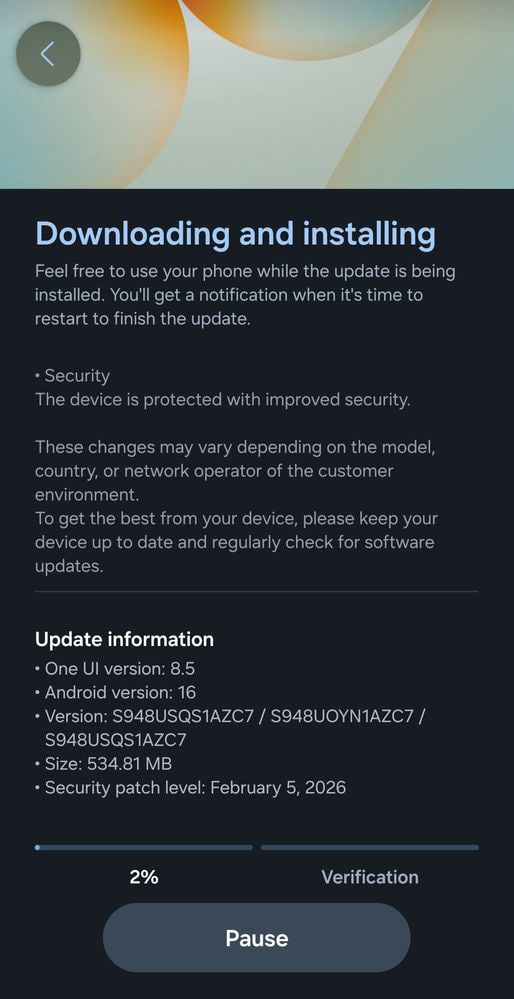
Samsung has announced the expansion of the One UI 8.5 beta program by adding 9 new devices, ending months long wait.

The beta program allows users to test the latest features before official release, which also enables the company to get important feedback and improve the software by fixing loopholes for a better user experience.

Samsung started the One UI 8.5 beta program in December last year with the Galaxy S25 series. Earlier this month, the program expanded to the Fold 7 and Flip 7 foldables. In the meantime, test builds started to appear for the rest of the devices. Yet today, Samsung comes up with a surprise for these users with a major expansion.

As noted by us and confirmed officially by Samsung, the 9 devices that joined the One UI 8.5 beta program are:

  1. Galaxy S25 FE
  2. Galaxy S24
  3. Galaxy S24+
  4. Galaxy S24 Ultra
  5. Galaxy S24 FE
  6. Galaxy Fold 6
  7. Galaxy Flip 6
  8. Galaxy Tab S11
  9. Galaxy Tab S11 Ultra

With these added, the total number of devices in beta has expanded to 15.

That’s not it, Samsung has announced that the number of One UI 8.5 beta devices will expand further in April. Though Samsung hasn’t said anything about these devices, we expect the S23 series and S23 FE to enter the test phase next, alongside Z Fold 5 and Flip 5 devices and more.

The post Samsung adds 9 new devices to One UI 8.5 beta appeared first on Sammy Fans.

Galaxy S23 series gets March 2026 update before One UI 8.5

Samsung has finally started sending the March 2026 security update for the Galaxy S23 series, one of its prime flagships, doing some groundwork before the next major upgrade initiates.

The update, as usual, was first released in Korea with a firmware version EZC2 for the S23, S23+, and S23 Ultra, and EZC1 for S23 FE, with more than 450MB of downloadable package size. Specifically, the update outlines the importance of the new March 2026 security patch, which fixes many of the security flaws found in the previous build. That said, it will soon start expanding for global S23 series users, improving their security segment.

Samsung Galaxy S23 series March 2026 security update

March 2026 security update for Galaxy S23 series

One UI 8.5 for Galaxy S23 series

In the meantime, Samsung is preparing to rollout the next One UI software version for the Galaxy S-series. The S25 series will be the first to get the major release, and the report suggests that the S23 series may also have a chance to claim One UI 8.5 sooner than expected.

One UI 8.5 comes with numerous upgrades in the visual style and the user experience. It also enhances apps and features such as the quick panel, which has become more customizable than the One UI 8.0 and prior software versions. These improvements will descend to the S23 series and enhance its user experience too.

Still, the late March 2026 rollout suggests that the S23, S23+, S23 Ultra, and the S23 FE could enter the One UI 8.5 beta phase by the end of April or early May. The possibility of S23 users installing the April patch with the newest One UI version is high, but we’ll wait for that to happen.

The post Galaxy S23 series gets March 2026 update before One UI 8.5 appeared first on Sammy Fans.

Samsung Browser launched for Windows 11 and 10 PCs with Perplexity AI

Samsung Browser, Samsung’s mobile internet browser, is now available to download for Windows 11 and Windows 10 PCs with new AI and smart device features.

The launch comes after four months of beta testing; however, you may have noticed that the app is no longer named Samsung Internet. That change is already reflected on mobile devices, and it’s also appearing on the PC app.

Cross-device features

The basic feature package includes bookmarks, home page setup, history, settings, and added Samsung smart apps on the right-hand toolbar.

Besides the basics, you can continue browsing a page from mobile to PC with a cross-device experience. For example, you have been reading about a new car on your Galaxy S26 Ultra, and with one tap, you can open it on your PC to read the same info on a large display.

Samsung Browser Windows open open webpage from Galaxy S26 Ultra

You can import all of your Samsung Pass passwords saved in your mobile device through the Samsung account and save new ones on your PC.

AI Integration with Perplexity

The company has officially confirmed that Samsung Browser on Windows PCs integrates Perplexity AI agents for natural language processing, finds content on pages, and processes information that would take time when done manually.

AI features

Understand Context: You can ask the browser to create a schedule for a visit to a certain place with a travel plan based on the current open page. The AI will browse the page and come up with a plan on the screen.

Samsung Browser AI browsing

AI actions – Samsung Browser can also take actions on your behalf, for example, you can ask the browser what type of video you want to watch or understand the content within the video.

Browsing history – History is one important feature that has long been part of browsers, but its exploration might get tricky, especially when you are searching for that one web page that you explored somewhere a week ago or maybe longer. Samsung Browser could help you to get that page, for things like a laptop they were looking at last week.

Multi-Tab AI – This new browser can also analyze all of the opened tabs and summarize their content at once.

Where to get?

Samsung Browser is available for all PCs with Windows 11 and 10 (1809 and above) starting today. However, the AI features are limited to the U.S. and South Korea, with an expansion planned for more markets. You can download this browser from Samsung Browser’s official website.

The post Samsung Browser launched for Windows 11 and 10 PCs with Perplexity AI appeared first on Sammy Fans.

How to share files between Galaxy S26 series and iPhones

Samsung is sending Airdrop support for Quick Share on the Galaxy S26 series, allowing Android flagship users to share files with iPhones. The update was released a few days prior for Korean users, now expanding to S26 series users around the globe. Though it may have other improvements, the key attention is grabbed by the AirDrop file sharing support.

Here’s how to share files

First, install the latest software update on your Galaxy S26 series and go to the Quick Share via Settings > Connected devices> Quick Share. Look for “Share with Apple devices. This option may have been enabled by default.

Samsung Quick Share AirDrop file sharing

If this is available in your device, check for “Who can share with you”, and select Everyone”. If this isn’t enabled, you won’t see Galaxy devices on an iPhone or other Apple devices.

On the other hand, you will need to do the same on an Apple device. Find AirDrop and change its settings to “Everyone for 10 minutes” to receive files from the Galaxy S26 device.

Quick share to AirDrop file sharing from Galaxy S26 series to an iPhone

You should know that Apple devices will only enable sharing mode for 10 minutes. So, you will have to check it again for the next session.

The file sharing works as usual, and there are no complexities. Just open your Quick Share or AirDrop and tweak these two settings on each device to share or receive files. Furthermore, you can send files in batches, including multiple images mixed with videos.

Quick share to AirDrop file sharing from Galaxy S26 series to an iPhone

This cross-platform file sharing support is currently limited to the S26 series, but the good news is that Samsung will expand it to older flagships with OTA updates. In that case, we expect it to come after the One UI 8.5 update rollout in April.

The post How to share files between Galaxy S26 series and iPhones appeared first on Sammy Fans.

Galaxy Z Fold 8 should borrow 3 of S26 Ultra’s camera upgrade

Galaxy Z Fold 8 design is already leaked online, while its shape and size look identical to the predecessor, the camera should get some upgrades this year. It’s confirmed that the camera island remains vertical with three lenses.

Looking back at last year’s Z Fold 7, its camera specs were:

  • 200MP wide-angle camera (OIS, F1.7)
  • 12MP ultra-wide angle camera (OIS f/2.2)
  • 10MP telephoto camera (OIS, F/2.4)

There’s a 10MP selfie camera on the cover and one inside the foldable screen. To be mentioned, the Fold 7 ramped up to a 200MP camera from the 50MP used in the Fold 6. However, the ultra-wide and the telephoto remained the same. Since Samsung isn’t focusing on the appearance, it must have been working on the camera side.

Samsung Galaxy Z Fold 7

Source – Samsung

Main camera

The phone maker adopted a larger aperture in the Galaxy S26 Ultra at F/1.4 aperture, over the f/1.7 aperture used in the S25 Ultra. A larger aperture enables brighter images and videos, and improves the overall picture quality. Since the Z Fold 7 also used the same lens, the new change in S26 Ultra should also reflect in the Galaxy Z Fold 8.

Telephoto

The introduction of the ALoP camera module for the S26 Ultra has changed the long-range zoom paradigm. This new all-lens on prism structure enables folded zoom for smartphone telephoto with space efficiency compared to the periscope module with increased size. ALoP camera also takes more light to the sensor than other long-range zoom lens solutions.


The Z Fold 7 uses a 3X optical zoom, but the new lens could pave the way for a 5X telephoto within the same space.

If Samsung isn’t keen on bringing ALoP to Z Fold 8, it may polish the 3X telephoto with better image outputs. However, that won’t make sense since it’s time for the phone to get better zooming capability.

Ultra-wide angle

That brings us to the third and final upgrade. Galaxy Z Fold 8 could pay attention to the ultra-wide-angle camera, taking it to 50MP. We’re optimistic for this upgrade, but we doubt that Samsung may not go all out on each lens at once.

Samsung Galaxy Z Fold 8 will launch at the next Unpacked event alongside Z Flip 8. Besides the camera, the phone will retain its main and cover screens. It will use the Snapdragon 8 Elite Gen 5 chipset and One UI 9 (Android 17) out of the box. Upcoming leaks will reveal more about this foldable, so stay tuned with us.

The post Galaxy Z Fold 8 should borrow 3 of S26 Ultra’s camera upgrade appeared first on Sammy Fans.

Samsung is moving slow with March 2026 update rollout

Over the past week, Samsung has released the March 2026 security update for fewer phones than in previous months, indicating a slower pace.

So far, Galaxy S25 series, S24 series, Fold/Flip 7, and Fold/Flip 6 devices have received the latest security patch. However, the rest of the devices are still in the queue to get the OTA update.

To be mentioned, the Galaxy S26 series, Samsung’s latest flagship, still has February 2026 security patches, maintained even after two software rollouts for the lineup. This suggests that the software was pre-planned, and the global version might have slight changes, but let’s not aim too high on this matter.

Samsung Galaxy S26 First update US

Image via Samsung Community

The entire scenario also shows that Samsung’s monthly security patch rollout plan has been slightly derailed for this month. However, we still have 5 days left to conclude March, and that should be enough to expand the latest security update to all eligible phones.

This delay comes as Samsung is expected to release the 8th One UI 8.5 beta somewhere this week. It is also expected to be the final for the Galaxy S25 series. The stable update is likely to come in the first half of April, followed by an expansion for other devices.

Have you received the March 2026 security update for your Samsung Galaxy device? Share your thoughts with us through our social media channels, or connect with me on my X account.

The post Samsung is moving slow with March 2026 update rollout appeared first on Sammy Fans.

Galaxy Z Fold 8 design leak shows Samsung’s design fatigue

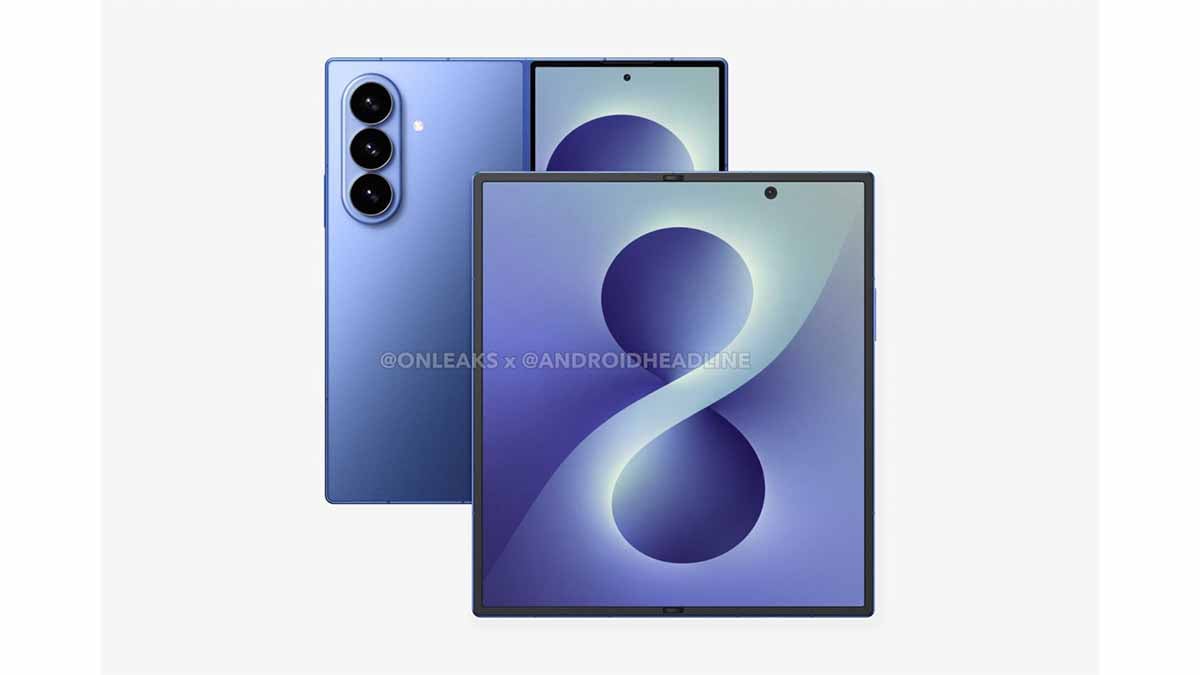
It’s been only a month since the Galaxy S26 series launch, and we may now have our first look at the Galaxy Z Fold 8 design coming courtesy of Androidheadlines.

From the above, the phone looks almost identical to the last generation. Specifically, the display is the same, the camera layout, as well as the bezels. All indicates a familiar design that appeared first with the Galaxy Z Fold 7.

Last year, Samsung went overboard and gave the phone a slim look, which not only facilitates a better user experience but also contributes to aesthetics.

Based on the leak, the Z Fold 8 is likely to come with 158.4mm height x 143.2mm width x 4.5mm thin dimensions once fully unfolded, which shrinks to 158.4mm x 72.8mm and 9mm folded.

Galaxy Z Fold 8 CAD Render

Galaxy Z Fold 8 CAD Render (Source – Androidheadlines)

Compared to this, the Fold 7 measures at 158.4 x 143.2 x 4.2mm unfolded, and 158.4 x 72.8 x 8.9mm folded. That said, the height and the width are the same, but the thickness could be changed. So, the Galaxy Z Fold 8 may carry the same design and dimensions (slightly thicker), thus not making the phone any thinner than the existing generation.

Furthermore, it could also use the 8-inch internal foldable and 6.5-inch cover displays. However, the under-display camera is still a mission from the foldable side.

These are some observations from the CAD renders, but we might come to more details when more leaks start to come out. One of the biggest features of this phone will be the One UI 9.0 (Android 17) user experience, and second, we’ll have to see whether the company adopts ALoP telephoto camera for this year’s Fold lineup, as it did with the S26 Ultra.

Samsung usually releases the Z Fold and Flip lineups in the second half of the year, and this year might not be different.

The post Galaxy Z Fold 8 design leak shows Samsung’s design fatigue appeared first on Sammy Fans.

❌