Reading view

Lenovo Yoga 9i 2-in-1 Aura Edition review: Awesome for entertainment, top-notch battery life

Lenovo Yoga 9i 2-in-1

The 2025 Lenovo Yoga 9i 2-in-1 Aura Edition is one of those laptops that quietly wins you over the longer you use it. I’ve been testing it for well over a month now, and during that time, it accompanied me through launch events, flights, hotel stays, editing sessions, and long workdays. I haven’t personally used many competing premium 2-in-1 laptops recently, so I can’t directly compare them against every rival out there. But after spending this much time with it, I genuinely feel this is one of the best premium convertibles currently available.

The unit I tested comes with Intel’s Lunar Lake platform, a 14-inch 2.8K OLED touchscreen, and rotating hinge speakers. On Lenovo India’s website, this configuration is priced at Rs 1,74,005, firmly placing it in premium territory.

Built for travel and everyday productivity

Lenovo Yoga 9i 2-in-1

One thing I appreciated almost immediately about the Lenovo Yoga 9i 2-in-1 Aura Edition (14ILL10) is how practical it feels for frequent travel. I regularly attend launch events that often involve flying from Mumbai to Delhi and back, and those trips can easily stretch into 15 to 18-hour travel days. During those journeys, I’m constantly switching between airports, cabs, hotel rooms, and event venues while continuing to work.

The Yoga 9i handled that lifestyle extremely well.

The Luna Gray finish gives the laptop a premium look without feeling flashy. The aluminum build feels solid and reassuringly sturdy, while the 360-degree hinge remains smooth and firm no matter how often you switch between laptop, tent, or presentation mode.

And that flexibility genuinely becomes useful in real life. During hotel stays, I often used the laptop in tent mode while watching videos or listening to music. At work events or during quick presentations, the stand-style orientation also came in handy. Of course, you can fully fold it back into tablet mode as well, although realistically, because of the size and weight, I still found myself using it primarily as a laptop. Still, having the freedom to use different orientations depending on the situation adds a lot to the overall experience.

Despite being a convertible, the laptop never felt fragile during travel. It’s also reasonably portable for a premium 2-in-1, making it easy to slide into a backpack without becoming a burden during long commutes.
Lenovo Yoga 9i 2-in-1

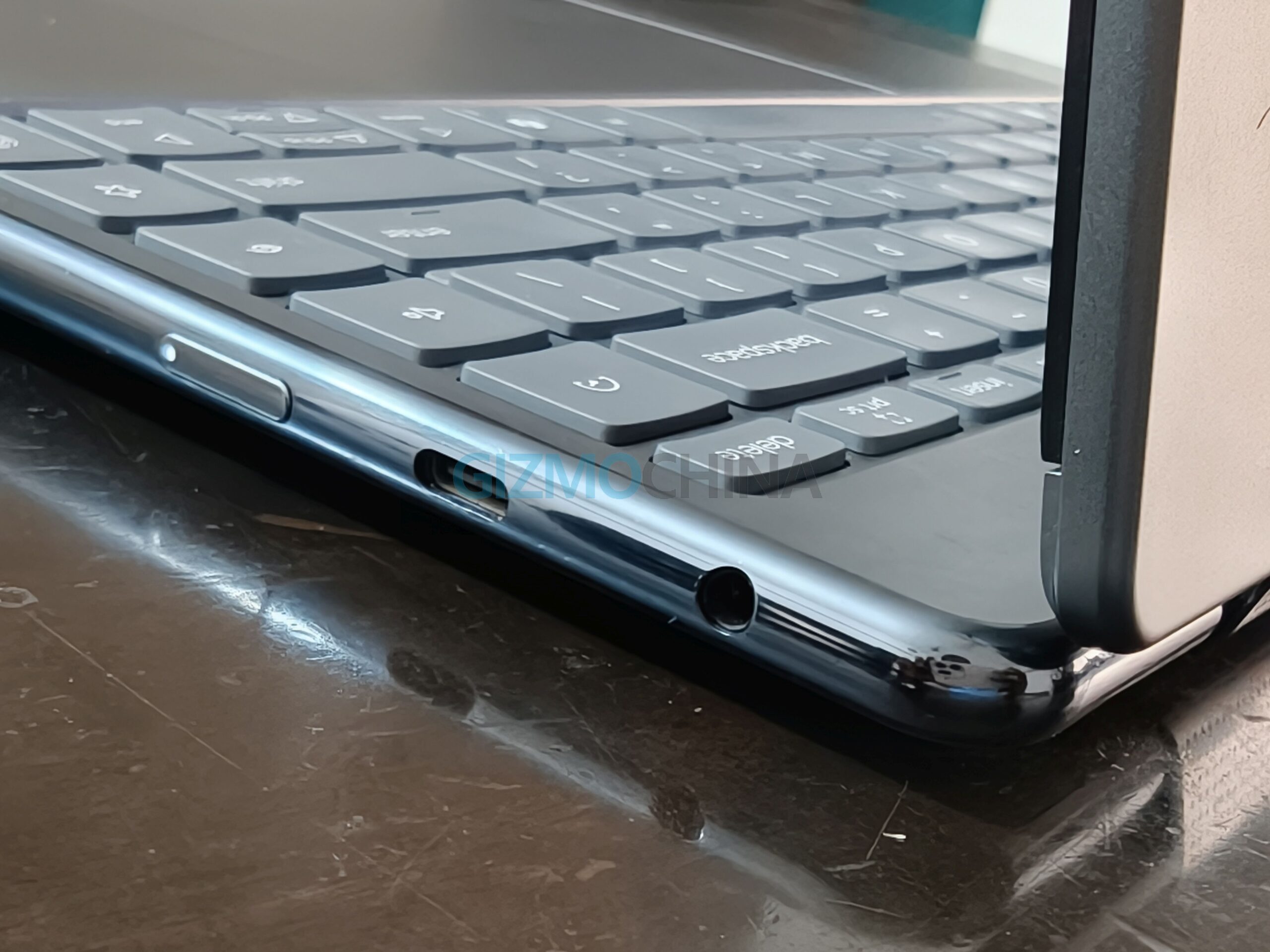
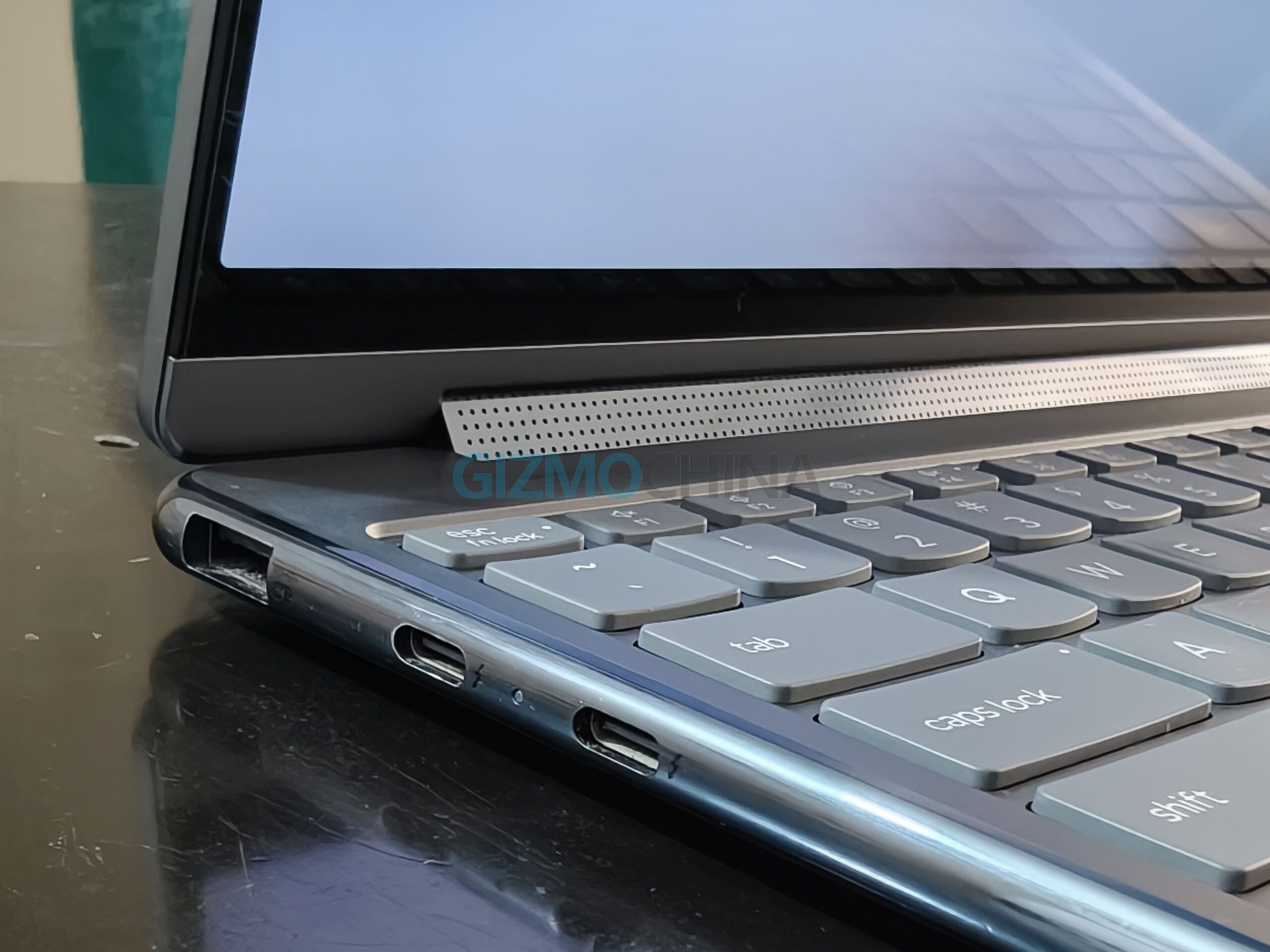
The port selection is also practical for a thin premium laptop. You get two Thunderbolt 4 USB-C ports, one additional USB-C port, a USB-A port, and a 3.5mm headphone jack. I also found it interesting that the power button is placed on the side of the laptop instead of the keyboard deck area. It’s something I personally don’t encounter very often on laptops I use, but I eventually got used to it.

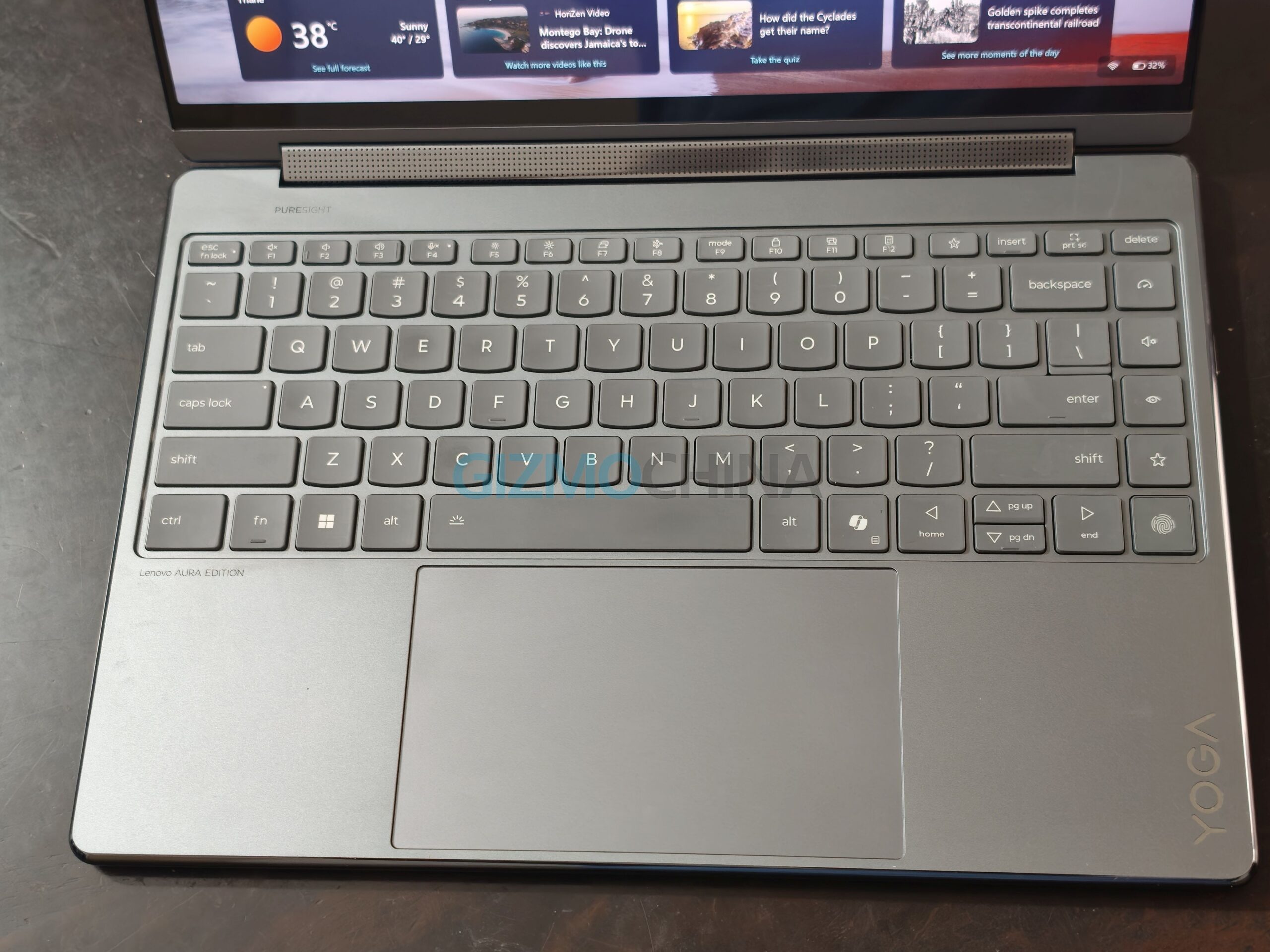
The keyboard deserves praise too. Lenovo continues to make some of the best laptop keyboards in the Windows space, and this one feels tactile and comfortable even during long writing sessions. There’s also a fingerprint reader placed as the extreme key on the bottom-right side of the keyboard. It works reliably, although the placement takes a little time to get used to. Also, there are dedicated buttons on the keyboard to switch between Power, Display, and Audio modes.
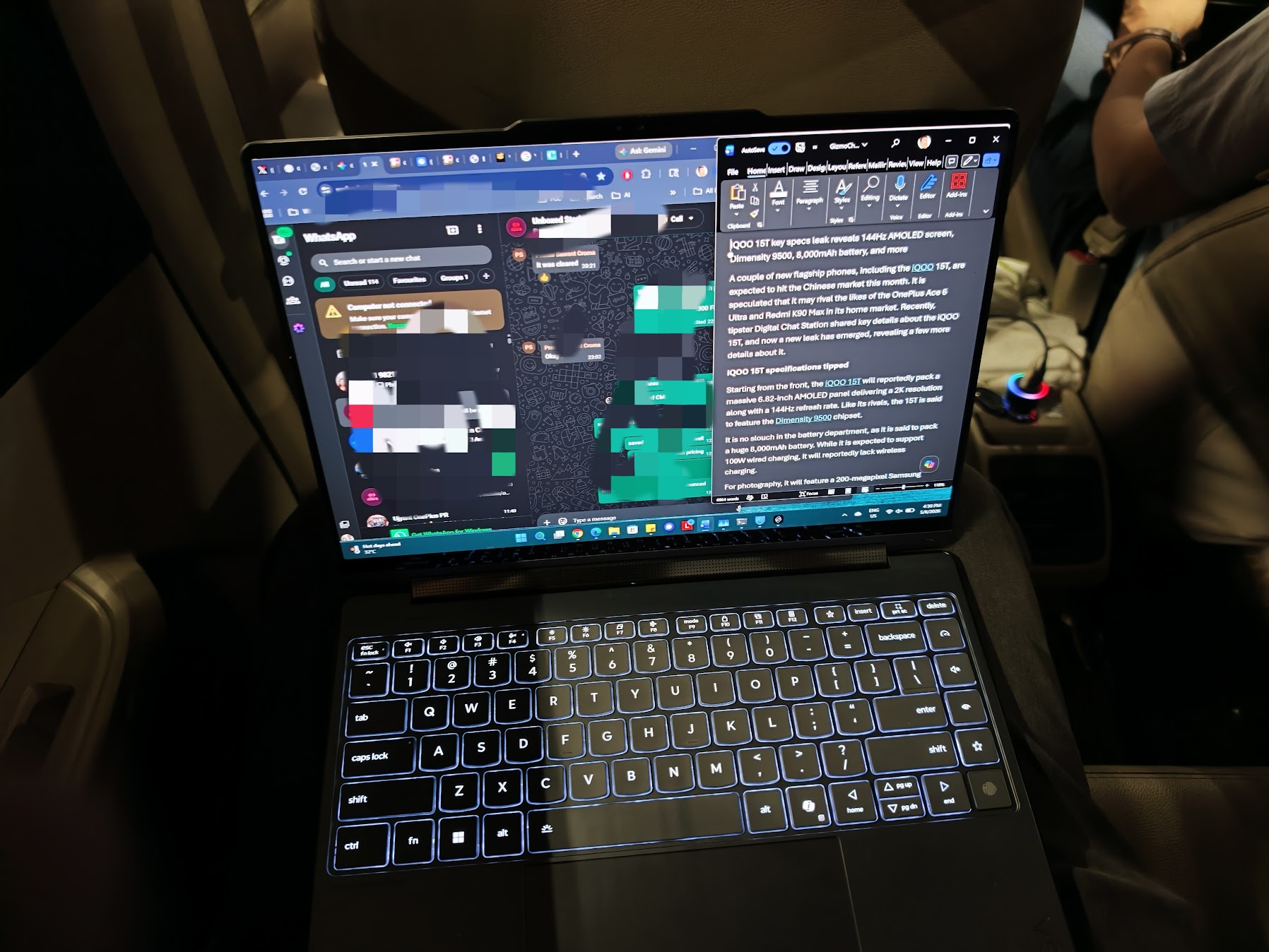
Lenovo Yoga 9i 2-in-1

The keyboard backlighting is also quite good and genuinely useful in dim environments. One moment where I particularly appreciated it was while typing inside a moving car passing through a tunnel, where the backlit keys remained clearly visible without feeling overly harsh or distracting.

Speaking of productivity, the Yoga 9i 2-in-1 Aura Edition supports the Yoga Pen, but my review unit package did not include it.

Battery life removes charger anxiety

Lenovo Yoga 9i 2-in-1

The biggest highlight of the Yoga 9i has easily been the battery life.

This is one of the few Windows laptops where I genuinely stopped worrying about carrying the charger everywhere. Even during heavier usage involving Chrome tabs, YouTube streaming, article writing, social media usage, and light editing, the battery comfortably lasted through most of my workday.

There were several times I carried a power bank expecting I might need a quick top-up, but honestly, I almost never ended up using it. And if needed, the laptop can conveniently charge through USB-C power banks anyway.

The laptop packs a 75Wh battery, and paired with Intel’s highly efficient Core Ultra 7 258V processor, the endurance is genuinely impressive for a premium OLED convertible. Lenovo bundles a 65W USB-C charger in the box, and charging speeds are fairly quick as well. In my usage, getting close to 50 percent charge in around 30 minutes felt realistic, which is especially useful during tight travel schedules between events and flights.

That kind of reliability matters a lot when you spend most of your day away from a desk.

Another thing I noticed is how quiet the laptop usually remains. During regular usage, fan noise is practically nonexistent. It’s only during charging or heavier workloads that the chassis becomes slightly warm.

That said, my testing conditions were far from ideal. During some of the review period, outdoor temperatures were reaching around 43 degrees Celsius, while indoor room temperatures still hovered between 33 and 35 degrees Celsius. Considering those conditions, the thermals are honestly respectable. During normal unplugged use, the laptop rarely became uncomfortably warm unless I pushed it with intensive workloads.

Lunar Lake delivers smooth everyday performance

Lenovo Yoga 9i 2-in-1

The Yoga 9i configuration I tested comes powered by Intel’s Core Ultra 7 258V processor, paired with 32GB LPDDR5X RAM and a 1TB NVMe SSD. Neither the RAM nor the storage is expandable on this device. For a thin-and-light 2-in-1 laptop, performance feels consistently smooth and responsive.

In daily usage, the laptop handled multitasking effortlessly. I routinely worked with dozens of Chrome tabs open alongside Discord, Microsoft Word, and multiple browser windows without noticing slowdowns. App launches feel snappy, Windows animations remain fluid, and the overall experience feels polished.

The Lunar Lake platform is clearly optimized around efficiency and AI-assisted workloads rather than brute-force benchmark numbers, but for the kind of usage most premium ultrabook buyers actually care about — productivity, multitasking, media consumption, presentations, light photo editing, and office workloads — it performs very well.

The integrated Intel Arc graphics are also surprisingly capable for casual gaming and lighter creative workloads. This is not a gaming laptop by any means, but it can comfortably handle lighter titles and some AAA games at lower settings if needed.

The 1TB SSD also deserves mention because file transfers and application loading speeds feel consistently fast throughout usage.

What stood out most to me, though, is how balanced the overall performance feels. The Yoga 9i never tries to behave like a bulky workstation laptop. Instead, it focuses on delivering a smooth premium ultrabook experience while staying relatively cool, quiet, and battery efficient.

Lenovo Yoga 9i 2-in-1

The laptop also comes with a 5-megapixel IR webcam equipped with a c, and during my usage, I found it to be noticeably better than the average Windows laptop camera. It delivers good sharpness, decent colors, and reliable Windows Hello facial recognition for video calls and meetings, although in some indoor lighting conditions, the image can occasionally appear slightly soft or overexposed. Lenovo has also included a physical privacy shutter for the camera, which is always nice to have for added peace of mind.

OLED display and hinge speakers make this an entertainment powerhouse

Lenovo Yoga 9i 2-in-1

The entertainment experience on this laptop is genuinely excellent.

The 14-inch 2.8K OLED display is easily one of the best aspects of the Yoga 9i. Blacks look deep, colors appear vibrant, and HDR content looks fantastic. Whether I was watching YouTube videos at hotels after events or catching up on shows during flights, the display consistently impressed me. The 120Hz refresh rate also adds noticeable smoothness while scrolling through Windows or browsing websites.

One thing worth mentioning is that the OLED panel uses a glossy glass layer on top, which gives the display a more reflective appearance near windows, under bright office lighting, or while using it outdoors. You can actually notice some of those reflections in a few of the images I’ve included in this review. Thankfully, the issue becomes much less noticeable once you increase the display brightness, since the panel itself gets sufficiently bright for most environments.

But what surprised me even more was the speaker setup.

Lenovo Yoga 9i 2-in-1

I listen to a lot of music while working, and during this review period, I found myself listening to plenty of Michael Jackson tracks because the Michael Jackson movie was released around the same time. Songs like Billie Jean, Smooth Criminal, and Beat It sounded fantastic on this machine.

The rotating soundbar hinge speakers are genuinely impressive. No matter which orientation you use the laptop in, the sound output remains loud, clear, and immersive. That’s the clever part of Lenovo’s implementation — whether you’re using the device in laptop mode, tent mode, or folded back for entertainment, the speakers continue projecting sound effectively.

Lenovo Yoga 9i 2-in-1

There’s very little distortion even at higher volumes, vocals remain crisp, and overall sound quality is among the best I’ve heard on a Windows laptop this thin.

Windows touch still needs refinement

Lenovo Yoga 9i 2-in-1

Lenovo has added a feature called Circle-to-Do, which I actually found useful over time.

If you swipe inward from the left side of the screen, you can activate the feature and quickly circle or select on-screen content to perform contextual actions. It feels somewhat like an AI-powered shortcut layer built directly into the system. It’s one of those small additions you may initially ignore but gradually start using more often.

That said, while the touchscreen hardware itself is excellent, I still feel Windows 11 is not fully optimized for touch-first usage.

Technically, you can use this laptop entirely without a mouse thanks to the touchscreen. But in real-world use, there are still moments where touch interactions simply don’t behave the way you expect. Certain menus don’t appear properly, some apps still feel designed primarily for mouse input, and occasionally you end up reaching for the touchpad anyway.

Touch support in Windows has definitely improved over the years, but if you plan to use this machine entirely as a tablet replacement, there will still be frustrating moments.

Lenovo Yoga 9i 2-in-1

Honestly, I feel Microsoft should focus more on refining and streamlining the Windows touch experience instead of pushing Copilot features left, right, and center. Hardware like the Yoga 9i already proves how good premium touchscreen laptops have become. The software experience now needs to consistently catch up across the operating system and third-party apps.

Interestingly, I also feel the industry itself may slowly move in this direction. I wouldn’t be surprised if Apple eventually launches an OLED touchscreen MacBook as early as next year, before gradually expanding touchscreen support across future MacBook models while perhaps keeping non-touch panels limited to entry-level variants. Premium laptop hardware is clearly evolving toward more interactive touch-first experiences, and Windows already has a major head start there — it just needs better optimization to fully capitalize on it.

Verdict

Lenovo Yoga 9i 2-in-1

The Lenovo Yoga 9i 2-in-1 Aura Edition feels like a premium laptop designed around portability, entertainment, battery life, and overall user experience rather than just raw benchmark numbers. And honestly, it succeeds at that.

The OLED display is gorgeous, the hinge speakers are among the best in the segment, battery life is genuinely dependable, and the overall build quality feels premium throughout. Add the flexibility of the 2-in-1 form factor, and this becomes an excellent companion for travelers, content consumers, and productivity-focused users alike.

I haven’t used many rival premium convertibles recently, but after spending over a month with the Yoga 9i, I can comfortably say this feels like one of the best 2-in-1 laptops currently available. I would definitely recommend it to anyone looking for a premium convertible laptop.

That said, one thing buyers should keep in mind is that while Windows 11 generally works well, the touch experience still isn’t always perfectly smooth. There are occasional moments where touch interactions can feel inconsistent or less polished than they should on a device designed to be used in multiple orientations.

PS: Don’t mind the keyboard key smudges visible in some of the images added in this post. The Lenovo review unit sent to me had already been used and reviewed by someone else before reaching me, and it was also fairly dusty when I received it. Also, while Lenovo’s official listing mentions that the Yoga Pen is included in the retail package, the review unit sent to me did not include the stylus.

The post Lenovo Yoga 9i 2-in-1 Aura Edition review: Awesome for entertainment, top-notch battery life appeared first on Gizmochina.

Lenovo Y70 (2026) gaming phone surfaces with Snapdragon 8 Gen 5 on Geekbench

Legion Y70-

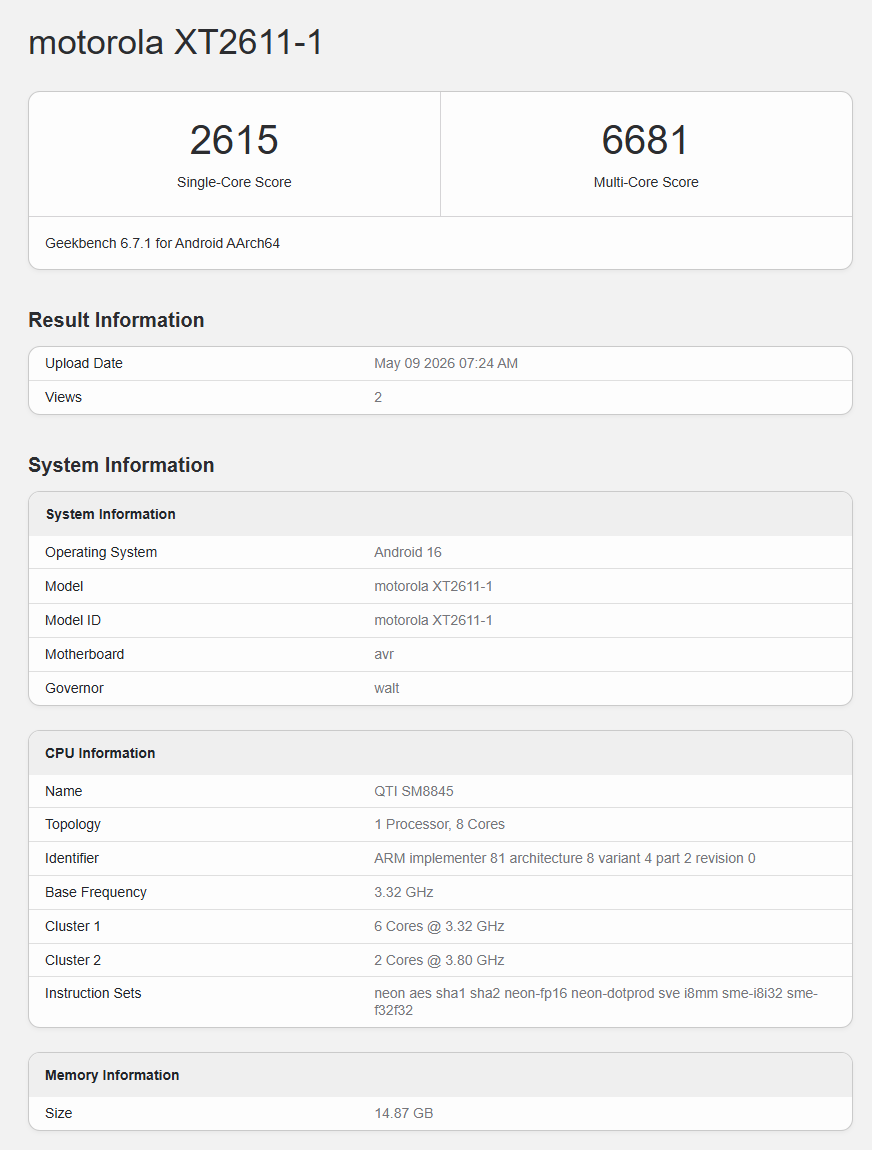
On May 19, Lenovo will unveil a couple of new devices, including the Legion Y70 (2026) gaming phone, in China. Recently, the device, which bears the model number XT2611, was spotted on China’s 3C certification platform, revealing its fast-charging capabilities. Now, the Y70 has appeared in Geekbench’s database, revealing key details about its chipset, RAM, and Android version.

Lenovo Legion Y70 (2026) Geekbench listing

Lenovo Legion Y70 Geekbench listing
Lenovo Legion Y70 Geekbench listing (metadata)

As seen above, the Motorola XT2611-1 device has surfaced on the Geekbench benchmarking platform. While it is labelled as a Motorola device, it is expected to launch in the Chinese market under the Legion Y70 branding.

The listing reveals that the Legion Y70 is powered by the Snapdragon 8 Gen 5 chipset, paired with 16GB of RAM and Android 16. In Geekbench’s single-core and multi-core tests, the device scored 2615 and 6681 points, respectively.

As for the other specifications, reports suggest that the Legion Y70 will feature a 6.8-inch OLED panel with a 2K resolution and a 144Hz refresh rate. It is also confirmed to pack a massive 8,000mAh battery with support for 90W fast charging.

For heat dissipation, the Legion Y70 is said to feature a robust thermal architecture that includes a 5500mm² VC cooling system, 12W liquid gold thermal interface material, and 10W high thermal conductivity gel. The device will reportedly be available in black and white shades.

For more daily updates, please visit our News Section.

Stay ahead in tech! Join our Telegram community and sign up for our daily newsletter of top stories! 💡

(via)

The post Lenovo Y70 (2026) gaming phone surfaces with Snapdragon 8 Gen 5 on Geekbench appeared first on Gizmochina.

This NoiseFit watch can use AI for managing tasks directly from your wrist

NoiseFit Halo 3

Noise has unveiled NoiseFit Halo 3 smartwatch in India. The new wearable focuses on AI-backed productivity tools, health tracking, and smart convenience features packed inside a premium round-dial design. Alongside fitness monitoring, the smartwatch also introduces tools like QR storage and AI voice transcription.

NoiseFit Halo 3 specifications and features

NoiseFit Halo 3
NoiseFit Halo 3

The NoiseFit Halo 3 comes with a 1.43-inch AMOLED display that supports brightness levels of up to 1000 nits for improved outdoor visibility. The smartwatch features a metal body with curved edges and an integrated strap layout inspired by classic dress watches. It is offered with metal, leather, and silicon strap options.

One of the major highlights is the inclusion of Noise AI Pro. The AI-based system supports voice commands, voice recording, and AI transcription that converts voice notes into text. The smartwatch can also generate personalised wallpapers and provide morning brief summaries that include sleep patterns, activity details, and health information.

The wearable also supports Super Notifications on Android devices, allowing users to receive OTPs, ride updates, and delivery alerts directly on the watch. In addition, it includes a Smart Dashboard with support for up to five widgets, including AQI updates, hydration reminders, music controls, and sleep tracking insights. Noise has also added a feature called Noise Vault, which stores QR codes for movie tickets, flights, concerts, and other passes for quick scanning access.

For fitness and health tracking, the NoiseFit Halo 3 supports heart rate monitoring, stress tracking, and SpO₂ measurement alongside continuous all-day tracking. The smartwatch is rated for water resistance up to 10 metres and is claimed to offer up to seven days of battery life on a single charge.

NoiseFit Halo 3 price and availability

The NoiseFit Halo 3 is priced at Rs 5,499 in India as an introductory offer. It is available through the official Noise website, Amazon, and Flipkart in Black, Brown, and Blue colour options.

For more daily updates, please visit our News Section.

Stay ahead in tech! Join our Telegram community and sign up for our daily newsletter of top stories! 💡

The post This NoiseFit watch can use AI for managing tasks directly from your wrist appeared first on Gizmochina.

Who Needs a 10,000mAh Phone in 2026?

Vivo Y600 Pro

For years, smartphone brands focused on making devices thinner, lighter, and faster. Battery upgrades often felt incremental, with most flagship phones settling between 4,500mAh and 5,500mAh capacities. However, 2026 is beginning to look very different. Smartphone makers are now experimenting with massive battery capacities, with some brands even crossing the 10,000mAh mark.

At first glance, a 10,000mAh smartphone may sound excessive. After all, many modern phones already last an entire day. But changing usage habits, AI-powered features, mobile gaming, and heavy content consumption are pushing battery demands to new levels.

The rise of power-hungry smartphones

Vivo Y600 Pro
Vivo Y600 Pro

Modern smartphones are no longer just communication devices. They are gaming consoles, portable editing machines, AI assistants, navigation systems, and entertainment hubs. Features like on-device AI processing, 2K displays with 144Hz refresh rates, advanced cooling systems, and desktop-grade gaming graphics consume a significant amount of power.

Mobile gamers, for example, can drain a standard flagship battery within a few hours while playing demanding titles like Genshin Impact or Zenless Zone Zero. Similarly, creators who shoot 4K or even 8K videos often carry power banks because traditional battery capacities struggle to keep up.

This is where 10,000mAh phones begin to make sense. Such devices are not necessarily aimed at casual users. Instead, they target power users who want true multi-day battery life without constantly searching for a charger.

Silicon-carbon batteries are changing the game

Honor Win
Honor Win series

A few years ago, fitting a 10,000mAh battery inside a regular smartphone chassis would have made the device bulky and impractical. However, silicon-carbon battery technology is rapidly changing that.

These newer batteries offer higher energy density compared to traditional lithium-ion cells. In simple terms, brands can now pack larger batteries into slimmer bodies without dramatically increasing thickness or weight.

That is why several upcoming flagship phones are expected to feature 8,000mAh to 10,000mAh batteries while still maintaining relatively premium designs. Combined with ultra-fast charging speeds, these devices could significantly reduce battery anxiety for heavy users.

Do average users really need it?

Honor-Power-2-Launch-Specs-Price

For many users, the answer is probably no. If your daily activities mainly involve messaging, social media, web browsing, and occasional photography, a modern 5,500mAh or 6,000mAh phone is usually more than enough. That’s the reason why Samsung and Apple flagship phones have barely crossed the 5,000mAh mark.

However, battery life has become one of the biggest purchase considerations globally. Even users who do not fully utilise a 10,000mAh battery may appreciate the convenience of charging their phone once every two or even three days.

There is also a psychological factor involved. Consumers often associate bigger batteries with reliability and long-term durability, especially as battery health naturally declines over time.

10,000mAh phones are already here

Poco X8 Pro Max
Poco X8 Pro Max

Chinese smartphone brands are already leading this transition. Vivo and Honor have recently introduced smartphones in China featuring batteries close to or above the 10,000mAh mark. These devices are currently limited to the Chinese market, but there is a strong possibility that global variants could arrive in the coming months.

The Vivo Y600 Pro, for example, packs a huge 10,200mAh battery inside a body that measures 8.2mm in thickness and weighs between 221 grams and 223 grams. Honor, on the other hand, has launched multiple high-capacity devices, including the Honor Win series with a 10,000mAh battery. The device measures 8.3mm thick and weighs 229 grams.

Another interesting model is the Honor Power 2, which features a 10,080mAh battery while maintaining an 8mm profile. It weighs 216 grams, making it slightly lighter than some other ultra-battery smartphones currently available.

What is impressive is that manufacturers have managed to keep the thickness of these devices under 9mm, which is quite good considering the battery capacities involved. However, the weight still hovers around the 220-gram mark in many cases. Once users add a protective case, the overall weight could increase by several more grams, making these phones noticeably heavier than typical mainstream smartphones.

At the same time, the global market is already seeing phones with 9,000mAh-class batteries. Devices such as the Poco X8 Pro Max and OnePlus Nord 6 are pushing battery capacities far beyond what used to be considered standard for mainstream smartphones.

While ultra-large batteries may not become mandatory for everyone, 2026 clearly marks the beginning of a new battery race. And for gamers, travellers, creators, and power users, the era of the 10,000mAh smartphone may finally make perfect sense.

For more daily updates, please visit our News Section.

Stay ahead in tech! Join our Telegram community and sign up for our daily newsletter of top stories! 💡

The post Who Needs a 10,000mAh Phone in 2026? appeared first on Gizmochina.

Redmi K100 Pro Max may not launch this year, new model tipped instead

Redmi K90 Pro Max

Redmi unveiled the Redmi K90 and K90 Pro Max smartphones in October last year. Notably, this marked the first time a Redmi flagship arrived with the “Pro Max” branding. Based on that naming pattern, early reports claimed that the upcoming Redmi K100 series would include the Redmi K100 and K100 Pro Max. However, a fresh update now suggests that the company could replace the K100 Pro Max with a different model altogether.

Redmi K100 Pro Max moniker could be dropped

As seen in the screenshot above, reliable tipster Experience More claims that there may not be a Q11U model after all, but instead a Q11X device. Earlier reports suggested that the Redmi K100 Pro Max carried the internal engineering codename Q11U. However, the latest information indicates that Redmi may have replaced the project internally and could launch it under a different branding.

To recall, the Redmi K90 Pro Max reportedly carried the internal codename P11U. Therefore, many expected its successor to follow a similar naming structure with the Q11U codename.

The tipster’s latest claim suggests that the company could launch Q11X instead of Q11U. This has led to speculation that Redmi may drop the “Pro Max” branding for the upcoming flagship altogether. At present, it remains unclear whether the device will debut as the Redmi K100 Ultra or under another name entirely.

Hopefully, additional leaks and reports emerging in the coming weeks will provide more clarity regarding the final branding of the device.

Based on previous reports, the Q11X model has already been spotted running early builds of HyperOS 3 that are reportedly optimized for 2nm architecture. This strongly suggests that the device could be powered by a Snapdragon 8 Elite Gen 6 series chipset. Globally, this device could be rebranded as the Poco F9 Ultra in the global market.

For more daily updates, please visit our News Section.

Stay ahead in tech! Join our Telegram community and sign up for our daily newsletter of top stories! 💡

The post Redmi K100 Pro Max may not launch this year, new model tipped instead appeared first on Gizmochina.

iQOO 15T to feature Dimensity 9500 Monster edition; Specs, images emerge via premature listing

iQOO 15T

iQOO is all set to unveil the iQOO 15T, a new flagship offering, later this month. While the launch date is still under wraps, the device has been spotted prematurely in China Telecom’s database, revealing its core specifications. Here’s a look at what the smartphone packs inside.

iQOO 15T specifications (rumored)

iQOO 15T
iQOO 15T

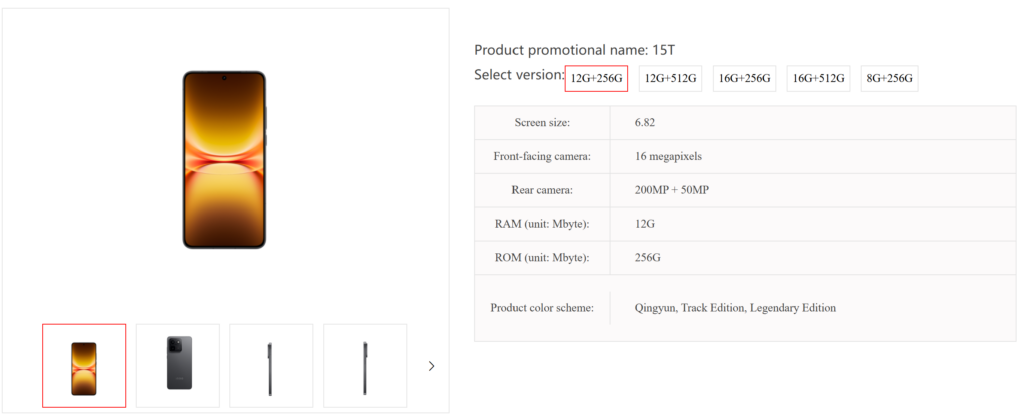
As per the China Telecom listing, the iQOO 15T will house a 6.82-inch OLED screen, which, according to other reports, will offer a 2K resolution and a 144Hz refresh rate. On the front, it will feature a 16-megapixel selfie camera, while the back panel will house a 200-megapixel + 50-megapixel dual-camera setup.

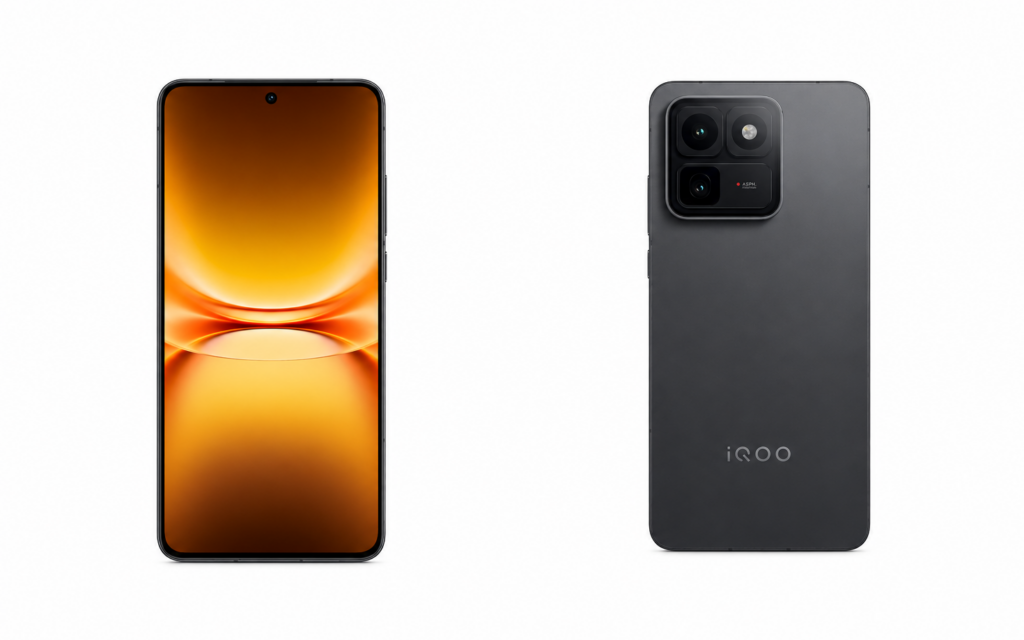
The images available in the listing reveal a flat display and a raised square-shaped camera module on the back. The rest of the design appears minimalist.

The iQOO 15T will be powered by the Dimensity 9500, which is listed as model number MT6993 in the China Telecom listing. It will come preloaded with Android 16, which will have a layer of OriginOS 6 on top.

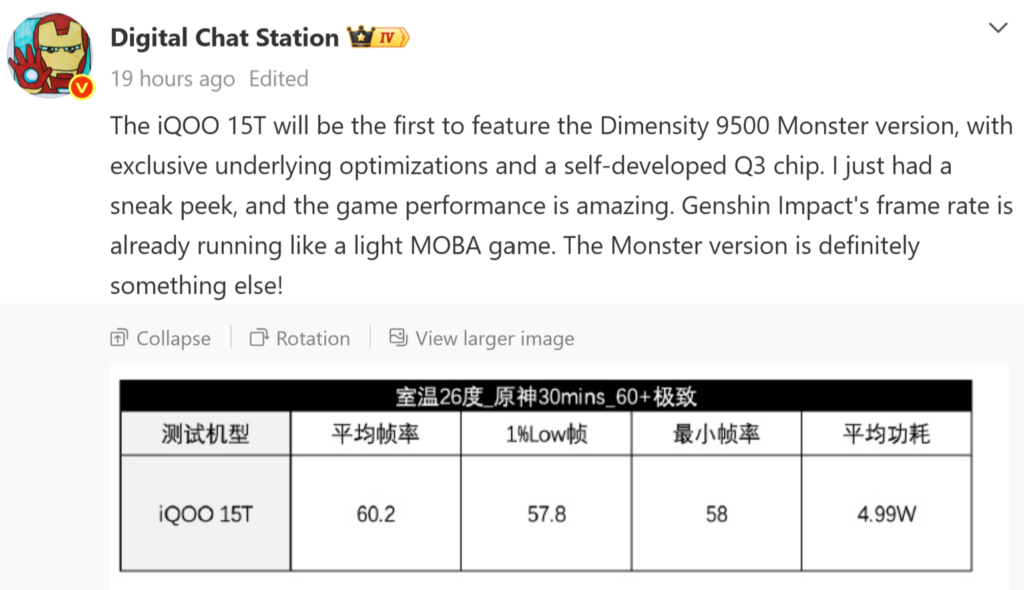
According to Digital Chat Station’s recent Weibo post, the iQOO 15T will debut with a special “Monster” edition of the Dimensity 9500 chipset, paired with the company’s self-developed Q3 gaming chip. The post further claims that the device delivered strong gaming performance during early testing.

According to the shared benchmark details, the iQOO 15T achieved an average frame rate of 60.2fps while running Genshin Impact for 30 minutes at 60fps+ extreme settings in a 26-degree room temperature environment. The test also reportedly recorded a 1% low frame rate of 57.8fps, a minimum frame rate of 58fps, and an average power consumption of 4.99W

Coming back to the China Telecom listing, it also reveals May 20 as the iQOO 15T’s release date. The said event will also see the arrival of other devices, such as the iQOO Pad 6 Pro and TWS 5i earbuds.

It will arrive in multiple configurations, including 8GB+256GB, 12GB+256GB, 12GB+512GB, 16GB+256GB, and 16GB+512GB. It will pack a massive 8,000mAh battery with support for 100W wired charging. Reports suggest that it may lack wireless charging support.

The iQOO 15T will measure 163.37 x 76.71 x 8.25 grams and weigh 216 grams. It will be sold in finishes, such as Qingyun, Track Edition, and Legendary Edition.

For more daily updates, please visit our News Section.

Stay ahead in tech! Join our Telegram community and sign up for our daily newsletter of top stories! 💡

The post iQOO 15T to feature Dimensity 9500 Monster edition; Specs, images emerge via premature listing appeared first on Gizmochina.

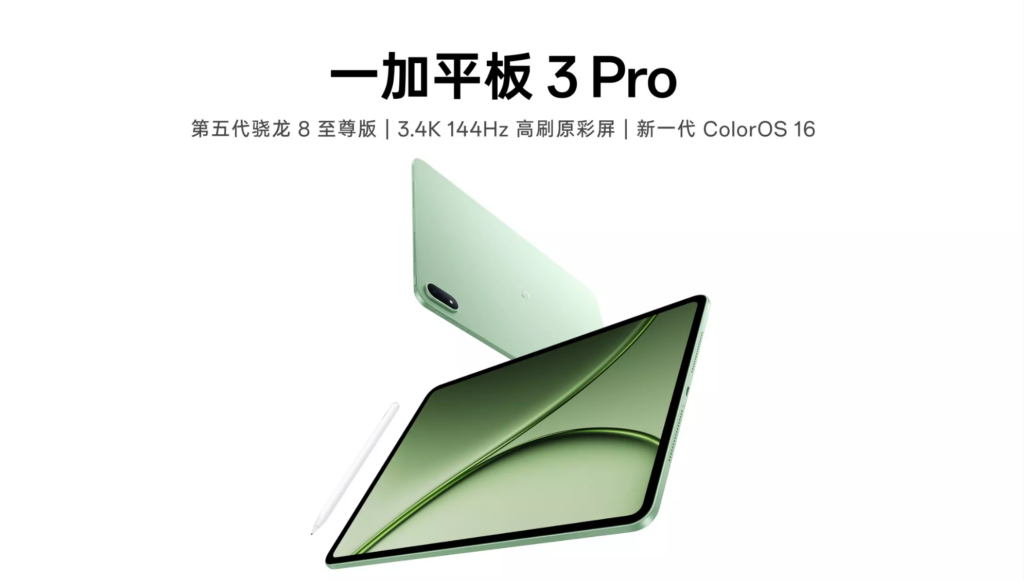
Another OnePlus tablet with Snapdragon 8 Elite Gen 5 chip incoming, but you can’t buy it

OnePlus Pad 3 Pro

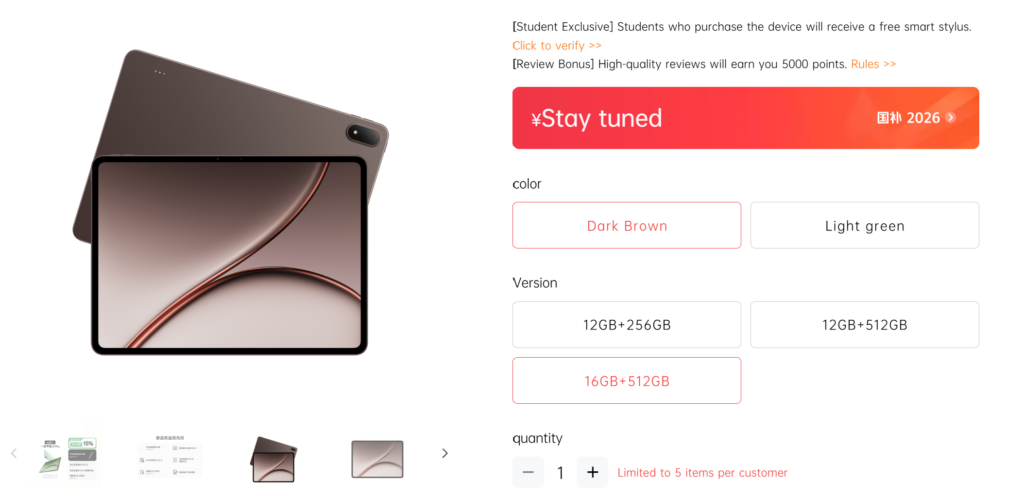
OnePlus has officially opened reservations for the OnePlus Pad 3 Pro in China, revealing nearly all of the tablet’s key specifications ahead of its first sale. The official listing has revealed the official images, color options, and configurations of the flagship tablet.

OnePlus Pad 3 Pro specifications and features

The OnePlus Pad 3 Pro is powered by Qualcomm’s Snapdragon 8 Elite Gen 5 mobile platform and features a large 40,760mm² cooling system that combines graphite and VC heat dissipation. The tablet runs the latest ColorOS 16 software and introduces a desktop-style free multi-window system.

It features a 13.2-inch TCL CSOT LCD display with a 3392 x 2400 resolution, 315ppi pixel density, and up to a 144Hz refresh rate. The screen supports up to 700 nits manual brightness and 1000 nits peak brightness, along with 100 percent DCI-P3 colour gamut coverage and a claimed deltaE value of around 0.7. OnePlus also says it is the first tablet to receive TÜV Rheinland Smart Eye Protection 5.0 certification.

The tablet packs a 13,380mAh battery with support for 67W fast charging. For photography and video calls, it includes an 8-megapixel front camera and a 13-megapixel rear camera. Audio is handled by an eight-speaker setup consisting of four mid-bass units and four ultra-wideband tweeters, along with dual Hi-Res audio certification. Other features include USB 3.1 connectivity, a magnetic ring antenna system, and support for accessories such as the OnePlus Floating Keyboard with integrated NFC and the OnePlus Pencil 3 Pro stylus.

The OnePlus Pad 3 Pro will go on sale in China from 13 May 2026. It will be available in 12GB+256GB, 12GB+512GB, and 16GB+512GB variants. Color options include Deep Brown and Light Green, while additional promotional material also mentions Dawn Gold, Mocha Brown, and Monet Purple finishes.

Interestingly, the OnePlus Pad 3 Pro appears to be the Chinese-market version of the OnePlus Pad 4, which is already available outside China, including in India. The overall design and hardware specifications between the two devices appear to be nearly identical. Therefore, it is unlikely the Pad 3 Pro will make it to the global market.

For more daily updates, please visit our News Section.

Stay ahead in tech! Join our Telegram community and sign up for our daily newsletter of top stories! 💡

The post Another OnePlus tablet with Snapdragon 8 Elite Gen 5 chip incoming, but you can’t buy it appeared first on Gizmochina.

Oppo Bubble, a Reno 16 series accessory, bags multiple certifications: Here’s what it could be

Oppo Reno 15

Oppo is gearing up to launch the Reno 16 series in China as well as other markets. While the lineup is expected to debut in the final week of this month, the global launch may happen next month or in July. A new accessory dubbed the Oppo Bubble, reportedly designed for the Reno 16 lineup, has now received approval from certification platforms such as TUV and Malaysia’s SIRIM.

Oppo Bubble certified by SIRIM, TUV

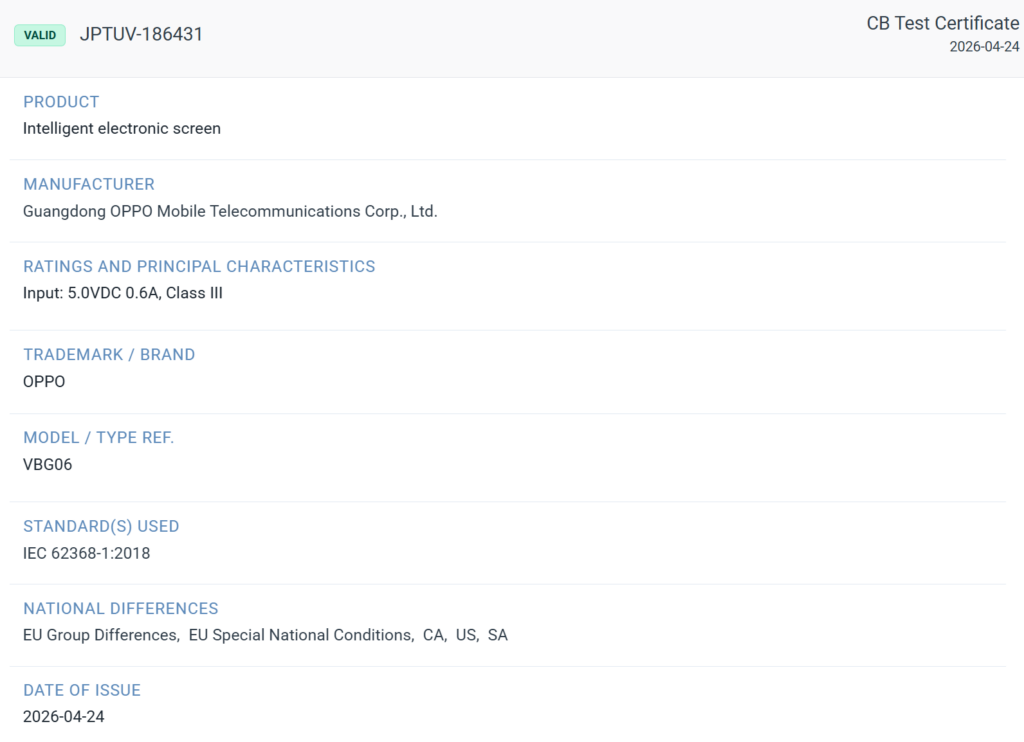
According to a recent report by TheTechOutlook, an upcoming Oppo device with the model number VBG06 has appeared in the SIRIM database with the Oppo Bubble moniker. The listing further describes it as a “wireless screen transmission” device.

Meanwhile, the same device has also surfaced in the TUV database with the description “intelligent electronic screen” and reveals support for 3W charging.

What is Oppo Bubble?

At present, there is no official confirmation regarding the Oppo Bubble, but a recent Weibo post by reliable tipster Digital Chat Station suggests that it will be a new accessory for the Reno 16 series.

Based on the tipster’s claims, the Oppo Bubble appears to be a smart electronic display accessory that supports customized wallpapers and remote camera shutter functionality. The accessory is expected to appeal strongly to fans of celebrity ambassadors such as Song Yuqi, who is reportedly set to endorse the Reno 16 lineup.

For more daily updates, please visit our News Section.

Stay ahead in tech! Join our Telegram community and sign up for our daily newsletter of top stories! 💡

The post Oppo Bubble, a Reno 16 series accessory, bags multiple certifications: Here’s what it could be appeared first on Gizmochina.

Vivo S60 to sport horizontal camera bar, Snapdragon 8-series chip, 7,000mAh battery

Vivo S50 Pro Mini

Reports have revealed that well-known Chinese smartphone brands are preparing to launch powerful yet camera-focused mid-range phones in China this month. These include the Honor 600 series, the Oppo Reno 16 series, and the Vivo S60 lineup. A new leak, courtesy of tipster Digital Chat Station, has revealed key details about Vivo’s next S-series phone.

Vivo S60 key details tipped

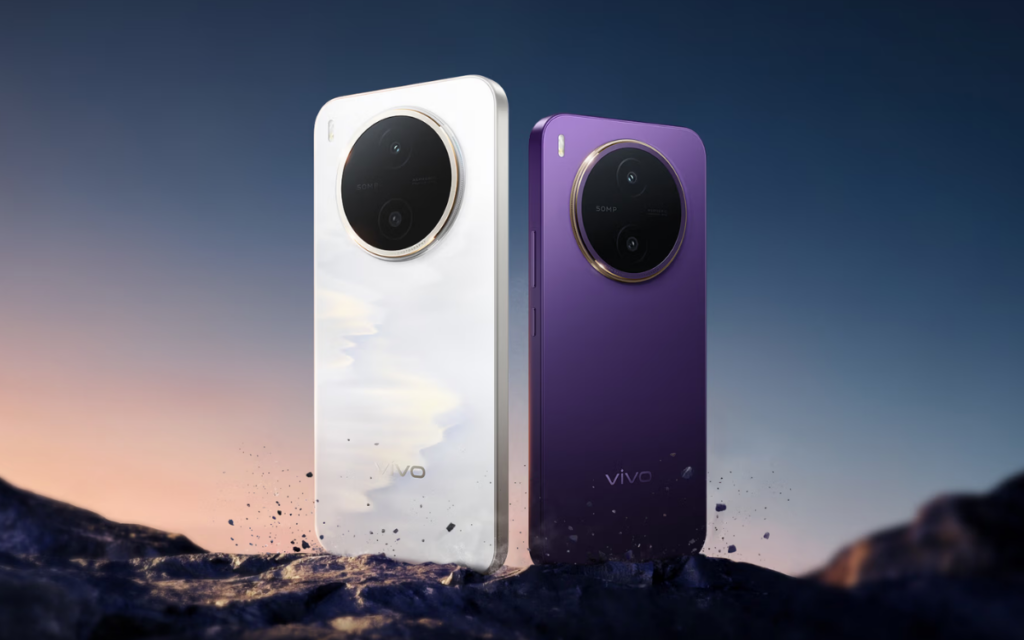
Vivo S60 leak by DCS

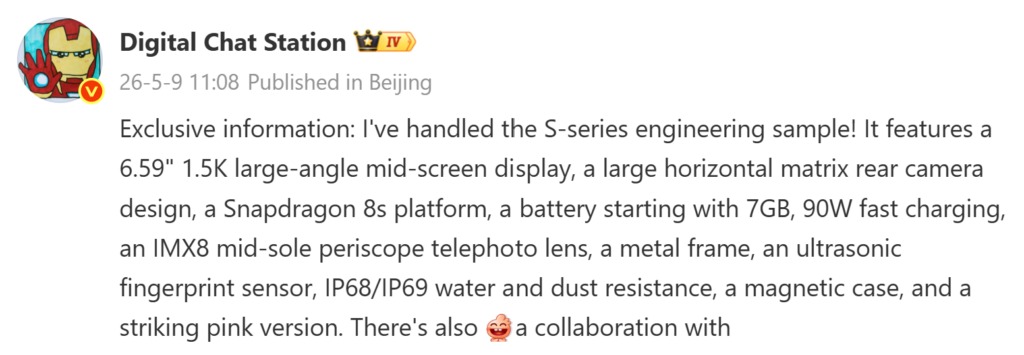
Tipster Digital Chat Station has shared fresh details about an upcoming Vivo “S” iteration smartphone prototype, which appears to belong to the Vivo S60 series. To recall, last year’s S50 lineup featured the Vivo S50 with a 6.59-inch display and Snapdragon 8s Gen 3 chip, while the Vivo S50 Pro Mini was equipped with a smaller 6.32-inch screen and Snapdragon 8 Gen 5 chipset.

According to the new leak, the upcoming S60 series phone features a 6.59-inch 1.5K display with large-radius corners and a centrally positioned screen design. The mentioned screen size suggests that the tipster could be referring to the standard Vivo S60.

The leak further reveals that the S60 will adopt a large horizontal camera matrix on the rear and could be powered by a Snapdragon 8s-series chipset. The device is also tipped to pack a battery capacity starting with “7,” indicating a battery in the 7,000mAh range, along with support for 90W fast charging.

For photography, the prototype reportedly includes a Sony IMX8-series mid-sized periscope telephoto sensor. Other expected features include a metal middle frame, an ultrasonic in-display fingerprint scanner, IP68/IP69-rated dust and water resistance, and support for magnetic accessories via magnetic cases.

The tipster further claims that one of the engineering prototype color options is a striking pink shade. In addition, the device is said to be planned in collaboration with a well-known Chinese anime IP. A report from last month suggested that the S60 lineup will have support telephoto extender accessory.

The Vivo S60 could be accompanied by the Vivo S60 Pro Mini, which may feature a compact design similar to the previous generation. To recall, the S50 Pro Mini was reportedly rebranded as the Vivo X300 FE in markets outside China. Therefore, it is likely that the S60 Pro Mini, if it exists, may be rebadged as the Vivo X500 FE in the first half of 2027.

For more daily updates, please visit our News Section.

Stay ahead in tech! Join our Telegram community and sign up for our daily newsletter of top stories! 💡

The post Vivo S60 to sport horizontal camera bar, Snapdragon 8-series chip, 7,000mAh battery appeared first on Gizmochina.
Mysterious Redmi K100 series phone tipped with insane 7-inch 2K display, 10,000mAh battery

Redmi K90 Pro Max

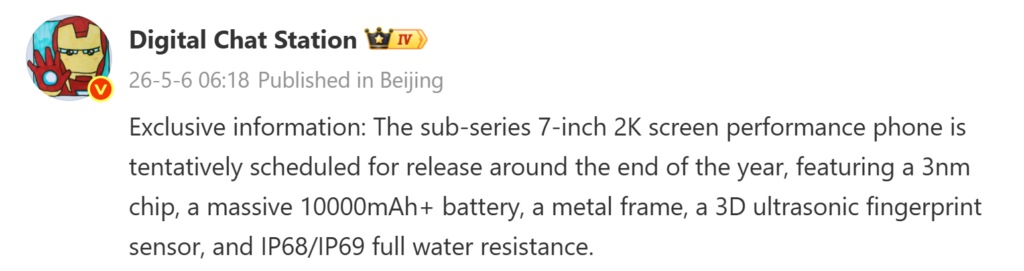
Redmi is reportedly working on the Redmi Note 17 series and Redmi K100 series smartphones for the Chinese market. While the next Note lineup is expected to debut in July or August, the K100 series may break cover in October. In a recent leak, tipster Digital Chat Station revealed key details of a Redmi flagship that is tentatively scheduled to launch around the end of this year, suggesting that he could be referring to one of the Redmi K100 series phones.

Mysterious Redmi K100 series phone’s details emerge

Mysterious Redmi K100 series phone’s details emerge

As per the leak, the Redmi K100 series phone will feature a massive 7-inch display offering a 2K resolution. It will draw power from a huge 10,000mAh+ battery and come equipped with other flagship features, such as an ultrasonic in-screen fingerprint sensor, a metal frame, and an IP68/IP69-rated dust and water-resistant chassis.

Previous leaks from the same source suggested that the Redmi K100 Pro Max would be equipped with the 2nm Snapdragon 8 Elite Gen 6 Pro chip. However, the latest leak mentions the presence of a 3nm chipset instead.

At present, rumors do not point to a new Snapdragon 8-series 3nm chip from Qualcomm this year. Both the Snapdragon 8 Elite Gen 6 and Gen 6 Pro are said to be built on a 2nm process.

On the other hand, there are two other 3nm chips reportedly in development. These include the Dimensity 9500 Plus, which is expected to be an overclocked version of the existing Dimensity 9500, and Xiaomi’s in-house Xring O3 chipset. As far as Qualcomm is concerned, the existing Snapdragon 8 Elite Gen 5 is also a 3nm offering.

Reports have revealed that the Redmi K100 is expected to feature a 6.6-inch display and a battery capacity of around 8,500mAh. Therefore, the mysterious Redmi K100 series phone mentioned by the tipster appears to be neither the K100 nor the K100 Pro Max. This raises the possibility that the lineup could include a third model with the above-mentioned specifications. It may potentially feature either the Dimensity 9500 Plus or the Xring O3 chipset, although the latter currently appears more likely.

 For more daily updates, please visit our News Section.

Stay ahead in tech! Join our Telegram community and sign up for our daily newsletter of top stories! 💡

The post Mysterious Redmi K100 series phone tipped with insane 7-inch 2K display, 10,000mAh battery appeared first on Gizmochina.
iPhone 18 Pro Series: 7 Upgrades You Cannot Ignore

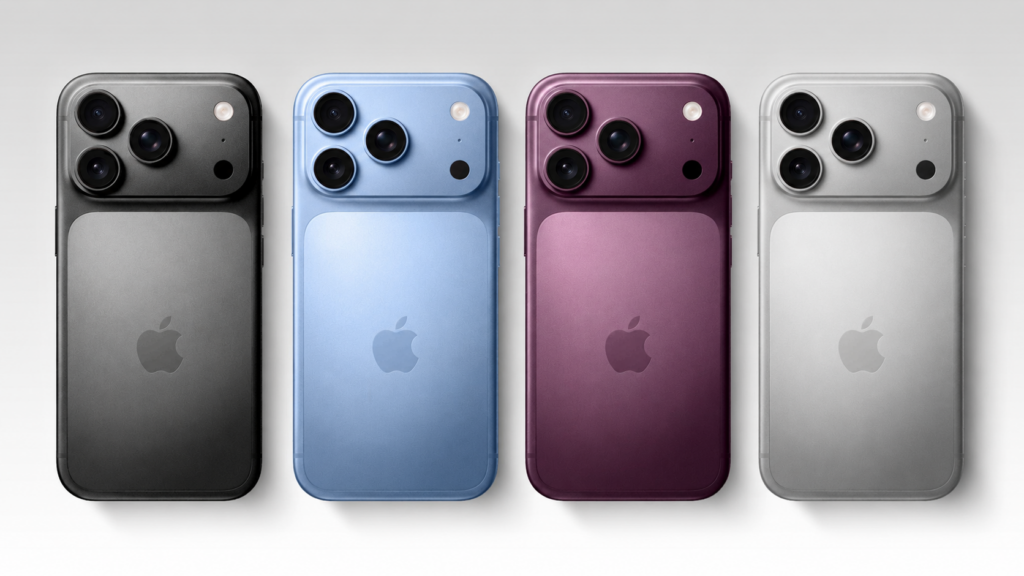
iPhone 18 Pro series AI-generated render

With the expected September launch only a few months away, Apple fans are eagerly waiting for the iPhone 18 Pro series. While global supply chains have been rattled by the rising costs of memory chips, multiple reports claim that despite the price hike of components, the iPhone 18 Pro series may arrive with unchanged pricing.

Whether Apple maintains this aggressive stance or introduces a slight hike in pricing, the iPhone 18 Pro series is expected to offer big upgrades that make it a standout release.

iPhone 18 Pro series AI-generated render

Refined Rear Design

The iPhone 18 Pro is expected to debut a more “unified” aesthetic. Rumors suggest Apple has perfected a new glass-processing technique that minimizes the visual gap between the back panel and the titanium frame, creating a seamless feel in the hand. The headline color for this year is tipped to be a sophisticated Dark Cherry—a deep, wine-like red—joining the staple finishes of Silver, Dark Gray, and a new Light Blue.

The “Micro-Island” Display

The Dynamic Island is finally shrinking. By migrating several Face ID components under the display, Apple is likely to reduce the pill-shaped cutout by roughly 25%. This “Micro-Island” design provides more usable screen real estate, bringing the iPhone closer to a true “all-screen” look while retaining the interactive software features users have grown to love.

2nm A20 Pro Silicon

Under the hood, the A20 Pro chip will be a historic milestone: the world’s first mass-produced processor using TSMC’s 2nm node. This jump in architecture allows for a denser transistor count, resulting in a predicted 15% boost in speed and a staggering 30% reduction in power consumption. It is the powerhouse required for the next generation of on-device agentic AI features.

12GB RAM for Pro Workflows

To support increasingly demanding AI models and professional video codecs, the entire iPhone 18 Pro lineup is expected to jump to 12GB of RAM. This ensures that even with heavy background tasks or 4K ProRes rendering, the system remains buttery smooth. This jump is essential for future-proofing the device for the next half-decade of iOS updates.

Massive Battery Capacity Increase

Apple is reportedly moving away from purely chemical efficiency to focus on raw volume. Leaks point to the iPhone 18 Pro Max packing a massive 5,200 mAh cell, the largest ever seen in an iPhone. By slightly optimizing the internal chassis, Apple is expected to deliver a true “two-day battery” experience, significantly pushing the endurance limits for power users.

Variable Aperture & Camera Control 2.0

The camera system is going mechanical. Apple is expected to introduce a variable aperture on the 48MP main sensor, allowing the lens to physically adjust how much light hits the sensor for natural depth of field.

Complementing this is Camera Control 2.0, which is rumored to feature a pressure-sensitive mechanical feel. This allows for a “half-press to focus” and “full-press to shoot” experience, mimicking professional-grade cameras.

The Proprietary C2 Modem

This year marks a major shift in connectivity. The iPhone 18 Pro series will likely be the first to feature Apple’s in-house C2 5G modem. This custom silicon is designed for extreme power efficiency and deeper integration with the A-series chip. It aims to provide more stable connections in high-density areas and potentially introduces enhanced “Direct-to-Cell” satellite capabilities.

For more daily updates, please visit our News Section.

Stay ahead in tech! Join our Telegram community and sign up for our daily newsletter of top stories! 💡

The post iPhone 18 Pro Series: 7 Upgrades You Cannot Ignore appeared first on Gizmochina.

This Oppo phone could be based on OnePlus Nord CE 6 Lite

OnePlus Nord CE 6 Lite color options

Two upcoming Oppo smartphones with model numbers PYR110 and PSY110 have emerged in the database of China’s TENAA certification body. According to a recent leak, the former is expected to launch in China as an Oppo K15 series phone. The TENAA listing of the PSY110 has also revealed its key specifications, although it remains unclear whether it will also debut under the K15 lineup.

Alleged Oppo K15 series phone’s details emerge

OnePlus Nord CE 6 Lite color options
OnePlus Nord CE 6 Lite

As per the TENAA listing, the Oppo PSY110 features a 6.72-inch LCD screen that offers an FHD+ resolution of 2400 x 1080 pixels. It is powered by an unknown 2.5GHz octa-core chipset paired with 6GB / 8GB / 12GB of RAM. The phone will be available in storage variants such as 128GB, 256GB, and 512GB.

The device is backed by a 6,830mAh rated battery, suggesting that its typical capacity could be around 7,000mAh. For photography, it features a 50-megapixel + 2-megapixel dual-camera setup along with an 8-megapixel front-facing camera.

While the leak does not mention the software version, the device is expected to ship with Android 16-based ColorOS 16. The TENAA listing also reveals the presence of a fingerprint sensor, which is likely embedded into the power button.

The above specifications are quite similar to those of the upcoming OnePlus Nord CE 6 Lite. However, while the Nord CE 6 Lite is said to feature the Dimensity 7400 Apex chipset, the Oppo offering may come equipped with a different processor. Readers are advised to wait for further reports to learn more about the chipset powering the device.

For more daily updates, please visit our News Section.

Stay ahead in tech! Join our Telegram community and sign up for our daily newsletter of top stories! 💡

The post This Oppo phone could be based on OnePlus Nord CE 6 Lite appeared first on Gizmochina.

Oppo K15 series phone with 8,000mAh battery incoming, could be the first Snapdragon 6 Gen 5 phone

Last month, Oppo unveiled the Oppo K15 Pro and K15 Pro+ gaming-focused phones in China. A new leak now suggests that the brand could be preparing to expand the lineup with the vanilla Oppo K15. The first details of the upcoming device have also surfaced.

Oppo K15 key details tipped

According to tipster Bald Panda, the upcoming Oppo K15 series phone, which may arrive with an additional suffix in its final branding, will feature a 6.78-inch LTPS screen that supports a 1.5K resolution. It is said to house a massive 8,000mAh battery within a body measuring 8.8mm in thickness and weighing 213 grams. The tipster further revealed that the device is powered by a 2.6GHz processor, but did not disclose the exact chipset name.

The K15 appears to be the Oppo PYR110, which recently appeared in TENAA’s database. The listing revealed that its 6.78-inch AMOLED panel supports a 1.5K resolution of 2772 x 1272 pixels. Its rated battery capacity is listed as 7,820mAh, while the typical value could be around 8,000mAh.

The K15 is expected to arrive with 6GB / 8GB / 12GB / 16GB RAM and 128GB / 256GB / 512GB / 1TB storage options. It may feature a 16-megapixel front camera and a 50-megapixel + 8-megapixel dual-camera setup on the back. Other expected features include an in-screen fingerprint sensor and an IR blaster.

Coming back to the chipset, Qualcomm recently unveiled the Snapdragon 6 Gen 5 chip, which clocks at 2.6GHz. During the launch, the company stated that Oppo would be among the first brands to adopt the new chip. Since the K15 has also been spotted with a 2.6GHz octa-core processor, it remains to be seen whether it will indeed feature the Snapdragon 6 Gen 5 chipset. MediaTek also has a 2.6GHz octa-core chip in its Dimensity lineup. Hence, it is advisable to wait for further reports to know about the device’s chip.

For more daily updates, please visit our News Section.

Stay ahead in tech! Join our Telegram community and sign up for our daily newsletter of top stories! 💡

The post Oppo K15 series phone with 8,000mAh battery incoming, could be the first Snapdragon 6 Gen 5 phone appeared first on Gizmochina.

boAt steps into premium audio territory with Snapdragon-powered Nirvana Eutopia 2 Pro

Boat Nirvana Eutopia 2 Pro

Nirvana by boAt has announced a major upgrade for its upcoming premium audio products by integrating Snapdragon Sound technology into its future lineup. The first product expected to showcase this partnership is the Nirvana Eutopia 2 Pro headphones, which are scheduled to launch in the second half of 2026. The announcement hints at boAt’s growing focus on high-end wireless audio experiences for music, gaming, and entertainment users in India.

Snapdragon Sound and premium audio features

Boat Nirvana Eutopia 2 Pro

The upcoming Nirvana Eutopia 2 Pro headphones are expected to be powered by the Snapdragon S3 Gen 1 platform and support Qualcomm aptX Lossless audio. This setup is designed to deliver lossless wireless sound with lower latency and improved connection stability. Qualcomm’s Bluetooth High Speed Link technology is also part of the package, helping maintain smoother audio transmission even in demanding environments.

boAt says the integration of Snapdragon Sound is aimed at improving the complete wireless audio chain, from the playback source to the headphones. Apart from music streaming, the technology is expected to improve voice calls and gaming performance with reduced lag and clearer audio output. The headphones are also being positioned as a studio-grade wireless audio solution for users who prefer premium listening experiences without wired connectivity.

Ahead of the official launch, boAt has teased several features expected on the Nirvana Eutopia 2 Pro. These include Dolby Atmos optimization with Dolby Head Tracking support, Hybrid Active Noise Cancellation, and ultra-low latency audio performance aimed at gaming and video streaming.

The headphones are expected to arrive as part of Nirvana by boAt’s flagship audio portfolio later this year. The collaboration with Qualcomm Technologies also reflects the increasing demand for premium wireless audio products in India, especially among users looking for higher-quality sound and advanced connectivity features.

For more daily updates, please visit our News Section.

Stay ahead in tech! Join our Telegram community and sign up for our daily newsletter of top stories! 💡

The post boAt steps into premium audio territory with Snapdragon-powered Nirvana Eutopia 2 Pro appeared first on Gizmochina.
iQOO Neo 12 first details out: 2K+ display, Snapdragon 8 Elite Gen 5 tipped

iQOO Neo 11

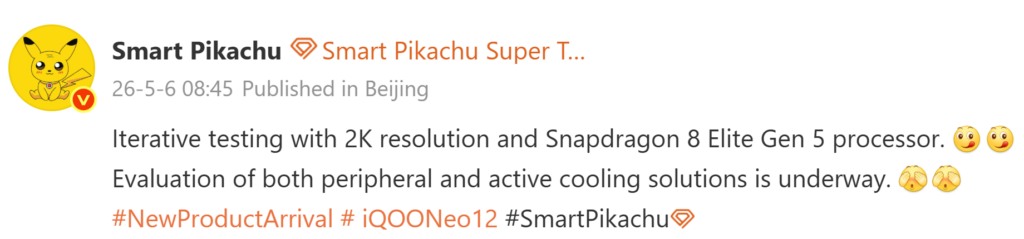
Last year in October, iQOO unveiled the iQOO 15 as well as the iQOO Neo 11. This year too, the brand is expected to announce the iQOO 16 in October. So far, reports have revealed several details about the upcoming iQOO flagship. Now, a new leak by tipster Smart Pikachu has not only revealed the existence of the Neo 12, but also disclosed its first details. Likely, it may debut alongside the iQOO 16 later this year.

iQOO Neo 12 key details tipped

iQOO Neo 12 key details emerge

According to the tipster, the upcoming iQOO Neo 12 may feature a 2K+ resolution display and the Snapdragon 8 Elite Gen 5 chipset. The leak also suggests that iQOO is currently evaluating two cooling approaches for the device, including an external accessory-based cooling solution and an active cooling system integrated into the phone.

At present, iQOO is teasing the iQOO 15T flagship phone, which will launch later this month in China. Reports have revealed that it will feature a 6.83-inch AMOLED screen offering a 2K resolution along with a 144Hz refresh rate. It will have a 16-megapixel front camera and a 200-megapixel + 50-megapixel dual-camera setup on the back.

Under the hood, the iQOO 15T will feature the Dimensity 9500 chip and an 8,000mAh battery with 100W wired charging, but it will lack wireless charging support. The phone will arrive in multiple configurations, such as 12GB+256GB, 12GB+512GB, 16GB+256GB, 16GB+512GB, and 16GB+1TB.

The 15T will come with other features, such as an ultrasonic in-screen fingerprint sensor, a metal middle frame, and an IP68/69-rated dust and waterproof chassis. It is expected to arrive in three shades, namely Qingyun, Legend, and Track Edition.

For more daily updates, please visit our News Section.

Stay ahead in tech! Join our Telegram community and sign up for our daily newsletter of top stories! 💡

The post iQOO Neo 12 first details out: 2K+ display, Snapdragon 8 Elite Gen 5 tipped appeared first on Gizmochina.
Samsung launches affordable Mini LED TVs in India with AI features and up to 100-inch screens

Samsung Mini LED TVs annnounced

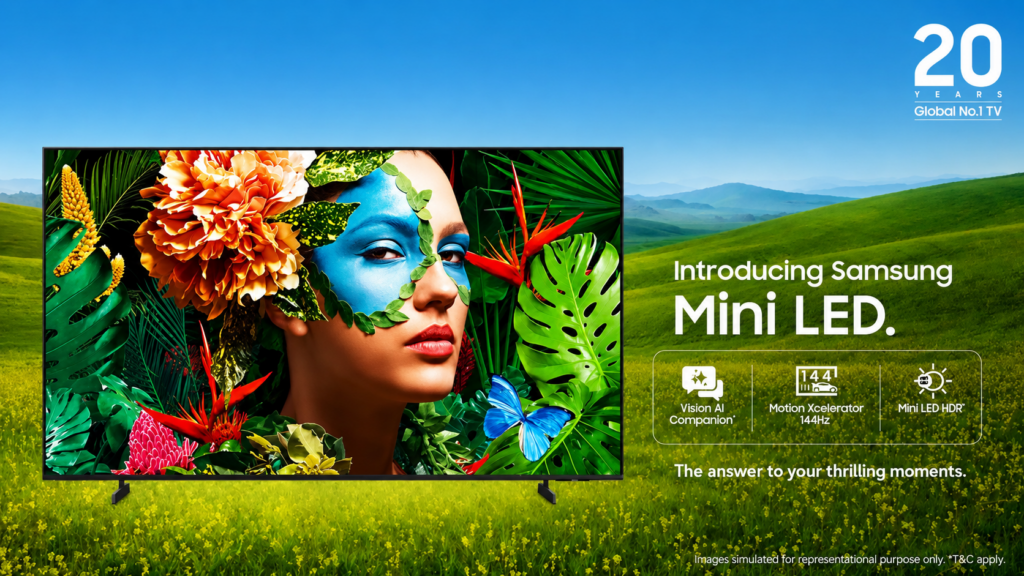
Samsung has introduced its 2026 Mini LED TV lineup in India, bringing new Vision AI-powered features, upgraded picture processing, and larger screen options to the premium television segment. The latest range starts at Rs 42,990 (~$450) and includes models ranging from 43-inch to 100-inch, targeting users looking for brighter visuals, improved contrast, and smarter entertainment features.

Vision AI features and display upgrades

Samsung Mini LED TVs annnounced
2026 Samsung Mini LED TVs annnounced-

The new Mini LED TVs come with Samsung’s MetalStream Design that uses a slim metal body and narrow bezels for a more immersive viewing experience. Samsung says the Mini LED backlighting system uses much smaller LEDs compared to conventional LED TVs, allowing more precise light control for deeper blacks, better contrast, and improved HDR performance.

The lineup also supports Pure Spectrum Color technology for more accurate colour reproduction and a wider colour gamut. Additional enhancements such as Color Booster and Mini LED HDR are included to improve brightness, contrast, and overall image quality across movies, sports, and streaming content. For gamers, the TVs support Motion Xcelerator 144Hz, which is aimed at reducing blur and improving smoothness during fast-paced gameplay and sports viewing.

Powering the lineup is Samsung’s NQ4 AI Gen2 Processor with a 20-neural-network architecture designed for real-time picture optimization, AI upscaling, and audio tuning. Samsung has also added an AI Sound Controller that adjusts sound settings based on the type of content being watched and user preferences.

The TVs run One UI Tizen and Samsung is promising up to seven years of OS upgrades. Smart features include Samsung TV Plus with access to more than 150 free channels across 14 languages, along with SmartThings integration, Samsung Knox Security, Apple AirPlay, Alexa, and Google Assistant support.

Samsung’s latest Mini LED TVs are available through retail stores, Samsung’s official website, and Flipkart. The company is also offering up to 5 percent cashback and zero down payment EMI options for up to 30 months.

For more daily updates, please visit our News Section.

Stay ahead in tech! Join our Telegram community and sign up for our daily newsletter of top stories! 💡

The post Samsung launches affordable Mini LED TVs in India with AI features and up to 100-inch screens appeared first on Gizmochina.
Xiaomi 17 Max bags an important certification before launch

Xiaomi 17 in Pine Green

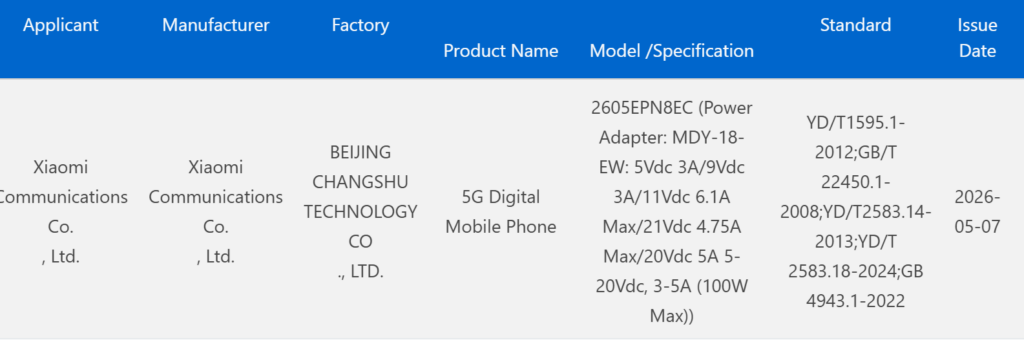
Last month, a Xiaomi device with model number 2605EPN8EC was spotted on China’s SRRC certification platform. The same device has now received approval from the country’s 3C certification authority. Rumours surrounding it suggest that it could be the upcoming Xiaomi 17 Max, which may launch later this month.

Xiaomi 17 Max 3C certified

The screenshot above shows that the Xiaomi 17 Max has been certified by China’s 3C authority. The listing reveals that the device may ship with support for 100W fast charging.

Xiaomi 17 Max specifications (rumored)

As per reports, the Xiaomi 17 Max will house a massive 8,000mAh battery and support 50W wireless charging in addition to 100W wired charging. On the front, it will feature a large 6.9-inch flat OLED panel offering a 1.5K resolution and possibly a 144Hz refresh rate. While the existing 17 Pro and 17 Pro Max feature rear displays, the upcoming Max variant is not expected to include one.

Under the hood, the 17 Max will reportedly feature the Snapdragon 8 Elite Gen 5 chip. It may ship with up to 16GB of LPDDR5x RAM and up to 1TB of UFS 4.1 storage.

For selfies, it may feature a 50-megapixel front camera. On the back, the device is expected to house a triple-camera setup comprising a 200-megapixel Samsung HPE primary camera with OIS support, a 50-megapixel ultra-wide lens, and a 50-megapixel periscope telephoto camera with 3x optical zoom.

The Xiaomi 17 Max is expected to come preloaded with Android 16 and HyperOS 3. Other expected features include an ultrasonic in-screen fingerprint sensor, symmetrical dual speakers, and an IP68/69-rated dust and water-resistant body. The device is expected to arrive in black and white color options. Speculations are rife that the phone may remain exclusive to the Chinese market.

For more daily updates, please visit our News Section.

Stay ahead in tech! Join our Telegram community and sign up for our daily newsletter of top stories! 💡

The post Xiaomi 17 Max bags an important certification before launch appeared first on Gizmochina.
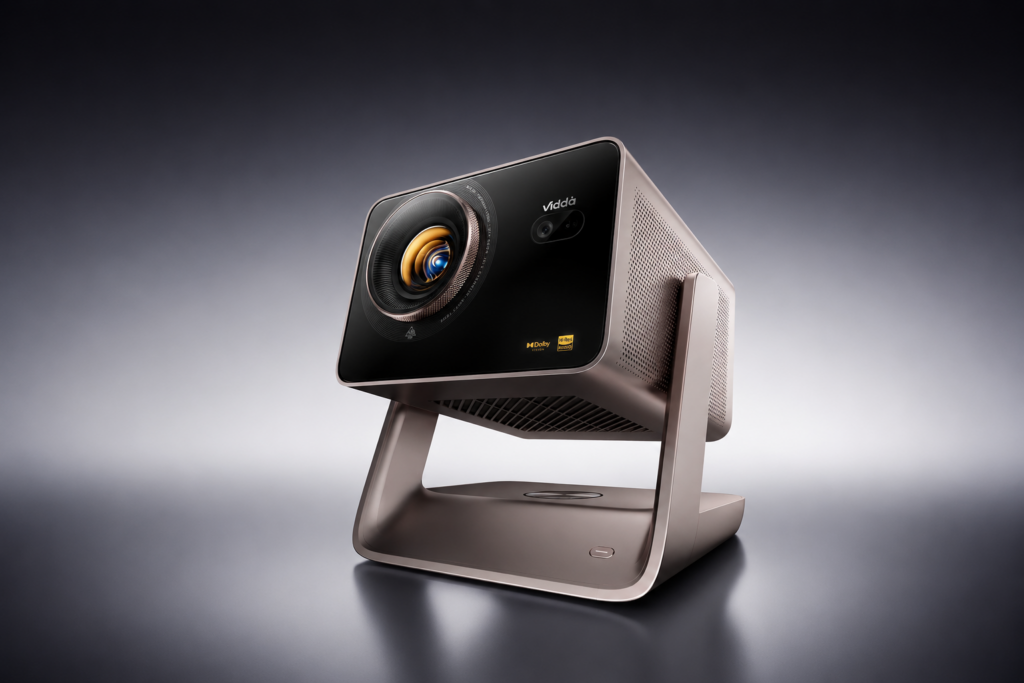
Hisense unveils Vidda C5 projector lineup with JBL audio and 240Hz gaming support

Hisense Vidda C5 series

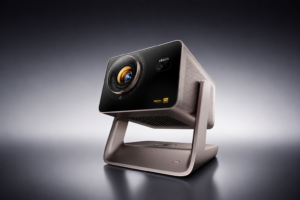
Hisense and Vidda have teamed up to launch the Vidda C5 series laser projectors in China. The new lineup focuses on premium home cinema experiences, gaming performance, and high-brightness projection, while also introducing several upgrades in audio and display technologies across different models.

Hisense Vidda C5 series specifications and features

Hisense Vidda C5 series

The Vidda C5 lineup includes four models called the C5 Pro Max, C5 Ultra, C5 Ultra Max, and C5 Master. All variants come equipped with cinema-focused hardware such as Hubble movie lenses, VRR support, 240Hz refresh rate support, and 1ms low latency aimed at gamers. The projectors also feature a 2.1-channel speaker system with dual 8W tweeters, dual 10W full-range units, and a 20W subwoofer.

The C5 Pro Max features dual QuaLas42 laser systems, 3200 CVIA brightness, a 0.47-inch DMD chip, 5000:1 native contrast ratio, Wi-Fi 6, and 3GB RAM with 64GB storage. The C5 Ultra steps things up with the new MCL3A laser system, 4400 CVIA brightness, 6000:1 contrast ratio, Wi-Fi 7 support, and 4GB RAM with 64GB storage.

For users looking at higher-end options, the C5 Ultra Max adds a new SST architecture DMD chip, 4700 CVIA brightness, and Harman JBL-tuned 2.1-channel audio. The top-end C5 Master combines the MCL3A and QuaLas42 laser systems, reaches 5800 CVIA brightness, and introduces liquid cooling alongside an 8000:1 native contrast ratio. It also offers 4GB RAM and 128GB storage.

Hisense Vidda C5 series price and availability

In terms of pricing, the Vidda C5 Pro Max starts at 7,999 yuan (~$1,175) in China, while the C5 Ultra is priced at 10,499 yuan (~$1,455). The C5 Ultra Max costs 12,999 yuan (~$1,800), whereas the flagship C5 Master carries a price tag of 14,999 yuan (~$2,080). Hisense has not yet confirmed global availability for the new projector lineup.

For more daily updates, please visit our News Section.

Stay ahead in tech! Join our Telegram community and sign up for our daily newsletter of top stories! 💡

The post Hisense unveils Vidda C5 projector lineup with JBL audio and 240Hz gaming support appeared first on Gizmochina.
Alibaba’s Qwen AI Glasses S1 gets proactive AI features and spatial 3D display upgrade

Alibaba Quark AI Glasses S1

Alibaba has announced a major software upgrade for the Qwen AI Glasses S1, bringing a more proactive approach to AI interactions. Instead of waiting for voice commands, the smart glasses can now offer contextual suggestions and reminders based on a user’s schedule, surroundings, and daily habits. The update also introduces spatial 3D display technology and several lifestyle-focused AI services.

Qwen AI Glasses S1 now acts before you ask

Alibaba Quark AI Glasses S1

The latest update allows the Qwen AI Glasses S1 to provide real-time prompts without requiring users to manually trigger commands. For example, the glasses can remind users to carry an umbrella before leaving home if rain is expected. During work hours, the device can also suggest taking a short break or stretching based on posture, wear duration, and activity patterns.

Alibaba says the AI system combines factors such as location, time, weather conditions, and usage behaviour to generate contextual recommendations. The company plans to further expand these abilities through stronger multimodal understanding and memory features. Future updates may include reminders to leave early for meetings due to traffic conditions or suggestions to switch from coffee to water after multiple caffeine orders during the day.

The update will also add ride-hailing, flash shopping, itinerary planning, and movie ticket booking features later this month. These additions are designed to reduce the need to frequently access smartphones during commuting, travel, or leisure activities.

Another major addition is what Alibaba describes as the world’s first spatial 3D display system for AI glasses. The Qwen AI Glasses S1 uses dual optical engines and binocular stereoscopic imaging technology to create layered visuals with depth perception instead of flat overlays.

This could make navigation prompts, notifications, subtitles, and digital content appear more naturally within the user’s field of view. Alibaba also announced partnerships related to tourism and cultural projects, including AI-assisted documentary creation and travel-focused experiences.

The update is rolling out to the Qwen AI Glasses S1, which is also marketed as the Quark AI Glasses S1 in China.

For more daily updates, please visit our News Section.

Stay ahead in tech! Join our Telegram community and sign up for our daily newsletter of top stories! 💡

The post Alibaba’s Qwen AI Glasses S1 gets proactive AI features and spatial 3D display upgrade appeared first on Gizmochina.
❌