Jensen Huang, chief executive of Nvidia, denied reports about delays of the company's next-generation AI platform and said that production volumes of the upcoming Vera Rubin platforms are 'giant.' He didn't address reports about delays of Vera Rubin Ultra-based rack-scale systems carrying 144 AI GPUs.
"[The reports about Vera Rubin delays are] not true," Huang told reporters on the sidelines of an event in Japan, reports Bloomberg. "Vera Rubin is already in production. Giant amounts of production incoming."
Nvidia confirmed production of its Vera Rubin platform in January and then sampling in February, so the current comment reiterates what we already know. Nvidia stressing that 'giant amounts of production' are incoming is meant to reassure investors that the company is on track to sell a boatload of its next-generation Vera CPUs, Rubin GPUs, and Vera Rubin NVL72 systems in the coming quarters, which means more record-setting quarters.
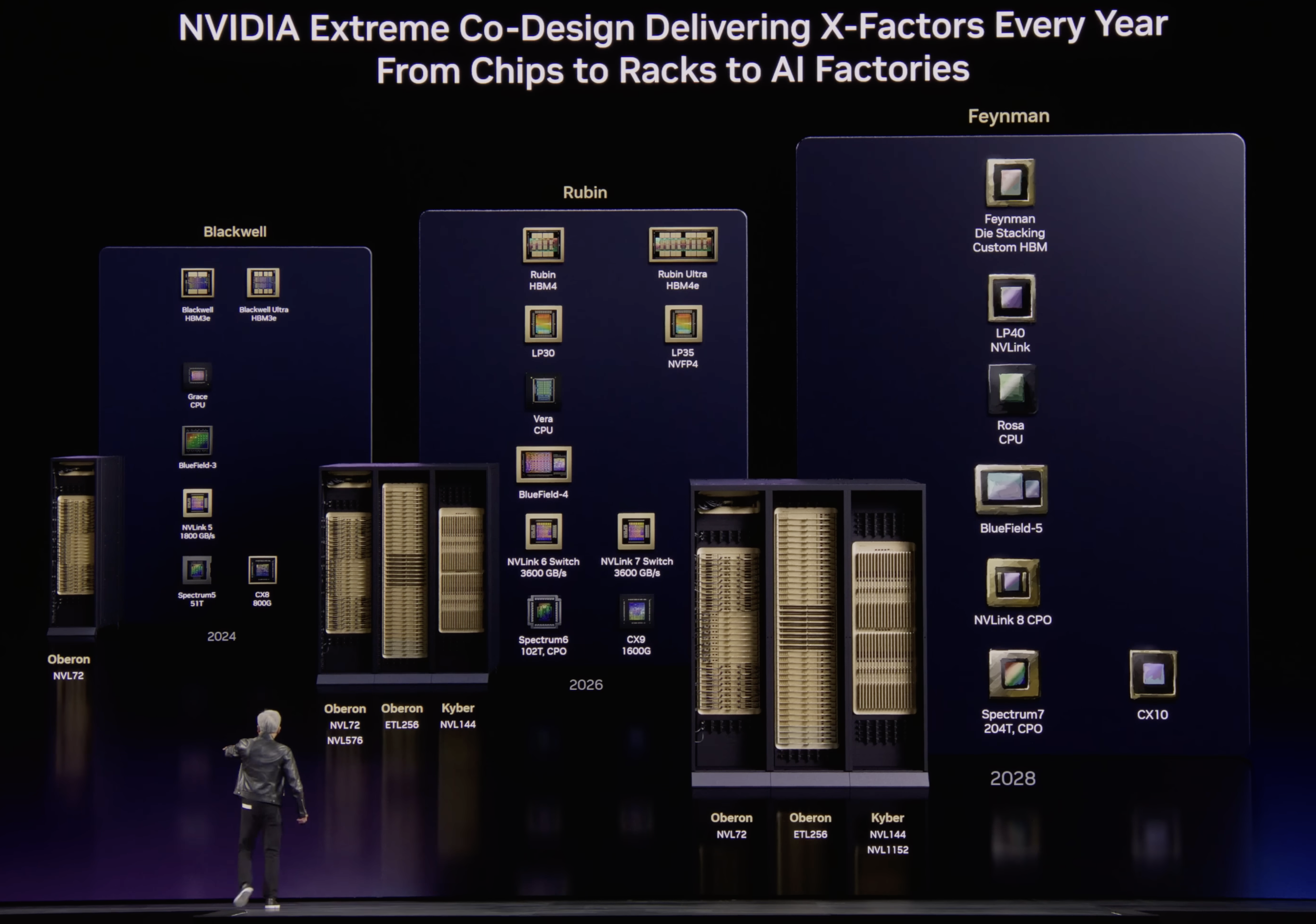
What Huang did not address — or perhaps he wasn't asked — is Nvidia's rumored delay of its Kyber NVL144 rack-scale solution with copper interconnects due to the system's complex PCB midplane by more than a year from 2027 to 2028. An alternative dual-rack design has reportedly been canceled and an even larger CPO-based NVL576 configuration may also face delays or limited availability, the same report from SemiAnalysis claimed earlier this month. The setback could leave Nvidia's Rubin Ultra platform with a smaller NVLink scale-up domain than originally envisioned. Nvidia says its roadmap is intact.
The Kyber NVL144 architecture was designed to connect 144 Rubin Ultra GPUs using a copper-based NVLink 7 scale-up fabric, so the machine required a sophisticated PCB midplane to carry high-speed electrical links between the system's components. SemiAnalysis claims that this midplane was challenging to manufacture, leading to a delay. The report does not identify defective chips or problems with particular components mounted on the board, but specifically points to the manufacturability of the PCB infrastructure itself.
"Our roadmap is intact," a spokesperson for Nvidia told Tom's Hardware.
Nvidia's statement on the matter neither confirms nor denies the report, but indicates that the company will be able to offer products mentioned in its roadmap without revealing whether they also remain on their previously announced launch schedules.
(Image credit: Nvidia)
Nvidia reportedly considered another copper-based design, called NVL72x2, as an alternative to Kyber. The system would have placed two Oberon racks back-to-back to expand the size of the NVLink scale-up domain without using optical interconnects. However, SemiAnalysis says customers rejected the unusual design and operational requirements, but does not specify their individual objections that could include serviceability, cooling, cabling, and data-center layout.
Meanwhile, the planned NVL576 rack scale solution that was supposed to combine eight Oberon racks interconnected using co-packaged optics between NVSwitches has also been postponed, or shipped in relatively small quantities because of 'ongoing CPO challenges,' SemiAnalysis claims.
The existence of the planned NVL576 configuration suggests that Nvidia had been developing some form of CPO-enabled NVSwitch connectivity for the Rubin generation. In theory, similar optical switch-to-switch connectivity could potentially be used to join smaller GPU groups into an NVL144 system and bypass Kyber's problematic copper midplane. However, the available information does not clearly indicate whether the CPO technology intended for NVL576 could reproduce Kyber's topology, bandwidth, and latency characteristics, or whether it was sufficiently mature for high-volume deployments by potential NVL144 customers.
The reported Kyber delay comes on the heels of another report saying that Nvidia had canceled quad-compute-chiplet version of its Rubin Ultra in favor or a dual-compute-chiplet design that is projected to deliver 2X lower performance. With Kyber NVL144 delayed and NVL72x2 cancelled, Nvidia will only be able to offer 72-way scale-up systems till sometimes in 2028, meaning that AMD and Google may end up with more competitive scale-up systems in 2027 – 2028. AMD's Mega Pod based on the Verano CPUs and Instinct MI500-series accelerators, is expected to pack up to 256 accelerators. Google's TPU 8i can provide roughly 1,024–1,152 accelerators within one low-latency domain, whereas the TPU 8t goes much further and can get to 9,600 chip packages per domain.
Homegrown DDR5 memory from China, manufactured by ChangXing Memory Technologies, has been making the rounds lately as more and more vendors start legitimizing it. However, new testing from overclocker Safedisk, shared by Uniko's Hardware, purportedly shows that it actually carries inferior performance compared to similar options from SK Hynix, alongside significant variance in the silicon between different batches.
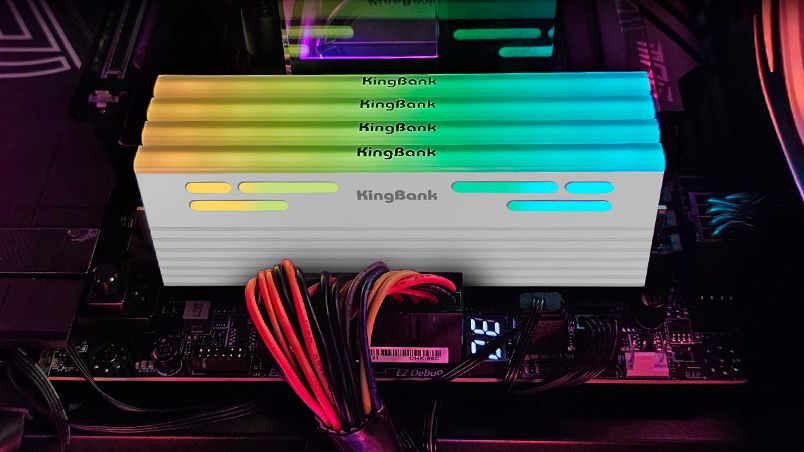
kingbank 2x24 6000c36 1.25 kit (cxmt 3gb dies) on asus c10amanual oc to 8600c44 mt 100%key characteristics of cxmt dies- dont scale with voltage- cant tighten timings- silicon variance appears to be massive between batches- not as strong as hynix when it comes to manual… pic.twitter.com/WNPRiHj233July 15, 2026
CXMT began producing DDR5 in late 2025 despite lacking any cutting-edge EUV lithography tools. Fast forward to today, and reports of the company matching Micron's memory capacity by this year are now floating around. If true, China would become the second-largest memory maker in the world. At such scale, it's no wonder that many companies in China have already started sourcing CXMT-made RAM to fill the gap in the consumer market.
Throughout 2026, we've seen motherboard manufacturers verify CXMT's DDR5 with official BIOS optimizations that allow it to run beyond 8,000 MT/s at this point. OEMs such as Dell and HP are using CXMT RAM in their region-bound systems, and even proper PC hardware companies like Corsair are using CXMT modules. Lexar, Kingbank, Netac, Asgard, Gloaway and more are also producing retail DDR5 kits with CXMT chips.
As such, the testing features a Kingbank 48GB (2x24) DDR5-6000 kit running at CL36 and found several weaknesses despite successfully achieving an 8,600 MT/s overclock at CL44. The first revelation is that CXMT modules don't scale with voltage, meaning you can't just increase voltage in hopes of achieving higher clocks. CXMT's DDR5 apparently doesn't respond well to tuning sub-timings either, forcing you to remain stuck with baseline CAS latency (or higher, like in this case).
Different batches of CXMT-equipped memory perform differently, too, so silicon lottery plays a much bigger role than it would with other vendors. Speaking of which, SK Hynix-made DDR5 modules allegedly performed better at identical clock speeds, while CXMT's modules were less susceptible to overclocking in general. We didn't get any comparative benchmarks for any metric, so take these claims with a grain of salt.
Overall, if Asus' testing is to be believed, it serves as counterprogramming against the popular narrative forming around China as the savior of consumer interests. CXMT's strength lies in the fact that it doesn't have to cater to opulent AI clients as much as the Big Three, which reduces opportunity cost, allowing CXMT to produce more DDR5 memory. That doesn't mean it would be cheaper, though, or at least no evidence has suggested that so far.
CXMT has remained limited to the Chinese region for now, and breaking through to the Western market would mean impressing a lot of skeptics. Not only would pricing play a big factor, but the reliability of a new DRAM manufacturer would raise serious concerns. Stories like these certainly don't help, but with CXMT's IPO on the way, it's only a matter of time before it becomes a serious mainstream contender.
ASRock is well known among PC enthusiasts for its graphics cards, motherboards, power supplies, and gaming monitors. Now, it has entered the market for liquid cooling solutions.
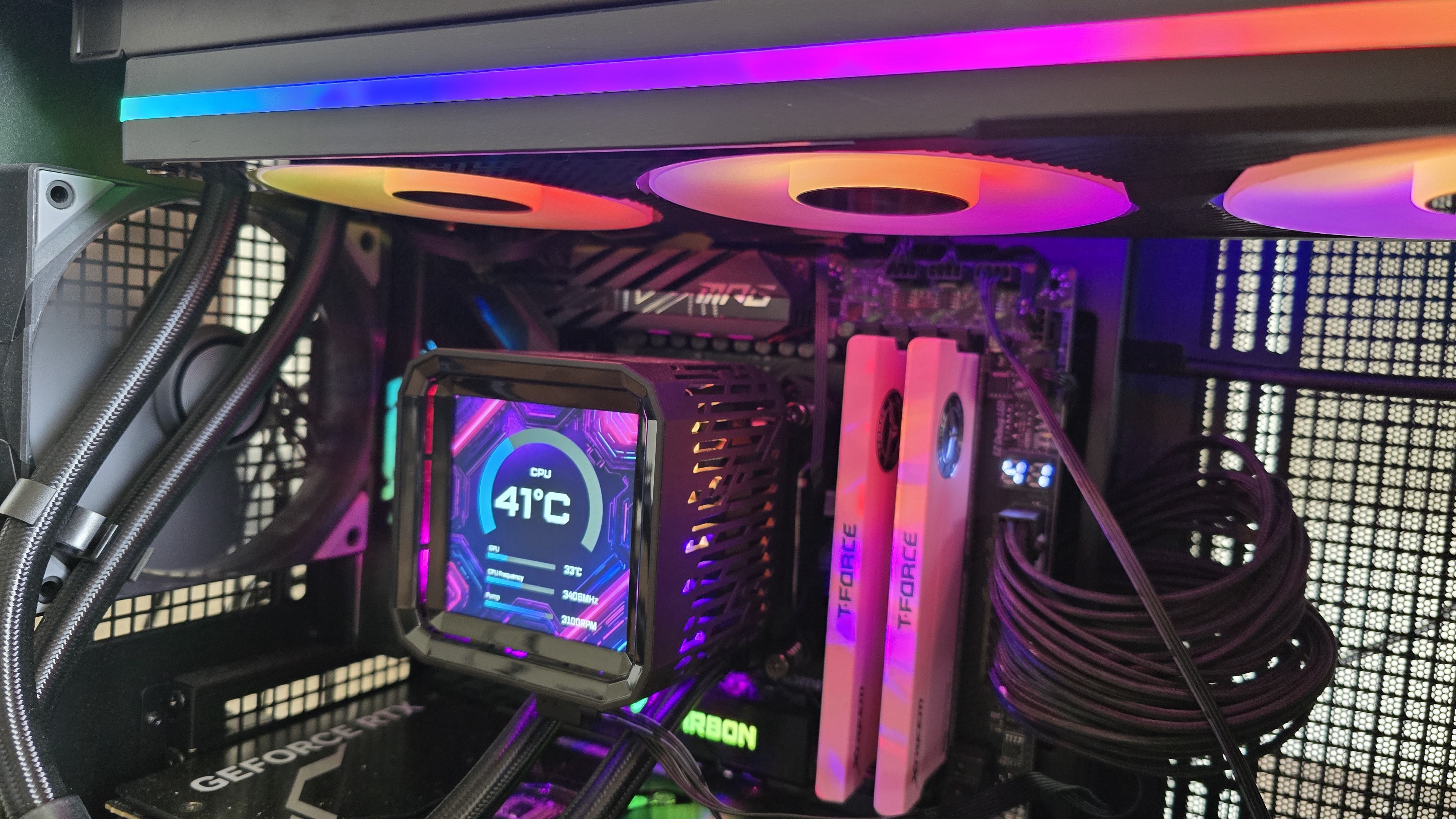
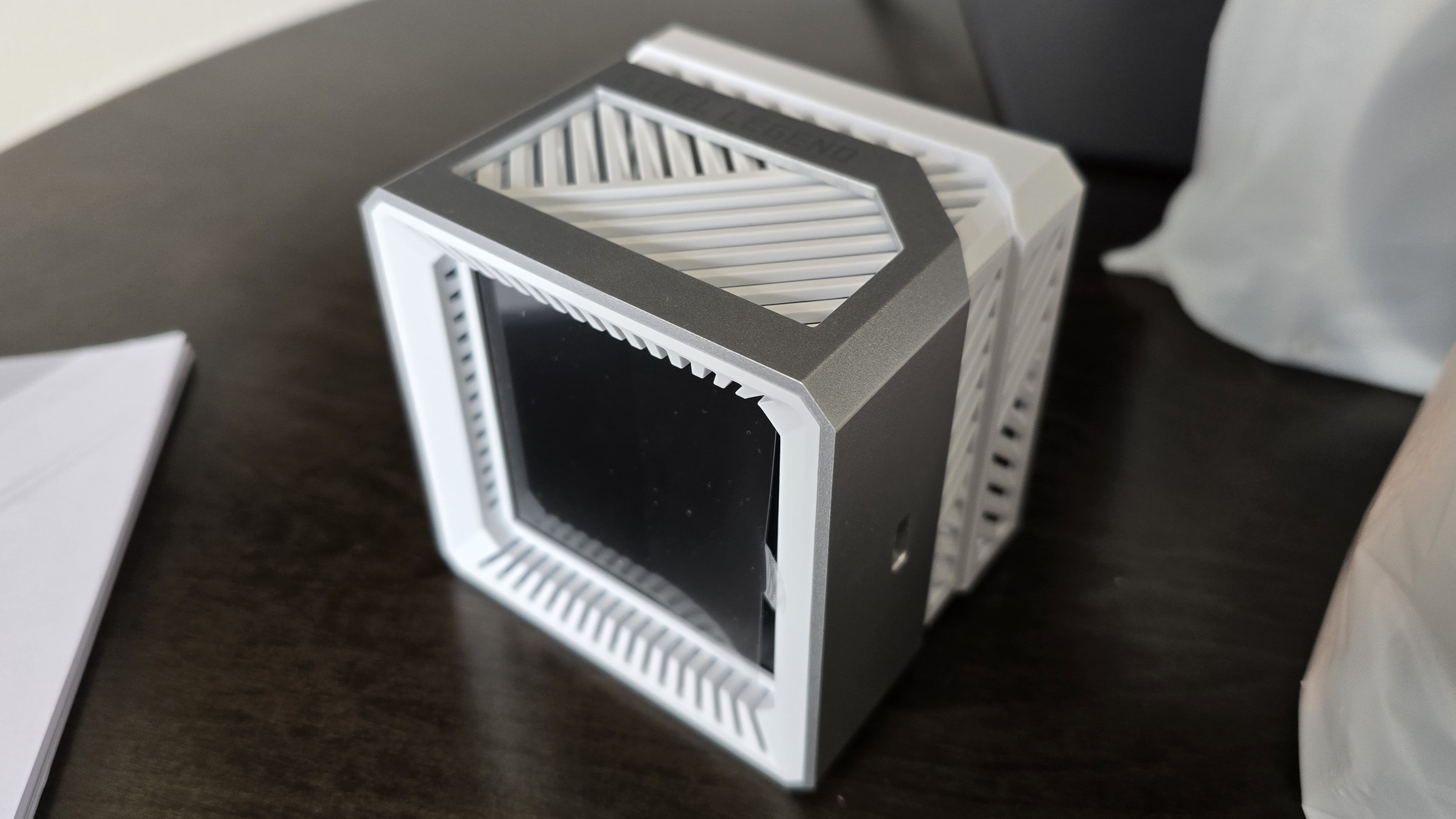
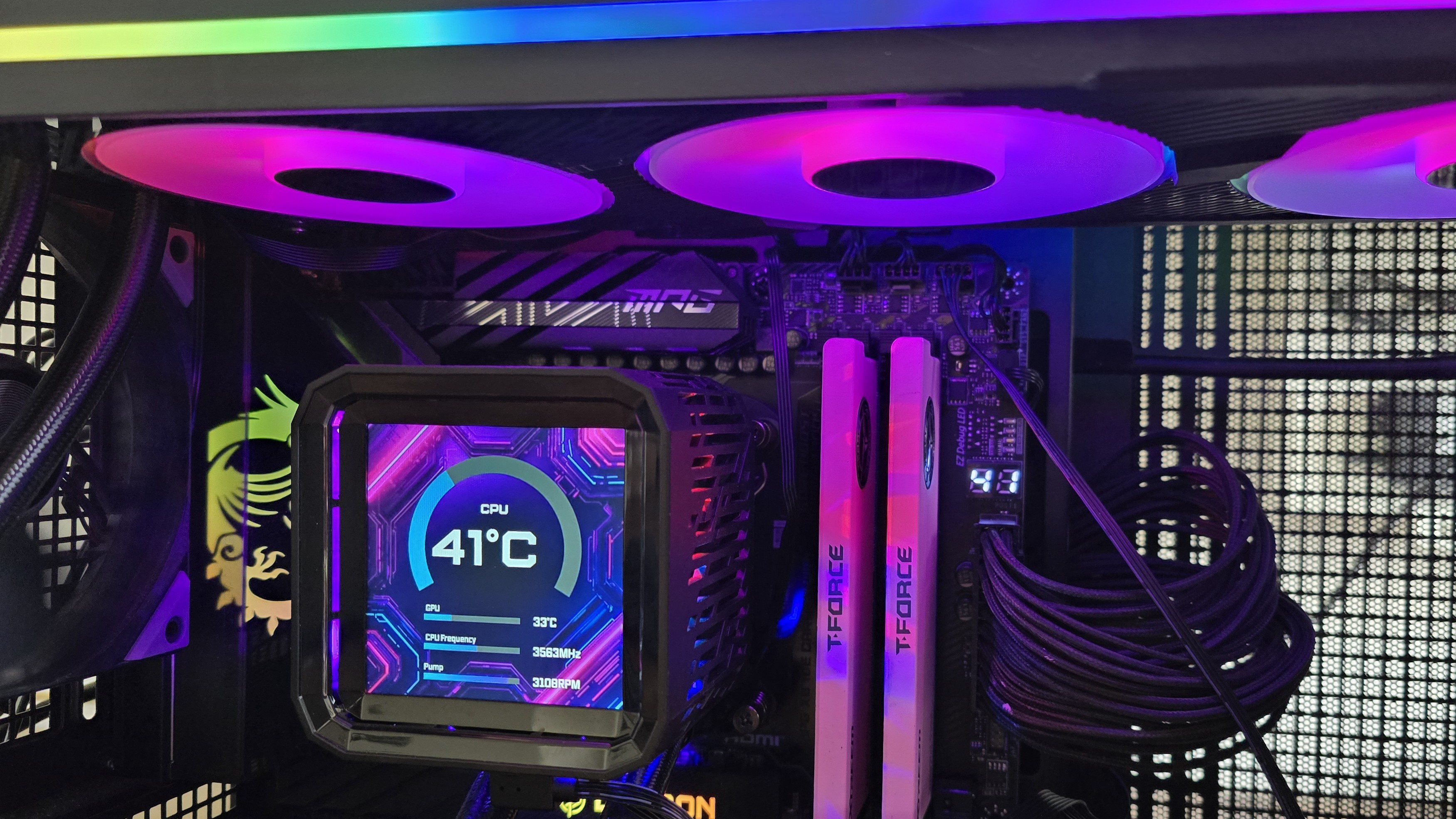
We’re looking at two of the company’s first AIOs here, the Phantom Gaming 360 LCD and Steel Legend 360 LCD. Both of these liquid coolers feature 3.4-inch 480 x 480 displays for showing off animations and monitoring performance metrics. Aside from aesthetics, the main differences between the two are the included fans and radiator size. The Steel Legend 360 incorporates a standard 27 mm thick radiator, whereas the Phantom Gaming 360 uses a thicker-than-normal 32 mm radiator.
(Image credit: Tom's Hardware)
Let's take a look at the specifications and features of the coolers, then we’ll go over thermal and noise benchmarks and decide whether ASRock’s Phantom Gaming and Steel Legend AIOs deserve to make our list of the best CPU coolers.
Cooler specifications
Cooler
ASRock Phantom Gaming 360
LCD/Steel Legend 360 LCD
Colors
Black
White
MSRP
$189.99
$159.99
Lighting
CPU block, radiator, and fans
CPU block
Warranty
6 years
2 years
Socket Compatibility
AMD AM5/AM4
Intel 1700/1851
Radiator dimensions
397mm (L) x 120mm (W) x 32mm (H)
397mm (L) x 120mm (W) x 27mm (H)
Maximum TDP (Our Testing)
>260W with AMD’s Ryzen 9 9950X3D
>260W with AMD’s Ryzen 9 9950X3D
Features of ASRock Phantom Gaming & Steel Legend 360 LCD
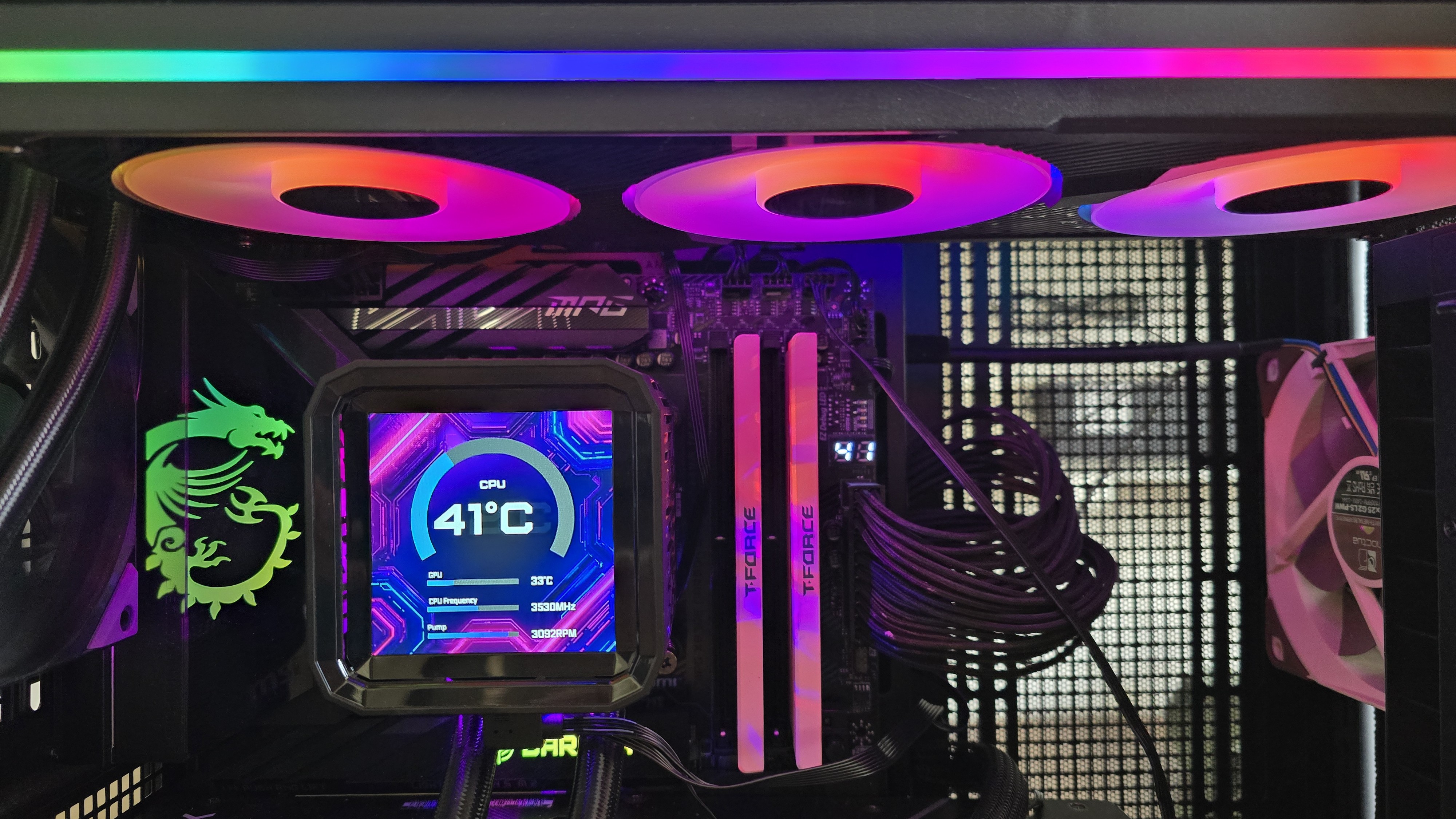
▶️ 60hz 3.4-inch LCD display
(Image credit: Tom's Hardware)
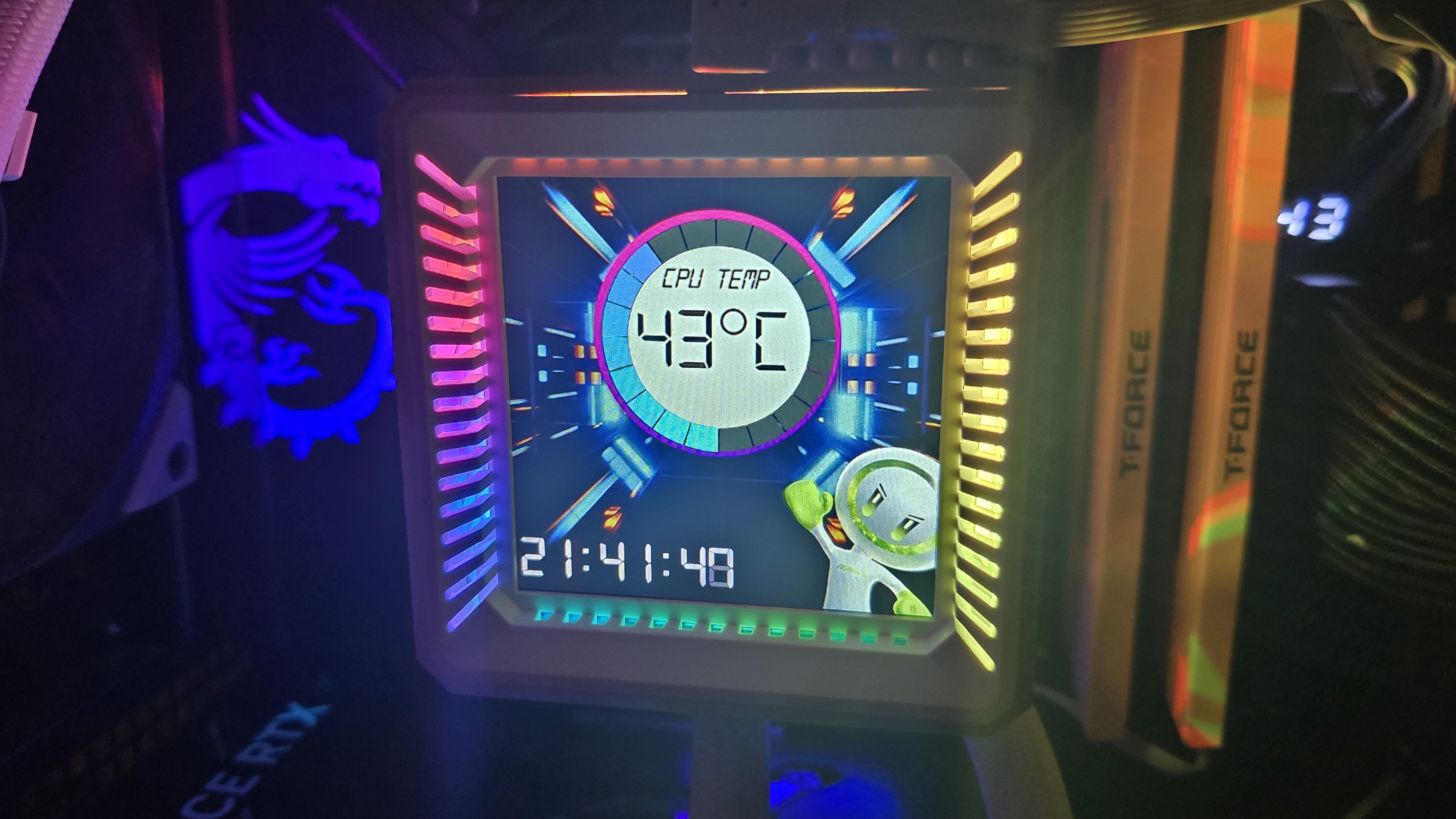
Both the Phantom Gaming 360 LCD and the Steel Legend 360 LCD include a 3.4-inch square IPS screen with a 480 x 480 resolution and 60 Hz refresh rate, with brightness rated at 250 nits.
(Image credit: Tom's Hardware)
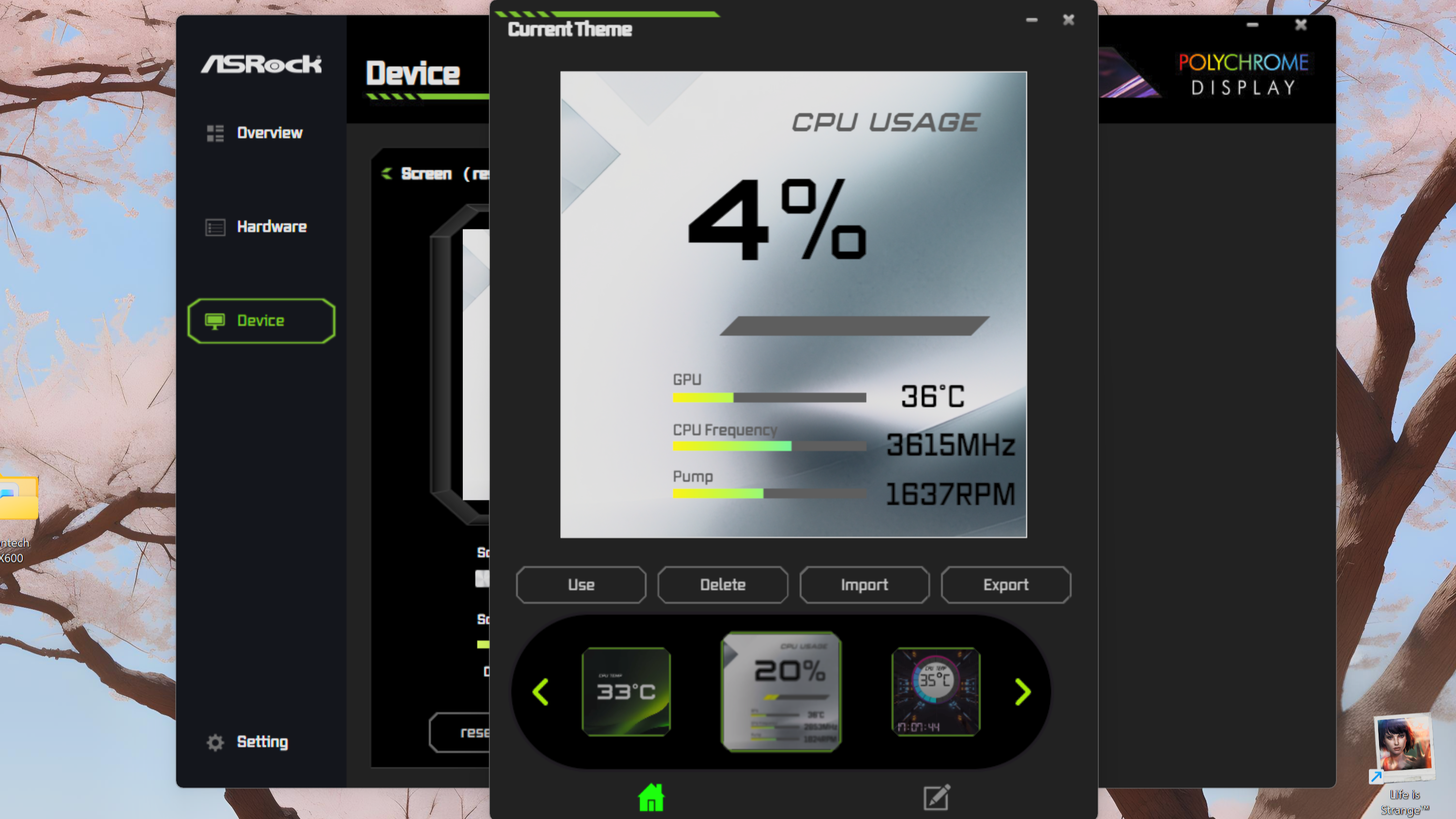
To control and customize the screen, you’ll need to download ASRock’s Polychrome Display software. You have the option of selecting six preset themes, or you can build your own theme, and/or customize the individual elements shown on the display.
(Image credit: Tom's Hardware)
While I certainly wish there were more presets available, my biggest complaint using this software is the extreme file compatibility limits. If you’d like to upload a custom background, the image or video file needs to be less than 20 megabytes and 1080p or lower in resolution.
(Image credit: Tom's Hardware)
▶️ RAM Clearance
As with most liquid coolers, the design of both the Steel Legend and Phantom Gaming 360 has the CPU block set so it doesn’t overhang or interfere with the DIMM slots – ensuring that all sizes of RAM, no matter how tall, are compatible.
(Image credit: Tom's Hardware)
▶️ VRM fan
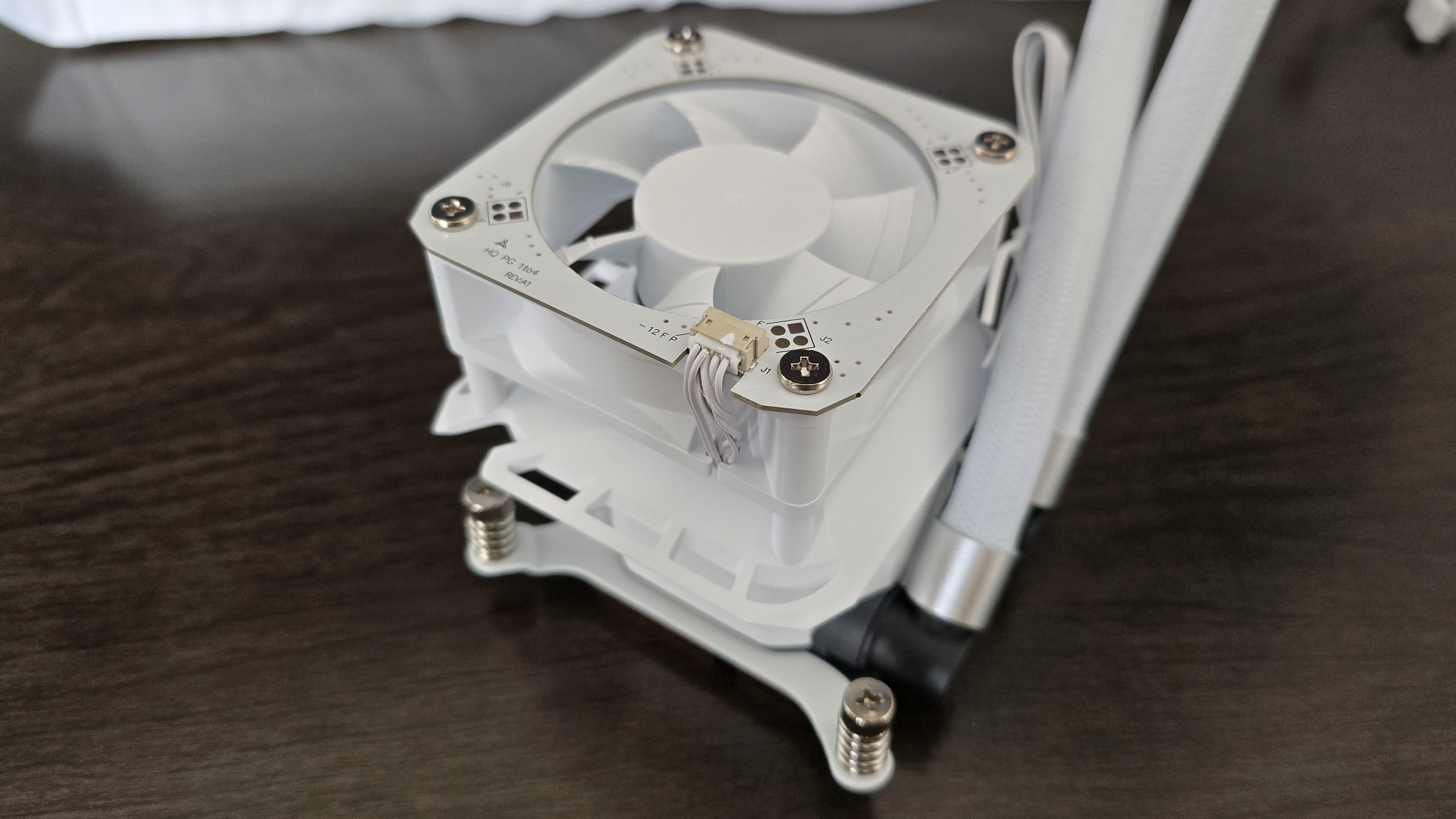
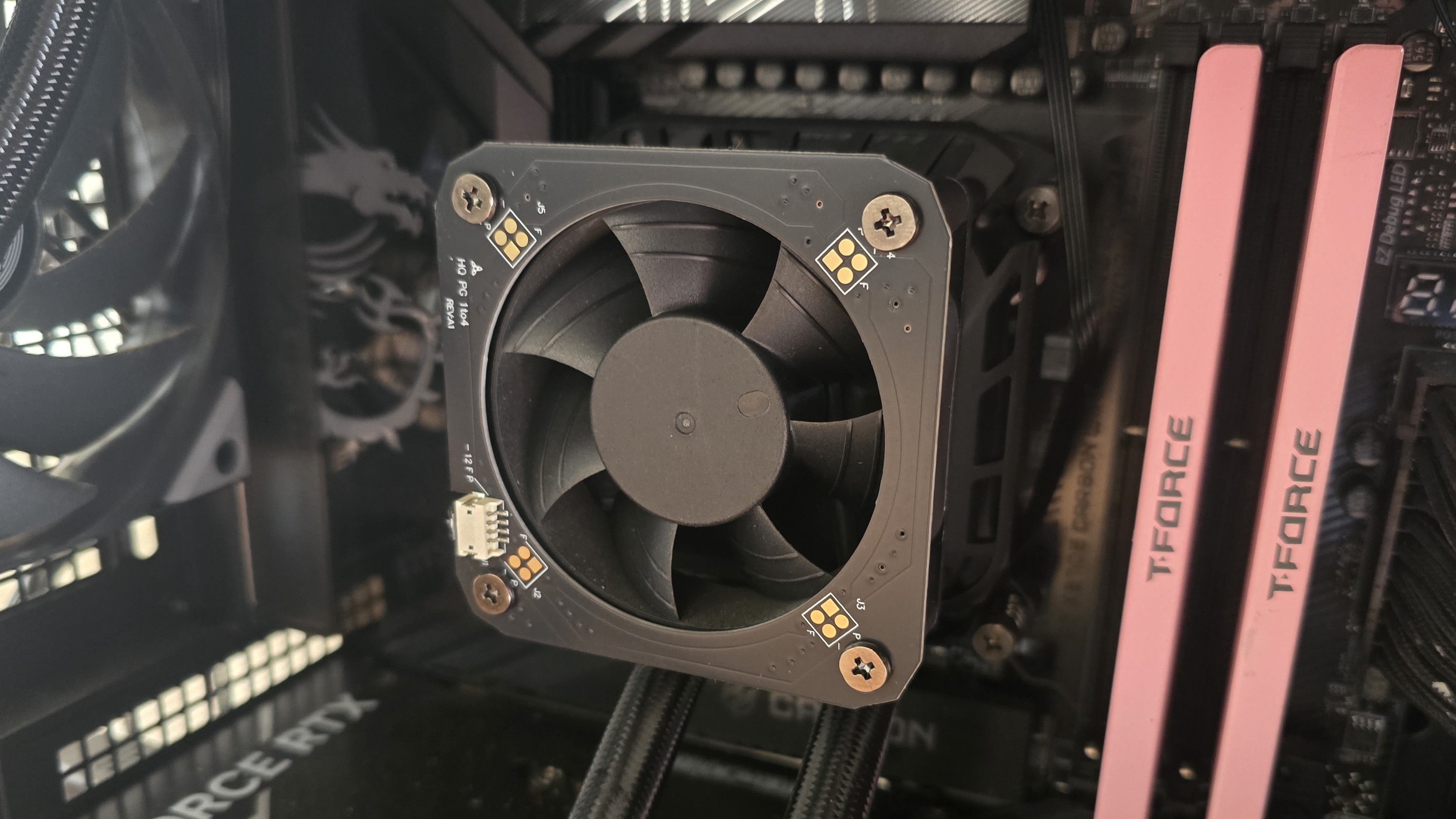
Included on top of the CPU block is a 70 mm, 3,000 RPM fan designed to help keep your RAM and motherboard’s VRM modules cool. As you’ll see in our Karhu benchmarks, it does an excellent job of cooling these parts of your computer.
(Image credit: Tom's Hardware)
▶️ Thick CPU cold plate
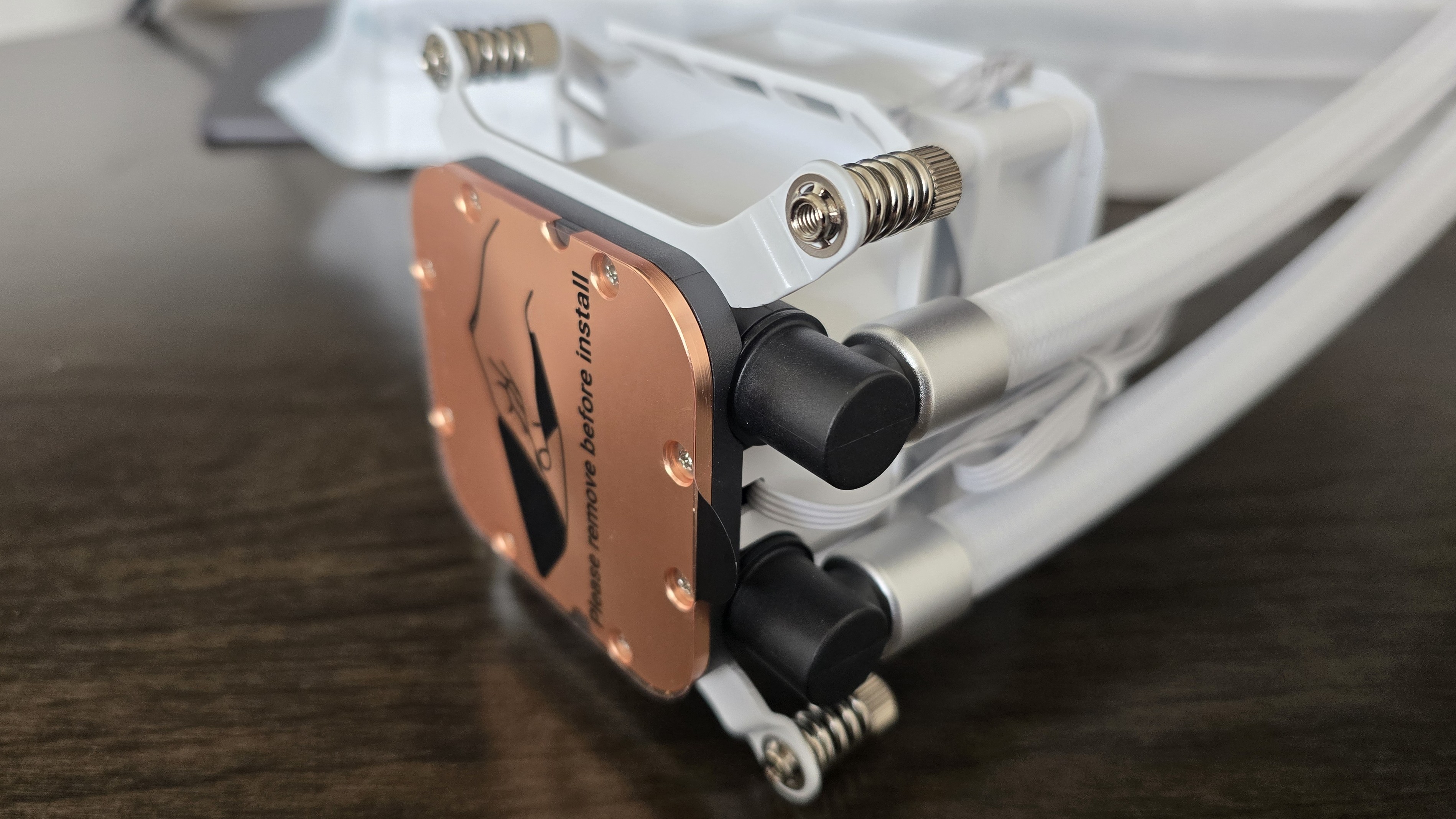
The copper contact plate is unusually thick, like you’d more typically see in an AIO supporting AMD Threadripper or Intel Xeon server CPUs.
(Image credit: Tom's Hardware)
Differences between the ASRock Phantom Gaming 360 LCD and Steel Legend 360 LCD
▶️ Color schemes and aesthetic
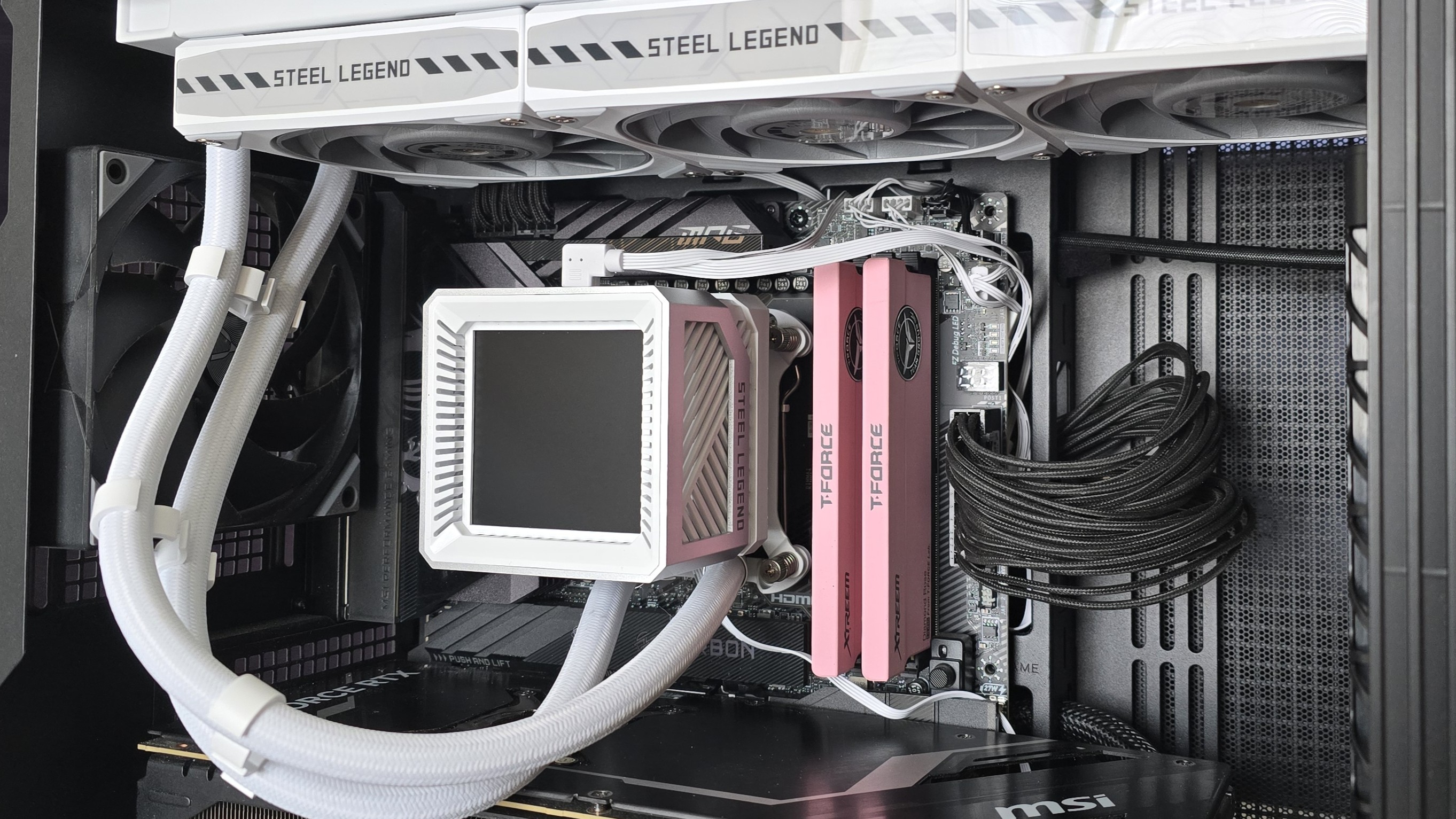
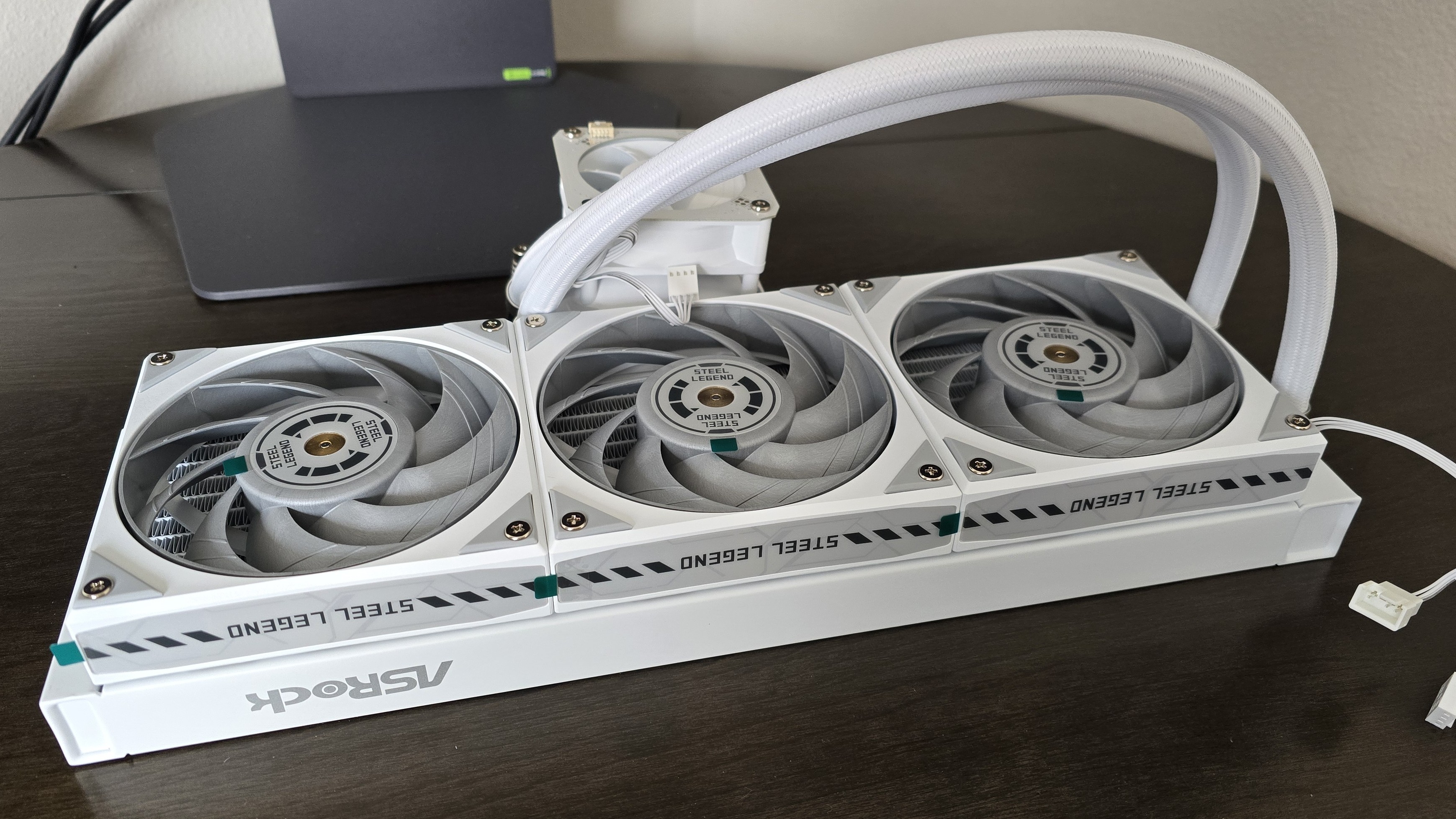
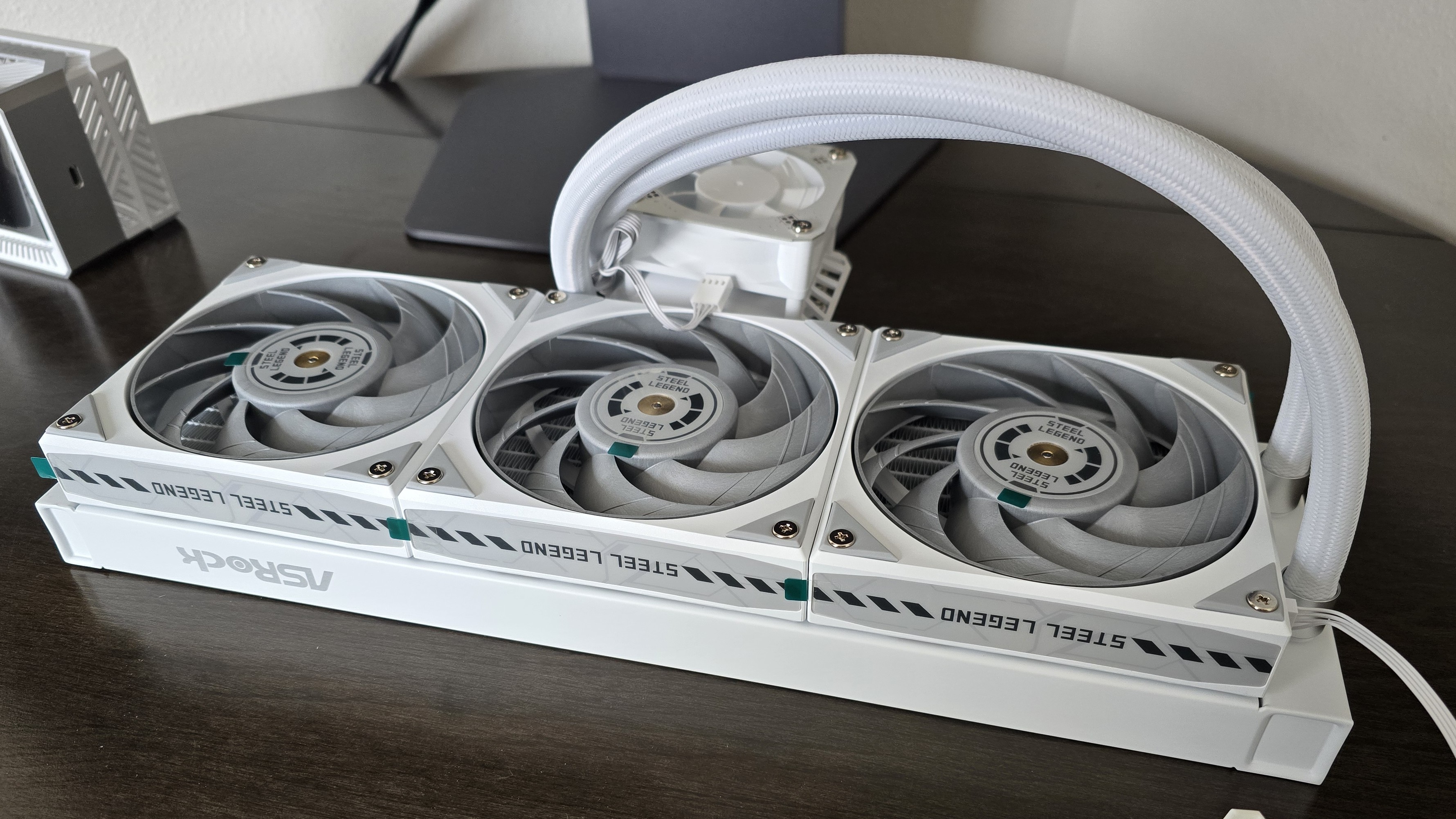
While they are similar in many ways, each of these AIOs has a different aesthetic, similar to what you’d see in the company’s motherboard lines. The Steel Legend might appeal to those who prefer simpler designs, with a white body and gray fan blades.
(Image credit: Tom's Hardware)
If you want flashy lighting, the Phantom Gaming 360 might be your thing. In addition to ARGB lighting on the fan blades, it also includes a lighting strip across the side of the radiator.
(Image credit: Tom's Hardware)
▶️ Radiator sizes: 32 mm and 27 mm
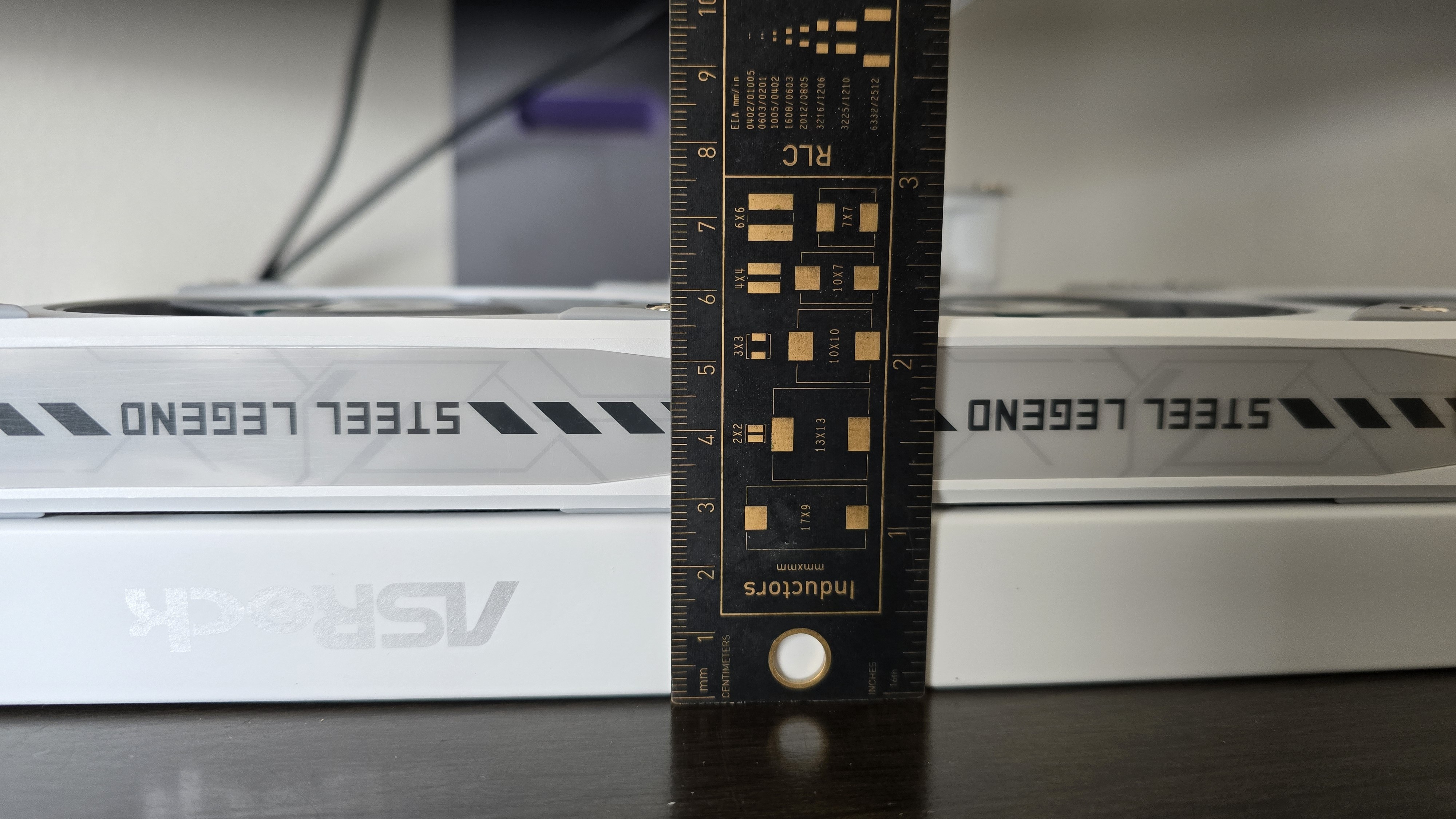
There are two primary technical differences between the Phantom Gaming 360 LCD and the Steel Legend 360 LCD; one of those is the radiator size. The Steel Legend 360 LCD has a standard 27 mm radiator, whereas the Phantom Gaming 360 features a thicker 32 mm radiator.
(Image credit: Tom's Hardware)
▶️ 120 mm fans
There’s more to a liquid cooler than just the radiator and liquid pump. The included fans directly impact noise levels and cooling performance. This constitutes the second primary technical difference between the AIOs we’re reviewing today.
Both units include fans that are 28 mm thick and pre-installed for user convenience. The Steel Legend 360 features three individual 120 mm fans, with a white shell and gray blades.
(Image credit: Tom's Hardware)
The Phantom Gaming includes a fancier fan block instead of individual fans, and features ARGB lighting on the fan blades and a strip across the radiator. These fans aren’t as powerful – or as noisy – as the fans included with the Steel Legend, but this is balanced by the thicker 32 mm radiator included on the Phantom Gaming 360 LCD.
(Image credit: Tom's Hardware)
Steel Legend
Phantom Gaming
Fan Speed
0 - 2500 ± 10% RPM
0 - 2400 ± 10% RPM
Airflow
76.7 CFM
61.28 CFM
Air Pressure
4.16 mmH20
3.11mmH20
Packaging
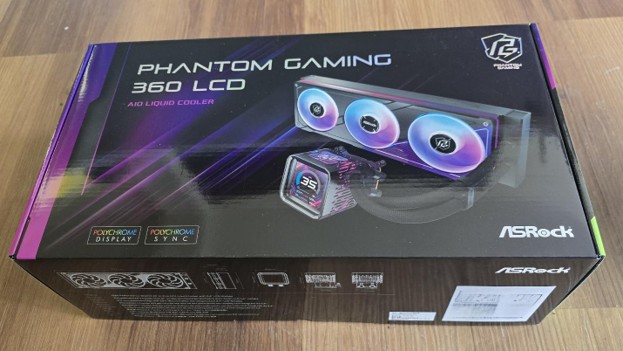
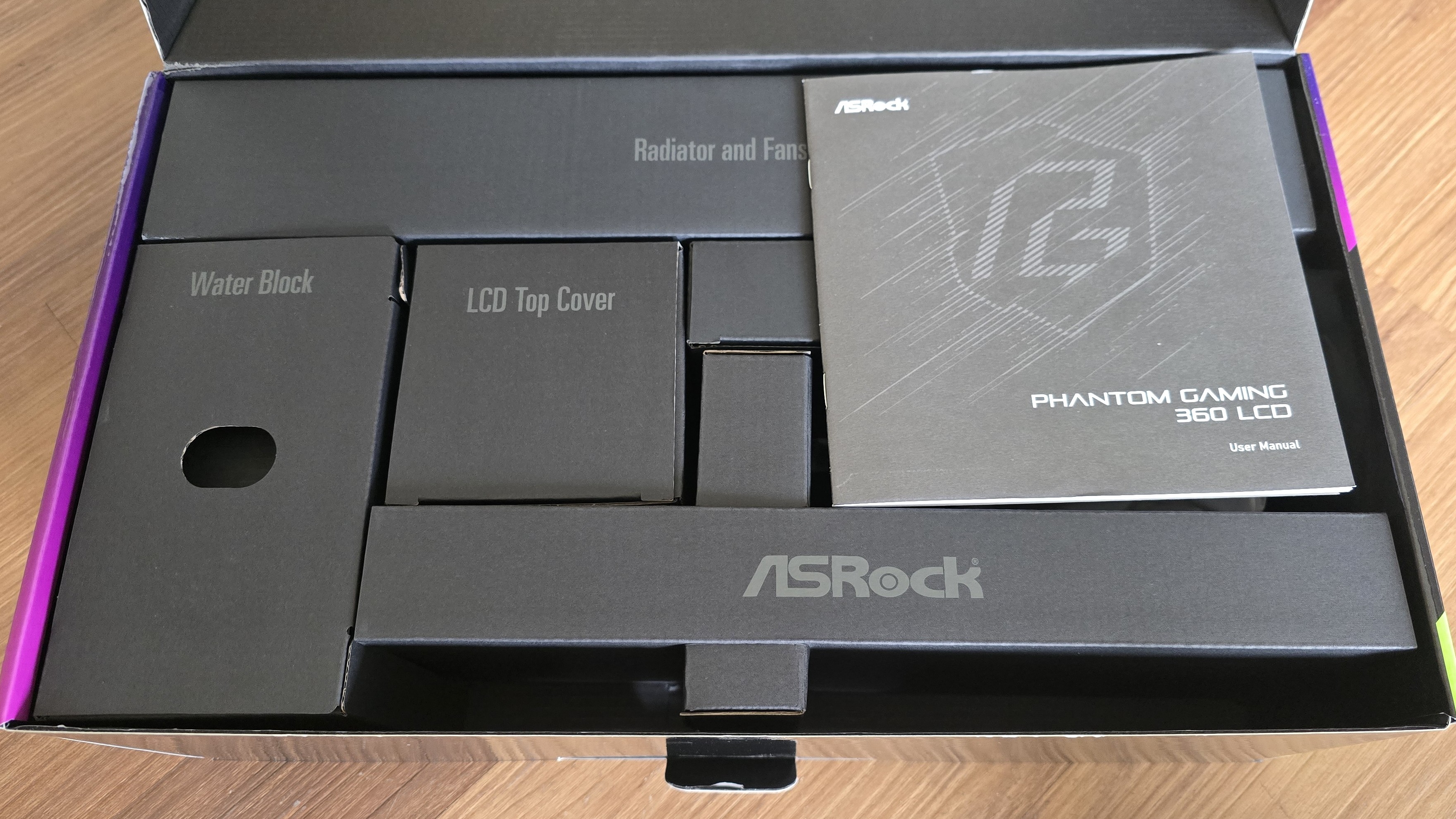
The outer packaging is a bit flashy – at least, in comparison to your normal AIO box. It features a rendering of the cooler against a black background with streaks of purple hues.
(Image credit: Tom's Hardware)
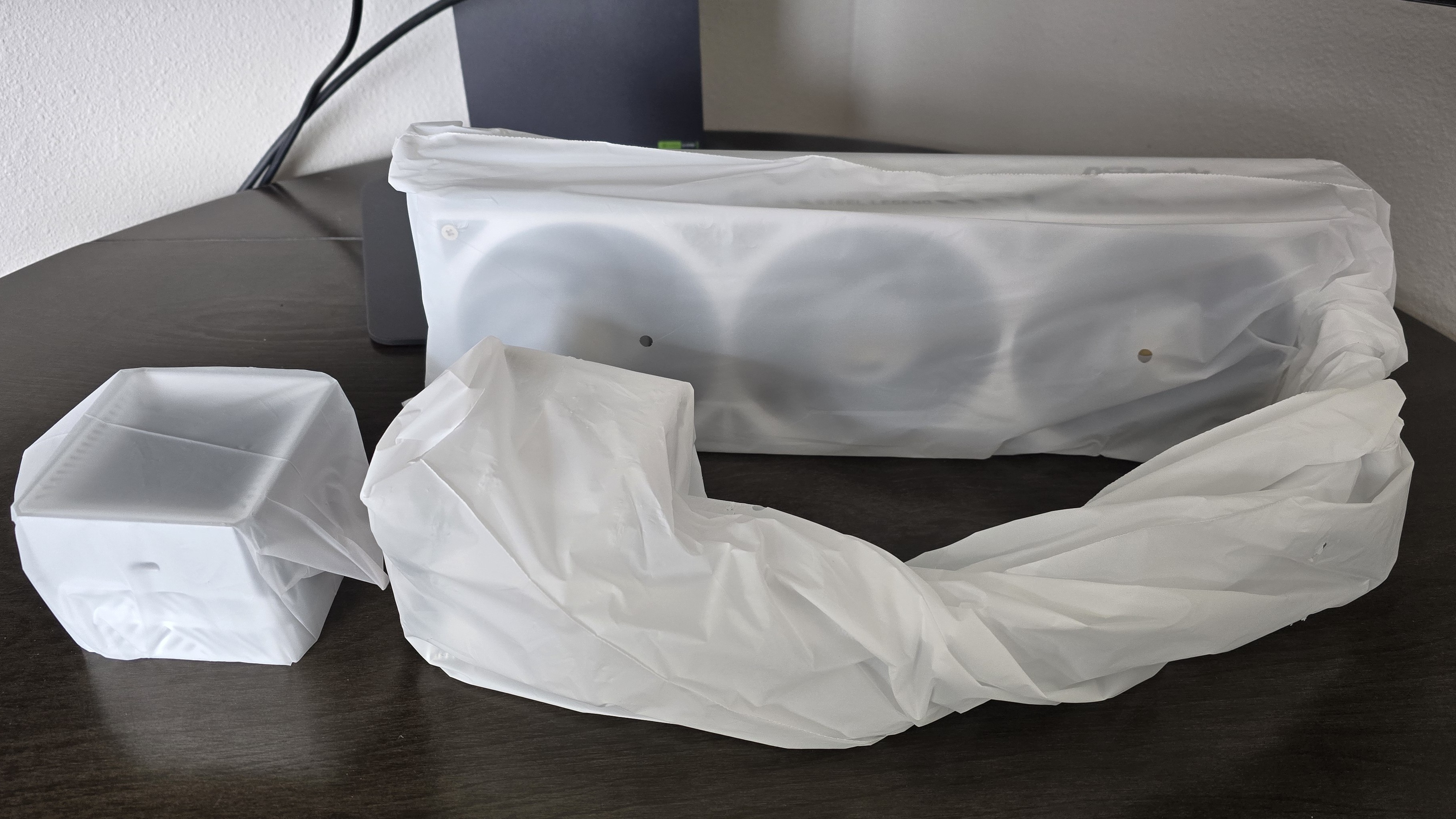
The inner packaging is just as fresh as the outside, with each component of the cooling system well protected from the chaos that shipping can bring by using a combination of soft covers and individual cardboard walls for each component.
Tom's HardwareTom's Hardware
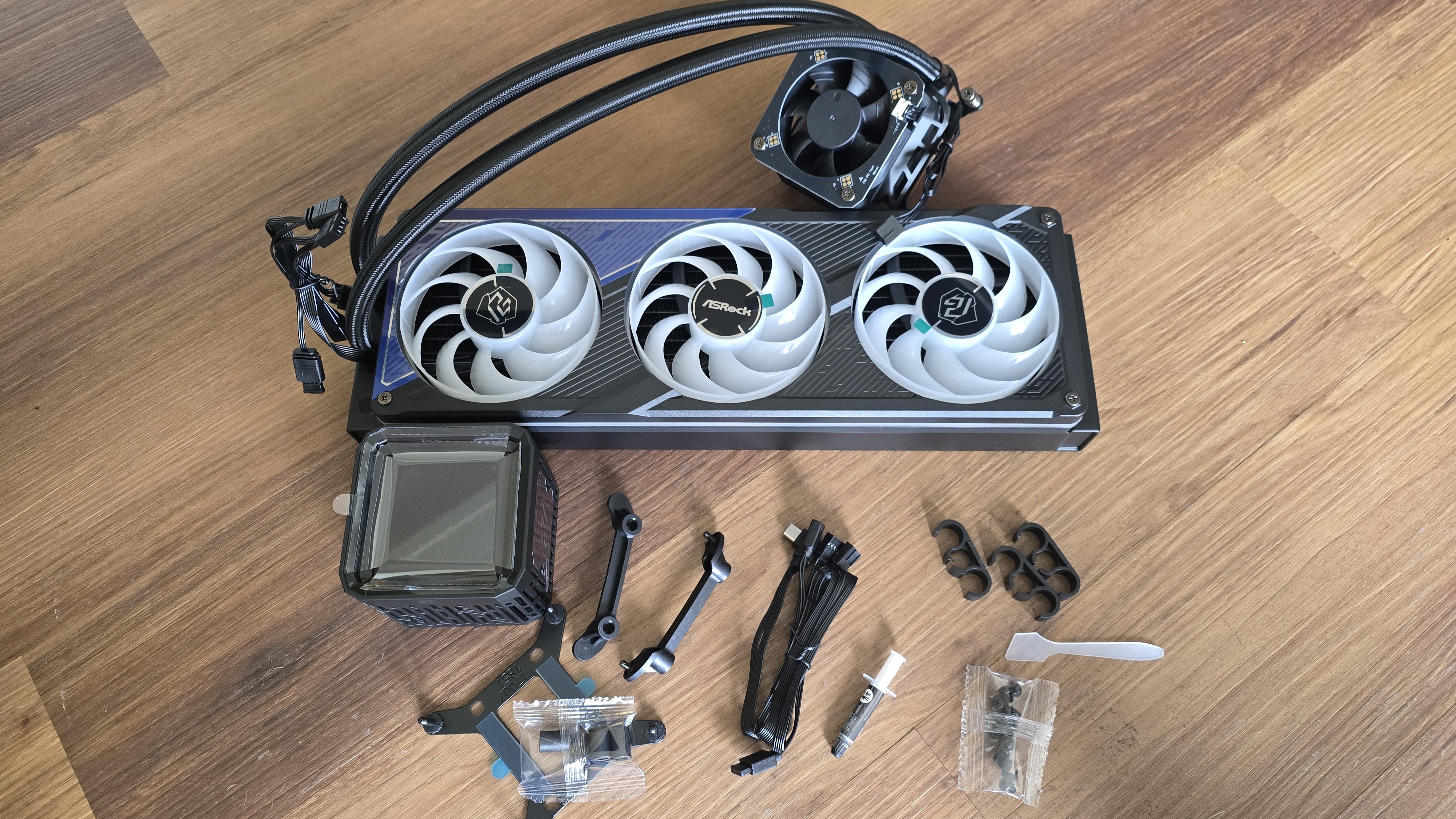
Included with the package are:
Mounting hardware for AMD and Intel platforms
Tubing clips
A small tube of thermal paste
360 mm radiator and 120 mm fans
3.4-inch LCD display
(Image credit: Tom's Hardware)
AM5 Installation
This section assumes you’ve already mounted the 360 mm radiator. Installation of AIOs is typically much easier when you have already secured the radiator to your computer case.
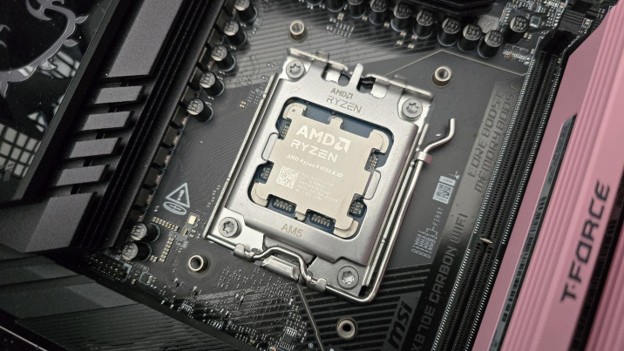
To begin putting things together, you’ll first need to remove the default AM4/5 retention from the motherboard.
(Image credit: Tom's Hardware)
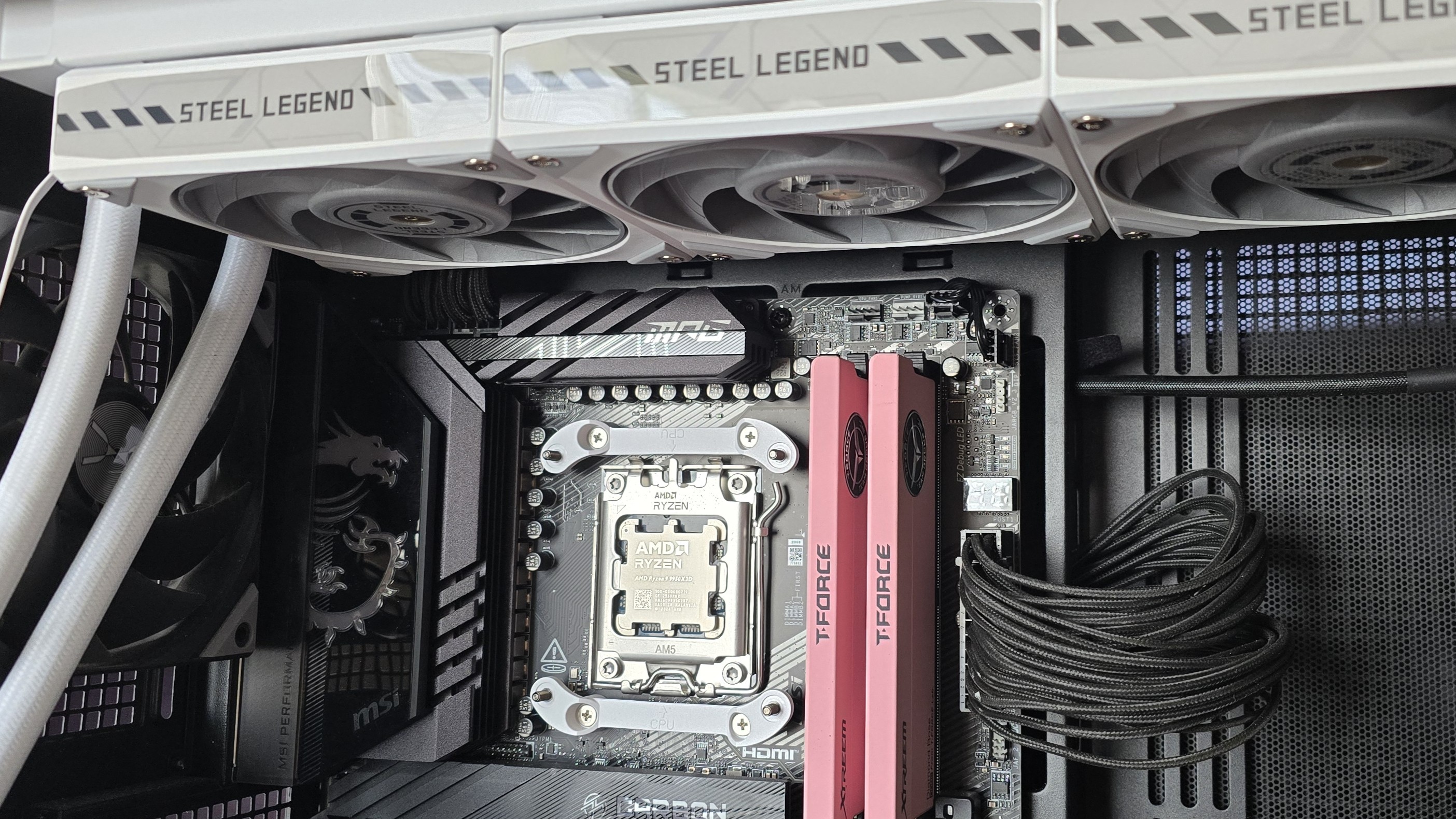
The next step is to place the mounting bars on top of the studs, securing them with the included screws. The middle of the mounting bars includes a helpful image indicating the direction the bars should be installed, with an arrow pointing towards where the CPU should be.
(Image credit: Tom's Hardware)
Now you’ll want to apply the included thermal paste. If you’re not sure how to do that, we have a handy thermal paste application guide that covers the different methods you can use.
Afterwards, place the pump block against the CPU and mounting bars, and use a screwdriver to secure it. You should have the liquid tubing in the south position for best thermal performance.
(Image credit: Tom's Hardware)
The next step is to slide the LCD display on top of the VRM fan. To complete the AIO’s installation, you’ll want to connect the USB, PWM, and ARGB headers as appropriate – then you can power on your system.
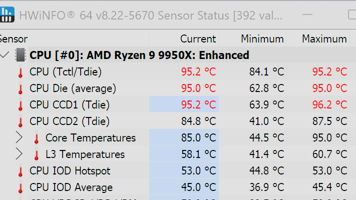
We’ve tested coolers with both the Ryzen 9950X3D and its non-V-Cache sibling, the 9950X. There are some differences in how the 9950X and 9950X3D CPUs are impacted by thermal events. While the heat output of the CCDs of AMD’s 9950X3D is relatively balanced, the 9950X I used has one CCD that runs much hotter than the other, with a difference of over 10 degrees Celsius in some scenarios, shown below.
(Image credit: Tom's Hardware)
We’ve since returned to using a 9950X3D for cooler testing, as it has a more balanced heat profile, and is almost certainly a more widely adopted CPU. The benchmark results shared in these reviews may differ from others because I emphasize results that are comparable to real-world use. This means I generally test CPU coolers inside of a closed desktop case, which increases cooling difficulty compared to other testing methods.
Many reviewers test coolers on open test benches, which have a combination of lesser airflow needs and lowered ambient temperatures. This results in making weak coolers appear stronger than they really are. Some also use generic thermal plates to test cooling solutions. I reject both of these methods because they don’t accurately reflect real-world cooler conditions.
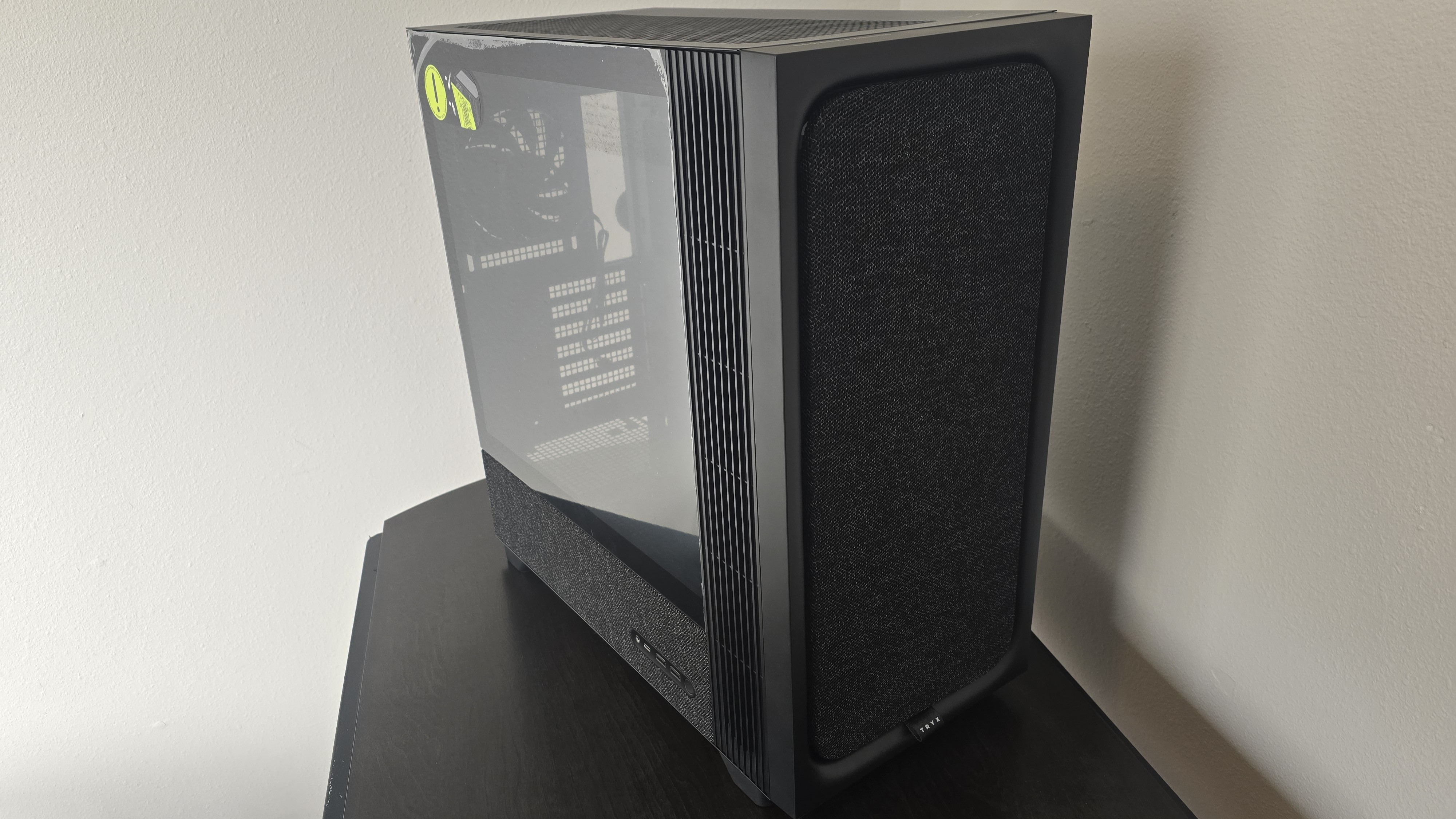
Our latest testing setup uses the Flova F50 computer case from Tryx.
(Image credit: Tom's Hardware)
This case features a unique “crossflow” fan that pulls air from the side, which the company claims is more effective than traditional intake fans. For air cooling tests, we’ve added a single Noctua NF-A12 G2 intake fan.
We’re going to start this review’s benchmark section by focusing on a traditional maximum performance test, with the CPU cooler’s fans allowed to reach their fastest speeds for the best cooling possible.
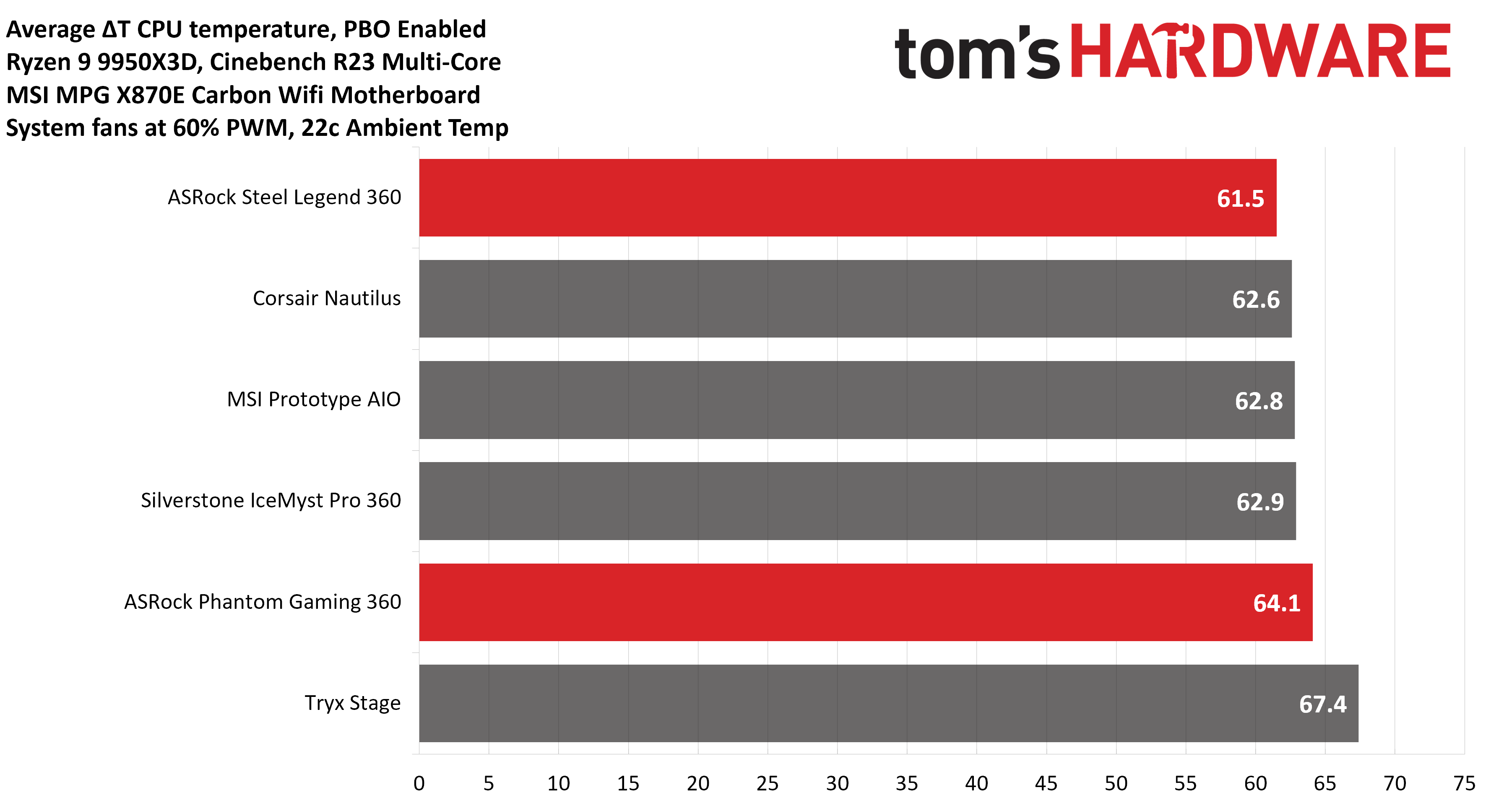
Turning on PBO allows AMD’s Ryzen 9 9950X3D to stretch its legs to an extent, and all air coolers I have tested with PBO enabled using MSI’s X870E Carbon Wifi motherboard reach the maximum CPU temperature of 95 degrees C (203 F) and thermally throttle to some extent.
(Image credit: Tom's Hardware)
The thermals of both ASRock AIOs are excellent, able to keep AMD’s Ryzen 9 9950X3D under its peak temperature (TJ Max) in Cinebench R23 with PBO enabled – allowing for the best possible benchmark performance. Of particular note is the performance of ASRock’s Steel Legend 360; it maintained an average of 61.5C over ambient (83.5C), the best result we’ve seen on this test bench.
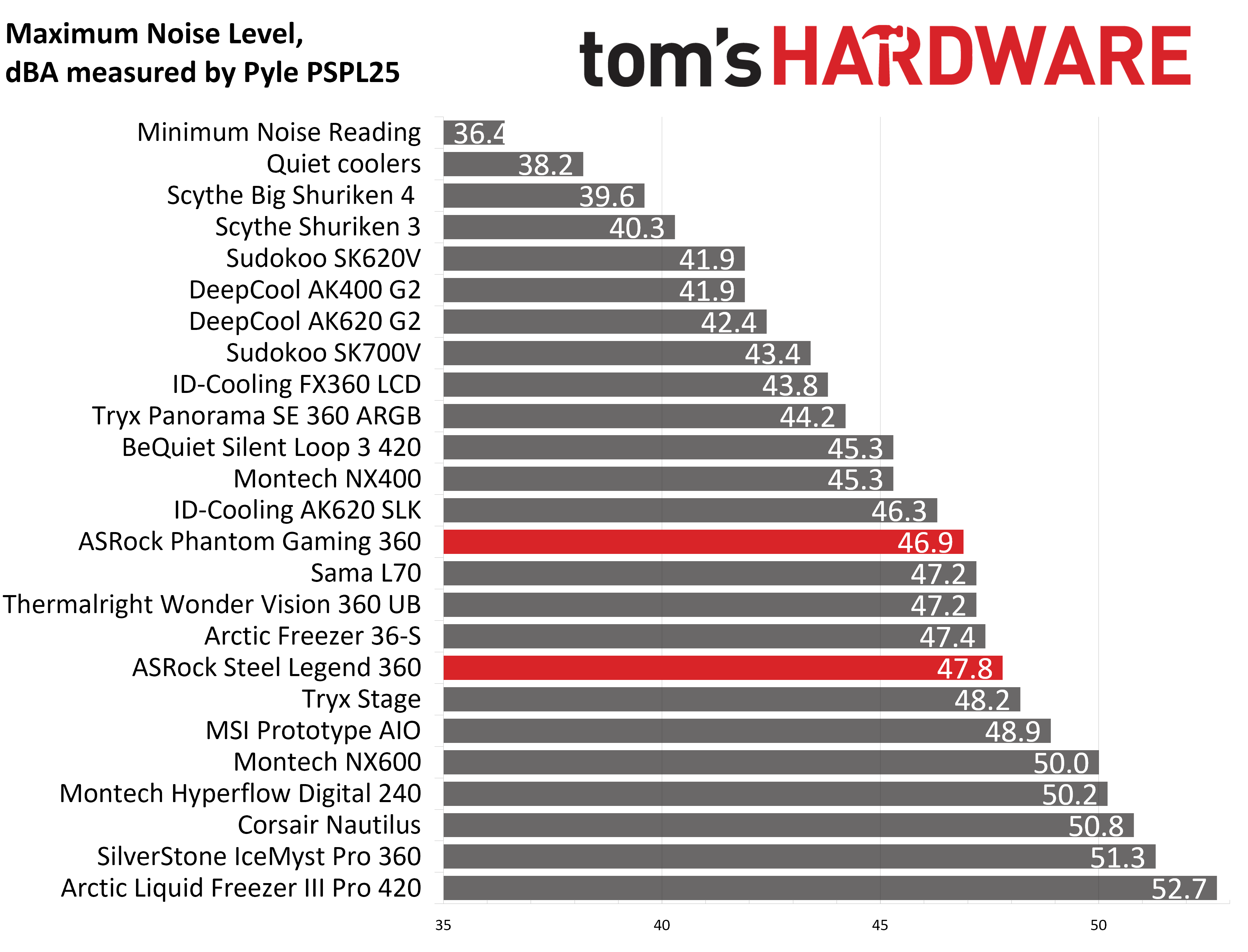
Some coolers perform well in maximum strength tests, but require running loudly to maintain said performance. The ASRock AIOs we tested reach 46.9 and 47.8 dBA, which is about average for most liquid coolers on the market.
(Image credit: Tom's Hardware)
200W thermal benchmarks
For the next thermal test, I leave the motherboard settings at their defaults, which results in a power limit of 200W when running Cinebench R23.
(Image credit: Tom's Hardware)
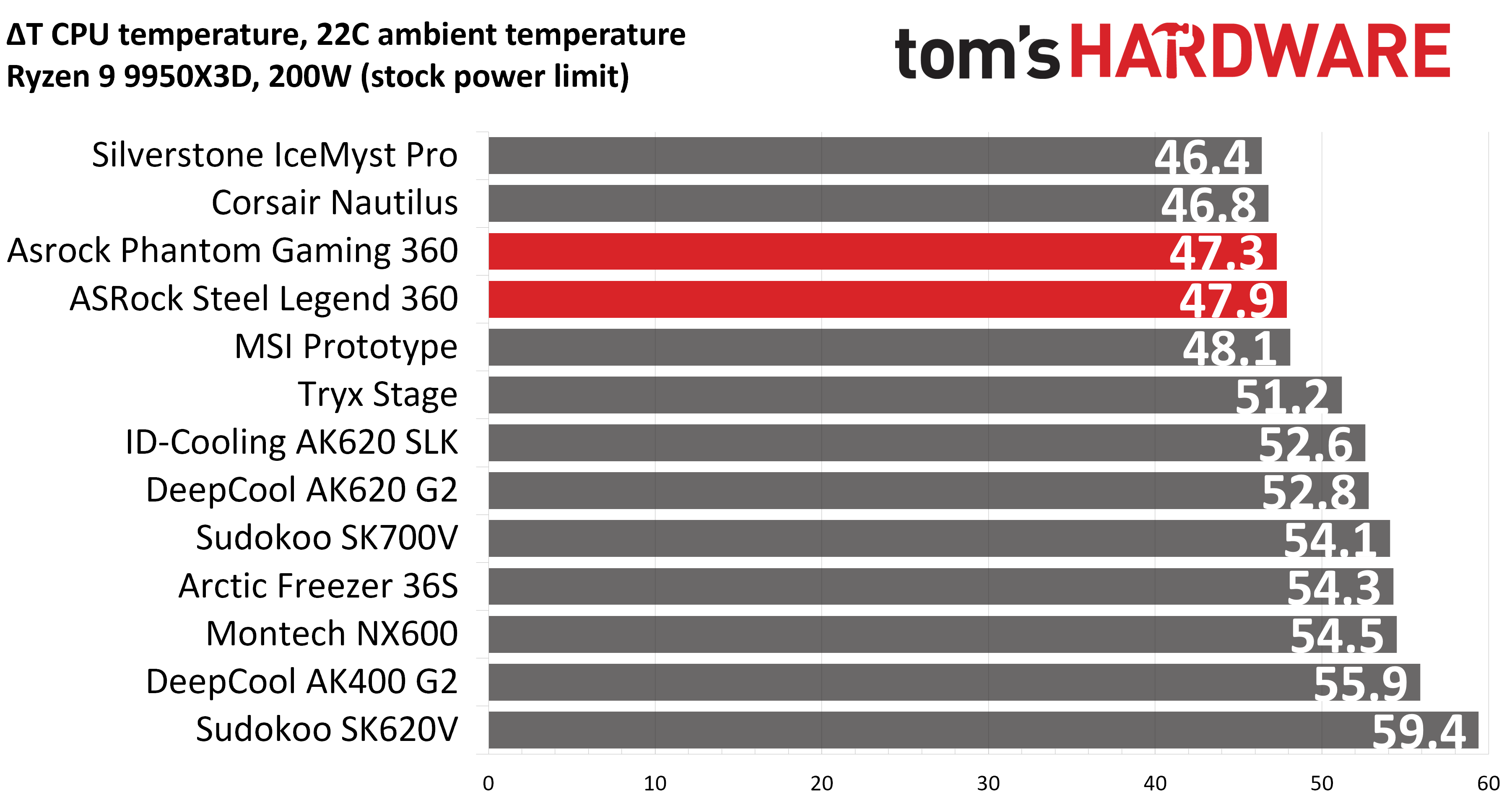
When a standard power limit is imposed, the thermal differences between the two ASRock coolers close, with both coolers performing about the same. I measured 47.3 and 47.9 degrees over ambient, giving them the third- and fourth-best performing results from this test bench.
150W + GPU thermal results, noise levels
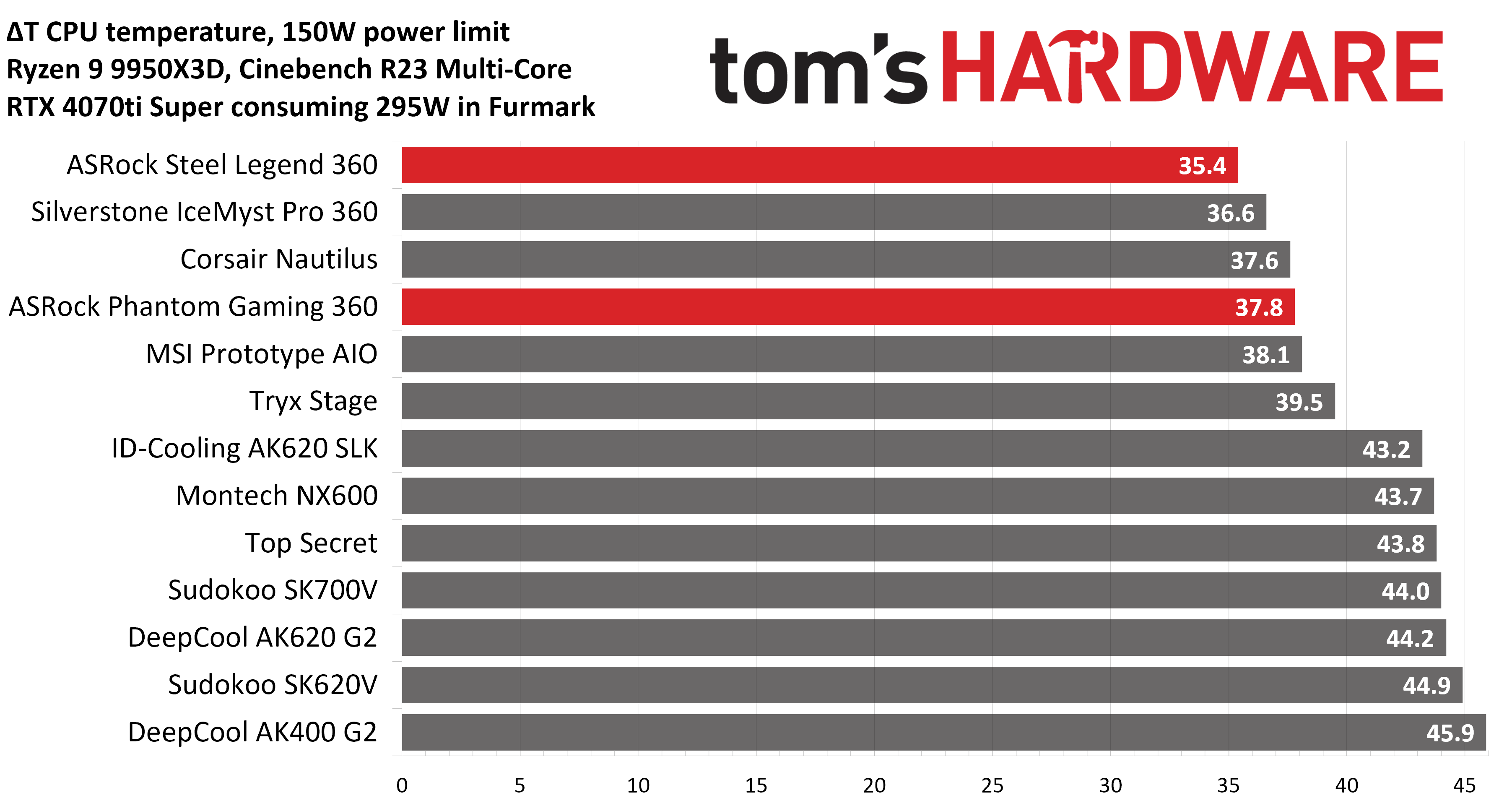
Our next test runs Cinebench on the CPU with a 150W power limit, while also running Furmark on MSI’s RTX 4070 Ti Super Ventus 3x OC. This causes the GPU to consume ~295W of power. This test is designed to emulate the thermals of games, which primarily stress the CPU and GPU.
(Image credit: Tom's Hardware)
ASRock’s Steel Legend stood out in this test, outperforming all other competitors, with an average temperature of 57.4 C (35.4 C above ambient). The Phantom Gaming AIO also performed well, taking the fourth-place spot.
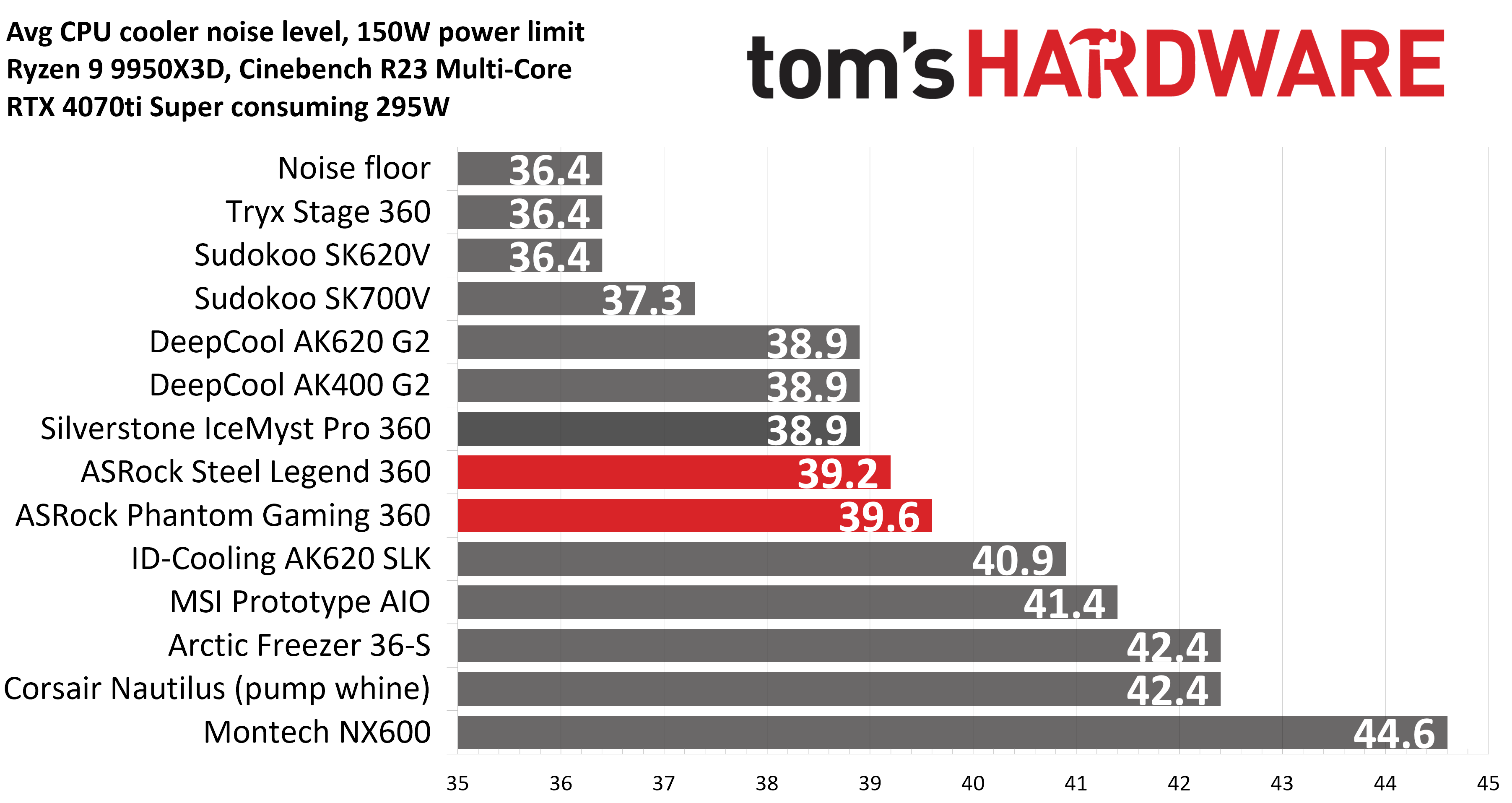
But thermals are only part of the story. Noise levels, especially when you’re gaming, are far more important here. When tied to my motherboard’s default fan curve, ASRock’s Steel Legend 360 had a noise level measured at 39.2 dBA. The Phantom Gaming 360 LCD was just a hair louder, measuring 39.6 dBA.
(Image credit: Tom's Hardware)
Noise-normalized testing
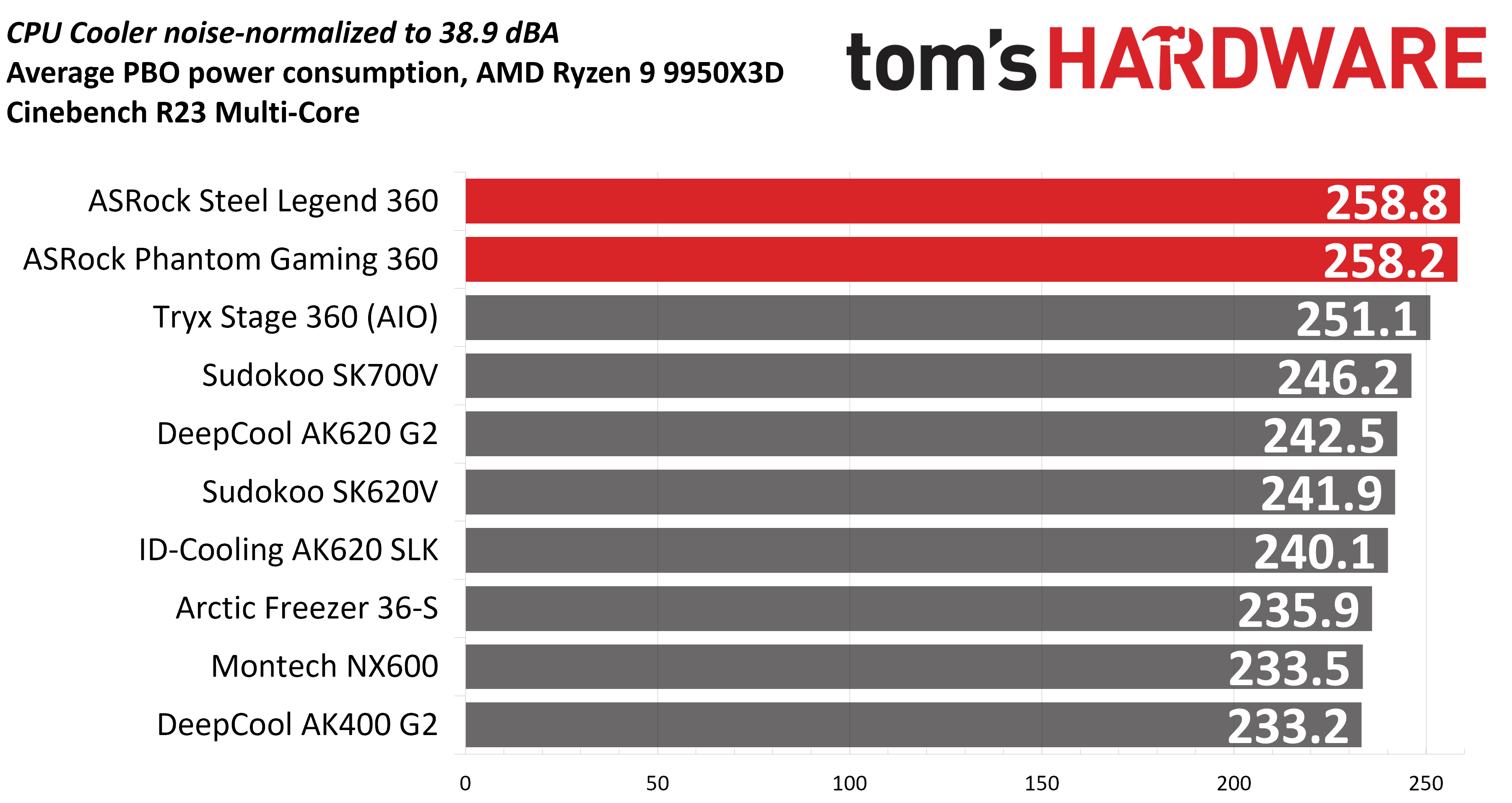
Most testing is performed with the cooler tied to the default fan curve of our MSI X870E Carbon motherboard, but some prefer to see tests when the noise levels of coolers are equalized. This is especially important to those of you who prefer silent computers. This next test has the CPU cooler noise-normalized to 38.9 dBA, with PBO enabled for the Ryzen 9 9950X3D CPU.
(Image credit: Tom's Hardware)
With recordings of 258.8 and 258.2W average CPU power consumption, ASRock’s AIOs perform essentially on par with each other while noise-normalized.
Karhu DDR5 RAM thermals testing
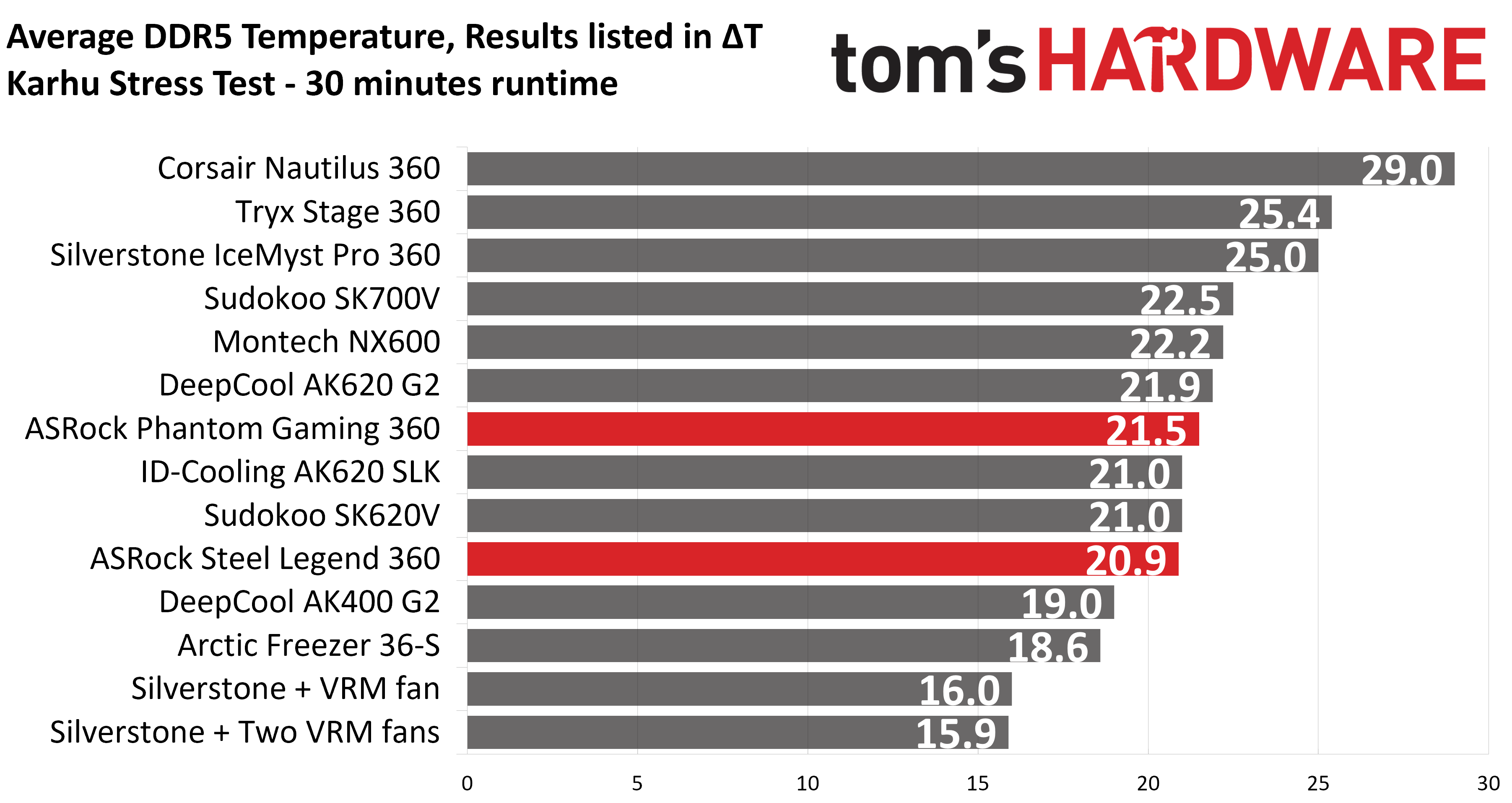
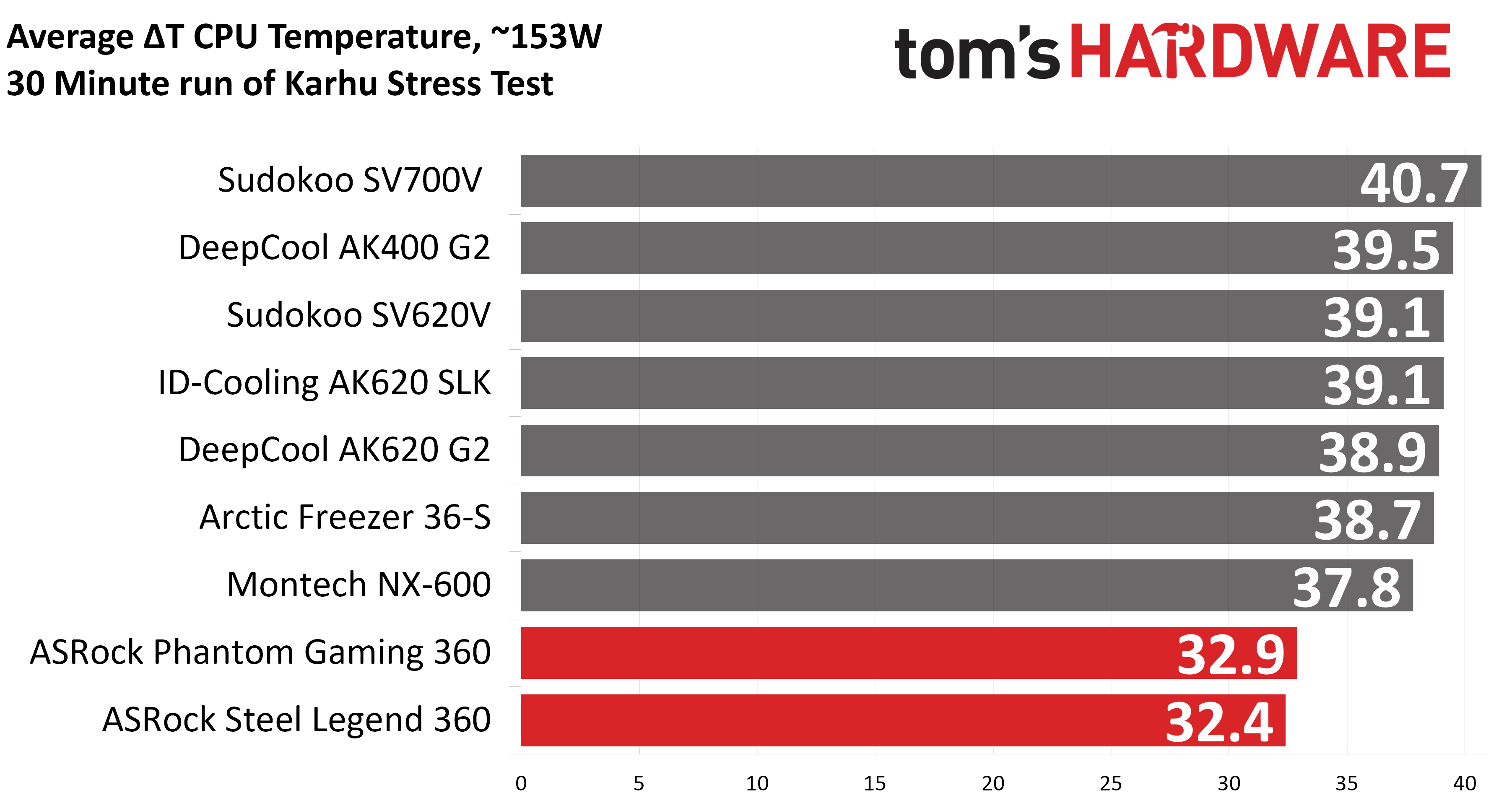
Your CPU cooler does not operate in isolation. It has an impact on not just your CPU’s temperatures, but also the other components in your build, like your RAM and GPU. To that end, I’ve run the Karhu RAM stress test. This places a load of ~153W on the CPU and ensures system RAM (DDR5 in my case) is fully stable. In this type of scenario, most AIOs tend to produce worse results than air coolers.
(Image credit: Tom's Hardware)
DDR5 temperatures were excellent in this test, with averages of 20.9 C (Steel Legend) and 21.5 C (Phantom Gaming) recorded. Of the AIOs I’ve tested on this configuration, only Silverstone’s IceMyst Pro with its unique stackable fans performs better.
We’ve also included a chart showing the CPU temperatures in this test, and thermal performance was strong – outperforming air coolers by ~5 degrees C. But I haven’t recorded this data for other AIOs yet.
(Image credit: Tom's Hardware)
Conclusion
(Image credit: Tom's Hardware)
ASRock’s Steel Legend 360 LCD and Phantom Gaming 360 LCD are both strong coolers, well suited to heat-intensive CPUs like AMD’s Ryzen 9950X3D or Intel’s Core i9-14900K.
Of the two ASRock AIOs, I would recommend the Steel Legend 360 LCD for users who want the best thermal performance possible (and a lower price tag). It might lack the thicker 32 mm radiator included with the Phantom Gaming 360 LCD, but its included fans are stronger, and as a result provide lower CPU temperatures and quieter noise levels in common scenarios. Still, at around $160, the Steel Legend is far from the most affordable AIO with a display, and it’s only available in white.
Intel has entered high-volume manufacturing using ASML's High NA extreme ultraviolet (EUV) lithography technology for a subset of its Intel Core Ultra Series 3 "Panther Lake" processors, becoming the first company to ship high-volume logic products manufactured with the technology. ASML announced the milestone in an official press release on Wednesday, July 15, confirming that Intel Foundry is running the qualified High NA layers on its Intel 18A process node in Oregon.
According to ASML, Intel is using High NA EUV to pattern selected Intel 18A layers, with products already shipping to customers at yields matched to those achieved on ASML's existing NXE EUV platform. These layers are dual-qualified, meaning the same layer can be exposed on either an existing 0.33 NA NXE scanner or a 0.55 NA EXE scanner, with the resulting wafers being interchangeable.
High NA EUV has long been viewed as the successor to today's EUV lithography, promising to extend semiconductor scaling by enabling manufacturers to print smaller, denser circuit patterns that are becoming difficult to achieve with existing tools. Until now, the platform had been confined to R&D work. ASML’s announcement marks the first time High NA EUV has been used to produce and ship a high-volume commercial logic product.
Panther Lake, built on the Intel 18A manufacturing process, is spearheading this transition. Rather than replacing the company's entire lithography flow, Intel is applying High NA EUV to specific layers while the remainder of the chip continues to be manufactured using conventional lithography.
High NA EUV builds on the same 13.5-nanometer extreme ultraviolet light used by today's scanners but increases the optical system's numerical aperture (NA) — how much light a lens system can collect and focus onto a silicon wafer — from 0.33 to 0.55. The higher value resolves finer features in a single exposure, allowing chipmakers to print smaller patterns with greater precision and process control.
This increased resolution is expected to reduce reliance on complex multi-patterning techniques for some of the industry's most demanding layers, thereby simplifying manufacturing and improving feature fidelity. In the long term, these capabilities are expected to support higher transistor densities and improved performance in future processors, particularly as AI workloads continue driving demand for increasingly advanced semiconductor technologies.
"With increased resolution and better process control, the introduction of High NA EUV marks a substantial development in semiconductor lithography," said ASML President and CEO Christophe Fouquet. "We are proud to play a role in enabling the smaller, denser patterning that will accelerate advancements in AI and other emerging technologies."
Intel and ASML have been working towards this milestone for several years. In 2024, Intel completed installation of one of the industry's first commercial High NA EUV lithography systems, the TWINSCAN EXE:5000, at its Hillsboro, Oregon, research and development facility. The company later became the first to qualify ASML's second-generation TWINSCAN EXE:5200B, which increases wafer throughput and overlay accuracy while incorporating an improved EUV light source over its predecessor.
While the announcement represents High NA EUV's commercial debut, it does not mean Panther Lake is manufactured entirely using the new lithography platform. Instead, Intel has qualified High NA for selected layers, an approach that mirrors how new lithography generations are typically introduced into advanced semiconductor production before broader adoption across future nodes.
Intel Foundry Executive Vice President and General Manager Naga Chandrasekaran said that qualifying the High NA process option on selected Intel 18A product layers enables the company's existing tool fleet to deliver higher manufacturing output while providing flexibility for future process technologies.
Panther Lake itself is not a future product. Intel launched Core Ultra Series 3 at CES on January 5, 2026, opened preorders the following day, and put systems on shelves globally from January 27. The Core Ultra X9 378H followed in April alongside the value-tier Core Series 3, code-named Wildcat Lake, and the handheld-focused Arc G3 parts arrived on May 28.
The announcement’s statement that the product is shipping to customers refers to wafer flow from the fab into the supply chain, rather than to a product launch. ASML says the two companies will continue working on High NA readiness, with the flexibility to incorporate the technology into future nodes based on customer needs — most immediately, Intel 14A, which Intel has designed to use High NA on a set of its tightest-pitch layers.
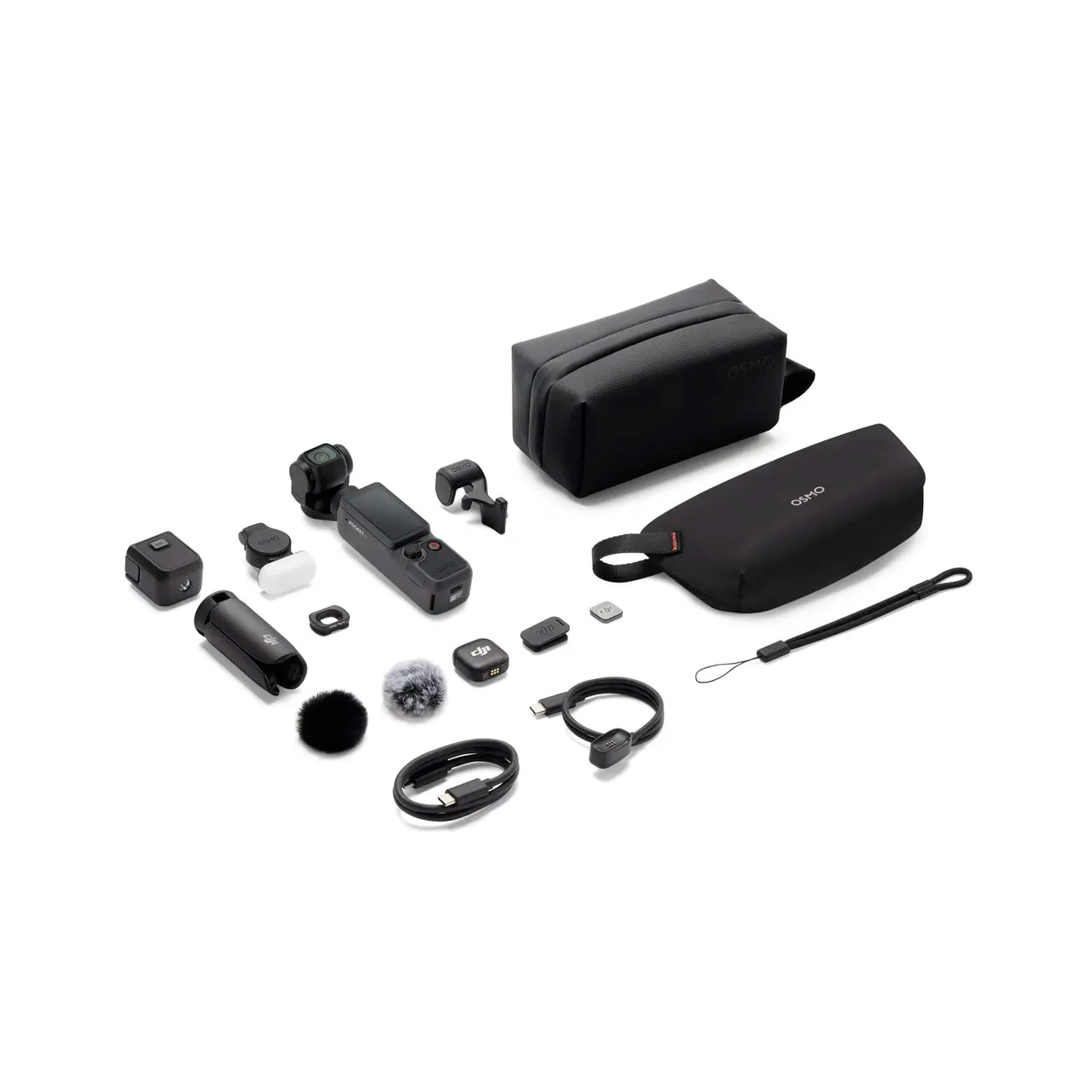
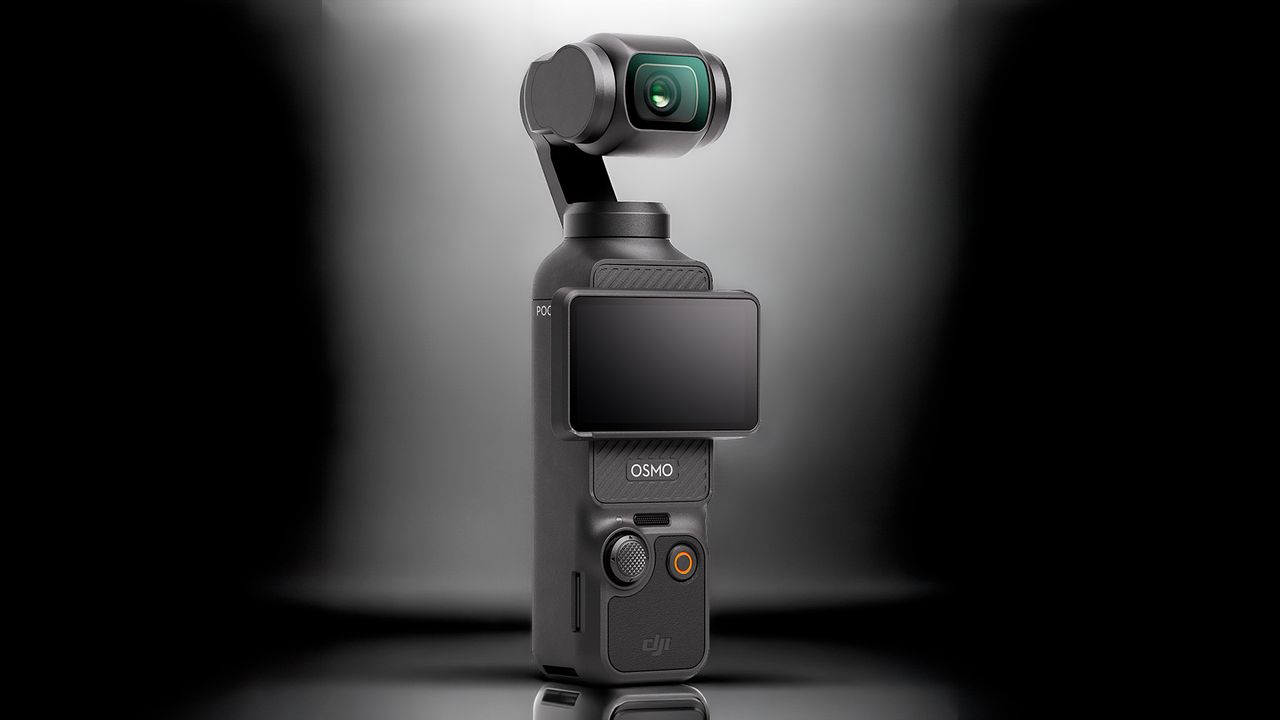
If you are an aspiring vlogger or simply just enjoy capturing your adventures, DJI’s Osmo Pocket series are among the most popular options on the market right now. And for a limited time, you can elevate your vlogs with some of the best Osmo Pocket handheld cameras that are available at special prices on AliExpress.
AliExpress already sells DJI’s Osmo 360, Pocket 3, Pocket 4, Pocket 4P, and their respective Creator Combos at very competitive prices compared to other U.S. retailers. However, the retailer's July A+ event brings even more attractive deals on the Osmo Pocket series. You can now save up to an additional 14% on top of the already low prices. The discounts range from $2 up to $70.
We have a few coupon codes that will help slash AliExpress's prices even further. They are exclusive for U.S. consumers and are case-sensitive. Therefore, you need to copy and paste them exactly as provided. Each account can only use a coupon once, so plan your shopping cart accordingly.
As usual, AliExpress utilizes a tiered format, so apply the highest coupon that matches your purchase amount to get the best deal. That does not mean you have to buy the more expensive model, as there are some nice discounts on the more affordable options, as well.
VSFUTURE2 — $18 –> $2
VSFUTURE5 — $39 –> $5
VSFUTURE10 — $69 –> $10
VSFUTURE20 — $139 –> $20
VSFUTURE23 — $169 –> $23
VSFUTURE35 — $249 –> $35
VSFUTURE55 — $379 –> $55
VSFUTURE70 — $499 –> $70
The Osmo 360 is a high-end 360-degree action camera with impressive specifications. It records in native 8K, up to 50 FPS, and takes stills up to 120 megapixels, with 360-degree support. Use the VSFUTURE35 coupon code at checkout.View Deal
The Osmo Pocket 3 is a pocket-sized camera that is designed for vlogging. It shoots 4K videos up to 60 FPS or, alternatively, 4K slow-motion videos up to 120 FPS. Use coupon code VSFUTURE55 at checkout.View Deal
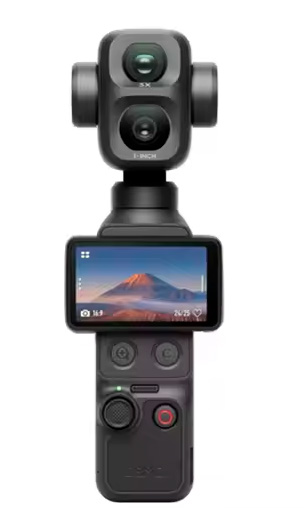
The Osmo Pocket 4 brings significant upgrades over the previous version, such as upping the slow-motion capability to 4K at 240 FPS, a brighter screen, and longer battery life. Use the VSFUTURE70 coupon code at checkout.View Deal
The Creator Combo comes with some useful accessories, including a DJI Mic 4 wireless transmitter, an Osmo mini tripod, a dedicated carrying bag, and other goodies. Use the VSFUTURE70 coupon code at checkout.View Deal
The Osmo Pocket 4P is the ultimate compact camera from DJI, which brings substantial upgrades for vlogging enthusiasts. It flaunts a dual-lens setup, 4K slow motion up to 240 FPS, a 37-megapixel snapper, and up to 210 minutes of shooting. Use the VSFUTURE70 coupon code at checkout.View Deal
The Creator Combo arrives with a plethora of audio and stabilizing accessories, like a handle extension, DJI wrist strap, DJI Mic 3 wireless transmitter, among others. Use the VSFUTURE70 coupon code at checkout.View Deal
The July A+ event started on July 13 and will last through July 19, so there is still ample time to look over the Osmo Pocket series products that are on sale. If you have been eyeing something, now is your opportunity to secure one at a bargain price. At these unbeatable prices, the Osmo Pocket series will likely sell out quickly, so don't wait too long.
Every order ships directly from AliExpress local U.S. warehouses, so shipping is free and comes with full buyer protection. There are no hidden fees, such as cross-border duties, either. Once your order is locked in, AliExpress will ship it in 2-5 business days. Take advantage of this limited-time event to get the best deals on DJI Osmo Pocket products before they sell out.
Google plans to use Intel's EMIB-T packaging for its next-generation TPU codenamed Humufish, according to SemiAnalysis. TSMC's portfolio of chip-on-wafer-on-substrate (CoWoS) technologies has become the de facto standard advanced packaging option for nearly all AI and HPC processors made in the industry. Competing offerings are usually considered as secondary solutions if CoWoS is in tight supply, but things are beginning to change.
Google is a long-standing CoWoS customer for TPUs, starting from the Third-Generation TPU, all the way to Google's latest Eighth-Generation TPUs. Assuming that SemiAnalysis's report about Google's decision to move to EMIB-T with its Ninth-Generation TPUs is accurate, it's a big decision for Google, as switching from one advanced packaging technology to another is a complicated endeavor, which involves plenty of changes and unknowns. Understanding Google's reasons for the switch could shed some light on the prospects of Intel's and TSMC's advanced packaging technologies, which will be used by leading chip designers and hyperscalers in the coming years.
Advanced packaging technologies at glance
For years, Google used TSMC's CoWoS-S, and later, CoWoS-L packaging. Initially, the company used CoWoS-S packaging, which relies on a silicon interposer up to 3.3X the reticle size, but with its 7th- and 8th-Generation TPUs, the company moved to CoWoS-L. CoWoS-L relies on a redistribution layer (RDL) interposer with embedded local silicon interconnect (LSI) bridges that enable high-performance die-to-die links, which can scale packages to 5.5X the reticle size today. TSMC promises to improve CoWoS-L's capabilities to scale over 14X the reticle size by the end of the decade.
(Image credit: Intel)
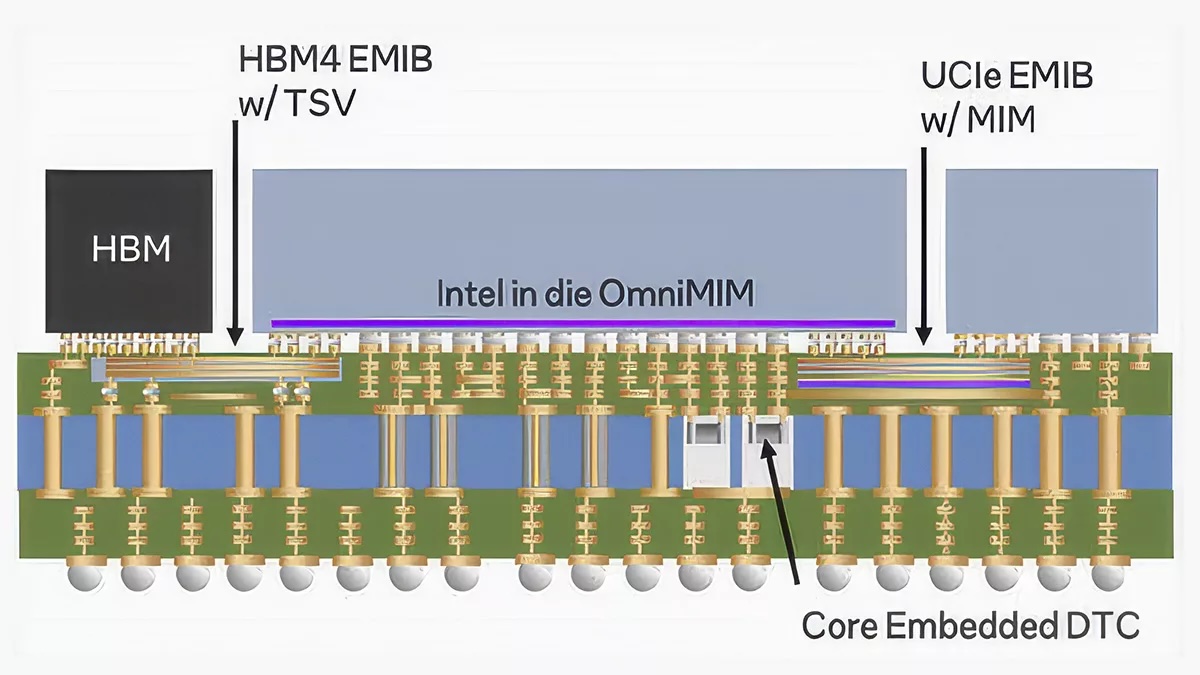
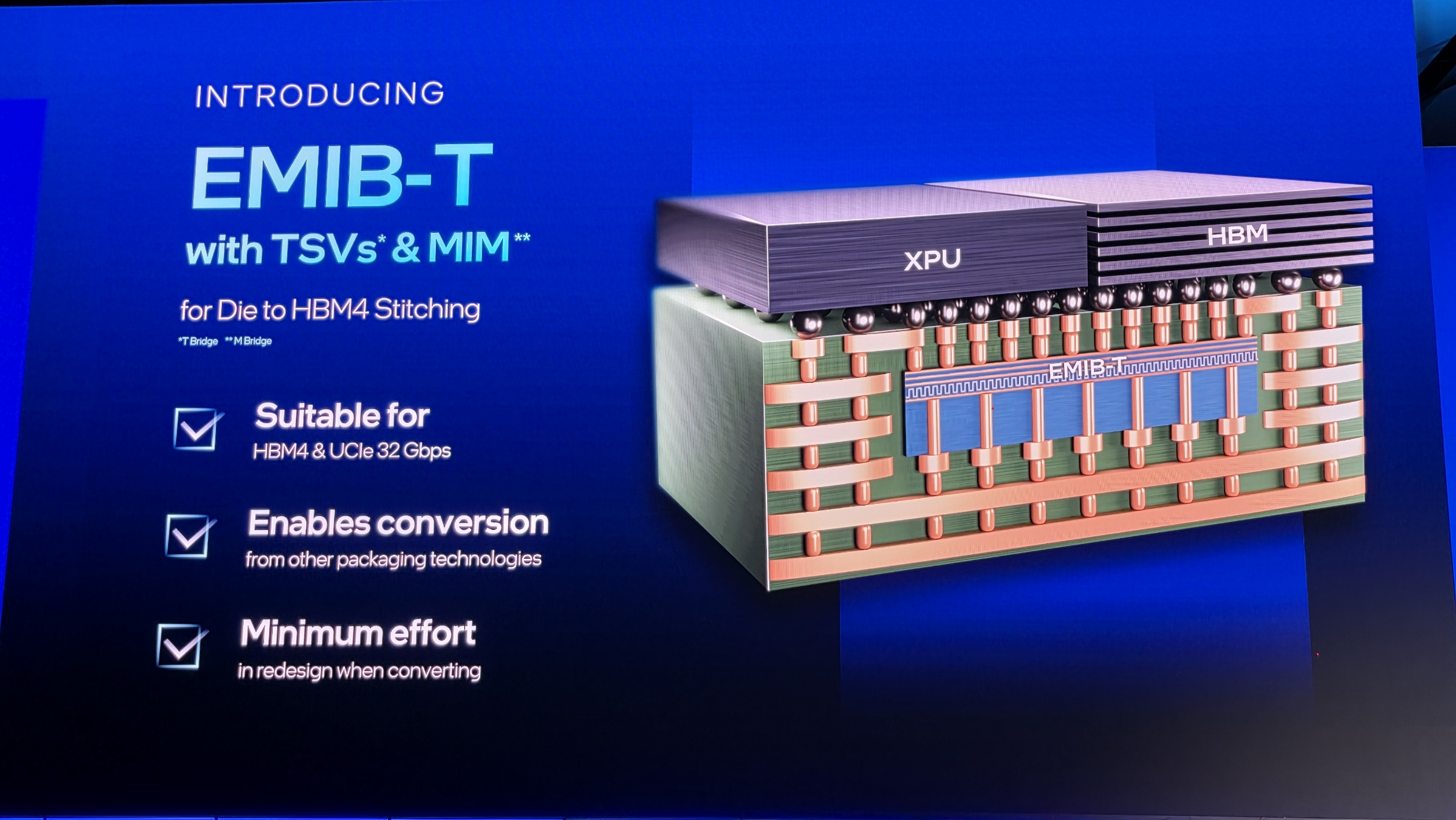
Unlike CoWoS, Intel's embedded multi-die interconnect bridge (EMIB) technology does not use any interposers. The technology instead relies on tiny embedded silicon bridges within the substrate to enable high-density die-to-die interconnections, whereas everything else is routed through an inexpensive organic substrate.
EMIB-T adds through-silicon vias (TSVs) to the bridge, which enables power to flow vertically instead of going through the organic substrate. In addition, Intel's EMIB-T also integrates sophisticated metal-insulator-metal (MIM) capacitors and a dedicated ground plane into the bridge to improve power integrity. The latter is a particularly important feature of complex next-generation AI accelerators, which demand more, cleaner power, and for which power delivery is becoming as challenging as signal routing.
The main selling point of EMIB (and EMIB-T) is that it is not constrained by interposer reticle limits as it places small silicon bridges only where high-density die-to-die links are needed. Strictly speaking, CoWoS-L is not either, as it uses LSIs locally as well. The difference is that those bridges are embedded into a package-wide RDL interposer that connects everything and enables dense interconnections across the package.
Since both CoWoS-L and EMIB-T are designed to address the same applications and have many similarities in the way they do this, the choice between them is likely driven by a combination of factors rather than one single advantage or disadvantage. On the technology side of matters, these factors include interconnect performance and density, power delivery, scaling beyond very large package sizes, and mechanical rigidity. On the business side of things, costs, capacity availability, and supply chain diversification are also a significant factor.
Crucial differences
(Image credit: Tom's Hardware)
SemiAnalysis claims that the main advantage of EMIB/EMIB-T over CoWoS is the lack of reticle limit, but this argument does not fully hold against CoWoS-L, as it was invented specifically to escape the reticle limitation by replacing the monolithic silicon interposer with localized LSI bridges.
When it comes to dense, package-wide routing, CoWoS-L's RDL interposer is fundamentally superior to an ordinary organic substrate offered by EMIB-T. Organic substrate wiring has coarser line/space dimensions and larger vias, so it cannot provide the same routing density as CoWoS-L's fine-pitch RDL. Where an EMIB bridge connects adjacent dies, Intel can achieve very high interconnect density. But anything that needs to travel beyond those bridges must use the package substrate or cross a topology involving additional bridges.
By contrast, CoWoS-L gives the designer two levels of connectivity: LSIs provide extremely dense local die-to-die connections, while the global RDL interposer provides relatively dense and flexible routing across the entire package. This means the RDL can carry longer, lower-density connections without consuming valuable LSI resources, while still offering much finer routing than the underlying package substrate.
One scenario for Google's choice is that it potentially wanted better power deliverythan what CoWoS-L could offer. EMIB-T integrates TSVs for vertical power delivery, sophisticated MIM capacitors for local decoupling, and a dedicated ground plane into its silicon bridges. The combination of these features substantially reduces power-delivery impedance and improves transient response and power integrity, which gives EMIB-T a major advantage over conventional EMIB for power-hungry AI accelerators. However, we have no idea how EMIB-T stacks up against CoWoS-L in the case of Google’s Humufish.
Of course, the larger the RDL interposer becomes, the greater its parasitics can become, potentially limiting scaling unless TSMC finds ways to mitigate them. However, EMIB does not eliminate long-distance wiring: If two distant dies must communicate, those signals still have to travel somewhere, and routing them through an organic substrate is not inherently electrically superior to routing them through a purpose-built RDL interposer. Therefore, it is difficult to claim that Google chose EMIB-T over CoWoS-L, simply because EMIB-T offers superior package-wide electrical characteristics.
After Nvidia suffered yield loss with its Blackwell data center GPUs due to an alleged mismatch in the coefficient of thermal expansion (CTE) among the GPU chiplets, LSI bridges, RDL interposer, and motherboard substrate, which led to warping and system failure, it is reasonable to question the mechanical rigidity of CoWoS-L packages. Nvidia has found a solution for its dual compute chiplet Blackwell packages, and so have other developers of AI accelerators. However, as package dimensions increase, they may behave differently, therefore causing yield losses.
By contrast, EMIB/EMIB-T eliminates the large RDL interposer and embeds small silicon bridges in the organic substrate, so most of the package consists of the substrate itself. This does not make EMIB/EMIB-T packages immune to mechanical failures, as large packages can warp and bend, causing various problems. However, as such packages lack the very source of global thermomechanical stress, they can potentially be more robust mechanically. However, EMIB-T can potentially complicate things because TSVs, additional metal structures, MIM capacitors, and their ground plane make the bridge more complex. Thus, Intel must manage both global package warpage and local stresses around each embedded bridge to ensure the mechanical rigidity of these packages.
Ironically, while CoWoS-L can offer denser package-wide routing, which is better for ultra-large processors, EMIB-T may potentially provide better mechanical rigidity required for such devices. Nonetheless, EMIB-T and its organic substrate do not eliminate package bending or cracking risks entirely.
Economics
If Google's Humufish TPU really moves to EMIB-T, the decision could well be both technical and strategic. Google has the engineering resources to opt for an all-new packaging technology in an effort to lower costs and eliminate dependence on TSMC's constrained CoWoS capacity. Nvidia tends to procure advanced packaging allocations years in advance, so it is possible that Google could simply not get enough CoWoS-L wafers for its 9th-generation TPU.
As a bonus, Google can also build relationships with Intel Foundry without using the company's fabrication technologies. In fact, keeping in mind that Intel and Google already have a strategic agreement covering Intel Xeon CPUs, it wouldn't be too surprising to learn that the cloud giant is courting Intel Foundry as well.
Both Intel's EMIB-T and TSMC's CoWoS-L have their own technological and economic advantages and disadvantages. Perhaps the biggest advantage of CoWoS-L is its predictability, as the company has experience with that tech. However, if Google has decided to drop that predictability in favor of an all-new packaging method, it may well have a combination of technological and strategic reasons to do so.
Nowadays, storage devices for consumer and data center applications differ rather dramatically, as do approaches to product design as well as go-to-market strategies. Therefore, to get a more or less comprehensive overview of the storage market in general, you must observe both ends of the spectrum. To complement our interview with Nelson Duann at Computex, we also sat down with his colleague Alex Chou, who is in charge of Silicon Motion’s enterprise storage business.
Alex Chou is an interesting person to talk to. Before joining Silicon Motion, he spent some 18 years at Broadcom, where he led the wireless connectivity business, also initiating the Enterprise Switch, PoE, and 10-G Base-T PHY business with a product marketing focus. Before that, he worked at UMC Capital, ARK Logic, and Western Digital, where he developed graphics accelerators. He deeply understands the industry and uses his knowledge to expand SMI's business into the data center segment. As he is the first general manager of Silicon Motion's enterprise business unit, it is safe to say that all the success that the company has faced in the new segment so far can be attributed to Alex Chou.
Anton Shilov: Can you introduce yourself to our readers, please?
Alex Chou: My name is Alex Chou. As you know, Silicon Motion has two business units: the client business and the enterprise business. I am responsible for the enterprise business unit. My responsibilities include defining new products, leading development teams, bringing products to market, and working with OEMs, cloud service providers, and other customers to promote our technology and differentiation.
Getting into enterprise SSD business
Historically, Silicon Motion was focused on NAND controllers for client applications as well as embedded graphics processors and USB display controllers. Following the restructuring in the early 2020s, SMI formed a separate business unit to offer enterprise-grade SSD controllers, though it took the company some time to land its first tangible orders. By now, the company has yet to grab a 10% market share, yet it has clients among cloud service providers (CSPs), hyperscalers, and OEMs, significant achievements given Silicon Motion is a relatively new market entrant.
Anton Shilov: It has been a challenging year for much of the industry, particularly for memory-related segments. Yet Silicon Motion reported first-quarter revenue of $342.1 million, up 23% sequentially and 105% year-over-year, while SSD controller sales increased by roughly 40% to 45%. Can you explain what drove those results, particularly on the enterprise side?
Alex Chou: It depends on how you define a difficult year. If you look at the results, I would argue that this has actually been one of the best years the storage industry has seen.
Silicon Motion is fundamentally a controller company. We build controllers that work with NAND from all major memory suppliers. On the enterprise side, we are still relatively new compared to some established competitors, but we have secured a number of new projects and have started delivering products to customers.
We have invested heavily in PCIe Gen5, Gen6, and Gen7 enterprise SSD controllers. Today, our Gen5 products are beginning to ramp into volume production with multiple OEM customers. That ramp is contributing to our growth.
Anton Shilov: Do you have an estimate of your market share in the enterprise SSD controller market?
Alex Chou: That depends on how you define the market. Some people measure market share by unit shipments, while others look at exabytes shipped because SSD capacities continue to increase.
We have only recently begun shipping enterprise products in volume. If you listened to our CEO's comments during the earnings call, we expect enterprise shipments to increase significantly in the second half of the year. We are still in the early stages of our ramp, but we are making good progress with several key customers.
If you look beyond the initial ramp and think about the full-year run rate, I believe we can build from there and target a much stronger position next year. Longer term, our goal is to exceed 10% market share in the $4B enterprise SSD controller market, but this year is really about getting through qualification, customer testing, and the early production ramp in 2 half of this year.
Our goal is to continue expanding our share. We are only beginning the ramp [of our data center-grade SSD controllers] today, but we expect our share to increase meaningfully as deployments grow.
Anton Shilov: Who are your primary customers? SSD manufacturers, OEMs, or hyperscalers?
Alex Chou: We primarily work with OEMs. We sell controllers and firmware solutions to SSD manufacturers and OEMs. Some customers use our complete controller-and-firmware solution, while others develop their own firmware.
At the same time, we work directly with hyperscalers and cloud service providers to explain the advantages of our products and ensure they understand our technology roadmap.
Enterprise SSDs are used in several different segments. Traditional compute servers represent one market. High-density storage systems used for AI and large-scale data storage are another. We also see growing interest in storage systems located near GPUs, where latency becomes particularly important.
One area where we differentiate ourselves is quality of service. We have developed a patented traffic-shaping engine that helps maintain latency consistency under heavy workloads and multi-tenant environments. That capability is particularly attractive to hyperscalers and cloud service providers.
Anton Shilov: Do you see the enterprise SSD market splitting into different categories depending on workload?
Alex Chou: Yes. We see at least three major categories emerging.
The first is traditional compute-attached enterprise SSDs, which are used in conventional servers and storage systems. The second is very high-density storage for AI and hyperscale environments, where capacity, throughput, and cost efficiency are critical. The third is storage located closer to GPUs, where the requirements are very different because latency and quality of service become much more important.
That third category is particularly interesting. In AI systems, the storage subsystem is no longer just feeding CPUs. It increasingly has to support GPUs directly, especially for workloads involving very large datasets or KV-cache offload. In those environments, low latency and predictable performance matter much more than they did in traditional storage deployments.
Storage Next, PCIe 6 and PCIe 7 SSD controllers
Anton Shilov: Is that where Nvidia's Storage Next vision comes in?
Alex Chou: Yes. Storage Next is one of the major industry developments we are watching very closely.
The idea is that storage will move closer to the GPU and become part of a much more tightly integrated data path. In some cases, the goal is not just to maximize bandwidth, but to ensure that latency remains low and deterministic enough for AI workloads that continuously move data between accelerators, system memory, and storage.
This is one of the reasons we have invested heavily in QoS and latency control. Through our traffic-shaping technology, we can manage access patterns and reduce latency spikes when multiple tenants or applications share the same SSD. In a cloud environment or an AI storage environment, that becomes very important.
(Image credit: Silicon Motion)
Anton Shilov: So, the challenge is no longer just raw throughput, but how predictably the SSD behaves under load?
Alex Chou: Exactly. Bandwidth still matters, but in many enterprise and AI environments, consistency matters just as much.
When multiple applications, multiple VMs, or multiple users share the same storage device, you need to control latency and quality of service carefully. If performance becomes unpredictable, it can affect the entire system.
That is why we have focused on a traffic-shaping mechanism that can prioritize and isolate workloads more effectively. We believe that kind of latency management will become a key differentiator for enterprise SSD controllers going forward.
Anton Shilov: How does that affect your roadmap for future controllers?
Alex Chou: It affects it quite a bit. Our upcoming controllers are not designed only for higher sequential bandwidth. They are also being designed for newer enterprise requirements such as OCP 2.7 compliance, stronger security, better QoS, and support for more advanced deployment models.
Anton Shilov: Are you already sampling your PCIe 6.x controllers?
Alex Chou: On the Gen6 side, our controller design is essentially complete; we have an FPGA [emulating algorithms], and we expect tape-out very soon. If everything goes according to plan, we expect first silicon back in the second half of 2026.
That controller not only supports a faster host interface, but also supports new features and requirements we see from AI infrastructure and hyperscale customers.
Anton Shilov: So, the PCIe Gen6 SSD platform is not just a speed upgrade for Silicon Motion?
Alex Chou: Correct. PCIe Gen6 obviously provides more bandwidth, but for us the more important part is that the surrounding system requirements are changing as well. Security, QoS, cloud deployment models, and AI storage architectures are all evolving at the same time, so the controller has to evolve with them.
Anton Shilov: Let us talk about the roadmap in more detail. You said the PCIe Gen6 enterprise controller is close to tape-out. What comes after that?
Alex Chou: PCIe Gen6 is the next major step for us, and the design is essentially complete. We expect to tape out very soon and, assuming [everything works correctly], receive first silicon in the second half of 2026.
But internally, we are already working beyond PCIe Gen6. PCIe Gen7 development has already started. In fact, the overall architecture for our Gen7 enterprise controller platform has already been defined. That means we are not just planning the interface speed increase; we are also defining the surrounding architecture, feature set, and deployment model that will be needed in the next generation of enterprise and AI systems.
Anton Shilov: So, SMI's PCIe Gen7 controller is no longer just a concept?
Alex Chou: Correct. PCIe Gen7 is already in active development. The current plan is to have internal samples in 2H, 2027 and to move toward production in that same general timeframe.
As controller development becomes more complex, you cannot wait until the market is ready before starting work. By the time a new interface reaches the market, the controller has to be nearly finished already. So, we are always working at least one generation ahead, and in practice often two.
Anton Shilov: As NAND becomes denser and more complex, error correction also becomes a bigger issue?
Alex Chou: That is a major part of controller development now. As NAND moves to higher layer counts and denser cell structures, the controller has to do more work to maintain reliability, endurance, and data integrity.
One of the areas we are working on is stronger LDPC. On the enterprise side, LDPC with a 16KB collaborative codeword is already used with SM8466, SMI’s first Enterprise PCIe Gen6 controller, and it is part of the roadmap because future NAND will require more robust error correction. That is one of the reasons enterprise controller architecture keeps becoming more complex generation after generation. You are no longer designing only for interface speed. You are also designing for signal integrity, power, security, QoS, error correction, and support for future NAND generations that may behave very differently from today's devices.
Anton Shilov: Will LDPC with 16KB collaborative codeword be enough for next generations of 3D NAND with hundreds of active layers?
Alex Chou: A 16KB LDPC engine already consumes a significant amount of silicon area and is quite sophisticated. For PCIe Gen7 controllers, our goal is to optimize and improve that engine from multiple angles rather than simply keep expanding it. We still need our architects to make the final call on exactly which improvements we will implement, but at this point we are more likely to refine and enhance the current design than to move beyond 16KB LDPC.
SSD controller development strategy
Anton Shilov: Speaking more generally, SSD controllers are increasingly becoming full platforms rather than just controllers, because integration matters so much. Do you expect close collaboration between controller vendors, NAND makers, and SSD manufacturers to become even more important as the industry moves to next-generation storage devices?
Alex Chou: I may not fully understand your question, but let me explain how we approach it.
At Silicon Motion, we design the controller architecture and build the firmware stack with a rich feature set. For example, we have developed our own [PerformaShape] traffic-shaping engine to improve QoS. That is the foundation of the platform.
From there, we have to look at how NAND evolves from one generation to the next. As we move from PCIe Gen5 to Gen6 to Gen7, controller performance has to scale accordingly. If you want to saturate the PCIe interface and deliver, say, 7 million IOPS today and much higher performance in future generations, you have to understand exactly where NAND is going.
That is why my team meets regularly with Samsung, SK hynix, SanDisk, Kioxia, and all other NAND vendors to review their roadmaps. Silicon Motion is part of that ecosystem, and because of those relationships, we usually get early visibility into future NAND generations and often receive early samples so we can bring up our controllers and make sure they take advantage of new NAND as quickly as possible.
That matters even more in the current supply environment. Because we work with all NAND suppliers, hyperscalers and cloud service providers can come to us and ask for a solution that is not tied to a single memory vendor. A company like Samsung naturally builds around its own NAND, but we have the advantage of being able to support multiple suppliers. That gives customers much more flexibility when supply is tight.
So yes, we have a core controller architecture and a common firmware base, but one of our strengths is that we work very closely with NAND vendors on future generations and make sure our platform can take advantage of faster interfaces, higher die counts, and new NAND capabilities as they arrive.
XL-Flash and storage-class memory
Anton Shilov: What about storage-class memory? Are there any developments there? As far as I can tell, adoption of Kioxia’s XL-Flash has been limited.
Alex Chou: That’s a very good question. I am actually going to visit Kioxia, so I should have a better sense of their plans after that. At the moment, Kioxia is essentially the only company still pushing XL-Flash, so they are trying to build something around it.
The challenge is that it is not just about the technology itself. You need a broader ecosystem to support it, and that is what makes the situation more complicated. We are watching it closely and trying to understand whether it is something we really need to support, but at this point I do not have a definitive answer. We are still evaluating it.
Anton Shilov: Have you heard anything similar from other suppliers? Quite a few memory makers used to talk about storage-class memory or similar technologies in their roadmaps.
Alex Chou: Based on what we know, not really. If you look back at last year’s Flash Memory Summit, several NAND makers were talking about higher-performance flash and storage-class-memory-like concepts. That created a lot of buzz at the time, and we looked into it, just as we have looked into XL-Flash, to understand whether there was a real ecosystem forming around it.
But there is much less discussion around those ideas now. One reason is simple: memory vendors do not really need those products at the moment because they can sell conventional NAND at very high prices and still generate strong returns.
Anton Shilov: In other words, they can just sell QLC 3D NAND and be perfectly happy.
Alex Chou: Exactly.
Anton Shilov: On the other hand, Nvidia wants storage devices capable of 100 million IOPS.
Alex Chou: Yes, that is where Storage Next comes in.
Anton Shilov: Has anyone actually come close to 100 million IOPS yet?
Alex Chou: I would say Storage Next gains many attentions. XL-Flash could be one possible approach to address that kind of requirement. But these are other options aiming to address high-performance and low latency needs.
What matters more is that Storage Next has a much stronger ecosystem behind it because Nvidia is actively driving it. There are regular meetings around it, and our architect has been involved from the very beginning. We have been tracking it closely and trying to make sure our future controller architecture can support it if and when the market materializes.
At the same time, Nvidia itself appears to recognize that 100 million or 200 million IOPS may not be realistic in the near term. The target seems to be moving closer to something like 50 million IOPS, which is more achievable. So yes, we are watching it very closely, and we are building in the flexibility to support it if needed.
In storage, having a technically interesting idea is not enough. The industry has to agree on how to use it, how to deploy it, and how to integrate it into systems. Storage Next currently has more momentum because the ecosystem behind it is much stronger.
Anton Shilov: So, you see Storage Next as more commercially relevant than storage-class memory, at least for now?
Alex Chou: Yes. At least today, Storage Next looks more immediate and more actionable.
We are already participating in those discussions and thinking about what future controller requirements will look like in that environment. That includes not only bandwidth, but also latency behavior, QoS, and the role storage plays in systems where GPUs are increasingly central to the data path.
That does not mean other technologies disappear. It just means that if you ask where the market is actively moving right now, the answer is much more on the Storage Next side than on the storage-class-memory side.
Anton Shilov: So, in practice, you make sure your controller works with all relevant NAND types, while the memory vendor mainly has to make sure the media itself complies with the interface requirements?
Alex Chou: When we design a controller, we already cooperate closely with NAND suppliers. Our architects look at all of the major vendors to understand whether there are any special requirements we need to account for. Then we handle another layer of optimization in firmware to make sure we can support all of those devices properly.
If you look deeper into enterprise NAND, most products also use interface chips internally to connect large numbers of dies. Those interface chips can differ from vendor to vendor, so we need to understand their configurations as well, including die counts, planes, and other architectural details. The goal is to make sure the controller and firmware together can support all of those different combinations.
So far, our architecture has been able to support NAND from SanDisk, Kioxia, SK hynix, and the other major vendors. Even if the interface chips differ, we try to keep the overall hardware design as flexible as possible.
There are really three elements involved: the controller itself, the hardware board, and the firmware. Ideally, you do not want a completely different board design for every NAND supplier. Fortunately, the industry has standardized a lot of the pinouts and module interfaces, which makes it possible to use a common hardware design and swap in NAND from different suppliers with the right firmware support.
We spend a lot of time making sure we can support all of those different combinations.
Anton Shilov: So you are effectively building controllers with a fairly clear view of what future NAND generations will look like.
Alex Chou: Exactly. We want to make sure that when the next generation of NAND arrives, we are ready to support it as broadly as possible.
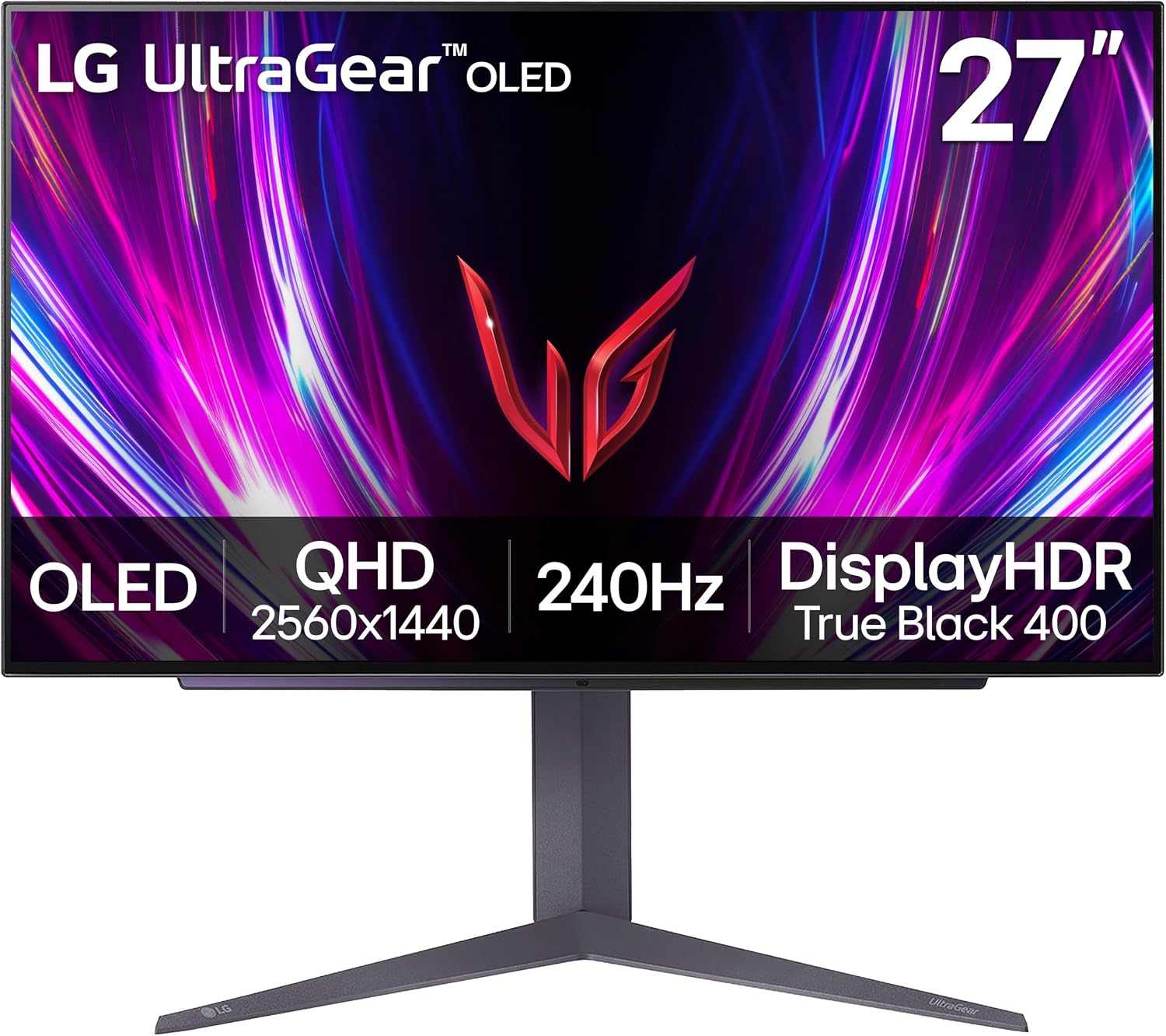
If you’re in the market to upgrade your gaming monitor, LG’s 27GS93QE, a 27-inch gaming monitor, is on sale now for only $499.99, a whopping $400 off the $899.99 MSRP. For the money, you get an awesome OLED panel with colors that pop off the screen and true blacks, delivering better image quality than VA or IPS panels, QHD (2560x1440) resolution, and a fast 240 Hz refresh rate that supports variable refresh rate technologies to ensure you won’t see any screen tearing. In all, it’s a significant upgrade over any 1080p VA/IPS panel or many 1440p monitors, and at 44% off the retail price (matching its all-time low), it’s a deal you should jump on sooner rather than later.
Snag a great deal on this 27-inch, 240 Hz LG UltraGear 27GS93QE monitor. The fast refresh rate and awesome colors on the OLED make upgrading worth it for your eyes while the price is easy on your wallet.View Deal
The 27GS93QE’s OLED panel supports a wide color gamut covering 98.5% DCI-P3 (~139% sRGB and 95-98^+% Adobe RGB), so not only is the panel fast, but it also covers quite a bit of colors. It’s also VESA DisplayHDR True Black 400 and sports a 1.5M:1 contrast ratio. So not only would this be good for gaming, but it also works well for photo editing, digital cinema production, and more. The 240 Hz (0.03ms GtG response time) minimizes ghosting and supports AMD FreeSync Premium Pro and Nvidia G-SYNC, so whether you have an AMD or Nvidia graphics card, you’ll get the best possible experience, as the monitor’s refresh rate will match the frame output of the graphics card. It also uses an anti-glare, low-reflection coating to minimize ambient light reflections.
As far as connectivity goes, the 27-inch UltraGear offers two HDMI (v2.1) and a single DisplayPort (v2.3) for video, and a single 3.5mm headphone jack. You will not find USB ports, however. The panel comes with a stand that lets you adjust the tilt (-5-15 degrees), height (110mm), and pivot (-10-10 degrees) to set it just as you want it. It’s also 100 × 100 mm VESA-mount-capable if you want to hang it on the wall. LG stands behind this panel with a 2-year warranty.
At $499.99, the LG 27GS93QE matches its all-time low price and is one of the best deals going on a 27-inch OLED gaming monitor. At 44% off MSRP, it’s hard to find another 1440p OLED from a trusted brand with these specs. If you've been waiting to upgrade your gaming or work setup, don't wait too long and grab this deal before the sale ends.
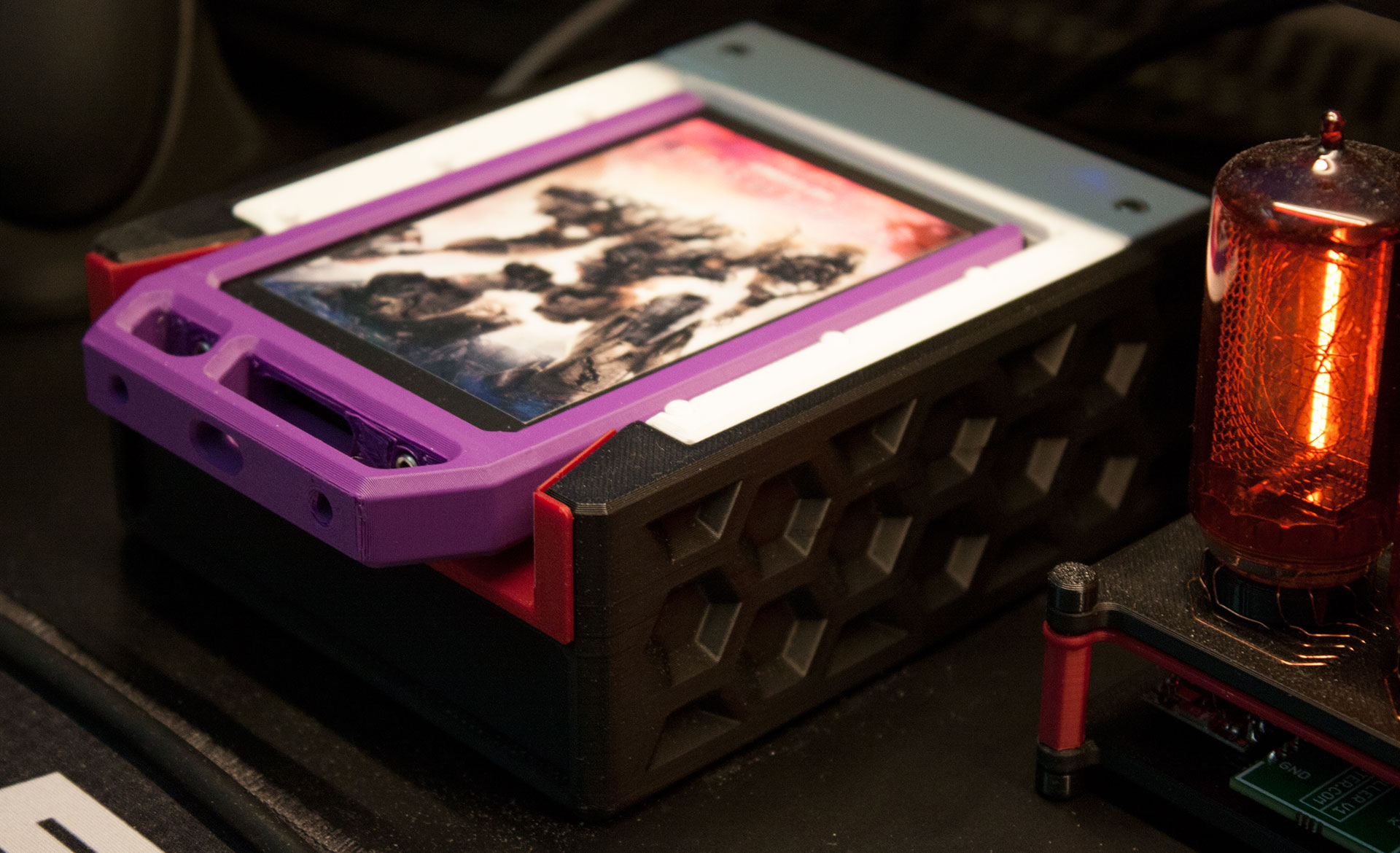
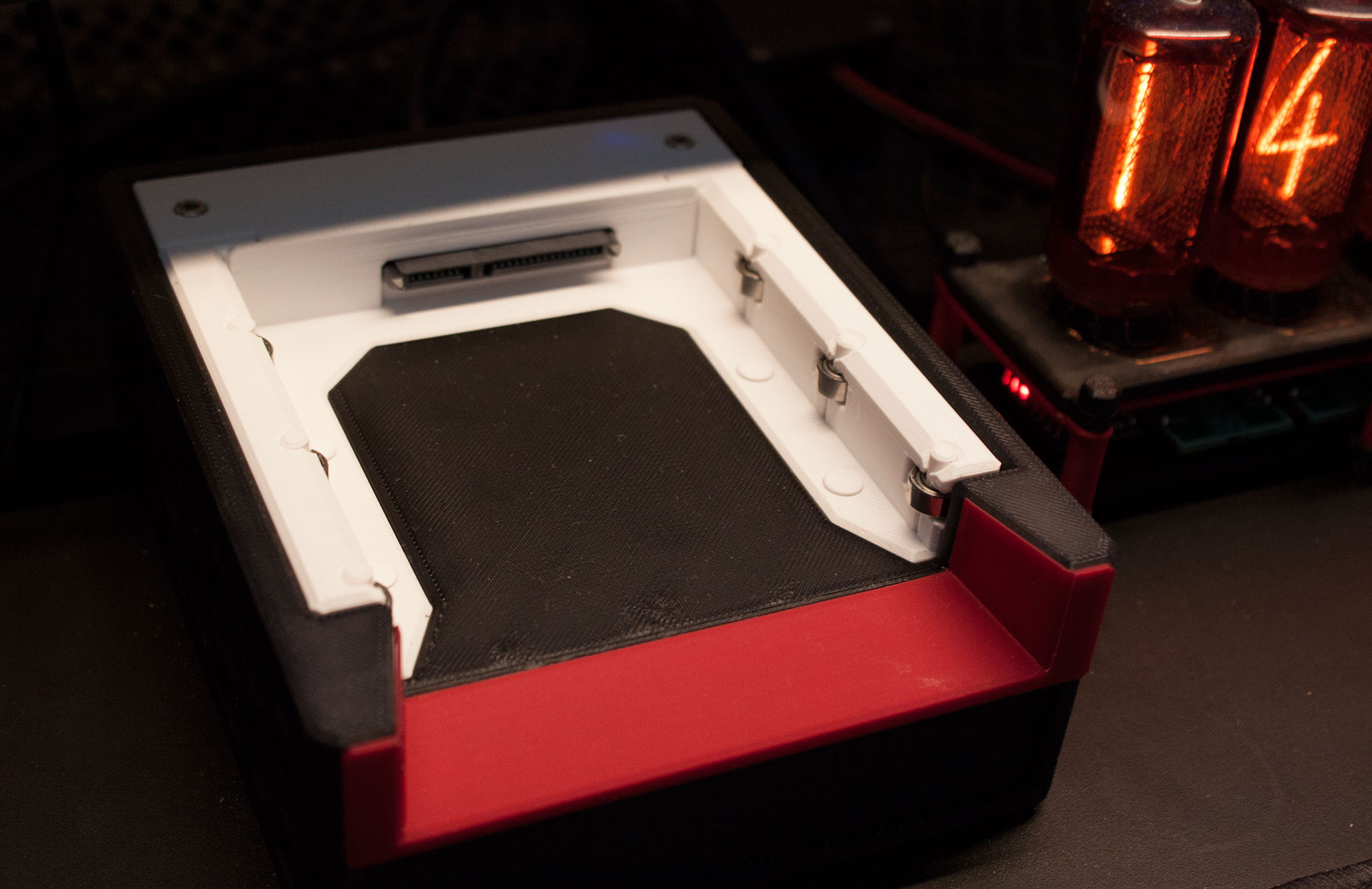
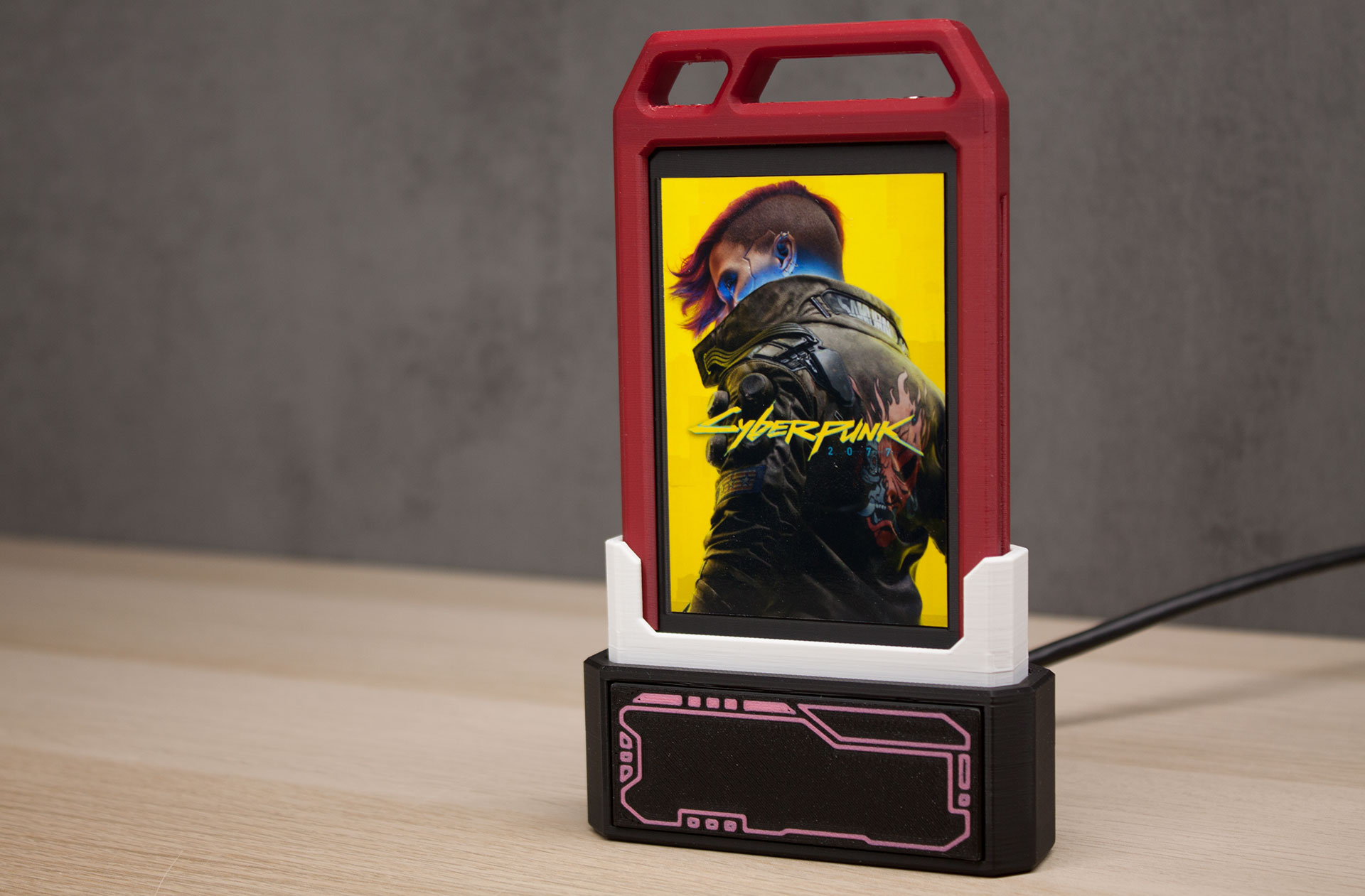
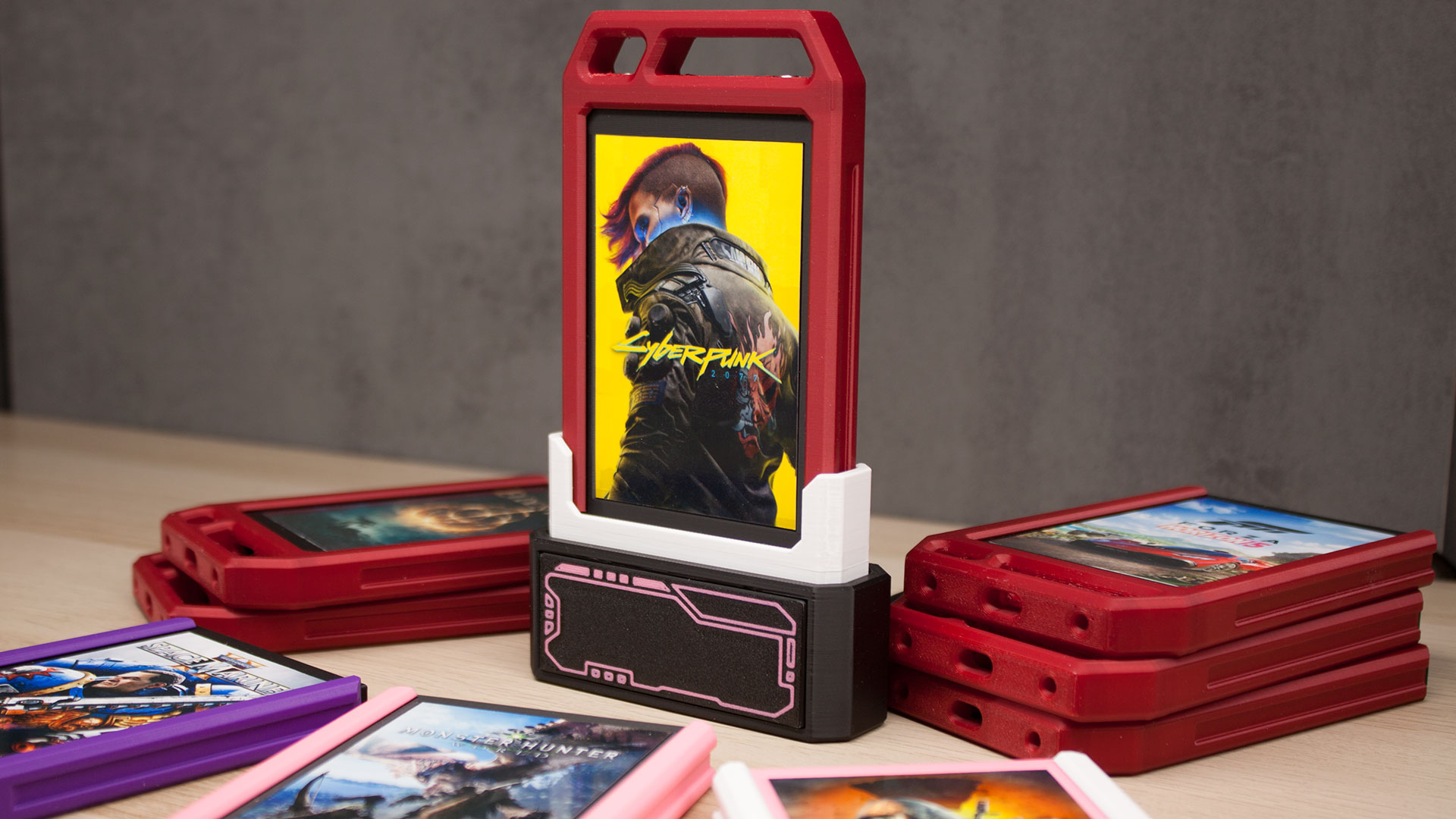
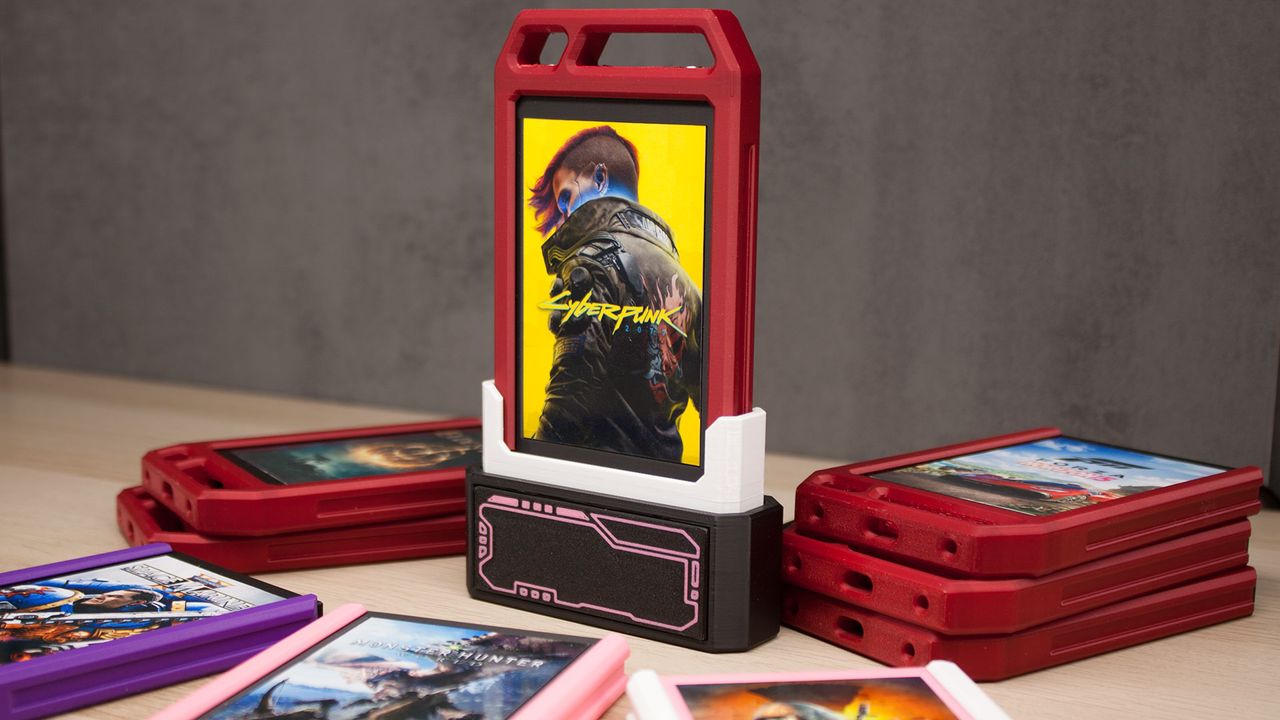
A PC gamer has created and demonstrated a handy Steam Game Cartridge system. Over on PCMR, Jibril-sama introduced the system, which blends the old-school console convenience of cartridges with Steam’s awesome and agreeably flexible games library. Ingeniously, it upcycles a bundle of old SATA SSDs into Steam-ready game cartridges using a disk mount detect and execute script on the software side and a SATA dock on the hardware side. Icing on this already tasty cake is provided by Jibril-sama’s colorfully encased and custom-labeled Steam Game Cartridges. Nice.
“Got a couple of used 2.5" SSDs for cheap so I decided to make a Game Cartridge system,” the Redditor casually informs the PCMR masses in the post embedded above. “Games are actually on those SSDs with a script to auto-navigate Steam to the game's page. Auto-starting the game right away is also possible.”
Further comments by the OP explain that all the drives bought for this project were 128GB in capacity, and €7 a piece ($8). That’s not bad in the current RAM and NAND crunch, and keeps these files off your built-in primary storage. As many readers will know, PC game libraries can easily grow to hog a lot of storage.
We reached out to Jibril-sama for some more background info about how the Steam Game Cartridge system is designed to work with as little user friction as possible. They informed us that the system in the video runs Linux and Valve’s Steam URL Protocol is leveraged to navigate to the game's page or launch the game.
“All it needs is a systemd template to check for a script on the SSD and launch it. And a udev rule to trigger the system,” Jibril-sama told Tom’s Hardware. “So basically: Plug in SSD -> udev rule sees the event -> triggers the systemd daemon -> systemd daemon looks into the SSD and finds the script -> execute the script.”
cakehonolulucakehonolulucakehonolulucakehonolulu
Commenters on PCMR have overwhelmingly welcomed the Steam Game Cartridge future teased by this system. Some want to see the system extended to include GOG game libraries. Others query how the system handles the inevitable hefty multi-gigabyte updates that are pushed (even to older games) from time to time. Jibril-sama told Tom’s Hardware that they didn’t plan to deal with updates often, as they didn’t use cartridges for ‘live service’ titles, and they are mostly used for the “games that I want to replay once in a while.” If and when updates have been flagged, “I just let Steam handle the updates and wait a bit before I can play,” they added.
I’ve had repeated firsthand experience with Steam Games libraries being fussy when moving across different PCs, so stretching the library system this way could reveal cracks and wrinkles as more games are tested. We shall see.
Hopefully, fuller implementation guides, scripts, and resources to help others purchase or 3D print their own Steam Game Cartridge shells will be shared in due course.
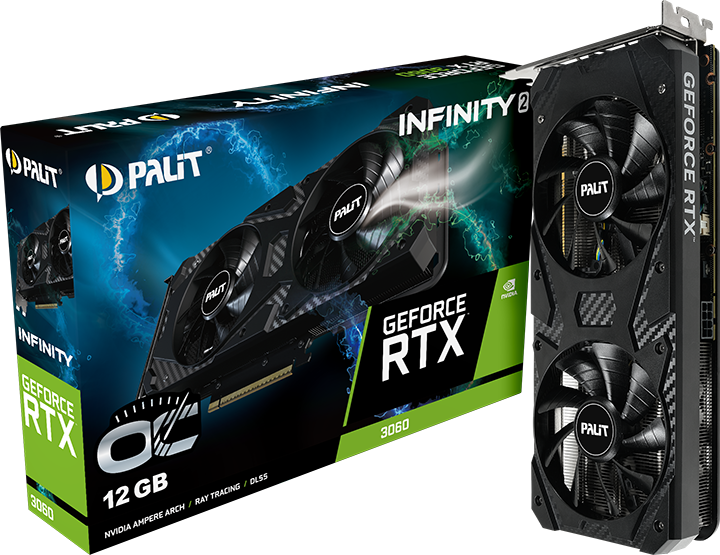
Nvidia has just relaunched its five-year-old graphics card, the GeForce RTX 3060, in order to combat the component scarcity driven by AI. This resurrection has seen a staggered release, with companies like Gigabyte and Manli silently listing their renewed variants in different parts of the world. Today, Palit joined the list with an official announcement for its RTX 3060 Infinity 2 OC, the first official indication of Ampere's return.
If we take a look at the specs, the card is identical to the original RTX 3060 we saw in 2021 — it has 3,584 CUDA cores paired with 12GB of GDDR6 VRAM saturated across a 192-bit-wide bus. Since this is an overclocked variant, it can boost up to 1,792 MHz, which is less than 1% higher than the base 1,777 MHz boost that Nvidia already mandates. Palit will also release a non-OC variant of the Infinity 2 RTX 3060.
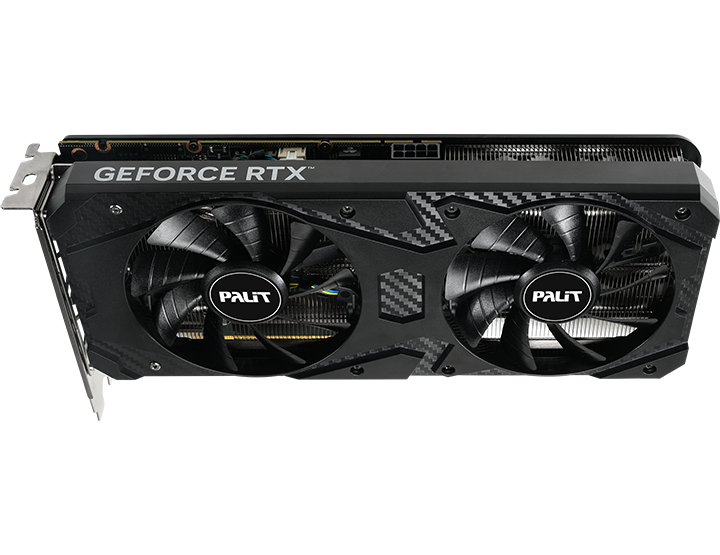
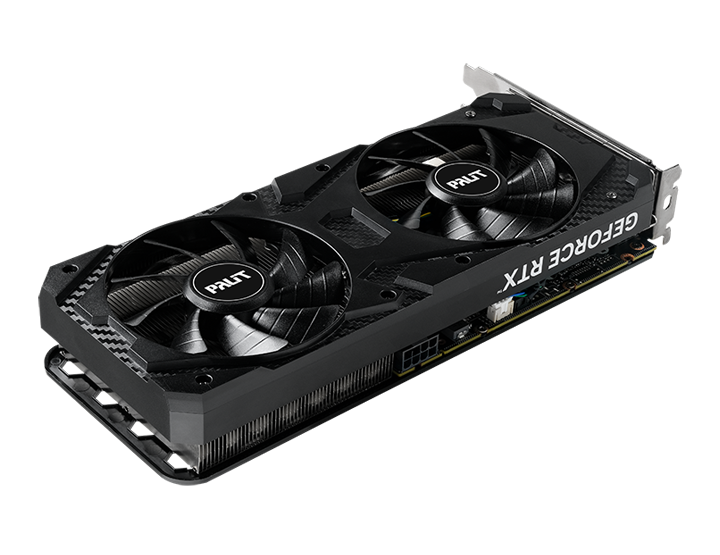
The card features a relatively simple design characterized by the typical black aesthetic we see on budget GPUs. There's no zero-RPM tech here, but Palit claims 0dB noise levels and says there's a "protective backplate" on the card that prevents PCB flex. When you're buying a GPU like this, its looks are probably the least of your concern; the main selling point is, of course, that 12GB memory pool.
PalitPalitPalit
Late last year, the PC hardware industry entered one of its most turbulent eras, characterized by production inadequacies created by the AI boom. Artificial intelligence demands a lot of memory and storage, and thus, commodity silicon has skyrocketed in price overnight with no signs of slowing down. After evading the crisis initially, GPUs eventually got wrapped up in the price hikes as well.
Nvidia's latest Blackwell family uses cutting-edge GDDR7 memory, which is even more expensive, and since vendors are busy producing HBM for fatter margins instead, the "solution" to this dilemma had to be creative. The idea for reviving older generation cards was actually floated by our very own Paul Alcornat a Q&A at CES 2026, where Nvidia CEO Jensen Huang replied, saying he'd "go back and take a look at this."
Palit hasn't provided a price for the Infinity 2 OC yet, and we didn't see it listed on retailers yet, but we can infer it'll cost around $329 given similar variants have also been popping up for that price. To be clear, the RTX 3060 is a great value GPU that we praised even back when it launched. But in the face of the RTX 50-series, it's not exactly something you should consider first, especially when buying new.
You can get an RTX 5060 Ti for just $369 right now on Newegg, which is a significantly faster card with support for DLSS 4.5 and multi-frame gen, not to mention the better efficiency. It only has 8GB of VRAM, unfortunately, which hurts performance at high resolutions and if you like to play with ray tracing enabled. Still, unless you're going up to 4K, the 5060 Ti (and the regular 5060) will perform much better than a 3060 no matter what, as you can see in our GPU benchmark hierarchy.
Ultimately, rebooting the RTX 3060 makes sense from a manufacturer's point of view given the better yields of Samsung's older 8nm process compared to TSMC's more expensive N5 node used by Ada and Blackwell. But as a consumer, you should definitely stick with the RTX 50-series or try to find a used RTX 40-series GPU instead.
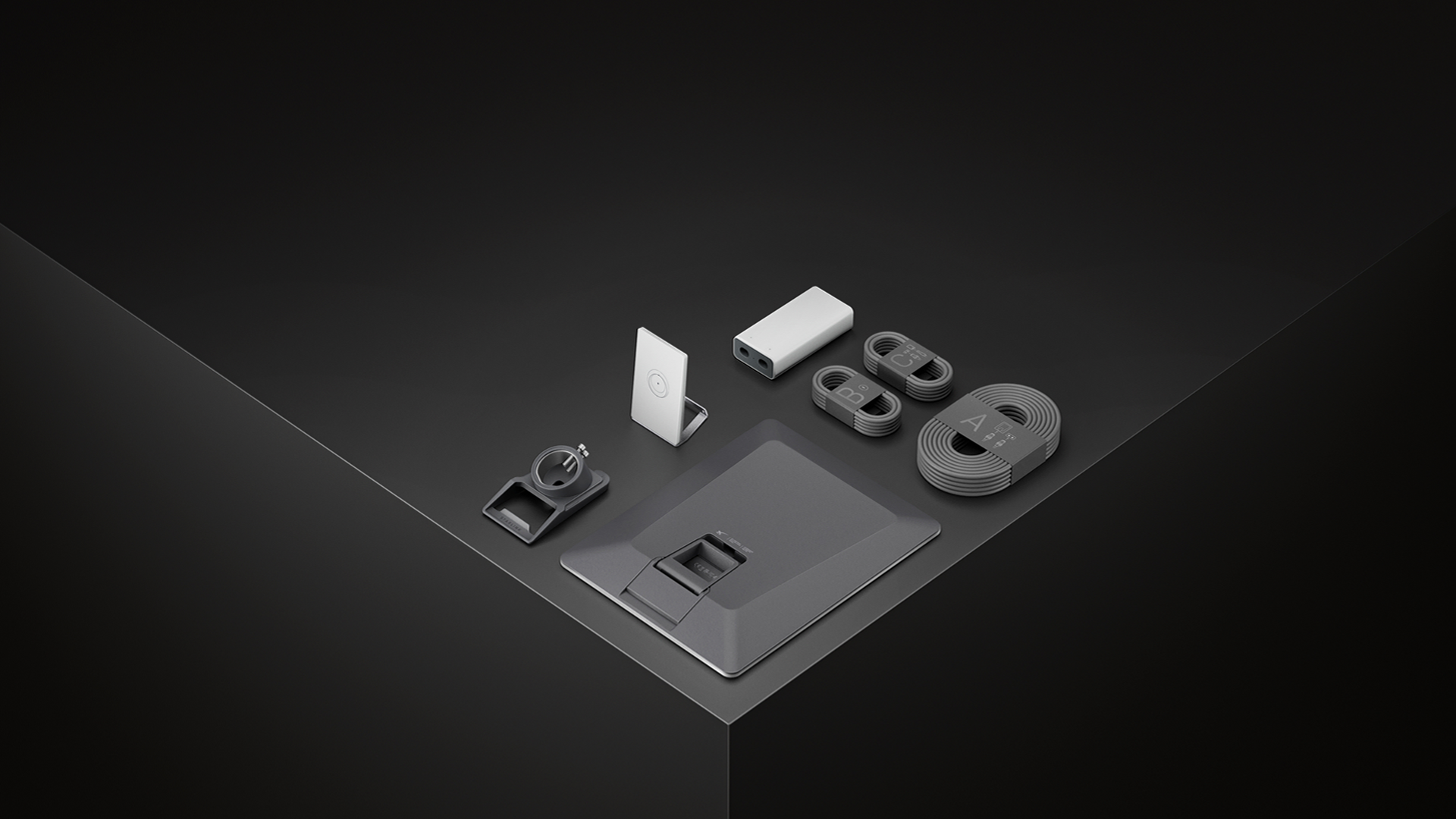
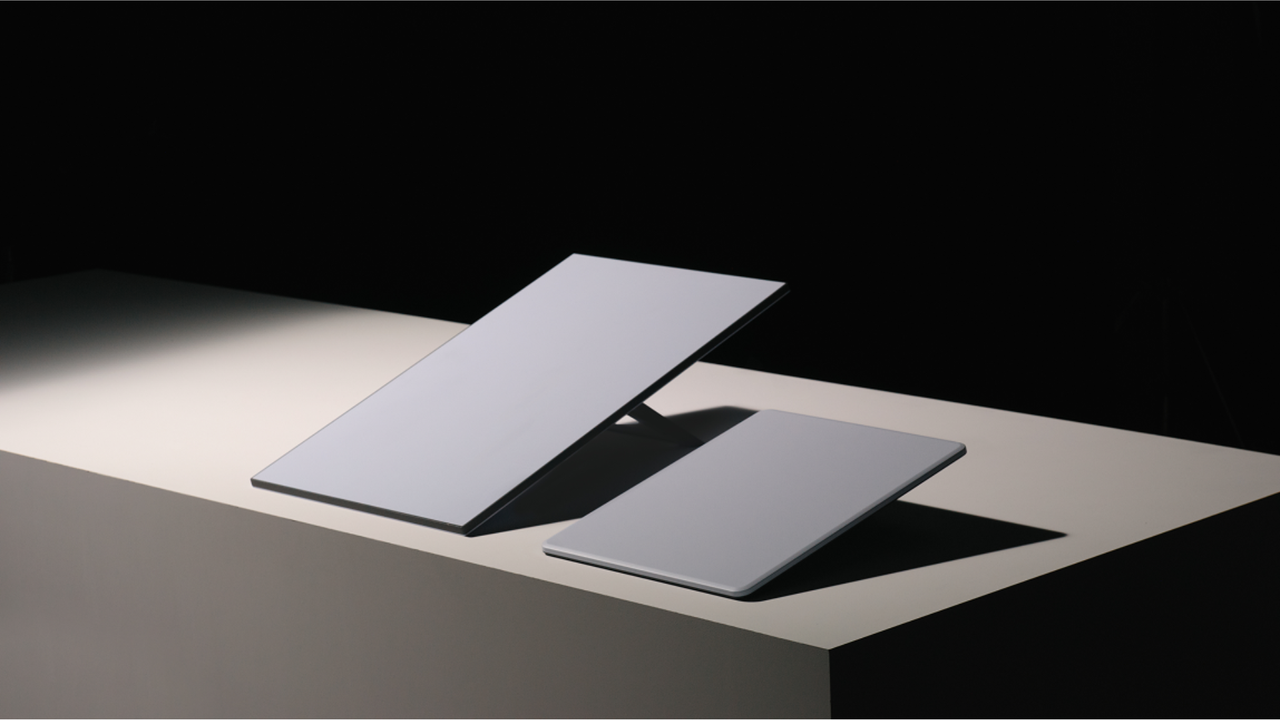
The SpaceX satellite internet service Starlink has just introduced its latest residential kit, letting users connect to the satellite network using a smaller and lighter terminal. The company announced the Starlink V5 on X, saying that it could hit up to 375+ Mbps for “streaming, video calling, gaming, and more.” It’s currently available in select areas only, though, with wider availability expected later as the company ramps up production.
Download speeds
Antenna
Field of View
Dish Weight
Environmental Rating
Operational Temperature
Mounted Wind Speed
Snow Melt Capability
Average Power Consumption
Power Indicator
Starlink V5
Up 375+ Mbps
Electronic Phased Array
110 degrees
2.4 lbs. (1.1kg)
IP67 Type 4
-22 deg F to 122 deg F (-30 deg C to 50 deg C)
165 mph (265 kph)
Up to 1.6 in. per hour (40mm per hour)
35 to 50 watts
LED / Starlink Top Face
Standard 4
Up to 400+ Mbps
Electronic Phased Array
110 degrees
6.4 lbs. (2.9kg)
IP67 Type 4
-22 deg F to 122 deg F (-30 deg C to 50 deg C)
60 mph (96 kph)
Up to 1.6 in. per hour (40mm per hour)
75 to 100 watts
LED / Router Face Plate
Mini
Up to 300+ Mbps
Electronic Phased Array
110 degrees
2.43 lbs. (1.1kg)
IP67 Type 4
-22 deg F to 122 deg F (-30 deg C to 50 deg C)
60 mph (96 kph)
Up to 1 in. per hour (25mm per hour)
25 to 40 watts
LED / Starlink Rear Face Plate
The new unit is significantly smaller and lighter than the Standard 4 used in most home deployments, and brings it close to the Starlink Mini, which is designed for both fixed and portable use. However, the Starlink V5 still requires a router (included), whereas the Mini can work without one, providing a wireless connection using its built-in Wi-Fi antenna. Still, the former is faster, offering speeds of up to 375+ Mbps. Although this is 25 Mbps slower than the 400+ Mbps that the Standard 4 is rated for, it’s still higher than the up to 300+ Mbps that SpaceX has set for the Mini.
The changes that SpaceX made to the Starlink V5 would make it much easier to set up, which is especially helpful for users who prefer to DIY their Starlink setup. Another interesting update to the new terminal is that it can handle faster wind speeds while mounted despite being lighter than the Standard 4. This should help it withstand tougher meteorological conditions, especially in areas frequently battered by storms and tornadoes.
(Image credit: Starlink)
The much lower average power consumption, which is just about half of what the previous-generation Starlink terminals consumed, would also help power stations last longer, making it ideal for keeping communications alive, especially during emergencies. This is exactly what Japan is experimenting with, as Tokyo has started putting up Starlink antennas on fire hydrant signs to provide emergency Wi-Fi.
Although SpaceX and its owner, Elon Musk, are no strangers to controversy, Starlink has proven useful in various situations. Aside from being useful for first responders in disaster zones, it also helped Ukraine stay connected during the height of Russia’s invasion of the country in 2024. It has even gotten to the point that China simulated a Starlink blockade over Taiwan because of how useful the service is in keeping a government online and communicating with its allies during times of distress.
Overall, this combined deal on PC parts means that you're paying the equivalent of just $61.99 for the RAM, and that's before we even consider the free $69.99 MSI MAG cooler that this deal includes. Yes, it isn't 32GB, but the lowest available (standalone) 16GB DDR5 RAM kit with comparable specs would cost you $202.97. You won't find RAM cheaper than this, but while the memory is a serious reason to buy this bundle, the other components can't be ignored, too.
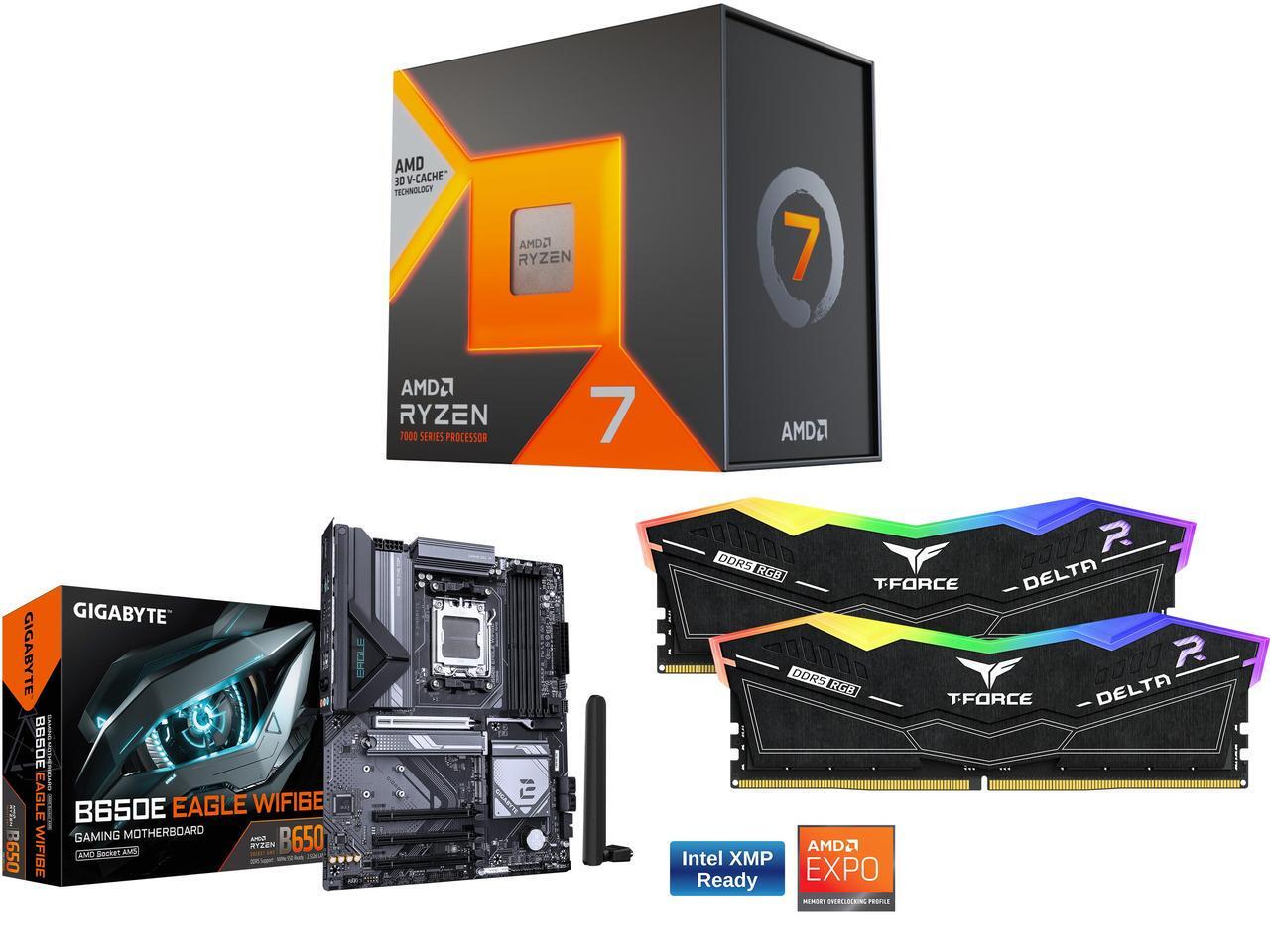
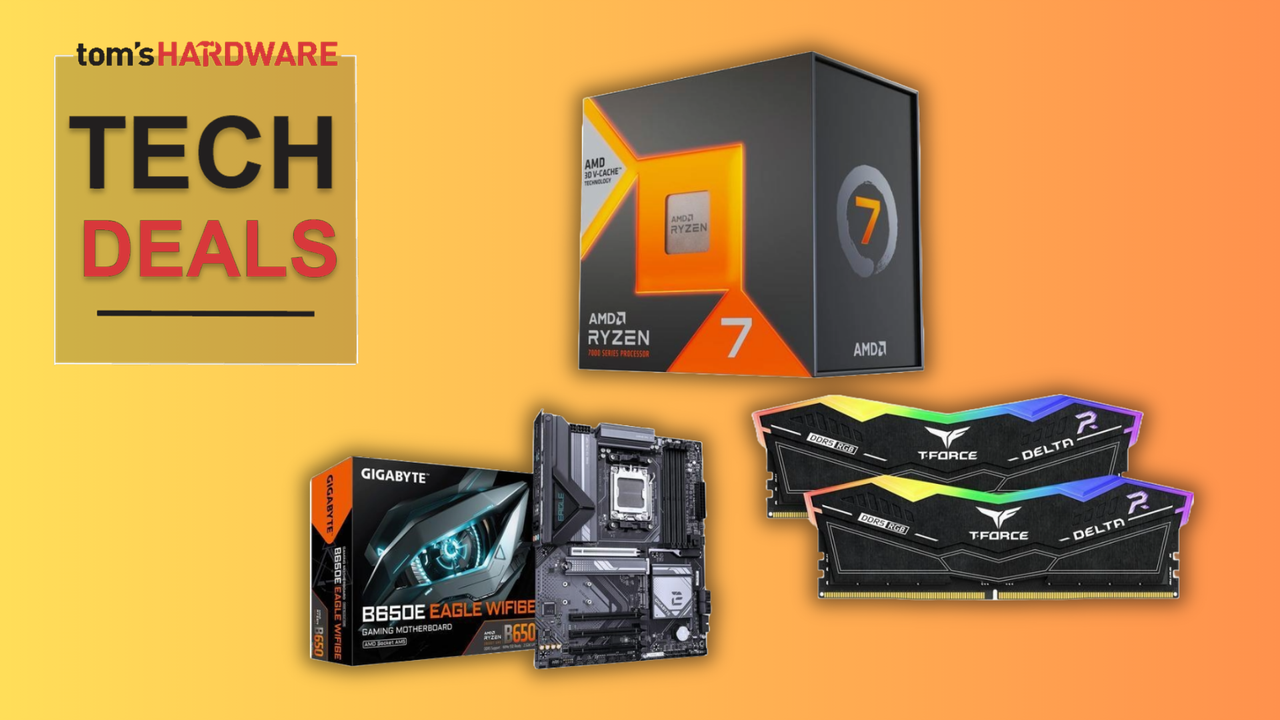
This Newegg combo for an AMD AM5 gaming PC build features the AMD Ryzen 7 7800X3D, Gigabyte B650E motherboard, and 32GB of TeamGroup DDR5 RAM. You also get a free MSI MAG AIO cooler, worth $69.99, for a limited-time only.View Deal
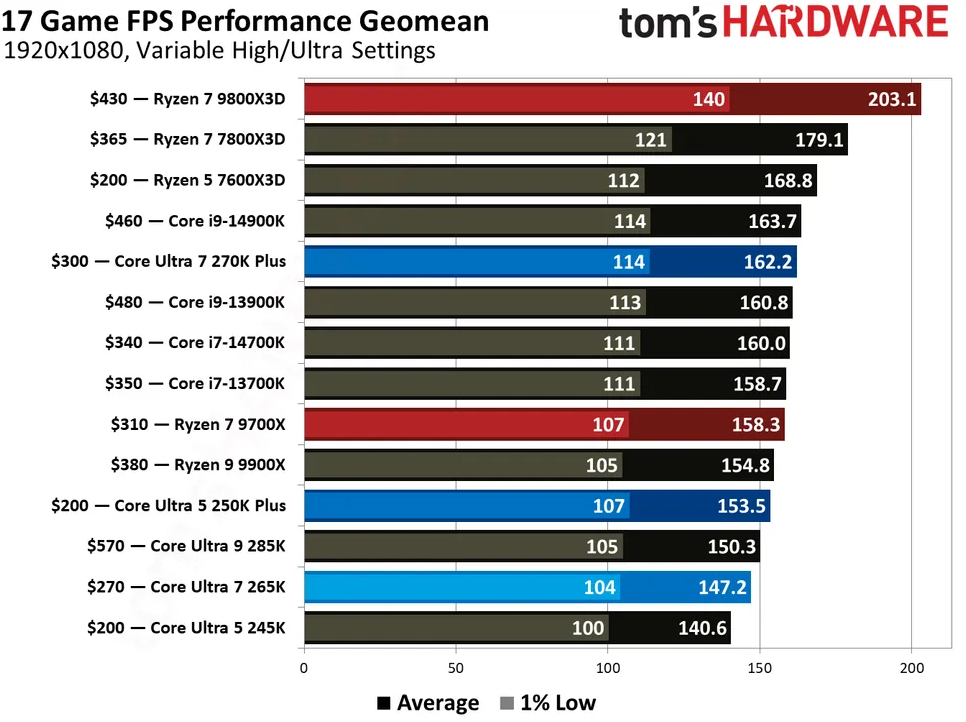
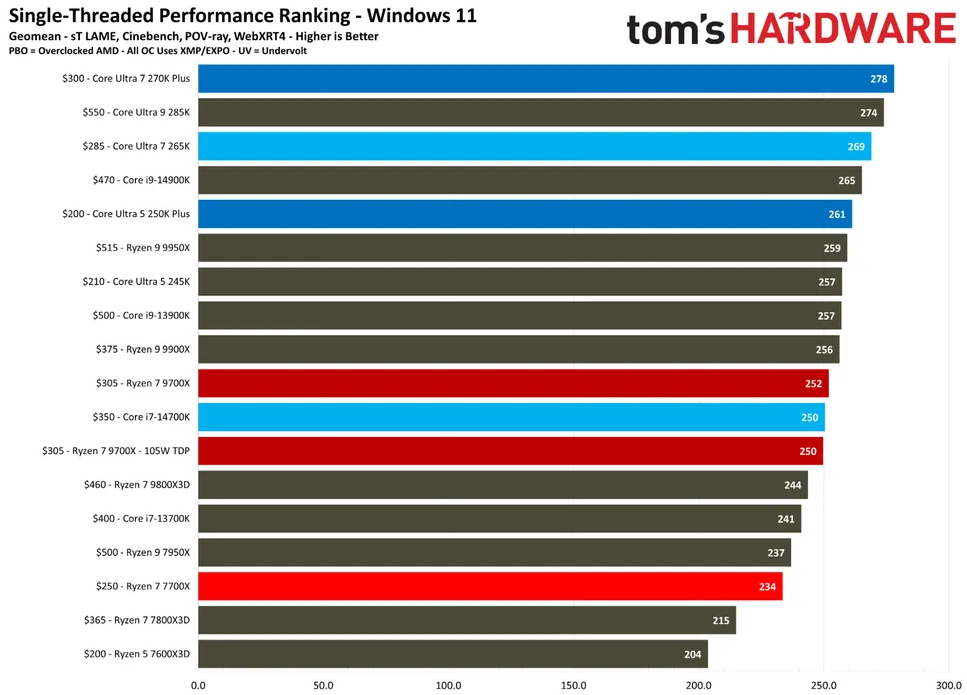
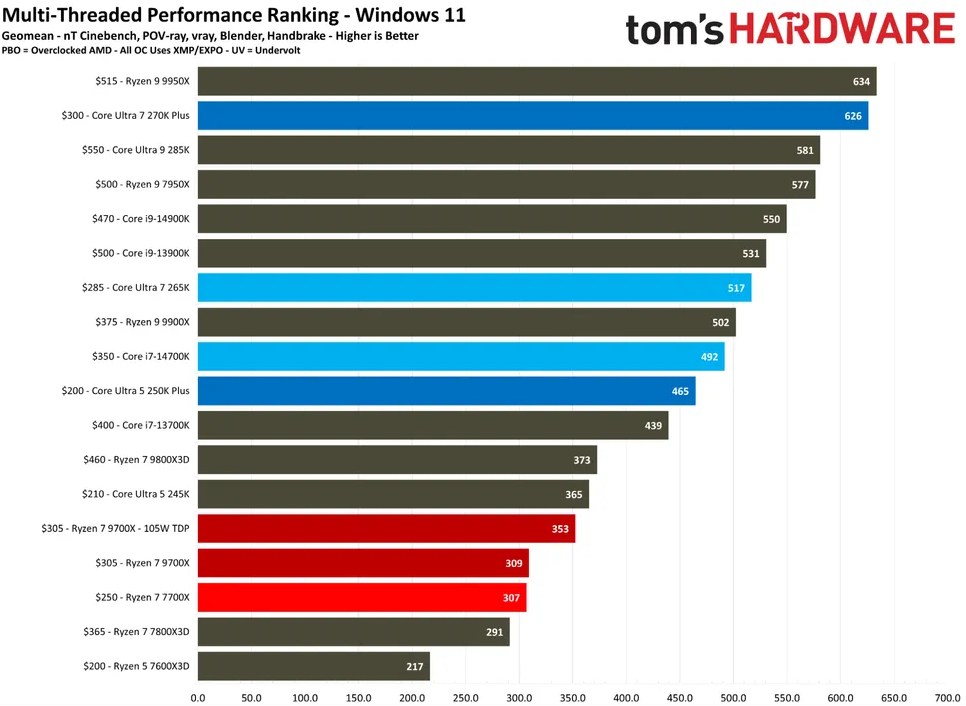
Our AMD Ryzen 7 7800X3D review makes clear how transformative this processor was when it launched: it's a powerhouse. While it isn't the fastest gaming CPU you can buy these days, our CPU benchmarks below show that it continues to rank highly for gaming and continues to be a popular option for gamers looking to build on a budget.
FutureFutureFuture
The 7800X3D ships with eight cores, all of which have access to the full 96 MB L3 cache capacity that helps give these chips their ultimate performance, along with a 4.2 GHz clock speed, which can boost up to 5 GHz. The L3 cache is the most important element, however, as the improved memory here reduces latency significantly. This means that the CPU doesn't have to fall back on using the slower system RAM as often while you're playing games, giving you higher and more stable frame rates while you play. You're also getting a free MSI MAG Coreliquid 240mm cooler, worth $69.99, to help keep your new CPU cool.
Alongside this powerhouse processor is a Gigabyte B650E Eagle motherboard. This is a budget-friendly mainstream board with plenty of I/O, including 2.5Gb Ethernet and several USB Type-A and Type-C ports. It has WiFi 6E and Bluetooth 5.3 connectivity, and has four M.2 slots for SSDs, including two with Gen 5 speeds.
The RAM, meanwhile, is from TeamGroup. This T-Force Delta RGB DDR5 kit comes with two 8GB modules, delivering 16GB memory in total, with speeds of 6,000 MT/s, and CAS latency and memory timings of 38-38-38-78. It has customizable RGB lighting, too, and supports both Intel XMP and AMD EXPO overclocking profiles, which are both supported by the motherboard, too.
16GB of DDR5 RAM for $61.99 (or free, if you count the value of the cooler) is a deal worth considering, especially when it's coupled with one of AMD's best and most popular CPUs from recent years. The $636.96 sale price for this 7800X3D bundle at Newegg hides some significant value, with $188.99 in savings overall up for grabs.
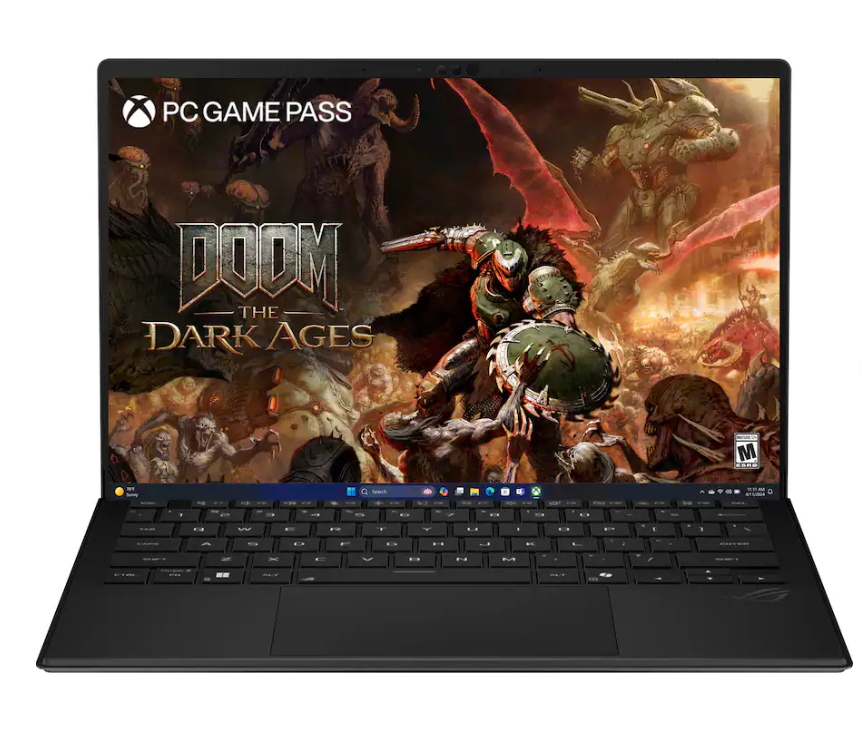
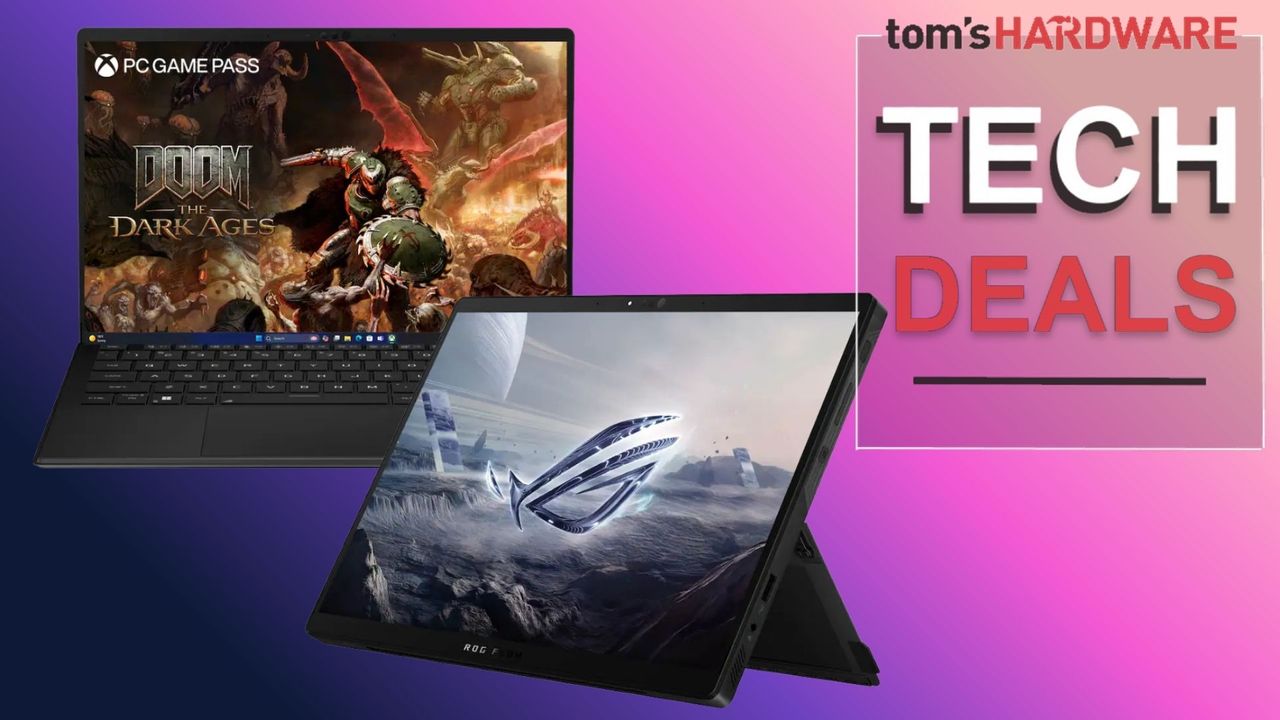
Fancy a gaming laptop that's a little different? Something that can be used to play games, run small local LLMs, and even transform into a tablet for on-the-go use, then check out this hefty $900 saving on the Asus RoG Flow Z13 from Best Buy, now only $2099.99. The original $2,999.99 price tag is a lot to ask for, even with this laptop's exceptional amount of speedy RAM, but at the reduced price, it's a very attractive proposition.
The Asus RoG Flow Z13 sports a 13.4-inch display with a 16:10 WQXGA 180Hz IPS ROG Nebula display and Gorilla Glass protection, with a 2560 x 1600 pixel resolution. The display is also touchscreen-enabled, and one of the quirks of this particular gaming laptop is that it can switch from an ordinary laptop setup to a tablet orientation with a built-in kickstand.
The hardware inside consists of AMD's 16-core Ryzen AI Max+ 395 processor with integrated Radeon 8060S graphics, a hefty 64GB of 8000 MT/s LPDDR5X unified memory, and a 1TB SSD for storage. You will be able to happily game on high settings at 1080p, but may need to make some compromises at 1440p to keep the frame rate high.
An AMDRyzen AI Max+ 395 gaming laptop with a 16-core processor and integrated Radeon 8060S graphics, plus a hefty 64GB of 8000MT/s LPDDR5X unified memory. There's also a 1TB SSD for storage and the 2 in ability to transform from a laptop to a touchscreen tablet. View Deal
The chassis of the Asus RoG Flow Z13 is constructed from a CNC'd aluminum block for a solid structure, with a lightweight stainless steel vapor chamber that efficiently dissipates heat while adding extra strength to the laptop. Liquid metal thermal material is used to keep the CPU cool under load and helps to keep the noise levels of the laptop to a minimum while playing the most demanding games or using AI applications and software.
Perfect for taking on the go, this convertible 2-in-1 Asus RoG Flow Z13 laptop is a good deal at $2099.99, especially considering the extortionate price of RAM in the current climate. 64GB is considered large for a laptop, although there is a 128GB version of this laptop; the price is a lot higher, and not good value for money.
Nvidia's RTX Spark platform arrives later this year, and the company is hard at work building the partner ecosystem around the GB10 Superchip to ensure that Windows and applications are ready for its agentic AI PC vision. As part of that groundwork, the two companies announced today that Sega will support the RTX Spark platform with its upcoming Virtua Fighter Crossroads, coming in 2027.
The two companies also committed to RTX Spark support for "future Sega titles,” meaning that we might see official support for other evergreen franchises like the Yakuza series, the Persona games, and the upcoming Alien: Isolation 2 and Total War: Warhammer.
Although the companies didn’t go into detail about exactly what full support for the RTX Spark means for Sega games, one would expect that the developer’s titles will be natively compiled for Windows on Arm instead of relying on the Prism x86 emulator for compatibility.
It also seems safe to expect that future Sega titles will incorporate DLSS technologies like upscaling and Multi Frame Generation in order to deliver the best possible experience on RTX Spark systems. Despite having GPU compute capabilities similar to those of a desktop RTX 5070 on paper, the unified memory architecture and relatively limited memory bandwidth of the GB10 Superchip behind the RTX Spark platform present challenges for gaming performance that are likely to make the incorporation of DLSS tech important for the best experience.
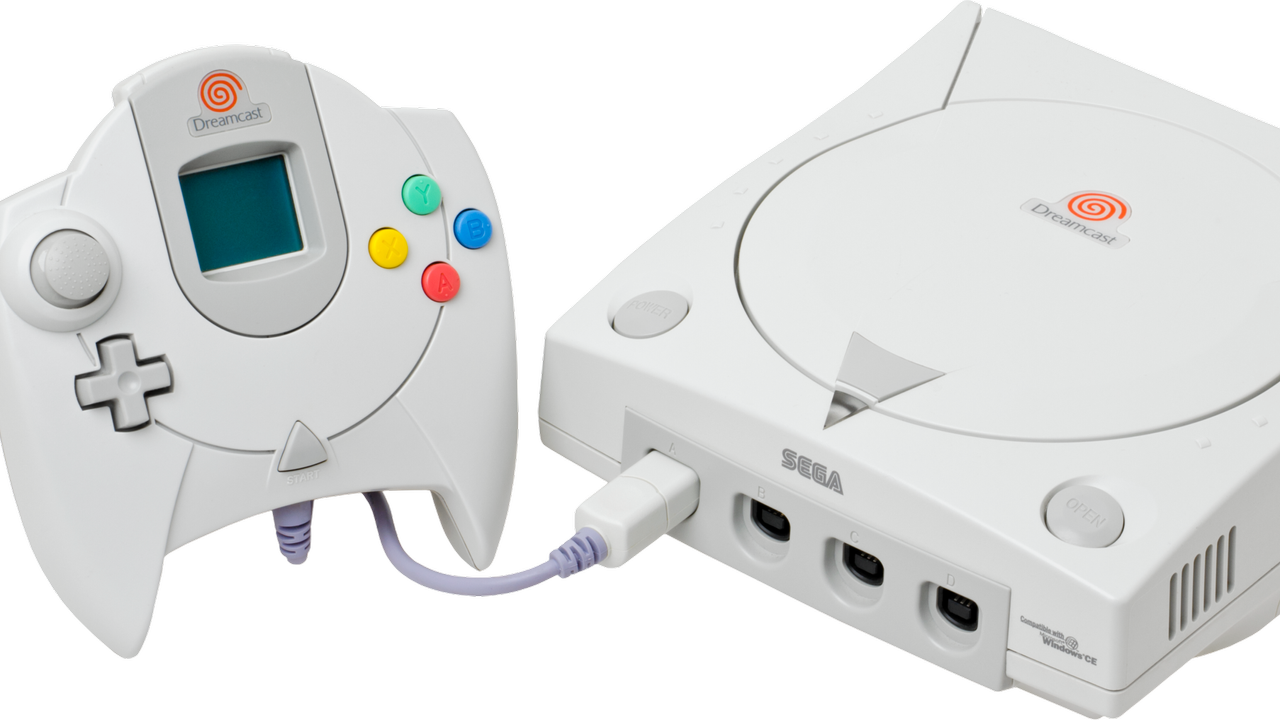
The relationship between Nvidia and Sega spans over 30 years, tracing its roots to the ultimately abandoned development of the GPU for the Dreamcast console. Despite its eventual decision to use an NEC-produced PowerVR GPU for that system, Sega offered Nvidia a $5 million lifeline that gave the company the runway that it needed to develop and deliver the Riva 128, its first DirectX-compatible GPU.
That investment proved to be historic, as Nvidia now has a market cap of over $5 trillion and is in the process of shifting the very foundations of computing through its Grace Blackwell and upcoming Vera Rubin AI platforms for the data center.
Whether the RTX Spark platform reshapes the PC when it arrives in the fall of this year remains to be seen. But if you’re a fan of Sega’s IP, this partnership means that you can at least look forward to a first-class experience with its games on RTX Spark systems.
Intel announced a €5 billion ($5.7 billion) investment on Monday to expand chip production at its Leixlip campus in County Kildare, Ireland, upgrading existing fabs to increase output of Intel 3 wafers for Xeon 6 and next-gen server processors. The program accounts for roughly 30% of Intel's planned 2026 capital expenditure of about $17 billion, adds several hundred permanent roles to a 4,900-strong Irish workforce, and is scheduled to be substantially deployed by the end of 2027. Naga Chandrasekaran, Intel's chief technology and operations officer and general manager of Intel Foundry, told Reuters that "the demand for servers, the demand for AI is driving a significant increase in the need for Intel 3 wafers."
The announcement comes just shy of a year after CEO Lip-Bu Tan cancelled Intel's planned €30 billion fab complex in Magdeburg, Germany, and a €4.6 billion assembly and test plant in Wrocław, Poland. Those cancellations came with a memo in which Tan wrote that Intel had "invested too much, too soon – without adequate demand."
The Ireland program, however, passes the test Magdeburg failed on every measure that Intel boss Lip-bu Tan set: It uses cleanrooms that already exist; it's funded from Intel's own capex with no announced state aid; and it expands an already shipping revenue product into a demand pipeline Intel says currently exceeds its supply.
What €5 billion buys
(Image credit: Intel)
It’s understood that no new manufacturing plants are part of the program, with the money instead going to upgrades of existing fab facilities, installation of leading-edge production equipment, and an expansion of the automated track system that links the campus's manufacturing modules into a single production flow. Intel said the work began earlier this year and will employ around 2,000 specialized tradespeople during the build-out, on top of the permanent hires.
Fab 34 is the focal point of the spending, with Chandrasekaran telling the Irish Times that "Ireland is our centre of excellence for Intel 3; we are not running Intel 3 in any other Intel manufacturing facilities." The fab began high-volume production on Intel 4 in September 2023, as the first EUV facility in Europe, and it now runs both Intel 4 and Intel 3, producing compute tiles for Core Ultra parts and Xeon 6 server processors. Intel has spent more than €30 billion in Ireland since 1989, over half of it between 2019 and 2023, doubling the campus's manufacturing footprint.
The spending follows directly from a transaction Intel closed in April, when it bought back the 49% stake in the Fab 34 joint venture it had sold to Apollo-managed funds for $11.2 billion in 2024, paying $14.2 billion to reclaim it. Apollo walked away with a roughly 27% gain in under two years. Intel now owns 100% of every wafer Leixlip produces, so each additional Intel 3 wafer the €5 billion generates flows entirely to Intel's own margin, rather than being shared with an outside capital partner.
The projects Intel cancelled
Magdeburg had roughly €9.9 billion in pledged German subsidies attached when Tan killed it, and Wroclaw had €1.9 billion in approved EU state aid. Fab 38 in Kiryat Gat, Israel, remains paused, and the Ohio site has slipped to around 2030. Every leading-edge wafer Intel produces for the foreseeable future comes from three U.S. states and one Irish campus, a concentration that made Leixlip the only European site left to expand and the cheapest place anywhere in Intel's network to add advanced capacity quickly, since the shells, EUV tools, and workforce are already in place.
Intel's Data Center and AI revenue rose 22% year over year to $5.1 billion in Q1 2026, and CFO David Zinsner told analysts on the April earnings call that Intel faces "unprecedented demand for silicon," with demand exceeding supply across the company's server lines. Intel Foundry revenue grew 16% to $5.4 billion in the same quarter, but external foundry revenue was just $174 million against a $2.4 billion operating loss, so the wafers that pay for Leixlip's tools are overwhelmingly Intel's own Xeon chips, rather than customer designs. A single campus running the entirety of a revenue-critical node also concentrates risk: Any disruption at Leixlip has no second source, because Intel 3 exists nowhere else.
Europe's most advanced node, without European money
(Image credit: Intel)
Intel 3 is now the most advanced process technology manufactured anywhere in Europe, and Chandrasekaran told the Irish Times the expansion provides "a technology sovereignty within the EU that the EU is targeting." Interestingly, no EU or Irish state aid accompanied the announcement, which distinguishes it from TSMC's €10 billion ESMC fab in Dresden, where the European Commission approved a €5 billion funding package for a plant producing 28/22nm and 16/12nm chips for automotive and industrial customers, scheduled to be operational from late 2027. Europe's only leading-edge logic production is self-funded by an American company for its own products, while its subsidized flagship project makes trailing-edge silicon.
Commercial electricity in Ireland runs up to twice the rates Intel pays in Arizona or Taiwan. Intel warned Irish ministers in August 2025 that its competitiveness was under threat from energy costs, and the company flagged up to 195 mandatory redundancies at Leixlip in mid-2025 as part of its global workforce reduction. IDA Ireland paid Intel €30 million in 2023 to offset elevated EU power bills, so that "self-funded" framing has at least one recent caveat.
Meanwhile, Intel's 14A node is being developed in Oregon; no Irish role in it has been announced, and two prospective 14A customers will decide the node's fate in commitments expected between late 2026 and early 2027. Ultimately, the €5 billion makes Leixlip the fully-loaded workhorse of a node Intel will eventually move past, not a contender for the leading edge. Whether Europe gets anything newer than Intel 3 remains to be seen.
The adventurous developer who recently released Linux for the Atari Jaguar (1993) has brewed up a version of the open-source OS for the Sega 32X (1994). If you can’t remember the 32X, it was Sega’s mid-gen answer to early fifth-generation challengers like the Jaguar, 3DO, and Amiga CD32. Sega’s solution added some potent processing power to a mushroom-like slot in an expansion to its popular Mega Drive/Genesis. Now cakehonolulu has got it running Linux, despite facing several major hurdles.
Compared to its Genesis host, the Sega 32X was incredibly muscular. The Genesis had relied on the capable but long-in-the-tooth Motorola 68000 (7 MHz) for years, but the 32X add-on boosted that with a pair of Hitachi SuperH SH2s (SH7604) CPUs (23 MHz). It also ramped up system RAM from the base 64KB by adding 256KB of its own. Sega’s expansion offered more than just speed; the console’s color palette was ramped up from 64 to 32,000 simultaneous colors on screen, and it was powerful enough to introduce hitherto unachievable 3D graphics elements to mainstream console gaming.
As with cakehonolulu’s tale of Linux wrangling on the old Jag, the above-linked blog talks through a long list of hurdles that needed to be leapt to get the Linux kernel booted and running BusyBox. This time around, particularly steely roadblocks included: the even more constrained RAM situation, the lack of hardware synchronization primitives, the desire to get SMP working across the pair of SH2 CPUs, no direct UART access from the 32X, and scheduler bugs, among other things.
On the positive side, smoothing the development process along were access to Chilly Willy’s 32X devkit, the linuxmd project, the Krikzz FPGA-based flash cart with ROM – RAM mapping tools, and existing SH2 documentation and sample projects. Please check through the linked blog for far more technical details from cakehonolulu.
Linux booted with BusyBox prompt on the Sega 32X (Image credit: cakehonolulu)
As you can see, cakehonolulu was successful again. So, what’s the next stop for this adventurous dev – the Sega Saturn? Whatever the project may be, it was interesting to read that works like this are basically forming a portfolio for the Spanish dev, which they hope will help them with job hunting.
There’s a new remake of the legendary Gravis Ultrasound ISA soundcard on the block with the arrival of the open-source Beavis Ultrasound project. Developer schlae shared details of this amusingly named mid-90s-cultural phenomenon portmanteau, Beavis Ultrasound PnP ISA Sound Card Replica, on GitHub on Monday. The repository includes complete KiCad schematics, PCB layout, sample ROM, reverse‑engineered GAL logic (for an operational IDE CD-ROM interface), assembly notes, and more. You’ll still need to source an old AMD AM78C201 InterWave chip to complete this DIY project, though.
The appeal of the new Beavis Ultrasound is nicely summed up by schlae, as they explain that “unlike other clones, this design includes the entire schematic as well as the reverse-engineered source code of the GAL.” This GAL provides transparent and reproducible logic and is key to this project being able to handle IDE connectivity, like original Gravis Ultrasound (GUS) PnP cards. And, yes, this is not a GUS Classic or MAX clone, but caters to enthusiasts wanting a clone of the more complex and advanced GUS PnP.
A particular strength of the Beavis Ultrasound is its authenticity. It could be described as a faithful hardware‑level reproduction rather than a functional approximation. No microcontrollers take the place of real hardware here; there’s no emulation software, and features like the aforementioned GAL logic and IDE interface aren’t swerved by the developer.
However, this authenticity could also be an Achilles heel, as you’ll need to source an old AMD AM78C201 InterWave chip to complete a Beavis Ultrasound build and enjoy once again its marvelous sound. Actually, there’s another point to note before following schlae’s plans. There are no tried and tested footsteps to follow at the time of writing, as the dev admits they “have not actually fabricated the board and tested it for functionality,” so interested parties are instructed to “build this board at your own risk.”
If you aren't an open-source or hardware-only purist
In recent weeks, we also reported on the return of the Orpheus II ISA soundcard due to “popular demand.” This device includes some GUS functionality but is a commercial, non-open-source proprietary product. Probably the most popular DIY-able solution around would be the PicoGUS, built around a Raspberry Pi Pico (RP2040) microcontroller, which handles all its GUS‑compatible audio playback in software – eschewing the need for rare vintage components like the AMD Interwave.
ChangXin Memory Technologies (CXMT), China's largest DRAM maker, is on track to match Micron's production capacity in 2026, if Citrini Research's forecasting models are correct. If this happens, China will become the world's second-largest DRAM production base in the coming years.
The bottom-up model estimates that CXMT will finish 2026 with approximately 350,000 wafer starts per month (WSPM) of DRAM capacity, which is just 25,000 WPM less than Micron. According to the analysis, the federal government is pushing CXMT to share its DRAM technology with JHICC, Swaysure, and YMTC's subsidiary XMC to ease domestic shortages. All three companies have either built DRAM capacity already, or will do so in the short-term future, the report claims.
Swaysure has completed construction of a 140,000-WSPM fab in Shenzhen, while JHICC's Jinjiang complex contains enough cleanroom space for 120,000 WSPM, and the initial 60,000-WSPM phase is expected to receive equipment by the end of 2026. YMTC is also projected to operate about 50,000 WSPM of DRAM production at Wuhan Fab 3. If all these facilities initiate operations in the coming years, then China will have a total DRAM capacity of 600,000 WSPM (not counting Samsung's and SK hynix's fabs in China), which is dramatically lower compared to South Korea, but ahead of Japan, Taiwan, and the U.S. combined.
But China is not going to stop developing its DRAM industry, and by 2030, its total capacity will increase to around 1.41 million WSPM, according to Citrini. CXMT alone is projected to build new production capacities in Beijing, Hefei, and Shanghai, to expand its production capability to 950,000 WSPM in 2030, assuming everything goes as planned.
The supply model assumes that about 400,000 WSPM of CXMT output will remain on D1a, another 400,000 WSPM will migrate to D1b, and roughly 150,000 WPM will produce D1c devices.
Forecasted DRAM manufacturing capacities (in thousands WSPM)
2026E
2027E - 2029E
2030E
CXMT
350
?
950
JHICC
-
60
120
Micron
375
?
?
Samsung
720
?
1,140 - 1,450
SK hynix
590
?
1,180
Swaysure
-
?
140
YMTC/XMC
50
50
200
Enough fab tools?
Citrini admits that producing China's outlook is considerably more difficult than predicting the development of established DRAM makers. On the one hand, there is rapidly expanding fabrication infrastructure in China, abundant state-backed financing, and government-directed technology transfers. On the other hand, among the key near-term limitations remains lithography equipment availability, particularly if the proposed MATCH Act restricts sales of advanced immersion DUV tools to select Chinese companies.
However, the author expects SMEE's domestic immersion DUV scanners to enter volume production around late 2026 or early 2027 following beta testing, as well as SiCarrier/Yuliangsheng introduce its own production-ready DUV platform in 2028. Perhaps a bit optimistically, the analysts predict that availability of lithography tools is not expected to constrain Chinese production beyond 2028, at least for mature logic and DRAM nodes. Yet, for obvious reasons, if the MATCH Act works as planned and disrupts supply of advanced immersion DUV tools to DRAM makers, production capacity expansions will not occur in the next couple of years, the report suggests.
Still, both SMEE and SiCarrier will need time to ramp up production of their lithography systems, whereas DRAM makers must learn how to use them efficiently, so we would not be as optimistic as the authors and would not expect Chinese tools to produce meaningful DRAM volumes before the early 2030s. Still, the key takeaway here is that China is on track to become a major DRAM maker rather sooner than later.
Unprecedented demand
Citrini Research projects total DRAM demand to reach 157.5 exabytes (EB) per year by 2030, including 75 EB of commodity DRAM for agentic AI CPUs, 25 EB of commodity DRAM for conventional cloud servers, 20 EB of commodity DRAM for client devices, and 37.5 EB of HBM4E as well as HBM5 for AI accelerators (15 EB and 22.5 EB, respectively).
Meanwhile, Citrini expects the whole industry to only produce around 37.5 EB of HBM4E/HBM4 memory (mostly by Micron, Samsung, and SK hynix) as well as 91.3 EB of commodity DRAM (including output in China) in 2030, leaving a deficit of 28.7 EB, or roughly 25%.
That said, the rapid expansion of DRAM production in China could be the industry's best hope to maintain relatively low prices of memory, something that will be particularly beneficial for the market of consumer devices that are sensitive to memory prices, analysts from Citrini believe. Yet, the author argues that most of this new capacity would satisfy China's own demand rather than eliminate the global shortage. Furthermore, even if companies like CXMT can expand their fabs faster, that additional capacity will mostly be consumed by domestic needs, according to Citrini.
It should be noted that to make more memory, DRAM makers need more fab tools, primarily 193nm immersion scanners. Yet, companies like ASML, Canon, and Nikon cannot increase output of immersion DUV systems quickly as these are extremely complex machines containing tens of thousands of parts. While Chinese memory companies certainly pin their hopes on local producers like SMEE and SiCarrier, neither has delivered a single commercial immersion system, and after they do, it will take them years to ramp up production of such tools.
Ukrainian FP-1 drones struck the Gazprom Neft oil refinery in Omsk, Siberia, on July 6 after flying roughly 2,500 km over more than 12 hours, halting operations at Russia's largest gasoline producer, according to a report from UK pub The Telegraph. It was the longest-range Ukrainian drone strike of the war, carried out by an aircraft built around a plywood load-bearing structure, foam wings, and a two-cylinder piston engine, at an estimated cost of $55,000 per unit.
Despite its lightweight structure, the drone managed to cause some pretty severe damage, setting fire to the CDU-10 crude distillation unit per Reuters, which handles 24,580 metric tons of crude per day and accounts for around 38% of the plant's processing capacity. A second unit, CDU-11, responsible for a further 37%, was shut down after network links vital to its operation were damaged. The refinery, which processed 22 million metric tons of crude (about 440,000 barrels per day) in 2024, stopped selling gasoline and diesel on the St. Petersburg International Mercantile Exchange the following day.
The FP-1, built by Kyiv-based Fire Point, is engineered not for sophistication or as cutting-edge drone tech, but for mass production. The airframe uses plywood structural elements and foam wings skinned in fiberglass or carbon fiber, with a twin-boom layout, a roughly five-meter wingspan, and no landing gear. A solid rocket booster launches it from a fixed platform or a truck, and a two-cylinder engine driving a propeller carries it the rest of the way.
The drone's original design range was 1,600 km with a warhead of up to 60 kg. At the Eurosatory defense exhibition in Paris last month, Fire Point showed an upgraded FP-1 with an additional fuel tank integrated into the wing, extending its range to 2,700 km. That variant put Omsk, and most of Russia's refining capacity, within reach. The Telegraph reported that the drones used in the strike were lightened, with lengthened wingspans and enlarged fuel tanks, and that Fire Point co-founder Denys Shtilerman said Ukrainian planners spent more than a week plotting a route around Russian air defenses. Navigation relies on a purpose-built algorithm designed to resist GPS spoofing, with inertial and satellite guidance layered together.
Fire Point produces around 100 FP-1s per day, and the aircraft now accounts for roughly 60% of Ukraine's deep strikes inside Russia, according to company CEO Iryna Terekh. Each drone costs less than a single interceptor missile fired by the multimillion-dollar S-400 and Pantsir batteries tasked with stopping it, and Russia simply can't field enough of those systems to cover a country spanning 11 time zones.
This design takes advantage of Russia's air defense network, which was designed to detect fast, high-flying jets and ballistic missiles, not slow, low-altitude aircraft with small radar signatures. Moscow scrambled Su-57 stealth fighters against the Omsk raid, but several drones still got through. Kyle Glen, an open-source investigator, told The Telegraph that Russia appears to concentrate its defenses around Moscow and St. Petersburg, leaving "almost nothing behind it to stop them" once drones penetrate the outer layer.
Ukraine's General Staff recorded 172 deep strikes last month, up from 85 in February, and Omsk was the sixth major Russian refinery forced to fully or partially shut down since the start of June. Last month, President Volodymyr Zelensky said that a new Fire Point drone can reach targets at 3,000 km, and the company's FP-5 Flamingo cruise missile, carrying a 1,150 kg warhead over the same distance, has begun striking Russian weapons facilities as air defenses thin out.
For years, the PS5 emulation scene has remained dormant, with updates few and far between as most projects become abandonware. However, Sony's recent decision to stop physical disc production and the impending release of GTA VI later this year have created an unprecedented demand in the market. All of a sudden, an influx of PS5 emulators has popped up online, and they're swiftly hitting development milestones, including actually being able to boot recent PS5 titles.
The most prominent name in the news cycle is SharpEmu, which serves as a PS5 emulator for Windows. It's written entirely in C# and works more like a translation layer since modern consoles and PC share the same x86 underlying architecture. SharpEmu allows the PC to execute CPU instructions natively while translating OS-specific API calls and graphics.
Since it's aiming for accuracy, only some 2D titles such as Dreaming Sarah are running on SharpEmu with solid performance and no hiccups. As far as 3D titles go, that's a different story since it's significantly harder to emulate those. At first, the PS5 remake of Demon's Souls successfully booted, but it didn't go past the startup screen. Then, in a major development, Discord user RShantila was able to boot Astro Bot, which is a PlayStation exclusive from 2024, on SharpEmu.
الأمور تحدث ⚠️ محاكي PS5 emu على PC !يشغل من الآن لعبة Dreaming Sarahومن الحصريات يشغل شاشة بدء Demons Souls Remakeوجاري تطويره وتحسينه لتشغيل الالعاب مثل ShadPS4بداية سريعة pic.twitter.com/XRerLF9oak pic.twitter.com/NvdLZVCYoQJuly 9, 2026
Getting such a recent game to run is extremely promising and shows that PS5 emulation is currently outpacing PS4 emulation at the same point in its life cycle. And SharpEmu is just one project among what's starting to seem like a sea of hopes and dreams.
The other emulator gaining traction is KytyPS5, which started as a cross-platform PS4 and PS5 emulator in 2021 but was abandoned in 2022. Fast forward four years and developer Nmzik has revived the project, creating their own fork that focuses only on PlayStation 5. According to reports online, within just a few weeks, KytyPS5 can boot commercial PS5 games running in Unreal Engine 4/5, Unity, and other custom engines.
KytyPS5 was able to boot and run Silent Hill: The Short Message till the menu screen. Remember, 3D games were previously limited to just their boot screens, so this is yet another major accomplishment. However, earlier today, the project's GitHub page was updated to show two new 3D games actually running with their graphics being properly rendered, shattering all expectations set thus far.
يب هذا محاكي ثاني للـPS5 اسمه KytyPS5 و بدأ يشغل لعبة SILENT HILL: The Short Message و يوصل للوقو و الرسائل التنبيهية مثل ما تشوفون، يلا عقبال نشوفه يتطور اكثر https://t.co/DjDda8tatw pic.twitter.com/Yn7ilNsHCrJuly 10, 2026
These two games are PowerWash Simulator and Pac-Man World, both of which are playable with functional gameplay, though we don't have any idea about performance or stability. Even more impressively, and perhaps more on-topic, the KytyPS5 version 0.0.3 successfully booted the commercial PS5 version of Grand Theft Auto V far enough to display the loading screens, main splash art, and actually navigate the in-game display settings.
محاكي KytyPS5 قدر يشغل GTA V و يوصل للقوائم، و Quake 2 ingame 😵😵توفر تحديث جديد قبل ساعة https://t.co/xK0Y4LTIwR pic.twitter.com/awVY3VpGUDJuly 11, 2026
KytyPS5 has also recently received updates to its shader compiler for better graphics, better memory management that leads to faster load times, and better audio support as well. The emulator works on Windows for now, but a Linux version is also planned for the future.
Finally, we need to mention RPCSX, which isn't exactly an emulator but rather just a research project dedicated to better understanding both PS4 and PS5 software. The devs are still working on being able to boot games from the user interface, but in a race like this, you need every hand on deck, and the team behind RPCS3 is one of the most experienced in the field.
The PS5 emulation scene has suddenly exploded, and the pace of these developments is astonishing. At this trajectory, it won't be unreasonable to expect GTA V to actually run on SharpEmu or KytyPS5 by next month. That being said, emulation is a marathon that takes a long time to perfect, so it's almost guaranteed that the official PC version of GTA VI will be out long before the emulated version becomes playable.
A PS5 emulator doesn't need to exist, because there'd be no games to emulate.July 8, 2026
The Sino-American chip wars have resulted in many back-and-forth salvos and negotiations as the countries try and strike a balance between technology access and trade. Currently, both sides have set respective import and export controls, letting specific companies on a case-by-case basis. Today, Reuters reports that Chinese telecoms giant ZTE and server firm Maginfra have received U.S. approval to buy Nvidia's last-gen H200 "Hopper" chips.
ZTE joins a club that counts Alibaba, Tencent, ByteDance, and JD.com among the roughly 10-strong group of Chinese companies with U.S. clearance for those purchases. Additionally, an apparent subsidiary of Kingsoft Cloud got approval to buy AMD accelerators equivalent to Nvidia's H200, presumably Instinct MI300X-class chips.
Over on the Chinese side of the table, Reuters remarks that there's no word on whether the respective authorities will give ZTE the go-ahead for import, as the country has taken on a protectionist stance as it tries to grow its own chip industry. The country has discouraged firms from purchasing foreign tech and has instead pushed companies to acquire homegrown accelerators. Huawei in particular has made great strides both technologically and financially.
But even with those domestic production initiatives, the Chinese hunger for AI silicon is so deep that six months ago, Reuters said the nation's tech firms had more than two million H200 chips on order, far more than what Nvidia had on hand at the time. We'd venture that hunger has barely subsided.
ZTE might not be a familiar name Stateside, but the corporation is one of China's largest telecommunication conglomerates, and among many other ventures, it sells all sorts of carrier network gear that's installed worldwide, along with corresponding client-facing equipment, including phones and IoT equipment. Like most any sizable technological venture, ZTE has joined in on the cloud computing and AI push, so it needs accelerators to make those ambitions reality.
The current status of the AI chip trade situation is roughly that the U.S. allows Chinese firms to buy AI chips up to and including the Hopper family (meaning no Blackwell chips), with a 25% export tariff, though final decisions are made on a case-by-case basis. Over on Chinese shores, Beijing's authorities play their cards close to their chest and dole out approvals as they see fit, with no clear rules seemingly set. But China is, of course, a global power with trade connections to most everyone, so interested firms were able to get their hands on Blackwell chips through various creative (and potentially illicit) means.
Whether this change will actually clear the way for any great volumes of H200 accelerators to make their way into ZTE's data centers remains to be seen. CNBC cites a U.S. trade official who today stated that "very few shipments against licenses for H200s and equivalents have taken place. It’s a very small quantity of chips" during a congressional hearing. If H200 shipments become material to Nvidia's bottom line, we'll almost certainly hear about it in future comments or earnings reports.
Samsung is back with another solid-state drive, and this time it's something a little bit different. The 990 is a QLC-based 990 EVO Plus, positioned as a budget drive that can still push a lot of bandwidth. It’s a little late to the game and not quite what was rumored for the 990 QVO, but it does bring some new technology to the table. We’re always interested in seeing what Samsung puts out, and this time is no different. It should not be confused as being part of Samsung’s Pro line or, for that matter, the EVO line, so keep that in mind.
The drive has its ups and downs, but in this challenging market, and for a budget drive, that’s to be expected. Samsung is still well-regarded for its name and reliable hardware, even as there has been a massive push towards enterprise, away from the consumer side. Samsung has, in fact, given some ground in the SSD space for many years, even as it produces some of the most common OEM drives. So while this is not a Crucial situation, it’s best to jump into this review with the right expectations about what this drive is and isn’t. It’s a budget drive with full Gen 4 throughput that hits the most common capacities with sufficient performance and power efficiency. It’s not meant to be a throne-taker.
It’s also thankfully not another 990 EVO situation – that drive felt somewhat underwhelming by the time it arrived, even when pitted against budget drives – but the 990 is also not a QLC rallying call. It’s a competent drive that mostly hits the right notes, as intended. Given how scarce Samsung QLC drives have been, and how much demand its QLC flash surely has elsewhere, it can feel like Samsung is throwing consumers a bone, though it would be crass to put it that way. We instead think this is smart positioning by the company as it knows the future is with QLC and the technologies used in this flash (even if first shown two years ago at ISSCC) point firmly at an ambitious future. The 990 just lets you own a piece of that.
Samsung 990 Specifications
Product
1TB
2TB
Pricing
$269.99
$529.99
Form Factor
M.2 2280 (Single-sided)
M.2 2280 (Single-sided)
Interface / Protocol
PCIe 4.0 x4 / NVMe 2.0
PCIe 4.0 x4 / NVMe 2.0
Controller
Samsung PiccoloQ
Samsung PiccoloQ
DRAM
N/A (HMB)
N/A (HMB)
Flash Memory
Samsung V9 QLC
Samsung V9 QLC
Sequential Read
7,150 MB/s
7,250 MB/s
Sequential Write
6,450 MB/s
6,450 MB/s
Random Read
700K IOPS
850K IOPS
Random Write
1,100K IOPS
1,200K IOPS
Power (R/W)
4.0W / 3.7W
4.3W / 3.8W
Endurance
400 TBW
800 TBW
Security
TCG Opal V2.0
TCG Opal V2.0
Part Number
MZ-V9V1T0
MZ-V9V2T0
Warranty
3-Year
3-Year
The Samsung 990 is only available at 1TB and 2TB capacities, with MSRPs of $269.99 and $529.99, respectively. These prices are very high, as you can get competing drives like the Crucial P310 for substantially less, and in fact even the TLC-based WD Black SN7100 costs less. But Samsung has historically launched with MSRPs well above actual market price. You should be able to get the drive at significantly lower prices after launch, but the “Samsung tax” may still apply. We’ll get into what that means throughout the review.
This limited capacity range is unfortunate, but enables Samsung to pack the flash into just one package, which reduces PCB space so that any OEM variant can be used in multiple M.2 form factors and will always be single-sided. Less than 1TB is also not enough for these denser dies if you want good performance. That leaves 1TB and 2TB as the target capacities, which also makes sense in a market where 4TB+ is getting exceptionally expensive. We’ll eventually see 2Tb dies to make single-package 4TB a reality, but that’s further along in Samsung’s roadmap.
The drive can reach 7,250 / 6,450 MB/s for sequential reads and writes and up to 850K / 1,200K random read and write IOPS. Peak performance is attained at 2TB, where you have the optimal amount of interleaving or parallelization: Sixteen 1Tb dies means four dies for each of four flash channels, the typical ceiling. However, as these are four-plane dies, you still get 32-way interleaving at 1TB with eight dies, which is enough to get good performance with just two dies per channel. Less than that is much less ideal, and more than that introduces additional overhead, especially for budget controllers. The math changes with six-plane and 2TB dies, but for this flash, 1TB is the reasonable minimum, with 2TB offering the best performance.
The drive is rated for approximately 4W of power draw across the two capacities, when looking at both reads and writes. Check our power results below to see how accurate that is. The drive is rated for 400TB of writes per TB capacity, which is high for QLC flash – we would typically see maybe 300TB, which is one-half of the TLC standard – but also indicates a very high drive writes per day (DWPD) rating. This is due to the warranty only covering three years rather than the normal five, so the amount of writes per year is significantly higher. This is atypical, so requires further explanation.
For those who live for TBW and write endurance, this illustrates why TBW often looks better on paper. Spreading 400TB over three years works out to roughly double the daily write allowance of a typical 300TBW / five-year QLC drive. Most people will never approach either number, and they will live with the shorter coverage window. However, if you intend to hammer the drive with writes to the point of exceeding TBW within the three-year warranty period, then this could be good. Although you really shouldn't use a budget DRAM-less QLC-based drive for that type of workload. However, that option exists and is rarely the case with a QLC-based drive. As a final note, the drive does support TCG Opal 2.0 for encryption.
Samsung 990 Software and Accessories
Samsung’s Magician software is the gold standard for consumer SSDs. This is an SSD toolbox with all the features you need. It displays system and drive health information, including SMART, and checks whether your drive is legitimate. You can also benchmark your drive and use any optional features, such as encryption. The software is also essential for keeping the drive’s firmware up to date, although you can also download that from the first link.
Samsung 990: A Closer Look
Tom's HardwareTom's Hardware
The 990 has an SSD controller, a single NAND flash package, and power management circuitry. There is no DRAM package present. This is a single-sided drive, which is ideal for compatibility and cooling. There is a lot of free space on the PCB, and by putting distance between the controller and flash, there is separation to mitigate component heat generation. This would also help if a heatspreader or heatsink were to be added. Without this space, the drive could be sold in a shorter form factor, which is particularly useful for OEM drives.
The label has information about the drive, such as the date of manufacture (DOM), model, serial, the PSID, and the power rating. We always caution that you not take certain drive information as being conclusive about the hardware. For example, you should not assume TLC or QLC flash from a drive’s TBW. Likewise, you shouldn’t rely on the labeled power rating – and this is done more often on M.2 2230 drives for portable devices – as any indication of drive power efficiency. Here we have 3.3V / 1.85A, which indicates potential power draw over 6W. Now, the power ratings given on spec sheets will often be average and not peak, and will be separated as read or write rather than mixed. In fact, this drive’s load power states can reach a peak of 5.90W via SMART, which is much above the rated average ~4W. We track both peak and average in our testing.
SamsungSamsungSamsung
We always enjoy reviewing Samsung drives with a focus on the technicals, as the manufacturer remains a leader in many ways. The 990, in particular, requires some extra description to be fully appreciated. Simply looking at the benchmark results might make the technology seem underwhelming – to be honest, this is very much a budget drive, even taken in the best light – but that doesn’t mean Samsung phoned this one in. In fact, there are signs of deliberate design here, and some of the decisions could help sell this drive. Samsung still has to get the pricing right, of course, but what else is new?
Let’s start with the controller. The 990 is using the PiccoloQ, which is the QLC flash version of the Piccolo. The Piccolo is utilized on the 990 EVO and 990 EVO Plus, two TLC-based drives. In all cases, it’s a four-channel, DRAM-less design, which limits performance and capacity. In both cases, the controller takes up to 2,400 MT/s flash – this is more than enough to saturate PCIe 4.0 – and the interior design is the same. This means it’s a Samsung 5nm part with multiple ARM Cortex-R8 cores and a single R5 core. If the Piccolo stands out in any way, it’s that it offers a PCIe 5.0 x2 option in addition to the standard 4.0 x4 interface. This option or mode has limited usefulness, though, and nothing in the 990 would change that if enabled for the PiccoloQ.
So, not much new on the controller front, but the use of this controller at the 990’s rated speeds does give us some more information. Namely, we know the 990 EVO runs more slowly because it’s using flash slower than 2,400 MT/s, 1,600 MT/s Samsung V6P TLC, to be precise. If we look at Samsung’s V7 QLC flash, it can run at that same speed. This is why the originally speculated 990 QVO with that flash was targeted at the same speeds as the 990 EVO. Things have changed since then. This drive could have been the 990 QVO, but with the EVO and EVO Plus lines going DRAM-less this generation, we suspect the QVO tier was “promoted” to the plain 990 name, and the 990 now targets the 990 EVO Plus's specs
The evidence to back this up, which also supports the loose 990 QVO rumor, is that Samsung does have a V7 QLC OEM drive: the BM9C1. This is the cousin to the PM9C1 line with OEM 990 EVO and 990 EVO Plus (PM9C1b) variants. The BM9C1 is available down to M.2 2230 and uses the same PiccoloQ as the 990 (the QLC version of the 990 EVO/EVO Plus’s Piccolo). It’s just limited to the same speeds as the 990 EVO, as it’s running at 1,600 MT/s. We have to be careful here, though, as Samsung’s V9 QLC press release indicates a 60% I/O improvement, which, with the V9 being 3,200 MT/s, suggests a 2,000 MT/s ceiling for the V7 QLC. Since there is an OEM TLC-based drive in between the 990 EVO and 990 EVO Plus (the PM9C1a) at 2,000 MT/s, the possibility for a ~6 GB/s 990 or 990 QVO with V7 QLC existed.
Before we dive more deeply into the flash, since we haven’t seen the new Samsung QLC in a while and there is some neat tech here, let’s decode the module. “K9” tells us it’s Samsung NAND flash memory. “YYG” indicates it’s a QLC flash package with sixteen dies (HDP) in a 2TB configuration, which confirms 1Tb dies. “Y8” means it’s 8-bit, J tells us the voltage, “5” tells us the number of chips enabled and ready/busy signals, and “D” tells us the generation. With V7 being “C” and V8 skipped, this suggests V9. The second part of the code tells us how the flash is packaged and that it’s commercial / consumer-grade. While you aren’t expected to know how to read codes on your SSD, knowing how it works can be useful, especially with Samsung drives, even if it’s just a matter of trying to figure out if you have a counterfeit product.
So let’s talk about the flash. This is a 286-Layer part, technically, but is sold as 280-Layer once accounting for source/ground and dummy lines. Dummy lines are usually at stack edges, as the physics of flash can make these lines otherwise unusable. A higher layer count – Samsung’s V7 is only 176-Layer, although technically 191 layers – generally means higher bit density. Bit density is key to scaling NAND flash, which is acting as capacious, non-volatile storage media. This can be disappointing to some because it means you don’t always see any real performance scaling as the layer count progresses.
Fitting more flash into the same space can mean less room for charge in each cell, which makes it harder to optimize for performance if you’re trying to maintain the same endurance level. That is certainly the case with this flash, as the performance only manages to match that of last-generation 176-Layer QLC flash from competitors, which is why we want to go out of our way to point out Samsung’s design decisions and why it leans innovative in ways you won’t see in, say, your game load times.
For one, when we talk about the layer count difference – reported versus actual – you also get an efficiency number that is the ratio between usable and total word lines. Samsung is a leader here, with high layer efficiency. Samsung also has held off using three decks or stacks of flash and is still at two, due to having superior channel etching – it’s able to drill down more layers with a higher aspect ratio. It’s also possible to run lines through the flash itself rather than rely largely on masked steps, which sets the stage for Samsung scaling to extremely high layer counts. One issue with high layer counts is that you start losing uniformity from layer to layer, and Samsung accounts for this with optimized word line spacing, too. So, as we’ve said in the past, it often feels like Samsung is falling behind on layer count, but in reality it has a very focused strategy and the best technology in the business, and we can see this with the 990’s flash.
For the consumer, though, the 990 is a little bit weird. This is presumably 3,200 MT/s flash that is being “wasted” with a 2,400 MT/s controller. This flash has amazing bit density, but having a single sixteen-die package at 2TB is nothing new. What about performance? Samsung has made optimizations to improve performance on this flash, but nothing amazing. This QLC is only comparable to the competition in performance terms, particularly at 2,400 MT/s. Samsung is playing catch-up, but we also think this is a case of designing for enterprise rather than consumer.
QLC flash is now highly sought after in enterprise for its density, and Samsung’s optimizations all benefit that kind of environment. In fact, from a consumer’s perspective you could look at this V9 QLC as being focused on higher bit density – but no 2Tb dies – and you would largely be correct. Samsung’s V9 QLC is 86% more dense generationally and about 94% more dense than the competition’s 176-Layer QLC flash.
We’ll take a look at one new technology in the V9 QLC flash to illustrate. One important consideration is flash power interruption leading to data loss, which, without power loss protection (PLP) means you are looking at protecting data at rest. This is on the non-volatile media or flash, not the volatile memory like DRAM. When folding from the pSLC cache to the native flash, data loss is not an issue because you don’t invalidate the original pSLC copy until the write has been verified. However, when writing to native QLC, you are writing multiple pages where the upper pages will require higher levels of sensitivity for proper reading. There are different methods of writing to QLC flash, but generally multi-bit flash has multiple write passes that go from fuzzy (coarse) to precise (fine), and lower pages write faster and may be complete first. Therefore, it’s important not to ruin existing lower-page data if you lose power while still adjusting voltage for the upper pages.
Micron has a unique way of dealing with this using a differential engine that can predict values from partial shifts, but a more common method is simply to back up or buffer the values in nonvolatile flash. QLC stores four bits per cell, so a full backup means writing four bits of pSLC per cell. pSLC is used because its writes are fast, whereas QLC's upper-page writes, in particular, are an order of magnitude slower. Samsung reduces the buffer to a single parity bit by using an odd/even algorithm, creating a sensing window that’s more like TLC (8-state) than QLC (16-state). This improves performance, endurance, and bit density. Some of that performance is still lost for higher bit density. For consumers, the direct benefit is higher TBW, but we speculate the higher density is aimed more at enterprise and future flash generation products. This is in part a response to Solidigm’s floating-gate design, a different technology than charge trap, with tighter charge placement.
The Samsung 990 enters a crowded market with a lot of good options, at least in theory. If we’re looking at QLC-based drives, this means the Crucial P310 and Sandisk WD Blue SN5100 at the very top. Both of these drives perform incredibly well. Below that, we have the older wave of drives represented by the TeamGroup MP44Q. That drive in particular remains a budget favorite with a fast controller and good QLC flash.
We would put the rest below that, even though the hardware is not always worse. This would include the Biwin M350, the Kingston NV3, and the Seagate FireCuda X1070. These drives are using alternative controllers – SMI, SMI, and TenaFe, respectively – that are roughly comparable, and the flash is not particularly old, either. However, these drives tend to be more budget-focused with reduced performance and (ideally) reduced cost.
We’ve also thrown in Samsung’s 990 EVO and 990 EVO Plus for comparison. The 990 should be closer to the latter, but with QLC flash, it would be okay landing somewhere in between. On the whole, we would expect the drive also to be between the two main categories of drives – that is, above the budget ones, below the two fastest, and closer to the middle MP44Q and its MAP1602-equipped alternatives, but with Samsung’s name recognition. The technology is here to make this a reliable drive, which is also a factor to consider, but being this late to the game puts the 990 at a general disadvantage.
Trace Testing — 3DMark Storage Benchmark
Built for gamers, 3DMark’s Storage Benchmark focuses on real-world gaming performance. Each round in this benchmark stresses storage based on gaming activities including loading games, saving progress, installing game files, and recording gameplay video streams. Future gaming benchmarks will be DirectStorage-inclusive and an evaluation for future-proofing is included where applicable.
SamsungSamsungSamsung
We start by looking at 3DMark because, frankly, QLC-based drives make a lot of sense for gaming. Aside from large installs and updates, you’re mostly doing reads, which do not favor TLC drives as much. While it’s true that QLC flash is still slower, often-accessed data might be left in the pSLC cache – if you leave enough space free – and QLC is also optimized for random reads. Games do involve a lot of sequential reads and often at larger block sizes than you’d expect, but as long as the drive has sufficient interleaving (it’s sufficiently large) you are going to get pretty good performance.
For 3DMark, which is a synthetic test, we might expect the drives to perform as they do under ideal, cached circumstances. This means the 990 should perform closely to the 990 EVO Plus and better than the 990 EVO, even though both of those latter two are TLC-based. It does. The 990 gets pretty close to the P310, which is one of the best QLC drives out there, aside from the Blue SN5100. We tend to look at ~45µs as a good cutoff point for all-around performance – gaming doesn’t need to be super responsive – which is roughly around the popular budget NV3. The 990 is significantly faster than that, which is all you could ask for here.
Trace Testing — PCMark 10 Storage Benchmark
PCMark 10 is an industry standard trace-based benchmark that uses a wide-ranging set of real-world traces from popular applications and everyday tasks to measure the performance of storage devices. The results are particularly useful when analyzing drives for their use as primary/boot storage devices and in work environments.
SamsungSamsungSamsung
PCMark 10 performance usually, but not always, follows 3DMark. There is speculation that some drives or firmware may be optimized for benchmarks like PCMark 10, but taken within a greater suite of tests it’s still useful to get a feel for application performance. For us, that means for a primary drive – your boot or OS drive where your apps live – or for your everything drive, if you work and game on a single drive in your system. This isn’t too unusual with laptops where M.2 slots are limited.
The 990 again ends up roughly where we’d expect – above the 990 EVO, and close to the 990 EVO Plus. It’s not on the level of the P310 or Blue SN5100, but it’s clearly above the budget drives. This is a strong result with good latency. For instance, we would take the 990 over the NV3 any day, every day. On the other hand, the P310 and Blue SN5100 are frankly better drives. These two drives are better optimized and performance-oriented. The 990 is more of a gap filler that’s late to the scene.
We have to say, though, that we’re glad Samsung didn’t push out a 990 QVO that was more like the 990 EVO, even if it would have arrived earlier. Such a drive would have used older QLC flash and performed more slowly simply due to the lower interface speed.And frankly we’d rather have density-optimized flash that can run at the 990 EVO Plus level. That’s what the 990 delivers, even if it feels a little underwhelming. However, it makes perfect sense given the current market, enterprise demand, OEM demand, etc. The drive is still very fast and of a superior quality to a great many budget drives out there, and that makes it worthwhile.
Console Testing — PlayStation 5 Transfers
The PlayStation 5 is capable of taking one additional PCIe 4.0 or faster SSD for extra game storage. While any 4.0 drive will technically work, Sony recommends drives that can deliver at least 5,500 MB/s of sequential read bandwidth for optimal performance. Based on our extensive testing, PCIe 5.0 SSDs don’t bring much to the table and generally shouldn’t be used in the PS5, especially as they may require additional cooling. Check our Best PS5 SSDs article for more information.
Our testing utilizes the PS5’s internal storage test and manual read/write tests with over 192GB of data, both from and to the internal storage. Throttling is prevented where possible to see how each drive operates under ideal conditions. While game load times should not deviate much from drive to drive, our results can indicate which drives may be more responsive in long-term use.
SamsungSamsungSamsung
You know our PlayStation 5 line by now: just about any drive will do. The 990 can push more bandwidth than the 990 EVO, which arguably makes it a better pick. It’s on par with, or better than, most budget drives out there. At least, for the things you will usually be doing on the PS5. It’s clear from our one bandwidth test that the drive ran out of cache, and it has the typical slow QLC flash write state. This is not indicative of real-world performance if you do normal installs/updates with mostly reads. If you are freshly installing the drive and moving a ton of games onto it, then yes, this could be an issue, but the QLC write speeds are still significantly faster than 1GbE if you’re intending only to download a ton of games at once. Otherwise, you can check the cache size in the relevant testing section.
Transfer Rates — DiskBench
We use the DiskBench storage benchmarking tool to test file transfer performance with a custom 50GB dataset. We write 31,227 files of various types, such as pictures, PDFs, and videos to the test drive, then make a copy of that data to a new folder, and follow up with a reading test of a newly-written 6.5GB zip file. This is a real-world type workload that fits into the cache of most drives.
SamsungSamsungSamsung
We also see some write performance issues in DiskBench. This is dependent on cache size and speed, but for the most part should be limited by the interface speed. However, there are cases where copy speed will simply be slower, whether due to the controller or other optimization trade-offs. We can see that the 990 EVO, with TLC flash, is not exactly doing great here, and the 990 EVO Plus does much better. However, the 990 lags behind, and is very far behind the P310 and Blue SN5100.
So, we can put some of this slow speed on the Piccolo/PiccoloQ controller. To avoid getting too technical on this, we suspect it is partially architectural. This is reflected in power efficiency, as both the P310 and Blue SN5100 – with the Phison E27T and a proprietary Sandisk controller, respectively – are significantly more power-efficient than the 990 EVO, 990 EVO Plus, and as we’ll discover, the 990 as well. We also know that Samsung’s V9 QLC flash is not particularly inefficient.
As for the controller, there are reasons to design it differently. Reliability is one reason, especially if you sell a lot of OEM and enterprise drives that share the technology. Scaling is another, as you may use similar technology across your stack. You might want to optimize for a different sort of performance baseline; you may have unique endurance requirements, and you also might have to keep capacity in mind – enterprise drives, in particular, could make better use of this flash’s interface speed when scaling for capacity. Therefore, DiskBench results for our specific testing may not really be what Samsung is optimizing for, in which case the 990’s performance more or less hits expectations based on the 990 EVO and 990 EVO Plus. It just disappoints against drives like the NV3, which are otherwise inferior.
And to put a cap on it, yes, this is a consumer drive, but if you go back and read our 990 EVO review – and other recent Samsung SSD reviews, for that matter – you will see we underlined the idea that Samsung has been late to the party with less-than-leading performance recently. The fact is, Samsung has and has had bigger fish to fry, and its technology is sound but no longer looks amazing on the standard consumer benchmarks. That makes its products less relevant if you just want the fastest drive, although we’d argue there are secondary effects like drive reliability that still keep Samsung in the fight, certainly as an OEM option. It’s also true that consumer use has a lower bar – any halfway-decent NVMe drive is fast enough for daily driving – which means, sometimes you’re just buying the Samsung name.
Synthetic Testing — ATTO / CrystalDiskMark
ATTO and CrystalDiskMark (CDM) are free and easy-to-use storage benchmarking tools that SSD vendors commonly use to assign performance specifications to their products. Both of these tools give us insight into how each device handles different file sizes and at different queue depths for both sequential and random workloads.
ATTO gives us a clear image of how a drive performs over a range of block sizes. This can relate to different file sizes, for example, you probably have many files at or below 4KiB in size for various things but larger files, archives, and media files will usually be in units of MiB. Depending on what you’re using the drive for you may want to pay attention to how a drive performs within a certain range. For the quickest comparison, we show the results on a logarithmic scale and, there, the 990 shows significant dips for reads between 64KiB and 1MiB.
What you need to know is that flash is interleaved to improve performance, which means that larger I/O sizes will show higher throughput. A single, four-plane die, with modern 16KiB pages, can interleave up to 64KiB internally. If you have one die per each of four channels, that’s 256KiB. If you parallelize that over four dies per channel – which is the ideal amount and what we have with the 2TB 990 – then you reach 1MiB. While alignment here can impact performance, for example we sometimes look at six-plane flash these days, in general you will see a gradual throughput increase as you go. You’ll see this beyond 1MiB as data can and will be cached in volatile memory, either system-side or in a small cache on the drive. If you’re looking at higher queue depths, which we do with CrystalDiskMark, performance saturates even further as the controller is able to optimize data placement and retrieval with knowledge of what’s coming.
What this usually means is that QD8 is enough to get drives close together, while there will be more disparity at QD1. QD1 is much closer to real-world, as most operations will be at low queue depth, the vast majority at our below QD4 and the majority at QD1 or QD2.
We see that the 990 matches the P310 with QD1 reads, while some drives, like the X1070, do surprisingly well. We can assume that the controller plays at least a partial role here. The X1070 is a good example because, let’s be real, it’s not a drive a lot of reviewers liked. Yet, it has pretty good performance in this instance, indicating it could be a solid secondary storage drive. Fair enough. The 990 just doesn’t really have the response we like to see for that, but it’s fast enough to remain relevant. We got the impression in our X1070 review that its controller was chosen for cost savings and that was plenty for daily use, but we don’t think Samsung cheaped out on the PiccoloQ. Rather, Samsung is looking at the bigger picture, as it also sells drives with the Piccolo controller, including its OEM offerings.
Random latency seems much more important to a lot of people. We generally find that sub-50µs is one bar and another is sub-45µs. The 990 manages the former, which puts it above last-gen drives and some earlier Gen 4 drives, and budget drives like the X1070. It’s in the same ballpark as the NV3, too. It’s sufficiently far behind more popular budget drives, though, to draw our interest. In most cases you won’t notice it, but if you’re using this as your only drive and are sensitive to that, it’s not your best option. On the other hand, we think you have to balance that against pricing and some management of expectations. Any modern SSD is going to be very fast, and with current pricing it might be worth putting more weight on reliability, for example.
Sustained Write Performance and Cache Recovery
Official write specifications are only part of the performance picture. Most SSDs implement a write cache, which is a fast area of pseudo-SLC (single-bit) programmed flash that absorbs incoming data. Sustained write speeds can suffer tremendously once the workload spills outside of the cache and into the "native" TLC (three-bit) or QLC (four-bit) flash. Performance can suffer even more if the drive is forced to fold, the process of migrating data out of the cache in order to free up space for further incoming data.
We use Iometer to hammer the SSD with sequential writes for 15 minutes to measure both the size of the write cache and performance after the cache is saturated. We also monitor cache recovery via multiple idle rounds. This process shows the performance of the drive in various states including the steady state write performance.
Tom's HardwareTom's HardwareTom's Hardware
Samsung’s TurboWrite 2.0 caching technology utilizes a fixed, static portion of pSLC combined with a much larger dynamic portion. These two zones have unique characteristics which, when taken together, ideally keep the drive feeling fast across a variety of workloads. The static portion ensures the drive always has some cache for random writes, while the dynamic portion varies with drive usage so that you always have ample cache. While the 990 EVO had 108GB total regardless of capacity, it’s more typical for Samsung to increase both caches in absolute terms as capacity goes up. This is the case with the 990 EVO Plus, which has a 216GB cache at 2TB. But we know from our 9100 Pro review that Samsung is quite capable of going with a larger cache. The general trend for consumer SSDs has been to go that way, especially for QLC-based and DRAM-less SSDs, as it better hides weak performance states.
Therefore, it’s not too surprising that the 990’s cache is pretty large. In its fastest state, it writes at almost 6.1 GB/s for over 57 seconds, for a cache in excess of 350GB. This is larger than the 2TB 990 EVO Plus’s but smaller than the 2TB 9100 Pro’s. Our suspicion is that the 990 follows the newer, larger scheme, but we’re dealing with QLC rather than TLC flash. QLC flash to pSLC is 4 bits to 1, while TLC is 3 bits to 1, so in relative terms the 990 lines up with the 9100 Pro. That’s all fine and good. As for how fast it writes, Samsung markets the 990 as having over 50% faster write performance than the 990 EVO, which is accurate simply because we’re moving from 1,600 to 2,400 MT/s, with newer flash and firmware.
Once the cache is exhausted, the drive has to write to the native QLC flash directly or fold data over from pSLC to QLC. The latter is slower but can reduce wear in some cases – folding uses predictable, sequential writes – and reduces the likelihood of errors in transmission. Considering the technology we mentioned above and how Samsung avoids problems with power loss, it makes sense that going slower is by design. In fact, given we know the expected speed of the flash – rated at 41 MB/s per die – we can reasonably assume the firmware wants this outcome. It’s not that the flash can’t handle higher speeds, even at the risk of endurance. It’s simply that for a consumer drive of this type, the response is reasonable and measured. Going faster would require reducing the cache size potentially, which tends not to be a good trade-off for this type of drive.
One interesting thing about the V9 flash is that it can operate in a pTLC caching mode. We don’t see that here. Honestly, that’s not too surprising: Solidigm’s 5-bit PLC flash effectively was designed to run as QLC/pQLC for enterprise, so it’s possible this pTLC mode was for cases where you might need that higher level of performance or endurance. After all, this is extremely dense flash even in such a mode, which points more at enterprise use.
We’ve seen QLC flash from Kioxia also optionally have this mode – and for that matter, Solidigm’s PLC can do pTLC, too – in the past, but that mode doesn’t appear to be designed for consumer use. There may be other reasons for not using it in a consumer product, such as power optimization, as consumer workloads probably benefit more from a straight pSLC and native/QLC hybrid.
Power Consumption and Temperature
We use the Quarch HD Programmable Power Module to gain a deeper understanding of power characteristics. Idle power consumption is an important aspect to consider, especially if you're looking for a laptop upgrade as even the best ultrabooks can have mediocre stock storage in terms of capacity and performance. Desktops are often more performance-oriented with less support for power-saving features so we show the worst-case for idle.
Some SSDs can consume watts of power at idle while better-suited ones sip just milliwatts. Average workload power consumption and max consumption are two other aspects of power consumption but performance-per-watt, or efficiency, is more important. A drive might consume more power during any given workload but accomplishing a task faster allows the drive to drop into an idle state more quickly, ultimately saving energy.
For temperature recording we currently poll the drive’s primary composite sensor during testing with a ~22°C ambient. Our testing is rigorous enough to heat the drive to a realistic ceiling temperature but real-world temperatures will vary due to the environment and workload factors.
Is the 990 power-efficient? Samsung markets the drive as being 38% more efficient than the 990 EVO – or that it cuts power consumption by 38% – which, technically, works with our numbers. It’s not a huge bar to hit as the 990 EVO was not very power-efficient. Even the X1070 is significantly more efficient! The 990, unfortunately, really doesn’t do well against other drives in its class, regardless of flash. We can’t chalk this up as being fully due to the controller because the 990 EVO Plus does well enough for itself.
This is actually expected since, for example, the Blue SN5100, which is using BiCS8 QLC, is less efficient than its BiCS8 TLC sibling, the Black SN7100. QLC and TLC flash of the same generation often have significant differences. TLC flash saw six planes first while QLC tends to be optimized for density. While it’s true that pSLC performance between the two is often comparable, behind the scenes the drive still has to deal with wear-leveling, garbage collection, and other maintenance with block granularity. QLC is slower, with larger blocks and pSLC taking more bits. So all else being equal, TLC often outshines it in power efficiency.
Our impression here, as is the case elsewhere in the review, is that this flash is basically V7 QLC with twice the density. Samsung uses impressive tricks to get it there; the flash is technically a bit faster and more efficient, and it has some neat changes that mostly apply to enterprise. This means you can have the 990 doing worse than the 990 EVO Plus with its V8 TLC. This is not perplexing. QLC flash is made for bit density, and Samsung intends to scale flash for a very long time. It also skipped V8 QLC for a reason. This doesn’t endear it to people wanting to buy this drive for laptops, although we assure you that this does use some cutting-edge technology, and we do think it should be very reliable. It’s just not going to be as efficient as you might expect.
Samsung is cognizant that its drives will end up with OEM variants in laptops and in many cases, shorter form factors. The 990 EVO wasn’t a great laptop drive due to its heat generation, but it works. The 990 is significantly better, so it, too, will work as a laptop drive. We think this drive deserves a heatsink in a desktop or PS5, and probably should have heatspreading of some sort anywhere else, if at all possible.
The question is, will it overheat? In our testing, we found that it got closer than we prefer to that point. Our maximum reported controller temperature was high relative to the initial throttling temperature, but a true composite value would be lower. Even so, the controller did get warm. On the other hand, our Iometer testing is far from real-world. We push our drives hard. This is not the sort of drive for a desktop replacement or high-end laptop in our opinion, although we think with typical workloads it’s perfectly fine. After all, the results here are better than the SK hynix Gold P31, which is a laptop staple. By all means, in a Gen 3 slot this thing will fly. If you’re hammering it at Gen 4 speeds, though, yeah, it’s not the coolest drive in town.
We use an Alder Lake platform with most background applications, such as indexing, Windows updates, and anti-virus, disabled in the OS to reduce run-to-run variability. Each SSD is prefilled to 50% capacity and tested as a secondary device. Unless noted, we use active cooling for all SSDs.
Samsung 990 Bottom Line
The Samsung 990 is bound to be underwhelming for some, but none of our results should surprise. We know what this technology is and we’ve seen Samsung’s entries in recent years with the 990 EVO, the 990 EVO Plus, and the 9100 Pro. You could even put the 980 and 990 Pros into that mix. The move away from DRAM on the EVO Plus series, in particular, was a sign of the times. It’s not surprising to see the raw 990 – the 980 was TLC-based – go to QLC without the “QVO” addendum. The original speculation of the 990 QVO being a QLC 990 EVO, with the EVO itself being a surprisingly “slow” drive, was probably correct given the OEM evidence, and the 990 being a step up lets it command the 990 name by itself. To reiterate, this is exactly what we expected.
Skipping over the 990 QVO and V7 QLC flash is only sidestepping, and that’s likely because the market has changed so much over the last year or two. Bringing out a QLC-based 990 EVO equivalent just wouldn’t sell and might even make the brand look bad. It could certainly be done, and even still done, as an affordable SKU with better yields. But any 990 was going to be exactly what we got, instead. You need the faster flash to saturate PCIe 4.0 with a DRAM-less drive, and this was always going to be DRAM-less. Using a new or licensed controller with TLC flash would be weird, as it’d be going up against the existing 990 EVO Plus. Frankly, the 990 is a good 990 EVO replacement from retail and OEM perspectives, with one caveat: endurance. Samsung saves itself some headaches by reducing the warranty to three years, and as this flash is robust, it can just nudge up the TBW as a distraction.
(Image credit: Samsung)
We think that’s an important part of the message here. This flash seems designed for enterprise and has technological changes to back that up, with the main consumer benefits being the potential for increased reliability. But memory is still in high demand, and this has to be a budget part, so here comes the three-year warranty. Performance is not bad – it certainly beats earlier Gen 4 QLC-based drives and would beat the rumored 990 QVO as well. It’s just not really performance-focused. It’s also a much more efficient design, but that’s in comparison to Samsung’s own hardware. It’s merely mediocre there in the current landscape. Samsung seems to be building for the future with higher layer counts and bit density, so this lays the groundwork. A client drive seems almost like an afterthought. Users shouldn’t take that personally, but also shouldn’t underestimate this drive as it’s more than effective enough for its purpose.
In fact, in the era of Gen 3 drives returning and so many “box of chocolates” SSDs with random names and hardware, a reliable Samsung SSD is a nice option. Even with QLC flash. If you only need a budget drive to throw into a build or to upgrade an old PC, you get Gen 4 performance and a TLC-like experience for most things. We also feel this drive should be reliable and, although it runs hotter than we’d like, it’s not going to be molten like some other drives. It’s just a polished design by Samsung that fills a micro niche, and clearly it thought a response was needed. It’s not a lot different than our reaction has been to Samsung’s last few new drives, which have all been competent but largely never the strtong leader. That’s okay with us, as we can tell the manufacturer has a longer-term perspective; it just means a little less awe when you finish a build using a Samsung drive.
If you really want the best experience with a QLC-based drive, we still recommend the Crucial P310 – which is going away – or the Sandisk WD Blue SN5100. These offer incredible performance for QLC flash. Otherwise, there are some MP44Q-like drives out there that continue to be budget leaders. The 990 fits somewhere along there as a known-brand alternative. If you’re looking for Gen 5, DRAM, or TLC, then you’re also looking at a higher price tag. Frankly, QLC costs more than it should, in part due to enterprise demand. On the other hand, a modern QLC drive will provide an equivalent experience 99% of the time. The priorities are up to you. For us, the 990 is a fine primary drive for normal builds and OK for laptops, although we’d go cheaper for the PS5 and higher-end for an enthusiast machine.
Elon Musk's Colossus 2 xAI data center, which runs independently of the power grid through on-site natural gas turbines, is said to be releasing thousands of tons of nitrogen oxide and carbon monoxide every year. According to Reuters, the company has installed 59 temporary, mobile natural gas turbines without permission, and these unpermitted portable units mostly heavily affect the communities surrounding the site, which happen to be predominantly black and are already suffering disproportionately high lung disease rates. xAI has claimed that it’s running 27 turbines without any permits, saying that it’s exempted because of their temporary nature.
Elon Musk’s alleged use of illegal turbines isn’t a new issue, with the community discovering that it’s been using over 30 gas turbines on the site, despite only having an ongoing application for 15 in July 2025. The company said that these turbines are exempted from the permitting process, as they are not permanent installations and will be moved within 364 days. The Environmental Protection Agency (EPA) issued a ruling earlier this year that removed all exceptions, but told Reuters that “it’s considering changes allowing ‘regulatory flexibilities’ for portable units while continuing to protect public health.”
The Colossus data centers were put up in record time, and Musk had to bring his own energy sources to achieve this. That’s because connecting to the grid could take years, especially if the grid must be upgraded to deliver his 1-GW capacity target. However, the Clean Air Act permitting process could take a similarly long time, with the report suggesting xAI bypassed it completely just to achieve its goal. Adding to the complexity, while the data center is located in Tennessee, Reuters reports that "at least" 57 of the 59 turbines are actually located just over the state line in Mississippi, which issued a permit for 41 permanent turbines in March. xAI and Mississippi environmental regulators claim the turbines are mobile and therefore don't need permits, but they also aren't covered by the permit for 41 permanent turbines.
This did not sit well with the communities surrounding the data centers, especially Colossus 2, which sat near the border of Tennessee and Mississippi. Because of this, xAI (now called SpaceXAI after its recent merger with Space X) is facing a lawsuit from the NAACP, which alleges that the operation of these unpermitted turbines resulted in an 111% increase in nitrogen oxide exhaust, an 83% increase in PM2.5 airborne particles, and an 88% increase in formaldehyde emissions. The Reuters investigation says that just 30 of the 59 turbines listed could emit 2,500 tons of nitrogen oxide, 4,000 tons of carbon monoxide, and 22 tons of formaldehyde annually — way above the 100-ton nitrogen oxide threshold that the Clean Air Act set for turbines to operate without a permit.
These pollutants are proven to have adverse effects on the health of the people living within a five-mile radius of the source, and census data showed that the residents living in the affected area are predominantly black. Since Colossus 2 straddles a state boundary, the publication listed the data for two counties — DeSoto County, Mississippi, and Shelby County, Tennessee. Statistics show that about 46% of the population in the former and 94% in the latter are black, which is significantly higher compared to the 33% and 52% in the rest of the counties.
While the report did not say that these communities were deliberately targeted, it also pointed to a 2022 study that showed that areas once redlined by banks still suffer in the present day from higher air pollutant emissions. SpaceXAI recently announced an automatic 50% discount and free hardware rentals on Starlink plans for people living near Colossus 1 and 2, with SpaceX VP for Starlink Michael Nicolls saying on X, “The unique capabilities of the Colossus datacenters could not be accomplished without the partnership and support from the local Memphis community.” While this may bring some benefit to already existing Starlink users, some say that this is merely a PR stunt to help give the company a better image as the community is battling the air and noise pollution they bring to the area.
China exported 179.44 billion integrated circuits worth $177.28 billion in the first six months of 2026, an increase of more than 96% year on year by value, according to data released by the country's General Administration of Customs and reported by the South China Morning Post. The figures are Beijing's own customs numbers, presented at a state press briefing as part of a broader account of China's trade performance, and they made semiconductors one of the main contributors to the country's double-digit export growth over the period.
Go deeper with TH Premium: Taiwan, trade, and tariffs
The customs administration attributed the surge to global demand for AI hardware, but the underlying numbers point more towards a worldwide memory price boom that has inflated the value of the commodity-grade chips that China exports in volume.
The half-year value figure implies an average of roughly $0.99 per exported chip, which reflects the composition of China's IC exports: memory, power management, microcontrollers, and other mature-node parts, along with chips packaged and tested in China for re-export, rather than advanced processors.
Earlier customs releases this year show the growth is being driven by prices rather than shipments. In January and February, IC export value rose 72.6% year on year while volume grew only 13.7%, according to the same customs data series. In April, export value rose 100.1% year on year, the first monthly doubling on record, as price increases across AI servers, data centers, and memory spread through the supply chain.
Samsung, SK hynix, and Micron have redirected DRAM capacity toward high-bandwidth memory for AI accelerators and are phasing out DDR4 production, tightening supply of conventional memory and pushing spot and contract prices sharply higher through late 2025 and into 2026. Chinese memory makers, including CXMT in DRAM and YMTC in NAND, sell into exactly that commodity segment, so their export quotations have risen alongside global prices. China's IC export growth ran at 24.7% through the first ten months of 2025 per DigiTimes, before accelerating to the 70% to 100% monthly rates recorded this year, a timeline that tracks the memory price cycle, not any step change in Chinese output.
Volume growth is real, however, if far smaller than the value figure suggests. China produced 484.3 billion ICs in 2025 and counted 3,901 domestic chip design companies with combined sales up nearly 30% year on year, as a years-long buildout of mature-node fab capacity reached scale and exports became the outlet for output exceeding domestic demand.
It’s worth noting that a meaningful share of China's IC exports is processing trade, in which chips are imported, packaged or tested at Chinese OSAT facilities, and re-exported. These are counted in customs figures as gross value crossing the border, not domestically designed and fabricated silicon, and are therefore somewhat misleading,
Adjacent categories showed the same AI-driven pattern, with exports of automatic data processing machines and parts, a category covering computers, servers, and memory modules, rose 41.3% year on year to $138.08 billion in the first half. Industrial robot exports rose 18.6% to 6.29 billion yuan ($927.7 million) across 141 countries and regions.
As China reports record export figures, U.S. policy continues to shift. A Bureau of Industry and Security rule that took effect on January 16 moved license applications for Nvidia's H200 to case-by-case review for Chinese customers, and Nvidia has since booked orders for more than 400,000 units from ByteDance, Alibaba, and Tencent, though it had recognized no revenue from those orders as of March.
Beijing obviously presented the export figures as evidence of industrial strength. "The export growth was fundamentally driven by precisely matching 'Made in China' [products] with diverse global demand," Wang Jun, a vice-minister at the General Administration of Customs, said at Tuesday's briefing, as quoted by the South China Morning Post.
Intel this week announced that it will invest €5 billion ($5.7 billion) to expand and modernize its manufacturing operations at the company's facility near Leixlip, Ireland. The project is intended to increase production capacity for Intel Xeon 6 processors and next-generation Intel Xeon products built using the Intel 3 fabrication process (3nm-class), as well as advanced research and development (R&D) activities at the site.
The upgrade of the facility will involve installation of new tools presumably at Fab 34 as well as extensive infrastructure improvements designed to increase manufacturing efficiency. One of the key elements of the project is the expansion of the campus' automated material transport network, which will connect separate manufacturing modules into a single high-speed production system. Meanwhile, the modernization will not involve cleanroom expansion. Intel expects the upgrade to enable the Leixlip site to produce larger volumes of Intel 3-based products and make better use of the existing cleanroom capacity.
Intel opened its Fab 34 near Leixlip, Ireland, in 2023 and has been making various chips — including Core Ultra 100-series using Intel 4 and Xeon 6 using Intel 3 production node — using its process technologies that rely on EUV lithography at the site. At present, Intel's Fab 34 is Europe's only high-volume semiconductor production facility that uses EUV tools.
In mid-2024, Intel announced the €10.1 billion sale of a 49% stake in Fab 34 with Apollo Global Management as it badly needed money. This April, the company announced that it would repurchase the 49% stake in Fab 34 for $14.2 billion, which opened doors to the current expansion and investment. Intel claims that it kicked off execution of the project earlier this year, though it did not disclose when the upgrades will be completed.
"By investing in our existing fabs with state-of-the-art technology and installing cutting-edge tools, we are not just increasing output of critical products like Xeon 6 and next gen Intel Xeon processors built on Intel 3, we are ensuring that Ireland remains at the forefront of the world's most advanced manufacturing ecosystems, while strengthening the region’s role in the global technology landscape," said Naga Chandrasekaran, Executive Vice President, Chief Technology and Operations Officer and General Manager of Intel Foundry.
Among other things, Intel says that the investment will strengthen Europe's semiconductor supply chain and support the European Union's technology sovereignty objectives by increasing domestic production of leading-edge CPUs. There is a catch about that claim, though. All the silicon produced in Ireland is transported back to the U.S. for testing and assembly, as well as makes the end products, such as Core Ultra or Xeon 6, 'made in America.'
The Razer Blade 16 has long been leading contender among the best gaming laptops, thanks in part to its careful component selection and strong style. In this case, our review unit comes equipped with an Intel Core Ultra 9 386H processor and a flagship RTX 5090 GPU.
While the chassis remains the same as the Razer Blade 16 that we tested a little over a year ago, the 25W processor in our new review unit enabled some impressive runtimes that eclipse the competition. You’ll have to pay a considerable sum for the luxury, but the Blade 16 makes as strong a case as a compelling premium gaming laptop.
Design of the Razer Blade 16
We were impressed with the design of last year's Blade 16, and luckily, Razer hasn’t altered the formula for this year’s model. You get the same matte-black chassis that measures just 0.69 inches at its thickest point (0.59 inches towards the front). Build quality remains excellent in true Razer fashion.
The overall design is minimalist, with a minimal amount of RGBs and no obvious ventilation slats along the sides for heat management. Instead, the clean design would look at home sitting on your desk while you're gaming with an Xbox controller, or sitting on your desk in a cubicle at work. The only bit of flash that you’ll find is the RGB Razer logo on the lid.
You’ll find thin bezels around the glossy 16-inch OLED display, below which you’ll find the full-size keyboard and a large trackpad. There’s also a small status LED at the front right of the chassis (just below the Intel Core Ultra sticker on the deck). It pulses white when the laptop is in standby mode.
There’s a healthy assortment of ports on the laptop, including three legacy USB 3.3 Gen 2 Type-A ports. There’s also one Thunderbolt 4 port, one Thunderbolt 5, an SD card reader (UHS-II), a full-size HDMI 2.1 port, and a 3.5 mm combo audio jack. There’s also a proprietary power port.
The Blade 16 measures 13.98 x 9.86 x 0.69 inches and weighs 4.71 pounds. For comparison, the MSI Raider 16 HX also packs an RTX 5090, but measures 14.29 x 10.62 x 1.14 inches and weighs over a pound more (5.73 pounds). The Alienware 16 Area-51 is heavier still at 7.49 pounds, with dimensions of 14.37 x 11.41 x 1.12 inches.
Razer Blade 16 Specifications
CPU
Intel Core Ultra 9 386H
Graphics
Nvidia GeForce RTX 5090 (24GB GDDR7, 1,597 MHz Boost Clock, 175 W Max TGP)
Memory
32GB LPDDR5X-9600 (2x 16GB)
Storage
2TB PCIe 4.0 NVMe M.2 SSD
Display
16-inch, 2560x1600, 240 Hz, 16:10
Networking
Wi-Fi 7, Bluetooth 6.0
Ports
1x Thunderbolt 5, 1x Thunderbolt 4, 3x USB 3.2 Type-A Gen 2, 1x HDMI 2.1, 3.5 mm headphone jack, SD reader (UHS-II)
Camera
1080p IR webcam
Battery
90 Whr
Power Adapter
280 W
Operating System
Windows 11 Home
Dimensions (WxDxH)
13.98 x 9.86 x 0.69 inches
Weight
4.71 pounds
Price (as configured)
$4,899.99
Gaming and Graphics on the Razer Blade 16
Our Blade 16 review unit is equipped with a Core Ultra 9 386H processor, which has 16 total cores (4 performance, 8 efficient) and a maximum performance turbo frequency of 4.9 GHz for the performance cores. There’s also 32GB of LPDDR5x memory and a GeForce RTX 5090 GPU (1,597 MHz boost clock, 175W max TGP).
This combo generally performed well across our gaming benchmark suite, with a few exceptions. While playing Battlefield 6 at native resolution in Overkill detail mode, with DLSS Quality and Frame Generation enabled, I was comfortably getting between 110 and 120 FPS, even with a lot of action happening on the screen.
For this review, the competitive set consists of last year's Blade 16 (Ryzen AI 9 HX 370 at 28W, RTX 5090 at 160W TGP), MSI Raider 16 Max HX (Core Ultra 9 290HX Plus at 55W, RTX 5090 at 175W TGP), and the Alienware 16 Area-51 (Core Ultra 9 290HX Plus at 55W, RTX 5080 at 175W TGP).
As usual, we start our gaming benchmarks with the Shadow of the Tomb Raider (Highest setting) benchmark, where the Blade 16 delivered 182 FPS at 1080p. Performance at 1600p scaled down to 133 FPS. The 2025 edition of the Blade 16 was 16 FPS behind at 1080, but at the resolution that most would play at, 1600p, the older model was nearly 30 FPS faster (162 FPS versus 133 FPS).
Cyberpunk 2077 (Ray Tracing Ultra settings), the laptops were pretty evenly matched, with most running between 65 and 70 FPS at 1080p and at around 40 FPS at 1600p. For the Razer Blade 16 specifically, it achieved 65 FPS at 1080p and 42 FPS at 1600p.
Far Cry 6 (Ultra settings) saw the Blade 16 running in third place ahead of its predecessor (106 FPS at 1080p, 108 FPS at 1600p). The Alienware 16 Area-51 and Raider 16 Max HX were a few FPS ahead at each resolution, but it was still a relatively close fight among the top three.
Red Dead Redemption 2 (Medium settings) proved challenging for the Blade 16, as it lagged behind with 94 FPS at 1080p and just 71 FPS at 1600p. For comparison, last year's model eclipsed those numbers at 121 FPS and 94 FPS, respectively. The 25W CPU simply couldn’t keep up with the 28W Ryzen and 55W Intel HX chips
However, the Blade 16 was back to its fighting form in the Borderlands 3 (Badass settings) benchmark, easily slipping into second place behind the Raider 16 Max HX with 175 FPS at 1080p and 126 FPS at 1600p.
Metro Exodus is still our preferred benchmark for gaming laptop stress testing. Our review unit averaged 133.39 FPS at 1080p across 15 loops using the RTX benchmark preset. The CPU performance cores averaged 3.96 GHz, and the efficiency cores averaged 3.5 GHz. The RTX 5090 GPU also ran at 1.95 GHz.
One item of note is that the two system fans are incredibly loud while gaming, which may force you to use a pair of the best gaming headsets to block out the added noise.
Productivity Performance on the Razer Blade 16
The Razer Blade 16 uses a 16-core Intel Core Ultra 9 386H processor, 32GB of memory, and a 2TB PCIe 4.0 SSD. With some of the competition sporting upwards of 8 additional cores, the Blade 16 didn’t really break through in the multi-threaded benchmarks.
The synthetic CPU benchmark Geekbench saw the Blade 16 lag slightly behind its predecessor in single-core (2,895 versus 2,922), but pull ahead in multi-core performance (16,971 versus 16,025). However, neither Blade system was a match for the Core Ultra 9 290HX Plus processors in the Alienware 16 Area-51 and Raider 16 Max HX; the latter of which pulled numbers of 3,231 and 20,656, respectively.
Tom's HardwareTom's HardwareTom's Hardware
In our 25GB file transfer test, the Blade 16 took second place by the slightest of margins, hitting 1,735.09 MBps. However, this result was still 1,000 MBps behind the first-place Alienware 16 Area-51.
The multi-threaded performance shortfall crept up again in our Handbrake test, where we transcode a 4K video file to 1080p. The Blade 16 pulled up the rear in this group, even falling behind the Blade 16 with the Ryzen AI 9 HX 370. It took 3 minutes and 17 seconds to complete the task compared to just 1 minute and 51 seconds for the Raider 16 Max HX.
Display on the Razer Blade 16
As Tom's Hardware's resident monitor editor, I’m absolutely smitten with OLED panels. Thankfully, the OLED display on the Blade 16 doesn’t disappoint: it’s a 16-inch panel with a 2560 x 1600 resolution and a native refresh rate of 240 Hz.
We found that color volume was 90 percent for DCI-P3 and 127 percent for sRGB. Brightness levels were also fairly impressive, earning second place behind the Raider 16 Max HX at 408.2 nits.
(Image credit: Tom's Hardware)
Although the instrumented tests show some regression compared to last year’s Blade 16 in the sRGB and DCI-P3 color spaces, the display looks amazing in a vacuum. The gritty visuals while playing Battlefield 6 in Overkill mode were a delight to my eyes, with sunlight glinting through windows and concussive bomb blasts kicking up debris all around me.
Keyboard and Touchpad on the Razer Blade 16
The keyboard on the Blade 16 uses scissor switches with 1.5 mm of travel. The key presses are slightly clicky, and my fingers had no trouble getting used to typing on the keys.
I used my standard keyhero.com typing test and scored 89 words per minute with 97 percent accuracy, which is about par for the course for me.
(Image credit: Tom's Hardware)
The touchpad is absolutely massive, measuring 5.9 inches wide and 3.8 inches tall. It’s one of the largest trackpads you’ll find outside of Apple’s 16-inch MacBook Pros. What isn’t Apple-like is the insistence on using a mechanical linkage for trackpad actuation instead of the steadier, more consistent presses made possible by a haptic touchpad. For a laptop with a sticker price of nearly $5,000, I don’t think it’s too much to ask for some haptics here.
However, if you’re using this laptop primarily for gaming, you’ll likely be using one of the best gaming mice for your competitive sessions.
Audio on the Razer Blade 16
The six-speaker audio system on the Blade 16 is THX-optimized, and the audio quality is good, if not quite price-appropriate. While playing Battlefield 6, in-game dialog, explosions, gunfire, and vehicle noise generally sounded good, but the effects were competing with the turbine whine of the dual system fans. Cranking the volume to near-max levels helped drown out the fan noise, but at that point, I was experiencing a bit of aural overload, so I opted to put on a pair of headphones.
When the CPU and GPU weren’t heavily taxed, I was able to better enjoy the speakers, such as by playing Dave Matthews Band’s album Before These Crowded Streets for the 300th time. I cruised through the album with the volume set to a comfortable 50%, savoring the acoustic and bass guitars on “Dreaming Tree,” which always results in a relaxing frisson for me.
Similarly, I watched the Mel Gibson-helmed The Patriot to get into the mood for the Fourth of July, and reveled in the heavy dialogue, flintlock musket blasts, and cannon bursts.
You can make adjustments to the audio using the Razer Synapse software,
Upgradeability of the Razer Blade 16
Accessing the interior of the Blade 16 involves removing 10 Torx screws. Once all screws are removed, the bottom panel lifts off with minimal force. You’ll find the large 90 WHr battery at the bottom front of the chassis, and above are two M.2 slots that accept full-length 2280 SSDs.
Tom's HardwareTom's HardwareTom's Hardware
The right slot was populated with a 2TB Lexar NM790 PCIe 4.0 SSD, while the left slot was empty, allowing for future upgrades. Also accessible is the PCIe Wi-Fi 7 network adapter (Intel BE213).
Battery Life on the Razer Blade 16
One thing to keep in mind is that the Blade 16 maintained competitive gaming performance among its peers, while its multi-threaded performance took a back seat. However, those compromises were fully redeemed in terms of battery life.
(Image credit: Tom's Hardware)
The Blade 16 uses a 90 WHr battery, which delivered shockingly long endurance (for a gaming laptop) in our battery test, consisting of web browsing, video streaming over Wi-Fi, and OpenGL testing with the screen brightness set at 150 nits. The system lasted a staggering 12:46, besting the Ryzen AI 9 HX 370-equipped Blade 16 by over 5 hours and the Alienware 16 Area-51 by over 9 hours. Even the Raider 16 Max HX was no match, falling short by over 4 hours.
That is a fantastic result for such a thin and light 16-inch gaming laptop, and it is a testament to the miserly energy consumption of the Panther Lake processor.
Heat on the Razer Blade 16
While running the Metro Exodus stress test, we measured the temperature of Blade 16's aluminum-alloy chassis in various spots. The keyboard measured 102 degrees Fahrenheit (F) between the G and H keys, while the touchpad was 92 F.
Tom's HardwareTom's Hardware
The hottest part of the laptop was near the rear center of the bottom of the chassis, where we measured 130 F. So it’s best to keep the laptop firmly planted on your desk while gaming, lest you roast your legs.
During the Metro Exodus stress test, the CPU measured 75.3 degrees Celsius (C). Meanwhile, the RTX 5090 came in at 87 C.
Webcam on the Razer Blade 16
Razer continues to use a run-of-the-mill 1080p webcam with an IR sensor for Windows Hello support. It’s by no means a class-leading webcam, but it’s perfectly usable for Zoom or Teams meetings.
I found the colors to be mostly adequate, but there was a little lightness in the detail in my facial features.
Software and Warranty on the Razer Blade 16
One of my favorite things about Razer laptops is that they aren’t loaded down with too much added software. On our Blade 16 review unit, Razer Chroma and Synapse were preloaded.
Synapse is an all-in-one utility that lets you adjust performance profiles, keyboard macros, audio presets, and more. Chroma, on the other hand, gives you full control over system RGBs, including the per-key keyboard effects.
Otherwise, you’ll find requisite utilities, like the Nvidia app and the usual Windows app shortcuts (we’re looking at you, LinkedIn) on the Start menu.
The Blade 16 comes backed by a one-year warranty for the system itself and a two-year warranty for the 90 WHr battery.
Razer Blade 16 Configurations
Our Blade 16 review unit came configured with a Core Ultra 9 386H processor, 32GB of LPDDR5X memory, a 2TB SSD, RTX 5090 laptop GPU, and a 16-inch, 240 Hz. 1600p display. The price as-configured is a whopping $4,899.99.
There are cheaper configurations available — if you retain the Core Ultra 9 386H and opt for an RTX 5070 Ti, 1TB SSD, and 32GB of memory, the price drops to $3,499.99. Going with RTX 5080 bumps (all other hardware staying the same) takes the price to $3,999.99.
Bottom Line
Overall, the Razer Blade 16 was a strong performer in our gaming benchmarks, which is the primary reason why most people would be willing to spend nearly $5,000 for this system. More importantly, the Panther Lake-based system delivered nearly 13 hours of non-gaming battery life, outrunning its closest competitor by over 4 hours. Combine those results with the beautiful display, attractive chassis, and under-the-radar design, and you have a winning combination.
(Image credit: Tom's Hardware)
However, there are some detractions; the lack of a haptic trackpad at this price point is annoying, and multi-threaded performance significantly lagged the competition. Also, the $4,900 asking price is high, although not completely out of line for a system with these specs. You can save roughly $900 by going with an RTX 5080 instead of the RTX 5090 that was in our system.
But if price isn’t an issue for you, it’s hard to argue with this compelling combination of gaming performance and battery life.
New York Governor Kathy Hochul signed into law Senate Bill S10642 today, also called the Responsible Data Center Development Act, which would put a one-year moratorium on all data center developments in the state. According to Reuters, this is the first temporary ban to be enforced statewide in the U.S. Maine’s legislature was actually the first one to pass a statewide moratorium, but Maine Governor Janet Mills vetoed the measure after it failed to exempt a data center project “that enjoys strong local support from its host community and region.”
"As data center development threatens to hike up utility bills, deplete our natural resources, and create uncertainty for New Yorkers, it's my responsibility to take action and lead," Hochul said in a statement. She also said that she’s pursuing legislation to repeal tax exemptions for large data centers. The moratorium will apply to data center projects with a capacity of 50 megawatts or more, with the New York Department of Environmental Conservation not issuing any more permits to projects that haven’t been completed yet.
Hochul said that the state will build a Generic Environmental Impact Statement (GEIS) so that future data center developments are held to “consistent standards,” while also looking at how the construction and operation of these projects will impact the environment. Although the data center moratorium is set for one year, the governor’s office said that it will be lifted once the state has finalized the GEIS.
All this pushback has resulted in many jurisdictions passing data center moratoriums. More than 75 projects have already been delayed in the first half of this year, amounting to $130 billion, with New York state being the first one to pass a state-wide temporary ban. Before this, Seattle, which plays host to the headquarters of Amazon and Microsoft, passed a similar one-year moratorium last month.
While delays like this will likely negatively impact the future availability of compute within the U.S., it’s also forcing tech giants to speed up innovations and governments to pass laws that protect their constituents. Multiple startups have started unveiling or even turning on their small modular reactor (SMR) prototypes, which could deliver the power needed by data centers without increasing air pollution or straining the local power grid. AI tech companies like Microsoft and Nvidia are also working on solutions that will cut data center energy use and water consumption, while Oregon’s POWER Act increased data center bills by 30% while cutting residential costs by 1.3%.
Stock for the 10th Anniversary 5800X3D has fluctuated since launch, but it's back with a vengeance. The $349.99 price is certainly better than the efforts by scalpers to double the price shortly after launch, and puts it back at MSRP. However, it's the free AIO cooler that makes this a serious bargain, as it brings the effective cost of the 5800X3D to just $270.
The Ryzen 7 5800X3D 10th Anniversary Edition is functionally similar to its predecessor, delivering top-tier gaming from a DDR4 platform with its eight cores and 16 threads delivering up to 4.5 GHz. The massive 96MB L3 is the main attraction, powering excellent gaming performance for this class of chip.
For a limited-time only, the 5800X3D comes with a free MSI MAG Coreliquid 250mm AIO cooler worth $69.99.View Deal
Our 5800X3D re-review shows that AMD has made a shrewd move by re-releasing this old classic. It continues to be the fastest option for builds with AMD AM4 builds with DDR4 RAM, as our CPU benchmark data confirms. It has eight cores, 16 threads, uses AMD's Zen 3 architecture, and can boost up to 4.5 GHz, and, yes, it has that boosted L3 cache capacity of 96MB, too.
(Image credit: Tom's Hardware)
This earlier X3D chip lacks the serious performance gains seen in its newer replacements like the 7800X3D and 9800X3D, but it's mostly in the context of DDR4 vs DDR5 platforms, as far as in-game FPS scores go. Our re-review shows that simply switching to DDR5 memory can itself be a big performance boost.
But that's not the point: DDR5 RAM is massively more expensive than it used to be, and the 5800X3D's re-release is designed to give gamers with older AM4 builds, or those looking to build a budget-friendly build with cheaper DDR4 RAM, an alternative route. You're certainly getting that here, and if you want a more complete set of parts, Newegg is also offering a combo bundle with the 5800X3D, motherboard, and RAM, alongside the free MSI MAG cooler that'll give you $173 in savings overall.
This Newegg combo bundle features the re-released 5800X3D with 16GB of DDR4 RAM and an Asus TUF Gaming B550-Plus motherboard, alongside the free $69.99 MSI MAG Coreliquid cooler.View Deal
Alongside the 5800X3D, you're getting an Asus TUF Gaming B550-Plus motherboard. We reviewed this model back in 2020, and it scored well as a good all-rounder for an AM4 build, with WiFi 6 support, 2.5Gb Ethernet, and support for up to 128GB DDR4 RAM. There's plenty of Type-C and Type-A USB ports for peripherals, and it also supports two M.2 SSDs, one with Gen 4 speeds.
RAM, meanwhile, is supplied by TeamGroup. The T-Force Delta RAM kit here has two 8GB modules, for 16GB total. It's DDR4, supporting speeds of 3,200 MT/s, with customizable RGB lighting. The deal overall means you're saving $103.99 compared to buying the parts separately, but that excludes the free $69.99 MSI MAG cooler that you'd also receive with this bundle.
AI tech giant Nvidia, which builds some of the most coveted AI chips in the world, has reportedly created a new “whitelist” of verified companies to help prevent its products from getting smuggled into China. According to the Financial Times, this roster cuts the number of authorized clients by more than half, with those remaining having passed tougher compliance inspections to ensure that they are genuine businesses, not shell companies designed to forward Nvidia GPUs and servers into China. Some of the steps that Nvidia took to help safeguard its chips reportedly included sending staff to customer data centers, contract verification, and interviewing end users.
Go deeper with TH Premium: Taiwan, trade, and tariffs
Although the U.S. has banned the latest AI GPUs for export into China since 2022, various investigations showed Chinese companies could still easily get their hands on these coveted chips until recently. Washington’s and its allies’ crackdown on AI GPU smuggling have cut supply in China, which is now making it harder for AI companies to procure the processors they need. President Donald Trump took a 180-degree turn in December 2025 and finally allowed Nvidia to export its H200 GPUs to select customers in the region, which would have alleviated the situation. However, Beijing refused to allow Chinese companies to buy these AI processors — instead, it’s banking on domestic semiconductor manufacturers to make up for the shortfall, but it’s apparently still not enough. One tech executive even told the Financial Times that all domestic suppliers are sold out and that they’re even considering less powerful chips, as long as they could be put to use.
As Nvidia reportedly cleaned up its verified list of clients and made it harder for non-vetted companies to acquire its chips, the company has also told its partners to fix their export control compliance. “We insist our partners are compliant,” Nvidia CEO Jensen Huang told the media last May after Taiwan started its operations against AI chip smuggling into China. “We hope that they will enhance and improve their regulation compliance and prevent that from happening in the future.”
Now this is a great-sounding deal to jump on today. For just $23.99, you can kit yourself out with a nice shiny new set of Drop BMR1 V2 speakers in a limited-time Woot deal. That's an unbelievable price for a set of monitor speakers that until recently commanded a price tag of $130. I have seen them cheaper than $130 at various retailers, including just $99 currently at Amazon, but nothing in the realm of $23. This is a limited opportunity to impulse-buy a decent desktop speaker experience at a snip of the original price.
The BMR1 V2 speakers are the new and improved version of the older BMR1. We haven't had the opportunity to review these more recent speakers, but we did review the original Drop BMR1 nearfield monitor speakers back in 2023. Originally, we were suitably impressed with the looks and styling of the BMR1, and found the soundstage to be rather large, with a good neutral sound for such a thin set of speakers, but we did find issues with the short Aux cable, a lack of included speaker grills, and the right speaker (containing the electronics) getting rather warm after prolonged use.
Some of our previous cons with the Drop BMR1 speakers have been addressed with the Drop BMR1 V2; the right speaker now runs 25% cooler, with improvements to overall speaker performance.
Powerful desktop speakers with a small footprint for maximising desk space. This improved V2 version of the popular BMR1 speakers improves performance and operational cooling. Choose to position your speakers horizontally or vertically thanks to a switchable orientation mechanism. View Deal
What makes the Drop BMR1 V2 nearfield monitor speakers stand out at first glance is the thin vertical orientation of the speakers with a very minimal desktop footprint. You can also switch the speakers to a horizontal position on their stand and easily place them under almost any standard PC monitor for another compact way of installing the speakers.
The Drop BMR1 V2 speakers use Balanced Mode Radiator drivers from Tectonic Audio Labs and can connect via Bluetooth or a 3.5mm Aux cable. There's also an aux-out port that lets you plug in an optional subwoofer. My only concern is that Drop no longer manufactures these speakers, as far as I can tell. Drop was bought up by Corsair and no longer has the original peripheral listings or shop, focusing more on collaborations with game IPs. So replacing these speakers could be an issue if there is a fault. But for only $23, it's not a huge issue.
A new Nintendo Switch dock shell has been designed to mimic the sleek undulating curves of the classic Nintendo 64 (N64). Dubbed the 64BITDOCK, this Switch accessory kit can be bundled with an 'N64 cart' that will help you keep your Switch Game Cards tidy. The 64BITDOCK is available now direct from the maker on Etsy, priced from $89.
In the assorted images of the 64BITDOCK from Nintendo Switch accessories specialist Krasivoe, you can see that the ‘N64’ cradles the Switch (Nintendo Switch / Switch 2 / LCD / OLED) horizontally, so the upper curves of the ‘N64’ are uninterrupted. Pleasingly, the ‘N64’ cart slot is actually useful here as a Nintendo Switch Game Card silo if you buy the optional magnetically secured storage receptacle (with 6 slots).
This is a cosmetic kit for your original Switch Dock
The 64BITDOCK is basically a snap-on cladding kit for your existing original Switch Dock. What you are buying is a set of “custom plates inspired by the iconic 64-bit console… [which] snap onto your Switch dock in seconds, transforming it into a nostalgic centerpiece while keeping all sides open to prevent overheating.”
The Krasivoe 64BITDOCK is available in light grey and ‘original’ charcoal finishes, with matching Game Card storage receptacles. For the dock plates alone, the Etsy store asks $89. If you want a Game Card cartridge holder, the price rises to $103. Worldwide shipping is $6.99.
KrasivoeKrasivoe
This isn’t Krasivoe’s first retro-inspired Switch Dock makeover kit. It also sells the 8BITDOCK, 16BITDOCK, and CUBEDOCK. Fans of retro Nintendo consoles will surely know what those look like.
The market is overflowing with Nintendo Switch docks, so Krasivoe has cannily sought to offer some eye-catching differentiation in the form of this 64BITDOCK. Its $89 starting price is quite a premium offering, though, as it doesn’t even include docking hardware – it’s just a cosmetic 3D-printed shell for your original Nintendo Switch Dock. We see that you can get basic, fully functional Switch docks from $20 or $30 on Amazon, with original ‘toaster’ style replacements priced at about $40.
Valve's new Steam Controller lacks native XInput support, but you can still emulate it as long as Steam is running in the background. An enthusiast named Safijari has just engineered a more seamless solution, creating his own DIY "OpenPuck" that lets the Steam Controller emulate other gamepads on the fly. It can emulate Xbox, PlayStation, and even Nintendo layouts, and do so away from your PC.
OpenPuck serves as open-source firmware for a microcontroller, allowing you to easily flash and convert that dev board into a DIY Steam Controller puck. The firmware intercepts raw data from the Steam Controller and translates it on-device, enabling fully-fledged, real-time emulation without the need for Steam Input.
There are other options out there, but the creator used a Pro Micro NRF52480 from Amazon that has the appropriate Bluetooth and 2.4 GHz radios. Once primed in DFU mode, all you need to do is plug the board into your computer via USB-C, drag and drop the Arduino sketch onto it, and the microcontroller turns into an OpenPuck right away. You can 3D print a case to make the assembly look more polished, too.
The original Steam Controller 2 puck (Image credit: Tom's Hardware)
The sketch is available on the project's GitHub page. Once you've flashed your controller, head to the configurator to manage the puck. It's a simple website that uses the WebUSB API to manage the controller, allowing you to switch between the different modes, which include Switch Pro, Xbox, DualSense (PS5), and DualShock 4 (PS4). The project description claims the puck only has a 1ms latency.
The Switch mode works natively on a Switch console with gyro and haptics support, but you can also emulate a Hori Pad that disables those extra features. The PlayStation modes only work on PC, but there's a special DualShock 3 mode that can work natively on a PlayStation 3 console as well, with gyro and haptics (Sixaxis). Of course, the default Steam Controller mode is also there.
You can switch between some of these different controller modes by pressing all four back buttons together and hitting either A, B, X, or Y, but the PlayStation modes require you to use the web configurator. Once everything is set up, however, the Steam Controller runs just like an official Switch, Xbox, or PlayStation controller without Steam even being open in the background.
(Image credit: Future)
There's even a bonus "ReversePuck" sub-project that allows a Steam Deck to act as an external controller, supporting all of the Steam Controller's features (except grip). If you flash a second NRF52840 Pro Micro and plug it into a Steam Deck, you can stream the Steam Deck's built-in controls across the room over 2.4GHz to your OpenPuck-equipped PC, giving you access to essentially another Steam Controller.
Barely a day goes by without some retro system developer accomplishing a technical feat that beggars belief. OpenStrike is the latest mad project, creating a proof-of-concept reimplementation of the seminal Counter-Strike for the Sony PlayStation Portable (PSP), a 22-year-old system that arguably has no business running the game.
The port was made by Yifeng Wang (aka doodlestrike), who apparently created his own Rust-based 3D engine called Pocket3D for the affair, along with the PocketJS JavaScript engine for the game rules and UI. Despite the proof-of-concept status, Wang says that elimination matches with bots are already playable, though the game's famous buying stages aren't yet functional. The full set of eight original Counter-Strike maps have already been tested, and interested modders should easily be able to roll their own.
Yes, that's Counter Strike on a PSP!Yes, that's DevTools inspecting game UI!Yes, it's PocketJS! Clean room implemented FPS engine, fully open JavaScript mod API, ~12MB RAM footprint, 60fps, fully open source. ⚡️ pic.twitter.com/OprLN3E71JJuly 10, 2026
The engine manages to run the game with bots at a steady 60 FPS at the PSP's native 480x272 resolution, thanks to pre-processing graphical assets to directly bake lightmaps into vertex colors (as opposed to real-time or on-startup calculations). Interestingly, Wang kept the old-school BSP (Binary Space Partitioning) rendering method to cull non-visible areas rather than use a fancier modern algorithm, lending credence to the "don't fix what isn't broken" motto.
The game also runs on the PS Vita, a system with 4x the effective resolution of the original at 960x544, with native graphics, without upscaling of either 3D rendering or 2D assets. You should also be able to run the project as a standard desktop game, and naturally, it's playable on the popular PPSSPP emulator. To get the project going, you'll have to provide your own copy of the Counter-Strike asset data, similar to using Doom's original WADs in one of the many ports.
The project's entire technical architecture is impressive, as Wang went way beyond the scope of "make a 3D engine that load maps." Both the Pocket3D and PocketJS 2D engines are generic, and OpenStrike is merely the first "product" that uses them. The code runs on a server/client/event architecture, and the event handling (ex: shooting) is decoupled from the rendering core, preventing nasty FPS dips. The game is testable offline, and most everything is trivially moddable. You should check out the OpenStrike repo if you're interested.
Researchers from Osaka Metropolitan University have developed a programmable thermal device that can control where heat is radiated while remembering its configuration even after power is removed, a capability that could one day contribute to smarter thermal management in high-performance chips, silicon photonics, infrared sensors, and energy-harvesting systems. The work, published in Laser & Photonics Reviews, overcomes two longstanding obstacles that have prevented the practical realization of nonreciprocal thermal devices.
The device combines a magneto-optical material — a material that changes its optical properties in the presence of a magnetic field — with a phase-change material known as germanium-antimony-tellurium (GST) to independently control how a surface absorbs and emits infrared radiation. Unlike previous designs that lost their functionality once power was removed or only worked when light struck the surface at extreme angles, the researchers say their device operates almost straight on while retaining its programmed state without continuous energy input.
Under normal circumstances, materials follow a principle stating that if a surface efficiently absorbs heat at a particular wavelength and direction, it must also emit heat equally well under the same conditions. This relationship, defined by Kirchhoff's law of thermal radiation, holds for conventional materials and limits how precisely engineers can manipulate heat. Rather than directing thermal energy where it is most useful, these materials simply emit heat based on how they absorb it.
Circumventing this relationship has become an active area of research, as it could give engineers an entirely new way to control thermal energy. Devices capable of independently steering absorption and emission could improve radiative cooling, thermophotovoltaic systems that convert heat into electricity, infrared sensing, thermal communication, and other photonic technologies where controlling heat is just as important as controlling light.
Researchers have explored several ways to achieve this by breaking Lorentz reciprocity, the physical principle that links incoming and outgoing electromagnetic waves. Most approaches rely on magneto-optical materials, magnetic Weyl semimetals, or actively modulated metasurfaces. However, these designs have generally encountered two major problems. First, they require light to strike the surface at very oblique, or grazing, angles to produce strong directional behavior. While this works experimentally, it significantly reduces the amount of usable thermal radiation and produces broad, inefficient emission patterns. Second, many existing designs are volatile. Their behavior disappears as soon as the magnetic field, electrical signal, or heating source controlling them is removed, making continuous power necessary simply to maintain their operating state.
The Osaka Metropolitan University team tackled both limitations by combining two materials that perform complementary roles. The first is indium arsenide (InAs), a magneto-optical semiconductor whose interaction with infrared light changes in the presence of a magnetic field. Rather than allowing light to behave identically in all directions, the material introduces a directional asymmetry that enables nonreciprocal thermal behavior. The second ingredient is GST, a phase-change material that can reversibly switch between amorphous and crystalline states, dramatically changing its optical properties while retaining whichever state it is written into, even after power is removed.
The researchers patterned GST into a microscopic grating above the InAs layer, forming what they describe as a magneto-optical metagrating. The InAs provides the directional control needed to separate heat absorption from heat emission, while the GST layer acts as a non-volatile switch that stores the device's operating mode. Applying a magnetic field tunes how infrared radiation interacts with the structure, while changing the phase of the GST permanently alters that behavior until it is intentionally rewritten. In effect, the device can be programmed to emit heat differently and retain that configuration without requiring continuous energy.
According to the researchers, the prototype achieved a nonreciprocity factor approaching 0.9 while operating at an incidence angle of just three degrees, much closer to normal incidence than the steep angles typically required by previous designs. The system also supports continuous tuning via changes in the magnetic field or incident angle, as well as digital on-off switching via the GST phase transition. The team further analyzed why the nonreciprocal effect weakens when GST changes state, concluding that the reduction results from a combination of optical field redistribution and increased damping rather than simple absorption losses alone.
Although the technology remains an early-stage research demonstration, the ability to program thermal radiation could eventually become valuable in computing hardware as processors continue to pack more transistors, chiplets, and photonic components into increasingly compact packages. Future thermal metasurfaces could give engineers another tool for directing heat away from hotspots, reducing thermal interference between neighboring chiplets, or stabilizing silicon photonic devices whose optical characteristics shift with temperature.
Beyond computing, the researchers also envision applications in radiative cooling, thermophotovoltaic energy conversion, infrared emitters, thermal communication systems, and photonic memory technologies. For now, however, the work remains a laboratory demonstration rather than a deployable technology. Considerable engineering challenges remain before programmable thermal emitters find their way into commercial electronics.
A stylish new product encourages the repurposing of old IDE optical drives as standalone audio players. Boutique South Korean electronic device maker das_POD has launched the CD-ROM PLAYER 01 (ships worldwide), and it has some distinct Teenage Engineering-a-like design flair. Any similarity to genuine TE products is purely accidental, we’re sure. The new self-assembly and bring-your-own optical drive enclosure costs from $190.
These guys are making a universal laser cut enclosure with a custom pcb for repurposed old cd-drives.The project is called CD-ROM PLAYER-01, by das_POD. pic.twitter.com/3w8kkyNbKlJuly 10, 2026
This das_POD product is “designed to be assembled, repaired, and owned,” says the maker. In contrast to a conventional hi-fi CD music player, the CD-ROM PLAYER 01 is supplied as a project that lets owners repurpose their old, unused, or discarded optical drives. The artsy assertion of das_POD is that “the project explores ownership, reparability, and the physical experience of music.”
As we stressed in the intro, the kit is supplied without any IDE optical drive, something required to complete the project. “Compatible IDE drives can often be found in old computers, second-hand markets, recycling centers, or forgotten boxes in storage,” points out das_POD, just in case you have never heard of eBay. “Every drive carries its own history. Every player becomes unique,” it adds, attempting to add mystique to a simple recycling/upcycling project.
We looked through the das_POD store and noticed that it sells some very reasonably priced IDE drives that can be used to facilitate a complete CD-ROM PLAYER 01 delivered in one package. Several refurb opticals are priced at just $5, for example. But you can also pick through multiple drives at $10, $15, $20… all the way up to $40. Something about the $35 DRIVE_24 from Samsung with its blue logo bar and tarnished beige faceplate (Grade: Output: A+, Sound Quality: A, Condition: C) grabbed my attention.
das_PODdas_PODdas_PODdas_PODdas_POD
There are two CD-ROM PLAYER 01 colorways to choose from right now. das_POD sells a model in an anodized semi-gloss white for $220. A model in TE-a-like powder-coated orange is priced at $190.
The maker boasts that the kit supplied needs no soldering. But we also learn on the respective product pages that an AUX cable and 12V power adapter are (also) not included. Circling back to the firm’s online store, it looks like purchasing these items will add $25 to $30 to your checkout total.
A cheaper Aliexpress + DIY alternative for makers?
As some social media commenters say, besides the case, another key component of this product appears to be a CD/DVD-ROM optical drive controller, much like one available from Aliexpress for $30. That leaves the das_POD power board PCB as the sole missing essential, preventing makers with 3D printers, laser cutters, and/or CNCs from crafting their own CD-ROM PLAYER 01-type kits.
If you're looking for a relatively affordable graphics card upgrade, the landscape has been barren of late, even during the peak of Prime Day. But Amazon is back with a deal on Asus' Prime RTX 5060 that beats even the best Prime Day lows we saw — at least if you're one of the lucky Prime subscribers it deems worthy.
If you do qualify, you can get this card for just $301.62, or just $2 above MSRP, which is as low a price as you'll find anywhere for an RTX 5060 right now.
To get this deal, you need to be a Prime member, but you also need to meet some other secret criteria. Most of the Tom's Hardware staff and several friends were eligible for the discount, but at least one of my friends didn't see it despite being a Prime member, so it's not a surefire deal. That said, if you are lucky enough to get this offer and need an affordable GPU upgrade, it's worthy of your consideration.
Nvidia's GeForce RTX 5060 is our pick for the best 1080p gaming graphics card, and you can score this Asus Prime card and its spiffy triple-fan cooler for less right now.View Deal
Despite having 8GB of VRAM, the RTX 5060 offers some of the strongest bang for the buck of any graphics card of its class, thanks to the strong baseline performance of its Blackwell architecture and support for the latest DLSS 4.5 upscaling model (as well as MFG, if your game's VRAM usage is low enough to allow for it).
The recently re-introduced RTX 3060 12GB is selling for anywhere from $329 to $359, but despite its extra 4GB of VRAM, we wouldn't give that card a second glance in 2026. By the time the extra VRAM makes a difference in performance, you're already running into the limitations of this five-year-old graphics card's shader horsepower. And even in raster games, the 3060 greatly trails the 5060 in our 2026 test suite. The smart money is definitely on the more modern Blackwell card.
The RTX 5060's most direct competition is the $299 Radeon RX 9060 XT 8GB, but you won't find any of those cards for anywhere close to the price of the median RTX 5060 right now, to say nothing of this Asus Prime card.
Versus other RTX 5060s, the Prime RTX 5060 8GB stands out thanks to its triple-fan cooler, sleek and stealthy shroud, and a full-length backplate with a large flow-through cutout for waste heat. Asus also equips this card with a dual-BIOS switch that lets you choose between the highest performance and low noise levels.
All that adds up to a great deal, so if you need an entry-level gaming upgrade in 2026 and qualify for this coupon from Amazon, you should jump on it while you can.
Tesla's AI5 chip is about to enter mass production at Samsung Foundry using the company's 2nm-class process technology, a principal engineer at Samsung Foundry disclosed in a LinkedIn post, as noticed by Sawyer Merritt. As it turns out, the chip has been taped out recently.
"The Tesla-Samsung Al5 chip has reached tape-out," James Kim, a principal engineer at Samsung Foundry, wrote in the LinkedIn post. "It is scheduled to be manufactured at the Taylor fab using our latest 2nm process and will soon be integrated into Tesla's newest products. It has been an honor to collaborate with the outstanding engineers at Tesla Palo Alto and Austin over the past several months."
Elon Musk demonstrated the first sample of Tesla's AI5 in mid-April and revealed that the processor will be concurrently made both at TSMC and Samsung Foundry. Apparently, AI5 implemented in a TSMC process technology reached taped out several months ahead of AI5 implemented using a Samsung Foundry.
Tesla’s AI5 processor module that Elon Musk demonstrated in April integrates a relatively compact accelerator die — roughly half a reticle in size, based on Musk's earlier remarks — alongside 12 SK hynix memory packages that appear to be standard GDDR6 or GDDR7 devices. The package relies on an organic substrate, and the memory components are labeled similarly to conventional discrete DRAM chips.
Tesla has not revealed the width of AI5's memory subsystem, but the presence of 12 memory packages points to a relatively broad external memory interface. Assuming the module indeed uses 12 GDDR6 or GDDR7 ICs, the processor would feature a 384-bit memory bus. Depending on the memory technology and transfer rates employed, this would translate into memory bandwidth ranging from 768 GB/s all the way to 1.536 TB/s.
The company has not disclosed AI5's peak compute performance, or other detailed performance specifications, but Musk has previously claimed that, in certain workloads, AI5 can deliver performance improvements of up to 40X compared to its predecessor.
Musk expects AI5 to be one of the most produced chip ever, which is why Tesla plans to use two foundries to make it. AI5 is projected to be used in Tesla cars, Tesla robots, and in Tesla's data centers.
MSI Afterburner’s solo developer is working on a new update that provides a heatmap of the most-used voltage/frequency points a GPU is operating at within Afterburner’s voltage/frequency curve chart. The update is designed to help enthusiasts and overclockers better understand the boosting behavior of their GPU and adjust their GPU’s overclock accordingly. Unwinder, Afterburner’s developer, reported on the Guru3D forums that this update will be released with 4.6.7 beta4 for users to test. An official (non-beta) release with the heatmap has not been announced yet.
The new heatmap generates yellow dots within Afterburner’s existing V/F curve editor, making it easy to compare the GPU’s existing V/F curve against where the GPU is boosting in real workloads. For instance, Unwinder shared a screenshot of the heatmap being used with an RTX 5090, showing the GPU operating primarily at 800mv at 1200MHz, and 1000- 1055 mV at around 2.6 to 2.8GHz. The former relates to the GPU’s behavior at idle/low-load workloads and the latter at maximum load.
the next beta of msi afterburner developed by unwinder adds V/F hit map.v4.6.7 beta4 (not yet released)https://t.co/sJxErlqMLVthe current latest beta is v4.6.7 beta3 build17352 (jun 19)https://t.co/o4jRfXFMJP https://t.co/cEMaQHaDTe pic.twitter.com/7vKK0rgyhhJuly 12, 2026
Unwinder revealed that one interesting perk of the new heatmap system is its ability to identify the differences in boosting behavior between Nvidia’s RTX 40-series and older GPUs, and RTX 50-series GPUs. Improvements in Blackwell’s DVFS, or Dynamic Voltage Frequency Scaling, make the GPU behave very differently compared to RTX 40-series GPUs or older. Unwinder shared an additional screenshot of an RTX 4090 running the heatmap, showing yellow dots only around the lower and upper ranges of the V/F curve. By contrast, the heatmap of the RTX 5090 shows yellow dots across the entire V/F curve, revealing that the RTX 5090 is spending more time in the middle range of the curve than its predecessor.
MSI Afterburner’s new heatmap aims to help overclockers more accurately adjust their overclocks according to what voltage/frequency points the GPU is prioritizing in real workloads. For the uninitiated, V/F curve overclocking manipulates the GPU’s boosting algorithm by changing the shape of its V/F curve. If you're able to sustain the same clock speed at a lower voltage, that should mean a higher voltage can push a higher clock speed, which is the idea behind undervolting with a V/F curve before overclocking with an offset.
Micron committed up to $3 billion to the U.S. semiconductor supply chain last week. Of that, $500 million goes to GlobalWafers as strategic financing — subject to definitive agreements and closing conditions — for its 300mm raw silicon wafer plant in Sherman, Texas, and the two companies will sign a 10-year agreement for access to that plant's output. Ben Tessone, Micron's senior vice president and chief procurement officer, tied the move to securing "critical input materials." In a second announcement from Boise the same day, Micron raised its planned US spending to more than $250 billion through 2035, up from $200 billion, and poured the first load of concrete at its Clay, New York megafab a quarter ahead of schedule.
Running until 2035, the $250 billion spending target is attached to a goal of making 40% of Micron's DRAM in the U.S. by the mid-2030s. Only a relatively paltry $500 million of that $250 billion has been earmarked for buying wafer supply from GlobalFoundries, the only U.S. supplier that’s capable of producing 300mm wafers.
The 300mm wafer market
Roughly 85% of global 300mm wafer capacity sits with five suppliers, according to market research firm Mordor Intelligence: Shin-Etsu and SUMCO of Japan, Taiwan's GlobalWafers, Germany's Siltronic, and South Korea's SK Siltron. The two Japanese firms hold more than half between them.
GlobalWafers America opened the Sherman plant in May last year on an initial $3.5 billion investment. It’s the first fully integrated 300mm raw wafer facility built in the U.S. in more than two decades, and the company says it’s the only CHIPS-participating supplier capable of producing advanced 300mm wafers domestically. The site holds a CHIPS Act award of up to $406 million, finalized in December 2024 and shared with a silicon-on-insulator plant in St. Peters, Missouri. Commerce Department figures from 2022 put full-build capacity at around 1.2 million wafers per month across a six-phase campus, with one phase currently running.
Meanwhile, SUMCO is ending 200mm production at its Miyazaki site and has slowed new 300mm expansion. The leading-edge capacity Shin-Etsu and SUMCO added in 2025 was sized to match contracted demand rather than to build ahead of the market. Wafer suppliers have run this way for a decade, protecting margins instead of chasing volume, and with suppliers holding back, the capital for new capacity increasingly comes from their customers.
GlobalWafers chairperson and CEO Doris Hsu set out her terms for that at the Sherman opening, announcing an additional $4 billion for the site and telling Reuters that further phases depended on the first two turning a profit, on customers signing long-term contracts, and on reasonable pricing, prepayments, and government support. Micron's $500 million in financing and a decade-long supply commitment cover most of that list, and Hsu has since called the Micron agreement the largest long-term deal in her company's history and said a second Sherman phase is now necessary.
Micron is locking in its own customers on the same basis, having signed a strategic customer agreement with General Motors on July 1 and another with Ford on July 6, two of 16 such agreements the company cited on its fiscal Q3 2026 earnings call. Each ties future memory output to a named buyer.
We’ve seen the industry do this before. During the memory boom of 2017-2018, chipmakers signed prepaid, take-or-pay wafer agreements to guarantee supply, but those prepayments became balance-sheet liabilities when DRAM pricing fell through 2019. SK Group chairman Chey Tae-won told an audience at Nvidia's GTC conference that the current wafer shortage could last through 2030 with a deficit above 20%, which is the argument for signing now. Conversely, the 2019 write-downs are the argument against.
HBM packaging
High-bandwidth memory is of course the component that’s currently carrying the steepest premiums in the AI market, and a fabbed wafer isn’t yet HBM. The die has to be stacked and packaged using advanced 2.5D methods with through-silicon vias, the capacity for which is located almost entirely in Asia. Micron's committed HBM packaging anchor is a roughly $7 billion facility in Singapore, with operations starting in 2026. Per a June 2025 SEC filing, the company lists U.S. HBM packaging as an intention, but no committed site or date has yet been announced.
As for U.S. packaging capacity that is scheduled, it’s all clustered in or around 2028. SK hynix is building the first U.S. 2.5D advanced packaging plant in West Lafayette, Indiana, a roughly $3.87 billion project with mass production set for the second half of 2028. Amkor, meanwhile, has expanded its Peoria, Arizona campus to $7 billion, with production slated for early 2028. TSMC's Arizona fabs run leading-edge logic but don’t yet offer high-volume 2.5D packaging on U.S. soil — this is reportedly planned for 2029. While it’s true that a wafer fabbed in New York and packaged in Singapore counts toward domestic DRAM, it doesn’t make the finished HBM stack domestic.
Output timelines vs. 2035
Micron's Manassas, Virginia fab began producing 1-alpha DRAM in May, and it’s the only U.S.-made memory in volume, representing roughly 2% of the world’s supply. The first new Idaho fab should reach wafer output in mid-2027, and the second in late 2028, while the Clay, New York campus isn’t expected to produce until around 2030. The $250 billion capex figure runs five years past that, while conventional DRAM contract prices continue to rise at record amounts — more than 90% quarter over quarter in early 2026, according to TrendForce — and manufacturers increase prices. Apple raised MacBook, iPad, and Vision Pro prices last month, citing memory costs, and none of the announced U.S. capacity will do anything to alleviate such shortages.
Samsung and SK hynix committed a combined $880 billion under a South Korean government-coordinated chip and AI program announced last month, spread over roughly a decade. That spending is domestic to Korea and separate from Samsung's $37 billion Texas footprint. But set next to Micron's $250 billion, we’re seeing a pattern of more companies announcing more capex than construction projects can physically absorb.
HBM consumes roughly three times the wafer area per bit of standard DDR5, so shifting production to HBM removes more commodity memory from the market. DRAM already takes around a fifth of global 300mm capacity, and memory is the largest single application for 300mm silicon. Micron's Sumit Sadana told CNBC in January the company could meet “at most” two-thirds of some customers' medium-term demand.
Intel has unveiled Starfire, a space-grade system-on-chip designed for the U.S. government that pairs eight CPU cores and a three-tile NPU built on its Intel 18A node with an Intel 3 graphics tile, all in one Foveros package. Intel published the Starfire sell sheet, listing two versions that draw 10 W and 35 W and reach up to 45 and 75 TOPS, respectively, rated to run between -55 and 125 Celsius.
Both SKUs share the same layout of four Intel 18A P-cores, four low-power efficiency cores, a three-tile NPU also on 18A, and a four-core Xe GPU with 64 execution units built on Intel 3. The Low Power part runs its P-cores at 1.0 GHz, efficiency cores at 850 MHz, and the GPU between 800 MHz and 1.0 GHz. The Performance part clocks the P-cores to 3.1 GHz, efficiency cores to 2.1 GHz, and the GPU to 2.0 GHz. Both carry 12 PCIe Gen4 lanes, support LPDDR5 or DDR5, and are rated for a 10-plus year lifetime.
Intel builds the CPU and NPU on 18A and the GPU on the older Intel 3, the same node division it used for Clearwater Forest, the 288-core Xeon that stacks 18A compute tiles on Intel 3 base tiles. Smaller transistors hold less charge per stored bit, which makes leading-edge silicon more prone to radiation-induced bit flips, so committing 18A to orbit leans on RibbonFET and design-level hardening rather than a mature, inherently more tolerant node.
The market Starfire is targeting has run on BAE Systems' RAD750 for two decades. That radiation-hardened PowerPC part clocks 110 to 200 MHz, carries 10.4 million transistors, and is built on 150nm or 250nm lithography, per public specifications, and it flies on the Mars rovers, Kepler, and Fermi, among more than 150 spacecraft. BAE's multi-core RAD5545 and the Microchip-built processor NASA is developing to reach 100 times the throughput of current spaceflight chips are the more recent step up. Starfire's up to 75 TOPS and dedicated NPU put it in a different bracket, built for on-orbit AI inference rather than telemetry and control.
Intel lists the radiation data, covering total ionizing dose, single-event latch-up, and single-event effects, as characterization in process, so the part isn't radiation-qualified yet, and it notes the specs are subject to change. Intel Government Technologies is handling Starfire, with samples in Q3 2026 and a pitch of market-competitive pricing and domestic manufacturing. Intel Foundry is the only U.S.-based maker of leading-edge logic, holds Trusted Foundry status, and has tied its 18A and packaging roadmap to Pentagon programs including RAMP-C and SHIP, though 18A yields aren't expected to reach industry-standard levels until 2027.
Cooler Master's HAF series of cases burst onto the scene in 2008 with the HAF 932, and it quickly became a favorite among the enthusiast crowd for its high airflow (High Air Flow) and massive 200 mm fans. From there, we've seen the HAF X (2010), the cube-shaped, dual-chamber HAF-XB (which I owned), and the spiritual successor, the MasterCase H 500 series of 2017 (there are other iterations, but these are the major releases). The HAF name was resurrected in 2022 with the HAF 500, again sporting large 200mm fans and returning to a focus on pure thermal performance. Fast-forward to today, and Cooler Master has released the HAF II 500 ($199.99), which the company calls “the next evolution of the High Air Flow series…” and is designed for “industry-leading noise-normalized cooling performance.”
The beefy mid-tower sports two huge 220mm fans up front and a large 180mm exhaust fan (all 40mm thick) in the rear to move large amounts of air quietly and keep the internals running optimally. And let me tell you, there is a lot of room inside for just about anything. Are you working with an E- ATX motherboard? No problem! 3.5-slot, 350 mm-plus video card or two? Easy. Considering two 3x140 mm radiators? You can do that, too. There's a lot of room and flexibility for all kinds of components, and we haven’t even mentioned the MasterRail system yet.
Externally, the black (the only colorway currently available) mid-tower is more of a typical cuboid shape, though wider than most mid-towers – over 10 inches due to the massive 220mm fans up front. The front panel has vertical slats running from top to bottom, with the Cooler Master brand shape (an angular, rounded-off hexagon) woven over the slats, with the same pattern used on top. Overall, it's an aggressive but good- looking chassis, and you know it means business with the huge fans visible through the front grille.
We'll cover many more details inside and outside the case, showcasing the features and any issues we may encounter during the build process. We also run the case through our thermal and noise testing to give you an idea of how it performs compared to other cases and see if it makes our best PC cases list. Below are the specifications from Cooler Master’s website.
Product Specifications
Type
Mid-Tower
Dimensions (H x L x W)
21.5 x 21.9 x 10.1-inches (548 x 557 x 262mm)
Motherboard Support
Mini-ITX/DTX, MicroATX, ATX, CEB, E-ATX
Color
Black
Storage Support
(3) 3.5-inch -or- (6) 2.5-inch
PCIe Expansion Slots
8
Fan Support
Top - 3x120/140mm or 2x160/180mm Front - 2x220mm, 3x120/140mm or 2x160/180mm Rear - 1x180mm
As far as looks go, it’s a design (or at least a shape) we’ve all seen before, except that the HAF II 500 is a bit wider than most mid-towers. The front panel looks good and showcases the huge 220mm fans behind it, along with a filter to keep dust out. It also has the “HAF” and “500” branding on tabs on each side, along with a shiny Cooler Master symbol in the middle. The panel is secured by tabs at the bottom and magnets on top. It pops off with a gentle tug from the top, exposing the removable dust filter and those massive fans.
FutureFutureFutureFutureFutureFutureFuture
The windowed side panel and non-windowed back panel attach to the case similarly, with tabs to line things up at the bottom, a ball-and-socket capture mechanism, and a thumbscrew on top for each. The top panel, also filtered, hangs on via a single thumbscrew and slides off toward the back, giving access to the flexible MasterRail system on top. Also at the top front, angled down, is the IO panel. It consists of a power button with a white LED, a small reset button on the right, three USB ports, and a single 3.5mm audio jack for audio and microphone. You get one USB 3.2 Gen 2x2 (20 Gbps) Type-C port and two USB 3.2 Gen 1 (5 Gbps) Type-A ports that flank both sides of the power button. It’s nice to see a 20 Gbps port up front, as many cases use 10 Gbps.
On the rear of the case, you can see that all airflow holes are shaped like the Cooler Master branding/symbol and appear to have less resistance, at least by air-to-grating ratio, than most others with much smaller spaces. That said, it’s probably a good idea to run slightly more intake than exhaust, or you could pull some dust in from this area (something most cases have to deal with). The power supply mounts on the bottom, in either a fan-up or fan-down configuration, and last are the eight expansion slots capable of holding two massive GPUs or four double-slot cards.
The chassis sits on four feet integrated into the metal frame that raise it roughly an inch off the floor to help with clean intake. The bottom uses a small dust filter for the PSU area only. It pulls out of the back, so depending on where your case lives, you may need to move it to get it out. But the good news is that it’s short, so you don’t need as much clearance as if it ran the full length of the case, as others do.
▶️ Internal Features
Moving inside the case, one of the first things you’ll notice is the amount of room inside, the huge fans, and the scoop to improve video card cooling. Since it’s over 10 inches wide, it feels like you’re working in a warehouse, with room for whatever components you can think of (within reason, of course). Starting at the front, we get a better look at the two Mighty40 F220 fans that bring air into the space. These dual ball-bearing fans spin from 200-1,500 RPM, and according to the specifications, each one moves over 203 CFM of air at 3.1 mmH2O static pressure, and does so at a low 36 dBA. This area supports up to 3x 120 mm fans/radiators or 2x 180 mm fans/radiators (up to 72mm thick if the air divider is removed).
FutureFutureFutureFutureFuture
Inside, a split-level layout separates the power supply and drive storage areas from the rest of the case. Towards the front is a sloped baffle covering part of the bottom fan, directing most of the air up towards the video card. The rest is dispersed within the power supply chamber, cooling any 2.5-inch (up to six) or 3.5-inch (up to three) drives in the space.
The panel where the motherboard mounts has an interior-sliding panel and a rear door, which makes building your rig and routing cables much easier. You don’t have to play games moving from one side to the other to find and plumb them; just send the cables through the large gap when both are open and connect. Easy. Once you’re done, slide the interior panel and secure it at the top with a twist of the tab (the thumbscrew at the bottom lets it slide fore and aft), so you can’t see the wires. It’s a really clean look. Also attached to that panel is the mount for the GPU support strut(s). It comes with one already mounted, but includes another in the accessories kit, to support two graphics cards.
The HAF II supports up to E-ATX motherboards and comes with the motherboard standoffs already installed (as we expect at this price point). There’s a large cutout on the motherboard baffle and plenty of room to install cooling hardware with the board already mounted. One thing I’d like to see in this case that isn’t here is rear-connect (BTF, Stealth, Project Zero) support for motherboards. You’ll have to use a ‘traditional’ motherboard. Cooler Master does stamp out plenty of holes around the edge of the motherboard real estate for cable routing.
FutureFutureFutureFutureFutureFutureFuture
The rear of the case holds the third included fan, in this case, a Mighty40 V180. This big guy spins from 25 to 1,370 RPM and delivers over 161 CFM at 4.0 mmH2O static pressure, at only 34 dB(A), according to the specifications. Below that are the eight PCIe expansion slots, which allow you to install up to two 3.5-slot video cards (72mm with two cards, up to 40mm each if installing four cards), rare for a mid-tower. You can run a single vertical GPU, but you’ll have to buy an adapter (PCI 4.0 or 5.0) separately.
Sliding off the top of the case (it moves back an inch or so, then lifts) exposes the MasterRail multi-purpose mounting system for fans or radiators. The rails and fully adjustable mounting points allow flexible placement of fans and radiators, enabling easy upgrades and fully custom setups. This space supports up to 3x 120 mm fans/radiators or 2x 180 mm fans/radiators (up to 58mm thick).
Flipping the case around to the back, we can see the second chamber at the bottom, along with space for the power supply and drive bays. The three pre-installed drive caddies support up to three 3.5-inch drives or six 2.5-inch drives, which is a lot in the age of M.2 form factor SSDs. PSU clearance is up to 210mm when the drives are installed in East-West orientation (pictured), and 150mm when you turn them North-South. As is, there’s enough room to hide your cables, but I wouldn’t call the cable space plentiful with all the caddies in place and East-West oriented.
Cooler Master includes several pre-installed Velcro strips for cable routing, and when you take the time to use them, they can really keep things clean in this normally messy area. In the middle, you can see that ‘door’ we talked about earlier to help with cable management. Again, open this up, slide the front one back, route your cables, slide the front back, and secure this rear one with two captive thumbscrews. I’d like to see captive thumbscrews on the side and top panels, too.
Along the top edge, we can see the included fan hub. The SATA-powered device supports up to six 4-pin PWM fans and six 3-pin ARGB devices. It supports up to 32W, which means you can use up to six ~5W fans.
The takeaways for me here are how much room there is for components and fiddling around, the copious amount of airflow, and how quiet it is at low speeds (and how it performs there as we’ll see in our testing below).
Our thermal tests are presented to give you more information about the product’s performance, but aren’t intended as the sole basis for judging the chassis. The style, price, features, and noise levels of a case should also be considered, and we all have different preferences. What I might like in a case, you might not, and that’s OK. Our goal with these reviews is to give everyone, regardless of their preferences, enough information to decide whether a case is right for them.
To get heat into the system, we stress the CPU with Cinebench R26 (multi-threaded test) and the video card with Furmark 2 (1080p). CPU and GPU tests run concurrently for 30 minutes, allowing the air-cooled system to reach saturation and stabilize over that period. We then let the system idle for 15 minutes, adjust the fans to 100%, and test again.
Noise-normalized (42dBA) Maximum thermal Performance
This set of tests is designed to appeal to those who love quiet PCs, with both system fans and the CPU fan noise normalized to 42 dBA. Consider this a measure of the case’s thermal efficiency when noise levels are set to run quietly. It is audible, but just (at least for my old ears).
FutureFuture
The HAF II 500 and its gigantic wind movers did a good job keeping our Intel Core Ultra 9 270K Plus running below its throttling point with ease, like the others. Temperatures peaked at 90 degrees Celsius, the best result (matched by the Montech TG3) among the five datasets we have on our new Intel-based test system. The HAF churned out the lowest video card temperature by far (5 degrees) in the group, which averaged 69 degrees Celsius, making this chassis great for high-power graphics cards for gaming, AI, rendering, or other GPU-heavy, compute-intensive workloads.
Maximum Noise Levels
We measure the noise levels with a sound meter from one meter away from the computer case, with the pre-installed fans running at their maximum RPM. If a case does not have enough included fans for airflow (intake and exhaust) as configured, we add a Cooler Master M120 ARGB, since we expect most users will add at least one more fan in situations like these.
(Image credit: Future)
With the three massive fans cranked and moving copious amounts of air, the new HAF peaked at 49 dBA, placing it in the middle of our current data sets. The Montech was the quietest at 48 dBA, a mere 1 dBA difference. Subjectively, the three Mighty40 fans' tone wasn’t unpleasant when fully cranked, and there was way more wind noise, with little audible mechanical noise. At the lower noise-normalized speed, it also didn’t emit harsh tones.
Maximum thermal performance - fans at full speed
Our noise-normalized results are designed for folks who prefer silence, but what if you don’t mind additional noise and just care about maximum performance, or maybe you have to run things at high settings to keep high-powered devices cool? This testing is for you. Obviously, when you add fans or an AIO up top, things will change a bit, but this gives you a great idea of ‘out-of-the-box’ performance, noise be damned.
FutureFuture
Maximum thermal performance – fans at full speed
Our noise-normalized results are designed for folks who prefer silence, but what if you don’t mind additional noise and just care about maximum performance, or maybe you have to run things at high settings to keep high-powered devices cool? This testing is for you. Obviously, when you add fans or an AIO up top, things will change a bit, but this gives you a great idea of ‘out-of-the-box’ performance, noise be damned.
FutureFuture
As we cranked the fans up, temperatures dropped 6 degrees Celsius from the noise-normalized testing to an average of 84 degrees for the HAF II 500. Video card temperatures only dropped two degrees Celsius to 67 degrees, but the HAF was still leading the pack. Overall, the huge fans did a great job of keeping our internals cool, especially with the graphics card.
Conclusion
Cooler Master’s new HAF II 500 ($199.99) carries on the HAF legacy, focusing on what made the series popular in the first place: moving a lot of air. The three pre-installed Mighty40 fans delivered excellent thermal performance in our testing, leading the pack on GPU temperatures and tying for the best CPU result on our new platform. The mid-tower not only supports a wide variety of hardware configurations, including up to four dual-slot graphics cards or two colossal 3.5-slot cards, but also cools them better than any of the five cases we’ve tested in this new setup so far. That may change over time, but for now, it’s the king of the hill, especially for video card cooling.
At just under $200, the HAF II 500 isn’t inexpensive, but it's built for enthusiasts who prioritize cooling performance without sacrificing acoustics. With massive fans, excellent airflow, a noise-optimized profile, flexible interior configurations, and a clean, built-for-purpose appearance, Cooler Master has delivered a worthy successor in the HAF lineup. It also made our Best PC Cases list as the best premium airflow chassis. So if you have the budget for a gaming, AI, rendering, or other high-power configuration, the HAF II 500 is a well-rounded sub-$200 chassis that keeps everything inside running optimally, and it does so without being loud.
Meta has said it will expand its Hyperion data center in Richland Parish, Louisiana, to 5 GW (gigawatts) of compute capacity from an initial 2 GW, pushing the company’s planned investment in the region beyond $50 billion. The announcement — made in an official blog post on Monday, July 13 — confirms the long-signaled scale-up of what is already Meta's largest data center.
The expansion will be a major increase over the $10 billion, 4-million-square-foot project Meta unveiled in December 2024, when it said the campus would deliver more than 2 GW of capacity. However, the 5GW target itself is not entirely new. CEO Mark Zuckerberg said in July 2025 that Hyperion would eventually reach that scale. Monday’s announcement formally ties the expanded capacity to an investment exceeding $50 billion and provides updated figures for jobs, contracts, and public infrastructure spending.
Much of the announcement is built around local economic impact. Meta said local Louisiana businesses have received more than $1.6 billion in contracts since construction began, while also highlighting teacher bonuses in Richland Parish that rose from $10,000 last year to more than $50,000 this year, funded by increased tax revenue tied to the data center.
In what appears to be a bid to pacify anti-data-center sentiment further, Meta said it plans to invest over $1 billion in local infrastructure improvements, including roads, water, and wastewater systems, as part of the expansion. The company’s recent agreement with utility Entergy Louisiana includes natural-gas plants providing more than 5.2 GW of capacity and support for up to 2.5 GW of new solar generation. Entergy claims Meta’s payments could save other customers around $2 billion over 20 years — a significant reprieve amid concerns over the impact of data centers on nearby residents’ electricity bills — although those savings remain projections.
On the other hand, the project is also receiving substantial state and local support. In late 2024, Louisiana Governor Jeff Landry signed into law a 20-year sales tax exemption for data centers built before 2029, part of an explicit effort to court Meta. The law allows qualifying data centers to claim sales-and-use-tax exemptions on eligible equipment. At the same time, Meta is expected to benefit from the state’s Quality Jobs program and a payment-in-lieu-of-taxes agreement that could reduce its property-tax burden if investment and employment targets are met.
First announced as a $10 billion project in December 2024, Hyperion is Meta’s AI supercluster campus in Richland Parish, Louisiana. The data center will house the infrastructure needed to train and run Meta’s future AI models, with CEO Mark Zuckerberg linking it directly to Meta Superintelligence Labs, the company’s AI division. In October 2025, Meta and Blue Owl Capital announced a joint venture valuing the project’s buildings and infrastructure at roughly $27 billion. Blue Owl holds about 80% of the venture, with Meta retaining 20% and leasing the completed facilities. The July 13 announcement raises Meta’s total planned investment in the region to more than $50 billion, but provides no further details on how the expansion affects the joint venture.
Hyperion is one node in a much larger spend. Meta is forecast to spend up to $145 billion in capital expenditures in 2026, mostly on AI infrastructure, as demand for AI compute continues to outstrip supply. The company has said it will cut 8,000 jobs to raise funds. Meanwhile, Monday's announcement follows what Meta says is its strongest week on the market since early 2024, driven by new AI model releases.
AMD is reportedly testing FSR Multi Frame Generation for existing Radeon GPUs, with ratios of up to 8x. According to a screenshot shared on the Chiphell forums, AMD's latest Adrenalin Edition 26.6.2 driver includes support for Multi Frame Generation, as hidden experimental settings were discovered in RadeonTuner, a third-party open-source alternative to AMD Adrenalin Software. In addition to a new Multi Frame Generation Ratio setting, RadeonTuner also includes override options for FSR Ray Regeneration Denoiser and FSR Neural Radiance Caching.
This suggests that AMD is potentially testing FSR Multi Frame Generation, with options ranging from 1x to 8x. In theory, that could boost a base frame rate of 60 FPS to as high as 480 FPS, which is around 2x higher than what Nvidia currently offers on its RTX 50 series GPUs. That said, these settings are non-functional, and there is no confirmation whether AMD has plans to roll out an 8x Multi Frame Generation mode.
(Image credit: Chiphell Forums)
The discovery has also prompted a response from the developer of RadeonTuner on GitHub, where they explained that AMD occasionally adds the names of upcoming settings to its drivers months before the actual functionality is implemented. The developer also clarified that the newly listed Multi Frame Generation ratios of up to 8x are placeholders that have been added for testing purposes, meaning that it may or may not align with the final implementation that AMD ends up supporting eventually.
Interestingly, during Microsoft's recent unveiling of its upcoming Xbox platform codenamed Project Helix, the company confirmed that the console will feature FSR Diamond (previously called FSR Next). This was touted as an AI-powered rendering suite that would include machine learning-based upscaling, ray regeneration, and Multi Frame Generation. AMD's graphics chief, Jack Huynh, later described FSR Diamond as the result of a multi-year engineering collaboration with Microsoft.
While there is no indication that the hidden driver settings are directly tied to FSR Diamond, the presence of experimental options for Multi Frame Generation, Ray Regeneration, and Neural Radiance Caching suggests AMD is laying the groundwork for its next-generation FSR technologies across the Radeon ecosystem.
The Flashforge Creator 5 is the best budget tool changer currently on the market. Of course, there are only two other true toolchangers out there right now, three if you include the Bambu Lab H2C nozzle swapper. At the time of this review, the Creator 5 is on sale for $699, after a $100 discount. For that, you get a solid, open-frame Core XY machine with a 256 mm cubed build volume and four speedy toolheads that won’t waste your filament budget.
The Creator 5 is not perfect. It purges an insane amount of material when it loads, and the required prime block is surprisingly large. If you don’t use the Flashforge filament profiles, you’ll be in for a shock at the heft of the prime tower. Why? They only adjusted the filament profile for their own material. Everything purges at single-nozzle AMS levels. This setting is buried pretty deep in the slicer, and it took some time for me to find and correct it.
The printer handle high temperature materials well, which is more relevant if you opt for the enclosed Creator 5 Pro. It's still useful on the open frame machine because it loads and unloads at a higher temp to avoid clogging.
Being an open-frame printer, the Flashforge Creator 5 is limited in the materials it can print. We used the basics, PLA, PETG, and TPU for most of our prints. Since the hot end temperature can go all the way to 320°C and bed can get to 120°C we did try some higher temp filaments like PET-GF which printed fine at 310°C.
There’s no upgrade path to take the Creator 5 to an enclosed Pro, something that other companies might offer. Even though it looks like Flashforge uses the same case for both machines, there’s no fan behind the exterior grill for extra cooling, and no way to install one. However, if your plan is to print in multicolor PLA, PETG, and TPU, this is a good, no-frills machine for your workshop. It's one of the best 3D printers we’ve seen this year, and I highly recommend checking it out for your next multicolor machine.
Specifications: Flashforge Creator 5
Build Volume
256 x 256 x 256 mm (10.07 x 10.07 x 10.07 inches)
Material
PLA/PETG/TPU (up to 320 degrees)
Extruder Type
Direct Drive Tool Changer
Nozzle
.4mm stainless steel proprietary
Build Platform
Double-sided textured PEI steel flex plate
Bed Leveling
Automatic + Z height
Filament Runout Sensor
Yes
Connectivity
USB, LAN, Wi-Fi
Interface
4-inch Color Touch Screen
Machine Footprint
520 x 443 x 710 mm (20.47 x 17.44 x 27.95 inches)
Machine Weight
14 KG (30.86 lbs)
MSRP
$799
Release Date for Pre-Orders
June 2026
Flashforge Creator 5: Included in the box
(Image credit: Tom's Hardware)
The Flashforge Creator 5 arrives mostly assembled. The tool heads are pre-assembled with a mounting plate. The spoolholders, touch screen, toolkit, filament coils, and quick start guide are included.
Design of the Flashforge Creator 5
(Image credit: Tom's Hardware)
The Flashforge Creator 5 is a fast Core XY open-frame printer with a simple grey case that prioritizes mechanical simplicity to keep the price down. We mainly see this in how filament is manually loaded to each tool head and requires picking up each head to physically hold down a lever while you push the material through to the nozzle.
The build volume is 256 mm³, which is a fairly standard size when compared to most 3D printers. The removable flex plate is two-sided and coated with a common PEI textured surface, which gave us no problem.
As I mentioned previously, the open frame case is not meant to be upgraded with a door or top lid. It appears to be the same one used on the Pro version of this machine, which is a great cost-saving method for Flashforge, but disappointing to the buyer when you notice there are no fans behind the vents in the body.
The X and Y axes run on beefy 8mm belts with a linear rail for the X axis and linear rods for the Y. The Z runs on three linear rods, driven by three lead screws belted to a single stepper motor.
The tool head carriage includes the extruder motor and parts cooling fan, which are shared by four very lightweight tool heads. Each tool head has a manual cutter, hot end, and cooling fan. The tool heads attach to their base with magnets and are picked up by the tool carriage mechanically by gripping the circular protrusion on the back of the tool head, and aligned by mating with three pins on the tool head carriage. This is less complex than motorized latching pins that other machines use, but during our testing, it proved to be a very reliable system.
(Image credit: Tom's Hardware)
The hot end includes the thermistor and heater, and is replaced as a unit. This is not a quick-release system, and you will need tools and a bit of patience to change out the nozzles.
The Flashforge Creator 5 has basic, static, spool holders which allow for the use of a wide variety of spool types from sample spools and coils to oversized spools and spools with dinged up rims. Since the Creator 5 does not automatically unload filament, these work just fine.
Assembling the Flashforge Creator 5
(Image credit: Tom's Hardware)
For a complex machine, the Flashforge Creator 5 is very simple to assemble. The 4-inch touchscreen plugs into a socket on the printer, with no ribbon cable to fuss with, and attaches with two screws.
(Image credit: Tom's Hardware)
The tool heads are prewired and attached to a plate, which is screwed into the right side of the printer, and the tool heads dock magnetically, also on the right side of the printer.
The spool holders are attached to the right side of the printer with a single screw each. Four nozzle blockers slot into the right side of the printer to prevent oozing. There is one cable to plug into the toolhead carriage, and it attaches with two screws.
(Image credit: Tom's Hardware)
Before calibration, there is a nice reminder to make sure you’ve removed the three screws holding the bad in place for shipping.
Preparing Files / Software for Flashforge Creator 5
(Image credit: Tom's Hardware)
The Flashforge Creator 5 requires a download of Flash Studio, which is based on Orca Slicer, which traces its lineage to Bambu Studio and Prusa Slicer. Flash Studio is stable and works fine for connecting to the Creator 5 in either cloud or LAN mode. The filaments input from the printer itself show up on the device page, but have to be manually chosen in the slicer as they do not sync up automatically.
Flashforge does not give access to the printer directly from a browser using the IP address, but does offer LAN mode if you want to avoid the cloud. Files can also be transferred manually via a USB drive.
(Image credit: Tom's Hardware)
You can access Voxelshare, Flashforge’s file sharing site from the home page of the slicer. While not as deep as some of the other file sharing services out there, it is a good place to start looking for something to print.
(Image credit: Tom's Hardware)
Flashforge does have a nice series of guides that can be accessed directly from the slicer. Information is a little light on the Creator 5 largely because it is still in pre-order status.
Leveling the Flashforge Creator 5
(Image credit: Tom's Hardware)
The Flashforge Creator 5 sets Z offset and levels the bed as part of its initial calibration, along with vibration compensation and extruder offset calibration. It calibrates the four tool heads by tapping a calibration disk hidden underneath the build plate. This takes about 40 minutes, but only needs to be done when the machine is first set up.
(Image credit: Tom's Hardware)
The printer offers to recheck the level at the start of each print. Since the printer sets the level using the tool head carriage, without the need to level each individual tool, it’s quick enough to just let it level each time.
Loading Filament on the Flashforge Creator 5
(Image credit: Tom's Hardware)
Loading filament in the Flashforge Creator 5 is a very simple, though oddly manual, process. Each tool head has a manual cutter, triggered by a lever, which also releases the extruder. To load filament, place the spool on the holder, push the end of the material into the appropriately numbered port, and hand-feed the material to the tool head. You then remove the toolhead from its dock, press the lever to release the extruder tension, and feed the material until it stops. To unload, you reverse the process.
The loading routine on the printer nicely sets the hot end temperature to match the last filament loaded, 250 °C for PLA and TPU, and 270 °C for PETG. It will then purge a rather large amount of material onto the floor of the printer.
(Image credit: Tom's Hardware)
Printing on the Flashforge Creator 5
The Flashforge Creator 5 comes with four small sample coils of basic colored PLA, which are too small to be of any real use. You should check out our guide to the best filaments for 3D printing to stock up on filament before using the Creator 5.
For my first print, I decided to jump into the deep end of the pool. I used Creality’s Cube Me tool to make a model from a photo of Dave Hasselhoff from his Knight Rider days. I used the .12 mm layer height default profile, which set an average print speed of 160 mm/s. I tilted the model 90 degrees backward to avoid supports on Hoff’s face and stuck with the default values for tree supports. The supports were very stout, but were removed with very little trouble.
The print took 8 hours 28 minutes to complete and looks fantastic. The purge block generated by the defaults was massive on this model, weighing in at 44 grams, more than the model’s 33 grams. This purge value can be adjusted in the slicer and should be refined in future software releases as well.
I wanted to test the ability of the Creator 5 to push TPU, so I loaded up some FiberFlex 40D from Fiberology. 40D is a little bit softer than standard 95A TPU, and many of the printers I test have a hard time handling it. To make it more interesting, I gave it a difficult model, the TPU air duster from Dan the 3D Printing Dad on Printables. This file will fail at the first hint of underextrusion. Using a .12mm layer height and an average print speed of 50 mm/s, the print completed in 2 hours and 9 minutes.
The duster printed great, with no leaks in the bellows, but did fail ¾ of the way up the straw. That soft TPU was way too wiggly at the top, where the model was very small.
Sadly, the extruder clogged, which required disassembling the tool head to clear.
Tinkercad (Image credit: Tom's Hardware)
I wanted to give the machine another shot, so I loaded up some CookieCad Sunset TPU, which has a shore hardness of 95A. This time, I was prototyping a phone bag I made in Tinkercad.
This printed at a .2mm layer height, with an average speed of 50 mm/s. The print took a little over 10 hours to print. The quality is very nice with just a little bit of stringing on the interior of the bag, which just means I should have dried the TPU before printing with it.
For PETG, I printed a Fidget Grabber I found while browsing MakerWorld. Using a .2mm layer height and an average print speed of 120 mm/s, the print completed in 2 hours 57 minutes. The print looks really good in Polymaker Silver PETG, and all of the print-in-place joints came out super clean. It’s not the most functional print, but it’s certainly fun.
Bottom Line
(Image credit: Tom's Hardware)
The Flashforge Creator 5 printed everything we threw at it (except softer than soft TPU) and did an excellent job. It will be even better if Flashforge can tone down the purge waste when loading and on the prime block. The slicer could be a little less clunky and sync filaments directly, but again, this is a small issue.
$699 isn’t exactly the cheapest price for a 3D printer, but it is currently the best deal you’ll get on a tool changer. If you want to print in four colors, but hate wasting your filament, the Creator 5 is worth a look.
Right now, our options for tool changers are limited. The Snapmaker U1 has a bit more polish and can be upgraded to be fully enclosed by slapping an IKEA tub on top of it. It is currently $899. The prosumer Prusa Research XL, which has a larger print volume and five heads, is $3,899.
Apple's planned M7 Ultra chip is being designed to support up to 1.5 TB of unified memory and to push AI performance toward the class of Nvidia's Blackwell accelerators, according to a new Bloomberg report published by Mark Gurman. But whether the lofty top memory config can ship at all will depend on the state of the memory market, and the part isn't expected until 2028. The same report says Apple has compressed its Mac silicon timeline, taping out the M7 roughly six months after the M6.
We've already heard that Apple plans to release a base M6 chip this fall for entry-level Macs, then skip the Pro, Max, and Ultra versions of that generation and move straight to the M7 line. However, Gurman now reckons that we'll see a base M7 in the first half of 2027, M7 Pro and M7 Max at the end of 2027, and the M7 Ultra in 2028. Apple reportedly began taping out the M7 about six months after it started the same process for the M6, which is what has enabled the company to pull the schedule forward.
Apple's rumored M-series roadmap
Chip
Rumored timing
Reported details
M6 (base)
Fall 2026
Entry-level Macs only; Pro/Max/Ultra skipped this generation
M7 (base)
H1 2027
Taped out roughly six months after M6
M7 Pro / M7 Max
End of 2027
N/A
M7 Ultra
2028
AI performance "closer to" Nvidia Blackwell-class accelerators; up to 1.5TB memory (~2x the M5 Ultra's planned capacity), supply-dependent
M8 (Soko)
By 2028
Built on a 1.4nm process; further AI gains
Cardinal
2028 generation
High-end Macs
The 1.5 TB target for the M7 Ultra is roughly twice the capacity Apple has planned for the M5 Ultra, per Gurman, who tied the configuration directly to memory availability. Apple already pulled the 128GB Mac Studio this year over supply constraints as DRAM prices climbed, and a 1.5 TB part would call for far more of the same scarce, high-cost memory.
Apple's current M3 Ultra already reaches 819 GB/s of memory bandwidth by fusing two Max dies, and it's the Ultra tier, not the base chips, that carries the heaviest local-AI workloads. Gurman describes the M7 Ultra as a large step up in AI performance rather than stated parity with Nvidia's data-center silicon. "I'm told the processor dramatically upgrades AI performance, bringing it closer to the class of dedicated AI accelerators such as Nvidia Corp.'s Blackwell," Gurman wrote in his report.
Apple is also preparing an AI server built on the M5 Ultra under the code name J246 for deployment soon, with a second server chip based on the M7 Ultra planned for 2029, according to the report. The 2028 generation, which includes an M8 chip code-named Soko and a high-end Mac part called Cardinal, moves to a 1.4nm process. That aligns with TSMC's A14 node, which the foundry has scheduled for mass production in the second half of 2028.
None of the dates or specifications have been confirmed by Apple.
Everyone is more than aware of the rise in prices of everything, especially anything using RAM or storage. Just take a look at the cost of the recently released Steam Machine as a prime example of the tragic near-future of home computing for the masses. It's all a bit doom and gloom, and some people may try to choose to wait it out in the hopes that things may get cheaper in a few years, but there's no guarantee that's going to happen. Rather than building your own PC, it's now cheaper to purchase prebuilt gaming rigs, with some companies still offering discounts in the current economy. This Cyberpower GML 99653 gaming PC is just $2744.55, after receiving a $544 discount. Packed inside are some of the most powerful currently available PC hardware components for pure gaming.
Cyberpower has stacked two deals together, first knocking off $400 off the $3289 total due to a $400 discount on any PC valued over $2500, and then giving you a coupon code GAMER2026 that allows you to take a further 5% ($144.45) off the price. This gives you a $544.45 (17%) total saving.
So what do you get for $2744.55? Well, you get some of the most powerful gaming hardware that's currently available, including one of the best CPUs for gaming - the AMD Ryzen 7 9800X3D, and Nvidia's RTX 5080 graphics card with 16GB of GDDR7 VRAM. Also, apart from those standout components, you're getting 32GB of DDR5 RAM and a 2TB SSD for storage. All packed in an attractive Montech Curved glass-panel PC case.
No game is too big for this monster PC. This Cyberpower rig sports a high-end RTX 5080 graphics card and an AMD Ryzen 7 9800X3D processor. Top-tier hardware for playing your favorite game titles on the highest settings.
Use code GAMER2026 for 5% off your purchase at checkout. View Deal
The 9800X3D is one of the absolute best CPUs for pure gaming, especially at 1080p, where the large 3D V-cache helps the processor to output incredible frame rates. For multi-threaded performance, something like the Intel Core Ultra 270K Plus would be a far superior option, but if you are only concerned with pure gaming, then the 9800X3D is the CPU for you. See our CPU benchmarks below for an idea of relative performance between processors.
Tom's HardwareTom's HardwareTom's Hardware
If you take into account the lowest price of a new RTX 5080 GPU ($1,256), 9800X3D ($444), 32GB of DDR5 memory ($394), and 2TB of SSD storage ($239), you're at $2,333 without even adding the case, power supply, cooler, motherboard, fans, and any other extras such as the operating system. Plus, you don't have to build it yourself or worry about the warranties for individual parts. So if you like the look of the Cyberpower GML 99653 gaming PC for $2,744.55, then grab this deal while the offer still stands.
We're enduring a particularly hot summer in the northern hemisphere, so it is understandable if powerful, pint-sized PCs are getting relatively toasty during long gaming sessions. However, Valve has confirmed that the Steam Machine's red light bar warning is bugged and being triggered prematurely. Redditor Pure-Outcome-5977 shared a Steam Support message that appears to confirm that a BIOS fix is on the way to raise the temperature and throttling red light warning threshold for the CPU/GPU from 95/90 to 100/100 degrees Celsius.
There appears to be a little miscommunication going on between the Redditor and Steam Support. Pure-Outcome-5977’s red warning light was coming on with system monitor tools showing the CPU was at 81°C and the GPU at 71°C. So the red light bar warning trigger temperatures of 95/90°C seem to be bugged. Thus, they got an answer to a slightly different issue than the one they raised.
“After discussing with our engineers, there is a known issue with the current BIOS that results in the red LED lights displaying much earlier than they should,” admits the Steam Support person in the message screenshot. “The issue is just with when the lights are set to come on. The Steam Machine itself is within normal operating temperature for the CPU/GPU, which they confirmed from your screenshots. For your awareness, the Steam machine will start throttling performance at 100C for CPU/GPU and will shut down to protect itself if temperatures rise past that.”
Importantly, this premature red warning light is just a temporary wrinkle that will be fixed soon via a BIOS update, adds Steam / Valve. After the update, red light warnings will only be seen after hitting a threshold of “100/100C for CPU/GPU instead of 95/90 for CPU/GPU that is currently happening,” concluded the official support message.
The nearest desktop alternative to the Steam Machine’s CPU, something like the Ryzen 5 7500F, has a TDP of 65W and a max operating temperature of 95°C. However, Valve uses a custom mobile-tuned 30W CPU, which is configured to throttle at 100°C and self-protect shutdown if temperatures continue to rise, hitting 105°C.
We don’t have a set date for the arrival of the new Steam Machine BIOS, but “soon” should be good enough for most users.
The Steam Machine’s light bar has previously been in media focus, being central to stories about the device suffering from a ‘Red Line of Death’ (RLOD). Happily, the pronouncement of death in that case was also premature. RLOD Steam Machines can be reanimated Lazarus-like by following a simple and officially described CMOS reset procedure (read more via the above link).
This bundle is $45 cheaper than it was last week, but the price of each component means that you're effectively paying just $236 for the RAM here. That's $154 less than the cheapest 32GB DDR5 RAM kit you can buy right now. You're also getting a full, powerhouse kit of components here, with the RAM bundle joined up with the seriously impressive 9800X3D for a rig capable of gaming at 4K, as long as you've got a good enough GPU. There's even an $80 360mm AIO cooler thrown in for free, too.
Free Gamedias Chione E4 V2 360mm AIO
This Newegg deal comes with one of the fastest gaming processors around in the 9800X3D, along with 32GB of Corsair Vengeance DDR5 RAM, a quality motherboard in the Gigabyte X870E Aorus Pro, and a free Gamedias 360mm AIO. This is the perfect combo for an AMD AM5 rig.View Deal
The AI boom has seriously affected the market for PC components, so the value of that RAM can't be understated. That said, the AMD Ryzen 7 9800X3D is a serious component in this bundle.
Our CPU benchmark data shows just what this X3D chip can do. It was, until recently, the fastest gaming CPU you can buy, and it remains the best CPU for most gamers and our top pick. This Zen 5 CPU has eight cores, 16 threads, and comes with a boost clock speed of up to 5.2 GHz.
All eight of its cores can access the boosted 96MB L3 cache. This 3D V-Cache technology is what makes all the difference for gaming, reducing the reliance on the slower system RAM and giving gamers the chance to play games at a higher, more stable frame rate compared to non-X3D chips.
Tom's HardwareTom's HardwareTom's Hardware
Alongside the CPU, you're also getting a Gigabyte X870E Aorus Pro motherboard. This is a good all-rounder, featuring fast 2.5Gb Ethernet and WiFi 7 connectivity. You've also got four M.2 sockets, one with Gen 5 speeds, along with four SATA ports. A good set of 80A SPS VRMs are there to power the processor, and it's beginner-build friendly, with "EZ" functionality such as the easy-to-use latching for the various M.2 ports.
As for the RAM, you're getting a fast set of 32GB memory from Corsair. This Corsair Vengeance DDR5 memory kit comes with two 16GB modules, allowing you to run dual channel, with speeds of 6,000 MT/s, which is about average for this type of RAM in an AM5 build. The built-in RGB lighting has ten different configurable zones, which you can customize using Corsair's iCue app, and is a popular choice for gamers.
The best part of this deal is the RAM price, though. The effective $236 cost you're paying for this Corsair RAM makes this bundle a steal, compared to the next-best option, especially as you're getting it with a 9800X3D. You're saving $234.48 on the cost of the parts combined, too.
Don't sit on this $1,064.98 Newegg RAM deal with memory pricing that good. The market isn't kind to PC builders right now, and coupled with the 9800X3D and an enthusiast Gigabyte board, you've got a good start on a 4K-ready gaming PC here. This RAM deal has already shifted in price once, and these combo deals typically sell out quite quickly, so make sure to grab it while you can.
Lenovo has just updated its current-gen Legion 7a 16-inch gaming laptop with a new GPU config: the 12GB version of the RTX 5070 mobile. Previously, the laptop 5070 was limited to just 8GB of VRAM, but Nvidia recently overhauled it, splitting the 5070 SKU into two distinct variants. Lenovo is one of the first vendors to feature the 12GB 5070 in a retail device, but it doesn't come cheap — this new Legion 7a is listed for a whopping $3,375 on Best Buy right now.
(Image credit: Future)
For that money, you're getting a flagship Ryzen AI 9 HX 470 CPU, 32GB of LPDDR5X-8000 memory, and a 1TB PCIe 4.0 SSD. Not to mention a gorgeous 2560 x 1600 OLED display with a 240 Hz refresh rate, solid build quality, and a plethora of cutting-edge I/O. This laptop is also the perfect recipient for the upgrade since its GPU topped out at a measly RTX 5060 before, making it less powerful than the last-gen Legion 7a devices.
Now, that RTX 5060 variant was almost $600 cheaper than this new 5070-equipped model, but it's actually expanded to a $1,000 delta right now because the 5060 SKU is on sale at the moment. When Nvidia first announced RTX 50-series laptops, it said RTX 5070 devices would start at $1,299; even if you consider the upgraded VRAM, you're paying just about double of what was initially promised to you.
In all seriousness, the Legion 7a is a premium gaming laptop with all the bells and whistles so it naturally commands a higher price, AI boom or not. The RTX 5070 in here is also rated at a 115W TGP instead of the 100W baseline Nvidia has set for the GPU. Regardless, you can still find cheaper laptops kitted with the new 12GB RTX 5070, such as Lenovo's own Legion 7i with a Core Ultra 9 290HX Plus processor.
The extra 4GB of VRAM in these devices, gained by swapping from 2GB GDDR7 modules to 3GB ones, should help improve performance in modern titles and AI workloads, especially where ray tracing is involved. Customers have already complained about Nvidia's insistence on packing 8GB video memory pools with various GPUs for years, and at this point, if you're buying a new GPU (or laptop) with that spec, you're killing any chances of future-proofing.
Data centers accounted for 23% of Ireland's total electricity consumption in 2025, according to data released by the country's Central Statistics Office last week. The report revealed that data center consumption rose to 7,663 GWh in 2025 from 6,973 GWh in 2024, a 10% rise in a single year. Meanwhile, consumption by the rest of the country increased by just 2% within the same period.
Viewed over a ten-year period, the 2025 figure represents a steep 360% increase from 2015, when data centers' total consumption was just 5%. The rise in consumption is even steeper when measured on a quarterly basis. Q4 2026’s consumption was 1,991 GWh, a 584% rise from Q1 2015’s 291 GWh.
“Newly compiled quarterly figures spanning 2015 to 2025 highlight a substantial increase in metered electricity consumption by data centers. Over this period, data center consumption saw a significant increase, from 291 GWh in the first quarter of 2015 to 1,991 GWh in Q4 2025, growing by 584%,” noted Dr. Grzegorz Głaczyński, an in-house statistician in the CSO’s Climate and Energy Division.
At 23%, data centers' consumption was almost as much as residential, including both urban and rural dwellings, which stood at 28%. The roll oout of these server farms — which have rapidly increased in number around the world due to the AI boom — have sparked a global debate. While they are critical to the AI technological revolution, there has been growing concern about their impact on the local communities where they are situated. Critics cite the impact of the immense electricity consumption on residents’ bills as one of many concerns.
The Republic of Ireland, with a relatively small population of around five million, is home to around 89 data centers, primarily clustered around the Greater Dublin Area. The majority and the largest belong to hyperscalers, including Microsoft, AWS, Google, and Meta, that build and operate facilities exclusively for their own cloud infrastructure, consumer apps, and AI frameworks. The rest are owned by colocation providers that lease out capacity.
While Ireland's initial data center boom was driven by traditional cloud storage and social media applications, the explosion of generative AI has led to a sharp increase. Due to fears that soaring electricity demand from server farms would cause widespread blackouts, the country's Commission for Regulation of Utilities (CRU) issued an emergency regulatory direction in November 2021 that imposed a de facto moratorium on new data center grid connections. The policy mandated that the national grid operator, EirGrid, immediately halt the processing of standard power applications for new data facilities, requiring developers to either supply their own on-site electricity generation or relocate to unconstrained regions outside the Greater Dublin Area.
Despite the moratorium, data center consumption continued to rise steadily, to the point that the International Energy Agency predicted in 2024 that data centers would account for a third of the country's electricity consumption by 2026. The data show that the prediction remains a possibility, as the 23% figure was for 2025 and consumption has risen steadily every year.
Ireland has replaced the moratorium with a new Large Energy Users (LEU) Connection Policy, enacted by the CRU in late 2025 to manage data center growth. Under this policy, developers of new data centers (over 10 MVA) must provide 100% on-site, flexible power generation to meet demand, while sourcing at least 80% of annual electricity from new, unsubsidized renewable projects within six years of operation.
A set of updates for Sega Dreamcast hardware has been merged into the Linux 7.2-rc3 kernel this weekend. Dmitry Torokhov submitted updates addressing the legendary console’s input subsystem and Linus Torvalds merged them on Saturday. The updates even surprised Linux-focused site Phoronix, That’s probably due to context: the Dreamcast continues to enjoy support while admittedly older but real computing hardware like the i486, PowerPC 40x chips, DEC Alpha, and Itanium / IA‑64, have all been sidelined in recent times.
In brief, the updates should mean new versions of Linux will come with more stable mouse, keyboard, and joystick drivers for Dreamcast stalwarts. If you are one of the Dreamcast faithful, still satisfying your computing (and gaming) needs on the final original consumer gaming hardware from Sega, this is good news.
Reading the pull request we can see some details about the new drivers for the Dreamcast’s Maple‑bus peripherals (mouse, keyboard, controller). Specifically, there’s a “fix for a crash in Sega Dreamcast (Maple) mouse driver when opening the device, caused by missing driver data,” as well as “Fixes for Maple drivers (keyboard, mouse, joystick) to properly order setting driver data and device registration to avoid races.” In this context races refers to things happening in the wrong order to result in crashes: it’s a timing bug that’s now been quashed.
Dreamcast hangers-on will now be able to craft specialized Linux builds on CD-R for their machines. The maplemouse driver has had the now-fixed crash-inducing bug since 2017.
Phoronix also comments that Linux kernel fixes for the GD-ROM driver used by the Dreamcast and a proposal for the VMUFAT file-system driver were also seen this year.
The Sega Dreamcast launched at the end of 1998 (in Japan, and the following year in the U.S.). So, in some ways it isn’t that surprising that it is still getting Linux kernel updates when the Intel i486 (1989) has been retired from mainline support. But one might have expected stronger demand for supported Linux distributions among i486 desktop and laptop users.
We all know by now that flash storage is facing unprecedented demand due to the AI boom; while not as unattainable as memory, it's still severely overpriced compared to last year. If you have an old M.2 SSD lying around that you'd like to appreciate more during these trying times, you can use an enclosure to turn it into a super-fast external drive. As such, we've found a deal on Asus' ROG Strix Aiolos, which has dropped down to just $59 on Amazon right now.
With transfer speeds up to 20 Gbps, this dual-interface M.2 enclosure can take any SSD and convert it into a high-speed portable drive in seconds, thanks to its tool-free installation. It also happens to look sleek while doing so. View Deal
The ROG Strix Aiolos is a premium, high-end M.2 SSD enclosure with transfer speeds up to 20 Gbps, enabled by a USB 3.2 Gen 2x2 interface that terminates in a USB-C port. Asus is using a Realtek RTL9220 controller, which allows it to take either a PCIe-based NVMe SSD or a SATA-based SSD and connect it to the aforementioned USB interface. It supports M.2-2242/2260/2280 sizes, but not M.2-2230.
You get a tool-less assembly with the Aiolos since it features a push-to-open mechanism for quick removals and installations. The enclosure is made from metal and has a hook on one end with a fabric loop for attaching it to backpacks and such. The body is also wrapped around in rubber to make it grippier on flat surfaces like when it's sitting on a desk. Frankly, the entire thing looks like a miniaturized ROG Astral graphics card.
Being an Asus ROG Strix product, there's an RGB strip running along the top that's controllable through software. Speaking of which, the Aiolos ships with a key for a basic version of the ROG SSD Dashboard so you can monitor your drive in real time. It can track SSD health, remaining capacity, show SMART info, and check temps. You can definitely get cheaper M.2 enclosures, but for just $59 right now, you're not getting one as fancy, or perhaps as fast, as the Aiolos.
Sotheby’s is preparing a blockbuster History of Science & Technology sale packed with amazing artifacts and collectors’ items. While there are many items that could justify being singled out, the famous auction house has chosen to spotlight a working sample of the Apple-1 computer serial number 01-0033 (1976) on its YouTube channel. Remember this first 50 hand-built-by-Wozniak batch has a place in history as the first commercial Apple computers ever sold.
In the video above you can see Harry Sadler, the original and current owner of the Apple-1 computer up for auction, preparing, booting and demonstrating this ancient ‘pre-built.’ Sadler underlines that his rare example was bought from the Byte Shop in 1976. While he ended up working in IT, Sadler said that it was mainly a hobbyist machine, for experimenting, tinkering with BASIC, and so on.
Interesting, Sadler took his Apple-1 back to the Byte Shop after a couple of weeks to get a minor repair done. There he met Steve Jobs and inquired about vacancies at Apple Computer. Nothing came of that because of admitted inexperience, but in 2010 Steve Jobs visited and bought the Siri Inc. startup, where Sadler was the 10th employee. So, Sadler did actually end up working for Apple.
The estimate for this machine is $300,000 - $500,000. It comes with original accessories like a cassette deck and keyboard, vintage monitor. There’s also an original Apple-1 Operation Manual, In-house copy of Apple Basic Manual, Apple-1 Cassette Interface Manual, Microchess manual, and various software on cassettes
I think this is rather high, as one of the rare wooden case models known as the ‘Moore Apple-1’ only achieved $475,000 (w/BP) for its client last year.
Other notable computers in the sale
This Sotheby’s sale has quite a few other notable computers among the tech artifacts listed. For example, there’s the Steve Jobs stage-used NeXT Computer from the ‘NeXT Introduction’ in 1988, and a similar model for European demos. Then there’s a Mark-8 minicomputer from 1974, a MITS Altair 8800 computer from 1974, as well as some complete sealed vintage Mac systems from early on in Apple’s history.
On the more scientific side of things, there’s lots of interesting artifacts associated with, owned, or used by iconic individuals like Thomas Alva Edison, Alexander Graham Bell, Richard Feynman, and even Albert Einstein.
The History of Science & Technology takes place on July 15, starting at 14:00 EDT live in Sotheby’s saleroom at 945 Madison Avenue in New York.
Windows 95 worked out whether a setup program had run by reading the executable's name and checking it against a short list of hard-coded words, according to Microsoft engineer and semi-official Windows historian Raymond Chen, sharing the details via his Old New Thing blog. A filename containing "setup," "install," or "inst" flagged the program as an installer, which triggered the operating system's routine for repairing system files that installers had damaged. Three non-English entries appeared on the same list, which Chen identified as his own guesses at Italian, Turkish, and Hungarian.
The full match list ran to six terms: setup, install, inst, imposta, ayarla, and felrak. Chen wrote that "install" was redundant, because any name containing it already contains "inst," and speculated that the shorter entry was added later to catch installers named along the lines of "blahinst" without anyone deleting the original. A program whose own name produced no match got a second test, with Windows 95 checking whether the word "Setup" appeared anywhere in the path to the executable. A separate live check ran after any multimedia driver was installed through an INF file, added because those drivers frequently overwrote system DLLs.
This heuristic gated a recovery mechanism Chen described in March. Installers of the period overwrote system files without checking versions, disregarding Microsoft's rule that a file should only ever be replaced by a newer one. An installer carrying Windows 3.1 copies of shared DLLs, for example, would bury the newer Windows 95 versions underneath them, and every program that relied on the current files would break.
Windows 95 kept backup copies of commonly clobbered files in a hidden C:\Windows\SYSBCKUP directory. It would then let each installer finish, check its work, and restore the correct versions where the installer had downgraded them. This safety net depended entirely on correctly guessing that an installer had run, so a setup routine with an unusual name slipped past it, while an ordinary program named something like instant.exe tripped it for nothing.
The file check was often deferred until the next boot rather than run immediately, with Chen explaining that some installers, unable to replace a file already in use, would drop back to MS-DOS, run a batch file to swap the file, and restart Windows, so the cleanup pass had to wait for the reboot to catch anything the batch file had altered.
Windows 2000 debuted a new approach
Microsoft dropped this approach in Windows 2000, which introduced Windows File Protection. That system registers for file-change notifications through Winlogon restores protected files from a cache at %WinDir%\System32\dllcache, with no filename guessing and no waiting for a setup program to complete.
Then, Windows ME shipped a comparable System File Protection, and Vista onward moved to Windows Resource Protection, which guards files using access-control lists instead. The sfc /scannow command that Windows 11 users still run to repair system files descends directly from that work, having replaced a 1995 mechanism that decided when to act by scanning filenames for the word "setup."
Reflect Orbital, a California startup that markets itself as “The Sunlight Company” and aims to make “clean, abundant energy available on demand,” has just received approval from the Federal Communications Commission (FCC) to launch the Eärendil-1. According to Space News, this is a low-earth orbit satellite equipped with four 18-meter (~60ft) thin-film reflectors designed to reflect sunlight on specific areas on Earth. This deployment will test the spacecraft’s capabilities in extending daylight for several minutes, which can be used from lighting construction sites and search-and-rescue operations to increasing solar farm energy production.
“We’re grateful to the FCC for recognizing the importance of testing novel technologies in space,” Ben Nowack, chief executive of Reflect Orbital, said in a statement. “This license is the first step toward rigorously testing our technology’s efficacy and the safeguards we have developed.” While the company envisions launching two satellites into space this year, it says on its website that it wants to deploy more than 50,000 satellites by 2035, allowing it to provide “up to 36,000 lux for hours comparable to daylight” or “up to 100 lux 24/7 comparable to indoor working areas.”
This idea is similar to the Icarus satellite developed by the antagonist in the James Bond movie Die Another Day, which was supposed to deliver “light and warmth to the darkest parts of the world” and “grow crops the year round, bringing an end to hunger.” The Reflect Orbital satellite could potentially achieve the same things, but experts from various fields are concerned about its potential adverse effects.
Astronomers from across the world criticized the project, saying it would make it harder to observe the night sky and could even be dangerous to sensitive instruments and people using telescopes. The Chief Scientist of the Vera C. Rubin Observatory, Tony Tyson, said that this plan to light up the ground using orbital mirrors was “even crazier” than the Starlink satellite constellations that have been affecting nighttime observations. The European Southern Observatory (ESO), which operates several telescopes in the Chilean desert, said that Reflect Orbital’s full deployment “would increase the background sky brightness at its facilities by a factor of three to four, limiting the ability of telescopes to detect faint objects.”
The orbital space mirror’s potential for disrupting astronomy is even greater than the threat posed by Elon Musk’s planned million-satellite Orbital Data Center and China’s planned competing project. But aside from making it harder for astronomers and scientists to survey the night sky, environmentalists also raised their reservations, saying that artificially extending daytime could disrupt the day-and-night cycles that the biology of living beings — from plants and animals to humans — rely on.
Unfortunately, the FCC said that scientific and environmental concerns were outside its jurisdiction. The government regulator only deals with “interstate and international communications by radio, television, wire, satellite and cable in all 50 states, the District of Columbia and U.S. territories.” Instead, it appears that the project’s critics should reach out to the EPA and NASA, as these are the relevant agencies that deal with concerns regarding space and astronomy. But even if the FCC had authority over the issues raised by its critics, it seems that the project will still push through as it considers that “…it is in the public interest to make spectrum available to encourage companies to test new and innovative space activities, as it promotes American innovation and the new services and economic growth that come from that innovation.”
Cooler Master occupies an unusual position in the power supply market. Founded in Taiwan in 1992 and best known for the cases and coolers that made its name, the company has spent more than two decades selling PSUs without ever being a PSU manufacturer in the strict sense. Like most brands in this space, it commissions platforms from numerous OEMs, and the quality of a given Cooler Master unit has historically tracked the quality of whoever built it. The MWE line sits at the volume end of the company's catalog: sensible, mainstream units aimed at builders who want a dependable supply without paying for a flagship badge. We take a closer look at the Cooler Master MWE Gold 750 V4 to see if it belongs among our list of the best power supplies in the market today.
The MWE Gold V4 series is the latest iteration of that formula, and it arrives with more substance than the mid-range positioning suggests. The platform was developed by Gospower in collaboration with Cooler Master, and it is currently dedicated to them - you will not find this design wearing another brand's sticker for the time being. The series is fully compliant with ATX 3.1 and PCIe 5.1, carries a native 12V-2x6 connector, and introduces Cooler Master's patent-pending GPU Shield current-monitoring feature alongside a digital control scheme for the PFC and LLC stages. The 750W model reviewed here targets the heart of the mainstream gaming market, backed by a ten-year warranty and a $119 MSRP.
Specifications and Design
Cooler Master MWE Gold V4 750W Power specifications ( Rated @ 40 °C )
RAIL
+3.3V
+5V
+12V
+5Vsb
-12V
MAX OUTPUT
20A
20A
62.5A
3A
0.3A
120W
120W
750W
15W
3.6W
TOTAL
750W
AC INPUT
100 - 240 VAC, 50 - 60 Hz
MSRP
$119
In the Box
The MWE Gold 750 V4 ships in a cardboard box with a purple-blue sleeve wrapped around plain kraft board, a render of the unit on the front, and the important badges - ATX 3.1 with 12V-2x6, PCIe 5.1 readiness, the 80 PLUS Gold logo, and the ten-year warranty shield - laid out along the bottom edge. It is a clean, honest presentation for the class, with the GPU Shield feature called out in its own corner.
(Image credit: Tom's Hardware)
Inside, the supply is sandwiched between protective packaging. The bundle is basic: the AC power cord, a set of mounting screws, a handful of zip ties, and a few reusable Velcro straps, plus a leaflet explaining Cooler Master's recommended PCIe cable installation practices. There are no cable combs, no tester, and no storage pouch, which is a defensible economy at this price point, even if competitors occasionally throw in more.
(Image credit: Tom's Hardware)
The modular cables themselves are all-black, flat ribbon types. The 12V-2x6 cable uses the two-color connector design that the ATX 3.1 spec encourages, making an incompletely seated plug easy to spot, but we would argue that dark purple was not the best choice for this application. Wire gauges are appropriate throughout, and the flat design makes routing behind a motherboard tray painless.
(Image credit: Tom's Hardware)
Cooler Master MWE Gold V4 750W
Connector type
Hardwired
Modular
ATX 24 Pin
-
1
EPS 4+4 Pin
-
1
EPS 8 Pin
-
1
PCI-E 5.0
-
1
PCI-E 8 Pin
-
4
SATA
-
6
Molex
-
3
Floppy
-
-
External Appearance
At 140 x 150 x 86 mm, the MWE Gold 750 V4 is a compact ATX unit - 140 mm of depth is as short as modern PSUs practically get, and it will drop into any case that accepts an ATX supply at all, with room to spare for cable slack. The rhombille tiling fan grille stands out, framed by four exposed screws, with a thin gold pinstripe and gold MWE branding on the side panels, providing the only decoration on an otherwise all-black chassis. The finish deserves a mildly critical word. It is smooth and appealing - not a bad paint job by any means - it simply is not as special as the rest of the unit's feature sheet might lead you to expect.
Tom's HardwareTom's Hardware
The rear face carries the AC receptacle and a receded main rocker switch surrounded by a generous perforated exhaust area. There is no switch for the semi-passive fan mode - the Zero RPM behavior is automatic and not user-selectable, which some builders will not appreciate. The front face hosts the fully modular connector bay, clearly silkscreened, with a shared 8-pin socket group for the PCIe and CPU cables, the native 12V-2x6 socket, and a small indicator LED between them. The specifications sticker lies on the top face.
(Image credit: Tom's Hardware)
That small LED is the visible face of GPU Shield, Cooler Master's patent-pending current-management feature, and the marketing centerpiece of the V4 series. The circuit monitors the current flowing through the individual pins of the 12V-2x6 connector in real time, and if it detects an abnormal draw on any of them - the classic signature of a poorly seated or damaged connector - it intervenes and flags the fault through the LED. Given how much grief melting connectors have caused over the past few years, a per-pin watchdog on a $119 unit is a genuinely useful inclusion rather than a gimmick, even if we hope most owners never see the LED do anything at all.
Tom's HardwareTom's Hardware
Internal Design
Cooling is handled by a 120 mm Hong Hua HA1225H12F-Z fan, a hydrodynamic bearing (HDB) model rated for 2400 RPM at 0.58A. Hong Hua is a familiar name inside value-oriented and mid-range PSUs, and while it lacks the cachet of a premium Japanese fan, the HDB variant is a reasonable, durable choice at this tier, and its ceiling speed gives the platform plenty of thermal headroom to call on.
(Image credit: Tom's Hardware)
As noted in the introduction, the platform is a Gospower design produced in collaboration with Cooler Master and currently exclusive to them, so there is a clear answer to the perennial 'who really makes it' question. The layout is clean and modern, with sizable heatsinks for the power output, vertical daughterboards for the minor rails, and generous helpings of grey silicone glue securing the components.
Tom's HardwareTom's Hardware
The transient filtering stage begins on a small PCB behind the AC receptacle and continues on the main board, with two Y capacitors, two X capacitors, two filtering inductors, and a MOV - a basic but complete filter without omissions. A relay handles inrush current bypass duty alongside the usual NTC thermistor. Two bridge rectifiers are mounted on their own heatsink, feeding the APFC stage, whose boost components share the long heatsink with the primary inversion stage MOSFETs. A single 590 μF capacitor from TK (Toshin Kogyo), a renowned Japanese manufacturer.
Tom's HardwareTom's Hardware
The primary inversion stage uses a half-bridge LLC resonant topology, the mature and cost-effective arrangement that dominates this class, with Cooler Master claiming the digital tuning of the PFC and LLC stages is worth roughly three points of efficiency over the previous MWE generation - a dubious claim as the unit still lands on Gold-level efficiency class. On the secondary side, the 12V rail is generated by four MOSFETs arranged in synchronous rectification on the main PCB, while the 3.3V and 5V rails are derived from DC-to-DC converters on a vertical daughterboard. Secondary filtering leans heavily on CapXon capacitors.
(Image credit: Tom's Hardware)
Cold Test Results (25°C Ambient)
Cold Test Results (25°C Ambient)
For the testing of PSUs, we are using high precision electronic loads with a maximum power draw of 2700 Watts, a Rigol DS5042M 40 MHz oscilloscope, an Extech 380803 power analyzer, two high precision UNI-T UT-325 digital thermometers, an Extech HD600 SPL meter, a self-designed hotbox and various other bits and parts.
At 25°C ambient, the MWE Gold 750 V4 delivers exactly the efficiency profile its badge promises. It averaged 90.4% at 230 VAC and 89.3% at 115 VAC across the nominal load range, peaking at 92.6% (230 VAC) near 50% load and holding 90.2% even at a sustained 750W. The curve is not exactly flat, but there is no dramatic full-load sag. The figures sit comfortably within 80Plus Gold territory. What the unit does not yet have is a Cybenetics certification: at the time of writing, there is no entry for the MPM-75F4-AFG in the Cybenetics database.
Acoustically, the cold run is very good news. The Zero RPM mode keeps the fan completely stopped up to almost 40% load (roughly up to 300W), which covers desktop work and light gaming outright. The fan spins up at about 40% load, registering a whisper-quiet 31.6 dB(A), and ramps gently from there, crossing 39 dB(A) only past 80% load and topping out at 44.2 dB(A) at a sustained 750W. Thermal performance gives no cause for concern, with the primary and secondary heatsinks reaching just 64°C and 66°C, respectively, at full load.
Hot Test Results (~45°C Ambient)
Hot Test Results (~45°C Ambient)
Inside the hotbox at roughly 45°C ambient - slightly above the unit's own 40°C rating - efficiency drops by about two percentage points, averaging 88.4% at 230 VAC and 87.4% at 115 VAC, with full-load figures of 86.5% and 85.2% respectively. That degradation is significant but entirely ordinary for the temperature delta, especially considering a unit that is now operating beyond its rated envelope.
Noise is where the heat reshapes the unit's character. The fan abandons its passive mode sooner and climbs steadily to 47.8 dB(A) at full output - a level you will definitely hear, though short of the wind-tunnel territory some compact Gold units reach under the same conditions. Internal temperatures are the figures to watch: the primary heatsink reached about 104°C and the secondary about 105°C at full load. The platform held composure, and component ratings give some reassurance, but sustained full-load operation in a 45°C environment is clearly not this unit's design brief, nor should it be for any mainstream 750W supply.
PSU Quality and Bottom Line
Power Supply Quality
Voltage regulation is relatively solid for the class. Across the 20% to 100% load span, the 12V rail moved by 0.9%, the 3.3V rail by 1.1%, and the 5V rail by 1.4%. Nothing here approaches the sub-1% figures of premium digital platforms, but every rail stays comfortably tight, and the 12V line - the only one modern systems seriously stress - is well controlled at under 1% regulation.
Ripple suppression follows the same pattern of honest adequacy. The 12V rail peaked at 54 mV under full load and 50 mV under the 12V-focused cross-load test, while the 5V and 3.3V rails topped out at 32 mV and 30 mV. Against the 120 mV and 50 mV ATX design limits, these are comfortable passes with roughly 55% headroom on the critical rail, though enthusiast-class platforms routinely halve these numbers. For the components a 750W Gold unit will realistically feed, the filtering is more than sufficient.
During our thorough assessment, we evaluate the essential protection features of every power supply unit we review, including Over Current Protection (OCP), Over Voltage Protection (OVP), Over Power Protection (OPP), and Short Circuit Protection (SCP).
All protection mechanisms were verified and triggered correctly during testing. With the unit hot, OCP tripped at 134% on the 3.3V rail, 136% on the 5V rail, and 128% (80A) on the 12V rail, with OPP shutting the unit down at roughly 130% of rated output, or about 975W. These thresholds are on the generous side for a mainstream unit but not unexpectedly so.
Main Output
Load (Watts)
151.48 W
378.52 W
564.3 W
748.7 W
Load (Percent)
20.22%
50.47%
75.24%
99.83%
Amperes
Volts
Amperes
Volts
Amperes
Volts
Amperes
Volts
3.3 V
1.8
3.37
4.5
3.36
6.75
3.34
9
3.33
5 V
1.8
5.1
4.5
5.09
6.75
5.05
9
5.02
12 V
11.25
12.11
28.14
12.1
42.2
12.03
56.27
11.97
Line
Regulation
Voltage Ripple (mV)
(20% to 100% load)
20% Load
50% Load
75% Load
100% Load
CL1 12V
CL2 3.3V + 5V
3.3V
1.3%
26
18
26
30
22
30
5V
1.5%
26
22
28
32
22
30
12V
1.2%
18
24
36
54
50
24
Bottom Line
The MWE Gold 750 V4 is a well-judged mainstream power supply that knows exactly what it is trying to be. The Gospower-built platform - developed jointly with Cooler Master and currently dedicated to them - is modern where it matters: ATX 3.1 compliance with a native 12V-2x6 connector, digital control of the PFC and LLC stages, and the GPU Shield monitoring feature as a genuinely novel extra at this price. The engineering fundamentals are in noticeably better shape than the MWE badge historically implied, and the 12V-2x6 connector protection can bring sales from worried consumers.
(Image credit: Tom's Hardware)
The measurements back the badge without embarrassing it. Efficiency lands squarely and honestly in Gold territory with a predictable curve, and its 80Plus listing is real and verifiable. Regulation and ripple are comfortably within specification on every rail, with the 12V line particularly steady, even if neither metric threatens the enthusiast tier. Acoustics at normal ambient temperatures are a quiet strength, with a true fanless window covering 300W of load and restrained ramping beyond it.
The compromises are easy to enumerate and, mostly, easy to live with. The capacitor selection is almost entirely Taiwanese, leaning on CapXon polymers - fine parts, but the ten-year warranty is doing some load-bearing work there. The unit gets audible under sustained heavy load in hot environments, where the internal temperatures also climb higher than we would like. None of these is a genuine weakness at this price point - they are simply the fingerprints a $119 budget inevitably leaves somewhere.
(Image credit: Tom's Hardware)
At an MSRP of $119 and with retail pricing typically drifting below that figure, the value calculus is straightforward. There are quieter units, better-built units, and units with prestigious component sheets - all of them costing meaningfully more. For a mainstream ATX 3.1 build around a mid-range or upper-mid-range graphics card, the MWE Gold 750 V4 delivers verified Gold efficiency, current-generation connectivity, unusual protective touches, and a decade of warranty coverage at a price that undercuts most of the units it competes with. That is an easy recommendation, delivered with only minor reservations.
Ivan Miranda has released the design files for the Mirandetta, a 3D-printed electric motorbike that breaks down to fit inside a suitcase. He has re-engineered the vehicle so that every part prints on a single 300mm x 300mm bed. The files cost $40 through his website, ivanmiranda.com, and the redesign targets makers who want to build their own rather than admire the one-off he rode at Prague Maker Faire.
Miranda built the original in roughly 10 days as a "travel hack" — the smallest motorbike an adult could ride that still packed into checked luggage. To achieve this, he relied on aluminum wheel axles and an all-metal steering column assembly, and now the released design replaces both with printed parts.
Miranda also standardized the lighting on off-the-shelf T10 automotive sockets and bulbs instead of the salvaged components in the original, cut the number of distinct screws, and constrained every part to a 300mm x 300mm build volume. He says the redesign took more work than building the first bike from scratch. The reference printer is the Prusa CORE One L, a 300mm x 300mm x 330mm machine that we've reviewed previously. Anything smaller, including the standard 250mm-class CORE One, can't fit the largest parts in one piece.
The wheels use lawnmower tires, which are normally too flat-profiled to lean on, and Miranda printed the rims narrower than standard so the tire's internal bead rings sit closer together; once inflated, the sidewalls can't splay outward and the tread rounds into a profile usable for cornering.
Braking uses floating motorcycle discs rather than the bicycle discs because the floating discs can be deriveted to open up a wider center bore that a printed axle passes through without shearing. Meanwhile, a belt drives the rear wheel, and the throttle is a 10K linear potentiometer mapped through an Arduino to the motor's electronic speed controller.
Power comes from two 36V cordless tool battery packs, making them hot-swappable and simpler to carry through airport security, while a DC-DC converter steps the 36V down to 12V for the horn and lights. Without the batteries fitted, the finished bike weighs a little over 14kg.
Users won't be folding up the assembled scooter and packing it away, though; that's only possible when the bike is fully assembled. Regardless, Miranda won the suitcase-build contest at Prague Maker Faire with the machine and plans to show it at Open Sauce. Miranda is selling the files as-is with no support, and the bike isn't intended as a production design; Miranda describes it as a "complicated hobby build."
When the RTX 50 series launched, reviewers quickly discovered that the hotspot temperature was being misreported in standard diagnostics tools such as HWiNFO or MSI Afterburner. Eventually, people realized that Nvidia had outright removed the option to monitor hotspot temps, but it seems like the hardware was never removed from the GPU. New testing by Brazilian repair specialist Paulo Gomes has revealed that the sensor is still present and readable with special tools.
In the video, the host shows a Gigabyte variant of the RTX 5070 Ti that was sent to him due to overheating issues. Within Windows, the monitoring tools showed no abnormal signs, as the "average" temperature was reported at 67 to 68 degrees Celsius. However, when diagnosed with a specialized tool called "MODS," the hotspot temperature reached 107 degrees Celsius almost immediately under load.
MODS stands for Modular Diagnostics Software, and it's an internal Nvidia tool used to test GPUs before they hit the shelves or during the RMA process. It's not available to the public and doesn't work on Windows because the OS keeps intercepting calls from the hardware monitoring APIs. You need a Linux distribution that boots directly into a command line, from where MODS (and MATS, for memory testing) can run as intended.
Some repair shops have been known to get access to MODS, such as in this case, which unlocks the hidden hotspot temperature sensor on Blackwell gaming GPUs. Keep in mind that Nvidia ships much more comprehensive diagnostic utilities for its server-grade and workstation GPUs that can actively monitor all aspects of the card. It's unknown why the company decided to keep some sensors locked out of gamers' reach.
Perhaps we can infer the rationale from last year, when Igor's Lab tested several RTX 50-series GPUs and found a "hotspot issue" affecting all of them. The reason was poor PCB manufacturing — not using heavy-duty materials to build the PCB layers, causing certain parts of the substrate to heat up even when the core was relatively cool. This was exacerbated by Nvidia's own guidelines, which told AIBs to compensate for ideal conditions instead of worst-case scenarios.
Anyhow, as Paulo Gomes and his team discovered, the RTX 5070 Ti's hotspot was hitting 107 degrees Celsius, and the card throttled and dropped its clock speeds right away. Nvidia mandates 107 degrees Celsius as the upper limit for RTX 50-series, so it was clear that the card was slowing down to prevent damage. To inspect what was actually wrong, they opened up the card and found poor thermal contact between the cooler and the componentry.
The TIM (thermal interface material) application was inadequate; the paste had accumulated around the perimeter of the core while the center was mostly dry. The repair personnel removed the old material and replaced it with SnowDog Husky paste, which was enough to drop the hotspot temperatures to 100 degrees Celsius. Now, it was within the safe operating range and no longer thermal throttling under load.
What would've been a simple fix on the consumer's end was turned into a repair job solely because Nvidia hid the GPU's hotspot temperature, literally misreporting the card's internal condition. Had this RTX 5070 Ti just run at 107 degrees Celsius continuously, the silicon would wear down incredibly fast, and the customer would never even know why. Not to mention some manufacturers' insistence on voiding warranty upon breaking the GPU's "seal," which is an illegal and unenforceable practice in the United States.
Combo deals are a great way to offset today's inflated memory prices while saving money on a complete platform upgrade. One such offer we spotted at Newegg bundles an AMD Ryzen 5 9600X with a Gigabyte B650M motherboard and a Corsair Vengeance RGB 16GB DDR5-6000 memory kit for $519.99. In addition to saving roughly $50, the bundle also includes a free Cooler Master Elite 240mm AIO liquid cooler valued at $79.99.
The AMD Ryzen 5 9600X is a solid budget processor featuring 6 cores and 12 threads with a boost clock speed of 5.4 GHz. Based on AMD’s latest Zen 5 architecture, the CPU comes with a rated TDP of 65W, which not only makes it efficient but also allows it to run at much lower temperatures. As for memory, the 16GB Corsair Vengeance RGB is a solid kit offering support for AMD Expo, 6000 MT/s speeds, addressable RGB lighting, and CL36 latency with timings of 36-44-44-96.
The bundle includes AMD's Zen 5-powered Ryzen 5 9600X, a Gigabyte B650M Gaming Plus Wi-Fi motherboard, 16GB of Corsair Vengeance DDR5 memory, and a complimentary 240mm liquid cooler.View Deal
The Gigabyte B650M Gaming Plus Wi-Fi is an entry-level mATX motherboard that comes with all the essential features, including a 5+2+2 digital VRM solution, support for DDR5 8000 (OC) memory, two M.2 SSD slots with support for PCIe Gen 4.0 speeds, a quick-release mechanism for the PCIe x16 slot, and onboard Wi-Fi 6E and 2.5GbE LAN.
As mentioned, the deal includes a free Cooler Master Elite Liquid 240mm AIO liquid cooler, which should easily handle the Ryzen 5 9600X. The company claims that the included 120mm PWM fans are optimized for quiet operation, while the pre-installed CryoFuze thermal paste should offer excellent thermal conductivity. The cooler also comes with a unique translucent hexagonal cap that sits atop the pump block and features customizable ARGB lighting.
Considering the overall value, this $519.99 Newegg bundle offers a great starting point if you are looking at a budget-friendly AM5 gaming build. Not only do you save $50 on the core components, but you also get a free CPU cooler, bringing the total value of the offer to roughly $130. Do keep in mind that such combo deals are usually time-limited and subject to stock availability.
A Brazilian gamer who lost his Microsoft account and all his digital games has won a court order forcing the company to hand it all back, after support staff told him to simply repurchase his library. The user, who posts as Ordo_Liberal on Reddit, shared a screenshot of a small-claims ruling in the Xbox subreddit that gives Microsoft 15 days to restore access or face fines and roughly $400 (R$2,000) in damages. He said the account had two-factor authentication enabled when it was flagged and permanently suspended, and that none of Microsoft's recovery options allowed him to regain access before he filed his lawsuit.
According to the support emails he posted, Microsoft suspended the account after detecting what it described as unauthorized access, and said an investigation found the account's security information had been changed. The company treated the suspension as permanent and directed him to buy his games again rather than reinstating the ones already tied to the account.
Anyone with a large Microsoft account might want to take note here, because the suspension didn’t target a single game or console but the user’s entire account. Microsoft accounts can carry Xbox purchases, Windows licenses, store apps, 365, and OneDrive data, and a permanent suspension blocks all of it, even, as in this case, when you’ve got strong security and two-factor authentication set up.
Brazil's Consumer Defense Code and its small-claims track allow individuals to bring cases without a lawyer and without paying court costs, meaning Ordo_Liberal was able to take Microsoft to court without incurring any costs. If Microsoft misses the payment deadline, an additional 10% penalty will be imposed. While the damages awarded in this case are minor, it's notable that Microsoft has been compelled to restore the account and its contents, which runs counter to the standard platform position that customers license digital games rather than own them.
Bambu Lab announced a major collaboration with the camera brand Insta360, featuring a “Let’s Make It” Luna Ultra Design Challenge on MakerWorld. The two companies invite fans to design and 3D print custom hardware to fit the new Luna Ultra, a dual-lens 8K gimbal camera built for vlogging. This is the first camera brand to establish an official presence on MakerWorld, the home of Bambu Lab’s file library and maker community.
Up for grabs are $11,160 in prizes, including Luna Ultra cameras, 3D printers, and gift cards. The most intriguing part of the contest is a “Mystery Grand Prize” that will go to the most inspiring concept and could be selected for development as an official Insta360 product.
Though the Luna Ultra uses AI-powered software, AI-generated designs are not welcome in the contest. Each model entry must be a new, unique, human-created design that is printable on an FDM 3D printer. Designers can download a mockup of the Luna Ultra to precisely fit their creations to the camera without needing to own one first.
MakerWorld – and other 3D printing file sites – are already full of useful camera mods for all sorts of cameras. Tripods, clips, grips, boom arms, dollies, stands, cases, and storage systems abound for every kind of camera. Type “Insta360” into MakerWorld, and over a thousand files pop up for the company's older camera models. Most files are born of necessity, then shared for free by the photographers who designed them.
Insta360’s decision to embrace the 3D printing community and encourage fan-made mods is a refreshing change from standard corporate behavior. We’ve seen many cases of brands being overprotective of their IP and shutting down the "unauthorized" use of their name and image. Rather than presenting Bambu Lab users with a cease-and-desist letter, Insta360 is leaning into the fandom. By providing official 3D-printable mockups of the Luna Ultra only a few weeks after the camera’s launch, they are asking users to become active participants in the hype train.
“We see a shift where creativity doesn’t stop at capturing images—it extends into building and shaping the tools themselves. This collaboration between Insta360 and Bambu Lab brings together imaging and the maker community for the first time in this way, bringing creators the freedom to push the boundaries of what's possible,” said Max Richter, Co-founder & Vice President of Marketing at Insta360.
The two companies hope the contest encourages users to “move past the limits of off-the-shelf parts” and build custom gear uniquely designed for each photographer’s shooting environment.
You don’t need to have an Insta360 camera or even a 3D printer to enter the contest. The contest consists of two tracks: one for 3D printed models posted to MakerWorld and a second for creative ideas posted to social media.
For the model design challenge, contestants need to upload an original creation that fits the Luna Ultra and mark it with the hashtag #PrintForLuna.
Track 1: The Model Design Challenge
For the core model track, contestants need to upload an original creation that fits the Luna Ultra to MakerWorld and tag it with #PrintForLuna.
Three grand prizes will be awarded for physical designs:
Most Original: Wins an Insta360 Luna Ultra Creator Bundle and a Bambu Lab X2D Combo.
Best Functional: Wins an Insta360 Luna Ultra Standard Bundle and a Bambu Lab A2L Combo.
Best Aesthetic: Wins an Insta360 Luna Ultra Standard Bundle and a Bambu Lab A2L Combo.
Models must fit the Luna Ultra, and be printable on an FDM printer. Each participant can submit up to five entries per contest, and each entry must be a new, unique design. AI generated models and remixes are not eligible. Models will be judged by a committee based on relevance, printability, uniqueness, visual appeal and functionality.
Track 2: The Social Media Campaign
The social media contest is for creators who may be new to 3D printing and lack design skills to actually design and print their ideas. Entries can be based on idea concepts, sketches or written descriptions shared on Instagram, TikTok, YouTube, Facebook, or Reddit (r/Insta360) with the hashtags #PrintForLuna #BambuLab #Insta360LunaUltra.
Two grand prizes will be awarded for social media posts:
Most Creative Idea: Wins an Insta360 Luna Ultra Standard Bundle and a Bambu Lab X2D Combo.
Most Practical Idea: Wins an Insta360 Luna Ultra Standard Bundle and a Bambu Lab X2D Combo.
Submissions will be open from July 10 to August 9, with winners announced on August 20, 2026
AMD’s formerly China-exclusive Radeon RX 9070 GRE, which rivals the best graphics cards, went global last month at a suggested MSRP of $549. The GPU has now seen its first price drop since its launch, with the Gigabyte Gaming Radeon RX 9070 GRE available for $499 at Newegg. While the listing shows $549, customers can use a $50 promo code by submitting their email address to reveal it.
The Radeon RX 9070 GRE is built on AMD’s RDNA 4 graphics architecture, and uses the same Navi 48 GPU as the Radeon RX 9070 and RX 9070 XT. However, it uses a cut-down version of that chip with 48 compute units. It also comes with 12GB of GDDR6 running at 18 Gbps on a 192-bit bus, offering 432 GB/s of raw memory bandwidth. Despite the scaled-down specifications, the RX 9070 GRE retains a TDP of 220W, similar to the standard Radeon RX 9070. Essentially, the card sits between the RX 9060 XT 16GB and the RX 9070, and AMD claims it delivers 21% higher average performance than the RTX 5060 Ti 16GB in 1440p gaming.
FutureFutureFuture
In our testing of the XFX Swift Radeon RX 9070 GRE, we found that the card averages 120 FPS at 1080p and 86.6 FPS at 1440p across our 11-game raster-only test suite. That makes it a solid choice for high-refresh-rate gaming at two of the most popular monitor resolutions, and it offers a comfortable position over the RX 9060 XT 16GB and RTX 5060 Ti 16GB.
Unfortunately, the RX 9070 GRE is not entirely impressive at 4K resolution as it struggles to maintain an average of 60 FPS. That said, enabling FSR 4 upscaling and frame generation in supported titles can significantly improve performance. Ray tracing performance remains a weaker area for the RX 9070 GRE. Gamers who prefer enabling RT effects will likely need to enable FSR 4 to offset the performance hit, particularly at higher resolutions.
At its discounted price, the RX 9070 GRE competes directly with Nvidia's RTX 5060 Ti 16GB, which currently sells for well over $500. If you are a gamer who prioritizes raw rasterized performance, the RX 9070 GRE is worth considering, especially if you're upgrading from an older GPU such as the RX 6700 XT or RTX 3070.
SK Hynix CEO Kwak Noh-jung says that 2027 will be the "worst year" for the ongoing memory shortage in comments shared with Reuters. The remark comes on the heels of SK Hynix successfully marking the largest-ever IPO for a foreign company on the U.S. stock market, raising $26.5 billion. Although Kwak points to next year being the worst for RAM shortages, the executive expects the memory crunch to last until 2030.
"We forecast that next year will be the worst year in the industry's history from the supply perspective," Kwan told Reuters. "We still forecast that customer demand will remain higher than our supply capacity even beyond 2030. But we are doing our best to solve the problem."
In March, SK Group chairmanChey Tae-won also suggested shortages would last until 2030, and the company has previouslypointed to 2027 as a key shortage point, alongside Samsung. DRAM demand is largely driven by the HBM used in AI accelerators, which require far more sophisticated manufacturing and packaging processes compared to consumer DDR5. On top of advanced manufacturing, HBM also consumes more wafer capacity than DDR5, forcing major memory brands to reallocate supply and double down on an already sticky supply situation.
Forecasts like this are tricky. It's in SK Hynix's financial interest for memory shortages to continue, even well beyond 2030. SK Hynix has set a record for quarter-over-quarter revenue, and rival Micron has seen its stock value increase 213% this year, pushing its share price to around $990.
However, Kwan's remarks aren't just a bid to rally behind SK Hynix stock. Over the past few months,we've seen Micron andSK Hynix ink long-term supply agreements (LTAs). These agreements commit supply over multiple years to particular companies and define a price floor and ceiling during the agreement term. Although LTAs don't directly influence market prices, they secure demand, and we've seen a lot of LTAs over the past several months to bind DRAM supply.
Although memory (and NAND) prices will remain elevated for at least the next several months, we've seen some signs of the market cooling. Earlier this month, aTrendForce report showed DRAM contract prices up 15% to 18% quarter over quarter for Q3 2026. That's a large increase, but far lower than the QoQ increases we've seen previously.
We're nearing some semblance of stability in the memory market, just stability at vastly elevated prices. How long that lasts is anyone's guess. Although memory brands like SK Hynix have visibility into market trends, those can rapidly change. Just this year, we've seen a massive pivot toward AI spending going toward CPUs, pushing Intel's stock to record highs while shedding around $1 trillion in Nvidia's market cap; a year ago, that would've been almost impossible to predict.
Microsoft’s emissions for fiscal 2025 (FY25) rose by 25% from the previous year, even as the company’s 2030 deadline to become carbon-negative draws closer. According to the company’s 2026 Environmental SustainabilityReport, released on Thursday, July 9, the backward step was driven primarily by the rapid expansion of its data center infrastructure and its decision to stop using short-term renewable energy certificates, which reduced its reported footprint without necessarily adding new clean electricity to power grids.
Microsoft reported approximately 20.3 million metric tons of carbon dioxide-equivalent emissions across its operations and supply chain, up from 16.2 million tons in fiscal 2024 and nearly 58% above its 2020 baseline. Electricity consumption increased by 24% during the year as the company built the computing capacity required for its cloud and AI businesses. Regardless, Microsoft says it remains committed to becoming carbon-negative, water-positive, and zero-waste by 2030. It also reported meeting its 2025 renewable-electricity target, replenishing more water than it withdrew globally, and exceeding several waste-recovery targets
The report’s foreword, written by Microsoft Vice Chair and President Brad Smith and Chief Sustainability Officer Melanie Nakagawa, focused heavily on the collision between the company’s headline sustainability goals and the realities of AI. Microsoft established the goals in 2020, a few years before the current scale of AI’s capabilities and the corresponding high environmental demands began to manifest.
While AI is inarguably a world-changing technological revolution, it is raising seriousenvironmental concerns that begin right at the raw material sourcing and the complex semiconductor fabrication stages. The impact continues even after the processors have been compiled into supercomputers in massive data centers, with issues related to land use, energy consumption, noise pollution, and water consumption. Residents areincreasingly opposing the building of these data centers in their communities due to these issues.
Microsoft is exposed at nearly every point of the AI chain. It procures servers and custom AI chips; owns and operates a massive, global network of over 300 data centers across 34 countries that powers the Azure cloud platform; and supplies the computing infrastructure behind products such as Copilot and its partnership with OpenAI. Scope 3 emissions from construction, purchased hardware, suppliers, and other value-chain activities remain the largest part of its footprint. Meanwhile, electricity-related Scope 2 emissions grew from nearly 2% of the total in 2024 to 13% in 2025.
Microsoft acknowledges that environmental solutions are not expanding as quickly as AI infrastructure. “This tension is real,” the foreword states. “It is forcing sharper questions: Where do we need to move faster, invest differently, or rethink our approach?” The company argues that the answer is not to retreat from AI, but to combine carbon-free electricity, carbon removal, sustainable fuels, lower-carbon construction materials, hardware reuse, and efficiency improvements into a single portfolio rather than treating each environmental target separately.
Its decision to stop buying non-additional, unbundled renewable energy certificates forms part of that change. These certificates can allow a company to claim renewable electricity already being generated elsewhere. Microsoft says it will instead prioritize longer-term agreements that help add additional carbon-free generating capacity to the grid, even though doing so will increase its reported emissions in the near term. Its renewable-energy agreements now cover up to 40 GW across 26 countries, with approximately 19 GW operational.
The company is also modifying the data centers themselves. It introduced a closed-loop liquid-cooling design that CEO Satya Nadella says enables AI data centers to use about as much water annually as a restaurant. Microsoft is experimenting with microfluidic channels etched into silicon, zonal cooling that reserves colder liquid for the hottest equipment, and lower-carbon concrete, steel, and mass timber for its construction. These efforts have not exactly quelled anti-data-center sentiment around its data centers. The company faced protests over a planned facility near Granger, Indiana, while residents living near its $7.3 billionFairwater AI complex in Wisconsin have filed a lawsuit alleging persistent noise, dust, traffic, and light pollution.
Away from carbon, the report records clearer progress. Microsoft replenished 14.2 million cubic meters of water, exceeding its global withdrawals for the first time, and reduced average data center water-use effectiveness by 25% from its 2022 baseline. It achieved a 92% reuse and recycling rate for retired cloud hardware, diverted 90.5% of construction and demolition waste from disposal, and reduced single-use plastics in primary product packaging to 0.07%. It also legally protected 16,266 acres of land, approximately 36% more than the land estimated to be occupied by its operations.
The report is equally candid about where Microsoft is falling behind. The company's most important commitment—becoming carbon-negative by 2030 — is moving further away rather than closer. Total greenhouse-gas emissions climbed 25% year over year and now sit roughly 58% above the company's 2020 baseline, largely because AI infrastructure is expanding faster than its decarbonization efforts can offset. Scope 2 emissions also jumped sharply, rising from nearly 2% of Microsoft's footprint in FY24 to 13% in FY25 as electricity demand from new data centers surged. While Scope 3 emissions remain the company's largest source of carbon pollution, the report says the growing contribution from purchased electricity underscores how increasingly difficult it is to power AI infrastructure with clean energy alone.
I've reviewed several Razer gaming chairs over the years and have come to appreciate their style, adjustability, and overall comfort. Now, Razer is introducing a new line of gaming chairs that leans heavily into styling.
Meet the new Soma Chroma, a mid-range gaming chair with a racing-style design and integrated RGB lighting customizable via Razer Chroma software. The chair can be powered via a USB-C cable or a portable power bank, and it connects to your PC via an integrated Bluetooth connection or a 2.4 GHz wireless USB dongle included in the box.
But is beauty more than skin deep? Let’s take a deep look at the Soma Chroma to see if there’s more to see other than its flashy design to make it a contender among the best gaming chairs.
Razer Soma Chroma Specifications
Upholstery
Black Fabric
Total Height (with base)
49.2 to 53.1 inches / 125 to 135 cm
Floor to Seat Height
16.1 to 20.1 inches / 41 to 51 cm
Armrest Adjustments
2D
Recline
Backrest adjustability 90 - 155 degrees
Backrest Length (not including headrest)
33.1 inches / 84 cm
Backrest Width (Shoulder Level)
23 inches / 58.5 cm
Seating Area Width (total)
21.5 inches / 54.5 cm
Seating Area Depth
18.5 inches / 47 cm
Armrest Width
4.1 inches / 10.4 cm
Armrest Depth
10.6 inches / 26.8 cm
Armrest Height (from floor)
23.2 to 31.1 inches / 58.9to 78.9 cm
Castors
2.4 inches / 5 cm PU
Max Recommended Weight
331 lbs / 150 kg
Weight
54 lbs / 24.5 kg
Warranty
3 years
MSRP / Price at Time of Review
$499
Release Date
Available Now
Assembling the Razer Soma Chroma
This is the fourth Razer gaming chair that I’ve reviewed, so I could pretty much put one together blindfolded. From the packaging to the tools/accessories included, not much has changed. Inside the box, you’ll find:
Fabric gloves for assembly (glued to the inner flap)
Backrest and seat base (left and right arms pre-attached)
Metal, 5-arm base
Casters 5x
Gas lift, tilt mechanism
Allen wrench, screws, and plastic covers for left/right side arms
2.4 GHz USB dongle (attached to assembly guide)
The chair arrived in a massive box, and the actual weight listed on the shipping label as 70 pounds. Upon opening the box, I was greeted by a familiar sight: a pair of black-and-green work gloves for assembling the chair. It’s a nice touch, but I always toss the gloves aside because I prefer to work with my bare hands for a relatively simple task like this.
A large green cardstock assembly guide sits atop the components, with a tiny box containing the 2.4 GHz wireless USB dongle attached to it.
The seat base, seatback, and 5-arm base were all wrapped in clear plastic bags to protect the metal and fabric on the components during shipping. The first step was to insert the castors into the 5-arm base, and then to insert the gas lift cylinder into the base.
The next step was to remove the four screws that are preinstalled from the factory from the bottom of the seat base with the included Allen wrench tool. Once removed, I attached the tilt mechanism, reinserted the same four screws, and placed it on the 5-arm base. The seatback has two screws on each side that must be removed before you attach it to the seat base.
Once the seatback was attached, I reinserted the four screws and slipped on the plastic cover to hide the screws and attachment mechanism. I'll note that on Razer Iskur chairs, the plastic cover is secured with a single screw on either side, and the screw is covered with a tiny plastic plug. The cover on the Soma Chroma simply slides and locks into place.
Once the chair is fully assembled, you’re not quite done yet. You still need to get power to the chair for the RGB lighting to work. The chair includes a relatively short USB-C cord that hangs out the back. Razer also supplied me with a 10-foot USB-C-to-USB-C extension cable, which I used to connect to my desktop PC. However, this setup is rather cumbersome and requires continually fighting the cable as you move around your workspace.
My solution was to plug the USB-C cable from the back of the chair into a portable power bank, and then tuck it into the zippered pouch at the bottom of the seatback. This worked well, and is clearly how the chair is intended to be used — however, it does not ship with a battery pack, nor does it ship with an extra-long cable (Razer sent that separately). So you'll need to invest in a battery pack or an extension cable to use the RGB on this chair.
Razer Soma Chroma Design
The Soma Chroma introduces an entirely new design language for Razer gaming chairs. Whereas the Iskur line has a more organic design, with softer curves and radiused edges, the Soma Chroma is more angular—especially on the seatback.
The seat back and the base have recessed channels, which I assume would help to improve airflow under your buttocks and around your back. It's an interesting design choice, though I imagine the recessed channels in the seat base will also quickly fill with dirt, dust, and food crumbs. The same design is mirrored on the back of the chair. While previous Iskur chairs have used the same material on both the front and back, the back of the Soma Chroma is constructed of hard plastic.
You'll find a zippered pouch at the back of the seat base, which runs the full width. It's large enough to accommodate a portable power bank, so you don't have to be tethered to a long extension cord to power the RGB lights.
Speaking of the RGB lights, they are controlled using Razer’s Synapse software. I installed the Synapse app on my desktop computer and then plugged in the 2.4 GHz wireless USB dongle (the chair also has integrated Bluetooth LE, if you prefer to go that route). The Soma Chroma then showed up in the app, allowing me to configure it.
Tom's HardwareTom's HardwareTom's Hardware
There’s a brightness slider and an option to dim the lights after a period of inactivity on the right panel. In the right panel, there are options to change the default effects pattern. You can configure more advanced effects using the Chroma Studio. As you might expect, you can sync the RGBs with your games, although the effect is not evenly remotely noticeable unless you’re in a dark room.
During the daytime, you’re not going to notice the lights at all, and the only people who will notice are your coworkers on Google Meet/Zoom/Teams calls.
Although you can control the RGB effects in software, there are also physical controls at the top of the headrest.
Razer Soma Chroma Adjustments and Comfort
The Soma Chroma features dual-density cold-cured foam for the seat cushion. It did a good job of conforming to my buttocks, as it's specifically designed to relieve pressure points. There's good thigh support for my 5-foot-10-inch and 161-ish-pound frame.
What you gain in RGB goodness, you lose in adjustability. There's no adjustable lumbar support — what you see is what you get. Razer said that the lumbar curve is designed to encourage a neutral position and reduce fatigue after long-term use. That may be true in theory, but my lower back begged to differ after sitting in the chair for 6 hours straight in an upright and "ergonomically-correct" position. This was never an issue for me with the Iskur V2, with its 360-degree lumbar support — or even with the Iskur V2 X, which has no lumbar controls.
Tom's HardwareTom's Hardware
The backrest is adjustable from its default 90-degree upright position all the way back to 155 degrees. I spent the majority of my time either fully upright or slightly reclined at about 100 degrees. Anything more than 100 degrees just doesn't feel natural to me in any gaming chair.
The Soma Chroma features 2D armrests, which are adjustable for swivel and height. The armrests have an up/down travel of 4 inches and can swivel in or out by up to 25 degrees. They're densely padded and were a comfortable home for my elbows during extended sessions.
The chair has a height adjustment mechanism via a handle located on the right side of the seat base. I preferred to leave the seat at its maximum height of 20.1 inches.
Bottom Line
The Razer Soma Chroma is an interesting chair for gamers who are already fully entrenched in the Chroma ecosystem. The Soma Chroma has full access to Razer’s software suite, so you can sync all your devices to suit your gaming (or other media) needs. The chair also features built-in Bluetooth LE and includes a 2.4 GHz wireless USB dongle.
The RGB integration is also well-done, with support for portable power banks and a zippered pouch on the back to discreetly hide it. You can also use a USB-C extension cord to connect the Soma Chroma to your PC, but it is a nightmare for ergonomics. Of course, the chair ships with neither a portable battery pack or an extension cord, so you'll need to purchase these separately.
On the flip side, the Soma Chroma isn’t as adjustable as some of Razer’s other chairs, as it lacks 3D armrests and lumbar controls. I also found that I had some minor lower back pain when using the chair for hours in my preferred seating position. Of course, your mileage may vary, but I haven't experienced this with previous Razer chairs.
And the other matter to consider is the $499 price. If you don’t need RGB wizardry, the Razer Iskur V2 X is $200 cheaper and just as good on chair fundamentals.
Running LLMs and agents in home lab setups is steadily gaining popularity due to the rising cost of AI bot subscriptions and concerns about data privacy. Unfortunately, an Nvidia NVL72 rack is ever so slightly out of the financial reach of most people, so enthusiasts have to make do with models that can run in limited amounts of memory. Italian engineer Vincenzo (aka JustVugg) seemingly wanted to have his cake and eat it,so he created ColibrÌ to run the 744-billion-parameter 1.5-TB GLM-5.2 model on a modest CPU, a mere 25 GB of RAM, and a 1 GB/s virtual NVMe drive.
Let's get the elephant out of the way: Colibrì's speed on Vincenzo's setup is only about 0.05 to 0.1 tokens per second on average, a measure that's unusable for practical conversation — imagine just one question taking hours to answer. Higher-end setups provide far better figures, but for now, they still don't meet the 20-30 tokens per second required for real-time use.
Having said that, GLM-5.2 is a Mixture-of-Experts (MoE) model with frontier-level capability, at least somewhere in viewing distance of the finest offerings from Anthropic, OpenAI, et al. This means that the quality of the answers ought to be excellent, and Vincenzo himself says his limited testing produced some impressive results. The way Colibrì works is simple enough to describe, and yet hard to do right: loading the model in slices to RAM. We're going to oversimplify for clarity's sake.
An MoE model like GLM-5.2 includes hundreds of expert sub-models to answer different topics, and these are chosen per token, not per query — meaning that when you ask a question, your words get split into tokens (chunks). For each token, the bot activates the best experts for it. The experts might always be the same for the entire question, but more often than not, a query might reel in tens of experts, possibly going into triple digits.
Whereas normally large chunks of the model, or the entire model, are loaded onto interconnected datacenter GPUs, Colibrì takes advantage of the MOE architecture and repeatedly loads/unloads the experts required per token, allowing even a cheap machine to use a large model at a steep performance penalty. For speed and simplicity's sake, Colibrì's expert-selection code is a single C file with very few dependencies. Additionally, the GLM-5.2 model is quantized down (simplified with lossy encoding) to take up less space to begin with.
If you're thinking that loading and unloading data for every piece of a question's words is going to be a hard hit on storage I/O and memory bandwidth, you're exactly on the right track. In this type of setup, NVMe storage speed is the first major bottleneck, but the proverbial funnel varies across configurations. Give it enough storage bandwidth, then you're up against RAM limitations. Fix that, then you need more CPU cores, and so on.
Colibrì is currently a proof-of-concept and doesn't yet run on GPUs, though it's worth noting that even then, shuffling data to/from the card will almost certainly be the biggest constraint. Even still, the project has barely been released, and it's already proving quite popular. Vincenzo is collecting benchmark data and running fixes as we speak, so be sure to visit the repository to contribute if you can. Maybe at some point it'll be feasible to run a really clever model on high-end consumer hardware at a decent enough clip.
Supply-chain security firm Socket haspublished research findings describing a Go module that posed as a DNS and subdomain scanner while acting as a first-stage Windows malware loader. The firm then traced it to a network of 222 GitHub repositories across 190 accounts. The module published its first version on January 24 this year and has since accumulated more than 1,200 versions, over 700 of them malicious. Socket tracks the campaign as “Operation Muck and Load” and reported the module to the Go security team, which blocked it from the Go module proxy.
Go derives a pseudo-version from the commit timestamp and hash for any commit that lacks a semantic version tag. Socket attributes the sprawl to the threat actor's own GitHub Actions workflow, saying its timed commits could each be resolved as a version, inflating a scanner utility's release history into the hundreds.
Across the confirmed repositories, Socket found the same workflow: it sets the Git email to ischhfd83@rambler.ru, sets the visible commit username to the current repository owner, and then force-pushes a rewritten log file every minute. That split generated owner-attributed activity across disposable accounts while leaving one reusable fingerprint. Socket counted a repository only when both the email and the workflow appeared together, resulting in 222 repositories as the confirmed minimum.
The module's main.go launches a hidden PowerShell command that downloads content from muckcoding.com, decodes it with certutil, and runs the result with execution-policy bypass. Socket describes the decoded script as a multi-layer loader using Base64 encoding and XOR decryption, with a Turkish-language comment in one layer that translates to "run directly, no other step is needed."
Rather than hardcoding a payload URL, the resolver retrieves text from public platforms, searches it for the marker string "LastW," then decrypts the trailing blob with a hardcoded key to recover the actual download location. Primary dead drops include Pastebin and a paste service called Rlim, with fallbacks across YouTube, Instagram, Telegram, Google Docs, and GitCode. If defenders remove one paste or block the final archive URL, the actor can update the resolver content without touching the first-stage loader.
The resolved URL points to a password-protected 7-Zip archive hosted as a GitHub release asset. The loader extracts it into a directory named to resemble a legitimate Microsoft Photos install and launches Microsoft.exe from that path with a hidden window. Decoded payload stages map to AsyncRAT, Quasar, and Remcos-style RAT detections alongside infostealer behavior.
Socket confirmed at least 14 unique malware files across the analyzed set, including Trojan loaders and downloaders,Vidar infostealer, dropper and spyware payloads, and XMRig-related Monero cryptominers. One Loader.exe appeared byte-identically across four separate repositories.
Lure themes span MetaMask and Trust Wallet integrations, seed-phrase utilities, Binance and PayPal automation, Telegram and Discord bots, and game cheats for PUBG, Valorant, and Escape from Tarkov. One PUBG repository, nrevv1lad/Pubg-DESYNC-Menu, presented itself as an external cheat with an installation guide while hosting a Vidar-linked Loader.exe in its source tree.
Socket assesses with high confidence that Operation Muck and Load belongs to the same cluster that Sophos documented in June last year. Sophos researchers Matt Wixey and Andrew O'Donnell traced 141 GitHub repositories, 133 of them backdoored, to the same ischhfd83@rambler.ru address. Sophos also identified "Muck" as one of the actor's aliases, a label now embedded in the muckcoding.com and muckdeveloper.com domains.
Neither GitHub nor the Go team has commented beyond the proxy block.
A data entry error in Flock’s system has resulted in a car reviewer getting boxed in by police cars in a parking lot on suspicion that he was driving a vehicle with stolen tags.The Drivereviewer and Director of Content and Product, Joel Feder, was driving a $155,000 loaner Range Rover when police surrounded his vehicle.
When he asked why he was stopped (and by four police cars, nonetheless), the officers said the car’s plate had been reported stolen and that they’d been tracking him for days using the Flock app. After about an hour of trying to figure out why he was stopped, it turned out that a different plate with similar characters had been misplaced and had to be reported stolen in California, which triggered a nationwide alert on Flock.
The core of the issue is that the New Jersey plates on the Range Rover read 34 10 DTM, with the number 10 written in smaller font. This is a non-standard design used by New Jersey for manufacturers, with VEHICLE MFR written on the bottom of the tags. The missing plate was 34 03 DTM, but unfortunately, the LAPD police report only listed 34 DTM.
Another issue with the Flock system compounded this reporting error. Since the New Jersey manufacturer tags weren’t standard, it only read the larger numbers and letters and disregarded the smaller “10” on Feder’s plate. Because of this, it flagged all vehicles with the 34 ## DTM plate as stolen and alerted partner police forces whenever it detected a similar plate on the road. Feder even said that four other vehicles with a similar plate were being tracked throughout Minnesota, and it just so happens that he was the first to be intercepted.
The police said they had been tracking the vehicle for days using Flock’s AI cameras, but kept losing it because Feder parked it in his covered garage. So, when he stopped at a retail store, the authorities jumped on the chance and boxed him in to ensure that he did not escape. Thankfully, the issue was resolved on the spot with the officers, although it took an hour to verify with Jaguar Land Rover that the car or the plates Feder had were not stolen. Still, the journalist was advised to go straight home, as other police agencies using Flock might not be aware of the situation, which could lead to him getting stopped again on suspicion of driving a stolen luxury car.
These two errors compounded together to create a rather harrowing experience with the police. Thankfully, the incident did not turn into something serious, especially as the Plymouth Police told Feder that the cops would have stopped him with guns drawn if he were in Minneapolis.
This event adds to the numerous controversies that Flock AI has been facing, with one of the biggest issues the company faced recently being whenseveral police officers were arrested for misusing the service to stalk romantic partners. This has led citizens to push back against the service, especially as news like this makes them lose trust in the authorities. It has even gotten to the point where a Texas town council member broke into a tantrum, proposing atotal ban on cellular and GPS devices, after community pressure led to the cancellation of the service.
Apple filed a federal lawsuit against OpenAI on Friday, accusing the AI company and its chief hardware officer of stealing its trade secrets.
"OpenAI and its cohorts, led at least in part by former Apple employees, have recruited candidates from Apple, extracted their knowledge of Apple’s sensitive and confidential information, and then continued to exploit that knowledge once they arrived," the complaint reads. "As a result, OpenAI has misappropriated Apple’s trade secrets and confidential information in a variety of ways."
The suit, filed in the Northern District of California, names OpenAI technical staff member Chang Liu, chief hardware officer Tang Tan, OpenAI, and io Products as defendants. The last of that group is notable because it was founded by Tan in collaboration with former Apple design head Jony Ive, Evans Hankey (Ive's successor at Apple), and former Apple designer Scott Cannon. Notably, the complaint seems to attempt to avoid naming the founders, though Ive's name is cited in a URL.
Tan previously served as a vice president of product design at Apple, working on the iPhone, AirPods, and Apple Watch. Liu served at Apple as a senior electrical engineer.
In the complaint, Apple alleges that it reached out to OpenAI in February with concerns, but that OpenAI did not respond. Apple claims that Tan attempted to gain secrets from Apple employees, including asking prospective job candidates to bring components for "show and tell" sessions and used his knowledge of the company to squeeze more information out of candidates. The suit claims that Liu never returned a company laptop, and used an authentication bug to access Apple files.
Apple also claims that OpenAI told incoming employees how to leave their former job, suggesting they stay as long as possible and not disclose their former employer in order to continue to access confidential information.
"At every level, from members of its Technical Staff to its Chief Hardware Officer, and in coordination with business partners, OpenAI has been stealing Apple’s trade secrets and confidential information," the suit reads. "As a natural result, OpenAI’s nascent hardware business now rests on the shakiest of foundations, rotten to its core by its illegal reliance on misappropriated trade secrets."
OpenAI did not immediately respond to a request for comment from Tom's Hardware. Apple's lawsuit claims that over 400 former Apple employees currently work at OpenAI.
Apple is rumored to be working on a number of AI-powered hardware projects, including AirPods with cameras, a pendant, and home robots. It's less clear what hardware OpenAI may be working on, though The Informationsuggested the company has a HomePod-style smart speaker in the works.
Apple is requesting a jury trial, damages, attorney fees, and orders that the OpenAI may not use Apple's trade secrets, among other injunctions.
In May, Bloomberg reported that OpenAI was considering legal action against Apple because it expected deeper integration and more users from ChatGPT features built into iOS.
If the trial does go to court, it's sure to be a dramatic one, potentially dragging several former high-level Apple employees into testimony through discovery and testimony.The trial, Apple Inc. v. Liu et al, is case 5:26-cv-07078 in the United States District Court in Southern California.
SK hynix, TetraMem, and researchers from the University of Southern California have developed a memristor-based in-memory computing (IMC) system-on-chip (SoC) for AI edge devices. The device is designed to accelerate neural network inference in lightweight AI models while consuming a fraction of the power that higher-end GPUs or NPUs would. To a large degree, the SoC is a proof-of-concept chip, as its performance would peak at around 2.54 TOPS in a theoretical best-case scenario, which is 16X below Microsoft's Copilot+ requirements.
A DWC-optimized IMC architecture
Memristor-based in-memory computing (IMC) accelerates neural networks by performing analog computations directly inside memory arrays, which reduces data movement and power consumption. However, depthwise convolution (DWC) — a core operation in lightweight networks such as MobileNet — performs independent per-channel filtering with limited data reuse and therefore maps poorly onto conventional crossbar arrays. To address this limitation, researchers from SK hynix, TetraMem, and USC developed an SoC that features both conventional IMC crossbars and a memristor-based IMC architecture specifically optimized for DWC.
(Image credit: SK Hynix)
The jointly developed SoC is based on an embedded RISC-V processor that schedules workloads and features 10 neural processing units (NPUs). One NPU out of 10 is dedicated to depthwise convolution, while the remaining nine execute pointwise and dense operations. Nine out of 10 NPU include a 256 × 256 memristor crossbar that performs the analog vector-matrix multiplication (VMM), 256 8-bit DACs that convert digital activations into analog voltages, 256 8-bit ADCs that convert the analog outputs back into digital values, and additional peripheral circuitry for reading, writing, programming, and controlling the crossbar.
The DWC-optimized NPU replaces its conventional array with eight specialized 252 × 28 zig-zag crossbar blocks, but retains DACs and ADCs. SK hynix developed and fabricated the memristor devices and integrated the resistive switching cells on top of the 65 nm CMOS circuitry using its back-end process.
That DWC-optimized NPU is the key feature of the whole SoC. To accelerate depthwise convolution, TetraMem replaced the straight selection lines used in conventional 1T1R crossbars with a zig-zag topology. As a result, the NPU contains eight 252 × 28 crossbar blocks whose diagonal selection lines activate 252 memory cells across 28 columns, which enables 28 independent 3 × 3 convolutions to run in parallel while using 100% of the array for weight storage. The remaining nine NPUs retain conventional 1T1R crossbars for 1×1 pointwise and dense layers and preserve the throughput and energy efficiency of traditional in-memory computing.
Great efficiency, low performance overall
To demonstrate the architecture, the researchers deployed a customized MobileNetV1Small neural network for the Visual Wake Words benchmark. The network contains approximately 36,000 parameters; all depthwise layers were mapped to the dedicated NPU, and pointwise layers were mapped to the remaining NPUs.
Because the memristor-based IMC hardware natively performs unsigned analog vector-matrix multiplication, inputs and weights are quantized to unsigned 8-bit values before execution. Since each memristor device can be programmed with only slightly more than 2 bits of effective precision, the design uses a two-subarray compensation technique that boosts effective weight precision to roughly 4 bits.
Conceptually, the approach is somewhat analogous to Nvidia's NVFP4 philosophy, in that both seek to achieve higher effective precision from low-precision hardware. However, the implementations are fundamentally different: NVFP4 relies on a digital floating-point representation and scaling factors, whereas the memristor SoC improves precision by compensating for analog programming errors using two programmed subarrays.
When it comes to accuracy, the SoC achieved an end-to-end inference accuracy of 80.36%, which matches the corresponding 4-bit software model. As for performance, the SoC delivers a peak throughput of 0.254 TOPS per NPU and reaches an energy efficiency of 21.3 TOPS/W at 100 MHz and 11.9 TOPS/W at 400 MHz. According to the authors, this compares favorably with published SRAM-based compute-in-memory accelerators despite being manufactured on an older 65 nm process. The SoC also exceeds Nvidia's A100 INT8 energy efficiency by an order of magnitude, the joint paper claims. Yet, these claims are largely unsubstantiated.
First up, the MobileNet demonstration does not even use all 10 NPUs. It uses one dedicated DWC NPU, five standard NPUs for pointwise layers, and leaves four standard NPUs idle. The demonstration thereby does not reveal total SoC throughput (TOPS), sustained throughput running a real network, and throughput with all 10 NPUs simultaneously saturated. In fact, the paper does not even reveal whether all 10 NPUs can be used at the same time. To that end, the 2.54 TOPS figure we mentioned earlier in the story is highly theoretical.
Validated approach
SK hynix, TetraMem, and researchers from the University of Southern California have developed a memristor-based IMC SoC featuring a novel depthwise convolution accelerator that improves crossbar utilization for lightweight AI workloads. The partners have managed to fabricate it using an outdated 65nm process technology and make it work, achieving a 21.3 TOPS/W energy efficiency and inference accuracy comparable to a 4-bit software model despite the fact that memristors can be programmed with a circa 2-bit accuracy. While the architecture validates that the approach works, the paper does not disclose the full performance of the SoC, and it is not clear whether the chip's 10 NPUs can be saturated at all.
Anthropic has discovered evidence that its Claude AI models use an internal reasoning space to respond to prompts that mirrors some of the internal processing of human consciousness. Using its Jacobian Lens, or J-Lens technique, to peer into the way Claude processes information and reasons its way to a response to user prompts, Anthropic can interpret this "J-Space," and showcase what might be going on under Claude's previously-opaque surface.
The results are intriguing, suggesting patterns of understanding beyond what's necessarily showcased in the outputs. When running evaluations, Claude appears to recognize it's being tested and acts differently than when the prompts are more innocent. It surfaced representations of panic and subterfuge when answers were required, but it couldn't draw on objective facts. When asked to reflect on ethical principles, Claude's behaviour improved, with concepts like "honest" and "integrity," appearing in the J-Space.
As is somewhat typical of Anthropic, however, the language used to describe these new understandings of the inner workings of large language models like Claude makes it sound more like an emerging conciousness, or the discovery of some new depths in a nebulous lifeform. Anthropic's detailed report admits several major caveats in this new understanding, including that model responses often bypass the J-Space entirely and are heavily token-restricted.
Like Mythos and Fable before it, Anthropic is layering marketing language over what is a genuinely intriguing development in our understanding of large language model function and reasoning, and risks obfuscating the real developments with speculative wording.
Behind the prompt
Global Workspace Theory is the idea that human consciousness works by collecting together multi-sensory inputs unconsciously, and thrusting them into the fore when relevant within a "Global Workspace," which highlights particular inputs when most relevant. That workspace is accessible to a wide range of networks within the brain, allowing the information it surfaces to be disseminated throughout the most relevant processes running in parallel.
Anthropic argues that Claude's J-Space acts like a "global workspace" that can analyze and manipulate concepts and ideas before broadcasting them to impact the eventual prompt outputs. More importantly, it claims that this wasn't something programmed into the model, but a byproduct of the digestion of training data and model weights. The workspace acts as a way to enhance their reasoning through internal computation that isn't necessarily reflected in its outputs.
To make this space readable, Anthropic used its J-Lens technique to map internal activations onto words in the model's output vocabulary. So when asking the model to perform a multi-step math calculation, the output response only contained the correct answer, but within the J-Space, Anthropic observed each step being handled individually, producing multiple results which led to the final answer.
Similarly, when Anthropic asked Claude to think about a topic while outputting something unrelated, the output was specifically what was requested, while the J-Space lit up with the conceptual topic Claude was asked to spend time on. Without Anthropic having used its J-Lens technique to view what was going on behind the scenes, there would be no way of knowing these internal processes were taking place.
Understanding LLMs
This discovery has the potential to be incredibly useful in refining large language models and in better understanding how they work, so we can use them more effectively and avoid some of their more frustrating pitfalls.
The first is that this is an intriguing insight into how LLMs process information and how they move through layers of reasoning to reach a response. It's not entirely different from how Anthropic and others are pushing for agentic workflows. Language models are more effective when tasks are split up into multiple steps, and they're more effective when they review their own work; J-Space is a little like an internal version of that.
When looking at the J-Space after Claude received prompt-injection data as part of data acquisition, Anthropic discovered the model appeared to be aware of this deception, surfacing related words like "fake, injection, false, prompt, fraud," and "poison." Its output ignored the injection attempt data entirely, and when pressured to respond on it, the J-Space displayed words like "transparency, honest, truth."
In one test, Anthropic removed evaluation awareness language from the J-Space, such as "fake," "fictional," and "scenario," and found that Claude was much more likely to fall for blackmail and baiting attempts, suggesting benchmarking of large language models for real-world scenarios may need stronger methods to obfuscate that a test is being conducted.
Human-coded framing
While the above section touches on the more noteworthy discoveries in Anthropic's paper, the long document also uses effluent language around thought, consciousness, and Claude having a "mind" of its own. That kind of human-coded framing is typical of Anthropic's marketing, which has consistently talked up the dangers of AI, how many jobs it's going to destroy, and why Anthropic is the safest and most secure of the AI developers.
Like the saga of Fable and Mythos, Anthropic's new Global Workspace idea has merit, but it's much more of a new tool to use to manipulate large language models than an insight into some emerging consciousness.
Anthropic acknowledges the limitations of its discoveries in the paper, highlighting that many prompt responses bypass the J-Space entirely, particularly if the command is straightforward.
"Despite its important role, the J-space is not involved in most of what a language model does," Anthropic says. "Speaking fluently, recalling simple facts, using correct grammar, etc. In experiments where we prevented Claude from using its J-space, it still interacted normally, but lost its higher-order cognitive functions."
Anthropic also admits it does not "feel comfortable making the stronger claim that monitoring the J-Space is sufficient for alignment monitoring, or that any sophisticated plan the model might execute must be represented there."
J-Space is also limited to using single token vocabulary, suggesting that plans with concepts that cannot be given a single token name may not surface on a J-Lens readout, even if it's still being computed behind the scenes. This is looking at just below the surface of Claude's processing iceberg, not necessarily the deeper waters.
Anthropic is also clear that humans and large language models think differently, even if there are similarities. Humans layer reinforced neural pathways over time, whereas transformer models only feed forward a set number of times, restricting the capabilities of its internal processing.
Google's head of DeepMind language model interpretability team, Neel Nanda, said in a paper that it shows real evidence of a cognitive space within models, and suggested that J-Lens would be useful, but limited in practice.
A meaningful step, without meaningful conciousness
Anthropic's paper lifts an intriguing curtain on how large language models can operate and generate novel methods for improving response accuracy. This intermediate step and its visibility could prove an invaluable tool in auditing for prompt injection, hallucinations, and model honesty.
But Anthropic's framing of the discovery as thought or consciousness is interjected within the objective facts. Anthropic itself admits the limitations of J-Lens monitoring, most obviously that often models will bypass the J-Space entirely. Considering models display alternative patterns of behavior when under evaluation, it may be that the J-Space itself could act as an obfuscating layer for behaviors that are beyond the scope of its oversight.
The J-Space and its analysis could help unlock new levers to pull in our mastery of these nascent smart tools, but it's not the discovery of a burgeoning AI conciousness, however much the pitch might hint at that direction.
The entire PC hardware industry is in shambles right now due to the AI boom. The cost of components has skyrocketed over the past year, making it difficult to assemble a rig today. Some parts, however, have stayed relatively unaffected, including processors. We've found a great deal on Intel's prior-gen Core Ultra 5 245K CPU — it's on sale for just $179.99 on Amazon right now, down 42% from its original MSRP of $310.
The Intel Core Ultra 7 245K is at all-time low pricing. This 14-core processor has 6 P-cores and 8 E-cores with 14 threads. The boost clocks of 5.2 GHz for the P-cores and 4.6 GHz for the E-cores enable this processor to perform well in gaming and multithreaded applications. View Deal
Tom's HardwareTom's HardwareTom's Hardware
The Intel Core Ultra 5 245K was succeeded by the excellent Core Ultra 5 250K Plus earlier this year as part of the Arrow Lake refresh. While that chip is genuinely fantastic, the 245K is no slouch either, especially at this new discounted rate. Its value proposition skyrockets if you get it for just $179, since it's a 14-core processor with 6 P-cores and 8 E-cores built on the same architecture and node as the Arrow Lake refresh lineup.
In games, it performs better than AMD's Ryzen 7 5800X3D, which was just relaunched as a special edition for $349. Even at its original $310-320 launch price, the 245K had the third-best FPS-to-dollar ratio in our testing; at $179, it's basically a no-brainer. In productivity tasks, it can even beat AMD's flagship AM5-based X3D chips, since it posted better geomean numbers than the 5800X3D, 7800X3D, and the 9800X3D in multi-threaded performance.
This CPU is compatible with DDR5 RAM — more specifically, you can install up to 256GB of DDR5-6400 via 2 memory channels. The Intel Core Ultra 5 245K is compatible with both PCIe 4.0 and PCIe 5.0 devices. The integrated graphics have doubled in capability compared to the 14th Gen Raptor Lake chips, though they're still no match for a dedicated GPU, of course.
Despite not being the flashiest offering on the Blue Team's ledger right now, the revised pricing makes it one of the best, nonetheless. At just $179 on Amazon, no other CPU will give you more performance across the board than the Core Ultra 5 245K. Just make sure to find reasonably priced DDR5 memory, as motherboards are already enjoying lower prices.
According to new research published by Alinea Analytics, Valve has grossed an estimated 11.1 billion dollars throughout the first half of 2026. If correct, the estimates would make it Valve's most profitable half-year on record, as digital storefronts become the norm throughout the games industry. Earlier this month, Sony announced that it would stop making new physical PlayStation discs by 2028, instead turning its efforts digital.
According to a Substack post from research firm Alinea Analytics, games sold on the platform accumulated $11.1 billion in revenue in the first six months of this year, which is a 14.5% jump compared to the first six months of 2025. Even more impressively, though, Steam's H1 2026 has posted 8% higher numbers than H2 2025, which includes the lucrative holiday season where most of the biggest sales happen. The store generated "only" $10.3 billion in revenue during the latter half of 2025.
Steam has been on a consistent incline for 10 years, boasting record revenue numbers almost every successive year. Even if it hits a slump, the data shows Valve has never had two bad years in a row; a recession is always followed by a boom. Alinea says five main factors contribute to the storefront's growth: a surge in Chinese players, higher prices, viral co-op hits, and smarter back-catalogue categories from big publishers.
The last one is rather ironic, as it involves third-party publishers quietly returning to Steam after their own launchers faltered. Some companies like Activision still inject their proprietary launchers between Steam and the game itself for titles like Call of Duty, but the situation has generally improved.
What display resolution do you use on your primary monitor?
Almost 10 years ago, in the first half of 2017, the platform made a little less than $2.5 billion, which means the H1 2026 revenue is 4.7 times higher, almost quintupling in a decade. Moreover, it's remarkable to believe that Steam also made more in the first six months of this year than it did in the entirety of 2020, when most of us were confined to our homes, free from responsibilities, and with a lot of time on our hands.
Alinea lists Forza Horizon 6, Resident Evil Requiem, and Crimson Desert as the top three games for Steam's explosive H1 2026 numbers — all of them made almost $200 million. Games from prior years also played a bigger role this time since 2026 releases only accounted for 21% of the $11.1 billion, while 27% of H1 2025's revenue came from 2025 launches; 29% of H1 2024's revenue was accumulated from 2024 releases.
Amidst all the data, a clear trend is forming. People are looking back in their libraries and appreciating older games more than ever before, while new releases still make an impact if they're universally acclaimed. With the highly anticipated GTA VI coming soon (with no current PC release date), it'll be interesting to see how these numbers change. Now, if only Valve could make more Steam Machines to play all those older games everyone seems to be playing.
Asus’ ROG Strix Scar 18 (starting at $4,299.99) is an example of abundance in the world of gaming laptops, built around an 18-inch display and the latest flagship silicon: a Core Ultra 9 290HX Plus with Nvidia’s GeForce RTX 5090 in our test unit. This machine makes a loud first impression, from its stellar (albeit tricky to configure) mini-LED display to the unique scrolling marquee lighting on its lid. But at this price - $4,999.99 as tested – the Scar 18 must prove it can hold the line against Razer’s Blade 18 before it can claim a spot at the top.
Design of the Asus ROG Strix Scar 18 (2026)
At 15.71 x 11.73 x 1.38 inches, the Scar 18 has the footprint of a cafeteria tray – this isn’t a laptop you’ll be getting out on a plane. And at 8.16 pounds, this is also one of the heaviest laptops on the market. But performance is the goal here, not portability. Razer’s Blade 18 (15.74 x 10.84 x 1.1 inches) is thinner and significantly lighter, at 7.06 pounds.
Tom's HardwareTom's Hardware
The vibrant Aura Sync lightbar around the base of the laptop also demands attention, as does the RGB-lit Republic of Gamers logo on the lid. Both are configurable with customizable lighting and patterns in the Armoury Crate app.
The lid also has a special feature called AniMe vision, a diagonally scrolling marquee of text via LEDs shining through holes in the lid backing. (This is extremely similar to the AniMe Matrix that debuted on the Zephyrus line years ago.) There are several preconfigured versions of the Republic of Gamers logo, and you can add your own text effects. Layered effects are possible and don’t always produce the desired effect — I had a “raining” effect enabled at the same time as my text, and the text was almost impossible to make out.
The bottom line is that the Scar 18 couldn’t do anything more to look like a gaming laptop – it is designed to be seen. Build-wise, it’s a solid machine, showing minimal flex no matter how I handled it. Only the lid is metal, with the rest of the construction thick plastic.
Connectivity is thoroughly modern: two Thunderbolt 5 (USB-C) and three USB-A 3.2 Gen 2 ports, HDMI 2.1, an audio combo jack, and 2.5 Gbps Ethernet. Internally, it offers Wi-Fi 7 and Bluetooth 5.4 from an Intel BE200 networking card. The power connector is proprietary for the 450 W power brick.
Tom's HardwareTom's Hardware
Specifications
CPU
Intel Core Ultra 9 290HX Plus
Graphics
Nvidia GeForce RTX 5090 (24GB GDDR7, 1,597 MHz boost clock, 175 W maximum graphics power)
Memory
32GB DDR5-6400 (1x 32GB)
Storage
1TB PCIe 4.0 SSD (HFS001TEJ9X101N)
Display
18-inch, 3840 x 2400, 16:10, Mini-LED, G-Sync, 240 Hz, anti-glare
Networking
Intel Wi-Fi 7 BE200, Bluetooth 5.4
Ports
2x Thunderbolt 5, 3x USB 3.2 Gen 2 Type-A, HDMI 2.1, 3.5 mm combo audio jack, 2.5 Gbps Ethernet
Camera
FHD IR
Battery
90 WHr
Power Adapter
450 W (proprietary connector)
Operating System
Windows 11 Home
Dimensions (WxDxH)
15.71 x 11.73 x 1.38 inches (39.9 x 29.8 x 3.5 cm)
Weight
8.16 pounds (3.7 kg)
Price (as configured)
$4,999.99
Gaming and Graphics on the Asus ROG Strix Scar 18 (2026)
We tested the ROG Strix Scar 18 in flagship form, featuring a Core Ultra 9 290HX Plus processor, RTX 5090 graphics card (175 W maximum graphics power), and 32GB of RAM. This is top-of-the-line gaming technology, though with one misstep: single-channel RAM. This might affect its performance as we’re about to see. The Task Manager confirms that only one SO-DIMM slot was used.
(Image credit: Tom's Hardware)
I put the Scar 18 through its paces playing 007: First Light at 3840 x 2400 with all detail settings maxed out. At first, this proved too demanding – I saw 26 to 32 frames per second (FPS) in most scenes. Enabling DLSS more than doubled the frame rate – I saw around 70 FPS or better, and the game was supremely playable.
Our comparison lineup includes Alienware’s 16 Area-51 (RTX 5080), MSI’s Raider 16 Max HX (RTX 5090), and Razer’s Blade 18 (RTX 5090). All laptops use a Core Ultra 9 290HX Plus and have GPUs rated for 175 W like our Asus. Their native screen resolutions, however, are different: Alienware and MSI are 2560 x 1600 while Razer has a unique dual-model display supporting both 1920 x 1200 and 3840 x 2400.
The Scar 18 was competitive across the board at 1200p, typically a few FPS ahead of the Alienware but a few FPS behind the MSI and particularly the Razer.
Bumping the resolution to 4K, the Scar 18 trailed the Razer in most games – the delta was at or almost 10% in Shadow of the Tomb Raider, Far Cry 6, Cyberpunk 2077, and F1 23. (Red Dead Redemption 2 was the exception.) While those numbers won't make the difference between playability and unplayability, the price of these laptops makes it difficult to overlook.
Differences versus the Razer aside, the Scar 18 still demonstrates ample performance for gaming at 4K in most of the games we tested, though not all – it averaged only 21 FPS in Cyberpunk 2077 on ray tracing ultra, indicating that it won't be possible to play every game at maximum detail settings.
We stress test gaming laptops running 15 loops of the Metro Exodus stress test at RTX settings. During the test, the Scar 18 averaged 141 FPS with minimal variance between runs, starting at 141.5 FPS and finishing at 141.1 FPS. The Core Ultra 9 290HX Plus CPU averaged 4.59 GHz on its P-cores and 2.58 GHz on its E-cores while the RTX 5090 had an average boost clock of 1.98 GHz.
Productivity Performance on the Asus ROG Strix Scar 18 (2026)
We tested the Scar 18 with a Core Ultra 9 290HX Plus CPU, 32GB of RAM, and a 1TB PCIe 4.0 SSD. Not including a PCIe 5.0 drive seems like a missed opportunity at this price, though Razer does the same thing.
Tom's HardwareTom's HardwareTom's Hardware
In Geekbench 6, the single-core numbers between these laptops were almost indistinguishable as we might expect given they all use the Core Ultra 9 290HX Plus, though the Scar 18’s multi-core score of 17,629 points significantly trailed the others, which all scored over 20,000 points.
The Scar 18 landed middle of the road in our 25GB file transfer test, averaging 2,042.69 MBps, putting it ahead of the MSI (1,357.93 MBps) and Razer (1,670.53 MBps) but behind the Alienware (2,738.9 MBps).
The Scar 18 also proved competitive in our 4K-to-1080p Handbrake transcoding test, completing it in two minutes and 11 seconds to lead the Alienware (2:24) but trail the MSI (1:51) and Razer (2:01).
Display on the Asus ROG Strix Scar 18 (2026)
The Scar 18’s “Nebula” HDR display is its crowning feature. With a 3840 x 2400 (4K) resolution, mini-LED backlighting with 2,000 dimming zones, a 240 Hz refresh rate, and Nvidia G-Sync, this is quite advanced.
Tweaking is required to get this display to perform as intended, and it’s not simple. Out of the box, HDR is disabled, the refresh rate is capped at 120 Hz, and G-Sync is unavailable since Nvidia Optimus, which dynamically switches between the CPU’s integrated graphics and the RTX 5090, is enabled. To unlock maximum performance, the GPU must be put in “Ultimate” mode in Armoury Crate, which is effectively a MUX toggle that disables the integrated graphics. A restart is required for this to take effect. G-Sync, the 240 Hz refresh rate, and a special feature called “Extreme Low Motion Blur” (ELMB) then become available. The latter is aimed at esports players– it manipulates the pixels so that they turn off when switching colors, theoretically eliminating blur. (More on this in a moment.)
Those aren’t the only settings you’ll need to know about. You can toggle the mini-LED backlighting control between one zone, multi-zone balanced, or multi-zone strong. These settings produce very different images – one-zone provides the deepest contrast, multi-zone balanced is the dimmest but evens out the contrast to make dark scenes appear brighter, and multi-zone strong is the brightest and most vibrant. I stuck with the latter for nearly everything.
ELMB only works in one-zone mode without HDR. I tested it using the Blur Blusters UFO Test. It clearly made a difference – in the 240 fps scrollbar, the UFO looked crisp moving across the screen. Disabling ELMB caused it to become blurry, making it harder to see details. This feature can really matter for competitive esports.
But wait, there are even more settings! Armoury Crate includes many color modes through a feature called GameVisual — racing, scenery, RTS/RPG, fps, cinema, eyecare, vivid, and e-reading. On top of that, it also provides color temperature and gamut settings.
Then there’s the question of HDR. To get that working, it must first be enabled in the Windows Settings app. Back in Armoury Crate, you’ll find GameVisual, color temperature and gamut settings, Extreme Low Motion Blur, and mini-LED backlighting settings are no longer available. That’s the trade-off.
Complicating all this is that the settings I just mentioned are in different places in Armoury Crate. Some are in the display section, while others require going into the Devices section, selecting the Scar 18, and making changes there. It’s not straightforward, and those that simply use this laptop out of the box without tweaking won’t get the best visual experience.
After much experimentation, I played 007: First Light in GPU Ultimate mode, G-Sync enabled, a 240 Hz refresh rate, and True Color HDR enabled through Windows. The picture left little to the imagination – colors seemed to pop off the screen and the 4K resolution provided exquisite detail right down to the patches on Bond’s uniform. HDR effects from muzzle flashes and explosions were dazzling in dark environments.
When I watched Zootopia 2, I switched off HDR and used SDR multi-zone strong. Colors looked exquisite, and brightness was borderline excessive in a darker room. Bright objects like lamps almost seemed overexposed, but they weren’t – the display was simply that bright, and colors were so saturated that I found it hard to look away.
(Image credit: Tom's Hardware)
The Scar 18’s numbers are from its default out-of-the-box display settings. In color coverage, its 77.9% DCI-P3 coverage was last in the group – Alienware's OLED screen achieved 93.7% — but is still high enough to create vibrant-looking colors. Its 428.2-nit peak brightness was mid-pack, brighter than the Alienware's 368.6 nits but well back from Razer's 538 nits.
Also shown in our charts are the multi-zone strong settings, which produced 584.6 nits of brightness, with parts peaking at 625 nits. Enabling HDR, we measured an astounding 1,124 nits at 10%, 1,090 nits at 40%, and 943 nits at 100%. If you're looking for one of the brightest laptop displays around, the Scar 18 ranks high on the list.
Keyboard and Touchpad on the Asus ROG Strix Scar 18 (2026)
The Scar 18’s keyboard is great for gaming – the keys require enough actuation force that resting your fingers on WASD or the arrow keys won’t produce accidental presses. Key travel is communicative in the sense your fingers know exactly when a key is at the top or bottom of the stroke. The bright RGB backlight is sharp and easy to see.
(Image credit: Tom's Hardware)
The keyboard is less ideal for productivity. The tactile feel is rather lifeless, though I still managed 126 words per minute with 99% accuracy in my usual MonkeyType run. Layout-wise, a two-thirds-size number pad on an 18-inch laptop is a miss – there’s plenty of space to make it full-size. Additionally, the arrow key cluster isn’t separated out, resulting in no right Ctrl key, and there are no dedicated Home, End, Page Up, or Page Down keys. Asus does, however, provide five dedicated macro keys, a rarity on any laptop. These are configurable in the Armoury Crate app.
Asus’ mechanical touchpad is excellent, with an expansive surface and a smooth but fingerprint-resistant surface coating. Its clicking action is quiet.
Audio on the Asus ROG Strix Scar 18 (2026)
The Scar 18’s quad-speaker array delivers a decent, if not remarkable, audio experience. In 007: First Light, soft details like the footsteps of approaching enemies were easy to pinpoint, thanks to the expansive soundstage – there’s plenty of room to separate the speaker placement on a laptop this large. Bass is muted, though, resulting in explosions and gunfire that don’t stir up as much excitement as they could.
In Phil Collins’ “Don’t Lose My Number,” high hats on drum hits were sharp but missed low-end bump. Switching to the Chainsmokers’ “Summertime Friends,” I also noted the lack of bass, though the vocals were crisp. The overall sound signature is on the hollow side, but that can be sharpened up using the Atmos Detailed equalizer in the Dolby Access app. None of the equalizers made up for the lack of bass, though. Volume levels are also moderate – I found myself pushing at least 80% volume for most situations.
Upgradeability of the Asus ROG Strix Scar 18 (2026)
Getting inside the Scar 18 couldn’t be easier – simply slide the latch below the palm rest, slide the entire bottom panel forward, and lift it away. You don't even need tools.
Upgrade possibilities include two M.2 slots, two SODIMM slots, and the battery.
Tom's HardwareTom's Hardware
Battery Life on the Asus ROG Strix Scar 18 (2026)
Our battery test consists of web browsing, running OpenGL tests, and streaming videos with the screen at 150 nits while connected to Wi-Fi.
(Image credit: Tom's Hardware)
One minute shy of the five-hour mark, the Scar 18 demonstrates respectable battery life for an 18-inch gaming laptop. The Razer lasted half an hour longer (5:31) and the MSI Raider (8:34) clearly does a better job conserving power, but the Scar 18 did outperform the Alienware (3:33) by several hours.
Heat on the Asus ROG Strix Scar 18 (2026)
We measure the surface temperatures of gaming laptops while running the Metro Exodus stress test. Peak temperatures were 91 degrees Fahrenheit on the keyboard between the G and H keys, 90 F on the touchpad, and 108 F on the underside near the cooling vents. Internally, the Core Ultra 9 290HX Plus averaged 66 Celsius while the RTX 5090 ran at 64 C.
The laptop’s fans are well-behaved for daily use. Though fan noise increases while gaming, I had no trouble hearing footsteps and distant conversations in 007: First Light using the built-in speakers.
Webcam on the Asus ROG Strix Scar 18 (2026)
Asus’ FHD webcam has the minimum resolution expected on a modern laptop. The picture looks soft and washed out. Highlights aren’t handled that well – a window in the background appeared blown out – and I had trouble making out details on my face from just a few feet away. Gamers who value visual quality will want to invest in an external webcam.
Software and Warranty on the Asus ROG Strix Scar 18 (2026)
Asus includes a useful software bundle, starting with the familiar Armoury Crate. This app provides component monitoring, a macro editor, game library, an exhaustive amount of display settings, and lighting settings via Aura Sync and AniMe Vision. Accessing some settings is unintuitive since you need to go to the Device section and select the laptop. There you can access Windows key and Touchpad toggles and several display settings, including panel overdrive (240 Hz refresh rate). Most settings can be saved in profiles.
The MyAsus app is more generic. In addition to diagnostics and system updates, it provides a battery care mode, microphone noise cancelation, and networking preferences that allow prioritizing traffic to games or other apps.†
The Scar 18 also works with Asus’ GlideX app to share content across devices, including phones and tablets.
Asus includes a standard one-year warranty.
Configurations
Asus offers two Scar 18 configurations with only the GPU different between them – model G835LWG-DB96 uses an RTX 5080 for $4,299.99 while our review model, G835LXG-DB96, steps up to the RTX 5090 for $4,999.99. All other components are the same: a Core Ultra 9 290HX Plus processor, 32GB of RAM, a 1TB SSD, and the 18-inch mini-LED display.
Pricing is slightly higher than Razer’s Blade 18 with the RTX 5080 – it was $4,099 at this writing. Razer runs $5,399 with the RTX 5090, but that price also includes a 2TB SSD.
Bottom Line
The Scar 18 is an undeniably impressive machine that goes all-in on visuals. Its mini-LED “Nebula” display looks breathtaking when properly configured, producing exceptional brightness. The AniMe scrolling marquee, dedicated macro keys, and easy serviceability also elevate its appeal.
However, when it comes to performance, the Scar 18’s single-channel RAM and lack of a PCIe 4.0 SSD are significant shortcomings on a $4,999.99 machine. Several of our gaming benchmarks and multi-core CPU performance showed meaningful dips against Razer’s Blade 18. Additionally, while its display is brilliant, the maze of settings required to unlock its potential means it doesn’t provide the best experience out of the box.
Overall, the Scar 18 is a formidable and visually stunning laptop with plenty of power and one of the best displays you’ll find in a laptop. It simply doesn’t perform consistently enough to displace the Blade 18 as our top recommendation among elite 18-inch gaming laptops.
Meta’s surprise purchase of Manus, a Chinese startup known for its advanced AI agents, caught Beijing by surprise and ordered the two companies to unwind the $2 billion deal. The Chinese tech giant Tencent, which was among the startup’s initial investors during early funding rounds, is taking the lead in buying back the startup at the same price. According to the Financial Times, other former investors, including ZhenFund and HSG — China-based venture capital firms — while former U.S. investors like Benchmark are unlikely to join the potential consortium.
This move marks Beijing’s increasing protectiveness of its AI companies and experts, which it considers strategic assets in its heated rivalry with the U.S. We can see this in the Chinese government’s five-year plan, which is doubling down on technological self-reliance. It has even gotten to the point that AI experts, even those working in private firms, are now required to secure approval before traveling internationally.
U.S. tech giants are investing billions of dollars to develop their AI models, even dangling hundred-million-dollar bonuses to hire AI experts — one AI founder even claimed that Meta offered a $1.25-billion bonus. It seems that China is trying to avoid a situation where its experts are enticed to work for American AI tech companies, with the Financial Times reporting that Chinese officials are calling Meta’s acquisition of Manus “a conspiratorial attempt to hollow out China’s technology base.” The order to undo the deal means that Meta cannot use Manus’ intellectual property, nor can it have its founders and employees working for the company. Still, the U.S. tech giant has had a few months to study its models and engineering expertise.
Meta has already agreed to undo the deal, with most of Manus’ operations reportedly running independently of the company. However, the Chinese startup still needs to break financially from the American tech giant by paying back the $2 billion the latter spent to purchase it. Even though Chinese companies are also investing massive amounts in AI tech, it’s still not easy to raise this amount of capital in such a short period.
Tencent, which owns the WeChat platform used by China’s 1.4 billion population for messaging, social networking, mobile payments, ride-hailing, food delivery, and more, believes that Manus would be an asset for the company. Aside from reaching an annual revenue of $500 million, its AI agent would also mesh well with the company's increasing AI focus. “Beyond foundation models, it has become increasingly evident that agentic AI represents a breakthrough use case,” Tencent president Martin Lau said in its May earnings call. “Our platform inherently has many benefits of hosting AI agents.”
SK hynix has completed the largest-ever foreign company IPO in U.S. history, raising $26.5 billion in its Nasdaq debut today, July 10. The South Korean memory giant sold 177.9 million American depositary receipts (ADRs) — a U.S.-listed stand-in for a foreign share — at $149 apiece, each representing a tenth of a Seoul-listed share. The offering was more than seven times oversubscribed and drew demand from more than 500 investment firms, according to Financial Times. Temporary Nasdaq trading is underway under the ticker SKHYV before regular-way trading begins as SKHY on Monday, July 13.
The offering was led by Bank of America, Citigroup, Goldman Sachs, and JPMorgan, with nine additional firms rounding out a 13-bank syndicate. Anchor demand came from heavyweight institutions including Baillie Gifford, Coatue Management, and Situational Awareness Partners, which together signaled interest in as much as $7 billion of stock, according to people familiar with the matter cited by Financial Times.
SK hynix is the world's leading maker of high-bandwidth memory (HBM), the vertically stacked DRAM that has become critical infrastructure for AI accelerators. The company has said it will steer the proceeds toward boosting its AI-memory manufacturing capacity. Confirmed build-outs include the first-phase fab at the massive Yongin semiconductor cluster, a new P&T7 advanced-packaging line in Cheongju, and EUV lithography equipment slated for delivery by the end of next year. Separately, SK hynix is constructing its first U.S. production site, a $4 billion advanced-packaging plant in West Lafayette, Indiana, targeted for completion around 2028. The facility is eligible for up to $458 million in CHIPS Act grants and up to $570 million in federal loans.
What display resolution do you use on your primary monitor?
SK hynix is seeing sensational growth thanks to the ongoing AI boom. The company is reportedly on track to post over 200 trillion won ($133 billion) in operating profit this year, a record-breaking figure that would see SK hynix employees earn around $400,000 each in bonuses. The company’s Seoul-listed stock is up roughly 220% year-to-date and has climbed more than sixfold over the past year.
In late June, SK hynix briefly surpassed Samsung as South Korea's most valuable company, closing at around 2,080 trillion won (about $1.35 trillion), a meteoric rise for a company that almost declared bankruptcy in 2001 and, more recently, recorded an annual operating loss of 7.73 trillion won in 2023. That rise doesn't seem like it will be slowing down any time soon. SK hynix has said its entire 2026 output of HBM, DRAM, and NAND is already sold out, with the crunch expected to extend into 2027.
Nanya Technology plans to increase its capital expenditure to more than TW$200 billion ($6.2 billion) in 2027, roughly four times its budget for this year, President Pei-Ing Lee said during an online briefing. The Taiwanese memory maker reported unaudited second-quarter revenue of T$82.55 billion, up 684% from 2025, and net income of T$50.19 billion, up 1,324%. Gross margin reached 79.5%, against a negative 20.6% during the same quarter of 2025. That single quarter's profit is 7.6 times what Nanya earned across the entirety of last year, and the quarter's revenue exceeds the company's entire 2025 sales.
Nanya spent T$13.2 billion on capex in 2023, T$16.1 billion in 2024, and T$13.4 billion in 2025, and has budgeted up to T$52 billion for 2026, per its Q1 investor presentation. Those four years together come to T$94.7 billion, less than half what Lee intends to spend in 2027 alone. Lee, however, admits that the 2027 figure is preliminary and hasn’t yet gone to the board, and that the new plant will absorb about T$480 billion at full capacity.
Nanya's average selling price climbed more than 70% quarter over quarter in Q1 2026, while its bit shipments fell by a mid-single-digit percentage, its own results deck shows. The company is targeting bit shipment growth in the teens for the full year, so almost all of the 684% revenue increase is due to price. Meanwhile, TrendForce projects a further 13% to 18% rise in conventional DRAM contract prices in Q3.
Roughly 70% of Nanya's shipments are DDR4 and low-power DDR4, Lee said at a January earnings conference, and DDR5 contributes about 10% of revenue. Nanya builds no high-bandwidth memory, and Lee has ruled out competing in HBM2, HBM3, HBM3E, or HBM4. A customized HBM part for edge AI, developed with Etron Technology, Piecemakers Technology, and Formosa Advanced Technologies, is targeted for the end of this year, however. Its 79.5% margin is close to a pure reading on conventional DRAM, and it sits within six points of the 85% consolidated gross margin Micron reported in its most recent 10-Q with HBM in the mix.
SanDisk, Kioxia, Solidigm, and Cisco paid T$78.72 billion for 10.19% of Nanya in a private placement completed in April, with SanDisk and Kioxia signing long-term DRAM supply agreements alongside the equity. Three of the four make SSDs and need DRAM for cache. Solidigm is a subsidiary of SK hynix, the world's second-largest DRAM maker, and it went to a supplier holding roughly 2% of the market to source it.
The first phase of Nanya's new fab in New Taipei City's Taishan District reaches 30,000 wafers per month in 2028 and expands to 45,000 later, Lee said Friday. The plant will run Nanya's 1B node, its second-generation 10nm-class process, to build DDR5, DDR4, and low-power DDR4, the company said during a March briefing. Lee said at that briefing that the most severe supply constraints run through the first half of 2027 and that the shortage persists into 2028. Samsung's P3 fab alone is expected to reach around 115,000 wafers per month by the end of this year.
Japanese chipmaker Rapidus will try to lure customers away from TSMC not only by offering a different kind of service, but also by offering its manufacturing services at lower prices, chief executive Atsuyoshi Koike announced this week. The company's plan to rival TSMC in terms of pricing appears on the surface as a risky move, as the company moves to develop leading-edge process technologies.
At present, Rapidus is looking at charging ¥3 million – ¥3.5 million ($18,550 - $21,635) per wafer processed using its 2nm-class fabrication process, which is significantly below TSMC's rumored quote of around $30,000 per N2 wafer, and is comparable to what Samsung is rumored to offer with its SF2 manufacturing technology, set at $20,000 per-wafer. Actual prices will depend on exchange rates, though Rapidus' general idea of offering significantly lower quotes than TSMC is immediately apparent.
Rapidus plans to start high-volume manufacturing (HVM) using its 2nm-class fabrication technology by the second half of 2027. The ramp of a new fab will take some time, so expect meaningful volumes from Rapidus to only be produced in 2028, when TSMC's N2 will no longer be its leading-edge node.
By the time Rapidus starts HVM at its IIM-1 in 2027, TSMC will have ramped production of chips using its performance-enhanced N2P manufacturing node, and the company will also absorb all the yield learning with gate-all-around the company will have with its N2 present at five fab modules. Furthermore, by the time Rapidus reaches meaningful volumes at IIM-1 in 2028, TSMC will have ramped up production using its advanced A16 fabrication process with Super Power Rail backside power delivery as well as a 3rd-generation 2nm-class node named N2X.
In addition to the vast 2nm-capable capacity and process maturity that should be kept in mind when comparing Rapidus with TSMC, there is another factor to consider. One of TSMC's major advantages over its rivals is its Open Innovation Platform (OIP) ecosystem, which includes comprehensive electronic design automation tools, silicon-proven IPs, even for the latest nodes, a host of contract chip designers, and advanced packaging services not only from TSMC but also from its partners. For now, neither Rapidus nor Intel and Samsung Foundry can offer anything close to TSMC's OIP.
Given the advantages that TSMC will likely have over competitors with its 2nm-class fabrication technologies in 2028, lower pricing may be among the few ways to compete against the world's largest foundry. Rapidus' strategy of offering lower quotes while operating a single fab does not seem like the best way of earning money, but perhaps a certain way to lose it.
However, Rapidus may have another ace up its sleeve with single wafer processing across all process steps. The approach will greatly speed up the production cycle, which will be its indisputable advantage over other chipmakers, albeit at the cost of tool usage efficiency. Will lower quotes and shorter production cycles be enough for Rapidus to win customers from TSMC? Only time will tell.
Rapidus is reportedly negotiating with more than 60 potential customers, mainly overseas companies, which demonstrates the company's ambitions to become a viable rival to the global leader TSMC as well as contract chipmakers Intel Foundry and Samsung Foundry.
VPN pricing is a little unorthodox, and we see deals like these appear all the time, so it's important to point out where the value really lies here. I spent a long time paying month by month for a VPN subscription, not realizing how much money I was actually spending by choosing a rolling, 30-day sub over locking in for a longer period. The $69.72 cost means that you're paying the equivalent of just $2.49 a month for the 28 months of access you're gaining here, compared to $15.99 a month for the 30-day access.
This deal for ExpressVPN's Basic plan unlocks a solution that'll protect 10 devices simultaneously with the same account. You can use it to keep your identity safe while you browsing, but if you're still unsure, new customers can take advantage of ExpressVPN's 30-day money-back guarantee. If you're unhappy, you can ask for a full refund within those first 30 days, giving you enough time to fully test the service to see if it matches up to your expectations.
This massive discount on a 2-year ExpressVPN subscription drops the price by 84%, with an extra four months of subscription thrown in for free. It comes with a 30-day money-back guarantee for new customers.View Deal
ExpressVPN is a no-logs provider, meaning it can't give up your data while you're using it, as it doesn't track or store any data about its users' connections. This is regularly audited, with the last audit in 2025 by KMPG confirming "reasonable assurance" of its systems and policies. This is real peace of mind for users: you're free to use the web how you want.
It also gives you a shield of privacy that your regular ISP just can't. A VPN sub like this means you can shop online or browse the web without trackers monitoring where you're from via your IP address. Your location stays hidden, obfuscated through the 105 different countries that ExpressVPN hosts servers, with 24 different server locations in the U.S. alone.
Don't underestimate how important that privacy is in the modern world. Every page you're visiting leaves a trace, whether it's a ping in a server log or a tracker on-page, giving the site owner data to build a profile on who you are, but using a VPN can stop this data from being useful. Likewise, a VPN connection can help you to connect as if you're from a certain location, which is particularly useful if you're traveling abroad and want to be able to access your home streaming services. It's also a good idea to use a VPN as a way to protect yourself if you're accessing the internet from a public WiFi network, where malicious actors could otherwise be snooping on your connection.
Using ExpressVPN, the encryption between your device and its servers is encrypted using industry-standard AES-256 encryption, as well as post-quantum encryption techniques for the initial handshake process. This can stop your data from being intercepted while you're accessing the web. If you lose your connection, features like ExpressVPN's kill switch will stop the data from leaking out, blocking any access until you reconnect. The Basic plan also includes a private email relay service to give you 10 anonymous email aliases to use for registering online, along with basic ad and malicious site protection for your browser.
This $69.72 price tag for the ExpressVPN Basic plan is a good deal for a 28-month privacy upgrade. Yes, VPN pricing can seem confusing, but by locking in for that period, you're getting online privacy protection for the equivalent of just $2.49 a month. You can always give it a go and, if you don't like it, request a refund using ExpressVPN's 30-day money-back guarantee.
Researchers in Korea and Japan have presented two separate memory-integration proposals that aim to increase HBM (High-Bandwidth Memory) capacity and bandwidth without trapping more heat inside ever-taller DRAM (Dynamic Random Access Memory) stacks, one of the most pressing challenges facing future AI accelerators. Presented at the 2026 IEEE/JSAP Symposium on VLSI Technology and Circuits held in June, the two approaches — V-Die from a Korean research collaboration and MOSAIC from a University of Tokyo-led group — both explore the same broad idea of standing DRAM memory dies on their edges instead of stacking the memory dies only upward like conventional HBM.
The Korean proposal, called Vertical-Die (V-Die), was presented by researchers at the Ulsan National Institute of Science and Technology (UNIST). The design rotates custom DRAM dies upright, drops through-silicon vias to free die area for more memory cells, gives each die its own bottom-edge I/O, and runs liquid-cooling channels between adjacent dies. In simulations against an HBM4 system at equal capacity, the V-Die system reportedly achieved 540 tokens per second on a GPT-3-sized workload, compared to 296 tokens per second for HBM4.
The Japanese project, MOSAIC, takes a similar “sideways stack” idea but focuses on the practical difficulty of connecting so many vertical dies to a GPU or package substrate. Presented by University of Tokyo researchers, the MOSAIC work uses orthogonal die stacking and a contactless die-to-die interface, in which data is transferred through tiny inductive coils rather than requiring every signal pad to land perfectly on a physical contact. The researchers say the prototype interface achieved up to 4 Gbps per channel, while the memory structure could double HBM4-class capacity in a DRAM-on-GPU configuration.
Both projects aim to solve the growing problem of AI chips being held back by memory. Modern accelerators can perform enormous amounts of computation, but large, powerful models depend on moving huge amounts of data between memory and compute. This is why HBM has become one of the defining technologies of modern AI hardware.
The technology addresses the memory wall by stacking multiple DRAM dies vertically on a base die and placing that stack very close to the processor. Nvidia's Blackwell Ultra B300, for instance, carries up to 288GB of HBM3E memory, without which much of the silicon would sit idle waiting for data. The dies are connected via through-silicon vias (TSVs) — tiny vertical channels etched through the silicon and filled with metal.
The stack then communicates with the GPU over an extremely wide interface, often routed through a silicon interposer or an advanced package. This is the core reason HBM can deliver terabytes per second of bandwidth: it uses a very wide, very short data path instead of sending memory traffic across a motherboard, as with conventional DIMMs (Dual In-line Memory Modules), physical sticks of RAM used in computers.
However, that same structure creates several problems. While taller stacks add more capacity, they also make it harder to remove heat. Heat generated in the lower dies and at the high-speed interface must pass through layers of silicon, bonding materials, underfill, and package structures before it reaches a heat spreader. Furthermore, TSVs consume die area that could otherwise be used for memory cells, and as bandwidth rises, more routing and I/O place additional pressure on both signal integrity and packaging costs.
HBM4, the latest generation of HBM, addresses a number of these challenges. Meanwhile, companies such as SK hynix, Samsung, and Micron are racing to improve speed, capacity, base-die performance, and thermal management. SK hynix has already shown iHBM, which embeds cooling elements into the HBM interface area, and Samsung has shown an HBM5 mockup with Heat Path Block cooling to more directly extract heat from the stack. However, they all retain the same upward stacking structure.
This convention is what V-Die and MOSAIC are challenging. By standing DRAM dies upright, the researchers expose far more silicon surface area to the cooling path. In theory, this turns the memory stack into something closer to a heat-sink fin array, where heat can move laterally and escape more directly instead of being trapped in the middle of a thick vertical pile. It also opens the door to new connection schemes along the bottom or side of each die, rather than forcing every die to communicate through TSVs running vertically through the stack.
For V-Die, the key shift is removing TSVs from the memory dies and replacing them with bottom-edge connections. Each DRAM die gets its own I/O along the bottom edge and connects directly to the substrate, with links reportedly spaced every 20 microns. The team says this layout gives four times as many connections as HBM4 and cuts memory read time by 37%, although some signals must travel farther across the package to reach the processor.
Cooling is the other half of the V-Die argument. The proposal places microfluidic cooling channels between adjacent upright DRAM dies, allowing coolant to dissipate heat closer to its source. According to the researchers, this could keep the stack around 45°C, far below the 80°C-plus range associated with dense HBM systems. In a simulated 16-die stack matched to H100-class hardware on a GPT-3-scale model, V-Die hit 540 tokens per second, compared to HBM4's 296, and cut first-token latency by 32%, or about 24 milliseconds.
MOSAIC, meanwhile, is focused on making the sideways stack manufacturable. Because the dies are assembled flat and then turned on edge, even a few microns of die-thickness variation across dozens of dies can add up to an alignment miss where the signal pads no longer land. The Japanese team’s answer is a contactless interface based on inductive coupling. One side of the memory die carries oblong coils, while a corresponding set of coils sits on the substrate or mating chip. Current in one coil induces a signal in the other, allowing data to cross the small gap without a direct metal-to-metal signal contact. This eliminates the need for precise overlapping, giving the package greater tolerance for assembly variation. Power, which requires fewer, larger connections than data, can still be supplied via physical contacts on the sides of the memory cube.
The VLSI MOSAIC prototype achieved up to 4 Gbps per channel and demonstrated TSV-free 3D integration for a memory-on-GPU layout. The team says the approach can enable twice the memory capacity of HBM4 without significantly increasing peak temperature. A related bump-MOSAIC hardware demonstration at ECTC used 100-micron-pitch microbumps, achieved stacking alignment within 6 microns as verified by X-ray CT, and showed a configuration with three times the thermal conductivity of conventional stacking while adding up to 30% more memory capacity.
While the results look promising, neither V-Die nor MOSAIC is close to replacing commercial HBM. Neither is close to shipping. V-Die is still a proposed architecture, with a prototype in the works to validate its thermal and electrical behavior; MOSAIC has proof-of-principle hardware, but the researchers have yet to show it scales to commercial DRAM capacity, yield, cost, and reliability.
Still, any viable solution to the multifaceted AI memory problem is a welcome development. SoftBank and Intel’s Z-Angle Memory (ZAM) and NEO Semiconductor’s 3D X-DRAM — both still in development — aim to solve the constraints of conventional memory. Meanwhile, the overall market is already feeling the squeeze on price and availability, even as memory makers divert capacity toward the more lucrative AI HBM and server products, driving consumer RAM prices even higher.
Logitech's current flagship productivity mouse, the MX Master 4, is available for just $102.59 at Lenovo when you stack codes EXTRAFIVE and SUMMERLIVE26 in the shopping cart. This adds a discount of $17.40, bringing the price down from the $119.99 list price and saving you 15% off this amazing mouse. It's not often that we see noticeable price drops on this model, as it's a particularly in-demand peripheral for productivity users.
This discount applies to the black version of the MX Master 4. It succeeds the MX Master 3S, which is still our top pick for the best overall wireless mouse. The new MX Master 4 model keeps many existing features from the previous MX Master 3S, including the dual-mode MagSpeed scroll wheel on the top and a horizontal wheel on the side, but adds a brand-new haptic experience.
The Logitech MX Master 4 uses an 8K DPI sensor, quiet click switches for almost silent operation, and better 2.4GHz wireless connectivity. The mouse offers both 2.4GHz wireless via the included USB transceiver and Bluetooth connectivity, with support for both Windows and macOS, as well as Linux and ChromeOS.
The MX Master 4 is the latest in Logitech's MX Master lineup, maintaining a similar ergonomic design along with dual MagSpeed scroll wheels and a new haptic feedback feature for those who prioritize productivity.View Deal
Logitech has added haptic feedback to the MX Master 4, which is located next to the thumb rest area of the mouse. Featuring four intensity settings to monitor your mouse, the haptic feedback feature is used to inform you when the mouse connects or disconnects from a device, during low battery, and for certain app-specific purposes.
Another new feature is the addition of the Action Ring, which is available via Logitech's Options+ software. It can be activated by pressing a dedicated button placed within the mouse's thumb rest, which brings up a circular menu giving users quick access to commonly used tasks. The ring is fully customizable through the Logitech software, so you can assign your favorite functions or actions for quick access.
If you're looking for a superb mouse for doing your work, getting creative, or for school, then the Logitech MX Master 4 at this $102.59 price is the best deal currently available from a major tech retailer.
The Chat Control 1.0 law that enables warrantless mass scanning of digital communications has been voted against multiple times by the EU Parliament. And yet, just like a movie zombie, it keeps getting resurrected by various legal sleight-of-hand moves. Yesterday, one of those tricks worked, as Chat Control 1.0 passed (or rather, was not rejected) in a forced re-vote that required an absolute majority (50% + 1) for active refusal. This brings back the law until 2028, and sets a different stage for September's upcoming discussion on Chat Control 2.0.
After the impending publication in the EU Official Journal, online direct-communication platforms will be allowed to mass-scan their users' data without the need for a warrant, under the guise of looking for child sexual abuse material (CSAM).
The scanning is not mandatory, but big tech firms will have a legal mechanism to rifle through user data. EU firms have historically refrained from doing so, presenting privacy and data sovereignty as selling points, but the legal door is nevertheless now officially open.
Go deeper with TH Premium: Taiwan, trade, and tariffs
The obvious platforms where monitoring can now take place will be e-mail and chat services. Immediate examples include Gmail, iCloud, Hotmail, Discord, Instagram, Slack, Teams, Snapchat, Xbox, and Google Chat.
Although the law's scope is for "interpersonal communications services," the legal mechanism might hypothetically extend to some gray areas like Google Drive, where sending someone a link to a cloud file could be within the scope of the law.
It's worth noting that "direct communication" isn't restricted to one-to-one chats, as it includes group chats; just not public or undirected communications. Additionally, EU law enforcement is still beholden to the same warrant requirement as before — Chat Control 1.0 does not grant a blank pass to authorities to mass-scan user data, or request companies to do so without a targeted warrant.
Thanks to two amendments in yesterday's vote, end-to-end-encrypted (E2EE) communications means (ex: WhatsApp) stay exempt. That means that for now, Chat Control 1.0 isn't a commandment to break encryption, something that has been regularly suggested by lawmakers around the world.
It's as good a time as any to remind people that Instagram messages are no longer E2EE as of May, and that although WhatsApp's messages are encrypted, the service leaks out every single bit of metadata about them — sender, recipient, time, size, etc. As always, Signal is recommended as a privacy-focused communications app.
This latest development in the EU parliament is eliciting widespread public outcry due to the nature of the law itself, but also due to the manner in which it happened. Critics and opponents of the rule are suggesting this move is unprecedented.
Chat Control 1.0 has already been shot down repeatedly, most recently in March. However, European Parliament President Roberta Metsola forced a second reading of the law, and invoked Rule 163's "urgent procedure" mechanism. This had many effects, including bringing up a law that was voted against for discussion yet again; turning the decision into a denial vote (vote-to-deny, not vote-to-pass); exploiting the second-reading requirement that demands an absolute majority vote (50% + 1); and letting the President herself set the schedule. Metsola scheduled the second reading to the very last day before the European Parliament summer recess.
The result was that out of 720 representatives, only 607 actually cast a vote. Of those, 315 (over half) voted against Chat Control 1.0. That figure did not meet the supermajority threshold of 361, which was calculated against a full chamber.
Opponents to Chat Control have posted resources at the Fight Chat Control website, including a breakdown of member-state and individual representative voting positions and contact information.
Micron has said it will invest up to $3 billion in the U.S. semiconductor supply chain, with $500 million of that going to GlobalWafers as strategic financing for its 300 mm raw silicon wafer plant in Sherman, Texas, alongside a 10-year agreement giving Micron access to that plant's wafer output. In a separate announcement, the memory maker raised its planned U.S. spending to more than $250 billion through 2035, up from $200 billion, and confirmed the first concrete pour at its Clay, New York campus more than a quarter ahead of schedule.
Sherman is the sole operating facility in the U.S. capable of producing advanced 300 mm raw silicon wafers, the substrate on which every leading-edge DRAM, NAND, and logic die is built. GlobalWafers opened the plant in May last year and holds a $406 million CHIPS Act award covering the site and a silicon-on-insulator facility in St. Peters, Missouri. The 142-acre campus is designed for up to six phases, one of which is running. Micron's other American sites draw their wafers from Japan, Taiwan, Germany, and South Korea; Shin-Etsu, SUMCO, GlobalWafers, Siltronic, and SK Siltron together control the overwhelming majority of global 300 mm supply, making raw silicon the most concentrated layer in the chip space.
Doris Hsu, chairperson and CEO of GlobalWafers, set out her terms for building phase two at Sherman during the plant's opening last year, telling Reuters the company needed profitability at the first two phases, customers willing to sign long-term contracts, reasonable pricing, prepayments, and government support. Thursday's announcement supplies most of that list in a single transaction.
Wafer suppliers spent the 2023-2024 downcycle protecting margins rather than adding capacity, and SUMCO is winding down 200mm production at Miyazaki this year while holding the line on new 300mm expansion. Customers, not suppliers, are therefore now underwriting the capacity. The last time the industry did this, during the 2017-2018 megacycle, chipmakers signed prepaid long-term agreements that turned into liabilities when pricing rolled over.
Silicon wafer shipments reached 3,275 million square inches in Q1 2026, up 13.1% year over year, with SEMI.org attributing the growth to AI data center demand across advanced logic, memory, and power devices. Micron's first new Idaho fab, ID1, is expected to begin wafer output in mid-2027, and production at Clay isn't expected until around 2030. The company began making 1-alpha DRAM at its Manassas, Virginia fab in May.
Micron told investors last December that it can serve only half to two-thirds of customer demand, and nothing announced Thursday changes the supply position of DRAM this year or next.
Samsung is reportedly sampling its dedicated AI processor for next-generation AI PCs with leading PC makers, such as HP and Lenovo. The chip, codenamed Gaia, was developed by the company's System LSI business unit, and it is designed to offload AI-related workloads from the CPU and GPU, reports Chosun.
Samsung's Gaia is designed to accelerate generative AI workloads on PCs and is made using the company's 4nm-class fabrication process. The chip, which is essentially a neural processing unit (NPU), is currently being evaluated by HP in the U.S. and Lenovo in China to verify its performance and evaluate whether it makes sense to integrate Gaia into their systems due in late 2027 or early 2028.
The report does not detail how Gaia differs from NPUs that are integrated into AMD's Ryzen, Intel's Core, or Qualcomm's Snapdragon X processors as well as whether it can offer significant performance advantages. Meanwhile, the report implies that the NPU (or perhaps its derivatives based on the same architecture) could be used for Samsung's next-generation implementations of its processing-in-memory (PIM) technology.
Samsung's original PIM was designed to embed compute logic directly within the HBM memory array and reduce data movement between HBM memory modules and host processors. PIM was aimed to accelerate select workloads, but did not take off because AI and HPC GPUs became very efficient and were supported by mature ecosystems, unlike PIM.
Perhaps if Samsung's upcoming Gaia NPU gains support from hardware makers and ecosystem partners, then this will give a boost to Samsung's next-generation PIM implementation as well. However, standalone NPUs and PIM are so fundamentally different that we can barely imagine that they can share a common architecture. Yet, PIM logic can be a subset of an NPU in terms of supported instructions and data formats and they can certainly share a common software framework.
One of the interesting things to note about Gaia is that it was reportedly developed by Samsung's LSI division, the same business unit at the company that is responsible for Exynos processors, automotive solutions, connectivity chips, ISPs, DSPs, display drivers, and image sensors. Given the multi-faceted nature of Samsung's LSI unit, as well as its strategic importance for the company, Samsung must be pinning some hopes on Gaia.
We have contacted Samsung and asked for a comment about the report, but we yet have to hear back from the company.
Tobias Friedly, also known as Game of Tobi on YouTube, is quite the wizard when it comes to making the seemingly impossible happen on early Nintendo hardware. His latest venture is getting a limited version of Minecraft running on the Game Boy Color (GBC)... but in 3D. As an added bonus, he even got the game working on the original Game Boy in limited fashion, thanks to both machines' interoperability.
Friedly demonstrated his work in a short YouTube video, where it's plainly visible that he managed to coax the GBC's 8x8 sprites into something visually resembling Minecraft in a three-dimensional projection. Although there are no enemies, inventory, or game logic, the feat is exceedingly impressive given that the hardware was never meant to have 3D games.
This is a significant departure from existing Minecraft demakes for old Nintendo gear, seemingly all of which tried implementing the original game's mechanics in a flat two-dimensional space. Friedly's project appears to be an offshoot of his existing Minecraft 3D for the Gameboy Advance.
Even with the limited GBC hardware, he even went as far as adding a map generator that can create flat or bumpy maps. Blocks of various types (including portals) can be placed and removed, and he even added the Nether area of the game. Game saving and loading is included, and there's an option to enable block textures. Predictably the results are a bit iffy given the limited resolution of the display and the inherent difficulty in faking texture mapping with 8x8 tiles.
Despite running at different speeds and color levels, the Game Boy Color and original Game Boy are for the most part compatible, and Friendly even showed that his clone does run on the original black-and-green Game Boy. It's hard to distinguish blocks on that screen — but it works. If you're interested in trying it out yourself, download the cart files that Friedly published.

 Login
Login