Advertisers contacting Google Ads support may now need to grant explicit authorization before they can even submit a help request — giving a Google specialist permission to access and make changes directly inside their account.
Here’s what’s happening. Users are first routed to a beta AI chat. If they opt to submit a support form instead, they must tick an “Authorisation” box. The wording allows a Google Ads specialist, on behalf of the company, to reproduce and troubleshoot issues by making changes directly in the account.
The fine print is clear. Google doesn’t guarantee results. Any adjustments are made at the advertiser’s own risk. And the advertiser remains solely responsible for the impact on campaign performance and spending.
Why we care. The required checkbox shifts more responsibility onto advertisers at a time when automation and AI already limit hands-on control. If support makes changes, the performance and spend risk still sits with the advertiser.
Between the lines. This creates a trade-off between speed and control. Granting access could accelerate troubleshooting, but it also opens the door to account-level changes that may affect live campaigns — without any assurance of improved outcomes.
The bottom line. Getting support may now mean temporarily handing over the keys — while keeping full accountability for whatever happens next.
First seen. This new caveats to getting support was spotted by PPC specialist Arpan Banerjee who shared spotting the message on LinkedIn.
Demand Gen marks a shift in Google Ads toward visual advertising beyond keywords and text. Relying on traditional strategies when testing it wastes budget, hurts performance, and limits opportunity. To succeed, you have to think more like a social advertiser than a search advertiser.
At SMX Next, Industrious Marketing owner Jack Hepp explained why many businesses struggle with demand gen campaigns — especially in B2B and lead generation — while also sharing insights relevant to ecommerce.
Understanding the Shift: From Intent to Interruption
Demand Gen reflects Google’s shift from intent-first search advertising to visual, discovery-based campaigns.
Instead of targeting users actively searching for your service, you reach them as they scroll through YouTube, Gmail, or Discovery feeds.
This changes your approach: visual creative becomes the new keyword, replacing traditional targeting.
Common misalignments in Demand Gen strategy
Applying outdated search strategies can lead to failure with Demand Gen. The four main mistakes:
Expecting bottom-of-funnel CPAs from mid-funnel traffic.
Using overly broad, “spray and pray” targeting.
Running bland, generic creative.
Not knowing how to optimize without negative keywords.
Success requires a social advertising mindset.
Campaign structure: Understanding the hierarchy
Demand Gen uses a two-level structure.
Campaign-level settings control broad parameters like bidding strategy, conversion goals, and device targeting.
Ad group–level settings control audiences, locations, and channels.
Each ad group learns independently—insights don’t transfer—allowing precise audience segmentation with tailored creative.
Creating interruption-based creative
You must stop their scroll within 3-4 seconds. Your creative must capture attention immediately, speak to a specific pain point, and present your solution.
Unlike search ads — where users are actively looking for you — Demand Gen interrupts browsing, so your message must be instantly compelling and problem-focused.
Aligning visuals to the customer journey
Match your offer to audience readiness.
Cold audiences need educational content like free guides or diagnostic tools.
Warm audiences respond to case studies, webinars, and comparison tools.
Hot audiences are ready for demos and direct purchase offers.
Misaligning them — like pushing demos to cold audiences — guarantees failure from the start.
The power of problem-focused creative
Generic ads with stock photos and basic headlines get scrolled past. Winning creative uses bold headlines, striking visuals, and problem-focused messaging.
For example, “43% of cyberattacks target small businesses” speaks to a specific pain point, making the ad stand out and prompting engagement instead of a scroll.
Bidding and budget strategies
Demand Gen uses campaign goals rather than traditional bidding strategies: conversion-focused, click-focused, or conversion–value–focused.
Aim for 50+ conversions per month and budget 10–15x your target CPA to build enough data.
For click-based bidding, set budget based on desired traffic volume and target CPC.
Demand Gen is highly data-reliant, so hitting these thresholds is critical to performance.
Can Demand Gen work with small budgets?
Yes, with strategic planning.
Focus on mid- or upper-funnel audiences and optimize for MQLs instead of bottom-funnel conversions. This helps you reach 50+ monthly conversions for data density, even with smaller budgets.
Align your goals, targeting, and budget to generate enough conversion data.
Building the right audience
Avoid two extremes:
Audiences that are too broad (billions of impressions) where Google can’t identify your target.
Audiences too narrow (a few thousand impressions) where you can’t build data density.
The sweet spot: start with custom segments based on search terms or competitor websites, then layer in lookalike segments and strategic first-party data. Avoid optimized targeting at first — it works best to expand already successful campaigns.
The role of creative in targeting
Your creative shapes who Google targets. The people who engage with your ads teach Google who to show them to next.
Performance peaks when your creative speaks to your ideal customer profile. Align messaging to the buyer’s stage — cold audiences need different messaging than hot prospects.
Strategic exclusions
Use exclusions surgically, not broadly. It’s tempting to exclude like negative keywords, but over-excluding shrinks your audience too much.
Focus only on clear non-converters (e.g., specific age groups, locations, or audiences you know won’t respond). Give Google room to find engaged users within your parameters, rather than narrowing to the point of ineffectiveness.
Optimization: Where to focus
Without negative keywords, optimize through three levers: creative, audience, and offer. Test multiple formats (video, image, carousel) and styles (UGC, testimonials, problem-focused messaging). Continuously refine what works with new hooks and data points.
Test offers to match audience readiness — cold audiences need educational content, while hot audiences need direct CTAs.
Prioritize post-click optimization: improve landing pages, strengthen tracking with CRM integration, and ensure clean data feeds Google’s learning.
Real-world case study
A telecommunications company targeting B2B managed IT services drove strong results by aligning all three elements.
Offer: An interactive quiz showing businesses how managed IT could reduce costs.
Targeting: Custom segments based on proven search terms and competitor website visitors.
Creative: Problem-focused messaging about cybersecurity threats to small businesses.
Results:
$10 cost per MQL.
3.8% conversion rate.
40% of quiz takers became SQLs.
20% increase in total SQLs.
Key takeaways
As you plan your next campaign:
Match your creative to your customer and their stage in the journey.
Target the right audience at the right point in that journey.
Test and optimize creative and offers to find what resonates and drives action.
Gartner predicted traditional search volume will drop 25% this year as users shift to AI-powered answer engines. Google’s AI Overviews now reach more than 2 billion monthly users, ChatGPT serves 800 million users each week, and Perplexity processes hundreds of millions of queries every month.
Getting found online is no longer just about ranking on Page 1. It’s about being the source AI engines cite when they generate an answer.
That’s the job of generative engine optimization (GEO) — and in 2026, it’s no longer optional. This guide shows you how to build, execute, and measure a GEO strategy that actually works.
What is GEO — and why 2026 is the tipping point
GEO is the practice of structuring your content and digital presence so that AI-powered search platforms — including ChatGPT, Google AI Overviews, Perplexity, Claude, and Copilot — can retrieve, cite, and recommend your brand when answering user questions.
If traditional SEO was about earning a spot among 10 blue links, GEO is about earning a place among the two to seven domains large language models typically cite in a single response. The competition is tougher, but the payoff is big: when an AI engine names your brand in its answer, it delivers an implicit endorsement no organic listing ever could.
Several forces make 2026 the tipping point. AI search adoption is moving beyond experimentation as users form platform loyalty, choosing their preferred AI engine the way they once chose between Google and Bing.
At the same time, GEO has gone mainstream at the enterprise level, with dedicated conferences, agency specializations, and a growing ecosystem of purpose-built tools. Academic research reinforces this shift. A Princeton study that coined the term, along with a 2025 paper on citation bias in AI search, shows that AI engines strongly favor earned media—authoritative third-party sources—over brand-owned content.
Understanding this dynamic isn’t optional. It’s the foundation of any effective GEO strategy.
A practical GEO framework: assess, optimize, measure, iterate
Treating GEO as a one-time content tweak is the biggest mistake you make. In reality, GEO demands the same ongoing discipline as SEO. The framework below lays out a repeatable structure to get it right.
Phase 1: Assess your AI search readiness
Before you optimize anything, you need a baseline. Most brands obsess over Google rankings yet have no visibility into how AI engines perceive and present their brand. That’s like running a business without ever checking your bank balance.
An effective GEO audit should answer a few core questions:
Are major AI engines citing your content at all?
Can AI crawlers read and understand your structured data?
How does your brand show up in AI-generated answers — accurate, positive, neutral, or wrong?
Where are competitors earning AI citations that you’re missing?
The audit doesn’t need to take months. Tools like Geoptie’s free GEO Audit can assess your site’s AI search readiness and surface actionable insights in minutes—giving you a clear starting point before you invest in optimization.
Phase 2: Optimize your content for AI engines
This is the tactical core of any GEO strategy. Focus your optimization on four areas: content structure, entity authority, technical foundations, and content freshness.
Structure content for AI retrieval
AI engines don’t read content the way people do. They break pages into individual passages and evaluate each one for relevance, clarity, and factual density. Every section needs to stand on its own.
Start each section with a clear, direct answer. Then expand with context.
Use a clean heading hierarchy (H2 and H3) to signal the topic of each passage.
Add brief TL;DR statements under key headings so they can stand alone as answers.
Include FAQ sections. AI engines rely heavily on clear question-and-answer pairs when building responses.
Build entity authority
GEO focuses on entities — your brand, your people, your products — not just individual pages. Strengthen those entity signals to increase the odds that AI engines recognize your brand and cite it with confidence.
Keep your brand mentions consistent across the web.
Publish clear, detailed About and author bio pages.
Pursue a Wikipedia presence when it makes sense.
Actively build and manage your knowledge panel.
Research shows AI engines favor earned media — third-party coverage, reviews, and industry mentions — over content on your own site.
Digital PR and thought leadership aren’t just brand plays anymore. They’re direct GEO levers.
Nail the technical foundations
Technical GEO optimization overlaps with traditional SEO, but it adds AI-specific layers.
Implement schema markup — especially Article, Organization, FAQ, HowTo, and Breadcrumb — to help AI engines parse your content.
Review your robots.txt file to ensure AI crawlers like GPTBot, ClaudeBot, and PerplexityBot aren’t blocked.
Consider adding an llms.txt file to guide AI systems on how to interpret your site.
And don’t ignore the fundamentals. Fast load times, clean site architecture, and mobile optimization still drive discoverability and crawlability.
Prioritize freshness and depth
AI engines weigh recency when selecting sources. A guide published in 2024 with no updates will lose ground to a 2026 article on the same topic.
Refresh your cornerstone content regularly. Add updated data, new insights, and a clear “Last updated” timestamp.
Original research, proprietary data, and expert commentary attract citations. If you publish something no one else has — a benchmark study, a unique dataset, or a framework built from your experience — AI engines have a reason to cite you over a dozen lookalike alternatives.
Phase 3: Measure your AI search performance
Measurement is the biggest gap in most GEO strategies today. Marketers who’ve spent years refining Google Analytics dashboards often have no comparable visibility into AI search performance.
Track the metrics that matter:
Measure AI citation frequency — how often your brand appears in AI-generated answers.
Track share of voice — your mentions versus competitors across AI platforms.
Monitor citation sentiment — whether AI accurately and positively presents your brand.
And measure AI-referred traffic — visits and conversions from AI search, tracked through GA4 attribution.
The challenge is that traditional SEO tools don’t track these metrics. You need purpose-built GEO platforms that query AI engines directly and monitor brand performance over time.
If you want a quick snapshot, Geoptie’s free Rank Tracker shows your position across multiple AI engines instantly. It’s a practical starting point before you commit to a full monitoring setup.
Phase 4: Iterate and scale
GEO isn’t a launch-and-forget initiative. The AI search landscape shifts fast — models update, citation patterns change, and competitors adapt. Your strategy needs to evolve just as quickly.
Use your performance data to see what’s earning citations — and why. Identify which AI platforms drive the most value in your vertical. Track where competitors are gaining or losing ground.
Then scale what works. Repurpose high-performing content across formats. Turn a well-cited guide into a data page, a video script, and a set of targeted FAQ entries.
Build a cross-functional GEO workflow. Generative engine optimization isn’t just the content team’s job. It lives at the intersection of content marketing, SEO, digital PR, and product marketing.
Platforms like Geoptie bring audit reports, competitor intelligence, citation analytics, and content optimization into one dashboard. That makes it practical to manage the entire cycle in one place instead of stitching together multiple tools.
Now is the time to build GEO capability
GEO isn’t a passing trend. It’s the new foundation of digital discovery.
As AI search adoption accelerates through 2026 and beyond, the gap between brands that invest now and those that wait will only widen.
The playbook is straightforward:
Assess where you stand today.
Optimize your content and technical foundation for AI retrieval.
Measure performance across the platforms that matter.
Then iterate relentlessly.
Brands that build this discipline into their marketing stack now will earn compounding advantages as AI becomes the primary way customers discover, evaluate, and decide who to trust.
The question isn’t whether GEO matters. It’s whether you’ll lead or follow.
Ready to take control of your AI visibility?
Geoptie gives you everything you need to master GEO from one platform. Run comprehensive GEO audits, track AI rankings across ChatGPT, Google AI, Perplexity, Claude, and more, analyze competitors, monitor citations, and build AI-first content—all in one place.
Whether you’re new to GEO or scaling an established strategy, Geoptie turns insight into action from day one. Start your free 14-day trial and see exactly where your brand stands in AI search.
Most SEO professionals give Google too much credit. We assume Google understands content the way we do — that it reads our pages, grasps nuance, evaluates expertise, and rewards quality in some deeply intelligent way. The DOJ antitrust trial told a different story.
Under oath, Google VP of Search Pandu Nayak described a first-stage retrieval system built on inverted indexes and postings lists, traditional information retrieval methods that predate modern AI by decades. Court exhibits from the remedies phase reference “Okapi BM25,” the canonical lexical retrieval algorithm that Google’s system evolved from. The first gate your content has to pass through isn’t a neural network. It’s word matching.
Google does deploy more advanced AI further down the pipeline, including BERT-based models, dense vector embeddings, and entity understanding systems. But those operate only on the much smaller candidate set traditional retrieval produces. We’ll walk through where each technology enters the process.
This matters for content optimization tools like Surfer SEO, Clearscope, and MarketMuse. Their core methodology — a mix of TF-IDF analysis, topic modeling, and entity evaluation — maps directly to how that first retrieval stage scores documents. The tools are built on the right foundation. The problem is that most people use them incorrectly, and the studies backing them have real limitations.
Below, I’ll explain how first-stage retrieval works and why it still matters, what the research on content scoring tools actually shows — and doesn’t show — and most importantly, how to use these tools to produce content that earns its way into the candidate set without wasting time chasing a perfect score.
How first-stage retrieval works and why content tools map to it
Best Matching 25 (BM25) is the retrieval function most commonly associated with Google’s first-stage system.
Nayak’s testimony described the mechanics it formalizes: an inverted index that walks postings lists and scores topicality across hundreds of billions of indexed pages, narrowing the field to tens of thousands of candidates in milliseconds.
Here’s what matters for content creators:
Term frequency with saturation: The first mention of a relevant term captures roughly 45% of the maximum possible score for that term. Three mentions get you to about 71%. Going from three to thirty adds almost nothing. Repetition has steep diminishing returns.
Inverse document frequency: Rare, specific terms carry more scoring weight than common ones. “Pronation” is worth roughly 2.5 times more than “shoes” in a running shoe query because fewer pages contain it.
Document length normalization: Longer documents get penalized for the same raw term count. All of these scoring algorithms are essentially looking at some degree of density relative to word count, which is why every content tool measures it.
The zero-score cliff: If a term doesn’t appear in your document at all, your score for that term is exactly zero. Not low. Zero. You’re invisible for every query containing it.
That last point is the single most important reason content optimization tools have value. If you write a comprehensive rhinoplasty article but never mention “recovery time,” you score zero for that entire cluster of queries, regardless of how good the rest of your content is.
Google has systems like synonym expansion and Neural Matching — RankEmbed — that can supplement lexical retrieval and surface additional documents. But counting on those systems to rescue a page with vocabulary gaps is a risky strategy when you can simply cover the term.
After first-stage retrieval, the pipeline gets progressively more expensive and more sophisticated. RankEmbed adds candidates keyword matching missed. Mustang applies roughly 100+ signals, including topicality, quality scores, and NavBoost — accumulated click data over 13 months, described by Nayak as “one of the strongest” ranking signals.
DeepRank applies BERT-based language understanding to only the final 20 to 30 results because these models are too expensive to run at scale. The practical implication is clear: no amount of authority or engagement signals helps if your page never passes the first gate. Content optimization tools help you get through it. What happens after is a different problem.
Three major studies have examined whether content tool scores correlate with rankings: Ahrefs (20 keywords, May 2025), Originality.ai (~100 keywords, October 2025), and Surfer SEO (10,000 queries, July 2025). All found weak positive correlations in the 0.10 to 0.32 range.
A 0.24 to 0.28 correlation is actually meaningful in this context. But these numbers need serious qualification. Every study was conducted by a vendor, and in every case, the vendor’s own tool performed best.
No study controlled for confounding variables like backlinks, domain authority, or accumulated click data. The methodology is fundamentally circular: the tools generate recommendations by analyzing pages that already rank in the top 10 to 20, then the studies test whether pages in the top 10 to 20 score well on those same tools.
The real question — whether following tool recommendations helps a new, unranked page climb — has never been rigorously tested. Clearscope’s Bernard Huang put it directly: “A 0.26 correlation is not the brag they think it is.”
He’s right. But a weak positive correlation is exactly what you’d expect if these tools solve the retrieval problem — getting into the candidate set — without solving the ranking problem — beating competitors once there. Understanding that distinction is what makes these tools useful rather than misleading.
Why not skip these tools altogether?
Expert writers are terrible at predicting how their audience actually searches. MIT Sloan’s Miro Kazakoff calls it the curse of knowledge. Once you know something, you forget what it was like before you knew it.
Clearscope’s case study with Algolia illustrates the problem precisely. Algolia’s writers were technical experts producing genuinely excellent content that sat on Page 9. The problem wasn’t quality. The team was using internal jargon instead of the language their audience actually typed into Google.
After adopting Clearscope, their SEO manager Vince Caruana said the tool helped the organization “start writing for our audience instead of ourselves” by breaking out of internal vocabulary. Blog posts moved from Page 9 to Page 1 within weeks. Not because the writing improved, but because the vocabulary finally matched search behavior.
Google’s own SEO Starter Guide acknowledges this dynamic, noting that users might search for “charcuterie” while others search for “cheese board.” Content optimization tools surface that gap by showing you the actual vocabulary of pages that have already demonstrated retrieval success.
You can do everything a tool does manually by reading top results and noting common themes, but the tools automate hours of SERP analysis into minutes. At $79 to $399 per month, the investment is justified when teams publish frequently in competitive niches or assign work to freelancers lacking domain expertise. For a solo blogger publishing once or twice a month, manual analysis works fine.
What about AI-powered retrieval?
Dense vector embeddings are the same core technology behind LLMs and AI-powered search features. They compress a document into a fixed-length numerical representation and can match semantically similar content even without shared keywords. Google uses them via RankEmbed, but they supplement lexical retrieval rather than replace it.
The reason is computational: A 768-dimensional embedding can preserve only so much information, and research from Google DeepMind’s 2025 LIMIT paper showed that single-vector models max out at roughly 1.7 million documents before relevance distinctions break down — a small fraction of Google’s index. Multiple studies, including findings on the BEIR benchmark, show hybrid approaches combining BM25 with dense retrieval outperform either method alone.
The bottom line for practitioners is clear: The AI layer matters, but it sits lower in the pipeline, and the traditional retrieval stage your content tools map to still does the heavy lifting at scale.
This is where most guidance on content tools falls short. The typical advice is “use Surfer/Clearscope, get a high score, rank better.”
That misses the point entirely. Here’s a framework built on how these tools actually intersect with Google’s retrieval mechanics.
Prioritize zero-usage terms over everything else
The highest-leverage action these tools identify is a term with zero mentions in your content. That’s a term where your retrieval score is literally zero, and you’re invisible for every query containing it. Going from zero to one mention is the single most impactful edit you can make. Going from four mentions to eight is nearly worthless because of the saturation curve.
When reviewing tool recommendations, filter for terms you haven’t used at all. Clearscope’s “Unused” filter does this explicitly.
Ask yourself: Does this missing term represent a subtopic my audience would expect me to cover? If yes, work it in naturally. If the tool suggests a term that doesn’t fit your angle — a beginner’s guide doesn’t need advanced technical terminology — skip it.
A high score achieved by forcing irrelevant terms into your content is worse than a moderate score with genuinely useful writing. As Ahrefs noted in its 2025 study, “you can literally copy-paste the entire keyword list, draft nothing else, and get a high score.” That tells you everything about the limits of chasing the number.
Be selective about which competitor pages you analyze
Default settings on most tools pull from the top 10 to 20 ranking pages, which frequently includes Wikipedia, major media outlets, and enterprise sites with overwhelming domain authority. These pages often rank despite their content, not because of it. Their term patterns reflect authority advantage, not content quality, and they’ll skew your recommendations.
A better approach: Look for pages that rank for a high number of organic keywords on mid-authority domains.
Ahrefs’ data shows the average page ranking No. 1 also ranks in the top 10 for nearly 1,000 other keywords. A page ranking for 500 keywords on a DR 35 site has demonstrated broad retrieval success through vocabulary and topical coverage, not just backlinks. Those pages contain term patterns proven effective across hundreds of separate retrieval events, not just one.
In most tools, you can manually exclude specific URLs from competitor analysis. Remove the Wikipedia pages, the Amazon listings, and any high-authority site where you know authority is doing the work. What’s left gives you a much cleaner picture of what content actually needs to include.
Use tools during research, not during writing
The worst workflow is writing with the scoring editor open, watching your number tick up in real time. That pulls your attention toward keyword insertion instead of communicating expertise. Practitioners reporting the worst experiences with these tools tend to be the ones writing to a live score.
The better workflow: Run the tool first. Review the term list. Identify gaps in your outline, especially terms with zero usage that represent subtopics you should cover. Then close the tool and write for your reader.
Run it again at the end as a sanity check. Did you miss any major subtopics? Add them. Is the score significantly lower than competitors? That’s information worth investigating. But your job is to build the best page on the internet for this topic, not to match a number.
Understand that content is one player in the game
NavBoost, RankEmbed, PageRank-derived quality scores, site authority, click data, and engagement signals all operate on the candidate set that first-stage retrieval produces. Content optimization gets you through the gate. It doesn’t win the race.
If you optimize a page, push the score to 90, and don’t see ranking improvements, that doesn’t mean the tool failed. It likely means the other ranking factors — backlinks, domain authority, and click signals — are doing more work for your competitors than content alone can overcome.
This is especially important when scoping on-page optimization projects. Be honest about what content changes can and can’t accomplish. If a page is on a DR 15 domain competing against DR 70+ sites, perfect content optimization is necessary but probably not sufficient.
When a client asks why they’re not ranking after you pushed their score to 95, the answer shouldn’t be “we need more content.” It should be a clear explanation of which part of the problem content solves — retrieval — which parts it doesn’t — authority, engagement, brand — and what the next strategic move actually is.
Focus on going beyond, not just matching
The philosophy behind these tools — structure your content after what top results cover — is sound. You need to demonstrate topical relevance to enter the candidate set. But the goal isn’t to produce another version of what already exists.
The pages that rank broadly, the ones that show up for hundreds or thousands of keywords, consistently do more than match the competitive baseline. They add original research, practitioner experience, specific examples, or angles the existing results don’t cover.
Surfer SEO’s December 2024 study supports this. It measured “facts coverage” across articles and found that top-performing content by keyword breadth had significantly higher coverage scores than bottom performers.
The content that ranks for the most queries doesn’t just include the right terms. It includes more information, more specifically. Use the tool to establish the floor of topical coverage. Then build the ceiling with value the tool can’t measure.
A note on entities
Google’s Knowledge Graph contains an estimated 54 billion entities. Entity understanding becomes most powerful in the later ranking stages where BERT and DeepRank process final candidates.
Some content tools are starting to incorporate entity analysis, but even the best versions present entities as flat keyword lists, missing the relationships between entities that Google’s systems actually evaluate.
Knowing that “Dr. Smith” and “rhinoplasty” appear on your page is different from understanding that Dr. Smith is a board-certified surgeon with published research at a specific institution. That relational depth is what Google processes, and no content scoring tool currently captures it.
Treat entity coverage as an additional layer beyond what keyword-focused tools measure, not a replacement for the fundamentals.
Content optimization tools work because they’ve reverse-engineered the vocabulary of the retrieval stage. That’s a less exciting claim than “they’ve cracked Google’s algorithm,” but it’s the honest one, and it’s supported by what the DOJ trial revealed about Google’s infrastructure.
Use these tools to identify missing terms and subtopics. Be skeptical of exact frequency targets. Exclude high-authority outliers from your competitor analysis. Prioritize zero-usage terms over further optimization of terms you’ve already covered.
Understand that a perfect content score addresses one stage of a multi-stage pipeline and use the competitive baseline as your floor, not your ceiling. The content that ranks the broadest isn’t the content that best matches what already exists. It’s the content that covers what already exists and then goes further.
SerpApi is asking a federal court to dismiss Google’s lawsuit, arguing the company is misusing copyright law to restrict access to public search results.
The motion was filed Feb. 20, according to a blog post by SerpApi CEO and founder Julien Khaleghy.
Google sued SerpApi in December, alleging it bypassed technical protections to scrape and resell content from Google Search.
The details: SerpApi argues Google is improperly invoking the Digital Millennium Copyright Act (DMCA). According to Khaleghy:
The DMCA protects copyrighted works, not websites or ad businesses.
Google doesn’t own the underlying content displayed in search results.
Accessing publicly visible pages isn’t “circumvention” under the statute.
Google’s complaint alleged SerpApi:
Circumvented bot-detection and crawling controls.
Used rotating bot identities and large bot networks.
Scraped licensed content from Search features, including images and real-time data.
SerpApi said it doesn’t decrypt systems, disable authentication, or access private data. Khaleghy said SerpApi retrieves the same information available to any user in a browser, without requiring a login.
Khaleghy also argued Google admitted its anti-bot systems protect its advertising business — not specific copyrighted works — which he said undermines the DMCA claim.
SerpApi cites the Ninth Circuit’s hiQ v. LinkedIn decision warning against “information monopolies” over public data. It also cites the Sixth Circuit’s Impression Products v. Lexmark ruling to argue that public-facing content can’t be shielded by technical measures alone.
Catch up quick: The lawsuit follows months of escalating legal fights over scraping and AI data use.
Oct. 22:Reddit sued SerpApi, Perplexity, Oxylabs, and AWMProxy in federal court, alleging they scraped Reddit content indirectly from Google Search and reused or resold it. Reddit claimed the companies hid their identities and scraped at “industrial scale.” Reddit said it set a “trap” post visible only to Google’s crawler that later appeared in Perplexity results. Reddit is seeking damages and a ban on further use of previously scraped data.
Dec. 19:Google sued SerpApi, alleging it bypassed security protections, ignored crawling directives, and scraped licensed Search content for resale. SerpApi responded that it operates lawfully and that accessing public search data is protected by the First Amendment.
By the numbers: SerpApi claims that, under Google’s interpretation of the DMCA, statutory damages could theoretically total $7.06 trillion — a figure it said exceeds U.S. GDP. The number reflects SerpApi’s calculation of potential per-violation penalties, not an actual damages demand.
What’s next. The case now moves to the court’s decision on whether Google’s claims can proceed.
Why we care: The outcome could reshape how SEO platforms, AI tools, and competitive intelligence software access SERP data. A win for Google could make third-party search data harder or riskier to obtain. A win for SerpApi could strengthen arguments that publicly accessible search results can be scraped and collected.
Search Console is a free gift from Google for SEO professionals that tells you how your website is performing. It’s the closest thing to X-ray vision we can get.
With data-packed amenities, SEO professionals can scavenge through to locate stashes of hidden nuggets like clicks and impressions from search queries, Core Web Vitals, and whatever other surprises lie within your website.
Custom regex filters take you around your million-page website.
For starters, keep reading this guide below on Search Console.
It’s engineered to withstand zombie pages, Helpful Content bloodbaths, core update mood swings, and AI Overview siphoning your clicks like we’re in Mad Max, the Search Edition. This guide is exactly what you need when the SEO industry gets dicey.
What does Search Console do? And how does it help SEO?
Search Console is a free website analytics and diagnostic tool provided by Google. Search Console tracks your website’s performance in Google search results (and, hopefully soon, in Gemini and AI Mode).
This is the closest thing we have to first-party search truth.
As an SEO director, I use Search Console daily. I monitor content performance, validate technical fixes, and track branded and non-branded query growth. It helps me prioritize what I should focus on in my SEO strategy.
If you don’t see any profiles listed, you’ll need to choose a domain or prefix URL and verify your website ownership.
So, how do you choose between a domain versus a prefix URL? Let me walk you through the differences.
Domain property is the default recommendation
A domain property includes all subdomains but no protocols (HTTP:// or HTTPS://) and no path strings (/sub/folder/).
A domain property provides a comprehensive view of how your website performs in Google search results because it automatically includes the HTTP, HTTPS, www, and non-www versions of your site.
I recommend setting up domain properties first.
To set up a domain property in Search Console, remove the HTTPS and trailing slashes.
After you hit continue, you can verify your ownership via a DNS TXT record.
I recommend going this route as it is the easiest.
You’ll need to log in to your hosting provider to submit the TXT file.
Another option is to verify through the CNAME. If you have technical support, this could be an easy alternative.
This pairs nicely with your schema markup: Product + Offer + shippingDetails + returnPolicy lets Google read your store like a label with price, availability, delivery speed, returns, etc.
URL prefix property allows you to dissect sections of a site
A URL prefix property includes the HTTPS or HTTP protocol and path string. This means that if you want to really dive into a section of your website, like /blog/ subfolder or a blog.website.com subdomain, you can do this.
After I set up my domain property, I created individual URL prefix properties for each subdomain, HTTP versions, and the/blog/ subfolders.
By having multiple URL prefix properties, I can dig deeper into sections of the website to help troubleshoot.
I can also create reporting specific to the website’s sections that may be more relevant to my co-workers.
For example, I work with customer support team members looking for data on how their Help Center content is performing.
Key moments in history for Search Console
Some really crazy stuff has happened with Search Console over time. Search Console is notorious among many SEO professionals as a delicacy, an incessant phantom of manual actions, and a culprit behind a better understanding of our website health.
I’ve compiled a short history of my SEO bromance with Search Console over the years to give you a glimmer of how we got here.
June 2005: Google Webmaster Tools (now called Search Console) was launched.
September 2018: Search Console released the Manual Actions report, “Test Live,” and request indexing features added for the URL inspection tool, and upgraded to 16 months of historical data.
December 2025: Social channel performance begins to appear in Search Console Insights (limited rollout).
Was Google preparing us for AI through Search Console all along?
Alright. Zoom out with me for a second.
All of these updates are not random. They tell a very clear story.
Search Console is evolving from a technical reporting tool into a visibility intelligence tool for the AI era.
Google is moving from: “Here are 1,000 queries.” to “Here’s a topic cluster and how it’s performing.”
The weekly/monthly views and annotations encourage trend-level analysis.
Google recognizes discovery journeys aren’t linear anymore with the introduction of social reporting.
Breakdown of Search Console for SEOs
While some SEO professionals may be waiting in the tunnels for Skynet and AIO to take over, there’s one thing we can all still depend on: Search Console.
So before you join your freelance mission with SEAL Team 6, walk through the anatomy of Search Console.
Overview
The Overview section in Search Console provides a bird’s-eye view of all data sets users can uncover in Search Console.
Search Console Insights
Search Console Insights shows which pages are popping off and which are dying in the corner. The Insights view is a digital equivalent of a snack tray.
In an AI running wild like an overcaffeinated squirrel, I’ll take this instead of analyzing 50+ tabs. This is Google’s attempt to slide into your emails and whisper, “Hey, you might want to see this.”
URL inspection
The URL inspection tool lets you see what Google sees for a given URL.
The URL inspection tool is one of my favorite SEO tools.
The test will show if the URL is indexable and explain why it may or may not be indexed.
You can also request a URL be indexed.
Search results
Search results are every content marketer’s favorite report in Search Console. It shows search traffic over the past 16 months (with comparisons), along with search queries, devices, countries, and search appearances.
It will also show you which pages rank for specific queries.
I use this report to show which pages are performing best and which are performing worst. It also helps troubleshoot any major drops or spikes in traffic.
You can segment this report based on clicks, impressions, and CTR.
The AI-powered configuration (Experiment) inside the Performance report is where things get interesting.
Instead of manually stacking filters, comparisons, regex, device splits, country filters, and date ranges, you can now describe the analysis you want and let Google build the report for you.
You can ask it questions like:
“Compare blog traffic month over month.”
“Show me queries containing ‘how to’.”
“What happened to USA traffic last week?”
“Compare mobile vs desktop performance in the last 28 days.”
“Show non-branded queries for the past 3 months.”
“What pages lost clicks this month?”
“Show changes for mobile users.”
Discover
The Discover report in Search Console shows your content’s performance in Google search results.
You can filter by pages, countries, search appearances, and devices, like the search results report.
Google News
The Google News report in Search Console tells you how your content performs under Google News in Google search results.
You can filter the report by page and device.
Pages
Pages indexing report in Search Console shares which pages in Google can find (or not find) on your website.
The pages report is valuable for every technical SEO. This report offers tons of quick wins for technical SEO. I always start with this section when auditing a website.
If you see an increase in pages indexed or not indexed, you’ll want to investigate why it’s happening.
Video pages
The video indexing report shows how many pages on your website are indexed with video content.
Sitemaps
The sitemap report allows you to submit all your XML sitemaps to Search Console. Ideally, you have at least one XML sitemap to submit.
You’ll need to submit all your XML sitemaps, including any video, image, or language-specific ones.
Removals
The removals tool in Search Console lets you temporarily block pages from Google.
Remember, these must be pages that you own on your website. You cannot submit pages you do not own.
This is the fastest way to remove a page from your website. However, I recommend working on a long-term solution if you want this web page permanently removed.
Core Web Vitals
The Core Web Vitals report uses real-world data to tell you how your pages perform.
Again, this is based on a URL level.
The report is grouped into mobile and desktop with segments of poor, needs improvement, and good.
The report is based on LCP, INP, and CLS user data.
Only indexed pages will be included in the Core Web Vitals report.
HTTPS
The HTTPS report tells you how many indexed pages on your website are HTTP or HTTPS.
If you notice any HTTP pages on your website, you should convert them to HTTPS. Google indexes the HTTPS version to protect searchers’ security and privacy.
Product snippets
Product snippets are part of the structured data reporting in Search Console that showcases which products have product markup on the page.
Currently, Google only supports product snippets for pages with one product.
Merchant snippets are also part of the rich result report in Search Console and serve as extensions of your Product snippet.
Merchant snippets are like getting a golden ticket. It provides more enhanced features in the SERPs, like carousels or knowledge panels.
Shopping tab listings
Shopping tab listings are also part of the rich result reports in Search Console and showcase the pages listed in the Shopping tab in Google search results.
If you’re an ecommerce marketer, you’ll want to live inside this report.
If you don’t see this information in Search Console, make sure your website’s structured data fits within the Merchant listing structured data requests.
AMP
The AMP report in Search Console shows all the AMP pages on your website and potential issues you may need to troubleshoot.
If AMP is a big part of your SEO strategy, you’ll want to ensure you reach zero in the critical errors section of the report so Google can detect your AMP pages.
While AMP is considered legacy, it’s relevant for some publishers.
Breadcrumbs
The breadcrumbs report is also part of the rich result report in Search Console, which tells you if your breadcrumb structured data is correct and readable by Google.
Breadcrumbs are essential to maintain a healthy site architecture and user experience. If you see any errors in the breadcrumbs, I recommend prioritizing this quickly.
FAQ
The FAQ report is also part of Search Console’s rich results report, which shares insights into which pages received the FAQ snippet.
The Profile page report reflects which pages are getting the profile page markup. You’ll want to validate and clean up any makeup you may be missing because these offer interesting SERP features.
It’s almost like a card functionality similar to the recipes.
Review snippets showcase your validation of review markup on pages.
You should check that all your markup is valid. If you notice any errors, work on updating those specific pages.
With Google’s algorithm updates, I’ve seen significant fluctuations in review snippets. Always double-check if it’s a bug, an algorithm update, or a true markup error.
Sitelinks searchbox
The sitelinks search box is a feature of the rich result report in Search Console that tells us in more detail any errors you may have with your Sitelinks Search Box markup.
Unparsable structured data
The unparsable structured data report in Search Console aggregates structured data syntax errors that prevent Google from identifying the specific structured data type.
Videos
The video indexing report in Search Console has expanded dramatically over the last few years, giving us more detailed information on how your videos perform in search results.
You can dissect whether the video is outside the viewport, too small, or too tall. If you’re building a video content strategy, it really helps to elevate your game with your UX team.
Google will actually email you now to notify you when you receive a security issue.
Check out this beauty I received within the first week of starting to work on a new site.
Links
The Links report in Search Console allows you to view all your site’s internal and external links. You can view the top link pages, top linking sites, and top linking text.
This is a legacy report, so I’d be cautious about relying on it in case Google decides to depreciate it.
Settings
If you need to verify ownership or add a new user, you should check the settings in Search Console.
Two cool reports under Settings in Search Console go undiscovered, but these are two of my favorite reports.
Robots.txt: The robots.txt report tells us which pages Google can crawl or any potential issues preventing Google from crawling your site.
One of the challenges I run into when working with developers is that they often choose to disallow it in the robots.txt file instead of adding a noindex, nofollow tag.
This report will help audit any technical updates with your dev team.
The robots.txt report is only available if you set up a domain property.
Crawl stats: The crawl stats report shows Google’s crawling history on your website. It can be sorted by how many requests were made and when, server response, and availability issues.
It tells SEO professionals if Google is encountering problems when crawling your website.
This report is only available if you have a domain property or a URL prefix at a root level.
Search Console is like stepping onto a planet dedicated to SEO professionals
That’s a lot to unpack. But the gist is that Search Console is a place where you can get information about how your website is performing.
All of the above is just part of the early phases of Search Console’s transformation. Google also hopes to add Google’s AI Overview data in the future. So, that seems like a worthwhile endeavor, seeing as there is no tool to support AIO data today.
And I know you all must be hoping Google’s AI Overview doesn’t overtake your jobs. That would suck. It would likely mean the end of times.
But in the insane event it does, at least you’re covered on how Search Console got here today.
Until then, you’ll have to make do with luxe URL inspections, regex filters, and manual action surprises.
SEO is a fast-moving, marketing-centric industry that will always keep you on your toes. If you’re just getting started, it can feel overwhelming without a guide.
There are many facets and specializations in SEO that come later in a career — local, technical, content, digital PR, UX, ecommerce, media — the list goes on. But that level of specialization isn’t where junior professionals should begin.
Much like a liberal arts degree or an apprenticeship, newcomers should first develop a broad understanding of the discipline before choosing a focus. Here’s how to build that foundation in SEO.
1. Start with the business
Whether you’re in-house or at an agency, resist the urge to jump straight into “solution mode” when beginning an SEO project.
Instead of immediately focusing on meta tags, keywords, backlinks, or URL structure, start by understanding the business itself.
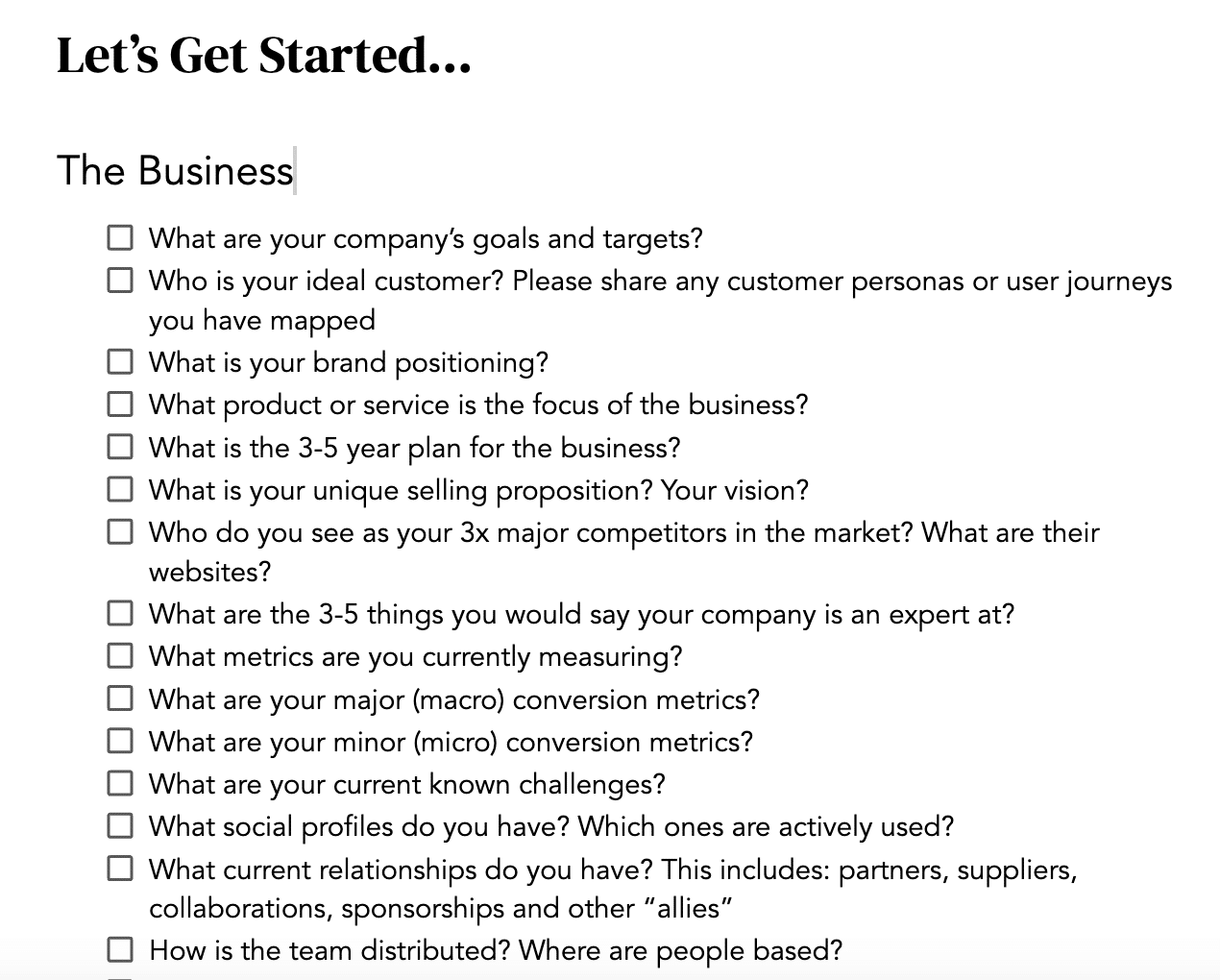
Here are some key questions to consider as you browse the website:
What product or service is being sold?
Who is the target audience? (If you’re in-house, who is your company trying to sell to?)
Why does the company believe customers should choose them over competitors? (Common differentiators include price, unique features, or benefits.)
If you have the time or opportunity, dig deeper by asking your boss or client these business-focused questions:
What are the company’s goals and targets?
What is the three- to five-year plan for the business? (Are there plans to launch new products or expand into new markets?)
Who are the main competitors, and what are they doing?
A sample of onboarding business questions from Building a Business Brain by FLOQ Academy
Even without that level of detail, the first three questions provide a useful frame of reference for determining the best SEO approach.
Because of that, SEOs often become social butterflies, regularly collaborating with other departments and specialties.
I’ve been in SEO for 15 years now (which makes me feel old), but I continue to ask my clients questions every day.
This field encourages curiosity, so rather than feeling frustrated by what you don’t fully understand, embrace being the one to ask the “dumb questions.”
There’s no such thing as a dumb question, by the way.
As mentioned earlier, SEO has many specializations. Some, like video or local SEO, are referred to as “search verticals.”
If you’re new to the field, start with the basics: the website and how Google presents search results.
Once you understand the business, try a simple exercise to analyze your site’s optimization.
Open a key product, category, or service page in one window. In another, search for a term you think users would enter to find that page.
Compare what appears in the search results with your own page and the pages that rank for that term.
For example, in a search for “running shoes,” a few things stand out:
The intent is somewhat mismatched. Nike’s category page targets users who are researching with intent to buy or are already planning a purchase. However, the search results display articles comparing different running shoes.
Scrolling down, you might see an image carousel, a “Nearby Stores” section, and “People Also Ask” results.
If I were a new SEO at Nike and assumed the “running shoes” category page could rank for the “running shoes” query, I would rethink that after reviewing the search results.
If ranking for that broad term were a priority, I would create a running shoe comparison article featuring high-quality images of real people using the shoes — maybe even a video, if budget allowed.
If your page aligns more closely with the search results, analyze the top-ranking pages and adapt successful elements to your own site.
Do most of them have an on-page FAQ while yours doesn’t?
A product video? Detailed specs? User reviews?
How is the content itself structured? Are there jump links? Short paragraphs? Lots of lists, bulleted or numbered?
Be critical and specific about what you can improve. (Never copy content directly.)
At its core, SEO is about identifying what Google deems important for a given product or service, then doing it better than the competition.
Many SEOs get caught up in tools and tactics and forget to examine the search results themselves.
Break that habit early and make reviewing Google’s search results a key part of your research process.
4. Dabble in the technical side and build relationships with your developers
Technical SEO is one of the more complex specializations in the field and can seem intimidating.
If you’re using a major CMS, your technical foundations are likely solid, so today, much of technical SEO focuses on refinements and enhancements.
While it’s important to develop technical knowledge, a great way to start is by building relationships with your development team and staying curious.
Asking questions makes learning more interactive and immediately relevant to your work.
Exploring coding courses or creating your own website can also help you develop technical skills gradually instead of all at once.
Some argue that you can be a good SEO without technical expertise — and I don’t disagree.
However, understanding a website’s inner workings, how Google operates, and even how large language models (LLMs) function can help you prioritize your SEO efforts.
Code is Google’s native language, and knowing how to interpret it can be invaluable when migrating a site, launching a new one, or diagnosing traffic drops.
5. Learn the different types of information Google shows in search results
The way search results are presented today vastly differs from 10 or 15 years ago.
Those who have been in the industry for a while have had the advantage of adapting gradually as Google has evolved.
Newcomers, on the other hand, are thrown into the deep end, facing a wide range of search features all at once — some personalized, some not, and some appearing inconsistently.
This can be challenging to grasp, even for experienced SEOs.
Google has invested heavily in understanding user intent and presenting search results in a way that best addresses it.
As a result, search results may include:
Videos.
Images.
People Also Ask.
Related Searches.
AI Overviews.
AI-organized search.
Map results.
Nearby shopping options.
Product listings.
People Also Buy From.
News
Building visibility for each of these features often requires a unique approach and specific considerations.
These search result types are now industry jargon, so a glossary can help you learn SEO terminology.
6. Learn the different types of query intent classifications
Google’s mission is to “organize the world’s information and make it universally accessible and useful.”
As part of this, Google works to understand why people search for something and provides the most relevant results to match that intent.
To do this, they classify queries based on intent.
The Search Quality Evaluator Guidelines, a handbook Google provides to evaluators who manually assess website and search result quality, also touches on understanding user intent:
“It can be helpful to think of queries as having one or more of the following intents.
Know query, some of which are Know Simple queries.
Do query, when the user is trying to accomplish a goal or engage in an activity.
Website query, when the user is looking for a specific website or webpage.
Visit-in-person query, some of which are looking for a specific business or organization, some of which are looking for a category of businesses.”
When conducting keyword research, it’s helpful to analyze both your site and the queries you’re targeting through this lens.
Many SEO professionals also use these broader, traditional intent categories, though they don’t always align perfectly with Google’s classifications:
Informational: Who, what, when, where, how, why.
Commercial: Comparison, review, best, specific product.
Transactional: Buy, cheap, sale, register.
Navigational: Searching for a specific brand.
Rather than focusing solely on keywords, take a step back and consider the intent behind the search. Understanding intent is essential for SEO success.
However, if you’re new to SEO, I strongly recommend completing at least one full project using tools like Google Search Console, Semrush, or Ahrefs without LLM support.
While AI can speed up the process, relying on it too early has drawbacks:
Slower learning curve: If an LLM does the heavy lifting, you miss the experience of making strategic trade-offs, such as choosing a low-volume, mid-competition keyword over a high-volume, high-competition one.
Lack of instinct for accuracy: Without firsthand research experience, it’s harder to recognize when an LLM generates inaccurate information or pulls from an unreliable source.
Reduced impact: Google is increasingly sophisticated in detecting “repetitive content.” Relying too much on LLMs for mass content creation could hurt performance, whereas a more focused, strategic approach might yield better results.
While it may be tempting to jump straight into strategy rather than hands-on execution, senior SEOs develop their strategic mindset through years of practical work across different clients and industries.
Skipping this foundational experience could make it harder to recognize large-scale patterns and trends.
While this channel represents a small percentage of market share compared to traditional Google search, the C-suite and other stakeholders are concerned with — and starting to pay attention to — their brand’s visibility in LLMs.
There are difficult conversations around measurability, impact, and how much time we should invest in optimizing for a relatively small channel, but that’s a different article. As a newcomer to SEO, it’s important to understand how this type of search is different. A few things to look into include:
How LLMs actually work: Do they truly “know” information, or is something else happening? Short answer: yes, something else is happening. It’s important to understand what that is and how it works. When unsure, rely on the LLM’s own documentation. Industry experts to follow include Lily Ray and Dan Petrovic.
How LLMs train on data and how RAG impacts this: Develop a basic understanding of how these systems evaluate website content when generating answers.
How people claim they can influence LLM output: Some tactics are high risk, such as publishing large volumes of self-promotional listicles. Others are lower-risk, longer-term activities, like ensuring a site is crawlable in plain HTML, making sure LLM agents aren’t blocked by firewalls, and structuring HTML to be more bot-friendly. If many of these lower-risk tactics sound familiar, they should — they overlap with traditional SEO practices.
If you’re feeling advanced, explore concepts like query fan-out and MuVERA, or research what engineers at DeepSeek, OpenAI, Google, and Claude are currently developing.
Google’s page indexing report within Google Search Console is missing a block of data earlier than December 15th. It seems like some sort of reporting bug that is impacting all users.
Google has not yet commented on the reporting issue but again, it is widespread and impacting everyone.
What it looks like. Here is a screenshot from Vijay on X but you can see it yourself by checking your page indexing report:
Why we care. I’d check back in a day or two to see if this data returns or if Google posts a notice about the issue. Right now, no one is able to access that data, so everyone is in the “same boat.”
Google will hopefully fix the data, and you can run your reporting and analysis if you have not done so yet for those data ranges.
Update: John Mueller from Google replied saying, “This is a side-effect of the latency issue from early December. This isn’t a new or separate issue.”
Looking to take the next step in your search marketing career?
Below, you will find the latest SEO, PPC, and digital marketing jobs at brands and agencies. We also include positions from previous weeks that are still open.
Job Description **Currently hiring in Louisiana** Are you obsessed with SEO and always eager to learn what’s next? Do you follow industry changes, test new ideas, and look for ways to sharpen your skills? We’re looking for someone who is hungry to grow, excited to dive deeper into strategy, and motivated to turn knowledge into […]
About Us At Ideal Living, we believe everyone has a right to pure water, clean air, and a solid foundation for wellness. As the parent company of leading wellness brands AirDoctor and AquaTru, we help bring this mission to life daily through our award-winning, innovative, science-backed products. For over 25 years, Los Angeles-based Ideal Living […]
Job Description COLAB Marketing is seeking an experienced and results-driven SEO Manager to lead our organic search strategy across multiple client accounts. This is a full-time, in-office position for someone who understands both the technical and strategic sides of SEO and thrives in a fast-paced agency environment. We’re looking for someone who doesn’t just “do SEO,” but understands how […]
What’s in it for you? Competitive salary with annual salary review and bonus. FULLY paid top tier medical, dental, & vision benefits for you and your family. Outstanding paid time off policy. Flexible work arrangement Student Loan Assistance, up to $5,000 annually as eligible. Learning and Development Opportunities including Tuition Reimbursement. Highly engaged culture, stable […]
Overview Job Description: We are looking for an ambitious and proven Senior Digital Marketing Executive with 3+ years of experience and in-depth knowledge of digital marketing platforms. Responsible for generating quality traffic for our website (the US-based website and traffic needed also from the USA). Responsibilities Hands on experience in creating marketing campaigns for PPC […]
Job Description Shaka Wear is a premium streetwear brand built on authenticity, quality, and cultural impact. Known for our heavyweight basics and iconic street silhouettes, we’ve grown from local staple to global name — driven by a loyal community and a powerful online presence. We’re looking for a Digital Marketing Manager (In-Person) who can take […]
Overview You will be working with an internal team that functions as an SEO helpdesk for a large international client in the hospitality sector with over 120 locations worldwide. The helpdesk receives a wide range of SEO-related requests from internal senior members and locations via email daily, and it is their responsibility to triage, process, […]
Job Description Salary: Up to 80K Position: Senior SEO Analyst Company: Mason Interactive Job Overview: As a Senior SEO Analyst at Mason Interactive, you will take a leading role in optimizing search engine performance for our diverse clientele. This position requires an individual who can combine deep technical SEO knowledge with creative problem-solving to enhance […]
Company Description Thought Industries powers the Business of Value – enabling enterprises to unlock growth across the customer lifecycle. From our Boston headquarters, we help organizations drive measurable impact, maximize customer lifetime value, and fuel innovation through our leading enterprise solutions. Unlock growth with us – where your potential meets boundless possibilities. Job Description We’re […]
Job Description Marketing Strategist (SEO, ORM & Marketing Automation, Mortgage Industry) Location: Hybrid – Irvine, CA Job Type: Full-Time Mutual of Omaha is a Fortune 300 Company. Mutual of Omaha Mortgage is inspired by hometown values and a commitment to being responsible and caring for each other. We exist for the benefit of our customers […]
Paid Media Manager Location: Dallas or Plano, TX Work Model: In-office initially, hybrid flexibility after 6 months Role Overview Angel Reyes & Associates is hiring a Paid Media Manager to serve as the hands-on owner of our paid search programs. This is a senior, execution-focused role responsible for day-to-day performance, optimization, and agency management across […]
Garner’s mission is to transform the healthcare economy, delivering high-quality and affordable care for all. We are fundamentally reimagining how healthcare works in the U.S. by partnering with employers to redesign healthcare benefits using clear incentives and powerful, data-driven insights. Our approach guides employees to higher-quality, lower-cost care, creating a system that works better for […]
Company Overview Natran Green Pest Control is not just a job, it’s a career! We’re searching for dedicated professionals who are passionate about the green movement, sustainability, and want to be part of a team that focuses on creating a healthy environment! Our culture is centered on continuous learning, communication, and teamwork at every level of […]
Job Description Mirage is the leading AI short-form video company. We’re building full-stack foundation models and products that redefine video creation, production and editing. Over 20 million creators and businesses use Mirage’s products to reach their full creative and commercial potential. We are a rapidly growing team of ambitious, experienced, and devoted engineers, researchers, designers, […]
Job Description DEL Records, Inc. is on the lookout for a dynamic Social Media Manager to elevate our Social Media team! If you’re passionate about music, events, and digital storytelling, we want you on board. Join us and play a pivotal role in connecting fans with their favorite artists and events. Responsibilities: Develop and implement […]
You’ll own high-visibility SEO and AI initiatives, architect strategies that drive explosive organic and social visibility, and push the boundaries of what’s possible with search-powered performance.
Every day, you’ll experiment, analyze, and optimize-elevating rankings, boosting conversions across the customer journey, and delivering insights that influence decisions at the highest level.
Google Merchant Center is investigating an issue affecting Feeds, according to its public status dashboard.
The details:
Incident began: Feb. 4, 2026 at 14:00 UTC
Latest update (Feb. 20, 14:43 UTC): “We’re investigating reports of an issue with Feeds. We will provide more information shortly.”
Status: Service disruption
The alert appears on the official Merchant Center Status Dashboard, which tracks availability across Merchant Center services.
Why we care. Feeds power product listings across Shopping ads and free listings. Any disruption can impact product approvals, updates, or visibility in campaigns tied to retail inventory.
What to watch. Google has not yet shared scope, root cause, or estimated time to resolution. Advertisers experiencing feed processing delays or disapprovals may want to monitor the dashboard closely.
Bottom line. When feeds stall, ecommerce performance can follow. Retail advertisers should keep an eye on diagnostics and campaign delivery until more details emerge.
PPC is evolving beyond traditional search. Those who adopt new ad formats, smarter creative strategies, and the right use of AI will gain a competitive edge.
Ginny Marvin, Google’s Ads Product Liaison, and Navah Hopkins, Microsoft’s Product Liaison, joined me for a conversation about what’s next for PPC. Here’s a recap of this special keynote from SMX Next.
Emerging ad formats and channels
When discussing what lies beyond search, both speakers expressed excitement about AI-driven ad formats.
Hopkins highlighted Microsoft’s innovation in AI-first formats, especially showroom ads:
“Showroom ads allow users to engage and interact with a showroom where the advertiser provides the content, and Copilot provides the brand security.”
She also pointed to gaming as a major emerging ad channel. As a gamer, she noted that many users “justifiably hate the ads that serve on gaming surfaces,” but suggested more immersive, intelligent formats are coming.
Marvin agreed that the landscape is shifting, driven by conversational AI and visual discovery tools. These changes “are redefining intent” and making conversion journeys “far more dynamic” than the traditional keyword-to-click model.
Both stressed that PPC marketers must prepare for a landscape where traditional search is only one of many ad surfaces.
Importance of visual content
A major theme throughout the discussion was the growing importance of visual content. Hopkins summed up the shift by saying:
“Most people are visual learners… visual content belongs in every stage of the funnel.”
She urged performance marketers to rethink the assumption that visuals belong only at the top of the funnel or in remarketing.
Marvin added that leading with brand-forward visuals is becoming essential, as creatives now play “a much more important role in how you tell your stories, how you drive discovery, and how you drive action.” Marketers who understand their brand’s positioning and reflect it consistently in their creative libraries will thrive across emerging channels.
Both noted that AI-driven ad platforms increasingly rely on strong creative libraries to assemble the right message at the right moment.
Myths about AI and creative
The conversation also addressed misconceptions about AI-generated creative.
Hopkins cautioned against overrelying on AI to build entire creative libraries, emphasizing:
“AI is not the replacement for our creativity… you should not be delegating full stop your creative to AI.”
Instead, she said marketers should focus on how AI can amplify their work. Campaigns must perform even when only a single asset appears, such as a headline or image. Creatives need to “stand alone” and clearly communicate the brand.
Marvin reinforced the need for a broader range of visual assets than most advertisers maintain. “You probably need more assets than you currently have,” she noted, especially as cross-channel campaigns like Demand Gen depend on testing multiple combinations.
Both positioned AI as an enabler, not a replacement, stressing that human creativity drives differentiation.
Strategic use of assets
Both liaisons emphasized the need for a diverse, adaptable asset library that works across formats and surfaces.
Marvin explained that AI systems now evaluate creative performance individually:
“Underperforming assets should be swapped out, and high-performing niche assets can tell you something about your audience.”
Hopkins added that distinct creative assets reduce what she called “AI chaos moments,” when the system struggles because assets overlap too closely. Distinctiveness—visual and textual—helps systems identify which combinations perform best.
Both urged marketers to rethink creative planning, treating assets as both brand-building and performance-driving rather than separating the two.
Partnering with AI for measurement
The conversation concluded with a deep dive into what it means to measure performance in an AI-first world.
Hopkins listed the key strategic inputs AI relies on:
“First-party data, creative assets, ad copy, website content, goals and targets, and budget. These are the things AI uses to optimize towards your business outcomes.”
She also highlighted that incrementality — understanding the true added value of ads — is becoming more important than ever.
Marvin acknowledged the challenges marketers face in letting go of old control patterns, especially as measurement shifts from granular data to privacy-protective models. However, she stressed that modern analytics still provide meaningful signals, just in a different form:
“It’s not about individual queries anymore… it’s about understanding the themes that matter to your audience.”
Both encouraged marketers to think more strategically and holistically in their analysis rather than getting stuck in granular metrics.
Even those of us who rely on LLMs regularly get frustrated when they don’t respond the way we want.
Here’s how to communicate with LLMs when you’re vibe coding. The same lessons apply if you find yourself in drawn-out “conversations” with an LLM UI like ChatGPT while trying to get real work done.
Choose your vibe-coding environment
Vibe coding is building software with AI assistants. You describe what you want, the model generates the code, and you decide whether it matches your intent.
That’s the idea. In practice, it’s often messier.
The first thing you’ll need to decide is which code editor to work in. This is where you’ll communicate with the LLM, generate code, view it, and run it.
I’m a big fan of Cursor and highly recommend it. I started on the free Hobby plan, and that’s more than enough for what we’re doing here.
Fair warning – it took me about two months to move up two tiers and start paying for the Pro+ account. As I mentioned above, I’m firmly in the “over a day a week of LLM use” camp, and I’d welcome the company.
A few options are:
Cursor: This is the one I use, as do most vibe coders. It has an awesome interface and is easily customized.
Windsurf: The main alternative to Cursor. It can run its own terminal commands and self-correct without hand-holding.
Google Antigravity: Unlike Cursor, it moves away from the file-tree view and focuses on letting you direct a fleet of agents to build and test features autonomously.
In my screenshots, I’ll be using Cursor, but the principles apply to any of them. They even apply when you’re simply communicating with LLMs in depth.
You might wonder why you need a tutorial at all. You tell the LLM what you want, and it builds it, right? That may work for a meta description or a superhero SEO image of yourself, but it won’t cut it for anything moderately complex — let alone a tool or agentic system spanning multiple files.
One key concept to understand is the context window. That’s the amount of content an LLM can hold in memory. It’s typically split across input and output tokens.
GPT-5.2 offers a 400,000-token context window, and Gemini 3 Pro comes in at 1 million. That’s roughly 50,000 lines of code or 1,500 pages of text.
The challenge isn’t just hitting the limit, especially with large codebases. It’s that the more content you stuff into the window, the worse models get at retrieving what’s inside it.
Attention mechanisms tend to favor the beginning and end of the window, not the middle. In general, the less cluttered the window, the better the model can focus on what matters.
If you want a deeper dive into context windows, Matt Pocock has a great YouTube video that explains it clearly. For now, it’s enough to understand placement and the cost of being verbose.
A few other tips:
One team, one dream. Break your project into logical stages, as we’ll do below, and clear the LLM’s memory between them.
Do your own research. You don’t need to become an expert in every implementation detail, but you should understand the directional options for how your project could be built. You’ll see why shortly.
When troubleshooting, trust but verify. Have the model explain what’s happening, review it carefully, and double-check critical details in another browser window.
Tutorial: Let’s vibe-code an AI Overview question extraction system
How do you create content that appears prominently in an AI Overview? Answer the questions the overview answers.
In this tutorial, we’ll build a tool that extracts questions from AI Overviews and stores them for later use. While I hope you find this use case valuable, the real goal is to walk through the stages of properly vibe coding a system. This isn’t a shortcut to winning an AI Overview spot, though it may help.
Step 1: Planning
Before you open Cursor — or your tool of choice — get clear on what you want to accomplish and what resources you’ll need. Think through your approach and what it’ll take to execute.
While I noted not to launch Cursor yet, this is a fine time to use a traditional search engine or a generative AI.
I tend to start with a simple sentence or two in Gemini or ChatGPT describing what I’m trying to accomplish, along with a list of the steps I think the system might need to go through. It’s OK to be wrong here. We’re not building anything yet.
For example, in this case, I might write:
I’m an SEO, and I want to use the current AI Overviews displayed by Google to inspire the content our authors will write. The goal is to extract the implied questions answered in the AI Overview. Steps might include:

1 – Select a query you want to rank for.
2 – Conduct a search and extract the AI Overview.
3 – Use an LLM to extract the implied questions answered in the AI Overview.
4 – Write the questions to a saveable location.
With this in hand, you can head to your LLM of choice. I prefer Gemini for UI chats, but any modern model with solid reasoning capabilities should work.
Start a new chat. Let the system know you’ll be building a project in Cursor and want to brainstorm ideas. Then paste in the planning prompt.
The system will immediately provide feedback, but not all of it will be good or in scope. For example, one response suggested tracking the AI Overview over time and running it in its own UI. That’s beyond what we’re doing here, though it may be worth noting.
It’s also worth noting that models don’t always suggest the simplest path. In one case, it proposed a complex method for extracting AI Overviews that would likely trigger Google’s bot detection. This is where we go back to the list we created above.
Step 1 will be easy. We just need a field to enter keywords.
Step 2 could use some refinement. What’s the most straightforward and reliable way to capture the content in an AI Overview? Let’s ask Gemini.
I’m already familiar with these services and frequently use SerpAPI, so I’ll choose that one for this project. The first time I did this, I reviewed options, compared pricing, and asked a few peers. Making the wrong choice early can be costly.
Step 3 also needs a closer look. Which LLMs are best for question extraction?
That said, I don’t trust an LLM blindly, and for good reason. In one response, Claude 4.6 Opus, which had recently been released, wasn’t even considered.
After a couple of back-and-forth prompts, I told Gemini:
“Now, be critical of your suggestions and the benchmarks you’ve selected.”
“The text will be short, so cost isn’t an issue.”
We then came around to:
For this project, we’re going with GPT-5.2, since you likely have API access or, at the very least, an OpenAI account, which makes setup easy. Call it a hunch. I won’t add an LLM judge in this tutorial, but in the real world, I strongly recommend it.
Now that we’ve done the back-and-forth, we have more clarity on what we need. Let’s refine the outline:
I’m an SEO, and I want to use the current AI Overviews displayed by Google to inspire the content our authors will write. The idea is to extract the implied questions answered in the AI Overview. Steps might include:

1 – Select a query you want to rank for.
2 – Conduct a search and extract the AI Overview using SerpAPI.
3 – Use GPT-5.2 Thinking to extract the implied questions answered in the AI Overview.
4 – Write the query, AI Overview, and questions to W&B Weave.
Before we move on, make sure you have access to the three services you’ll need for this:
SerpAPI: The free plan will work.
OpenAI API: You’ll need to pay for this one, but $5 will go a long way for this use case. Think months.
Weights & Biases: The free plan will work. (Disclosure: I’m the head of SEO at Weights & Biases.)
Now let’s move on to Cursor. I’ll assume you have it installed and a project set up. It’s quick, easy, and free.
The screenshots that follow reflect my preferred layout in Editor Mode.
Step 2: Set the groundwork
If you haven’t used Cursor before, you’re in for a treat. One of its strengths is access to a range of models. You can choose the one that fits your needs or pick the “best” option based on leaderboards.
I tend to gravitate toward Gemini 3 Pro and Claude 4.6 Opus.
If you don’t have access to all of them, you can select the non-thinking models for this project. We also want to start in Plan mode.
Let’s begin with the project prompt we defined above.
Note: You may be asked whether you want to allow Cursor to run queries on your behalf. You’ll want to allow that.
Now it’s time to go back and forth to refine the plan that the model developed from our initial prompt. Because this is a fairly straightforward task, you might think we could jump straight into building it, which would be bad for the tutorial and in practice. If you thought that, you’d be wrong. Humans like me don’t always communicate clearly or fully convey our intent. This planning stage is where we clarify that.
When I enter the instructions into the Cursor chat in Planning mode, using Sonnet 4.5, it kicks off a discussion. One of the great things about this stage is that the model often surfaces angles I hadn’t considered at the outset. Below are my replies, where I answer each question with the applicable letter. You can add context after the letter if needed.
An example of the model suggesting angles I hadn’t considered appears in question 4 above. It may be helpful to pass along the context snippets. I opted for B in this case. There are obvious cases for C, but for speed and token efficiency, I retrieve as little as possible. Intent and related considerations are outside the scope of this article and would add complexity, as they’d require a judge.
The system will output a plan. Read it carefully, as you’ll almost certainly catch issues in how it interpreted your instructions. Here’s one example.
I’m told there is no GPT-5.2 Thinking. There is, and it’s noted in the announcement. I have the system double-check a few details I want to confirm, but otherwise, the plan looks good. Claude also noted the format the system will output to the screen, which is a nice touch and something I hadn’t specified. That’s what partners are for.
Finally, I always ask the model to think through edge cases where the system might fail. I did, and it returned a list. From that list, I selected the cases I wanted addressed. Others, like what to do if an AI Overview exceeds the context window, are so unlikely that I didn’t bother.
A few final tweaks addressed those items, along with one I added myself: what happens if there is no AI Overview?
I have to give credit to Tarun Jain, whom I mentioned above, for this next step. I used to copy the outline manually, but he suggested simply asking the model to generate a file with the plan. So let’s direct it to create a markdown file, plan.md, with the following instruction:
Build a plan.md including the reviewed plan and plan of action for the implementation.
Remember the context window issue I discussed above? If you start building from your current state in Cursor, the initial directives may end up in the middle of the window, where they’re least accessible, since your project brainstorming occupies the beginning.
To get around this, once the file is complete, review it and make sure it accurately reflects what you’ve brainstormed.
Step 3: Building
Now we get to build. Start a new chat by clicking the + in the top right corner. This opens a new context window.
This time, we’ll work in Agent mode, and I’m going with Gemini 3 Pro.
Arguably, Claude 4.6 Opus might be a technically better choice, but I find I get more accurate responses from Gemini based on how I communicate. I work with far smarter developers who prefer Claude and GPT. I’m not sure whether I naturally communicate in a way that works better with Gemini or if Google has trained me over the years.
First, tell the system to load the plan. It immediately begins building the system, and as you’ll see, you may need to approve certain steps, so don’t step away just yet.
Once it’s done, there are only a couple of steps left, hopefully. Thankfully, it tells you what they are.
First, install the required libraries. These include the packages needed to run SerpAPI, GPT, Weights & Biases, and others. The system has created a requirements.txt file, so you can install everything in one line.
Note: It’s best to create a virtual environment. Think of this as a container for the project, so downloaded dependencies don’t mix with those from other projects. This only matters if you plan to run multiple projects, but it’s simple to set up, so it’s worth doing.
Open a terminal:
Then enter the following lines, one at a time:
python3 -m venv .venv
source .venv/bin/activate
pip install -r requirements.txt
You’re creating the environment, activating it, and installing the dependencies inside it. Keep the second command handy, since you’ll need it any time you reopen Cursor and want to run this project.
You’ll know you’re in the correct environment when you see (.venv) at the beginning of the terminal prompt.
When you run the requirements.txt installation, you’ll see the packages load.
Next, rename the .env.example file to .env and fill in the variables.
The system can’t create a .env file, and it won’t be included in GitHub uploads if you go that route, which I did and linked above. It’s a hidden file used to store your API keys and related credentials, meaning information you don’t want publicly exposed. By default, mine looks like this.
I’ll fill in my API keys, sorry, can’t show that screen, and then all that’s left is to run the script.
To do that, enter this in the terminal:
python main.py "your search query"
If you forget the command, you can always ask Cursor.
Oh no … there’s a problem!
I’m building this as we go, so I can show you how to handle hiccups. When I ran it, I hit a critical one.
It’s not finding an AI Overview, even though the phrase I entered clearly generates one.
Thankfully, I have a wide-open context window, so I can paste:
An image showing that the output is clearly wrong.
The code output illustrates what the system is finding.
A link (or sometimes simply text) with additional information to direct the solution.
Fortunately, it’s easy to add terminal output to the chat. Select everything from your command through the full error message, then click “Add to Chat.”
It’s important not to rely solely on LLMs to find the information you need. A quick search took me to the AI Overview documentation from SerpAPI, which I included in my follow-up instructions to the model.
My troubleshooting comment looks like this.
Notice I tell Cursor not to make changes until I give the go-ahead. We don’t want to fill up the context window or train the model to assume its job is to make mistakes and try fixes in a loop. We reduce that risk by reviewing the approach before editing files.
Glad I did. I had a hunch it wasn’t retrieving the code blocks properly, so I added one to the chat for additional review. Keep in mind that LLMs and bots may not see everything you see in a browser. If something is important, paste it in as an example.
Now it’s time to try again.
Excellent, it’s working as we hoped.
Now we have a list of all the implied questions, along with the result chunks that answer them.
It’s a bit messy to rely solely on terminal output, and it isn’t saved once you close the session. That’s what I’m using Weave to address.
Weave is, among other things, a tool for logging prompt inputs and outputs. It gives us a permanent place to review our queries and extracted questions. At the bottom of the terminal output, you’ll find a link to Weave.
There are two traces to watch. The first is what this was all about: the analyze_query trace.
In the inputs, you can see the query and model used. In the outputs, you’ll find the full AI Overview, along with all the extracted questions and the content each question came from. You can view the full trace here, if you’re interested.
Now, when we’re writing an article and want to make sure we’re answering the questions implied by the AI Overview, we have something concrete to reference.
The second trace logs the prompt sent to GPT-5.2 and the response.
This is an important part of the ongoing process. Here you can easily review the exact prompt sent to GPT-5.2 without digging through the code. If you start noticing issues in the extracted questions, you can trace the problem back to the prompt and get back to vibing with your new friend, Cursor.
I’ve been vibe coding for a couple of years, and my approach has evolved. It gets more involved when I’m building multi-agent systems, but the fundamentals above are always in place.
It may feel faster to drop a line or two into Cursor or ChatGPT. Try that a few times, and you’ll see the choice: give up on vibe coding — or learn to do it with structure.
On episode 352 of PPC Live The Podcast, I spoke to Emina Demiri Watson, Head of Digital at Brighton-based Vixen Digital, where she to shared one of the most candid stories in agency life: deliberately firing a client that accounted for roughly 70% of their revenue — and what they learned the hard way in the process.
The decision to let go
The client relationship had been deteriorating for around three months before the leadership team made their move. The decision wasn’t about the client being difficult from day one — it was a relationship that had slowly soured over time. By the end, the toxic dynamic was affecting the entire team, and leadership decided culture had to come first.
The mistake they didn’t see coming
Here’s where it got painful. When Vixen sat down to run the numbers, they realized they had a serious customer concentration problem — one client holding a disproportionately large share of total revenue. It’s the kind of thing that gets lost when you’re busy and don’t have sophisticated financial systems. A quick Excel formula later, and the reality hit harder than expected.
Warning signs agencies should watch for
Emina outlined the signals that a client relationship is shifting — beyond the obvious drop in campaign performance. External factors inside the client’s business matter too: company restructuring, team changes, even a security breach that prevents leads from converting downstream. The lesson? Don’t just watch your Google Ads dashboard — understand what’s happening on the client’s side of the fence.
How they clawed back
Recovery came down to three things: tracking client concentration properly going forward, returning to their company values as a decision-making compass, and accepting that rebuilding revenue simply takes time. Losing the client freed up the mental bandwidth to pitch new business and re-engage with the industry community — things that had quietly fallen by the wayside.
Common account mistakes still haunting audits in 2026
When asked about errors she sees in audited accounts, Emina didn’t hold back. Broad match without proper audience guardrails remains a persistent problem, as does the absence of negative keyword lists entirely. Over-narrow targeting is another — particularly for clients chasing high-net-worth audiences, where the data pool becomes too thin for Smart Bidding to function.
The right way to think about AI
Emina’s take on AI is pragmatic: the biggest mistake is believing the hype. PPC practitioners are actually better positioned than most to navigate AI skeptically, given they’ve been working with automation and black-box systems for years. Her preferred approach — and the one she quietly enforces with junior team members via a robot emoji — is to treat Claude and other LLMs as a first stop for research, not a replacement for critical thinking.
The takeaway
If you’re sitting on a deteriorating client relationship and nervous about pulling the trigger, Emina’s advice is simple: go back to your values. If commercial survival sits at the top of the list, keep the client. If culture and team wellbeing matter more, it might be time.
Automation has long been part of the discipline, helping teams structure data, streamline reporting, and reduce repetitive work. Now, AI agent platforms combine workflow orchestration with large language models to execute multi-step tasks across systems.
Among them, n8n stands out for its flexibility and control. Here’s how it works – and where it fits in modern SEO operations.
Understanding how n8n AI agents are deployed
If you think of modern AI agent platforms as an AI-powered Zapier, you’re not far off. The difference is that tools like n8n don’t just pass data between steps. They interpret it, transform it, and determine what happens next.
Getting started with n8n means choosing between cloud-hosted and self-hosted deployment. You can have n8n host your environment, but there are drawbacks:
The environment is more sandboxed.
You can’t recode the server to interact with n8n workflows in custom ways, such as de-sandboxing the saving of certain file types to a database.
You can’t install or use community nodes.
Costs tend to be higher.
There are advantages, too:
You don’t have to be as hands-on managing the n8n environment or applying patches after core engine updates.
Less technical expertise is required, and you don’t need a developer to set it up.
Although customization and control are reduced, maintenance is less frequent and less stressful.
There are also multiple license packages available. If you run n8n self-hosted, you can use it for free. However, that can be challenging for larger teams, as version control and change attribution are limited in the free tier.
Regardless of the package you choose, using AI models and LLMs isn’t free. You’ll need to set up API credentials with providers such as Google, OpenAI, and Anthropic.
Once n8n is installed, the interface presents a simple canvas for designing processes, similar to Zapier.
You can add nodes and pull in data from external sources. Webhook nodes can trigger workflows, whether on a schedule, through a contact form, or via another system.
Executed workflows can then deliver outputs to destinations such as Gmail, Microsoft Teams, or HTTP request nodes, which can trigger other n8n workflows or communicate with external APIs.
In the example above, a simple workflow scrapes RSS feeds from several search news publishers and generates a summary. It doesn’t produce a full news article or blog post, but it significantly reduces the time needed to recap key updates.
Below, you can see the interior of a webhook trigger node. This node generates a webhook URL. When Microsoft Teams calls that URL through a configured “Outgoing webhook” app, the workflow in n8n is triggered.
Users can request a search news update directly within a specific Teams channel, and n8n handles the rest, including the response.
Once you begin building AI agent nodes, which can communicate with LLMs from OpenAI, Google, Anthropic, and others, the platform’s capabilities become clearer.
In the image above, the left side shows the prompt creation view. You can dynamically pass variables from previously executed nodes. On the right, you’ll see the prompt output for the current execution, which is then sent to the selected LLM.
In this case, data from the scraping node, including content from multiple RSS feeds, is passed into the prompt to generate a summary of recent search news. The prompt is structured using Markdown formatting to make it easier for the LLM to interpret.
Returning to the main AI agent node view, you’ll see that two prompts are supported.
The user prompt defines the role and handles dynamic data mapping by inserting and labeling variables so the AI understands what it’s processing. The system prompt provides more detailed, structured instructions, including output requirements and formatting examples. Both prompts are extensive and formatted in markdown.
On the right side of the interface, you can view sample output. Data moves between n8n nodes as JSON. In this example, the view has been switched to “Schema” mode to make it easier to read and debug. The raw JSON output is available in the “JSON” tab.
This project required two AI agent nodes.
The short news summary needed to be converted to HTML so it could be delivered via email and Microsoft Teams, both of which support HTML.
The first node handled summarizing the news. However, when the prompt became large enough to generate the summary and perform the HTML conversion in a single step, performance began to degrade, likely due to LLM memory constraints.
To address this, a second AI agent node converts the parsed JSON summary into HTML for delivery. In practice, a dual AI agent node structure often works well for smaller, focused tasks.
Finally, the news summary is delivered via Teams and Gmail. Let’s look inside the Gmail node:
The Gmail node constructs the email using the HTML output generated by the second AI agent node. Once executed, the email is sent automatically.
The example shown is based on a news summary generated in November 2025.
In this article, we’ve outlined a relatively simple project. However, n8n has far broader SEO and digital applications, including:
Generating in-depth content and full articles, not just summaries.
Creating content snippets such as meta and Open Graph data.
Reviewing content and pages from a CRO or UX perspective.
Generating code.
Building simple one-page SEO scanners.
Creating schema validation tools.
Producing internal documents such as job descriptions.
Reviewing inbound CVs, or resumes, and applications.
Integrating with other platforms to support more complex, connected systems.
Connecting to platforms with API access that don’t have official or community n8n nodes, using custom HTTP request nodes.
The possibilities are extensive. As one colleague put it, “If I can think it, I can build it.” That may be slightly hyperbolic.
Like any platform, n8n has limitations. Still, n8n and competing tools such as MindStudio and Make are reshaping how some teams approach automation and workflow design.
How long that shift will last is unclear.
Some practitioners are exploring locally hosted tools such as Claude Code, Cursor, and others. Some are building their own AI “brains” that communicate with external LLMs directly from their laptops. Even so, platforms like n8n are likely to retain a place in the market, particularly for those who are moderately technical.
Drawbacks of n8n
There are several limitations to consider:
It’s still an immature platform, and core updates can break nodes, servers, or workflows.
That instability isn’t unique to n8n. AI remains an emerging space, and many related platforms are still evolving. For now, that means more maintenance and oversight, likely for the next couple of years.
Some teams may resist adoption due to concerns about redundancy or ethics.
n8n shouldn’t be positioned as a replacement for large portions of someone’s role. The technology is supplementary, and human oversight remains essential.
Although multiple LLMs can work together, n8n isn’t well-suited to thorough technical auditing across many data sources or large-scale data analysis.
Connected LLMs can run into memory limits or over-apply generic “best practice” guidance. For example, an AI might flag a missing meta description on a URL that turns out to be an image, which doesn’t support metadata.
The technology doesn’t yet have the memory or reasoning depth to handle tasks that are both highly subjective and highly complex
It’s often best to start by identifying tasks your team finds repetitive or frustrating and position automation as a way to reduce that friction. Build around simple functions or design more complex systems that rely on constrained data inputs.
AI agents and platforms like n8n aren’t a replacement for human expertise. They provide leverage. They reduce repetition, accelerate routine analysis, and give SEOs more time to focus on strategy and decision-making. This follows a familiar pattern in SEO, where automation shifts value rather than eliminating the discipline.
The biggest gains typically come from small, practical workflows rather than sweeping transformations. Simple automations that summarize data, structure outputs, or connect systems can deliver meaningful efficiency without adding unnecessary complexity. With proper human context and oversight, these tools become more reliable and more useful.
Looking ahead, the tools will evolve, but the direction is clear. SEO is increasingly intertwined with automation, engineering, and data orchestration. Learning how to build and collaborate with these systems is likely to become a core competency for SEOs in the years ahead.
Google is updating how it attributes conversions in app campaigns, shifting from the date of the ad click to the date of the actual install.
What’s changing. Previously, conversions were logged against the original ad interaction date. Now, they’re assigned to the day the app was actually installed — bringing Google’s methodology closer in line with how Mobile Measurement Partners (MMPs) like AppsFlyer and Adjust report data.
Why this helps:
It should meaningfully reduce discrepancies between Google Ads and MMP dashboards — a persistent headache for mobile marketers reconciling two different numbers.
Google’s default 30-day attribution window meant many conversions were being reported too late to be useful for campaign learning, effectively starving Smart Bidding of timely signals.
Tying conversions to install date gives the algorithm fresher, more accurate data — which should translate to faster optimization cycles and more stable performance.
Why we care. The change sounds technical, but its impact is significant. Attribution timing directly affects how Google’s machine learning optimizes campaigns — and a 30-day lag between ad click and conversion credit has long been a silent drag on performance. This change means Google’s machine learning will finally receive conversion signals at the right time — tied to when a user actually installed the app, not when they clicked an ad weeks earlier.
That shift should lead to smarter bidding decisions, faster campaign optimization, and fewer frustrating discrepancies between Google Ads and MMP reporting. If you’ve ever wondered why your Google numbers don’t match AppsFlyer or Adjust, this update is a direct response to that problem.
Between the lines. Most advertisers never touch their attribution window settings, leaving Google’s 30-day default in place. That default has quietly been working against them — delaying the conversion signals that machine learning depends on to make better bidding decisions.
The bottom line. A small change in attribution logic could have an outsized impact on app campaign performance. Mobile advertisers should monitor their data closely in the coming weeks for shifts in reported conversions and optimization behavior.
First spotted. This update was first spotted by David Vargas who shared receiving a message of this post on LinkedIn.
Data isn’t just a report card. It’s your performance marketing roadmap. Following that roadmap means moving beyond Google Analytics 4’s default tools.
If you rely only on built-in GA4 reports, you’re stuck juggling interfaces and struggling to tell a clear story to stakeholders.
This is where Looker Studio becomes invaluable. It allows you to transform raw GA4 and advertising data into interactive dashboards that deliver decision-grade insights and drive real campaign improvements.
Here’s how GA4 and Looker Studio work together for PPC reporting. We’ll compare their roles, highlight recent updates, and walk through specific use cases, from budget pacing visualizations to waste-reduction audits.
GA4 vs. Looker Studio: How they differ for PPC reporting
GA 4 is your source of truth for website and app interactions. It tracks user behavior, clicks, page views, and conversions with a flexible, event-based model. It even integrates with Google Ads to pull key ad metrics into its Advertising workspace. However, GA4 is primarily designed for data collection and analysis, not polished, client-facing reporting.
Looker Studio, on the other hand, serves as your one-stop shop for reporting. It connects to more than 800 data sources, allowing you to build interactive dashboards that bring everything together.
Here’s how they compare functionally in 2026.
Data sources
GA4 focuses on on-site analytics. In late 2025, Google finally rolled out native integration for Meta and TikTok, allowing automatic import of cost, clicks, and impressions without third-party tools.
However, the feature is still rigid. It requires strict UTM matching and lacks the ability to clean campaign names or import platform-specific conversion values, such as Facebook Leads vs. GA4 Conversions.
Looker Studio excels here, allowing you to blend these data sources more flexibly or connect to platforms GA4 still doesn’t support natively, such as LinkedIn or Microsoft Ads.
Metrics and calculations
GA4’s reporting UI has improved significantly, now allowing up to 50 custom metrics per standard property, up from the previous limit of five. However, these are often static.
Looker Studio allows calculated fields, meaning you can perform calculations on your data in real time, such as calculating profit by subtracting cost from revenue, without altering the source data.
Data blending
Looker Studio lets you blend multiple data sources, essentially joining tables, to create richer insights. While enterprise users on Looker Studio Pro can now use LookML models for robust data governance, the standard free version still offers flexible data blending capabilities to match ad spend with downstream conversions.
Sharing and collaboration
Sharing insights in GA4 often means granting property access or exporting static files. Looker Studio reports are live web links that update automatically. You can also schedule automatic email delivery of PDF reports for free.
Enterprise features in Looker Studio Pro add options for delivery to Google Chat or Slack, but standard email scheduling is available to everyone.
Here’s where Looker Studio moves from helpful to essential for PPC teams.
1. Unified, cross-channel view of PPC performance
You don’t rely on just one ad platform. A Looker Studio dashboard becomes your single source of truth, pulling in intent-based Google Ads data and blending it with awareness-based Meta and Instagram Ads for a holistic view.
Instead of just comparing clicks, use Looker Studio to normalize your data. For instance, you might discover that X Ads drove 17.9% of users, while Microsoft Ads drove 16.1%, allowing you to allocate budget based on actual blended performance.
2. Visualizing creative performance
In industries like real estate, the image sells the click. A spreadsheet saying “Ad_Group_B performed well” means nothing to a client.
Use the IMAGE function in Looker Studio. If you use a connector that pulls the Ad Image URL, you can display the actual photo of that luxury condo or HVAC promotion directly in the report table alongside the CTR. This lets clients see exactly which creative is driving results, without translation.
3. Deeper insight into post-click behavior
Reporting shouldn’t stop at the click. By bringing GA4 data into your Looker Studio report, you connect the ad to the subsequent action.
You might discover that a Cheap Furnace Repair campaign has a high CTR but a 100% bounce rate. Looker Studio lets you visualize engaged sessions per click alongside ad spend, proving lead quality matters more than volume.
4. Custom metrics for business goals
Every business has unique KPIs. A real estate company might track tour-to-close ratio, while an HVAC company focuses on seasonal efficiency.
Looker Studio lets you build these formulas once and have them update automatically. You can even bridge data gaps to calculate return on ad spend (ROAS) by creating a formula that divides your CRM revenue by your Google Ads cost.
5. Storytelling and narrative
Raw data needs context. Looker Studio allows you to add text boxes, dynamic date ranges, and annotations that turn numbers into narratives.
Use annotations to explain spikes or drops. Highlight the so what behind the metrics. If cost per lead spiked in July, add a text note directly on the chart, “Seasonal demand surge + competitor aggression.” This preempts client questions and transforms a static report into a strategic tool.
Use cases: PPC dashboards that drive real insights
These dashboards go beyond surface metrics and surface insights you can act on immediately.
The budget pacing dashboard
Anxious about overspending? Standard reports show what you’ve spent, but not how it relates to your monthly cap.
Use bullet charts in Looker Studio. Set your target to the linear spend for the current day of the month. For example, if you’re 50% through the month, the target line is 50% of the budget.
This visual instantly shows stakeholders whether you’re overpacing and need to pull back, or underpacing and need to push harder, ensuring the month ends on budget.
The zero-click audit report
High spend with zero conversions is the silent budget killer in service industries.
Create a dedicated table filtered for waste. Set it to show only keywords where conversions = 0 and cost > $50, or whatever threshold makes sense for you, sorted by cost in descending order.
This creates an immediate hit list of keywords to pause. Showing this to a client proves you’re actively managing their budget and cutting waste, or you can use it internally.
Geographic performance maps
For local services, location is everything. GA4 provides location reports, but Looker Studio visualizes them in ways that matter.
Build a geo performance page that shades regions by cost per lead rather than traffic volume.
You might find that while City A drives the most traffic, City B generates leads at half the cost. This allows you to adjust bid modifiers by ZIP code or city to maximize ROI.
Getting the most out of GA4 and Looker Studio in 2026
To ensure success with this combination, keep these final tips in mind.
Watch your API quotas
One of today’s biggest technical challenges is GA4 API quotas. If your dashboard has too many widgets or gets viewed by too many people at once, charts may break or fail to load.
If you have heavy reporting needs, consider extracting your GA4 data to Google BigQuery first, then connecting Looker Studio to BigQuery. This bypasses API limits and significantly speeds up your reports.
Enable optional metrics
Different clients have different needs. In your charts, enable the “optional metrics” feature. This adds a toggle that lets viewers swap metrics, for example, changing a chart from clicks to impressions, without editing the report each time.
Validate and iterate
When you first build a report, spot-check the numbers against the native GA4 interface. Make sure your attribution settings are correct.
Once you’ve established trust in the data, treat the dashboard as a living product, and keep iterating on the design based on what your stakeholders actually use and need.
Master Looker Studio to unlock GA4’s full potential for PPC reporting. GA4 gives you granular behavioral metrics; Looker Studio is where you combine, refine, and present them.
Move beyond basic metrics and use advanced visualizations — budget pacing, bullet charts, and ad creative tables — to deliver the transparency that builds real trust.
The result? You’ll shift from reactive reporting to proactive strategy, ensuring you’re always one step ahead in the data-driven landscape of 2026.
Google Ads is now displaying examples of how “Landing Page Images” can be used inside Performance Max (PMax) campaigns — offering clearer visibility into how website visuals may automatically become ad creatives.
How it works. If advertisers opt in, Google can pull images directly from a brand’s landing pages and dynamically turn them into ads. Now when creating your campaigns, before setting it live, Google Ads will show you the automated creatives it plans on setting live.
Why we care. For PMax campaigns your site is part of your asset library. Any banner, hero image, or product visual could surface across Search, Display, YouTube, or Discover placements — whether you designed it for ads or not. Google Ads is now showing clearer examples of how Landing Page Images may be used inside those PMax campaigns — giving much-needed visibility into what automated creatives could look like.
Instead of guessing how Google might transform site visuals into ads, brands can better anticipate, audit, and control what’s eligible to serve. That visibility makes it easier to refine landing pages proactively and avoid unwanted surprises in live campaigns.
Between the lines: Automation is expanding — but so is creative risk. Therefore this is a very useful update that keeps advertisers aware of what will be set live before the hit the go live button.
Bottom line: In PMax, your website is no longer just a landing page. It’s part of the ad engine.
First seen. This update was spotted by Digital Marketer Thomas Eccel who showed an example on LinkedIn.
I stopped using press releases several years ago. I thought they had lost most of their impact.
Then a conversation with a good friend and mentor changed my perspective.
She explained that the days of expecting organic features from simply publishing a press release were long gone. But she was still getting strong results by directly pitching relevant journalists once the release went live, using its key points and a link as added leverage.
I reluctantly tried her approach, and the results were phenomenal, earning my client multiple organic features.
My first thought was, “If it worked this well with a small tweak, I can make it even more effective with a comprehensive strategy.”
The strategy I’m about to share is the result of a year of experiments and refinements to maximize the impact of my press releases.
Yes, it requires more research, planning, and execution. But the results are exponentially greater, and well worth the extra effort.
Research phase
You already know what your client wants the world to know — that’s your starting point.
From there:
Map out tangential topics, such as its economic impact, related technology, legislation, and key industry players.
Find media coverage from the past three months on those topics in outlets where you want your client featured.
Your list should include a link to each piece, its key points, and the journalist’s contact information. Also include links to any related social media posts they’ve published.
Sort the list by relevance to your client’s message.
Planning phase
As you write your client’s press release, look for opportunities to cite articles from the list you compiled, including links to the pieces you reference.
Make sure each citation is highly relevant and adds data, clarity, or context to your message. Aim for three to five citations. More won’t add value and will dilute your client’s message.
At the same time, draft tailored pitches to the journalists whose articles you’re citing, aligned with their beat and prior coverage.
Mention their previous work subtly — one short quote they’ll recognize is enough. Include links to a few current social media threads that show active public interest in the topic. Close with a link to your press release (once it’s live) and a clear call to action.
The goal isn’t to win favor by citing them. It’s to show the connection between your client’s message and their previous coverage. Because they’ve already covered the topic, it’s an easy transition to approach it from a new angle — making a media feature far more likely.
Execution phase
Start by engaging with the journalists on your list through social media for a few days. Comment on their recent posts, especially those covering topics from your list. This builds name recognition and begins the relationship.
Then publish your press release. As soon as it goes live, send the pitches you wrote earlier to the three to five journalists you cited. Include the live link to your press release. (I prefer linking to the most authoritative syndication rather than the wire service version.)
After that, pitch other relevant journalists.
As with the first group, tailor each pitch to the journalist. Reference relevant points from their previous articles that support your client’s message. The difference is that because you didn’t cite these journalists in your press release, the impact may be lower than with the first group.
Track all organic features you secure. You may earn some simply from publishing the press release, though that’s less common now. You’re more likely to earn them through direct pitches, and each one creates new opportunities.
Review each new feature for references to other articles, especially from the list you compiled earlier. Then pitch the journalist who wrote the original article, citing the new piece that references or reinforces their work.
The psychology behind why this works
This strategy leverages two powerful psychological principles:
We all have an ego, so when a journalist sees their work cited, it validates their perspective.
We look for ways to make life easier, and expanding on a topic they’ve already covered is far easier than starting from scratch.
Follow this framework for your next press release, and you’ll earn more media coverage, keep your clients happier, and create more impact with less effort — while looking like a rockstar.
OpenAI is serving ads inside ChatGPT, and new findings suggest the experience looks quite different from what the company originally envisioned.
What’s happening. Research from AI ad intelligence firm Adthena has identified the first confirmed ads appearing on ChatGPT for signed-in desktop users in the U.S.
The big surprise. Early speculation suggested ads would only surface after extended back-and-forth conversations. That’s not what’s happening. When a user asked “What’s the best way to book a weekend away?”, sponsored placements appeared immediately — on the very first response.
What they look like. The ads feature a prominent brand favicon and a clear “Sponsored” label, a design that differs slightly from the concepts OpenAI had previously shared publicly.
Why we care. ChatGPT is one of the most visited sites on the internet. Ads appearing in its responses marks a significant moment for the future of AI monetization — and a potential shift in how brands reach consumers at the point of inquiry.
Between the lines. The immediacy of the ad trigger suggests OpenAI is treating single, high-intent prompts — not just sustained conversations — as viable ad inventory. That’s a meaningful strategic signal for advertisers evaluating where to place budget.
The bottom line. ChatGPT’s ad era has quietly begun. For marketers, the question is no longer if they need an AI search strategy — it’s whether they’re already late.
First spotted. CMO of Adthena, Ashley Fletcher shared his team spotting the ads on LinkedIn.
Reddit is piloting a new AI-powered shopping experience that transforms its famously trusted community recommendations into shoppable product carousels — a move that could reshape how the platform monetizes its search traffic.
What’s happening. A small group of U.S.-based users are seeing interactive product carousels appear in search results when their queries signal purchase intent — think “best noise-canceling headphones” or “top budget laptops.”
The carousels sit at the bottom of search results and include pricing, images and direct retailer links.
Products are surfaced from items actually mentioned in Reddit posts and comments — not just ad inventory.
For consumer electronics queries, Reddit is also pulling from select Dynamic Product Ads (DPA) partner catalogs.
How it works. The AI identifies purchase-intent queries, scans relevant Reddit conversations for product mentions, and assembles them into structured, shoppable cards. Users can tap a card to get more details and link out to retailers.
Why we care. Reddit’s shopping carousels give advertisers a rare opportunity to reach consumers at peak purchase intent — at the exact moment they’re seeking peer validation for a buying decision. Unlike traditional display ads, products surfaced here benefit from the implicit trust of Reddit’s community context, making them feel less like ads and more like recommendations.
For brands already running Dynamic Product Ads on Reddit, this is a direct pipeline from community buzz to conversion.
Between the lines. Reddit is doing something its competitors haven’t quite cracked — using organic, peer-driven content as the foundation of a commerce experience rather than pure ad targeting.
That’s a meaningful distinction. Consumers increasingly distrust sponsored recommendations, and Reddit’s entire value proposition is built on authentic community voice. Formalizing that into a shopping layer could give it a credibility edge over traditional retail media networks.
The big picture. Retail media is a fast-growing business, and platforms with high-intent audiences are racing to claim their share. Reddit’s search traffic has grown significantly since its Google search partnership, making this a natural next frontier.
The bottom line. Reddit is experimenting with turning intent-driven search into commerce, aiming to make it easier for users to move from recommendation to transaction — without leaving the community context that drives trust.
Google Analytics is adding AI-powered Generated insights to the Home page and rolling out cross-channel budgeting (beta), moves designed to help marketers spot performance shifts faster and manage paid spend more strategically.
What’s happening. Generated insights now appear directly on the Google Analytics Home screen, summarizing the top three changes since a user’s last visit. That includes notable configuration updates, anomalies in performance and emerging seasonality trends — all without digging into detailed reports.
The feature is built for speed. Instead of manually scanning dashboards, marketers get a quick snapshot of what changed and why it may matter.
Cross-channel budgeting (Beta). Google is also introducing cross-channel budgeting in beta. The feature helps advertisers track performance across paid channels and optimize investments based on results.
Access is currently limited, with broader availability expected over time.
Why we care. These updates make it faster to spot performance shifts and easier to connect insights to budget decisions. Generated insights surface key changes automatically, reducing the time spent digging through reports, while cross-channel budgeting helps marketers allocate spend more strategically across paid channels.
Together, they streamline analysis and improve how quickly teams can
Bottom line. Together, Generated insights and cross-channel budgeting aim to reduce reporting friction and improve decision-making — giving marketers faster answers and more control over how they allocate budget across channels.
Search is no longer a blue-links game. Discovery increasingly happens inside AI-generated answers – in Google AI Overviews, ChatGPT, Perplexity, and other LLM-driven interfaces. Visibility isn’t determined solely by rankings, and influence doesn’t always produce a click.
Traditional SEO KPIs like rankings, impressions, and CTR don’t capture this shift. As search becomes recommendation-driven and attribution grows more opaque, SEO needs a new measurement layer.
LLM consistency and recommendation share (LCRS) fills that gap. It measures how reliably and competitively a brand appears in AI-generated responses – serving a role similar to keyword tracking in traditional SEO, but for the LLM era.
Why traditional SEO KPIs are no longer enough
Traditional SEO metrics are well-suited to a model where visibility is directly tied to ranking position and user interaction largely depends on clicks.
In LLM-mediated search experiences, that relationship weakens. Rankings no longer guarantee that a brand appears in the answer itself.
A page can rank at the top of a search engine results page yet never appear in an AI-generated response. At the same time, LLMs may cite or mention another source with lower traditional visibility instead.
This exposes a limitation in conventional traffic attribution. When users receive synthesized answers through AI-generated responses, brand influence can occur without a measurable website visit. The impact still exists, but it isn’t reflected in traditional analytics.
At the core of this change is something SEO KPIs weren’t designed to capture:
Being indexed means content is available to be retrieved.
Being cited means content is used as a source.
Being recommended means a brand is actively surfaced as an answer or solution.
Traditional SEO analytics largely stop at indexing and ranking. In LLM-driven search, the competitive advantage increasingly lies in recommendation – a dimension existing KPIs fail to quantify.
This gap between influence and measurement is where a new performance metric emerges.
LLM consistency and recommendation share is a performance metric designed to measure how reliably a brand, product, or page is surfaced and recommended by LLMs across search and discovery experiences.
At its core, LCRS answers a question traditional SEO metrics can’t: When users ask LLMs for guidance, how often and how consistently does a brand appear in the answer?
This metric evaluates visibility across three dimensions:
Prompt variation: Different ways users ask the same question.
Platforms: Multiple LLM-driven interfaces.
Time: Repeatability rather than one-off mentions.
LCRS isn’t about isolated citations, anecdotal screenshots, or other vanity metrics. Instead, it focuses on building a repeatable, comparative presence. That makes it possible to benchmark performance against competitors and track directional change over time.
LCRS isn’t intended to replace established SEO KPIs. Rankings, impressions, and traffic still matter where clicks occur. LCRS complements them by covering the growing layer of zero-click search – where recommendation increasingly determines visibility.
LCRS has two main components: LLM consistency and recommendation share.
LLM consistency
In the context of LCRS, consistency refers to how reliably a brand or page appears across similar LLM responses. Because LLM outputs are probabilistic rather than deterministic, a single mention isn’t a reliable signal. What matters is repeatability across variations that mirror real user behavior.
Prompt variability is the first dimension. Users rarely phrase the same question in exactly the same way. High LLM consistency means a brand surfaces across multiple, semantically similar prompts, not just one phrasing that happens to perform well.
For example, a brand may appear in response to “best project management tools for startups” but disappear when the prompt changes to “top alternatives to Asana for small teams.”
Temporal variability reflects how stable those recommendations are over time. An LLM may recommend a brand one week and omit it the next due to model updates, refreshed training data, or shifts in confidence weighting.
Consistency here means repeated queries over days or weeks produce comparable recommendations. That indicates durable relevance rather than momentary exposure.
Platform variability accounts for differences between LLM-driven interfaces. The same query may yield different recommendations depending on whether a conversational assistant, an AI-powered search engine, or an integrated search experience responds.
A brand demonstrating strong LLM consistency appears across multiple platforms, not just within a single ecosystem.
Consider a B2B SaaS brand that different LLMs consistently recommend when users ask for “CRM tools for small businesses,” “CRM software for sales teams,” and “HubSpot alternatives.” That repeatable presence indicates a level of semantic relevance and authority LLMs repeatedly recognize.
Recommendation share
While consistency measures repeatability, recommendation share measures competitive presence. It captures how frequently LLMs recommend a brand relative to other brands in the same category.
Not every appearance in an AI-generated response qualifies as a recommendation:
A mention occurs when an LLM references a brand in passing, for example, as part of a broader list or background explanation.
A suggestion positions the brand as a viable option in response to a user’s need.
A recommendation is more explicit, framing the brand as a preferred or leading choice. It’s often accompanied by contextual justification such as use cases, strengths, or suitability for a specific scenario.
When LLMs repeatedly answer category-level questions such as comparisons, alternatives, or “best for” queries, they consistently surface some brands as primary responses while others appear sporadically or not at all. Recommendation share captures the relative frequency of those appearances.
Recommendation share isn’t binary. Appearing among five options carries less weight than being positioned first or framed as the default choice.
In many LLM interfaces, response ordering and emphasis implicitly rank recommendations, even when no explicit ranking exists. A brand that consistently appears first or includes a more detailed description holds a stronger recommendation position than one that appears later or with minimal context.
Recommendation share reflects how much of the recommendation space a brand occupies. Combined with LLM consistency, it provides a clearer picture of competitive visibility in LLM-driven search.
To be useful in practice, this framework must be measured in a consistent and scalable way.
Measuring LCRS demands a structured approach, but it doesn’t require proprietary tooling. The goal is to replace anecdotal observations with repeatable sampling that reflects how users actually interact with LLM-driven search experiences.
1. Select prompts
The first step is prompt selection. Rather than relying on a single query, build a prompt set that represents a category or use case. This typically includes a mix of:
Category prompts like “best accounting software for freelancers.”
Comparison prompts like “X vs. Y accounting tools.”
Alternative prompts like “alternatives to QuickBooks.”
Use-case prompts like “accounting software for EU-based freelancers.”
Phrase each prompt in multiple ways to account for natural language variation.
2. Confirm tracking
Next, decide between brand-level and category-level tracking. Brand prompts help assess direct brand demand, while category prompts are more useful for understanding competitive recommendation share. In most cases, LCRS is more informative at the category level, where LLMs must actively choose which brands to surface.
3. Execute prompts and collect data
Tracking LCRS quickly becomes a data management problem. Even modest experiments involving a few dozen prompts across multiple days and platforms can generate hundreds of observations. That makes spreadsheet-based logging impractical.
As a result, LCRS measurement typically relies on programmatically executing predefined prompts and collecting the responses.
To do this, define a fixed prompt set and run those prompts repeatedly across selected LLM interfaces. Then parse the outputs to identify which brands are recommended and how prominently they appear.
4. Analyze the results
You can automate execution and collection, but human review remains essential for interpreting results and accounting for nuances such as partial mentions, contextual recommendations, or ambiguous phrasing.
Early-stage analysis may involve small prompt sets to validate your methodology. Sustainable tracking, however, requires an automated approach focused on a brand’s most commercially important queries.
As data volume increases, automation becomes less of a convenience and more of a prerequisite for maintaining consistency and identifying meaningful trends over time.
Track LCRS over time rather than as a one-off snapshot because LLM outputs can change. Weekly checks can surface short-term volatility, while monthly aggregation provides a more stable directional signal. The objective is to detect trends and identify whether a brand’s recommendation presence is strengthening or eroding across LLM-driven search experiences.
With a way to track LCRS over time, the next question is where this metric provides the most practical value.
LCRS is most valuable in search environments where synthesized answers increasingly shape user decisions.
Marketplaces and SaaS
Marketplaces and SaaS platforms benefit significantly from LCRS because LLMs often act as intermediaries in tool discovery. When users ask for “best tools,” “alternatives,” or “recommended platforms,” visibility depends on whether LLMs consistently surface a brand as a trusted option. Here, LCRS helps teams understand competitive recommendation dynamics.
Your money or your life
In “your money or your life” (YMYL) industries like finance, health, or legal services, LLMs tend to be more selective and conservative in what they recommend. Appearing consistently in these responses signals a higher level of perceived authority and trustworthiness.
LCRS can act as an early indicator of brand credibility in environments where misinformation risk is high and recommendation thresholds are stricter.
Comparison searches
LCRS is also particularly relevant for comparison-driven and early-stage consideration searches. LLMs often summarize and narrow choices when users explore options or seek guidance before forming brand preferences.
Repeated recommendations at this stage influence downstream demand, even if no immediate click occurs. In these cases, LCRS ties directly to business impact by capturing influence at the earliest stages of decision-making.
While these use cases highlight where LCRS can be most valuable, it also comes with important limitations.
LCRS is designed to provide directional insight, not absolute certainty. LLMs are inherently nondeterministic, meaning identical prompts can produce different outputs depending on context, model updates, or subtle changes in phrasing.
As a result, you should expect short-term fluctuations in recommendations and avoid overinterpreting them.
LLM-driven search experiences are also subject to ongoing volatility. Models are frequently updated, training data evolves, and interfaces change. A shift in recommendation patterns may reflect platform-level changes rather than a meaningful change in brand relevance.
That’s why you should evaluate LCRS over time and across multiple prompts rather than as a single snapshot.
Another limitation is that programmatic or API-based outputs may not perfectly mirror responses generated in live user interactions. Differences in context, personalization, and interface design can influence what individual users see.
However, API-based sampling provides a practical, repeatable reference point because direct access to real user prompt data and responses isn’t possible. When you use this method consistently, it allows you to measure relative change and directional movement, even if it can’t capture every nuance of user experience.
Most importantly, LCRS isn’t a replacement for traditional SEO analytics. Rankings, traffic, conversions, and revenue remain essential for understanding performance where clicks and user journeys are measurable. LCRS complements these metrics by addressing areas of influence that currently lack direct attribution.
Its value lies in identifying trends, gaps, and competitive signals, not in delivering precise scores or deterministic outcomes. Viewed in that context, LCRS also offers insight into how SEO itself is evolving.
The introduction of LCRS reflects a broader shift in how search visibility is earned and evaluated. As LLMs increasingly mediate discovery, SEO is evolving beyond page-level optimization toward search presence engineering.
The objective is no longer ranking individual URLs. Instead, it’s ensuring a brand is consistently retrievable, understandable, and trustworthy across AI-driven systems.
In this environment, brand authority increasingly outweighs page authority. LLMs synthesize information based on perceived reliability, consistency, and topical alignment.
Brands that communicate clearly, demonstrate expertise across multiple touchpoints, and maintain coherent messaging are more likely to be recommended than those relying solely on isolated, high-performing pages.
This shift places greater emphasis on optimization for retrievability, clarity, and trust. LCRS doesn’t attempt to predict where search is headed. It measures the early signals already shaping LLM-driven discovery and helps SEOs align performance evaluation with this new reality.
The practical question for SEOs is how to respond to these changes today.
The shift from position to presence
As LLM-driven search continues to reshape how users discover information, SEO teams need to expand how they think about visibility. Rankings and traffic remain important, but they no longer capture the full picture of influence in search experiences where answers are generated rather than clicked.
The key shift is moving from optimizing only for ranking positions to optimizing for presence and recommendation. LCRS offers a practical way to explore that gap and understand how brands surface across LLM-driven search.
The next step for SEOs is to experiment thoughtfully by sampling prompts, tracking patterns over time, and using those insights to complement existing performance metrics.
Digital marketing teams have long debated the balance between SEO and PPC. Who owns the keyword? Who gets the budget? Who proves ROI most effectively?
For years, the division felt clear. SEO optimized for organic rankings, while paid media optimized for auctions. Both fought for visibility on the same results page, but operated under fundamentally different mechanics and incentives.
ChatGPT ads are beginning to erase that line. The separation between organic and paid isn’t just blurring, it’s breaking down inside conversational AI.
The new battleground isn’t the SERP. It’s the prompt. The intersection of PPC and SEO now lives inside ChatGPT ads.
From SERP-based strategy to prompt-based demand insights
Search marketing has always revolved around keywords: bidding strategies, landing page optimization, and even attribution modeling.
Generative AI doesn’t operate on keyword strings the same way. It operates on intent-rich, multi-variable prompts.
“Best CRM” becomes “What’s the best CRM for a B2B SaaS company under 50 employees?” “Project management tool” becomes “What project management tool integrates with Slack and Notion?”
These prompts carry deeper layers of context and specificity that traditional keyword research often flattens to accommodate SERP coverage rather than answer an individualized question.
When ChatGPT introduces sponsored placements beneath its answers, ads don’t appear next to a head term. They show under a fully articulated need. That changes everything.
ChatGPT ads are structurally different. They:
Appear underneath an AI-generated response.
Are clearly labeled as “Sponsored.”
Don’t influence the answer itself.
Are primarily contextual and session-based.
This isn’t a classic auction layered over a keyword strategy. It’s contextual alignment layered over a conversational experience. For marketers, that means three things:
The new playbook: Prompt intelligence as the bridge
If ChatGPT ads represent a new demand capture environment, the first strategic question becomes, “How do we know which prompts to prioritize?”
The answer isn’t buried in Google Search Console, Keyword Planner, or any other SERP research or keyword mining tool. It’s surfaced in LLM performance that SEO counterparts have been analyzing for the past several months.
The first intersection of PPC and SEO begins with organic LLM visibility. We can start developing a ChatGPT ads strategy by mining high-performing LLM prompts. To do this, we’ll need to understand:
When does your brand appear organically in ChatGPT responses, and when do competitors appear?
What types of prompts surface the kinds of discussions we want to be part of?
Which use cases are most commonly referenced?
This is prompt intelligence. Instead of asking, “What keywords are we ranking for?” the question becomes, “Which conversational queries are surfacing our brand?”
When you analyze those prompts, you uncover something even more valuable: fanout keywords.
Fanout keywords: The new long tail
Fanout keywords are contextual signals embedded within prompts. For example, take this prompt: “Best CRM for B2B SaaS startups with under 50 employees that integrates with HubSpot.”
Traditional keyword tools might surface relevant targets as “CRM for SaaS,” “best CRM,” and “B2B CRM,” focusing on the root terms and the core subject of the prompt.
The fanout structure would include “SaaS startups with under 50 employees,” “HubSpot integration,” “budget sensitivity,” and “growth-stage scaling,” focusing not only on the root terms and core subject but also on factors like company size, growth trajectory, and pain-point considerations.
These aren’t simple keyword variations to cover semantic phrasing. They’re layered qualifiers that reveal nuance and support us as marketers in identifying additional high-intent segments, highlighting underserved or undiscovered audience segments, and identifying potential gaps in paid keyword coverage. This is an example of PPC and SEO converging.
After extracting fanout keywords from high-performing LLM prompts, run a paid coverage audit to see whether your strategy addresses the nuanced variants that surfaced, whether you’re over-indexed on root terms while missing higher-intent expansions, and whether competitors dominate contextual areas you’ve overlooked.
You can prioritize where to activate paid media based on this audit:
If LLM organic presence is high and paid media coverage is high: Great. Continue reinforcing your strategy to dominate.
If LLM organic presence is high and paid media coverage is low: Consider testing ChatGPT ads to increase overall coverage.
If LLM organic presence is low and paid media coverage is high: Work on improving organic LLM and SEO visibility and strength.
If LLM organic presence is low and paid media coverage is low: This is a lower priority. Focus on building foundational marketing strategies to increase overall coverage.
The opportunity lies where organic LLM visibility and paid gaps intersect. If your brand frequently appears in conversational responses for “CRM for early-stage SaaS,” but you aren’t targeting that intent via paid placements, you’re leaving incremental demand on the table.
ChatGPT ads can become a mechanism for defending and amplifying organic AI authority.
Landing pages: An overlooked leverage point
Until now, PPC and SEO teams may have both sent traffic to the same landing pages, but each team optimized them based on independent factors. That approach won’t hold in conversational AI.
When prompts become hyper-specific, landing pages must mirror that specificity. Consider this group of queries: “Best CRM for 10-person SaaS team,” “Affordable CRM for startups,” and “CRM with simple onboarding for founders.”
If all of those drive to a generic “CRM software” page, conversion friction increases and conversion rates drop.
Instead, we can use these groups to build intent-specific landing pages, add content tied to common keyword fanout themes, adjust messaging to mirror conversational phrasing, and highlight deeper, relevant information for the customer.
The more your landing page reflects the nuance of the prompt, the stronger alignment becomes across ad relevance, user experience, conversion performance, and even LLM organic authority.
The critical loop is this: Improved landing page clarity doesn’t just increase conversion. It increases the likelihood that LLMs understand and surface your brand appropriately in future prompts.
This is the new feedback cycle between SEO and paid.
The closed loop between LLM visibility and paid media
In traditional search, SEO influenced PPC through factors like Quality Score and brand demand. Paid media influenced SEO indirectly through brand lift. With conversational AI, the loop tightens.
One of the most common objections to emerging ad formats is the ability to accurately measure performance and report ROI.
ChatGPT ads operate with privacy-forward controls and aggregate reporting. We won’t have pixel-level behavioral depth or cross-session tracking parity with traditional paid media.
This continues to force a shift in how marketing performance is evaluated, away from click-based attribution models. Instead of relying exclusively on click-based ROI, teams should prioritize:
Incrementality testing.
Assisted conversion analysis.
Prompt-level lift.
Brand search lift post-exposure.
LLM visibility shifts before and after paid media campaign coverage.
If ChatGPT ads reinforce high-intent conversational exposure, that impact might show up downstream in branded search, direct traffic, and higher close rates in assisted funnels.
We shouldn’t think of this as a purely demand capture channel, but as a hybrid of capture and demand influence or creation.
Organizational implications: SEO and PPC can’t be siloed
This shift is less about media buying and more about team structure. To execute effectively, marketing organizations need to prioritize.
1. Shared prompt taxonomies
SEO and paid teams must work together to group queries into prompt categories. For example, role-based queries (e.g., CMO, founder, or operations lead); industry-based queries (e.g., SaaS, healthcare, or ecommerce); and constraint-based queries (e.g., budget, team size, or integrations).
These groupings should inform both content and paid media structure and bidding strategies.
2. Unified reporting dashboards
Instead of separate keyword and ranking reports, teams should see:
Query group performance.
LLM visibility by segment.
Paid coverage by segment or query group.
Landing page conversion by prompt type or category.
3. Integrated budget planning
Paid media budget allocation should consider where:
Organic AI authority is strongest.
Competitors dominate conversational mentions.
Incremental coverage via ChatGPT ads can defend or expand.
This isn’t about shifting dollars from Google Ads to ChatGPT. It’s about reallocating dollars based on a deeper understanding of user demand and behavior.
The bigger shift: AI as the primary discovery layer
Zoom out. Search engines were the gateway to information. Social feeds were the gateway to discovery. Conversational AI is becoming the gateway to decision-making.
If that trajectory continues, optimizing for LLM visibility becomes as critical as ranking on Google once was. Now that ads are layered into that experience, paid media and SEO become inseparable.
The future won’t be defined by organic rankings or paid media CPC efficiency alone. It will be defined by how effectively brands show a unified message and experience across:
The introduction of ads into ChatGPT isn’t just another platform beta. It’s a structural signal.
The channel divide between SEO and paid media, a debate that has shaped marketing teams for as long as they’ve existed, is dissolving inside conversational AI.
The brands that win will:
Mine prompt data like they once mined keyword reports.
Extract fanout signals that reveal hidden demand.
Align paid media coverage to conversational intent.
Build landing pages that mirror prompt nuance.
Measure incrementally and holistically, not myopically.
The intersection of paid and SEO is no longer a shared SERP. It’s a shared intelligence system.
ChatGPT ads may be the first clear signal that conversational AI isn’t just changing how people search. It’s changing how we structure growth.
Google is launching Scenario Planner, a no-code tool that lets you test budget scenarios and forecast ROI using its Meridian marketing mix model without needing data science expertise.
Intuitive, code-free interface: You can test different budget allocations and view ROI estimates without writing any code.
Forward-looking planning: The tool lets you simulate investment scenarios and stress-test strategies, moving beyond retrospective reporting.
Digestible insights: Technical model outputs are visualized in clear, easy-to-understand formats so you can leverage them for strategy decisions.
Why we care. With predictive marketing insights at your fingertips, you can test budgets, predict returns, and adjust campaigns in real time — so you plan smarter and make the most of every dollar.
Closing the MMM actionability gap. Scenario Planner bridges the long-standing “usability gap” in Marketing Mix Models, which traditionally required specialized skills. Nearly 40% of organizations struggle to turn MMM outputs into actionable decisions, according to Harvard Business Review.
Bottom line. By combining the rigor of MMM with an intuitive, interactive interface, Scenario Planner helps you plan smarter, optimize your spend, and make confident, data-driven decisions — without relying on technical experts.
You’re tracking the wrong numbers – and so is almost everyone else in SEO right now.
We’ve all been there. You present a chart showing organic traffic up 47%, only to get blank stares from the CMO who wants to know why revenue hasn’t budged. Or you celebrate a top-three ranking for a keyword nobody’s actually searching for anymore.
The metrics that made you look good in 2019 are actively misleading your decision-making in 2026.
With AI Overviews dominating search results, zero-click searches becoming the norm, and personalized SERPs making traditional rankings less meaningful, sticking with outdated measurements puts your strategy and budget at risk.
Let’s walk through the exact metrics your SEO team needs to retire this year and what you should measure instead.
Traffic metrics
1. Organic traffic
As a standalone KPI, organic traffic has been the primary metric in SEO reporting since SEO began. But on its own, it lacks context.
Not all traffic is created equal. A thousand visitors who bounce in three seconds aren’t helping your business. A hundred visitors who convert at 8%? That’s a different story.
I worked with a local HVAC company that saw traffic drop 22% year over year. Panic mode, right? Except revenue from organic actually increased by 31%. We’d pruned low-intent informational content and doubled down on high-intent service pages. Fewer visitors, better visitors.
Before you panic about any traffic drop, look at where you’re losing traffic. If it’s informational articles and customer login pages, that’s not a revenue problem. It’s noise leaving your dashboard.
2. Total impressions without intent segmentation
This metric is equally misleading.
A million impressions from informational queries like “what is SEO” might generate awareness, but zero revenue. Ten thousand impressions from commercial queries like “best enterprise SEO agency” could fill your pipeline. Google Search Console gives you this data, but most teams don’t slice it intelligently.
3. Traffic growth without revenue correlation
This one gets SEO teams in trouble with executives. You walk into a quarterly review, proudly show a 35% increase in organic traffic, and the CFO asks, “Great, how much revenue did that drive?” If you can’t answer that question, you’re just showing noise.
This looks useful in a dashboard but falls apart under scrutiny. If you rank No. 1 for a keyword with 10 monthly searches and No. 50 for a keyword with 50,000 monthly searches, your average position might look decent, but you’re getting crushed where it actually matters.
The metric treats all keywords as equal when they aren’t. And with personalized search results, “average position” varies widely by user and location.
5. Isolated keyword tracking
Searchers don’t think in isolated keywords. They ask questions, explore topics, and refine queries. Google has shifted to semantic search and topic modeling.
Tracking “lawyer” alone is useless without intent — criminal defense, divorce, or someone researching what lawyers do.
6. Share of top 10 rankings
This metric sounds smart until you realize 80% of your top 10 rankings may be low-intent, low-volume informational queries. Meanwhile, competitors hold the top three spots for every high-intent commercial query in your niche.
One No. 1 ranking for a high-converting transactional keyword is worth more than 50 top-10 rankings for informational fluff.
Authority and engagement metrics
7. Domain authority and domain rating
DA and DR aren’t Google metrics. They’re proprietary scores created by SEO tool companies. Yet I see teams setting goals like “increase DA from 42 to 50 by Q3.”
This is another vanity metric. Google’s algorithm weighs link quality, relevance, and context.
A single link from a highly relevant, authoritative site in your niche is worth more than 500 spammy directory links. I’ve audited sites with 100,000+ backlinks that couldn’t rank for anything meaningful because 95% were junk.
9. Bounce rate
This metric has been misunderstood for years. If someone searches “business hours for [your company],” lands on your contact page, finds the hours, and leaves, that’s a successful session with a 100% bounce rate.
Google replaced bounce rate with “engagement rate” in GA4 for good reason. Similarly, session duration and pages per session need context. A high pages-per-session metric on your pricing page might mean users are confused rather than engaged.
The search landscape has fundamentally shifted. Up to 58.5% of U.S. Google searches and 59.7% of EU searches now end without a click to any external website, according to SparkToro’s zero-click study. That means for every 1,000 searches, only 360 clicks go to the open web.
AI Overviews, ChatGPT, and Perplexity are pulling information and synthesizing answers without requiring a click. Your content can be highly visible and influential without generating a single session in Google Analytics.
In many verticals, AI is now the primary discovery layer.
About 24% of CMOs now use AI tools like ChatGPT and Perplexity to research vendors, up from zero mentions just a year earlier, Wynter’s B2B buyer research found.
Buyers are discovering vendors inside AI tools, then turning to Google to confirm what they’ve already heard. This means your SEO team’s goal is no longer just to “drive traffic.” It’s to make sure your brand shows up when buyers are deciding which options to consider.
Modern customer journeys are also messy. A prospect might discover you via organic search, return through a paid ad, sign up for your email list, and finally convert through direct traffic. If you’re using last-click attribution, SEO looks ineffective. But without that initial organic touchpoint, the conversion never would’ve happened.
For ecommerce, track revenue from organic sessions by product category and landing page. For lead-gen businesses, track qualified leads from organic and how many convert to customers. Use CRM integration to connect the dots.
Nobody cares about your DA if you can show organic contributed $1.2 million in revenue last quarter.
Conversion-weighted visibility
Track your visibility specifically for high-value terms that actually drive conversions.
A franchise client shifted to this metric and discovered they were dominating low-intent queries but barely visible for high-intent local service terms. We reallocated resources, and qualified leads doubled in four months.
Topic cluster performance
This replaces individual keyword rankings. Track how well you rank across entire topic clusters, how many related keywords you rank for, average visibility across the cluster, and total traffic and conversions from that cluster. This gives you a holistic view of topical authority.
SERP real estate ownership
Measure how much of the search results page you own, not just organic listings, but featured snippets, knowledge panels, local packs, and People Also Ask boxes. Owning multiple SERP features for a high-value query means you’ve effectively blocked out competitors.
AI platform visibility and brand mentions
How often is your brand mentioned or recommended in AI-generated responses? Brand recommendations now matter as much as clicks.
If you have a 90%+ recommendation rate across ChatGPT, Perplexity, and Google AI Overviews for your core topics, you’re winning, even if your click-through traffic looks flat.
Tools are emerging to track this, but you can also do manual spot checks. This visibility builds authority and awareness, leading to brand searches and conversions down the line.
Branded search and direct traffic as AI visibility proxies
Here’s something most teams miss: When buyers discover your brand through AI tools or zero-click searches, they don’t click through. They search your brand name directly or type your URL into their browser. That traffic shows up in your branded search and direct channels, not organic.
If your nonbranded organic traffic is flat but branded searches and direct visits are climbing, that’s often a sign your content is being cited in AI Overviews and LLM responses. Track these together.
A client of mine saw organic traffic plateau while brand search volume increased 40%. Their content was being cited in AI Overviews, building awareness without the click.
Changing your reporting framework is scary. Stakeholders have stared at the same metrics for years.
Start by auditing your current dashboard. Does each metric connect to a business outcome, or is it just activity?
Retire vanity metrics gradually. If you’ve reported organic traffic as a standalone KPI, introduce “organic traffic by intent segment” and “organic-attributed revenue” alongside it. Over a few reporting cycles, shift focus to the new metrics and phase out the old.
When introducing new metrics, explain them in business terms. Don’t say “conversion-weighted visibility.” Say “visibility for the search terms that drive the most leads and revenue.”
Be transparent about why change is necessary. AI Overviews, zero-click results, and personalization have made old metrics less reliable. That’s not admitting failure. It’s demonstrating you’re evolving with the reality of search in 2026.
The metrics you retire this year — organic traffic as a standalone number, average keyword position, domain authority, and bounce rate — aren’t bad. They’re incomplete. Worse, they create the illusion of progress while competitors focus on metrics that drive revenue.
The metrics you adopt — revenue contribution, conversion-weighted visibility, topic authority, SERP real estate ownership, and AI platform mentions — connect SEO directly to business outcomes. They prove ROI, justify budget, and align your strategy with what matters.
Take a hard look at your dashboard. Identify the metrics that make you look busy instead of effective. Retire them. Replace them.
No one cares how much traffic you drove or your DA score. They care whether SEO drove growth. Make sure your metrics prove it.
In the early days of SEO, authority was a crude concept. In the early 2000s, ranking well often came down to how effectively you could game PageRank. Buy enough links, repeat the right keywords, and visibility followed. It was mechanical, transactional, and remarkably easy to manipulate.
Two decades later, that version of search is largely extinct. Algorithms have matured. So has Google’s understanding of brands, people, and real-world reputation.
In a landscape increasingly shaped by AI-powered discovery, authority is no longer a secondary ranking factor – it’s the foundational principle. This is the logical conclusion of a long, deliberate evolution in search.
From links to legitimacy: How authority evolved
Google’s first major move against manipulation came with Penguin, which forced the industry to evolve. That’s when “digital PR” began emerging as a more palatable framing than link building.
Google also began experimenting with entity-based understanding. Author photos appeared in search results. Knowledge panels surfaced. Brands, authors, and organizations were treated less like URLs and more like connected entities.
Although experiments like Google authorship were eventually retired, the direction was clear. Google was redefining how it assessed website and brand authority.
Instead of asking, “Who links to this page?” the algorithms increasingly asked, “Who authored this content, and how are they recognized elsewhere?”
That shift has only accelerated over the past 12 months, as AI-driven search experiences have made the trend impossible to ignore.
Helpful content and the end of synthetic authority
The integration of the helpful content system into Google’s core algorithmmarked a turning point. Sites that built visibility through over-optimization saw organic performance erode almost overnight. In contrast, brands demonstrating depth, experience, and strong brand authority gained ground.
Search systems are now far better at evaluating whether content reflects lived expertise. Over-optimized sites – those with disproportionately high link metrics but limited brand recognition – have struggled as a result.
In recent core updates, larger, well-known brands have consistently outperformed smaller sites that were technically strong but lacked brand authority. Authority, not optimization, has become a key differentiator.
Large language models (LLMs) learn from the open web: journalism, reviews, forums, social platforms, video transcripts, and expert commentary. Reputation is inferred through the frequency, consistency, and context of brand mentions.
This has profound implications for how brands approach SEO.
Reddit, Quora, LinkedIn, YouTube, and trusted review platforms such as G2 are among the most heavily cited sources in AI search responses. These aren’t environments you can fully control. They reflect what people actually say about your brand, not what you claim about yourself.
In other words, authority is now externally validated – and much harder to influence. Visibility is no longer driven solely by what happens on your website. It’s shaped by how convincingly your brand shows up across the wider digital ecosystem.
This doesn’t mean the end of Google
Market share data continues to show Google commanding over 90% of global search usage, with AI platforms accounting for a fraction of referral traffic. Even among heavy ChatGPT users, the vast majority still rely on Google as part of their search behavior.
Google is absorbing AI-style answers into its own interface through AI Overviews, AI Mode, and other generative enhancements. Users aren’t abandoning Google. They’re encountering AI within it.
The opportunity lies in building authority that performs across both traditional and AI-mediated search surfaces. I’ve previously written about the concept of building a total search strategy.
Brand building is the new SEO multiplier
One of the more uncomfortable realizations for SEO practitioners is that some of the most effective authority signals sit outside traditional search channels.
Digital PR, brand advertising, events, partnerships, and even offline activity increasingly influence organic performance. A physical event can generate listings on event platforms, coverage in local press, and organic social discussion – each feeding into a broader perception of legitimacy. This is where paid and organic disciplines begin to converge.
Brand awareness improves click‑through rates. Familiar names attract citations. Mentions on YouTube or in long-form journalism reinforce topical authority in ways links alone never could. We’ve even seen a recent study showing YouTube comments as a leading factor correlated with AI mentions.
As someone who works across both paid and organic strategy, I see this multiplier effect repeatedly. Strong brands don’t just convert better – they now perform better organically, too.
A practical framework: The three pillars of authority
Building authority requires a holistic approach – one that starts with brand strategy, category understanding, and a broader set of tactics than traditional SEO.
I’ve developed a simple framework that ensures consistent focus on three core pillars:
1. Category authority: Owning the truth, not just the traffic
This is about defining how the category itself is understood, not merely competing within it. Authority begins upstream of content production, with a clear point of view on what matters, what’s outdated, and what’s misunderstood.
Rather than chasing keywords, the goal is to become the reference point others defer to when making sense of the space. This is the layer search engines and LLMs increasingly reward because it signals genuine expertise rather than tactical optimization.
2. Canonical authority: Creating the definitive explanations
If category authority sets the belief system, canonical authority operationalizes it. This is where brands invest in explanation-first content that answers questions properly, not superficially.
Canonical explanations are designed to be cited, reused, and paraphrased across the ecosystem: by journalists, analysts, creators, forums, and AI systems. They form the backbone of content infrastructure – hubs, guides, FAQs, and explainers that are structurally sound, consistently updated, and clearly authored.
In an AI-mediated search environment, these assets become the raw material models learn from and reference, making them central to long-term visibility.
3. Distributed authority: Proving legitimacy beyond your website
What matters isn’t just what you publish, but how your brand shows up across platforms you don’t control. This includes:
PR coverage.
Social mentions.
Video platforms.
Communities.
Reviews.
Events.
Even product experiences.
Distribution and amplification aren’t afterthoughts. They’re how authority is stress-tested in public. Consistent, credible presence across these surfaces feeds both human perception and algorithmic inference, reinforcing legitimacy at scale.
Every evolution in search presents the same choice. You can react – scrambling to interpret updates, tweaking tactics, and hoping the next change favors you.
Or you can invest in becoming the recognized authority in your space. This requires patience, cross-channel collaboration, and genuine investment. But it’s the only approach that’s proved durable across decades of algorithmic change.
The tactics influencing performance today feel less like legacy SEO and far more like classic marketing and PR: building authority, earning attention, and influencing demand rather than engineering visibility.
No doubt Google will continue to evolve. AI systems will mature. New discovery platforms will emerge. None of that changes the underlying truth: Authority has always been the hardest signal to earn – and the most valuable once established.
Google Ads now surfaces Performance Max (PMax) campaign data in the “Where ads showed” report, giving advertisers clearer insight into placements, networks, and impressions — data that was previously unavailable.
What’s new. The update makes it possible to see exactly where PMax ads are appearing across Google’s network, including search partners, display, and other placements. Advertisers can now track impressions by placement type and network, helping them understand how campaigns are performing in detail.
Why we care. This update finally gives visibility into where PMax campaigns are running, including Google Search Partners, display, and other networks. With placement, type, and impression data now available, marketers can better understand campaign performance, optimize budgets, and make informed decisions instead of relying on guesswork. It turns previously opaque PMax reporting into actionable insights.
User reaction. Digital marketer Thomas Eccel shared on LinkedIn that the report was historically empty, but now finally shows real data.
“I finally see where and how PMax is being displayed,” he wrote.
He also noted the clarity on Google Search Partners, previously a “blurry grey zone.”
The bottom line. This update gives marketers actionable visbility into PMax campaigns, helping them understand placement performance, optimize spend, and identify which networks are driving results — all in one report.
Organic search clicks are shrinking across major verticals — and it’s not just because of Google’s AI Overviews.
Classic organic click share fell sharply across headphones, jeans, greeting cards, and online games queries in the U.S., new Similarweb data comparing January 2025 to January 2026 shows.
The biggest winner: text ads.
Why we care. You aren’t just competing with AI Overviews. You’re competing with Google’s aggressive expansion of paid search real estate. Across every vertical analyzed, text ads gained more click share than any other measurable surface. In product categories, paid listings now capture roughly one-third of all clicks. As a result, several brands that are losing organic visibility are increasing their paid investment.
By the numbers. Across four verticals, text ads showed the most consistent, measurable click-share gains.
Classic organic lost 11 to 23 percentage points of click share year over year.
Text ads gained 7 to 13 percentage points in every case.
Paid click share doubled in major product categories.
AI Overviews SERP presence rose ~10 to ~30 percentage points, depending on the vertical.
Classic organic is down everywhere. Year-over-year classic organic click share declined across all four verticals. Headphones saw the steepest drop. Even online games — historically organic-heavy — lost double digits. In two verticals (headphones, jeans), total clicks also fell.
Headphones: Down from 73% to 50%
Jeans: Down from 73% to 56%
Greeting cards: Down from 88% to 75%
Online games: Down from 95% to 84%
Text ads are the biggest winner. Text ads gained share in every vertical; no other surface showed this level of consistent growth:
Headphones: Up from 3% to 16%
Online games: Up from 3% to 13%
Jeans: Up from 7% to 16%
Greeting cards: Up from 9% to 16%
In product categories, PLAs compounded the shift:
Headphones: Up from 16% to 36%
Jeans: Up from 18% to 34%
Greeting cards: Up from 10% to 19%
AI Overviews surged unevenly. The presence of Google AI Overviews expanded sharply, but varied by vertical:
Headphones: 2.28% → 32.76%
Online games: 0.38% → 29.80%
Greeting cards: 0.94% → 21.97%
Jeans: 2.28% → 12.06%
Zero-click searches are high — and mostly stable. Except for online games, zero-click rates didn’t change dramatically:
Headphones: 63% (flat)
Jeans: Down from 65% to 61%
Online games: Up from 43% to 50%
Greeting cards: Up from 51% to 53%
Brands losing organic traffic are buying it back. In headphones:
Amazon increased paid clicks 35% while losing organic volume.
Walmart nearly 6x’d paid clicks.
Bose boosted paid 49%.
In jeans:
Gap grew paid clicks 137% to become the top paid player.
True Religion entered the paid top tier without top-10 organic presence.
In online games:
CrazyGames quadrupled paid clicks while organic declined.
Arkadium entered paid after losing 68% of organic clicks.
The result? We’re seeing a self-reinforcing cycle, according to the study’s author, Aleyda Solis:
Organic share declines.
Competition intensifies.
More brands increase paid budgets.
Paid surfaces capture more clicks.
About the data. This analysis used Similarweb data to examine SERP composition and click distribution for the top 5,000 U.S. queries in headphones, jeans, and online games, and the top 956 queries in greeting cards and ecards. It compares January 2025 to January 2026, tracking how clicks shifted across classic organic results, organic SERP features, text ads, PLAs, zero-click searches, and AI Overviews.
Microsoft Advertising is rolling out multi-image ads for Shopping campaigns in Bing search results, giving ecommerce brands a richer way to showcase products and capture shopper attention before the click.
What’s new. Advertisers can now display multiple product images within a single Shopping ad, letting shoppers preview different angles, styles or variations directly in search.
The format is designed to make ads more visually engaging and informative, helping consumers compare options quickly without leaving the results page.
How it works:
Additional images are uploaded through the optional additional_image_link attribute in the product feed.
Advertisers can include up to 10 images, separated by commas.
The images appear alongside pricing and retailer information in Shopping results.
Why we care. Multi-image ads could increase engagement and purchase intent by presenting a fuller picture of a product. More visuals can highlight features, colors and design details that a single image might miss.
Discovery. The feature was first spotted by digital marketer Arpan Banerjee who shared spotting it on LinkedIn.
The bottom line. Multi-image Shopping ads give retailers more creative flexibility and shoppers more context at a glance — a shift that could improve ad performance and reshape how products compete in search results.
A new applied learning path from Microsoft Advertising is designed to help marketers get more value from Performance Max campaigns through hands-on, scenario-based training — not just theory.
What’s happening. The new Performance Max learning path bundles three progressive courses that focus on real-world setup, optimization and troubleshooting. The structure is meant to let advertisers learn at their own pace while building practical skills they can immediately apply to live campaigns.
Each course targets a different stage of expertise, from beginner fundamentals to advanced strategy and credentialing.
What’s included:
Course 1: Foundations
Introducing Microsoft Advertising Performance Max campaigns covers the essentials.
Ideal for beginners who want to understand how PMax campaigns work.
Focuses on core concepts and terminology.
Course 2: Hands-on setup
Setting up Microsoft Advertising Performance Max campaigns provides a guided walkthrough.
Designed for advertisers launching their first PMax campaign or refreshing their skills.
Walks step-by-step through campaign creation and answers common setup questions.
Course 3: Advanced implementation
Implementing & optimizing Microsoft Advertising Performance Max centers on scenario-based applied learning.
Targets advanced users developing strategic and optimization skills.
Includes practical tools like checklists, videos and reusable reference materials.
How it works. The third course introduces embedded support features that let learners access targeted educational resources mid-assessment via a “Help me understand” option. Users can review specific concepts in context and return directly to their questions.
The benefit. Learners can spend more time on weak areas while quickly progressing through familiar material.
Credential payoff. Completing the advanced course unlocks the chance to earn a Performance Max badge. The credential signals proficiency in implementing and optimizing PMax campaigns and applying best practices in real-world scenarios.
The badge is digitally shareable and verifiable through Credly, making it easy to display on professional platforms like LinkedIn.
Why we care. This update from Microsoft Advertising makes it faster and easier to build real, job-ready skills for running Performance Max campaigns — not just theoretical knowledge. The applied, scenario-based training helps marketers avoid common setup mistakes, optimize campaigns more confidently, and improve performance in live accounts.
Plus, the shareable credential adds professional credibility, signaling proven expertise to clients and employers.
The bottom line. The new learning path aims to close the gap between training and execution. By combining applied scenarios, embedded support and credentialing, it offers a structured route for advertisers to build confidence — and prove it — in Performance Max campaign management.
ChatGPT heavily favors the top of content when selecting citations, according to an analysis of 1.2 million AI answers and 18,012 verified citations by Kevin Indig, Growth Advisor.
Why we care. Traditional search rewarded depth and delayed payoff. AI favors immediate classification — clear entities and direct answers up front. If your substance isn’t surfaced early, it’s less likely to appear in AI answers.
By the numbers. Indig’s team found a consistent “ski ramp” citation pattern that held across randomized validation batches. He called the results statistically indisputable:
44.2% of citations come from the first 30% of content.
31.1% come from the middle (30–70%).
24.7% come from the final third, with a sharp drop near the footer.
At the paragraph level, AI reads more deeply:
53% of citations come from the middle of paragraphs.
24.5% come from first sentences.
22.5% come from last sentences.
The big takeaway. Front-load key insights at the article level. Within paragraphs, prioritize clarity and information density over forced first sentences.
Why this happens. Large language models are trained on journalism and academic writing that follow a “bottom line up front” structure. The model appears to weight early framing more heavily, then interpret the rest through that lens.
Modern models can process massive token windows, but they prioritize efficiency and establish context quickly.
What gets cited. Indig identified five traits of highly cited content:
Definitive language: Cited passages were nearly twice as likely to use clear definitions (“X is,” “X refers to”). Direct subject-verb-object statements outperform vague framing.
Conversational Q&A structure: Cited content was 2x more likely to include a question mark. 78.4% of citations tied to questions came from headings. AI often treats H2s as prompts and the following paragraph as the answer.
Entity richness: Typical English text contains 5% to 8% proper nouns. Heavily cited text averaged 20.6%. Specific brands, tools, and people anchor answers and reduce ambiguity.
Balanced sentiment: Cited text clustered around a subjectivity score of 0.47 — neither dry fact nor emotional opinion. The preferred tone resembles analyst commentary: fact plus interpretation.
Business-grade clarity: Winning content averaged a Flesch-Kincaid grade level of 16 versus 19.1 for lower-performing content. Shorter sentences and plain structure beat dense academic prose.
About the data. Indig analyzed 3 million ChatGPT responses and 30 million citations, isolating 18,012 verified citations to examine where and why AI pulls content. His team used sentence-transformer embeddings to match responses to specific source sentences, then measured their page position and linguistic traits such as definitions, entity density, and sentiment.
Bottom line. Narrative “ultimate guide” writing may underperform in AI retrieval. Structured, briefing-style content performs better.
Indig argues this creates a “clarity tax.” Writers must surface definitions, entities, and conclusions early—not save them for the end.
Google Ads has launched a new Results tab inside its Recommendations section that shows advertisers the measured performance impact after they apply bid and budget suggestions.
How it works. After an advertiser applies a bid or budget recommendation, Google analyzes campaign performance one week later and compares it to an estimated baseline of what would have happened without the change. The system then highlights the incremental lift, such as additional conversions generated by raising a budget or adjusting targets.
Where to find it. Impact reporting appears in the Recommendations area of an account. A summary callout shows recent results on the main page, while a dedicated Results tab provides a deeper breakdown grouped by Budget and Target recommendations, with filtering options for each.
Why we care. Advertisers can now see whether Google’s automated recommendations actually drive incremental results — not just projected gains — helping teams evaluate the business value of platform guidance.
What to expect. Results are reported as a seven-day rolling average measured across a 28-day window after a recommendation is applied. Metrics focus on the campaign’s primary bidding objective — such as conversions, conversion value, or clicks.
Between the lines. The feature adds a layer of accountability to automated recommendations at a time when advertisers are relying more heavily on platform-driven optimization.
Spotted by. Hana Kobzová founder of PPCNewsFeed who shared a screenshot of the help doc on LinkedIn.
Help doc. Even though there isn’t a live Google help doc, a Google spokesperson has confirmed that there’s an early pilot running.

 Login
Login