Reading view

Samsung’s new Quick Share update is a game changer – Here’s what’s new

Samsung has released a new update for Quick Share, which makes sharing files easier and better for Galaxy users. The update enables AirDrop-like sharing on Galaxy devices. 

The fresh update brings a new option called “Your Devices.” It is added in the Who can share with you setting. With this option, you can choose to receive files only from your own devices. This helps keep your phone safe and gives you more control over who can send you files.

Samsung has also changed how things look in the Share Panel. Now, nearby devices are shown from left to right. This small change makes it easier to quickly find and select the device you want to share with.

Samsung Quick Share Update

Image via TarunVats

In addition to this, the update adds the ability to share app content. Before, Quick Share was mainly used for sending photos, videos, or files. Now, you can also share things like reminders, camera presets, photo filters, and stickers. This makes sharing more fun and helpful in everyday use.

It also brings an AirDrop-like sharing experience to older Galaxy devices running One UI 8.5 Beta. This means even if you have an older phone, you can still enjoy fast and smooth sharing like newer devices. However, some One UI 8.0 users are also reporting receiving this feature.

You can easily get this update via Samsung Galaxy Store >> Menu option >> Updates. Install the update to enjoy latest features.

Google Search Top Stories Preferred Source

The post Samsung’s new Quick Share update is a game changer – Here’s what’s new appeared first on Sammy Fans.

Here’s how Samsung Galaxy S26 Ultra makes every shot perfect with AI

Samsung makes travel photography easier and more creative with the Galaxy S26 Ultra. Taking perfect pictures is not always as simple as it sometimes the timing is off, things are missing, or small mistakes happen. But the Galaxy S26 Ultra uses AI tools to fix photos, improve them, and even turn them into art.

The Korean Tech giant tested the Galaxy S26 Ultra’s AI features in San Francisco, a city full of famous streets, cafés, and landmarks. With these AI tools, you can edit photos by simply typing what you want.

You can combine photos, change the lighting, or transform regular pictures into creative styles. This makes travel photography easy, even for people who are not professional photographers. Below you can check how you can get perfect photos.

Fix and Restore with Photo Assist

Photo Assist helps fix small mistakes in photos. For example, if you take a picture of a cake that is already partly eaten, you can type “Make it look uneaten,” and the AI will restore it. Photo Assist can also combine images, like adding a tram to a street scene, so it looks like the perfect moment was captured.

Samsung Galaxy S26 Ultra Photo Assit

Image via Samsung

Change Time of Day

Photo Assist can also change the time of day in your pictures. You can type prompts like “Make it sunset” or “Turn it into night,” and the AI will adjust the colors, lighting, and sky. This way, you can create the scene you imagined without waiting for perfect lighting.

Samsung Galaxy S26 Ultra Photo Assit

Image via Samsung

Turn Photos into Art with Creative Studio

Creative Studio lets you make photos look like art. For example, a photo of sea lions at Pier 39 can be transformed into an oil painting-style image. The AI studies colors and textures to create a fresh, artistic version. This helps make ordinary travel photos feel unique and creative.

Samsung Galaxy S26 Ultra Creative Studio feature

Image via Samsung

Make Custom Stickers

You can also create custom stickers from your photos. Like, sea lions can become fun stickers that can be used in messaging apps, notes, or social media. You can pick different themes to match your style to make it easier to share memories in a fun and personal way.

Samsung Galaxy S26 Ultra custom stickers

Image via Samsung

Samsung’s Galaxy S26 Ultra makes travel photography simple and creative. From fixing mistakes and combining scenes to turning photos into art and stickers, its AI tools help you make every memory look amazing. Try out these features now.

Google Search Top Stories Preferred Source

The post Here’s how Samsung Galaxy S26 Ultra makes every shot perfect with AI appeared first on Sammy Fans.

Apple’s Siri to get smarter with third-party AI in iOS 27

Apple may soon make a big change to how Siri works on iPhones. In the future iOS 27 update, Siri might be opened up to third-party AI tools. This means Siri will no longer be limited to Apple’s own system and could become much smarter and more useful.

Right now, Siri mostly handles requests on its own. For more complex questions, it sometimes sends them to ChatGPT. But this setup is still limited. Apple controls what Siri can and cannot do, and other AI tools do not have full access.

But now, Apple is reportedly working on an Extensions system. This would allow users to choose which AI they want Siri to use. Like, you could pick Google Gemini or Claude instead of relying only on Apple’s AI.

Apple Intelligence Siri

This is a big opportunity for Google. Its Gemini AI is already used in many apps and services, especially on Android. It can understand text, images, and even provide real-time information from the web. If it connects deeply with Siri, iPhones could become much more powerful.

Apple always focuses on privacy and keeping user data safe. But it has also slowed down Siri’s growth compared to other AI assistants. Now, Apple seems ready to change its approach by letting other companies handle more advanced tasks.

For users, this could mean a better experience. You might get faster answers, smarter responses, and more useful features. Siri could turn into a smart gateway that connects you to the best AI tools available, which makes your iPhone easier and more helpful to use every day.

Google Search Top Stories Preferred Source

The post Apple’s Siri to get smarter with third-party AI in iOS 27 appeared first on Sammy Fans.

Samsung Galaxy A53 March 2026 security update rolling out

Samsung has started releasing a new update with the March 2026 security patch for the Galaxy A53. This update improves the device’s security and stability. It fixes many problems found in the earlier version, providing a smoother experience.

March 2026 security update for Samsung Galaxy A53 comes with firmware version A536NKSSFGZC2 and is currently available for users in South Korea. Samsung is rolling it out gradually, so it may take a few days to reach other countries.

The latest security update is mainly about fixing security issues. It solves around 65 issues that were present in the previous software. These fixes are important because they protect the phone from bugs, threats, and possible attacks. With this update, the Galaxy A53 becomes more secure and reliable for everyday use.

Samsung Galaxy A33 and A53

Source – Samsung

Along with this update, Samsung is also preparing to expand the One UI 8.5 update to more Galaxy devices. This new version will be based on Android 16 and is expected to bring a cleaner design and better features. It was first introduced as a beta version for newer phones, and the stable version is about to start expanding. The Galaxy A53 is likely to receive it in the coming weeks or months.

To check for the update, go to Settings on your phone, then tap on Software update, and select Download and install. If the update is available, you can easily install it and enjoy improved security and better performance.

Google Search Top Stories Preferred Source

The post Samsung Galaxy A53 March 2026 security update rolling out appeared first on Sammy Fans.

T-Mobile updates device return policy with higher restocking fees

T-Mobile customers in the United States will now have to pay slightly more if they decide to return their smartphones, including popular Samsung Galaxy devices. The carrier has quietly increased its restocking fees across all device categories, adding an extra $5 compared to previous rates.

As one of the largest wireless providers in the country, T-Mobile offers customers a return window for devices they no longer wish to keep. However, like other major carriers, it applies a restocking fee to discourage unnecessary returns and to offset logistical costs.

Under the updated policy, devices priced at $600 or more, mainly flagship models such as the Samsung Galaxy S26 or the latest foldable phones, will now require a $75 restocking fee. Previously, this fee was $70.

Mid-range devices priced between $300 and $599 will now have a $50 fee, up from $45. While budget devices under $300 will cost $25 to return, compared to the earlier $20.

T-Mobile

Although the increase is relatively small, it still represents an additional cost for customers who may change their minds after purchasing a device. Restocking fees are to discourage returns based on minor preferences.

Despite the fee, customers are still eligible to receive a refund for the device, minus the restocking charge. This policy ensures that while consumers have flexibility, the carrier is compensated for handling returned products.

Google Search Top Stories Preferred Source

The post T-Mobile updates device return policy with higher restocking fees appeared first on Sammy Fans.

Samsung’s One UI 9 to add smarter accessibility tools for Galaxy devices

Samsung is already working on One UI 9, the next update for Galaxy phones, and early leaks show it will bring improvements for people who need extra help using their devices. The company is testing the update internally, and some new features have been spotted in the code.

The latest codes spotted by Android Authority reveal that One UI 9 will bring exciting changes to the accessibility features. One of which is the keyboard support. Users will be able to control the on-screen mouse with a keyboard more easily.

You can now adjust the cursor speed and even use the numeric keypad as extra controls. A new keyboard shortcut will also let you turn accessibility features on or off without touching your phone. It makes it simpler to use your device in the way that works best for you.

Also, Samsung is also making some existing features easier to find. Like, the option to change swipe gestures to single taps will now be at the top of the Interaction and Dexterity menu, instead of being hidden in the Assistant menu.

One UI 9 Replace Swipe with tap option

Image via Android Authority

One UI 9 reportedly includes the Text Spotlight feature, which makes text bigger and easier to read, is getting improvements too. You can change the size, colors, and other settings to make reading more comfortable.

These updates are part of a “What’s new” screen that will show One UI 9 users all the new accessibility options. While Android 17, which One UI 9 is based on, won’t be finalized until later this year, it’s clear Samsung is planning ahead for users of all abilities.

Even if some features are updates to old ones, these changes show Samsung wants to make Galaxy phones easier and more flexible for everyone. It’s exciting to see the company focusing on tools that help users navigate their devices in ways that suit them best. Stay tuned for more information.

The post Samsung’s One UI 9 to add smarter accessibility tools for Galaxy devices appeared first on Sammy Fans.

Samsung and BTS redefine the ARIRANG TOUR experience with Galaxy S26 Ultra

Samsung has partnered with BTS for their new “BTS WORLD TOUR ‘ARIRANG’.” The aim is to make concerts more fun and easy to enjoy for fans. This partnership uses technology to improve the live concert experience. 

The main highlight of this partnership is the Samsung Galaxy S26 Ultra. This phone has a powerful camera that can take clear photos and videos during concerts. Fans can capture their favorite moments without missing anything. They can also quickly share these memories with friends and family.

Samsung wants to bring fans closer to BTS. BTS and their fans, known as ARMY, already share a strong connection through music. Samsung is helping make this bond even stronger using its Galaxy technology. This makes the concert experience more personal and meaningful.

Samsung Galaxy S26 Ultra BTS world tour

Image via Samsung

The tour will begin in Goyang and then travel to many cities around the world. It will continue until 2027, which gives fans in different countries a chance to attend. Along with the concerts, there will also be special events – “BTS THE CITY.” These events add more excitement to the tour.

The first “BTS THE CITY” event will take place in Seoul. Fans can join fun activities, try Galaxy features, and create stickers using AI tools. They can also win special prizes and limited-edition merchandise. 

Google Search Top Stories Preferred Source

The post Samsung and BTS redefine the ARIRANG TOUR experience with Galaxy S26 Ultra appeared first on Sammy Fans.

One UI 8.5 Beta slots filled quickly for Galaxy S24 users in India

Samsung recently started expanding the One UI 8.5 beta program to more Galaxy devices, including the Galaxy S24 series. This beta lets users try new features and changes before the official update is released to everyone. But there’s bad news for Galaxy S24 users who haven’t participated in the beta update yet. 

According to the information, the One UI 8.5 Beta program for the Galaxy S24 series seems to have filled up very quickly in India. Many users reported on Samsung’s Community forum that they were unable to join the beta program through the Samsung Members app.

When users tried to register, they saw a message saying the program had already reached its participant limit. Multiple users faced the same issue, which shows that all available slots were filled quickly.

One UI 8.5 Beta Program For Galaxy S24

Image via Reddit

Samsung has not shared how many people could join the beta, but the fast response clearly shows strong interest from users. Now, more Galaxy S24 users in India are not able to join the beta.

One UI 8.5 beta was released just recently, and within less than a day, it became fully available in India. This means new users cannot join the program right now. Those who missed it will need to wait and see if Samsung opens more slots or releases the stable version in the coming months.

Until then, users can expect the official update after proper testing is completed. However, Samsung confirmed One UI 8.5 Beta expansion will continue in April 2026 too. Stay tuned for more information.

The post One UI 8.5 Beta slots filled quickly for Galaxy S24 users in India appeared first on Sammy Fans.

Avoid latest Camera Assistant on Samsung Galaxy S26 – Here’s why

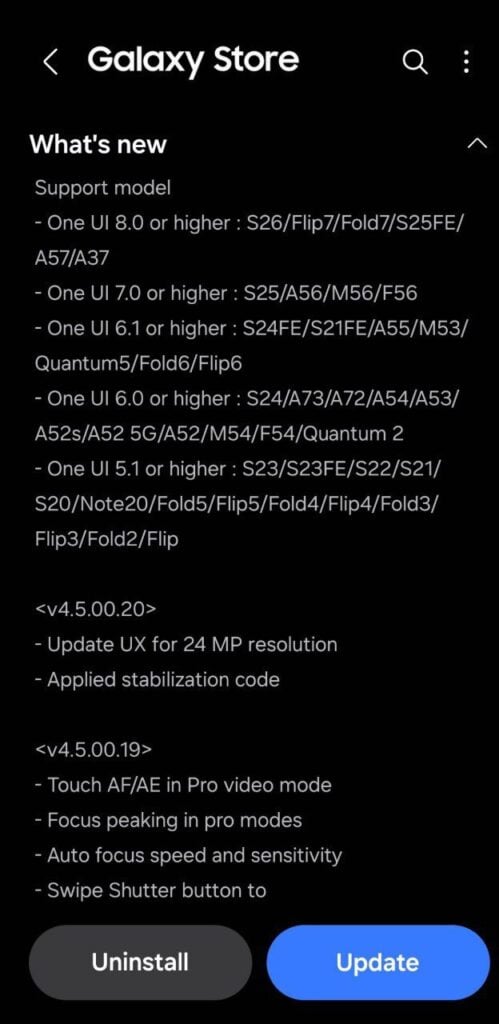
Samsung recently released a new Camera Assistant update with version 4.5.00.20, but Galaxy S26 users should be careful. The update brings some improvements, but it also has a frustrating bug.

The main change in this update is the 24MP photo option. Before, it was hidden in the advanced settings, so many people didn’t notice it. Now, Samsung has moved it to the main settings screen. This makes it easier and faster to switch to 24MP mode without going through multiple menus.

The 24MP mode gives better photo detail than the regular 12MP mode but avoids the problems of very high-resolution photos. Also, the update is reported to improve camera stabilization, helping you take clearer photos even if your hands shake slightly.

However, there’s a big issue with this update. Many Galaxy S26 users report (via @Wvisioncreation) that switching between 12MP and 24MP doesn’t work properly. After switching away from 24MP, the camera sometimes won’t go back unless you wait, try again, or restart your phone. This bug keeps repeating, which can be very annoying for anyone who likes using both modes.

Samsung Camera Assistant 24MP update

While the update makes the 24MP option easier to use and improves stabilization, the bug reduces its usefulness. Many users are frustrated because updates are supposed to fix problems, not create new ones.

For now, Galaxy S26 owners might want to avoid updating to version 4.5.00.20 until Samsung releases a fix. It’s always good to check user reports before installing updates, mainly when a new feature comes with bugs.

The update improves 24MP access and camera stability, but the switching bug makes it less reliable. Galaxy S26 users should wait for a more stable version before updating. Stay tuned for more information.

Google Search Top Stories Preferred Source

The post Avoid latest Camera Assistant on Samsung Galaxy S26 – Here’s why appeared first on Sammy Fans.

Early One UI 9 build reveals integrated repair and warranty app

Ahead of the One UI 8.5 expansion, Samsung started working on an Android 17-based One UI 9 update for Galaxy devices. Now, new information reveals that the company is developing a new app, Warranty and Care, in its upcoming One UI 9 update that could make phone repairs and support much easier for Galaxy users.

The app, Warranty and Care, has been recently spotted by Android Authority in an early version of One UI 9. It is designed to bring everything related to device support into one place, from checking your warranty to booking repairs.

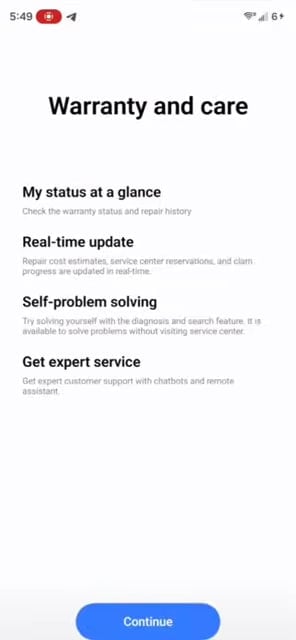
It isn’t available in the regular app drawer yet and needs a special launcher to open, which shows it’s still being developed. Early screenshots reveal the main screen shows your phone’s warranty status and has a search bar for troubleshooting problems.

There’s also a shortcut for diagnostics that links to the Samsung Members app. It suggests the new app will work alongside existing tools. Warranty and Care also seems focused on simplifying repairs.

Samsung Warranty and Care app

Image via Android Authority

With this app, users might be able to estimate repair costs, book service center appointments, and track repair progress. There are also hints of self-service options, allowing users to run diagnostics, find fixes, or chat with support via chatbots or a remote assistant. Many of these features aren’t functional yet.

Since the app is still in development, the appearance in the final One UI 9 update is not confirmed yet. Even so, Warranty and Care shows Samsung is trying to make device support simpler and more convenient. Stay tuned for more information.

Google Search Top Stories Preferred Source

The post Early One UI 9 build reveals integrated repair and warranty app appeared first on Sammy Fans.

Every Samsung Galaxy device currently eligible for One UI 8.5 beta program

Samsung has expanded its One UI 8.5 Beta Program to allow more Galaxy users to try new features before the official stable release. This update is based on Android 16 and first introduced with the Galaxy S25 series. Over time, Samsung has widened the rollout to include more flagship smartphones, foldable devices, and tablets.

One UI 8.5 Beta is currently live on a bunch of Galaxy devices in limited countries. Eligible users can join the program through the Samsung Members app and explore new features, design changes, and performance improvements ahead of the stable rollout. However, since it is still a beta version, users may face bugs or minor issues.

One UI 8.5 Beta Eligible Galaxy Devices:

Below is the complete list of Samsung Galaxy devices currently eligible for the One UI 8.5 beta program:

Galaxy S Series

  • Galaxy S25
  • Galaxy S25 Plus
  • Galaxy S25 Ultra
  • Galaxy S24
  • Galaxy S24 Plus
  • Galaxy S24 Ultra
  • Galaxy S25 FE
  • Galaxy S24 FE

Galaxy Z Series

  • Galaxy Z Fold 7
  • Galaxy Z Fold 6
  • Galaxy Z Flip 7
  • Galaxy Z Flip 6

Galaxy Tab

  • Galaxy Tab S11
  • Galaxy Tab S11 Ultra

These devices’ users can currently access the One UI 8.5 beta program in select regions. Samsung has released the beta update for these devices and is still working on expansion. However, Samsung already introduced a stable version with the Galaxy S26 series.

This time, Samsung is taking a slightly different approach with the One UI 8.5 beta rollout. Even after launching the stable version with the latest devices, the company is still expanding the beta program to more devices.

Aside from this, Samsung has already confirmed that the One UI 8.5 Beta Program will continue to expand in April 2026. More Galaxy devices, possibly including some A-series phones, are expected to join soon.

With such a wide rollout, Samsung is ensuring that more users can test the software early and provide feedback. It helps the company deliver a more stable and refined final version. Stay tuned for more information.

Google Search Top Stories Preferred Source

The post Every Samsung Galaxy device currently eligible for One UI 8.5 beta program appeared first on Sammy Fans.

Google’s Android 17 Beta 3 released with platform stability – Check what’s new

Google has released Android 17 Beta 3 for Pixel devices almost a month after the previous update. This version reaches the Platform Stability milestone, which means that final APIs, app behaviors, and non-SDK lists are now set. Developers can now begin their final testing to make sure apps are fully compatible with the upcoming official release.

Android 17 Beta 3 is available for a wide range of Pixel devices, including Pixel 6, 6 Pro, 6a, 7, 7 Pro, 7a, Pixel Tablet, Pixel Fold, Pixel 8, 8 Pro, 8a, 9 series, 10 series, and the Android Emulator. Users can join the Android Beta Program to receive over-the-air (OTA) updates and provide feedback.

The latest beta update brings several user and developer-focused improvements. Bubbles are now fully enabled, allowing apps to support multitasking more easily. Users can also hide app labels on the home screen for a cleaner look, and the screen recording toolbar has been redesigned with a floating interface that does not appear in recorded videos.

Android 17

Image – Android 17

Moreover, camera and media features include capturing 14-bit RAW images, customizable photo picker grids, and new vendor-defined camera extensions for AI and “Super Resolution” modes. Apps can also identify camera types—built-in, external, or virtual.

Audio improvements include better support for Bluetooth LE hearing aids with separate routing for notifications and alarms. Also, there’s a new HE-AAC software encoder for high-quality low-bitrate audio.

Performance and privacy upgrades include reduced wakelocks for idle alarms, a secure system location button for session-only access, separate password visibility for touch and keyboard input, and Post-Quantum Cryptography hybrid APK signing.

It also includes widget support on external displays, interactive desktop PiP windows, VPN app exclusion settings, dynamic font updates, and Health Connect enhancements. You can check the full changelog of the Android 17 Beta 3 update here.

Google Search Top Stories Preferred Source

The post Google’s Android 17 Beta 3 released with platform stability – Check what’s new appeared first on Sammy Fans.

Apple 200MP camera leak hints at larger sensor design

Apple is planning a major camera upgrade for future iPhones. Reports say it may introduce a 200-megapixel camera, a big jump from the current 48MP cameras. This would help iPhones compete with rivals like Samsung, which has already released smartphones with very high-resolution cameras. 

A well-known tipster, Digital Chat Station, shared new details about Apple’s plans. Apple is reportedly testing a larger 1/1.12-inch sensor for the 200MP camera. A bigger sensor can capture more light and make photos look better, especially in low-light conditions. This is similar to the sensor in the Oppo Find X9 Ultra.

More megapixels don’t always mean better pictures. When too many pixels are packed into a small sensor, photos can look noisy, mainly at night or indoors. Apple has avoided this in the past by using smaller sensors with lower megapixels to focus on low-light performance.

Apple 200MP Camera Leak

Image via @Jukan05 (X)

The 200MP camera may be used mainly in the telephoto lens, which helps improve zoom and detail. Samsung balances high megapixels with lens quality very well in its flagship smartphones, and Apple is likely to do so.

Earlier, Morgan Stanley predicted the 200MP camera would come in 2028. But the latest reports suggest Apple may launch it as early as next year. Stay tuned for more information.

Google Search Top Stories Preferred Source

The post Apple 200MP camera leak hints at larger sensor design appeared first on Sammy Fans.

One UI 8.5 to offer advanced Quick Settings options via QuickStar

Samsung is making its Quick Settings panel much more flexible with a new QuickStar feature in One UI 8.5. Earlier, One UI 8.5 already improved Quick Settings by letting users add, remove, and rearrange toggles. With new options, users will have more control over the Quick Settings Panel.

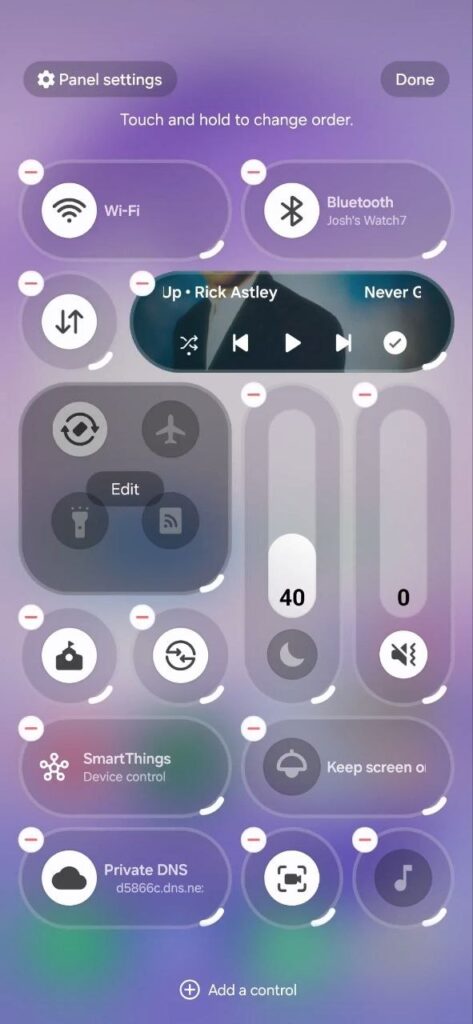
Samsung QuickStar is a Good Lock module, and it will soon allow users to fully control how their Quick Settings look. According to the information via @thatjoshguy69, a new option of the QuickStar lets you change how many tiles appear on the screen and even adjust their size.

It means that if you want a cleaner and smaller layout, you can shrink tiles or make the media player more compact. If you prefer bigger buttons, you can do that too. This gives users more freedom to design the panel the way they like.

Samsung QuickStar One UI 8.5 feature

Image via @thatjoshguy69 (X)

But the feature is not officially released yet for One UI 8.5 devices. But it can already turned on manually. To do this, you need an app called SetEdit and a tool called Android Debug Bridge.

After installing SetEdit, you connect your phone to a computer and run a simple ADB command to give permission. The ABD command is:

adb shell pm grant by4a.setedit22 android.permission.WRITE_SECURE_SETTINGS

Then, inside SetEdit, you change certain Quick Settings (QS) values from 0 to 1. Once this is done, you can open Quick Settings, tap edit, and try the new options. However, there are a few downsides. The feature may have small visual bugs, and the extra options reset after restarting your phone. You will need to enable them again. Stay tuned for the official release.

The post One UI 8.5 to offer advanced Quick Settings options via QuickStar appeared first on Sammy Fans.
Samsung Wallet brings Digital Home Key feature to Canadian Galaxy users

Samsung has launched a new feature, Digital Home Key, in its Samsung Wallet in Canada. This feature lets people unlock their home doors using their Samsung Galaxy phones. It makes things easier because you don’t need to carry a physical key anymore.

Earlier, Samsung Wallet was mainly used for storing payment cards, IDs, tickets, and even car keys. Now, with Digital Home Key, users can also store and use their house keys digitally. This means you no longer need to carry a physical key to unlock your door.

The feature works with compatible smart locks that are set up using Samsung SmartThings and the Matter system. Once the lock is connected, users can easily add their home key to Samsung Wallet.

Samsung Wallet New feature

Image via Samsung

There are different ways to unlock the door. You can simply tap your phone using NFC, use hands-free unlocking with UWB when you are nearby, or even unlock the door remotely through the app. The technology behind this system is based on Aliro, developed by the Connectivity Standards Alliance.

Samsung is working with popular smart lock brands, including Aqara, Nuki, Schlage, and Xthings, to support this feature. For security, the digital keys are protected by Samsung Knox. If your phone is lost, you can remove access remotely. This new feature started rolling out in March 2026 in Canada and will expand to more regions soon.

Google Search Top Stories Preferred Source

The post Samsung Wallet brings Digital Home Key feature to Canadian Galaxy users appeared first on Sammy Fans.
❌