Reading view

Pixel phones see up to 20% performance gains after the new Android 16 update
Google’s Pixel phones are known for offering a stock Android experience and using Google’s own Tensor G-series processors. However, their performance has historically been somewhat underwhelming. That may be changing, as the latest Android 16 update has brought a noticeable improvement to Pixel 10 Pro XL performance.

Over the past few days, Google has rolled out the Android 16 QPR2 update to Pixel phones. Unexpectedly, users and testers discovered that device performance has improved significantly, especially in graphics performance.

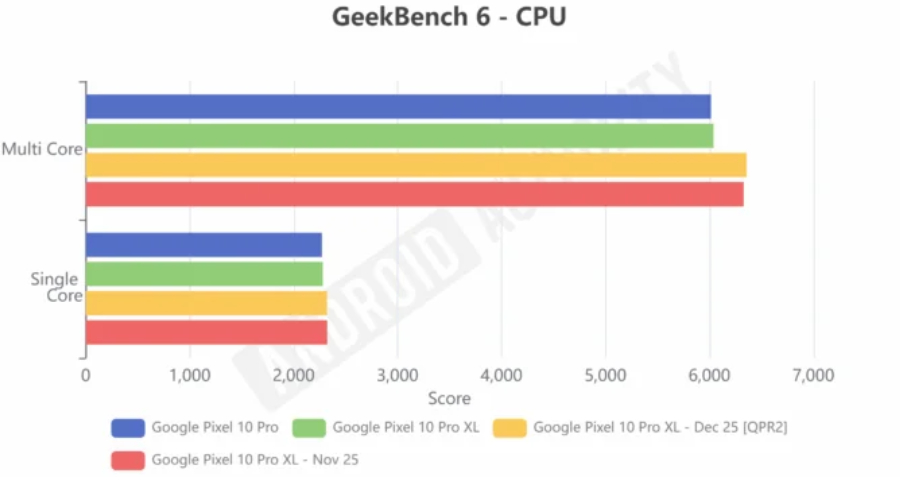
Android Authority tested the Pixel 10 Pro XL and found that CPU performance gains were modest. In Geekbench 6, single-core performance improved by 2%, while multi-core performance increased by 5%, which isn’t a dramatic change.
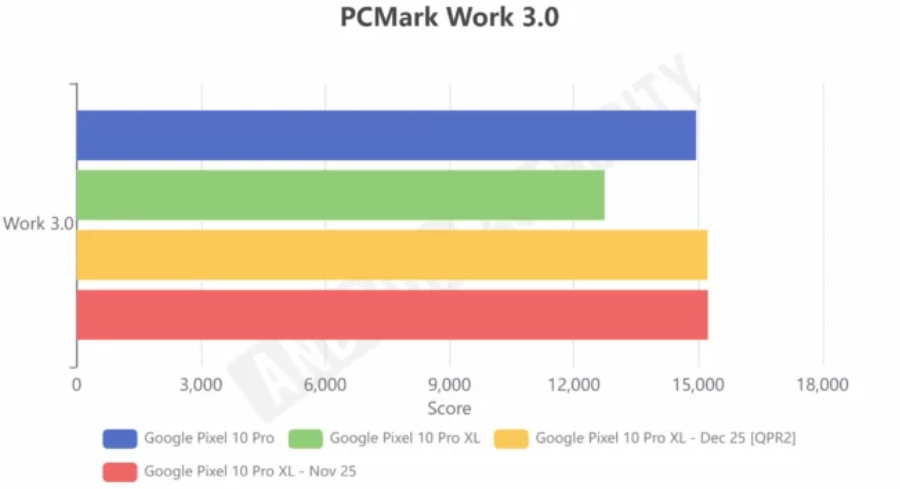
PCMark’s Work 3.0 score, however, showed a much more substantial improvement, rising by 19.6%. This benchmark simulates everyday tasks such as web browsing and image editing, making it a better reflection of real-world usage.

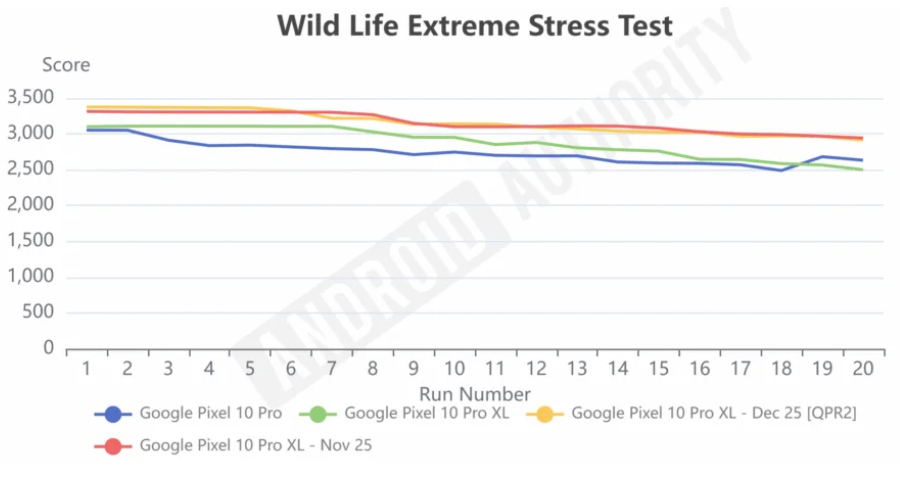
Graphics performance also saw gains. In 3DMark’s Wild Life test, scores improved by around 5% to 7%, averaging roughly 6%.

Interestingly, despite no change in the GPU driver version, the OpenCL benchmark shows a score jump from the previous 3,063 to 4,061. That’s a nearly one-third improvement.

The possible reason for the gain

So how can a simple Android system update deliver such a performance boost?

According to AndroidPolice, the gains may come from deeper optimizations in Android 16, which introduces a more advanced and efficient memory garbage collection mechanism. This reduces CPU load during garbage collection, minimizes lag, and improves overall smoothness.
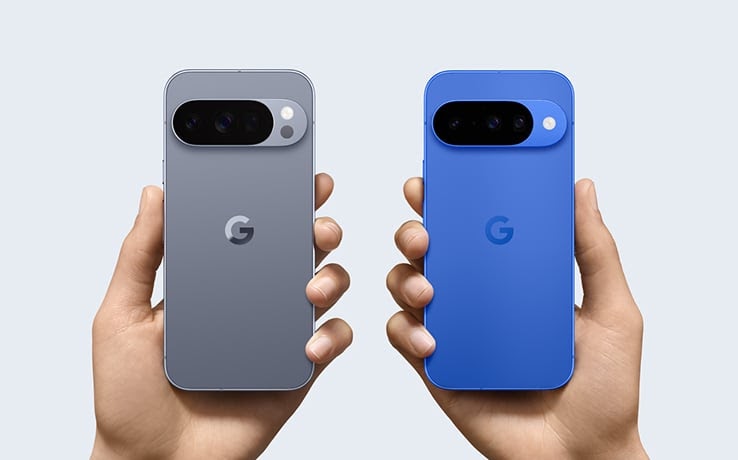
Pixel-10-Pro-XL

The good news is that these improvements aren’t limited to the new Pixel 10 series. Some users report that older models, such as the Pixel 8a, have also seen higher benchmark scores and better frame rates in 3DMark tests (via Reddit).

What remains unclear is whether these optimizations are exclusive to Google’s in-house Tensor processors. If the changes are more broadly applicable, other Android phones could also see meaningful performance gains through future updates.

For more daily updates, please visit our News Section.

Stay ahead in tech! Join our Telegram community and sign up for our daily newsletter of top stories! 💡

The post Pixel phones see up to 20% performance gains after the new Android 16 update appeared first on Gizmochina.

One UI 9 (Android 17) could add Motion Assist feature to Galaxy phones

Samsung Galaxy users may soon get a helpful new feature, Motion Assist, with One UI 9. One UI 9 will be based on Android 17, and Google is reportedly working on this feature to make using phones in moving vehicles easier and more comfortable.

Several people feel dizzy or get headaches while travelling in cars, buses, or trains and using a phone. Motion sickness occurs because your eyes perceive a still screen while your body senses movement.

To resolve this issue, Google is developing a Motion Assist feature, which displays small dots on the screen that move in sync with the vehicle’s motion. These dots use the phone’s motion sensors to match to reduce motion sickness.

The feature has been spotted by Assemble Debug, who found that Motion Assist, also called Motion Cues, already exists inside Google Play Services but is not yet active. Currently, this feature cannot appear over the lock screen, notifications, or Quick Settings due to Android’s overlay limits.

Android 17 Motion Assist feature

Image via Android Authority

Android 17 update might make these appear dots safely on all parts of the screen. Google might make it a part of the system rather than a separate app. It could also work with Transiting mode, which changes phone settings automatically while commuting.

Based on Android 17, Samsung’s One UI 9 is also expected to bring the Motion Assist feature to Galaxy devices. Stay tuned for more information.

Google Search Top Stories Preferred Source

The post One UI 9 (Android 17) could add Motion Assist feature to Galaxy phones appeared first on Sammy Fans.

Gemini’s image markup tool is now in testing

Google is testing a new image feature for its Gemini AI, and it aims to make working with pictures much easier. This new tool allows users to mark, circle, or draw on images before asking questions. By doing this, Gemini can clearly see which part of the image the user wants to talk about.

The new image feature is currently under testing in the Gemini mobile app and also on the web version. When users upload an image to Gemini, they can now highlight or mark certain areas in the picture. It means users can point to just one ask question about it, if there are many people or objects in one image.

On Android devices, Gemini shows a short message when an image is added, which explains the new markup action. Users can use this tool not only for analysis but also for editing images. Early testing shows that Gemini understands marked areas well, even if it sometimes makes small mistakes.

Gemini Image Marked feature

Image via Android Authority

Google has been working on this feature for the past few months. First, signs of it were found in app updates, and later it appeared in leaks showing Gemini on the web. Now, some users have started to see it live, which means Google is likely testing it more widely.

At the moment, not everyone has access to the image markup feature. Google has not yet confirmed when it will be available to everyone. So stay tuned for more information.

Google Search Top Stories Preferred Source

The post Gemini’s image markup tool is now in testing appeared first on Sammy Fans.

Google’s new browser wants to “vibe-code” apps from whatever you’re doing online

Google Disco Browser released

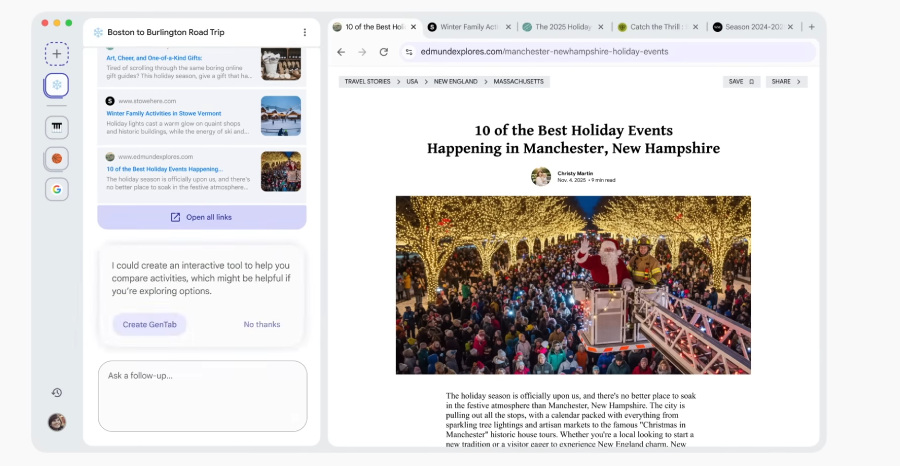
Google thinks the future of the web isn’t just about making it agentic; it’s also about letting your browser build things for you. That idea is now real with “Disco”, the company’s experimental new AI-powered browser that vibe-codes an app based on what you are doing online. This feature of Disco is called “GenTab,” and is powered by Gemini 3.

As you might’ve guessed, GenTab takes your tab and chat history into consideration. It analyzes your tabs, your searches, and your chat prompts to generate tools that fit what you’re doing.

Google showed off a few examples, and they’re honestly pretty impressive. If you’re researching science topics like Entropy, Disco might spin up an “Entropy Explainer” app. The official video also shows a vibe-coded bunk bed comparison site and a memory match brain game.

Google’s new AI browsers vibe codes an app based on your tabs

GenTabs sit alongside regular tabs, but they get their own Gemini-like icon instead of a favicon. One demo showed a travel planner with calendars, route maps, crowd-level predictions, and quick-action buttons like “Book Nearby Stays.” Tap anything inside that app, and the GenTab reshapes itself in real time.

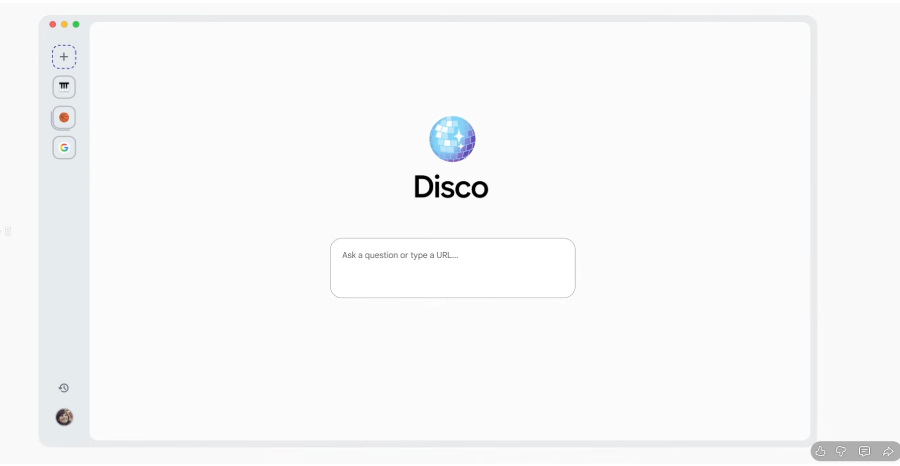
Disco greets you with a homepage containing a chatbox rather than the usual address bar. That’s where the chat history comes from, although you can also paste a URL in it.

If you end up conversing, Google will first suggest you relevant webpages, and after a few conversations, it pops up a prompt to create a GenTab based on what you’re searching.

Google Disco HomePage
Disco browser with Create GenTab prompt based on chat history

AI is definitely changing the way we search and consume content. And it won’t surprise me that features like GenTabs are the next evolution of it. 

You don’t need to write code; you just describe what you need, refine it in plain language, and the browser does the heavy lifting. Google says Disco is meant to help people “learn faster” and experiment with what browsing could become. And yes, the company admits the best concepts from Disco might eventually show up in Chrome.

For now, Disco is an early experiment. Google Labs has opened a waitlist, and the first version is rolling out only on macOS. 

For more daily updates, please visit our News Section.

Don’t miss a thing! Join our Telegram community for instant updates and grab our free daily newsletter for the best tech stories!

The post Google’s new browser wants to “vibe-code” apps from whatever you’re doing online appeared first on Gizmochina.
Proactive Agents: Shifting from Reactive AI to Intelligent Collaboration

The post Proactive Agents: Shifting from Reactive AI to Intelligent Collaboration appeared first on StartupHub.ai.

The prevalent model of artificial intelligence, where developers constantly manage and prompt AI tools, imposes a significant “mental load” that stifles innovation. This was the central theme articulated by Kath Korevec, Director of Product at Google Labs, during her presentation at the AI Engineer Code Summit. Korevec argued for a paradigm shift towards “proactive agents,” […]

The post Proactive Agents: Shifting from Reactive AI to Intelligent Collaboration appeared first on StartupHub.ai.

Samsung phones are not getting timely Google Play system updates

The problem with Google Play system updates has returned on Samsung phones. Various Galaxy devices (phones and tablets) have stopped receiving new updates from Google, leaving them behind in this important aspect.

It came to light that many Samsung phones have not received new Google Play system updates for months. A handful of Galaxy models are stuck on July and August releases, which raises concerns of security and reliability.

Well, it’s not the first time we’re reporting such news. Galaxy users complained many times about the issue with the Play system updates. Even though new One UI updates are coming, Play system updates feel totally stuck.

Samsung’s Galaxy S25 series, Z Fold 7, and Z Flip 7 have September’s Play system update. A newer version is available on One UI 8.5, which is a follow-up to One UI 8. Hopefully, the stalled rollout will kick-start soon.

It’s not Samsung’s fault but Google’s.

Samsung is providing timely security updates to Galaxy devices. The company is already expanding the latest December patch. However, Google isn’t matching Samsung’s standards and keeping the Play system updates on hold.

Some Samsung devices have received September’s Play system update. It’s the latest mark on the majority of Galaxy devices, which falls significantly behind. There seems to be an internal collaborative issue, holding key updates.

Samsung and Google should work closely to find the problem, if there’s any. A collaborative work will ensure Galaxy users also get the latest Play system updates and don’t fall behind Pixel phones in this software release part.

The post Samsung phones are not getting timely Google Play system updates appeared first on Sammy Fans.

Gemini Google Translate Elevates Nuance

The post Gemini Google Translate Elevates Nuance appeared first on StartupHub.ai.

Google Translate now leverages Gemini's advanced AI to provide more natural and contextually aware translations for both text and live speech.

The post Gemini Google Translate Elevates Nuance appeared first on StartupHub.ai.

Gemini Deep Research Unlocks Advanced AI for Devs

The post Gemini Deep Research Unlocks Advanced AI for Devs appeared first on StartupHub.ai.

Google has released a significantly more powerful Gemini Deep Research agent, now accessible to developers via the new Interactions API.

The post Gemini Deep Research Unlocks Advanced AI for Devs appeared first on StartupHub.ai.

Google December 2025 core update rolling out now

Google released the December 2025 core update today, the company announced.

This is the third core update of 2025 and the fourth major Google algorithm update overall. Earlier this year, Google rolled out the August 2025 spam update, which followed the June 2025 core update and the March 2025 core update.

What Google is saying. Google updated its Search Status Dashboard to state:

  • “Released the December 2025 core update. The rollout may take up to 3 weeks to complete.”

Google added on LinkedIn:

  • “This is a regular update designed to better surface relevant, satisfying content for searchers from all types of sites.”

About core updates. Core updates roll out several times each year. They introduce broad, significant changes to Google’s search algorithms and systems, which is why Google announces them.

Video on this core update. I made this short video a few hours after publishing this story:

What to do if you are hit. Google did not share any new guidance specific to the December 2025 core update. However, in the past, Google has offered advice on what to consider if a core update negatively impacts your site:

  • There aren’t specific actions to take to recover. A negative rankings impact may not signal anything is wrong with your pages.
  • Google offered a list of questions to consider if your site is hit by a core update.
  • Google said you can see some recovery between core updates, but the biggest change would be after another core update.

In short: write helpful content for people and not to rank in search engines.

  • “There’s nothing new or special that creators need to do for this update as long as they’ve been making satisfying content meant for people. For those that might not be ranking as well, we strongly encourage reading our creating helpful, reliable, people-first content help page,” Google said previously.

For more details on Google core updates, you can read Google’s documentation.

Previous core updates. Here’s a timeline and our coverage of recent core updates:

Why we care. With any core update, we often see significant volatility in Google search results and rankings. These updates may improve visibility for your site or your clients’ sites, but some may experience fluctuations or even declines in rankings and organic traffic. We hope this update rewards your efforts and drives strong traffic and conversions.

💾

This was the third core update and fourth confirmed Google update in 2025. The December core update will take up to three weeks to rollout.

Google Brings Live Video Sharing to Emergency Calls on Android

Google is launching a new safety feature, Android Emergency Live Video, which lets people share live video from their phone with emergency responders. This feature is now starting to roll out across the United States, as well as in some regions in Germany and Mexico.

The new feature works on Android phones running Android 8 or newer with Google Play services. It is very simple to use. When you call or text your local emergency number, the dispatcher may ask to see what is happening around you. They will send a request to your phone, and you can choose to accept or decline it by tapping “Share” or “No thanks.” You are always in control.

If you choose to share, your camera will open in a small window on your screen. You can make it bigger, stop sharing at any time, turn on your flashlight, or switch between the front and back cameras.

Also, Google says that the video is encrypted, which means it is protected while being sent. Emergency services may view and record the video only for your active situation.

Android Emergency Live Sharing

Image via Google

Google explains that this feature can help responders understand what is happening faster. During an emergency, it can be hard to explain everything clearly, especially when you are stressed. Live video can help dispatchers quickly see the scene and guide you through important steps.

This new tool shows Google’s effort to improve safety on Android phones. It builds on features like Emergency Location Service, Car Crash Detection, Fall Detection, and Satellite SOS. Google is also working with safety organisations worldwide to make this feature available in more places.

Google Search Top Stories Preferred Source

The post Google Brings Live Video Sharing to Emergency Calls on Android appeared first on Sammy Fans.

Samsung Galaxy XR just got more useful with Google’s new features

Google is updating the Samsung Galaxy XR headset with new features that make it more useful for work, play, and video calls. These new features give users a smoother and more interactive experience in the XR world.

PC Connect is one of the new additions that lets you link a Windows computer to the headset. You can see your PC desktop or any app inside the XR environment, right alongside Android XR apps from Google Play. The connection works over Wi-Fi in high resolution with smooth performance.

With PC Connect, you can use a keyboard and mouse from either your PC or headset to control both devices at the same time. Google showed a demo where a user edited photos on a laptop while watching YouTube in XR, with all inputs syncing seamlessly. PC Connect is in beta starting today, and Mac support is expected next year.

Samsung Galaxy XR Headset

Moreover, Google is also adding Travel Mode that keeps the XR view stable even when you’re moving, like in any vehicle. This makes using the headset while traveling much easier and less disorienting.

Aside from this, Google introduces Likeness, a new avatar system for video calls. You create the avatar using a phone app, not the headset. It mirrors your facial expressions and hand gestures in real time.

Notably, these new features roll out today in beta. It makes the Galaxy XR more powerful, flexible, and fun for work, gaming, and virtual meetings.

Google Search Top Stories Preferred Source

The post Samsung Galaxy XR just got more useful with Google’s new features appeared first on Sammy Fans.

Android could soon optimize your phone settings on public transit

Google is testing a new Android feature that could make riding buses and trains easier. Right now, commuters often lower the volume, turn on Do Not Disturb, or change settings manually to avoid distractions.

Android phones can already detect when you are driving. They use motion sensors and Bluetooth to know you are in a car. Driving Mode then silences calls and notifications to help you stay focused.

Now, Google seems ready to do something similar for public transit. The new feature is called “Transiting Mode.” It could automatically adjust your phone settings when it detects you are on a bus or train.

Modes in Android let you set custom sound, notification, and display profiles. Some Modes turn on automatically, like Driving Mode, when certain motions are detected. Transiting Mode will likely work the same way.

Android Driving Mode

Image via Android Authority

In the Android test version, developers found a new option – While Transiting. When this is active, your phone could automatically lower volume, limit notifications, or change display settings like dark mode.

It may also work with Google’s upcoming Motion Cues feature. Motion Cues is designed to reduce motion sickness while traveling in moving vehicles. Together, these features could make commuting much more comfortable.

Transiting Mode is expected to appear in the Android 16 QPR3 update, possibly next March. Google has not confirmed the release yet, but more details should come when the beta version launches. Stay tuned for more information.

Google Search Top Stories Preferred Source

The post Android could soon optimize your phone settings on public transit appeared first on Sammy Fans.

❌