Reading view

One UI 8.5 expand wallpapers with new AI tool

AI has become the core of Samsung’s device ecosystem, and it’s wasting no time in shipping stock wallpapers with your mobile; instead, it’s giving new tools to let you create ones that reflect your imagination.

For example, One UI offers a generative AI wallpaper feature with templates and allows users to remix them to generate new wallpapers. On the other hand, the weather wallpaper sets a weather effect based on your location.

However, One UI 8.5 lets you dive deeper into the generative AI with Creative studio. Initially launched as Drawing Assist, the creative studio supports text prompts, which you can’t do with the Generative tool.

The interface is basically the same as the Creative studio, but integrated with wallpaper features. For example, once you generate an image, the screen will redirect you to set it as wallpaper, instead of saving it to the gallery.

How to create wallpapers with Creative Studio

Go to wallpapers and select the Create with AI section. Here, you will see the Creative studio. Tap on Create or select from the existing wallpapers and edit them instead.

Create wallpapers with Creative Studio tool in One UI 8.5

Generating wallpapers with the Creative Studio tool in One UI 8.5

Creating a new wallpaper is easy; you need to select an art style in which your wallpaper will be generated. Then write the prompt. You can also sketch, draw, or choose an image from the Gallery.

Create wallpapers with Creative Studio tool in One UI 8.5

Generating wallpapers with Creative Studio tool in One UI 8.5

Image generation may take a few seconds; afterward, the screen will display the result. If you aren’t satisfied, generate another with the tap of a button.

Author’s Take

Creative assist is a great way to unleash your inner creation, and integrating it into the settings provides an instant solution for ready-to-use wallpapers.

Galaxy S26 series users with One UI 8.5 are the first to access this tool. However, it may expand to previous generations with the stable release. Still, we aren’t sure on that part since Samsung might want to keep it exclusive.

The post One UI 8.5 expand wallpapers with new AI tool appeared first on Sammy Fans.
Galaxy S26 Ultra’s S Pen perfects grip with its thin design

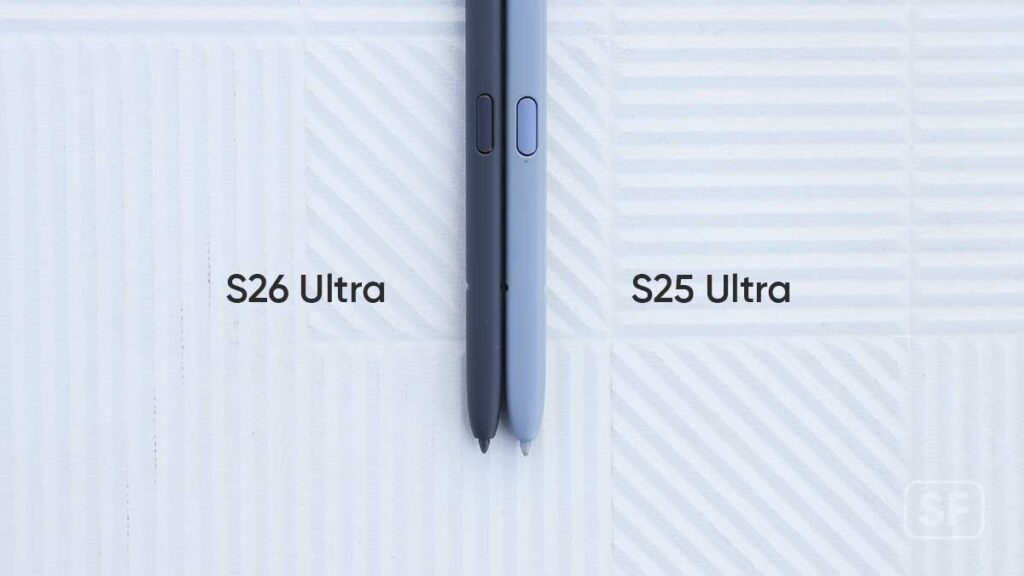
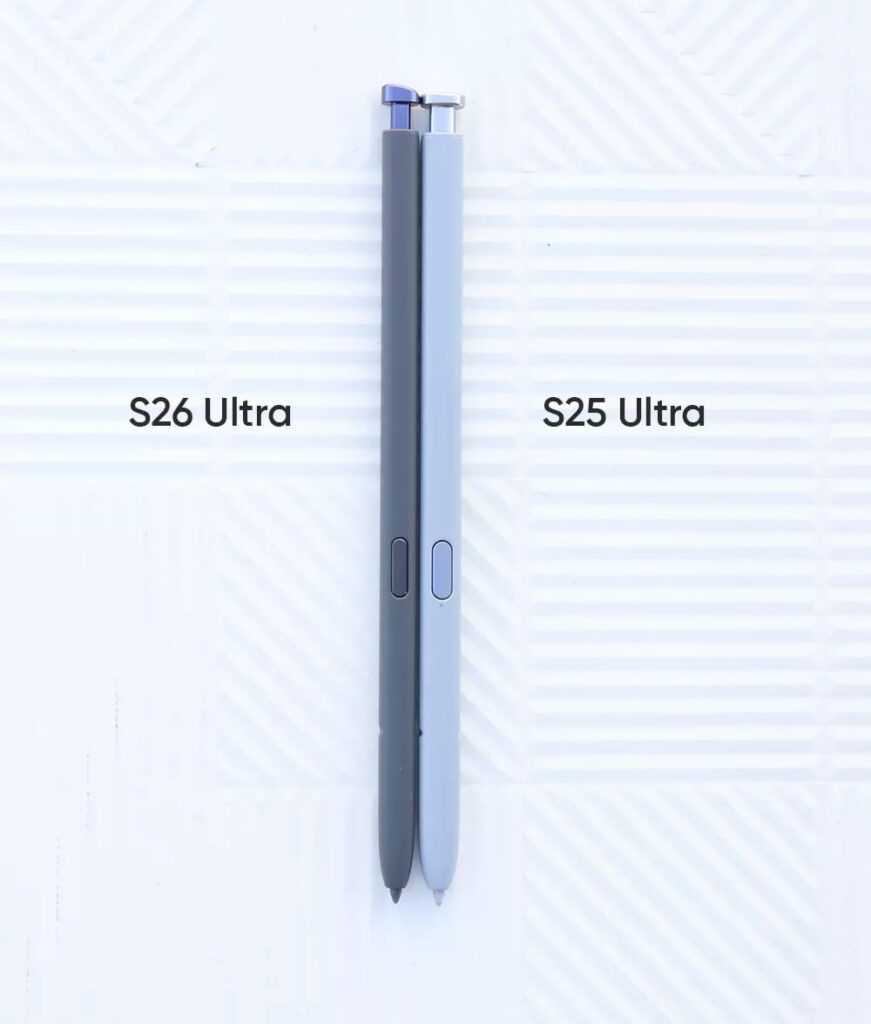
Samsung has trimmed the Galaxy S26 Ultra’s S Pen, and it appears narrower than the S25 Ultra released last year. In a side-by-side comparison, we’ve found that the size of this new stylus has changed, once again improving the grip and user experience.

This year, Galaxy S26 Ultra has adopted a larger corner radius, which also influenced the S Pen’s clicker button. It means you will have to put the S Pen in the right direction to align with the phone’s frame. However, that doesn’t disturb the user experience. New users may not notice anything significant, but the Galaxy S25 Ultra owners could see what’s just unfolded with the S26 Ultra.

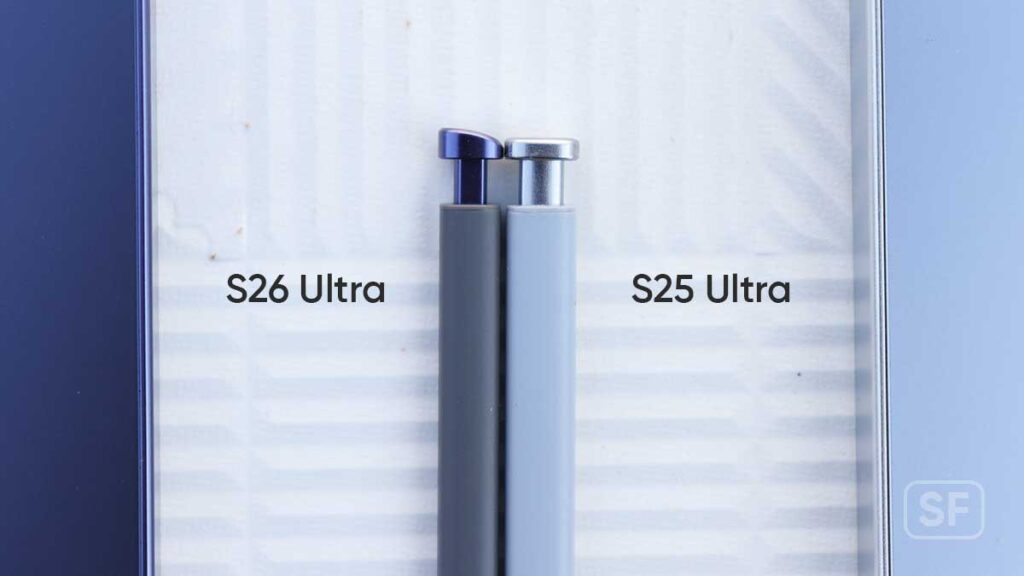
In our comparison, we’ve put the S26 Ultra’s S-Pen beside its former sibling and noticed it has a lower width. You can see that the middle button width has been slightly reduced alongside the body.

Samsung Galaxy S26 and S25 Ultra S Pen SG26 Spen

Meanwhile, the height and thickness are identical in both styluses. So, the only thing that has been affected this time is the width. We found that the new version is more comfortable in terms of grip and in-hand experience.

Samsung Galaxy S26 and S25 Ultra S Pen SG26 Spen

The real reason behind this narrow design is unknown, but it appears to be another move to match the frame design. We can speculate that a slightly reduced width enabled the company to maintain its S Pen’s position inside the chassis. Rather than pushing it to the very corner without interfering with the corner radius. In other words, the narrow S Pen supports the aesthetics of the device.

You should also see that the Galaxy S26 Ultra’s S Pen clicker neck area is also narrower than its predecessor.

Samsung Galaxy S26 and S25 Ultra S Pen SG26 Spen

Galaxy S26 Ultra (left) vs S25 Ultra (right) S Pen comparison

Swapping Test

I also tried to swap the S Pens; as you may expect, the Galaxy S25 Ultra’s S Pen was wider than the S26 Ultra’s supported housing width. On the other hand, the S26 Ultra’s S Pen slipped easily inside the S25 Ultra, but it couldn’t stay put. Instead, it would come out every time you tilt the device down. One thing to mention is that the S25 Ultra was detecting the S26 Ultra’s stylus once it reached the very end of the housing.

Conclusion

It’s not the first time we’re seeing such changes in the S Pen, as last year, we explored the S25 Ultra’s S Pen for new changes. However, the worst catastrophe for users arrived when the S Pen lost its Bluetooth capability. Though Samsung gave a reason not to offer this feature anymore, we had our share of grief on this matter. We’ll wait for an S Pen’s teardown to see the internal components.

The post Galaxy S26 Ultra’s S Pen perfects grip with its thin design appeared first on Sammy Fans.

Galaxy S26 Ultra aluminum frame test cleared strength doubts

With the Galaxy S26 Ultra, Samsung has swapped the titanium frame for aluminum, creating doubts over its strength and overall durability, but a tester shows that these doubts may be unnecessary.

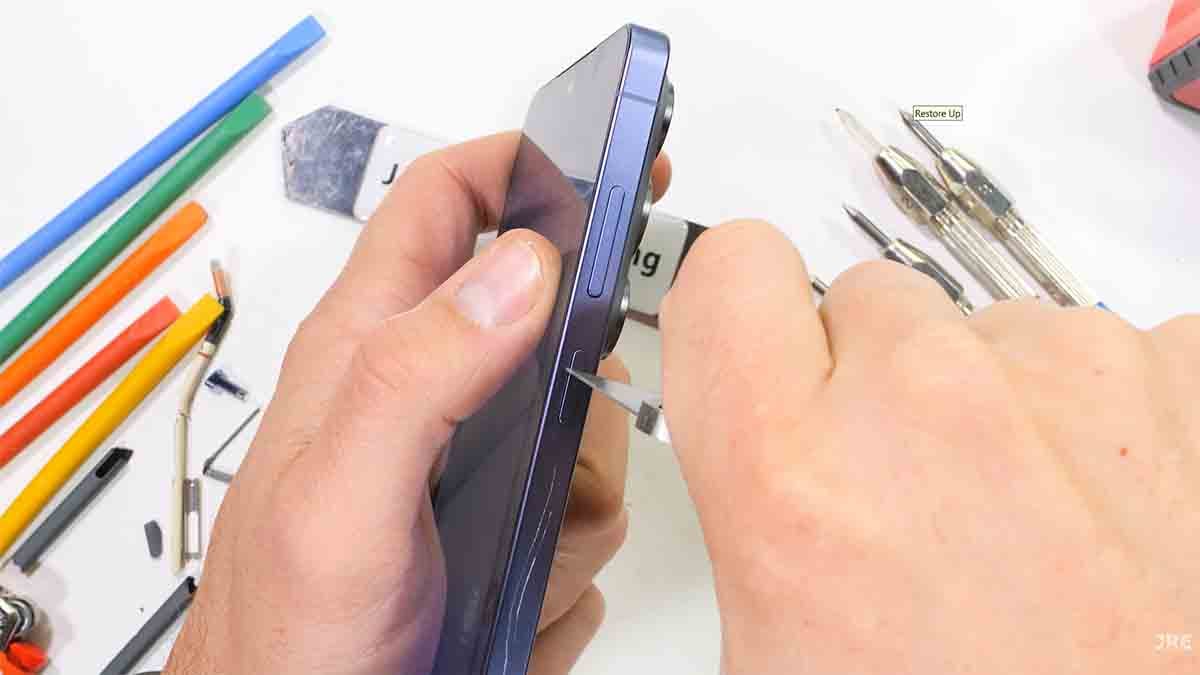
YouTuber Jerryrigeverything has put the newly released Galaxy S26 Ultra on a durability test, including scratching and bending the flagship. The result was that the phone came out without any damage.

Starting with the S24 Ultra, Samsung jumped to a titanium frame design, which has high durability and strength. The frame continues with the S25 Ultra. Titanium’s high durability comes from its material density, which may have prevented the new device from getting a slim outlook.

On the other hand, the new aluminum armor supports improved molding and better color schemes.

Samsung Galaxy S26 Ultra scratch test

Source – Jerryrigeverything/YouTube

With that said, the aluminum armor frame is doing a great job of enduring the applied pressure without sustaining any damage. Despite these advantages and good strength, aluminum is far behind in overall durability compared to titanium. A recent drop test shows that the new phone has good drop resistance, but titanium still rules the chart.

Since consumers are not throwing their Galaxy S26 Ultra to verify its durability and frame strength, the test is a clear indicator that the new Samsung flagship is quite strong. Therefore, don’t hesitate to place your order for this new Galaxy device.

Starting Wednesday, all three phones are available worldwide, and if you have missed the pre-orders, the company has new launch offers, such as double storage and high trade-in values.

The post Galaxy S26 Ultra aluminum frame test cleared strength doubts appeared first on Sammy Fans.

Don’t be lazy with Galaxy S26 Ultra’s S Pen

The Samsung Galaxy S26 Ultra features several design improvements, including a crucial change to the S Pen, and you may have to learn how to insert the stylus back into the device.

S Pen has been a part of the Note series since the very beginning, which later succeeded the S-series’ Ultra model. This built-in accessory offers a smart experience for millions of users despite losing its Bluetooth capabilities.

However, the biggest change arrived with the S26 Ultra. You see, the Note series remained boxy til the very end, enabling a flat click-to-release button. In that case, the user can insert the Pen facing upwards or downwards without verifying its head position.

This saga continued with the S22 Ultra, S23 Ultra, S24 Ultra, and S25 Ultra, since these phones come with a proper flat bottom frame to continue the flat clicker. That changed with the Galaxy S26 Ultra, increasing the corner radius and taking the round curves all the way to the S Pen.

Samsung Galaxy S26 Ultra SG26U S Pen

So, Samsung has to amend its clicker’s design with an arc to align with the new frame design. Since you no longer have that flat clicker, you will have to match its position in the right direction.

Does the wrong position matter? On the positive note, it doesn’t, the S Pen will still insert in either direction, but that will look odd. That’s one of the noticeable drawbacks of the S26 Ultra’s design, which wasn’t the case with the S25 Ultra.

However, everything moves forward, and we don’t know what the next chapter of the S Pen will bring. Once you start using the Galaxy S26 Ultra’s S Pen, it will come into your habit, or you can choose to keep the S Pen inside the phone, just like a typical Ultra user.

The post Don’t be lazy with Galaxy S26 Ultra’s S Pen appeared first on Sammy Fans.

Samsung wants Galaxy S26 Ultra’s Privacy Display users to stay cautious

Samsung has released some of the important notes about the Galaxy S26 Ultra’s Privacy Display feature, which you should know before you buy this phone based on its intriguing promos and advertisements.

The privacy display feature allows you to hide the on-screen content from other people while using the phone in public or crowded places. This feature aims to improve the user’s privacy with this new display technology. If disabled, the display works like a regular phone.

Samsung suggests that enabling this feature doesn’t guarantee complete invisibility for on-screen content, which will be decided by viewing angle and the distance of other people. It means that if other people are in proximity to the phone, they’ll see some content despite the feature being enabled. However, brightness and natural light environment will play a key role in how much they can see.

The company said, “Caution is advised when exposing sensitive information.” It indirectly means that you should stay cautious while reading or watching sensitive content with this feature enabled.

Samsung shared some Galaxy S26 Ultra's privacy display flaws

Galaxy S26 Ultra’s privacy display is an innovative feature, and Samsung has won a lot of praise from the industry. However, it has certain parameters, which you must meet in order to safeguard your privacy in public places.

For instance, you should keep the device straight and close to your face while using this feature, with adequate brightness, and at an optimum distance, so that the content remains visible only to you and not others. This approach will maximize the privacy display’s effect on others’ visibility and reduce the possibility of creating a loophole.

The post Samsung wants Galaxy S26 Ultra’s Privacy Display users to stay cautious appeared first on Sammy Fans.

Galaxy S26 update removed Perplexity’s Hey Plex

At Unpacked, Samsung announced Perplexity’s AI assistant integration to the Galaxy S26 series, and recently, the company has removed its Hey Plex instant AI access. Samsung partnered with Perplexity to offer different AI services to improve user experience. For example, the Galaxy S26 series comes with Gemini, Bixby, and Perplexity. Users can select which one of these will be their go-to partner. They can also switch the agent at any time from the settings.

Similar to Gemini, Perplexity offers a voice wake-up feature, so when the Galaxy S26 user says “Hey Plex”, the app will launch a screen overlay of Perplexity’s voice agent to take the user command even when the screen is off.

What’s important about this partnership is that Perplexity has gained system-level access. So its AI can read from and write to system apps. With this capability, users can ask questions and get answers from the internet with source citations. Perplexity can also save information into Samsung Notes and edit it later.

Hey Plex Galaxy S26

Hey Plex feature inside the Perplexity app before the recent Galaxy S26 series update

Two days ago, I received my Galaxy S26 Ultra, and while checking its features, I come down to the Hey Plex. The feature was part of the Perplexity app, which comes preloaded on the device.

To check this capability, you need to go to the app’s settings and check “Hey Plex detection” under the Assistant section. Next, Perplexity asks you to set up the voice for Hey Plex activation. It asks you to repeat the on-screen sentences to record your voice, and it’s done.

I went through the process and activated the Hey Plex voice wake-up, and it was working as promised. However, the February 2026 security update has removed the Hey Plex detection option from the Galaxy S26 Ultra.

Simply put, the Hey Plex wake-up phrase is no longer working on Galaxy S26 Ultra. This may be the same scenario across the lineup. However, you can still use Perplexity’s dedicated voice assistant on the side button.

We’ll have to wait and see when this feature turns up in a future update release.

The post Galaxy S26 update removed Perplexity’s Hey Plex appeared first on Sammy Fans.

Samsung Galaxy S26 Ultra vs S25 Ultra: Side by Side Comparison – Design and Dimensions

Samsung has released the Galaxy S26 Ultra with design optimizations, and we’ve conducted its side-by-side comparison with the Galaxy S25 Ultra to highlight everything new in this latest flagship.

The need for such an exploration is evident from the divided user opinions. On one side, people are saying that it’s a refined version, while others are weighing in with “nah, it’s the same as S25 Ultra”. So, we decided to break into the conversation and tell you what you should know.

Galaxy S26 Ultra vs S25 Ultra – front

Last year, Samsung broke away from the Note series and adopted curved corners. Though reviewers saw this as a mere frame radius inclusion but it’s more like the end of an era. An era that made Note and Ultra look different from other premium phones in the market.

Samsung Galaxy S26 Ultra and S25 Ultra design

S26 Ultra (left) and S25 Ultra (right)

Building on the new design schemes, the S26 Ultra has increased the corner radius. After this change, the S26 Ultra’s symmetry aligns more with the base and Plus models. Basically, they are on the same page now.

S26 Ultra (left) and S25 Ultra (right)

Both phones bring a 6.9-inch QHD Dynamic AMOLED display, but the S26 Ultra appears a bit wider. You can only spot this difference in a side-by-side comparison. Samsung’s official specs sheet backs this observation. The S26 Ultra is 78.1mm wide and 163.6mm tall. On the other hand, the S25 Ultra is 77.6mm wide and 162.8mm tall. The new flagship is also taller and thinner than its predecessor despite offering the same display size.

Samsung Galaxy S26 Ultra and S25 Ultra SG25 and SG26

S26 Ultra (left) and S25 Ultra (right)

Galaxy S26 Ultra vs S25 Ultra – frame

The frame is now aluminium, degrading from the titanium used in S25 Ultra. Some might argue that the build quality has declined, but it appears to be good overall.

The volume and power keys are on the right, and the USB-C port, SIM tray, microphone, and S-pen are at the bottom. That said, all of the side features are the same as the previous version, except for the S-Pen, and its clicker button had to adopt the new curves.

Samsung Galaxy S26 Ultra and S25 Ultra SG25 and SG26

S26 Ultra (top) and S25 Ultra (bottom)

Galaxy S26 Ultra vs S25 Ultra – Rear

The back of both phones has a matte finish protected with Corning Gorilla Glass, yet the S26 Ultra has a more vibrant color. Unlike the S25 Ultra, the new model comes with a camera island.

The camera layout is the same as last year, but it no longer looks cheap with the addition of integrated camera crowns, which closely resemble the Galaxy Z Fold 7 but look better on the S26 Ultra.

Samsung Galaxy S26 Ultra and S25 Ultra SG25 and SG26

S26 Ultra (left) and S25 Ultra (right)

That’s where Samsung received online criticism for gluing the camera rings around the S25 Ultra’s cameras. I guess the company has learned from the mistakes and brought a more integrated look to this year’s flagship.

With camera design enhancement, you can no longer put the phone on a flat surface, which is a kind of harsh reality, as it will wobble all the time. In that case, you’d better put on a cover on this device.

Conclusion

This comparison reveals that the Samsung Galaxy S26 Ultra is wider, taller, thinner, and looks better than the S25 Ultra. These optimizations stand tall on top of the software and hardware improvements, such as the privacy display, improved performance, cameras, and software. This is a perfect Android flagship for first-time buyers; still, we don’t recommend it as an upgrade for the S25 Ultra users.

The post Samsung Galaxy S26 Ultra vs S25 Ultra: Side by Side Comparison – Design and Dimensions appeared first on Sammy Fans.

One UI 8.5 rollout delay on par with One UI 7

It’s been three months since Samsung released the first One UI 8.5 beta, but the software is in a delay mode, which kind of reminds me of the One UI 7. 2024 was the year of major changes in Samsung’s software ecosystem, with its One UI program taking a new direction. At the forefront, the One UI 7 (Android 15) took the center stage, marking the first public beta rollout in early December.

The software has brought major changes throughout the interface that awed the users across the Galaxy S24 series. Still, the new One UI version is tagged with the Galaxy S25 series.

Even after the official release, Samsung delayed the software expansion to all of the S24 series and previous flagships. The S25 series was unveiled in January 2025, but the stable software stretched to April.

This development arrived at a time when One UI 8 had already appeared on internal test servers. Yet, many users remained attached to their newly received update due to massive improvements. Still, that doesn’t stop us from criticising Samsung’s strange development cycles, filled with delays.

One UI 8.5

In early December, Samsung followed the One UI 7 and released the first One UI 8.5 beta. You should know that this new software marks the return of a feature pack update other than a major Android release.

Despite being based on Android 16, one of One UI 8.5’s betas saw a month-long delay before the Galaxy S26 launch, which shipped with a stable version out of the box.

Closest launch window

As of today, the company hasn’t said anything specific about the stable One UI 8.5 rollout for older devices. Yet, the development cycle suggests that we’re pretty much moving toward the end of March to see a final rollout.

On the other hand, the Galaxy S26 series’ worldwide launch will happen on March 11, which is a good occasion to gift this new software for the S25 series. However, if the company is still running with its old strategy, then we’ll not be seeing this happening anytime soon, at least not this month.

The post One UI 8.5 rollout delay on par with One UI 7 appeared first on Sammy Fans.

Samsung’s One UI 8.5 device compatibility FAQ is hilarious

Last month, Samsung released the Galaxy S26 series along with the One UI 8.5. Since Samsung has been testing this new software for almost a quarter, this occasion was the right time to release an OTA update for the Galaxy S25 series and other flagships. Instead, Samsung gave us something else, an FAQ, featuring a hilarious and strange answer about the One UI 8.5 devices’ compatibility.

One UI 8.5 refines One UI 8.0, including major changes in the user interface, animations, app transitions, fluidity, and more. The overall upgrades make it way better than the previous generation. That’s where the line is drawn. You see, this is the best One UI update so far, and Samsung is already stretching its development for the previous flagship phones, which should have ended.

One UI 8.5 device compatability

One UI 8.5 device compatibility FAQ

Amid this anticipation, Samsung has published a number of FAQs about One UI 8.5 on its official website, and one of them was completely unhinged. Each year, old Galaxy smartphone users seek information about their phone’s compatibility with the latest major software release.

This sheer interest leads them to the internet and search for eligible devices. Samsung also shares this compatible devices list through its Members app, but it happens only after the official rollout kicks off.

This year, the phone maker has tried something new by sharing the eligible devices for the One UI 8.5, confirming that the Galaxy S26, S26+, and S26 Ultra will be the first to receive this update in public.

The majority of people have been reading news about the Galaxy S26 series shipping with One UI 8.5 out of the box. Samsung also made it formal through the Unpacked keynote and through its official press release.

It appears that executives at Samsung have forgotten that people are seeking such compatibility information for their existing devices and not the newly launched phones, which they may not want to buy.

The phone maker did mention that the rollout will expand to more Galaxy devices, but without naming any of the former flagships, not even the Galaxy S25 series.

Still, it’s noteworthy that Samsung has a misconception that One UI 8.5 will help it sell more devices. The phone is selling on its face value, design, camera, and performance. Meanwhile, it maintains mystery around the rollout plan.

The post Samsung’s One UI 8.5 device compatibility FAQ is hilarious appeared first on Sammy Fans.

❌