Normal view

Yesterday — 6 March 2026Gizmochina

OnePlus 15T’s 6.32-inch OLED screen officially confirmed along with new details

6 March 2026 at 07:06
OnePlus 15T (AI-generated image)

For the past few days, OnePlus China President Li Jie has been consistently revealing new details about the upcoming OnePlus 15T through his Weibo handle. Today’s Weibo post summarizes all the details he shared and also includes some new information. These teasers suggest that the 15T may debut later this month in China.

OnePlus 15T key specifications officially confirmed

OnePlus 15T (AI-generated image)

According to Li Jie, the OnePlus 15T is positioned as a “small-screen powerhouse,” aimed at becoming the dream phone for users who prefer compact smartphones. It is expected to feature a 6.32-inch flat display with large, rounded corners and extremely narrow symmetrical bezels for an improved front-facing design. Rumors surrounding the device have claimed that it will support a 1.5K resolution and a 165Hz refresh rate.

Despite its compact size, the phone is tipped to pack a massive 7,500mAh silicon-carbon battery, which is even larger than many big-screen flagships, along with 100W fast charging and bypass charging. It will also have support for 50W wireless charging.

The camera system is also expected to see improvements with an upgraded LUMO periscope telephoto lens designed to keep the camera bump minimal. Reports have suggested that it may feature a 50-megapixel or 200-megapixel main camera along with a 50-megapixel periscope zoom sensor. For selfies, it may feature a 32-megapixel front camera.

Other upgrades include an ultrasonic in-display fingerprint sensor and IP66, IP68, IP69, and IP69K dust and water resistance ratings. The device will also support a magnetic accessory ecosystem, including compatible chargers, protective cases, and cooling accessories.

Li Jie added that the OnePlus 15T will bring broader upgrades in areas such as performance, gaming, display quality, and overall in-hand feel. He also teased that the phone’s design will be officially revealed next Monday (March 9).

Earlier this week, the Snapdragon 8 Elite Gen 5-powered OnePlus 15T was spotted with a 4.45 million score on AnTuTu benchmarks. The listing also revealed 16GB of LPDDR5x RAM, 512GB of UFS 4.1 storage, and Android 16.

For more daily updates, please visit our News Section.

Stay ahead in tech! Join our Telegram community and sign up for our daily newsletter of top stories.

The post OnePlus 15T’s 6.32-inch OLED screen officially confirmed along with new details appeared first on Gizmochina.

Honor X80i specifications revealed via TENAA certification

6 March 2026 at 06:32
Honor-600-Lite-Design-Specs-and-Price-Leak

A forthcoming Honor smartphone has appeared with the model number LNA-AN00 in the database of China’s TENAA certification. This device is believed to carry the Honor X80i branding when it hits the Chinese market. The listing reveals several key specifications of the device, including details about its display, battery, cameras, and hardware configuration.

Honor X80i specifications

Honor-600-Lite-Design-Specs-and-Price-Leak

The TENAA listing reveals that the Honor X80i will feature a 6.6-inch OLED display that offers a resolution of 1200 x 2600 pixels. The phone is expected to be powered by a 2.6GHz octa-core processor, although the exact chipset name has not been confirmed yet.

In terms of memory configurations, the X80i may arrive with 6GB, 8GB, 12GB, and 16GB of RAM, along with storage options such as 128GB, 256GB, 512GB, and 1TB. The handset is listed with a 6,800mAh rated battery, suggesting that the typical capacity could be around 7,000mAh when officially announced.

For photography, the Honor X80i is expected to feature an 8-megapixel front camera for selfies. On the rear, the device is equipped with a 50-megapixel primary camera, accompanied by an additional sensor as part of a dual-camera setup.

The X80i is also expected to feature an in-screen fingerprint sensor and an IR blaster.  The TENAA listing further reveals that the handset measures 157.43 x 75.35 x 7.34mm and weighs around 185 grams, indicating a relatively slim profile despite packing a large battery.

While Honor has not officially confirmed the launch timeline yet, the appearance of the device on TENAA suggests that the Honor X80i may debut in China later this month.

Last year’s Honor X70i for the Chinese market was similar to the Honor 400 Lite, which debuted globally. Therefore, China’s Honor X80i could be somewhat similar to the Honor 600 Lite (model number LNA-NX1), which recently debuted in the global market.

For more daily updates, please visit our News Section.

Stay ahead in tech! Join our Telegram community and sign up for our daily newsletter of top stories.

The post Honor X80i specifications revealed via TENAA certification appeared first on Gizmochina.

Motorola Razr 70 specifications revealed via TENAA certification

6 March 2026 at 06:29
motorola razr 60

Earlier this year, the upcoming Motorola Razr 70 and Razr 70 Ultra were spotted with the respective model numbers XT2655-1 and XT2657-8 at the UAE’s TDRA certification. In a new development, the Razr 70 has now appeared in the database of China’s TENAA certification, revealing key details about its specifications.

Motorola Razr 70 specifications

motorola razr 60
Motorola Razr 60

The TENAA listing reveals that the Motorola Razr 70 will feature a 6.9-inch OLED screen with an FHD+ resolution of 1080 x 2640 pixels and a 3.63-inch cover display with a resolution of 1056 x 1066 pixels. For security, it will have a side-facing fingerprint sensor.

Moving on to the optics, the Razr 70 will feature a 32-megapixel front camera and a dual 50-megapixel camera setup on the back. In comparison, the Razr 60 from last year came with a 50-megapixel main camera and a 13-megapixel ultra-wide lens, along with a 32-megapixel selfie camera.

Under the hood, the Razr 70 has a 2.75GHz octa-core chip with 8GB / 12GB / 16GB / 18GB of RAM. It appears that it will have a different chip, as the Razr 60 featured a 2.6GHz Dimensity 7400x SoC.

The Razr 70 may come in storage options such as 128GB / 256GB / 512GB / 1TB. It has a 4,275mAh rated dual-cell battery, with a combination of 1,090mAh and 3,185mAh. Likely, the typical value could be 4,500mAh, the same as the previous generation. Finally, it will measure 171.3 x 73.9 x 7.2mm and weigh around 188 grams. These dimensions are almost identical to the Razr 60.

The Razr 60 series was unveiled in April 2025, and now that the Razr 70 has received TENAA certification, it appears that it may debut later this month or by early April in China. The global launch could follow soon after.

For more daily updates, please visit our News Section.

Stay ahead in tech! Join our Telegram community and sign up for our daily newsletter of top stories.

The post Motorola Razr 70 specifications revealed via TENAA certification appeared first on Gizmochina.

TCL launches 27C3A Pro QD-Mini LED monitor with 4K 165Hz and FHD 320Hz dual modes

6 March 2026 at 03:26
TCL 27C3A Pro monitor

TCL has introduced its latest gaming monitor, the 27C3A Pro, at its 2026 monitor launch event in China. The monitor features advanced QD-Mini LED technology and retails for 3,578 yuan (approximately $518).

TCL 27C3A Pro monitor

TCL 27C3A Pro Specfications

The TCL 27C3A Pro includes a 27-inch 4K display (3840 x 2160 pixels) with a 165Hz refresh rate. TCL has also added a dual-mode refresh system that allows users to switch to Full HD resolution at 320Hz.

The monitor uses QD-Mini LED technology with quantum dot color enhancement for precise lighting and vibrant colors. It features 2304 local dimming zones, XDR peak brightness of 2200 nits, HDR1400 certification, and a 22,000,000:1 dynamic contrast ratio, delivering deeper blacks, vivid highlights, and enhanced HDR performance.

The 27C3A Pro features 10-bit color depth and covers 99% of the DCI-P3 and sRGB color gamuts. TCL has factory-calibrated the display for a Delta E value of less than 1, ensuring accurate color reproduction for gaming, content creation, and media consumption.

TCL 27C3A Pro monitor

Designed for gaming, the monitor features a 1ms response time and HFS Shoot high-speed panel technology for better motion clarity and reduced ghosting. It supports AMD FreeSync Premium and Nvidia G-Sync for tear-free performance. It also features AI-powered tools such as crosshair adjustment, dark-scene enhancement, and flash detection to enhance visibility and gameplay.

The TCL 27C3A Pro includes HDMI 2.1, DisplayPort 1.4, and USB-C with 90W power delivery. It supports KVM functionality and includes an ergonomic stand with height, tilt, swivel, and pivot adjustments. Additionally, it serves as a smart TV, powered by TCL’s smart entertainment system with Dolby Vision and Dolby Atmos support.

In related news, TCL recently launched the 32X3A OLED+ monitor with a 4K 240Hz display and also unveiled the CrystalClip open-ear earbuds, including a Swarovski special edition.

For more daily updates, please visit our News Section.

Stay ahead in tech! Join our Telegram community and sign up for our daily newsletter of top stories! 💡

The post TCL launches 27C3A Pro QD-Mini LED monitor with 4K 165Hz and FHD 320Hz dual modes appeared first on Gizmochina.

TCL launches 32X3A OLED+ monitor with 4K 240Hz display

6 March 2026 at 01:51
TCL 32X3A OLED+ monitor

TCL has unveiled its latest flagship monitor, the 32X3A OLED+, at its 2026 monitor launch event. The new monitor targets gamers, content creators, and professionals with its advanced display technology, fast refresh rates, and premium design. TCL has priced the monitor at 6666 yuan (around $966).

TCL 32X3A OLED+ monitor

TCL 32X3A OLED+ Specifications

The TCL 32X3A OLED+ is a 31.5-inch monitor with an OLED+ panel that offers deep blacks, vibrant colors, and precise image quality. It provides dual 99% color gamut coverage for DCI-P3 and sRGB, making it ideal for professional and cinematic use. The monitor also features a 10-bit color depth, 1300 nits peak brightness, and DisplayHDR True Black 400 certification.

TCL 32X3A OLED+ monitor

The 32X3A OLED+ supports 4K resolution at 240Hz and can switch to 480Hz at Full HD for competitive gaming. It features a 0.03ms GtG response time to reduce motion blur and supports AMD FreeSync Premium and Nvidia G-Sync compatible for smoother gameplay. It also includes gaming features such as AI dynamic crosshair adjustment and dark scene enhancement, which improve visibility in competitive scenarios.

The 32X3A features a Stargate-inspired design with a slim 6.4mm profile and ultra-thin bezels for immersive viewing. It includes a reverse-projection ambient lighting system for a soft glow and Bang & Olufsen-tuned speakers with a front-facing sound chamber.

TCL 32X3A OLED+ monitor

The monitor prioritizes eye comfort with low blue light filtering, flicker-free dimming, and an anti-glare coating. It features an ambient light sensor for automatic brightness and color adjustments and includes burn-in protection with intelligent screen management and pixel refresh routines.

For connectivity, it includes HDMI 2.1, DisplayPort 2.1, USB-C with 90W power delivery, USB-B, USB-A, and a headphone jack. These ports allow connections to PCs, gaming consoles, and laptops, as well as device charging and peripheral support.

In related news, TCL unveiled the CrystalClip open-ear earbuds with a Swarovski special edition, while TCL CSOT presented its Super Pixel display technology and outlined plans for 8.6-generation printed OLED production at MWC 2026.

For more daily updates, please visit our News Section.

Stay ahead in tech! Join our Telegram community and sign up for our daily newsletter of top stories! 💡

The post TCL launches 32X3A OLED+ monitor with 4K 240Hz display appeared first on Gizmochina.

Patent reveals affordable Galaxy Z Flip phone with interesting design

6 March 2026 at 00:16

Samsung’s foldable phones have gradually become more accessible over the years, but a newly surfaced patent suggests the company may be exploring an even cheaper clamshell model. The design hints at a Galaxy Z Flip variant that could sit below the Z Flip7 FE in price, potentially pushing foldables further into the mainstream.

The patent was spotted by 91Mobiles in the World Intellectual Property Organization (WIPO) database. Samsung originally filed the design on May 20, 2024, and it was officially registered on March 3, 2026. Like most patents, it doesn’t guarantee an actual product, but it does offer a glimpse into the kinds of ideas Samsung is experimenting with.

The device shown in the filing clearly follows the familiar Galaxy Z Flip-style clamshell design. However, one detail stands out: the cover screen.

Samsung has steadily increased the size and usefulness of the outer screen in its foldable phones. Earlier flip models had very small displays with limited functionality, mostly for notifications. That changed with the Galaxy Z Flip 5, which introduced a much larger cover screen capable of running apps and handling quick tasks without opening the device.

The patent seems to move in the opposite direction. Instead of a large rectangular panel, the design shows a small circular display placed next to the rear cameras on the cover. It’s a noticeably simpler setup. Some interpretations suggest there may be a surrounding display area, but from the diagrams it looks more like a single compact screen meant for basic information and quick controls.

That smaller display could serve a practical purpose: lowering costs. A simpler cover screen would likely reduce manufacturing complexity while keeping the core flip-phone experience intact. When unfolded, the device appears very similar to a standard Galaxy Z Flip, suggesting the main foldable display and overall form factor wouldn’t change much.

Of course, patents often represent experimental ideas rather than confirmed products. Still, with competition in the foldable market growing and more brands entering the segment, it wouldn’t be surprising to see Samsung explore ways to make flip-style foldables cheaper and easier for new buyers to try.

Don’t miss a thing! Join our Telegram community for instant updates and grab our free daily newsletter for the best tech stories!

For more daily updates, please visit our News Section.

(Source | Via)

The post Patent reveals affordable Galaxy Z Flip phone with interesting design appeared first on Gizmochina.

Vivo quietly shows off the rumored X300 Max at MWC 2026

5 March 2026 at 23:26

Vivo came to MWC 2026 in Barcelona with plenty to show off, but one device at its booth drew attention for a different reason. While the company has been openly promoting the camera-focused X300 Ultra, visitors noticed another handset quietly displayed nearby, one that appears to be the long-rumored Vivo X300 Max.

The handset appeared alongside information referencing MediaTek’s upcoming Dimensity 9500 processor, and was described simply as an existing member of the X300 series. Well-known leaker Roland Quandt quickly connected the dots. He pointed to a device labeled V258A, likely related to the previously rumored V2548A model number. That identifier recently surfaced in 3C certification documents, which also revealed support for 90W wired charging.

Images shared by Vivo executive Han Bo Xiao seem to show the same handset, strengthening the case that the device on display is indeed the Vivo X300 Max.

One of the clearest visual differences appears to be the rear camera layout. Unlike the X300 and X300 Pro, the Max features a slightly different arrangement: two lenses sit on either side of the Zeiss T* branding, while a third lens is positioned above them.

Rumors suggest the phone could feature a 6.78-inch LTPO OLED display with a 1440p resolution. Perhaps even more notable is the battery capacity being discussed: a massive 7,000 mAh unit, which could translate into impressive battery life.

Vivo hasn’t formally acknowledged the X300 Max yet, but its quiet appearance at MWC hints that the company may be preparing to expand the X300 lineup sooner rather than later.

If the X300 Ultra is aimed at photography enthusiasts looking for maximum camera capabilities, the X300 Max could end up serving as the more balanced flagship, combining strong performance, long battery life, and versatile cameras.

Don’t miss a thing! Join our Telegram community for instant updates and grab our free daily newsletter for the best tech stories!

For more daily updates, please visit our News Section.

(Sources: 1, 2)

The post Vivo quietly shows off the rumored X300 Max at MWC 2026 appeared first on Gizmochina.

Casio launches four new transparent G-Shock GA-V01 models

5 March 2026 at 23:12
Casio-G-Shock-GA-V01

Casio has updated its G-Shock GA-V01 series with four new transparent models. The watches feature translucent resin cases and introduce a new orange color option. Pre-orders for the refreshed lineup are now available in Japan for ¥24,200 ($154). The models are now up for sale through Casio stores and authorized retailers.

Casio G-Shock GA-V01

The new models retain the futuristic, industrial design of the GA-V01 series while replacing solid cases with see-through shells. Casio has introduced four color variants: orange (GA-V01SKE-4A), green (GA-V01SKE-3A), purple (GA-V01SKE-6A), and gray (GA-V01SKE-8A). The translucent designs take inspiration from the popular Y2K aesthetic, recalling the look of early-2000s tech products and accessories.

Casio has maintained the durability and functionality that G-Shock is known for. The GA-V01 models include a shock-resistant construction and 200-meter water resistance. The watches feature a bezel-and-band structure designed to protect the module inside. Large dimensional indexes overlap the glass and act as bumpers to absorb impacts.

Casio G-Shock GA-V01

Casio has also introduced a Shock Release Hand mechanism in these models. The mechanism uses magnetic force to attach the minute hand to the shaft, rather than a fixed connection. This design improves shock absorption and allows for larger hands while maintaining durability.

The watches feature a combination of analog and digital displays. The full-screen LCD sits beneath a metallic dial with decorative openwork sections. The timepieces include essential functions like world time for 31 time zones, a 1/100-second stopwatch, a countdown timer, and five daily alarms. Casio has added a double LED Super Illuminator that improves visibility in low light.

Each model uses a CR2025 battery, which delivers approximately 10 years of battery life. The watches weigh 74 grams and measure 49.1 x 58.2 x 19.6 mm.

In related news, Casio has recently introduced the G-Shock GM-H5600 series with heart rate tracking and solar charging, and the G-Shock GMA-P2126W-8A with a sleek monochrome design and gold accents.

For more daily updates, please visit our News Section.

Stay ahead in tech! Join our Telegram community and sign up for our daily newsletter of top stories! 💡

The post Casio launches four new transparent G-Shock GA-V01 models appeared first on Gizmochina.

Casio Edifice x Honda ECB-2300HR-1A Watch Goes on Sale in the US for $400

5 March 2026 at 22:54
New Casio G-Shock 2026

The new Casio Edifice Sospensione ECB‑2300HR‑1A, developed in collaboration with Casio and Honda, has officially gone on sale in the United States after its launch was delayed in 2025. The watch celebrates the 60th anniversary of Honda’s first Formula 1 victory and is priced at $400.

Casio-Edifice-ECB-2300HR-1A-Honda-F1-Special-Edition

The model commemorates Honda’s historic win at the 1965 Mexican Grand Prix, where the Honda RA272 secured the company’s first Formula 1 victory on October 24, 1965. It marked the first F1 win for a Japanese car manufacturer. Honda designed both the engine and chassis internally. Since that milestone, the company has won six constructors’ championships and produced four world champions in Formula 1. Honda engineers worked closely with Casio to design the details of this commemorative watch.

Casio-Edifice-ECB-2300HR-1A-Honda-F1-Special-Edition

The bezel uses genuine Championship White paint taken from the RA272 race car. The color is applied to the base and finished with a top coat to replicate the car’s glossy ivory body. A gold “60” sits at the 60-minute position to highlight the anniversary. Around the dial, a red ring references the Hinomaru circle used on the RA272 and mirrors the design of the Japanese flag.

Inside the dial, a gold metal bearing ring carries the engraving “Veni, Vidi, Vici” along with the car number “11.” The phrase refers to the message Honda’s Formula 1 team sent after its historic victory. The strap also reflects Honda’s engineering history. It features a printed diagram of the RA272’s 1.5-liter V12 engine, emphasizing Honda’s unusual decision to use a 12-cylinder layout in the car. The band uses nappa leather on the front and ultra suede on the underside.

The countdown timer positioned at 9 o’clock is designed to resemble the RA272’s tachometer. It replicates the original color scheme, scale font, hand shape, and red zone markings from the race car’s instrument cluster.

The watch measures 50.2 × 45.8 × 11.8 mm and weighs 67 grams. Its case and bezel combine carbon, stainless steel, and resin materials. The band fits wrists measuring between 175 and 215 mm. Water resistance is rated at 10 ATM.

In Japan, the model is listed at ¥66,000, roughly $421, and is expected to go on sale there in March 2026.

For more daily updates, please visit our News Section.

Stay ahead in tech! Join our Telegram community and sign up for our daily newsletter of top stories!

The post Casio Edifice x Honda ECB-2300HR-1A Watch Goes on Sale in the US for $400 appeared first on Gizmochina.

Tecno Camon 50 Ultra 5G Ranked Best Camera Phone Under $600 by DXOMARK

5 March 2026 at 21:31
TECNO CAMON 50 Ultra 5G

The Tecno Camon 50 Ultra 5G was tested using the camera evaluation suite from DXOMARK to measure photo, video, and zoom performance in real-world use. The device achieved an overall camera score of 146, with 154 for photo and 132 for video. According to TECNO, this is currently the highest DXOMARK camera score among smartphones priced under $600.

TECNO CAMON 50 Ultra 5G

Camera hardware

The Tecno Camon 50 Ultra 5G uses a triple rear camera system designed to handle different shooting situations.

Tecno Camon 50 Ultra 5G DXOMARK

The main camera uses a 50 MP sensor with an f/1.8 aperture and a 23 mm wide lens. It has a 1/1.56-inch sensor, 1.0µm pixel size, phase detection autofocus, and optical image stabilization (OIS).

The ultra-wide camera uses an 8 MP sensor with an f/2.2 aperture and a 14 mm lens. It offers a 112° field of view, uses a 1/4.0-inch sensor, and has 1.12µm pixels.

The telephoto camera uses a 50 MP sensor with an f/2.4 aperture and a 70 mm lens. It uses a 1/2.88-inch sensor, 0.61µm pixels, PDAF, and supports 3x optical zoom.

Photo performance

The phone achieved a photo score of 154. In testing, the main camera delivered stable exposure and natural colors in most conditions. Skin tones were rendered accurately across different skin types. Images showed good detail and controlled noise in bright light, indoor lighting, and moderately low light.

Autofocus was fast and accurate. The camera was able to lock focus quickly when capturing both still and moving subjects. Group photos also benefited from extended depth with AI face detail enhancement that kept faces clear across the frame.

Some issues were still visible in testing. Exposure shifts affecting brightness and contrast appeared in certain scenes. White balance changes were also noticeable in some cases. Testers also observed artifacts such as fusion artifacts and occasional face rendering issues in both main and telephoto photos.

Low light and portrait

In low-light scenes, the camera maintained good detail with limited noise. Faces usually appeared bright and well rendered, though they could sometimes appear slightly brighter than the background. Exposure and white balance could shift in challenging lighting.

Portrait mode produced natural skin tones and reliable background separation. Depth mapping was usually accurate, although small depth errors could appear around the subject.

Zoom and video

The telephoto camera delivered consistent results with the main camera in both photo and video capture. Images retained good detail and low noise. The ultra-wide camera showed lower quality, with softer images and more visible noise compared with the other cameras. Zoom performance received a score of 125.

Video achieved a score of 132. Video clips showed good detail and controlled noise. Autofocus remained stable, although exposure shifts were sometimes visible during recording.

Overall, the Tecno Camon 50 Ultra 5G delivers strong camera performance for its price segment, especially with its main and telephoto cameras.

For more daily updates, please visit our News Section.

Stay ahead in tech! Join our Telegram community and sign up for our daily newsletter of top stories!

(Source)

The post Tecno Camon 50 Ultra 5G Ranked Best Camera Phone Under $600 by DXOMARK appeared first on Gizmochina.

Tecno x Tonino Lamborghini brings bold new smartphones, PCs, and more

By:Sean
5 March 2026 at 21:02
Tecno x Tonino Lamborghini Collab

Tecno just announced a partnership with Italian lifestyle brand Tonino Lamborghini. This collaboration introduces a range of co-branded hardware products that combine Tecno’s technology with Lamborghini-inspired design language. Rather than focusing on a single product, the partnership covers multiple devices, including gaming PCs, smartphones, laptops, and much more.

Tecno x Tonino Lamborghini Collab
Tecno x Tonino Lamborghini

A mini gaming PC leads the lineup

The flagship product of the collaboration is the Tonino Lamborghini Tecno Taurus (Mega Mini G1 Pro), which is a compact gaming PC that builds on the brand’s existing mini PC. Despite its small size, the device packs serious gaming hardware:

  • Intel Core i9-13900HK processor
  • Nvidia GeForce RTX 5060 GPU
  • 10,000mm² copper water-cooling plate with triple-fan cooling system
  • Wi-Fi 6E and Bluetooth 5.4 connectivity
  • 15 external ports

The mini PC also features a metal body with RGB lighting and a small built-in display that shows real-time CPU and GPU performance.

Lamborghini-themed Tecno smartphone

Tecno also revealed a special POVA Metal Tonino Lamborghini Limited Edition smartphone, which brings the luxury brand’s design identity to the company’s mobile lineup. So here’s what it offers:

  • Full-metal unibody construction
  • Slim 0.99mm bezel design
  • A Snapdragon processor
  • A customizable Rear Dot Matrix lighting system made up of 241 LEDs
  • A pulse light strip integrated into the chassis

The programmable LED matrix can display notifications, alerts, and other visual effects on the back panel, giving the phone a distinctive look that matches the bold aesthetic of the Lamborghini brand.

A bigger AIoT ecosystem in the works

Beyond the initial hardware, Tecno also showcased a concept AIoT ecosystem that expands the collaboration into more product categories. Future devices under the partnership may include:

  • Laptops and MEGABOOK models
  • Tablets
  • Wearables
  • Other smart devices for productivity and everyday use

For more daily updates, please visit our News Section.

Tech enthusiast? Get the latest news first! Follow our Telegram channel and subscribe to our free newsletter for your daily tech fix! ⚡

The post Tecno x Tonino Lamborghini brings bold new smartphones, PCs, and more appeared first on Gizmochina.

Casio launches new G-Shock GM-H5600 watches with heart rate tracking and solar charging

5 March 2026 at 19:52
Gshock GM-H5600

Casio has introduced two new fitness-focused G-Shock watches, the GM-H5600-1 and GM-H5600-9, in Japan. The watches are priced at ¥51,700 (around $328) and will be available for purchase later in March. These may also be launched in other markets in the coming weeks.

Gshock GM-H5600

G-Shock GM-H5600 Specifications

The GM-H5600 series combines the classic G-Shock design with modern fitness features. Casio has added a stainless steel bezel to enhance durability and style. The case back uses lightweight but durable carbon fiber-reinforced resin. The bands are made from bio-based resin derived from renewable materials like corn, reducing the environmental impact of the watches.

Gshock GM-H5600-1
Gshock GM-H5600-9

Casio has equipped these watches with advanced fitness-tracking features, including an optical heart rate sensor and a 3-axis accelerometer, for activities like running and walking. They also integrate with the Polar smartwatch library, offering workout analysis, sleep recovery monitoring, breathing exercises, and blood oxygen level measurements.

The GM-H5600 models feature a high-resolution memory-in-pixel (MIP) LCD for clear visibility in any lighting condition. The watches support USB charging and solar-assisted charging, offering up to 35 hours of battery life during intensive use or 11 months in power-saving mode.

Casio GM-H5600-1
Casio GM-H5600-9

The watches come with Bluetooth connectivity, allowing them to link to the Casio Watches app for enhanced functionality. Through the app, users can access training data, sleep analysis, and set the time for over 300 cities worldwide. Both models also boast shock resistance, 200-meter water resistance, and a built-in LED Super Illuminator for easy visibility in low-light conditions.

In related news, Casio debuted the G-Shock GMA-P2126W-8A with a minimalist monochrome finish and gold highlights, alongside new G-Shock GMA-S140PG models featuring metallic pink gold accents.

For more daily updates, please visit our News Section.

Stay ahead in tech! Join our Telegram community and sign up for our daily newsletter of top stories! 💡

(Casio 1,2)

The post Casio launches new G-Shock GM-H5600 watches with heart rate tracking and solar charging appeared first on Gizmochina.

Nothing Headphone (a) vs Headphone (1): How the new affordable model compares with the flagship

5 March 2026 at 17:36
Nothing Headphone (a) vs. Headphone (1)

Nothing today unveiled the Nothing Headphone (a) alongside the Phone (4a) and Phone (4a) Pro. The new headphone brings the brand’s distinctive design language and software features to a more accessible price segment.

While the Headphone (a) shares several core features with the flagship Nothing Headphone (1), there are notable differences in audio tuning, battery life, design materials, and positioning. Here’s a closer look at how the two models compare.

Nothing Headphone (a) vs. Headphone (1)

Design and build

Both headphones follow Nothing’s recognisable transparent-inspired aesthetic and distinctive control layout, but they are aimed at slightly different audiences.

The Nothing Headphone (1) is positioned as the company’s premium over-ear headphone. It uses higher-end materials and a more refined design that aligns with flagship audio products. The overall construction feels more premium and is intended for users who value both aesthetics and build quality. The headphones weigh 329 grams.

The Nothing Headphone (a) focuses on accessibility and practicality with a polycarbonate build. While it still maintains Nothing’s design identity and tactile controls, the build has been simplified to help reduce cost. The headphones weigh around 310 grams and include a lightweight carry pouch.

In terms of colors, the Headphone (a) is available in White, Black, Pink, and Yellow, whereas the Headphone (1) is offered in more traditional color options.

Audio hardware and sound features

The two headphones share several similarities in terms of audio hardware.

The Nothing Headphone (a) features 40mm drivers with a titanium-coated diaphragm and supports Hi-Res Audio and LDAC codecs. It also supports AAC and SBC, ensuring compatibility across Android and iOS devices. The headphones offer a 20Hz to 40,000Hz frequency response.

The Headphone (1) also features 40mm dynamic drivers with a 20Hz–40kHz frequency range, but its sound is tuned by KEF, which is intended to deliver a more refined and balanced audio experience.

For everyday listening, both headphones should offer strong performance, but Headphone (1) remains the better option for users who prioritize sound quality.

Active noise cancellation and microphones

Both headphones support active noise cancellation, though the implementation differs slightly.

The Nothing Headphone (a) offers adaptive ANC up to 40dB along with a transparency mode that allows outside sound to pass through when needed. It also features a four-microphone setup, including hybrid ANC microphones and a three-mic algorithm for calls.

The Headphone (1) features real-time adaptive ANC up to 42dB and uses six microphones in total (three on each side) with ENC architecture for calls.

That said, the Headphone (a) should still provide effective noise reduction for everyday situations such as commuting, traveling, or working in busy environments.

Battery life and charging

Battery life is one of the biggest advantages of the Nothing Headphone (a).

The headphones pack a 1,060mAh battery and can deliver up to 135 hours of playback with ANC turned off and up to 75 hours with ANC enabled. Fast charging is also supported, with a five-minute charge providing up to eight hours of playback with ANC disabled.

The Headphone (1) includes a 1,040mAh battery. It offers up to 80 hours of playback with ANC off and up to 35 hours with ANC enabled using AAC playback. A five-minute charge can provide up to five hours of playback with ANC off.

Connectivity and software features

Both headphones integrate with the Nothing X app, allowing users to customize controls, adjust sound settings, and manage device features.

The Nothing Headphone (a) supports Bluetooth 5.4, dual-device connectivity, Google Fast Pair, and Microsoft Swift Pair, along with a low-latency mode.

The Headphone (1) supports Bluetooth 5.3, dual-device connectivity, LDAC, and similar software features through the Nothing X app.

Another notable feature shared by both models is the custom tactile control system, which includes a roller, paddle, and multifunction button for managing playback, volume, and calls.

For more daily updates, please visit our News Section.

Stay ahead in tech! Join our Telegram community and sign up for our daily newsletter of top stories.

The post Nothing Headphone (a) vs Headphone (1): How the new affordable model compares with the flagship appeared first on Gizmochina.

Nothing announces Headphone (a) with five days of battery and a lighter design

5 March 2026 at 16:53
Nothing-Headphone-a-Launch-Specs-Price

Alongside the Phone (4a) series, Nothing has officially launched the Headphone (a). As an affordable alternative to the Headphone (1), the headphones feature a similar design to the Headphone (1) and offer good battery life and customizable sound.

Nothing Headphone (a) Specifications

The Headphone (a) stands out visually thanks to its four color options: yellow, pink, black, and white. Despite being over-ear headphones, the device is relatively lightweight at 310 grams. It uses memory foam ear cushions designed to sit comfortably during long listening sessions.

Nothing has also added an IP52 rating, meaning the headphones offer protection against dust and light splashes of water.

Inside the Headphone (a) are 40mm drivers with a titanium-coated diaphragm. According to Nothing, this material provides a more rigid structure for the drivers, helping to reduce distortion and deliver cleaner audio.

The headphones support Hi-Resolution Audio Wireless and the LDAC codec. Users can also tweak the sound profile through the Nothing X app, which includes an eight-band equalizer for more precise frequency adjustments than typical bass and treble sliders.

Adaptive Noise Cancellation and Smarter Controls

The Headphone (a) includes adaptive active noise cancellation with three preset levels — low, medium, and high — depending on how much background noise users want to block out.

There is also a transparency mode that lets outside sounds in, allowing users to stay aware of their surroundings. For calls, the headphones feature a three-microphone AI system that analyzes surrounding noise and isolates the user’s voice.

The headphones also use the same physical controls introduced on the earlier Nothing Headphone (1), including a Roller, Paddle, and Button built directly into the ear cups.

Nothing is also introducing a feature called Channel Hop. Users can activate it by pressing the button, allowing them to quickly switch between apps or functions without reaching for their phone. The same button can also work as a remote camera shutter.

As for battery life, Nothing says the headphones can deliver up to five days of continuous listening on a single charge. A quick five-minute charge is said to provide up to five hours of playback.

Price and Availability

The Nothing Headphone (a) will be sold for $199, £149, or €159. Preorders begin on March 5 through Nothing’s website and selected partners.

Open sales for the black, white, and pink versions start on March 13, while the yellow limited edition model will arrive later, on April 6.

Don’t miss a thing! Join our Telegram community for instant updates and grab our free daily newsletter for the best tech stories!

For more daily updates, please visit our News Section.

The post Nothing announces Headphone (a) with five days of battery and a lighter design appeared first on Gizmochina.

Nothing launches Phone (4a) and Phone (4a) Pro, each with its own design identity

5 March 2026 at 16:19
Nothing-Phone-4a-Pro-Launched

The Nothing Phone (4a) and (4a) Pro are finally here, and unsurprisingly, both phones have their own design and character. The Phone (4a) has a cleaner profile with a pill-shaped rear camera module. Meanwhile, the Nothing Phone (4a) Pro has a bold new look, where the camera module covers the top, housing three camera lenses. 

Nothing Phone (4a)
Nothing Phone (4a) Pro

Both phones also feature redesigned rear lighting systems and arrive with Nothing OS 4.1 based on Android 16. Nothing is promising three major OS updates and six years of security patches, matching the support window offered by the previous generation.

Here’s how the two new models differ.

Nothing Phone (4a)

The Nothing Phone (4a) retains the simpler design of its predecessor. The phone features a pill-shaped rear camera module and a new lighting system called the Glyph Bar on the back.

Glyph Bar places LEDs in a straight strip across the back. The bar is divided into six segments and contains 63 LEDs, along with the red recording indicator. The lights can reach up to 3,500 nits of brightness in three different levels, which is about 40% higher than the previous generation.

Inside, the phone runs on the Snapdragon 7s Gen 4 chipset. While it technically succeeds the Snapdragon 7s Gen 3 used previously, the performance improvement is relatively small—only about 7% per Nothing. It’s paired with 8GB or 12GB of LPDDR4X RAM and up to 256GB of UFS 3.1 storage. 

On the front, it has a 6.78-inch OLED panel with a resolution of 1,224 × 2,720 pixels and supports a 120Hz refresh rate. Peak brightness climbs to 4,500 nits, and the screen is protected by Gorilla Glass 7i.

Camera hardware is where the vanilla model slightly differs from the Pro. The main camera uses a 50-megapixel Samsung GN9 sensor with an f/1.88 lens and optical image stabilization. The rest of the camera setup mirrors the Pro model, including a 50MP 3.5x periscope telephoto lens, an 8MP ultra-wide camera, and a 32MP front camera.

The body uses a plastic frame and measures 8.55mm thick. It carries an IP64 rating for dust and water resistance and features a 5,080mAh batterywith 50W wired charging support.

Price and availability

Pre-orders for the Nothing Phone (4a) start from today, and open sales will begin on March 13. The phone will be available through the official website and select retail partners. Here’s the price breakdown for EU, UK, and India:

  • 8/128GB: €350 / £350 / ₹32,000
  • 8/256GB: €390 / ₹35,000 
  • 12/256GB: €430 / £400 /  ₹38,000

Nothing Phone (4a) Pro

Coming to the Nothing Phone (4a) Pro, the most visible change is the Glyph Matrix. It is a circular LED display on the back of the phone made up of 137 LEDs. While that’s fewer than the 489 LEDs used in the flagship Glyph Matrix seen on Nothing Phone (3), the new version is larger and brighter. 

The circular area is also about 57 percent bigger, and the LEDs can reach up to 3,000 nits of brightness. 

The Pro also upgrades the build quality with a metal unibody design, replacing the plastic frame used on the standard model. Despite the metal switch, the phone remains relatively light and is slimmer at 7.95mm thick.

It carries an IP65 rating for dust and water resistance. Nothing says the phone can survive submersion in water up to 25cm for around 20 minutes.

Under the hood, the phone runs on the Qualcomm Snapdragon 7 Gen 4 processor. Compared to the Snapdragon 7s Gen 3 used in the previous generation, the new chip promises around 27 percent faster CPU performance, 30 percent better graphics performance, and a significant 65 percent boost in AI tasks.

The device pairs the chip with 8GB or 12GB of LPDDR5X RAM and either 128GB or 256GB of UFS 3.1 storage. To maintain sustained performance, Nothing has added a 5,300mm² vapor chamber cooling system.

The display is also larger and faster than the one on the standard model. The phone features a 6.83-inch OLED panel with a 144Hz refresh rate and a resolution of 1,260 × 2,800 pixels. Its peak brightness reaches 5,000 nits, and the panel uses 2,160Hz high-frequency PWM dimming.

Camera hardware on the Pro includes a 50MP Sony Lytia 700C sensor for the main camera with optical image stabilization. The phone also includes a 50MP Samsung JN5 periscope camera offering 3.5x optical zoom, extendable to 7x using in-sensor zoom.

The ultra-wide camera remains unchanged from the previous model with an 8MP Sony IMX355 sensor and a 120-degree field of view. On the front, the phone uses a 32MP selfie camera.

Like the standard model, the Pro includes a 5,080mAh battery with support for 50W wired charging.

Price and availability

Pre-orders for the Nothing Phone (4a) Pro begin on March 13, with open sales starting on March 27. Surprise, surprise, it will also be available in the US. Here’s the pricing breakdown for EU, UK, India, and the US:

  • 8/128GB: €480 / £500 / ₹40,000 / $500
  • 8/256GB: ₹43,000 (only available in India)
  • 12/256GB: €550 / £550 / ₹46,000 / $600

Don’t miss a thing! Join our Telegram community for instant updates and grab our free daily newsletter for the best tech stories!

For more daily updates, please visit our News Section.

The post Nothing launches Phone (4a) and Phone (4a) Pro, each with its own design identity appeared first on Gizmochina.

HAYLOU Flowbuds N55 Launched: LDAC, Ti-Coated Drivers, 40 Hours Playback

5 March 2026 at 14:11

HAYLOU has launched the Flowbuds N55, a new pair of true wireless earbuds built for everyday use. The focus is on stable performance, simple controls, and long battery life instead of adding unnecessary features.

The Flowbuds N55 comes with real-time adaptive active noise cancellation that can reduce ambient noise by up to 54dB under optimal conditions. The system automatically adjusts based on the surroundings, whether it is traffic, public transport, or crowded indoor spaces. There is no need to switch modes manually. The earbuds respond as the environment changes, helping reduce distractions while keeping the experience simple.

For sound, the earbuds use a 12.4mm titanium-coated dynamic driver. They are certified for Hi-Res Audio and support LDAC. The tuning focuses on balanced clarity, controlled bass, and clear detail. Vocals remain sharp, bass does not overpower, and finer details stay intact. The sound profile is designed for long listening sessions across music, voice calls, and podcasts without causing fatigue.

Battery life is rated at up to 12 hours on a single charge. With the charging case, total playback reaches up to 40 hours. This reduces the need for frequent charging during the day. The earbuds support touch controls for easy operation. The charging case is compact and easy to carry, making it suitable for daily travel and first-time true wireless users.

The case features a dual-tone design with vacuum coating and excimer processing. This improves durability while maintaining a clean look. The design focuses on daily practicality and long-term use.

Pricing and availability

The HAYLOU Flowbuds N55 are listed for preorder for $39.99 on the brand’s official online store. Shipping is stated to commence on April 5.

Don’t miss a thing! Join our Telegram community for instant updates and grab our free daily newsletter for the best tech stories!

For more daily updates, please visit our News Section.

The post HAYLOU Flowbuds N55 Launched: LDAC, Ti-Coated Drivers, 40 Hours Playback appeared first on Gizmochina.

TECNO CAMON 50 Ultra 5G Launched With 50MP Sony LYT-700C Camera, Dimensity 7400 and 6500mAh Battery

5 March 2026 at 13:25
Tecno CAMON 50 Ultra 5G

TECNO has quietly launched the CAMON 50 Ultra 5G, expanding the CAMON 50 series after several teasers. The phone focuses on mobile photography, AI features, and durability, offering high-resolution camera sensors, AI imaging tools, and a rugged design.

Hardware & software

The CAMON 50 Ultra 5G runs on the MediaTek Dimensity 7400 Ultimate processor. The chipset is built on a 4-nanometer process and is designed to provide balanced performance and power efficiency.

The device features a 6.78-inch curved AMOLED display with a 1.5K resolution. The screen supports refresh rates up to 144Hz, which improves smoothness when scrolling and switching between apps. TECNO also includes ProXDR eye-care technology to reduce eye strain during long viewing sessions. Power comes from a 6500mAh battery. The phone supports 45W fast charging, allowing users to recharge the large battery quickly.

The phone includes TECNO’s AI software tools. These include an upgraded Ella smart assistant, an AI Image-to-Video generator, 3D PhotoSpace, and AI LightMaster 2.0.

Tecno CAMON 50 Ultra 5G

TECNO has confirmed three major Android OS updates and up to five years of Android security updates for the device. Users will also receive 50GB of TECNO Cloud storage every year for the first three years.

Tecno CAMON 50 Ultra 5G

The CAMON 50 Ultra 5G carries IP68, IP69, and IP69K ratings. These ratings indicate resistance to dust, water submersion, and high-pressure water jets. The device also holds MIL-STD-810 military certification, which means it has passed tests for drops, shocks, and general physical stress.

Camera hardware and imaging features

The CAMON 50 Ultra 5G uses a triple-camera system designed for different shooting situations. The main camera is a 50-megapixel Sony LYT-700C sensor with Optical Image Stabilization. It uses a 1/1.56-inch sensor size, which helps capture more light and improves performance in low-light conditions.

The second camera is a 50-megapixel telephoto sensor that supports 3x optical zoom. This lens is intended for portrait photography and distant subjects without losing image quality.

An 8-megapixel ultrawide camera completes the setup. It allows users to capture wider scenes such as landscapes, buildings, and group photos.

TECNO also adds several software tools to support the camera hardware. AI 60x SuperZoom increases zoom capability using AI processing. Super-Zoom FlashSnap helps stabilize and sharpen subjects when shooting at high zoom levels. The phone also supports Live Photo, which records short motion clips around each photo. A dedicated Underwater Photography mode is included for shooting in wet conditions.

TECNO says the phone achieved a DXOMARK overall camera score of 146. According to the company, this is the highest score among smartphones priced under $600. The device also received an impressive portrait score of 142.

For more daily updates, please visit our News Section.

Stay ahead in tech! Join our Telegram community and sign up for our daily newsletter of top stories!

(Source)

The post TECNO CAMON 50 Ultra 5G Launched With 50MP Sony LYT-700C Camera, Dimensity 7400 and 6500mAh Battery appeared first on Gizmochina.

Hisense UX 2026 becomes world’s largest RGB Mini LED TV with record-breaking 10,000-nit brightness

5 March 2026 at 13:20
HiSense UX 2026

Hisense has officially unveiled the Hisense UX 2026, a new flagship television designed to push the boundaries of display technology. The company says the premium home entertainment TV introduces several new technologies aimed at improving color accuracy, brightness, and motion performance. Continue reading ahead to know more about it in detail.

Hisense UX 2026 specifications and features

HiSense UX 2026
HiSense UX 2026

The Hisense UX 2026 introduces a new RGB Mini LED backlight system built around what the company calls a Linglong four-chip true-color architecture. Unlike traditional Mini LED systems that rely on three color sources, this setup adds a cyan light chip alongside red, green, and blue. The additional chip helps fill color gaps in the spectrum and improves colour accuracy across brightness levels. As a result, the panel can reach 110 percent BT.2020 colour gamut, allowing the TV to reproduce an extremely wide color range.

The flagship model features up to 43,008 color control zones and peak brightness of 10,000 nits, enabling strong contrast and detailed highlights in HDR content. Hisense pairs this hardware with the Hi-View H7 Pro AI picture processor, which uses a four-chip coordinated architecture and 134-bit color control precision. The processor also applies advanced algorithms designed to minimize halo effects around bright objects while maintaining balanced colors and stable brightness.

For screen technology, the UX 2026 includes a customised Ultra Black Obsidian panel designed to reduce reflections and deliver deeper black levels. Motion performance is handled by a native 4K 180Hz refresh rate, which is aimed at reducing motion blur and improving clarity during fast-moving sports and gaming scenes.

HiSense UX 2026
HiSense UX 2026

Audio is powered by a Devialet-tuned sound system featuring a counter-balanced bass chamber that enhances low-frequency performance without increasing the overall thickness of the TV. Hisense also introduces real-time AI 2D-to-3D conversion, which can transform standard video content into a simulated 3D viewing experience.

The top variant also stands out as the world’s largest 116-inch RGB Mini LED television, designed with an ultra-slim body and a wall-hugging form factor aimed at premium home theatre setups.

Hisense UX 2026 price and availability

The Hisense UX 2026 is available in 85-inch, 100-inch, and 116-inch variants. The 85-inch model is priced at 34,999 Yuan (around $4,850), the 100-inch version costs 54,999 Yuan (around $7,620), and the 116-inch flagship model is priced at 119,999 Yuan (around $16,640).

Pre-orders for the TV have already begun in China, and the official sales are scheduled to start on April 18. There’s no information on whether it will be released in markets outside of China.

For more daily updates, please visit our News Section.

Stay ahead in tech! Join our Telegram community and sign up for our daily newsletter of top stories.

The post Hisense UX 2026 becomes world’s largest RGB Mini LED TV with record-breaking 10,000-nit brightness appeared first on Gizmochina.

Samsung Galaxy S26 series sees strong pre-orders as Galaxy S26 Ultra wins Best in Show at MWC 2026

5 March 2026 at 12:50
Samsung-Galaxy-S26-and-S26-Plus

Samsung’s latest flagship lineup, the Galaxy S26 series, is reportedly seeing strong demand during its pre-order phase. An early industry report (via) indicates that the new devices are attracting significant interest from buyers. At the same time, the Galaxy S26 Ultra has received a major industry award at MWC 2026, highlighting the technological advancements introduced with the series.

Galaxy S26 series pre-orders show strong demand

Samsung-Galaxy-S26-and-S26-Plus

According to telecom industry sources in South Korea, the Galaxy S26 series is performing well in early pre-order sales. Analysts believe the lineup could surpass the record set by the Galaxy S25 series, which recorded approximately 1.3 million units during its reservation period.

While the final figures have not yet been confirmed, several telecom officials noted that the current sales momentum appears stronger than last year’s flagship lineup. Among the available models, the Galaxy S26 Ultra is reportedly attracting the highest share of demand from buyers.

Samsung executives have also hinted at strong early performance. Company representatives revealed that sales of the Galaxy S26 lineup are currently about 15 percent higher than the previous generation, with the Ultra variant accounting for nearly 70 percent of the orders.

Industry observers believe that a mix of factors is contributing to this strong response. Carrier inventories of the Galaxy S25 series have largely been cleared, encouraging upgrades. In addition, premium smartphone buyers appear to be showing strong interest in the new lineup.

Galaxy S26 Ultra wins Best in Show at MWC 2026

Galaxy S26 Ultra has also received recognition at the Global Mobile Awards (GLOMO) during MWC 2026

Alongside its early market momentum, the Galaxy S26 Ultra has also received recognition at the Global Mobile Awards (GLOMO) during MWC 2026 in Barcelona. The device won the Best in Show award, one of the highest honours presented at the event.

The judging panel highlighted the device’s integration of advanced hardware with One UI 8.5 software and Galaxy AI features designed to simplify daily tasks while maintaining strong privacy protections.

One of the standout technologies is the built-in Privacy Display, which improves screen privacy without compromising visual quality. Judges noted that the device stood out among thousands of products showcased at MWC because it delivers meaningful innovation that users can experience today.

For more daily updates, please visit our News Section.

Stay ahead in tech! Join our Telegram community and sign up for our daily newsletter of top stories.

The post Samsung Galaxy S26 series sees strong pre-orders as Galaxy S26 Ultra wins Best in Show at MWC 2026 appeared first on Gizmochina.

These Oppo devices will receive ColorOS 16 (Android 16) update this month

5 March 2026 at 12:39
ColorOS 16 March 2026 rollout plan

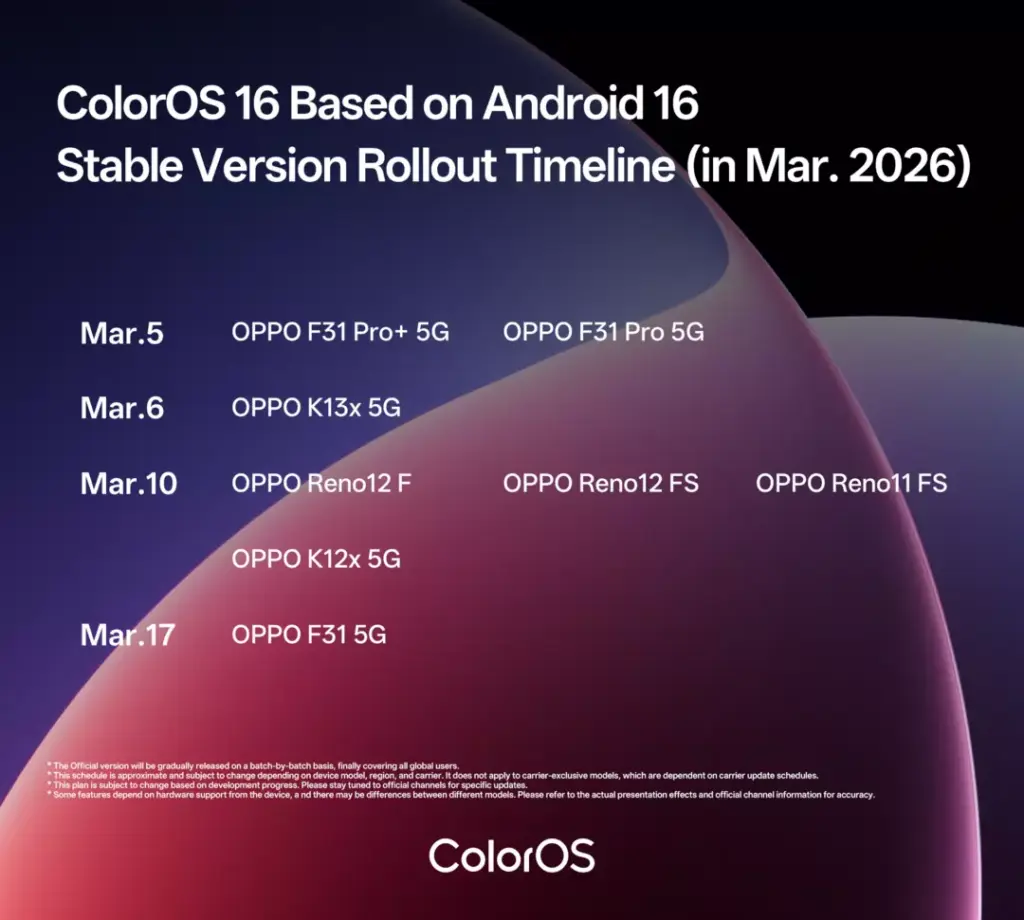
Oppo is wrapping up ColorOS 16 rollout as it announces the update timeline for the last batch of eligible devices. The March 2026 timeline mostly focuses on mid-range devices, such as the Oppo F31 series, Reno 12F, Reno12 FS, K12x 5G, and more.

ColorOS 16 rollout schedule for March 2026

  • March 5: Oppo F31 Pro+ 5G, Oppo F31 Pro 5G
  • March 6: Oppo K13x 5G
  • March 10: Oppo Reno12 F, Oppo Reno12 FS, Oppo Reno11 FS, Oppo K12x 5G
  • March 17: Oppo F31 5G

Some of these devices, including the Oppo F31 Pro models and Oppo K13x 5G, are already receiving the ColorOS 16 update. The rollout may be limited to select regions for now, but it should eventually expand to the remaining devices this month.

Oppo ColorOS 16 rollout timeline for March 2026

If your Oppo device is on the list above, you can expect the ColorOS 16 update this month. To manually check for available updates, go to Settings > System & Updates > Software update.

Keep in mind that this is a major upgrade, and hence the update size will be a few gigabytes. So, ensure that your device has sufficient storage and it’s charged to at least 50% for a smooth upgrade to ColorOS 16. You can read about the changes and new features in ColorOS 16 here.

With the ColorOS 16 rollout nearing completion, Oppo is reportedly already working on its next major upgrade based on Android 17. Google has already released the first two public betas, and more are expected in the coming weeks. The stable version is likely to arrive in Q3 2026.

We’ll keep you updated with the latest news in our Oppo section, so make sure to check it regularly for new updates. You can also join our Telegram channel to get instant notifications.

The post These Oppo devices will receive ColorOS 16 (Android 16) update this month appeared first on Gizmochina.

Realme Narzo Power packs insane 10,001mAh battery, AI chip, 144Hz display

5 March 2026 at 12:22
Realme Narzo Power 5G launched

Realme has unveiled the Realme Narzo Power 5G in India. The device highlights include a massive 10,001mAh battery, a Dimensity 7400 Ultra chipset, and a curved-edge AMOLED display. The phone also integrates a dedicated AI chip aimed at improving gaming performance and efficiency. Here is a closer look at the specifications, features, and pricing of the new Narzo smartphone.

Realme Narzo Power specifications and features

Realme Narzo Power 5G launched

The Realme Narzo Power 5G features a 6.8-inch AMOLED display with a 144Hz refresh rate and support for up to 1.07 billion colours. The screen is capable of reaching peak brightness levels of up to 6500 nits and is protected by Corning Gorilla Glass 7i. The device is built with durability in mind and carries IP66, IP68, and IP69 ratings for dust and water resistance.

The smartphone is powered by the MediaTek Dimensity 7400 Ultra 5G chipset. It also includes the HyperVision+ AI chip, which acts as a secondary processor to assist with gaming performance and visual enhancements.

The device supports features such as AI Hyper Stable Frame, AI Hypermotion, and AI Hyper Clarity to improve gaming smoothness and graphics. Realme Narzo Power runs on Realme UI 7.0, which is overlaid on Android 16. The brand has to provide Narzo Power users with three years of Android OS upgrades and four years of security updates.

A key highlight is the 10,001mAh battery, which is significantly larger than most smartphone batteries currently available. The battery supports 80W fast charging, capable of charging the device to 50 percent in about 36 minutes. The phone also offers 27W reverse charging, allowing it to charge other devices.

Realme Narzo Power price in India, availability

The Narzo Power’s 8GB+128GB model is priced at Rs 27,999, while the 8GB+256GB variant costs Rs 29,999. It comes in Titan Silver and Titan Blue color options.With first sale offers including bank discounts and price benefits, the effective starting price comes down to Rs 23,999.

The first sale begins on March 5 at 12 noon via realme.com and Amazon. Buyers can also receive benefits worth Rs 3,999, including bank offers, exchange discounts, and a 4-year battery warranty available during the initial sale period.

For more daily updates, please visit our News Section.

Stay ahead in tech! Join our Telegram community and sign up for our daily newsletter of top stories.

The post Realme Narzo Power packs insane 10,001mAh battery, AI chip, 144Hz display appeared first on Gizmochina.

5 reasons the MacBook Neo isn’t a typical MacBook

5 March 2026 at 11:41

Apple just introduced the MacBook Neo as its most affordable laptop at $500. This is a Mac designed to reach people who might otherwise buy a Chromebook or a cheaper Windows laptop.

And at first glance, it’s really captivating. It has an aluminum chassis, weighs just 1.23kg, and comes in four bright colors. The laptop features a 13-inch Liquid Retina display, dual speakers with Dolby Atmos, a 1080p webcam, and up to 16 hours of battery life.

But once you look past the bright colors and the relatively low price, the compromises start to show. To reach this price point, Apple has trimmed back several features that users might expect from a modern MacBook. Some of those changes may not matter much for casual users, but others stand out when compared with the company’s more expensive laptops.

Here are five limitations of the MacBook Neo that you must know before buying Apple’s new entry-level laptop.

It doesn’t use a full-power laptop chip

One of the most unusual aspects of the MacBook Neo is its processor.

Instead of using one of Apple’s laptop-focused chips, like those found in the MacBook Air or MacBook Pro, Apple chose the A18 Pro, the same chip it used in the iPhone 16 Pro.

This choice alone makes it clear where Apple sees the Neo in its lineup. A-series chips are typically designed for iPhones and iPads, not laptops. While they’re powerful and efficient, they aren’t built with the same thermal headroom or performance expectations as Apple’s M-series processors.

Snapdragon 8 Gen 4 vs Apple A18 Pro

The version of the chip used in the MacBook Neo is also slightly reduced. The iPhone version features a 6-core CPU and a 6-core GPU, while the MacBook Neo ships with a 6-core CPU but only a 5-core GPU.

For basic tasks like browsing, document editing, or streaming, the chip should still be more than capable. Apple is also using a fanless design, which means the laptop operates completely silently. But for heavier workloads like video editing, the Neo may fall short compared with laptops powered by Apple’s M-series chips.

Limited memory and slower memory bandwidth

Memory is another area where Apple has made clear compromises. The MacBook Neo comes with 8GB of RAM, and unlike many other Apple computers, users cannot upgrade it when ordering the device. That means buyers are locked into the base configuration.

By comparison, newer Mac models now start with 16GB of RAM, including updated versions of the MacBook Air.

Because Apple uses unified memory architecture — where the CPU and GPU share the same memory pool — the amount of RAM can affect multiple parts of the system at once. Lower memory limits may become noticeable when running many browser tabs, multitasking across apps, or working with large files.

There’s also a difference in memory bandwidth. The MacBook Neo offers 60GB/s, which is less than half of what the MacBook Air provides.

The display loses several premium features

Apple is still calling the screen on the MacBook Neo a Liquid Retina display, but it’s not the same type of panel used in the company’s other laptops.

The 13-inch display has a resolution of 2408 × 1506, supports 1 billion colors, and reaches 500 nits of brightness, which matches the brightness level of the MacBook Air. However, there are several missing features.

First, the display only covers the sRGB color gamut, rather than the wider P3 color space supported by the MacBook Air since it switched to Apple silicon in 2020.

The display also does not support True Tone, Apple’s technology that automatically adjusts color temperature based on ambient lighting.

And perhaps more surprisingly, the MacBook Neo doesn’t include an ambient light sensor at all. That means the system cannot automatically adjust screen brightness depending on the environment.

No Magnetic Charging

Finally, the MacBook Neo removes a few physical hardware features that are common on other MacBooks.

One of the biggest differences is charging. Unlike the MacBook Air and MacBook Pro, the Neo does not include a MagSafe magnetic charging port. 

Instead, it relies on two USB-C ports, both located on the left side of the laptop. One of these ports supports USB 3 speeds up to 10Gb/s, while the other is limited to USB 2 speeds up to 480Mb/s.

Using USB-C for charging is not unusual, but MagSafe has become a popular feature because it detaches easily if someone trips over the charging cable. Also, it clears the USB-C port for other tasks.

Keyboard without backlight

Last but not least, there are compromises in keyboard and trackpad, too.

The keyboard does not include backlighting. It been a standard for MacBooks to include a backlit keyboard, but Neo is an exception.

Meanwhile, the trackpad is a simpler physical multi-touch trackpad instead of Apple’s Force Touch design. That means it lacks pressure sensitivity, force click features, and pressure-sensitive drawing.

Even Touch ID is optional. The base 256GB model doesn’t include it, though it is available if users upgrade to the 512GB version.

For more daily updates, please visit our News Section.

Stay ahead in tech! Join our Telegram community and sign up for our daily newsletter of top stories

The post 5 reasons the MacBook Neo isn’t a typical MacBook appeared first on Gizmochina.

OnePlus 16’s 200MP triple camera specifications seemingly revealed

5 March 2026 at 11:41
OnePlus 15

OnePlus is expected to unveil the OnePlus 16 in October this year in China. Since the OnePlus 15 was criticized for having underwhelming cameras, recent rumors suggest that its successor could arrive with significantly improved camera hardware. To recall, in December 2025, well-known tipster Digital Chat Station claimed that the OnePlus 16 may feature the same imaging setup expected to debut on the upcoming Find N6 foldable phone. Now, a new leak has surfaced revealing the rear camera configuration of the N6, offering a glimpse of what the OnePlus 16 could bring in terms of photography.

Oppo Find N6 / OnePlus 16 camera specs tipped

Oppo Find N6 camera specs tipped

As per the leak, the Oppo Find N6 will feature a 200-megapixel Samsung HP5 main camera with an f/1.8 aperture and OIS support. It will be accompanied by a 50-megapixel Samsung JN5 camera with an f/2.0 aperture and a 50-megapixel Samsung JN5 periscope telephoto camera with an f/2.7 aperture and OIS support.

There is a possibility that the same 200-megapixel triple camera setup could also appear on the OnePlus 16. These cameras may not necessarily deliver the same level of photography experience as Pro or Ultra-branded flagship phones. However, if the leak proves accurate, the OnePlus 16 could still deliver a strong camera experience, especially considering that the device may be positioned primarily as a performance-focused flagship.

Speaking of performance, the OnePlus 16 is expected to feature the next-generation Snapdragon 8 Elite Gen 6 chipset. Some reports also suggest that the device may pack a massive 9,000mAh battery.

The display could also see an upgrade. The OnePlus 16 is rumored to feature a 200Hz or 240Hz OLED panel offering a 1.5K resolution and ultra-thin bezels measuring less than 1mm. As a next-generation flagship, the device is expected to run on OxygenOS 17 based on Android 17. This phone may carry a starting price of 4,999 Yuan (~$725).

For more daily updates, please visit our News Section.

Stay ahead in tech! Join our Telegram community and sign up for our daily newsletter of top stories.

The post OnePlus 16’s 200MP triple camera specifications seemingly revealed appeared first on Gizmochina.

Oppo Find N6 leaks in full with dual LTPO display, titanium hinge, 6000mAh battery

5 March 2026 at 10:42
Oppo Find N6 specs features leak

Oppo is gearing up to launch the Find N6 foldable in China, and this time, it looks like a global release is on the table, too. There’s still no official date, but a flurry of recent posts on the Chinese social media platform Weibo have spilled the full spec sheet ahead of schedule.

Here’s everything we know so far about the Oppo Find N6.

Display

According to the leak, the Find N6 may feature a 6.62-inch external display with a 1.5K+ resolution. The panel is reportedly based on BOE’s Q10 technology and supports Dolby Vision, HDR Vivid, and HDR10+. It’s also said to use an 8T LTPO panel with a variable refresh rate ranging from 1Hz to 120Hz.

Oppo Find N6 presentation leaks on Weibo

The external screen is said to reach up to 1,600 nits of global peak brightness, while manual brightness tops out at 800 nits. For eye comfort, the panel reportedly combines Pulse DC-like dimming at high brightness levels with 2160Hz PWM dimming when brightness is low.

Inside, the foldable screen may measure 8.12 inches with a sharper 2K+ resolution. This internal display is expected to use a Samsung E7 panel and offer the same HDR standards and 1–120Hz adaptive refresh rate. It has 2160Hz PWM dimming at lower brightness levels.

Triple-camera system

The camera setup described in the leak includes three sensors. It has a 50MP 0.6x ultra-wide camera with a 15mm lens and an f/2.0 aperture, which is reportedly paired with Samsung’s JN5 sensor.

Oppo-Find-N6-White-2
Oppo FInd N6 in White

The main camera could use a 200MP 23mm lens with an f/1.8 aperture and optical image stabilization, reportedly based on the HP5 sensor. The 3x telephoto camera offers a 70mm focal length and f/2.7 aperture with OIS. The device is also said to feature a second-generation “Danxia” lens system.

Flagship hardware and durability

On the performance side, the Find N6 is expected to run on Qualcomm Snapdragon 8 Elite Gen 5 paired with LPDDR5X RAM and UFS 4.1 storage.

The leak mentions a titanium alloy dome hinge, along with multiple dust and water resistance certifications, including IP56, IP58, and IP59. The device is also said to include a new Shanhai communication chip, super linear dual speakers, and an infrared remote control.

Moreover, the Find N6 is rumored to include a 6,000mAh third-generation Glacier Battery, with 80W wired and 50W wireless charging. 

For more daily updates, please visit our News Section.

Stay ahead in tech! Join our Telegram community and sign up for our daily newsletter of top stories

The post Oppo Find N6 leaks in full with dual LTPO display, titanium hinge, 6000mAh battery appeared first on Gizmochina.

Official: Vivo X300 Ultra to feature Sony LYT-901 200MP main camera; More details confirmed

5 March 2026 at 10:25
Vivo X300 Ultra main camera

Vivo recently showcased the Vivo X300 Ultra at MWC 2026. Since then, the brand has been gradually revealing key details about what it claims will be its ultimate camera smartphone. Today, Vivo product manager Han Boxiao confirmed several technical details about the primary camera of the X300 Ultra, offering a clearer picture of the device’s imaging capabilities.

Vivo X300 Ultra main camera details confirmed

Vivo X300 Ultra main camera
Vivo X300 Ultra main camera sensor (right) compared with X200 Ultra’s 200MP main camera (right)

According to Han Boxiao, the Vivo X300 Ultra will feature a Sony LYTIA-901 sensor, which is making its debut globally on the device. The phone will adopt a 35mm main camera, a focal length often preferred for street and documentary photography. Vivo says this focal length offers a natural perspective that is well-suited for capturing people and real-world scenes with minimal distortion.

The main camera also combines a 200-megapixel sensor with a large 1/1.12-inch sensor size, which Vivo describes as a premium configuration for mobile photography. The company claims that the effective light-gathering area per pixel has increased by over 30 percent compared to the previous generation. Stabilization has also been upgraded from CIPA 5.0 to CIPA 6.5, which should help improve handheld photography and video recording, especially in low-light environments.

Vivo has also improved the lens structure. The previous generation’s 7P lens setup has been replaced by a 1G + 6P optical configuration. The system includes ALD PRO coating that reportedly reduces reflections by around 30 percent, along with additional coatings designed to minimise ghosting and improve clarity in challenging lighting conditions.

Vivo X300 Ultra’s other cameras

Vivo X300 Ultra 400mm teleconverter kit-

As for the rest of the camera system, rumors suggest the Vivo X300 Ultra may include a 50-megapixel Sony LYT-828 ultra-wide camera and a 200-megapixel Samsung HPB periscope telephoto camera. For color accuracy, the setup is also expected to feature a 5-megapixel multispectral sensor. On the front, the phone may include a 50-megapixel autofocus selfie camera.

At MWC 2026, Vivo also showcased a 400mm teleconverter kit capable of delivering 17x optical zoom. The X300 Ultra paired with this accessory is aimed at professional creators. A recent leak has also suggested that Vivo is preparing another teleconverter kit designed for everyday photography enthusiasts.

For more daily updates, please visit our News Section.

Stay ahead in tech! Join our Telegram community and sign up for our daily newsletter of top stories

(source)

The post Official: Vivo X300 Ultra to feature Sony LYT-901 200MP main camera; More details confirmed appeared first on Gizmochina.

Xiaomi HyperOS 3.1 stable rollout begins: These devices are getting it first

5 March 2026 at 10:07
Xiaomi HyperOS 3.1 update rollout

Following weeks of beta testing, Xiaomi has finally begun rolling out a stable HyperOS 3.1 update to the initial set of devices. The latest HyperOS software, based on Android 16, brings meaningful upgrades and plenty of fixes to deliver a refined software experience.

The latest update is available for the new Xiaomi 17 series and Redmi K90 Pro Max, as shared by Xiaomi Time. Currently, the rollout is restricted to China, as has been the case with previous HyperOS releases. However, it will eventually reach Xiaomi devices globally soon.

  • Xiaomi 17: OS3.0.301.0.WPCCNXM
  • Xiaomi 17 Pro: OS3.0.301.0.WBLCNXM
  • Xiaomi 17 Pro Max: OS3.0.301.0.WPBCNXM
  • Redmi K90 Pro Max: OS3.0.301.0.WPMCNXM

Xiaomi will expand the HyperOS 3.1 update to more devices over the coming days and weeks. And soon, it will also start rolling out in other regions. We’ll continue to update you on the latest developments in our Xiaomi section.

You should receive a notification on your device once the update is ready for download and installation. You can also manually check for available updates by navigating to Settings > My device and tapping the HyperOS logo at the top.

Xiaomi HyperOS 3.1 update: complete changelog

[Notes]
– This update will upgrade from the Beta version to the official version. Some functions are only available in the Beta version. After upgrading to the official version, some Beta version functions will no longer be available. For specific functions, please refer to the official version.

[System]
– Optimize the display effect of the gesture prompt line in some scenarios
– Fix the problem of system sharing crashing in some scenarios
– Fix the problem of abnormal sharing of handwritten notes in some scenarios
– Fix the problem of abnormal location display in some scenarios
– Fix the occasional black screen problem after restoring factory settings
– Fix the problem of abnormal file uploading in some third-party applications
– Fix the problem of unencryptable private files in app clones in some scenarios
– Fix the problem of unrecognizable SIM cards in some special scenarios
– Fix the occasional connection problem with AirPods in some scenarios
– Fix the abnormal opening of some files in dual-app scenarios

[Launcher]
– Add support for stacking recent tasks, making it more beautiful and smooth

[Smart Assistant]
– Fix the occasional lag problem in the Negative Screen in some scenarios

[Gallery]
– Optimize the smoothness in some scenarios and improve the user experience (App is recreated with Rust)

[Weather]
– Fix the problem of unresponsive weather in some scenarios (App is recreated with Rust)

[Status bar and notification bar]
– Fix the abnormal display of the network icon in the status bar in some scenarios

Be sure to visit the Xiaomi section regularly for fresh details. Alternatively, you can join our Telegram channel to get instant alerts about the latest HyperOS releases and breaking tech news.

The post Xiaomi HyperOS 3.1 stable rollout begins: These devices are getting it first appeared first on Gizmochina.

Honor 600 Lite launches without fanfare, has a 6520mAh battery

5 March 2026 at 09:31
Honor-600-Lite-Launch-Specs-and-Price

Just a few days after its reveal in full, Honor has quietly introduced the Honor 600 Lite in Malaysia. The company didn’t hold an event or make a big announcement, but the new Honor 600 Lite is now officially listed and available for purchase in the country.

At a glance, the phone sticks to a fairly simple design. The front features a pill-shaped notch, while the back has a rectangular camera module with two lenses and an LED flash. 

On the right side of the frame, Honor has added a dedicated shutter button likely to wake the camera with one touch. The device is available in two color options: Velvet Grey and Desert Gold.

Honor 600 Lite Specifications

Up front, the Honor 600 Lite features a 6.6-inch AMOLED display with a 1.5K screen resolution. The panel also supports a 120Hz refresh rate and has 6,500 nits of peak brightness.

Powering the phone is MediaTek’s MediaTek Dimensity 7100 Elite processor. The chip is paired with 12GB of RAM and 256GB of internal storage. 

The camera setup is built around a 108-megapixel primary sensor. It’s accompanied by a 5-megapixel ultra-wide camera, while a 16-megapixel camera on the front handles selfies. 

Moving on, the Honor 600 Lite packs a 6,520mAh battery, and top-up is handled through 45W wired charging.

The phone also supports Bluetooth 6.0, NFC, and carries an IP66 rating for water and dust resistance. On the software side, it runs MagicOS 10 based on Android 16.

The Honor 600 Lite is now available in Malaysia with a retail price of RM1,399 (~ $355). For a limited time, Honor is offering a RM100 (~ $25) rebate along with a 1+1 year extended warranty worth RM99.

For more daily updates, please visit our News Section.

Stay ahead in tech! Join our Telegram community and sign up for our daily newsletter of top stories.

The post Honor 600 Lite launches without fanfare, has a 6520mAh battery appeared first on Gizmochina.

Nothing Phone (4a) Pro with scaled-down Glyph Matrix

5 March 2026 at 09:19

Ahead of the official launch on March 5, 2026, Nothing shared a teaser showing the rear of the Phone (4a) Pro as a dark silhouette, briefly lit up by a circular LED pattern. The short clip confirms that the phone will feature a Glyph Matrix, the circular LED array that first appeared on the flagship Nothing Phone (3).

Nothing Phone (4a) Pro Glyph Matrix

On the Phone (3), the Glyph Matrix consisted of 489 micro-LEDs, allowing the phone to display fairly detailed animations, everything from notifications and timers to progress indicators and even pixel-style caller IDs.

The version coming to the Phone (4a) Pro, however, appears to be noticeably scaled down. Early information suggests the matrix may use around 137 micro-LEDs, a significant reduction from the flagship implementation.

That change has already sparked debate within the community. Discussions on platforms like Reddit and X show many fans wondering whether the reduced LED count will limit what the feature can actually do. With fewer lights, animations may not look as smooth, and complex icons or progress indicators could lose some detail.

Nothing Phone (3) Glyph Matrix

An animation circulating online, shared by X user @adi, appears to demonstrate the matrix in action. It shows familiar Glyph-style behaviors such as pulsing notification alerts and charging indicators. But compared to the Phone (3), the visuals do seem less detailed.

Another detail that remains unclear is the physical size of the matrix. The teaser doesn’t reveal whether the LED circle itself is smaller or simply uses fewer LEDs within the same space.

The base Phone (4a) takes a different approach altogether. Instead of the circular matrix, it features a Glyph Bar. By keeping the Glyph Matrix exclusive to the Pro model, Nothing is clearly trying to create a visual and functional gap between the two devices.

With the launch event scheduled for later today in many regions, we won’t have to wait long to see the full picture. Whether the scaled-down Glyph Matrix turns out to be a clever cost-saving tweak or a feature that feels watered down remains to be seen. Either way, the teaser has already done one thing successfully: it has people talking.

Don’t miss a thing! Join our Telegram community for instant updates and grab our free daily newsletter for the best tech stories!

For more daily updates, please visit our News Section.

(Source: Nothing)

The post Nothing Phone (4a) Pro with scaled-down Glyph Matrix appeared first on Gizmochina.

Poco X8 Pro series officially confirmed to pack Dimensity 8, 9-series chipsets

5 March 2026 at 09:16
Poco X8 Pro Max

Poco has started teasing the Poco X8 Pro series globally, which indicates that it may launch this month in multiple markets. A recent teaser released by the brand confirms the MediaTek chips that will power the X8 Pro series. Here’s a look at what to expect from the lineup.

Poco X8 Pro series chipsets confirmed

Poco X8 Pro series chipsets

As can be seen in the above image, the Poco X8 Pro series will feature Dimensity 8500 Ultra and Dimensity 9500s chipsets. The latter is a slightly toned-down version of the existing Dimensity 9500.

While Poco has not confirmed the names of the X8 Pro models, reports say that the X8 Pro will feature the Dimensity 8500 Ultra, whereas the X8 Pro Max will house the Dimensity 9500s.

Rumors have claimed that the Poco X8 Pro and X8 Pro Max will be slightly tweaked versions of the Redmi Turbo 5 and Turbo 5 Max, which debuted earlier this month in China. The only major difference could be in the battery department, as the Poco models are said to feature slightly smaller batteries. The X8 Pro may arrive with a 6,500mAh battery, whereas the X8 Pro Max edition may feature a 7,550mAh unit.

The Poco X8 Pro may feature a 6.59-inch screen, whereas the Pro Max may house a bigger 6.83-inch panel. Both OLED panels may offer a 1.5K resolution and a 120Hz refresh rate. The X8 Pro and X8 Pro Max may feature a 20-megapixel and a 32-megapixel front camera, respectively. Their rear panels could be equipped with an OIS-enabled 50-megapixel main camera and an 8-megapixel ultra-wide lens.

The series is expected to ship with up to 12GB of LPDDR5x RAM and up to 512GB of UFS 4.1 storage. Both phones could be available in mint, black, and white shades. Reports have also revealed that the X8 Pro will have a special Iron Man edition variant.

For more daily updates, please visit our News Section.

Stay ahead in tech! Join our Telegram community and sign up for our daily newsletter of top stories

The post Poco X8 Pro series officially confirmed to pack Dimensity 8, 9-series chipsets appeared first on Gizmochina.

Xiaomi phones to be pricier soon, but it will try to limit the effect on users

5 March 2026 at 08:57
xiaomi lei jun

A surge in memory chip prices has started raising concerns across the smartphone industry. Xiaomi CEO Lei Jun recently addressed questions about whether this trend could affect smartphone prices. His comments shed light on the broader supply challenges affecting the consumer electronics sector.

Rising memory prices: The cause behind smartphones’ price hike

xiaomi lei jun
Xiaomi CEO Lei Jun

During a recent interaction with the media, Lei Jun explained that the rapid growth of artificial intelligence has significantly increased the demand for memory chips. According to him, this demand surge has created a shortage of supply in the past year, pushing memory prices sharply higher. The rising cost of memory components has placed noticeable pressure on Xiaomi’s smartphone business and other related product lines.

Lei Jun acknowledged that the cost situation is challenging for manufacturers, but he suggested that Xiaomi will attempt to manage these pressures carefully. Instead of directly passing the entire cost increase to consumers, the company plans to explore different approaches to reduce the burden on buyers. He indicated that Xiaomi will try various methods to make any price adjustments easier for customers to accept.

The spike in component costs is already affecting multiple companies across the consumer electronics sector. Some brands have reported profit declines due to the higher cost of components. Others have slowed down or reconsidered certain product plans as the rising prices make new launches more difficult to sustain.

Xiaomi executives have indicated that the company is in a relatively stable position compared to some competitors. Xiaomi President Lu Weibing previously stated that the company maintains close partnerships with the world’s major memory manufacturers. Because Xiaomi produces a wide range of products, including smartphones, tablets, televisions, and electric vehicles, its scale allows it to maintain stable supply relationships.

Lu Weibing also noted that the memory price cycle may last longer than previous ones. He expects the current price increase phase to continue until around the end of 2027. According to industry observers, some smartphone brands may increase prices in the coming months, with entry level devices potentially disappearing as manufacturers shift their focus towards higher value models.

For more daily updates, please visit our News Section.

Stay ahead in tech! Join our Telegram community and sign up for our daily newsletter of top stories

(via)

The post Xiaomi phones to be pricier soon, but it will try to limit the effect on users appeared first on Gizmochina.

Xiaomi 17 Max could launch in May with Snapdragon 8 Elite Gen 5, 8,000mAh battery

5 March 2026 at 08:49
Xiaomi 17

Several reports have revealed that Xiaomi is working on a new Snapdragon 8 Elite Gen 5-powered flagship phone dubbed the Xiaomi 17 Max. Rumors have claimed that Xiaomi may unveil it in April, but a new leak by tipster Digital Chat Station suggests a different launch window. Here’s a look at what to expect from this phone.

Xiaomi 17 Max launch timeframe (rumored)

Xiaomi 17 Max tentative launch timeframe

The above post suggests that the Xiaomi 17 Max is tentatively scheduled to break cover in May in China. Apart from revealing the inclusion of the Snapdragon 8 Elite Gen 5, the new leak does not state anything about its other specifications.

Xiaomi 17 Max specifications (rumored)

Recent reports have revealed that the Xiaomi 17 Max will house a 6.9-inch flat OLED 1.5K screen with support for a 120Hz refresh rate and an ultrasonic in-screen fingerprint sensor. It is expected to ship with HyperOS 3-based Android 16.

The 17 Max is expected to feature a 50-megapixel front camera. Its back panel will have a secondary display, and its rear camera setup will comprise a 200-megapixel Samsung HPE main camera, a 50-megapixel ultra-wide lens, and a 50-megapixel periscope telephoto camera.

The Snapdragon 8 Elite Gen 5-powered device is expected to ship with up to 16GB of LPDDR5x RAM and up to 1TB of UFS 4.1 storage. One of the major highlights of the 17 Max is that it will house a huge 8,000mAh battery with 100W wired and 50W wireless charging. It is also expected to feature an x-axis linear motor and a dual symmetric 1115 speaker setup.

For more daily updates, please visit our News Section.

Stay ahead in tech! Join our Telegram community and sign up for our daily newsletter of top stories

The post Xiaomi 17 Max could launch in May with Snapdragon 8 Elite Gen 5, 8,000mAh battery appeared first on Gizmochina.

Infinix Note 60 Ultra debuts with Pininfarina design, 144Hz AMOLED screen, 7,000mAh battery. 200MP camera

5 March 2026 at 08:23
Infinix Note 60 Ultra

Infinix has introduced a new flagship smartphone called the Infinix Note 60 Ultra at MWC 2026 in Barcelona. The device arrives as the top model in the Note 60 lineup, following the Note 60 Pro launched earlier. The phone brings several premium features including a redesigned camera module, satellite communication support, and a large battery aimed at heavy users.

Infinix Note 60 Ultra specifications and features

Infinix Note 60 Ultra

The Infinix Note 60 Ultra features an aluminium unibody construction designed in collaboration with the Italian design house Pininfarina. The rear panel uses a single sheet of Gorilla Glass Victus and integrates what the company calls a Uni-Chassis camera module, giving the device a flat back without a raised camera bump. The back panel also includes a floating taillight-style notification light and a hidden dot matrix display that can show alerts and system icons.

For photography, the phone includes a triple camera system led by a 200-megapixel Samsung ISOCELL HPE primary sensor. It is accompanied by a 50-megapixel Samsung JN5 periscope telephoto camera that supports 3.5x optical zoom and extended digital zoom up to 100x. An ultra-wide camera with a 112-degree field of view completes the setup. The imaging system is supported by the company’s XDR Image Engine with Ultra HDR capture to improve dynamic range.

Infinix Note 60 Ultra

On the front, the device features a 6.78-inch AMOLED display with 1.5K resolution and a 144Hz refresh rate. The screen can reach peak brightness levels of up to 4500 nits. Powering the phone is the MediaTek Dimensity 8400 Ultimate chipset built on a 4nm process. The device runs XOS 16 based on Android 16 and comes with 12GB RAM and 256GB storage.

The Note 60 Ultra houses a 7000mAh silicon carbon battery that supports 100W wired charging and 50W wireless charging. Infinix claims the phone can reach a full charge in around 48 minutes. It also introduces battery self-healing technology designed to recover around one percent battery health every 200 charging cycles. Additional features include stereo speakers tuned by JBL, IP64 protection, and dual-way satellite calling and messaging for communication in areas without network coverage.

Infinix Note 60 Ultra price and availability

The Infinix Note 60 Ultra has been listed in Malaysia with a price of 3,000 MYR (~$770) for the 12GB+256GB edition. It comes in Torino Black, Monza Red, Amalfi Blue and Roma Silver shades. Its retail package includes a zinc alloy MagCharge Case, a custom Kevlar MagCase, a Kevlar MagPad, and a Track-Edition SIM pin. Global availability details are yet to be announced.

For more daily updates, please visit our News Section.

Stay ahead in tech! Join our Telegram community and sign up for our daily newsletter of top stories

The post Infinix Note 60 Ultra debuts with Pininfarina design, 144Hz AMOLED screen, 7,000mAh battery. 200MP camera appeared first on Gizmochina.

Red Magic teases compact Gaming Tablet 5 Pro following Legion Tab Gen 5 reveal

5 March 2026 at 07:58

Red Magic has started teasing a new entry in the compact gaming tablet segment, not long after Lenovo introduced the Lenovo Legion Tab Gen 5 at MWC 2026. Smaller, high-performance tablets are slowly gaining attention, and Red Magic appears ready to join that push with its next device.

The company posted an early teaser for the upcoming Red Magic Gaming Tablet 5 Pro, which will succeed the Red Magic Astra. That device originally launched in China as the Red Magic Gaming Tablet 3 Pro before getting a global rebrand.

The teaser highlights a compact form factor, suggesting the new model will stick closer to the Astra’s portable design rather than the larger Red Magic Nova. Red Magic hasn’t revealed specifications yet, and there’s no confirmed launch date either. The only message for now is that the tablet is “coming soon.”

The timing is interesting because compact gaming tablets are suddenly getting more attention. Lenovo’s Legion Tab Gen 5 currently stands out as one of the first in this category to feature Qualcomm’s Snapdragon 8 Elite Gen 5. Given Red Magic’s focus on gaming hardware, it wouldn’t be surprising to see the Gaming Tablet 5 Pro use the same chip, paired with a high-refresh display and the brand’s typical active cooling system.

Red Magic has followed a fairly predictable launch pattern in the past. The previous model arrived in China first in June 2025, then appeared internationally about a month later under the Astra name. The new tablet could follow a similar path, debuting in China before a wider global release sometime later in 2026.

The Astra itself already packed strong hardware for its size. It featured a Snapdragon 8 Elite processor, a 9.06-inch 2.4K OLED display, up to 24GB of RAM, and an internal cooling fan. The upcoming model will likely build on that formula, possibly adding higher refresh rates, improved triggers, or a larger battery.

For now, though, Red Magic is only offering a small preview. More details should emerge soon as the company moves closer to announcing the Gaming Tablet 5 Pro.

Don’t miss a thing! Join our Telegram community for instant updates and grab our free daily newsletter for the best tech stories!

For more daily updates, please visit our News Section.

(Source: Red Magic on Weibo)

The post Red Magic teases compact Gaming Tablet 5 Pro following Legion Tab Gen 5 reveal appeared first on Gizmochina.

Official: OnePlus 15T’s 7,500mAh battery revealed, more details confirmed

5 March 2026 at 07:55
OnePlus 15T (AI-generated image)

OnePlus China President Li Jie has been gradually confirming new details about the upcoming OnePlus 15T. Today, he released a new Weibo post confirming fresh information about the 15T’s battery size and charging capabilities.

OnePlus 15T battery, charging details confirmed

OnePlus 15T (AI-generated image)

The OnePlus 15T is confirmed to house a humongous 7,500mAh battery. This will be coupled with 100W wired and 50W wireless charging.

With this, the OnePlus 15T will offer one of the best battery and charging combinations on a compact flagship phone. Despite packing a huge battery, the 15T is said to measure 8.4mm in thickness and weigh around 194 grams.

In recent days, Li Jie has also confirmed that the OnePlus 15T features a 50MP periscope telephoto camera and carries IP68/IP69/69K-level dust and water resistance. An official image released by him revealed that its compact screen will have ultra-thin bezels on all four sides. Speaking of the display, rumors suggest it will feature a 6.31-inch OLED 1.5K panel offering a 165Hz refresh rate.

The OnePlus 15T’s AnTuTu listing has confirmed that it features the Snapdragon 8 Elite Gen 5 chipset, 16GB of LPDDR5x RAM, and 1TB of UFS 4.1 storage. The device recorded a remarkable 4.45 million score on AnTuTu benchmarks.

Rumors suggest that it may include a 32-megapixel front camera, and its rear panel could feature a dual-camera setup consisting of a 50-megapixel Sony IMX906 or a 200-megapixel Samsung HP5 primary camera. It may also arrive with additional features such as a metal middle frame, an ultrasonic in-screen fingerprint sensor, and a Plus key.

For more daily updates, please visit our News Section.

Stay ahead in tech! Join our Telegram community and sign up for our daily newsletter of top stories

The post Official: OnePlus 15T’s 7,500mAh battery revealed, more details confirmed appeared first on Gizmochina.

Before yesterdayGizmochina

Xiaomi XRING O2 to launch this year, to be based on 3nm process

5 March 2026 at 06:45
Xiaomi-XRING-O2

Xiaomi introduced its in-house XRING O1 mobile processor back in May last year. Seems like the company is now gearing up for its successor.

According to well-known leaker Digital Chat Station, Xiaomi will “definitely” launch a new XRING-branded chip this year, possibly called the XRING O2.

Like its predecessor, it is said to be manufactured using TSMC’s 3nm process. While the naming has not been officially confirmed, it is expected to be the direct successor to the O1.

Xiaomi plans to launch a new mobile processor every year moving forward

The XRING O1 is Xiaomi’s first self-developed flagship SoC, built on TSMC’s second-generation 3-nanometer process. The chip later debuted inside the Xiaomi 15S Pro, where it delivered competitive benchmark scores and solid real-world performance.

In a recent interview with CNBC, Xiaomi Group President Lu Weibing said the company plans to release a brand-new self-developed mobile phone processor every year going forward.

Outside of companies like Apple and Samsung, most Android phone makers rely heavily on chip suppliers such as Qualcomm and MediaTek. Xiaomi’s entry into that small club signals a longer-term strategic shift that will give the brand greater control over its products.

However, Xiaomi’s chip ambitions are not limited to smartphones. The company is reportedly planning to expand the use of its next-generation silicon across a wider range of smart devices within its ecosystem. This could include tablets, wearables, and other connected hardware.

When Xiaomi first launched the O1, it positioned the chip as a foundational step. Founder Lei Jun previously said that self-developed chips typically require three to four years of research and development.

He explained that the first generation was more about validating the underlying technology than chasing large shipment volumes, and pre-order quantities were intentionally limited.

On paper, however, the O1 was no small experiment. Built on Arm-based CPU and GPU architectures, it achieved a multi-core benchmark score above 9,000, placing it among top-tier flagship chips. For a first attempt, that was enough to draw attention.

For more daily updates, please visit our News Section.

Stay ahead in tech! Join our Telegram community and sign up for our daily newsletter of top stories! 💡

(Source | Via)

The post Xiaomi XRING O2 to launch this year, to be based on 3nm process appeared first on Gizmochina.

Motorola Razr Fold Camera Tested by DXOMARK: 164 Score Sets Foldable Record

5 March 2026 at 04:55
Motorola Razr Fold

Motorola’s Razr fold has received a DXOMARK camera score of 164, earning the DXOMARK Gold Label for imaging performance. According to DXOMARK’s rankings, this score places the device among the top cameras on foldable smartphones and ranks it 8th overall globally, beating competitors like the Google Pixel 10 Pro XL and the Xiaomi 17 Pro Max. Motorola’s recently launched Motorola Signature has also received the same label from the testing lab.

For those unaware, DXOMARK is an independent technology evaluation laboratory that measures the performance of consumer electronics using controlled scientific tests and perceptual analysis. To determine the score, the Razr fold was evaluated using the DXOMARK Camera test suite, which analyzes photo quality, zoom capability, and video performance from a user perspective.

In its findings, DXOMARK reported that the Razr fold performed well in exposure accuracy, dynamic range, and low-light photography. The device produced balanced colors across different lighting conditions, while maintaining good detail and relatively low image noise. The lab also observed accurate skin tone rendering and consistent depth estimation, which helped portrait shots appear natural.

Zoom performance was another area highlighted in the evaluation. The Razr fold includes a dedicated 3x periscope telephoto camera, which produced detailed images with stable color reproduction during testing. DXOMARK noted a balanced texture-to-noise ratio, which helped maintain clarity in zoomed images. Portrait photography also benefited from the 85mm equivalent focal length, which creates natural subject separation. The ultra-wide camera captured a wide field of view while maintaining consistent image quality.

The camera hardware on the Razr fold includes three 50MP rear cameras equipped with Sony LYTIA sensors. The 50MP main camera uses the Sony LYTIA 828 sensor, which Motorola describes as its largest 50MP sensor so far. The system supports AI-based image processing and produces photos with Pantone-validated color and skin tone calibration.

The 50MP periscope telephoto camera uses the Sony LYTIA 600 sensor and supports 3x optical zoom. The phone also offers 100x Super Zoom Pro, which relies on AI processing to maintain detail at long distances. Optical image stabilization is included to reduce blur in zoom shots. The 50MP ultra-wide camera provides a 122° field of view and supports Macro Vision for close-up photography.

For selfies and video calls, the device includes a 20MP front camera with Quad Pixel technology and a 32MP internal camera with Quad Pixel technology, which can be used in laptop mode for hands-free photos or video calls.

Video recording on the Razr fold supports 8K resolution with Dolby Vision, which allows higher dynamic range and improved color reproduction.

Image processing on the device is handled by Motorola’s Photo Enhancement Engine, which uses AI to expand dynamic range, reduce noise, and create software-based bokeh effects. The system also uses the Snapdragon 8 Gen 5 Mobile Platform, which supports AI processing for camera performance and efficiency.

For more daily updates, please visit our News Section.

Stay ahead in tech! Join our Telegram community and sign up for our daily newsletter of top stories.

(Source)

The post Motorola Razr Fold Camera Tested by DXOMARK: 164 Score Sets Foldable Record appeared first on Gizmochina.

New Xiaomi BE19000 Pro WiFi 7 Router Launching Globally Soon

By:Sean
4 March 2026 at 23:26
Xiaomi BE19000 Pro WiFi 7 Router

After unveiling the Xiaomi 17 series and Xiaomi Pad 8 lineup, the brand is expanding its smart IoT product lineup with a new router. The new Xiaomi BE19000 Pro WiFi 7 router is set to debut globally soon. So here are all the details.

Xiaomi BE19000 Pro Router Specs

The upcoming router was spotted on the Chinese tech giant’s official global website. This quiet listing revealed a high performance WiFi 7 router with built-in NAS functionality. Looking at the webpage, the Xiaomi Router BE19000 Pro brings tri-band WiFi 7 connectivity, bringing support for 2.4GHz, 5GHz, and 6GHz bands. The router delivers combined theoretical wireless speeds up to 18,656Mbps, making it one of the fastest networking devices from Xiaomi yet.

Xiaomi BE19000 Pro WiFi 7 Router

The BE19000 Pro also delivers serious wired connectivity to match its wireless capabilities, including two 10-Gigabit Ethernet ports and four 2.5-Gigabit Ethernet ports. This allows users to connect high-bandwidth devices such as gaming PCs, NAS servers, or media workstations while maintaining multi-gig speeds across the network. Other ntoable features include WiFi mesh networking with AI optimizations, Bluetooth Mesh functionality for smart home devices, and Xiaomi’s HyperOS ecosystem integration.

Unfortunately, Xiaomi has yet to confirm the launch date, availability, or pricing details for the Xiaomi BE19000 Pro WiFi 7 Router. In related news, the company recently unveiled the Xiaomi Vertical Study Lamp 2 and is gearing up to release the HyperOS 3.1 update.

For more daily updates, please visit our News Section.

Tech enthusiast? Get the latest news first! Follow our Telegram channel and subscribe to our free newsletter for your daily tech fix! ⚡

The post New Xiaomi BE19000 Pro WiFi 7 Router Launching Globally Soon appeared first on Gizmochina.

AnTuTu’s February flagship rankings are out, and iQOO leads the pack

4 March 2026 at 19:45
iQOO 15 Ultra

AnTuTu’s Android performance rankings for February 2026 are out, and there’s a new device at the top.

The iQOO 15 Ultra has claimed the number one spot on the flagship list, ending the recent streak of the Red Magic 11 Pro+. With an average score of 4.2 million points, the iQOO phone now sets the pace for Android performance this month. 

iQOO 15 Ultra

The Red Magic 11 Pro+, which had held onto first place in previous rankings, slips to second with an average of 4.16 million. Irrespective of numbers, both phone runs on Qualcomm’s Snapdragon 8 Elite Gen 5 processor. 

In third place is the Vivo X300 Pro Satellite Communication Edition, powered by MediaTek’s Dimensity 9500 chipset. It posts an average score of 4.08 million. Not to mention, it’s also the only MediaTek-powered phone on the list. 

It’s all Snapdragon moving forward

From the Realme GT 8 Pro at fourth to the Redmi K90 Pro Max at tenth spot, all use a Snapdragon 8 Elite Gen 5 chip at the helm.

So it’s unsurprising to say that the Snapdragon 8 Elite Gen 5 has become the mainstream choice for high-end Android devices. Multiple phones powered by the chip are now comfortably crossing the 4 million mark in AnTuTu’s scoring system. 

It’s also worth noting how AnTuTu calculates these rankings. The published score reflects the average of all benchmark results recorded for each model during the month, not the single highest score a device may achieve.

That means the numbers can differ from marketing claims or isolated screenshots circulating online. In theory, the average score should provide a more realistic reference point for day-to-day performance.

For more daily updates, please visit our News Section.

Stay ahead in tech! Join our Telegram community and sign up for our daily newsletter of top stories! 💡

The post AnTuTu’s February flagship rankings are out, and iQOO leads the pack appeared first on Gizmochina.

Xiaomi changes plan, Pad 8 to launch before Xiaomi 17 series in India

4 March 2026 at 19:22
Xiaomi Pad 8

Xiaomi is readjusting its India launch timeline for the Xiaomi Pad 8 and the Xiaomi 17 series.

The company originally unveiled the Xiaomi 17 series at MWC 2026. Soon after that, it announced that the phones, along with the tablet, would launch on March 11. However, Xiaomi has now confirmed that the India launch has been rescheduled.

According to updates shared on X, the Xiaomi Pad 8 will arrive on March 10, with the Xiaomi 17 series following a day later on March 11.

Xiaomi Pad 8

For India, Xiaomi is keeping the spotlight on the standard Pad 8. It features an 11.2-inch LCD panel with a 3.2K resolution (3200 x 2136) and a 3:2 aspect ratio, which is slightly taller than the usual 16:10 format seen on many Android tablets.

The display supports a 144Hz adaptive refresh rate and peaks at 800 nits of brightness. It also brings Dolby Vision and HDR10 support, along with 12-bit color depth.

Xiaomi Pad 8

Furthermore, the screen supports wet-touch input and carries TÜV Rheinland certifications for low blue light, flicker-free viewing, and circadian-friendly performance. 

Powering the Pad 8 is Qualcomm’s Snapdragon 8s Gen 4 chip built on a 4nm process, paired with LPDDR5X RAM. Storage options include 128GB with UFS 3.1 or 256GB/512GB with faster UFS 4.1.

The tablet runs on HyperOS 3, Xiaomi’s latest software platform, which adds split-screen multitasking, a workstation mode, PC-like drag-and-drop browsing, and AI tools such as AI Writing, AI Translate, and AI Art.

Xiaomi 17 series

On March 11, Xiaomi will launch the Xiaomi 17 and Xiaomi 17 Ultra in India. Notably, the Leica-branded Ultra variant available in some global markets won’t be making its way to India.

There’s also a battery difference depending on the region. While Chinese variants of the Ultra models feature 6,800mAh batteries, the global and Indian versions are equipped with 6,000mAh units. 

The Indian microsite confirms that the Xiaomi 17 Ultra will support 90W wired HyperCharge and 50W wireless HyperCharge. Another feature Xiaomi is highlighting is Offline Communication, which enables network-free voice calls up to 1.9 kilometers using Bluetooth and proprietary protocols.

For more daily updates, please visit our News Section.

Stay ahead in tech! Join our Telegram community and sign up for our daily newsletter of top stories! 💡

The post Xiaomi changes plan, Pad 8 to launch before Xiaomi 17 series in India appeared first on Gizmochina.

Vivo X300 FE launched with compact 6.31-inch display, Snapdragon 8 Gen 5, 50MP triple cameras

4 March 2026 at 19:11
Vivo X300 FE

Back in December 2025, Vivo unveiled the Vivo X300 and Vivo X300 Pro globally. There have been reports that the X300 FE will be added to the lineup in the coming days. Surprisingly, the device has already gone official in Russia. Here is a look at the specifications, features, and price of the device.

Vivo X300 FE specifications and features

Vivo X300 FE
Vivo X300 FE

The Vivo X300 FE arrives as a compact flagship with a 6.31-inch AMOLED display that delivers a resolution of 2640 x 1216 pixels. The panel supports a 1Hz to 120Hz refresh rate and offers up to 5000nits local peak brightness. It runs OriginOS 6 based on Android 16 and is promised to receive five years of Android version upgrades along with seven years of security updates.

Under the hood, the phone runs on the Snapdragon 8 Gen 5 chip, paired with LPDDR5X Ultra RAM and UFS 4.1 storage, offering configurations of 12GB RAM with up to 512GB storage. It houses a 6,500mAh battery with 90W wired and 40W wireless charging support.

For photography, the device features a triple rear camera system that includes a 50-megapixel Sony IMX921 main camera, a 50-megapixel telephoto lens using the IMX882 sensor with 3x optical zoom, and an 8-megapixel ultra-wide camera. On the front, it carries a 50-megapixel camera for selfies and video calls.

Vivo X300 FE-
Vivo X300 FE

The Vivo X300 FE is equipped with other features, such as an ultrasonic in-screen fingerprint sensor, dual speakers, Wi-Fi 7, Bluetooth 5.4, NFC, an IR blaster, and a USB-C port. The X300 FE has a glass back and measures around 7.99mm in thickness, while weighing about 190 gram.

Vivo X300 FE price and availability

The Vivo X300 FE is offered in color options such as Moonlight White, Cool Purple, and Graphite Black. In Russia, the sole 12GB+256GB trim of the device is priced at RUB 60,124 (~$770).

At the time of writing, Vivo has not publicly revealed the official pricing for the Russian market. As expected, the X300 FE has turned out to be a rebranded version of the Vivo S50 Pro Mini, which debuted in China in December 2025.

For more daily updates, please visit our News Section.

Stay ahead in tech! Join our Telegram community and sign up for our daily newsletter of top stories

The post Vivo X300 FE launched with compact 6.31-inch display, Snapdragon 8 Gen 5, 50MP triple cameras appeared first on Gizmochina.

iPad Air (2026) arrives in Geekbench with near-Pro performance

4 March 2026 at 16:54
Apple-iPad-Air-2026

Apple’s latest iPad Air refresh has started appearing in early benchmarks, and the numbers suggest the tablet performs closer to the iPad Pro than many might have expected. Shortly after the announcement, the first Geekbench 6 results for the M4-powered iPad Air began circulating online. In the test, the tablet scored 3,714 in single-core and 12,296 in multi-core performance.

Apple-iPad-Air-2026

Those numbers put it surprisingly close to the Apple iPad Pro (M4), which typically lands around 3,691 single-core and 13,663 multi-core in the same benchmark. In other words, single-threaded performance is nearly identical, while the Air trails the Pro by roughly 10% in multi-core workloads.

That gap isn’t particularly surprising once you look at the chip configurations. The iPad Air uses an 8-core version of the M4, with three performance cores and five efficiency cores. The iPad Pro, meanwhile, carries a 10-core variant with four performance cores and six efficiency cores.

The extra cores in the Pro help when software can scale across many threads — things like exporting large video projects or heavy multitasking. But for everyday work, the difference may be harder to notice. Tasks like browsing, media consumption, note-taking, and even most creative workloads rarely saturate all available cores.

That positioning keeps the Air noticeably cheaper than the Pro lineup, while still delivering Apple’s newest silicon. If these early benchmarks hold up in broader testing, the M4 iPad Air may end up occupying a sweet spot in Apple’s tablet lineup — offering most of the performance of the Pro models without the same price tag. For many buyers, the extra cores in the Pro simply won’t make a meaningful difference in daily use.

The M4 iPad Air is already available for pre-orders, with retail availability reportedly scheduled for March 11. Pricing starts at about 4,799 yuan in China (roughly $659) for the 11-inch model with 128GB storage, while the 13-inch version begins around 6,499 yuan (~$899). Pricing and availability may vary by region.

Don’t miss a thing! Join our Telegram community for instant updates and grab our free daily newsletter for the best tech stories!

For more daily updates, please visit our News Section.

(Source: Geekbench)

The post iPad Air (2026) arrives in Geekbench with near-Pro performance appeared first on Gizmochina.

Vivo X300 Ultra has another teleconverter lens that is not revealed yet

4 March 2026 at 15:12
Vivo X300 Ultra 400mm teleconverter kit-

Vivo’s next flagship camera phone, the Vivo X300 Ultra, has started appearing in fresh leaks revealing key details about its display, design, and imaging system. A new tip from Digital Chat Station suggests that the device could bring notable changes compared to the previous generation, particularly in display design and camera capabilities.

Vivo X300 Ultra display and design details tipped

Vivo X300 Ultra’s key details tipped

According to the leak, the Vivo X300 Ultra will feature a 6.82-inch display supplied by BOE. The panel is said to offer a 2K+ resolution with a 120Hz refresh rate and support LTPO technology for dynamic refresh rate adjustment. The screen will reportedly adopt a flat design with regular rounded corners instead of the quad-curved panels used in earlier models.

The tipster also claims the display will have extremely narrow bezels on all four sides, creating a symmetrical look around the panel. This marks a shift away from the equal-depth curved screens that previously appeared on several flagship phones. The change could improve grip, screen protection compatibility, and overall usability.

Vivo X300 Ultra’s display

In addition to the new display design, the Vivo X300 Ultra is said to include a slightly larger battery than the Vivo X300 Pro. However, the battery capacity is not expected to reach the 7,000mAh mark that had been rumoured earlier. Under the hood, it will feature the Snapdragon 8 Elite Gen 5 chipset.

Vivo X300 Ultra camera and imaging upgrades

Vivo X300 Ultra 400mm teleconverter kit-
Vivo X300 Ultra 400mm teleconverter kit

The phone is expected to place strong emphasis on photography, continuing Vivo’s focus on imaging flagships. Reports indicate that the device may feature a triple camera system built around two 200-megapixel sensors and a 50-megapixel ultra-wide camera.

The main camera could use a custom Sony LYTIA 901 sensor with a large 1/1.12-inch sensor size and a 35mm focal length. A second 200-megapixel Samsung HPB periscope telephoto camera with an 85mm focal length and a 50-megapixel Sony LYT-828 ultra-wide sensor are also expected. The setup may be accompanied by a 5-megapixel multispectral sensor designed to improve colour accuracy under complex lighting conditions.

The Vivo X300 Ultra is also expected to support advanced video features such as full focal length 4K 120fps recording with Dolby Vision and optical stabilisation across lenses. Vivo is reportedly preparing a new photography kit as well, including a 400mm telephoto converter and a professional camera grip designed to extend the phone’s long-distance shooting capabilities.

Tipster Digital Chat Station also hinted that, besides the already known telephoto converter, there may be another accessory that has not surfaced yet. According to the tipster, this additional telephoto accessory could be designed to suit regular photography enthusiasts rather than only professional users.

For more daily updates, please visit our News Section.

Stay ahead in tech! Join our Telegram community and sign up for our daily newsletter of top stories

The post Vivo X300 Ultra has another teleconverter lens that is not revealed yet appeared first on Gizmochina.

Caviar unveils custom Galaxy S26 Ultra with 24K gold animal designs, starting at $10,490

4 March 2026 at 15:11
Caviar-Galaxy-S26-Ultra-Fire-Horse-edition

Caviar, the Dubai-based luxury customization brand, has introduced the Totem Collection, a new series of exquisitely designed Samsung Galaxy S26 Ultra smartphones. Each phone in the collection is inspired by a symbolic animal: horse, lion, wolf, and falcon, and crafted with premium materials like 24K gold, black titanium, and forged carbon.

Caviar Totem Collection

Design Details

Caviar-Galaxy-S26-Ultra-Fire-Horse-edition

The flagship Fire Horse model celebrates the Lunar New Year and the horse as a symbol of energy, vitality, and passion. Caviar designed this phone with a bold 24K gold bas-relief of a rearing horse, framed by red flame motifs hand-filled with rich enamel to create the effect of living fire. The base, crafted from black titanium, adds a touch of heritage and strength. The Fire Horse is priced at $11,490, making it the most expensive in the collection.

Caviar-Galaxy-S26-Ultra-Fire-Horse-edition

The Lion model represents power, courage, and leadership. The phone features a golden bas-relief lion rising against a forged carbon backdrop. Its rimson enamel accents form a radial shield around the lion, emphasizing its regal presence and commanding authority. This model is priced at $11,060.

Caviar Lion Galaxy S26 Ultra

The Wolf model reflects independence, instinct, and discipline. The centerpiece is a finely detailed bas-relief of a wolf, set against a textured black titanium and forged carbon base. Sharp, radiant motifs surround the wolf, creating a protective symbolic shield that represents resilience and focus. This model is priced at $10,490.

Caviar Wolf Galaxy S26 Ultra
Caviar Falcon Galaxy S26 Ultra

The Falcon model celebrates visionaries and pioneers. It features a sculpted bas-relief of a soaring falcon, placed on a carbon panel enriched with golden inclusions. The radiating pattern surrounding the falcon symbolizes clarity and control, qualities associated with strategic foresight. The Falcon model is priced at $10,910.

Caviar has limited each model in the Totem Collection to only 19 pieces, ensuring unmatched exclusivity. Each phone is delivered in a signature luxury gift box and accompanied by a personalized video greeting.

In related news, Caviar has also unveiled the ultra-luxury iPhone 17 Pro Valentine’s collection featuring gold and diamond embellishments, alongside the Black Edition iPhone 17 Pro Max crafted with titanium, crocodile leather, and gold accents.

For more daily updates, please visit our News Section.

Stay ahead in tech! Join our Telegram community and sign up for our daily newsletter of top stories! 💡

The post Caviar unveils custom Galaxy S26 Ultra with 24K gold animal designs, starting at $10,490 appeared first on Gizmochina.

Samsung Galaxy A57 and A37 retailer listing confirms price hike, here are the details

4 March 2026 at 14:56
Sasmsung Galaxy A56 (left) and Galaxy A36 (right)

Samsung’s next midrange phones are getting expensive. Tipster Sudhanshu Ambhore on X spotted the upcoming Galaxy A57 and Galaxy A37 on a European retail listing, revealing the price of two phones. And yes, it suggests a price hike.

If the leak is accurate, the Galaxy A57 with 6GB of RAM and 128GB of storage could cost €439. The higher-end model with 8GB of RAM and 256GB of storage may go up to €539.

The Galaxy A37, meanwhile, is listed at €539 for the 8GB RAM + 128GB variant, while the 8GB RAM + 256GB model could reach €609.

Samsung Galaxy A37 and A57 prices for Europe:

Galaxy A37
• 6GB+128GB: €439
• 8GB+256GB: €539

Galaxy A57
• 8GB+128GB: €539
• 8GB+256GB: €609 pic.twitter.com/O7bAYH5Vaz

— Sudhanshu Ambhore (@Sudhanshu1414) March 3, 2026

For comparison, Samsung launched the Galaxy A36 and the Galaxy A56 at starting prices of €379 and €479, respectively, for the same storage variants. That means Samsung may be planning a €60 price increase across the board without increasing memory or storage. 

What to expect from the Galaxy A37

According to leaks, the Galaxy A37 could be powered by Samsung’s Exynos 1480 chipset, the same processor used in last year’s Galaxy A55. 

Samsung Galaxy A37 5G
Samsung Galaxy A37 in certification listing

It will feature a triple rear camera setup, headlined by a 50-megapixel primary sensor with OIS, an 8-megapixel ultra-wide, and a 5-megapixel macro camera. The phone could pack a 5,000mAh battery with 45W charging support.

Some reports also suggest the device could ship with Android 16 and One UI 8.5, though that may depend on its final release date.

What to expect from the Galaxy A57

The Galaxy A57 is expected to sit slightly higher in Samsung’s lineup. It may feature a newer Exynos 1680 processor and a 6.6-inch AMOLED display with a 120Hz refresh rate.

Samsung-Galaxy-A57-Design
Samsung Galaxy A57 in TENAA listing

It’s also said to come with a 5,000mAh battery and 45W charging. Other possible features include IP67 water resistance and stereo speakers.

Samsung has yet to announce the device officially.

Don’t miss a thing! Join our Telegram community for instant updates and grab our free daily newsletter for the best tech stories!

For more daily updates, please visit our News Section.

(Via)

The post Samsung Galaxy A57 and A37 retailer listing confirms price hike, here are the details appeared first on Gizmochina.

Here’s when Xiaomi 17T is expected to launch

4 March 2026 at 14:55
Xiaomi 17 in Pine Green

Xiaomi has just launched the Xiaomi 17 and 17 Ultra flagship phones globally. The brand is known for launching “T”-branded affordable flagships in select markets in the second half of the year. However, rumors surrounding the Xiaomi 17T lineup suggest that it will debut earlier than expected. A new leak by tipster Abhishek Yadav has revealed a more specific timeframe for the 17T series’ arrival.

Xiaomi 17T launch timeframe tipped

Xiaomi 17 in Pine Green

According to the tipster, the Xiaomi 17T will launch by the end of April or in May. This should be accompanied by the Pro model, but in India, the brand may only offer the standard variant, which has already appeared in the IMEI database in the past.

Previous reports have revealed that the Xiaomi 17T and 17T Pro will be equipped with Leica imaging capabilities. Both phones are expected to feature a 50-megapixel + 12-megapixel + 50-megapixel triple camera unit, but the primary and telephoto camera sensors are said to differ from each other. The Pro edition is also said to feature a periscope telephoto camera. For selfies, both phones may feature a 32-megapixel front camera.

The Xiaomi 17T and 17T Pro are said to have model numbers 2602DPT53G/I and 2602EPTC0G. While the 17T may pack a Dimensity 8500 chip and a 6,500mAh battery with 67W charging, the 17T Pro is said to be powered by the Dimensity 9500. However, there is no information about the Pro model’s battery and charging capabilities.

The 17T Pro is said to be based on the Redmi K90 Ultra, which is also expected to launch in April in China. It is said to feature a 6.8-inch OLED 1.5K 165Hz display, a Dimensity 9500 chip, an 8,500mAh battery with 100W charging, a built-in cooling fan, a metal frame, an ultrasonic in-screen fingerprint sensor, and comprehensive water resistance.

For more daily updates, please visit our News Section.

Stay ahead in tech! Join our Telegram community and sign up for our daily newsletter of top stories

The post Here’s when Xiaomi 17T is expected to launch appeared first on Gizmochina.

Tecno Pop X debuts with 120Hz display, Ella AI, and walkie-talkie calling feature

4 March 2026 at 14:28
Tecno Pop X

Tecno has introduced a new entry-level smartphone in India called the Tecno Pop X. The device arrives with a few features that are uncommon in the budget segment, including a high refresh rate display and a walkie-talkie style communication option that works without a cellular network. Here is a closer look at the Pop X and what it offers.

Tecno Pop X specifications and features

Tecno Pop X
Tecno Pop X-

The Tecno Pop X features a 6.75-inch LCD display that offers an HD+ resolution and a 120Hz refresh rate. The screen is designed to deliver smoother scrolling and improved responsiveness compared to standard budget panels. In terms of design, the phone comes with an IP64 rating for dust and splash resistance and is available in white and green colour options.

On the photography front, the device is equipped with a 13-megapixel rear camera accompanied by a dual LED flash. For selfies and video calls, it has an 8-megapixel front camera. The camera module also houses an infrared sensor, which is integrated into the rear design.

The smartphone runs on HiOS based on Android 15. It also includes Tecno’s Ella AI assistant, which supports several regional Indian languages. Powering the phone is the Unisoc T7250 processor paired with 4GB of LPDDR4x RAM and 64GB of eMMC storage. The device also includes a dedicated microSD card slot for storage expansion.

A 5,000mAh battery powers the Pop X and supports 15W charging. For connectivity, it supports dual 4G LTE, Wi-Fi, Bluetooth 5.2, GPS, a USB-C port, and a 3.5mm audio jack. One notable feature is its “no network communication” capability, which allows walkie-talkie style voice calls between compatible Tecno phones within a range of up to 1.5km.

Tecno Pop X price and availability

The Tecno Pop X has been launched in India in a single configuration with 4GB RAM and 64GB storage priced at Rs 8,499 (~$93). The phone will go on sale starting March 6 at 12 PM (local time) through Amazon and offline retail stores. As part of a launch offer, buyers using select bank cards may be able to purchase the device at a reduced price of Rs 7,749 (~$85).

For more daily updates, please visit our News Section.

Stay ahead in tech! Join our Telegram community and sign up for our daily newsletter of top stories

The post Tecno Pop X debuts with 120Hz display, Ella AI, and walkie-talkie calling feature appeared first on Gizmochina.

Vivo V70 FE to debut in three colors with 200MP primary camera

4 March 2026 at 14:21
Vivo-V70-FE-launch-announced

The Vivo V70 FE has largely been revealed ahead of its official debut, thanks to a steady stream of leaks. Now, Vivo has confirmed it’ll launch the phone in Indonesia on March 9. Joining it is the Vivo V70, which has already debuted in India.

Vivo has also started teasing key details ahead of the event. The company confirmed that the V70 FE will ship with a dual rear camera system led by a 200-megapixel primary sensor. 

Teaser images also show off the phone’s slim display bezels and three color options—Muse Purple, Ocean Blue, and Titanium Silver. 

Vivo V70 FE Specifications (Expected)

Alongside the 200MP main sensor sits an 8-megapixel ultra-wide camera for broader scenes. On the front, there’s a 32-megapixel camera designed for selfies and video calls.

The V70 FE is expected to feature a 6.83-inch AMOLED display with a 1.5K resolution and a 120Hz refresh rate. If you notice, the screen also has a gentle curve on the side. 

Powering the device is MediaTek’s Dimensity 7360-Turbo chipset, built on a 4nm manufacturing process. It’s paired with multiple memory options: 8GB of RAM with 256GB of storage, 12GB with 256GB, and 8GB with 512GB.

The phone runs on OriginOS 6 out of the box. Vivo says it will support the device with up to six years of system updates and promises five years of smooth performance.

The V70 FE packs a large 7,000mAh “BlueVolt” battery, paired with 90W FlashCharge support for faster top-ups.

Rounding out the spec sheet are dual stereo speakers and IP68 and IP69 ratings for dust and water resistance.

For more daily updates, please visit our News Section.

Stay ahead in tech! Join our Telegram community and sign up for our daily newsletter of top stories.

The post Vivo V70 FE to debut in three colors with 200MP primary camera appeared first on Gizmochina.

OnePlus 16, iQOO 16, and Redmi K100 Pro Max all tipped to launch at higher starting prices

4 March 2026 at 13:57
OnePlus 15

2026 is expected to be the year when Apple, Qualcomm, and MediaTek release their 2nm flagship mobile processors. Apple is reportedly preparing its A20 series chip. Qualcomm is working on the Snapdragon 8 Elite Gen 6 series, while MediaTek is said to be developing the Dimensity 9600.

On paper, this new silicon is expected to deliver a major performance leap across flagship smartphones. But there’s a catch, an expensive one in fact.

According to recent reports, the cost of a single 2nm wafer from TSMC is expected to exceed $30,000. That’s nearly double the price of today’s mainstream 4nm wafers. Manufacturing at this scale is not just technologically difficult; it’s also financially demanding.

Flagship phones from sub-brands will increase in price in 2026

When core components become more expensive, the final product usually follows. A well-known industry tipster, Digital Chat Station, claims that next-generation flagship smartphones from sub-brands like OnePlus, iQOO, and Redmi equipped with 2nm chips will start at 5,000 yuan (~$725). The base variant is said to feature 12GB of RAM and 256GB of storage.

For comparison, current flagships from these brands start at significantly lower prices. The OnePlus 15 starts at 3,999 yuan for the 12GB/256GB variant. The iQOO 15 launched at 4,199 yuan. Likewise, the Redmi K90 Pro Max retails for 3,999 yuan.

Brands are unlikely to absorb higher chip fabrication costs on their own. Instead, many are expected to adopt differentiated strategies within their product lineups. Not every model will ship with a 2nm processor; standard versions may continue using refined 3nm chips, which are more mature and less expensive to produce.

For consumers, the promise of faster speeds and improved battery efficiency is appealing. But so is a reasonable price. If entry-level flagship pricing climbs past 5,000 yuan, the barrier to experiencing cutting-edge hardware will rise significantly.

Don’t miss a thing! Join our Telegram community for instant updates and grab our free daily newsletter for the best tech stories!

For more daily updates, please visit our News Section.

(Source)

The post OnePlus 16, iQOO 16, and Redmi K100 Pro Max all tipped to launch at higher starting prices appeared first on Gizmochina.

Snapdragon X2 Elite Extreme X2E-96-100 impresses in Geekbench CPU, GPU tests

4 March 2026 at 13:20

Qualcomm’s next push into high-performance Windows laptops is starting to show up in benchmarks, and the early numbers look promising.

The upcoming Snapdragon X2 Elite Extreme (X2E-96-100) has finally appeared in a leaked Geekbench listing tied to an Asus Zenbook A16 configuration with 48GB of RAM. While the chip was announced earlier and even shown in a few prototype devices at CES 2026, this is one of the first independent benchmark entries to surface publicly.

In Geekbench 6.6.0, the processor reportedly scored 4,033 in single-core and 23,198 in multi-core tests. Those results put it in interesting territory.

On the single-core side, the chip appears to edge past Apple’s Apple M4 Max, which typically lands somewhere around the high-3,800 to low-3,900 range in the same benchmark. Multi-core performance still favors Apple, though, with the M4 Max hovering closer to 25,700.

Compared with current Windows-focused competitors, the results look significantly stronger. AMD’s top Strix Halo configurations generally score around 2,900 single-core and 18,000 multi-core, while Intel’s Core Ultra X9 388H Panther Lake part sits roughly in the 3,000 / 17,800 range. If the numbers hold up, Qualcomm’s new chip would represent a clear step forward for Windows-on-Arm performance.

Graphics performance also appears to have taken a notable leap. The integrated Adreno X2-90 GPU — listed with 16 compute units — achieved 44,786 points in Geekbench’s OpenCL test. That’s almost double what earlier Snapdragon X Elite graphics managed in similar benchmarks.

The Snapdragon X2 Elite lineup is expected to feature Qualcomm’s updated Oryon CPU architecture, with an 18-core design and boost clocks reportedly reaching up to 5.0 GHz on prime cores. The chip also includes an 80 TOPS NPU aimed at accelerating AI workloads.

The leak gives an early glimpse of Qualcomm’s ambitions. The company has spent the past few years positioning Snapdragon chips as a serious alternative to traditional laptop processors, promising much improved power efficiency and battery life.

If production laptops deliver results close to these numbers, the Snapdragon X2 Elite could end up being Qualcomm’s strongest attempt yet at challenging both Apple Silicon and the latest x86 processors.

Don’t miss a thing! Join our Telegram community for instant updates and grab our free daily newsletter for the best tech stories!

For more daily updates, please visit our News Section.

(Sources: 1, 2 | Image: Qualcomm)

The post Snapdragon X2 Elite Extreme X2E-96-100 impresses in Geekbench CPU, GPU tests appeared first on Gizmochina.

Redmi K100 Pro Max chipset, 200MP triple camera setup tipped, Poco F9 Ultra may mirror this

4 March 2026 at 13:08
Redmi K90 Pro Max

Redmi is expected to unveil the Redmi K90 Ultra and K90 Pro in April this year in China. A couple of months later, the brand may introduce the Redmi K100 lineup, featuring the K100 and K100 Pro Max. The latter could be Redmi’s most powerful flagship phone.

Redmi K100 Pro Max chip, camera details emerge

Redmi K100 Pro Max key details emerge

A report that surfaced last month revealed that the Redmi K100 and K100 Pro Max could both be powered by Qualcomm’s Snapdragon 8-series chipsets. While these devices are expected to remain exclusive to the Chinese market, their rebranded versions, dubbed the Poco F9 Pro and F9 Ultra (or Pro Max), may launch globally.

A new leak by reliable tipster Digital Chat Station talks about an upcoming Redmi flagship phone whose prototype is powered by a 2nm chip. This device appears to be the Redmi K100 Pro Max equipped with the next-generation 2nm Snapdragon 8 Elite Gen 6.

He added that Redmi could be testing a new camera setup featuring a 200-megapixel main camera backed by a 1/1.28-inch sensor and a 50-megapixel mid-tier periscope telephoto lens. In comparison, the Redmi K90 Pro Max has the Snapdragon 8 Elite Gen 5 chip and a triple 50-megapixel camera setup.

Therefore, it is likely that the Redmi K100 Pro Max’s rear camera setup may feature a 200-megapixel main camera, a 50-megapixel ultra-wide lens, and a 50-megapixel periscope telephoto camera. As a rebranded edition, the Poco F9 Ultra may feature the same camera setup and the Snapdragon 8 Elite Gen 6.

The rest of the specifications of the Redmi K100 Pro Max / Poco F9 Ultra remain under wraps. More details about these devices are expected to surface in the coming days. Likely, the K100 series may debut in October this year in China, whereas the Poco F9 lineup may hit the global market by Q1 2027.

For more daily updates, please visit our News Section.

Stay ahead in tech! Join our Telegram community and sign up for our daily newsletter of top stories

The post Redmi K100 Pro Max chipset, 200MP triple camera setup tipped, Poco F9 Ultra may mirror this appeared first on Gizmochina.

DJI Osmo Pocket 4 leak reveals removable LED light, new zoom controls

4 March 2026 at 12:21

More details about DJI’s upcoming Osmo Pocket 4 are starting to surface, and the latest leak suggests the small vlogging camera may bring a few more practical upgrades than earlier rumors hinted.

The new information comes from tipster Igor Bogdanov, who shared additional pages from what appears to be the device’s full Quick Start Guide. The document is labeled for the Creator Combo version, which usually includes extra accessories aimed at content creators.

One of the more interesting additions revealed in the new pages is a removable LED floodlight accessory. Instead of building a light directly into the camera body, DJI appears to have designed a small module that attaches to the bottom of the device, likely through a magnetic or mechanical connection.

The light itself includes physical buttons that allow users to adjust both brightness and color temperature, each with three levels. For vloggers filming in dim environments, that could be a handy option without needing to carry separate lighting gear. At the same time, keeping it detachable helps the camera stay compact when the light isn’t needed.

Another tweak involves physical zoom controls. According to the diagrams in the guide, the Osmo Pocket 4 will include a dedicated zoom button that quickly switches between 1×, 2×, and 4× zoom levels. The higher levels appear to rely on digital zoom rather than optical, though earlier leaks have suggested that a separate Osmo Pocket 4 Pro model could introduce optical zoom. The guide also hints at support for a magnetic auxiliary lens.

As for timing, earlier reports indicate the Osmo Pocket 4 could be officially announced in China on March 26 with sales beginning shortly afterward. A global launch may follow soon after, possibly in April, which would match DJI’s typical rollout pattern.

For now, the Osmo Pocket 4 looks like a careful evolution of DJI’s pocket-sized gimbal camera, adding a few thoughtful tools for creators without straying too far from what already works.

Don’t miss a thing! Join our Telegram community for instant updates and grab our free daily newsletter for the best tech stories!

For more daily updates, please visit our News Section.

(Source: Igor Bogdanov)

The post DJI Osmo Pocket 4 leak reveals removable LED light, new zoom controls appeared first on Gizmochina.

Modder fits Honor Magic V6 Blade batteries into Galaxy Z TriFold for staggering 9,600mAh capacity

4 March 2026 at 11:40

Foldable phones are already engineering puzzles. Now imagine opening one up and trying to nearly double its battery capacity.

That’s essentially what YouTuber Scotty Allen attempted in his latest project. Allen, best known for the Strange Parts channel and its ambitious repair experiments, decided to see what would happen if he replaced the battery inside Samsung’s tri-fold phone with a high-energy-density silicon-carbon battery pack taken from a rival device.

Samsung’s Galaxy Z TriFold ships with a three-cell battery pack with a total capacity of 5,600mAh. Honor’s latest book-style foldable, in comparison, manages a battery capacity of around 6,660mAh. Allen’s idea was simple in theory: take those high-density battery cells and retrofit them into Samsung’s device.

In practice, it turned into a far more complicated job. The Honor Magic V6’s battery cells are slightly larger than the spaces available inside the TriFold, so Allen had to physically modify the phone to make them fit. That meant CNC-milling parts of the chassis, grinding down hinge components, and even removing the bottom speaker to free up room.

There was also the matter of battery electronics. Allen replaced Honor’s battery management system with Samsung’s to ensure the phone could properly recognize and manage the new cells.

The end result, at least on paper, was a 9,600mAh battery pack inside the TriFold. That’s about 71% more capacity than the original 5,600mAh configuration.

The modified phone actually powers on and runs. But the surgery didn’t come without consequences. A visible white line now runs across the display, likely the result of stress during disassembly or reassembly.

Still, the experiment makes an interesting point. Being able to squeeze significantly more capacity into the same physical volume could dramatically improve endurance for these devices.

Samsung, for its part, has been cautious about adopting the technology. After past battery incidents, the company has tended to prioritize reliability over aggressive capacity jumps.

But a recent report suggests Samsung may finally be preparing to use silicon-carbon batteries in future Galaxy phones, possibly starting with slim devices like the rumored Galaxy S26 Edge.

Don’t miss a thing! Join our Telegram community for instant updates and grab our free daily newsletter for the best tech stories!

For more daily updates, please visit our News Section.

(Source)

The post Modder fits Honor Magic V6 Blade batteries into Galaxy Z TriFold for staggering 9,600mAh capacity appeared first on Gizmochina.

Oppo Find X9 Ultra’s dual periscope telpehoto camera details emerge again, up to 10x zoom tipped

4 March 2026 at 11:28
Oppo Find X9 Pro

In a Weibo post, reliable tipster Ice Universe has claimed the upcoming Oppo Find X9 Ultra could feature one of the strongest telephoto systems at the hardware level. In support of this claim, he has reposted a post shared by tipster Digital Chat Station, which reiterates the periscope camera details of the X9 Ultra. Here’s a look at the details shared by him.

Dual periscope telephoto camera details surface

According to DCS, the Find X9 Ultra may arrive with a significantly improved zoom camera configuration. The device is said to feature a 200-megapixel periscope telephoto sensor with a large 1/1.28-inch sensor size and an aperture around F2.2. This lens is expected to deliver stronger light capture compared to most telephoto cameras currently available in flagship smartphones.

Alongside it, the phone could include a second periscope camera designed for extreme zoom. This sensor is tipped to be a 50-megapixel unit with roughly 10x optical zoom and a 1/2.76-inch sensor. The combination of these two lenses could allow the device to cover both mid-range zoom photography and longer focal lengths with improved clarity.

Previous leaks have also outlined that the Find X9 Ultra could be equipped with a new 200-megapixel OmniVision OV52A mid-range periscope lens with 3x optical zoom at 70mm. This could be accompanied by a 50-megapixel Samsung JN5 periscope telephoto camera with 10x optical zoom and 230mm focal length.

For the primary camera, the X9 Ultra may feature the all-new 200-megapixel Sony LYT-901 primary camera with a 23mm focal length. It could be coupled with a 15mm 50-megapixel Samsung JN5 ultra-wide lens. For selfies, it may feature a Samsung JN5 50-megapixel camera with autofocus support.

Oppo Find X9 Ultra launch timeframe

Apart from the camera upgrades, the phone is expected to feature a 2K display along with balanced flagship hardware across other areas. However, the biggest highlight remains the upgraded telephoto system aimed at improving long-range photography.

As for the launch timeline, reports indicate that Oppo may introduce the Find X9 Ultra in China around April this year, possibly alongside the Find X9s Pro. The global debut could follow later in the second quarter, where it may launch together with the Find X9s series.

For more daily updates, please visit our News Section.

Stay ahead in tech! Join our Telegram community and sign up for our daily newsletter of top stories

The post Oppo Find X9 Ultra’s dual periscope telpehoto camera details emerge again, up to 10x zoom tipped appeared first on Gizmochina.

Lenovo confirms Xiaoxin Pro 13 and Legion Y700 (2026) launch date, here are the specs we know

4 March 2026 at 11:07
Lenovo-Xiaoxin-Pro-13-Launch-Specs

Lenovo has been teasing the Xiaoxin Pro 13 and Legion Y700 (2026) tablet for quite some time. Now, we finally have a date to look forward to.

Lenovo today confirmed that it will hold an AI-focused tablet launch event on March 18, where it will introduce the fifth-generation Legion Y700 and the Xiaoxin Pro 13.

According to Lenovo, the new Legion Y700 delivers the strongest performance in the lineup’s history. The Xiaoxin Pro 13 series, meanwhile, focuses on its display, which Lenovo says is the largest and best screen the series has offered so far.

If some of this sounds familiar, that’s because Lenovo already showed part of its hand at MWC. 

The company recently introduced the Lenovo Legion Tab (8.8”, 5), which is said to be the international version of the Legion Y700 (2026). It also unveiled the Lenovo Idea Tab Pro Gen 2, which could be the upcoming Xiaoxin Pro 13 for the global market. 

Lenovo Legion Y700 (2026) Specifications

The Legion Tab (8.8”, 5) is powered by Qualcomm’s Snapdragon 8 Elite Gen 5 processor and features an 8.8-inch 3K display with a 165Hz refresh rate and 600 nits of brightness. 

It comes with 16GB of LPDDR5X-10667 RAM and 512GB of UFS storage. There are dual USB-C ports, a 9,000mAh battery, and a total weight of 360 grams.

Lenovo says its upgraded Legion Coldfront liquid cooling system is 32 percent more efficient than the previous generation. The tablet also includes Lenovo’s AI Engine+ software, which uses AI to enhance audio quality, reduce noise, and improve touch responsiveness.

The Legion Tab (8.8”, 5) is scheduled to go on sale in April 2026, with a starting price of €999.

Lenovo Xiaoxin Pro 13 Specifications

On the other side, the Idea Tab Pro Gen 2 runs on Qualcomm’s Snapdragon 8s Gen 4 platform and features a 13-inch 3.5K PureSight Pro display, with an optional matte eye-care panel. It includes a JBL quad-speaker system and supports Dolby Vision and Dolby Atmos.

The tablet is just 6.20mm thick and weighs under 600 grams. Inside, there’s a 10,200mAh battery with support for 45W fast charging. Lenovo is also bundling a 2-in-1 keyboard with a dedicated smart key, and the tablet supports the Lenovo Tab Pen Plus stylus for note-taking and drawing.

The Idea Tab Pro Gen 2 is set to launch in March 2026 with a starting price of €549.

For more daily updates, please visit our News Section.

Stay ahead in tech! Join our Telegram community and sign up for our daily newsletter of top stories! 💡

The post Lenovo confirms Xiaoxin Pro 13 and Legion Y700 (2026) launch date, here are the specs we know appeared first on Gizmochina.

JBL launches GO 5 Bluetooth speaker with audio tuned by Harman Acoustics

4 March 2026 at 10:48
JBL-GO-3-IP-Rating

JBL has quietly announced the new JBL GO 5 speaker. The small, colorful Bluetooth speaker builds on the familiar GO design, but this time JBL is layering in a handful of meaningful upgrades.

At first glance, not much has changed about the design. The GO 5 keeps its compact, block-like shape, measuring 101 x 77.4 x 43 mm and weighing about 230 grams. It’s small enough to slip into a bag pocket without much thought. 

JBL is offering it in six color options, including Black, Red, Sky Blue, Pink, Orange, and Deep Blue (Cloisonne). There’s also WINK ambient lighting built in for a subtle visual layer. And as expected, the speaker comes with an IP68 rating for dust and water resistance. 

JBL GO 5 Specifications

Internally, JBL says the GO 5 has been tuned by the Harman Acoustics team. Output power is rated at 4.8W RMS, a modest bump that suggests slightly stronger sound compared to previous models. 

It uses a 45mm driver and offers a frequency response range of 100 Hz to 19 kHz (-6dB), with a signal-to-noise ratio above 85 dB. As expected from a speaker of this size, it’s built more for personal listening and small gatherings rather than filling large rooms.

For connectivity, the GO 5 moves to Bluetooth 6.0 and supports SBC, AAC, and LC3 codecs. JBL is also adding support for Bluetooth AURACAST, a newer feature designed to broadcast audio to multiple compatible devices. There’s an AirTouch one-touch pairing function as well, aimed at simplifying the setup process.

If you own more than one GO 5, you can power them on and have two units automatically connect to form a stereo pair. Multiple speakers can also be wirelessly linked together for a wider sound setup. 

For those who prefer a wired option, the GO 5 supports direct USB-C connection to a computer and includes a built-in DAC chip for digital audio playback.

Inside, there’s a 1000mAh lithium-ion battery (3.85Wh, equivalent to 3.8V/1000mAh). JBL claims up to 8 hours of music playback with lights off, depending on volume level and audio content. Charging takes about three hours using a 5V/1A USB-C input. The maximum operating temperature is listed at 40°C.

The JBL GO 5 is now available for pre-order in China for 399 yuan (roughly $58), with broader global availability expected in the coming days.

For more daily updates, please visit our News Section.

Stay ahead in tech! Join our Telegram community and sign up for our daily newsletter of top stories

(Via)

The post JBL launches GO 5 Bluetooth speaker with audio tuned by Harman Acoustics appeared first on Gizmochina.

iQOO 16 tipped to retain 2K display while rivals shift to 1.5K panels

4 March 2026 at 10:00
iQOO 15

In October 2025, Vivo unveiled the Vivo X300 series, whereas its sub-brand iQOO announced the iQOO 15. It is likely that both companies will apply the same strategy for the next-generation flagships. While the rumor mill has already leaked a few details about the upcoming Vivo X500 series, details about the iQOO 16 have also started surfacing. A new leak, courtesy of tipster Smart Pikachu, has revealed a key detail about the iQOO 16’s display.

iQOO 16 to feature 2K display

According to the tipster, while most next-generation flagships are shifting to 1.5K displays, Vivo is reportedly testing two upcoming phones with 2K screens.

The iQOO 16 hashtag used in the Weibo post suggests that it could retain a higher-resolution 2K display instead of moving to the 1.5K panels many competitors are adopting.

While he has not mentioned the X500 series, a previous leak suggests that the entire lineup would feature 2K resolution displays.

The OnePlus 16 is expected to be one of the major rivals for the iQOO 16. This device is likely to retain the 1.5K resolution and a 165Hz refresh rate that were introduced on the OnePlus 15. Some unconfirmed reports suggest that the iQOO 16’s display refresh rate may upgrade to 165Hz.

At present, there is no information about the iQOO 16’s other specifications. Being a performance-focused flagship, it may feature the next-generation Snapdragon 8 Elite Gen 6 chipset and a massive battery. Hopefully, upcoming reports will shed more details about the iQOO 16’s innards.

For more daily updates, please visit our News Section.

Stay ahead in tech! Join our Telegram community and sign up for our daily newsletter of top stories

The post iQOO 16 tipped to retain 2K display while rivals shift to 1.5K panels appeared first on Gizmochina.

OnePlus 15T could be the only compact flagship with IP66, IP68, IP69 and IP69K ratings

4 March 2026 at 09:15
OnePlus 15T render

For the past few days, OnePlus has been gradually revealing key details about the OnePlus 15T. A new updated released by a company executive reveals that the 15T will offer a comprehensive water resistance. Here is a look at the fresh details that have emerged today.

OnePlus 15T confirmed to arrive with IP68/69/69K rating

OnePlus 15T render
OnePlus 15T AI-generated render

According to OnePlus China president Li Jie, the OnePlus 15T will come with upgraded water resistance capabilities. The device is expected to support IP66, IP68, IP69, and IP69K ratings, which could make it one of the few smartphones in the market with this level of protection. If confirmed, it may also become the only compact flagship currently offering all four certifications together.

These ratings indicate resistance against dust as well as water exposure under different conditions. In particular, the IP69K standard means the device can withstand high pressure water jets and high temperature washing. Under testing conditions, devices with this rating can operate even when exposed to water pressure reaching around 100 bar and temperatures up to 80°C.

This level of durability suggests the phone may handle harsh environments such as heavy rain, hot water splashes, or intense cleaning conditions more reliably than typical smartphones. For everyday users, it could provide additional peace of mind during outdoor use, travel, or accidental exposure to water.

Expected specifications and design details

The OnePlus 15T is also expected to bring flagship hardware. Reports indicate that it will run on the Snapdragon 8 Elite Gen 5 chipset, paired with configurations reaching 16GB RAM and up to 1TB storage. Benchmark listings on AnTuTu reportedly show scores exceeding 4.45 million, hinting at strong performance.

The phone is said to feature a 6.32-inch compact display with extremely narrow and symmetrical bezels. Company executives have suggested that it could have one of the narrowest visual borders seen on a small smartphone.

Battery capacity may reach 7,500mAh, supported by 100W fast charging. Camera hardware could include a 200-megapixel or 50-megapixel main camera accompanied by a 50-megapixel periscope telephoto lens. A tweaked version of the device with the OnePlus 15s branding is expected to release in markets outside of China.

For more daily updates, please visit our News Section.

Stay ahead in tech! Join our Telegram community and sign up for our daily newsletter of top stories

The post OnePlus 15T could be the only compact flagship with IP66, IP68, IP69 and IP69K ratings appeared first on Gizmochina.

Oppo Find X9 Ultra spotted with 100W charger at 3C certification, launch imminent

4 March 2026 at 08:57
Oppo Find X9 Ultra global launch confirned

While Oppo is expected to unveil the Oppo Find N6 later this month in China, April could see the arrival of the Find X9 Ultra and Find X9s Pro. Last month, the X9s Pro was approved by China’s 3C certification platform, and now, in a new development, the X9 Ultra has also received the same approval. Here’s a look at the details that have surfaced through the certification.

Oppo Find X9 Ultra 3C certified

Oppo Find X9 Ultra 3C certfiied
Oppo Find X9 Ultra 3C certified

As can be seen above, an upcoming Oppo phone with model number PMA110 has received approval from the 3C authority. This device is said to carry the Oppo Find X9 Ultra branding when it hits the market.

The certification reveals that the Find X9 Ultra may ship with a 100W charger. This device appears to be the regular version, whereas the company is also expected to announce a satellite communication edition. Rumors suggest that it will also have support for 50W wireless charging.

Oppo has also confirmed that the Find X9 Ultra will be released globally. Rumors suggest that it may hit the global market in the second quarter of this year. Reports have revealed that the X9 Ultra will feature a Hasselblad-tuned 200-megapixel (main) + 50-megapixel (ultra-wide) + 200-megapixel (3x periscope) + 50-megapixel (periscope) quad-camera setup.

For selfies, it will have a 50-megapixel front-facing camera. It may feature a 6.82-inch OLED 2K 120Hz screen, a Snapdragon 8 Elite Gen 5 chip, and a 7,550mAh battery.

Oppo Find X9s Pro and Find X9s incoming

The Dimensity 9500-powered Find X9s Pro phone, which is expected to feature dual 200-megapixel cameras along with a 50-megapixel sensor, is said to remain exclusive to the Chinese market. However, the global market is likely to receive another model named the Find X9s.

The Find X9s, which is confirmed to feature the Dimensity 9500s chip, could be a toned-down version of the existing Find X9. Compared to the X9, the X9s is likely to feature different cameras and lack support for wireless charging. It is unclear whether this device will be released in China.

For more daily updates, please visit our News Section.

Stay ahead in tech! Join our Telegram community and sign up for our daily newsletter of top stories

The post Oppo Find X9 Ultra spotted with 100W charger at 3C certification, launch imminent appeared first on Gizmochina.

MacBook Pro gets major upgrade with Apple M5 Pro and M5 Max chips

4 March 2026 at 07:55
MacBook Pro with M5 Pro and M5 Max

Apple has introduced updated 14-inch and 16-inch MacBook Pro models powered by its latest M5 Pro and M5 Max chips. The new machines focus on improving performance for demanding creative, development, and AI workloads while also adding faster storage and improved connectivity. The announcement expands Apple’s professional laptop lineup following the earlier debut of the base M5 chip.

MacBook Pro with M5 Pro, M5 Max specifications and features

MacBook Pro with M5 Pro and M5 Max

The new MacBook Pro models run on Apple’s M5 Pro and M5 Max chips, built on a new Fusion Architecture that connects two dies into a single system on a chip. This design integrates the CPU, GPU, Neural Engine, media engine, unified memory controller and Thunderbolt support on one platform, helping deliver higher performance for complex workloads.

Both chips feature an 18-core CPU made up of six high-performance “super cores” and twelve efficiency-focused performance cores, offering up to 30 percent higher performance in professional tasks. The graphics subsystem has also been upgraded with a next-generation GPU that scales up to 20 cores on M5 Pro and up to 40 cores on M5 Max. Each GPU core includes a Neural Accelerator designed to speed up AI processing.

M5 Pro and M5 Max
M5 Pro and M5 Max

Apple says the chips can deliver more than four times the peak GPU compute for AI compared with the previous generation, while also improving ray tracing performance for demanding visual effects and 3D rendering.

The laptops support up to 64GB unified memory on M5 Pro and up to 128GB on M5 Max, with memory bandwidth reaching 307GB/s and 614GB/s respectively. Storage now starts at 1TB and can go up to 8TB. Other features include a Liquid Retina XDR display with ProMotion up to 120Hz, Thunderbolt 5 ports, a new N1 wireless chip with Wi-Fi 7 and Bluetooth 6, a 12-megapixel Center Stage camera, studio-quality microphones and a six-speaker system with Spatial Audio. Apple claims battery life can reach up to 24 hours depending on usage.

MacBook Pro with M5 Pro, M5 Max price and availability

Apple has opened pre-orders for the new MacBook Pro models, with sales beginning on March 11. In the United States, the 14-inch MacBook Pro with the M5 Pro chip starts at $2,199, while higher configurations cost more depending on memory, storage and GPU options.

The larger 16-inch MacBook Pro with the M5 Pro processor starts at $2,699, while models powered by the M5 Max chip begin at $3,599, going higher depending on configuration choices such as GPU cores and memory capacity.

For more daily updates, please visit our News Section.

Stay ahead in tech! Join our Telegram community and sign up for our daily newsletter of top stories

The post MacBook Pro gets major upgrade with Apple M5 Pro and M5 Max chips appeared first on Gizmochina.

Keychron launches the B11 Pro foldable keyboard with 138 hours of battery life

4 March 2026 at 07:42
Keychron-B11-Pro-foldable-keyboard-launch-specs-price

Keychron has introduced a new portable keyboard that folds in half and fits into a bag with ease. The new B11 Pro is designed for people who work across multiple devices and want something more ergonomic than the usual flat, straight keyboard layout.

Keychron B11 Pro Keyboard Specifications

The B11 Pro uses what Keychron calls a flat Alice layout. Unlike a traditional horizontal keyboard, the Alice-style design slightly splits and angles the keys to create a more natural typing position. 

It’s meant to reduce wrist strain over long sessions, while still keeping a familiar key arrangement. The keyboard supports all major platforms: macOS, Windows, and Linux.

As its name suggests, portability is a big part of the pitch. The B11 Pro features an inward-folding design, so the keys fold into themselves when closed. The main body is made of ABS plastic, while the back is covered in matte black PU leather.

At 258 grams, it’s light enough to carry around daily without adding noticeable weight to a backpack. Under the hood, the keyboard uses scissor-switch mechanisms instead of mechanical switches. That typically means quieter typing and a thinner overall profile. The keycaps are concave and made of ABS, shaped to guide fingers toward the center of each key.

For connectivity, the keyboard supports USB-C wired, 2.4GHz wireless, and Bluetooth 5.3 options. It also features a dual 1,000Hz polling rate.

Power comes from a built-in 250mAh battery, which Keychron says can deliver up to 138 hours of use on a single charge. The keyboard automatically powers off when folded and turns back on when unfolded. It’s rated to operate in temperatures ranging from -10 to 50 degrees Celsius.

The Keychron B11 Pro is priced at USD 64.99.

For more daily updates, please visit our News Section.

Stay ahead in tech! Join our Telegram community and sign up for our daily newsletter of top stories! 💡

The post Keychron launches the B11 Pro foldable keyboard with 138 hours of battery life appeared first on Gizmochina.

MacBook Neo could be Apple’s most affordable laptop yet

4 March 2026 at 07:35

Apple may have unintentionally revealed the name of its rumored affordable MacBook ahead of its latest product announcements. A regulatory listing briefly appeared on Apple’s website referencing a device called the MacBook Neo. The listing disappeared soon after, but the brief appearance has fuelled speculation about a new entry-level Mac laptop.

MacBook Neo leak hints at Apple’s affordable Mac laptop

MacBook Neo
MacBook Neo name appears on Apple’s website

The reference was spotted in a regulatory compliance document linked to Apple’s European listings. While the document itself did not display the product name inside the file, the webpage URL contained the name “MacBook Neo” along with the model number A3404. Observers noticed the listing before Apple removed the page, suggesting the information may have been published earlier than intended.

Reports about a lower-cost MacBook have been circulating for several months. The device is believed to sit below the MacBook Air in Apple’s lineup and target students, first-time buyers and users who want access to macOS at a lower price point. If launched, the MacBook Neo could represent Apple’s attempt to expand its presence in the affordable laptop segment.

Rumours indicate that the laptop may not rely on Apple’s M-series processors used in existing Mac models. Instead, it could be powered by an iPhone-class chip such as the A18 Pro or a newer A-series processor. Such a shift could help Apple lower production costs while still delivering efficient performance and strong battery life for everyday tasks like browsing, document editing and streaming.

Early leaks suggest the MacBook Neo could feature a 12.9-inch display and come in multiple color options, including blue, green, yellow and pink. The design is expected to remain consistent with Apple’s minimalist aluminium build, but with a focus on portability and long battery life.

Pricing rumours currently place the device between $599 and $799. If accurate, it would become the most affordable MacBook available. Apple is expected to reveal more details during its ongoing product announcement week or through a newsroom update soon.

For more daily updates, please visit our News Section.

Stay ahead in tech! Join our Telegram community and sign up for our daily newsletter of top stories

(via)

The post MacBook Neo could be Apple’s most affordable laptop yet appeared first on Gizmochina.

Edifier launches MK12 wireless lavalier mic with 15h battery life & DSP processing

4 March 2026 at 02:12
Edifier MK12 Microphone

Edifier has introduced the MK12 wireless lavalier microphone in China. It is now available on JD.com for 139 yuan ($20). The microphone is available in two colors, Classic Black and Cloud Rock White, and is designed for simple, plug-and-play use with a wide range of audio systems.

Edifier MK12 Microphone

Edifier MK12 Microphone Specifications

The MK12 includes a clip-on transmitter and a receiver with a standard 3.5mm audio plug. This design allows it to connect directly to speakers, portable amplifiers, sound systems, and mixers without requiring additional setup. Edifier has developed a custom housing for the MK12, moving away from generic molds to create a more distinctive design.

Edifier MK12 Microphone

The microphone uses 2.4GHz wireless transmission to ensure a stable connection. Edifier claims the device can maintain an unobstructed wireless range of over 30 meters. It features a high-sensitivity, unidirectional electret condenser capsule that is tuned for clear vocal pickup. The company positions the MK12 as a solution for classrooms, training sessions, sales presentations, and promotional events.

Edifier has included a built-in DSP chip for audio processing. The DSP provides anti-feedback technology to reduce howling and improve voice clarity, even during live amplification. It also supports advanced features like Acoustic Echo Cancellation (AEC) and Environmental Noise Cancellation (ENC). These technologies help eliminate background noise and maintain clear speech, even in demanding environments.

Edifier MK12 Microphone

The transmitter includes a 300mAh battery, which provides up to 15 hours of use on a single charge. The microphone uses a clip-on design for easy attachment to clothing, while the receiver comes with a lanyard for added portability.

The MK12 has a frequency response of 100Hz to 10kHz, which is optimized for voice rather than music. It supports both 3.5mm and 6.35mm inputs, with an adapter included in the package for compatibility with larger connectors.

In related news, Edifier has recently launched the retro-inspired M330 II Bluetooth speaker with LDAC, AirPlay 2, and up to 14 hours of battery life, alongside the Hecate Air 3 Commander open-ear gaming headset with 2.4G wireless connectivity and Bluetooth 6.0 support.

For more daily updates, please visit our News Section.

Stay ahead in tech! Join our Telegram community and sign up for our daily newsletter of top stories! 💡

(JD)

The post Edifier launches MK12 wireless lavalier mic with 15h battery life & DSP processing appeared first on Gizmochina.

Motorola Launches Moto Buds 2 Plus with Sound by Bose and Moto Buds 2 with 48-Hour Battery

4 March 2026 at 01:35

Motorola has introduced two new wireless earbuds at MWC 2026 as part of its Moto Things ecosystem. The new models are the Moto Buds 2 Plus and the Moto Buds 2. Both earbuds focus on delivering strong audio performance, active noise cancellation, and smart features in a compact design with Pantone color finishes.

moto buds 2 plus

The Moto Buds 2 Plus are designed for users who move between work, calls, and entertainment throughout the day. The earbuds use Sound by Bose technology, tuned to deliver balanced and detailed audio.

They feature 11mm dynamic drivers for deeper bass and Knowles balanced armatures for improved clarity and precision. The earbuds support Hi-Res Audio with the Low-Latency High-Definition Audio Codec (LHDC) for high-quality wireless playback. Spatial Audio is also included to create a more immersive sound experience.

moto buds 2

To reduce distractions, the Moto Buds 2 Plus include Dynamic Active Noise Cancellation (ANC). This helps block outside noise while working or traveling. For calls, the earbuds use six microphones with Environmental Noise Cancellation and a high signal-to-noise ratio to deliver clearer voice audio. Users can also enable CrystalTalk AI in the Moto Buds app, which uses AI noise reduction to improve voice clarity in loud environments.

Battery life is rated at up to 9 hours on a single charge, with up to 40 hours of total playback when using the charging case. The earbuds support Dual Connection, allowing them to stay connected to two devices at the same time. Users can move between a laptop and a phone without reconnecting. The Audio Share feature lets two pairs of Moto Buds 2 Plus connect to one phone to listen together. Wear Detection automatically pauses audio when the earbuds are removed.

Users can customize touch controls for play, pause, track skipping, calls, or launching a voice assistant. On compatible Motorola devices, holding the earbuds activates Moto AI features such as Catch Me Up, Pay Attention, and Remember This. AI-powered translation is also supported on select devices.

moto buds 2

The Moto Buds 2 are aimed at everyday listening. They use 11mm dynamic drivers and 6mm micro planar magnetic drivers and support Hi-Res Audio with LHDC. Spatial Audio is also supported for more immersive playback.

moto buds 2 plus

They include Dynamic ANC rated up to 55dB, along with Transparency Mode so users can hear their surroundings when needed. The earbuds also feature six microphones with Environmental Noise Cancellation for clear voice calls.

Battery life reaches up to 11 hours on a single charge and up to 48 hours total with the charging case. A 10-minute charge provides up to 3 hours of playback.

The Moto Buds 2 support Dual Connection and use Bluetooth 6.0 for improved connectivity and faster speeds. A Gaming Mode in the Moto Buds app reduces audio latency for gaming. On supported Motorola devices, users can also access Moto AI features such as Catch Me Up, Pay Attention, and Remember This by holding the earbuds.

Availability

The Moto Buds 2 Plus start at €149/£130 and will launch in Europe, the Middle East, Latin America, and Asia Pacific in the coming weeks. Color options include PANTONE Cool White and PANTONE Silhouette.

The Moto Buds 2 start at €79 and will also launch in the same regions. They will be available in PANTONE Carbon, PANTONE Violet Ice, and PANTONE Gray Mist.

Don’t miss a thing! Join our Telegram community for instant updates and grab our free daily newsletter for the best tech stories!

For more daily updates, please visit our News Section.

The post Motorola Launches Moto Buds 2 Plus with Sound by Bose and Moto Buds 2 with 48-Hour Battery appeared first on Gizmochina.

Nubia Neo 5 GT Brings Built-In Fan Cooling, 144Hz AMOLED Display, and 6210mAh Battery

4 March 2026 at 00:35
Nubia Neo 5 GT

Nubia has unveiled the nubia Neo 5 GT at MWC Barcelona 2026. The phone targets young gamers and Gen Z users with a focus on cooling performance, gaming controls, and AI-powered features.

Nubia Neo 5 GT

Built-In Fan and Advanced Cooling

The Nubia Neo 5 GT is the only phone in its class with a built-in active cooling fan. It also includes a 29,508mm² cooling area and a Through-Flow Duct Design that directs airflow over the CPU and battery. This setup is built to control heat and maintain stable frame rates during long gaming sessions.

Nubia Neo 5 GT

The device runs on the MediaTek D7400 4nm processor with LPDDR5 memory rated at 6400Mbps. Performance is managed by the NeoTurbo Engine for consistent frame rates. A 360° Game Antenna helps maintain strong connectivity regardless of how the phone is held. The phone is certified for 120FPS gameplay on Garena Free Fire and MLBB. It also supports 90FPS on Delta Force with the Mid-Season update.

Triggers, Display, and Battery

The Nubia Neo 5 GT comes with 550Hz Neo Triggers 5.0 for four-finger control. It supports sub-5.5ms latency and a 3049Hz touch sampling rate. Magic Touch 3.0 keeps the screen responsive even with wet or sweaty fingers.

It features a 6.8-inch 1.5K AMOLED display with a 144Hz refresh rate and 4,500 nits peak brightness. SGS-certified Eye Care helps reduce eye strain. The 6,210mAh dual-cell battery supports up to 80W fast charging, while the EU version supports 45W PD charging. The 5% Extreme Mode delivers up to 23 minutes of gaming or 29 hours of standby. Bypass Charging powers the device directly during gaming without charging the battery.

Design, AI, and Cameras

The Neo 5 GT has a completely flat back with no camera bump, rounded corners, and a 90° charging cable. It includes stereo dual speakers with DTS:X Ultra, an X-Axis linear motor, and RGB lighting that reacts during gameplay.

AI Game Space 5.0 centralizes performance controls. AI Copilot Demi 2.0 includes a Gaming Coach, Gaming Chatbot, and Auto-Chat reply feature.

The series also includes a 50MP AI triple rear camera and a 16MP front camera. AI Memory, AI Scam Alert, AI Image and Text Generation, and AI Translate are included.

Pricing & availability

The device will launch globally starting in Southeast Asia in March with a starting price of €399.

For more daily updates, please visit our News Section.

Stay ahead in tech! Join our Telegram community and sign up for our daily newsletter of top stories.

The post Nubia Neo 5 GT Brings Built-In Fan Cooling, 144Hz AMOLED Display, and 6210mAh Battery appeared first on Gizmochina.

Anker launches 250W GaN Desktop Charger Pro+ with six ports and Xiaomi 120W support

3 March 2026 at 20:16
Anker Desktop Charger Pro+

Anker has launched its new 250W Desktop Charger Pro+ (model A2345) on JD.com for 849 yuan (approx $120). The charger features a design similar to the current 250W global version and offers six ports, including four USB-C and two USB-A, with support for multiple fast-charging protocols.

Anker Desktop Charger Pro+

Anker Desktop Charger Pro+ Specifications

The new charger delivers a maximum output of 250W. The USB-C1 port supports up to 140W output, making it suitable for high-performance laptops like the 16-inch MacBook Pro. It offers multiple power profiles, including 5V/3A (15W), 9V/3A (27W), 15V/3A (45W), 20V/5A (100W), and 28V/5A (140W). The USB-C2, USB-C3, and USB-C4 ports each deliver up to 100W output for fast charging phones, tablets, and other devices.

Anker Desktop Charger Pro+

The device features comprehensive protocol compatibility, including PD, PD 3.1, PPS up to 100W, SCP, UFCS, and Xiaomi’s proprietary fast-charging standards. It comes with built-in support for Huawei 66W SuperCharge and Xiaomi 120W wired fast charging when paired with compatible cables.

The dual USB-A ports provide up to 22.5W output, which works well for smaller devices and accessories like earbuds or power banks.

Anker has built the charger with GaN (Gallium Nitride) technology, which improves efficiency and keeps the device compact. The charger measures 106 x 90 x 40 mm and weighs 640 grams, making it portable and practical for travel or a permanent desk setup.

Anker Desktop Charger Pro+

The front of the charger includes a 2.26-inch LCD display that shows real-time power output for each port. Anker also integrates intelligent power distribution that ensures safe and efficient charging when multiple devices are connected.

In related news, Anker has recently introduced the Soundcore Boom Go 3i portable speaker in Europe, and also unveiled the Soundcore Space 2 headphones featuring enhanced ANC and up to 70 hours of battery life.

For more daily updates, please visit our News Section.

Stay ahead in tech! Join our Telegram community and sign up for our daily newsletter of top stories! 💡

The post Anker launches 250W GaN Desktop Charger Pro+ with six ports and Xiaomi 120W support appeared first on Gizmochina.

MacBook Air M5 debuts with 16GB RAM, 512GB storage, and up to 18 hours of battery life

3 March 2026 at 20:05
Apple-MacBook-Air-M5-launch-specs-price

The all-new MacBook Air M5 is here, and at first glance, it doesn’t look very different. But inside, Apple’s latest thin-and-light laptop gets a new chip, faster storage, and updated wireless connectivity, while it keeps the same design that’s defined the Air lineup for the past few years.

Apple’s new MacBook Air is powered by the company’s M5 chip. An important change is that the laptop now starts with 16GB of RAM and 512GB of storage as standard. 

The price also went up from $999 to $1,099 for the base, but you can’t complain. Pre-orders are opening from March 4th, and the launch is set for Wednesday, March 11. 

Same design, familiar feel

On the outside, this is still very much the MacBook Air people know. Apple is keeping the same chassis design, flat edges, a thin profile, and a lightweight build. The 13-inch version weighs 1.23kg, while the 15-inch model comes in at 1.51kg. Color options include sky blue, silver, starlight, and midnight. 

The 13-inch model continues to feature a 13.6-inch LCD display with a 2560 x 1664 resolution and a 60Hz refresh rate. Up top, there’s still a 12MP Center Stage webcam, which automatically adjusts framing during video calls. 

M5 chip takes center stage in new MacBook Air

The real story here is the M5 chip. Apple is offering two GPU configurations: one with an 8-core graphics processor and another with a 10-core graphics processor. 

The new MacBook Air M5 also allows users to customize RAM, SSD capacity, keyboard options, and even the matching power adapter. Apple claims the SSD read and write speeds are now twice as fast as the previous generation. 

Connectivity also gets a bump. The laptop includes Apple’s upgraded N1 wireless chip, supporting Wi-Fi 7 (802.11be), Bluetooth 6, and Thread networking technology. 

The MacBook Air M5 packs a 53.8Wh lithium polymer battery, rated for up to 18 hours of streaming video playback. Likewise, you get a MagSafe 3 magnetic charging port and two Thunderbolt 4 ports on the left. On the right, you’ll find a 3.5mm headphone jack.

Don’t miss a thing! Join our Telegram community for instant updates and grab our free daily newsletter for the best tech stories!

For more daily updates, please visit our News Section.

(Source)

The post MacBook Air M5 debuts with 16GB RAM, 512GB storage, and up to 18 hours of battery life appeared first on Gizmochina.

TECNO Unveils Full-Metal, Ultra-Thin and Lighting-Based Phone Concepts at MWC 2026

3 March 2026 at 19:21

TECNO presented concept devices at Mobile World Congress 2026 that tackle a basic problem: AI needs more computing power than current smartphones can handle in their existing designs.

Tecno Modular Magnetic Interconnection

The main solution is Modular Magnetic Interconnection Technology. Users snap hardware pieces onto their phones using magnets. The system includes stackable batteries, action cameras, and telephoto lenses that connect through intelligent connectivity.

Two versions show different styles. The ATOM edition focuses on clean structure and subtle design. The MODA edition uses bold, geek-inspired looks. Both let you add capabilities outside the phone body instead of packing everything inside. This keeps the phone light for daily use while supporting high-demand tasks when needed.

POVA Ecosystem Targets Gamers

The POVA Ecosystem extends this concept across multiple devices. POVA Metal is the world’s first full-metal unibody 5G phone. It has a Snapdragon processor and all-metal construction.

POVA Controller Slide is the world’s first controller with targeted aiming for MOBA mobile games. It offers 0 to 25-degree adjustable viewing angles, works for both FPS and MOBA games, and supports wireless charging.

POVA Earphones match the ecosystem design with futuristic styling and signature dot-matrix lighting.

Edge AI Runs Directly on Phone

Edge-Side AIGC Preview Concept Technology puts AI processing on the device itself. This removes the need for an internet connection and cuts down lag time.

TECNO worked with Arm to build customized Style Transfer Preview technology. It uses algorithm optimization to reduce screen flickering and jitters that appear in older solutions. The result is a real-time preview at 30fps with smooth split-screen viewing.

The company compressed AI models to run completely offline on smartphones while keeping artistic quality and stable performance.

Other Design Concepts

AI EINK uses electronic ink technology for a paper-like display. The device uses AI recognition to analyze colors from the camera and match the back panel. Users can personalize it through a dedicated app.

TECNO Slim 2 has an ultra-thin body and 0.7mm ultra-narrow bezel.

POVA Neon is the first smartphone to use ionized inert gas lighting technology, creating a glowing effect.

The Concept Design Suite includes a laptop, tablet, earbuds, smartwatch, smart glasses, and power bank. The “Music in Motion” theme uses citrus yellow and urban gray colors.

Tri-Fold Phone Measures 11.49mm Folded

TECNO PHANTOM Ultimate G Fold Concept is the world’s thinnest tri-fold phone. The G-style tri-fold design has a 9.94-inch display that folds inward twice. This protects the main screen from scratches and impacts when closed.

The device is 11.49mm thick when folded and 3.49mm thick when unfolded. It uses 2,000 MPa ultra-high-strength steel for the hinge and ultra-strong Titan Fiber for the back cover, which is just 0.3mm thick.

TECNO displayed these concepts at Stand 7A40 in Hall 7 at Fira Gran Via in Barcelona from March 2 to 5.

For more daily updates, please visit our News Section.

Stay ahead in tech! Join our Telegram community and sign up for our daily newsletter of top stories.

The post TECNO Unveils Full-Metal, Ultra-Thin and Lighting-Based Phone Concepts at MWC 2026 appeared first on Gizmochina.

Galaxy S26 Ultra’s 5,000mAh battery tested against 7,000mAh+ giants

3 March 2026 at 19:13

It’s been over half a decade since Samsung last increased the battery capacity of its top-tier Galaxy S flagship. The company moved to a 5,000mAh cell with the Galaxy S20 Ultra back in 2020, and that figure remains unchanged in the newly launched Galaxy S26 Ultra. Instead of increasing raw capacity, Samsung is leaning on improved efficiency from the latest Snapdragon, along with performance tuning in One UI 8.5.

Meanwhile, Chinese brands like Xiaomi, OnePlus, and Honor have taken a very different approach. Their latest flagships pair the same chipset with high-energy-density batteries with capacities over 7,000mAh. So naturally, the big question is where the Galaxy S26 Ultra stands against these rivals when it comes to battery life. A recent battery drain comparison by Tech Droider attempts to put that into perspective.

The test simulated mixed real-world usage such as browsing, video playback, gaming, camera work, and the Galaxy S26 Ultra lasted 9 hours and 8 minutes. That’s actually a step up from last year’s S25 Ultra, which stopped at around 8 hours and 40 minutes in the same test. So there is progress, even if it’s not dramatic.

Where things get interesting is in the comparison. The iPhone 17 Pro Max crossed 9 hours and 41 minutes. Xiaomi’s 17 Pro Max pushed just past 10 hours. And the OnePlus 15 stretched all the way to 12 hours and 31 minutes.

That gap isn’t hard to explain. Battery size plays a role, and a big one. The OnePlus 15 carries a 7,300mAh battery, and Xiaomi’s flagship goes up to 7,500mAh. With that kind of capacity advantage, endurance gains start to look less surprising.

The pattern is becoming clearer year after year. Efficiency tweaks help, but they only go so far when rivals are increasing raw capacity by 30–40 percent.

Samsung has hinted at possible silicon-carbon adoption in future models, which could allow for larger batteries without adding bulk. If that happens, the balance may shift. For now, though, the S26 Ultra remains competitive rather than class-leading in endurance.

Don’t miss a thing! Join our Telegram community for instant updates and grab our free daily newsletter for the best tech stories!

For more daily updates, please visit our News Section.

(Source)

The post Galaxy S26 Ultra’s 5,000mAh battery tested against 7,000mAh+ giants appeared first on Gizmochina.

Honor Magic 9 Pro may arrive with two 200MP cameras on the back

3 March 2026 at 15:04

If you’ve been keeping up with us, you’ve already seen the early details on the Honor Magic 9 series. Now there’s more. This time, the spotlight is on the Honor Magic 9 Pro.

According to tipster Digital Chat Station, Honor is testing the Magic 9 Pro with not one but two 200-megapixel sensors on the back. One is said to serve as the primary camera, while the other would power a periscope-style telephoto lens. 

Honor Magic 9 Pro Camera Specifications (Expected)

The more interesting part is the choice of sensor. The prototype is said to be using either the OmniVision OV52B or the OmniVision OVB0D, both 200MP sensors, but with slightly different sizes and capabilities.

The OV52B reportedly comes in a 1/1.3-inch format and is expected to appear in several 2026 flagship phones. It’s designed to balance high resolution with improved dynamic range, which could help capture more detail in both bright and dark areas of a scene.

The OVB0D, on the other hand, is even larger at 1/1.12 inches and supports OmniVision’s LOFIC Gen 2 HDR technology. LOFIC, short for Lateral Overflow Integration Capacitor, is meant to improve dynamic range and reduce blown-out highlights in challenging lighting. That could make it particularly useful in a flagship device that wants to compete on image quality rather than just raw megapixel numbers.

For now, there are no confirmed details about the phone’s processor, design, or battery. The leak focuses entirely on imaging. But the tipster did confirm that the Honor Magic 9 Pro will feature a 6.85-inch display. 

As always with early leaks, plans can change. But we now at least have an idea of what Honor is preparing for its 2027 flagship lineup. The lineup could debut in October 2026.

For more daily updates, please visit our News Section.

Stay ahead in tech! Join our Telegram community and sign up for our daily newsletter of top stories.

(Source)

The post Honor Magic 9 Pro may arrive with two 200MP cameras on the back appeared first on Gizmochina.

Redmi K90 Ultra to launch a little later than expected

3 March 2026 at 14:19
Redmi K90 Pro Max

The Redmi K90 Ultra was supposed to arrive in February — at least, that’s what earlier rumors suggested. February has come and gone, and there’s still no official word. Now, a new leak indicates the wait might stretch a bit longer.

According to a well-known Weibo tipster, Digital Chat Station, a certain manufacturer’s Dimensity 9500 flagship processor is tentatively scheduled for release in April. 

While the post doesn’t directly name the phone, the clues are hard to ignore. Based on the blogger’s previous posting patterns and discussions in the comments, many are speculating that the device in question is the Xiaomi Redmi K90 Ultra.

Redmi K90 Ultra Specifications

As for specs, the rumored hardware reads like a checklist of flagship ambitions. The phone is expected to feature a massive 6.8-inch display with 1.5K resolution and a 165Hz refresh rate. 

Powering it could be an equally massive 8,500mAh battery with support for 100W charging. Other rumored features include a metal frame, an ultrasonic in-display fingerprint sensor, and comprehensive water resistance.

Redmi K90 Pro Max
Redmi K90 Pro

There’s also a global angle. The so-called Xiaomi 17T Pro is rumored to be a tweaked version of the K90 Ultra for international markets. Carrying the model number 2602EPTC0G, it may ship without certain features like a cooling fan. 

In any case, the Redmi K90 Ultra is expected to launch along with the Redmi K Pad 2 in China. It could come with an 8.8-inch 3K display, a flagship-level processor, and a larger 9,000mAh cell.

For more daily updates, please visit our News Section.

Tech enthusiast? Get the latest news first! Follow our Telegram channel and subscribe to our free newsletter for your daily tech fix! ⚡

(Source)

The post Redmi K90 Ultra to launch a little later than expected appeared first on Gizmochina.

Smalth Titanium Pro smart ring brings ECG monitoring, 30-day battery backup

3 March 2026 at 13:23
Smalth Titanium Pro

Smalth has expanded its wearable portfolio with the launch of the Titanium Pro smart ring. The new model builds upon the existing Titanium platform and introduces deeper heart monitoring features. Designed as a screen-free wearable, it focuses on delivering meaningful health insights in a subtle and comfortable form.

Smalth Titanium Pro: Built-in ECG for deeper heart monitoring

Smalth Titanium Pro
Smalth Titanium Pro

The Smalth Titanium Pro comes equipped with integrated ECG support, allowing users to monitor heart rhythm patterns beyond standard heart rate tracking. By combining ECG with continuous heart rate, HRV, sleep stage analysis and activity tracking, the ring offers a broader understanding of cardiac health over time.

It can store health data offline for up to seven days, making it suitable for travel or limited connectivity situations. Once paired with the companion app, all stored data syncs automatically.

Smalth Titanium Pro
Smalth Titanium Pro key features

Constructed from medical-grade titanium, the ring is lightweight, durable and resistant to corrosion. Its minimalist and gender-neutral design ensures that it blends seamlessly into everyday wear. The waterproof build adds to its practicality for daily use.

Battery endurance is one of the key highlights of the Titanium Pro. In normal usage conditions, the ring lasts between five and seven days, while lighter usage can extend battery life up to 12 days. The included charging case supports four to five full recharges, delivering a combined battery life of up to 30 days or more.

Smalth Titanium Pro: Price and availability

Priced at $128, Smalth positions the Titanium Pro with the ECG ring as a health-focused wearable that works quietly in the background, offering advanced heart insights without screens, constant notifications, or complicated interaction. Its ceramic ring variant is priced at $88.

For more daily updates, please visit our News Section.

Stay ahead in tech! Join our Telegram community and sign up for our daily newsletter of top stories

The post Smalth Titanium Pro smart ring brings ECG monitoring, 30-day battery backup appeared first on Gizmochina.

Samsung unveils 2030 sustainability roadmap for Galaxy devices

3 March 2026 at 13:06
Samsung Galaxy for the Planet

Samsung has announced a major update to its Galaxy for the Planet initiative, outlining fresh environmental goals through 2030. After successfully meeting its earlier 2025 sustainability targets, the company is now widening its focus beyond product design and manufacturing to address broader ecological impact across its global operations.

Galaxy for the Planet achieves 2025 milestones

Samsung Galaxy for the Planet
Samsung’s Galaxy for the Planet initiative

Launched in 2021, Galaxy for the Planet serves as the sustainability framework for Samsung’s Mobile eXperience business. The company confirmed that it has achieved all four goals originally set for 2025, which were aimed at lowering environmental impact across mobile products and operations.

A key area of progress has been the increased use of recycled and responsibly sourced materials in Galaxy devices. Samsung now applies 10 types of recycled materials in both internal and external components, including plastics, glass and metals. It has also advanced circular initiatives such as recovering plastics from discarded fishing nets and strengthening its Circular Battery Supply Chain to reclaim materials from used batteries.

The company has phased out single-use plastics in mobile packaging, shifting to paper-based and recycled alternatives. Improvements in low standby power technology have reduced charger standby consumption to near-zero levels. In manufacturing, all qualifying mobile production sites have received Platinum certification under UL Solutions’ Zero Waste to Landfill standard, reflecting complete landfill diversion at those facilities.

With its initial targets achieved, Samsung is expanding its sustainability strategy for the remainder of the decade. The next phase centres on three priority areas: circularity, water stewardship and ecosystem conservation.

Samsung aims to include at least one recycled material in every module of every Galaxy mobile product, covering phones, tablets, PCs and watches. On water management, the company plans to return 110 percent of the water consumed in its mobile operations while pursuing the highest Alliance for Water Stewardship certification. It has also committed to conserving ecosystems equivalent to the footprint of its global mobile operations, focusing on habitat protection and biodiversity restoration.

Through these measures, Samsung is positioning sustainability as a long-term pillar of its innovation and operational strategy rather than a standalone initiative.

For more daily updates, please visit our News Section.

Stay ahead in tech! Join our Telegram community and sign up for our daily newsletter of top stories

The post Samsung unveils 2030 sustainability roadmap for Galaxy devices appeared first on Gizmochina.

Oppo Find X9 Ultra global launch confirmed; Oppo says it is your next camera

3 March 2026 at 12:29
Oppo Find X9 Ultra global launch confirned

Oppo has confirmed that the Find X9 Ultra will make its global debut later this year, signalling a major step for its premium Ultra lineup. The announcement was made during the company’s media event at MWC 2026 event in Barcelona, where executives highlighted the device’s strong focus on next-generation mobile photography.

Oppo Find X9 Ultra global availability confirmed

Oppo Find X9 Ultra global launch confirned
Oppo Find X9 Ultra global launch confirmed

The Find X9 Ultra will mark the first time Oppo’s Ultra platform expands beyond China. Positioned as “Built to Be Your Next Camera,” the device features an advanced imaging system developed in collaboration with Hasselblad. Oppo executives stated that the new Ultra model is designed to set a higher benchmark in smartphone photography. Complete specifications, pricing and regional rollout timelines will be shared closer to launch.

Oppo Find X9 Ultra specifications (rumored)

Reports indicate that the Find X9 Ultra may feature a 6.82-inch flat OLED display with 2K resolution, similar to its predecessor. While early engineering units are said to support a 144Hz refresh rate, the final retail version is expected to offer a 120Hz refresh rate.

On the camera front, the phone is tipped to include a quad-camera system comprising a 200-megapixel main sensor, a 50-megapixel ultra-wide lens, a 200-megapixel 3x periscope telephoto camera, and an additional 50-megapixel periscope lens. For selfies, it may feature a 50-megapixel front-facing camera.

Under the hood, the device is expected to run on the Snapdragon 8 Elite Gen 5 chipset and ship with ColorOS 16 based on Android 16. The battery capacity is said to be around 7,050mAh, which is slightly lower than the Find X9 Pro’s 7,500mAh unit but larger than the 6,100mAh battery found in the Find X8 Ultra. Charging support may include 80W wired and 50W wireless speeds.

For more daily updates, please visit our News Section.

Stay ahead in tech! Join our Telegram community and sign up for our daily newsletter of top stories

The post Oppo Find X9 Ultra global launch confirmed; Oppo says it is your next camera appeared first on Gizmochina.

Vivo confirms X300 Ultra supports full-focal-length 4K Log shooting and custom LUT support

3 March 2026 at 11:32
Vivo X300 Ultra 400mm teleconverter kit-

Vivo officially unveiled the X300 Ultra at Mobile World Congress 2026, and now the company is sharing more details about the phone’s video chops. 

In a post on Weibo, Vivo product manager Han Boxiao laid out what he calls the key camera upgrades coming to the X300 Ultra. According to him, the X300 Ultra is aiming to be a “pocket camera” for creators.

Vivo X300 Ultra can record 10-bit Log from all three lenses

One of the headline features is what Vivo calls its “no secondary camera” Zeiss Master Lens Trinity. In practical terms, the company says all focal lengths — from wide to telephoto — will support 4K 120fps 10-bit Log recording. The same applies to 4K 120fps Dolby Vision capture and optical image stabilization across all focal lengths.

The consistency carries over into post-production. The X300 Ultra supports APV 422 professional video encoding, which Vivo claims brings output closer to what you’d expect from a dedicated camera. 

Moreover, Log footage can load and apply 3D LUTs and custom LUTs during recording, enabling real-time color calibration on set. It’s also compatible with ACES workflows, so Log clips can drop into professional cinema pipelines without heavy conversion.

As for the audio, the X300 Ultra has a four-microphone system with six preset scenes designed to enhance target audio while reducing ambient noise. 

For more casual use, Vivo is adding two cinematic color presets: Film Style and Film Look. These are designed to deliver more polished, one-tap results without requiring manual grading. The official says that sample photos and videos in these modes will be shared later.

Vivo X300 Ultra 400mm teleconverter kit-

The device is also tipped to feature a 6.82-inch 2K BOE flat display with narrow bezels and LTPO technology. It will pack the Snapdragon 8 Elite Gen 5 chip and a battery of around 7,000mAh capacity with 100W wired and 40W wireless charging support.

For more daily updates, please visit our News Section.

Stay ahead in tech! Join our Telegram community and sign up for our daily newsletter of top stories

(Source)

The post Vivo confirms X300 Ultra supports full-focal-length 4K Log shooting and custom LUT support appeared first on Gizmochina.

❌
❌