Reading view

What is HD Voice on Galaxy Buds 4? Samsung’s new AI call tech explained

Samsung’s HD Voice feature on the Galaxy Buds 4 aims to offer a crystal clear calling experience. Bluetooth calling has always had a ceiling. You hear it the moment you step into traffic or take a call on a windy street.

Voices get flattened, consonants blur together, and everything starts to sound slightly robotic. That is not just poor tuning, but a bandwidth problem, paired with weak noise handling.

Samsung’s Galaxy Buds 4 series tries to fix both at the same time. The company calls it HD Voice, and unlike typical marketing labels, there is actual engineering underneath.

Why traditional Bluetooth calls fall short

Most Bluetooth voice calls operate within a narrow frequency range. That limited bandwidth strips away detail from speech, especially the higher frequency components. These are the subtle cues that make words sound distinct.

Now add environmental noise. Standard earbuds rely on basic filtering, which often struggles in dynamic conditions like moving traffic or crowded spaces. The result is a compressed, noisy call that feels far from natural.

The shift to 16kHz super wide band

HD Voice on the Galaxy Buds 4 doubles the effective Bluetooth voice bandwidth to 16kHz. It expands the range of frequencies that can be captured and transmitted during a call.

More data gets through, and that directly translates to more natural-sounding speech. You start to hear the edges of words again; conversations feel less processed, more immediate.

AI, multiple mics, and VPU

The Galaxy Buds 4 series uses multiple microphones to capture sound from different directions. That part is expected, while the interesting bit is the Voice Pick Up Unit, or VPU.

The VPU acts as a dedicated sensor layer focused on identifying your voice. It works alongside the mic array to isolate speech patterns from surrounding noise.

Samsung Galaxy Buds 4 HD Voice

HD Voice is not just about the earbuds; it is an end-to-end system. When paired with a Galaxy S26 series device, the Buds 4 can fully leverage Samsung’s optimized audio stack.

How to enable HD Voice on your Galaxy Buds

Getting started is straightforward, though the option is slightly buried in settings:

  1. Open your Galaxy Buds case near your Galaxy smartphone
  2. Go to Settings
  3. Tap your Galaxy Buds settings
  4. Select Sound quality and effects
  5. Open Advanced quality options
  6. Enable Super wideband speech

Once enabled, HD Voice kicks in automatically during calls.

The post What is HD Voice on Galaxy Buds 4? Samsung’s new AI call tech explained appeared first on Sammy Fans.

Samsung’s new Quick Share update is a game changer – Here’s what’s new

Samsung has released a new update for Quick Share, which makes sharing files easier and better for Galaxy users. The update enables AirDrop-like sharing on Galaxy devices. 

The fresh update brings a new option called “Your Devices.” It is added in the Who can share with you setting. With this option, you can choose to receive files only from your own devices. This helps keep your phone safe and gives you more control over who can send you files.

Samsung has also changed how things look in the Share Panel. Now, nearby devices are shown from left to right. This small change makes it easier to quickly find and select the device you want to share with.

Samsung Quick Share Update

Image via TarunVats

In addition to this, the update adds the ability to share app content. Before, Quick Share was mainly used for sending photos, videos, or files. Now, you can also share things like reminders, camera presets, photo filters, and stickers. This makes sharing more fun and helpful in everyday use.

It also brings an AirDrop-like sharing experience to older Galaxy devices running One UI 8.5 Beta. This means even if you have an older phone, you can still enjoy fast and smooth sharing like newer devices. However, some One UI 8.0 users are also reporting receiving this feature.

You can easily get this update via Samsung Galaxy Store >> Menu option >> Updates. Install the update to enjoy latest features.

Google Search Top Stories Preferred Source

The post Samsung’s new Quick Share update is a game changer – Here’s what’s new appeared first on Sammy Fans.

Galaxy S26 Ultra display issues get Samsung’s attention, fix rolling out soon

It seems consumer reports have finally caught Samsung’s attention, with the representatives promising that a fix for Galaxy S26 Ultra display issues will be rolling out soon.

A Galaxy S26 Ultra owner submitted a bug report through the official means. In a recent development, the user AnthonyHershko received an update from Samsung, promising that fixes and improvements for Galaxy S26 display issues are coming soon.

Earlier, a Samsung moderator of the US community also acknowledged problems with the Galaxy S26 Ultra display. That response also signalled that an investigation is being conducted, but a resolution remains awaited.

Meanwhile, the most recent response includes two specific terms, “flickering” and “distortion.” Samsung may have found the bugs that are causing these problems on the Galaxy S26 display, with a fix rolling out with upcoming updates.

Samsung Galaxy S26 display issues software update

Source – Anthony Hershko (X)

Galaxy S26 Ultra users have complained about eye strain and headaches. It’s happening because of the new pixel structure used in the S26 Ultra screen that powers Privacy Display.

However, the fix Samsung is promising looks related to flickering and distortion. It could not be the one that resolves eye strain problems, as it is driven by the Flex Magic Panel, a hardware difference.

What we expect are improvements to refine the display experience. Users of the Galaxy S26, S26 Plus, and S26 Ultra should look forward to the April 2026 firmware. It should carry some important stuff tied to the display segment.

Samsung has released two software updates for the Galaxy S26 series so far. The flagships have yet to receive the March 2026 security patches. It remains to be seen April firmware brings March patches or jump directly to April.

The post Galaxy S26 Ultra display issues get Samsung’s attention, fix rolling out soon appeared first on Sammy Fans.

Android 17 ‘Organizer’ feature brings Samsung-level control to Pixel

Google is finally loosening its grip on the Pixel home screen, and the latest Android 17 Beta suggests a bigger shift is underway. Buried inside Android 17 Beta 3 is an in-progress feature called “Organizer.

It is not live yet, and based on what has surfaced so far, it is clearly unfinished. For the first time, Pixel users may get a proper tool to manage entire home screen pages without the usual friction.

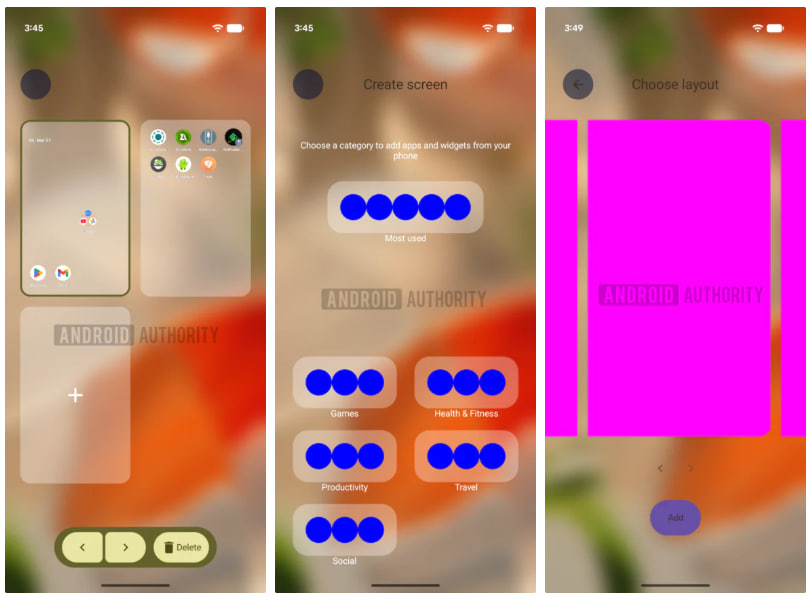
Organizer is designed to let users create, delete, and rearrange home screen panels from a single interface. Right now, reorganizing Pixel layout requires you to move icons one by one, clear pages manually, and hope it all lines up the way you want.

Android 17 Organizer feature flips that process, as per the AndroidAuthority report. When creating a page, the system can automatically populate it using categories like Most Used, Games, Productivity, or Travel.

These categories appear to be pulled from Play Store data, which makes the suggestions more contextual than random. You also get layout choices, so the structure is not locked.

The leaked interface shows placeholder visuals, blue circles and pink rectangles standing in for actual app icons and widgets. That is developer-stage material, not something close to rollout, even the “Organizer” name feels temporary.

Android 17 Organizer Feature

Image – Android Authority

For years, Google kept the Pixel Launcher minimal. Android 17 shows Google is starting to respond. Beta updates have already introduced smaller but meaningful tweaks and if Organizer ships it would be the first real step toward structural control.

Meanwhile, Samsung has offered deep home screen control through One UI for multiple generations. Rearranging pages, managing layouts, and organizing apps into structured panels, this has been standard there for a while.

The post Android 17 ‘Organizer’ feature brings Samsung-level control to Pixel appeared first on Sammy Fans.

Galaxy S26 Battery Test: Exynos vs Snapdragon – You can’t ignore the difference

Samsung is selling Galaxy S26 and S26 Plus with Exynos and Snapdragon chips, depending on the country. A new test reveals a major gap in battery life of the Galaxy S26, and the difference in figures can’t be ignored.

A video posted on YouTube channel AndroidAddicts shows the battery test of the Galaxy S26 with Exynos and Snapdragon chips. The model Samsung is selling in the US and China turns out to be a battery beast with the same capacity.

Samsung Galaxy S26 ships with Snapdragon 8 Elite Gen 5 in the US, Canada, and China. Users in the rest of the world get Exynos 2600-powered phones. Exynos is technically superior, but the Snapdragon crushes it in practice.

The battery test video involves various stages and aspects. Majority of the test scenarios belong to everyday usage of different period such as photography, social media, and entertainment.

The test involved phone call, video recording at 4K 30fps, video encoding, navigation through Google Maps, video call, YouTube video streaming, 3D Mark gaming benchmark, TikTok, X, Amazon Prime Video, and Instagram.

The video displayed everything side-by-side, with the Exynos model dying mid-X operation. It didn’t participate in Amazon Prime Video and Instagram. The battery performance gap was a huge, nearly 28 percent.

  • Exynos – 6 hours and 48 minutes
  • Snapdragon – 9 hours and 26 minutes

The Snapdragon version offered a battery of 2 hours and 38 minutes more than the Exynos variant. All the factors were the same while testing, it’s just the difference due to the processors inside.

It raises serious concerns about Exynos-equipped Galaxy S26 and S26 Plus, when it comes to efficiency. A recent test showed that the Exynos chip requires more power than the Snapdragon used in the Galaxy S26 series.

Samsung Galaxy S26 Battery Test - Exynos vs Snapdragon

Source – Android Addicts (YouTube)

The post Galaxy S26 Battery Test: Exynos vs Snapdragon – You can’t ignore the difference appeared first on Sammy Fans.

When Galaxy S24 users may get another chance at One UI 8.5 Beta

Galaxy S24 lineup’s One UI 8.5 Beta slots exceeded the limit just the second day of opening. On March 26, Samsung launched the Beta Program, and only a limited number of users managed to confirm their seats for the testing phase.

On March 27, reports spread that One UI 8.5 Beta is no longer available for sign-ups on the Galaxy S24 series. It’s classic Samsung, and we’ve encountered a similar pattern in the previous Beta testing activities on Galaxy devices.

Galaxy S24 users, upon enrollment, received the first Beta update. Samsung is expected to start the development of the second Beta. It will be based on feedback from Beta participants as well as internal assessment.

Samsung’s software rollout has become unpredictable. That said, it’s tough to assume when the next update could drop for your devices. However, the rollout of Beta 2 is important for non-Beta testers who are interested in joining.

One UI 8.5 Beta 2 rollout for the Galaxy S24 series will bring more slots. Simply put, users who were not able to confirm their enrollment initially will have another chance to do so, with the process remaining similar.

If you’re a seasoned One UI Beta Program tester, you may have deliberately skipped the first Beta on your device. It’s always recommended to jump directly to Beta 2, especially if you are going to have it on your daily driver.

Beta 2 could come in the first or second week of April 2026. Galaxy S25 users may receive the April 2026 security patch and then the One UI 8.5 Stable. Beta may continue on the 2024 flagship phones for roughly a month.

One UI 8.5 Beta Program For Galaxy S24

Image via Reddit

The post When Galaxy S24 users may get another chance at One UI 8.5 Beta appeared first on Sammy Fans.

We may see One UI 8.5 Beta April expansion to these Samsung devices

Samsung officially confirmed One UI 8.5 Beta will expand to even more Galaxy devices in April 2026. With the 2025 and 2024 flagship models already joined, the next wave may add phones, foldables, and tablets from 2023.

Starting with Galaxy S25 series, Samsung’s One UI 8.5 Beta Program landed on the Z Fold 7, Z Flip 7, and S24 series. The company surprised with the expansion to the Z Fold 6, Z Flip 6, Tab S11 series, along with the S25 FE and S24 FE.

Now, Samsung’s S23 series, Z Fold 5, and Z Flip 5 look likely next. The company may also invite select mid-range and budget phones. It could include the Galaxy A36 and A56 as well as the recently launched A57 and A37.

One UI 8.5 Beta may expand to these Samsung devices

  • Galaxy S23, S23+ and S23 Ultra (probably the S23 FE too)
  • Galaxy Z Fold 5 and Z Flip 5
  • Galaxy A56 and A36
  • Galaxy A57 and A37 (less likely)
  • Galaxy Tab S10 Plus and Tab S10 Ultra

Galaxy S23 series, Z Fold 5, and Z Flip 5 were released with Android 13 preinstalled. The phones are eligible for four years of major updates, with Android 16 being the third. One UI 8.5 will arrive before the final Android 17 upgrade.

One UI 8.5 Stable Update

Samsung started rolling out One UI 8.5 with the Galaxy S26 series. The Galaxy S25 series has also received eight Beta updates so far. Last year’s flagships are still running the Beta build of a software that already made its debut.

Galaxy S25 series may not start April with the One UI 8.5 update. Users of the flagship phones may receive the April patch before jumping to the new One UI version. Well, we can’t deny the possibility of a stable rollout in April itself.

The post We may see One UI 8.5 Beta April expansion to these Samsung devices appeared first on Sammy Fans.
Samsung QuantumBlack display tech kills reflections, boosts durability

Samsung Display is putting a clear name behind its next push in QD-OLED innovation: QuantumBlack. The focus is simple: cut reflections, strengthen the panel, and preserve true black performance in real-world conditions.

The Samsung QuantumBlack display technology reduces light reflectance by 20 percent compared to its previous film, which targets one of QD-OLED’s biggest pain points.

While self-emissive panels can shut off pixels entirely to deliver true black, ambient light often interferes. Reflections wash out dark scenes, especially in bright rooms. QuantumBlack is designed to address exactly that.

Samsung Display plans to apply this new film across all QD-OLED monitor products launching this year. With trademark registration already completed, signalling a broader push to standardize low-reflection performance as a core selling point.

QuantumBlack increases panel surface hardness from 2H to 3H. A 3H rating indicates the panel can withstand contact from a fingernail without visible damage, which is a practical upgrade for long-term usage.

Samsung QuantumBlack QD-OLED Monitors

In line with QuantumBlack’s development, global vendors are prepping to bring monitors featuring this new technology. Notably, ASUS has launched its ‘Black Shield,’ Gigabyte ‘Obsidian Shield,’ and MSI ‘Dark Armor.’

Samsung, citing Omdia report, says that the global self-emissive monitor display market is expected to expand from 3.4 million units in 2025 to 7.6 million units by 2030. Samsung Display currently holds a dominant 75 percent market share in 2025.

Brad Jung, Vice President at Samsung Display, describes QuantumBlack as a premium solution. He points to its ability to reinforce QD-OLED’s deep black advantage while improving durability, ultimately delivering a more immersive experience.

The post Samsung QuantumBlack display tech kills reflections, boosts durability appeared first on Sammy Fans.

Samsung Galaxy A55 and A53 grab March 2026 security update

Samsung starts rolling out a new software update to the Galaxy A55 (Quantum 6) and Galaxy A53 in South Korea, bringing the March 2026 security patches.

The March 2026 update is currently available for Korean users of the Quantum 6 (Galaxy A55) and Galaxy A53. It will be provided to Global users in the coming days. Samsung is also preparing the One UI 8.5 upgrade for smartphone users.

Samsung sold the Galaxy A55 as Quantum 6 in South Korea. The March patch comes with PDA build versions A556SKSS6CZC1 and A536NKSSFGZC2. It brings 67 fixes, including 60 from Google for Android and 7 from Samsung for One UI.

The devices are currently running Android 16-based One UI 8.0. Samsung also has the One UI 8.5 update prepared for plenty of devices, including the A55. It will elevate the user experience and apply elegant design changes.

Galaxy A53 and A55 are one of the most sold Samsung phones in their launch years. The phones brought incredible specs and features at affordable prices. Samsung is now continuing regular software support as promised at launch.

The South Korean tech giant confirmed a Beta Program expansion. A major expansion took place yesterday in various markets. The next wave is scheduled for April, but there’s no confirmation for the Galaxy A55 smartphone.

Getting the latest Samsung software isn’t tricky on Galaxy devices. Simply, open System Settings and Software update page. Hit Download and install to let your phone fetch if the firmware is available, followed by Install now.

Samsung Galaxy A55 March 2026 Update

The post Samsung Galaxy A55 and A53 grab March 2026 security update appeared first on Sammy Fans.

Samsung launches Galaxy Book 6 AI laptops in India – Availability, Price and Offers

Samsung officially launched its 2026 lineup of AI laptops in India, the Galaxy Book 6. The lineup introduces three variants in two sizes and different configurations. Samsung also revealed the price and offers alongside availability.

Availability, Price and Offers

Galaxy Book 6 Pro and Ultra will be available in Gray, while Galaxy Book 6 will be available in Gray and Silver through Samsung.com, Exclusive Stores, top retail chains, and across online platforms, as well as select Samsung authorized retail stores.

Galaxy Book 6

Configuration

  • 14″/16″ | Ultra 7/5 | 16GB/32GB | 512GB/1TB

Starting offer price

  • INR 1,27,990

Galaxy Book 6 Pro

Configuration

  • 14″/16″ | Ultra X7/7/5 | 16GB/32GB | 512GB/1TB

Starting offer price

  • INR 1,78,990

Galaxy Book 6 Ultra

Configuration

  • 16″ Ultra X7/7 | 32GB | 1TB

Starting offer price

  • INR 2,42,990

Samsung announced shoppers can avail up to 24-month zero-interest EMI on the new laptops, enabling them to buy:

  • Galaxy Book6 Ultra at INR 10125/month
  • Galaxy Book6 Pro at INR 7458/month
  • Galaxy Book6 at just INR 5333/month

Instead, interested consumers can also score a cashback of up to INR 5000 on Pro and Ultra models and up to INR 2000 on the standard model. Students can avail an additional benefit of up to 10%.

“We are thrilled to introduce the Galaxy Book6 series, which combines unparalleled speed and power with dependable AI that simplifies workflows. With an all-new cooling architecture, up to 30 hours of battery life, and a stellar multimedia experience, the Galaxy Book6 is engineered for power users who demand a workhorse that integrates cutting-edge hardware and software in an eye-catching durable design for enhanced creativity and streamlined efficiency,” said Raju Pullan, SVP, MX Business, Samsung India.

The post Samsung launches Galaxy Book 6 AI laptops in India – Availability, Price and Offers appeared first on Sammy Fans.

Snapdragon 8 Elite Gen 5 crushes Galaxy S26’s Exynos 2600 in efficiency

Samsung’s Exynos 2600 is technologically more advanced than its Snapdragon counterpart, but an independent test reveals a significant efficiency gap.

The company had a point to prove with its first 2nm GAA chip, but the numbers raise more questions than confidence. Exynos 2600 should have been a turning point; a fresh node, a new transistor design, and a reset for the silicon division.

The headline problem is power.

The Exynos 2600 spikes to 30W under load. That is not just high for a smartphone chip, it is borderline laptop territory. In the same test, the Snapdragon 8 Elite Gen 5 stays around 21W, as tested by TechStation365.

It is around 40 percent higher power draw for nearly identical multi-core output. Performance alone does not save this chip. In single-core, the Exynos 2600 trails by over 10 percent.

Multi-core is close, but that comes at a steep cost. The efficiency equation is broken; you are burning significantly more power just to keep pace.

Snapdragon 8 Elite Gen 5 vs Exynos 2600 Comparison

The decompression test makes it worse.

The Exynos 2600 needs 63 percent more power to complete the same task, while also taking slightly longer. The Snapdragon chip, meanwhile, stays under 5W. This points to a deeper issue with Samsung’s 2nm GAA process.

GAA was supposed to fix leakage and improve efficiency at lower voltages. But first-generation nodes are rarely perfect, and this looks like a classic case of ambition outpacing execution.

This is not the first time Exynos has struggled, but it is more concerning this time. The company had a clean slate with 2nm GAA. If the first showing looks like this, it suggests the road to maturity will take longer than expected.

The post Snapdragon 8 Elite Gen 5 crushes Galaxy S26’s Exynos 2600 in efficiency appeared first on Sammy Fans.
Here’s how Samsung Galaxy S26 Ultra makes every shot perfect with AI

Samsung makes travel photography easier and more creative with the Galaxy S26 Ultra. Taking perfect pictures is not always as simple as it sometimes the timing is off, things are missing, or small mistakes happen. But the Galaxy S26 Ultra uses AI tools to fix photos, improve them, and even turn them into art.

The Korean Tech giant tested the Galaxy S26 Ultra’s AI features in San Francisco, a city full of famous streets, cafés, and landmarks. With these AI tools, you can edit photos by simply typing what you want.

You can combine photos, change the lighting, or transform regular pictures into creative styles. This makes travel photography easy, even for people who are not professional photographers. Below you can check how you can get perfect photos.

Fix and Restore with Photo Assist

Photo Assist helps fix small mistakes in photos. For example, if you take a picture of a cake that is already partly eaten, you can type “Make it look uneaten,” and the AI will restore it. Photo Assist can also combine images, like adding a tram to a street scene, so it looks like the perfect moment was captured.

Samsung Galaxy S26 Ultra Photo Assit

Image via Samsung

Change Time of Day

Photo Assist can also change the time of day in your pictures. You can type prompts like “Make it sunset” or “Turn it into night,” and the AI will adjust the colors, lighting, and sky. This way, you can create the scene you imagined without waiting for perfect lighting.

Samsung Galaxy S26 Ultra Photo Assit

Image via Samsung

Turn Photos into Art with Creative Studio

Creative Studio lets you make photos look like art. For example, a photo of sea lions at Pier 39 can be transformed into an oil painting-style image. The AI studies colors and textures to create a fresh, artistic version. This helps make ordinary travel photos feel unique and creative.

Samsung Galaxy S26 Ultra Creative Studio feature

Image via Samsung

Make Custom Stickers

You can also create custom stickers from your photos. Like, sea lions can become fun stickers that can be used in messaging apps, notes, or social media. You can pick different themes to match your style to make it easier to share memories in a fun and personal way.

Samsung Galaxy S26 Ultra custom stickers

Image via Samsung

Samsung’s Galaxy S26 Ultra makes travel photography simple and creative. From fixing mistakes and combining scenes to turning photos into art and stickers, its AI tools help you make every memory look amazing. Try out these features now.

Google Search Top Stories Preferred Source

The post Here’s how Samsung Galaxy S26 Ultra makes every shot perfect with AI appeared first on Sammy Fans.

Apple’s Siri to get smarter with third-party AI in iOS 27

Apple may soon make a big change to how Siri works on iPhones. In the future iOS 27 update, Siri might be opened up to third-party AI tools. This means Siri will no longer be limited to Apple’s own system and could become much smarter and more useful.

Right now, Siri mostly handles requests on its own. For more complex questions, it sometimes sends them to ChatGPT. But this setup is still limited. Apple controls what Siri can and cannot do, and other AI tools do not have full access.

But now, Apple is reportedly working on an Extensions system. This would allow users to choose which AI they want Siri to use. Like, you could pick Google Gemini or Claude instead of relying only on Apple’s AI.

Apple Intelligence Siri

This is a big opportunity for Google. Its Gemini AI is already used in many apps and services, especially on Android. It can understand text, images, and even provide real-time information from the web. If it connects deeply with Siri, iPhones could become much more powerful.

Apple always focuses on privacy and keeping user data safe. But it has also slowed down Siri’s growth compared to other AI assistants. Now, Apple seems ready to change its approach by letting other companies handle more advanced tasks.

For users, this could mean a better experience. You might get faster answers, smarter responses, and more useful features. Siri could turn into a smart gateway that connects you to the best AI tools available, which makes your iPhone easier and more helpful to use every day.

Google Search Top Stories Preferred Source

The post Apple’s Siri to get smarter with third-party AI in iOS 27 appeared first on Sammy Fans.
Samsung Galaxy A53 March 2026 security update rolling out

Samsung has started releasing a new update with the March 2026 security patch for the Galaxy A53. This update improves the device’s security and stability. It fixes many problems found in the earlier version, providing a smoother experience.

March 2026 security update for Samsung Galaxy A53 comes with firmware version A536NKSSFGZC2 and is currently available for users in South Korea. Samsung is rolling it out gradually, so it may take a few days to reach other countries.

The latest security update is mainly about fixing security issues. It solves around 65 issues that were present in the previous software. These fixes are important because they protect the phone from bugs, threats, and possible attacks. With this update, the Galaxy A53 becomes more secure and reliable for everyday use.

Samsung Galaxy A33 and A53

Source – Samsung

Along with this update, Samsung is also preparing to expand the One UI 8.5 update to more Galaxy devices. This new version will be based on Android 16 and is expected to bring a cleaner design and better features. It was first introduced as a beta version for newer phones, and the stable version is about to start expanding. The Galaxy A53 is likely to receive it in the coming weeks or months.

To check for the update, go to Settings on your phone, then tap on Software update, and select Download and install. If the update is available, you can easily install it and enjoy improved security and better performance.

Google Search Top Stories Preferred Source

The post Samsung Galaxy A53 March 2026 security update rolling out appeared first on Sammy Fans.
T-Mobile updates device return policy with higher restocking fees

T-Mobile customers in the United States will now have to pay slightly more if they decide to return their smartphones, including popular Samsung Galaxy devices. The carrier has quietly increased its restocking fees across all device categories, adding an extra $5 compared to previous rates.

As one of the largest wireless providers in the country, T-Mobile offers customers a return window for devices they no longer wish to keep. However, like other major carriers, it applies a restocking fee to discourage unnecessary returns and to offset logistical costs.

Under the updated policy, devices priced at $600 or more, mainly flagship models such as the Samsung Galaxy S26 or the latest foldable phones, will now require a $75 restocking fee. Previously, this fee was $70.

Mid-range devices priced between $300 and $599 will now have a $50 fee, up from $45. While budget devices under $300 will cost $25 to return, compared to the earlier $20.

T-Mobile

Although the increase is relatively small, it still represents an additional cost for customers who may change their minds after purchasing a device. Restocking fees are to discourage returns based on minor preferences.

Despite the fee, customers are still eligible to receive a refund for the device, minus the restocking charge. This policy ensures that while consumers have flexibility, the carrier is compensated for handling returned products.

Google Search Top Stories Preferred Source

The post T-Mobile updates device return policy with higher restocking fees appeared first on Sammy Fans.
Samsung’s One UI 9 to add smarter accessibility tools for Galaxy devices

Samsung is already working on One UI 9, the next update for Galaxy phones, and early leaks show it will bring improvements for people who need extra help using their devices. The company is testing the update internally, and some new features have been spotted in the code.

The latest codes spotted by Android Authority reveal that One UI 9 will bring exciting changes to the accessibility features. One of which is the keyboard support. Users will be able to control the on-screen mouse with a keyboard more easily.

You can now adjust the cursor speed and even use the numeric keypad as extra controls. A new keyboard shortcut will also let you turn accessibility features on or off without touching your phone. It makes it simpler to use your device in the way that works best for you.

Also, Samsung is also making some existing features easier to find. Like, the option to change swipe gestures to single taps will now be at the top of the Interaction and Dexterity menu, instead of being hidden in the Assistant menu.

One UI 9 Replace Swipe with tap option

Image via Android Authority

One UI 9 reportedly includes the Text Spotlight feature, which makes text bigger and easier to read, is getting improvements too. You can change the size, colors, and other settings to make reading more comfortable.

These updates are part of a “What’s new” screen that will show One UI 9 users all the new accessibility options. While Android 17, which One UI 9 is based on, won’t be finalized until later this year, it’s clear Samsung is planning ahead for users of all abilities.

Even if some features are updates to old ones, these changes show Samsung wants to make Galaxy phones easier and more flexible for everyone. It’s exciting to see the company focusing on tools that help users navigate their devices in ways that suit them best. Stay tuned for more information.

The post Samsung’s One UI 9 to add smarter accessibility tools for Galaxy devices appeared first on Sammy Fans.

Samsung and BTS redefine the ARIRANG TOUR experience with Galaxy S26 Ultra

Samsung has partnered with BTS for their new “BTS WORLD TOUR ‘ARIRANG’.” The aim is to make concerts more fun and easy to enjoy for fans. This partnership uses technology to improve the live concert experience. 

The main highlight of this partnership is the Samsung Galaxy S26 Ultra. This phone has a powerful camera that can take clear photos and videos during concerts. Fans can capture their favorite moments without missing anything. They can also quickly share these memories with friends and family.

Samsung wants to bring fans closer to BTS. BTS and their fans, known as ARMY, already share a strong connection through music. Samsung is helping make this bond even stronger using its Galaxy technology. This makes the concert experience more personal and meaningful.

Samsung Galaxy S26 Ultra BTS world tour

Image via Samsung

The tour will begin in Goyang and then travel to many cities around the world. It will continue until 2027, which gives fans in different countries a chance to attend. Along with the concerts, there will also be special events – “BTS THE CITY.” These events add more excitement to the tour.

The first “BTS THE CITY” event will take place in Seoul. Fans can join fun activities, try Galaxy features, and create stickers using AI tools. They can also win special prizes and limited-edition merchandise. 

Google Search Top Stories Preferred Source

The post Samsung and BTS redefine the ARIRANG TOUR experience with Galaxy S26 Ultra appeared first on Sammy Fans.

One UI 8.5 Beta slots filled quickly for Galaxy S24 users in India

Samsung recently started expanding the One UI 8.5 beta program to more Galaxy devices, including the Galaxy S24 series. This beta lets users try new features and changes before the official update is released to everyone. But there’s bad news for Galaxy S24 users who haven’t participated in the beta update yet. 

According to the information, the One UI 8.5 Beta program for the Galaxy S24 series seems to have filled up very quickly in India. Many users reported on Samsung’s Community forum that they were unable to join the beta program through the Samsung Members app.

When users tried to register, they saw a message saying the program had already reached its participant limit. Multiple users faced the same issue, which shows that all available slots were filled quickly.

One UI 8.5 Beta Program For Galaxy S24

Image via Reddit

Samsung has not shared how many people could join the beta, but the fast response clearly shows strong interest from users. Now, more Galaxy S24 users in India are not able to join the beta.

One UI 8.5 beta was released just recently, and within less than a day, it became fully available in India. This means new users cannot join the program right now. Those who missed it will need to wait and see if Samsung opens more slots or releases the stable version in the coming months.

Until then, users can expect the official update after proper testing is completed. However, Samsung confirmed One UI 8.5 Beta expansion will continue in April 2026 too. Stay tuned for more information.

The post One UI 8.5 Beta slots filled quickly for Galaxy S24 users in India appeared first on Sammy Fans.
Avoid latest Camera Assistant on Samsung Galaxy S26 – Here’s why

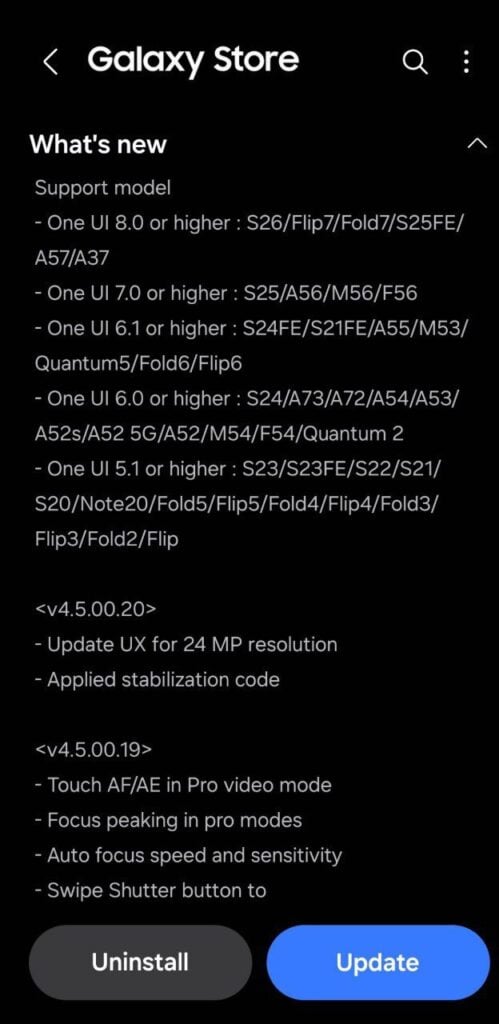
Samsung recently released a new Camera Assistant update with version 4.5.00.20, but Galaxy S26 users should be careful. The update brings some improvements, but it also has a frustrating bug.

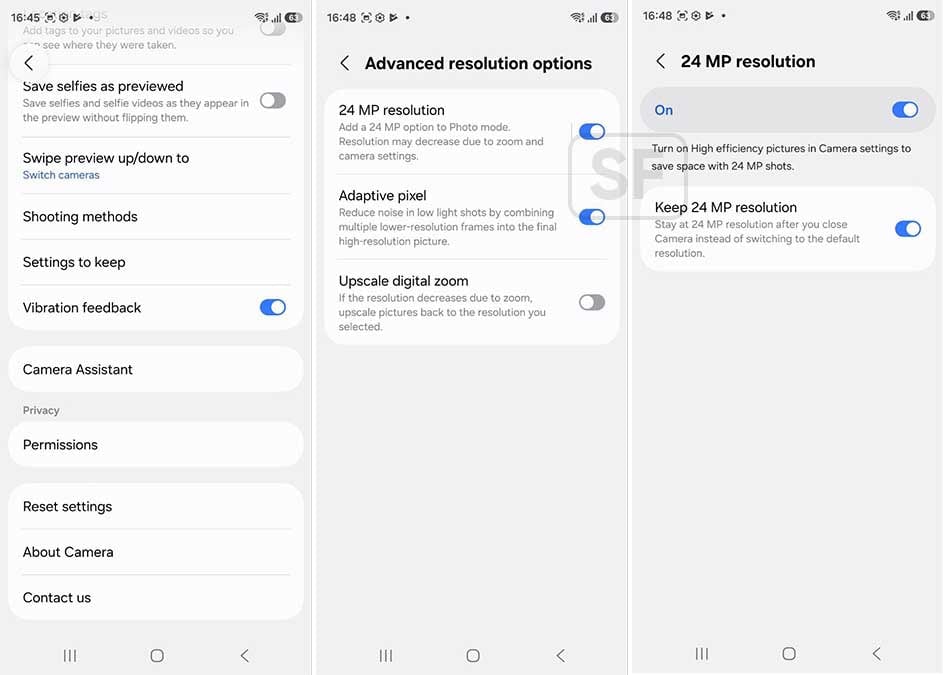
The main change in this update is the 24MP photo option. Before, it was hidden in the advanced settings, so many people didn’t notice it. Now, Samsung has moved it to the main settings screen. This makes it easier and faster to switch to 24MP mode without going through multiple menus.

The 24MP mode gives better photo detail than the regular 12MP mode but avoids the problems of very high-resolution photos. Also, the update is reported to improve camera stabilization, helping you take clearer photos even if your hands shake slightly.

However, there’s a big issue with this update. Many Galaxy S26 users report (via @Wvisioncreation) that switching between 12MP and 24MP doesn’t work properly. After switching away from 24MP, the camera sometimes won’t go back unless you wait, try again, or restart your phone. This bug keeps repeating, which can be very annoying for anyone who likes using both modes.

Samsung Camera Assistant 24MP update

While the update makes the 24MP option easier to use and improves stabilization, the bug reduces its usefulness. Many users are frustrated because updates are supposed to fix problems, not create new ones.

For now, Galaxy S26 owners might want to avoid updating to version 4.5.00.20 until Samsung releases a fix. It’s always good to check user reports before installing updates, mainly when a new feature comes with bugs.

The update improves 24MP access and camera stability, but the switching bug makes it less reliable. Galaxy S26 users should wait for a more stable version before updating. Stay tuned for more information.

Google Search Top Stories Preferred Source

The post Avoid latest Camera Assistant on Samsung Galaxy S26 – Here’s why appeared first on Sammy Fans.
No One UI 8.5 in April? Galaxy S25 update roadmap takes unexpected turn

It turns out that Samsung has no plans to roll out the Galaxy S25 family’s One UI 8.5 update in April. This isn’t an official confirmation or a leak, but a fact supported by evidence, suggesting a delay in the major update rollout.

Samsung enthusiast Alfaturk discovered a potential April 2026 security update for the Galaxy S25 series, which signals One UI 8.5 may not arrive next. The major release may most likely come after another security update.

On March 26, Samsung released the 8th One UI 8.5 Beta update for the Galaxy S25 series. So far, the Samsung server hasn’t listed any new Beta build. However, the Stable build may be kept on hold from public distribution.

One UI 8.5 Beta was first released in December 2025. Samsung has rolled out eight Beta builds so far, and the next could be Stable. However, it could only come after the users install at least one more One UI 8-based software.

Samsung Galaxy S25 April 2026 Security Update

This is just an assumption, but supported by solid evidence. If a build exists, it is for public distribution, not just server testing. Let’s see how things unfold in the update story of Samsung’s Galaxy S25 series.


Samsung also recently opened the One UI 8.5 Beta Program for several users. It’s now available on Galaxy S25 series, Galaxy S24 series, Tab S11 series, Z Fold 7, Z Flip 7, Z Fold 6, Z Flip 6, Galaxy S25 FE, and Galaxy S24 FE.

April will mark the opening of the One UI 8.5 Beta Program for even more Galaxy users. While an official confirmation is awaited, Samsung is expected to expand the Beta to Galaxy S23 series, Galaxy A56, and Galaxy A36 phones.

The post No One UI 8.5 in April? Galaxy S25 update roadmap takes unexpected turn appeared first on Sammy Fans.

Samsung Browser in One UI 9 testing ‘Smart shopping’ feature to find and apply coupons

One UI 9 may equip Samsung Browser with a smart shopping feature that will help you save money while shopping. Hidden inside code strings, the upcoming feature could change how Galaxy users hunt for deals.

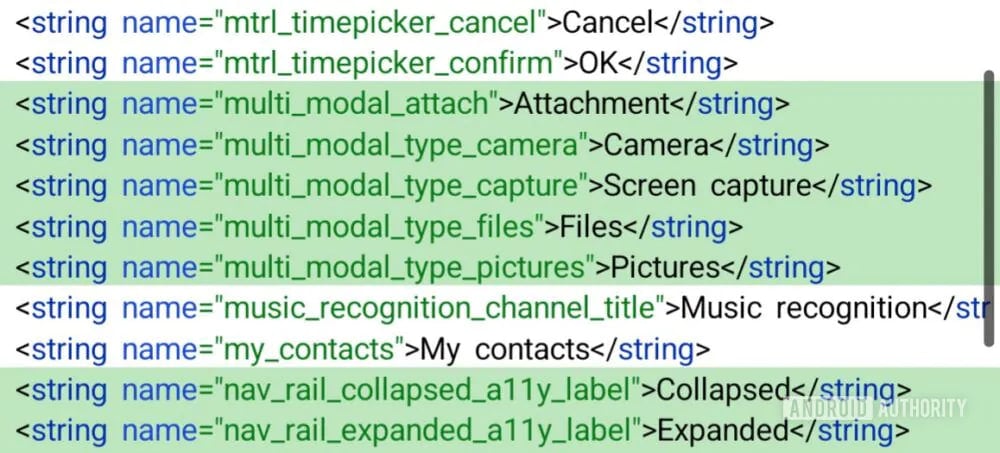
Code spotted in Samsung Browser v30.0.0.39, pulled from an early One UI 9 build, reveals a feature called “Smart shopping.” The browser detects coupon codes while you shop and nudges you to use them before checkout, via AndroidAuthority.

The strings indicate Samsung Browser can validate whether a coupon is still active, show its status, and offer a quick copy button. There is also an option to automatically apply deals at checkout that hints at deeper integration.

Coupons are generated using context like your current website, cart contents, country, time of visit, and even your IP address. That raises the obvious privacy question. Samsung appears aware of this trade-off; that said, Smart shopping is designed as an opt-in feature.

It was spotted during testing that the toggle for automatic coupon application is front and center, suggesting Samsung wants this to feel effortless once enabled. However, the feature seems limited to partner websites that opt into the service.

Even though this build is tied to One UI 9, the rollout may not be restricted to it. Samsung typically updates its browser through the Galaxy Store, which means older versions like One UI 8.5 could still get it.

The feature itself is not functional yet, but the direction is clear. Samsung Browser is stepping deeper into assisted shopping, convenience on one side, data awareness on the other.

The post Samsung Browser in One UI 9 testing ‘Smart shopping’ feature to find and apply coupons appeared first on Sammy Fans.
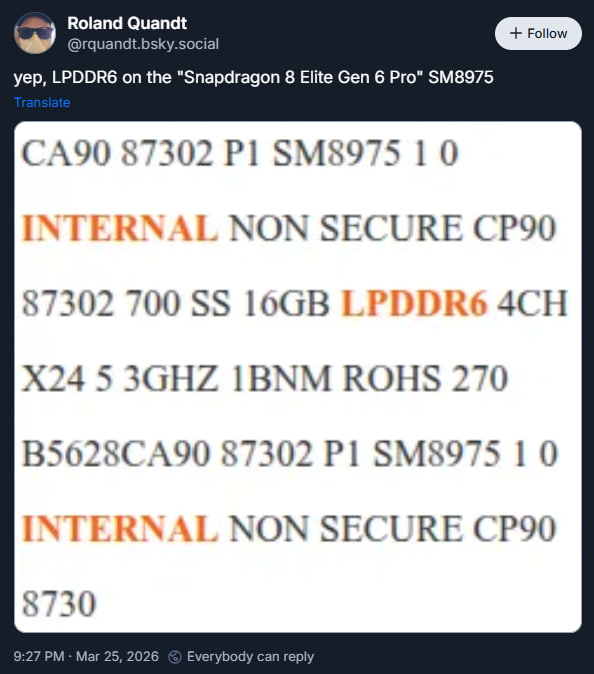
Galaxy S27 Ultra may feature LPDDR6 RAM with first Pro Snapdragon chip

Samsung may equip the Galaxy S27 Ultra with LPDDR6 RAM, thanks to the Snapdragon 8 Elite Gen 6 Pro chipset. A new leak sheds light on support for next-gen DRAM technology when paired with the upcoming Qualcomm chip.

LPDDR5X is the refined, high-performance memory standard, which delivers fast data rates, solid efficiency gains, and enough bandwidth to handle demanding tasks like gaming, 4K video, and multitasking.

LPDDR6 represents a more meaningful shift, bringing higher speeds, significantly improved bandwidth, and a redesigned sub-channel architecture. These changes allow data to move more efficiently across the system.

It also pushes efficiency further with smarter power management. Simply put, LPDDR5X feels like a polished peak of the current generation, while LPDDR6 is being built as the backbone for the next wave of mobile computing.

Advanced RAM may result in higher component costs. Prices of DRAM and NAND flash memory have already skyrocketed. The next wave of memory components may cost even more than the present iteration.

Samsung Galaxy S27 Ultra LPDDR6 RAM

Snapdragon 8 Elite Gen 6 Pro

Qualcomm is working on two variants of its next Snapdragon: standard and Pro. There will be a Snapdragon 8 Elite Gen 6 and a Snapdragon 8 Elite Gen 6 Pro. Samsung may utilize the latter in the S27 Ultra for peak performance.

It was recently revealed that the Snapdragon 8 Elite Gen 6 chips could feature a tri-cluster architecture with a 2+3+3 setup. That said, there could be two price cores, three performance cores, and three efficiency cores inside.

Samsung is also working on Exynos 2700 and even the Exynos 2800. Meanwhile, the Galaxy S27 Ultra may exclusively use a Qualcomm chip. The non-Ultra models may utilize even more Exynos than the S26 series does this year.

The post Galaxy S27 Ultra may feature LPDDR6 RAM with first Pro Snapdragon chip appeared first on Sammy Fans.

Samsung Bixby might get real upgrade in One UI 9 – Say goodbye to wake words?

Samsung is working on a new “raise-to-talk” gesture for activating Bixby in One UI 9. The company is currently Beta testing One UI 8.5 on various models and internally crafting Android 17-based One UI 9 for the Galaxy S26 series.

Virtual assistants were supposed to fade into the background. On Samsung phones, Bixby still feels like something you have to deliberately call upon, either with a wake word or a button press, as per the AndroidAuthority report.

Early signs are coming from a leaked build tied to Bixby version 4.1.10.2. That’s a jump from the current 4.0.51.0 found on devices like the Galaxy S26 running One UI 8.5.

The new build hints at a gesture-based trigger. Pick up your phone, bring it closer to your face, and Bixby may start listening. No wake word, no word; just intent inferred from movement.

Google already tested similar ideas. Not on phones, though; on wearables. The Pixel Watch 4 introduced a raise-to-talk gesture, letting users trigger Assistant by simply lifting their wrist and speaking. It works because the context is predictable.

Samsung One UI 9 Bixby Raise-to-Talk

Image source – Android Authority

You don’t randomly raise your wrist to your mouth, as phones are different. We pick them up constantly; to scroll, to check notifications, to unlock, which makes Samsung’s approach riskier.

If Bixby reacts every time the phone moves toward your face, you’re looking at a flood of unintended triggers. The leaked strings suggest Samsung is aware of this.

There are hints of proximity or volume thresholds, possibly requiring the device to detect both movement and a certain level of voice input before activating.

One UI 9 hasn’t even entered beta, and Samsung’s timeline is still fluid. A summer preview wouldn’t be surprising, especially as we move closer to the next foldable cycle, likely around the Galaxy Z Fold 8 generation.

The post Samsung Bixby might get real upgrade in One UI 9 – Say goodbye to wake words? appeared first on Sammy Fans.

24MP camera mode should come to old Galaxy devices

With the Galaxy S26 series, Samsung introduced a 24MP photo mode that captures higher-resolution photos, different from the default mode.

Despite offering the 12MP mode by default, users can enable 24MP mode in the main camera app. You just need to enter the camera assistant settings and select the advanced camera resolution. Once enabled, you can switch the resolution from the camera UI and capture images.

The new 24MP mode offers fast captures and high-quality images for users. With AI fusion, it captures 12MP multi-frame static to get the high-dynamic range, while simultaneously shooting a 50MP high-resolution frame to improve the quality.

Eventually, the AI analyzes these 12MP and 50MP shots and combines them into one picture with rich colors and texture details in a single image. That said, the output won’t mess up with the storage due to its resolution file size.

This mode lives in both worlds, for example, a 50MP photograph lacks vibrant color patterns due to complex HDR processing for higher-resolutions. However, cutting this resolution ceiling to 24MP meets the baseline requirements and helps to speed up the HDR process for sharper and more detailed captures.

Samsung Galaxy S26 Ultra 24MP Camera Photo Mode

Support for older Galaxy devices

So, the 24MP camera does have the potential to provide a better photography experience. That leaves many Galaxy S25, S24 series, and S23 series users asking whether the 24MP camera mode will reach their devices with One UI 8.5.

The 24MP camera mode is part of the camera assistant and not the stock camera app. Camera assistant is a Good Lock module, which is also supported by the previous generation of devices.

On the other hand, past S-series and Foldables bring high-end camera specs, some of these matches the latest releases. So, Samsung shouldn’t have any problem in offering the 24MP camera mode to old Galaxy devices.

Eventually, the technical answer to the user’s question is yes, Samsung can rollout 24MP to old Galaxy devices, but only an official confirmation could clear the clouds.

The post 24MP camera mode should come to old Galaxy devices appeared first on Sammy Fans.
What we know about One UI 9 right now: Small but useful changes – Fresh leaks from this week

Samsung has already started working on One UI 9, and early leaks from the past week are giving us a first real peek at what’s coming for your Galaxy smartphone. If you are a Sammy Fans reader who read about the initial rumors last month, One UI 9 feels like a minor upgrade rather than a complete overhaul. Just to share, One UI 9 is based on Android 17, and right now it’s in very early internal testing on the Galaxy S26 series.

Where are we right now?

Samsung first started testing the One UI 9 for the Galaxy S26 series. And someone even managed to install the very early (test) build on a real device and share screenshots. That means nothing is confirmed yet, many things could change or even be removed before it reaches a stable version.

According to leaks, Samsung is focusing on polishing the look instead of making everything brand new. The Now Bar gets a refresh. It now comes with a darker, almost black background. This makes the text much easier to read. When you play music, the song title appears clearly at the top. You will also see a smooth, wavy animation at the bottom of the pill-shaped bar. If you press and hold the Now Bar, you get quick options. You can remove it completely or go directly to its settings.

Samsung One UI 9 Now Bar Leak

Widgets look a bit different: Several widgets, such as the Browser, Weather, and Now Bar, now have sharper and more square corners. They are moving away from the soft, rounded corners we saw before. There’s a chance Samsung may add an option so you can choose the corner style you like and customize it yourself.

Samsung One UI 9 Widgets Leak

We also have some improvements in the Gallery App. When you pick multiple photos or videos, a new small box or highlight now shows clearly which ones you have selected. It’s a small change, but it will help you save time and avoid mistakes while organizing your pictures.

There are many small improvements. The volume and brightness sliders in the quick settings are now a bit bigger and easier to tap. The lock screen music player has brighter waveform graphics on the progress bar. It also adds a new quick option to cast your media to other devices, such as “This Phone” for easy sharing. Some settings menus have also been rearranged a little for better use.

New Features:

Two new things caught attention in the latest leaks:

1. Warranty & Care App
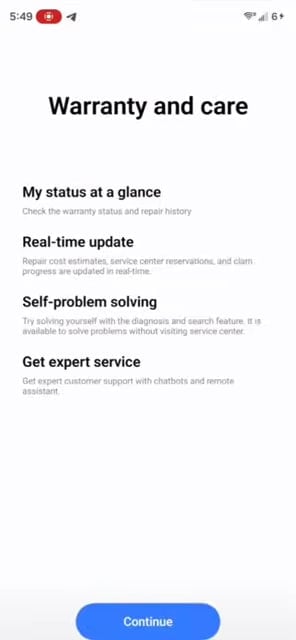
Samsung is making a simple app for all support needs. In this app, you can easily check your warranty, see repair costs, book a service appointment, and track your repair status, all in one place. Right now, this app is hidden in the early test version. You need special tools to open it, which means it is still being developed. If it comes out as planned, fixing or repairing your Galaxy phone could become much less stressful.

Samsung Warranty and Care app

Image via Android Authority

2. Better Samsung Browser
The phone’s built-in browser (also known as Internet) may get some useful upgrades. It could support multiple windows or a split-screen view. This will be especially useful on foldable phones because of the extra screen space.

There is also an “Ask AI” button powered by Perplexity AI. While you are on any webpage, you can tap this button to ask questions about the page, get quick summaries, or use information from your past browsing history. It makes research faster and easier without copying text or opening other apps.

In addition, the browser may get a compact bottom bar that automatically hides when you scroll, giving you a cleaner and wider view of the webpage.

Who will get One UI 9 and when?

There is still no official list of supported phones. But based on Samsung’s usual pattern, the newest foldable phones (Z Fold8 and Z Flip8) and the Galaxy S26 series should get it first. Older flagship phones like the S25 and S24 will likely receive the update later. Some mid-range A-series phones may also get it after the flagships. Note that the most advanced AI features might only work on newer Galaxy phones. We have seen the same pattern in the last few years.

Samsung Browser

From the leaks this week, One UI 9 is not bringing any big or flashy redesigns. Instead, it looks like a careful improvement. We are seeing better readability, easier ways to select photos in the Gallery, a new support app, and smarter features in the browser. The main goal seems to be making daily use smoother and more enjoyable.

Remember, all this information comes from very early test versions. Many things can still change. Samsung usually adds and removes features while developing the update. Once the public beta starts (possibly in May or June), we will know a lot more.

If you are excited about any part, like the new browser AI or the Warranty & Care app, feel free to DM on X @thesammyfans. I will keep watching for new leaks and share updates with you. What do you hope to see most in One UI 9?

The post What we know about One UI 9 right now: Small but useful changes – Fresh leaks from this week appeared first on Sammy Fans.

Samsung One UI 8.5 unlocks ‘desktop-like’ power with Linux GUI apps

Samsung One UI 8.5 is moving to an Android 16 QPR2 base, and that shift quietly changes what the built-in Linux Terminal can do. What used to feel like a limited shell environment is starting to resemble a stripped-down desktop layer.

Google laid the groundwork with Android 16, but the QPR2 version is where things get more usable, via AndroidAuthority. Samsung is carrying those changes forward, and early builds on Galaxy hardware already show the difference.

Graphical Interface support for Linux apps

The biggest shift is support for graphical Linux applications. Until now, the Terminal in earlier One UI builds was limited to command-line binaries. One UI 8.5 introduces a display icon inside the Terminal window.

Tapping it launches a graphical session, enabling GUI-based Linux apps to run directly on the device. Early testing confirms compatibility with tools like GIMP, the Chromium browser, and even lightweight games like Doom.

It signals that Android’s Linux container is now capable of handling a full display stack, not just shell-level operations. For developers and power users, it opens up workflows that were previously impractical on mobile.

Dynamic Storage and Memory Management

One UI 8 required users to manually allocate disk space to the Linux environment via a resize slider. One UI 8.5 adopts what is effectively storage ballooning.

The Linux container dynamically accesses available storage on the device instead of being capped by a predefined partition. In testing, the Terminal reported access to as much as 198GB of space.

Expanded Directory Permissions

With One UI 8.5, the Linux environment can access shared storage across the device. That includes directories like DCIM, Movies, Music, and Android. The change significantly improves interoperability between Android apps and Linux tools.

Have a Qualcomm phone? You can’t access it

Despite these improvements, access remains limited by hardware. The Linux Terminal continues to be restricted to devices running Exynos, MediaTek, or Google Tensor chipsets. Snapdragon-powered Galaxy devices are still excluded.

The post Samsung One UI 8.5 unlocks ‘desktop-like’ power with Linux GUI apps appeared first on Sammy Fans.

Samsung Galaxy S26 features new classical ringtones inspired by nature and nostalgia

With the Galaxy S26, Samsung is introducing new classical ringtones that lean heavily on orchestral roots, but with a modern twist in how they are produced and positioned.

The new Galaxy S26 classical ringtones are not random classical inserts; there is intent behind the selection. Bach’s Prélude from Cello Suite No. 1 is structured in a way that feels almost algorithmic.

Samsung connects that to natural patterns, things like waves or growth cycles. It sounds abstract, but once you hear it as a ringtone, it makes sense. It does not interrupt as aggressively as typical alert tones.

Handel’s Alla Hornpipe is more expressive, more fluid. Historically tied to royal performances on water, it carries motion in its rhythm. Samsung seems to be using that quality to create something that flows rather than cuts through silence.

“Classical music transcends time and space, resonating deeply with people,” said Myoung Woo Nam, Principal Sound Designer, Mobile eXperience (MX) Business at Samsung Electronics. “We hope more users can experience classical music naturally in daily life through Galaxy.”

Where things get interesting is the production side. These tracks were recorded at Abbey Road Studios, which is not just a flex; it actually changes the output. You get depth, layering, and clarity that typical smartphone tones just do not have.

The Royal Philharmonic Orchestra handled the performance, with recording and mixing split between London and Seoul. If you have used Samsung phones long enough, especially during the Anycall phase, these compositions will ring a bell.

Download the new classical ringtones from Samsung Newsroom.

The post Samsung Galaxy S26 features new classical ringtones inspired by nature and nostalgia appeared first on Sammy Fans.

Galaxy S25 users deserve better: One UI 8.5 Stable still missing

Samsung should reveal the Stable One UI 8.5 release timeline for the Galaxy S25 series. Users of last year’s flagship phones deserve better. They aren’t entirely sidelined, but the frustration is growing among the consumers.

Last December, Samsung released the One UI 8.5 Beta Program. Since then, Galaxy S25 users have been testing the Beta software. It’s an opportunity for users living in Beta-eligible markets, but others are not happy at all.

Beta Program continues to stretch

After the Galaxy S25 series, Samsung expanded the One UI 8.5 Beta Program to the Z Fold 7 and Z Flip 7. The company didn’t stop; yesterday’s expansion broadened Beta software’s reach to plenty of more Galaxy devices.

Samsung added Galaxy S24 series, S25 FE, S24 FE, Z Fold 6, Z Flip 6, and Tab S11 series to the Beta Program. In addition, the company announced another wave of Beta expansion, taking place in the month of April 2026.

Meanwhile, Samsung didn’t talk about the Stable One UI 8.5 release timeline for the Galaxy S25 series.

Could April finally end the wait?

Samsung recently delivered the 8th One UI 8.5 Beta to the S25 series. So far, there’s no information about the 9th Beta build in testing. It looks like the Beta Program is about to be closed, and the next release could be Stable.

March is about to end, making April a strong contender for the Stable One UI 8.5 update. Galaxy S25 users have also received the March security patch. Stable build is internally testing ahead of the official rollout.

It’s confirmed that the Galaxy S25 series will lead the charge of bringing the public version of One UI 8.5. The rollout timeline remains a mystery, but Samsung should soon come with an official confirmation on the matter.

The post Galaxy S25 users deserve better: One UI 8.5 Stable still missing appeared first on Sammy Fans.

Samsung Galaxy Buds 4 Pro drives massive sales boom

Samsung Galaxy Buds 4 series is a hit, with the sales of the Pro model skyrocketing. The massive sales prove that the company knows what premium buyers want.

According to the information, the sales of the Samsung Galaxy Buds 4 series have exceeded 100,000 units in South Korea. The company has flagged this milestone in just two weeks after the official release on March 11.

The lineup brings two models: Galaxy Buds 4 and Galaxy Buds 4 Pro. The report says that the higher-end model, the Buds4 Pro, drives the overall sales. The Pro model accounts for around 90 percent of total sales.

Following the launch, real user reviews and online reactions spread quickly, with daily sales reportedly exceeding 7,000 units in South Korea. This shows there’s a great enthusiasm for the company’s latest earbuds.

Galaxy Buds 4 introduces improved hardware and enhanced AI features. The devices also come with the highest level of Hi-Fi sound. The Pro model features a bezel-less woofer and a two-way speaker system, improving both bass and treble.

Thanks to the ergonomic design, the Buds 4 Pro delivers better comfort for long-term wear, earning positive feedback. The Head Gesture is also pushing the sales, thanks to its Bixby-powered features for answering/rejecting calls.

Galaxy S26 series is also selling well globally. Samsung shared sales data of South Korea and the US, while Europe and India are also trending.

Earlier this month, Samsung also launched the Galaxy Buds Custom Lab in South Korea. This platform lets visitors personalize their Galaxy Buds 4 and Buds 4 Pro in their own way, offering such a unique kind of experience.

Samsung Galaxy Buds 4 Custom Lab

The post Samsung Galaxy Buds 4 Pro drives massive sales boom appeared first on Sammy Fans.

Samsung users may soon limit contact access app-by-app thanks to Android 17

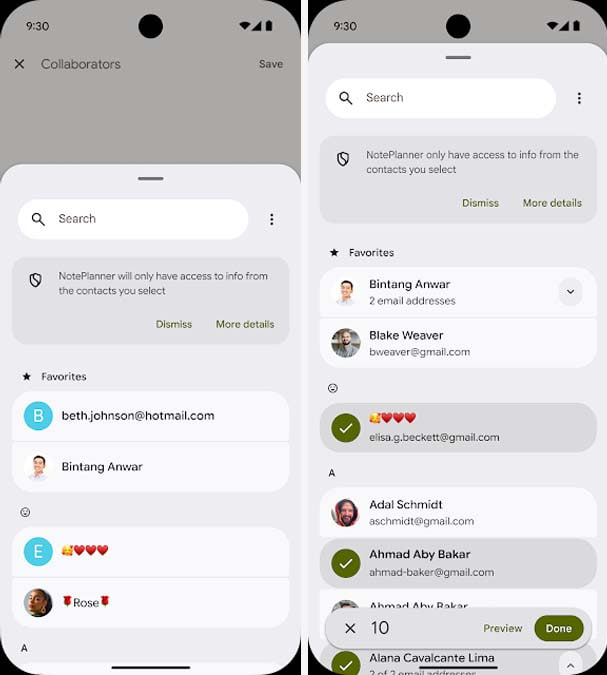
Samsung users could finally get the kind of contact privacy control that feels long overdue. With Android 17, Google is introducing a new Contact Picker system that could land on Samsung phones as part of One UI 9.

This replaces the READ_CONTACTS permission model. It changes how data is handed over, via AndroidDevelopers. Apps can request only specific details, like a phone number or an email address, rather than pulling the full contact card.

One detail that deserves attention is how access works behind the scenes. Android 17 uses something called a Session URI, which means access is temporary. An app gets what it needs for that moment, then the permission fades away.

Samsung users will appreciate how this ties into existing features. The new picker works across Private Space, Cloned Profiles, and work profiles. You can pull contacts from different environments without exposing everything across the board.

Android 17 Contact Picker

Performance also gets a boost. Instead of apps making repeated requests for individual contacts, the system bundles everything into a single, efficient query.

Backward compatibility is also handled smartly. Older apps using legacy contact APIs will automatically get routed through this new system on Android 17 devices, though developers will need updates to unlock its full potential.

For Samsung users, this is more than just another Android update. It signals a deeper shift toward user-first privacy. When One UI 9 arrives, Galaxy devices could offer one of the most refined permission systems in the Android ecosystem.

If this lands as expected with One UI 9, Galaxy devices could quietly lead the way in practical Android privacy.

The post Samsung users may soon limit contact access app-by-app thanks to Android 17 appeared first on Sammy Fans.

Early One UI 9 build reveals integrated repair and warranty app

Ahead of the One UI 8.5 expansion, Samsung started working on an Android 17-based One UI 9 update for Galaxy devices. Now, new information reveals that the company is developing a new app, Warranty and Care, in its upcoming One UI 9 update that could make phone repairs and support much easier for Galaxy users.

The app, Warranty and Care, has been recently spotted by Android Authority in an early version of One UI 9. It is designed to bring everything related to device support into one place, from checking your warranty to booking repairs.

It isn’t available in the regular app drawer yet and needs a special launcher to open, which shows it’s still being developed. Early screenshots reveal the main screen shows your phone’s warranty status and has a search bar for troubleshooting problems.

There’s also a shortcut for diagnostics that links to the Samsung Members app. It suggests the new app will work alongside existing tools. Warranty and Care also seems focused on simplifying repairs.

Samsung Warranty and Care app

Image via Android Authority

With this app, users might be able to estimate repair costs, book service center appointments, and track repair progress. There are also hints of self-service options, allowing users to run diagnostics, find fixes, or chat with support via chatbots or a remote assistant. Many of these features aren’t functional yet.

Since the app is still in development, the appearance in the final One UI 9 update is not confirmed yet. Even so, Warranty and Care shows Samsung is trying to make device support simpler and more convenient. Stay tuned for more information.

Google Search Top Stories Preferred Source

The post Early One UI 9 build reveals integrated repair and warranty app appeared first on Sammy Fans.

Every Samsung Galaxy device currently eligible for One UI 8.5 beta program

Samsung has expanded its One UI 8.5 Beta Program to allow more Galaxy users to try new features before the official stable release. This update is based on Android 16 and first introduced with the Galaxy S25 series. Over time, Samsung has widened the rollout to include more flagship smartphones, foldable devices, and tablets.

One UI 8.5 Beta is currently live on a bunch of Galaxy devices in limited countries. Eligible users can join the program through the Samsung Members app and explore new features, design changes, and performance improvements ahead of the stable rollout. However, since it is still a beta version, users may face bugs or minor issues.

One UI 8.5 Beta Eligible Galaxy Devices:

Below is the complete list of Samsung Galaxy devices currently eligible for the One UI 8.5 beta program:

Galaxy S Series

  • Galaxy S25
  • Galaxy S25 Plus
  • Galaxy S25 Ultra
  • Galaxy S24
  • Galaxy S24 Plus
  • Galaxy S24 Ultra
  • Galaxy S25 FE
  • Galaxy S24 FE

Galaxy Z Series

  • Galaxy Z Fold 7
  • Galaxy Z Fold 6
  • Galaxy Z Flip 7
  • Galaxy Z Flip 6

Galaxy Tab

  • Galaxy Tab S11
  • Galaxy Tab S11 Ultra

These devices’ users can currently access the One UI 8.5 beta program in select regions. Samsung has released the beta update for these devices and is still working on expansion. However, Samsung already introduced a stable version with the Galaxy S26 series.

This time, Samsung is taking a slightly different approach with the One UI 8.5 beta rollout. Even after launching the stable version with the latest devices, the company is still expanding the beta program to more devices.

Aside from this, Samsung has already confirmed that the One UI 8.5 Beta Program will continue to expand in April 2026. More Galaxy devices, possibly including some A-series phones, are expected to join soon.

With such a wide rollout, Samsung is ensuring that more users can test the software early and provide feedback. It helps the company deliver a more stable and refined final version. Stay tuned for more information.

Google Search Top Stories Preferred Source

The post Every Samsung Galaxy device currently eligible for One UI 8.5 beta program appeared first on Sammy Fans.

Google’s Android 17 Beta 3 released with platform stability – Check what’s new

Google has released Android 17 Beta 3 for Pixel devices almost a month after the previous update. This version reaches the Platform Stability milestone, which means that final APIs, app behaviors, and non-SDK lists are now set. Developers can now begin their final testing to make sure apps are fully compatible with the upcoming official release.

Android 17 Beta 3 is available for a wide range of Pixel devices, including Pixel 6, 6 Pro, 6a, 7, 7 Pro, 7a, Pixel Tablet, Pixel Fold, Pixel 8, 8 Pro, 8a, 9 series, 10 series, and the Android Emulator. Users can join the Android Beta Program to receive over-the-air (OTA) updates and provide feedback.

The latest beta update brings several user and developer-focused improvements. Bubbles are now fully enabled, allowing apps to support multitasking more easily. Users can also hide app labels on the home screen for a cleaner look, and the screen recording toolbar has been redesigned with a floating interface that does not appear in recorded videos.

Android 17

Image – Android 17

Moreover, camera and media features include capturing 14-bit RAW images, customizable photo picker grids, and new vendor-defined camera extensions for AI and “Super Resolution” modes. Apps can also identify camera types—built-in, external, or virtual.

Audio improvements include better support for Bluetooth LE hearing aids with separate routing for notifications and alarms. Also, there’s a new HE-AAC software encoder for high-quality low-bitrate audio.

Performance and privacy upgrades include reduced wakelocks for idle alarms, a secure system location button for session-only access, separate password visibility for touch and keyboard input, and Post-Quantum Cryptography hybrid APK signing.

It also includes widget support on external displays, interactive desktop PiP windows, VPN app exclusion settings, dynamic font updates, and Health Connect enhancements. You can check the full changelog of the Android 17 Beta 3 update here.

Google Search Top Stories Preferred Source

The post Google’s Android 17 Beta 3 released with platform stability – Check what’s new appeared first on Sammy Fans.

Apple 200MP camera leak hints at larger sensor design

Apple is planning a major camera upgrade for future iPhones. Reports say it may introduce a 200-megapixel camera, a big jump from the current 48MP cameras. This would help iPhones compete with rivals like Samsung, which has already released smartphones with very high-resolution cameras. 

A well-known tipster, Digital Chat Station, shared new details about Apple’s plans. Apple is reportedly testing a larger 1/1.12-inch sensor for the 200MP camera. A bigger sensor can capture more light and make photos look better, especially in low-light conditions. This is similar to the sensor in the Oppo Find X9 Ultra.

More megapixels don’t always mean better pictures. When too many pixels are packed into a small sensor, photos can look noisy, mainly at night or indoors. Apple has avoided this in the past by using smaller sensors with lower megapixels to focus on low-light performance.

Apple 200MP Camera Leak

Image via @Jukan05 (X)

The 200MP camera may be used mainly in the telephoto lens, which helps improve zoom and detail. Samsung balances high megapixels with lens quality very well in its flagship smartphones, and Apple is likely to do so.

Earlier, Morgan Stanley predicted the 200MP camera would come in 2028. But the latest reports suggest Apple may launch it as early as next year. Stay tuned for more information.

Google Search Top Stories Preferred Source

The post Apple 200MP camera leak hints at larger sensor design appeared first on Sammy Fans.

One UI 8.5 to offer advanced Quick Settings options via QuickStar

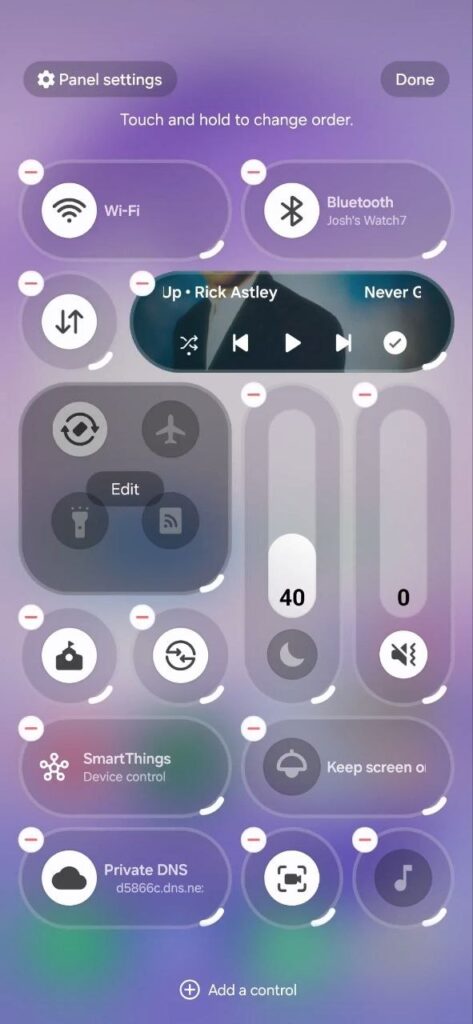
Samsung is making its Quick Settings panel much more flexible with a new QuickStar feature in One UI 8.5. Earlier, One UI 8.5 already improved Quick Settings by letting users add, remove, and rearrange toggles. With new options, users will have more control over the Quick Settings Panel.

Samsung QuickStar is a Good Lock module, and it will soon allow users to fully control how their Quick Settings look. According to the information via @thatjoshguy69, a new option of the QuickStar lets you change how many tiles appear on the screen and even adjust their size.

It means that if you want a cleaner and smaller layout, you can shrink tiles or make the media player more compact. If you prefer bigger buttons, you can do that too. This gives users more freedom to design the panel the way they like.

Samsung QuickStar One UI 8.5 feature

Image via @thatjoshguy69 (X)

But the feature is not officially released yet for One UI 8.5 devices. But it can already turned on manually. To do this, you need an app called SetEdit and a tool called Android Debug Bridge.

After installing SetEdit, you connect your phone to a computer and run a simple ADB command to give permission. The ABD command is:

adb shell pm grant by4a.setedit22 android.permission.WRITE_SECURE_SETTINGS

Then, inside SetEdit, you change certain Quick Settings (QS) values from 0 to 1. Once this is done, you can open Quick Settings, tap edit, and try the new options. However, there are a few downsides. The feature may have small visual bugs, and the extra options reset after restarting your phone. You will need to enable them again. Stay tuned for the official release.

The post One UI 8.5 to offer advanced Quick Settings options via QuickStar appeared first on Sammy Fans.

Samsung Wallet brings Digital Home Key feature to Canadian Galaxy users

Samsung has launched a new feature, Digital Home Key, in its Samsung Wallet in Canada. This feature lets people unlock their home doors using their Samsung Galaxy phones. It makes things easier because you don’t need to carry a physical key anymore.

Earlier, Samsung Wallet was mainly used for storing payment cards, IDs, tickets, and even car keys. Now, with Digital Home Key, users can also store and use their house keys digitally. This means you no longer need to carry a physical key to unlock your door.

The feature works with compatible smart locks that are set up using Samsung SmartThings and the Matter system. Once the lock is connected, users can easily add their home key to Samsung Wallet.

Samsung Wallet New feature

Image via Samsung

There are different ways to unlock the door. You can simply tap your phone using NFC, use hands-free unlocking with UWB when you are nearby, or even unlock the door remotely through the app. The technology behind this system is based on Aliro, developed by the Connectivity Standards Alliance.

Samsung is working with popular smart lock brands, including Aqara, Nuki, Schlage, and Xthings, to support this feature. For security, the digital keys are protected by Samsung Knox. If your phone is lost, you can remove access remotely. This new feature started rolling out in March 2026 in Canada and will expand to more regions soon.

Google Search Top Stories Preferred Source

The post Samsung Wallet brings Digital Home Key feature to Canadian Galaxy users appeared first on Sammy Fans.

❌