Reading view

Google expands UCP checkout to main search shopping results

Earlier this year, Google announced Universal Commerce Protocol (UCP), a protocol to allow AI-agents to buy directly from search. This went live only in Google’s AI Mode interface in February. But now, it seems to be rolling out in the main Google Search results where there are retailers that support UCP.

What it looks like. Brodie Clark posted a screenshot, which I can replicate, of the UCP-powered “Buy” button in the product detail overlay within Google Search, specifically for the retailer Wayfair. Here is his screenshot:

Clicking the Buy button will connect your Google checkout account with Wayfair and make the purchase without having to go to the Wayfair website to checkout.

About UCP. UCP establishes a shared language between AI agents and commerce systems, removing the need for custom integrations across agents or platforms.

  • UCP works with existing standards (e.g., Agent2Agent, Agent Payments Protocol, and Model Context Protocol).
  • Google co-developed it with partners including Shopify, Etsy, Wayfair, and Target.
  • More than 20 additional companies across retail and payments have already endorsed it.

Why we care. A lot of people are saying AI-agents are the future of the web, well, here is a clear sign of how agents can help retailers make money. While Wayfair did not get any traffic from Google for this query, and there is no click, 0 click-through rates from Google Search. There was an impression in Google Search that led to a purchase without any clicks to the web site.

This won’t necessarily stop all searchers for wanting to visit the site and learn more about the product before purchasing. Just like it doesn’t stop all buyers from going into a physical store to touch and feel the product before purchasing. But some may just click “Buy” and never visit your site.

Now that it is rolling out in the main search results, it is something to keep a closer eye on.

8 Android 17 features in development you’ll actually care about

Android 17 top features

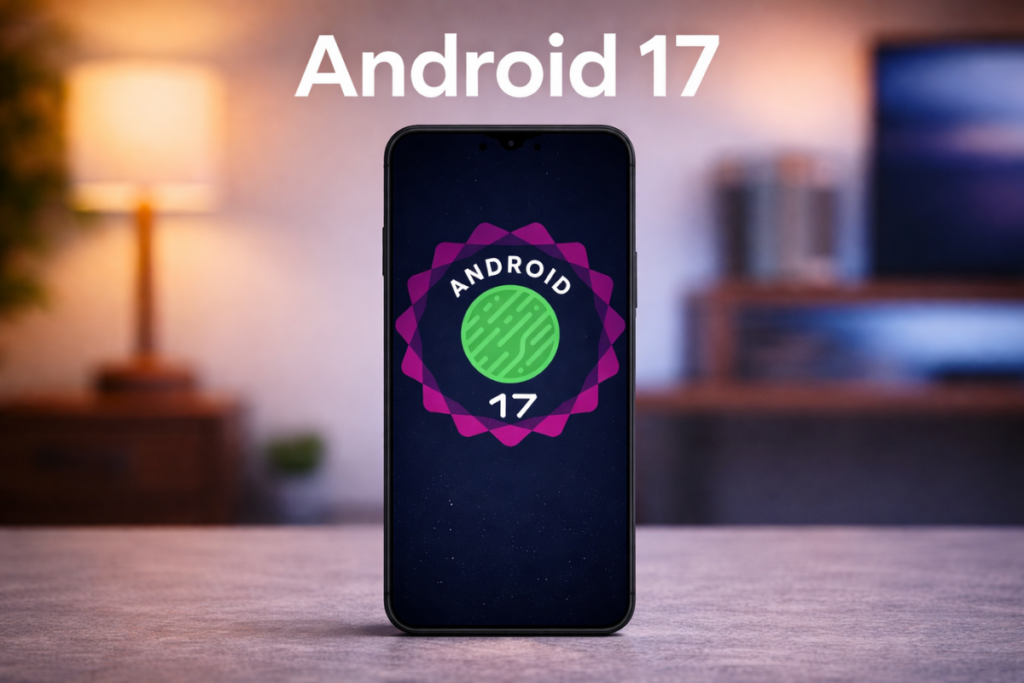
Google has already released four betas of Android 17, which are more than enough to show us what the upcoming version has in store. There are some new, exciting features, as well as many essential upgrades to existing ones, that make the software more useful and feature-rich.

With the stable Android 17 release approaching, here are the eight features or upgrades I can’t wait to try.

1. A native app lock, finally

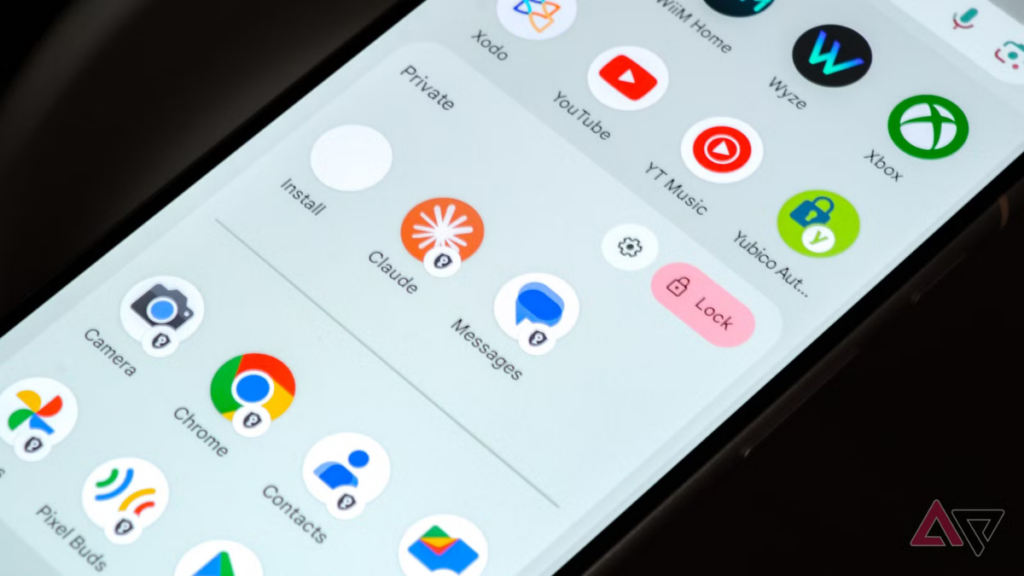
Google is finally bringing the ability to lock individual apps, a feature users have been requesting for years. You will be able to lock apps directly from the home screen by long-pressing an app icon and choosing the “App lock” option from the quick options menu.

You can set up app lock using a PIN, pattern, password, or biometrics like fingerprint or face unlock, without needing a third-party app. This feature on the Google Pixel works just like any other app lock, but keep in mind that notifications for a locked app, along with all associated shortcuts and widgets, will be hidden.

Google notes that certain AI features, such as Gemini’s screen automation, may still be able to interact with apps, depending on permissions. You’ll be notified if other apps have access to the app you’re locking.

Most Android skins, including One UI, already have this feature, but it’s a nice welcome addition for Google Pixels.

2. Floating app bubbles make multitasking easier

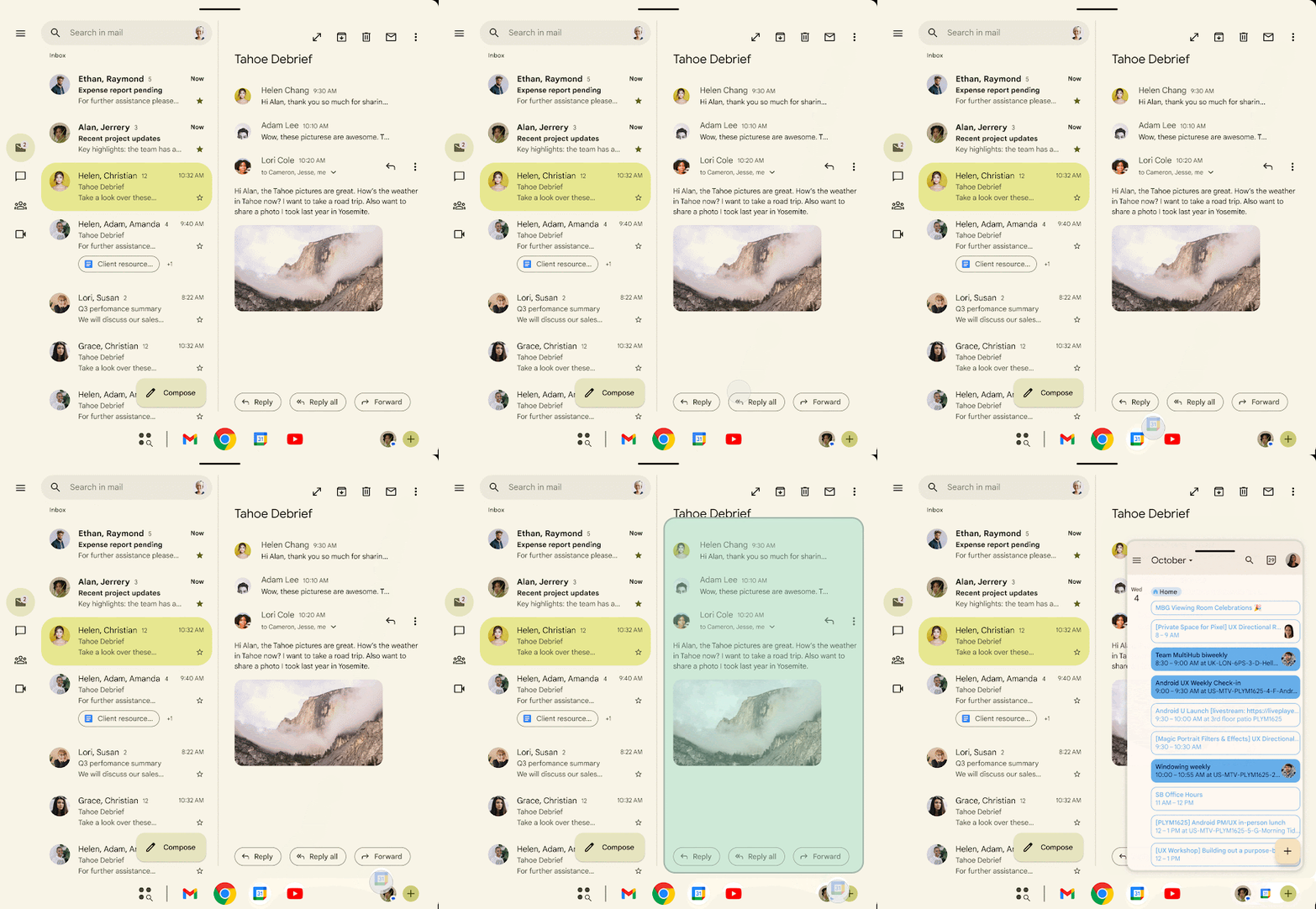
The bubble feature has been around for quite a few years now, but it was restricted to messaging and conversations. Android 17 takes it a major step forward by allowing users to turn any app into a floating bubble.

For example, if you’re watching a tutorial on YouTube and noting important steps on Google Keep, you’ll be able to convert Google Keep into a floating bubble for quicker access. When you tap the Keep bubble, the app will open in a small floating window, while the YouTube tutorial plays in full screen. This is better than switching between the two apps and using them in a split-screen view.

You will be able to close an app bubble by dragging it to the bottom of the screen.

Bubbles are more useful on large-screen devices like foldables or tablets where the user has more screen to work with than on a regular smartphone.

3. A more powerful screen recording with a preview screen

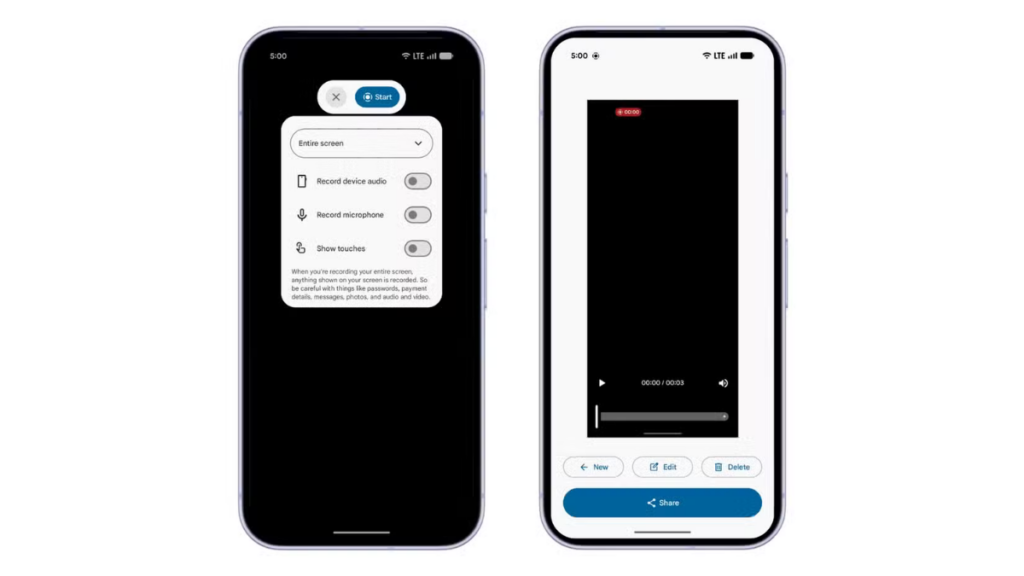
Android 17 will upgrade the screen recording experience with a more refined UI and a new preview screen. Currently, when you tap the screen recording tile in Quick Settings, a pop-up shows up asking about the recording area and audio options.

In Android 17, when you tap the screen recording tile, a new floating pill interface will show up, letting you choose what to record, whether to record device audio or microphone (or both), and whether to show touches. You can tap the status indicator in the status bar to bring back the floating pill UI.

screen recording in Android 17

Once you stop the recording, you’ll see a new preview screen where you can play, edit, delete, or share the clip instantly without opening the gallery.

4. Mandatory Large-Screen Adaptivity

Google enforces a stricter policy on app resizability and orientation, preventing developers from restricting apps to a single orientation on large devices (sw ≥ 600dp). This effectively skips smartphones (generally below 600dp) and targets tablets and larger-screen devices.

The latest move is designed to make Android apps truly adaptive. On a device running Android 16 or an earlier build, if you open a portrait-locked app on a landscape tablet, the app appears as a tall, narrow window in the center of the screen, with thick black bars on the sides. In Android 17, the app would rotate to fill the gap, resulting in a more usable screen and better app experience.

Games are exempted from these strict mandates to ensure they don’t break during critical gameplay.

Google began phasing out apps’ ability to restrict screen orientation and resizability on large-screen devices with Android 16. However, it still allowed app developers to opt out of this change. But Android 17 makes it mandatory, and developers will no longer be able to opt out.

5. Hide app names on the home screen

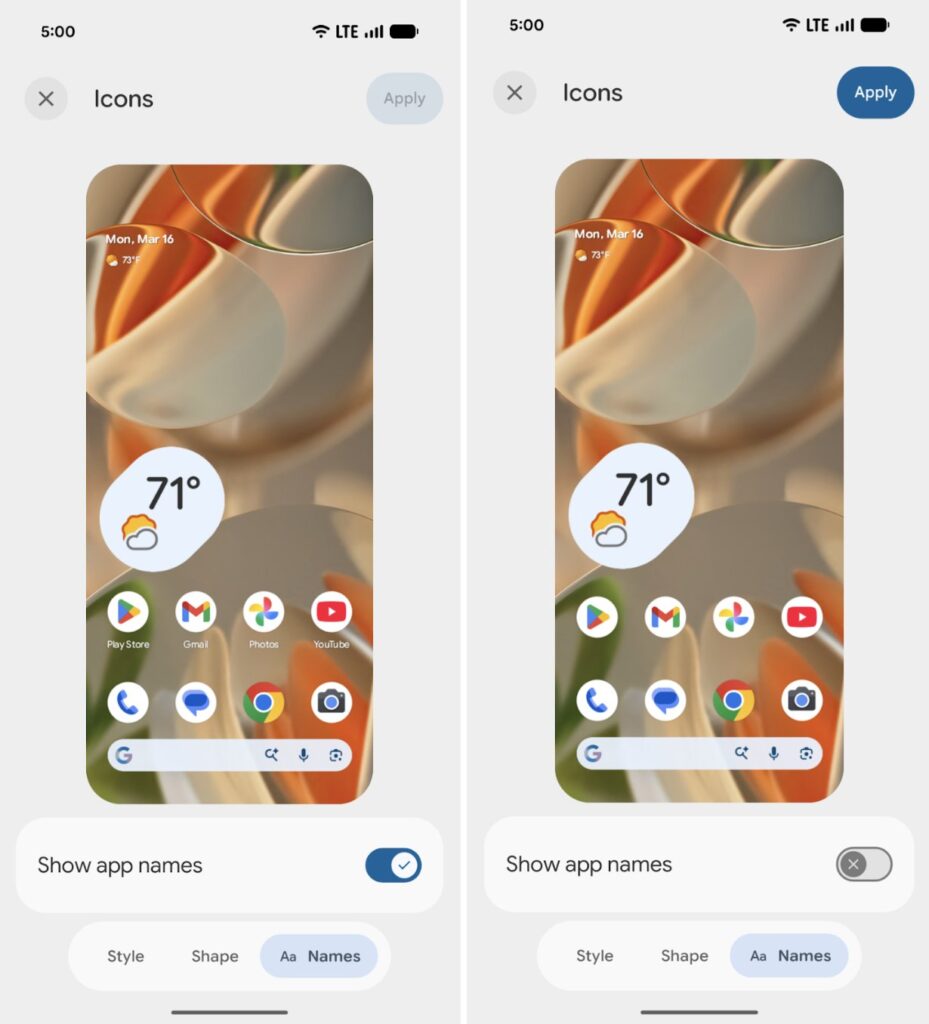
In the Beta 3 build, Google introduced a feature that lets users hide the app labels on the home screen. This isn’t a big step, but it helps users create a cleaner home screen setup.

To hide app labels, you’ll need to go to Wallpaper & style, tap Home screen, select Icons, tap the Names tab at the bottom, and turn off the toggle for Show app names. Keep in mind that this won’t affect the app drawer or apps inside folders.

6. Separate Wi-Fi and mobile data toggles

On Pixel devices running Android 16 or earlier, if you need to switch between Wi-Fi and mobile data, or turn them on or off, you must open Quick Settings, tap the Internet tile, and then perform the action.

Many users have expressed their frustration with the extra step required to access Wi-Fi or mobile data. After nearly four and a half years, Google is finally allowing users to add separate Wi-Fi and mobile data toggles in Android 17.

This change would particularly benefit Pixel users, as most other Android skins, including Samsung’s One UI and OnePlus’s OxygenOS, already have it.

7. Give apps limited access to your contacts

Right now, there’s no way to give apps access to specific contacts. If you grant the contacts permission, the app will have access to all contacts stored on your device.

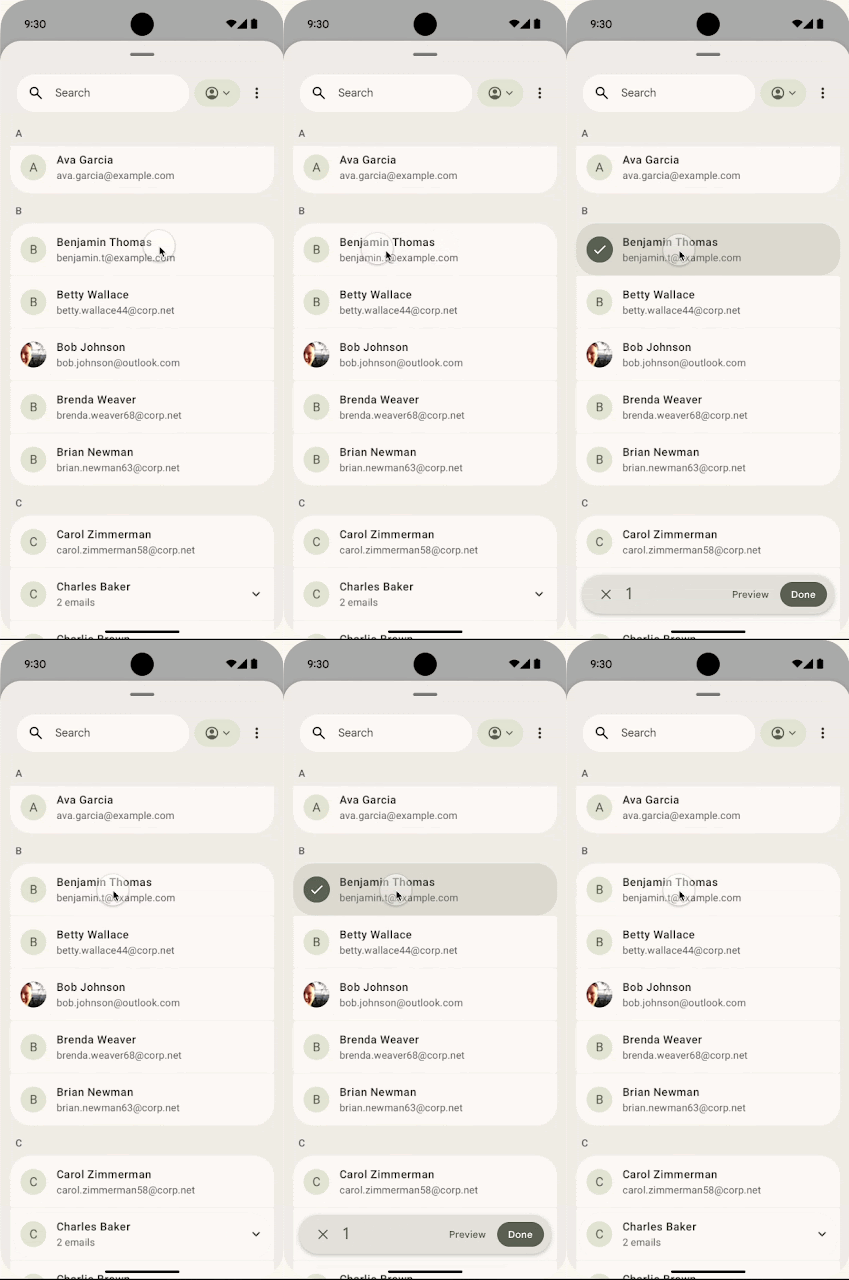
This is certainly not a privacy-focused approach, and therefore, Google is introducing a new system-level Contact Picker interface that will allow users to select one or more contacts to share with an app at a time. Google says apps won’t be able to track any changes you make to a contact’s information.

Contact Picker grants temporary, session-based read access to the specific data fields selected by the user. That means the app will need to request permissions again after the session timeout, further strengthening users’ privacy.

8. Seamless task continuity on another device

Google is working on a “Task Continuity” feature, which will allow users to sync notifications, share files, and continue apps across their linked Android devices. Essentially, you will be able to transfer an app’s current state from one Android device to another. This feature could debut with Android 17.

This feature will show a suggestion on the taskbar representing the running app from another device. When you click this suggestion, the system initiates the handoff and passes the remote app’s state, as Android Authority explains.

Google announced the new Handoff API in Android 17 Beta 2, which allows developers to specify the application state to resume on another device. Once enabled, the Android system displays a handoff suggestion in the launcher of the user’s nearby devices.

Final build may not include all of them

If you’ve been following Android releases, you’d know that Google doesn’t include all the features from the beta builds into the final package. But there’s a very good chance some of them will make it to the final release.

All the features we’ve discussed so far are available in the Android 17 beta releases. You can get an eligible Google Pixel to test them or wait for the stable release, which could happen around June 2026.

We’ll regularly update you with the latest information in the Android 17 section on this website. You can visit the page regularly for the latest details, or join our Telegram channel for instant updates.

The post 8 Android 17 features in development you’ll actually care about appeared first on Gizmochina.

Google rolls out new data, experimentation and MMM tools to improve measurement

Google is rolling out new tools to help advertisers better understand performance across increasingly complex customer journeys.

What’s happening. As AI continues to transform campaigns, creatives and targeting, Google is introducing updates focused on data integration, experimentation and media mix modelling — all aimed at helping marketers turn fragmented signals into actionable insights.

Why we care. Automation has made it easier to run campaigns, but harder to understand what’s actually working. These updates make it easier to connect data, prove what’s actually driving results, and make smarter budget decisions across channels. As AI handles more of the execution, having strong measurement in place becomes the key differentiator for performance and growth.

Data is the starting point. Google is expanding its Data Manager to give advertisers a clearer view of how their data flows across platforms like BigQuery, HubSpot and Shopify.

A new map-based interface will help marketers visualise connections between data sources and identify gaps in tracking or configuration. At the same time, updates to the Google tag aim to simplify setup, allowing advertisers to upgrade existing tags without additional coding.

The goal: make it easier to unify signals and improve data quality — which directly impacts campaign performance.

Between the lines. Google is acknowledging a long-standing issue — advertisers struggle more with data setup and integration than with campaign execution itself.

By simplifying tagging and data flows, Google is trying to remove one of the biggest blockers to effective AI adoption.

Proving what actually works. Google is also introducing Meridian GeoX, a new geo-experimentation tool designed to measure incremental impact across regions.

Built on an open-source framework, GeoX feeds into Google’s broader Marketing Mix Model, Meridian, giving advertisers a more defensible way to validate performance — especially when presenting results to finance teams.

This signals a shift toward causal measurement, not just correlation.

Why it matters. As privacy changes reduce visibility and attribution becomes more complex, marketers are under pressure to prove impact. Tools like GeoX aim to provide that “ground truth” — something many attribution models struggle to deliver.

Simplifying media mix modelling. To address the complexity of Marketing Mix Models (MMMs), Google is launching Meridian Studio — a Google Cloud-powered platform that helps teams build, customise and scale models more easily.

The focus is on operationalising MMMs, making them less resource-intensive and more accessible for enterprise teams managing large datasets.

What to watch:

  • Whether advertisers adopt MMMs more widely with simplified tools
  • How effective GeoX is in proving incremental impact
  • If improved data visibility translates into better campaign performance

Bottom line. Google is making a strategic shift: in an AI-driven world, better measurement — not just better automation — will determine who wins.

Intel Places Huge Order For Equipment Related To Advanced Packaging Production, Signaling Huge Interest in EMIB

Intel has placed a massive order at Taiwanese manufacturers to secure advanced packaging equipment, which will be used for its EMIB plans. Intel Bets Big on EMIB, As The Company Has Placed A Huge Order To Secure Advanced Packaging Equipment From Taiwan EMIB, the advanced packaging solution and alternative to TSMC's CoWoS, has been making headlines for some time now. The packaging technology is gaining lots of momentum as potential customers line up to utilize the tech for their upcoming chips, mainly for AI purposes. This demand has now led Intel to go after Taiwanese manufacturers to secure the equipment […]

Read full article at https://wccftech.com/intel-places-huge-advanced-packaging-equipment-order-signaling-huge-emib-interest/

Google fixes Search Console’s year-long data logging issue – well, kind of…

Screenshot of Google Search Console

Google said it has “resolved” an issue with logging data within Google Search Console reporting. The logging issue happened between May 13, 2025 through April 27, 2026, about 50 weeks. The resolution did not fix the past data, but it did fix the issue going forward.

What Google said. Here is what Google posted:

“A logging error prevented Search Console from accurately reporting impressions from May 13, 2025 until April 27, 2026. This issue has been resolved. As a result, you may notice a decrease in impressions in the Search Console Performance report. Only impressions and related metrics – CTR and average position – were affected; clicks were not affected by the error, and this issue affected data logging only.”

What was fixed. Just to be clear, Google has not fixed the data from May 13, 2025 through April 27, 2026 but just fixed the data going forward. So keep this in mind when reviewing the data in that date range.

John Mueller from Google confirmed on Bluesky that this is only fixed going forward and the old data will not be fixed.

Why we care. When reviewing your Search Console data, please note that for about 50 weeks, almost a year, the reports may be off and you may see a decrease in impressions, and thus click-through rate and average position data are also impacted.

xAI Is Reportedly Using Just 11% of Its 550,000 NVIDIA GPUs, While Meta and Google Squeeze Out 43-46% From Their Fleets

xAI Is Reportedly Using Just 11% of Its 550,000 NVIDIA GPUs, While Meta and Google Squeeze Out 43-46% From Their Fleets

xAI is reportedly able to utilize just over 10% of its entire NVIDIA GPU fleet, as report suggests lackluster AI software stack optimizations. AI Software Stack Bottlenecks Are An Industry-Wide Problem, As xAI Is Only Able To Utilize 11% of Its Entire NVIDIA GPU Installation. The Information has reported that Elon Musk's xAI, the software firm behind Gorq and other key AI-based components, is only able to utilize a small chunk of its total installed GPU capacity. Currently, xAI runs around 550,000 NVIDIA GPUs, which are a combination of H100s and H200s. These are deployed within xAI's Memphis and Colussus […]

Read full article at https://wccftech.com/xai-using-just-11-percent-gpus-while-meta-google-squeeze-out-much-more/

Musk v. Altman is just getting started

Elon Musk spent the better part of three days on the witness stand this week in his lawsuit against OpenAI, and it’s already getting messy. Emails, texts, and his own tweets are surfacing in court, and there are plenty more witnesses to come. Musk’s argument against OpenAI? By converting the company to a for-profit model, Sam Altman betrayed the “nonprofit for the […]

Google Analytics introduces Task Assistant

Google is trying to simplify one of its most complex products, helping advertisers and analysts get more value from Google Analytics without deep technical expertise.

What’s new. Google Analytics is rolling out Task Assistant, a guided workflow tool that surfaces tailored recommendations to improve property setup, data collection and reporting.

How it works. Available in the left-hand navigation, Task Assistant organizes recommendations into clear categories like connecting accounts, enhancing reporting and fixing data issues. Users can mark tasks as complete as they go or skip items that don’t align with their business goals, creating a more flexible setup experience.

Why we care. Google is making it easier to identify gaps in tracking and fix them quickly, which leads to more reliable data and better decision-making. Task Assistant helps ensure Analytics is properly configured without requiring deep expertise, reducing the risk of missed insights or inaccurate reporting. Ultimately, better data setup means more confident optimization of campaigns and budgets.

Between the lines. Analytics platforms are powerful but often underutilized due to poor configuration. Task Assistant is Google’s attempt to reduce that friction by turning setup into a step-by-step process rather than a manual audit.

The bottom line. Task Assistant aims to make Google Analytics more actionable, guiding users toward better data quality and more effective measurement with less guesswork.

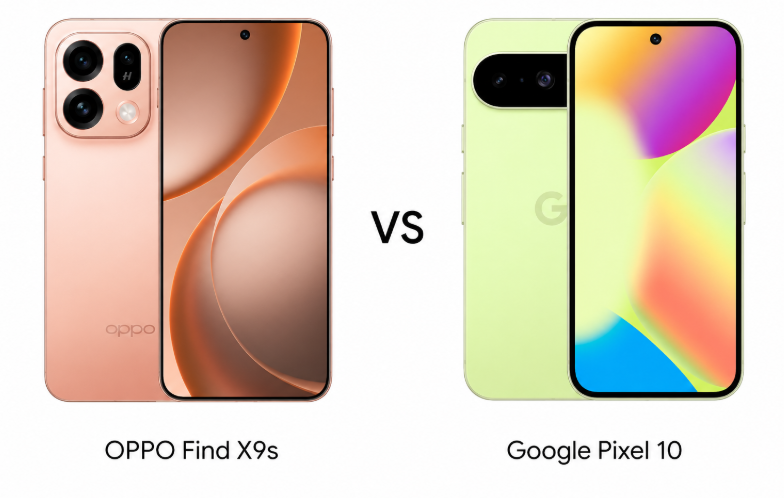
Oppo Find X9s vs Pixel 10: Which One Should You Buy in 2026?

Oppo vs Google

Choosing between the Oppo Find X9s and Pixel 10 isn’t just about specs; it’s about what kind of smartphone experience matters more. One pushes raw power, battery, and cutting-edge hardware, while the other focuses on software intelligence, camera consistency, and long-term reliability. For buyers in the premium mid-range segment, this comparison highlights whether performance-driven value or refined smart features make more sense in daily use. 

Major Features:

FeatureOppo Find X9sGoogle Pixel 10Winner
Display6.59″ AMOLED, 1216×2640, 120Hz, 3600 nits peak6.3″ OLED, 1080×2424, 120Hz, 3000 nits peakOppo – Higher resolution & brighter
ProtectionGorilla Glass 7iGorilla Glass Victus 2Pixel – Stronger glass protection
OSAndroid 16, ColorOS 16Android 16, 7 major updatesPixel – Longer software support
ChipsetDimensity 9500s (3nm)Tensor G5 (3nm)Oppo – Higher clock speeds
StorageUFS 4.1UFS 3.1 / 4.0Oppo – Faster storage standard
Rear Camera50MP + 50MP (3x) + 50MP UW48MP + 10.8MP (5x) + 13MP UWOppo – Higher resolution sensors
Video4K@120fps4K@60fpsOppo – Higher frame rate
Selfie32MP, 4K video10.5MP, 4K videoOppo – Higher resolution
Battery7025 mAh4970 mAhOppo – Much larger battery
Charging80W wired30W wired + wireless + reverseOppo – Faster wired charging
Wireless ChargingNoYes (15W, Qi2)Pixel – Wireless support
ConnectivityWi-Fi 7, Bluetooth 6.1, IRWi-Fi 6e, Bluetooth 6.0Oppo – Newer standards + IR
ExtrasInfrared portSatellite SOS, Circle to SearchPixel – Unique smart features
Price$730 / ₹60,000$800 / ₹70,000Oppo – More affordable
Disclaimer: Specs are based on available data. Actual performance may vary. Verify details from official sources before buying.

Design and Display

Build and Feel

The Oppo Find X9s leans toward a more rugged and futuristic approach with higher durability ratings, including IP66/IP68/IP69 protection. It feels engineered for tougher environments while still maintaining a premium finish. The Pixel 10, on the other hand, focuses on refined minimalism with Gorilla Glass Victus 2 on both sides and a clean aluminum frame. It looks more polished and subtle, which may appeal to users who prefer a classic flagship aesthetic. The Oppo feels slightly more experimental, while the Pixel feels more mature and balanced.

Display Quality

Oppo clearly pushes boundaries with a larger AMOLED panel, higher resolution, and an impressive peak brightness of 3600 nits. This makes it more immersive and easier to use outdoors. The Pixel 10 counters with HDR10+ support and a more color-accurate OLED panel, though its brightness and resolution are slightly lower. The Pixel’s display feels more tuned for consistency, while Oppo’s feels more aggressive and vibrant.

Verdict

Oppo wins for sheer display power and durability, while Pixel 10 offers a more refined and color-accurate experience.

Specifications Including Battery

Performance

The Oppo Find X9s runs on the Dimensity 9500s built on a 3nm process, paired with UFS 4.1 storage, delivering strong raw performance and faster data speeds. It is clearly optimized for heavy multitasking and gaming. The Pixel 10’s Tensor G5 focuses more on AI-driven performance and efficiency rather than raw power. While it may not dominate in benchmarks, it offers smoother real-world optimization and long-term software support with up to seven Android upgrades. Oppo feels faster under load, while Pixel feels smarter in daily use.

Battery and Charging

Oppo takes a massive lead with its 7025 mAh battery and 80W fast charging, making it ideal for heavy users and quick top-ups. The Pixel 10’s 4970 mAh battery is smaller but adds wireless charging, reverse charging, and bypass charging, improving versatility. Oppo prioritizes endurance, while Pixel focuses on convenience and balance.

Verdict

Oppo wins for performance and battery power, but the Pixel 10 stands out for efficiency and long-term reliability.

Camera

Main and Secondary Lenses

Oppo offers a powerful triple 50MP setup, including a telephoto lens with 3x optical zoom and a strong ultrawide sensor. It delivers consistency across all lenses and supports high frame rate 4K video. The Pixel 10, however, focuses on computational photography with its 48MP main sensor and 5x telephoto lens. Features like Pixel Shift and Ultra-HDR enhance real-world shots significantly. While Oppo provides hardware strength, Pixel leans heavily on software processing, often producing more balanced and natural images.

Selfie Camera

Oppo includes a higher resolution 32MP selfie camera with wider video capabilities, making it more suitable for content creators. The Pixel’s 10.5MP front camera may seem modest, but it benefits from better image processing and consistent color tones. Oppo feels sharper, while Pixel feels more natural.

Verdict

Pixel 10 wins for overall photography experience, while Oppo leads in hardware versatility and video flexibility.

Pricing

The Oppo Find X9s is priced around $730 (₹60,000), while the Pixel 10 comes in higher at approximately $800 (₹70,000). This places Oppo in a more aggressive value position, especially considering its larger battery, faster charging, and stronger hardware specifications. The Pixel 10 justifies its higher price through software support, AI features, and camera optimization.

Is the Price Justified?

Oppo feels like a performance-focused deal, offering flagship-level specs at a slightly lower price. It is clearly aimed at users who want maximum hardware for their money. The Pixel 10, however, feels like a long-term investment with better software longevity and smarter features. The extra cost reflects a more refined ecosystem rather than raw specifications.

Verdict

Oppo offers better value for money, while Pixel 10 justifies its price with software and camera excellence.

Disclaimer:
Prices are approximate and may vary based on country, region, launch timing, and applicable taxes. Always check whether the listed price is for a China unit or a global/international variant when purchasing.

Conclusion

The Oppo Find X9s stands out with its massive battery, ultra-fast charging, and powerful hardware setup, making it ideal for power users and gamers. It also includes features like an infrared port and advanced connectivity options that add practical value. The Pixel 10 differentiates itself with long-term Android updates, AI-powered features like Circle to Search, satellite SOS, and a cleaner software experience. It feels more future-proof and ecosystem-driven.

Verdict

Oppo Find X9s is the better choice for users who prioritize performance, battery life, and raw specifications. Pixel 10 is more suitable for those who value camera intelligence, software longevity, and a refined daily experience.

Disclaimer: This comparison is based on the specifications provided and is intended for general informational purposes. Actual performance, camera results, battery life, and overall experience may vary depending on real-world usage, software updates, and individual preferences.

Read More:

The post Oppo Find X9s vs Pixel 10: Which One Should You Buy in 2026? appeared first on Gizmochina.

Google Preferred Sources now works for all languages

Google’s Preferred Sources now supports all languages, not just the English language. “Preferred Sources is now rolling out globally in all supported languages,” Google wrote on its blog this morning.

“This feature gives you more control over the news you see on Search by letting you choose the outlets and sites you want to appear more often in Top Stories,” Google added.

In December, Google rolled out preferred sources globally but it only supported English. Now it supports all languages globally as well.

Stats. Google added some interesting data including:

  • “Readers are twice as likely to click through to a site after marking it as a Preferred Source”
  • “People have already selected over 200,000 unique sites — from niche local blogs to global news desks”

Preferred Sources. Preferred Sources let searchers star publications in the Top Stories section of Google Search, and Google uses that signal to show more stories from those starred outlets. The feature entered beta in June, rolled out in the U.S. and India in August, and is now expanding globally.

How it works. You click the star icon to the right of the Top Stories header in search results. After that, you can choose your preferred sources – assuming the site is publishing fresh content.

Google will then start to show you more of the latest updates from your selected sites in Top Stories “when they have new articles or posts that are relevant to your search,” Google added.

More details can be found over here.

Why we care. Traffic from Google Search is hard and if you can get your readers, loyal readers, to make your site a preferred source, that can help. Google said those users are twice as likely to click, which can help drive more traffic.

So add the preferred source icon to your site and encourage users to sign up. You can make Search Engine Land a preferred source by clicking here.

❌