Reading view

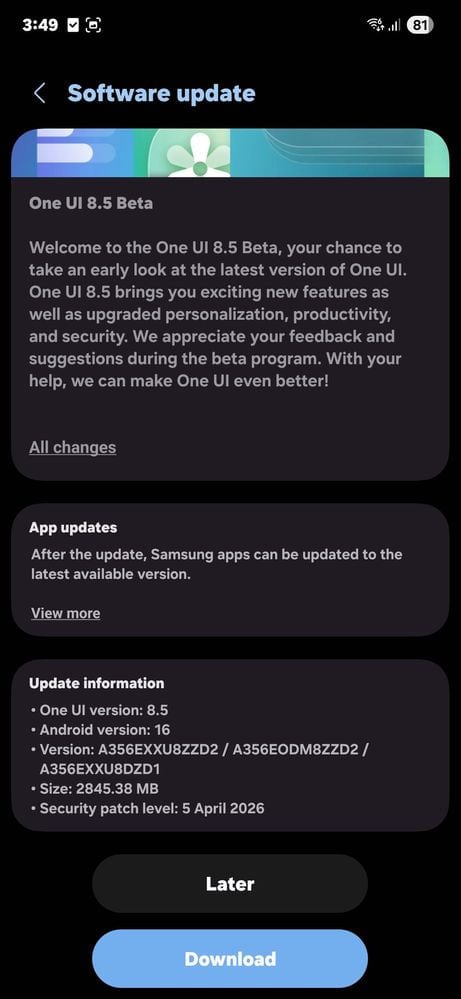
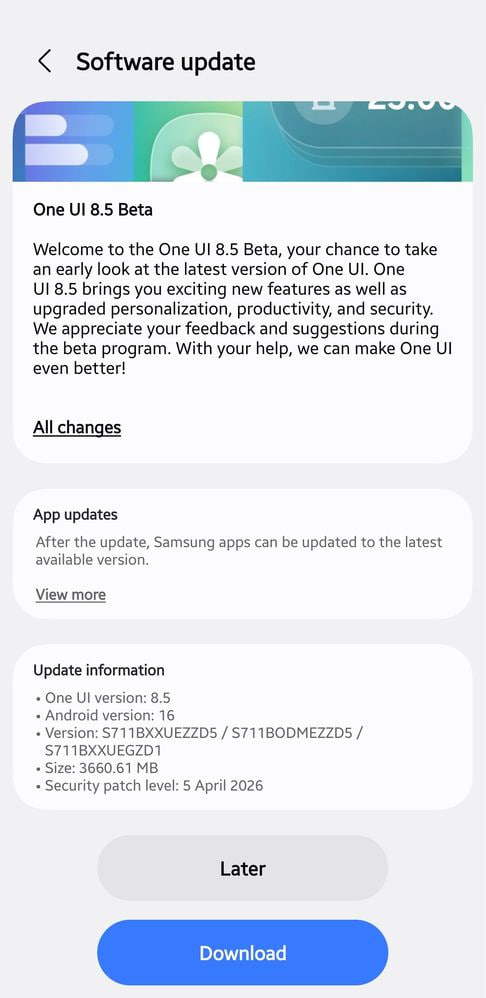
BREAKING: 9th One UI 8.5 Beta update is now available in the US

Everyone assumed it might not arrive, but the 9th One UI 8.5 Beta has finally landed in the US. Owners of the Galaxy S25 series, who have participated in the Beta Program, can now download the latest ZZD5 software update.

On April 9, Samsung pushed the 9th One UI 8.5 Beta in Beta-eligible markets, but US users didn’t receive the update. Though a bit late, the company is finally bringing its most Stable build to the Galaxy S25 users in the US.

The update mainly focuses on polish rather than major feature additions.

One of the more interesting additions is support for AirDrop-style connectivity with Apple devices, making file sharing more flexible. Samsung has also introduced three new camera filters: Classic Film, Pop Film, and Blanc.

Several connectivity and stability issues have been addressed. Bluetooth performance has been improved, especially in cases where connections would randomly disconnect and reconnect, making them much more reliable in daily use.

Samsung has also fixed several UI glitches across the system. Notification cards now display properly without being cut off, and their layout behaves better when the device is rotated between portrait and landscape modes.

In addition, camera-related bugs have also been ironed out. Users should no longer experience screen flickering or color distortion when adjusting zoom levels during dual recording, improving overall shooting consistency.

Performance improvements extend to the Gallery app as well. The update reduces stuttering when opening albums under certain conditions, resulting in a smoother and more responsive browsing experience for photos and videos.

There are also fixes for always-on display inaccuracies, where time information would occasionally appear incorrectly. Additionally, the lock screen no longer flashes briefly during incoming calls before switching to the call interface.

Samsung may also release the 10th One UI 8.5 Beta before kicking off the Stable rollout on April 30 or May 4.

9th One UI 8.5 Beta US

Thanks for the tip, Matthew!

The post BREAKING: 9th One UI 8.5 Beta update is now available in the US appeared first on Sammy Fans.

Galaxy S25 series tipped for major price cut in India

Rising component costs are making 2026 more expensive. The latest Galaxy S26 series is pricier than the Galaxy S25 series, but Samsung is reportedly planning a price cut across the last year’s flagships in India.

Credible leaker AbhishekYadav reports that the Galaxy S25 series prices may be slashed in India soon. The price cut may apply to the base, Fan Edition and Ultra variants in the Indian smartphone market.

The standard Galaxy S25 may go down to INR 65,000 from its original 80,990 price tag. The Galaxy S25 FE may also see a price cut of INR 5,000, hitting INR 55,000. Galaxy S25 Ultra price may get the biggest (INR 20,000) drop.

Revised prices could be as follows:

  • Galaxy S25
    • 12 GB + 256GB – INR 65,000
  • Galaxy S25 FE
    • 8 GB + 128 GB – INR 55,000
  • Galaxy S25 Ultra
    • 12GB + 256GB – INR 1,00,000

Last month, Samsung started selling the Galaxy S26 series. The latest phones are literally incredible, but if you want a true flagship experience and save some money, the Galaxy S25 series should be the first pick.

Unlike the S26 series, the S25 and S25 Ultra come with a Snapdragon processor. In some cases, the Galaxy S25 may outperform the Galaxy S26 with Exynos. Galaxy S25 FE, meanwhile, ships with Exynos processor, worldwide.

Galaxy S25 Ultra was the world’s 10th best-selling phone in Q4 2025. Samsung apparently wants to keep that momentum. A price cut, that too around three months ahead of the festive season, may push sales of the S25 smartphones.

Samsung Galaxy S25, S25+ and S25 Ultra

Source – Samsung Mobile Press

The post Galaxy S25 series tipped for major price cut in India appeared first on Sammy Fans.

Galaxy S26 Ultra camera crisis? User stuck between ‘replace lens’ and ‘no fault’ advice

A Galaxy S26 Ultra user reported having a glitch with the ultrawide camera. Upon checking the log files, Samsung’s moderator advised replacement, but the service center staff is reportedly refusing to replace the Galaxy S26 Ultra’s camera.

A fresh report from the Samsung Community highlights a frustrating gap between what users are told online and what they hear at official service centers.

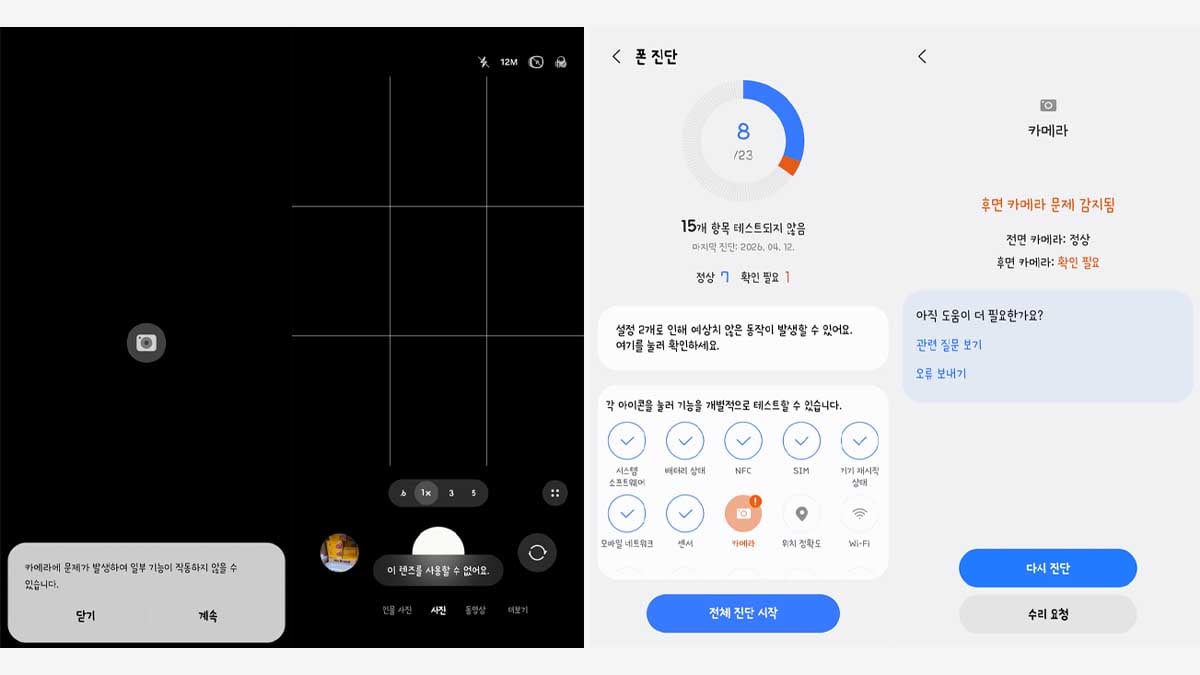
The case revolves around a Galaxy S26 Ultra owner who started facing camera issues just days after purchase. According to the report, the camera app throws an error the moment it is opened, warning that some features may not work.

Only limited zoom ranges show up, and even those fail with a “lens cannot be used” message. That alone would be concerning on a premium smartphone; what makes this case stand out is what happened next.

Samsung Galaxy S26 Ultra ultrawide camera replacement

The user did what any reasonable customer would do. They visited an official service center, not once, but twice, and each time, they were told there was no hardware fault.

A Samsung Community moderator, reportedly from the camera team, reviewed the logs submitted through the Samsung Members app. Their conclusion directly contradicted the service center’s assessment.

According to the moderator, the ultra-wide lens module likely needs replacement, and the user should visit a service center for inspection. That leaves the customer in an absurd situation.

The digital side of Samsung says there is a hardware problem. The physical service center says everything is fine. It will be interesting to see whether Samsung steps in to resolve this specific case.

The post Galaxy S26 Ultra camera crisis? User stuck between ‘replace lens’ and ‘no fault’ advice appeared first on Sammy Fans.

Samsung’s Quick Share to AirDrop feature is deleting Image metadata

Samsung has already expanded the AirDrop file transfer support for Quick Share in top-tier Galaxy devices, but there’s an issue that we just uncovered about the image metadata.

The phone maker is enjoying applause from the Galaxy users for this native hack. You need to select the file, change the device’s visibility, and that’s it. That file transfer speed is also good, removing a big hurdle for users who own devices from both ecosystems.

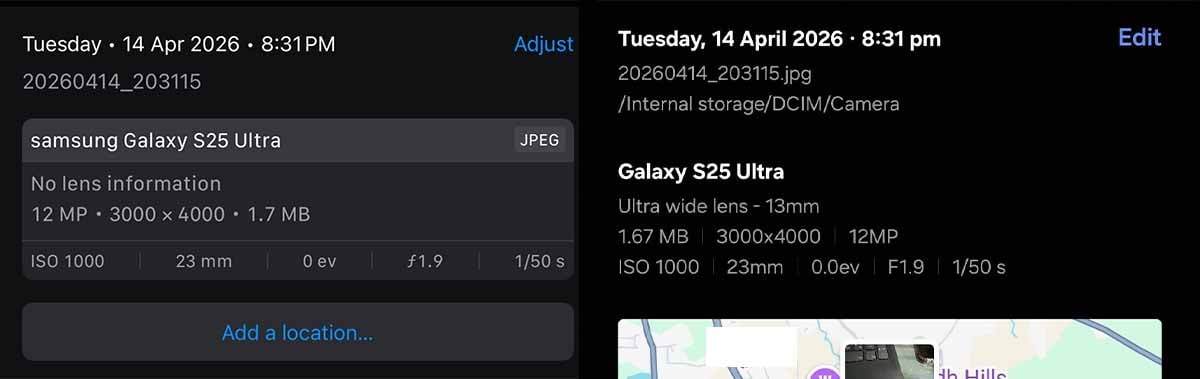
I’ve been trying the Quick Share to AirDrop every day. And recently noticed that the images and videos shared from Galaxy S26 Ultra to the iPhone are missing image metadata.

Just to give you a brief overview, the metadata stores information about the camera settings, such as aperture, zoom, and megapixels. The same goes for the videos. Users can also enable or disable the location where the image/video is captured.

The images from the Galaxy S26 Ultra were showing camera data but missing lens and location tags. A cross verification with Galaxy S25 Ultra created the same outcome.

Samsung's Quick Share to Airdrop images are missing metadata

iPhone (left), Galaxy S25 Ultra (right)

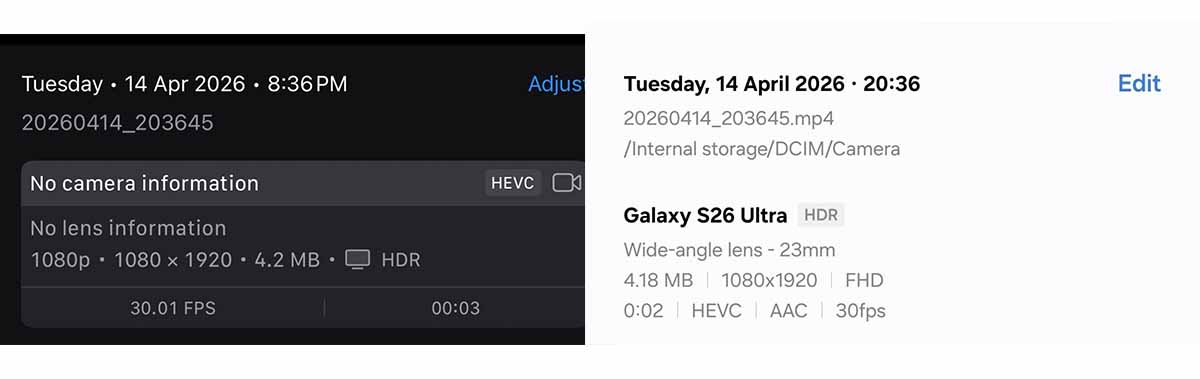
Next, I sent a video to the iPhone, and it had no metadata except for the resolution and HDR details. The camera and the location details were missing together. Finally, I transferred images and videos from Galaxy S26 Ultra to the S25 Ultra, and those have the details preserved as they should be.

Samsung's Quick Share to Airdrop images are missing metadata

iPhone (left), Galaxy S26 Ultra (right)

Does the same issue appear for the other way around?

No, images and videos shared from an iPhone to Galaxy S26 Ultra or S25 Ultra aren’t missing any metadata information. That confirms that the issue is part of the Quick Share.

To sum up the findings, I transferred the images from the iPhone back to the Galaxy device, and it had metadata. However, it was missing these details for videos.

Based on these transfer experiments. We can conclude that the Quick Share is either deleting the metadata or it’s not packaging the missing information during transfers. Since these files have preserved some metadata, it appears that the second scenario is most likely to be true.

Quick Share to AirDrop is a good approach, and missing metadata may not be a big deal for many users, but it’s an issue, and Samsung should bring a fix.

The post Samsung’s Quick Share to AirDrop feature is deleting Image metadata appeared first on Sammy Fans.

Samsung phones, including Galaxy S26, getting March 2026 Google Play system update

Google Play system update dated March 2026 is making its way to Samsung phones, including the Galaxy S26 series. An update weighing around 70 megabytes is rolling out to devices, enforcing Android functions and security.

Samsung seems serious about Google Play system update with March 2026 version as well. One UI 8.5 Beta is underway, but it hasn’t broken system update releases. As spotted by X user Kailash, the latest March version is available.

What’s new in March Play system update?

March Play system update brings a mix of user-facing features and under-the-hood improvements, with Google continuing to focus on cross-device experiences, stability, and developer tools across phones, PCs, wearables, and Android Auto.

A notable addition is improved device connectivity. Fast Pair now extends to large screens, making it easier to connect accessories to desktop, while Wi-Fi Sync helps users seamlessly share trusted networks across their personal device ecosystem.

Safety also gets a meaningful upgrade. Wireless Emergency Alerts now include a map view, allowing users to instantly see affected areas and their own location within alerts, improving situational awareness during critical events.

System management updates focus on stability, storage optimization, and updatability. Play Store enhancements include better review search, cross-platform gaming support, and improved content discovery, while background services receive routine maintenance.

Developers receive several new capabilities tied to utilities, maps, connectivity, and payments. These updates aim to streamline app functionality, improve authentication flows, and enhance integration with system-level services like Autofill and Credential Manager.

The post Samsung phones, including Galaxy S26, getting March 2026 Google Play system update appeared first on Sammy Fans.

Samsung’s Galaxy A18 is already cutting corners before it launches

A supply chain leak pointing to a quiet but telling decision inside Samsung’s Galaxy A18 development pipeline.

The company has reportedly reverted to the older Chip-on-Glass method for mounting display driver ICs onto the panel substrate, walking back an earlier plan to use the more advanced Chip-on-Film approach.

CoF mounting generally allows for thinner bezels and better display flexibility.

Samsung used CoG on the Galaxy A17, the A18’s direct predecessor, and at some point this year someone apparently decided the upgrade wasn’t worth the bill. The A18 is an entry-level phone, sure, but millions of units will ship every month.

Wonik D2I is in discussions with Samsung Display to land the A18 contract. The company just announced its first-ever mass production shipment of OLED panel DDIs, believed to have gone to a Sharp device through Samsung Display.

Here’s the complication: integrating a timing controller into a single-chip DDI solution, the format Samsung Display’s supply chain calls a TED, is technically demanding. Analysts aren’t convinced Wonik D2I is ready for that yet.

Samsung’s established DDI suppliers include Samsung System LSI, DB HiTek, Anapass, and Novatek. DB HiTek currently handles the A17; getting displaced there won’t happen quietly.

The Korean tech giant is betting its cheapest new phone on a supplier whose biggest flex right now is a Sharp model nobody’s talking about.

The post Samsung’s Galaxy A18 is already cutting corners before it launches appeared first on Sammy Fans.

One UI 9 leak reveals About Phone revamp, AI photo editor, and major design overhaul

One UI 9, built on Android 17, is expected to land this summer alongside the Galaxy Z Fold 8 and Z Flip 8. Meanwhile, leaks are already exposing that Samsung is preparing an About Phone revamp, an AI photo editor, and more for One UI 9.

About Phone

Samsung’s About Phone section has displayed a massive, screen-hogging render of the device you’re already holding. The giant image of your device staring back at you from the Settings menu has always been a waste of real estate.

The new layout in One UI 9 tucks a compact device render into the top-left corner, via SammyGuru. The rest of the screen becomes functional. Model number, serial number, device name, all of it gets promoted to the prime visual space.

Samsung One UI 9 About Phone

Photo Editor

Samsung is reportedly adding AI-powered suggestion pills that sit above the input field when you’re editing an image. Think of them as smart shortcuts, contextual nudges that read what you’re working on and surface edits.

The AI photo suggestions, if they’re tuned well, could represent something more interesting. Context-aware editing prompts built into a default app would be genuinely useful to people who will never download Lightroom.

Samsung One UI 9 Photo Editor with AI

Search Bar

Less dramatic but worth mentioning: the Settings search bar is getting a new expansion animation. It stretches and collapses with what’s described as a smooth, flexible motion.

Samsung has spent years adding features and very little time subtracting them. One UI 9 suggests someone inside the company finally asked the harder question.

The One UI 9 beta program should be close. The stable release is targeting summer 2026, so Samsung typically opens beta access a few months before.

The post One UI 9 leak reveals About Phone revamp, AI photo editor, and major design overhaul appeared first on Sammy Fans.
Qualcomm building custom 3D DRAM for AI phones

Qualcomm is jointly developing custom DRAM with CXMT, formally ChangXin Memory Technologies, China’s fourth-largest DRAM producer. Qualcomm is also working with GigaDevice on a discrete smartphone NPU targeting Chinese brands.

The NPU delivers roughly 40 TOPS of compute. It’s paired with 4GB of customized 3D DRAM manufactured by CXMT, using TSV and hybrid bonding stacking to push memory bandwidth beyond what standard LPDDR5X can offer.

Shipments are expected in late 2026 or early 2027, aimed at devices priced above RMB 4,000 (~ $585) to 4,500 (~ $660). That’s not a minor spec tweak, but a purpose-built AI memory stack for mid-to-premium Android phones.

CXMT already covers around 30% of the Chinese smartphone market with its LPDDR5X production. The capacity exists, the manufacturing knowledge exists and now there’s a Qualcomm-backed design riding on top of it.

Samsung, SK Hynix, and Micron have been operating in a seller’s market for mobile memory while they prioritize AI server contracts. A qualified CXMT with custom designs in hand is pressure, even if it never ships a single unit outside China.

Samsung sits in an uncomfortable position here

Samsung is one of the companies causing the mobile memory squeeze by chasing AI server contracts, and one of the Android ecosystem players that suffers when memory costs push OEMs toward cheaper silicon choices.

The company could have moved on custom DRAM partnerships for mobile AI. Now, Qualcomm is building an alternative stack with Chinese suppliers, targeting the exact price tier where Samsung’s Galaxy A and mid-range lines compete hardest.

The post Qualcomm building custom 3D DRAM for AI phones appeared first on Sammy Fans.
Samsung Messages is gone but its best features coming to Google Messages

For anyone who spent five minutes personalizing their Samsung Messages experience, switching to Google Messages feels like moving into a concrete apartment.

Folks over at Android Authority found that Google is preparing to upgrade its Messages app by adding the best personalization features from Samsung Messages.

In Samsung Messages, you could pull an image from your Gallery, and slap it as a chat room background. Theme Park through Good Lock took it even further: bubble colors, contrast adjustments, wallpaper-based themes.

Buried inside the latest Google Messages Beta build, version messages.android_20260410_02_RC00.phone.openbeta_dynamic, new strings have surfaced pointing at something interesting.

The strings reference a full “Custom” theme section, background styles. Adjustable bubble colors and the ability to upload your own photos as chat wallpapers. References to “Upload photo” and “Your photos” suggest Google Photos integration is coming.

Google Messages Change Colors

A “Theme Preview” option and an “Apply” button hint that users will get a real, interactive customization experience. Separate controls for backgrounds and bubbles also appear in the strings, meaning you could mix and match.


Google Messages is now the default on Galaxy phones, and the transition makes sense. Samsung Messages quietly fell behind when it dropped RCS support, leaving millions of Galaxy users stuck with glorified SMS while the rest of the world moved on.

Samsung Messages fans who felt abandoned when the app started its retirement walk finally have a reason to stop mourning.

The post Samsung Messages is gone but its best features coming to Google Messages appeared first on Sammy Fans.
Samsung turns One UI 8.5 into its biggest beta program ever

As a long-time beta tester and Samsung Galaxy user, I am impressed with the Samsung One UI 8.5 beta program. The reason is very obvious. Samsung One UI 8.5 beta is the largest beta program ever, and it’s impressive. As of now, Samsung is letting users test the new One UI 8.5 on 21 different Galaxy devices.

Let me keep it real and simple. Samsung started the One UI 8.5 beta program for the Galaxy S25 series and latest foldables late last year. But Samsung didn’t stop there. The company kept adding more phones one by one. The beta program now includes 12 S-series phones, including S25, S25+, S25 Ultra, S25 FE, plus the full S24 lineup with S24 FE, and even the S23 series with S23 FE. Three generations of FE phones in the beta program, for the first time.

The latest beta program includes 6 foldables, and they are Z Fold7, Z Flip7, Z Fold6, Z Flip6, Z Fold5, and Z Flip5. There are 2 tablets in the beta program, Galaxy Tab S11 and Tab S11 Ultra. In addition, you can also test the 8.5 beta on select A-series phones, Galaxy A36, A35 and A55.

In total, the One UI 8.5 beta program is currently available for 23 different Galaxy devices. No One UI beta has ever covered this many phones, foldables, tablets, and even a mid-ranger at once.

Just to give you the full picture:

  • One UI 8.5 (right now): 23 devices – the biggest yet
  • One UI 8 (last year, 2025): S25 + S24 + S23 series, Z Fold/Flip 6 & 5, some A-series like A36 and A35, and a few tablets. It was way bigger than the previous betas.
  • One UI 7: 12 devices – Started with S24 series (S24, S24+, S24 Ultra, S24 FE). Expanded to S23 series (S23/+/Ultra; S23 FE limited), Z Fold6/Flip6, Tab S10 series (select), and A55 (only mid-ranger).
  • One UI 6.1 / 6.1.1: 8–10 devices – S23 series (S23/+/Ultra/FE), limited S22, Z Fold5/Flip5 + select Z Fold4/Flip4, Tab S9 series.
  • One UI 6: 12–14 devices – S23 series, S22 series, S21 series, select Z Fold/Flip (5/4/3), and a few A-series A54, A53, A34.

As you can see in the above list, the old beta program was mostly limited to the newest flagships and maybe one older series. One UI 8 was a nice step up last year, but One UI 8.5 just took the beta program to another level. It includes more FE models, more older phones, tablets, and A-series.

READ MORE: Dear Samsung, it’s the right time to start One UI 9 beta for the Galaxy S26 Ultra

I have to give credit to Samsung for this fantastic run. By making the beta program available for several smartphones, Samsung is collecting important feedback to improve the stable One UI 8.5 software.

Everything is cool, but there’s still room to improve. The 8.5 beta program is still kinda slow and dragged out. Samsung is adding devices in phases, first the new S25, then S24, then S23, and the A36 weeks later. The Galaxy users living in some countries get it early, while others wait forever. If Samsung could speed things up and open the beta to more people faster, it would feel even better. The waiting game can be annoying when you are excited to try the new features.

In the end, the One UI 8.5 beta is the most inclusive program the company has ever done, bigger than the One UI 8 beta last year and way bigger than anything before. It shows Samsung is trying harder to make software that actually works great for all of us, not just the flagship owners.

If your phone is on the list and want to test the One UI 8.5 features, go to the Samsung Members app and sign up right now. What do you think? Are 23 devices enough, or should Samsung have added more devices? Drop your thoughts in our DM on X handle @thesammyfans.

The post Samsung turns One UI 8.5 into its biggest beta program ever appeared first on Sammy Fans.

Galaxy S26 users receive a surprise update in America – Camera fix?

Samsung has a surprise new update for Galaxy S26 users, which is currently rolling out in North America. On the first of April, Samsung pushed the latest update, bumping the security patch to the April 2026 level (AZCL/M).

Now, Galaxy S26 users in North America are getting another April 2026 update, which can be identified through the PDA build version ending with AZD4. This release weighs roughly 540 megabytes, as spotted by TarunVats.

It’s currently rolling out in Mexico, and it remains to be seen whether it goes global or stays limited to the country/region. Galaxy S26 runs One UI 8.5 and you can check for updates through Settings > Software update.

The package size indicates the content is limited to stability improvements. April patch is retained in this release as May is too far from now. Samsung may have included a fix for camera performance based on reports.


Galaxy S26 has a strange camera glitch that impacts the image output. Tapping the shutter captures the image as usual, but the final result looks a bit cut and stretched from one side; however, the camera preview appears fine.

Samsung has already acknowledged the problem and promised a fix. While the changelog doesn’t say so, users in Mexico are requested to compare the camera experience before and after installing the AZD4 firmware.


One UI 8.5 is impressive on the Galaxy S26 series. Meanwhile, Samsung has already started the optimization of Android 17 with One UI 9 Alpha testing. The One UI 9 Beta Program should have been there already, but it’s not.

The post Galaxy S26 users receive a surprise update in America – Camera fix? appeared first on Sammy Fans.
Dual Recording feature returns on Galaxy S25 FE – Here’s how to use it

Samsung has quietly cleared up confusion around one of its more practical camera tools. The Dual Recording feature is not missing from the Galaxy S25 FE, despite early impressions from users testing the latest One UI 8.5 Beta.

With the rollout of One UI 8.5 Beta 2 on April 13, several users reported that Dual Recording had disappeared from the camera app. However, it’s now confirmed that the feature isn’t missing, but it just needed one extra step that many didn’t expect.

Given Samsung’s recent track record of trimming or shifting features between updates, the concern felt justified. This time, the issue wasn’t about removal, but availability.

A Samsung community moderator has now confirmed (via MojoTrick) that Dual Recording is still part of the Galaxy S25 FE experience. This quick clarification prevents the narrative from slipping into another feature rollback controversy.

You need to update the Camera Assistant app from the Galaxy Store. Once updated, the feature reappears within the camera settings. For users, it means one extra step. For Samsung, it means faster fixes and more flexibility.

Samsung Galaxy S25 FE

Source – Samsung Newsroom

Dual Recording is not just another camera toggle. It enables simultaneous recording from both front and rear cameras, a feature that appeals to creators, vloggers, and even casual users who want more flexibility in capturing moments.

Samsung had already brought back both Dual Recording and Single Take to the broader Galaxy S25 lineup in December 2025 after initial backlash. So, seeing it “missing” again on the S25 FE raised eyebrows.

The post Dual Recording feature returns on Galaxy S25 FE – Here’s how to use it appeared first on Sammy Fans.
One UI 8.5 under testing for these Samsung phones

Samsung is testing One UI 8.5 Alpha and Beta for various phones. On December 8, Samsung officially launched the Public Beta Program for the Galaxy S25 series, and the official update rollout is likely to start in 2Q26.

One UI 8.5 testing isn’t just underway but also expanding its scope to even more Samsung phones. The company has already added a number of Galaxy devices to the internal testing, while Public Beta is also reaching more devices.

The testing is still underway, and we will see more changes and tweaks throughout the Program. After a massive expansion in March, Samsung is preparing to open early access for even more Galaxy devices this month.

Devices in Public Beta

Started with the Galaxy S25 series, Samsung’s One UI 8.5 Beta is available on a wide range of Galaxy devices, including:

  • Galaxy S25, S25 Plus and S25 Ultra – Beta 9
  • Galaxy S25 FE – Beta 2
  • Galaxy S24, S25 Plus and S24 Ultra – Beta 2
  • Galaxy S24 FE – Beta 2
  • Galaxy S23, S23 Plus and S23 Ultra – Beta 1
  • Galaxy S23 FE – Beta 1
  • Galaxy Z Fold 7 and Flip 7 (FE too) – Beta 3
  • Galaxy Z Fold 6 and Flip 6 – Beta 2
  • Galaxy Z Fold 5 and Flip 5 – Beta 1
  • Galaxy Tab S11 and Tab S11 Ultra – Beta 2
  • Galaxy A36 – Beta 1
  • Galaxy A35 and A55 – Beta 1

Devices in Internal ‘Alpha’

While Public Beta has very limited availability, the internal testing has been expanded to plenty of newer and older Samsung phones.

Galaxy Z Series

  • Galaxy Z TriFold
  • Galaxy Z Fold 4 and Z Flip 4

Galaxy S Series

  • Galaxy S25 Edge
  • Galaxy S22, S22 Plus and S22 Ultra

Galaxy A Series

  • Galaxy A17 LTE/5G
  • Galaxy A07


  • Galaxy A56
  • Galaxy A36
  • Galaxy A26
  • Galaxy A16 LTE/5G
  • Galaxy A06


  • Galaxy A25
  • Galaxy A15 LTE/5G


  • Galaxy A54
  • Galaxy A34
  • Galaxy A24


  • Galaxy A53
  • Galaxy A33

Galaxy Tab Series

  • Galaxy Tab S10+ and Tab S10 Ultra
  • Galaxy Tab S9, Tab S9+ and Tab S9 Ultra
  • Galaxy Tab S8, Tab S8+ and Tab S8 Ultra


  • Galaxy Tab S10 FE and Tab S10 FE+
  • Galaxy Tab S9 FE and Tab S9 FE+
  • Galaxy Tab A9
  • Galaxy Tab A11+
  • Galaxy Tab Active 5

Galaxy M/F Series

  • Galaxy M17/F17
  • Galaxy M07/F07
  • Galaxy M56/F56
  • Galaxy M36
  • Galaxy M16
  • Galaxy M55/M55s
  • Galaxy M35
  • Galaxy M15
  • Galaxy M05/F05
  • Galaxy M54/F54
  • Galaxy M34/F34
  • Galaxy M53

Updated on April 13, 2026.

Samsung One UI 8.5

Image – SammyFans

Samsung’s One UI 8.5 is based on Android 16 (One UI 8). It comes with a user interface redesign and applies blur across various aspects. The majority of stock apps have also received dynamic tweaks that make the UI beautiful.

The post One UI 8.5 under testing for these Samsung phones appeared first on Sammy Fans.
Samsung introduces 14m Onyx LED with 4K 120Hz support

At CinemaCon 2026 in Las Vegas, Samsung introduced a new 14m (14-meter) standard size for its Onyx cinema LED lineup, and it’s aimed squarely at the premium large-format auditoriums.

The new 14-meter model carries a 3.3mm pixel pitch, tuned specifically for that screen size to keep image quality sharp across the whole face of a larger display. The infinite contrast ratio means blacks that actually look black.

It supports up to 4K 120Hz, which puts motion handling in a different category than anything projection-based can offer at this scale. Peak brightness hits 300 nits, roughly six times what conventional cinema standards deliver.

Individual LED cabinets can be added to the sides and bottom, pushing the 14-meter format up to 20 meters total. It’s a practical architecture decision that gives exhibitors flexibility.

Samsung Onyx LED display lineup now runs from a 5m boutique configuration up through 10m premium rooms to this new 14m format. Three tiers, distinct purposes; Samsung is building a full stack.

Trilith Cinemas in Fayetteville, Georgia, installed the latest Onyx generation across five auditoriums in December 2025, becoming the first US to do so.

Over in Rabat, Morocco, Pathé Dar Essalam opened with 12 Onyx screens across four auditoriums. Pathé now operates more Onyx screens than any other cinema company in Europe.

“People go to premium theaters for something they cannot recreate at home,” said Hyoung Jae Kim, Executive Vice President of the Visual Display (VD) Business at Samsung Electronics. “That raises the bar for every part of the auditorium, starting with the screen. Samsung’s new 14-meter Onyx gives exhibitors a way to bring the premium experience to larger auditoriums, helping turn moviegoing into a destination again.”

Samsung Onyx 2026

The post Samsung introduces 14m Onyx LED with 4K 120Hz support appeared first on Sammy Fans.

Galaxy Watch 6, 7, 8, and Ultra users report sudden drop in battery life

Samsung Galaxy Watch owners are waking up to dead wrists: across forums, users of the Watch 6, 7, 8, and Ultra are reporting sudden, dramatic drops in battery life, and the culprit looks suspiciously like Google Play Services.

One Reddit user posted a screenshot showing Google Play Services sitting at the top of their app battery usage list, eating through 16.5% of all power consumed by apps on the watch.

Some users traced the drain directly to a recent security update. Others noticed it seemingly out of nowhere, with no clear trigger they could identify. Besides, there’s a third group, maybe a quarter of the conversation, saying their battery life hasn’t budged at all.

The timing has sparked speculation that Samsung’s blood pressure feature update, which rolled out recently, may have changed something under the hood.

One working theory floating around is that a server-side change pushed by Google, not Samsung, triggered Google Play Services into a more aggressive state on Wear OS devices.

The immediate advice for anyone hitting this wall: open the Watch settings, find Google Play Services under app info, clear the cache, and force a restart, as suggested by Android Authority.

The immediate advice for anyone hitting this wall: open the Watch settings, find Google Play Services under app info, clear the cache, and force a restart.

Samsung should, at least, acknowledge the Galaxy Watch battery drop problem. Letting Google Play Services eat through that battery life quietly, with no comment and no fix timeline, is exactly the wrong move.

The post Galaxy Watch 6, 7, 8, and Ultra users report sudden drop in battery life appeared first on Sammy Fans.

Galaxy Buds 3 earbuds are getting April 2026 stability update

Samsung has released the April 2026 stability update for Galaxy Buds 3 series earbuds, improving their user experience. Users on the Samsung community Korea reported this rollout for the Galaxy Buds 3 and Buds 3 Pro. However, the changelog content is the same.

The Galaxy Buds 3 Pro is getting this new firmware R630XXU0AZD1, and the Buds 3 have firmware version  R530XXU0AZD1. The download size is around 8mb.

Samsung Galaxy Buds 3 and Buds 3 Pro April 2026 stability update

This firmware has been due for a long time for Buds 3 users, as the last one was released months ago. Samsung seeds the version upgrade for its wearables with unusual delays.

Besides the stability code application, the web version of the changelog suggests that the Bluetooth connectivity and sound experience are also improved with the most recent software release. Some users reported that this is their second patch of the month. So, it’s possible that the update may have been revised with more stability improvements.

Besides Korea, the April 2026 stability update for Galaxy Buds 3 and Buds 3 Pro may soon expand to global users. So, keep an eye on its firmware section.

The post Galaxy Buds 3 earbuds are getting April 2026 stability update appeared first on Sammy Fans.
Dear Samsung, it’s the right time to start One UI 9 beta for the Galaxy S26 Ultra

We know that software update rollouts take time, especially with all the new AI features and changes included in a major One UI version. But right now, things feel a bit off with the One UI 8.5 rollout. Samsung Galaxy users expected the beta to kick off earlier, maybe around November last year. Now we are in April 2026, and the stable One UI 8.5 rollout still hasn’t landed for everyone.

That’s exactly why it’s time to move forward. Samsung, it’s the right moment to start the One UI 9 beta program for the Galaxy S26 Ultra (and the rest of S26 series). Just for information, the One UI 9 will be based on Android 17 OS. Google released the first Android 17 Beta back in February 2026, followed by Beta 2 and Beta 3 by late March. With Beta 3, Android 17 reached platform stability, and the full stable Android 17 is expected around June 2026.

Where’s Samsung in this race? As per leaks, the One UI 9 internal testing is already going on for the Galaxy S26 Ultra. A public beta could start in late May or early June. Waiting longer just slows everything down, especially since Android 17 is already moving fast.

Let’s look back quickly at how Samsung handled the previous beta program. For the One UI 7 beta program on the Galaxy S24 series, it started rolling out in December 2024 in select countries like Germany, India, Korea, UK, US, and Poland. The stable version began arriving in April 2025.

For the One UI 8 beta on the Galaxy S25 series: It kicked off in May 2025 (early compared to past years), with expansion to older devices like the S24 series in August 2025. Samsung started the stable One UI 8 for the S25 phones in September 2025.

Samsung Galaxy S26 Ultra SG26U

What we are discussing here, Samsung often starts the beta program months ahead and plans for a stable rollout around the new flagship launch event. The Galaxy S26 Ultra is the perfect candidate to test the One UI 9 features now. It gives early testers a chance to try new features, report bugs, and help polish things before a wider rollout.

Plus, it keeps the excitement alive instead of letting the One UI 8.5 delay disappoint everyone. Android 17’s beta is going well, and Samsung already has internal builds tested. I think there’s no reason to wait any longer to start the public beta program.

What do you think? If you have the S26 Ultra or are planning to buy one, would you join the One UI 9 beta right away? Let me know in the DM on X handle @thesammyfans.

The post Dear Samsung, it’s the right time to start One UI 9 beta for the Galaxy S26 Ultra appeared first on Sammy Fans.

We may have an official One UI 8.5 stable release date

Samsung is making users scratch their heads for the stable One UI 8.5 release date for months, and now, we might have something reliable on this matter.

A user asked (via @theonecid) Samsung customer service about the One UI 8.5 beta 9 release in the U.S. Samsung recently released the 9th beta for the Galaxy S25 series, which brought AirDrop and new camera filters as well as software bug fixes.

Stable One UI 8.5 rollout date

Stable One UI 8.5 release date (via @theonecid)

That said, some users from the US reported that the new beta hasn’t appeared on their devices. The reason is unknown, which led them to seek answers from official sources. Instead of answering about the beta 9 rollout delay, the Samsung representative has shared the stable release information.

It’s confirmed that the stable One UI 8.5 is expected to begin for older models like the Galaxy S25 series on April 30, 2026, in Korea. This update will expand to users outside, including the U.S., sometime around May 4, 2026.

This new information about the stable rollout is identical to what we’ve seen sometimes ago. Though we can’t verify the source, it appears to be true because Samsung has already delayed the stable rollout.

The One UI 8.5 beta program first opened for the Galaxy S25 series in December 2025. So far, It inducted 9 beta software with various improvements, bug fixes, and UI upgrades.

Besides the S25 series, the Galaxy S24, S23 series, Fold 7/Flip 7, and Tab S11 series have already moved forward in the program. Recently, it added even older models from the Galaxy Z Fold/Flip and Galaxy A-series in the test pool.

It’s expected that Samsung could push one more beta software before closing the program with a stable One UI 8.5. This beta may bring the missing AI features from the latest Galaxy S-series smartphones. Still, we’re waiting for the next move Samsung will make in this matter.

The post We may have an official One UI 8.5 stable release date appeared first on Sammy Fans.

Samsung shipping second One UI 8.5 beta to Galaxy Tab S11

Samsung is rolling out the second One UI 8.5 beta for the Galaxy Tab S11 series tablets, bringing a couple of improvements and fixes to bugs found in the past builds.

This update arrives today after a couple of old Galaxy devices joined the test, including the Galaxy S23 FE, Fold/Flip 5, and other devices. These phones are receiving their first beta with new features.

Samsung has tagged the build version X936NKOU5 ZZD1 for the Tab S11 series’ latest update. The downloadable software package size is 635.91MB, and it brings the April 2026 security patch for improved system security. This One UI 8.5 beta for the Galaxy Tab S11 series has the following new stuff:

  • Improvement of unsatisfactory call recording performance
  • Improved the issue where the Bluetooth interruption notification appeared
  • Fixed an error where the toast pop-up did not appear when deleting an app from the overlay apps.
  • Fixed Toast popup error on external monitor when switching between Mirroring and Dex after Screen Zoom Max setup

Furthermore, the OTA update also consists of some of the app improvements. However, specifics need to be explored.

Samsung initially launched the One UI 8.5 beta program for the Galaxy Tab S11 series in late March, and it may get one more software update before the end of this month.

The post Samsung shipping second One UI 8.5 beta to Galaxy Tab S11 appeared first on Sammy Fans.

Galaxy S24 FE One UI 8.5 Beta 2 adds new camera filters

Samsung has pushed the One UI 8.5 Beta 2 (ZZD5) update for the Galaxy S24 FE. If you’ve been tracking the S25 FE Beta, this one will feel very familiar. The focus is clearly on polishing the experience rather than adding headline features.

Just like the S25 FE, there’s still no AirDrop-style sharing feature here, which many users were hoping for. It seems unlikely that Samsung would expand AirDrop sharing support to the Fan Edition phones anytime soon.

The camera app gets a small but welcome boost with three new filters: Classic Film, Pop Film, and Blanc. They give users a bit more flexibility when shooting directly from the stock camera without needing third-party apps.

Most of the update is about fixing everyday annoyances (via TarunVats). Samsung has addressed a persistent Bluetooth issue where connections would randomly drop and reconnect.

Notification cards have also been cleaned up, with fixes for cut-off UI elements and better behavior when rotating the device. The Gallery stutter some users experienced while opening albums under certain conditions has been smoothed out.

Always On Display has also been corrected, especially in cases where time information wasn’t showing properly. There are also smaller but important UI fixes.

The lock screen briefly flashing before an incoming call screen should no longer happen, and notification visuals are now more consistent across orientations.

Overall, this Beta update feels like a stability-focused step forward.

With Samsung recently opening the beta program for the Galaxy S23 FE as well, it’s clear the company is tightening things up across its FE lineup before moving closer to a Stable release.

Related article:

The post Galaxy S24 FE One UI 8.5 Beta 2 adds new camera filters appeared first on Sammy Fans.

Galaxy A35 and A55 get One UI 8.5 Beta – How to enroll, download and install

Following the Z Fold 5 and Z Flip 5, Samsung’s One UI 8.5 Beta has arrived for the Galaxy A35 and Galaxy A55 in India and Korea. This opportunity lets Samsung fans access the latest software advancements before they go live for the public.

One UI 8.5 Beta 1 will be available for participants upon successful sign-up. The update, weighing roughly 2.85 GB, also carries the April 2026 security patch. Meanwhile, Galaxy S23 FE users have also received One UI 8.5 Beta.

To join the One UI 8.5 Beta on your Galaxy A35 or A55, you first need to check if Samsung has officially opened Beta signups in your region. These programs usually roll out gradually and may not be available everywhere at once.

Open the Samsung Members app on your phone and sign in with your Samsung account. Look for a banner or notice related to the One UI 8.5 Beta Program on the home screen or in the notices section.

Tap the banner and follow the on-screen instructions to register. Once enrolled, your device will be added to the beta testing pool linked to your account. After successful registration, go to Settings, then Software update, and tap Download and install.

A couple of quick tips

  • Keep at least 40–50% battery before starting
  • Use a stable Wi-Fi connection to avoid interruptions
  • Make sure you have enough storage space

Before installing, make sure to back up your data, as beta software can be unstable and may cause bugs or performance issues. It’s also recommended to have a sufficient battery and a stable internet connection during the download process.

Samsung Galaxy A35 One UI 8.5 Beta

The post Galaxy A35 and A55 get One UI 8.5 Beta – How to enroll, download and install appeared first on Sammy Fans.

One UI 8.5 Beta released for Galaxy S23 FE – Complete Beta Tutorial

In a surprising move, Samsung released One UI 8.5 Beta for Galaxy S23 FE. Starting in India, the Beta Programme is now available on the third-gen Fan Edition phone. It follows the Galaxy S23 series, which joined the testing earlier.

Samsung has made April 13 a day filled with One UI 8.5 updates. Foldables from 2025 and 2024 received new Beta builds. Galaxy Z Fold 5 and Flip 5 joined the Beta Program along with the Galaxy A35 mid-range smartphone.

Samsung’s S23 FE finally grabs One UI 8.5 Beta

Make sure your Galaxy S23 FE is eligible for the One UI 8.5 Beta Program by checking announcements in your region, as beta availability often rolls out gradually and may not be open everywhere at once.

Open the Samsung Members app on your phone and sign in with your Samsung account, since all beta program registrations are handled directly through this official app, not through settings or external websites.

Look for a banner or notice about the One UI 8.5 Beta Program. Tap on the beta banner and carefully read all instructions, warnings, and terms. After reviewing the details, proceed by tapping Enroll to complete the signup process.

Once registration is successful, go to Settings, then Software update, and tap Download and install to fetch the One UI 8.5 beta update, which should appear shortly after enrollment.

Beta software can include bugs, performance issues, and instability that may affect your daily usage experience. That said, before installing the Beta firmware, back up your important data so there’s no loss in case of any potential glitch.

Samsung Galaxy S23 FE One UI 8.5 Beta

The post One UI 8.5 Beta released for Galaxy S23 FE – Complete Beta Tutorial appeared first on Sammy Fans.

One UI 8.5 Beta 2 fixes major Galaxy Z Fold 6, Flip 6 issues

Samsung’s One UI 8.5 Beta 2 update just went public for the Galaxy Z Fold 6 and Z Flip 6, fixing major issues that users complained about.

One UI 8.5 Beta 2 update for the Galaxy Z Fold 6 and Z Flip 6 focuses heavily on fixing everyday usability issues. It resolves bugs tied to multipack image deletion on the cover screen and black background glitches when opening folders.

The update also tackles persistent display problems, including the background turning black after rebooting following lock screen changes and the top status bar refusing to disappear in full-screen apps, improving overall interface consistency.

Performance sees a noticeable improvement too, with better thermal management during gaming sessions to reduce overheating. Samsung has also addressed a reported phone screen cracking issue, aiming to improve durability and user confidence in daily use.

Updating a Samsung phone is simple, and it’s worth doing regularly for security patches, new features, and bug fixes.

  • Step-by-step guide
  • Open Settings
  • Scroll down and tap Software update
  • Tap Download and install
  • If an update is available, hit Install now (or schedule it)

Your phone will restart during the process, so make sure you’re not in the middle of anything important.

Galaxy Z Fold 6 and Z Flip 6

One UI 8.5 Beta 2 is now available 📢 pic.twitter.com/a4JFQHV88o

— Samsung Software Update – One UI 9 #OneUI9 (@SamsungSWUpdate) April 13, 2026

Related articles:

The post One UI 8.5 Beta 2 fixes major Galaxy Z Fold 6, Flip 6 issues appeared first on Sammy Fans.

One UI 8.5 Beta goes live for Galaxy Z Fold 5 and Flip 5 – Guide to join the program and install

Samsung today launched One UI 8.5 Beta Program for the Galaxy Z Fold 5 and Galaxy Z Flip 5. In parallel, the company pushed the third Beta for Z Fold 7 and Z Flip 7, while the Fold 6 and Flip 6 users are getting the second Beta.

Earlier this month, Samsung expanded One UI 8.5 Beta Program to several Galaxy devices and confirmed its availability for the Z Fold 5 and Z Flip 5. It should soon be available for the Galaxy S23 FE and select more models.

One UI 8.5 Beta now available for Galaxy Z Fold 5 and Z Flip 5

Samsung has finally opened the One UI 8.5 Beta Program for the Galaxy Z Fold 5 and Galaxy Z Flip 5, letting users try upcoming features early. The rollout is gradual, so availability may vary by region and timing.

To join the program, open the Samsung Members app on your device and sign in with your Samsung account. Look for the One UI 8.5 Beta banner on the home screen and tap it to begin enrollment.

Once you tap the banner, follow the on-screen instructions and accept the terms and conditions. After successful registration, your device will be enrolled in the beta program within a few minutes automatically.

Now, go to Settings, then Software Update, and tap Download and install. If the beta firmware is available for your device, it will show up there, ready to be installed. Once the download completes, tap Install now and let your phone restart.

Your Z Fold 5 or Flip 5 will boot into One UI 8.5 beta, giving you early access to new features and changes.

Before getting started, make sure your device is eligible and you’re in a supported country like India, the US, UK, or Korea. Also, back up your data since beta software can be unstable and may cause unexpected issues.

Galaxy Z Fold 5 and Z Flip 5

One UI 8.5 Beta Program is finally starting pic.twitter.com/TbeiCEdyJT

— Samsung Software Update – One UI 9 #OneUI9 (@SamsungSWUpdate) April 13, 2026

The post One UI 8.5 Beta goes live for Galaxy Z Fold 5 and Flip 5 – Guide to join the program and install appeared first on Sammy Fans.

One UI 8.5 Beta 3 is the update Galaxy Z Fold 7 and Flip 7 users were waiting for

Samsung has started rolling out One UI 8.5 Beta 3 update to the Galaxy Z Fold 7 and Galaxy Z Flip 7. The company has also launched the Beta Program for the Z Fold 5 and Flip 5, while Fold 6 and Flip 6 users are getting Beta 2 update.

One UI 8.5 Beta 3 now available for Galaxy Z Fold 7 and Flip 7

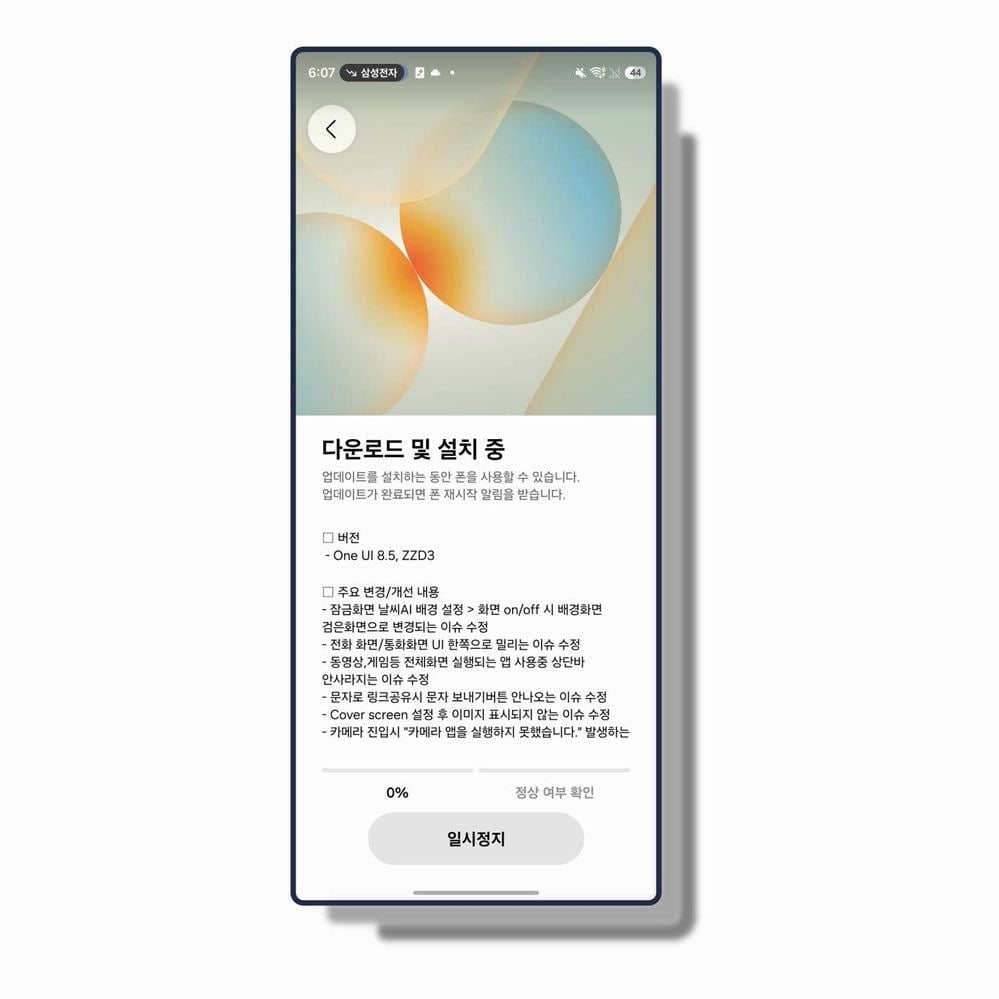
Samsung’s One UI 8.5 Beta 3 update mainly focuses on stability, ironing out several frustrating bugs across the system. Lock screen glitches, camera launch failures, and UI alignment issues during calls have all been addressed.

The update also improves full-screen app behavior, fixing problems where the status bar wouldn’t disappear during videos or games, along with issues affecting cover screen images and link-sharing through messages not displaying properly.

On the performance side, Samsung has tackled deeper usability bugs, including keyboard failures in KakaoTalk, black screens after unfolding during video playback, and ANR errors triggered while using video effects in certain scenarios.

Alongside these fixes, the update ensures Samsung apps are brought up to their latest versions after installation, keeping the overall experience more polished and consistent across the Galaxy Z Fold 7 and Galaxy Z Flip 7.

Samsung One UI 8.5 Beta 3 Galaxy Z Fold 7 and Z Flip 7

The post One UI 8.5 Beta 3 is the update Galaxy Z Fold 7 and Flip 7 users were waiting for appeared first on Sammy Fans.

Apple foldable iPhone expected in September; Samsung becoming its most critical supplier

Samsung Display plans to kick off mass production of foldable OLED panels for the first foldable Apple iPhone in late June, with shipments potentially moving as early as July, and the product could launch in September 2026.

Apple’s oldest rival is quietly becoming the most critical supplier for the product Apple has spent years refusing to ship. The internal screen measures 7.5 inches, which is actually smaller than the 8-inch panels Samsung builds for its Fold lineup.

Samsung Display is targeting somewhere between 8 and 9 million foldable panels for Apple before the year closes out. After accounting for assembly yields, that translates to roughly 7 to 8 million finished devices.

Earlier expectations had Samsung Display shipping foldable panels in June. That slipped, but the industry contact who let this surface made a fair point: the originally planned June shipment volume was only around 500,000 units.

Amphenol, the American company responsible for mass-producing the hinge mechanism, hasn’t fully stabilized its process yet. Depending on how fast Amphenol irons out its issues, the whole production timeline could shift.

Apple’s foldable will use CoE, a color filter on encapsulation. Samsung already ships this in its own foldable lineup, which means Samsung Display has real production experience here.

If Samsung Display ships 8 to 9 million internal panels and 8 to 9 million external panels for Apple’s foldable device, that’s 16 to 18 million additional OLED units hitting Samsung Display’s books this year.

Samsung Display is investing in its 6th-generation OLED production lines to handle Apple’s order. Capital expenditure.

The post Apple foldable iPhone expected in September; Samsung becoming its most critical supplier appeared first on Sammy Fans.

Samsung is shipping imperfect 2nm chips on purpose

Samsung is sitting at roughly 55% yield on its 2nm process. Nearly half of every wafer it produces gets thrown in the bin. Samsung is deliberately pushing 2nm chips out the door at this yield because it has no better option right now.

Until the back half of last year, Samsung’s 2nm yields were stuck in the 20% range. Getting from 20% to 55% in under twelve months is actually a serious technical achievement.

The production experience driving that improvement came largely from Bitcoin mining chip orders, companies like Canaan and MicroBT feeding Samsung’s lines with enough volume to build process memory.

When you fold in binning losses and packaging, the share of chips that can actually generate profit drops closer to 40%. It is the number that explains why Apple, NVIDIA, and AMD haven’t moved their orders.

Qualcomm, which seemed close to committing, has been drifting back toward TSMC for the same reason. TSMC is reportedly running its own 2nm process at somewhere between 60% and 70% yield, as reported by Busan.

Samsung is planning mass production this year for Tesla’s AI6 autonomous driving chip. When those wafers start running at volume, Samsung’s yield at that moment will determine whether the business case holds together or bleeds out.

What Samsung needs isn’t just higher yields. It needs a flagship client willing to publicly trust the process. Apple would change everything overnight and NVIDIA would change the conversation entirely. But those companies aren’t going to sign until the numbers move.

Half the chips are garbage, the good clients are watching from a distance, and the company’s answer is to keep shipping anyway.

The post Samsung is shipping imperfect 2nm chips on purpose appeared first on Sammy Fans.

First look at Tap to Share: Android’s NameDrop rival is designed with Samsung in mind

Google is resurrecting the ghost of Android Beam and calling it Tap to Share, and what’s surfaced inside recent app updates suggests Samsung users are going to get the best seat at the table.

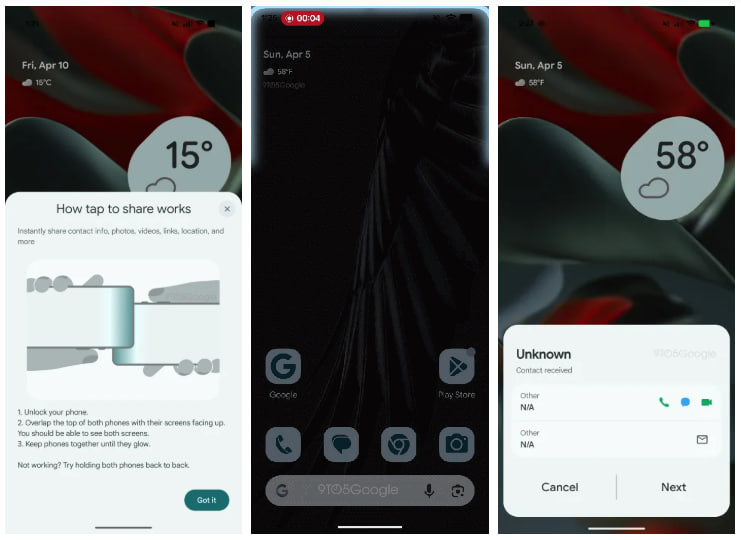
Now, Google is rebuilding Android Beam, and the latest code updates have let slip a detailed pop-up explaining exactly how Tap to Share works.

Unlock your phone, overlap the tops of both devices with screens facing up, and keep them together until they glow. That glow animation is apparently real, a visual cue triggering when the NFC handshake completes.

The feature is aiming wide: contact info, photos, videos, links, and location. Buried in the code is something more specific: Samsung users will be able to share their contact card, a VCard, directly to another device this way.

The pop-up itself, spotted on a Pixel, is visually designed around Samsung hardware.

Android Tap to Share

It tells you where Google’s head is at. Samsung ships more Android devices than anyone else on the planet, and if Google wants Tap to Share to matter, Samsung owners are the audience that has to adopt it.

Apple’s NameDrop works because iPhones are standardized. Every single one has NFC in the same spot. Meanwhile, it’s a totally different case in the world of Android as some carry NFC toward the top, others bury it toward the middle of the back.

In Google’s latest updates, a new pop-up has appeared that showcases “how tap to share works.” The pop-up explains, via 9to5Google:

  • Instantly share contact info, photos, videos, links, location, and more
  • Unlock your phone.
  • Overlap the top of both phones with their screens facing up. You should be able to see both screens
  • Keep phones together until they glow.
  • Not working? Try holding both phones back to back.

It might ship differently than what we’re seeing. Features like this get modified, delayed, and sometimes shelved entirely between internal testing and public release.

The post First look at Tap to Share: Android’s NameDrop rival is designed with Samsung in mind appeared first on Sammy Fans.

Samsung Internet with new Browser identity lands appearing on One UI 8

Samsung Internet browser is getting updated on One UI 8 devices, and this update apparently changes the app’s identity.

Starting in the Galaxy S26 series, Samsung Internet has turned Samsung Browser, which is now landing on older models running One UI 8. It’s a bold shift in terms of the identity of the app, and it also carries improvements.

Samsung Internet app’s v29.0.5.3 update doesn’t just rename to Browser, but also elevates the experience. Some anticipated changes are yet to be applied, but the progress is constant and on the right path.

Version 29.0.5.3 update adds a new feature that alerts you with a warning notification when you access possibly malicious websites. The browser will detect the reliability of your browsing to safeguard your device, data, and privacy.

An alert will be issued, letting you decide whether to continue browsing or end that session. Even if you continue browing, it will be in your mind that the website could be malicious and you won’t share personal or financial details.

Release notes also mention bug fixes and app stability improvements. This content usually comes with every release of the application. You can look forward to a stable and seamless user experience after installing this version.

  • Provides a warning notification when accessing unexpected malicious websites.
  • Includes bug fixes and improves app stability.

Samsung Internet (now Browser) is rolling out in batches. Check either the Galaxy Store or the Play Store to find the latest update. It has landed on One UI 8 devices, with future expansion likely covering One UI 7 devices too.

The post Samsung Internet with new Browser identity lands appearing on One UI 8 appeared first on Sammy Fans.

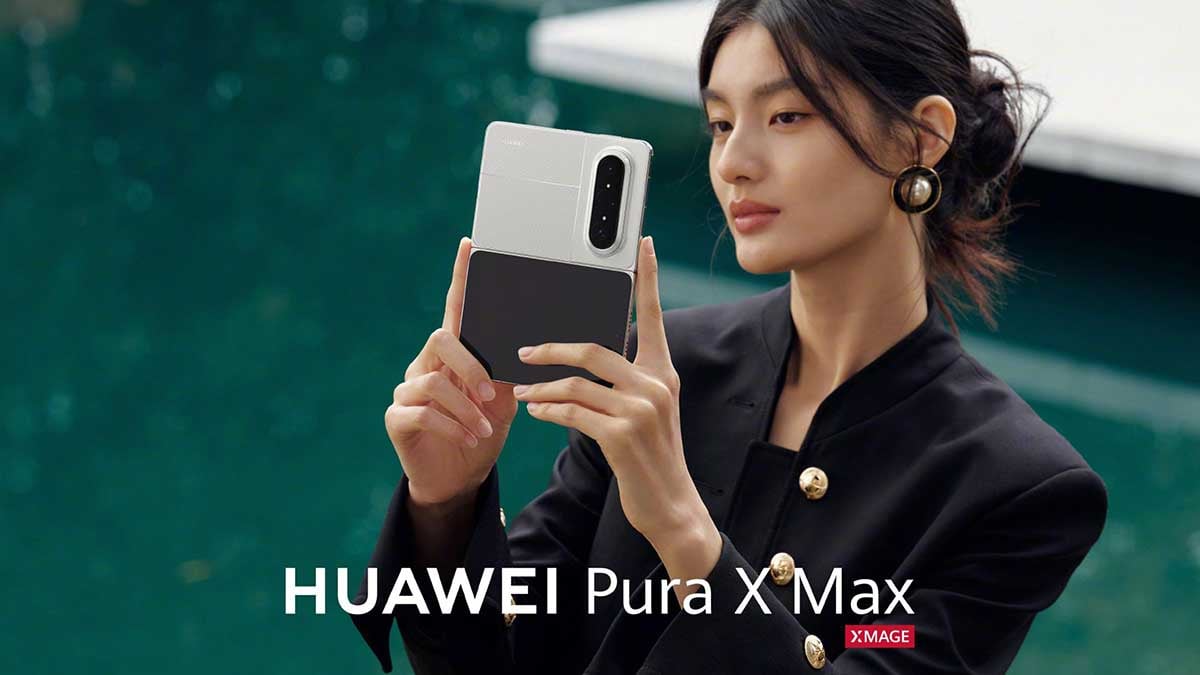
Huawei unveils a stunning Wide Fold phone before Samsung, Apple

Samsung is making a Galaxy Z Wide Fold before Apple introduces its first foldable iPhone, but Huawei just defeated both.

Huawei just unveiled Pura X Max, a Wide Fold model that Samsung and Apple are preparing to launch this year. It’s the clearest signal yet that wide-format foldables are no longer a rumor or a roadmap slide.

The wide foldable form factor Samsung has reportedly been engineering for a 2026 flagship launch now looks like a response rather than a vision.

Huawei Pura X Max

The Pura X Max is short and wide, the kind of device that looks like a paperback novel when closed and a small tablet when opened. The internal display is 7.69 inches with WQHD+ resolution, while the cover screen is 5.5 inches.

It carries a triple rear camera system, a design that appears to minimize the visible crease significantly. Samsung’s supposed differentiator is essentially the same device, and Huawei has pre-orders open already.

Leaks for the Galaxy Z Wide Fold have been circulating for months, and here’s the part that should make Samsung’s product team uncomfortable. The rumored specs, a 7.6-inch inner screen paired with a 5.4-inch cover display, are nearly identical to Pura X Max.

Huawei Pura X Max

Huawei, a company operating under heavy US trade sanctions with limited chip access and no Google services, is casually stepping in front of the entire industry’s next big move.

The Pura X Max does look better suited for actual real-world tasks like watching video, running split-screen apps side by side, or gaming in landscape. Pricing and global availability for the Pura X Max remain unknown.

Samsung Galaxy Z Wide Fold ❎
Apple iPhone Fold (first-gen) ❎
Huawei Pura X Max✅ pic.twitter.com/Dm75nimh5a

— Samsung Software Update – One UI 9 #OneUI9 (@SamsungSWUpdate) April 13, 2026

Reports have Samsung and Apple both planning wide foldable releases in 2026.

The Pura X Max may not be available globally, at least not through any official channel, so it isn’t competing directly with Samsung or Apple for the same customers.

Samsung Galaxy Z Wide Fold ❎
Apple iPhone Fold (first-gen) ❎
Huawei Pura X Max✅ pic.twitter.com/ucZi0UrRXy

— Samsung Software Update – One UI 9 #OneUI9 (@SamsungSWUpdate) April 13, 2026

The post Huawei unveils a stunning Wide Fold phone before Samsung, Apple appeared first on Sammy Fans.

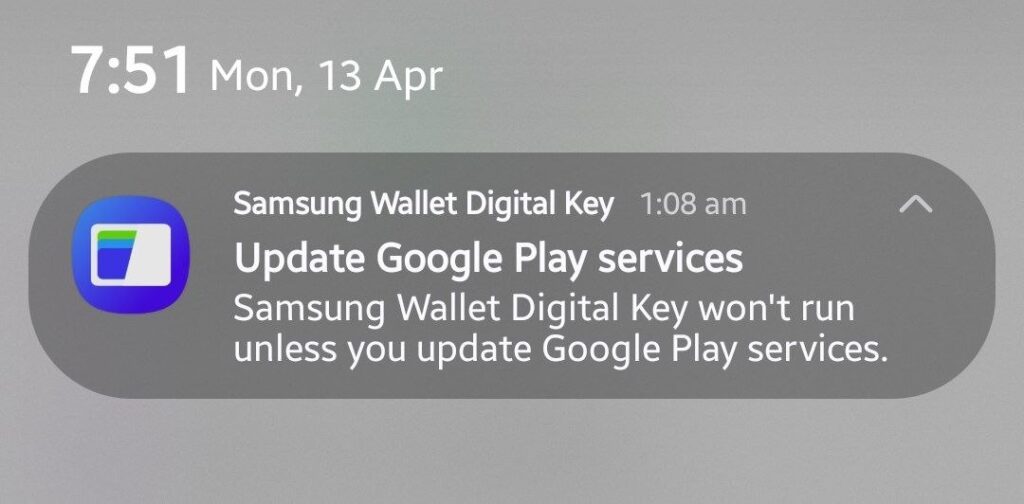
Samsung Wallet faces feature cut on legacy Google Play Services versions

Samsung Wallet may lose the Digital Key feature on outdated Google Play services versions. In a new notice issued today, Samsung has requested Galaxy users to update Google Play services on their phones to retain Digital Key.

Digital Key is an effective solution that eliminates the needs of carrying physical keys. Samsung is continuously expanding its partnership with service providers to expand the supported digital locks and cars on Samsung Wallet.

That said, if you utilize Digital Key feature of Samsung Wallet, don’t forget to install the latest version of Google Play services. The notice is being issued to users in phases; you may also receive (or may have already received) the same.

Tapping the notification redirects you to the Google Play services app page on the Play Store. The app often updates itself in the background. However, certain conditions may prevent it from getting updated automatically.

Despite getting notified, you may find that the latest version of Google Play services is already installed. Great if it’s the case, and you can easily update the Play services to keep Digital Key feature running on your Galaxy.

Samsung Wallet Google Play Services

Google Play services is a core Android app that backs key functionalities on devices. It’s necessary to stay updated to keep user data and privacy secure.

Google recently revealed the April 2026 Play system update details. It’s closely tied to Google Play services on Android devices. However, the update mechanism of these updates isn’t the same on all devices running Android.

  • Play system – Settings > Security and privacy > Updates > Google Play system update.
  • Play services – Google Play Store > Google Play services > Update.

The post Samsung Wallet faces feature cut on legacy Google Play Services versions appeared first on Sammy Fans.

Samsung to fix Adaptive Clock glitch in One UI 8.5 update

Adaptive Clock has a glitch on One UI 8.5 devices, and Samsung is working on a fix. The problem has been acknowledged by a community moderator, who promised the addressal with the next Beta software update.

It’s already a big day for Samsung users, thanks to One UI 8.5 rollouts. Whether it’s new Beta releases of the expansion of the program, the company has just impressed. Meanwhile, the Adaptive Clock glitch has yet to be addressed.

The latest One UI 8.5 Beta ZZD5 includes improvements linked to the lock screen. But that is not the one tied to the Adaptive Clock scaling bug. It improves the incoming call screen on lock screen after several reports from users.

Upon inspection, Samsung moderator found that the Adaptive Clock has an error that causes the clock fonts to appear stretched in One UI 8.5. The mention of Fold right after One UI 8.5 indicates it is primarily causing on foldables.

Simply put, the system is failing to calculate the font positioning. The same wallpaper is showing normal and abnormal adaptive clock on lock screen. The difference is just size, which renders the font to overlap instead of blend.

Samsung hasn’t released new Beta updates for Z Fold 7 and Z Flip 7 today. It seems the work is still underway and enhancements will be provided later. We will keep you updated when a credible update arrives for the same.

Samsung Lock Screen Adaptive Clock Fix

The post Samsung to fix Adaptive Clock glitch in One UI 8.5 update appeared first on Sammy Fans.

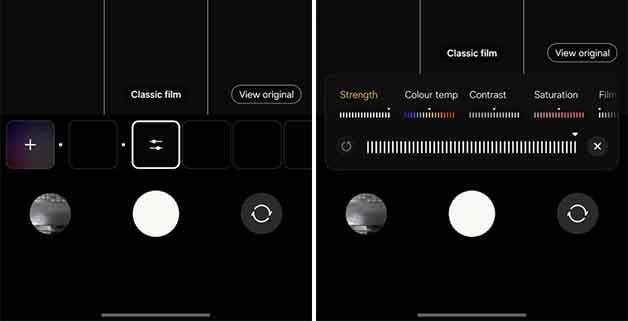
Check the three new camera filters of One UI 8.5 [Gallery]

Samsung has released three new camera filters for the Galaxy S25 and S24 series with the latest One UI 8.5 beta software. The three filters are Classic Film, Pop Film, and Blanc. You should know that these new additions are already available in the S26 series, but an expansion is hitting previous flagships with the newest beta.

These three filters enable users to change an image’s appearance in different styles.

Classic film

This filter is the first in the selection and enables a vintage and unique mood with warm tones and restrained colors. It enhances a calm and stable skin tone, turning everyday moments into soft, emotional film photographs.

Samsung One UI 8.5 camera classic film camera filter

Pop Film

This filter has a vibrant film scene with vivid and bright color tone. It adds bright areas with a magenta tint and green shadows, making the subject look healthier, creating bright and colorful photographs.

Samsung One UI 8.5 Pop Film camera filter

Blanc

Though there are no limitations to this filter, it best suits scenes that focus on people and their clothing to pop whites and skin in the picture. Specifically, it enables bright, high tones and a natural whitening effect to make a face look clear and clean.

Samsung One UI 8.5 blanc camera filter

Customize

Once applied, you can capture the photographs, whether it’s a normal or a portrait. These filters bring a stylish change to your viewport. However, you still can customize the filter, changing its strength, color temperature, contrast, saturation, and film grain. Also, the filter screen lets you view the original right away to spot the difference.

Rollout

New camera filters are part of the latest One UI 8.5 beta firmware and are yet to be released for all Galaxy S25 and S24 series users. However, they may also drop to other devices with the stable firmware.

The post Check the three new camera filters of One UI 8.5 [Gallery] appeared first on Sammy Fans.

9th One UI 8.5 beta is missing new AI feature for Galaxy S25

This week, Samsung released the 9th One UI 8.5 beta software for the Galaxy S25 series, and no new AI features were added to the build. This update has AirDrop file transfer support for the lineup and new camera filters. Besides, there are bug fixes for a better user experience.

However, the one thing that many users have been anticipating is new AI features. Features like Now nudge, audio eraser integration to YouTube, call screening, improved drawing assist, and more. However, none of these appeared.

This takes us back to the most recent controversy around the call screening feature. Samsung Korea community launched a mass criticism movement against the company and raised questions against its software policy.

These users, in particular, asked the company to release Galaxy S26 series features to previous generation phones, specifically, the Galaxy S25. However, a few of the community moderators denied the support.

One UI 8.5

After a massive backlash, Samsung changed this decision and confirmed that the new capabilities, including improved Galaxy AI, will come to Galaxy S25 and other devices with One UI 8.5. So far, the testers have received 9 betas, but new builds have lacked any major changes. User alleges that Samsung is intentionally keeping the new features exclusive to the S26 series. However, Samsung wants to prove them wrong with a feature pack rollout.

Based on the current rollout trend, the phone maker may have one more beta left before closing the program. This new update could come a week after, and it may have some new additions that we haven’t seen before.

On the other hand, it appears that the company is just buying time to prepare the next update, and the same goes for the final release. The 9th beta has disappointed, but we have more to see with the 10th beta firmware and will keep you posted about the latest features and improvements in this regard.

The post 9th One UI 8.5 beta is missing new AI feature for Galaxy S25 appeared first on Sammy Fans.

My Galaxy S26 Ultra has a strange camera watermark bug

Samsung Galaxy S26 Ultra comes with a high-end camera setup, enabling users to take some amazing photographs, but recently, I’ve come across a strange camera watermark feature bug.

The watermark feature allows you to tag new photographs with the phone’s name, or you can customize it with a custom text. Once captured, you will see this watermark across all of the photographs.

I use Camera Watermark all of the time, but recently, when I captured some shots with the Galaxy S26 Ultra, there was no watermark. The photos were captured as if the feature was disabled. I visited the camera settings, checked the feature, and it was enabled. So, I tried again, and it was all the same.

Samsung Galaxy S26 Ultra camera watermark

Galaxy S26 Ultra photographs (before and after bug resolved)

How was it resolved?

I visited the settings page and re-enabled the camera watermark switch, and that worked. The camera watermark appeared right after.

This appears to be a random bug, though I can’t confirm whether it has appeared with anyone else. Since then, the watermark has been working fine.

When it appeared

There is something you should know from my end: this camera watermark bug appeared a day after the April 2026 security update rollout for Galaxy S26 Ultra. It may have caused this change, but I didn’t encounter the same issue afterwards.

Conclusion

Bugs often appear out of nowhere, but it’s good to report back to the community and seek more user experience on such issues. Many users don’t like using a watermark, but if you do and this has come across your way, report back to me at my X handle.

The post My Galaxy S26 Ultra has a strange camera watermark bug appeared first on Sammy Fans.

Turn your Galaxy device into space explorer with Earth and Moon wallpapers

The Artemis II mission has been one of the biggest space exploration missions in years, and NASA has shared the first flyby images of the Moon as wallpapers. You can set them on your Samsung Galaxy device to experience the exploration up close.

The agency has released several of these customized versions of flyby images as wallpapers for mobile devices in high-quality. These flyby covers the impact craters, ancient lava flows, and surface fractures on the Moon. They also show an earthset and an earthrise solar-eclipse view of the Sun’s corona.

Some of the images contain a clear view of our Earth covered in the most vibrant atmosphere and rich detail. A few have the Earth peeking behind the Moon and showing the dark portion at night.

These are some of the clearest photos of the Earth and Moon we’ve ever seen, and setting these as wallpaper will look good in your wallpaper collection.

Here are the wallpaper names:

  • Setting Earth
  • Edge of Lunar Day
  • Orientale Basin
  • Lunar Closeup
  • New Moon View
  • Vavilov Crater
  • Peeking at Earth
  • Eartset
  • Backlit Earth
  • Earth Views from the Artemis II Crew
  • Eart Perspective
  • Looking back at Earth
  • In Eclipse
  • Eclipse view from Orion

How to download

Go to the NASA website and download the Artemis II wallpapers on your Galaxy device.

Once downloaded, go to the gallery, locate the latest downloads, tap on the three dots on the top right, and “Set as wallpaper”. Here you can adjust the clock size or use an adaptive clock to do the work for you. You can apply filters to change the wallpaper’s color composition and give it a new look.

The post Turn your Galaxy device into space explorer with Earth and Moon wallpapers appeared first on Sammy Fans.

Cancelled with Galaxy S26, Pro model rumors reignites for S27

Samsung is once again rumored to bring a Pro version, this time with the Galaxy S27 lineup, to revamp its flagship tier.

Based on a recent report, Samsung wants to add a new device to the lineup in 2027. It’s indicated that the S27 Pro will align with the S27 Ultra to offer top features in two devices, instead of only one. On the other hand, it wants to keep the standard and the Plus version as the consumer-friendly models.

This move aligns with Apple’s strategy of launching four phones – Standard, Air, Pro, and Pro Max. The iPhone maker offers its best specs with the latter two models and keeps the former as a base and a slim category.

However, this is not the first time Samsung has been rumored to bring this change to consumers. Last year, we heard the same about the Galaxy S26 Pro, which leaked online through CAD renders. After a successful hype, the plan, which had no official confirmation, was cancelled.

On the other hand, Samsung made an attempt to expand the Galaxy S25 series with the S25 Edge and miserably failed on the sales chart. Before this sales failure, Samsung was rumored to replace the Plus version with the S26 Edge. Similar to the S26 Pro, the design schemes for this rumored phone appeared before the launch, but Samsung revived the plans for Galaxy S26 Plus and vacated the S26 Edge.

Both appearances of such reports and the cancellation have never been verified by the company. However, it shows a practical approach based on consumer response.

Since the plan is about expanding the S-series, the Galaxy S27 Pro could sit below the S27 Ultra. They could share features like privacy display and a 200MP camera together. However, the larger variant will dominate the display and overall camera features.

Meanwhile, the latest reports about the Galaxy S27 Pro could only be taken with a pinch of salt due to such rumors proving false in the past. So, we could wait for a clearer picture of the model, if Samsung has any in the making.

The post Cancelled with Galaxy S26, Pro model rumors reignites for S27 appeared first on Sammy Fans.

One UI 8.5 rollout possibly delayed for these two reasons

With the 9th beta, Samsung has delayed the One UI 8.5 rollout for the Galaxy S25 series, and these two reasons could be responsible for this move.

It’s expected that the 9th beta may not be the final, and we may have a 10th coming soon. These test firmwares may be released in April, and the stable release could get delayed to late this month. Meanwhile, Samsung has confirmed that the program will add more devices from different lineups.

In the meantime, we’ve observed something about the delay that Samsung is causing to the final release.

Samsung is receiving much-needed criticism for limiting the S26 series features from the S25 series. So far, the beta program hasn’t seen any of the new features that are part of the new S-series phones. That includes the latest AI features like Now Nudge and expanded Audio eraser support.

It’s been four months since Samsung started testing One UI 8.5 for the S25 series, and the company has apparently failed to deliver new features to the phone users derived from the S26 series.

Users allege that the company is intentionally keeping the new One UI 8.5 experience limited to the S26 series. This could be true on the face of current test practices.

Adding new features

Connecting the first to the second reason, Samsung is now taking additional time to add and test new features. We’ve tested the One UI 8.5 beta program and confirmed that the software reached stability a month ago, and the new features should have been added to the past builds. However, Samsung keeps on focusing on bug fixes with each release. To be mentioned, the 9th beta only introduced the AirDrop file sharing support for Quick Share to the Galaxy S25 series.

However, the software is missing AI features from the Galaxy S26 series, and to be honest, there are none in these recent builds.

There are two ways to see this: a good way that Samsung is showing efforts to bring the S26 series features to the previous generation. The other way indicates that the company intentionally waited for this long to add these new features, delaying the final One UI 8.5 rollout.

It’s no use to completely rule out Samsung’s development phase, but we’re curious about what the 10th One UI 8.5 beta will add to the user experience. For this reason, the stable One UI 8.5 rollout is once again delayed.

The post One UI 8.5 rollout possibly delayed for these two reasons appeared first on Sammy Fans.

One UI 9 Settings show Samsung trusting simplicity

Simplicity is the next journey Samsung has embarked on in One UI 9, with the first visuals from the Settings page turning cleaner, simpler, and smarter.

Samsung is finally doing something it has resisted for years. Having covered One UI since its inception, I’ve watched the Settings app grow into a dense, sometimes overwhelming control center.

Every release added more toggles, more labels, more explanations; useful but noisy. The early look at One UI 9 Settings interface suggests a shift in mindset, as reported by SammyGuru.

One UI 9 Settings – The first (not final!) visuals

The most telling change sits right at the top. The Display section now uses full-phone previews for Light and Dark mode instead of the old half-device cards.

This aligns closely with what Google has been doing with its latest Material You iterations in Android 17, where interface elements are getting larger, more expressive, and less cluttered.

Galaxy users will notice a bigger philosophical shift inside the Apps menu. Alphabetical headers are now clearly defined, with Samsung stripping away storage size indicators from the main list.

For years, Samsung leaned into info density, but One UI 9 pulls that back. You can still access the details, but you are not forced to process them at a glance, it’s a subtle but important distinction.

Another noticeable change is the move toward consistent circular iconography, especially in account-related sections. Subtext descriptions under menu items are being cut down or removed entirely.

The Galaxy AI section might be the clearest example of this new direction. Earlier implementations listed features with individual descriptions, which are largely gone in One UI 9.

If this direction holds, One UI 9 could mark a turning point.

Samsung One UI 9 Settings

Do you prefer the old Samsung approach, packed with visible data and options at every level? Or does this cleaner, quieter Settings experience feel like the right move now?

The post One UI 9 Settings show Samsung trusting simplicity appeared first on Sammy Fans.

This app unlocks powerful Samsung Galaxy Watch features

Samsung locks Galaxy Watch features by region. It’s been doing this for years and honestly, that’s embarrassing for a company selling premium hardware at premium prices. A developer named Dante63 decided enough was enough.

If you’ve been following Galaxy Watch modding circles, Dante63 isn’t a stranger. This is the person who built a patched version of Samsung Health Monitor to crack open ECG functionality for users in unsupported regions.

Now, Dante63 has surfaced something bigger: an app called GeminiMan Wellness Companion. The headline feature right now is ECG recording directly from your Galaxy Watch, with reports and AI analysis pulled into the phone app.

You get heart rhythm, heart rate, and something Samsung doesn’t bother including: a confidence score for each reading.

Running GeminiMan and Samsung Health Monitor side by side revealed an elevated heart rate. Meanwhile, GeminiMan flagged two recordings as showing abnormal rhythm that Samsung’s app missed entirely.

The custom notes feature is the quiet killer here. GeminiMan lets you write whatever you want. For anyone managing a chronic condition, like migraines that spike heart rate, that flexibility isn’t a nice-to-have.

Multiple profiles work too. Share a watch with a partner or family member? You can pull readings for different people without contaminating your own data.

You can back everything up with encryption, and you can export ECG reports as CSV or PDF depending on which chart type you’re working with.

If you’re outside Samsung’s approved regions for health features and you’ve been watching your expensive watch collect dust on capabilities it physically has, this app is worth your attention right now.

Beyond that, Dante63 has published a full development roadmap on the GeminiMan GitHub page.

  • Phase two brings blood pressure recording.
  • Phase three expands into a full wellness platform pulling in blood oxygen, heart rate variability, sleep data, and skin temperature.

The post This app unlocks powerful Samsung Galaxy Watch features appeared first on Sammy Fans.

April update starts rolling out to Samsung A lineup

Samsung has started shipping the April 2026 update to the Galaxy A lineup. You may be surprised knowing the first device getting the latest patch is neither a recent model nor the one you would have expected; it’s Galaxy A54.

April 2026 update is available for Samsung A phones, starting with the Galaxy A54. It will gradually expand to even more Galaxy devices. Not just A, but M and F series models are also eligible for the latest security update.

Galaxy A54 is getting the latest update in South Korea. It will be available for more users outside the company’s home ground. You can check for the latest releases through Settings > Software update > Download and install.


Details revealed last week confirm April OTA carries Android, One UI, and Exynos patches. Every update isn’t the same, and content may vary according to the model, region, or carrier.

You get 47 patches if you own a Galaxy device that packs an Exynos chipset. If a Qualcomm or MediaTek silicon powers your Galaxy, expect four fewer patches.


Samsung offers new updates to premium and select mid-range devices every month. All others get updates quarterly; expect one this month if your phone was updated in January last time.

As part of its Enterprise program, Samsung offers monthly OTAs to select Galaxy A phones, with the list including:

  • Galaxy A54 5G
  • Galaxy A55 5G
  • Galaxy A56 5G
  • Galaxy A57 5G

In addition, multiple Galaxy A phones are eligible for security patches, but are listed on a quarterly chart. Find the list below to know more:

  • Galaxy A04, Galaxy A04s, Galaxy A04e, Galaxy A05, Galaxy A05s, Galaxy A06, Galaxy A06 5G, Galaxy A07, Galaxy A07 5G
  • Galaxy A13, Galaxy A14, Galaxy A14 5G, Galaxy A15, Galaxy A15 5G, Galaxy A16, Galaxy A16 5G, Galaxy A17, Galaxy A17 5G
  • Galaxy A23, Galaxy A23 5G, Galaxy A24, Galaxy A25 5G, Galaxy A26 5G
  • Galaxy A33 5G, Galaxy A34 5G, Galaxy A35 5G, Galaxy A36 5G, Galaxy A37 5G
  • Galaxy A73 5G

The post April update starts rolling out to Samsung A lineup appeared first on Sammy Fans.

Irony at its peak: Apple begs Samsung to prove iPhone isn’t a monopoly

Apple and Samsung have been at each other’s throats for over a decade. Patents, design rights, market share, you name it. So when I tell you Apple is now leaning on Samsung to save its skin in a US antitrust case, take a moment with that.

The DOJ filed suit against Apple back in March 2024, alongside a coalition of states, arguing that Apple weaponizes iPhone features, App Store rules, and third-party app restrictions to choke out competition and cement a monopoly.

Apple’s argument is straightforward.

If Samsung’s internal documents can show how frequently users cross the aisle from iPhone to Android, and how genuinely competitive the smartphone and smartwatch markets actually are, then Apple’s policies start looking a lot less sinister.

Well, the problem is that Samsung doesn’t want to hand anything over.

Apple first went after Samsung’s US operation. Samsung US shrugged and said the relevant data sits with Samsung Korea, not them.

So Apple went up the chain.

The iPhone maker filed under the Hague Evidence Convention, a legal framework that lets US courts formally request evidence from foreign entities.

Even if a US court greenlit the request, it still has to survive Korean courts before Samsung Korea is compelled to produce anything, and Korean courts have a form for rejecting these kinds of requests.

Simply put, Apple is chasing its longtime rival, Samsung, through international legal channels just to find evidence that its own market isn’t a closed shop.

The post Irony at its peak: Apple begs Samsung to prove iPhone isn’t a monopoly appeared first on Sammy Fans.

Hey Perplexity starts rolling out to Galaxy S26 series!

It seems Perplexity listened to us! Hey Plex, which was silently removed from the Galaxy S26 series is starting to receive its replacement and it’s now “Hey Perplexity.”

Android app Perplexity is getting a fresh update, bumping the version to 2.82.0. Installing it on the Galaxy S26 series brings the much-awaited “Hey Perplexity” wake phrase feature.

Hey Perplexity has traveled a rough journey. It includes an official launch, a silent removal and revival with a new identity. Hey Plex was designed specifically for Samsung’s Bixby, but things didn’t turn out the way decided.

Samsung announced in February the Hey Plex feature for Galaxy S26 series. It did arrive, too, but initial updates of the flagships removed it without any clarification. Samsung even removed its long press release regarding the same.

In the meantime, Perplexity CEO confirmed to a user that Hey Plex is on hold and it will return as Hey Perplexity. As promised, the wake-up phrase is starting to rollout to the Galaxy S26 series and it’s the news of the day.

Open the Perplexity app and enter the app’s Settings to access the wake-up phrase setup page. It’s a simple toggle entitled “Hey Perplexity detection,” which carries a description along that “Open Assistant with your voice.”

The setup is simple and doesn’t require any specific trick. Once done, return to the home page and try saying “Hey Perplexity.” It triggers the dynamic pill, just like Gemini, and your queries will pull results from Perplexity.

The app update is rolling out in batches. It might not take much for a wider availability on the Galaxy S26 phones. You now have access to another AI agent, just a wake up phrase needs to be spoken, and that’s it.

Hey Perplexity Wake-up phrase

The post Hey Perplexity starts rolling out to Galaxy S26 series! appeared first on Sammy Fans.

❌